EP4485143A1 - Blickinteraktionen mit benutzerschnittstellen - Google Patents
Blickinteraktionen mit benutzerschnittstellen Download PDFInfo
- Publication number
- EP4485143A1 EP4485143A1 EP23182254.5A EP23182254A EP4485143A1 EP 4485143 A1 EP4485143 A1 EP 4485143A1 EP 23182254 A EP23182254 A EP 23182254A EP 4485143 A1 EP4485143 A1 EP 4485143A1
- Authority
- EP
- European Patent Office
- Prior art keywords
- gaze
- user
- control
- interest
- region
- Prior art date
- Legal status (The legal status is an assumption and is not a legal conclusion. Google has not performed a legal analysis and makes no representation as to the accuracy of the status listed.)
- Withdrawn
Links
Images

Classifications
-
- G—PHYSICS
- G06—COMPUTING OR CALCULATING; COUNTING
- G06F—ELECTRIC DIGITAL DATA PROCESSING
- G06F3/00—Input arrangements for transferring data to be processed into a form capable of being handled by the computer; Output arrangements for transferring data from processing unit to output unit, e.g. interface arrangements
- G06F3/01—Input arrangements or combined input and output arrangements for interaction between user and computer
- G06F3/011—Arrangements for interaction with the human body, e.g. for user immersion in virtual reality
- G06F3/013—Eye tracking input arrangements
-
- G—PHYSICS
- G06—COMPUTING OR CALCULATING; COUNTING
- G06F—ELECTRIC DIGITAL DATA PROCESSING
- G06F3/00—Input arrangements for transferring data to be processed into a form capable of being handled by the computer; Output arrangements for transferring data from processing unit to output unit, e.g. interface arrangements
- G06F3/01—Input arrangements or combined input and output arrangements for interaction between user and computer
- G06F3/048—Interaction techniques based on graphical user interfaces [GUI]
- G06F3/0484—Interaction techniques based on graphical user interfaces [GUI] for the control of specific functions or operations, e.g. selecting or manipulating an object, an image or a displayed text element, setting a parameter value or selecting a range
- G06F3/04842—Selection of displayed objects or displayed text elements
Definitions
- the invention relates to controlling gaze interactivity with user interfaces.
- Interactions with medical user interfaces are usually onehanded as the user (e.g., sonographer/specialist) often holds a medical device (e.g., transducer) in the other hand. This is also often the non-dominant hand.
- the user interface e.g., touch screen
- a method for controlling gaze interactivity with a user interface, UI comprising:
- gaze interactions with the UI provides a seamless and intuitive interaction for the user and avoids the user having to raise their hands to interact with the UI (e.g., for a touchscreen UI).
- Gaze interaction/input refers to a method of human-computer interaction where the direction or position of a person's gaze is used as an input to interact with a computer system or application (in this case, the medical UI). Instead of using traditional input devices like a mouse, gaze interaction relies on tracking the movements and focus of a person's eyes. In other words, gaze interactions use the user's gaze as an alternative to, for example, the movement of a mouse to highlight controls on the UI.
- Gaze interaction typically involves the use of eye-tracking technology, which can precisely track the movement and position of the eyes. This technology uses cameras or sensors to capture and analyze the reflection or position of the eyes, allowing the computer system to interpret the user's gaze. Gaze interaction can be integrated into the UIs, allowing for eye-controlled interactions.
- the first control may be a physical control (e.g., button, rotary control, touchpad etc.).
- the medical UI may be configured to display one or more UI controls, wherein the user can adapt parameters of an image with the UI controls.
- a separate button/control can then be used to adapt the parameters corresponding to the control.
- the control may correspond to gain for an ultrasound image.
- the gaze can be used to select the gain control when it is focused on the control and a rotary control could be used to adapt the gain.
- the region of interest may be an ultrasound image displayed on an ultrasound UI.
- the gaze of the user is quicker than the reaction time of a hand, or other physical control.
- a different UI control may be selected/highlighted by the gaze when the user begins to adapt the parameter with the physical control.
- Locking gaze interactions prevents the user's gaze from being able to select/highlight a different UI control and thus unintentionally adapting a different parameter.
- Gaze interactions with the UI may be unlocked in response to the user not interacting with a first control for at least a first period of time, wherein the first control is for adapting a parameter corresponding to a UI control.
- Determining whether the user's gaze is moving towards a region of interest on the UI may comprise determining the speed of the gaze, relative to the UI, in the direction of the region of interest, being above a first speed threshold.
- gaze interactions can be locked when such actions are detected.
- This action can be detected by checking whether the gaze speed (e.g., in pixels per second) in that direction is above a first speed threshold.
- the speed threshold may depend on the resolution of the screen of the medical UI and can be determined by experimentation during use.
- Determining whether the user's gaze is moving towards a region of interest on the UI may comprise determining whether the head of the user is tilting towards the region of interest.
- the method may further comprise displaying, on the UI, the value of a parameter being adapted by the user at the position of the user's gaze on the UI.
- the user can then always see how much they are adapting the parameter without having to change their gaze from the region of interest (to see how the parameter changes affect, for example, an image) and the position at which the parameter value is displayed (to see by how much they have adapted the parameter).
- the method may further comprise adapting the position at which the parameter is displayed to avoid the region of interest, or a portion thereof, in response to the gaze of the user being on the region of interest.
- the method may also comprise determining the region of interest on the image (e.g., user input, via object detection etc.).
- the region of interest may be the whole image.
- the UI may be a medical UI configured to display a medical image and UI controls to adapt parameters of the medical image.
- the UI may be an ultrasound UI configured to display an ultrasound image and UI controls to adapt parameters of the ultrasound image.
- the medical UI may be configured for other imaging modalities (e.g., CT, MRI, x-ray etc.).
- imaging modalities e.g., CT, MRI, x-ray etc.
- the method may further comprise unlocking gaze interactions with the medical UI in response to determining that the user's gaze is not moving towards the region of interest.
- Determining that the user's gaze is not moving towards the region of interest may comprise determining that the speed of the user's gaze, relative to the UI, in a direction away from the region of interest, is above a second speed threshold. Alternatively, or additionally, it may comprise determining that the user's head is tilting away from the region of interest.
- the invention also provides a method for controlling gaze interactivity with a user interface, UI, the method comprising:
- UIs use a first touch control (e.g., a rotary controls) to adapt parameters of a selected UI control whilst they hold, or otherwise interact with other equipment (e.g., ultrasound probe). In these cases, they would either have to let go of the first control or the equipment to interact with the UI. Gaze interactions thus provide a seamless and intuitive interaction with the UI whilst they can still keep hold of the first control and the equipment.
- a first touch control e.g., a rotary controls
- other equipment e.g., ultrasound probe
- Gaze interactions could then be unlocked when the user has not interacted with the first control for a first period of time (e.g., 0.5, 1, 1.5, 2 seconds etc.).
- a first period of time e.g., 0.5, 1, 1.5, 2 seconds etc.
- the particular value for the set period of time may depend on the application.
- the method may further comprise unlocking gaze interactions with the UI in response to the user interacting with a second control.
- the second control is a second function of a physical button/control with two functions, where the first control is the first function.
- a rotary button may be rotated (first control) or clicked (second control).
- the method may further comprise displaying, on the UI, the value of the parameter being adapted by the user at the position of the user's gaze on the UI.
- the method may further comprise adapting the position at which the parameter is displayed to avoid a region of interest on the medical UI, or a portion thereof, in response to the gaze of the user being on the region of interest.
- the invention also provides a computer program carrier comprising computer program code which, when executed on a computer, causes the computer to perform all of the steps of any of the afore-mentioned methods.
- the computer program carrier may comprise computer memory (e.g., random-access memory), computer storage (e.g., hard drives, solid-state drives etc.).
- the computer program carrier may be a bitstream carrying the computer program code.
- the invention also provides a system for controlling gaze interactivity with a user interface, UI, the system comprising:
- the system may also comprise a gaze tracker configured to track the gaze of a user relative to the UI to allow the user to select a UI control with the user's gaze;
- the system may further comprise the UI.
- the invention provides a method for controlling gaze interactivity with a user interface, UI.
- the method comprises tracking the gaze of a user on the UI to allow the user to select a UI control with the user's gaze and determining whether the user's gaze is moving towards a region of interest, ROI, on the UI.
- gaze interactions with the UI are locked to prevent the user's gaze from selecting a different UI control.
- Gaze interactions enable the creation of a user interface (UI) that allows users to look at a UI control on the user interface to select it instead of lifting the arm to interact with the user interface.
- UI user interface
- a separate control element can then be used to adapt the state of the selected UI control. For example, by pressing a rotary control/trackball, the user can toggle the UI control state to change a value/parameter corresponding to said UI control. This creates a seamless and intuitive interaction for the user and avoids them having to raise their hands to interact with the user interface.
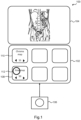
- Fig. 1 illustrates an ultrasound user interface 100.
- the ultrasound UI 100 comprises two screens 102 and 104.
- the first screen 102 displays six UI controls and the second screen 104 displays an ultrasound image.
- a physical rotary control 106 is also provided to control the values/parameters corresponding to the selected UI control.
- UI control 108 corresponds to grey map values and UI control 110 corresponds to chroma map values.
- gaze UI element 112 the gaze of the user
- the gray map UI control 108 the user is likely to want to look up to see the effects on the ultrasound image. Due to this, it is likely that the user might accidently select the chroma map UI control 110 whilst looking up, therefore resulting in unwanted actions, frustration and a negative user experience.
- the general UI design acts as an augmented layer on top of the existing user interfaces.
- Gaze interactions could be unlocked (i.e., UI controls cannot be selected) when a dedicated unlocking control is interacted with (e.g., pressed etc.), therefore allowing the user to select a UI control using their gaze.
- a dedicated unlocking control e.g., pressed etc.
- gaze interactions could then be locked until they are unlocked again. However, this requires that the user waits for a set amount of time to lock the gaze interactions.
- gaze interactions are locked when a separate control (e.g., the rotary button 106) is interacted with.
- the separate control is configured to adapt values/parameters corresponding to the UI controls.
- the user is using the separate control to adapt the values/parameters, they do not wish to change the selected UI control. It has also been found that it is highly likely that the user will look to towards a region of interest to the user to see the effects of the adaptions.
- locking gaze interactions when the separate control is interacted with reduces the risk of an unwanted change in selection of UI controls.
- gaze interactions are locked when the user's gaze is moving towards a pre-determined region of interest.
- the region of interest is a region of the UI which the user is expected to look towards to see the effect of any changes made.
- the region of interest may be the top screen 104 or the region of the top screen 104 occupied by the ultrasound image.
- Determining whether the user's gaze is moving towards the region of interest can be achieved by determining the speed (e.g., in pixels per second) of the gaze in the direction of the region of interest. If the speed exceeds a threshold value, the gaze interactions can be locked.
- the particular threshold speed values will highly depend on the user interface, screen resolutions etc. Experiments can be done to determine adequate speed thresholds for different user interfaces. These experiments may involve having users adapt a value/parameter on the UI and measuring the speed of the gaze from the selected UI control to the region of interest.
- determining whether the user's gaze is moving towards the region of interest can be achieved by determining whether the head of the user is tilting towards the region of interest.
- the user's head will usually tilt when looking at region of interest relatively far from the UI controls. Determining whether the user's head is tilting can be achieved by measuring the head position over time and checking for abrupt changes (e.g., the head position moves upwards when the user's head tilts backwards to look higher up).
- Locking the gaze interactions as per the embodiments above may be further based on whether there is a high probability that a different UI control will be selected. For example, if the UI control is right next to the region of interest, there may be no need to lock the gaze interactions.
- a separate control e.g., rotating a rotary control or moving a trackball
- gaze interactions can be unlocked when there is no interaction with the separate control for more than a given amount of time.
- gaze interactions can be unlocked when the user's head movement tilts away from the region of interest and/or the speed of gaze is higher than a certain threshold in a direction away from the region of interest.
- gaze interactions could be unlocked when a dedicated unlocking control is interacted with.
- the gaze of the user can be tracked with eye-trackers using known gaze tracking methods.
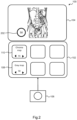
- Fig. 2 shows the ultrasound UI of Fig. 1 with an improved gaze UI element 202.
- the selected UI controls' value can be displayed on the gaze UI element 202.
- the selected UI controls' value follows the gaze of the user to the ultrasound image. This allows the user to keep changing this value even when not looking at the corresponding UI control.
- the gaze UI element with the overlayed values can be prevented from obstructing the ultrasound image to avoid occlusion of critical details on the ultrasound image.
- the ultrasound user interface shown in Figs 1 and 2 is provided as an example of a user interface which can be used with the methods described herein. It will be appreciated that the method can be used with any user interface using gaze tracking. It has been realized that all methods described herein as particularly advantageous when the region of interest is an image and the UI controls correspond to visual parameters of the image which can be adapted. This is because users are likely to look towards the image as they are adapting the values/parameters.
- Fig. 3 shows a method for controlling gaze interactivity with a UI.
- the method comprises tracking 302 the gaze of a user on the UI to allow the user to select a UI control with the user's gaze and determining 304 whether the user's gaze is moving towards a region of interest (ROI) on the UI.
- ROI region of interest
- each step of a flow chart may represent a different action performed by a processor, and may be performed by a respective module of the processing processor.
- a processor comprises an electronic circuit suitable for processing data. Any method described herein may be computer-implemented, where computer-implemented means that the steps of said methods are performed by one or more computers and where a computer is defined as a device suitable for processing data. A computer may be suitable for processing data according to prescribed instructions.
- the system makes use of processor to perform the data processing.
- the processor can be implemented in numerous ways, with software and/or hardware, to perform the various functions required.
- the processor typically employs one or more microprocessors that may be programmed using software (e.g., microcode) to perform the required functions.
- the processor may be implemented as a combination of dedicated hardware to perform some functions and one or more programmed microprocessors and associated circuitry to perform other functions.
- circuitry examples include, but are not limited to, conventional microprocessors, application specific integrated circuits (ASICs), and field-programmable gate arrays (FPGAs).
- ASICs application specific integrated circuits
- FPGAs field-programmable gate arrays
- the processor may be associated with one or more storage media such as volatile and non-volatile computer memory such as RAM, PROM, EPROM, and EEPROM.
- the storage media may be encoded with one or more programs that, when executed on one or more processors and/or controllers, perform the required functions.
- Various storage media may be fixed within a processor or controller or may be transportable, such that the one or more programs stored thereon can be loaded into a processor.
- a single processor or other unit may fulfill the functions of several items recited in the claims.
- a computer program may be stored/distributed on a suitable medium, such as an optical storage medium or a solid-state medium supplied together with or as part of other hardware, but may also be distributed in other forms, such as via the Internet or other wired or wireless telecommunication systems.
- a suitable medium such as an optical storage medium or a solid-state medium supplied together with or as part of other hardware, but may also be distributed in other forms, such as via the Internet or other wired or wireless telecommunication systems.
- a single processor or other unit may fulfill the functions of several items recited in the claims.
- a computer program may be stored/distributed on a suitable medium, such as an optical storage medium or a solid-state medium supplied together with or as part of other hardware, but may also be distributed in other forms, such as via the Internet or other wired or wireless telecommunication systems.
- a suitable medium such as an optical storage medium or a solid-state medium supplied together with or as part of other hardware, but may also be distributed in other forms, such as via the Internet or other wired or wireless telecommunication systems.
Landscapes
- Engineering & Computer Science (AREA)
- General Engineering & Computer Science (AREA)
- Theoretical Computer Science (AREA)
- Human Computer Interaction (AREA)
- Physics & Mathematics (AREA)
- General Physics & Mathematics (AREA)
- User Interface Of Digital Computer (AREA)
Priority Applications (4)
| Application Number | Priority Date | Filing Date | Title |
|---|---|---|---|
| EP23182254.5A EP4485143A1 (de) | 2023-06-29 | 2023-06-29 | Blickinteraktionen mit benutzerschnittstellen |
| PCT/EP2024/067398 WO2025002996A1 (en) | 2023-06-29 | 2024-06-21 | Gaze interactions with user interfaces |
| EP24733973.2A EP4735979A1 (de) | 2023-06-29 | 2024-06-21 | Blickinteraktionen mit benutzerschnittstellen |
| CN202480043218.7A CN121444047A (zh) | 2023-06-29 | 2024-06-21 | 与用户界面的注视交互 |
Applications Claiming Priority (1)
| Application Number | Priority Date | Filing Date | Title |
|---|---|---|---|
| EP23182254.5A EP4485143A1 (de) | 2023-06-29 | 2023-06-29 | Blickinteraktionen mit benutzerschnittstellen |
Publications (1)
| Publication Number | Publication Date |
|---|---|
| EP4485143A1 true EP4485143A1 (de) | 2025-01-01 |
Family
ID=87059999
Family Applications (2)
| Application Number | Title | Priority Date | Filing Date |
|---|---|---|---|
| EP23182254.5A Withdrawn EP4485143A1 (de) | 2023-06-29 | 2023-06-29 | Blickinteraktionen mit benutzerschnittstellen |
| EP24733973.2A Pending EP4735979A1 (de) | 2023-06-29 | 2024-06-21 | Blickinteraktionen mit benutzerschnittstellen |
Family Applications After (1)
| Application Number | Title | Priority Date | Filing Date |
|---|---|---|---|
| EP24733973.2A Pending EP4735979A1 (de) | 2023-06-29 | 2024-06-21 | Blickinteraktionen mit benutzerschnittstellen |
Country Status (3)
| Country | Link |
|---|---|
| EP (2) | EP4485143A1 (de) |
| CN (1) | CN121444047A (de) |
| WO (1) | WO2025002996A1 (de) |
Citations (3)
| Publication number | Priority date | Publication date | Assignee | Title |
|---|---|---|---|---|
| US20160274758A1 (en) * | 2015-03-20 | 2016-09-22 | Thalmic Labs Inc. | Systems, devices, and methods for mitigating false positives in human-electronics interfaces |
| US20200401218A1 (en) * | 2019-06-18 | 2020-12-24 | Synaptics Incorporated | Combined gaze and touch input for device operation |
| EP3848779A1 (de) * | 2020-01-09 | 2021-07-14 | BHS Technologies GmbH | Kopfmontiertes anzeigesystem und verfahren zur steuerung einer medizinischen abbildungsvorrichtung |
-
2023
- 2023-06-29 EP EP23182254.5A patent/EP4485143A1/de not_active Withdrawn
-
2024
- 2024-06-21 WO PCT/EP2024/067398 patent/WO2025002996A1/en not_active Ceased
- 2024-06-21 CN CN202480043218.7A patent/CN121444047A/zh active Pending
- 2024-06-21 EP EP24733973.2A patent/EP4735979A1/de active Pending
Patent Citations (3)
| Publication number | Priority date | Publication date | Assignee | Title |
|---|---|---|---|---|
| US20160274758A1 (en) * | 2015-03-20 | 2016-09-22 | Thalmic Labs Inc. | Systems, devices, and methods for mitigating false positives in human-electronics interfaces |
| US20200401218A1 (en) * | 2019-06-18 | 2020-12-24 | Synaptics Incorporated | Combined gaze and touch input for device operation |
| EP3848779A1 (de) * | 2020-01-09 | 2021-07-14 | BHS Technologies GmbH | Kopfmontiertes anzeigesystem und verfahren zur steuerung einer medizinischen abbildungsvorrichtung |
Also Published As
| Publication number | Publication date |
|---|---|
| WO2025002996A1 (en) | 2025-01-02 |
| CN121444047A (zh) | 2026-01-30 |
| EP4735979A1 (de) | 2026-05-06 |
Similar Documents
| Publication | Publication Date | Title |
|---|---|---|
| US11726653B2 (en) | Non-contact gesture commands for touch screens | |
| US10324602B2 (en) | Display of 3D images | |
| EP2615525B1 (de) | Berührungsloser Betrieb von Vorrichtungen durch Verwendung von Tiefensensoren | |
| US9871962B2 (en) | Movable user interface shutter button for camera | |
| US9507418B2 (en) | Eye tracker based contextual action | |
| US11704142B2 (en) | Computer application with built in training capability | |
| JP7059178B6 (ja) | データ表示装置 | |
| US20080118237A1 (en) | Auto-Zoom Mark-Up Display System and Method | |
| EP2840478B1 (de) | Verfahren und Vorrichtung zur Bereitstellung einer Benutzerschnittstelle für medizinische diagnostische Vorrichtungen | |
| JP2014142937A (ja) | 医用画像参照装置及びカーソル制御プログラム | |
| US20140082559A1 (en) | Control area for facilitating user input | |
| JP6158690B2 (ja) | 画像表示装置 | |
| WO2024131694A1 (en) | Methods and systems for gaze assisted interaction | |
| US10802702B2 (en) | Touch-activated scaling operation in information processing apparatus and information processing method | |
| EP4485143A1 (de) | Blickinteraktionen mit benutzerschnittstellen | |
| JP7474705B2 (ja) | ディスプレイ上のマーカの正確な位置決め | |
| JP2018097443A (ja) | 入力システム、入力プログラム | |
| US11520400B2 (en) | Electronic apparatus and method for controlling the same | |
| US20200193689A1 (en) | Information processing apparatus, information processing method, and storage medium | |
| EP3506055B1 (de) | Verfahren zur augenverfolgungskalibrierung mit startbildschirm | |
| CN109857307A (zh) | 一种图像的显示交换方法、装置、电子设备及存储介质 | |
| WO2025015410A1 (en) | System and method for gaze-driven computer control | |
| US20190196664A1 (en) | Medical image display system and medical image display apparatus |
Legal Events
| Date | Code | Title | Description |
|---|---|---|---|
| PUAI | Public reference made under article 153(3) epc to a published international application that has entered the european phase |
Free format text: ORIGINAL CODE: 0009012 |
|
| STAA | Information on the status of an ep patent application or granted ep patent |
Free format text: STATUS: THE APPLICATION HAS BEEN PUBLISHED |
|
| AK | Designated contracting states |
Kind code of ref document: A1 Designated state(s): AL AT BE BG CH CY CZ DE DK EE ES FI FR GB GR HR HU IE IS IT LI LT LU LV MC ME MK MT NL NO PL PT RO RS SE SI SK SM TR |
|
| STAA | Information on the status of an ep patent application or granted ep patent |
Free format text: STATUS: THE APPLICATION IS DEEMED TO BE WITHDRAWN |
|
| 18D | Application deemed to be withdrawn |
Effective date: 20250702 |