EP4488990A2 - Procédé d'affichage d'interface et dispositif électronique - Google Patents
Procédé d'affichage d'interface et dispositif électronique Download PDFInfo
- Publication number
- EP4488990A2 EP4488990A2 EP24191607.1A EP24191607A EP4488990A2 EP 4488990 A2 EP4488990 A2 EP 4488990A2 EP 24191607 A EP24191607 A EP 24191607A EP 4488990 A2 EP4488990 A2 EP 4488990A2
- Authority
- EP
- European Patent Office
- Prior art keywords
- application
- interface
- electronic device
- area
- display
- Prior art date
- Legal status (The legal status is an assumption and is not a legal conclusion. Google has not performed a legal analysis and makes no representation as to the accuracy of the status listed.)
- Withdrawn
Links
Images
































































Classifications
-
- G—PHYSICS
- G06—COMPUTING OR CALCULATING; COUNTING
- G06F—ELECTRIC DIGITAL DATA PROCESSING
- G06F3/00—Input arrangements for transferring data to be processed into a form capable of being handled by the computer; Output arrangements for transferring data from processing unit to output unit, e.g. interface arrangements
- G06F3/01—Input arrangements or combined input and output arrangements for interaction between user and computer
- G06F3/048—Interaction techniques based on graphical user interfaces [GUI]
- G06F3/0487—Interaction techniques based on graphical user interfaces [GUI] using specific features provided by the input device, e.g. functions controlled by the rotation of a mouse with dual sensing arrangements, or of the nature of the input device, e.g. tap gestures based on pressure sensed by a digitiser
- G06F3/0488—Interaction techniques based on graphical user interfaces [GUI] using specific features provided by the input device, e.g. functions controlled by the rotation of a mouse with dual sensing arrangements, or of the nature of the input device, e.g. tap gestures based on pressure sensed by a digitiser using a touch-screen or digitiser, e.g. input of commands through traced gestures
-
- G—PHYSICS
- G06—COMPUTING OR CALCULATING; COUNTING
- G06F—ELECTRIC DIGITAL DATA PROCESSING
- G06F3/00—Input arrangements for transferring data to be processed into a form capable of being handled by the computer; Output arrangements for transferring data from processing unit to output unit, e.g. interface arrangements
- G06F3/01—Input arrangements or combined input and output arrangements for interaction between user and computer
- G06F3/048—Interaction techniques based on graphical user interfaces [GUI]
- G06F3/0481—Interaction techniques based on graphical user interfaces [GUI] based on specific properties of the displayed interaction object or a metaphor-based environment, e.g. interaction with desktop elements like windows or icons, or assisted by a cursor's changing behaviour or appearance
-
- G—PHYSICS
- G06—COMPUTING OR CALCULATING; COUNTING
- G06F—ELECTRIC DIGITAL DATA PROCESSING
- G06F3/00—Input arrangements for transferring data to be processed into a form capable of being handled by the computer; Output arrangements for transferring data from processing unit to output unit, e.g. interface arrangements
- G06F3/01—Input arrangements or combined input and output arrangements for interaction between user and computer
- G06F3/048—Interaction techniques based on graphical user interfaces [GUI]
- G06F3/0481—Interaction techniques based on graphical user interfaces [GUI] based on specific properties of the displayed interaction object or a metaphor-based environment, e.g. interaction with desktop elements like windows or icons, or assisted by a cursor's changing behaviour or appearance
- G06F3/0483—Interaction with page-structured environments, e.g. book metaphor
-
- G—PHYSICS
- G06—COMPUTING OR CALCULATING; COUNTING
- G06F—ELECTRIC DIGITAL DATA PROCESSING
- G06F3/00—Input arrangements for transferring data to be processed into a form capable of being handled by the computer; Output arrangements for transferring data from processing unit to output unit, e.g. interface arrangements
- G06F3/01—Input arrangements or combined input and output arrangements for interaction between user and computer
- G06F3/048—Interaction techniques based on graphical user interfaces [GUI]
- G06F3/0484—Interaction techniques based on graphical user interfaces [GUI] for the control of specific functions or operations, e.g. selecting or manipulating an object, an image or a displayed text element, setting a parameter value or selecting a range
- G06F3/0485—Scrolling or panning
-
- G—PHYSICS
- G06—COMPUTING OR CALCULATING; COUNTING
- G06F—ELECTRIC DIGITAL DATA PROCESSING
- G06F3/00—Input arrangements for transferring data to be processed into a form capable of being handled by the computer; Output arrangements for transferring data from processing unit to output unit, e.g. interface arrangements
- G06F3/01—Input arrangements or combined input and output arrangements for interaction between user and computer
- G06F3/048—Interaction techniques based on graphical user interfaces [GUI]
- G06F3/0484—Interaction techniques based on graphical user interfaces [GUI] for the control of specific functions or operations, e.g. selecting or manipulating an object, an image or a displayed text element, setting a parameter value or selecting a range
- G06F3/0486—Drag-and-drop
-
- G—PHYSICS
- G06—COMPUTING OR CALCULATING; COUNTING
- G06F—ELECTRIC DIGITAL DATA PROCESSING
- G06F3/00—Input arrangements for transferring data to be processed into a form capable of being handled by the computer; Output arrangements for transferring data from processing unit to output unit, e.g. interface arrangements
- G06F3/01—Input arrangements or combined input and output arrangements for interaction between user and computer
- G06F3/048—Interaction techniques based on graphical user interfaces [GUI]
- G06F3/0487—Interaction techniques based on graphical user interfaces [GUI] using specific features provided by the input device, e.g. functions controlled by the rotation of a mouse with dual sensing arrangements, or of the nature of the input device, e.g. tap gestures based on pressure sensed by a digitiser
- G06F3/0488—Interaction techniques based on graphical user interfaces [GUI] using specific features provided by the input device, e.g. functions controlled by the rotation of a mouse with dual sensing arrangements, or of the nature of the input device, e.g. tap gestures based on pressure sensed by a digitiser using a touch-screen or digitiser, e.g. input of commands through traced gestures
- G06F3/04883—Interaction techniques based on graphical user interfaces [GUI] using specific features provided by the input device, e.g. functions controlled by the rotation of a mouse with dual sensing arrangements, or of the nature of the input device, e.g. tap gestures based on pressure sensed by a digitiser using a touch-screen or digitiser, e.g. input of commands through traced gestures for inputting data by handwriting, e.g. gesture or text
-
- G—PHYSICS
- G06—COMPUTING OR CALCULATING; COUNTING
- G06F—ELECTRIC DIGITAL DATA PROCESSING
- G06F3/00—Input arrangements for transferring data to be processed into a form capable of being handled by the computer; Output arrangements for transferring data from processing unit to output unit, e.g. interface arrangements
- G06F3/01—Input arrangements or combined input and output arrangements for interaction between user and computer
- G06F3/048—Interaction techniques based on graphical user interfaces [GUI]
- G06F3/0487—Interaction techniques based on graphical user interfaces [GUI] using specific features provided by the input device, e.g. functions controlled by the rotation of a mouse with dual sensing arrangements, or of the nature of the input device, e.g. tap gestures based on pressure sensed by a digitiser
- G06F3/0488—Interaction techniques based on graphical user interfaces [GUI] using specific features provided by the input device, e.g. functions controlled by the rotation of a mouse with dual sensing arrangements, or of the nature of the input device, e.g. tap gestures based on pressure sensed by a digitiser using a touch-screen or digitiser, e.g. input of commands through traced gestures
- G06F3/04886—Interaction techniques based on graphical user interfaces [GUI] using specific features provided by the input device, e.g. functions controlled by the rotation of a mouse with dual sensing arrangements, or of the nature of the input device, e.g. tap gestures based on pressure sensed by a digitiser using a touch-screen or digitiser, e.g. input of commands through traced gestures by partitioning the display area of the touch-screen or the surface of the digitising tablet into independently controllable areas, e.g. virtual keyboards or menus
-
- G—PHYSICS
- G06—COMPUTING OR CALCULATING; COUNTING
- G06F—ELECTRIC DIGITAL DATA PROCESSING
- G06F3/00—Input arrangements for transferring data to be processed into a form capable of being handled by the computer; Output arrangements for transferring data from processing unit to output unit, e.g. interface arrangements
- G06F3/14—Digital output to display device ; Cooperation and interconnection of the display device with other functional units
-
- G—PHYSICS
- G06—COMPUTING OR CALCULATING; COUNTING
- G06F—ELECTRIC DIGITAL DATA PROCESSING
- G06F3/00—Input arrangements for transferring data to be processed into a form capable of being handled by the computer; Output arrangements for transferring data from processing unit to output unit, e.g. interface arrangements
- G06F3/14—Digital output to display device ; Cooperation and interconnection of the display device with other functional units
- G06F3/1423—Digital output to display device ; Cooperation and interconnection of the display device with other functional units controlling a plurality of local displays, e.g. CRT and flat panel display
- G06F3/1446—Digital output to display device ; Cooperation and interconnection of the display device with other functional units controlling a plurality of local displays, e.g. CRT and flat panel display display composed of modules, e.g. video walls
-
- G—PHYSICS
- G06—COMPUTING OR CALCULATING; COUNTING
- G06F—ELECTRIC DIGITAL DATA PROCESSING
- G06F9/00—Arrangements for program control, e.g. control units
- G06F9/06—Arrangements for program control, e.g. control units using stored programs, i.e. using an internal store of processing equipment to receive or retain programs
- G06F9/44—Arrangements for executing specific programs
- G06F9/451—Execution arrangements for user interfaces
-
- G—PHYSICS
- G09—EDUCATION; CRYPTOGRAPHY; DISPLAY; ADVERTISING; SEALS
- G09G—ARRANGEMENTS OR CIRCUITS FOR CONTROL OF INDICATING DEVICES USING STATIC MEANS TO PRESENT VARIABLE INFORMATION
- G09G5/00—Control arrangements or circuits for visual indicators common to cathode-ray tube indicators and other visual indicators
- G09G5/14—Display of multiple viewports
-
- G—PHYSICS
- G06—COMPUTING OR CALCULATING; COUNTING
- G06F—ELECTRIC DIGITAL DATA PROCESSING
- G06F2203/00—Indexing scheme relating to G06F3/00 - G06F3/048
- G06F2203/048—Indexing scheme relating to G06F3/048
- G06F2203/04803—Split screen, i.e. subdividing the display area or the window area into separate subareas
-
- G—PHYSICS
- G06—COMPUTING OR CALCULATING; COUNTING
- G06F—ELECTRIC DIGITAL DATA PROCESSING
- G06F3/00—Input arrangements for transferring data to be processed into a form capable of being handled by the computer; Output arrangements for transferring data from processing unit to output unit, e.g. interface arrangements
- G06F3/14—Digital output to display device ; Cooperation and interconnection of the display device with other functional units
- G06F3/1454—Digital output to display device ; Cooperation and interconnection of the display device with other functional units involving copying of the display data of a local workstation or window to a remote workstation or window so that an actual copy of the data is displayed simultaneously on two or more displays, e.g. teledisplay
-
- G—PHYSICS
- G09—EDUCATION; CRYPTOGRAPHY; DISPLAY; ADVERTISING; SEALS
- G09G—ARRANGEMENTS OR CIRCUITS FOR CONTROL OF INDICATING DEVICES USING STATIC MEANS TO PRESENT VARIABLE INFORMATION
- G09G2354/00—Aspects of interface with display user
Definitions
- Embodiments of the present invention relate to the field of electronic device technologies, and in particular, to an interface display method and an electronic device.
- a display of an electronic device for example, a mobile phone
- a display feature of a large screen more electronic devices support a split-screen function.
- the mobile phone is used as an example.
- An implementation solution of a screen splitting operation in the conventional technology is as follows:
- the mobile phone displays an interface 101 of a first application.
- a screen splitting gesture of a user for example, the user taps the display and slides from left to right, the mobile phone loads an interface 102.
- a display area of the interface 102 includes a display area 1021 and a display area 1022.
- the interface of the first application is displayed in the display area 1021, and icons of one or more other second applications that support the split-screen function are displayed in the display area 1022.
- the user may select the second application in the display area 1022.
- an interface of the second application is displayed in the display area 1022.
- a user opens a multi-task management interface 104 by performing operations such as sliding up from a lower edge of an interface 101.
- Windows of one or more applications started by the user are displayed on the multi-task management interface 104.
- the window of the application includes a split-screen button 1041.
- the mobile phone loads an interface 102.
- the interface 102 includes a display area 1021 and a display area 1022.
- An interface of the first application is displayed in the display area 1021, and icons of one or more other second applications that support the split-screen function are displayed in the display area 1022.
- the user may select the second application in the display area 1022.
- an icon of a second application an interface of the second application is displayed in the display area 1022.
- Embodiments of this application provide an interface display method and an electronic device, to implement a convenient screen splitting operation.
- an embodiment of this application provides an interface display method.
- the method may be applied to an electronic device.
- the electronic device includes a display.
- the method includes:
- the electronic device displays an interface of a first application in a first display area of the display.
- the first application may be one application or a plurality of applications. In other words, in the first display area, only an interface of one application may be displayed, or interfaces of a plurality of applications (each application has one interface) may be displayed.
- the electronic device When the electronic device displays the interface of the first application, the electronic device receives a first operation.
- a user when the first application runs in a foreground, a user performs the first operation.
- the first operation may be an operation performed on the first display area.
- the electronic device displays a multi-task interface in the first display area in response to the first operation.
- the multi-task interface includes an application window of a currently running application, and the application window of the currently running application includes at least an application window of the first application.
- the currently running application may include all applications currently running on the electronic device. It should be noted that an application included in the electronic device may run in the foreground or a background.
- the electronic device receives a second operation.
- the second operation is an operation performed on an application window of a second application in the application windows of the currently running applications.
- the electronic device displays the interface of the first application and an interface of the second application in different areas in the first display area in response to the second operation.
- the application window of the second application is included in the multi-task interface.
- the second application may be selected as an application, to be displayed on a split screen, by using the second operation performed on the application window of the second application, and the first application and the second application may be directly displayed on split screens.
- the user may conveniently perform one operation on the multi-task interface by using this method, to implement two functions: second application selection and split-screen display.
- the application to be displayed on a split screen is selected and the split-screen display is triggered by using one operation. This simplifies a screen splitting operation.
- application windows of two or more currently running applications may be simultaneously displayed in the first display area.
- application windows of all the currently running applications cannot be simultaneously displayed.
- the user may perform a third operation on the multi-task interface.
- the electronic device displays a plurality of application windows in scrolling mode on the multi-task interface.
- the application window of the first application may be always displayed. In other words, the application window of the first application is not moved out of the first display area.
- the user When the plurality of application windows are displayed in scrolling mode, the user generally searches for an application that needs to be displayed on split screens with the first application.
- the application window of the first application is always kept displayed, to prompt the user that the first application is to be displayed on a split screen.
- some applications included in the electronic device support split-screen display, and some applications do not support the split-screen display. Therefore, some applications corresponding to the application windows included in the multi-task interface may support the split-screen display, and some applications may not support the split-screen display.
- the electronic device When the second operation is performed on an application window of an application supporting the split-screen display, the electronic device outputs a first effect.
- the first effect may be that as the user slides down the application window of the second application, the application window of the second application is moved down.
- the electronic device outputs a second effect, to prompt the user that the currently selected application does not support the split-screen display. For example, as the user slides down an application window, the application window moves down for a short distance and then returns to an initial position, to prompt the user that the application window does not support the split-screen display.
- an embodiment of this application provides another interface display method, applied to an electronic device.
- the electronic device includes a display.
- the method includes:
- the electronic device displays an interface of a first application in a first display area of the display.
- the first application may be one application or a plurality of applications.
- the electronic device receives a first operation.
- the electronic device displays a multi-task interface in the first display area in response to the first operation.
- the displayed multi-task interface includes a first area and a second area.
- the first area includes an application window of the first application.
- the second area includes an application window of a currently running application, for example, an application window of a currently running second application.
- the second area may include the application window of the first application, or may not include the application window of the first application.
- the electronic device receives a second operation performed on the application window of the second application.
- the electronic device moves the application window of the second application to the first area in response to the second operation.
- the electronic device may display, in different areas in the first display area, applications corresponding to all application windows in the first area.
- the user when using the first application, the user may conveniently perform an operation on the multi-task interface by using this method, to move an application to be displayed on a split screen to the first area. Then, all applications included in the first area are displayed on split screens.
- an embodiment of this application provides another interface display method, applied to an electronic device.
- the method includes: The electronic device displays an interface of a first application.
- the electronic device receives a first operation when displaying the interface of the first application.
- the electronic device displays a first multi-task interface in response to the first operation, where the first multi-task interface includes an application window of a currently running application.
- the electronic device receives a second operation when displaying the first multi-task interface.
- the second operation may be an operation performed on an application window on the first multi-task interface or another operation that triggers a second multi-task interface.
- the electronic device displays the second multi-task interface in response to the second operation.
- the second multi-task interface includes a first area and a second area.
- the first area includes an application window of the first application
- the second area includes the application window of the currently running application.
- the electronic device receives a third operation performed on an application window, in the second area, of a second application that is currently running.
- the electronic device moves the application window of the second application to the first area in response to the third operation.
- the second operation and the third operation may be one consecutive operation.
- the second operation may be dragging down the application window of the second application
- the third operation may be dragging the application window of the second application to the first area.
- the second operation and the third operation are consecutive, and a finger of a user may not leave the screen.
- the electronic device displays the interface of the first application and an interface of the second application in different areas based on application windows in the first area.
- the first multi-task interface is first displayed in response to the first operation of the user.
- the second multi-task interface including two areas is displayed, to prompt the user to move an application window to be displayed on a split screen to the first area.
- the electronic device may display a process in which the first multi-task interface changes to the second multi-task interface.
- the electronic device may present an animation in which the application window of the first application is moved to the first area, to prompt the user to move the application window to be displayed on a split screen to the first area.
- the method provided in the third aspect may be performed on one display area of the display.
- the display may further include one or more other display areas for displaying another interface.
- the method provided in the third aspect may further include: after one or more application windows on the second multi-task interface are dragged to another display area, an application corresponding to the dragged application window may be displayed in the another display area. If a plurality of application windows are dragged, a plurality of applications corresponding to the plurality of application windows are displayed in different areas in the another display area.
- the user may conveniently display a plurality of applications in a plurality of display areas of the display in a split-screen manner.
- the first application and the second application may be the same. If the first application and the second application are the same, the interface of the first application and the interface of the second application may be the same or different.
- the electronic device displays two interfaces of the first application in different areas. The two interfaces may be two same interfaces or two different interfaces of the first application.
- the user may display one application on split screens, that is, simultaneously display two interfaces of the application, and then independently perform an operation on each interface, so that the user can simultaneously use the two interfaces of the same application.
- the second operation or the third operation includes any one of the following operations: touching and holding the application window of the second application, double-tapping the application window of the second application, or sliding down the application window of the second application.
- the multi-task interface includes application windows of the plurality of applications. These application windows may be arranged according to a specific rule. For example, the arrangement may be based on a frequency that each application is jointly used with the first application. If a frequency that an application is jointly used with the first application is relatively high, the application is preferentially displayed on the multi-task interface. Therefore, it can be more convenient for the user to select an application having a high frequency of being jointly used with first application to perform screen splitting.
- the second application may be a plurality of applications.
- the user may simultaneously perform a multi-point operation on the plurality of applications.
- the electronic device may display the first application and the plurality of second applications in different areas.
- the user may perform one operation to simultaneously display a plurality of applications on split screens.
- the first operation may be sliding from an edge of the display area to the center.
- the display area may include a multi-task button, and the first operation may be an operation performed on the multi-task button, for example, tapping, touching and holding, or pressing.
- the first display area may be all display areas on the display that are used to display an application interface, for example, may be all display areas except a status bar.
- the first display area may be a part of a display area, on the display, that is used to display an application interface.
- the display may further include a second display area that displays another application interface.
- a home screen of the electronic device or an application interface may be displayed in the second display area.
- the user may perform an operation on one or more application windows on the multi-task interface. The operation is moving the one or more application windows to the second display area.
- the electronic device may display interfaces of one or more applications in the second display area.
- the application window is displayed in the second display area. If a plurality of application windows are moved to the second display area by using the operation, interfaces of the plurality of applications are displayed in different areas in the second display area.
- the user may conveniently display a plurality of applications in a plurality of display areas of the display in the split-screen manner.
- the electronic device may display, in different areas in the first display area, applications corresponding to all the application windows in the first area.
- the interface of the first application and the interface of the second application are displayed in different areas.
- the user may conveniently perform an operation on the multi-task interface, that is, move the second application to the first area, to implement the two functions: the second application selection and the split-screen display.
- the application to be displayed on a split screen is selected and the split-screen display is triggered by using one operation of the user. This simplifies the screen splitting operation.
- the first area is displayed on the multi-task interface, and the two functions of the selection and the split-screen display can be implemented by moving an application to the first area. In this way, the screen splitting operation is simple and intuitive, and is convenient for the user to operate.
- the user may further tap a confirmation operation.
- the electronic device displays, in different areas in the first display area, the applications corresponding to all the application windows included in the first area.
- the user may further perform another operation. For example, if the user wants to simultaneously display three or more applications on split screens, the user may further move another application window to the first area until the user selects all applications to be displayed on split screens, and then tap the confirmation operation. In this way, the plurality of applications may be displayed on split screens.
- the user may adjust positions of a plurality of application windows in the first area, that is, move positions of one or more application windows in the first area.
- the user taps the confirmation operation to perform screen splitting.
- a relative position relationship between the plurality of applications during the split-screen display may be the same as a relative position relationship between the plurality of application windows in the first area when the confirmation operation is tapped.
- the user may sequentially move a plurality of application windows to the first area, or may move one or more application windows out of the first area, that is, move from the first area to the second area.
- the applications corresponding to all the application windows included in the first area are displayed on split screens. The user adjusts the positions of the plurality of application windows in the first area, so that the user conveniently adjusts display positions of the plurality of applications after the screen splitting.
- the first area may include one or more application windows.
- the user may move an application window to a desired position.
- the first area includes the application window of the first application.
- the application window of the second application When the application window of the second application is moved, the application window of the second application may be moved above the application window of the first application, or may be moved below the application window of the first application.
- a position relationship between a plurality of application interfaces to be subsequently displayed on split screens is the same as a position relationship between the plurality of application windows in the first area.
- the user may control positions of the applications to be subsequently displayed on split screens.
- an embodiment of this application provides an interface display method.
- the method may be applied to an electronic device.
- the electronic device includes a display.
- the method includes:
- the electronic device displays a first interface of an instant messaging application in a first display area of the display.
- the electronic device When the electronic device displays the first interface, the electronic device receives a first operation. In response to the first operation, the electronic device displays a multi-task interface and stops displaying the first interface.
- the multi-task interface is used to display an application window of a currently running application, and the application window includes a window of the instant messaging application.
- the user may perform the first operation. For example, when the user browses friend feeds by using the instant messaging application (for example, Moments of the WeChat application), if an instant messaging message sent by another friend is received, the user may perform the first operation.
- the user chats with a friend A by using the instant messaging application if an instant messaging message sent by a friend B is received, the user may accordingly perform the first operation.
- the electronic device receives a second operation on the multi-task interface.
- the second operation is an operation performed on the window of the instant messaging application.
- the electronic device displays the first interface of the first application and a second interface of the first application in different areas in the first display area.
- the first interface and the second interface may be the same or different.
- the electronic device When the first interface displayed by the electronic device is not a chat interface with the friend B (for example, the first interface is a chat interface with another friend or another interface of the instant messaging application), and the electronic device receives a new message sent by the friend B, if the electronic device receives the first operation of the user, the electronic device displays two different interfaces, namely, the first interface and the second interface of the instant messaging application in different areas. In this case, the second interface is the chat interface with the friend B.
- the user when using the first application, the user may conveniently perform one operation on the multi-task interface by using this method, to display two different interfaces of the first application in different areas. In this way, the user can simultaneously use a plurality of functions of an application, to avoid repeatedly switching interfaces of the same application.
- FIG. 3 is a schematic diagram of a structure of an electronic device 100.
- the electronic device 100 may include a processor 110, an external memory interface 120, an internal memory 121, a universal serial bus (universal serial bus, USB) port 130, a charging management module 140, a power management module 141, a battery 142, an antenna 1, an antenna 2, a mobile communications module 150, a wireless communications module 160, an audio module 170, a speaker 170A, a receiver 170B, a microphone 170C, a headset jack 170D, a sensor module 180, a button 190, a motor 191, an indicator 192, a camera 193, a display 194, a subscriber identification module (subscriber identification module, SIM) card interface 195, and the like.
- a processor 110 an external memory interface 120, an internal memory 121, a universal serial bus (universal serial bus, USB) port 130, a charging management module 140, a power management module 141, a battery 142, an antenna 1, an antenna 2, a mobile communications module 150, a wireless communications module 160, an audio module 170,
- the sensor module 180 may include a pressure sensor 180A, a gyro sensor 180B, a barometric pressure sensor 180C, a magnetic sensor 180D, an acceleration sensor 180E, a distance sensor 180F, an optical proximity sensor 180G, a fingerprint sensor 180H, a temperature sensor 180J, a touch sensor 180K, an ambient light sensor 180L, a bone conduction sensor 180M, and the like.
- the processor 110 may include one or more processing units.
- the processor 110 may include an application processor (application processor, AP), a modem processor, a graphics processing unit (graphics processing unit, GPU), an image signal processor (image signal processor, ISP), a controller, a video codec, a digital signal processor (digital signal processor, DSP), a baseband processor, a neural-network processing unit (neural-network processing unit, NPU), and/or the like.
- Different processing units may be independent components, or may be integrated into one or more processors.
- the controller may generate an operation control signal based on instruction operation code and a time sequence signal, to complete control of instruction reading and instruction execution.
- the processor 110 may include one or more interfaces.
- the interface may include an inter-integrated circuit (inter-integrated circuit, I2C) interface, an inter-integrated circuit sound (inter-integrated circuit sound, I2S) interface, a pulse code modulation (pulse code modulation, PCM) interface, a universal asynchronous receiver/transmitter (universal asynchronous receiver/transmitter, UART) interface, a mobile industry processor interface (mobile industry processor interface, MIPI), a general-purpose input/output (general-purpose input/output, GPIO) interface, a subscriber identity module (subscriber identity module, SIM) interface, a universal serial bus (universal serial bus, USB) port, and/or the like.
- I2C inter-integrated circuit
- I2S inter-integrated circuit sound
- PCM pulse code modulation
- PCM pulse code modulation
- UART universal asynchronous receiver/transmitter
- MIPI mobile industry processor interface
- GPIO general-purpose input/output
- the I2C interface is a two-way synchronization serial bus, and includes one serial data line (serial data line, SDA) and one serial clock line (serial clock line, SCL).
- the processor 110 may include a plurality of groups of I2C buses.
- the processor 110 may be separately coupled to the touch sensor 180K, a charger, a flash, the camera 193, and the like through different I2C bus interfaces.
- the processor 110 may be coupled to the touch sensor 180K through the I2C interface, so that the processor 110 communicates with the touch sensor 180K through the I2C bus interface, to implement a touch function of the electronic device 100.
- the I2S interface may be configured for audio communication.
- the processor 110 may include a plurality of groups of I2S buses.
- the processor 110 may be coupled to the audio module 170 through the I2S bus, to implement communication between the processor 110 and the audio module 170.
- the audio module 170 may transmit an audio signal to the wireless communications module 160 through the I2S interface, to implement a function of answering a call by using a Bluetooth headset.
- the PCM interface may also be configured to perform audio communication, and sample, quantize, and code an analog signal.
- the audio module 170 may be coupled to the wireless communications module 160 through a PCM bus interface.
- the audio module 170 may alternatively transmit an audio signal to the wireless communications module 160 through the PCM interface, to implement the function of answering a call through the Bluetooth headset. Both the I2S interface and the PCM interface may be configured for audio communication.
- the UART interface is a universal serial data bus, and is configured to perform asynchronous communication.
- the bus may be a two-way communications bus, and converts to-be-transmitted data between serial communication and parallel communication.
- the UART interface is usually configured to connect the processor 110 to the wireless communications module 160.
- the processor 110 communicates with a Bluetooth module in the wireless communications module 160 through the UART interface, to implement a Bluetooth function.
- the audio module 170 may transmit an audio signal to the wireless communications module 160 through the UART interface, to implement a function of playing music by using the Bluetooth headset.
- the MIPI interface may be configured to connect the processor 110 to a peripheral component such as the display 194 or the camera 193.
- the MIPI interface includes a camera serial interface (camera serial interface, CSI), a display serial interface (display serial interface, DSI), and the like.
- the processor 110 communicates with the camera 193 through the CSI interface, to implement a photographing function of the electronic device 100.
- the processor 110 communicates with the display 194 through the DSI interface, to implement a display function of the electronic device 100.
- the GPIO interface may be configured through software.
- the GPIO interface may be configured as a control signal or a data signal.
- the GPIO interface may be configured to connect the processor 110 to the camera 193, the display 194, the wireless communications module 160, the audio module 170, the sensor module 180, and the like.
- the GPIO interface may alternatively be configured as the I2C interface, the I2S interface, the UART interface, the MIPI interface, or the like.
- the USB port 130 is an interface that conforms to a USB standard specification, and may be specifically a mini USB port, a micro USB port, a USB Type-C port, or the like.
- the USB port 130 may be configured to connect to a charger to charge the electronic device 100, or may be configured to transmit data between the electronic device 100 and a peripheral device, or may be used to connect to a headset for playing audio through the headset.
- the interface may be configured to connect to another electronic device, for example, an AR device.
- an interface connection relationship between the modules shown in this embodiment of the present invention is merely an example for description, and does not constitute a limitation on the structure of the electronic device 100.
- the electronic device 100 may alternatively use an interface connection manner different from that in the foregoing embodiment, or a combination of a plurality of interface connection manners.
- the charging management module 140 is configured to receive a charging input from the charger.
- the charger may be a wireless charger or a wired charger.
- the charging management module 140 may receive a charging input from a wired charger through the USB port 130.
- the charging management module 140 may receive a wireless charging input by using a wireless charging coil of the electronic device 100.
- the charging management module 140 supplies power to the electronic device by using the power management module 141 when charging the battery 142.
- the power management module 141 is configured to connect to the battery 142 and the charging management module 140 to the processor 110.
- the power management module 141 receives an input of the battery 142 and/or an input of the charging management module 140, and supplies power to the processor 110, the internal memory 121, the display 194, the camera 193, the wireless communications module 160, and the like.
- the power management module 141 may further be configured to monitor parameters such as a battery capacity, a quantity of battery cycles, and a battery health status (electric leakage or impedance).
- the power management module 141 may alternatively be disposed in the processor 110.
- the power management module 141 and the charging management module 140 may alternatively be disposed in a same device.
- a wireless communication function of the electronic device 100 may be implemented through the antenna 1, the antenna 2, the mobile communications module 150, the wireless communications module 160, the modem processor, the baseband processor, and the like.
- the antenna 1 and the antenna 2 are configured to transmit and receive electromagnetic wave signals.
- Each antenna in the electronic device 100 may be configured to cover one or more communications frequency bands. Different antennas may further be multiplexed to improve antenna utilization.
- the antenna 1 may be multiplexed as a diversity antenna in a wireless local area network. In some other embodiments, the antenna may be used in combination with a tuning switch.
- the mobile communications module 150 may provide a solution that is applied to the electronic device 100 and that includes wireless communications technologies such as 2G, 3G, 4G, and 5G.
- the mobile communications module 150 may include at least one filter, a switch, a power amplifier, a low noise amplifier (low noise amplifier, LNA), and the like.
- the mobile communications module 150 may receive an electromagnetic wave through the antenna 1, perform processing such as filtering or amplification on the received electromagnetic wave, and transmit a processed electromagnetic wave to the modem processor for demodulation.
- the mobile communications module 150 may further amplify a signal modulated by the modem processor, and convert the signal into an electromagnetic wave for radiation through the antenna 1.
- at least some function modules of the mobile communications module 150 may be disposed in the processor 110.
- at least some function modules of the mobile communications module 150 and at least some modules of the processor 110 may be disposed in a same device.
- the modem processor may include a modulator and a demodulator.
- the modulator is configured to modulate a to-be-sent low-frequency baseband signal into a medium or high-frequency signal.
- the demodulator is configured to demodulate a received electromagnetic wave signal into a low-frequency baseband signal. Then, the demodulator transfers the low-frequency baseband signal obtained through demodulation to the baseband processor for processing.
- the low-frequency baseband signal is processed by the baseband processor, and is then transferred to the application processor.
- the application processor outputs a sound signal through an audio device (which is not limited to the speaker 170A, the receiver 170B, or the like), or displays an image or a video through the display 194.
- the modem processor may be an independent component.
- the modem processor may be independent of the processor 110, and is disposed in a same component as the mobile communications module 150 or another function module.
- the wireless communications module 160 may provide a wireless communication solution that includes a wireless local area network (wireless local area network, WLAN) (for example, a wireless fidelity (wireless fidelity, Wi-Fi) network), Bluetooth (Bluetooth, BT), a global navigation satellite system (global navigation satellite system, GNSS), frequency modulation (frequency modulation, FM), a near field communication (near field communication, NFC) technology, an infrared (infrared, IR) technology, or the like and that is applied to the electronic device 100.
- the wireless communications module 160 may be one or more components integrating at least one communications processor module.
- the wireless communications module 160 receives an electromagnetic wave through the antenna 2, performs frequency modulation and filtering processing on an electromagnetic wave signal, and sends a processed signal to the processor 110.
- the wireless communications module 160 may further receive a to-be-sent signal from the processor 110, perform frequency modulation and amplification on the signal, and convert the signal into an electromagnetic wave for radiation through the antenna 2.
- the antenna 1 of the electronic device 100 is coupled to the mobile communications module 150, and the antenna 2 is coupled to the wireless communications module 160, so that the electronic device 100 may communicate with a network and another device by using a wireless communications technology.
- the wireless communications technology may include a global system for mobile communications (global system for mobile communications, GSM), a general packet radio service (general packet radio service, GPRS), code division multiple access (code division multiple access, CDMA), wideband code division multiple access (wideband code division multiple access, WCDMA), time-division code division multiple access (time-division code division multiple access, TD-SCDMA), long term evolution (long term evolution, LTE), BT, a GNSS, a WLAN, NFC, FM, an IR technology, and/or the like.
- GSM global system for mobile communications
- GPRS general packet radio service
- code division multiple access code division multiple access
- CDMA wideband code division multiple access
- WCDMA wideband code division multiple access
- time-division code division multiple access time
- the GNSS may include a global positioning system (global positioning system, GPS), a global navigation satellite system (global navigation satellite system, GLONASS), a BeiDou navigation satellite system (BeiDou navigation satellite system, BDS), a quasi-zenith satellite system (quasi-zenith satellite system, QZSS), and/or satellite based augmentation systems (satellite based augmentation systems, SBAS).
- GPS global positioning system
- GLONASS global navigation satellite system
- BeiDou navigation satellite system BeiDou navigation satellite system
- BDS BeiDou navigation satellite system
- QZSS quasi-zenith satellite system
- SBAS satellite based augmentation systems
- the electronic device 100 implements a display function through the GPU, the display 194, the application processor, and the like.
- the GPU is a microprocessor for image processing, and connects the display 194 to the application processor.
- the GPU is configured to perform mathematical and geometric calculation, and render an image.
- the processor 110 may include one or more GPUs that execute program instructions to generate or change display information.
- the display 194 is configured to display an image, a video, and the like.
- the display 194 includes a display panel.
- a liquid crystal display liquid crystal display, LCD
- an organic light-emitting diode organic light-emitting diode, OLED
- an active-matrix organic light emitting diode active-matrix organic light emitting diode, AMOLED
- a flexible light-emitting diode flexible light-emitting diode
- FLED flexible light-emitting diode
- mini-LED a micro-LED, a micro-OLED
- quantum dot light emitting diodes quantum dot light emitting diodes, QLED
- the electronic device 100 may include one or N displays 194, where N is a positive integer greater than 1.
- the electronic device 100 may implement the photographing function through the ISP, the camera 193, the video codec, the GPU, the display 194, the application processor, and the like.
- the ISP is configured to process data fed back by the camera 193. For example, during photographing, a shutter is pressed, and light is transmitted to a photosensitive element of the camera through a lens. An optical signal is converted into an electrical signal, and the photosensitive element of the camera transmits the electrical signal to the ISP for processing, to convert the electrical signal into a visible image.
- the ISP may further perform algorithm optimization on noise, brightness, and complexion of the image.
- the ISP may further optimize parameters such as exposure and color temperature of a photographing scenario.
- the ISP may be disposed in the camera 193.
- the camera 193 is configured to capture a static image or a video. An optical image of an object is generated through the lens, and is projected onto a photosensitive element.
- the light-sensitive element may be a charge coupled device (charge coupled device, CCD) or a complementary metal-oxide-semiconductor (complementary metal-oxide-semiconductor, CMOS) phototransistor.
- CCD charge coupled device
- CMOS complementary metal-oxide-semiconductor
- the photosensitive element converts an optical signal into an electrical signal, and then transmits the electrical signal to the ISP to convert the electrical signal into a digital image signal.
- the ISP outputs the digital image signal to the DSP for processing.
- the DSP converts the digital image signal into an image signal in a standard format such as an RGB format or a YUV format.
- the electronic device 100 may include one or N cameras 193, where N is a positive integer greater than 1.
- the digital signal processor is configured to process a digital signal, and may process another digital signal in addition to the digital image signal. For example, when the electronic device 100 selects a frequency, the digital signal processor is configured to perform Fourier transform on frequency energy, or the like.
- the video codec is configured to compress or decompress a digital video.
- the electronic device 100 may support one or more video codecs. Therefore, the electronic device 100 may play or record videos in a plurality of coding formats, for example, moving picture experts group (moving picture experts group, MPEG)-1, MPEG-2, MPEG-3, and MPEG-4.
- MPEG moving picture experts group
- the NPU is a neural-network (neural-network, NN) computing processor.
- the NPU quickly processes input information by referring to a structure of a biological neural network, for example, by referring to a mode of transmission between human brain neurons, and may further continuously perform self-learning.
- Applications such as intelligent cognition of the electronic device 100 may be implemented through the NPU, for example, image recognition, facial recognition, speech recognition, and text understanding.
- the external memory interface 120 may be configured to connect to an external memory card, for example, a micro SD card, to extend a storage capability of the electronic device 100.
- the external memory card communicates with the processor 110 through the external memory interface 120, to implement a data storage function. For example, music and videos are stored in the external storage card.
- the internal memory 121 may be configured to store computer-executable program code.
- the executable program code includes instructions.
- the internal memory 121 may include a program storage area and a data storage area.
- the program storage area may store an operating system, an application required by at least one function (for example, a sound playing function or an image playing function), and the like.
- the data storage area may store data (for example, audio data, a phone book, and the like) created in a process of using the electronic device 100, and the like.
- the internal memory 121 may include a high-speed random access memory, and may further include a non-volatile memory such as at least one magnetic disk storage device, a flash storage device, or a universal flash storage (universal flash storage, UFS).
- the processor 110 runs the instructions stored in the internal memory 121 and/or the instructions stored in the memory disposed in the processor, to perform various function applications of the electronic device 100 and data processing.
- the electronic device 100 may implement an audio function, for example, music playing and recording, through the audio module 170, the speaker 170A, the receiver 170B, the microphone 170C, the headset jack 170D, the application processor, and the like.
- an audio function for example, music playing and recording
- the ambient light sensor 180L is configured to sense ambient light brightness.
- the electronic device 100 may adaptively adjust brightness of the display 194 based on the sensed ambient light brightness.
- the ambient light sensor 180L may also be configured to automatically adjust a white balance during photographing.
- the ambient light sensor 180L may also cooperate with the optical proximity sensor 180G to detect whether the electronic device 100 is in a pocket, to avoid an accidental touch.
- the SIM card interface 195 is configured to connect to a SIM card.
- the SIM card may be inserted in the SIM card interface 195 or removed from the SIM card interface 195, to implement contact with or separation from the electronic device 100.
- the electronic device 100 may support one or N SIM card interfaces, where N is a positive integer greater than 1.
- the SIM card interface 195 may support a nano-SIM card, a micro-SIM card, a SIM card, and the like.
- a plurality of cards may be simultaneously inserted in a same SIM card interface 195.
- the plurality of cards may be of a same type or of different types.
- the SIM card interface 195 may also be compatible with different types of SIM cards.
- the SIM card interface 195 may further be compatible with an external memory card.
- a software system of the electronic device 100 may use a layered architecture, an event-driven architecture, a microkernel architecture, a micro service architecture, or a cloud architecture.
- an Android system with a layered architecture is used as an example to illustrate a software structure of the electronic device 100.
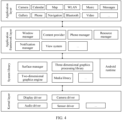
- FIG. 4 is a block diagram of the software structure of the electronic device 100 according to an embodiment of the present invention.
- the layered architecture software is divided into several layers, and each layer has a clear role and task.
- the layers communicate with each other through a software interface.
- the Android system is divided into four layers: an application layer, an application framework layer, an Android runtime (Android runtime) and system library, and a kernel layer from top to bottom.
- the application layer may include a series of application packages.
- the application framework layer provides an application programming interface (application programming interface, API) and a programming framework for an application at the application layer.
- the application framework layer includes some predefined functions.
- the application framework layer may include a window manager, a content provider, a view system, a phone manager, a resource manager, a notification manager, and the like.
- the window manager is configured to manage a window program.
- the window manager may obtain a size of a display, determine whether there is a status bar, perform screen locking, take a screenshot, and the like.
- the view system includes visual controls, such as a control for displaying a text and a control for displaying an image.
- the view system may be configured to construct an application.
- a display interface may include one or more views.
- a display interface including an SMS message notification icon may include a text display view and an image display view.
- the phone manager is configured to provide a communication function of the electronic device 100, for example, management of a call status (including answering or declining a call).
- the resource manager provides various resources for an application, such as a localized character string, an icon, an image, a layout file, and a video file.
- the application layer and the application framework layer run in the virtual machine.
- the virtual machine executes java files at the application layer and the application framework layer as binary files.
- the virtual machine is configured to implement functions such as object lifecycle management, stack management, thread management, security and exception management, and garbage collection.
- the system library may include a plurality of function modules, for example, a surface manager (surface manager), a media library (Media Library), a three-dimensional graphics processing library (for example, an OpenGL ES), and a 2D graphics engine (for example, an SGL).
- a surface manager surface manager
- Media Library media library
- 3-dimensional graphics processing library for example, an OpenGL ES
- 2D graphics engine for example, an SGL
- the surface manager is configured to manage a display subsystem and provide fusion of 2D and 3D layers for a plurality of applications.
- the media library supports playback and recording of a plurality of commonly used audio and video formats, static image files, and the like.
- the media library may support a plurality of audio and video coding formats, for example, MPEG-4, H.264, MP3, AAC, AMR, JPG, and PNG.
- the 2D graphics engine is a drawing engine for 2D drawing.
- the following describes an example of a working process of software and hardware of the electronic device 100 with reference to a photographing scenario.
- the touch sensor 180K receives a touch operation, a corresponding hardware interruption is sent to the kernel layer.
- the kernel layer processes the touch operation into an original input event (including information such as touch coordinates and a timestamp of the touch operation).
- the original input event is stored at the kernel layer.
- the application framework layer obtains the original input event from the kernel layer, and identifies a control corresponding to the input event.
- An example in which the touch operation is a touch tap operation, and a control corresponding to the tap operation is a control of a camera application icon is used.
- the camera application invokes an interface at the application framework layer to start the camera application, then starts a camera driver by invoking the kernel layer, and captures a static image or a video through the camera 193.
- the display area A is any display area on the display 194.
- the display area A may be all display areas on the display 194 or some display areas on the display 194.
- the interface A may be an interface of an application.
- the interface A may include interfaces of a plurality of applications.
- the one or more applications are referred to as "first applications" below. It may be understood that the first application is one or more applications running in a foreground.
- the electronic device may run one or more other applications in a background.
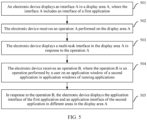
- Step 502 The electronic device receives an operation A performed on the display area A.
- the operation A is used to indicate the electronic device to display, in the display area A, an application window of a running application.
- the application window of the running application includes an application window of an application run by the electronic device in the foreground and an application window of an application run by the electronic device in the background.
- the operation A may be sliding inward from a point on an edge of the display area A.
- the operation A may be tapping, touching and holding, or double-tapping a multi-task button in the display area A.
- the multi-task button is used to indicate the electronic device to display a multi-task interface in a corresponding display area.
- the multi-task button may be a physical button.
- the physical button includes but is not limited to HOME, MENU, RETURN, a power button, a volume button, and the like.
- the multi-task button may be a virtual button.
- the multi-task button may be located on a lower edge of the corresponding display area.
- the multi-task button may be located at an end of a division line of a plurality of display areas.
- Step 503 The electronic device displays the multi-task interface in the display area A in response to the operation A.
- the multi-task interface includes application windows of one or more running applications.
- the electronic device may arrange the application windows of the plurality of applications based on a sequence of running time of the applications, usage frequencies of the applications, names of the applications, types of the applications, or the like.
- the multi-task interface includes the application windows of all the running applications.
- the application windows of the running applications include the application window of the application running in the background and the application window of the application running in the foreground. It may be understood that when the electronic device displays the multi-task interface in the display area A, an application originally displayed in the display area A changes from running in the foreground to running in the background.
- the electronic device may preferentially display an application window of an application having a relatively high frequency of being jointly used with the application running in the foreground.
- the electronic device may preferentially display an application window of an application having a relatively high frequency of being jointly used with the first application.
- the application window may include a thumbnail of a running interface of the application, and may further include an icon or a name of the application.
- a user may perform an operation on the application window. For example, the user may slide up an application window of an application, so that the electronic device ends running of the application. For another example, the user may tap an application window of an application to enable the application to run in the foreground.
- the electronic device may determine a style of an application window of an application based on a type of the application. For example, if an application supports an area-based display function, the electronic device determines that a style of an application window of the application is a first style. If an application does not support the area-based display function, the electronic device determines that a style of an application window of the application is a second style different from the first style. In this way, the user can identify the application that supports the area-based display function. It may be understood that the style of the application window is not limited in this embodiment of this application.
- the style of the application window includes but is not limited to: color, shape, size, transparency, brightness, saturation, contrast, color temperature, resolution, and the like.
- the electronic device may display different identifiers based on the types of the applications. For example, if an application supports the area-based display function, the electronic device may display an area-based identifier at the top or the upper-right corner or the upper-left corner of an application window of the application.
- the electronic device may output different animations, sounds, and/or tactile effects based on whether an application selected by the user supports the area-based display function. For example, if the application selected by the user is an application that supports the area-based display function, the electronic device outputs a first effect. If the application selected by the user is an application that does not support the area-based display function, the electronic device outputs a second effect.
- the user may perform an operation on the multi-task interface. For example, the user may slide the multi-task interface to scroll content displayed on the multi-task interface. It is assumed that when a quantity of running applications is greater than a quantity of application windows that can be displayed in the display area A, the user may slide the multi-task interface left or right to scroll the content displayed on the multi-task interface.
- Step 504 The electronic device receives an operation B, where the operation B is an operation performed by the user on an application window of a second application in the application windows of the running applications.
- the operation B is used to select one or more applications (namely, second applications) to be displayed in different areas and indicate the electronic device to perform area-based display.
- the second application is any one or more applications, selected by the user, that are to be displayed in different areas.
- the first application may be the same as the second application, or may be different from the second application.
- the operation B may be sliding down application windows of the one or more applications.
- the electronic device may display a prompt when displaying the multi-task interface. For example, "slide down the application window to split the screen" is displayed in a blank area of the multi-task interface.
- the electronic device may output different animations, sounds, and/or tactile effects based on whether an application selected by the user supports the area-based display function. For example, if the application selected by the user is an application that supports the area-based display function, the electronic device outputs the first effect.
- the first effect may be an animation effect that an application window of the application moves down as a finger of the user slides down. If the application selected by the user is an application that does not support the area-based display function, the electronic device outputs the second effect.
- the second effect may be an animation effect that, as a finger of the user slides down, a window of the application moves down for a predetermined distance and returns up.
- Step 505 In response to the operation B, the electronic device displays the application interface of the first application and the application interface of the second application in different areas in the display area A.
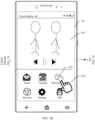
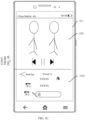
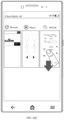
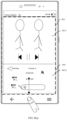
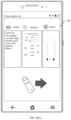
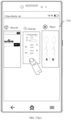
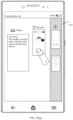
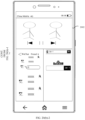
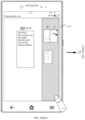
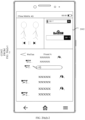
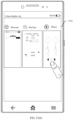
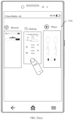
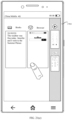
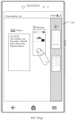
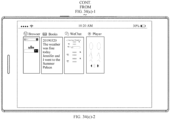
- FIG. 6(a) to FIG. 6(h) are schematic diagrams of scenarios of the interface display method according to an embodiment of this application.
- An application scenario shown in FIG. 6(a) to FIG. 6(d) is that the user receives a WeChat message from a friend A when watching a movie on the electronic device.
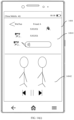
- the electronic device displays an interface 601 in a display area 600.
- the interface 601 is an interface of "Player".
- "Player” is an application currently running in the foreground.
- the electronic device may further run one or more other applications in the background. For example, other applications such as “WeChat” and “Browser” may run in the background.
- the user taps a multi-task button 6011.
- the application window of "Browser” is preferentially displayed.
- the application window of WeChat is placed on the right of the application windows of "Browser” and "Books”, and can be preferentially displayed.
- the user may need to perform some operations on the multi-task interface to view the application window. For example, if the frequency that "Books" is jointly used with "Player” is relatively low, the user needs to slide the interface 1101 right to view the application window of "Books". That an application window with a high priority is located on the right side in the foregoing is merely an example.
- preferential display is based on a scrolling display rule of the multi-task interface, and an application window that is preferentially viewed by the user is preferentially displayed.
- the user slides down the application window of "WeChat”.
- the electronic device displays an interface 1103.
- the interface 1103 includes an interface of "Player” and an interface of "WeChat”.
- the electronic device displays the interface of "Player” and the interface of "WeChat” in different areas.
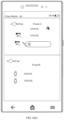
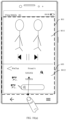
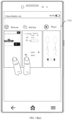
- FIG. 12(a) to FIG. 12(d) are schematic diagrams of a scenario of another interface display method according to an embodiment of this application.
- the application scenario shown in FIG. 12(a) to FIG. 12(d) is that the electronic device displays a home screen and the user wants to simultaneously watch a video and chat with a friend A by using the electronic device.
- the electronic device displays an interface 1201, and the interface 1201 is a home (Home) screen.
- the electronic device runs one or more applications in the background. For example, applications such as “Player”, “WeChat”, and “Browser” run in the background.
- the user taps a button 6011.
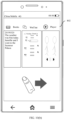
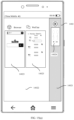
- the electronic device displays a multi-task interface (for example, an interface 1202).
- the interface 1202 includes application windows of "Player”, “WeChat”, and “Browser”.
- FIG. 12(b) and FIG. 12(c) the user slides down the application window of "WeChat” and the application window of "Player”.
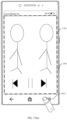
- the electronic device displays an interface 1203.
- the interface 1203 includes an interface of "Player” and an interface of "WeChat”.
- the display area 600 is divided into a display area 12031 and a display area 12032.
- the interface of "Player” is displayed in the display area 12031, and the interface of "WeChat” is displayed in the display area 12032.
- the electronic device displays the interface of "Player” and the interface of "WeChat” in different areas in the display area 600.
- Step 1302 The electronic device receives an operation A performed on the display area A.
- a size of the first area may be less than a size of the second area, so that the user can view application windows of more applications that are not displayed in the display area A.
- a width of the first area may be less than a width of the second area.
- the electronic device may arrange the application windows of the plurality of applications based on running time of the applications, usage frequencies of the applications, names of the applications, types of the applications, or the like.
- the electronic device may preferentially display an application window of an application having a relatively high frequency of being jointly used with the application running in the foreground.
- the electronic device may preferentially display an application window of an application having a relatively high frequency of being jointly used with the first application.
- Step 1304 The electronic device receives an operation C of the user.
- the operation C may be moving application windows of one or more second applications in the second area to the first area. It may be understood that the second application is any one or more applications, selected by the user, that are to be displayed in different areas.
- the moving application windows of the one or more second applications to the first area includes: moving the application window of the second application, so that the application window of the second application partially overlaps the first area. In other words, the user does not need to completely move the application window of the second application to the first area.
- the electronic device may display an animation effect that the application window of the second application is completely moved to the first area.
- the electronic device may reduce display of the application window of the second application.
- Step 1305 In response to the operation C, the electronic device displays, in different areas in the display area A, an interface of the first application and an interface of the second application based on application windows included in the first area.
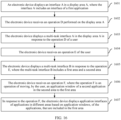
- step 1305 may include step 13051 to step 13055.
- Step 13052 The electronic device determines, based on the position information of the application window of each application in the first area, a display position of an interface of the application.
- a relative position relationship between the application windows, of the applications, that are included in the first area may be the same as a relative position relationship between interfaces of the applications displayed in different areas.
- an interface of the application is accordingly located on the left side of an interface of the another application.
- the position relationship includes but is not limited to: left, right, upper, middle, lower, upper right, lower left, lower right, upper left, and the like.
- a relative position relationship between the application window of each application and the first area is the same as a relative position relationship between the interface of the application and the display area A.
- an application window of an application is located in an upper half area of the first area, an interface of the application is displayed in an upper half display area of the display area A.
- Step 13053 The electronic device obtains a quantity of the application windows included in the first area.
- Step 13054 The electronic device determines, based on the quantity of the application windows, a quantity of display areas included in the display area A.
- the electronic device divides the display area A into N display areas, and respectively displays interfaces of the N applications.
- N is an integer greater than or equal to 2.
- Step 13055 The electronic device displays an interface B based on the display positions and the quantity determined in the foregoing steps.
- step 13051 and step 13053 are not limited in this embodiment of this application.
- Step 13051 may be performed first, or step 13053 may be performed first, or step 13051 and step 13053 may be simultaneously performed.
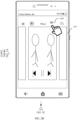
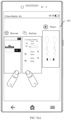
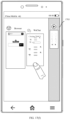
- FIG. 14(a) to FIG. 14(i) are schematic diagrams of a scenario of the another interface display method according to an embodiment of this application.
- the electronic device displays an interface 1401 in a display area 600.
- the interface 1401 is an interface of "Player”.
- the electronic device may run one or more applications in a background. For example, applications such as “WeChat”, “Browser”, and “Books” run in the background.
- the user taps a multi-task button 6011.
- the electronic device displays an interface 1402 in the display area 600.
- the interface 1402 is a multi-task interface.
- the interface 1402 includes application windows 14023 and 14024 of running applications such as "Player”, “WeChat”, “Browser", and "Books”.
- An application window 14024 of a first application (for example, "Player") is displayed in a first area 14021, and the application windows 14023 of other running applications (such as “WeChat”, “Browser”, and “Books”) are displayed in a second area 14022.
- a width of the first area 14021 is less than a width of the second area 14022.
- the user touches an application window of "WeChat” in the second area, drags the application window of "WeChat” to the first area, and releases the touch on the application window of "WeChat”.
- the application window of "WeChat” is moved to the first area 14021.
- the application window of "WeChat” As shown in FIG. 14(b) to FIG. 14(d) , as the application window of "WeChat” is moved to the first area 14021, the application window of "WeChat” gradually becomes smaller until the application window of "WeChat” is less than or equal to the width of the first area.
- the application window of "WeChat” may be moved below an application window of "Player”, or may be moved above an application window of "Player”.
- the application window of "WeChat” is moved to the first area.
- the first area 14021 includes two application windows: the application window of "WeChat” and the application window of "Player".
- the application window of "WeChat” is located below the application window of "Player”.
- the electronic device displays an interface 1403.
- the interface 1403 includes an interface of "WeChat” and an interface of "Player”.
- An upper half interface is the interface of "WeChat", and a lower half interface is the interface of "Player”.
- the display area 600 is divided into two display areas: a display area 14031 and a display area 14032.
- the display area 14031 is located above the display area 14032.
- the interface of "Player” is displayed in the display area 14031, and the interface of "WeChat” is displayed in the display area 14032.
- the first area 14021 includes two application windows: the application window of "WeChat” and the application window of "Player”.
- the application window of "WeChat” is located above the application window of "Player”.
- the electronic device displays an interface 1404.
- the interface 1404 includes an interface of "WeChat” and an interface of "Player”. In this case, different from FIG.
- an upper half interface of the interface 1404 is the interface of "WeChat", and a lower half interface is the interface of "Player”.
- the display area 600 is divided into two display areas: a display area 14041 and a display area 14042.
- the display area 14041 is located above the display area 14042. In this case, different from FIG. 14(f) , the interface of "Player” is displayed in the display area 14052, and the interface of "WeChat" is displayed in the display area 14051.
- the quantity of the application windows of the applications in the first area is the same as a quantity of interfaces, of applications, that are included in the interface B.
- the relative position relationship between the application windows of the applications in the first area is the same as a relative position relationship between the interfaces of the applications on the interface B. For example, if an application window of an application in the first area is located above an application window of another application in the first area, when the electronic device displays the interface B, an interface of the application is accordingly located above an interface of the another application. If an application window of an application in the first area is located below an application window of another application in the first area, when the electronic device displays the interface B, an interface of the application is accordingly located below an interface of the another application.
- the position relationship includes but is not limited to: left, right, upper, middle, lower, upper right, lower left, lower right, upper left, and the like.
- the user may specify display positions of interfaces of applications displayed in different areas.
- FIG. 15(a) to FIG. 15(f) are schematic diagrams of a scenario of the another interface display method according to an embodiment of this application.
- the application scenario shown in the figure is that the user simultaneously operates a plurality of application windows by using different fingers, and moves the application windows of a plurality of applications (for example, application windows of "Browser” and "WeChat") to the first area.
- the electronic device displays an application interface of "Player” in a display area 600.
- the user taps a multi-task button 6011.
- the electronic device may display a multi-task interface (for example, an interface 1402).
- a multi-task interface for example, an interface 1402.
- the application windows of "WeChat” and “Browser” are moved below the application window of "Player". After a part of the application window of "WeChat” overlaps the first area, the user releases the finger that touches the application window of "WeChat".
- the electronic device may display an animation effect that the application windows of "WeChat” and "Browser” are completely moved to the first area.
- the first area 14021 includes application windows of three applications: the application window of "WeChat", the application window of "Browser", and the application window of "Player".
- the application window of "Browser” is located below the application window of "WeChat", and the application window of "WeChat” is located below the application window of "Player”.
- the electronic device displays an interface 1503.
- the interface 1503 includes an interface of "Browser", an interface of "WeChat”, and an interface of "Player".
- An upper third of the interface is the interface of "Player”
- a middle third of the interface is the interface of "WeChat”
- a lower third of the interface is the interface of "Browser”.
- the display area 600 is divided into three display areas: a display area 15031, a display area 15032, and a display area 15033.
- the display area 15031 is located above the display area 15032, and the display area 15032 is located above the display area 15033.
- the interface of "Player” is displayed in the display area 15031
- the interface of "WeChat” is displayed in the display area 15032
- the interface of "Browser” is displayed in the display area 15033.
- the electronic device displays the interface of "Browser", the interface of "WeChat”, and the interface of "Player” in different areas in the display area 600.
- the electronic device displays the interface of "Browser", the interface of "WeChat”, and the interface of "Player” in different areas.
- the interface of "WeChat” is displayed in the display area 15031
- the interface of "Browser” is displayed in the display area 15032
- the interface of "Player” is displayed in the display area 15033.
- an embodiment of this application provides another interface display method. As shown in FIG. 16 , the method includes the following steps.
- Step 1601 An electronic device displays an interface A in a display area A.
- the interface A includes an application interface of a first application.
- Step 1602 The electronic device receives an operation D performed by the user on the display area A.
- Step 1607 In response to the operation F, the electronic device displays application interfaces of applications in different areas based on application windows, of the applications, that are included in the first area.
- FIG. 17(a) to FIG. 17(i) are schematic diagrams of a scenario of the another interface display method according to an embodiment of this application.
- the electronic device displays an interface 1701 in a display area 600.
- the interface 1701 is an interface of "Player”.
- the electronic device runs one or more applications in a background. For example, “WeChat”, “Browser”, and “Books” run in the background.
- the user taps a button 6011.
- the electronic device displays a multi-task interface (for example, an interface 1702).
- the interface 1702 includes application windows of "Player”, “WeChat”, “Browser”, and “Books”.
- the electronic device arranges the application windows based on running time of the applications.
- the user moves the application window of "WeChat” to the first area.
- the application window of "WeChat” may gradually become smaller until a width of the application window is less than a width of the first area and the application window is placed in the first area.
- the electronic device displays an interface 1704.
- the interface 1704 includes an interface of "Player” and an interface of "WeChat”. The electronic device displays the interface of "Player” and the interface of "WeChat” in different areas.
- the electronic device displays the interface 1804. This is inconvenient for the user to separately adjust positions of application windows of a plurality of second applications in the first area. Therefore, optionally, the electronic device may display the interfaces of the applications in different areas after receiving the operation F. In other words, the electronic device does not perform area-based display until the electronic device receives the operation F of the user (for example, the operation of tapping the first area by the user). Therefore, before the electronic device receives the operation F, the user may adjust positions of the application windows of the one or more applications in the first area, move the application windows of the one or more applications out of the first area, or move in application windows of one or more applications to the first area.
- FIG. 19(a) to FIG. 19(i) are schematic diagrams of a scenario of another interface display method.
- the electronic device displays an interface 1701.
- the user taps a multi-task button 6011.
- the electronic device displays an interface 1702.
- the user touches and holds an application window of "WeChat”.
- the electronic device displays an interface 1703.
- FIG. 19(d) to FIG. 19(g) after moving the application window of "WeChat" to a first area, the user moves an application window of "Browser" to the first area.
- the user taps the first area.
- the first area includes application windows of three applications. From top to bottom, the application windows are the application window of "Browser", an application window of "Player”, and the application window of "WeChat”.
- the electronic device displays an interface 1904.
- the interface 1904 includes an interface of "WeChat", an interface of "Player”, and an interface of "Browser".
- An upper third of the interface is the interface of "Browser”
- a middle third of the interface is the interface of "Player”
- a lower third of the interface is the interface of "WeChat”.
- the electronic device displays the interface of "WeChat", the interface of "Player", and the interface of "Browser” in different areas.
- the user may move application windows of any one or more applications out of the first area.
- the any one or more applications may include the first application.
- the user moves the application window of "Books” out of the first area, and then taps the first area.
- the electronic device does not display an application interface of "Books" in an area-based manner.
- FIG. 20(a)-1 to FIG. 20(d)-2 are schematic diagrams of a scenario of another interface display method.
- FIG. FIG. 20(a)-1 to FIG. 20(d)-2 separately show different interfaces (for example, an interface 2001, an interface 2002, an interface 2003, and an interface 2004) displayed by the electronic device based on different positions of the application windows in the first area.
- FIG. 21(a) to FIG. 21(i) are schematic diagrams of a scenario of the another interface display method according to an embodiment of this application.
- the electronic device displays an interface 1701.
- the user taps a multi-task button 6011.
- the electronic device displays an interface 1702.
- the user touches and holds an application window of an application (for example, "Player").
- the electronic device displays an interface 1703.
- the user taps an application window of "WeChat”. As shown in FIG. 21 (d)
- the electronic device in response to that the user taps the application window of "WeChat", the electronic device moves the application window of "WeChat” to a first area. In this case, the application window of "WeChat” is located below the application window of "Player”. Still as shown in FIG. 21(e) , the electronic device taps an application window of "Browser". As shown in FIG. 21(f) , in response to that the user taps the application window of "Browser", the electronic device moves the application window of "Browser" to the first area. In this case, the application window of "Browser" is located below the application window of "WeChat". As shown in FIG. 21(g) to FIG.
- the user moves the application window of "Browser” above the application window of "Player”. Then, still as shown in FIG. 21(h) , the user taps the first area.
- the first area includes application windows of three applications. From top to bottom, the application windows are the application window of "Browser", the application window of "Player”, and the application window of "WeChat”.
- the electronic device displays an interface 2104.
- the interface 2104 includes an interface of "WeChat", an interface of "Player", and an interface of "Browser".
- An upper third of the interface is the interface of "Browser”
- a middle third of the interface is the interface of "Player”
- a lower third of the interface is the interface of "WeChat”.
- the electronic device displays the interface of "WeChat”, the interface of "Player”, and the interface of "Browser” in different areas.
- the user may first tap or double-tap or touch and hold an application window of an application to move the application window of the application to the first area, and then adjust a position of the application window of the application by moving the application window of the application. Finally, the user taps the first area. In response to that the user taps the first area, the electronic device displays an application interface of the application in an area-based manner.
- tapping the first area is used as an example for description. It may be understood that the tapping the first area may be replaced with another operation, for example, double-tapping a second area.
- FIG. 19(a) to FIG. 21(i) a method in which a multi-task interface is first displayed and then another multi-task interface is displayed is used as an example for description. It may be understood that the embodiments in FIG. 19(a) to FIG. 21(i) are applicable to the method described in FIG. 13 to FIG. 14(i) .
- FIG. 22(a) to FIG. 22(c) are schematic diagrams of a scenario of another interface display method according to an embodiment of this application.
- the electronic device displays an interface 2201 in a display area 2200.
- the interface 2201 includes an interface of "Player” and an interface of "WeChat”.
- the electronic device displays the interface of "Player” in a display area 22011, and displays the interface of "WeChat” in a display area 22012.
- the display area 2200 includes the display area 22011 and the display area 22012.
- the interface 2201 may include multi-task buttons 22022a, 22022b, and 22021.
- the multi-task button 22022a is used to indicate the electronic device to display a multi-task interface in the display area 22011.
- the multi-task button 22022b is used to indicate the electronic device to display a multi-task interface in the display area 22012.
- a multi-task button (for example, the multi-task button 22022a or the multi-task button 22022b) used to indicate the electronic device to display a multi-task interface in a display area may be located at an edge, for example, a lower edge, of the display area.
- the multi-task button 22021 is used to indicate the electronic device to display a multi-task interface in the display area 2200 (which includes the display areas 22011 and 22012).
- a multi-task button (for example, the multi-task button 22021) used to indicate the electronic device to display one multi-task interface in a plurality of display areas may be located at one end (as shown in FIG. 32(a) and FIG.
- the electronic device displays a multi-task interface (for example, an interface 2203) in the display area 22011.
- the interface 2203 includes an application window of "WeChat”, an application window of "Books”, an application window of "Browser", and an application window of "Player”.
- the application window of "WeChat”, the application window of "Books”, and the application window of "Browser” are displayed in the display area 22011.
- the user slides down the application window of "Browser”.
- the electronic device displays an interface 2204 in the display area 22011.
- the interface 2204 includes an interface of "Player” and an interface of "Browser”.
- the electronic device displays the interface of "Player” and the interface of "Browser” in different areas in the display area 22011. In this case, display content in the display area 22012 is still an interface of "WeChat”.
- the electronic device may display interfaces of one or more applications in different areas in a single display area or a display area including a plurality of display areas, without changing display of another display area.
- the electronic device may display a home screen, to avoid repeatedly displaying same content in different display areas.
- FIG. 23(a) to FIG. 23(c) are schematic diagrams of a scenario of another interface display method according to an embodiment of this application.
- the electronic device displays an interface 2201 in a display area 2200.
- the user taps a multi-task button 22022a.
- the electronic device displays an interface 2203 in a display area 22011.
- the user slides down an application window of "WeChat”.
- the application window of "WeChat” is displayed in a display area 22012. Therefore, as shown in FIG.
- the electronic device in response to that the user slides down the application window of "WeChat", the electronic device displays an interface 2304 in the display area 22011.
- the interface 2304 includes an interface of "Player” and the home screen.
- the electronic device displays the interface of "Player” and the home screen in different areas in the display area 22011.
- the electronic device may display an interface that is not displayed in another display area.
- FIG. 24(a) to FIG. 24(c) are schematic diagrams of a scenario of another interface display method according to an embodiment of this application.
- the application scenario shown in FIG. 24(a) to FIG. 24(c) is that the user watches a video when chatting with a friend A. In this case, the user receives a new message from a friend B.
- "WeChat" includes a dialog interface 2402 with the friend A and a dialog interface 2404 with the friend B.
- the electronic device displays an interface 2401 in a display area 2200.
- the interface 2401 includes an interface of "Player” and an interface (for example, the interface 2402) of "WeChat”.
- the display area 2200 includes a display area 22011 and a display area 22012.
- the electronic device displays the interface of "Player” in the display area 22011, and displays the interface (for example, the interface 2402) of "WeChat” in the display area 22012.
- the interface 2204 may include multi-task buttons 22022a, 22022b, and 22021. The user taps the multi-task button 22022a. As shown in FIG.
- the electronic device in response to that the user taps the multi-task button 22022a, the electronic device displays a multi-task interface (for example, an interface 2403) in the display area 22011.
- the interface 2403 includes an application window of "WeChat”, an application window of "Books”, an application window of "Browser", and an application window of "Player".
- the application window of "WeChat”, the application window of "Books”, and the application window of "Browser” are displayed in the display area 22011. The user slides down the application window of "WeChat”.
- this application provides another interface display method.
- the electronic device displays an interface 2501 in a display area 2500.
- the interface 2501 includes an interface of "Player” and an interface of "WeChat” (for example, a dialog interface with a friend A).
- the display area 2500 includes a display area 25011 and a display area 25012.
- the interface of "Player” is displayed in the display area 25011
- the interface of "WeChat” is displayed in the display area 25012.
- FIG. 25(b) when the electronic device receives a new message from a friend B, the electronic device displays a new message notification 2502. It may be understood that the new message notification 2502 corresponds to an interface of "WeChat” (for example, a dialog interface with the friend B).
- the user moves, double-taps, or touches and holds the new message notification 2502.
- the electronic device displays an interface 2503 in the display area 2500.
- the interface 2503 includes one interface of "WeChat” (for example, the dialog interface with the friend A), another interface of "WeChat” (for example, the dialog interface with the friend B), and the interface of "Player”.
- the new message notification 2502 may alternatively be moved to a display area (for example, the display area 25012).
- the electronic device in response to the operation performed on the new message notification, displays, in an area-based manner, the interface corresponding to the new message notification in the display area.
- FIG. 26(a) when the electronic device receives the new message from the friend B, the electronic device displays the new message notification 2502. The user moves the new message notification 2502 to the display area 25012. As shown in FIG. 26(c) , in response to that the user moves the new message notification 2502 to the display area 25012, the electronic device displays an interface 2603 in the display area 25012.
- the interface 2603 includes one interface of "WeChat” (for example, the dialog interface with the friend A) and another interface of "WeChat” (for example, the dialog interface with the friend B).
- the electronic device may determine, based on a position in the display area and to which the new message notification 2502 is moved, a position of the interface that corresponds to the new message notification and that is displayed in the area-based manner. For example, as shown in FIG. 26(b) , when the new message notification 2502 is moved to a lower half of the display area 25012, as shown in FIG. 26(c) , a lower half of the interface 2603 is the interface corresponding to the new message notification (for example, a second window interface of "WeChat").
- the user may quickly display, in the area-based manner, the interface corresponding to the new message notification.
- the user may tap an application window of an application to display an interface of the application.
- the electronic device displays an interface 2201 in a display area 2200.
- the user taps a multi-task button 22022a.
- the electronic device displays an interface 2203 in a display area 22011.
- the user taps an application window of "Browser” to display an interface of the application.
- FIG. 27(c) in response to the operation (namely, tapping the application window of "Browser"), the electronic device displays the interface of "Browser" in the display area 22011.
- the electronic device may display a home screen in the display area.
- the electronic device displays the interface 2201 in the display area 2200.
- the user taps the multi-task button 22022a.
- the electronic device displays the interface 2203 in the display area 22011.
- the user taps an application window of "WeChat” to display an interface of the application.
- the application window of "WeChat” is displayed in a display area 2102. Therefore, as shown in FIG. 27(f) , the electronic device displays the home screen in the display area 22011.
- the electronic device may display, in the display area, an interface that is of the application and that is not displayed in another display area.
- an application selected by the user through tapping, that is to be displayed in an area-based manner
- the electronic device may display, in the display area, an interface that is of the application and that is not displayed in another display area.
- the interface 2403 includes an application window of "WeChat”, an application window of "Books”, an application window of "Browser", and an application window of "Player”.
- the application window of "WeChat”, the application window of "Books”, and the application window of "Browser” are displayed in the display area 22011.
- the user taps the application window of "WeChat”.
- "WeChat” includes a plurality of interfaces.
- the interface 2402 is displayed in the display area 21012, and the interface 2404 is not displayed.
- the electronic device displays the interface 2404 in the display area 22011. In this case, display content in the display area 22012 is still the interface 2402.
- FIG. 29(a) to FIG. 29(d) are schematic diagrams of a scenario of another interface display method according to an embodiment of this application.
- the electronic device displays an interface 2901 in a display area 2200.
- the interface 2901 includes an interface of "Player” and a home screen.
- the display area 2200 includes a display area 22011 and a display area 22012.
- the electronic device displays a multi-task interface (for example, an interface 29032) in the display area 22012.
- the interface 29032 includes the application window of "WeChat”, the application window of "Books”, the application window of "Browser”, and the application window of "Player”.
- the user slides down the application window of "Browser” and the application window of "WeChat” on the interface 29032.
- the user taps the application window of "Books” on the interface 29031.
- FIG. a multi-task interface for example, an interface 29032
- the user may alternatively slide down the application window of "Browser” and the application window of "WeChat” on the interface 29032, and slide down the application window of "Books” on the interface 29031.
- the electronic device in response to sliding down the application window of "Browser” and the application window of "WeChat” on the interface 29032, displays the interface of "WeChat” and the interface of "Browser” in the display area 22012.
- the electronic device displays the interface of "Books” and the interface of "Player” in the display area 22021.
- FIG. 30(a) to FIG. 30(f) are schematic diagrams of a scenario of the another interface display method according to an embodiment of this application.
- the electronic device displays an interface 3001 in a display area 2200.
- the interface 3001 includes an interface of "Player” and an interface of "Calendar”.
- the display area 2200 includes a display area 22011 and a display area 22012.
- the electronic device displays the interface of "Player” in the display area 22011, and displays the interface of "Calendar” in the display area 22012.
- the interface 3001 may include multi-task buttons 22022a, 22022b, and 22021. The user taps the multi-task button 22022a. As shown in FIG.
- the electronic device in response to that the user taps the multi-task button 22022a, the electronic device displays a multi-task interface (for example, an interface 30031) in the display area 22011.
- the interface 30031 includes an application window of "WeChat”, an application window of "Books”, an application window of "Browser", an application window of "Calendar”, and an application window of "Player”.
- the user moves the application window of "WeChat” and the application window of "Browser” on the interface 29031 to the display area 22012.
- application windows of a plurality of applications displayed in a display area are moved to another display area (for example, the display area 22012).
- the electronic device displays an interface 3003 in the display area 22012.
- the interface 3003 includes an interface of "WeChat” and an interface of "Browser".
- the electronic device displays the interface of "WeChat” and the interface of "Browser” in different areas in the display area 22012.
- the user taps the application window of "Books” on the interface 29031.
- FIG. 30(f) in response to that the user taps the application window of "Books” on the interface 29021, the electronic device displays an interface of "Books" in the display area 22021.
- FIG. 31(a) to FIG. 31(f) are schematic diagrams of a scenario of another interface display method according to an embodiment of this application.
- FIG. 31(a) is the same as FIG. 30(a)
- FIG. 31(b) is the same as FIG. 30(b) . Details are not described herein again.
- the electronic device receives an operation G of the user.
- the operation G is moving an application window of "Browser" on an interface 29031 to a display area 22012.
- an application window of an application displayed in a display area for example, a display area 22011
- the electronic device displays an interface 3103 in the display area 22012.
- the interface 3103 is an interface of "Browser". Then, still as shown in FIG. 30(e) , the user taps an application window of "Books” on the interface 29031. As shown in FIG. 30(f) , in response to that the user taps the application window of "Books” on the interface 29021, the electronic device displays an interface of "Books" in the display area 22021.
- the method shown in FIG. 30(a) to FIG. 30(f) allows the user to perform only one operation to display the multi-task interface in a display area, so as to change content displayed in two display areas.
- an operation used to display a multi-task interface in a display area includes but is not limited to the manner described in the foregoing embodiment.
- FIG. 32(a) to FIG. 32(c) are schematic diagrams of a scenario of another interface display method according to an embodiment of this application.
- the application scenario shown in FIG. 31(a) to FIG. 31(f) is that the user simultaneously watches a video and replies to a WeChat message of a friend A by using the electronic device.
- An application window of "Player” is displayed in a display area 22011.
- An application window of "WeChat” is displayed in a display area 22012.
- the electronic device displays an interface 3201 in a display area 2200.
- the interface 3201 includes an interface of "Player” and an interface of "WeChat”.
- the electronic device displays the interface of "Player” in the display area 22011, and displays the interface of "WeChat” in the display area 22012.
- the display area 2200 includes the display area 22011 and the display area 22021.
- a multi-task button 22021 is used to indicate the electronic device to display a multi-task interface in the display area 2200. The user taps the multi-task button 22021. As shown in FIG.
- the electronic device displays a multi-task interface (for example, an interface 2203) in the display area 2200.
- the interface 2203 includes the application window of "WeChat”, an application window of "Books", an application window of "Browser", and the application window of "Player”.
- the user taps the application window of "Books”.
- FIG. 32(c) in response to that the user taps the application window of "Books", the electronic device displays the interface of "Books" in the display area 2200.
- FIG. 33(a) to FIG. 33(f) are schematic diagrams of a scenario of another interface display method according to an embodiment of this application.
- the electronic device displays an interface 3301 in a display area 3300.
- the interface 3301 includes an interface of "Player”, an interface of "WeChat”, and an interface of "Browser".
- the electronic device displays the interface of "Player” in a display area 33001, displays the interface of "WeChat” in a display area 33003, and displays the interface of "Browser” in a display area 33004.
- the display area 33003 includes the display area 33001 and a display area 33002.
- a display area 33006 includes the display area 33001 and the display area 33002. The user may slide a plurality of display areas through multi-point sliding to display a multi-task interface in the plurality of display areas.
- the electronic device when the user slides the display area 33003 and the display area 33004 through multi-point sliding, as shown in FIG. 33(b) , in response to the operation, the electronic device combines the display area 33003 and the display area 33004, and displays the multi-task interface in the combined display area 33002.
- the electronic device when the user slides the display area 33001 and the display area 33003 through multi-point sliding, as shown in FIG. 33(d) , in response to the operation A, the electronic device combines the display area 33001 and the display area 33003, and displays the multi-task interface in the combined display area 33005.
- a combined display area may be different from superimposition of display areas that are combined.
- the electronic device combines the display area 33001, the display area 33003, and the display area 33004, and displays the multi-task interface in a combined display area 3300.
- multi-point sliding is used as an example for description in FIG. 33(a) to FIG. 33(f) . It may be understood that, as shown in FIG. FIG. 34(a)-1 to FIG. 34(c)-2 , the multi-point sliding operation may alternatively be replaced with another operation, for example, a single-point sliding operation.
- a sliding track may be a straight line or a curve.
- the multi-task button may further be used to adjust the size of each display area.
- the user may slide the multi-task button in a direction perpendicular to a division line to adjust the size of each display area divided by the division line.
- a length of the multi-task button may vary with a size of the display area.
- the user may slide a multi-task button 3504 left, to reduce a width of a display area 3501 and increase widths of a display area 3502 and a display area 3503. It may be understood that a reduced width of the display area 3501 is the same as an increased width of the display area 3502 or the display area 3503.
- the operation G may be sliding from a display area to another display area.
- the electronic device combines display areas on which the sliding operation is performed, and displays the multi-task interface in the combined display area.
- An embodiment of this application discloses an electronic device, including a display, a processor, a memory, one or more sensors, an application, and a computer program.
- the foregoing components may be connected through one or more communications buses.
- the one or more computer programs are stored in the memory and are configured to be executed by the one or more processors.
- the one or more computer programs include instructions, and the instructions may be used to enable the electronic device to perform the steps in the foregoing embodiments.
- the one or more sensors may include a touch sensor.
- the processor may be specifically the processor 110 shown in FIG. 3
- the memory may be specifically the internal memory 121 and/or the external memory shown in FIG. 3
- the display may be specifically the display 194 shown in FIG. 3
- the sensor may be specifically one or more sensors in the sensor module 180 shown in FIG. 3
- the touch sensor may be the touch sensor 180K shown in FIG. 3 . This is not limited in this embodiment of this application.
- an embodiment of this application further provides a graphical user interface (GUI) on an electronic device.
- GUI graphical user interface
- the graphical user interface specifically includes a graphical user interface displayed when the electronic device performs the foregoing method embodiments.
- All or some of the foregoing embodiments may be implemented by using software, hardware, firmware, or any combination thereof.
- a software program is used to implement the embodiments, all or some of the embodiments may be implemented in a form of a computer program product.
- the computer program product includes one or more computer instructions. When the computer instructions are loaded and executed on a computer, the procedures or functions according to the embodiments of this application are all or partially generated.
- the computer may be a general-purpose computer, a dedicated computer, a computer network, or another programmable apparatus.
- the computer instructions may be stored in a computer-readable storage medium or may be transmitted from a computer-readable storage medium to another computer-readable storage medium.
- the computer instructions may be transmitted from a website, computer, server, or data center to another website, computer, server, or data center in a wired (for example, a coaxial cable, an optical fiber, or a digital subscriber line (DSL)) or wireless (for example, infrared, radio, or microwave) manner.
- the computer-readable storage medium may be any usable medium accessible by a computer, or a data storage device, such as a server or a data center, integrating one or more usable media.
- the usable medium may be a magnetic medium (for example, a floppy disk, a hard disk, or a magnetic tape), an optical medium (for example, a DVD), a semiconductor medium (for example, a solid state disk (Solid State Disk, SSD)), or the like.
- a magnetic medium for example, a floppy disk, a hard disk, or a magnetic tape
- an optical medium for example, a DVD
- a semiconductor medium for example, a solid state disk (Solid State Disk, SSD)
Landscapes
- Engineering & Computer Science (AREA)
- Theoretical Computer Science (AREA)
- General Engineering & Computer Science (AREA)
- Physics & Mathematics (AREA)
- General Physics & Mathematics (AREA)
- Human Computer Interaction (AREA)
- Software Systems (AREA)
- Computer Hardware Design (AREA)
- Multimedia (AREA)
- User Interface Of Digital Computer (AREA)
- Digital Computer Display Output (AREA)
Applications Claiming Priority (3)
| Application Number | Priority Date | Filing Date | Title |
|---|---|---|---|
| CN201910442738.6A CN112068907A (zh) | 2019-05-25 | 2019-05-25 | 一种界面显示方法和电子设备 |
| PCT/CN2020/091612 WO2020238759A1 (fr) | 2019-05-25 | 2020-05-21 | Procédé d'affichage d'interface et dispositif électronique |
| EP20812622.7A EP3958106B1 (fr) | 2019-05-25 | 2020-05-21 | Procédé d'affichage d'interface et dispositif électronique |
Related Parent Applications (2)
| Application Number | Title | Priority Date | Filing Date |
|---|---|---|---|
| EP20812622.7A Division-Into EP3958106B1 (fr) | 2019-05-25 | 2020-05-21 | Procédé d'affichage d'interface et dispositif électronique |
| EP20812622.7A Division EP3958106B1 (fr) | 2019-05-25 | 2020-05-21 | Procédé d'affichage d'interface et dispositif électronique |
Publications (2)
| Publication Number | Publication Date |
|---|---|
| EP4488990A2 true EP4488990A2 (fr) | 2025-01-08 |
| EP4488990A3 EP4488990A3 (fr) | 2025-03-19 |
Family
ID=73553777
Family Applications (2)
| Application Number | Title | Priority Date | Filing Date |
|---|---|---|---|
| EP20812622.7A Active EP3958106B1 (fr) | 2019-05-25 | 2020-05-21 | Procédé d'affichage d'interface et dispositif électronique |
| EP24191607.1A Withdrawn EP4488990A3 (fr) | 2019-05-25 | 2020-05-21 | Procédé d'affichage d'interface et dispositif électronique |
Family Applications Before (1)
| Application Number | Title | Priority Date | Filing Date |
|---|---|---|---|
| EP20812622.7A Active EP3958106B1 (fr) | 2019-05-25 | 2020-05-21 | Procédé d'affichage d'interface et dispositif électronique |
Country Status (4)
| Country | Link |
|---|---|
| US (1) | US12204919B2 (fr) |
| EP (2) | EP3958106B1 (fr) |
| CN (1) | CN112068907A (fr) |
| WO (1) | WO2020238759A1 (fr) |
Families Citing this family (8)
| Publication number | Priority date | Publication date | Assignee | Title |
|---|---|---|---|---|
| CN114691066B (zh) * | 2020-12-31 | 2025-08-15 | 华为技术有限公司 | 一种应用的显示方法及电子设备 |
| CN114554299A (zh) * | 2022-01-20 | 2022-05-27 | 海信视像科技股份有限公司 | 一种显示设备及分屏显示方法 |
| CN114647395A (zh) * | 2022-03-28 | 2022-06-21 | 北京小米移动软件有限公司 | 投屏方法、装置、电子设备及存储介质 |
| CN114895820B (zh) * | 2022-04-12 | 2024-04-19 | 西藏腾虎技术发展有限公司 | 一种基于人机交互的显示控制方法 |
| CN116088716B (zh) * | 2022-06-13 | 2023-12-08 | 荣耀终端有限公司 | 窗口管理方法和终端设备 |
| CN117827070A (zh) * | 2022-09-29 | 2024-04-05 | 华为技术有限公司 | 界面显示方法及电子设备 |
| CN116048317B (zh) * | 2023-01-28 | 2023-08-22 | 荣耀终端有限公司 | 一种显示方法及装置 |
| CN116048708B (zh) * | 2023-03-31 | 2024-02-23 | 成都齐之之知识产权运营有限公司 | 基于人工智能的软件窗口调整方法、系统、设备和介质 |
Family Cites Families (12)
| Publication number | Priority date | Publication date | Assignee | Title |
|---|---|---|---|---|
| US9207717B2 (en) * | 2010-10-01 | 2015-12-08 | Z124 | Dragging an application to a screen using the application manager |
| KR101961860B1 (ko) | 2012-08-28 | 2019-03-25 | 삼성전자주식회사 | 사용자 단말 장치 및 그 제어 방법 |
| KR101957173B1 (ko) * | 2012-09-24 | 2019-03-12 | 삼성전자 주식회사 | 터치 디바이스에서 멀티윈도우 제공 방법 및 장치 |
| US10585553B2 (en) * | 2012-12-06 | 2020-03-10 | Samsung Electronics Co., Ltd. | Display device and method of controlling the same |
| CN103324435B (zh) * | 2013-05-24 | 2017-02-08 | 华为技术有限公司 | 分屏显示的方法、装置及其电子设备 |
| CN106970735B (zh) | 2016-01-14 | 2020-06-23 | 联想(北京)有限公司 | 一种信息处理方法及电子设备 |
| CN106020592A (zh) * | 2016-05-09 | 2016-10-12 | 北京小米移动软件有限公司 | 分屏显示方法及装置 |
| CN106537319A (zh) * | 2016-10-31 | 2017-03-22 | 北京小米移动软件有限公司 | 分屏显示方法及装置 |
| WO2019014859A1 (fr) | 2017-07-18 | 2019-01-24 | 华为技术有限公司 | Procédé d'opération multitâche et dispositif électronique |
| KR20190021141A (ko) * | 2017-08-22 | 2019-03-05 | 삼성전자주식회사 | 멀티 윈도우를 제어하는 전자 장치 및 그 동작 방법 |
| CN107783830B (zh) * | 2017-10-23 | 2020-12-04 | 华为技术有限公司 | 一种多任务管理方法及终端设备 |
| CN109358929A (zh) | 2018-09-26 | 2019-02-19 | 北京小米移动软件有限公司 | 分屏显示方法、装置及存储介质 |
-
2019
- 2019-05-25 CN CN201910442738.6A patent/CN112068907A/zh active Pending
-
2020
- 2020-05-21 EP EP20812622.7A patent/EP3958106B1/fr active Active
- 2020-05-21 EP EP24191607.1A patent/EP4488990A3/fr not_active Withdrawn
- 2020-05-21 WO PCT/CN2020/091612 patent/WO2020238759A1/fr not_active Ceased
- 2020-05-21 US US17/607,031 patent/US12204919B2/en active Active
Also Published As
| Publication number | Publication date |
|---|---|
| EP3958106A4 (fr) | 2022-06-29 |
| US12204919B2 (en) | 2025-01-21 |
| EP3958106B1 (fr) | 2024-09-11 |
| WO2020238759A1 (fr) | 2020-12-03 |
| EP4488990A3 (fr) | 2025-03-19 |
| CN112068907A (zh) | 2020-12-11 |
| EP3958106A1 (fr) | 2022-02-23 |
| US20220214891A1 (en) | 2022-07-07 |
Similar Documents
| Publication | Publication Date | Title |
|---|---|---|
| EP4131911B1 (fr) | Procédé d'interaction entre des interfaces d'application, dispositif électronique et support de stockage lisible par ordinateur | |
| US11893219B2 (en) | Method for quickly invoking small window when video is displayed in full screen, graphic user interface, and terminal | |
| US12135976B2 (en) | Screen display method and electronic device | |
| US12039144B2 (en) | Display information interaction method and related apparatus | |
| US20250036167A1 (en) | Video Call Display Method Applied to Electronic Device and Related Apparatus | |
| US20220300154A1 (en) | Split-Screen Display Processing Method and Apparatus, and Electronic Device | |
| EP4283454A1 (fr) | Procédé d'affichage de gadget logiciel de carte, interface utilisateur graphique et appareil associé | |
| US11921987B2 (en) | System navigation bar display method, system navigation bar control method, graphical user interface, and electronic device | |
| US11687235B2 (en) | Split-screen method and electronic device | |
| US20220269405A1 (en) | Floating Window Management Method and Related Apparatus | |
| EP3958106B1 (fr) | Procédé d'affichage d'interface et dispositif électronique | |
| EP4012544B1 (fr) | Procédé de traitement d'écran partagé et dispositif terminal | |
| US12216899B2 (en) | Display element display method and electronic device | |
| US20230236714A1 (en) | Cross-Device Desktop Management Method, First Electronic Device, and Second Electronic Device | |
| EP4033339A1 (fr) | Procédé d'affichage d'interface utilisateur et dispositif électronique |
Legal Events
| Date | Code | Title | Description |
|---|---|---|---|
| PUAI | Public reference made under article 153(3) epc to a published international application that has entered the european phase |
Free format text: ORIGINAL CODE: 0009012 |
|
| STAA | Information on the status of an ep patent application or granted ep patent |
Free format text: STATUS: THE APPLICATION HAS BEEN PUBLISHED |
|
| AC | Divisional application: reference to earlier application |
Ref document number: 3958106 Country of ref document: EP Kind code of ref document: P |
|
| AK | Designated contracting states |
Kind code of ref document: A2 Designated state(s): AL AT BE BG CH CY CZ DE DK EE ES FI FR GB GR HR HU IE IS IT LI LT LU LV MC MK MT NL NO PL PT RO RS SE SI SK SM TR |
|
| REG | Reference to a national code |
Ref country code: DE Ref legal event code: R079 Free format text: PREVIOUS MAIN CLASS: G09G0005140000 Ipc: G06F0003048860 |
|
| PUAL | Search report despatched |
Free format text: ORIGINAL CODE: 0009013 |
|
| AK | Designated contracting states |
Kind code of ref document: A3 Designated state(s): AL AT BE BG CH CY CZ DE DK EE ES FI FR GB GR HR HU IE IS IT LI LT LU LV MC MK MT NL NO PL PT RO RS SE SI SK SM TR |
|
| RIC1 | Information provided on ipc code assigned before grant |
Ipc: G09G 5/14 20060101ALI20250211BHEP Ipc: G06F 3/14 20060101ALI20250211BHEP Ipc: G06F 9/451 20180101ALI20250211BHEP Ipc: G06F 3/0488 20220101ALI20250211BHEP Ipc: G06F 3/04883 20220101ALI20250211BHEP Ipc: G06F 3/0483 20130101ALI20250211BHEP Ipc: G06F 3/0481 20220101ALI20250211BHEP Ipc: G06F 3/0486 20130101ALI20250211BHEP Ipc: G06F 3/04886 20220101AFI20250211BHEP |
|
| STAA | Information on the status of an ep patent application or granted ep patent |
Free format text: STATUS: THE APPLICATION IS DEEMED TO BE WITHDRAWN |
|
| 18D | Application deemed to be withdrawn |
Effective date: 20250920 |