EP4495741A1 - Dispositif de traitement d'informations et procédé de traitement d'informations - Google Patents
Dispositif de traitement d'informations et procédé de traitement d'informations Download PDFInfo
- Publication number
- EP4495741A1 EP4495741A1 EP23770378.0A EP23770378A EP4495741A1 EP 4495741 A1 EP4495741 A1 EP 4495741A1 EP 23770378 A EP23770378 A EP 23770378A EP 4495741 A1 EP4495741 A1 EP 4495741A1
- Authority
- EP
- European Patent Office
- Prior art keywords
- finger
- virtual object
- fingertip
- information processing
- user
- Prior art date
- Legal status (The legal status is an assumption and is not a legal conclusion. Google has not performed a legal analysis and makes no representation as to the accuracy of the status listed.)
- Pending
Links
Images




Classifications
-
- G—PHYSICS
- G06—COMPUTING OR CALCULATING; COUNTING
- G06F—ELECTRIC DIGITAL DATA PROCESSING
- G06F3/00—Input arrangements for transferring data to be processed into a form capable of being handled by the computer; Output arrangements for transferring data from processing unit to output unit, e.g. interface arrangements
- G06F3/01—Input arrangements or combined input and output arrangements for interaction between user and computer
- G06F3/017—Gesture based interaction, e.g. based on a set of recognized hand gestures
-
- G—PHYSICS
- G06—COMPUTING OR CALCULATING; COUNTING
- G06F—ELECTRIC DIGITAL DATA PROCESSING
- G06F3/00—Input arrangements for transferring data to be processed into a form capable of being handled by the computer; Output arrangements for transferring data from processing unit to output unit, e.g. interface arrangements
- G06F3/01—Input arrangements or combined input and output arrangements for interaction between user and computer
-
- G—PHYSICS
- G06—COMPUTING OR CALCULATING; COUNTING
- G06F—ELECTRIC DIGITAL DATA PROCESSING
- G06F3/00—Input arrangements for transferring data to be processed into a form capable of being handled by the computer; Output arrangements for transferring data from processing unit to output unit, e.g. interface arrangements
- G06F3/01—Input arrangements or combined input and output arrangements for interaction between user and computer
- G06F3/011—Arrangements for interaction with the human body, e.g. for user immersion in virtual reality
-
- G—PHYSICS
- G06—COMPUTING OR CALCULATING; COUNTING
- G06F—ELECTRIC DIGITAL DATA PROCESSING
- G06F3/00—Input arrangements for transferring data to be processed into a form capable of being handled by the computer; Output arrangements for transferring data from processing unit to output unit, e.g. interface arrangements
- G06F3/01—Input arrangements or combined input and output arrangements for interaction between user and computer
- G06F3/011—Arrangements for interaction with the human body, e.g. for user immersion in virtual reality
- G06F3/014—Hand-worn input/output arrangements, e.g. data gloves
-
- G—PHYSICS
- G06—COMPUTING OR CALCULATING; COUNTING
- G06F—ELECTRIC DIGITAL DATA PROCESSING
- G06F3/00—Input arrangements for transferring data to be processed into a form capable of being handled by the computer; Output arrangements for transferring data from processing unit to output unit, e.g. interface arrangements
- G06F3/01—Input arrangements or combined input and output arrangements for interaction between user and computer
- G06F3/03—Arrangements for converting the position or the displacement of a member into a coded form
- G06F3/033—Pointing devices displaced or positioned by the user, e.g. mice, trackballs, pens or joysticks; Accessories therefor
- G06F3/0346—Pointing devices displaced or positioned by the user, e.g. mice, trackballs, pens or joysticks; Accessories therefor with detection of the device orientation or free movement in a three-dimensional [3D] space, e.g. 3D mice, 6-DOF [six degrees of freedom] pointers using gyroscopes, accelerometers or tilt-sensors
-
- G—PHYSICS
- G06—COMPUTING OR CALCULATING; COUNTING
- G06F—ELECTRIC DIGITAL DATA PROCESSING
- G06F3/00—Input arrangements for transferring data to be processed into a form capable of being handled by the computer; Output arrangements for transferring data from processing unit to output unit, e.g. interface arrangements
- G06F3/01—Input arrangements or combined input and output arrangements for interaction between user and computer
- G06F3/048—Interaction techniques based on graphical user interfaces [GUI]
- G06F3/0487—Interaction techniques based on graphical user interfaces [GUI] using specific features provided by the input device, e.g. functions controlled by the rotation of a mouse with dual sensing arrangements, or of the nature of the input device, e.g. tap gestures based on pressure sensed by a digitiser
- G06F3/0488—Interaction techniques based on graphical user interfaces [GUI] using specific features provided by the input device, e.g. functions controlled by the rotation of a mouse with dual sensing arrangements, or of the nature of the input device, e.g. tap gestures based on pressure sensed by a digitiser using a touch-screen or digitiser, e.g. input of commands through traced gestures
- G06F3/04883—Interaction techniques based on graphical user interfaces [GUI] using specific features provided by the input device, e.g. functions controlled by the rotation of a mouse with dual sensing arrangements, or of the nature of the input device, e.g. tap gestures based on pressure sensed by a digitiser using a touch-screen or digitiser, e.g. input of commands through traced gestures for inputting data by handwriting, e.g. gesture or text
-
- G—PHYSICS
- G06—COMPUTING OR CALCULATING; COUNTING
- G06T—IMAGE DATA PROCESSING OR GENERATION, IN GENERAL
- G06T19/00—Manipulating three-dimensional [3D] models or images for computer graphics
Definitions
- the present technology relates to an information processing apparatus and an information processing method, and more particularly, to an information processing apparatus and information processing method suitable for use in a case of detecting a gesture of pinching a virtual object.
- AR augmented reality
- MR mixed reality
- the virtual object is visual information superimposed and displayed on the real world in a field of view of the user.
- Patent Document 1 Japanese Patent Application Laid-Open No. 2016-189194
- the present technology has been made in view of such a situation, and enables quick and accurate detection of a gesture of pinching a virtual object.
- An information processing apparatus includes a gesture detection unit that individually detects movement of a hand base portion that is a portion not including fingers of a hand of a user, and movement of a first finger of the hand, and detects a gesture in which the user pinches a virtual object, on the basis of the movement of the hand base portion and the movement of the first finger.
- An information processing method includes individually detecting movement of a hand base portion that is a portion not including fingers of a hand of a user, and predetermined movement of a finger of the hand, and, on the basis of the movement of the hand base portion and the movement of the finger, detecting a gesture in which the user pinches a virtual object.
- movement of a hand base portion that is a portion not including fingers of a hand of a user, and movement of a first finger of the hand are individually detected, and a gesture in which the user pinches a virtual object is detected on the basis of the movement of the hand base portion and the movement of the first finger.
- a gesture of pinching a virtual object 2 may be performed as illustrated in Fig. 1 .
- a user pinches the virtual object 2 by bringing a fingertip (ball) of a thumb and a fingertip (ball) of an index finger of a hand 1 into contact with each other.
- the user moves the hand 1 while keeping the fingertip of the thumb and the fingertip of the index finger in contact with each other, thereby moving the virtual object 2 to a destination.
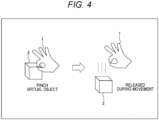
- the user separates the fingertip of the thumb and the fingertip of the index finger from each other, thereby releasing the virtual object 2.
- bringing a fingertip of a thumb and a fingertip of an index finger into contact with each other is simply referred to as bringing the thumb and the index finger into contact with each other.
- separating the fingertip of the thumb and the fingertip of the index finger from each other is simply referred to as separating the thumb and the index finger from each other.
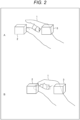
- the user in a case where the user selects and pinches the virtual object 2 from among the virtual object 2 and a virtual object 3 that are close to each other, the user brings fingertips of the thumb and index finger of the hand 1 close to the virtual object 2 in a state where the thumb and the index finger are separated from each other. Then, as illustrated in B of Fig. 2 , the user brings the thumb and index finger of the hand 1 into contact with each other so that the thumb and index finger overlap the virtual object 2 as viewed from the user. Therefore, the user can select and pinch the virtual object 2 from among the virtual object 2 and the virtual object 3.
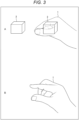
- positions of fingertips of the hand 1 move in both cases where the hand 1 is moved to select the virtual object and where the thumb and the index finger are brought into contact with each other to pinch the virtual object. It is difficult to distinguish whether movement of the fingertips indicates that the user intends to select the virtual object or pinch the virtual object.
- the present technology enables accurate and quick detection of a gesture of pinching the virtual object and a gesture of releasing the virtual object.
- a series of gestures from when a user pinches the virtual object to when the user releases the virtual object is referred to as a pinching gesture.
- Fig. 5 illustrates an embodiment of an information processing system 101 to which the present technology is applied.
- the information processing system 101 includes a fingertip sensor 111, an IMU 112, an IMU 113, and a head-mounted display (HMD) 114.
- a fingertip sensor 111 an IMU 112
- an IMU 113 an IMU 113
- a head-mounted display (HMD) 114 an IMU 114.
- the fingertip sensor 111, the IMU 112, and the IMU 113 are attached to a hand 102 used in a case where a user pinches a virtual object.
- the fingertip sensor 111 is attached to a fingertip of an index finger 102A.
- the fingertip sensor 111 includes a pressure sensor 131, a finger band 132, and a capacitance sensor 133.
- the pressure sensor 131 is disposed so as to be in contact with a ball of the index finger 102A.
- the pressure sensor 131 detects pressure applied to the fingertip (ball) of the index finger 102A.
- the finger band 132 is used to attach the fingertip sensor 111 to the fingertip of the index finger 102A.
- the capacitance sensor 133 is provided outside the finger band 132.
- the capacitance sensor 133 is disposed at substantially the same position as the pressure sensor 131 with the finger band 132 interposed therebetween.
- the capacitance sensor 133 detects a contact state of a body that is in contact with the fingertip of the index finger 102A by detecting capacitance on the fingertip (ball) of the index finger 102A.
- the fingertip sensor 111 transmits, to the HMD 114, sensor data indicating a result of detecting the pressure and capacitance on the fingertip of the index finger 102A.
- the IMU 112 is attached to, for example, a metacarpophalangeal portion corresponding to a metacarpophalangeal bone between the second joint and the third joint of the index finger 102A, and detects acceleration and angular velocity of the index finger 102A.
- the IMU 112 transmits, to the HMD 114, sensor data indicating results of detecting the acceleration and angular velocity of the index finger 102A.
- the IMU 113 is attached to a back of hand 102C.
- the IMU 113 detects acceleration and angular velocity of a portion of the hand 102 excluding fingers (hereinafter, referred to as a hand base portion).
- the hand base portion includes the back of hand 102C and a palm.
- the IMU 113 transmits, to the HMD 114, sensor data indicating the results of detecting the acceleration and angular velocity of the hand base portion of the hand 102.
- the IMU 113 may be attached to a position other than the back of hand 102C (for example, a palm or the like of the hand 102) as long as the acceleration and angular velocity of the hand base portion of the hand 102 can be detected at the position.
- the HMD 114 is worn on a head 103 of the user and implements AR or MR. For example, the HMD 114 superimposes and displays a virtual object on a real world in a field of view of the user.
- the virtual object includes an object imitating a body in the real world, an object that visually transmits various types of information, an object for operating the HMD 114, and the like.
- the HMD 114 detects a pinching gesture by the user on the basis of sensor data from the fingertip sensor 111, the IMU 112, and the IMU 113.
- Fig. 7 illustrates a configuration example of the HMD 114.
- the HMD 114 includes an input unit 151, a sensing unit 152, a communication unit 153, a control unit 154, and an output unit 155.
- the input unit 151 includes various types of input device and operation device, and supplies the control unit 154 with input data that is input by using each device.
- the input data includes, for example, operation data from the operation device, audio data from a microphone, and the like.
- the sensing unit 152 includes an imaging unit 161 and an IMU 162.
- the imaging unit 161 includes, for example, a camera that captures an image in front of a face of the user (a direction in which the face faces) (hereinafter, referred to as a front camera), and a camera that captures an image of an area including eyes of the user (hereinafter, referred to as a user camera).
- the front camera supplies the control unit 154 with an image obtained by image capturing (hereinafter, referred to as a front image).
- the user camera supplies the control unit 154 with an image obtained by image capturing (hereinafter, referred to as a user image).
- the front camera for example, it is desirable to use a camera capable of detecting a depth (distance), such as a time of flight (ToF) camera, so that bone information of fingers of the user can be detected.
- a depth depth
- ToF time of flight
- the IMU 162 detects acceleration and angular velocity of the head of the user wearing the HMD 114.
- the IMU 162 supplies the control unit 154 with sensor data indicating results of detecting the acceleration and angular velocity of the head of the user.
- the communication unit 153 communicates with the fingertip sensor 111, the IMU 112, and the IMU 113, and receives sensor data from each of them.
- the communication unit 153 supplies the received sensor data to the control unit 154.
- a method for communication by the communication unit 153 is not particularly limited, and may be either wired communication or wireless communication.
- the control unit 154 executes control of each unit of the HMD 114 and various types of processing.
- the control unit 154 includes a gesture detection unit 171, a line-of-sight detection unit 172, an information processing unit 173, and an output control unit 174.
- the gesture detection unit 171 detects various types of gestures by the user, on the basis of the sensor data from the fingertip sensor 111, the IMU 112, and the IMU 113, and the front image from the front camera.
- a gesture to be detected includes the above-described pinching gesture.
- the line-of-sight detection unit 172 detects a direction of a line of sight of the user on the basis of the user image from the user camera and the sensor data from the IMU 162.
- the information processing unit 173 performs various types of information processing on the basis of the sensor data from the fingertip sensor 111, the IMU 112, and the IMU 113, the input data from the input unit 151, the front image and user image from the imaging unit 161, the sensor data from the IMU 162, the gesture of the user detected by the gesture detection unit 171, the line of sight of the user detected by the line-of-sight detection unit 172, and the like.
- the various types of information processing include, for example, processing of generating image data for displaying the virtual object.
- the output control unit 174 controls output of various types of information by the output unit 155, on the basis of, for example, a result of processing by the information processing unit 173.
- the output control unit 174 controls output of visual information by a display unit 181. This visual information includes the virtual object.
- the output control unit 174 controls output of auditory information by an audio output unit 182.
- the output control unit 174 controls output of tactile information by a haptics device 183.
- the output unit 155 includes the display unit 181, the audio output unit 182, and the haptics device 183.
- the display unit 181 includes one or more displays, and displays the visual information under control of the output control unit 174. For example, within the field of view of the user, the display unit 181 superimposes and displays a virtual object, which is a type of visual information, on the real world.
- the audio output unit 182 includes one or more audio output devices, and outputs the auditory information under control of the output control unit 174.
- the audio output devices for example, a speaker, headphones, earphones, and the like are conceivable.
- the haptics device 183 outputs the tactile information under control of the output control unit 174.
- the haptics device 183 vibrates a housing of the HMD 114.
- the haptics device 183 is worn on a predetermined portion (a hand, for example) of a body of the user, and transmits tactile information, such as vibration, to the worn portion.
- This processing is started when power of the HMD 114 is turned on, and is ended when the power is turned off, for example.
- Step S1 the information processing system 101 starts sensing. Specifically, the fingertip sensor 111 starts processing of detecting capacitance and pressure on the fingertip of the index finger of the user and transmitting sensor data indicating a detection result to the HMD 114.
- the IMU 112 starts processing of detecting acceleration and angular velocity of the index finger of the user and transmitting sensor data indicating a detection result to the HMD 114.
- the IMU 113 starts processing of detecting acceleration and angular velocity of the hand base portion of the user and transmitting sensor data indicating a detection result to the HMD 114.
- the communication unit 153 of the HMD 114 starts processing of receiving the sensor data from the fingertip sensor 111, the IMU 112, and the IMU 113, and supplying the sensor data to the control unit 154.
- the imaging unit 161 starts processing of capturing an image in front of the face of the user and supplying the obtained front image to the control unit 154. Furthermore, the imaging unit 161 starts processing of capturing an image of the area including the eyes of the user and supplying the obtained user image to the control unit 154.
- the IMU 162 starts processing of detecting the acceleration and angular velocity of the head of the user and supplying the control unit 154 with sensor data indicating a detection result.
- Step S2 the gesture detection unit 171 determines whether or not the position and posture of the hand base portion have changed within a predetermined area.
- the gesture detection unit 171 detects changes in the position and posture of the hand base portion on the basis of the acceleration and angular velocity of the hand base portion. For example, in a case where a change in the position of the hand base portion is less than a predetermined threshold value (hereinafter, referred to as a position threshold value) and a change in the posture of the hand base portion on each axis (x-axis, y-axis, z-axis) is less than a predetermined threshold value (hereinafter, referred to as a posture threshold value), the gesture detection unit 171 determines that the position and posture of the hand base portion have changed within the predetermined area.
- a predetermined threshold value hereinafter, referred to as a position threshold value
- a predetermined threshold value hereinafter, referred to as a predetermined threshold value
- a posture threshold value a predetermined threshold value
- the gesture detection unit 171 determines that the position and posture of the hand base portion have changed within the predetermined area.
- the gesture detection unit 171 determines that at least either the position or posture of the hand base portion has changed beyond the predetermined area.
- the position threshold value is set to 10 mm/sec.
- the posture threshold value is set to 1 degree/sec for each axis.
- Step S2 The determination processing in Step S2 is repeatedly executed until it is determined that the position and posture of the hand base portion have changed within the predetermined area. Meanwhile, in a case where it is determined that the position and posture of the hand base portion have changed within the predetermined area, the processing proceeds to Step S3.
- Step S3 the gesture detection unit 171 determines whether or not the index finger has come into contact with the thumb. For example, in a case where the capacitance on the fingertip of the index finger is less than a predetermined threshold value or the pressure on the fingertip of the index finger is less than a predetermined threshold value, the gesture detection unit 171 determines that the fingertip of the index finger is not in contact with the thumb, and the processing returns to Step S2.
- Step S2 and S3 are repeatedly executed until it is determined in Step S3 that the index finger has been brought into contact with the thumb.
- Step S3 in a case where the capacitance on the fingertip of the index finger is equal to or greater than the predetermined threshold value and the pressure on the fingertip of the index finger is equal to or greater than the predetermined threshold value, the gesture detection unit 171 determines that the index finger is brought into contact with the thumb, and the processing proceeds to Step S4.
- Step S3 it is also possible to detect the contact between the thumb and the index finger on the basis of only the pressure on the fingertip of the index finger.
- the detection accuracy is improved when the capacitance on the fingertip of the index finger is also used.
- the detection accuracy is improved for a case where the index finger is slowly moved to be brought into contact with the thumb.
- a method for detecting a contact between the thumb and the index finger only on the basis of the capacitance on the fingertip of the index finger is not very desirable because there is a possibility that erroneous detection occurs in a case where, for example, the thumb and the index finger accidentally come into contact with each other.
- the gesture detection unit 171 determines whether or not a position of the fingertip of the index finger is within an area of the virtual object. For example, the gesture detection unit 171 detects the position of the fingertip of the index finger in a predetermined coordinate system (a world coordinate system, for example) on the basis of the front image. Then, the gesture detection unit 171 compares, with the position of the fingertip of the index finger, a region in which the virtual object is assumed to be present in the coordinate system described above in a case where the virtual object would exist in the real world (hereinafter, referred to as a virtual object region).
- a virtual object region a region in which the virtual object is assumed to be present in the coordinate system described above in a case where the virtual object would exist in the real world
- the gesture detection unit 171 determines that the position of the fingertip of the index finger is within the area of the virtual object. Meanwhile, in a case where the fingertip of the index finger is not included in the virtual object region, the gesture detection unit 171 determines that the position of the fingertip of the index finger is not within the area of the virtual object.
- the virtual object region does not necessarily need to exactly match a region in which the virtual object is assumed to be present in the real world.
- a region obtained by providing a margin around the region in which the virtual object is assumed to be present in the real world may be set as the virtual object region.
- a region near the center of the region in which the virtual object is assumed to be present in the real world may be set as the virtual object region.
- Step S4 the processing in Steps S2 to S4 is repeatedly executed until it is determined in Step S4 that the position of the fingertip of the index finger is within the area of the virtual object.
- Step S4 determines that the position of the fingertip of the index finger is within the area of the virtual object.
- Step S5 the gesture detection unit 171 determines that the virtual object has been pinched. In other words, the gesture detection unit 171 determines that the pinching gesture has been started.
- a virtual object 201 in a case where the user pinches a virtual object 201 with the hand 102, first, it is conceivable that the entire hand 102 moves to a vicinity of the virtual object 201 to be pinched, in order to select the virtual object 201. Then, it is conceivable that, at a time when the user pinches the hand 102, only the fingers (in particular, the index finger 102A) move in a state where the hand base portion including the back of hand 102C is substantially stationary.
- the fingertip of the index finger is within the area of the virtual object when brought into contact with the thumb (that is, in a case where the thumb and the index finger come into contact with each other within an area including the virtual object), it is determined that the virtual object is pinched.
- Step S6 similarly to the processing in Step S2, it is determined whether or not the position and posture of the hand base portion have changed within the predetermined area. In a case where it is determined that the position and posture of the hand base portion have changed within the predetermined area, the processing proceeds to Step S7.
- position threshold value and posture threshold value used in the processing in Step S6 may be set to the same values as the position threshold value and posture threshold value used in the processing in Step S2, or may be set to different values.
- Step S7 the gesture detection unit 171 determines whether or not the index finger is separated from the thumb. For example, in a case where the capacitance on the fingertip of the index finger is equal to or greater than the predetermined threshold value, the gesture detection unit 171 determines that the index finger is not separated from the thumb, and the processing returns to Step S6.
- Step S6 determines that at least either the position or posture of the hand base portion has changed beyond the predetermined area.
- Step S8 the gesture detection unit 171 determines whether or not at least either the position or posture of the index finger has changed beyond the predetermined area, and whether or not a state where the index finger is separated from the thumb has been maintained.
- the gesture detection unit 171 detects changes in the position and posture of the index finger on the basis of the acceleration and angular velocity of the index finger. For example, in a case where the change in the position of the index finger is less than the predetermined threshold value and the change in the posture of the index finger on at least each axis is less than the predetermined threshold value, the gesture detection unit 171 determines that the position and posture of the index finger have changed within the predetermined area.
- the gesture detection unit 171 determines that at least either the position or posture of the index finger has changed beyond the predetermined area.
- the gesture detection unit 171 determines that the state in which the index finger is separated from the thumb has been maintained. Meanwhile, in a case where the state in which the capacitance on the fingertip of the index finger is less than the predetermined threshold value has not been maintained for a predetermined period (for example, 0.2 seconds) or longer, the gesture detection unit 171 determines that the state in which the index finger is separated from the thumb has not been maintained.
- Step S6 to S8 is repeatedly executed until it is determined in Step S7 that the index finger is separated from the thumb or it is determined in Step S8 that at least either the position or posture of the index finger has changed beyond the predetermined area, and that the state in which the index finger is separated from the thumb has been maintained.
- Step S7 for example, in a case where the capacitance on the fingertip of the index finger is less than the predetermined threshold value, the gesture detection unit 171 determines that the index finger has been separated from the thumb, and the processing proceeds to Step S9.
- Step S8 determines that at least either the position or posture of the index finger has changed beyond the predetermined area, and that the state where the index finger is separated from the thumb has been maintained.
- Step S9 the gesture detection unit 171 determines that the virtual object has been released.
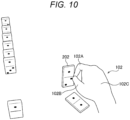
- Fig. 10 illustrates an example of a case where the user gently releases a virtual object.
- the user arranges dominoes for domino toppling in a virtual space, and releases the virtual object, a domino 202, from the hand 102.
- the user moves only the index finger 102A and the thumb 102B while keeping the hand base portion including the back of hand 102C substantially stationary.
- the gesture of gently releasing the virtual object is detected by the determination processing in Steps S7 and S8 detecting that the position and posture of the hand base portion have changed within the predetermined area, and that the index finger has separated from the thumb.
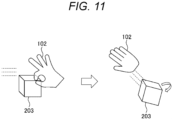
- FIG. 11 illustrates an example of a case where the user swiftly releases a virtual object.
- the user releases a virtual object 203 from the hand 102 at a desired position while moving the hand 102 pinching the virtual object 203.
- the gesture of swiftly releasing the virtual object is detected by the determination processing in Steps S7 and S9 detecting that at least either the position or posture of the hand base portion has changed beyond the predetermined area, that at least either the position or posture of the index finger has changed beyond the predetermined area, and that the state where the index finger is separated from the thumb has been maintained.
- the information processing system 101 may respond to a case where a result of detecting a pinching object is contrary to an intention of the user.
- a last detected gesture of pinching the virtual object may be canceled by the user performing a predetermined gesture.
- the gesture detection unit 171 detects a gesture of continually bringing the thumb and the index finger into contact with each other with respect to the same virtual object
- the above-described position threshold value and posture threshold value may be reduced. Therefore, in a case where the user tries to pinch the same virtual object again, the gesture of pinching the virtual object is easily detected.
- the gesture detection unit 171 may detect the gesture of pinching the virtual object even if the fingertip of the thumb and the fingertip of the index finger do not come into contact with each other.
- the gesture detection unit 171 may detect the gesture of pinching the virtual object by detecting proximity of the fingertip of the thumb and the fingertip of the index finger on the basis of the front image.
- the gesture detection unit 171 may detect the positions and postures of the thumb and index finger on the basis of acceleration and angular velocity of the thumb and the index finger, and detect the proximity of the fingertip of the thumb and the fingertip of the index finger, thereby detecting the gesture of pinching the virtual object.
- the gesture detection unit 171 may detect the gesture of pinching the virtual object by detecting the proximity of the fingertip of the thumb and the fingertip of the index finger on the basis of sensor data from a proximity sensor provided on the fingertip (ball) of the index finger.
- the gesture of pinching the virtual object may be detected by combining two or more of the above-described methods and detecting the proximity of the fingertip of the thumb and the fingertip of the index finger.
- the present technology can also be applied to other gestures such as, for example, a gesture of grasping the virtual object, a gesture of bending a finger into a hook shape to hook the virtual object, and a gesture of flicking the virtual object with a finger, in addition to the pinching gesture.
- the gesture detection unit 171 may detect the position and posture of the hand base portion by using acceleration and angular velocity of a portion other than a back of the hand (for example, a wrist, palm, fist, arm, or the like).
- the gesture detection unit 171 may detect the gesture of pinching the virtual object by further using movement of the hand or arm opposite to the hand pinching the virtual object.
- the gesture detection unit 171 may make it a condition of detection of the gesture of pinching the virtual object that a distance between the thumb and the index finger is widened, or that the fingers of the hand are spread once.
- the gesture detection unit 171 may detect the virtual object to be pinched on the basis of the line of sight of the user detected by the line-of-sight detection unit 172.
- the gesture detection unit 171 may change the position threshold value and posture threshold value for the hand base portion that are used in Steps S2 and S6 in Fig. 8 described above, on the basis of a state and attribute of the user, a state and attribute of the virtual object, the surrounding environment, or the like.
- the gesture detection unit 171 may acquire information of the dominant arm of the user and increase at least either the position threshold value or the posture threshold value.
- the gesture detection unit 171 may reduce at least either the position threshold value or the posture threshold value.
- the gesture detection unit 171 may change at least either the position threshold value or the posture threshold value, on the basis of a distance between the virtual object and a hand, a distance between a plurality of virtual objects, the size of the virtual object, a speed of moving the virtual object, or the like.
- the gesture detection unit 171 may change at least either the position threshold value or the posture threshold value, on the basis of a posture of the user (for example, whether the user is standing or sitting, or the like), a walking state of the user, history of use of the information processing system 101 by the user, a region where the user is good at operation, what the user is wearing, or the like. It is conceivable that what the user is wearing is, for example, one that makes it difficult to move a hand, such as a glove.
- various threshold values including the position threshold value and the posture threshold value may be set and changed by using machine learning.
- the threshold values may be set before the information processing system 101 reaches a hand of the user, or the threshold values may be changed after the information processing system 101 reaches the hand of the user.
- the output unit 155 may notify the user that the pinching gesture has been detected.
- the display unit 181 may change a display mode (for example, color, shape, transparency, brightness, or the like) of the pinched virtual object under control of the output control unit 174.
- the user may be notified that the pinching gesture has been detected by audio information or tactile information.
- the user can recognize that the pinching gesture has been detected and recognize the virtual object targeted for the pinching gesture, and can operate the information processing system 101 at ease.
- the gesture detection unit 171 may predict the virtual object to be pinched by the user, on the basis of movement of the hand base portion, the index finger, and the like of the user. Then, the gesture detection unit 171 may set in advance the virtual object as the detection target for the pinching gesture. Furthermore, the display unit 181 may change the display mode of the virtual object under control of the output control unit 174. Therefore, the user can pinch a desired virtual object more quickly.
- whether or not the display mode of the virtual object described above is to be changed may be changed on the basis of the user or the surrounding environment.
- the display mode of the virtual object may be changed as described above for a user who has not yet used the information processing system 101 for a long time, and the display mode of the virtual object may not be changed for a user who has used the information processing system 101 for a long time.
- the display mode of the virtual object may not change to avoid presentation of an excessive amount of information to the user.
- the display unit 181 may display, in the field of view of the user, information indicating movement after the virtual object is released. For example, information of a locus, rotation state, landing position, posture, or the like of the virtual object in a case where the virtual object is released in a current state may be displayed in the field of view of the user.
- the haptics device 183 may transmit to the user a feeling of pinching or releasing the virtual object.
- the virtual object may not necessarily be displayed.
- AR not using a display apparatus but using a tactile sense
- the user may pinch a plurality of virtual objects at a time.
- the gesture detection unit 171 may change the number of virtual objects to be subjected to the pinching gesture, on the basis of an amount of change in the position and posture of the hand base portion.
- the present technology can also be applied when a robot arm pinches a real object or a virtual object in a case where, for example, the robot arm moves at a remote location in conjunction with movement of a hand of the user.
- the gesture detection unit 171 may change various threshold values such as the position threshold value and the posture threshold value according to performance of the robot arm.
- the present technology can also be applied to a method other than the HMD, which is, for example, AR or MR implemented by using a display terminal such as a projector or a smartphone.
- the above-described series of processing can be executed by hardware and can also be executed by software.
- a program included in the software is installed on a computer.
- examples of the computer include a computer incorporated in dedicated hardware, and for example, a general-purpose personal computer that can execute various functions by installing various programs.
- Fig. 12 is a block diagram illustrating a configuration example of hardware of a computer that executes the above-described series of processing by a program.
- a central processing unit (CPU) 1001 a read only memory (ROM) 1002, and a random access memory (RAM) 1003 are mutually connected by a bus 1004.
- CPU central processing unit
- ROM read only memory
- RAM random access memory
- An input/output interface 1005 is further connected to the bus 1004. To the input/output interface 1005, an input unit 1006, an output unit 1007, a storage unit 1008, a communication unit 1009, and a drive 1010 are connected.
- the input unit 1006 includes an input switch, a button, a microphone, an imaging element, and the like.
- the output unit 1007 includes a display, a speaker, and the like.
- the storage unit 1008 includes a hard disk, a non-volatile memory, and the like.
- the communication unit 1009 includes a network interface and the like.
- the drive 1010 drives a removable medium 1011 such as a magnetic disk, an optical disk, a magneto-optical disk, or a semiconductor memory.
- the series of processing described above is executed, for example, by the CPU 1001 loading a program stored in the storage unit 1008 into the RAM 1003 via the input/output interface 1005 and the bus 1004, and executing.
- the program executed by the computer 1000 can be provided, for example, by being recorded in the removable medium 1011 as a package medium and the like. Furthermore, the program can be provided via a wired or wireless transmission medium, such as a local area network, the Internet, or digital satellite broadcasting.
- the program can be installed in the storage unit 1008 via the input/output interface 1005 by mounting the removable medium 1011 on the drive 1010. Furthermore, the program can be received by the communication unit 1009 via a wired or wireless transmission medium and installed in the storage unit 1008. Furthermore, the program can be installed in the ROM 1002 or the storage unit 1008 in advance.
- the program executed by the computer may be a program in which processing is performed in time series in the order described in the present specification or may be a program in which processing is performed in parallel or at necessary timing such as when a call is made.
- the system means a set of a plurality of components (an apparatus, a module (a part), and the like), and it does not matter whether or not all the components are in the same housing. Therefore, a plurality of apparatuses housed in separate housings and connected to each other via a network and one apparatus in which a plurality of modules is housed in one housing are both systems.
- the present technology can have a cloud computing configuration in which one function is shared and processed in cooperation by a plurality of apparatuses via a network.
- each of the steps described in the above-described flowcharts can be executed by one apparatus or executed by a plurality of apparatuses in a shared manner.
- the plurality of pieces of processing included in the one step can be executed by one device or executed by a plurality of apparatuses in a shared manner.
- the present technology can have the following configurations.
Landscapes
- Engineering & Computer Science (AREA)
- General Engineering & Computer Science (AREA)
- Theoretical Computer Science (AREA)
- Physics & Mathematics (AREA)
- General Physics & Mathematics (AREA)
- Human Computer Interaction (AREA)
- Computer Graphics (AREA)
- Computer Hardware Design (AREA)
- Software Systems (AREA)
- User Interface Of Digital Computer (AREA)
Applications Claiming Priority (2)
| Application Number | Priority Date | Filing Date | Title |
|---|---|---|---|
| JP2022043596 | 2022-03-18 | ||
| PCT/JP2023/007211 WO2023176420A1 (fr) | 2022-03-18 | 2023-02-28 | Dispositif de traitement d'informations et procédé de traitement d'informations |
Publications (2)
| Publication Number | Publication Date |
|---|---|
| EP4495741A1 true EP4495741A1 (fr) | 2025-01-22 |
| EP4495741A4 EP4495741A4 (fr) | 2025-06-18 |
Family
ID=88023601
Family Applications (1)
| Application Number | Title | Priority Date | Filing Date |
|---|---|---|---|
| EP23770378.0A Pending EP4495741A4 (fr) | 2022-03-18 | 2023-02-28 | Dispositif de traitement d'informations et procédé de traitement d'informations |
Country Status (5)
| Country | Link |
|---|---|
| US (1) | US20250165078A1 (fr) |
| EP (1) | EP4495741A4 (fr) |
| JP (1) | JPWO2023176420A1 (fr) |
| KR (1) | KR20240159914A (fr) |
| WO (1) | WO2023176420A1 (fr) |
Families Citing this family (1)
| Publication number | Priority date | Publication date | Assignee | Title |
|---|---|---|---|---|
| US12498793B2 (en) * | 2024-01-02 | 2025-12-16 | Snap Inc. | Translating a 3D volume in extended reality |
Family Cites Families (4)
| Publication number | Priority date | Publication date | Assignee | Title |
|---|---|---|---|---|
| JP6302506B2 (ja) | 2016-05-23 | 2018-03-28 | 京セラ株式会社 | 表示装置、制御方法および制御プログラム |
| US10521947B2 (en) * | 2017-09-29 | 2019-12-31 | Sony Interactive Entertainment Inc. | Rendering of virtual hand pose based on detected hand input |
| US20230341936A1 (en) * | 2020-03-05 | 2023-10-26 | Sony Group Corporation | Information processing device, information processing method, computer program, and augmented reality system |
| US20230095328A1 (en) * | 2020-03-24 | 2023-03-30 | Sony Group Corporation | Information processing apparatus, information processing method, computer program, and augmented reality system |
-
2023
- 2023-02-28 EP EP23770378.0A patent/EP4495741A4/fr active Pending
- 2023-02-28 JP JP2024507690A patent/JPWO2023176420A1/ja active Pending
- 2023-02-28 US US18/839,239 patent/US20250165078A1/en active Pending
- 2023-02-28 KR KR1020247031830A patent/KR20240159914A/ko active Pending
- 2023-02-28 WO PCT/JP2023/007211 patent/WO2023176420A1/fr not_active Ceased
Also Published As
| Publication number | Publication date |
|---|---|
| EP4495741A4 (fr) | 2025-06-18 |
| US20250165078A1 (en) | 2025-05-22 |
| JPWO2023176420A1 (fr) | 2023-09-21 |
| KR20240159914A (ko) | 2024-11-07 |
| WO2023176420A1 (fr) | 2023-09-21 |
Similar Documents
| Publication | Publication Date | Title |
|---|---|---|
| US20200241730A1 (en) | Position-dependent Modification of Descriptive Content in a Virtual Reality Environment | |
| EP3469458B1 (fr) | Entrée de réalité mixte à six ddl par fusion d'une unité de commande manuelle inertielle avec un suivi de main | |
| US20230031913A1 (en) | Information processing device, information processing method, computer program, and augmented reality system | |
| KR102473259B1 (ko) | 시선 타겟 애플리케이션 런처 | |
| JP2022535315A (ja) | 自己触覚型仮想キーボードを有する人工現実システム | |
| EP3979234A1 (fr) | Dispositif de traitement d'informations, procédé de traitement d'informations et programme | |
| EP3196734B1 (fr) | Dispositif de commande, procédé de commande et programme | |
| EP4099135A1 (fr) | Dispositif de traitement d'informations, procédé de traitement d'informations, programme informatique et système de détection à réalité augmentée | |
| JP2022534639A (ja) | 指マッピング自己触覚型入力方法を有する人工現実システム | |
| US12158992B1 (en) | Systems for interpreting thumb movements of in-air hand gestures for controlling user interfaces based on spatial orientations of a user's hand, and method of use thereof | |
| CN115480639A (zh) | 人机交互系统、人机交互方法、可穿戴设备及头显设备 | |
| EP4254143B1 (fr) | Sélection basée sur le suivi oculaire d'un élément d'interface utilisateur sur la base de critères de ciblage | |
| US20240103712A1 (en) | Devices, Methods, and Graphical User Interfaces For Interacting with Three-Dimensional Environments | |
| US11768546B1 (en) | Method and device for positional/rotational information of a finger-wearable device | |
| US10963063B2 (en) | Information processing apparatus, information processing method, and program | |
| WO2019026713A1 (fr) | Dispositif et procédé de traitement d'informations, et programme | |
| EP4495741A1 (fr) | Dispositif de traitement d'informations et procédé de traitement d'informations | |
| US12197652B2 (en) | Control device and control method with set priorities for input operations in competitive relationship | |
| US11797100B1 (en) | Systems and methods for classifying touch events based on relative orientation | |
| US20230377480A1 (en) | Method and Device for Presenting a Guided Stretching Session | |
| WO2024249679A9 (fr) | Dispositifs, procédés et interfaces utilisateur graphiques pour afficher un clavier virtuel | |
| US12518473B1 (en) | Method and device for dynamically adjusting a pointer visualization | |
| US20260003436A1 (en) | Information processing device, information processing system, storage medium storing information processing program, and information processing method | |
| Saxen et al. | Image-based methods for interaction with head-worn worker-assistance systems | |
| US20260105700A1 (en) | Information processing apparatus and information processing method |
Legal Events
| Date | Code | Title | Description |
|---|---|---|---|
| STAA | Information on the status of an ep patent application or granted ep patent |
Free format text: STATUS: THE INTERNATIONAL PUBLICATION HAS BEEN MADE |
|
| PUAI | Public reference made under article 153(3) epc to a published international application that has entered the european phase |
Free format text: ORIGINAL CODE: 0009012 |
|
| STAA | Information on the status of an ep patent application or granted ep patent |
Free format text: STATUS: REQUEST FOR EXAMINATION WAS MADE |
|
| 17P | Request for examination filed |
Effective date: 20241004 |
|
| AK | Designated contracting states |
Kind code of ref document: A1 Designated state(s): AL AT BE BG CH CY CZ DE DK EE ES FI FR GB GR HR HU IE IS IT LI LT LU LV MC ME MK MT NL NO PL PT RO RS SE SI SK SM TR |
|
| A4 | Supplementary search report drawn up and despatched |
Effective date: 20250520 |
|
| RIC1 | Information provided on ipc code assigned before grant |
Ipc: G06F 3/04883 20220101ALI20250514BHEP Ipc: G06T 19/00 20110101ALI20250514BHEP Ipc: G06F 3/0346 20130101ALI20250514BHEP Ipc: G06F 3/01 20060101AFI20250514BHEP |
|
| DAV | Request for validation of the european patent (deleted) | ||
| DAX | Request for extension of the european patent (deleted) | ||
| RAP3 | Party data changed (applicant data changed or rights of an application transferred) |
Owner name: SONY GROUP CORPORATION |