EP4502775A2 - Procédé et appareil de traitement de message, dispositif électronique et support de stockage - Google Patents
Procédé et appareil de traitement de message, dispositif électronique et support de stockage Download PDFInfo
- Publication number
- EP4502775A2 EP4502775A2 EP23788697.3A EP23788697A EP4502775A2 EP 4502775 A2 EP4502775 A2 EP 4502775A2 EP 23788697 A EP23788697 A EP 23788697A EP 4502775 A2 EP4502775 A2 EP 4502775A2
- Authority
- EP
- European Patent Office
- Prior art keywords
- emoticon
- message
- area
- conversation
- message processing
- Prior art date
- Legal status (The legal status is an assumption and is not a legal conclusion. Google has not performed a legal analysis and makes no representation as to the accuracy of the status listed.)
- Pending
Links
Images




Classifications
-
- G—PHYSICS
- G06—COMPUTING OR CALCULATING; COUNTING
- G06F—ELECTRIC DIGITAL DATA PROCESSING
- G06F9/00—Arrangements for program control, e.g. control units
- G06F9/06—Arrangements for program control, e.g. control units using stored programs, i.e. using an internal store of processing equipment to receive or retain programs
- G06F9/44—Arrangements for executing specific programs
- G06F9/451—Execution arrangements for user interfaces
-
- G—PHYSICS
- G06—COMPUTING OR CALCULATING; COUNTING
- G06F—ELECTRIC DIGITAL DATA PROCESSING
- G06F3/00—Input arrangements for transferring data to be processed into a form capable of being handled by the computer; Output arrangements for transferring data from processing unit to output unit, e.g. interface arrangements
- G06F3/01—Input arrangements or combined input and output arrangements for interaction between user and computer
- G06F3/048—Interaction techniques based on graphical user interfaces [GUI]
- G06F3/0487—Interaction techniques based on graphical user interfaces [GUI] using specific features provided by the input device, e.g. functions controlled by the rotation of a mouse with dual sensing arrangements, or of the nature of the input device, e.g. tap gestures based on pressure sensed by a digitiser
- G06F3/0488—Interaction techniques based on graphical user interfaces [GUI] using specific features provided by the input device, e.g. functions controlled by the rotation of a mouse with dual sensing arrangements, or of the nature of the input device, e.g. tap gestures based on pressure sensed by a digitiser using a touch-screen or digitiser, e.g. input of commands through traced gestures
- G06F3/04886—Interaction techniques based on graphical user interfaces [GUI] using specific features provided by the input device, e.g. functions controlled by the rotation of a mouse with dual sensing arrangements, or of the nature of the input device, e.g. tap gestures based on pressure sensed by a digitiser using a touch-screen or digitiser, e.g. input of commands through traced gestures by partitioning the display area of the touch-screen or the surface of the digitising tablet into independently controllable areas, e.g. virtual keyboards or menus
-
- G—PHYSICS
- G06—COMPUTING OR CALCULATING; COUNTING
- G06F—ELECTRIC DIGITAL DATA PROCESSING
- G06F3/00—Input arrangements for transferring data to be processed into a form capable of being handled by the computer; Output arrangements for transferring data from processing unit to output unit, e.g. interface arrangements
- G06F3/01—Input arrangements or combined input and output arrangements for interaction between user and computer
- G06F3/048—Interaction techniques based on graphical user interfaces [GUI]
- G06F3/0481—Interaction techniques based on graphical user interfaces [GUI] based on specific properties of the displayed interaction object or a metaphor-based environment, e.g. interaction with desktop elements like windows or icons, or assisted by a cursor's changing behaviour or appearance
-
- G—PHYSICS
- G06—COMPUTING OR CALCULATING; COUNTING
- G06F—ELECTRIC DIGITAL DATA PROCESSING
- G06F3/00—Input arrangements for transferring data to be processed into a form capable of being handled by the computer; Output arrangements for transferring data from processing unit to output unit, e.g. interface arrangements
- G06F3/01—Input arrangements or combined input and output arrangements for interaction between user and computer
- G06F3/048—Interaction techniques based on graphical user interfaces [GUI]
- G06F3/0481—Interaction techniques based on graphical user interfaces [GUI] based on specific properties of the displayed interaction object or a metaphor-based environment, e.g. interaction with desktop elements like windows or icons, or assisted by a cursor's changing behaviour or appearance
- G06F3/04817—Interaction techniques based on graphical user interfaces [GUI] based on specific properties of the displayed interaction object or a metaphor-based environment, e.g. interaction with desktop elements like windows or icons, or assisted by a cursor's changing behaviour or appearance using icons
-
- G—PHYSICS
- G06—COMPUTING OR CALCULATING; COUNTING
- G06F—ELECTRIC DIGITAL DATA PROCESSING
- G06F3/00—Input arrangements for transferring data to be processed into a form capable of being handled by the computer; Output arrangements for transferring data from processing unit to output unit, e.g. interface arrangements
- G06F3/01—Input arrangements or combined input and output arrangements for interaction between user and computer
- G06F3/048—Interaction techniques based on graphical user interfaces [GUI]
- G06F3/0481—Interaction techniques based on graphical user interfaces [GUI] based on specific properties of the displayed interaction object or a metaphor-based environment, e.g. interaction with desktop elements like windows or icons, or assisted by a cursor's changing behaviour or appearance
- G06F3/0482—Interaction with lists of selectable items, e.g. menus
-
- G—PHYSICS
- G06—COMPUTING OR CALCULATING; COUNTING
- G06F—ELECTRIC DIGITAL DATA PROCESSING
- G06F3/00—Input arrangements for transferring data to be processed into a form capable of being handled by the computer; Output arrangements for transferring data from processing unit to output unit, e.g. interface arrangements
- G06F3/01—Input arrangements or combined input and output arrangements for interaction between user and computer
- G06F3/048—Interaction techniques based on graphical user interfaces [GUI]
- G06F3/0487—Interaction techniques based on graphical user interfaces [GUI] using specific features provided by the input device, e.g. functions controlled by the rotation of a mouse with dual sensing arrangements, or of the nature of the input device, e.g. tap gestures based on pressure sensed by a digitiser
-
- G—PHYSICS
- G06—COMPUTING OR CALCULATING; COUNTING
- G06F—ELECTRIC DIGITAL DATA PROCESSING
- G06F3/00—Input arrangements for transferring data to be processed into a form capable of being handled by the computer; Output arrangements for transferring data from processing unit to output unit, e.g. interface arrangements
- G06F3/01—Input arrangements or combined input and output arrangements for interaction between user and computer
- G06F3/048—Interaction techniques based on graphical user interfaces [GUI]
- G06F3/0487—Interaction techniques based on graphical user interfaces [GUI] using specific features provided by the input device, e.g. functions controlled by the rotation of a mouse with dual sensing arrangements, or of the nature of the input device, e.g. tap gestures based on pressure sensed by a digitiser
- G06F3/0488—Interaction techniques based on graphical user interfaces [GUI] using specific features provided by the input device, e.g. functions controlled by the rotation of a mouse with dual sensing arrangements, or of the nature of the input device, e.g. tap gestures based on pressure sensed by a digitiser using a touch-screen or digitiser, e.g. input of commands through traced gestures
- G06F3/04883—Interaction techniques based on graphical user interfaces [GUI] using specific features provided by the input device, e.g. functions controlled by the rotation of a mouse with dual sensing arrangements, or of the nature of the input device, e.g. tap gestures based on pressure sensed by a digitiser using a touch-screen or digitiser, e.g. input of commands through traced gestures for inputting data by handwriting, e.g. gesture or text
-
- H—ELECTRICITY
- H04—ELECTRIC COMMUNICATION TECHNIQUE
- H04L—TRANSMISSION OF DIGITAL INFORMATION, e.g. TELEGRAPHIC COMMUNICATION
- H04L51/00—User-to-user messaging in packet-switching networks, transmitted according to store-and-forward or real-time protocols, e.g. e-mail
- H04L51/04—Real-time or near real-time messaging, e.g. instant messaging [IM]
- H04L51/046—Interoperability with other network applications or services
-
- H—ELECTRICITY
- H04—ELECTRIC COMMUNICATION TECHNIQUE
- H04M—TELEPHONIC COMMUNICATION
- H04M1/00—Substation equipment, e.g. for use by subscribers
- H04M1/72—Mobile telephones; Cordless telephones, i.e. devices for establishing wireless links to base stations without route selection
- H04M1/724—User interfaces specially adapted for cordless or mobile telephones
- H04M1/72403—User interfaces specially adapted for cordless or mobile telephones with means for local support of applications that increase the functionality
- H04M1/7243—User interfaces specially adapted for cordless or mobile telephones with means for local support of applications that increase the functionality with interactive means for internal management of messages
- H04M1/72436—User interfaces specially adapted for cordless or mobile telephones with means for local support of applications that increase the functionality with interactive means for internal management of messages for text messaging, e.g. short messaging services [SMS] or e-mails
-
- H—ELECTRICITY
- H04—ELECTRIC COMMUNICATION TECHNIQUE
- H04M—TELEPHONIC COMMUNICATION
- H04M1/00—Substation equipment, e.g. for use by subscribers
- H04M1/72—Mobile telephones; Cordless telephones, i.e. devices for establishing wireless links to base stations without route selection
- H04M1/724—User interfaces specially adapted for cordless or mobile telephones
- H04M1/72469—User interfaces specially adapted for cordless or mobile telephones for operating the device by selecting functions from two or more displayed items, e.g. menus or icons
-
- G—PHYSICS
- G06—COMPUTING OR CALCULATING; COUNTING
- G06F—ELECTRIC DIGITAL DATA PROCESSING
- G06F2203/00—Indexing scheme relating to G06F3/00 - G06F3/048
- G06F2203/048—Indexing scheme relating to G06F3/048
- G06F2203/04803—Split screen, i.e. subdividing the display area or the window area into separate subareas
Definitions
- Embodiments of the present disclosure relate to the technical field of message processing, and in particular to a message processing method, device, electronic device and storage medium.
- an embodiment of the present disclosure provides a message processing method, comprising: displaying a conversation message in a conversation interface, and detecting a trigger operation on the conversation message; and displaying an emoticon area and a message processing area corresponding to the conversation message in response to the trigger operation satisfying a preset condition; wherein the emoticon area and the message processing area are independent of each other and have different display positions in the conversation interface, the emoticon area comprises at least one selectable emoticon, and the message processing area comprises at least one function control.
- an embodiment of the present disclosure further provides a message processing device, comprising: a trigger operation detection module configured to display a conversation message in a conversation interface, and detect a trigger operation on the conversation message; and a display module configured to display an emoticon area and a message processing area corresponding to the conversation message in response to the trigger operation satisfying a preset condition; wherein the emoticon area and the message processing area are independent of each other and have different display positions in the conversation interface, the emoticon area comprises at least one selectable emoticon, and the message processing area comprises at least one function control.
- an embodiment of the present disclosure provides an electronic device, comprising: one or more processors; and a storage device for storing one or more programs, which when executed by the one or more processors cause the one or more processors to implement the message processing method according to any embodiment of the present disclosure.
- an embodiment of the present disclosure further provides a storage medium containing computer executable instructions, which when executed by a computer processor carry out the message processing method according to any embodiment of the present disclosure.
- an embodiment of the present disclosure further provides a computer program, comprising: instructions that, when executed by a processor, cause the processor to perform the message processing method according to any embodiment of the present disclosure.
- the inventors of the present disclosure found that, in the solution provided by the related art, when a user processes a message, related emoticons or controls are usually stacked or concentrated in a menu bar or a small area. Based on this, the user needs to perform multiple operations to process the message. Therefore, the operation logic is not simple enough. In addition, when the identification information associated with each message processing control is long, the display method in the related art cannot clearly display the information to users, resulting in poor user experience accordingly.
- an embodiment of the present disclosure provides a message processing method, which can not only clearly show various emoticons and controls related to message processing to users, but also reduce the problem of stacking or concentrating multiple emoticons or controls in one control area or small area, thereby simplifying the operation logic and improving the user experience.
- the technical solution can be applied in a scenario where a user feeds back and processes a message in the chat interface, and can also be applied in a scenario where a conversation interface is applied in a multi-person video process.
- a conversation interface is applied in a multi-person video process.
- the user may want to provide feedback on a message or process a message in the chat interface in a simple way.
- an emoticon area can be displayed in the display interface by a trigger operation, and then a corresponding emoticon can be selected therefrom to give feedback on the message; or, when a user wants to forward a certain message in the chat frame to other users or other groups, based on the solution of the embodiment of the present disclosure, a message processing area that is different from the emoticon area can be displayed in the display interface by a trigger operation, and then a corresponding control can be selected from the message processing area to forward the message.
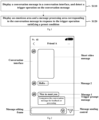
- FIG. 1 is a schematic flowchart of a message processing method provided by an embodiment of the present disclosure.
- the embodiment of the present disclosure is applicable to a situation where a user gives feedback on a message or processes the messages in a chat interface.
- the method is executed by a message processing device, which may be implemented in the form of software and/or hardware.
- the message processing device may be implemented in the form of an electronic device.
- the electronic device is a mobile terminal, a PC (Personal Computer) terminal, a server, or the like.
- the method comprises step S110 to S120.
- a conversation message is displayed in a conversation interface, and a trigger operation on the conversation message is detected.
- the conversation message is a message sent by a user. It can be understood that for a client, the conversation message comprises not only a message sent by a user corresponding to the client, but also a received message sent by another user. It should be noted that, in the embodiment, the conversation message can be either a text message, or a voice message or a video message, and each conversation message is associated with a user identification, so as to facilitate the recognition of the source of the message.
- the conversation interface may be an interface pre-built in the application software provided with a chatting communication function or information sharing function. Through the conversation interface, multiple conversation messages can be displayed one by one according to their sending time.
- a plurality of conversation messages are usually arranged vertically in the conversation interface, with received messages and user identifications associated with the messages displayed on the left side of the conversation interface, and the message sent by the user corresponding to the client and a user identification associated with the message displayed on the right side of the conversation interface, wherein the latest conversation message is usually displayed at a bottom of the conversation interface, which will not be repeated in the embodiments of the present disclosure.
- the user since the user has the demand for feedback or processing of a conversation message in the conversation interface, in order to facilitate the user to perform related operations, it is first necessary to display some trigger prompt information near the conversation message. It can be understood that the displayed trigger prompt information is at least used to guide the user's message feeding back operation, or guide the user's message processing operation.
- the trigger prompt information is displayed at a position associated with the conversation message to prompt the trigger operation and/or the preset condition of the conversation message.
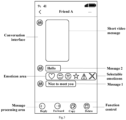
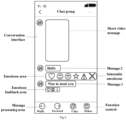
- three messages i.e., a short video message, message 1, and message 2 continuously sent by friend A are displayed together with an avatar of friend A on the left side of the conversation interface.
- the client can display a trigger prompt message "Long press the conversation message for feedback or processing" at a position associated with message 1 (that is, below a display frame corresponding to message 1 shown in FIG. 2 ).
- the associated position also comprises an end position of the display frame to which the conversation message belongs, or a position at a bottom of the display frame. Therefore, the actual display position of the trigger prompt information can be adjusted according to actual needs.
- the application can only display trigger prompt information at an associated position of the display frame of the latest conversation message, or display, trigger prompt information at an associated position of the display frame of each conversation message, which is not specifically limited in the embodiment of the present disclosure.
- the application may also display the trigger prompt information and the corresponding conversation message in a differentiated manner; wherein the differentiated displaying comprises displaying the conversation message and the trigger prompt information in different fonts, colors and/or font sizes, or displaying a sub-display frame to which the trigger prompt information belongs and the display frame with different fill colors.
- the text messages sent by friend A are both displayed with one font type and are displayed in bold.
- the application displays the trigger prompt information for the display frame corresponding to message 1
- the trigger prompt information "Long press the conversation message for feedback or processing" will be displayed in another font type.
- the font size of the trigger prompt message is slightly smaller than the font size of message 1
- the color of the text of the trigger prompt message is also different from the color of the text of the conversation message.
- the application can also fill the display frame corresponding to the conversation message with white, and fill the sub-display frame corresponding to the trigger prompt message with gray, so as to emphasize the difference therebetween.
- the conversation message may be distinguished from the trigger prompt information in one way described above, or in several ways, which is not specifically limited in the embodiment of the present disclosure.
- the application when at least one conversation message is displayed in the conversation interface, the application can detect a trigger operation for the at least one conversation message in real time.
- the trigger operation comprises: a long-press operation on the conversation message
- the preset condition comprises: a duration of the long-press operation on the conversation message reaching a preset duration threshold.
- the application when the application displays trigger prompt message "Long press the conversation message for feedback or processing" below the display frame of message 1, the user can understand how to provide feedback or process the message, and then perform a long-press operation on the display frame of one of the messages sent by friend A according to the user's own wishes (for example, perform a long-press operation on the display frame of message 1).
- the application After detecting the user's touch on the display frame, the application can accumulate the duration of the user's touch to obtain a duration of the long-press operation of the user. Further, when it is detected that the duration of the long-press operation reaches a preset duration threshold (2s), the application can determine that the user's trigger operation has met the preset condition.
- the trigger operation can also comprise various types of operation. For example, multiple consecutive click operations on the display frame of the conversation message can be used as the trigger operation.
- the preset condition can also be adaptively changed according to different trigger operations.
- an emoticon area and a message processing area corresponding to the conversation message are displayed in response to the trigger operation satisfying a preset condition.
- the emoticon area comprises at least one selectable emoticon
- the message processing area comprises at least one function control.
- the selectable emoticons are used to reflect the user's various emotions.
- the heart emoticon indicates that the user likes the content of the message
- the smiling emoticon means that the user is very happy after viewing the content of the message
- the crying emoticon means that the user is uncomfortable after viewing the content of the message, etc..
- the function controls are the controls pre-developed by the staff and integrated into the application, each function control being associated with a subprogram having a certain function.
- the message processing area comprises a reply control for replying to a certain message, a forward control for the user to forward a certain message, and a delete control for deleting a certain message.
- the emoticon area and the message processing area are independent of each other, and have different display positions in the conversation interface.
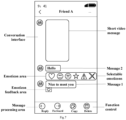
- the emoticon area is displayed at an edge of a display frame to which the conversation message belongs, and the message processing area is displayed at a bottom of the conversation interface. The display of the emoticon area and the message processing area will be described below with reference to FIG. 3 .
- an emoticon area can be displayed at an upper edge of the display frame of the message, the emoticon area comprising a plurality of emoticons that can reflect the user's emotions, such as heart, smiley face, crying face, star, attention, error and the like.
- a message processing area is displayed at the bottom of the conversation interface, that is, where a message editing frame is originally displayed, the message processing area comprising a reply control for replying to the message 1, a forward control for forwarding message 1, a copy control for copying the content of message 1, and a delete control for deleting the content of message 1.
- the emoticon area can not only be displayed at the upper edge of the display frame of the message, but also can be displayed on the left, right or lower edge of the display frame of the message according to actual needs.
- the expressions comprised in the emoticon area the controls integrated in the message processing area can be set according to actual needs, which are not specifically limited in the embodiment of the present disclosure.
- the application can also mask display of another conversation message in the conversation interface to which the conversation message belongs.
- the masking display comprises: drawing a mask layer corresponding to the other conversation message to mask display of the other conversation message based on the mask layer. A transparency of the mask layer is within a preset transparency range. The case of masking display of another conversation message will be described below with reference to FIG. 4 .
- one or more mask layers are also generated according to a preset transparency, so as to mask other conversation messages or those areas not related to message 1.
- a preset transparency As shown in FIG. 4 , mask layers in appropriate sizes and with a transparency of 60% are displayed over the areas on the top and bottom of the display frame of message 1, respectively.
- the user can set the preset transparency range corresponding to the mask layer in advance through the application. For example, when the transparency range is 20%-80%, the application can select a value within the transparency range as the transparency of the actual rendered mask layer according to actual situations. It can be understood that, through providing a way for users to adjust the transparency of the mask layer, it is convenient for users to flexibly change the final style of the display interface, so as to avoid the rendered mask layer from affecting their viewing experience.
- the emoticon area and the message processing area can also be displayed in other ways.
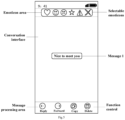
- the conversation message is displayed on a pop-up page; and the emoticon area is displayed at an edge of a display frame to which the conversation message belongs, and the message processing area is displayed at a bottom of the pop-up page.
- a page size of the pop-up page can be consistent with a interface size of the conversation interface. The way of displaying described above will be described below with reference to FIG. 5 .
- the application when it is detected that the user's trigger operation satisfies the preset condition, the application can construct a pop-up page with the same size and position as the conversation interface, and render the page to the display interface for display.
- the content "Nice to meet you" of message 1 fed back or processed by the user can be displayed in the center of the pop-up page.
- the content of the message can also be displayed in an upper part area or a lower part area of the pop-up page as needed, which is not specifically limited in the embodiment of the present disclosure.
- an emoticon area in response to the content of message 1 being displayed in the pop-up page, an emoticon area can also be displayed at the top of the pop-up page. For example, an emoticon area containing six selectable emoticons is displayed at the top of the page.
- a message processing area may be displayed at the bottom of the pop-up page. For example, a message processing area comprising a reply control, a forward control, a copy control and a delete control is displayed at the bottom of the page.
- At least one function control in the message processing area is displayed laterally, and the message processing area is configured to be slid laterally to display more function controls.
- the manner of displaying function controls through a lateral-slide operation will be described below with reference to FIG. 4 and FIG. 6 .
- the message processing area comprises 5 sliding windows, each sliding window being used to display a function control, such as a reply control, a forward control, a copy control, a delete control, or a report control.
- a function control such as a reply control, a forward control, a copy control, a delete control, or a report control.
- the application can only display the sliding windows corresponding to the first four controls described above.
- the user wants to report message 1, that is, when the user wants to click on the report control on the far right side of the message processing area, the user can perform a leftward slide operation on the message processing area by touch, so that the message processing area displays a forward control, a copy control, a delete control, and a report control as shown in FIG. 6 . Therefore, the sliding windows displayed in the message processing area and the controls associated with the sliding windows can be updated.
- the application when the message processing area is displayed at the bottom of the conversation interface, the application can also determine an object type of an object to which the conversation message belongs, and determine at least one function control in the message processing area according to the object type.
- the at least one function control in response to the object type being a first object type, does not comprise a report control; and in response to the object type being a second object type, the at least one function control does not comprise a recall control.
- the object type of the object to which the message belongs in response to the object type of the object to which the message belongs being the first object type, it indicates that the message is a message sent by a user corresponding to the current client; and in response to the object type of the object to which the message belongs being the second object type, it indicates that the message is a message sent by another user received by the current client.
- the report control is used to implement the function of reporting the message to a server, so that the message can be reviewed by the staff operating the server, and the recall control is used to implement the function of recalling the message.
- a message sent by stranger user B may violate relevant regulations of the application.
- the user can select the message through a touch operation.
- the application detects that the user's touch duration reaches a preset duration threshold, a message processing area corresponding to the message can be displayed.
- the application can determine that the object type of the object to which the message belongs is the second object type according to an identifier carried in the message, that is, determine that the message is a message sent by another user to the user corresponding to the client.
- the report control will also be displayed to the user in the message processing area.
- the client can report the message to the server in a message or other form, so as to review the message by the relevant staff.
- the user can select the message through a touch operation.
- the application detects that the user's touch duration reaches a preset duration threshold, a message processing area corresponding to the message can be displayed.
- the application can determine that the object type of the object to which the message belongs is the first object type according to an identifier carried in the message, that is, determine that the message is a message sent by the user corresponding to the client to another user.
- a recall control will also be displayed to the user in the message processing area.
- the client can remove the message, so that it is no longer displayed on the conversation interface between the user and the stranger user B.
- displaying of the at least one selectable emoticon in the emoticon area comprises: determining a user identification of a user who performs the trigger operation on the conversation message; and determining at least one selectable emoticon displayed in the emoticon area and a display order of the at least one selectable emoticon according to a language type, an region type and/or use frequencies of various emoticons corresponding to the user identification.
- the user identification is information that reflects the identities of various users in chats. Through a user identification, the application can determine the language used by the user, the region where the user is currently located, or frequencies that various emoticons are used by the user.
- the application can display multiple selectable emoticons corresponding to a group using language A in the emoticon area. Moreover, these emoticons are displayed in an order that is more in line with the usage habits of the group using language A. For example, if the group prefers the use of the heart and smiley face emoticons during online chats, the above two emoticons will be displayed in the first and second positions respectively in the corresponding emoticon area.
- the application can select emoticons with the highest use frequencies for the user, and display these emoticons in the emoticon area sequentially according to their use frequencies.
- an emoticon feedback area is created at a bottom of the conversation message or at a bottom of a display frame to which the conversation message belongs and a triggered target emoticon is displayed in the emoticon feedback area when a trigger operation on a selectable emoticon in the emoticon area is detected.
- the emoticon feedback area will be described below with reference to FIG. 7 .
- the application when the user selects the heart emoticon from the emoticon area to express his approval and appreciation for message 1 sent by friend A, the application will construct and display a corresponding emoticon feedback area at a bottom of a display frame to which message 1 belongs. Certainly, in an actual application, the emoticon feedback area may also be displayed at the bottom of the conversation message, which is not specifically limited in the embodiment of the present disclosure.
- the application After constructing the emoticon feedback area, the application further adds the heart emoticon selected by the user to the emoticon feedback area. It should be noted that the emoticon feedback area constructed by the application is bound to message 1. Therefore, in addition to the user corresponding to the client, friend A can also see in the conversation interface that the user sends a heart emoticon as feedback to the message sent by friend A. In this way, the communication effect between users can be enhanced in a simple and convenient manner.
- a plurality of target emoticons corresponding to the conversation message are displayed in a tiled manner in an emoticon feedback area in response to the plurality of target emoticons being received and the plurality of target emoticons being different.
- the way of displaying multiple emoticons in a tiled manner will be described below with reference to FIG. 8 .
- the application when multiple users communicate in a chat group, there may also be a situation where multiple users give feedback on message 1 "Nice to meet you" sent by a user, that is, there may be a situation where multiple users long press the display frame corresponding to message 1 respectively and choose emoticons to give feedback to message 1 according to their own wishes.
- the application will also construct and display a corresponding emoticon feedback area at the bottom of the display frame to which the message belongs, in which the heart emoticon selected by the user corresponding to the client and the smiley face emoticon selected by another user are displayed in a tiled manner.
- the emoticon feedback area constructed by the application is bound to message 1. Therefore, any user in the group can see the emoticon feedback area and the two emoticons comprised in the emoticon feedback area.
- the user corresponding to the current client sends a heart emoticon for the message, and several other users in the group each feed back a smiley face emoticon for the message.
- the application will only display one smiley face emoticon in the emoticon feedback area, and the heart emoticon fed back by the user corresponding to the current client and the smiley face emoticon are displayed in a tiled manner.
- various target emoticons are displayed in order in the emoticon feedback area according to receiving time of the various target emoticons.
- the user corresponding to the current client is the first who responded to message 1 with a heart emoticon.
- the application displays a heart emoticon in the constructed emoticon feedback area.
- the application displays a smiley face emoticon behind the heart emoticon in the emoticon feedback area, so that the effect of displaying the emoticons fed back by multiple users for the message according to the receiving time of the emoticons is achieved.
- a total number of all target emoticons presented in the conversation message is displayed at an end of a last target emoticon in the emoticon feedback area. The process of displaying the total number of presented emoticons will be described below with reference to FIG. 9 .
- the user corresponding to the current client is the first who responded to message 1 with a heart emoticon, and then two other users in the group each respond to message 1 with a smiley face emoticon.
- the application will not only display the heart and smiley face emoticons in the emoticon feedback area one by one according to their receiving time in the way described above, but also display the total number 3 of target emoticons at the end of the emoticon feedback area. In this way, users within the group can determine exactly how many users have responded to the message.
- a list page comprising a plurality of pieces of display data is popped up when it is detected that the emoticon feedback area is triggered; wherein the display data comprises a target emoticon and an user identification corresponding to the target emoticon.
- the process of displaying a list page will be described below with reference to FIG. 10 .
- a page can be popped up, which can be used as a list page.
- the list page can display the emoticons comprised in the emoticon feedback area and their corresponding trigger users.
- the trigger users can be identified based on their user identifications, for example, the avatars used by the users when registering their accounts.
- the emoticon triggered by the user and the user's user identification may be displayed at a first position.
- a display size of the list page is smaller than a display size of the conversation interface, and a bottom of the list page horizontally corresponds to a bottom of the conversation interface.
- a display size of the list page is smaller than a display size of the conversation interface, and a bottom of the list page horizontally corresponds to a bottom of the conversation interface.
- a triggered target emoticon is updated to the emoticon feedback area, and a target emoticon corresponding to a previous trigger operation is removed from the emoticon feedback area.
- the feedback can also be changed, that is, for a conversation message, a user can only have one emoticon feedback. If the user modifies the emoticon feedback, the original emoticon feedback can be removed from the emoticon feedback area, and the newly triggered emoticon is displayed in the emoticon feedback area.
- an emoticon feedback area is created at a bottom of the conversation message, and a default emoticon is added to the emoticon feedback area.
- a conversation message is displayed in a conversation interface, and a trigger operation on the conversation message is detected; and an emoticon area and a message processing area corresponding to the conversation message is displayed in response to the trigger operation satisfying a preset condition; wherein the emoticon area and the message processing area are independent of each other and have different display positions in the conversation interface, the emoticon area comprises at least one selectable emoticon, and the message processing area comprises at least one function control.
- the emoticon area and the message processing area By differentiated displaying of the emoticon area and the message processing area, it can not only clearly display various emoticons and controls related to message processing to users, but also reduce the problem of stacking or concentrating multiple emoticons or controls in one control or small area, thereby simplifying the operation logic in the user's message processing process, which is conducive to quick feedback or processing of messages, and improving the user experience.
- FIG. 11 is a schematic structural diagram of a message processing device provided by an embodiment of the present disclosure. As shown in FIG. 11 , the message processing device comprises: a trigger operation detection module 210 and a display module 220.
- the trigger operation detection module 210 is configured to display a conversation message in a conversation interface, and detect a trigger operation on the conversation message.
- the display module 220 is configured to display an emoticon area and a message processing area corresponding to the conversation message in response to the trigger operation satisfying a preset condition; wherein the emoticon area and the message processing area are independent of each other and have different display positions in the conversation interface, the emoticon area comprises at least one selectable emoticon, and the message processing area comprises at least one function control.
- the trigger operation detection module 210 is further configured to display trigger prompt information at a position associated with the conversation message to prompt the trigger operation and/or the preset condition of the conversation message; wherein the position comprises an end position of a display frame to which the conversation message belongs, a position at a bottom of the display frame, or a position below the display frame.
- the trigger prompt information and the corresponding conversation message are displayed in a differentiated manner; the differentiated displaying comprises: displaying the conversation message and the trigger prompt information in different fonts, colors and/or font sizes, or displaying a sub-display frame to which the trigger prompt information belongs and the display frame with different fill colors.
- the trigger operation comprises: a long-press operation on the conversation message; and the preset condition comprises: a duration of the long-press operation on the conversation message reaching a preset duration threshold.
- the display module 220 is further configured to display the emoticon area at an edge of a display frame to which the conversation message belongs, and display the message processing area at a bottom of the conversation interface.
- the message processing apparatus further comprises a masking display module.
- the masking display module is used configured to mask display of another conversation message in the conversation interface to which the conversation message belongs.
- the masking display comprises: drawing a mask layer corresponding to the other conversation message to mask display of the other conversation message based on the mask layer; wherein a transparency of the mask layer is within a preset transparency range.
- the display module 220 comprises a conversation message display unit and an area display unit.
- the conversation message display unit is configured to display the conversation message on a pop-up page.
- the area display unit is configured to display the emoticon area at an edge of a display frame to which the conversation message belongs, and display the message processing area at a bottom of the pop-up page.
- At least one function control in the message processing area is displayed laterally, and the message processing area is configured to be slid laterally to display more function controls.
- the display module 220 is further configured to determine an object type of an object to which the conversation message belongs, and determine the at least one function control in the message processing area according to the object type.
- the display module 220 is further configured to determine that the at least one function control does not comprise a report control in response to the object type being a first object type; and determine that the at least one function control does not comprise a recall control in response to the object type being a second object type.
- the display module is further configured to display the at least one selectable emoticon in the emoticon area.
- the displaying of the at least one selectable emoticon in the emoticon area comprises: determining a user identification of a user who performs the trigger operation on the conversation message; and determining at least one selectable emoticon displayed in the emoticon area and a display order of the at least one selectable emoticon according to a language type, an region type and/or use frequencies of various emoticons corresponding to the user identification.
- the message processing device further comprises an emoticon feedback area creation module.
- the emoticon feedback area creation module is configured to, in response to a trigger operation on a selectable emoticon in the emoticon area being detected, create an emoticon feedback area at a bottom of the conversation message or at a bottom of a display frame to which the conversation message belongs and display a triggered target emoticon in the emoticon feedback area.
- the message processing device further comprises an emoticon display module.
- the emoticon display module is configured to display a plurality of target emoticons corresponding to the conversation message in a tiled manner in an emoticon feedback area in response to the plurality of target emoticons being received and the plurality of target emoticons being different.
- the emoticon display module is further configured to, in response to a plurality of target emoticons corresponding to the conversation message being received, and the plurality of target emoticons comprising same target emoticons, treat the same target emoticons as a single target emoticon and display the single target emoticon and other different target emoticons in a tiled manner in an emoticon feedback area.
- the message processing device further comprises an emoticon display order determination module.
- the emoticon display order determination module is configured to display various target emoticons in order in the emoticon feedback area according to receiving time of the various target emoticons.
- the message processing device further comprises a presentation number determination module configured to display a total number of all target emoticons presented in the conversation message at an end of a last target emoticon in the emoticon feedback area.
- the message processing apparatus further comprises a list page display module.
- the list page display module is configured to pop up a list page comprising a plurality of pieces of display data in response to it being detected that the emoticon feedback area is triggered; wherein the display data comprises a target emoticon and an user identification corresponding to the target emoticon.
- a display size of the list page is smaller than a display size of the conversation interface, and a bottom of the list page horizontally corresponds to a bottom of the conversation interface.
- the message processing device further comprises an emoticon feedback area updating module.
- the emoticon feedback area updating module is configured to, in response to a trigger operation on the selectable emoticon in the emoticon area being detected again, update a triggered target emoticon to the emoticon feedback area, and remove a target emoticon corresponding to a previous trigger operation from the emoticon feedback area.
- the default emoticon adding module is configured to, in response to it being detected that the conversation message is double-clicked, create an emoticon feedback area at a bottom of the conversation message, and add a default emoticon to the emoticon feedback area.
- a conversation message is displayed in a conversation interface, and a trigger operation on the conversation message is detected; and an emoticon area and a message processing area corresponding to the conversation message is displayed in response to the trigger operation satisfying a preset condition; wherein the emoticon area and the message processing area are independent of each other and have different display positions in the conversation interface, the emoticon area comprises at least one selectable emoticon, and the message processing area comprises at least one function control.
- the emoticon area and the message processing area By differentiated displaying of the emoticon area and the message processing area, it can not only clearly display various emoticons and controls related to message processing to users, but also reduce the problem of stacking or concentrating multiple emoticons or controls in one control or small area, thereby simplifying the operation logic in the user's message processing process, which is conducive to quick feedback or processing of messages, and improving the user experience.
- the message processing device provided in the embodiment of the present disclosure can execute the message processing method provided in any embodiment of the present disclosure, and has corresponding functional modules to implement the method and achieve the beneficial effect of the present disclosure.
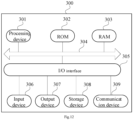
- FIG. 12 is a schematic structural diagram of an electronic device provided by an embodiment of the present disclosure.
- a structural diagram of an electronic device e.g., a terminal device or server shown in FIG. 12
- the terminal device of the embodiment of the present disclosure may comprise, but not limited to, a mobile terminal such as a mobile phone, a notebook computer, a digital broadcast receiver, a PDA (Personal Digital Assistant), a PAD (tablet computer), a PMP (Portable Multimedia Player), an on-board terminal (such as an on-board navigation terminal), and a fixed terminal such as a digital TV, a desktop computer, and the like.
- the electronic device shown in FIG. 12 is merely an example and should not impose any limitation on the function and scope of the embodiment of the present disclosure.
- the electronic device 300 may comprise a processing device (e.g., a central processing unit, a graphics processor) 301, which may perform various appropriate actions and processes according to a program stored in Read Only Memory (ROM) 302 or a program loaded from storage device 308 into Random Access Memory (RAM) 303.
- ROM Read Only Memory
- RAM Random Access Memory
- processing device 301, ROM 302 and RAM 303 are connected to each other through bus 304.
- I/O Input/Output
- an input device 306 comprising, for example, a touch screen, a touch pad, a keyboard, a mouse, a camera, a microphone, an accelerometer, a gyroscope, etc.
- an output device 307 comprising, for example, a liquid crystal display (LCD), a speaker, a vibrator, etc.
- a storage device 308 such as a magnetic tape, a hard disk, etc.
- the communication device 309 enables the electronic device 300 to communicate wirelessly or by wire with other devices to exchange data.
- FIG. 12 shows an electronic device 300 having various components, it should be understood that it is not required to implement or provide all the illustrated components. Alternatively, more or fewer components can be implemented or provided.
- an embodiment of the present disclosure comprises a computer program product, which comprises a computer program carried on a non-transitory computer readable medium, and containing program code for executing the method shown in the flowchart.
- the computer program may be downloaded and installed from the network through the communication device 309, or installed from the storage device 306, or from the ROM 302.
- the processing device 301 When the computer program is executed by the processing device 301, the above functions defined in the method of the embodiment of the present disclosure are performed.
- the electronic device provided by the embodiment of the present disclosure and the message processing method provided by the above embodiment belong to the same inventive concept.
- the embodiment can achieve the same beneficial effect as the above embodiment.
- An embodiment of the present application further provides a computer storage medium on which a computer program is stored, which when executed by a processor implement the message processing method provided in the above embodiment.
- the computer-readable medium in the present disclosure may be a computer-readable signal medium or a computer-readable storage medium, or any combination of thereof.
- the computer readable storage medium can be, for example, but not limited to, an electronic, magnetic, optical, electromagnetic, infrared, or semiconductor system, apparatus, or device, or any combination of the above. More specific examples of the computer readable storage medium may comprise, but are not limited to: electrical connection with one or more wires, portable computer disk, hard disk, random access memory (RAM), read only memory (ROM), erasable programmable read only memory (EPROM or flash), fiber optics, portable compact disk Read only memory (CD-ROM), optical storage device, magnetic storage device, or any suitable combination of the foregoing.
- a computer readable storage medium can be any tangible medium that can contain or store a program, which can be used by or in connection with an instruction execution system, apparatus or device.
- a computer readable signal medium may comprise a data signal that is propagated in the baseband or as part of a carrier, carrying computer readable program code. Such propagated data signals can take a variety of forms comprising, but not limited to, electromagnetic signals, optical signals, or any suitable combination of the foregoing.
- the computer readable signal medium can also be any computer readable medium other than a computer readable storage medium, which can transmit, propagate, or transport a program for use by or in connection with the instruction execution system, apparatus, or device.
- Program code embodied on a computer readable medium can be transmitted by any suitable medium, comprising but not limited to wire, fiber optic cable, RF (radio frequency), etc., or any suitable combination of the foregoing.
- a client and a server can communicate using any currently known or future developed network protocol such as HTTP (HyperText Transfer Protocol), and can be interconnected by any form or medium of digital data communication, e.g., a communication network.
- HTTP HyperText Transfer Protocol
- Examples of communication networks comprise a local area network ("LAN”) and a wide area network (“WAN”), the Internet, and end-to-end networks (for example, ad hoc end-to-end networks), as well as any currently known or future developed networks.
- the above computer-readable medium may be comprised in the electronic device described above; or it may exist alone without being assembled into the electronic device.
- the computer-readable medium carries one or more programs that cause, when executed by the electronic device, the electronic device to perform the following steps: displaying a conversation message in a conversation interface, and detecting a trigger operation on the conversation message; and displaying an emoticon area and a message processing area corresponding to the conversation message in response to the trigger operation satisfying a preset condition; wherein the emoticon area and the message processing area are independent of each other and have different display positions in the conversation interface, the emoticon area comprises at least one selectable emoticon, and the message processing area comprises at least one function control.
- the computer program code for executing operations of the present disclosure may be complied by one or more program design languages or any combination thereof, the program design languages comprising but not limited to object-oriented program design languages, such as Java, Smalltalk, C++, etc., as well as conventional procedural program design languages, such as "C" program design language or similar program design language.
- a program code may be completely or partly executed on a user computer, or executed as an independent software package, partly executed on the user computer and partly executed on a remote computer, or completely executed on a remote computer or server.
- the remote computer may be connected to the user computer through various kinds of networks, comprising local area network (LAN) or wide area network (WAN), or connected to external computer (for example using an internet service provider via Internet).
- LAN local area network
- WAN wide area network
- Internet for example using an internet service provider via Internet
- each block in the flowchart or block diagrams may represent a module, segment, or portion of code, which comprises one or more executable instructions for implementing the specified function or functions.
- the functions noted in the block may occur out of the order noted in the figures. For example, two blocks shown in succession may be executed substantially in parallel, or the blocks may sometimes be executed in the reverse order, depending upon the functionality involved.
- a unit can be implemented in software or hardware.
- the name of a unit does not constitute a limitation of the unit itself under certain circumstances, for example, a first acquisition unit may also be described as "a unit that obtains at least two Internet Protocol addresses".
- exemplary types of hardware logic components comprise: Field Programmable Gate Array (FPGA), Application Specific Integrated Circuit (ASIC), Application Specific Standard Product (ASSP), System on Chip (SOC), Complex Programmable Logic Device (CPLD), etc.
- FPGA Field Programmable Gate Array
- ASIC Application Specific Integrated Circuit
- ASSP Application Specific Standard Product
- SOC System on Chip
- CPLD Complex Programmable Logic Device
- a machine-readable medium may be a tangible medium, which may contain or store a program for use by or in connection with an instruction execution system, apparatus, or device.
- the machine-readable medium may be a machine-readable signal medium or a machine-readable storage medium.
- the machine-readable medium may comprise, but is not limited to, an electronic, magnetic, optical, electromagnetic, infrared, or semiconductor system, apparatus, or device, or any suitable combination of thereof.
- machine-readable storage medium may comprise electrical connection with one or more wires, portable computer disk, hard disk, random access memory (RAM), read only memory (ROM), erasable programmable read only memory (EPROM or flash), fiber optics, portable compact disk Read only memory (CD-ROM), optical storage device, magnetic storage device, or any suitable combination of the foregoing.
- RAM random access memory
- ROM read only memory
- EPROM or flash erasable programmable read only memory
- CD-ROM compact disk Read only memory
- optical storage device magnetic storage device, or any suitable combination of the foregoing.
- a message processing method comprising: displaying a conversation message in a conversation interface, and detecting a trigger operation on the conversation message; and displaying an emoticon area and a message processing area corresponding to the conversation message in response to the trigger operation satisfying a preset condition; wherein the emoticon area and the message processing area are independent of each other and have different display positions in the conversation interface, the emoticon area comprises at least one selectable emoticon, and the message processing area comprises at least one function control.
- the displaying of the conversation message in the conversation interface comprises: displaying trigger prompt information at a position associated with the conversation message to prompt the trigger operation and/or the preset condition of the conversation message; wherein the position comprises an end position of a display frame to which the conversation message belongs, a position at a bottom of the display frame, or a position below the display frame.
- differentiated displaying of the trigger prompt information and the conversation message corresponding to the trigger prompt information is made; wherein the differentiated displaying comprises: displaying the conversation message and the trigger prompt information in different fonts, colors and/or font sizes, or displaying a sub-display frame to which the trigger prompt information belongs and the display frame with different fill colors.
- the trigger operation comprises: a long-press operation on the conversation message; and the preset condition comprises: a duration of the long-press operation on the conversation message reaching a preset duration threshold.
- the displaying of the emoticon area and the message processing area corresponding to the conversation message comprises: displaying the emoticon area at an edge of a display frame to which the conversation message belongs, and displaying the message processing area at a bottom of the conversation interface.
- the method further comprises: masking display of another conversation message in the conversation interface to which the conversation message belongs.
- the masking display comprises: drawing a mask layer corresponding to the other conversation message to mask display of the other conversation message based on the mask layer; wherein a transparency of the mask layer is within a preset transparency range.
- the displaying of the emoticon area and the message processing area corresponding to the conversation message comprises: displaying the conversation message on a pop-up page; and displaying the emoticon area at an edge of a display frame to which the conversation message belongs, and displaying the message processing area at a bottom of the pop-up page.
- the at least one function control in the message processing area is displayed laterally, and the message processing area is configured to be slid laterally to display more function controls.
- the displaying of the message processing area at the bottom of the conversation interface comprises: determining an object type of an object to which the conversation message belongs, and determining the at least one function control in the message processing area according to the object type.
- the determining of the at least one function control in the message processing area according to the object type comprises: determining that the at least one function control does not comprise a report control in response to the object type being a first object type; and determining that the at least one function control does not comprise a recall control in response to the object type being a second object type.
- the method further comprises: displaying the at least one selectable emoticon in the emoticon area; wherein the displaying of the at least one selectable emoticon in the emoticon area comprises: determining a user identification of a user who performs the trigger operation on the conversation message; and determining at least one selectable emoticon displayed in the emoticon area and a display order of the at least one selectable emoticon according to a language type, an region type and/or use frequencies of various emoticons corresponding to the user identification.
- the method further comprises: in response to a trigger operation on a selectable emoticon in the emoticon area being detected, creating an emoticon feedback area at a bottom of the conversation message or at a bottom of a display frame to which the conversation message belongs and displaying a triggered target emoticon in the emoticon feedback area.
- the method further comprises: displaying a plurality of target emoticons corresponding to the conversation message in a tiled manner in an emoticon feedback area in response to the plurality of target emoticons being received and the plurality of target emoticons being different.
- the method further comprises: in response to a plurality of target emoticons corresponding to the conversation message being received, and the plurality of target emoticons comprising same target emoticons, treating the same target emoticons as a single target emoticon and displaying the single target emoticon and other different target emoticons in a tiled manner in an emoticon feedback area.
- the method further comprises: displaying various target emoticons in order in the emoticon feedback area according to receiving time of the various target emoticons.
- the method further comprises: displaying a total number of all target emoticons presented in the conversation message at an end of a last target emoticon in the emoticon feedback area.
- the method further comprises: popping up a list page comprising a plurality of pieces of display data in response to it being detected that the emoticon feedback area is triggered; wherein the display data comprises a target emoticon and an user identification corresponding to the target emoticon.
- a display size of the list page is smaller than a display size of the conversation interface, and a bottom of the list page horizontally corresponds to a bottom of the conversation interface.
- the method further comprises: in response to a trigger operation on the selectable emoticon in the emoticon area being detected again, updating a triggered target emoticon to the emoticon feedback area, and removing a target emoticon corresponding to a previous trigger operation from the emoticon feedback area.
- the method further comprises: in response to it being detected that the conversation message is double-clicked, creating an emoticon feedback area at a bottom of the conversation message, and adding a default emoticon to the emoticon feedback area.
- a message processing device comprising: a trigger operation detection module configured to display a conversation message in a conversation interface, and detect a trigger operation on the conversation message; and a display module configured to display an emoticon area and a message processing area corresponding to the conversation message in response to the trigger operation satisfying a preset condition; wherein the emoticon area and the message processing area are independent of each other and have different display positions in the conversation interface, the emoticon area comprises at least one selectable emoticon, and the message processing area comprises at least one function control.
- an electronic device comprising: one or more processors; and a storage device configured to store one or more programs, which when executed by the one or more processors cause the one or more processors to implement the message processing method according to any one of the embodiments of the present disclosure.
- a storage medium containing computer executable instructions, which when executed by a computer processor carry out the message processing method according to any one of the embodiments of the present disclosure.
- a computer program comprising: instructions that, when executed by a processor, cause the processor to perform the message processing method according to any one of the embodiments of the present disclosure.
Landscapes
- Engineering & Computer Science (AREA)
- Theoretical Computer Science (AREA)
- General Engineering & Computer Science (AREA)
- Human Computer Interaction (AREA)
- General Physics & Mathematics (AREA)
- Physics & Mathematics (AREA)
- Signal Processing (AREA)
- Computer Networks & Wireless Communication (AREA)
- Software Systems (AREA)
- Business, Economics & Management (AREA)
- General Business, Economics & Management (AREA)
- User Interface Of Digital Computer (AREA)
- Information Transfer Between Computers (AREA)
- Digital Computer Display Output (AREA)
Applications Claiming Priority (2)
| Application Number | Priority Date | Filing Date | Title |
|---|---|---|---|
| CN202210388818.XA CN114780190B (zh) | 2022-04-13 | 2022-04-13 | 消息处理方法、装置、电子设备及存储介质 |
| PCT/SG2023/050124 WO2023200397A2 (fr) | 2022-04-13 | 2023-03-02 | Procédé et appareil de traitement de message, dispositif électronique et support de stockage |
Publications (2)
| Publication Number | Publication Date |
|---|---|
| EP4502775A2 true EP4502775A2 (fr) | 2025-02-05 |
| EP4502775A4 EP4502775A4 (fr) | 2025-07-09 |
Family
ID=82428418
Family Applications (1)
| Application Number | Title | Priority Date | Filing Date |
|---|---|---|---|
| EP23788697.3A Pending EP4502775A4 (fr) | 2022-04-13 | 2023-03-02 | Procédé et appareil de traitement de message, dispositif électronique et support de stockage |
Country Status (5)
| Country | Link |
|---|---|
| US (1) | US20230333729A1 (fr) |
| EP (1) | EP4502775A4 (fr) |
| JP (1) | JP7833561B2 (fr) |
| CN (1) | CN114780190B (fr) |
| WO (1) | WO2023200397A2 (fr) |
Families Citing this family (5)
| Publication number | Priority date | Publication date | Assignee | Title |
|---|---|---|---|---|
| CN115017429A (zh) * | 2021-08-27 | 2022-09-06 | 北京字跳网络技术有限公司 | 一种链接对象的剪存方法、装置、系统及存储介质 |
| USD1086159S1 (en) * | 2022-09-06 | 2025-07-29 | Beijing Kuaimajiabian Technology Co., Ltd. | Display screen or portion thereof with a graphical user interface |
| US12387404B2 (en) * | 2023-07-07 | 2025-08-12 | Adeia Guides Inc. | Generating memes and enhanced content in electronic communication |
| CN121037604A (zh) * | 2024-05-28 | 2025-11-28 | 北京有竹居网络技术有限公司 | 信息展示方法、装置、设备、存储介质及产品 |
| CN121635728A (zh) * | 2024-09-10 | 2026-03-10 | 北京字跳网络技术有限公司 | 信息显示方法、装置、电子设备及存储介质 |
Family Cites Families (77)
| Publication number | Priority date | Publication date | Assignee | Title |
|---|---|---|---|---|
| US8584031B2 (en) * | 2008-11-19 | 2013-11-12 | Apple Inc. | Portable touch screen device, method, and graphical user interface for using emoji characters |
| US9158983B2 (en) * | 2010-07-08 | 2015-10-13 | E-Image Data Corporation | Microform word search method and apparatus |
| CN108681424B (zh) * | 2010-10-01 | 2021-08-31 | Z124 | 用户界面上的拖移手势 |
| US10313279B2 (en) * | 2011-12-12 | 2019-06-04 | Rcs Ip, Llc | Live video-chat function within text messaging environment |
| US20150100537A1 (en) * | 2013-10-03 | 2015-04-09 | Microsoft Corporation | Emoji for Text Predictions |
| KR20150123407A (ko) * | 2014-04-24 | 2015-11-04 | 삼성전자주식회사 | 메시지 서비스 제공 장치 및 방법 |
| US9716680B2 (en) * | 2014-04-25 | 2017-07-25 | Jordan H. Taler | Expandable graphical icon for response to electronic text transmission |
| US10845982B2 (en) * | 2014-04-28 | 2020-11-24 | Facebook, Inc. | Providing intelligent transcriptions of sound messages in a messaging application |
| JP6428053B2 (ja) * | 2014-08-26 | 2018-11-28 | カシオ計算機株式会社 | グラフ表示装置およびプログラムおよびサーバ装置 |
| KR20160087640A (ko) * | 2015-01-14 | 2016-07-22 | 엘지전자 주식회사 | 이동단말기 및 그 제어방법 |
| CN105989165B (zh) * | 2015-03-04 | 2019-11-08 | 深圳市腾讯计算机系统有限公司 | 在即时聊天工具中播放表情信息的方法、装置及系统 |
| CN104917669A (zh) * | 2015-05-29 | 2015-09-16 | 北京搜狗科技发展有限公司 | 一种信息处理方法和装置 |
| CN106909282A (zh) * | 2015-12-23 | 2017-06-30 | 阿里巴巴集团控股有限公司 | 信息处理方法及装置 |
| CN106249857B (zh) * | 2015-12-31 | 2018-06-29 | 深圳超多维光电子有限公司 | 一种显示转换方法、装置及终端设备 |
| CN105763424B (zh) * | 2016-03-22 | 2019-05-07 | 网易有道信息技术(北京)有限公司 | 一种文字信息处理方法和装置 |
| US11320982B2 (en) * | 2016-05-18 | 2022-05-03 | Apple Inc. | Devices, methods, and graphical user interfaces for messaging |
| US10620812B2 (en) * | 2016-06-10 | 2020-04-14 | Apple Inc. | Device, method, and graphical user interface for managing electronic communications |
| KR102654807B1 (ko) * | 2016-08-18 | 2024-04-05 | 삼성전자주식회사 | 전자 장치 및 전자 장치 제어 방법 |
| CN106130889B (zh) * | 2016-08-30 | 2019-10-18 | 北京北信源软件股份有限公司 | 一种即时通讯中定时提醒消息的处理方法 |
| CN107491435B (zh) * | 2017-08-14 | 2021-02-26 | 苏州狗尾草智能科技有限公司 | 基于计算机自动识别用户情感的方法及装置 |
| WO2019036217A1 (fr) * | 2017-08-18 | 2019-02-21 | Missing Link Electronics, Inc. | Transport hétérogène basé sur des paquets |
| US10515464B2 (en) * | 2017-09-07 | 2019-12-24 | Whatsapp Inc. | Dynamic color customization of standardized (emoji) image characters |
| CN107786894B (zh) * | 2017-09-29 | 2021-03-02 | 维沃移动通信有限公司 | 一种用户反馈数据的识别方法、移动终端和存储介质 |
| CN108038748A (zh) * | 2017-11-30 | 2018-05-15 | 苏宁云商集团股份有限公司 | 用于辅助应答交互界面显示方法及设备 |
| CN108182714B (zh) * | 2018-01-02 | 2023-09-15 | 腾讯科技(深圳)有限公司 | 图像处理方法及装置、存储介质 |
| CN110120909B (zh) * | 2018-02-07 | 2021-12-07 | 腾讯科技(深圳)有限公司 | 消息的传输方法和装置、存储介质、电子装置 |
| CN108540646A (zh) * | 2018-03-12 | 2018-09-14 | 广东欧珀移动通信有限公司 | 消息提醒方法、装置、设备及存储介质 |
| CN108415751B (zh) * | 2018-03-12 | 2020-11-03 | Oppo广东移动通信有限公司 | 消息提醒方法、装置、设备及存储介质 |
| CN108415643B (zh) * | 2018-03-16 | 2020-08-04 | 维沃移动通信有限公司 | 一种图标显示方法及终端 |
| CN108595217A (zh) * | 2018-04-11 | 2018-09-28 | 南昌黑鲨科技有限公司 | 应用程序的内容推送方法、内容推送系统及智能终端 |
| CN108536372A (zh) * | 2018-04-11 | 2018-09-14 | 中国电子科技集团公司第十四研究所 | 一种触屏信息系统人机交互设计方法 |
| CN110493447A (zh) * | 2018-05-14 | 2019-11-22 | 成都野望数码科技有限公司 | 一种消息处理方法以及相关设备 |
| CN108737655B (zh) * | 2018-05-16 | 2020-10-09 | Oppo广东移动通信有限公司 | 图片处理方法及相关装置 |
| CN108733651A (zh) * | 2018-05-17 | 2018-11-02 | 新华网股份有限公司 | 表情符号预测方法及模型构建方法、装置、终端 |
| CN108804607B (zh) | 2018-05-29 | 2021-12-21 | 创新先进技术有限公司 | 聊天消息查询方法、装置及设备 |
| CN108874466B (zh) * | 2018-06-08 | 2021-10-29 | Oppo(重庆)智能科技有限公司 | 控件调用方法、电子装置及计算机可读存储介质 |
| CN109165014B (zh) * | 2018-07-17 | 2022-03-29 | 北京新唐思创教育科技有限公司 | 用于编辑控件的方法、装置、设备以及计算机存储介质 |
| CN109343764A (zh) * | 2018-07-18 | 2019-02-15 | 奇酷互联网络科技(深圳)有限公司 | 移动终端和控制运行控件的方法、装置 |
| CN109120866B (zh) * | 2018-09-27 | 2020-04-03 | 腾讯科技(深圳)有限公司 | 动态表情生成方法、装置、计算机可读存储介质和计算机设备 |
| CN109543575B (zh) * | 2018-11-09 | 2023-09-01 | 深圳市云兴科技有限公司 | 基于行为轨迹和动态多维度信息反馈激发大数据的方法和区域多维度探测反馈组合设备 |
| CN109525486A (zh) * | 2018-11-27 | 2019-03-26 | 北京微播视界科技有限公司 | 即时通信的会话消息加载方法、装置、电子设备及介质 |
| CN109857354A (zh) * | 2018-12-25 | 2019-06-07 | 维沃移动通信有限公司 | 一种界面显示方法及终端设备 |
| CN113938456B (zh) * | 2018-12-29 | 2023-07-14 | 天津字节跳动科技有限公司 | 会话消息置顶处理方法和装置 |
| CN109841217A (zh) * | 2019-01-18 | 2019-06-04 | 苏州意能通信息技术有限公司 | 一种基于语音识别的ar交互系统和方法 |
| CN109814952A (zh) * | 2019-01-30 | 2019-05-28 | 维沃移动通信有限公司 | 一种应用界面快捷启动控件处理方法、装置及移动终端 |
| CN109992192B (zh) * | 2019-02-28 | 2021-08-24 | 维沃移动通信有限公司 | 一种界面显示方法及终端设备 |
| CN110162776B (zh) * | 2019-03-26 | 2024-10-18 | 腾讯科技(深圳)有限公司 | 交互消息处理方法、装置、计算机设备和存储介质 |
| CN111756917B (zh) * | 2019-03-29 | 2021-10-12 | 上海连尚网络科技有限公司 | 信息交互方法、电子设备和计算机可读介质 |
| CN110086927A (zh) * | 2019-04-16 | 2019-08-02 | 北京达佳互联信息技术有限公司 | 消息处理方法、装置、设备、服务器及可读存储介质 |
| CN110221889B (zh) * | 2019-05-05 | 2020-09-25 | 北京三快在线科技有限公司 | 一种页面展示方法、装置、电子设备及存储介质 |
| CN110187947A (zh) * | 2019-05-17 | 2019-08-30 | 维沃移动通信有限公司 | 一种消息显示方法及终端设备 |
| CN110502292B (zh) * | 2019-07-01 | 2022-07-15 | 维沃移动通信有限公司 | 一种显示控制方法及终端 |
| CN110321009B (zh) * | 2019-07-04 | 2023-04-07 | 北京百度网讯科技有限公司 | Ar表情处理方法、装置、设备和存储介质 |
| CN110391970B (zh) * | 2019-07-17 | 2021-09-10 | 广州市百果园信息技术有限公司 | 用于通讯应用的消息管理系统、方法、设备和存储介质 |
| CN110311858B (zh) * | 2019-07-23 | 2022-06-07 | 上海盛付通电子支付服务有限公司 | 一种发送会话消息的方法与设备 |
| CN110417641B (zh) * | 2019-07-23 | 2022-05-17 | 上海盛付通电子支付服务有限公司 | 一种发送会话消息的方法与设备 |
| CN110543242B (zh) * | 2019-07-25 | 2023-07-04 | 北京智慧章鱼科技有限公司 | 基于bert技术的表情输入法及其装置 |
| CN110554782B (zh) * | 2019-07-25 | 2023-06-27 | 北京智慧章鱼科技有限公司 | 一种表情输入的图像合成方法和系统 |
| CN110389809B (zh) | 2019-07-26 | 2023-04-07 | 上海掌门科技有限公司 | 用于显示信息的方法和设备 |
| CN110489578B (zh) * | 2019-08-12 | 2024-04-05 | 腾讯科技(深圳)有限公司 | 图片处理方法、装置及计算机设备 |
| CN110634483B (zh) * | 2019-09-03 | 2021-06-18 | 北京达佳互联信息技术有限公司 | 人机交互方法、装置、电子设备及存储介质 |
| CN115174506B (zh) * | 2019-10-14 | 2024-03-22 | 腾讯科技(深圳)有限公司 | 会话信息处理方法、装置、可读存储介质和计算机设备 |
| CN110851288B (zh) * | 2019-10-17 | 2021-08-03 | 腾讯科技(深圳)有限公司 | 消息处理方法及装置 |
| CN110826682A (zh) * | 2019-11-01 | 2020-02-21 | 北京云迹科技有限公司 | 一种控制机器人的方法和装置 |
| CN110851035B (zh) * | 2019-11-12 | 2021-06-18 | 北京字节跳动网络技术有限公司 | 一种会话消息显示方法、装置、电子设备及存储介质 |
| CN110841291A (zh) * | 2019-11-19 | 2020-02-28 | 网易(杭州)网络有限公司 | 游戏中快捷消息的交互方法、装置及电子设备 |
| CN111030918B (zh) * | 2019-11-19 | 2022-03-25 | 维沃移动通信有限公司 | 一种消息处理方法、电子设备及服务器 |
| CN111193599B (zh) * | 2019-12-06 | 2021-07-06 | 腾讯科技(深圳)有限公司 | 消息处理方法和装置 |
| CN111817947A (zh) * | 2020-06-30 | 2020-10-23 | 广州市百果园信息技术有限公司 | 用于通讯应用的消息展示系统、方法、设备和存储介质 |
| CN111740896B (zh) * | 2020-07-07 | 2023-07-25 | 腾讯科技(深圳)有限公司 | 一种内容分享控制方法、装置、电子设备和存储介质 |
| CN111934989A (zh) * | 2020-09-14 | 2020-11-13 | 盛威时代科技集团有限公司 | 一种会话消息处理方法及装置 |
| US11079907B1 (en) * | 2020-10-23 | 2021-08-03 | Slack Technologies, Inc. | Systems and methods for reacting to messages |
| CN112883181A (zh) * | 2021-02-26 | 2021-06-01 | 腾讯科技(深圳)有限公司 | 会话消息的处理方法、装置、电子设备及存储介质 |
| CN113301421B (zh) | 2021-05-19 | 2024-02-02 | 广州繁星互娱信息科技有限公司 | 直播片段展示方法和装置、存储介质及电子设备 |
| KR102652719B1 (ko) * | 2021-06-25 | 2024-03-28 | 주식회사 카카오 | 커스텀 키워드를 이용하여 이모티콘을 표시하는 방법 및 사용자 단말 |
| CN114003326B (zh) * | 2021-10-22 | 2023-10-13 | 北京字跳网络技术有限公司 | 消息处理方法、装置、设备及存储介质 |
| CN114024929A (zh) | 2021-11-04 | 2022-02-08 | 维沃移动通信有限公司 | 语音消息处理方法、装置、电子设备及介质 |
-
2022
- 2022-04-13 CN CN202210388818.XA patent/CN114780190B/zh active Active
- 2022-06-30 US US17/810,184 patent/US20230333729A1/en not_active Abandoned
-
2023
- 2023-03-02 JP JP2024560533A patent/JP7833561B2/ja active Active
- 2023-03-02 WO PCT/SG2023/050124 patent/WO2023200397A2/fr not_active Ceased
- 2023-03-02 EP EP23788697.3A patent/EP4502775A4/fr active Pending
Also Published As
| Publication number | Publication date |
|---|---|
| CN114780190B (zh) | 2023-12-22 |
| EP4502775A4 (fr) | 2025-07-09 |
| WO2023200397A2 (fr) | 2023-10-19 |
| CN114780190A (zh) | 2022-07-22 |
| US20230333729A1 (en) | 2023-10-19 |
| JP7833561B2 (ja) | 2026-03-19 |
| JP2025514681A (ja) | 2025-05-09 |
| WO2023200397A3 (fr) | 2023-12-28 |
Similar Documents
| Publication | Publication Date | Title |
|---|---|---|
| EP4502775A2 (fr) | Procédé et appareil de traitement de message, dispositif électronique et support de stockage | |
| US11954426B2 (en) | Method and apparatus for displaying online document, and storage medium | |
| US10728192B2 (en) | Apparatus and method for message reference management | |
| EP2699029B1 (fr) | Procédé et dispositif pour fournir une fonction de message | |
| US10025475B1 (en) | Apparatus and method for message reference management | |
| CN114692038B (zh) | 页面显示方法、装置、设备及存储介质 | |
| CN113591439B (zh) | 一种信息交互方法、装置、电子设备及存储介质 | |
| JP7642676B2 (ja) | 情報展示方法、装置、電子デバイス及び記憶媒体 | |
| US9860198B1 (en) | Apparatus and method for message reference management | |
| CN113285866B (zh) | 信息发送方法、装置和电子设备 | |
| WO2022156557A1 (fr) | Procédé et appareil d'affichage d'image, dispositif et support | |
| CN111580922A (zh) | 应用程序的互动消息展示方法、装置及可读存储介质 | |
| US20250193142A1 (en) | Message sending method and apparatus, and device and storage medium | |
| CN111857504A (zh) | 信息显示方法、装置、电子设备和存储介质 | |
| CN113824627B (zh) | 群聊消息显示方法、装置、电子设备及存储介质 | |
| CN113885746A (zh) | 消息发送方法、装置及电子设备 | |
| CN113676395A (zh) | 信息处理方法、相关设备及可读存储介质 | |
| EP4418089B1 (fr) | Procédé et appareil de traitement de données, dispositif électronique et support de stockage | |
| CN112837050A (zh) | 发送和接收群收款消息的方法、设备及计算机可读介质 | |
| CN112822327A (zh) | 一种处理方法和装置 | |
| CN112346615A (zh) | 信息处理方法及装置 | |
| CN118764679B (zh) | 界面显示方法、装置、设备、存储介质与程序产品 | |
| US20260081884A1 (en) | Information processing method and apparatus, electronic device, and storage medium | |
| CN121680690A (zh) | 一种互动处理的方法、相关装置、设备及存储介质 | |
| CN119814714A (zh) | 消息处理方法、装置、电子设备、存储介质及程序产品 |
Legal Events
| Date | Code | Title | Description |
|---|---|---|---|
| STAA | Information on the status of an ep patent application or granted ep patent |
Free format text: STATUS: THE INTERNATIONAL PUBLICATION HAS BEEN MADE |
|
| PUAI | Public reference made under article 153(3) epc to a published international application that has entered the european phase |
Free format text: ORIGINAL CODE: 0009012 |
|
| STAA | Information on the status of an ep patent application or granted ep patent |
Free format text: STATUS: REQUEST FOR EXAMINATION WAS MADE |
|
| 17P | Request for examination filed |
Effective date: 20241024 |
|
| AK | Designated contracting states |
Kind code of ref document: A2 Designated state(s): AL AT BE BG CH CY CZ DE DK EE ES FI FR GB GR HR HU IE IS IT LI LT LU LV MC ME MK MT NL NO PL PT RO RS SE SI SK SM TR |
|
| REG | Reference to a national code |
Ref country code: DE Ref legal event code: R079 Free format text: PREVIOUS MAIN CLASS: G06F0003048100 Ipc: G06F0003048170 |
|
| A4 | Supplementary search report drawn up and despatched |
Effective date: 20250605 |
|
| RIC1 | Information provided on ipc code assigned before grant |
Ipc: H04M 1/72469 20210101ALI20250530BHEP Ipc: H04M 1/72436 20210101ALI20250530BHEP Ipc: H04L 51/046 20220101ALI20250530BHEP Ipc: G06F 3/0482 20130101ALI20250530BHEP Ipc: G06F 3/04886 20220101ALI20250530BHEP Ipc: G06F 3/04883 20220101ALI20250530BHEP Ipc: G06F 3/04817 20220101AFI20250530BHEP |
|
| DAV | Request for validation of the european patent (deleted) | ||
| DAX | Request for extension of the european patent (deleted) | ||
| GRAP | Despatch of communication of intention to grant a patent |
Free format text: ORIGINAL CODE: EPIDOSNIGR1 |
|
| STAA | Information on the status of an ep patent application or granted ep patent |
Free format text: STATUS: GRANT OF PATENT IS INTENDED |
|
| RIC1 | Information provided on ipc code assigned before grant |
Ipc: G06F 3/04817 20220101AFI20260225BHEP Ipc: G06F 3/04883 20220101ALI20260225BHEP Ipc: G06F 3/04886 20220101ALI20260225BHEP Ipc: G06F 3/0481 20220101ALI20260225BHEP Ipc: G06F 3/0482 20130101ALI20260225BHEP Ipc: G06F 3/0487 20130101ALI20260225BHEP Ipc: H04L 51/046 20220101ALI20260225BHEP Ipc: H04M 1/72436 20210101ALI20260225BHEP Ipc: H04M 1/72469 20210101ALI20260225BHEP |
|
| INTG | Intention to grant announced |
Effective date: 20260318 |