EP4509975A2 - Appareil de traitement d'informations, procédé de commande, programme et support de stockage lisible par ordinateur - Google Patents
Appareil de traitement d'informations, procédé de commande, programme et support de stockage lisible par ordinateur Download PDFInfo
- Publication number
- EP4509975A2 EP4509975A2 EP24216602.3A EP24216602A EP4509975A2 EP 4509975 A2 EP4509975 A2 EP 4509975A2 EP 24216602 A EP24216602 A EP 24216602A EP 4509975 A2 EP4509975 A2 EP 4509975A2
- Authority
- EP
- European Patent Office
- Prior art keywords
- setting
- print data
- data generation
- storage medium
- Prior art date
- Legal status (The legal status is an assumption and is not a legal conclusion. Google has not performed a legal analysis and makes no representation as to the accuracy of the status listed.)
- Pending
Links
Images




Classifications
-
- G—PHYSICS
- G06—COMPUTING OR CALCULATING; COUNTING
- G06F—ELECTRIC DIGITAL DATA PROCESSING
- G06F3/00—Input arrangements for transferring data to be processed into a form capable of being handled by the computer; Output arrangements for transferring data from processing unit to output unit, e.g. interface arrangements
- G06F3/12—Digital output to print unit, e.g. line printer, chain printer
- G06F3/1201—Dedicated interfaces to print systems
- G06F3/1202—Dedicated interfaces to print systems specifically adapted to achieve a particular effect
- G06F3/1203—Improving or facilitating administration, e.g. print management
- G06F3/1205—Improving or facilitating administration, e.g. print management resulting in increased flexibility in print job configuration, e.g. job settings, print requirements, job tickets
-
- G—PHYSICS
- G06—COMPUTING OR CALCULATING; COUNTING
- G06F—ELECTRIC DIGITAL DATA PROCESSING
- G06F3/00—Input arrangements for transferring data to be processed into a form capable of being handled by the computer; Output arrangements for transferring data from processing unit to output unit, e.g. interface arrangements
- G06F3/12—Digital output to print unit, e.g. line printer, chain printer
- G06F3/1201—Dedicated interfaces to print systems
- G06F3/1223—Dedicated interfaces to print systems specifically adapted to use a particular technique
- G06F3/1224—Client or server resources management
- G06F3/1228—Printing driverless or using generic drivers
-
- G—PHYSICS
- G06—COMPUTING OR CALCULATING; COUNTING
- G06F—ELECTRIC DIGITAL DATA PROCESSING
- G06F3/00—Input arrangements for transferring data to be processed into a form capable of being handled by the computer; Output arrangements for transferring data from processing unit to output unit, e.g. interface arrangements
- G06F3/12—Digital output to print unit, e.g. line printer, chain printer
- G06F3/1201—Dedicated interfaces to print systems
- G06F3/1223—Dedicated interfaces to print systems specifically adapted to use a particular technique
- G06F3/1229—Printer resources management or printer maintenance, e.g. device status, power levels
- G06F3/123—Software or firmware update, e.g. device firmware management
-
- G—PHYSICS
- G06—COMPUTING OR CALCULATING; COUNTING
- G06F—ELECTRIC DIGITAL DATA PROCESSING
- G06F3/00—Input arrangements for transferring data to be processed into a form capable of being handled by the computer; Output arrangements for transferring data from processing unit to output unit, e.g. interface arrangements
- G06F3/12—Digital output to print unit, e.g. line printer, chain printer
- G06F3/1201—Dedicated interfaces to print systems
- G06F3/1223—Dedicated interfaces to print systems specifically adapted to use a particular technique
- G06F3/1237—Print job management
- G06F3/125—Page layout or assigning input pages onto output media, e.g. imposition
-
- G—PHYSICS
- G06—COMPUTING OR CALCULATING; COUNTING
- G06F—ELECTRIC DIGITAL DATA PROCESSING
- G06F3/00—Input arrangements for transferring data to be processed into a form capable of being handled by the computer; Output arrangements for transferring data from processing unit to output unit, e.g. interface arrangements
- G06F3/12—Digital output to print unit, e.g. line printer, chain printer
- G06F3/1201—Dedicated interfaces to print systems
- G06F3/1223—Dedicated interfaces to print systems specifically adapted to use a particular technique
- G06F3/1237—Print job management
- G06F3/1253—Configuration of print job parameters, e.g. using UI at the client
- G06F3/1254—Automatic configuration, e.g. by driver
-
- G—PHYSICS
- G06—COMPUTING OR CALCULATING; COUNTING
- G06F—ELECTRIC DIGITAL DATA PROCESSING
- G06F3/00—Input arrangements for transferring data to be processed into a form capable of being handled by the computer; Output arrangements for transferring data from processing unit to output unit, e.g. interface arrangements
- G06F3/12—Digital output to print unit, e.g. line printer, chain printer
- G06F3/1201—Dedicated interfaces to print systems
- G06F3/1223—Dedicated interfaces to print systems specifically adapted to use a particular technique
- G06F3/1237—Print job management
- G06F3/1253—Configuration of print job parameters, e.g. using UI at the client
- G06F3/1256—User feedback, e.g. print preview, test print, proofing, pre-flight checks
-
- G—PHYSICS
- G06—COMPUTING OR CALCULATING; COUNTING
- G06F—ELECTRIC DIGITAL DATA PROCESSING
- G06F3/00—Input arrangements for transferring data to be processed into a form capable of being handled by the computer; Output arrangements for transferring data from processing unit to output unit, e.g. interface arrangements
- G06F3/12—Digital output to print unit, e.g. line printer, chain printer
- G06F3/1201—Dedicated interfaces to print systems
- G06F3/1278—Dedicated interfaces to print systems specifically adapted to adopt a particular infrastructure
- G06F3/1285—Remote printer device, e.g. being remote from client or server
-
- G—PHYSICS
- G06—COMPUTING OR CALCULATING; COUNTING
- G06F—ELECTRIC DIGITAL DATA PROCESSING
- G06F3/00—Input arrangements for transferring data to be processed into a form capable of being handled by the computer; Output arrangements for transferring data from processing unit to output unit, e.g. interface arrangements
- G06F3/12—Digital output to print unit, e.g. line printer, chain printer
- G06F3/1201—Dedicated interfaces to print systems
- G06F3/1223—Dedicated interfaces to print systems specifically adapted to use a particular technique
- G06F3/1224—Client or server resources management
- G06F3/1225—Software update, e.g. print driver, modules, plug-ins, fonts
Definitions
- the present invention relates to an information processing apparatus, a control method, a program, and a computer-readable storage medium.
- WSDA Windows Store Device App
- the present invention is made to further increase convenience of print processing.
- the present invention in its first aspect provides a computer-readable storage medium storing an application program, as specified in claim 1.
- the present invention in its second aspect provides an information processing apparatus as specified in claim 19.
- the present invention in its third aspect provides a method as specified in claim 20.
- an initialization program is stored in the ROM 112 in the ROM 112.
- the HDD 114 a group of application programs, an operating system (OS), a print data generation application, various types of data, and so on are stored.
- the RAM 113 is used as, for example, a work memory that is used when various programs stored in the HDD 114 are executed.
- the CPU 111 performs processing in accordance with procedures in the programs stored in the HDD 114 to thereby execute features described below in the host computer 101 and processing based on flowcharts described below.
- a printing device 102 which is a device, is connected to the host computer 101 via the input/output interface 116.
- the host computer 101 and the printing device 102 are separately configured; however, these may be configured as one information processing apparatus.
- the printing device 102 for example, an inkjet printer that performs printing by ejecting ink onto paper is assumed, and a description is given. However, printing may be performed with other methods (for example, an electrophotographic method).
- the host computer 101 may be a desktop computer, a smartphone, or a laptop computer.
- Figs. 2A and 2B are diagrams illustrating data flows in printing.
- Fig. 2A is a diagram illustrating a data flow in a case where an extended application 203 is not associated with an application 201, print data generation software 202, or the printing device 102.
- a user gives a print instruction from the application 201.
- the application 201 is software that creates contents to be printed and, for example, is a word processing application or a spreadsheet application.
- the user performs a setting process using a print setting screen provided by the OS or the print data generation software 202.
- the print data generation software 202 generates print setting information.
- the print setting information includes settings corresponding to set values that are set by using the print setting screen.
- the print setting information may be called PrintTicket.
- the OS generates intermediate data (also called input data) on the basis of application data output from the application 201 in accordance with the print instruction and passes the intermediate data to the print data generation software 202.
- the data output from the application 201 for printing is data in the Graphics Device Interface format (data in the GDI format) or data in the XML Paper Specification format (data in the XPS format).
- the print data generation software 202 generates print data that can be interpreted by the printing device 102 from the intermediate data on the basis of the print setting information set by the user and transmits the print data to the printing device 102.
- the print data generation software 202 generates print data that can be used in print devices from multiple vendors.
- Fig. 2B is a diagram illustrating a data flow in a case where the extended application 203 is associated with the print data generation software 202.
- the print data generation software 202 is software that is included in advance in the OS. That is, when the OS is installed on the host computer 101, the print data generation software 202 can be used.
- the extended application 203 is software that is not included in advance in the OS. Therefore, the user needs to operate the host computer 101 to download, from a server via a network, and install the extended application 203.
- the CPU 111 obtains device identification information from the printing device 102.
- the CPU 111 may obtain, from a server via a network, and install the extended application 203 that corresponds to the obtained device identification information. That is, the print data generation software 202 and the extended application 203 are retained in the host computer 101 as separate files.
- the print data generation software 202 and the extended application 203 may be updated and upgraded, and this update process is performed at separate timings. That is, a timing at which the print data generation software 202 is obtained by the host computer 101 is different from a timing at which the extended application 203 is obtained by the host computer 101. Further, a trigger for the host computer 101 to obtain the print data generation software 202 is different from a trigger for the host computer 101 to obtain the extended application 203.
- the OS associates the print data generation software 202 and the extended application 203 with each other.
- the extended application 203 described in this embodiment includes a print setting screen extension unit 204, a layout extension unit 205, and a preview unit 206.
- the extended application 203 may stop running each time processing by each unit ends.
- the OS launches the extended application 203 each time a request for using each unit is received.
- Another form may be employed in which, for example, the OS stops the extended application 203 that is running when processing by the print setting screen extension unit 204 ends but the OS keeps the extended application 203 running even when processing by the layout extension unit 205 ends.
- the user gives a print instruction from the application 201.
- the user performs a setting process using the print setting screen provided by the print setting screen extension unit 204 of the extended application 203.
- the print setting screen extension unit 204 generates print setting information. The details of this print setting feature will be described below with reference to Fig. 3 .
- the OS generates, in accordance with a print instruction, intermediate data on the basis of application data and print setting information and launches the layout extension unit 205 of the extended application 203.
- the intermediate data includes drawing data corresponding to contents to be printed and the print setting information.
- the OS generates, for example, data in the XPS format as the intermediate data on the basis of GDI data output from the application 201.
- the OS may pass the data in the XPS format to the layout extension unit 205 as is.
- the OS may modify the data in the XPS format, which is the application data, to generate data in the XPS format.
- the layout extension unit 205 edits the drawing data on the basis of the drawing data included in the generated intermediate data and the print setting information generated by using, for example, a screen illustrated in Fig. 3 .
- the layout extension unit 205 outputs the edited drawing data to the print data generation software 202.
- the print data generation software 202 generates and outputs print data that can be interpreted by the printing device 102 on the basis of the print setting information generated in accordance with a setting operation by the user and the edited drawing data.
- the OS launches the preview unit 206 of the extended application 203.
- the preview unit 206 obtains the print data generated by the print data generation software 202 and displays a print preview.
- the user uses a UI of the print preview to give a print start instruction.
- the preview unit 206 outputs the print data.
- the print data output from the preview unit 206 is transmitted to the printing device 102.
- the printing device 102 performs printing on paper on the basis of the print data transmitted from the host computer 101.
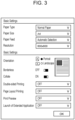
- Fig. 3 illustrates an example of the print setting screen provided by the print setting screen extension unit 204 of the extended application 203.
- the user uses this screen to set print setting information.
- a default print setting screen provided by the OS or the print data generation software 202 is generally used.
- On the default print setting screen only print setting information corresponding to features provided by the print data generation software 202 can be set.
- print setting information corresponding to the extended features provided by the extended application 203 can also be set.
- setting for page layout printing provided by the layout extension unit 205 and setting for the print preview feature provided by the preview unit 206 can be performed.
- Fig. 4 is a diagram schematically illustrating the page layout print feature provided by the layout extension unit 205 of the extended application 203.
- layout is done such that a plurality of pages in intermediate data based on application data are arranged on a side of one sheet.
- two-page printing (2 in 1) is set, and the layout extension unit 205 generates drawing data 403 in which two consecutive pages 401 and 402 are arranged on a side of one sheet.
- drawing data 403 in which two consecutive pages 401 and 402 are arranged on a side of one sheet.
- a setting for arranging a larger number of pages on a side of one sheet is available. It is assumed that the layout extension unit 205 in this embodiment has a layout feature for two-page printing and four-page printing as the page layout print feature, and the following description is given.
- Fig. 5 illustrates an example of a print preview screen provided by the preview unit 206 of the extended application 203.
- a display item 501 is used to change pages to be displayed on a print preview. The user can operate the display item 501 to change pages to be displayed and check the total number of pages to be printed based on the current print data and print settings.
- a display item 502 is a print preview screen for displaying an image of a print result of specified pages.
- a display item 503 is a button for starting printing.
- a display item 504 is a cancel button and, when the user presses this button, subsequent print processing is cancelled.
- the preview image illustrated in Fig. 5 corresponds to contents generated by the application 201.
- a vendor that offers the printing device 102 can extend the features of the print data generation software 202 by using the extended application 203.
- the extended application 203 is associated with the print data generation software 202 and the extended application 203 is launched each time printing is performed, the total time taken to perform printing may increase, which causes concern. Accordingly, the user performs launch setting for the extended application 203 to switch between launch and non-launch of the extended application 203, so that print processing is appropriately performed.
- the user sets ON or OFF as the launch setting of the extended application 203.
- the screen illustrated in Fig. 3 may be used to set ON or OFF as the launch setting of the extended application 203.
- the user may set ON or OFF as the launch setting of the extended application 203 by using another application before using the extended application 203.
- the OS checks the launch setting of the extended application 203 and launches the extended application 203 only in a case where ON is set. Accordingly, the user can select whether to use the extended application 203.
- the user sets the setting to OFF, so that an increase in the total time taken to perform printing can be suppressed.
- the extended application 203 is to be launched only in a case where the user wants to use the features provided by the extended application 203.
- the extended application 203 is to be launched only in a case where the user gives a print instruction in a state where ON is set for the print preview setting on the screen illustrated in Fig. 3 .
- a source that launches the extended application 203 needs to know whether to launch the extended application 203 for what setting in print setting information (hereinafter, the source that launches the extended application 203 is assumed to be the OS, and a description is given). Accordingly, a configuration is described in which the extended application 203 registers launch conditions, and the OS launches the extended application 203 in a case where the registered launch conditions are met.
- a CUSTOM setting for which launch determination is performed on the basis of print setting information is first added to the above-described launch setting of the extended application 203.
- the OS determines whether to launch the extended application 203 on the basis of the registered launch conditions.
- the extended application 203 When the extended application 203 is associated with the print data generation software 202, the extended application 203 registers print setting information based on which launch of the extended application 203 is triggered.
- the timing at which the information is registered is not limited to the timing at which the extended application 203 is associated with the print data generation software 202.
- the user can change the information at any timing using the extended application 203, and the timing at which the launch condition information is registered is not limited.
- the registration information As the registration information, three types of information, namely, "Feature” that indicates a target feature, "Options” that includes a list of set items for which the extended application 203 is to be launched if the items are set, and “Timing” that indicates the launch timing, are present.
- the numerical value of "Timing” is associated with a launch timing. In a case where the numerical value is equal to 1, the extended application 203 is to be launched before launch of the print data generation software 202. In a case where the numerical value is equal to 2, the extended application 203 is to be launched after launch of the print data generation software 202.
- an information item is registered so that, in a case where "JobPreview” setting corresponding to the print preview feature is set to ON, the extended application 203 is to be launched after launch of the print data generation software 202. Further, an information item is registered so that, in a case where two-page printing (PagesPerSheet_2) or four-page printing (PagesPerSheet_4) is set for "Feature" of "JobNUpAllDocumentsContiguously" corresponding to the page layout print setting, the extended application 203 is to be launched before launch of the print data generation software 202.
- PagesPerSheet_2 two-page printing
- PagesPerSheet_4 four-page printing
- the registration information regarding the launch conditions described in this embodiment is an example for realizing the configuration, and the content of the registration information is not limited to the above-described information.
- a setting may be provided as "Timing" for which the extended application 203 is to be launched at both the timing before and the timing after launch of the print data generation software 202.
- setting of "Timing" itself might not be necessary.
- Fig. 7 is a flowchart regarding control of a launch process for the extended application 203 in the first embodiment.
- a description is given under the assumption that the OS is responsible for launch of the extended application 203; however, a configuration may be actually employed in which a launch module that is included in the OS is present.
- the flowchart illustrated in Fig. 7 starts, for example, in accordance with a print instruction given by the user using the application 201 after the user has set print setting information using the screen illustrated in Fig. 3 (that is, an instruction for causing the OS to generate intermediate data).
- the flowchart illustrated in Fig. 7 also starts in response to the print data generation software 202 outputting print data.
- the OS checks the launch setting of the extended application 203 (S701).
- any of the three settings namely, ON, OFF, and CUSTOM, can be set.
- ON, OFF, and CUSTOM are present.
- determination in S701 results in ON
- determination in S701 results in OFF.
- determination in S701 results in CUSTOM.
- the flow proceeds to S702, and the OS launches the extended application 203.
- the launch setting of the extended application 203 is OFF, the OS does not launch the extended application 203, and the launch process ends.
- the OS inputs intermediate data to the print data generation software 202 to output print data to the printing device 102 as in Fig. 2A .
- the launch setting of the extended application 203 is CUSTOM
- the OS determines that the launch timing is before processing by the print data generation software 202, and saves 1 as the variable n (S704).
- the OS determines that the launch timing is after processing by the print data generation software 202, and saves 2 as the variable n (S705).
- the OS obtains, from the launch condition information, an information item in which "Timing" matches the value of n saved in S704 or S705 (S706).
- the OS identifies the print setting information set by the user, compares the print setting information with the information item in the launch condition information obtained in S706, and checks whether a setting that matches the information item in the launch condition information is present in the print setting information (S707).
- the OS checks whether the set value of "JobNUpAllDocumentsContiguously" in the print setting information is "PagesPerSheet_2" or "PagesPerSheet_4".
- the flow proceeds to S702, and the OS launches the extended application 203.
- "Timing" is set to 1 in only one information item.
- the layout extension unit 205 has a plurality of layout settings and the layout settings have respective set values.
- the OS makes a comparison with all of the registered information items and, if at least one matched setting is present, the flow proceeds to S702, and the OS launches the extended application 203.
- the OS does not launch the extended application 203, and the launch process ends. That is, in this embodiment, in a case where the extended application 203 is launched before the print data generation software 202 generates print data, the extended application 203 edits intermediate data (input data).
- the OS checks whether the set value of "Preview" in the print setting information is ON. In a case where it is determined that a matched setting is present in the print setting information, the flow proceeds to S702, and the OS launches the extended application 203. That is, in this embodiment, in a case where the extended application 203 is launched after the print data generation software 202 has generated print data, the extended application 203 displays a preview image using the print data.
- the OS is allowed to launch the extended application 203 on the basis of the registered launch condition information only in a case where the features provided by the extended application 203 are to be used. Accordingly, in a case of printing in which the user does not use the extended features provided by the extended application 203, a decrease in performance caused by association of the extended application 203 can be made smaller.
- any of the three settings, namely, ON, OFF, and CUSTOM, can be set has been described.
- the options for "Launch of Extended Application” on the screen illustrated in Fig. 3 only ON and OFF are present. In this case, the OS does not perform the process from S703 to S707.
- the process illustrated in Fig. 7 there may be a case where, as the launch setting of the extended application 203, only CUSTOM is set. In this case, options for "Launch of Extended Application” need not be present on the screen illustrated in Fig. 3 , and the OS performs the process in S702 and the process from S703 to S707 but does not perform the process in S701. That is, if the extended application is launched under an appropriate condition, all of the steps need not be performed.
- the method has been described in which the launch setting for the extended application 203 is performed by using the screen illustrated in Fig. 3 ; however, other methods may be employed.
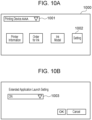
- a screen 1000 as illustrated in Fig. 10A may be displayed.
- a display item 1001 is used to accept selection of a target printing device.
- a display item 1002 is used to display a screen illustrated in Fig. 10B .
- the user may use a display item 1003 on the screen illustrated in Fig. 10B to specify a method for launching the extended application 203.
- the display item 1002 on the screen illustrated in Fig. 10A is selected, the screen illustrated in Fig. 3 may be displayed.
- a printing device registered in the associated print data generation software 202 is displayed.
- the plurality of printing devices are displayed as options.
- state information regarding a printing device selected in the display item 1001 (the state of the printing device, the amount of remaining ink of the printing device, etc.) is displayed.
- the state information regarding the printing device may be obtained via the print data generation software 202.
- Address information regarding a printing device selected in the display item 1001 may be obtained from the print data generation software 202, and the extended application 203 may use the obtained address information to obtain state information regarding the printing device.
- a Web browser may be launched to display a Web page for ordering an ink.
- information regarding inks that can be used in a printing device selected in the display item 1001 may be displayed.
- print setting information that serves as launch conditions is registered, and the OS launches the extended application 203 only in a case where a matched setting is set, thereby realizing the configuration in which the extended application 203 is launched only when the user needs the extended features.
- the registered launch conditions need to be compared with print setting information set by the user at each launch timing, and therefore, the process for checking settings takes time, which is an issue. Specifically, as a larger number of launch conditions are set, it takes longer for the OS to determine whether the print setting information matches the launch conditions. Accordingly, in this embodiment, a method for reducing the time taken to determine whether to launch the extended application 203 is proposed.
- a common extended application launch setting for triggering launch of the extended application 203 is included in print setting information. Then, the print setting screen extension unit 204 of the extended application 203 changes the extended application launch setting on the basis of print setting information set by the user, and a launch instruction is given accordingly.
- the extended application 203 is offered from each vendor, the extended application launch setting described above is set in common from the extended application 203 from any vendor. Accordingly, when launching the extended application 203, the OS needs to, for example, only refer to the extended application launch setting in the print setting information. As a result, information to be referred to by the OS can be reduced, and the time taken to determine whether to launch the extended application 203 can be reduced accordingly.
- Fig. 8 is an example flowchart illustrating a process for setting the extended application launch setting by the print setting screen extension unit 204.
- the process illustrated in Fig. 8 may be performed at a timing at which "OK" button is pressed on the screen illustrated in Fig. 3 .
- the process illustrated in Fig. 8 may be performed each time print setting information is changed on the screen illustrated in Fig. 3 .
- the extended application launch setting two settings, namely, LaunchExtendAppBefore indicating that the extended application 203 is to be launched before launch of the print data generation software 202 and LaunchExtendAppLater indicating that the extended application 203 is to be launched after launch of the print data generation software 202, are provided.
- ON or OFF can be set for each of the two settings, and setting ON indicates that the extended application 203 is to be launched at a corresponding timing.
- the extended application launch setting has two settings, and determination as to whether to launch the extended application 203 before or after launch of the print data generation software 202 is performed.
- a configuration may be employed in which a single setting is used to determine whether to launch the extended application 203 before or after launch of the print data generation software 202 on the basis of a set value.
- the set value three values need to be provided, namely, a value indicating that the extended application 203 is to be launched before launch of the print data generation software 202, a value indicating that the extended application 203 is to be launched after launch of the print data generation software 202, and a value indicating that the extended application 203 is not launched.
- determination can be performed on the basis of whether the set value of the single setting is ON or OFF.
- the print setting screen extension unit 204 checks whether print setting information set by the user includes a setting for which the layout extension unit 205 is to be used (S801). In a case where the extended application 203 is to be launched in accordance with conditions the same as those in the registration information illustrated in Fig. 6 , the print setting screen extension unit 204 checks whether two-page printing or four-page printing is set for the page layout setting.
- the print setting screen extension unit 204 sets the LaunchExtendAppBefore setting to ON (S802).
- the print setting screen extension unit 204 checks whether the print setting information set by the user includes a setting for which the preview unit 206 is to be used (S803). In a case where the extended application 203 is to be launched in accordance with conditions the same as those in the registration information illustrated in Fig. 6 , the print setting screen extension unit 204 checks whether ON is set for the print preview setting. In a case where it is determined that a setting for which the preview unit 206 is to be used is present in the print setting information, the print setting screen extension unit 204 sets the LaunchExtendAppLater setting to ON (S804). Accordingly, the extended application launch setting can be appropriately performed in accordance with the print setting information set by the user.
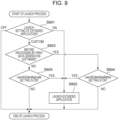
- Fig. 9 is a flowchart of an example of the launch process for the extended application 203 in the second embodiment.
- the OS launches the extended application 203 at an appropriate timing on the basis of the extended application launch setting set by the print setting screen extension unit 204. Also in this embodiment, a description is given under the assumption that the OS is responsible for launch of the extended application 203; however, a configuration may be actually employed in which a launch module that is included in the OS is present.
- the OS determines whether the launch timing is before processing by the print data generation software 202 (S903). In a case where the launch timing is before processing, the flow proceeds to S904, and in a case where the launch timing is after processing, the flow proceeds to S905. In S904, the OS checks whether ON is set for the LaunchExtendAppBefore setting indicating whether to launch the extended application 203 before launch of the print data generation software 202. In a case where ON is set, the OS launches the extended application 203. In a case where OFF is set, the OS does not launch the extended application 203, and the launch process ends.
- the OS checks whether ON is set for the LaunchExtendAppLater setting indicating whether to launch the extended application 203 after launch of the print data generation software 202. In a case where ON is set, the OS launches the extended application 203. In a case where OFF is set, the OS does not launch the extended application 203, and the launch process ends. As in the first embodiment, the OS outputs intermediate data to the print data generation software 202 and outputs print data to the printing device 102.
- part of launch determination for the extended application 203 based on print settings is performed at the time of printing, and the extended application launch setting is set, so that the load of the launch determination process performed by the launch module can be reduced. Accordingly, part of the determination process is performed at the time of print setting, and the time taken from a print start instruction given by the user until print completion can be made shorter than that in the first embodiment.
- the above-described embodiments can be implemented by performing the following process.
- a recording medium to which program code of software for realizing the functions of the above-described embodiments is recorded is supplied to a system or an apparatus.
- a computer or a CPU or a micro-processing unit (MPU) of the system or the apparatus reads and executes the program code stored in the recording medium. Accordingly, the above-described functions can be realized.
- the program code read from the recording medium realizes the functions of the above-described embodiments, and the recording medium that stores the program code constitutes the present invention.
- the recording medium for supplying the program code for example, a flexible disk, a hard disk, an optical disk, a magneto-optical disk, a compact disc read-only memory (CD-ROM), a compact disc recordable (CD-R), a magnetic tape, a nonvolatile memory card, a ROM, or a digital versatile disc (DVD) can be used.
- a flexible disk for example, a flexible disk, a hard disk, an optical disk, a magneto-optical disk, a compact disc read-only memory (CD-ROM), a compact disc recordable (CD-R), a magnetic tape, a nonvolatile memory card, a ROM, or a digital versatile disc (DVD)
- CD-ROM compact disc read-only memory
- CD-R compact disc recordable
- DVD digital versatile disc
- the program code read from the recording medium may be written to a memory included in a function extension board that is inserted into the computer or a memory included in a function extension unit that is connected to the computer. Then, a CPU, etc. included in the function extension board or a CPU, etc. included in the function extension unit may perform part or all of the actual processing. With the processing, the functions of the above-described embodiments are realized.
- Embodiment(s) of the present invention can also be realized by a computer of a system or apparatus that reads out and executes computer executable instructions (e.g., one or more programs) recorded on a storage medium (which may also be referred to more fully as a 'non-transitory computer-readable storage medium') to perform the functions of one or more of the above-described embodiment(s) and/or that includes one or more circuits (e.g., application specific integrated circuit (ASIC)) for performing the functions of one or more of the above-described embodiment(s), and by a method performed by the computer of the system or apparatus by, for example, reading out and executing the computer executable instructions from the storage medium to perform the functions of one or more of the above-described embodiment(s) and/or controlling the one or more circuits to perform the functions of one or more of the above-described embodiment(s).
- computer executable instructions e.g., one or more programs
- a storage medium which may also be referred to more fully as
- the computer may comprise one or more processors (e.g., central processing unit (CPU), micro processing unit (MPU)) and may include a network of separate computers or separate processors to read out and execute the computer executable instructions.
- the computer executable instructions may be provided to the computer, for example, from a network or the storage medium.
- the storage medium may include, for example, one or more of a hard disk, a random-access memory (RAM), a read only memory (ROM), a storage of distributed computing systems, an optical disk (such as a compact disc (CD), digital versatile disc (DVD), or Blu-ray Disc (BD) TM ), a flash memory device, a memory card, and the like.
Landscapes
- Engineering & Computer Science (AREA)
- Theoretical Computer Science (AREA)
- Human Computer Interaction (AREA)
- Physics & Mathematics (AREA)
- General Engineering & Computer Science (AREA)
- General Physics & Mathematics (AREA)
- Software Systems (AREA)
- Accessory Devices And Overall Control Thereof (AREA)
- Facsimiles In General (AREA)
- Editing Of Facsimile Originals (AREA)
Applications Claiming Priority (2)
| Application Number | Priority Date | Filing Date | Title |
|---|---|---|---|
| JP2018125043A JP7187189B2 (ja) | 2018-06-29 | 2018-06-29 | 情報処理装置、制御方法およびプログラム |
| EP19179923.8A EP3588261B1 (fr) | 2018-06-29 | 2019-06-13 | Appareil de traitement d'informations, procédé de commande, programme et support d'informations lisible sur ordinateur |
Related Parent Applications (2)
| Application Number | Title | Priority Date | Filing Date |
|---|---|---|---|
| EP19179923.8A Division-Into EP3588261B1 (fr) | 2018-06-29 | 2019-06-13 | Appareil de traitement d'informations, procédé de commande, programme et support d'informations lisible sur ordinateur |
| EP19179923.8A Division EP3588261B1 (fr) | 2018-06-29 | 2019-06-13 | Appareil de traitement d'informations, procédé de commande, programme et support d'informations lisible sur ordinateur |
Publications (2)
| Publication Number | Publication Date |
|---|---|
| EP4509975A2 true EP4509975A2 (fr) | 2025-02-19 |
| EP4509975A3 EP4509975A3 (fr) | 2025-03-26 |
Family
ID=66951783
Family Applications (2)
| Application Number | Title | Priority Date | Filing Date |
|---|---|---|---|
| EP19179923.8A Active EP3588261B1 (fr) | 2018-06-29 | 2019-06-13 | Appareil de traitement d'informations, procédé de commande, programme et support d'informations lisible sur ordinateur |
| EP24216602.3A Pending EP4509975A3 (fr) | 2018-06-29 | 2019-06-13 | Appareil de traitement d'informations, procédé de commande, programme et support de stockage lisible par ordinateur |
Family Applications Before (1)
| Application Number | Title | Priority Date | Filing Date |
|---|---|---|---|
| EP19179923.8A Active EP3588261B1 (fr) | 2018-06-29 | 2019-06-13 | Appareil de traitement d'informations, procédé de commande, programme et support d'informations lisible sur ordinateur |
Country Status (3)
| Country | Link |
|---|---|
| US (2) | US11687293B2 (fr) |
| EP (2) | EP3588261B1 (fr) |
| JP (4) | JP7187189B2 (fr) |
Families Citing this family (3)
| Publication number | Priority date | Publication date | Assignee | Title |
|---|---|---|---|---|
| EP3910465B1 (fr) * | 2020-05-13 | 2023-07-12 | Canon Production Printing Holding B.V. | Système informatique pour surveiller une pluralité de systèmes d'impression |
| JP7673024B2 (ja) * | 2022-07-26 | 2025-05-08 | キヤノン株式会社 | 情報処理装置、プログラム |
| JP2024016353A (ja) * | 2022-07-26 | 2024-02-07 | キヤノン株式会社 | 情報処理装置、プログラム |
Citations (1)
| Publication number | Priority date | Publication date | Assignee | Title |
|---|---|---|---|---|
| JP2017016480A (ja) | 2015-07-02 | 2017-01-19 | セイコーエプソン株式会社 | 通信制御装置、通信制御ドライバーおよび通信制御方法 |
Family Cites Families (18)
| Publication number | Priority date | Publication date | Assignee | Title |
|---|---|---|---|---|
| JP4481800B2 (ja) | 2003-12-02 | 2010-06-16 | キヤノン株式会社 | 情報処理装置、情報処理方法及びプログラム |
| JP4590341B2 (ja) | 2004-11-15 | 2010-12-01 | キヤノン株式会社 | データ処理装置および設定処理方法および情報処理装置および制御プログラム |
| JP4857135B2 (ja) | 2007-01-30 | 2012-01-18 | キヤノン株式会社 | 情報処理装置、情報処理方法、プログラム、及び記憶媒体 |
| JP5408904B2 (ja) * | 2008-05-23 | 2014-02-05 | キヤノン株式会社 | 情報処理装置、プレビュー方法、及びプログラム |
| JP5343643B2 (ja) * | 2009-03-17 | 2013-11-13 | 株式会社リコー | プリンタドライバ、記憶媒体、及び情報処理装置 |
| JP5463762B2 (ja) * | 2009-07-07 | 2014-04-09 | 株式会社リコー | 電子機器、情報処理方法、及びプログラム |
| JP5562002B2 (ja) * | 2009-10-30 | 2014-07-30 | キヤノン株式会社 | 情報処理装置、情報処理方法及びプログラム |
| JP5617386B2 (ja) * | 2010-07-05 | 2014-11-05 | ブラザー工業株式会社 | 制御装置、画像処理システム、及びプログラム |
| JP2012113356A (ja) * | 2010-11-19 | 2012-06-14 | Canon Inc | 印刷制御装置、印刷制御方法、及びコンピュータプログラム |
| JP5879807B2 (ja) * | 2011-08-11 | 2016-03-08 | 株式会社リコー | 印刷制御装置、制御プログラム及び記録媒体 |
| JP2013140423A (ja) * | 2011-12-28 | 2013-07-18 | Ricoh Co Ltd | 情報処理装置及び印刷処理プログラム |
| JP6330361B2 (ja) * | 2013-03-27 | 2018-05-30 | 株式会社リコー | 印刷制御プログラム、情報処理装置及び印刷システム |
| JP5569639B2 (ja) | 2013-08-15 | 2014-08-13 | 株式会社リコー | 情報処理装置、印刷制御プログラムおよび印刷システム |
| JP6303609B2 (ja) * | 2014-03-03 | 2018-04-04 | 株式会社リコー | プログラム、情報処理装置、情報処理方法、及び情報処理システム |
| JP6387918B2 (ja) * | 2015-07-23 | 2018-09-12 | コニカミノルタ株式会社 | 画像形成装置、端末装置、画像形成システム及びプログラム |
| JP6834823B2 (ja) | 2016-09-08 | 2021-02-24 | 株式会社リコー | プリンタドライバ、情報処理装置および画像処理システム |
| JP6897074B2 (ja) | 2016-09-15 | 2021-06-30 | 株式会社リコー | 情報処理装置、情報処理システム、情報処理方法、及びプログラム |
| US10540129B2 (en) * | 2016-09-15 | 2020-01-21 | Ricoh Company, Ltd. | Information processing device, information processing system, and information processing method for executing script included in print information |
-
2018
- 2018-06-29 JP JP2018125043A patent/JP7187189B2/ja active Active
-
2019
- 2019-06-13 EP EP19179923.8A patent/EP3588261B1/fr active Active
- 2019-06-13 EP EP24216602.3A patent/EP4509975A3/fr active Pending
- 2019-06-25 US US16/452,097 patent/US11687293B2/en active Active
-
2022
- 2022-11-29 JP JP2022189869A patent/JP7532482B2/ja active Active
-
2023
- 2023-05-12 US US18/316,934 patent/US20230280947A1/en active Pending
-
2024
- 2024-04-05 JP JP2024061418A patent/JP7665825B2/ja active Active
-
2025
- 2025-03-31 JP JP2025057900A patent/JP7844706B2/ja active Active
Patent Citations (1)
| Publication number | Priority date | Publication date | Assignee | Title |
|---|---|---|---|---|
| JP2017016480A (ja) | 2015-07-02 | 2017-01-19 | セイコーエプソン株式会社 | 通信制御装置、通信制御ドライバーおよび通信制御方法 |
Also Published As
| Publication number | Publication date |
|---|---|
| JP7665825B2 (ja) | 2025-04-21 |
| JP7187189B2 (ja) | 2022-12-12 |
| EP3588261B1 (fr) | 2025-01-08 |
| JP2020004241A (ja) | 2020-01-09 |
| US20200004471A1 (en) | 2020-01-02 |
| JP2025100569A (ja) | 2025-07-03 |
| JP7532482B2 (ja) | 2024-08-13 |
| US20230280947A1 (en) | 2023-09-07 |
| EP4509975A3 (fr) | 2025-03-26 |
| JP2023021149A (ja) | 2023-02-09 |
| EP3588261A1 (fr) | 2020-01-01 |
| US11687293B2 (en) | 2023-06-27 |
| JP7844706B2 (ja) | 2026-04-13 |
| JP2024086801A (ja) | 2024-06-28 |
Similar Documents
| Publication | Publication Date | Title |
|---|---|---|
| US12265745B2 (en) | Non-transitory computer-readable storage medium, control method, and information processing apparatus for displaying information related to a function | |
| US20230280947A1 (en) | Information processing apparatus and control method | |
| US12061828B2 (en) | Information processing apparatus, control method, and storage medium | |
| US11954386B2 (en) | Information processing apparatus having enhanced printing functions, controlling method of information processing apparatus, and storage medium | |
| US11875066B2 (en) | Controlling an information processing apparatus to execute an extension application associated with printing data generation software | |
| US20160004939A1 (en) | Print control system, print control apparatus, print control method, and storage medium | |
| US10795617B2 (en) | Information processing apparatus and control method | |
| US12118253B2 (en) | Information processing apparatus and non-transitory computer-readable storage medium for using an extension application for extending functionality in association with a standard application | |
| US12498893B2 (en) | Information processing apparatus to extend print function and non-transitory computer-readable storage medium | |
| US12554511B2 (en) | Storage medium, information processing method, and information processing apparatus | |
| US20240126490A1 (en) | Information processing apparatus, control method, and storage medium | |
| EP4538850A1 (fr) | Procédé de commande d'appareil de traitement d'informations, appareil de traitement d'informations et support d'informations |
Legal Events
| Date | Code | Title | Description |
|---|---|---|---|
| PUAI | Public reference made under article 153(3) epc to a published international application that has entered the european phase |
Free format text: ORIGINAL CODE: 0009012 |
|
| STAA | Information on the status of an ep patent application or granted ep patent |
Free format text: STATUS: THE APPLICATION HAS BEEN PUBLISHED |
|
| AC | Divisional application: reference to earlier application |
Ref document number: 3588261 Country of ref document: EP Kind code of ref document: P |
|
| AK | Designated contracting states |
Kind code of ref document: A2 Designated state(s): AL AT BE BG CH CY CZ DE DK EE ES FI FR GB GR HR HU IE IS IT LI LT LU LV MC MK MT NL NO PL PT RO RS SE SI SK SM TR |
|
| PUAL | Search report despatched |
Free format text: ORIGINAL CODE: 0009013 |
|
| AK | Designated contracting states |
Kind code of ref document: A3 Designated state(s): AL AT BE BG CH CY CZ DE DK EE ES FI FR GB GR HR HU IE IS IT LI LT LU LV MC MK MT NL NO PL PT RO RS SE SI SK SM TR |
|
| RIC1 | Information provided on ipc code assigned before grant |
Ipc: G06F 3/12 20060101AFI20250219BHEP |
|
| STAA | Information on the status of an ep patent application or granted ep patent |
Free format text: STATUS: REQUEST FOR EXAMINATION WAS MADE |
|
| 17P | Request for examination filed |
Effective date: 20250926 |
|
| STAA | Information on the status of an ep patent application or granted ep patent |
Free format text: STATUS: EXAMINATION IS IN PROGRESS |
|
| 17Q | First examination report despatched |
Effective date: 20260122 |