EP4521415A2 - Verfahren und vorrichtung zur interaktion mit medizinischen arbeitsblättern in einem point-of-care-browser - Google Patents
Verfahren und vorrichtung zur interaktion mit medizinischen arbeitsblättern in einem point-of-care-browser Download PDFInfo
- Publication number
- EP4521415A2 EP4521415A2 EP24213549.9A EP24213549A EP4521415A2 EP 4521415 A2 EP4521415 A2 EP 4521415A2 EP 24213549 A EP24213549 A EP 24213549A EP 4521415 A2 EP4521415 A2 EP 4521415A2
- Authority
- EP
- European Patent Office
- Prior art keywords
- worksheet
- data
- component
- local memory
- server
- Prior art date
- Legal status (The legal status is an assumption and is not a legal conclusion. Google has not performed a legal analysis and makes no representation as to the accuracy of the status listed.)
- Pending
Links
Images



Classifications
-
- G—PHYSICS
- G06—COMPUTING OR CALCULATING; COUNTING
- G06F—ELECTRIC DIGITAL DATA PROCESSING
- G06F16/00—Information retrieval; Database structures therefor; File system structures therefor
- G06F16/90—Details of database functions independent of the retrieved data types
- G06F16/95—Retrieval from the web
- G06F16/955—Retrieval from the web using information identifiers, e.g. uniform resource locators [URL]
-
- G—PHYSICS
- G06—COMPUTING OR CALCULATING; COUNTING
- G06F—ELECTRIC DIGITAL DATA PROCESSING
- G06F16/00—Information retrieval; Database structures therefor; File system structures therefor
- G06F16/90—Details of database functions independent of the retrieved data types
- G06F16/95—Retrieval from the web
- G06F16/958—Organisation or management of web site content, e.g. publishing, maintaining pages or automatic linking
- G06F16/972—Access to data in other repository systems, e.g. legacy data or dynamic Web page generation
-
- G—PHYSICS
- G06—COMPUTING OR CALCULATING; COUNTING
- G06F—ELECTRIC DIGITAL DATA PROCESSING
- G06F40/00—Handling natural language data
- G06F40/10—Text processing
- G06F40/166—Editing, e.g. inserting or deleting
- G06F40/174—Form filling; Merging
-
- G—PHYSICS
- G06—COMPUTING OR CALCULATING; COUNTING
- G06F—ELECTRIC DIGITAL DATA PROCESSING
- G06F40/00—Handling natural language data
- G06F40/10—Text processing
- G06F40/166—Editing, e.g. inserting or deleting
- G06F40/186—Templates
-
- G—PHYSICS
- G16—INFORMATION AND COMMUNICATION TECHNOLOGY [ICT] SPECIALLY ADAPTED FOR SPECIFIC APPLICATION FIELDS
- G16H—HEALTHCARE INFORMATICS, i.e. INFORMATION AND COMMUNICATION TECHNOLOGY [ICT] SPECIALLY ADAPTED FOR THE HANDLING OR PROCESSING OF MEDICAL OR HEALTHCARE DATA
- G16H10/00—ICT specially adapted for the handling or processing of patient-related medical or healthcare data
- G16H10/60—ICT specially adapted for the handling or processing of patient-related medical or healthcare data for patient-specific data, e.g. for electronic patient records
-
- G—PHYSICS
- G16—INFORMATION AND COMMUNICATION TECHNOLOGY [ICT] SPECIALLY ADAPTED FOR SPECIFIC APPLICATION FIELDS
- G16H—HEALTHCARE INFORMATICS, i.e. INFORMATION AND COMMUNICATION TECHNOLOGY [ICT] SPECIALLY ADAPTED FOR THE HANDLING OR PROCESSING OF MEDICAL OR HEALTHCARE DATA
- G16H15/00—ICT specially adapted for medical reports, e.g. generation or transmission thereof
-
- G—PHYSICS
- G16—INFORMATION AND COMMUNICATION TECHNOLOGY [ICT] SPECIALLY ADAPTED FOR SPECIFIC APPLICATION FIELDS
- G16H—HEALTHCARE INFORMATICS, i.e. INFORMATION AND COMMUNICATION TECHNOLOGY [ICT] SPECIALLY ADAPTED FOR THE HANDLING OR PROCESSING OF MEDICAL OR HEALTHCARE DATA
- G16H30/00—ICT specially adapted for the handling or processing of medical images
- G16H30/20—ICT specially adapted for the handling or processing of medical images for handling medical images, e.g. DICOM, HL7 or PACS
-
- G—PHYSICS
- G16—INFORMATION AND COMMUNICATION TECHNOLOGY [ICT] SPECIALLY ADAPTED FOR SPECIFIC APPLICATION FIELDS
- G16H—HEALTHCARE INFORMATICS, i.e. INFORMATION AND COMMUNICATION TECHNOLOGY [ICT] SPECIALLY ADAPTED FOR THE HANDLING OR PROCESSING OF MEDICAL OR HEALTHCARE DATA
- G16H40/00—ICT specially adapted for the management or administration of healthcare resources or facilities; ICT specially adapted for the management or operation of medical equipment or devices
- G16H40/20—ICT specially adapted for the management or administration of healthcare resources or facilities; ICT specially adapted for the management or operation of medical equipment or devices for the management or administration of healthcare resources or facilities, e.g. managing hospital staff or surgery rooms
Definitions
- the disclosed technology relates to point-of-care medical systems and in particular to systems completing patient care worksheets on a point-of-care ultrasound system without a live server connection.
- a physician or technician is asked to complete a form or worksheet that documents the examinations performed.
- Such worksheets can store basic information such as the patient's name, doctor's name, procedure type or imaging modality, date and location, etc.
- the electronic worksheet can also include still or video images taken during the examination, measurements or annotations, physician notes, diagnosis, etc.
- the completed worksheets are stored in a Digital Imaging and Communications in Medicine (DICOM) archive server.
- DICOM Digital Imaging and Communications in Medicine
- Point-of-care medical systems can be integrated with medical equipment, such as an ultrasound device, can be operatively connected to such medical equipment either directly or via a network, or can be another computing system (e.g. a computer or tablet) which can execute the system software and receive worksheet input from a user.
- existing point-of-care medical systems often come with a set of default, hard-coded worksheets. These can be excessively long or cumbersome for many situations, which results in physicians being less likely to use them.
- the worksheets can be customizable by a clinic or a practice group to reflect a desired workflow for a particular procedure.
- Worksheet server systems can facilitate the use and customization of a worksheet and allow worksheets to be downloaded to a remote computer or medical device, such as a point-of-care system.
- the worksheet server or other systems can receive data entered in a completed worksheet and other DICOM data, can store worksheet data and still or video images (e.g. in a picture archiving and communication system (PACS)), and can interact with billing systems.
- PACS picture archiving and communication system
- One such worksheet server system is the QPath E TM server system available from Telexy Healthcare, Inc. of Maple Ridge, BC Canada.
- point-of-care systems are required to have live network server connections to download and view worksheets and allow data entered into worksheets to be signed-off (approved for the next stage in the data review workflow) for transmission to servers. If the connection is lost, when point-of-care devices are used in the field or in locations where an internet or other computer communication connections are unavailable or are unreliable, the worksheet cannot be viewed or completed until the connection is reestablished.
- the inventor has recognized a need for technology that allows a user of a point-of-care system, such as an ultrasound point-of-care system, to interact with and complete worksheets without a live connection to a worksheet server.
- the disclosed technology addresses this need with point-of-care systems that include system software to interface with a browser component. Interfacing between the system software and browser component allows the system software to obtain worksheet data from the browser component and store it in local storage. This interfacing also allows the system software to retrieve stored worksheet data from the local storage and can cause the worksheet data to be auto-filled into a worksheet in the browser component. When an internet or other computer communication connection becomes available, the point-of-care imaging system transmits worksheet data to the server.
- the point-of-care imaging system software can determine whether there is data associated with this worksheet stored in the point-of-care imaging system's local memory. If so, the system software of the point-of-care imaging system can obtain the local data and interface with the browser component to auto-fill fields in the worksheet. The user can then interact with the worksheet, whether or not it has auto-filled data.
- a triggering event to save worksheet data occurs, such as when the user performs an action that navigates away from the current Document Object Model (DOM)
- the system software of the point-of-care system can again interface with the browser component to obtain worksheet data entered in the worksheet fields.
- Data from the worksheet can be stored in local memory.
- the worksheet data can be incorporated into a DICOM package by entering data from the worksheet and other associated data into "tags" in the DICOM package.
- DICOM tags can be standardized fields defined for particular types of data.
- a DICOM package can include a "private" tag, which can have various data structures useable by different organizations for different purposes.
- interfacing between the system software element and the browser component element includes employing an intermediary component that interacts with both software elements.
- a worksheet provided in the browser component can use predefined functions (e.g. JavaScript functions) that provide information about the worksheet.
- the system software running on the point-of-care imaging device can be configured with identifications of these predefined functions, such as their name, the arguments passed to the functions, and the types of results to be returned.
- the system software can use the intermediary component to get a reference to one or more of the predefined functions for an intended action, such as getting worksheet data or auto-filling a worksheet with specified fields.
- the intermediary component can use these references to execute the predefined functions within the browser component and obtain a result, if any.
- the result can be reformatted for use by the system software.
- the system software can package the function results into one or more private DICOM tags, or into other DICOM package fields.
- the intermediary component is a component object model (COM).
- the COM can include an IDispatch function for obtaining pointer references in the DOM of the browser component, given a function's name, parameter, and result data.
- the COM can also include an IInvoke function for using the pointers to execute the corresponding functions and obtain results.
- interfacing between the system software and the browser component can include injecting code into the scripting interpreter of the browser component.
- injecting the code can include passing the codes through an API of the browser component.
- the browser can execute the injected code, e.g. to auto-fill worksheet values or obtain entered worksheet values.
- the procedure for injecting the code can provide a handle to the result.
- the handle can be a return value from an API function call or can be a specified memory location, accessible by the system software, to which the result will be written.
- the disclosed technology provides interaction on a point-of-care system with worksheets without a live connection to a remote worksheet server.
- An organization can generate a custom set of worksheets, e.g., tailored for various departments, such as emergency medicine or radiology, and for the most common types of procedures performed. This facilitates use of such customized worksheets over default software embedded worksheets where a one size fits all approach is impractical and leads to infrequent or improper use.
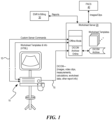
- the point-of-care system 10 is connected by a computer communication connection 15 to a worksheet server 20.
- the point-of-care system 10 includes one or more processors (not shown) that are configured to execute programmed instructions (“system software") that are stored in a computer readable memory in order to control the operation of the imaging system.
- the communication connection 15 to the worksheet server 20 may be a private wired or wireless LAN or may be a public network such as the internet.
- the worksheet server 20 stores a number of worksheets that can be customized for particular users, machines, groups of machines, or can be generic across an organization. Users can edit the worksheets, e.g. to put their own clinic logos on the forms or to make more substantive changes such as deciding what information or fields to include or not include and in what order, spaces for doctor or technician notes, and areas to put measurements or calculations.
- the worksheet server 20 can store the data for a completed worksheet in a DICOM (Digital Imaging and Communications in Medicine) archiver.
- DICOM Digital Imaging and Communications in Medicine
- DICOM is a standard for handling, storing, printing, and transmitting information in medical imaging and records. It includes a file format definition and a network communications protocol.
- the information in a worksheet can be sent by the DICOM archiver to an electronic medical records (EMR) and billing system 30.
- EMR electronic medical records
- PACS picture archiving and communication
- the worksheet server 20 pulls the referenced information back from the EMR system 30 and the PACS system 40.
- the ultrasound imaging system When connected to the worksheet server 20, the ultrasound imaging system receives custom server commands as well as worksheets and other information over the computer communication connection 15.
- the worksheets can be obtained at various times, such as on a periodic basis, when the worksheet is loaded on the point-of-care system, upon an administrator command at the point-of-care system (i.e. a "pull" operation), or as a "push" from the worksheet server.
- Worksheets can be transmitted from the worksheet server 20 to the ultrasound imaging machine in a browser readable format such as HTML.
- worksheets can include JavaScript.
- worksheets can include references to other content such as images, scripts, CSS files, etc. These references can be network based or can be downloaded locally to the point-of-care system.
- the worksheets and any referenced items can be downloaded and saved in local memory of the point-of-care system when a live network connection is available.
- the worksheet can then be used by the point-of-care system, whether or not a live network connection is available, because the worksheet and items referenced by the worksheet are available locally.
- a browser component implemented by the system software running on the point-of-care system 10 can display the worksheets, allowing a user to enter data, attach images or video clips, and sign the worksheet electronically. Once the user has completed the worksheet, the entered data, images and video clips can be transmitted back to the worksheet server 20 for storage in the DICOM archive server once the computer communication connection is established.
- the browser component can transmit the worksheet, e.g. by submitting a form encapsulating the worksheet.
- this option is not available if there is not a live network connection to a server.
- the worksheets received from the worksheet server 20 are designed to operate in a browser environment that is continually connected to the worksheet server 20 through an active computer communication connection 15. If the communication link fails or is unavailable, any information entered into the worksheet and not yet saved may be lost. Additionally, switching between worksheets may cause an error or loss of data.
- the disclosed technology provides mechanisms by which system software running on the point-of-care system 10 can run functions (e.g. JavaScript functions) in relation to the HTML of a particular worksheet.
- the system software can encapsulate the worksheet data in a DICOM package, e.g. as one or more private tags or in standard DICOM fields, and put the DICOM package into an outbound queue for transmission to a server upon a live network connection being available.
- the system software interfaces with the browser component to extract worksheet data.
- the browser component submits the worksheet data directly when a live network connection is available and interfaces with the system software when a live network connection is not available.
- Figure 2 is a block diagram of a system for allowing a user to complete a worksheet, previously downloaded from a remote worksheet server, without a live connection to the remote server.
- worksheet server 20 connects to point-of-care system 10 using communication connection 15.
- a local memory 100 in the point-of-care system 10 stores the HTML and other files that define the one or more worksheets received from the worksheet server 20.
- the system software 25 on the point-of-care system 10 includes a browser component 120 that allows a user to view and interact with the worksheets. With the browser component, the user can enter information, make and record measurements, and sign the worksheet.
- the browser component or system software can also be used to associate video clips, still images, or other information with the worksheet data.
- the worksheets received from the worksheet server can include or reference a number of functions (e.g. JavaScript) that provide information about the worksheet that is rendered in the browser.
- functions can produce drop-down menus, control radio buttons, display checkboxes and perform other operations that control how the worksheet appears.
- Some functions can provide meta-data about the worksheet, such as if the form contains any information, has been signed by the doctor or technician performing the examination, and the like.
- Such functions are generally designed to be within a browser component and do not communicate with outside applications, such as the other point-of-care system software. The technology disclosed provides ways for such external software to cause these functions to execute and to obtain their results.
- the system software 25 of the point-of-care system interfaces with the browser component to execute functions, either by using an intermediary component (e.g. interface 35) to obtain access to pre-defined functions included in, or referenced by the worksheets or by injecting functions into the script interpreter of the browser component.
- interface 35 can be a component object model (COM) interface provided by an operating system of the point-of-care system.
- the functions the interface can cause the browser to execute include:
- the system software knows identification information for the functions, such as the function names, what types of variables are to be passed to the functions, what return values and their types are expected from the functions, code line number, memory location, identifier number, parent object, or other identifying information.
- the intermediary component can use this information to gain access to execute these functions and to obtain the functions' results.
- the access can be gained by the system software injecting the functions directly into the script interpreter of the browser component and, in response, receiving any produced results.
- the system software can retrieve the information that a user has entered into the worksheet with the browser component and the meta-data about the worksheet itself.
- the system software stores the retrieved information in a local memory.
- This access also allows the system software to auto-fill the worksheet data back into a worksheet when it is re-opened.
- the system can take the information from a form and reconfigure the information as a DICOM file, either as entering pieces of the information into corresponding standard DICOM fields or into one or more private tags.
- a DICOM archive server can extract this information and worksheet identification information to determine that the information is for a particular worksheet.
- the system software sends the DICOM file when a live computer communication connection is established.
- the system software can retrieve the information that is entered into a worksheet and store it in local memory. The system software then can repackage the information into a DICOM file and transmit the information back to the DICOM archive server when a computer communication connection is re-established.
- the system software stores the DICOM information for each worksheet periodically and as it is being closed. If a worksheet is opened again before the information is transmitted to the worksheet server 20, the system can invoke the JavaScript commands to restore the information into the worksheet in its previous state so that the physician or technician can finish the report.
- information about a worksheet that is being rendered by a browser component is obtained not by calling embedded scripts but via injecting additional scripting into the HTML DOM using supported functionality specific to some browser components, such as those used in WPF and UWP platforms.
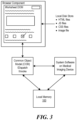
- Figure 3 illustrates further detail of how the system software can interact with the browser component, using an intermediary component, to retrieve information about a worksheet in accordance with some embodiments of the disclosed technology.
- the information required to render a worksheet by a browser component is retrieved from the worksheet server 20 and stored in a local memory of the medical imaging device.
- the information that makes up a worksheet can include HTML text files, JavaScript files, cascading style sheet (CSS) files, or media (e.g. image, audio, video, etc.) files. These files can be stored in a directory (and subdirectories if required) of a local disk store on the medical imaging device.
- CSS cascading style sheet
- media e.g. image, audio, video, etc.
- the system software uses a component object model (COM) intermediary interface, which provides IDispatch and IInvoke commands.
- COM can use IDispatch to retrieve pointers to the pre-defined JavaScript functions that provide information about or auto-fill information into the worksheets.
- the system software can also configure arguments expected by the functions and define the expected results in manner that is understood by the COM interface.
- the system software then instructs the COM intermediary component to request execution of the functions, using the IInvoke command. Any results returned from the functions are placed into memory locations, in local memory 100, that are known to the system software.
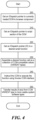
- Figure 4 shows more detail of the actions performed by the system software to call the functions of the DOM corresponding to a worksheet in accordance with some embodiments of the disclosed technology.
- the process of Figure 4 is implemented as a sub-process of block 610 or block 616 of the process shown in Figure 6 .
- the system software calls the IDispatch function of the COM interface to obtain a pointer to the currently loaded DOM in the browser component.
- the pointer provides a handle to the worksheet that is currently being rendered. If the user is switching between worksheets, the pointers can be stored and the correct pointer for the currently rendered worksheet is used.
- the system software calls the IDispatch function of the COM interface to get a pointer to a portion of the DOM that includes script functions.
- getting the pointer to the portion of the DOM that includes script functions can be based on the pointer to the currently loaded DOM.
- the pointer to the currently loaded DOM can provide a scope or other context for the function that will obtain the pointer to the portion of the DOM that includes script functions.
- the scripts are JavaScript, however other script types can be used. For example, scripting and other languages such as VBScript, AJAX, jQuery, C#, Java, etc. could be used.
- the system software calls the IDispatch function, passing identifications for one of the worksheet's functions, to retrieve a pointer to that function.
- the identifiers can include the names of these functions, which are known a priori to the system software.
- the system software requests the IDispatch function to return pointers to one or more of the JavaScript functions, for the current DOM in the browser component, having the names: "GetWorksheetData()"; "SetWorkSheetData(worksheetData)"; "IsWorksheetSigned()"; and "IsWorksheetActive()".
- retrieving the pointers to the identified functions can be based on the pointer to the portion of the DOM that includes script functions.
- the pointer to the portion of the DOM that includes script functions can provide a scope or other context for the function that will obtain the pointers to the identified functions.
- a function call as a collection of COM compatible values (VARIANT types).
- a function call is created as a structure. For example, a JavaScript function:
- the system software instructs the COM to execute the function using the IInvoke COM interface.
- the COM interface is instructed to perform the following pseudocode:
- the results (if any) of the called functions inside the current DOM are stored in the memory of the structure used to call the function and are converted from a format used by the COM interface into a format used by the system software.
- a format used by the COM interface For example, BSTR used by the COM interface, containing data in JSON format, may be converted into a string character array, char[], char* that is used by the system software.
- Figure 5 shows more detail of the actions performed by the system software to inject functions into a browser component implementing a worksheet in accordance with some embodiments of the disclosed technology.
- the process of Figure 5 is implemented as a sub-process of block 610 or 616 of the process shown in Figure 6 .
- a result handle can be a return value from an API or plug-in function call, a memory location shared between the browser component and the system software that the injected code is configured to write to, a call made by the injected code to a web service local to the point-of-care system, or the system software can be configured to intercept outgoing requests from the browser component and locally handle those with an identifier (e.g. a specified destination, port, etc.) indicating it is from the injected code.
- an identifier e.g. a specified destination, port, etc.
- the browser component can execute the injected code.
- the injected code can include one or more functions comparable to the GetWorksheetData(); SetWorkSheetData(worksheetData); IsWorksheetSigned(); or IsWorksheetActive() functions discussed above.
- blocks 506 and 508 can be performed only when the injected code is expected to produce a result, as indicated by these blocks being shown in dashed lines.
- the system software can use a handle for the type of code injection used to obtain a result of the executed code.
- the system software can receive a function call return value for an API or plug-in function call.
- the system software can read from a memory location shared between the browser component and the system software, to which the injected code is configured to write the result.
- the injected code can include an operation to make a network request (e.g. an operation in JavaScript using XMLHttpRequest()) where the request destination can be a web service local to the point-of-care system and data encapsulated in the request (e.g. as GET or POST data) can be extracted by a script hosted by the local web service. Further, the system software can intercept outgoing requests from the browser component and extract the data encapsulated in the request.
- the result from the injected code can be converted into a format useable by the system software.
- the result may be a string representation of the result, such as a JSON data string.
- the string can be tokenized and values with particular keys can utilized, e.g. by mapping them into corresponding DICOM fields.
- the entire string or values from the tokenized string can be encapsulated in a DICOM private tag.
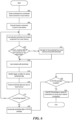
- Figure 6 is a flowchart of steps performed by system software to operate worksheets, using local storage instead of a live server connection, and transmit worksheet data upon server availability in accordance with some embodiments of the disclosed technology.
- the system software can obtain worksheets, from a worksheet server, and store them in local memory.
- obtaining versions of worksheets can be initiated by a requesting device (i.e. a "pull" operation) or by the worksheet server (i.e. a "push” operation).
- obtaining versions of worksheets can be triggered by an administrator command (either locally or from a remote system), by a periodic automatic request for updates, when a new version of a worksheet is available, or in response to a user requesting to access a worksheet while there is an active connection to a worksheet server.
- the worksheets can be customized for particular organizations, e.g. to maintain a particular look and feel, to include particular fields corresponding to data an organization wants to gather at that point-of-care system, or to specify how fields in the worksheet are organized to enable particular data-gathering workflows.
- the worksheets can be customized for a particular point-of-care system or for a group of point-of-care systems.
- the worksheets can be files that define fields using HTML.
- the worksheet files can include other content, such as scripts (e.g. JavaScript), images or other media, CSS, etc.
- the worksheet files can include references to other content stored in local storage of the point-of-care system.
- the worksheets and/or the additional content can be stored in a solid state drive of the point-of-care system. In some implementations, the worksheets and/or the additional content can be stored in a secure manner, such as through encryption.
- the point-of-care system is able to extract and locally store data entered into a worksheet.
- the point-of-care system can implement remaining blocks 604-624 without a live server connection.
- the system software of the point-of-care system can execute a browser component.
- This can be a custom browser specific to the point-of-care system or a version of a commercial browser, such as Chrome, Safari, Internet Explorer, etc.
- the browser component can be configured to integrate with, or be embedded in the system software such that it is not readily apparent that the browser component is separate from other aspects of the system software.
- executing the browser component can be performed as part of the initialization of the system software or in response to a user selection to open a worksheet.
- the browser component can load, from local memory, a selected worksheet, e.g. selected by a user during a patient exam. This can be accomplished by supplying the worksheet, from where it was stored in local memory at block 602, to the browser component. Where the worksheet has references to other content stored in local memory, the browser component can resolve the references and obtain the other content to fully render the worksheet and execute additional code such as referenced JavaScript or CSS.
- the system can determine whether there is unsigned or otherwise partial data stored in the local memory for the worksheet loaded at block 606. In some implementations, this occurs by checking which worksheet was loaded at block 606 and determining whether corresponding worksheet data has been stored. For example, meta-data identifying a worksheet can be stored in association with the worksheet data in the local memory. Worksheet data can be recognized where it has not yet been signed-off for transmission to a DICOM server, which can be indicated by further meta-data.
- the point-of-care system can include session data identifying a current patient, in which case at block 608 the determination further identifies unsigned worksheet data only if it also has an identifier for the current patient. If worksheet data is identified at block 608, processing continues to block 610. Otherwise, processing continues to block 612.
- the worksheet data identified at block 608 can be obtained from the local storage and supplied to the browser component.
- Code included in the worksheet or injected by the system software can use the supplied worksheet data to auto-fill fields of the worksheet.
- a process for inserting worksheet data into worksheet fields using an intermediary component is described above in relation to Figure 4 .
- a process for inserting worksheet data into the worksheet using code injection is described above in relation to Figure 5 .
- a user and/or automated systems can interact with the worksheet.
- a user can type information into a field or other gathered data can be entered or associated with the worksheet, such as data scanned from an encoding (e.g. a bar-code, QR code, etc.),calculations, measurements, images, readings, other scanning results, etc.
- an encoding e.g. a bar-code, QR code, etc.
- a trigger condition for saving the worksheet data can be identified.
- the trigger condition can be an event that will cause the browser component to navigate away from the current page, which can result in the browser component clearing the DOM for the current worksheet.
- such events can include a user actuating a control to end a patient exam, navigating to a different worksheet or other page, or an activation of a different subsystem of the point-of-care system (e.g. imaging, transducer, system menu, help menu, etc.) which will cause the system software to close the browser component.
- data entered into the current worksheet can be extracted and saved to local memory. Extracting data from the worksheet, for example, can be accomplished by utilizing an intermediary component to identify a reference to a GetWorksheetData() function and execute the function or by injecting the code for a GetWorksheetData() function into the browser component and retrieving the result.
- a process for extracting data from the worksheet using an intermediary component is described above in relation to Figure 4 .
- a process for extracting data from the worksheet using code injection is described above in relation to Figure 5 .
- the extracted worksheet data can be saved in a secure manner, such as by being encrypted.
- the system software can incorporate a version of the signed worksheet data into a DICOM package. In some implementations, this is done by adding a version of the worksheet data, e.g. as a string, to a private tag in the DICOM package. When a server receives this DICOM package it can extract individual values from the worksheet data in the private tag. In other implementations, the version of the worksheet data can be values for individual fields of the worksheet extracted from the worksheet data and added to corresponding standard fields of a DICOM package.
- the system software can add the completed DICOM package to a queue configured to transmit DICOM packages in the queue to one or more servers when live network connectivity is available.
- FIG. 7 is a block diagram of an example computing component 700 for executing system software on a point-of-care medical imaging system in accordance with some embodiments of the disclosed technology.
- Elements of computing component 700 can be implemented in digital electronic circuitry, or in computer software, firmware, or hardware, including the structures disclosed in this specification and their structural equivalents, or in combinations of one or more of them.
- Computing component 700 can include one or more input devices 720 that provide input to the Processor(s) 710 (e.g. CPU(s), GPU(s), HPU(s), etc.), notifying it of actions.
- the actions can be mediated by a hardware controller that interprets the signals received from the input device and communicates the information to the processors 710 using a communication protocol.
- Input devices 720 include, for example, a mouse, a keyboard, a touchscreen, an ultrasound, x-ray or other medical scanning component, an infrared sensor, a touchpad, a wearable input device, a camera- or other visual-based input device (e.g. bar-code or QR code reader), a microphone, or other user input devices.
- Processors 710 can be a single processing unit or multiple processing units in a device or distributed across multiple devices. Processors suitable for the execution of a computer program include, by way of example, both general and special purpose microprocessors, and any one or more processors of any kind of digital computer. Processors 710 can be coupled to other hardware devices, for example, with the use of a bus, such as a PCI bus or SCSI bus. The processors 710 can communicate with a hardware controller for devices, such as for a display 730. Display 730 can be used to display text and graphics. In some implementations, display 730 provides graphical and textual visual feedback to a user.
- the processors 710 can have access to a memory 750 of the point-of-care system.
- a memory includes one or more of various hardware devices for volatile and non-volatile storage, and can include both read-only and writable memory.
- a memory can comprise random access memory (RAM), various caches, CPU registers, read-only memory (ROM), and writable non-volatile memory, such as flash memory, hard drives, floppy disks, CDs, DVDs, magnetic storage devices, tape drives, device buffers, and so forth.
- RAM random access memory
- ROM read-only memory
- writable non-volatile memory such as flash memory, hard drives, floppy disks, CDs, DVDs, magnetic storage devices, tape drives, device buffers, and so forth.
- a memory is not a propagating signal divorced from underlying hardware; a memory is thus non-transitory.
- Memory 150 can include program memory 760 that stores computer programs, such as an operating system 762 (e.g.
- Memory 750 can also include data memory 770 that can store data, such as worksheets and worksheet data, to be provided to the program memory 760 or any element of the computing component 700.
- a computer program (also known as a program, software, software application, script, or code) can be written in any form of programming language, including compiled or interpreted languages, declarative or procedural languages, and it can be deployed in any form, including as a stand-alone program or as a module, component, subroutine, object, or other unit suitable for use in a computing environment.
- a computer program may, but need not, correspond to a file in a file system.
- a program can be stored in a portion of a file that holds other programs or data (e.g., one or more scripts stored in a markup language document), in a single file dedicated to the program in question, or in multiple coordinated files (e.g., files that store one or more modules, sub-programs, or portions of code).
- a computer program can be deployed to be executed on one computer or on multiple computers that are located at one site or distributed across multiple sites and interconnected by a communication network.
- Relative terms such as high or unimportant, when not otherwise defined, can be understood as assigning a value and determining how that value compares to an established threshold.
- selecting a fast connection can be understood to mean selecting a connection that has a value assigned corresponding to its connection speed that is above a threshold.
- the word “or” refers to any possible permutation of a set of items.
- A, B, or C refers to at least one of A, B, C, or any combination thereof, such as any of: A; B; C; A and B; A and C; B and C; A, B, and C; or multiple of any item such as A and A; B, B, and C; A, A, B, C, and C; etc.
Landscapes
- Engineering & Computer Science (AREA)
- Theoretical Computer Science (AREA)
- Health & Medical Sciences (AREA)
- General Health & Medical Sciences (AREA)
- Physics & Mathematics (AREA)
- General Engineering & Computer Science (AREA)
- General Physics & Mathematics (AREA)
- Databases & Information Systems (AREA)
- Medical Informatics (AREA)
- Public Health (AREA)
- Epidemiology (AREA)
- Primary Health Care (AREA)
- Computational Linguistics (AREA)
- Audiology, Speech & Language Pathology (AREA)
- Artificial Intelligence (AREA)
- Data Mining & Analysis (AREA)
- General Business, Economics & Management (AREA)
- Business, Economics & Management (AREA)
- Radiology & Medical Imaging (AREA)
- Nuclear Medicine, Radiotherapy & Molecular Imaging (AREA)
- Biomedical Technology (AREA)
- Stored Programmes (AREA)
- Ultra Sonic Daignosis Equipment (AREA)
- Pathology (AREA)
- Medical Treatment And Welfare Office Work (AREA)
- Information Retrieval, Db Structures And Fs Structures Therefor (AREA)
Applications Claiming Priority (3)
| Application Number | Priority Date | Filing Date | Title |
|---|---|---|---|
| US201762578277P | 2017-10-27 | 2017-10-27 | |
| PCT/US2018/053187 WO2019083677A1 (en) | 2017-10-27 | 2018-09-27 | METHOD AND APPARATUS FOR INTERACTING WITH MEDICAL WORK SHEETS IN INTERVENTION POINT BROWSER |
| EP18870763.2A EP3701536A4 (de) | 2017-10-27 | 2018-09-27 | Verfahren und vorrichtung zur interaktion mit medizinischen tabellenblättern bei einem browser am versorgungsort |
Related Parent Applications (1)
| Application Number | Title | Priority Date | Filing Date |
|---|---|---|---|
| EP18870763.2A Division EP3701536A4 (de) | 2017-10-27 | 2018-09-27 | Verfahren und vorrichtung zur interaktion mit medizinischen tabellenblättern bei einem browser am versorgungsort |
Publications (2)
| Publication Number | Publication Date |
|---|---|
| EP4521415A2 true EP4521415A2 (de) | 2025-03-12 |
| EP4521415A3 EP4521415A3 (de) | 2025-03-26 |
Family
ID=66243985
Family Applications (2)
| Application Number | Title | Priority Date | Filing Date |
|---|---|---|---|
| EP24213549.9A Pending EP4521415A3 (de) | 2017-10-27 | 2018-09-27 | Verfahren und vorrichtung zur interaktion mit medizinischen arbeitsblättern in einem point-of-care-browser |
| EP18870763.2A Ceased EP3701536A4 (de) | 2017-10-27 | 2018-09-27 | Verfahren und vorrichtung zur interaktion mit medizinischen tabellenblättern bei einem browser am versorgungsort |
Family Applications After (1)
| Application Number | Title | Priority Date | Filing Date |
|---|---|---|---|
| EP18870763.2A Ceased EP3701536A4 (de) | 2017-10-27 | 2018-09-27 | Verfahren und vorrichtung zur interaktion mit medizinischen tabellenblättern bei einem browser am versorgungsort |
Country Status (6)
| Country | Link |
|---|---|
| US (2) | US11042696B2 (de) |
| EP (2) | EP4521415A3 (de) |
| JP (2) | JP7333317B2 (de) |
| KR (2) | KR20240121337A (de) |
| CN (1) | CN111670477B (de) |
| WO (1) | WO2019083677A1 (de) |
Families Citing this family (5)
| Publication number | Priority date | Publication date | Assignee | Title |
|---|---|---|---|---|
| EP4521415A3 (de) * | 2017-10-27 | 2025-03-26 | Fujifilm Sonosite, Inc. | Verfahren und vorrichtung zur interaktion mit medizinischen arbeitsblättern in einem point-of-care-browser |
| JP7628545B2 (ja) * | 2019-12-06 | 2025-02-10 | フジフィルム ソノサイト インコーポレイテッド | 医療ワークシートと対話入力するための方法及び装置 |
| CN112786139A (zh) * | 2021-02-02 | 2021-05-11 | 福州数据技术研究院有限公司 | 一种生成交互医学报告的方法和系统 |
| US12299166B2 (en) | 2021-07-22 | 2025-05-13 | Translational Imaging Innovations, Inc. | Methods, systems and computer program products for handling data records using an application programming interface (API) and directory management system |
| CN115859264B (zh) * | 2023-02-28 | 2023-05-09 | 北京亿赛通科技发展有限责任公司 | 一种Windows10以及Windows11下基于UWP程序的注入方法 |
Family Cites Families (35)
| Publication number | Priority date | Publication date | Assignee | Title |
|---|---|---|---|---|
| NO975308L (no) * | 1996-11-21 | 1998-05-22 | Atl Ultrasound Inc | Billeddannende ultralyd-diagnose-system med datatilgangs- og kommunikasjonsmulighet |
| US6096095A (en) | 1998-06-04 | 2000-08-01 | Microsoft Corporation | Producing persistent representations of complex data structures |
| US7283857B1 (en) | 1998-11-30 | 2007-10-16 | Hologic, Inc. | DICOM compliant file communication including quantitative and image data |
| JP2002024383A (ja) | 2000-07-03 | 2002-01-25 | Fujitsu Ltd | 診療録入力装置、診療録サーバ、診療録入力プログラム記憶媒体および診療録サーバプログラム記憶媒体 |
| WO2004112580A2 (en) * | 2003-06-19 | 2004-12-29 | Compumed, Inc. | Method and system for analyzing bone conditions using dicom compliant bone radiographic image |
| US7930757B2 (en) * | 2003-10-31 | 2011-04-19 | Adobe Systems Incorporated | Offline access in a document control system |
| US7721197B2 (en) | 2004-08-12 | 2010-05-18 | Microsoft Corporation | System and method of displaying content on small screen computing devices |
| JP4733998B2 (ja) | 2005-02-24 | 2011-07-27 | 株式会社東芝 | 移動式医療装置 |
| US20060206822A1 (en) * | 2005-03-10 | 2006-09-14 | Siemens Medical Solutions Usa, Inc. | Application communication with document embedded functions |
| JP4880980B2 (ja) * | 2005-11-17 | 2012-02-22 | 株式会社東芝 | 電子文書表示装置及び電子文書表示方法 |
| JP4714110B2 (ja) | 2006-08-29 | 2011-06-29 | 富士フイルム株式会社 | 医用ネットワークシステム、医用画像撮影装置、医用画像処理装置、及び医用画像処理方法 |
| US20090210631A1 (en) * | 2006-09-22 | 2009-08-20 | Bea Systems, Inc. | Mobile application cache system |
| US8065166B2 (en) * | 2007-10-30 | 2011-11-22 | Onemednet Corporation | Methods, systems, and devices for managing medical images and records |
| US20090132285A1 (en) * | 2007-10-31 | 2009-05-21 | Mckesson Information Solutions Llc | Methods, computer program products, apparatuses, and systems for interacting with medical data objects |
| US8037110B2 (en) * | 2007-12-27 | 2011-10-11 | Microsoft Corporation | Business data access client for online/offline client use |
| JP2009189541A (ja) | 2008-02-14 | 2009-08-27 | Fujifilm Corp | 読影支援装置及び方法、並びに医用ネットワークシステム |
| JP2011067549A (ja) * | 2009-09-28 | 2011-04-07 | Nec Corp | 携帯型超音波測定装置及び携帯型超音波測定方法 |
| US9774702B2 (en) * | 2009-10-19 | 2017-09-26 | Tritan Software Corporation | System and method of employing a client side device to access local and remote data during communication disruptions |
| US20120084350A1 (en) * | 2010-10-05 | 2012-04-05 | Liang Xie | Adaptive distributed medical image viewing and manipulating systems |
| US10467699B2 (en) * | 2011-04-26 | 2019-11-05 | Russell Henry AMUNDSON | System and method for conveying and processing personal health information |
| JP5001450B2 (ja) * | 2011-07-30 | 2012-08-15 | 株式会社日立メディコ | 超音波診断装置 |
| KR20130086792A (ko) * | 2012-01-26 | 2013-08-05 | 연세대학교 산학협력단 | 의료정보시스템의 애플리케이션 업데이트 방법 |
| US8553965B2 (en) * | 2012-02-14 | 2013-10-08 | TerraRecon, Inc. | Cloud-based medical image processing system with anonymous data upload and download |
| US20140114672A1 (en) * | 2012-10-19 | 2014-04-24 | Datcard Systems, Inc. | Cloud based viewing, transfer and storage of medical data |
| US20140142984A1 (en) * | 2012-11-21 | 2014-05-22 | Datcard Systems, Inc. | Cloud based viewing, transfer and storage of medical data |
| WO2014085918A1 (en) * | 2012-12-03 | 2014-06-12 | International Medical Solutions, Inc. | System and method of viewing digital medical images |
| CN103136445B (zh) * | 2013-01-29 | 2015-11-04 | 浙江大学 | 一种openEHR信息到关系数据库的转换方法 |
| JP5930407B2 (ja) * | 2013-09-02 | 2016-06-08 | 富士フイルム株式会社 | 診療データ表示制御装置および方法並びにプログラム |
| KR20150059336A (ko) * | 2013-11-22 | 2015-06-01 | 주식회사 시공미디어 | 온라인 문서 저장 및 변환 표시 장치 및 방법 |
| US20170300634A1 (en) * | 2014-09-29 | 2017-10-19 | Twin Sails Technology Group, Inc. | Systems and methods for managing electronic healthcare information |
| US9760681B2 (en) * | 2014-11-24 | 2017-09-12 | Practice Fusion, Inc. | Offline electronic health record management |
| JP6527771B2 (ja) * | 2015-07-21 | 2019-06-05 | 富士フイルム株式会社 | 情報分析支援装置とその作動方法および作動プログラム、並びに情報分析支援システム |
| JP6547961B2 (ja) * | 2016-04-08 | 2019-07-24 | 国立大学法人 東京大学 | 医療情報検索システム、医療情報検索ゲートウェイ装置、医療情報検索方法及びプログラム |
| US20180218119A1 (en) * | 2017-01-31 | 2018-08-02 | Konica Minolta Healthcare Americas, Inc. | Cloud-to-local, local-to-cloud switching and synchronization of medical images and data |
| EP4521415A3 (de) * | 2017-10-27 | 2025-03-26 | Fujifilm Sonosite, Inc. | Verfahren und vorrichtung zur interaktion mit medizinischen arbeitsblättern in einem point-of-care-browser |
-
2018
- 2018-09-27 EP EP24213549.9A patent/EP4521415A3/de active Pending
- 2018-09-27 KR KR1020247025037A patent/KR20240121337A/ko active Pending
- 2018-09-27 US US16/144,795 patent/US11042696B2/en active Active
- 2018-09-27 JP JP2020523272A patent/JP7333317B2/ja active Active
- 2018-09-27 CN CN201880070263.6A patent/CN111670477B/zh active Active
- 2018-09-27 KR KR1020207014642A patent/KR102689370B1/ko active Active
- 2018-09-27 WO PCT/US2018/053187 patent/WO2019083677A1/en not_active Ceased
- 2018-09-27 EP EP18870763.2A patent/EP3701536A4/de not_active Ceased
-
2021
- 2021-06-02 US US17/303,551 patent/US11494550B2/en active Active
-
2023
- 2023-08-14 JP JP2023131837A patent/JP7637198B2/ja active Active
Also Published As
| Publication number | Publication date |
|---|---|
| JP2021500953A (ja) | 2021-01-14 |
| EP3701536A1 (de) | 2020-09-02 |
| KR20200065084A (ko) | 2020-06-08 |
| EP3701536A4 (de) | 2021-08-18 |
| WO2019083677A1 (en) | 2019-05-02 |
| CN111670477B (zh) | 2024-04-05 |
| US20190129928A1 (en) | 2019-05-02 |
| US11494550B2 (en) | 2022-11-08 |
| US20210294968A1 (en) | 2021-09-23 |
| KR20240121337A (ko) | 2024-08-08 |
| CN111670477A (zh) | 2020-09-15 |
| JP2023166405A (ja) | 2023-11-21 |
| EP4521415A3 (de) | 2025-03-26 |
| KR102689370B1 (ko) | 2024-07-30 |
| JP7637198B2 (ja) | 2025-02-27 |
| JP7333317B2 (ja) | 2023-08-24 |
| US11042696B2 (en) | 2021-06-22 |
Similar Documents
| Publication | Publication Date | Title |
|---|---|---|
| US11494550B2 (en) | Method and apparatus for interacting with medical worksheets in a point-of-care browser | |
| US8060376B2 (en) | System and method for collection of community health and administrative data | |
| US11798665B2 (en) | Method and apparatus for interacting with medical worksheets | |
| US20140172457A1 (en) | Medical information processing apparatus and recording medium | |
| WO2022225122A1 (ko) | 환자 맞춤형 전자 문진 시스템, 문진용 단말 및 이를 이용한 문진 방법 | |
| US20140242698A1 (en) | Medical records storage system | |
| Kuntalp et al. | A simple and low-cost Internet-based teleconsultation system that could effectively solve the health care access problems in underserved areas of developing countries | |
| US9286061B2 (en) | Generating and managing electronic documentation | |
| CN114360671A (zh) | 电子病历的生成方法和装置、存储介质和电子装置 | |
| US8176467B2 (en) | Computer program generation system and method thereof | |
| US20220171919A1 (en) | Methods and system for recording user inputs when interacting with a user interface | |
| JP7628545B2 (ja) | 医療ワークシートと対話入力するための方法及び装置 | |
| US20190244696A1 (en) | Medical record management system with annotated patient images for rapid retrieval | |
| US20230377719A1 (en) | Systems and Methods for Routing Medical Images Using Order Data | |
| JP7664334B2 (ja) | 情報処理システム、端末装置、情報処理方法及びプログラム | |
| US20060224719A1 (en) | Operator simulator and non-invasive interface engine | |
| US20150278466A1 (en) | System and Method for Providing Emergency Care Over a Computer Network | |
| Lad | The Operating Room (OR) Journey: Towards an end-to-end pipeline for patient access to their intra-operative data | |
| Postacı | An advanced personal health record platform for patient empowerment | |
| CN113778560A (zh) | 医院就诊流程定制开发及执行的方法与系统、设备与介质 | |
| Dayhoff et al. | Integrated Multimedia Patient Record Systems |
Legal Events
| Date | Code | Title | Description |
|---|---|---|---|
| PUAI | Public reference made under article 153(3) epc to a published international application that has entered the european phase |
Free format text: ORIGINAL CODE: 0009012 |
|
| STAA | Information on the status of an ep patent application or granted ep patent |
Free format text: STATUS: THE APPLICATION HAS BEEN PUBLISHED |
|
| REG | Reference to a national code |
Ref country code: DE Ref legal event code: R079 Free format text: PREVIOUS MAIN CLASS: G16H0040200000 Ipc: G16H0015000000 |
|
| PUAL | Search report despatched |
Free format text: ORIGINAL CODE: 0009013 |
|
| AC | Divisional application: reference to earlier application |
Ref document number: 3701536 Country of ref document: EP Kind code of ref document: P |
|
| AK | Designated contracting states |
Kind code of ref document: A2 Designated state(s): AL AT BE BG CH CY CZ DE DK EE ES FI FR GB GR HR HU IE IS IT LI LT LU LV MC MK MT NL NO PL PT RO RS SE SI SK SM TR |
|
| AK | Designated contracting states |
Kind code of ref document: A3 Designated state(s): AL AT BE BG CH CY CZ DE DK EE ES FI FR GB GR HR HU IE IS IT LI LT LU LV MC MK MT NL NO PL PT RO RS SE SI SK SM TR |
|
| RIC1 | Information provided on ipc code assigned before grant |
Ipc: G16H 40/20 20180101ALI20250219BHEP Ipc: G16H 30/20 20180101ALI20250219BHEP Ipc: G06F 40/174 20200101ALI20250219BHEP Ipc: G06F 16/958 20190101ALI20250219BHEP Ipc: G16H 80/00 20180101ALI20250219BHEP Ipc: G16H 50/20 20180101ALI20250219BHEP Ipc: G16H 10/60 20180101ALI20250219BHEP Ipc: G16H 15/00 20180101AFI20250219BHEP |
|
| STAA | Information on the status of an ep patent application or granted ep patent |
Free format text: STATUS: REQUEST FOR EXAMINATION WAS MADE |
|
| 17P | Request for examination filed |
Effective date: 20250926 |