EP4531409A1 - Procédé et appareil de capture d'image, et dispositif et support de stockage - Google Patents
Procédé et appareil de capture d'image, et dispositif et support de stockage Download PDFInfo
- Publication number
- EP4531409A1 EP4531409A1 EP23834772.8A EP23834772A EP4531409A1 EP 4531409 A1 EP4531409 A1 EP 4531409A1 EP 23834772 A EP23834772 A EP 23834772A EP 4531409 A1 EP4531409 A1 EP 4531409A1
- Authority
- EP
- European Patent Office
- Prior art keywords
- shooting
- camera
- image
- user
- page
- Prior art date
- Legal status (The legal status is an assumption and is not a legal conclusion. Google has not performed a legal analysis and makes no representation as to the accuracy of the status listed.)
- Pending
Links
Images





Classifications
-
- G—PHYSICS
- G06—COMPUTING OR CALCULATING; COUNTING
- G06T—IMAGE DATA PROCESSING OR GENERATION, IN GENERAL
- G06T5/00—Image enhancement or restoration
- G06T5/70—Denoising; Smoothing
-
- H—ELECTRICITY
- H04—ELECTRIC COMMUNICATION TECHNIQUE
- H04N—PICTORIAL COMMUNICATION, e.g. TELEVISION
- H04N23/00—Cameras or camera modules comprising electronic image sensors; Control thereof
- H04N23/60—Control of cameras or camera modules
-
- H—ELECTRICITY
- H04—ELECTRIC COMMUNICATION TECHNIQUE
- H04N—PICTORIAL COMMUNICATION, e.g. TELEVISION
- H04N23/00—Cameras or camera modules comprising electronic image sensors; Control thereof
- H04N23/60—Control of cameras or camera modules
- H04N23/62—Control of parameters via user interfaces
-
- H—ELECTRICITY
- H04—ELECTRIC COMMUNICATION TECHNIQUE
- H04N—PICTORIAL COMMUNICATION, e.g. TELEVISION
- H04N23/00—Cameras or camera modules comprising electronic image sensors; Control thereof
- H04N23/60—Control of cameras or camera modules
- H04N23/63—Control of cameras or camera modules by using electronic viewfinders
- H04N23/631—Graphical user interfaces [GUI] specially adapted for controlling image capture or setting capture parameters
-
- H—ELECTRICITY
- H04—ELECTRIC COMMUNICATION TECHNIQUE
- H04N—PICTORIAL COMMUNICATION, e.g. TELEVISION
- H04N23/00—Cameras or camera modules comprising electronic image sensors; Control thereof
- H04N23/60—Control of cameras or camera modules
- H04N23/63—Control of cameras or camera modules by using electronic viewfinders
- H04N23/631—Graphical user interfaces [GUI] specially adapted for controlling image capture or setting capture parameters
- H04N23/632—Graphical user interfaces [GUI] specially adapted for controlling image capture or setting capture parameters for displaying or modifying preview images prior to image capturing, e.g. variety of image resolutions or capturing parameters
-
- H—ELECTRICITY
- H04—ELECTRIC COMMUNICATION TECHNIQUE
- H04N—PICTORIAL COMMUNICATION, e.g. TELEVISION
- H04N23/00—Cameras or camera modules comprising electronic image sensors; Control thereof
- H04N23/60—Control of cameras or camera modules
- H04N23/63—Control of cameras or camera modules by using electronic viewfinders
- H04N23/633—Control of cameras or camera modules by using electronic viewfinders for displaying additional information relating to control or operation of the camera
-
- H—ELECTRICITY
- H04—ELECTRIC COMMUNICATION TECHNIQUE
- H04N—PICTORIAL COMMUNICATION, e.g. TELEVISION
- H04N23/00—Cameras or camera modules comprising electronic image sensors; Control thereof
- H04N23/60—Control of cameras or camera modules
- H04N23/64—Computer-aided capture of images, e.g. transfer from script file into camera, check of taken image quality, advice or proposal for image composition or decision on when to take image
-
- H—ELECTRICITY
- H04—ELECTRIC COMMUNICATION TECHNIQUE
- H04N—PICTORIAL COMMUNICATION, e.g. TELEVISION
- H04N23/00—Cameras or camera modules comprising electronic image sensors; Control thereof
- H04N23/90—Arrangement of cameras or camera modules, e.g. multiple cameras in TV studios or sports stadiums
-
- H—ELECTRICITY
- H04—ELECTRIC COMMUNICATION TECHNIQUE
- H04N—PICTORIAL COMMUNICATION, e.g. TELEVISION
- H04N5/00—Details of television systems
- H04N5/222—Studio circuitry; Studio devices; Studio equipment
- H04N5/262—Studio circuits, e.g. for mixing, switching-over, change of character of image, other special effects ; Cameras specially adapted for the electronic generation of special effects
- H04N5/265—Mixing
Definitions
- Example embodiments of the present disclosure generally relate to the computer field, and specifically, to a method, apparatus, device and computer-readable storage medium for image shooting.
- More applications are currently designed to provide various services to users. Users may use such content sharing applications to view, comment and repost various content such as multimedia content including videos, pictures, picture collections, sound, and so on. Content sharing applications further allow users to create and post multimedia content like pictures or videos. Application providers try to encourage more users to participate in content creating and posting. This can provide more and richer multimedia content on the platform while increasing the user stickiness to the applications.
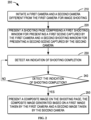
- a method for image shooting comprises initiating a first camera and a second camera different from the first camera for image shooting.
- the method further comprises presenting a shooting page.
- the shooting page comprises a first shooting window for presenting a first scene captured by the first camera and a second shooting window for presenting a second scene captured by the second camera.
- the method further comprises presenting a composite image on the shooting page in response to an indication of shooting completion.
- the composite image is generated based on a first image taken by the first camera and a second image taken by the second camera.
- an apparatus for image shooting comprises a camera initiating module configured to initiate a first camera and a second camera different from the first camera for image shooting.
- the apparatus further comprises a shooting page presenting module configured to present a shooting page.
- the shooting page comprises a first shooting window for presenting a first scene captured by the first camera and a second shooting window for presenting a second scene captured by the second camera.
- the apparatus further comprises a composite image presenting module configured to present a composite image on the shooting page in response to an indication of shooting completion. The composite image is generated based on a first image taken by the first camera and a second image taken by the second camera.
- an electronic device comprising: at least one processing unit; and at least one memory, coupled to the at least one processing unit and storing instructions to be executed by the at least one processing unit.
- the instructions when executed by the at least one processing unit, cause the device to perform a method according to the first aspect or the second aspect.
- a computer-readable storage medium is provided.
- a computer program is stored on the medium, which, when executed by a processor, implements a method according to the first aspect or the second aspect.
- the term “includes” and its variants are to be read as open terms that mean “includes, but is not limited to.”
- the term “based on” is to be read as “based at least in part on”
- the terms “one embodiment” or “the embodiment” are to be read as “at least one embodiment.”
- the term “some embodiments” is to be read as “at least some embodiments.”
- Other definitions, either explicit or implicit, may be included below.
- image may refer to multimedia content such as a still image or picture (e.g., photo), a moving image or picture (e.g., video) and the like.
- the image may be taken by a single camera or composited from multiple images taken by multiple cameras.
- prompt information is sent to the user to explicitly inform the user that the requested operation would acquire and use the user's personal information. Therefore, according to the prompt information, the user may decide on his/her own whether to provide the personal information to the software or hardware, such as electronic devices, applications, servers, or storage media that perform operations of the technical solutions of the subject matter described herein.
- the way of sending the prompt information to the user may, for example, include a pop-up window, and the prompt information may be presented in the form of text in the pop-up window.
- the pop-up window may also carry a select control for the user to choose to "agree” or “disagree” to provide the personal information to the electronic device.
- FIG. 1 illustrates a schematic view of an example environment 100 in which the embodiments of the present disclosure can be implemented.
- an application 120 is installed in a terminal device 110.
- a user 140 may interact with the application 120 via the terminal device 110 and/or a device attached to the terminal device 110.
- the application 120 may be a content sharing application that can provide the user 140 with various services related to multimedia content, such as work browsing, commenting, reposting, creating (e.g., shooting and/or editing) and posting multimedia content.
- multimedia content may be content in various forms, including videos, audios, pictures, picture collections, text, etc.
- the terminal device 110 may present a page 150 of the application 120.
- the page 150 may include various pages which the application 120 can provide, such as a multimedia content presenting page, a content creating page, a content posting page, a message page, a personal page, etc.
- the application 120 may provide a content creating function to shoot and/or creating multimedia content, so that the user 140 can edit the taken or uploaded multimedia content, etc.
- the application 120 may further have a posting content to allow the user 140 to post the created multimedia content.
- the terminal device 110 may be provided with a plurality of cameras or communicatively connected with a plurality of external cameras.
- the terminal device 110 may be provided with a first camera and a second camera to shoot multimedia content.
- the terminal device 110 communicates with a server 130 to provide services of the application 120.
- the terminal device 110 may be any type of mobile, fixed or portable terminal, including a mobile phone, a desktop computer, a laptop computer, a notebook computer, a netbook computer, a tablet computer, a media computer, a multimedia tablet, a Personal Communication System (PCS) device, a personal navigation device, a Personal Digital Assistant (PDA), an audio/video player, a digital camera/video, a positioning device, a television receiver, a radio broadcast receiver, an electronic book device, a gaming device or any other combination thereof consisting of accessories and peripherals of these devices or any other combination thereof.
- PCS Personal Communication System
- PDA Personal Digital Assistant
- the terminal device 110 can also support any type of interface (such as a "wearable" circuit, and the like) for the user 140.
- the server 130 is various types of computing system/server that can provide computing capability, including, without limitation to, a mainframe, an edge computing node, a computing device in a cloud environment, etc.
- multimedia content may include those such as videos, pictures, picture collections, sounds and the like.
- Some conventional content sharing applications can provide the function of shooting multimedia content of a single scene. For example, these applications usually only support a front camera or a rear camera to take images. However, sometimes users might wish to shoot multimedia content of more than one scene to share richer content.
- both the first and second cameras can be initiated to shoot different scenes respectively.
- a first scene captured by the first camera and a second scene captured by the second camera can be simultaneously presented in the presented shooting page.
- a composition image generated based on a first image taken by the first camera and a second image taken by the second camera is presented.
- composition image generated as such can present richer content.
- This flexible image generating solution can improve user participation and experience.
- embodiments of the present solution enable the joint shooting of two different cameras. As a result, the shooting process is simple, the user operation complexity is reduced. The user can create content more conveniently and quickly, and different shooting requirements can be met.
- FIG. 2 illustrates a flowchart of a process 200 for image shooting according to some embodiments of the present disclosure.
- the process 200 can be implemented at the terminal device 110.
- the process 200 will be described with reference to the environment 100 in FIG. 1 . It is to be understood that the process 200 may include an additional act which is not shown and/or omit an act which is shown, and the scope of the present disclosure is not limited in this regard.
- the terminal device 110 initiates a first camera and a second camera that is different from the first camera to shoot images.
- the first camera is a rear camera built in the terminal device 110
- the second camera is a front camera built in the terminal device 110.
- the first camera may be the front camera built in the terminal device 110
- the second camera may be the rear camera built in the terminal device 110.
- the first camera may be a front or rear camera built in the terminal device 110
- the second camera may be an external camera communicatively coupled with the terminal device 110.
- the first camera and the second camera are initiated for shooting in the present description, it is to be understood that more than two cameras can be initiated for shooting.
- discussion is presented below in the context that the first camera is a rear camera and the second camera is a front camera.
- the application 120 installed on the terminal device 110 may provide a shooting function. With the shooting function activated, the first camera and the second camera can be initiated to shoot images.
- the terminal device 110 can detect a shooting start command. The shooting start command is used to trigger the start of shooting. If the shooting start command is detected, then the terminal device 110 triggers the shooting function, e.g., by initiating the first and second cameras.
- the terminal device 110 may detect the shooting start command for the application 120 and initiate the first and second cameras if the shooting start command is detected.
- a shooting start control may be provided in a page which is currently presented in the application 120.
- the shooting start command is detected. It is possible to trigger the shooting start control by, e.g., clicking or selecting it, via voice, or the like.
- the shooting start command can be triggered in other ways such as voice control, hard buttons, and specific gestures (e.g., swipe gestures) in specific pages. Scope of the present disclosure is not limited in this regard.
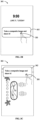
- FIG. 3A illustrates an example page 300 of the application 120.
- the page 300 can be any page of the application 120.
- the page 300 is a content presenting page in which an image 310 is presented.
- the page 300 includes a shooting start control 320 for triggering the initiation of the first and second cameras for the shooting.
- the page 300 further includes navigation tab bars for navigations to various pages.
- a "lower navigation tab bar” in the lower part of the page 300 includes navigation tabs 322, 324, 326 and 328.
- the navigation tab 322 has the characters "Home” indicating that the navigation tab corresponds to the home page of application 120;
- the navigation tab 324 has the characters "Friends” indicating that the navigation tab corresponds to the friend content page of the application 120;
- the navigation tab 326 has the characters "Inbox” indicating that the navigation tab corresponds to the inbox page (also referred to as the message page) of the application 120;
- the navigation tab 328 has the character "I” indicating that the navigation tab corresponds to the user's personal page.
- An "upper navigation tab bar” in the upper part of the page 300 includes lower-level navigation tabs of the navigation tab 322, i.e., navigation tabs 323 and 325.
- the navigation tab 323 has the characters "Recommended” indicating a recommended content page in which recommended content of the application 120 may be presented; the navigation tab 325 has the characters “Following” indicating a following content page in which content of following users may be presented.
- the page 300 corresponds to the page of the navigation tab "Recommended” 323 under the navigation tab "Home" 322, in which the recommended content, i.e., the image 310 is presented.
- page 300 in FIG. 3 and pages in other drawings to be described below are merely example pages, and various page designs may exist in practice.
- Various graphical elements in the page may have different arrangements and different visual representations, where one or more of them may be omitted or replaced, and one or more other elements may further exist.
- the embodiments of the present disclosure are not limited in this regard.
- an indication such as "post a shared content" may be presented in the page 300 to prompt the user 140 to take an image and post the same.
- other page of the application 120 may present the shooting start control and/or allow to initiate the shooting start command in other way.
- the terminal device 110 will detect the shooting start command and initiate the first camera and the second camera.
- the enumerated page 300 including the shooting start control is merely for illustration purpose.
- the user 140 may trigger the shooting start control in another page.
- the terminal device 110 in response to receiving a camera initiating command, can initiate the first and second cameras.
- the camera initiating command may be provided by the user in response to a system message about taking a composite image.
- the page 300 may be displayed by triggering the system message about taking a composite image in other page.
- FIGS. 3B to 3C each illustrate schematic views of a page of pushing a system message about taking a composite image to a user according to some embodiments of the present disclosure.
- the terminal device 110 may push a system message 342 to the user 140 in a lock-screen page 340 in FIG. 3B .
- the terminal device 110 may further push the system message 342 to the user 140 in any other way, e.g., an active page 350 in FIG. 3C .
- system message 342 may prompt the user to take and share a composite image. It is to be understood that the text of the system message presented in FIG. 3B and to be presented below is merely exemplary and not limiting.
- the system message 342 may include any appropriate text, symbols, stickers or photographs that prompt the user 140 to take and share images.
- the system message 342 may also be in any language.
- the system message 342 may further indicate time limit information for prompting a user to take and post content information of a corresponding content category within the time limit or a specified time.
- An example of the system message 342 is "Please take a composite image and share it within five minutes!. It is to be understood that the above enumerated time limit such as five minutes is merely exemplary and not limiting.
- the system message may indicate a content category.
- the content category may be at least one of content categories of the first image and the second image indicated by the system message.
- the system message may indicate that the first and second images are both pictures or videos, or one of them is a picture and the other is a video. Scope of the present disclosure are not limited in this regard.
- the terminal device 110 may launch the application 120.
- the user 140 may also trigger content sharing by means of a touch device, a pointing device and the like. Scope of the present disclosure are not limited in this regard. It is noted that for purposes of illustration, touch gesture-based user selection is illustrated in FIG. 3B and some subsequent embodiments. However, it is to be understood that depending on the capability of the terminal device 110, other methods for receiving user selection may exist, such as mouse selection, voice control, etc.
- the flow goes to the page 300 as shown in FIG. 3A .
- the first camera and the second camera may be initiated by triggering the shooting start control 320.
- the above system message besides being posted to the terminal device 110 of the user 140, is further sent to a device of other user.
- the user 140 and other user can be instructed to take a composite image of the same content category.
- the system message may be sent to terminal devices of a group of users respectively, instructing these users to complete the shooting of a composite image and post it within a certain time period (also referred to as a posting time limit).
- the user 140 may only post content within the time limit specified by the posting time limit. If the time limit expires, the user 140 is allowed to post content. Alternatively, or in addition, in some embodiments, even if the content posting time limit expires, the user 140 is still allowed to post content. In such an example where the user 140 posts content later than the content posting time limit, information indicating that the user posts content later than the content posting time limit may be displayed. For example, content such as "4 hours late" may be shown anywhere on the presenting page of the content posted by the user, etc. It is to be understood that the above enumerated time such as four hours is merely for illustration without suggesting any limitations as to the scope of the present disclosure.
- the terminal device 110 presents a shooting page.
- the shooting page includes a first shooting window for presenting a first scene captured by the first camera and a second shooting window for presenting a second scene captured by the second camera.
- the first camera and the second camera can be used to take images, which may include static pictures (e.g., photos) or dynamic pictures (e.g., videos) and other multimedia content.
- the first shooting window and the second shooting window can be simultaneously presented in the shooting page.
- the first shooting window may at least partly overlap the second shooting window.
- the second shooting window can at least partly overlap the first shooting window as well.
- the first shooting window corresponding to the first camera may be presented first in the shooting page.
- the second shooting window corresponding to the second camera can be presented.
- a prompt may be presented to the user to prompt the user to complete the shooting of the second camera within a predetermined duration.
- the first camera and the second camera may be set to take videos on default.
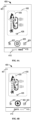
- FIG. 4A illustrates an example shooting page 400, which includes a first shooting control 420.
- the first shooting control 420 is configured to take a video, as indicated by a highlighted "Video" tab 415.
- the first camera and the second camera may be caused to take videos by triggering the first shooting control 420.
- the flow switches to the shooting for photos (e.g., the "Photo” tab 410 is highlighted), as indicated by a second shooting control 460 in FIG. 4B .
- the first camera and the second camera may also be set to take photos on default.
- the "Video” tab 415 may be triggered to switch to the shooting for videos.
- the first camera and the second camera may be caused to take photos by triggering the second shooting control 460.
- the first camera and the second camera may be configured to take different image types.
- the first camera may be set to take videos, while the second camera may be set to take photos, or vice versa.
- a "Mix" tab (not shown) may be presented in the shooting page 400 for selecting different shooting modes for such different cameras.
- the shooting page 400 may include a first shooting window (also referred to as a rear viewfinder window) for presenting a first scene captured by the first camera and a second shooting window 435 (also referred to as a front viewfinder window) for presenting a second scene captured by the second camera.
- a first real-time dynamic picture associated with the first camera may be presented in the first shooting window 430.
- a second real-time dynamic picture associated with the second camera may be presented in the second shooting window.
- the second real-time dynamic picture includes a different scene than the first real-time dynamic picture.
- the first real-time dynamic picture may include a real-time picture of the environment where the user is located, while the second real-time dynamic picture may include a real-time picture of the user, e.g., a real-time picture of the user's face.
- a zoom factor function 426 may further be set in the first shooting window 430 for zooming the first scene.
- a zoom factor function (not shown) may also be set in the second shooting window 435 for zooming the second scene.
- the shooting page 400 further provides an exit option 401. If it is detected that the user 140 selects the exit option 401, then the shooting page 400 switches back to the previous page 300.
- the shooting page 400 may further provide other control for controlling image shooting.
- a flash control function 422 is provided for turning on or off the flash;
- a camera switching function 424 is provided for switching the positions of the first shooting window 430 and the second shooting window 435.
- the shooting page 400 may further provide more functions, which are hidden and may be unfolded by, for example, triggering (e.g., clicking) a position in the shooting page 400 (e.g., the upper right corner or other suitable position). It is to be understood that the functions shown here are merely exemplary, and more, less or other functions may be provided in the shooting page. The embodiments of the present disclosure are not limited in this regard.
- the terminal device 110 detects a shooting completion indication.
- the terminal device 110 may detect the shooting completion indication while presenting the shooting page.
- the terminal device 110 may detect the shooting completion indication by detecting a triggering command for the shooting control (e.g., the first shooting control 420 or the second shooting control 460) in the shooting page.
- Methods for triggering the shooting control may, for example, include clicking or selecting the shooting control, triggering in other way such as voice, etc.
- the terminal device 110 may detect periodically or in other way whether the shooting control is triggered. Scope of the present disclosure are not limited in this regard.
- the shooting may begin at the same time as the first and second cameras are initiated at block 210, and the shooting may stop upon detecting that the first shooting control 420 is triggered (i.e., detecting the shooting completion indication).
- a shooting start indication e.g., the first triggering of the first shooting control 420
- the shooting completion indication e.g., the second triggering of the first shooting control 420
- the first camera and the second camera take photos when the terminal device 110 detects the triggering of the second shooting control 460 (i.e., detecting the shooting completion indication).
- the first camera starts to take a video at block 210, or the first camera starts to take a video when the shooting start indication is detected.
- the shooting completion indication is detected, the first camera completes the video shooting, and the second camera takes photos.
- the process in which the first camera takes photos and the second camera takes videos is similar and thus is not detailed here.
- the terminal device 110 determines whether the shooting completion indication is detected. If the terminal device 110 does not detect the shooting completion indication at block 240, the terminal device 110 may continue to detect the shooting completion indication at block 230. For example, if the shooting completion indication is not detected in the shooting page, then the presentation of the shooting page may be maintained, and the shooting completion indication may be detected periodically or in other way. If other indication is detected in the shooting page, a corresponding operation may be performed according to the other indication.
- the terminal device 110 detects the shooting completion indication at block 240, then the terminal device 110 presents a composite image on the shooting page at block 250.
- the composite image is generated based on a first image taken by the first camera and a second image taken by the second camera.
- the terminal device 110 may generate the composite image based on the first image and the second image and according to the shape and layout of the first shooting window 430 and the second shooting window 435.
- the user may utilize a plurality of cameras to shoot desired content, i.e., a composite image composed.
- the user may post the composite image of the selfie and the photo of the user's environment at the time, for friends to view.
- Such composite images can make the content shared by users richer and more interesting, thereby improving user participation and experience.
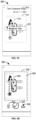
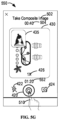
- FIG. 5A illustrates a schematic view of an example shooting page 500 related to image shooting according to some embodiments of the present disclosure.
- the terminal device 110 may present the shooting page 500 in response to the triggering of the shooting start control 320 in the page 300.
- the terminal device 110 may present the shooting page 500 in response to the triggering of the "Photo" tab 410 in the shooting page 400.
- the first camera and the second camera may be used to take static pictures.
- the shooting page 500 also presents the first shooting window 430 and the second shooting window 435.
- the first shooting window 430 may present a first real-time dynamic picture.
- the first shooting window 430 or the second shooting window 435 may present a second real-time dynamic picture.
- the first shooting window 430 or the second shooting window 435 may also present a static picture.
- the shooting page 500 may further present the flash control function 422, the camera switching function 424, the zoom factor function 426, etc. Such functions or controls are not detailed here.
- a text prompt 502 such as "Take Composite Image” or other suitable text, symbols, or labels, may be presented in the shooting page 500 to inform the user 140 that a composite image is currently being taken.
- the terminal device 110 may present a countdown 504 for taking the first and second images in order to prompt the user 140 to complete the shooting before the countdown ends.
- the countdown 504 may have an initial interval of, e.g., 2 minutes or other suitable length. In this way, the user may learn how much time is left for shooting. By limiting the shooting interval, it can be ensured that the obtained composite image is the real-time content taken within a certain time, and thus the content shared by the user is made more meaningful.
- the terminal device 110 may detect the triggering of the second shooting control 460 before the countdown 504 expires.
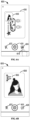
- FIG. 5B illustrates that when the countdown 504 comes to 1 minute and 12 seconds, the terminal device 110 detects the triggering of the second shooting control 460, e.g., the triggering of the second shooting control 460 by a user finger 510.
- the time at which the shooting completion indication is detected as shown in FIG. 5B is referred to as a "first time.”
- the detection of the triggering of the second shooting control 460 means the detection of the shooting completion indication.
- the terminal device 110 may trigger the first camera to take the first image at the first time.
- the terminal device 110 may further trigger the second camera to take the second image at a second time.
- the first image may include a first static image
- the second image may include a second static image.
- the shooting completion indication may further be triggered in other suitable ways, including but not limited to, voice control, triggering of hardware keys, and specific gestures (e.g., swipe gestures) in specific pages, etc. Scope of the present disclosure are not limited in this regard.
- the terminal device 110 may only trigger the first camera to take the first image at the first time and does not trigger the second camera to take the second image at the first time. In this case, the second camera may take images sometime after the first time.
- the terminal device 110 may further present shooting prompt information (also referred to as a second camera shooting prompt) to prompt the user 140 that the second camera is to take images.
- shooting prompt information also referred to as a second camera shooting prompt
- FIG. 5C a second camera shooting prompt 520 is to be presented on the shooting page 500.
- the second camera shooting prompt 520 may include, for example, an arrow and text "Ready for This."
- FIG. 5C a second camera shooting prompt 520 is to be presented on the shooting page 500.
- the second camera shooting prompt 520 may include, for example, an arrow and text "Ready for This."
- the presented text prompt 502 is also replaced by a second text prompt 506.
- the second text prompt may include the text "Take the current image” or other suitable text.
- the shooting prompt may further include a countdown of a predetermined interval to prompt the user to shoot at the second time.
- the second camera shooting prompt 520 may include any suitable text, symbols, stickers or photographs prompting the user 140 that the second camera is to shoot.
- the second camera shooting prompt 520 may also use any language, e.g., Chinese, English, etc.
- the terminal device 110 may trigger the second camera to take the second image at the second time.
- the second time is separated from the first time by a predetermined duration, e.g., 0.5 seconds or other suitable duration.
- a predetermined duration e.g., 0.5 seconds or other suitable duration.
- time lengths enumerated herein, e.g., the total countdown duration of 2 minutes, and the predetermined duration of 0.5 seconds are all exemplary and not limiting.
- the total countdown duration or the predetermined duration of any other length may be adopted. These durations may also be set by the user 140.
- the countdown 504 starts to be displayed from the initiating of the first camera and the second camera.
- the countdown starts to be displayed in order to prompt the user to take an image with the second camera.
- the first shooting window 430 may change from to present the first image instead of the first real-time dynamic picture.
- the first shooting window 430 no longer presents the zoom factor function 426.
- the second shooting window 435 may still present the second real-time dynamic picture, so that the user 140 gets ready for shooting by viewing the second real-time dynamic picture, e.g., posing for better photos, etc.
- the first shooting window 430 may be no longer displayed.
- the user can know when to shoot by the second camera, so as to get ready for shooting in advance.
- the user can know when to shoot by the second camera, so as to get ready for shooting in advance.
- sufficient time can be given to the user to be ready for shooting. In this way, it is possible to better facilitate user operation and further take more user-satisfactory images.
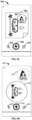
- the shooting page 500 in FIG. 5D presents a page which is presented upon completion of the shooting of the first and second images.
- the terminal device 110 may generate a composite image based on the first image and the second image and according to the shape and layout of the first shooting window 430 and the second shooting window 435.
- a composite image 530 in FIG. 5D includes the first image at the position of the first shooting window 430 and the second image at the position of the second shooting window 435.
- the shooting page 500 upon completion of the shooting, the shooting page 500 further presents a shooting completion confirm control 534, a delete control 532 and a save control 536, etc. If the triggering of the delete control 532 is detected, the composite image 530 will be deleted. If the triggering of the save control 536 is detected, the composite image 530 will be stored to a local album of the terminal device 110, for example.
- the terminal device 110 may trigger the posting of the composite image 530. As shown in FIG. 5E , if it is detected that the user finger 510 triggers the shooting completion confirm control 534, the terminal device 110 may present an image posting indication in a pop-up window 540 on the shooting page 500.
- the image posting indication may include a prompt, e.g., "Post Image?" or other similar information.
- a post control 542 and a cancel control 544 may further be set in the pop-up window 540. If the triggering of the post control 542 is detected, then the terminal device 110 may post the composite image 530 to the content sharing page of the application 120. If the triggering of the cancel control 544 is detected, then the terminal device 110 may return to the shooting page 500 in FIG. 5A for image shooting again.
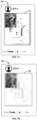
- FIG. 5F illustrates a schematic view of an example page 550 related to image shooting according to some embodiments of the present disclosure.
- the terminal device 110 may present the shooting page 550 in response to the triggering of the shooting start control 320 in the page 300.
- the terminal device 110 may present the shooting page 550 in response to the triggering of the "Video" tab 415 in the shooting page 400.
- the first camera and the second camera can be used to take dynamic pictures.
- the shooting page 550 Similar to the shooting page 500 in FIG. 5A , the shooting page 550 also presents the first shooting window 430 and the second shooting window 435.
- the first shooting window 430 may present a first real-time dynamic picture.
- the second shooting window 435 may present a second real-time dynamic picture.
- the shooting page 550 may present the text prompt 502, such as "Take a composite image" or other suitable text, symbols, or labels, in order to inform the user 140 that a composite image is currently being taken.
- Other functions or controls similar to the shooting page 500 will not be detailed.
- the shooting page 550 presents the first shooting control 420.
- the shooting page 550 further presents a shooting time 552 to a current video shooting duration.
- the shooting begins at the same as the first camera and the second camera are initiated. In other words, the shooting time 552 counts from this time.
- the shooting page 550 is presented, if the triggering of the first shooting control 420 is detected, then the shooting begins, and meanwhile the shooting time 552 counts from 00:00.
- the time when the shooting begins or the shooting time 552 begins to count is also referred to as a third time.
- the terminal device 110 may present the countdown 504 for taking the first image and the second image, in order to prompt the user 140 to complete the shooting before the countdown ends.
- the countdown 504 may have an initial interval of, e.g., 2 minutes or other suitable length. In this way, the user may learn how much time is left for shooting. By limiting the shooting interval, it can be ensured that the obtained composite image is the real-time content taken within a certain time, and thus the content shared by the user is made more meaningful.
- the terminal device 110 detects the shooting completion indication, the first camera and the second camera are triggered to end the image shooting.
- the shooting time 552 has no more change and the countdown 504 may also stop changing.
- the time when the picture shooting ends is referred to as a fourth time.
- FIG. 5G illustrates an example of ending the shooting upon detection of the shooting completion indication. For example, when the countdown 504 goes to 0 minute and 40 seconds, and the shooting time 552 goes to 1 minute and 20 seconds, if it is detected that the user finger 510 triggers the first shooting control 420, then the terminal device 110 triggers the first camera and the second camera to stop shooting.
- the first camera has taken a first video with a total duration of 1 minute and 20 seconds as presented in the first shooting window 430.
- the second camera has taken a second video with a total duration of 1 minute and 20 seconds as presented in the second shooting window 435.
- the shooting completion indication can be triggered in other suitable ways, including but not limited to voice control, triggering of hardware keys, and specific gestures (e.g., swipe gestures) in specific pages, etc. Scope of the present disclosure are not limited in this regard.
- a composite image generated from the first and second videos can be presented in the shooting page 550.
- an image posting prompt may be shown in a pop-up window on the shooting page 550, for the user 140 to confirm whether to post the composite image.
- the content presented in the shooting pages involved in these processes is similar to that of the shooting page 500 in FIGS. 5D and 5E , and thus is not detailed here.
- the first camera and the second camera take videos and other dynamic pictures, and a final composite image is obtained.
- the image obtained as such may contain dynamic images of a plurality of scenes, so that richer and more interesting content is provided.
- the terminal device 110 may trigger the first camera and the second camera to take different types of images.
- the first camera may be triggered to take a dynamic image
- the second camera may be triggered to take a static image, so that a composite image is obtained, and vice versa.
- the embodiments of the present disclosure may adopt various flexible implementations.
- the obtained composite image may be directly posted.
- the terminal device 110 may further edit the composite image.
- the terminal device may cut, crop, add filters, add text or stickers to the composite image. Ways of editing the composite image are not limited.
- the first shooting window 430 and the second shooting window 435 are simultaneously presented in the shooting page 500 or the shooting page 550.
- the second shooting window 435 at least partly overlaps the first shooting window 430.
- the two shooting windows in the shooting page may have other shape or layout.
- FIGS. 6A to 6D illustrate examples of various shooting pages according to embodiments of the present disclosure.
- a shooting page 600 presents the first shooting window 430 and the second shooting window 435, just like the shooting page 400.
- the terminal device 110 detects a camera switching command (also referred to as a lens switching command or a shooting window switching command), e.g., detects the triggering of the camera switching function 424 by a user finger 610, then the terminal device 110 will change the shooting page 600 to a shooting page 620 in FIG. 6B .
- a first shooting window 630 presents a second scene captured by the second camera
- a second shooting window 635 presents a first scene captured by the first camera.
- the terminal device 110 will change the shooting page to the shooting page 600.
- the terminal device 110 can, in response to detecting a user command, change the shape or layout of at least one of the first shooting window and the second shooting window. Alternatively, or in addition, the terminal device 110 may change the shape or layout of at least one of the first shooting window and the second shooting window at a predetermined time interval (e.g., one week, one month, or other suitable time interval).
- a predetermined time interval e.g., one week, one month, or other suitable time interval.
- FIG. 6C presents a shooting page 640 with shooting windows of other shape and layout.
- a first shooting window 650 in the shooting page 640 may include a rectangular shape with a dog ear
- ta second shooting window 655 may include a pentagonal shape.
- the second shooting window 655 may overlap with the upper right position of the first shooting window 650 instead of the upper left position in the example of FIG. 6A .
- FIG. 6D presents a shooting page 660 with shooting windows of other shape and layout.
- a first shooting window 670 and a second shooting window 675 in the shooting page 660 may both have a circular shape.
- the first shooting window 670 and the second shooting window 675 do not overlap in the shooting page 660.
- FIGS. 6A to 6D Several examples of shooting pages with shooting windows of different shapes and layouts have been described in conjunction with FIGS. 6A to 6D . It is to be understood that these examples are merely exemplary and not limiting.
- the embodiments of the present disclosure may adopt any shapes and layouts for shooting windows. By means of these varying shooting windows, composite images of different shapes and layouts may be presented, which may further be shared to provide more interesting content. In this way, it is possible to provide a more interesting image shooting application and content sharing application and thus improve user experience.
- the application 120 may further provide other functions, such as a composite image sharing function, a composite image viewing function, etc.
- a composite image sharing function such as a composite image sharing function, a composite image viewing function, etc.
- the user 140 may post a composite image through the composite image sharing function of the application 120.
- Other users may view the composite image shared by the user 140.
- the terminal device 110 may perform blur processing or mosaic processing on the above composite image to obtain a blurred version of the composite image.
- the terminal device 110 can generate a blurred image associated with the composite image at least partly based on the blurred version of the composite image.
- a blurred image associated with the composite image can also be generated by adding an illustration to the blurred version of the composite image.
- a blurred image associated with the composite image may be generated by adding a prompt about sharing content to view the composite image on the blurred version of the composite image.
- the terminal device 110 may provide the blurred image associated with the composite image to other user than the user 140. For example, if a certain user does not post content, e.g., a composite image, when the user wants to view the composite image shared by the user 140, a blurred image associated with the composite image shared by the user 140 will be presented to the user. For another example, if a certain user has no association (e.g., a social friend relationship) with the user 140, when the user wants to view the composite image shared by the user 140, a blurred image associated with the composite image shared by the user 140 may be presented to the user.
- a certain user does not post content, e.g., a composite image
- a blurred image associated with the composite image shared by the user 140 will be presented to the user.
- a certain user has no association (e.g., a social friend relationship) with the user 140
- a blurred image associated with the composite image shared by the user 140 may be presented to the user.
- FIGS. 7A to 7F each illustrate a schematic view of an example of presenting a blurred image associated with a composite image to the user 40 according to some embodiments of the present disclosure.
- FIG. 7A illustrates a page 700 of the application 120.
- the page 700 may be presented in a page, e.g., with the tab "Friends" displayed at the bottom of the page.
- the user 140 may want to view a composite image shared by another user (also referred to as user A).
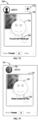
- a blurred image presented to the user 140 comprises a blurred version 710 of a composite image obtained by mosaicking the composite image posted by user A.
- the blurred image comprises a blurred version 720 obtained from blur processing on the composite image posted by user A, i.e., image bokeh.
- the blurred image further comprises an illustration overlapping the blurred version of the composite image.
- the blurred image presented to the user 140 comprises the blurred version 710 of the composite image as well as an illustration 730.
- the blurred image presented to the user 140 comprises the blurred version 720 of the composite image and the illustration 730.
- a smiley picture is used as an example of the illustration 730. This is merely an example and other kind of suitable picture can be used as the illustration. Different users may adopt the same or different illustrations.
- the illustration may be configured by the terminal system 110 or selected by the user 140.
- the blurred image further includes an indication of sharing the content to view the first content, e.g., an indication 740 in FIG. 7D .
- an indication 740 in FIG. 7D e.g., an indication 740 in FIG. 7D .
- the blurred image comprises both the illustration 730 and the indication 740 in the example of FIG. 7D
- the blurred image may only comprise one of the illustration 730 and the indication 740.
- the indication 740 shown in FIG. 7D is merely exemplary, and the indication 740 may comprise different content.
- the indication 740 may be "Share Content to View.”
- an indication 760 in FIG. 7E may be presented, such as "You are not friends yet" or other similar text, stickers, etc.
- the page 700 may further be provided with an add friend control 770.
- the add friend control 770 the user 140 sends a friend application to user A.
- the terminal device 110 may further present the blurred profile photo of user A to the user 140. For example, there is shown in the page 700 of FIG. 7F that the profile photo of user A is a blurred profile photo 780. Alternatively, or in addition, if the user 140 has no association with user A, then the profile photo of user A which is presented to the user 140 may have been subjected to blur processing.
- the blurred profile photo of the profile photo of user A presented in the page 700 it is also possible to use the blurred profile photo of user A in other pages such as the search box of the friend page, media stream, the skylight of the friends page, the inbox, etc.
- the profile photo of user A presented on the sharing information or reposting information seen by the user 140 may also be a blurred profile photo.
- the composite image posted by user A seen by the user 140 in the sharing information or reposting information may also be a blurred image associated with the composite image.
- the terminal device 110 may present the composite image posted by user A to the user 140.
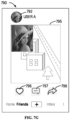
- FIG. 7G illustrates a schematic view of an example of presenting a composite image to a user according to some embodiments of the present disclosure.
- the terminal device 110 presents a composite image 795 shared by user A to the user 140.
- a clear profile photo 792 of user A is presented in the page 790.
- the page 790 is further provided with a plurality of interaction controls (also referred to as interaction icons), such as a like control 796, a comment control 797, a repost control 798 and any other suitable interaction control (not shown).
- interaction controls also referred to as interaction icons
- the user 140 may like the composite image 795 posted by user A by triggering the like control 796.
- the user 140 may add a comment to the composite image 795 posted by user A by triggering the comment control 797.
- the user 140 may repost the composite image posted by user A to other user by triggering the repost control 798.
- the presented composite image 795 may further have time information (not shown) of the composite image 795.
- the time information may be time when the composite image 795 is created (e.g., taken), or time when the composite image 795 is shared.
- the time information may be displayed in the form of a timestamp, e.g., a vintage postmark, or may be presented in other suitable form.
- the page 790 may further present the difference between the time when the user shared the content and the time when the user received the system message 342.
- the user can be presented in a suitable position on the page 790, e.g., the right side of the user's profile photo, that the sharing is 4 hours late. It is to be understood that various time enumerated above is merely exemplary and not limiting.
- the user may receive a push about a content sharing prompt at any time and may also share content at any time.
- the above examples have described additional functions provided by the application 120. These functions are merely exemplary and not limiting.
- the application 120 may provide less or richer functions. These functions make the application 120 interesting, and thus user participation and experience is improved.
- FIG. 8 illustrates a block diagram of an apparatus 800 for image shooting according to some embodiments of the present disclosure.
- the apparatus 800 may be implemented at or included in the terminal device 110.
- Various modules/components of the apparatus 800 may be implemented by hardware, software, firmware or any combinations thereof.
- the apparatus 800 comprises a camera initiating module 810, which is configured to initiate a first camera and a second camera different from the first camera for image shooting.
- the image may be a static image, a dynamic image or a combination thereof.
- the camera initiating module 810 is configured to initiate the first camera and the second camera in response to receiving a camera initiating command.
- the camera initiating command may be provided by the user 140 in response to a system message about providing an image.
- the system message may be used to prompt the user 140 to post content of a corresponding category within a specified time.
- the system message may further indicate a category of at least one of the first and second images.
- the system message is provided to the terminal device 110 (also referred to as a first device) of the user 140 and other device (also referred to as a second device) of other user than the user 140, for guiding the user 140 and the other user to take a composite image of a same category.
- the apparatus 800 further comprises a shooting page presenting module 820, which is configured to present a shooting page.
- the shooting page comprises a first shooting window (e.g., the first shooting window 430) for presenting a first scene captured by the first camera and a second shooting window (e.g., the second shooting window 435) for presenting a second scene captured by the second camera.
- the shooting page presenting module 820 comprises a first dynamic presenting module, which is configured to present a first real-time dynamic picture associated with the first camera in the first shooting window of the shooting page.
- the shooting page presenting module 820 may further comprise a second dynamic presenting module, which is configured to present a second real-time dynamic picture associated with the second camera in the second shooting window of the shooting page.
- the second real-time dynamic picture comprises a scene different from the first real-time dynamic picture.
- the shooting page presenting module 820 comprises an overlap presenting module, which is configured to present the first and second shooting windows simultaneously in the shooting page.
- One of the first and second shooting windows at least partly overlapping the other of the first and second shooting windows.
- the second shooting window may at least partly overlap the first shooting window.
- the first shooting window may also at least partly overlap the second shooting window.
- the shooting page presenting module 820 is configured to present the first shooting window corresponding to the first camera in the shooting page first, and upon completion of the shooting by the first camera, present the second shooting window corresponding to the second camera, and prompt the user to complete a shooting by the second camera within a predetermined duration.
- the apparatus 800 further comprises a composite image presenting module 830, which is configured to present a composite image on the shooting page in response to an indication of shooting completion.
- the composite image is generated based on the first image taken by the first camera and the second image taken by the second camera.
- the composite image may comprise a composite picture or a composite video.
- the apparatus 800 further comprises a first shooting causing module, which is configured to, in response to detecting the indication of shooting completion at a first time, cause the first camera to take the first image at the first time.
- the apparatus 800 may further comprise a shooting prompt module, which is configured to present a shooting prompt to indicate that the second camera is to be used for shooting.
- the apparatus 800 may further comprise a second shooting causing module, which is configured to cause the second camera to take the second image at a second time.
- the second time is separated from the first time by a predetermined interval.
- the predetermined interval may be 0.5 seconds, 1 second or other suitable duration.
- the shooting prompt may indicate a countdown of a predetermined interval to prompt the user 140 to shoot at the second time.
- the apparatus 800 further comprises a composite image generating module, which is configured to generate the composite image based on the first and second images according to a shape and a layout of the first and second shooting windows.
- the apparatus 800 further comprises a window adjusting module, which is configured to change a shape and a layout of at least one of the first and second shooting windows.
- the window adjusting module may change the shape and layout of the first shooting window or the second shooting window according to a predetermined rule or in response to a user trigger.
- the apparatus 800 further comprises a scene switching module, which is configured to, in response to a camera switching command, present the second scene captured by the second camera via the first shooting window, and present the first scene captured by the first camera via the second shooting window.
- a scene switching module which is configured to, in response to a camera switching command, present the second scene captured by the second camera via the first shooting window, and present the first scene captured by the first camera via the second shooting window.
- the apparatus 800 further comprises a countdown presenting module, which is configured to, in response to the shooting page being presented, present a countdown for taking the first and second images to prompt the user 140 to complete the shooting before the countdown expires.
- the apparatus 800 further comprises a blur processing module, which is configured to perform blur processing or mosaic processing on the composite image to obtain a blurred version of the composite image.
- the apparatus 800 further comprises a blurred image generating module, which is configured to generate a blurred image associated with the composite image at least based on the blurred version of the composite image.
- the blurred image generating module is further configured to add an illustration to the blurred version of the composite image to generate the blurred image; or add an indication of sharing content to view the composite image to the blurred version of the composite image to generate the blurred image.
- the apparatus 800 further comprises a blurred image providing module, which is configured to provide the blurred image associated with the composite image to a further user that is different from the user 140 taking the composite image.
- the further user may be a user who does not posted content.
- the further user may be a user having no association with the user 140.
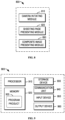
- FIG. 9 illustrates a block diagram of an electronic device 900 in which one or more embodiments of the present disclosure can be implemented. It is to be understood that the electronic device 900 as shown in FIG. 9 is merely provided as an example, without suggesting any limitation to the functionalities and scope of the embodiments described herein. The electronic device 900 shown in FIG. 9 may be used to implement the terminal device 110 of FIG. 1 .
- the electronic device 900 is in the form of a general-purpose electronic device.
- Components of the electronic device 900 may include, without limitation to, one or more processors or processing units 910, a memory 920, a storage device 930, one or more communication units 940, one or more input devices 950 as well as one or more output devices 960.
- the processing unit 910 may be a real or virtual processor and can execute various processing according to programs stored in the memory 920. In a multi-processor system, a plurality of processing units execute in parallel computer-executable instructions to increase the parallel processing capability of the electronic device 900.
- the electronic device 900 usually includes various computer storage media. Such media may be any available media accessible by the electronic device 900, including but not limited to, volatile and non-volatile media, or detachable and non-detachable media.
- the memory 920 may be a volatile memory (for example, a register, cache, Random Access Memory (RAM)), non-volatile memory (for example, a Read-Only Memory (ROM), Electrically Erasable Programmable Read-Only Memory (EEPROM), a flash memory), or any combination thereof.
- the storage devic930 may be any detachable or non-detachable medium and may include machine-readable medium such as a flash memory drive, a magnetic disk or any other media that can be used for storing information and/or data (e.g., training data for training) and are accessible within the electronic device 900.
- machine-readable medium such as a flash memory drive, a magnetic disk or any other media that can be used for storing information and/or data (e.g., training data for training) and are accessible within the electronic device 900.
- the electronic device 900 may further include additional detachable/non-detachable, volatile/non-volatile memory media.
- additional detachable/non-detachable, volatile/non-volatile memory media may be provided.
- a disk drive for reading from or writing into a detachable and non-volatile disk (e.g., a floppy disk), and an optical disk drive for reading from and writing into a detachable non-volatile optical disk.
- each drive may be connected to a bus (not shown) via one or more data medium interfaces.
- the memory 920 may include a computer program product 925 having one or more program modules which are configured to perform various methods or acts according to various embodiments of the present disclosure.
- the communication unit 940 implements communication with another computing device via the communication medium.
- the functionalities of components in the electronic device 900 may be implemented by a single computing cluster or a plurality of computing machines that can communicate with each other via communication connections.
- the electronic device 900 may operate in a networked environment using a logic connection with one or more other servers, network personal computers (PCs), or further general network nodes.
- PCs network personal computers
- the input device 950 may include one or more of a variety of input devices, such as a mouse, keyboard, trackball and the like.
- the output device 960 may be one or more output devices, such as a display, loudspeaker, printer and the like.
- the electronic device 900 may further communicate with one or more external devices (not shown) such as storage devices and display devices, one or more devices that enable the user to interact with the electronic device 900, or any devices (such as a network card, a modem and the like) that enable the electronic device 900 to communicate with one or more other computing devices, if required. Such communication may be performed via input/output (I/O) interfaces (not shown).
- I/O input/output
- the electronic device 900 may further be provided with a plurality of cameras, e.g., the first camera and the second camera.
- the first camera and the second camera may communicate with other component of the electronic device 900 or an external device via the communication unit 940.
- a computer-readable storage medium with computer-executable instructions stored thereon, wherein the computer-executable instructions are executed by a processor to realize the methods described above.
- a computer program product tangibly stored on a non-transient computer-readable medium and comprising computer-executable instructions which are executed by a processor to realize the methods described above.
- These computer readable program instructions may be provided to a processing unit of a general-purpose computer, special-purpose computer, or other programmable data processing apparatus to produce a machine, such that the instructions, which execute via the processor of the computer or other programmable data processing apparatus, create means for implementing the functions/acts specified in the flowchart and/or block diagram block or blocks.
- These computer readable program instructions may also be stored in a computer readable storage medium that can direct a computer, a programmable data processing apparatus, and/or other devices to function in a particular manner, such that the computer readable storage medium having instructions stored therein comprises an article of manufacture including instructions which implement aspects of the function/act specified in the flowchart and/or block diagram block or blocks.
- the computer readable program instructions may also be loaded onto a computer, other programmable data processing apparatus, or other device to cause a series of operational steps to be performed on the computer, other programmable apparatus or other device to produce a computer implemented process, such that the instructions which execute on the computer, other programmable apparatus, or other device implement the functions/acts specified in the flowchart and/or block diagram block or blocks.
- each block in the flowchart or block diagrams may represent a module, segment, or portion of code, which comprises one or more executable instructions for implementing the specified logical function(s).
- the functions noted in the block may occur out of the order noted in the figures. For example, two blocks shown in succession may, in fact, be executed substantially concurrently, or the blocks may sometimes be executed in the reverse order, depending upon the functionality involved.
Landscapes
- Engineering & Computer Science (AREA)
- Multimedia (AREA)
- Signal Processing (AREA)
- Human Computer Interaction (AREA)
- Physics & Mathematics (AREA)
- General Physics & Mathematics (AREA)
- Theoretical Computer Science (AREA)
- Studio Devices (AREA)
- User Interface Of Digital Computer (AREA)
- Two-Way Televisions, Distribution Of Moving Picture Or The Like (AREA)
Applications Claiming Priority (2)
| Application Number | Priority Date | Filing Date | Title |
|---|---|---|---|
| CN202210803525.3A CN117425057A (zh) | 2022-07-07 | 2022-07-07 | 用于影像拍摄的方法、装置、设备和存储介质 |
| PCT/CN2023/105002 WO2024008005A1 (fr) | 2022-07-07 | 2023-06-30 | Procédé et appareil de capture d'image, et dispositif et support de stockage |
Publications (2)
| Publication Number | Publication Date |
|---|---|
| EP4531409A1 true EP4531409A1 (fr) | 2025-04-02 |
| EP4531409A4 EP4531409A4 (fr) | 2025-10-08 |
Family
ID=89431054
Family Applications (1)
| Application Number | Title | Priority Date | Filing Date |
|---|---|---|---|
| EP23834772.8A Pending EP4531409A4 (fr) | 2022-07-07 | 2023-06-30 | Procédé et appareil de capture d'image, et dispositif et support de stockage |
Country Status (7)
| Country | Link |
|---|---|
| US (3) | US12035034B2 (fr) |
| EP (1) | EP4531409A4 (fr) |
| JP (1) | JP7797742B2 (fr) |
| KR (1) | KR102938142B1 (fr) |
| CN (1) | CN117425057A (fr) |
| AU (1) | AU2023302439B2 (fr) |
| WO (1) | WO2024008005A1 (fr) |
Families Citing this family (1)
| Publication number | Priority date | Publication date | Assignee | Title |
|---|---|---|---|---|
| CN115514874B (zh) * | 2021-06-07 | 2024-04-05 | 荣耀终端有限公司 | 一种视频拍摄方法及电子设备 |
Family Cites Families (172)
| Publication number | Priority date | Publication date | Assignee | Title |
|---|---|---|---|---|
| JP2004274627A (ja) | 2003-03-11 | 2004-09-30 | Sony Corp | 映像素材編集装置及び映像素材編集方法 |
| KR100677303B1 (ko) | 2003-12-26 | 2007-02-05 | 엘지전자 주식회사 | 휴대 단말기 |
| JP4193743B2 (ja) | 2004-04-09 | 2008-12-10 | ソニー株式会社 | 編集装置および方法、プログラム、並びに記録媒体 |
| US7663691B2 (en) | 2005-10-11 | 2010-02-16 | Apple Inc. | Image capture using display device as light source |
| US7823056B1 (en) | 2006-03-15 | 2010-10-26 | Adobe Systems Incorporated | Multiple-camera video recording |
| US8665333B1 (en) | 2007-01-30 | 2014-03-04 | Videomining Corporation | Method and system for optimizing the observation and annotation of complex human behavior from video sources |
| US7777783B1 (en) | 2007-03-23 | 2010-08-17 | Proximex Corporation | Multi-video navigation |
| EP2001235B1 (fr) * | 2007-06-08 | 2013-05-22 | Samsung Electronics Co., Ltd. | Extension du format MPEG-4 à l'enregistrement de données vidéo stereoscopique ou synthétiques 3D avec leurs metadonnées. |
| US8111874B2 (en) * | 2007-12-04 | 2012-02-07 | Mediatek Inc. | Method and apparatus for image capturing |
| JP5088161B2 (ja) | 2008-02-15 | 2012-12-05 | ソニー株式会社 | 画像処理装置、カメラ装置、通信システム、画像処理方法、およびプログラム |
| US20100077289A1 (en) | 2008-09-08 | 2010-03-25 | Eastman Kodak Company | Method and Interface for Indexing Related Media From Multiple Sources |
| KR101562972B1 (ko) | 2009-03-26 | 2015-10-26 | 삼성전자 주식회사 | 공유 레벨에 따라 영상을 차등화하여 제공하는 영상 공유 장치 및 방법 |
| US8555169B2 (en) | 2009-04-30 | 2013-10-08 | Apple Inc. | Media clip auditioning used to evaluate uncommitted media content |
| JP5473646B2 (ja) | 2010-02-05 | 2014-04-16 | キヤノン株式会社 | 画像検索装置、制御方法、プログラム及び記憶媒体 |
| US8502856B2 (en) | 2010-04-07 | 2013-08-06 | Apple Inc. | In conference display adjustments |
| US20120081392A1 (en) * | 2010-09-30 | 2012-04-05 | Apple Inc. | Electronic device operation adjustment based on face detection |
| US9584735B2 (en) * | 2010-11-12 | 2017-02-28 | Arcsoft, Inc. | Front and back facing cameras |
| CN102568260A (zh) | 2010-12-31 | 2012-07-11 | 上海久隆信息工程有限公司 | 一种基于三分屏课件录制的视频信息处理方法 |
| MX2013007806A (es) | 2011-01-04 | 2013-08-21 | Thomson Licensing | Contenido de secuenciacion. |
| US8744143B2 (en) | 2011-04-01 | 2014-06-03 | Yahoo! Inc. | Adding privacy protection to photo uploading/ tagging in social networks |
| KR101764372B1 (ko) * | 2011-04-19 | 2017-08-03 | 삼성전자주식회사 | 휴대용 단말기에서 영상 합성 방법 및 장치 |
| US8988558B2 (en) * | 2011-04-26 | 2015-03-24 | Omnivision Technologies, Inc. | Image overlay in a mobile device |
| KR101786049B1 (ko) | 2011-04-29 | 2017-10-16 | 삼성전자 주식회사 | 디지털 촬영 장치, 디지털 촬영 장치 제어 방법, 및 컴퓨터 판독가능 저장매체 |
| EP2540325B1 (fr) | 2011-06-27 | 2016-08-10 | Greatbatch Ltd. | Revêtement antimicrobien à base de peptides |
| US8887096B2 (en) | 2011-10-27 | 2014-11-11 | Disney Enterprises, Inc. | Friends lists with dynamic ordering and dynamic avatar appearance |
| US9792955B2 (en) | 2011-11-14 | 2017-10-17 | Apple Inc. | Automatic generation of multi-camera media clips |
| KR20130081814A (ko) * | 2012-01-10 | 2013-07-18 | 엘지전자 주식회사 | 단말기 및 그의 영상 전송 방법 |
| KR101527038B1 (ko) | 2012-02-24 | 2015-06-08 | 엘지전자 주식회사 | 이동 단말기 및 그 제어 방법, 이를 위한 기록 매체 |
| US9041727B2 (en) | 2012-03-06 | 2015-05-26 | Apple Inc. | User interface tools for selectively applying effects to image |
| US8866943B2 (en) * | 2012-03-09 | 2014-10-21 | Apple Inc. | Video camera providing a composite video sequence |
| US9241131B2 (en) | 2012-06-08 | 2016-01-19 | Samsung Electronics Co., Ltd. | Multiple channel communication using multiple cameras |
| US9325889B2 (en) | 2012-06-08 | 2016-04-26 | Samsung Electronics Co., Ltd. | Continuous video capture during switch between video capture devices |
| US20140047371A1 (en) | 2012-08-10 | 2014-02-13 | Smartdrive Systems Inc. | Vehicle Event Playback Apparatus and Methods |
| US20140055633A1 (en) | 2012-08-27 | 2014-02-27 | Richard E. MARLIN | Device and method for photo and video capture |
| CN102938825B (zh) | 2012-11-12 | 2016-03-23 | 小米科技有限责任公司 | 一种拍摄照片和视频的方法及装置 |
| US8953079B2 (en) * | 2012-12-31 | 2015-02-10 | Texas Instruments Incorporated | System and method for generating 360 degree video recording using MVC |
| CN107395975A (zh) | 2013-01-07 | 2017-11-24 | 华为技术有限公司 | 一种图像处理方法及装置 |
| CN106027910B (zh) * | 2013-01-22 | 2019-08-16 | 华为终端有限公司 | 预览画面呈现方法、装置及终端 |
| US20140229544A1 (en) | 2013-02-12 | 2014-08-14 | BackPeddle, LLC | Sharing content in social networks |
| KR102018887B1 (ko) | 2013-02-21 | 2019-09-05 | 삼성전자주식회사 | 신체 부위 검출을 이용한 이미지 프리뷰 |
| KR102076771B1 (ko) * | 2013-02-21 | 2020-02-12 | 삼성전자주식회사 | 다수의 이미지 동시 포착 |
| KR102022444B1 (ko) | 2013-02-21 | 2019-09-18 | 삼성전자주식회사 | 복수의 카메라를 구비한 휴대 단말에서 유효한 영상들을 합성하기 위한 방법 및 이를 위한 휴대 단말 |
| KR102013331B1 (ko) | 2013-02-23 | 2019-10-21 | 삼성전자 주식회사 | 듀얼 카메라를 구비하는 휴대 단말기의 이미지 합성 장치 및 방법 |
| KR102032541B1 (ko) | 2013-02-26 | 2019-11-08 | 삼성전자주식회사 | 이미지 촬영장치 및 방법 |
| KR102032347B1 (ko) * | 2013-02-26 | 2019-10-15 | 삼성전자 주식회사 | 이미지 센서 위치를 이용한 이미지 영역 설정 장치 및 방법 |
| KR20140114501A (ko) * | 2013-03-14 | 2014-09-29 | 삼성전자주식회사 | 영상 데이터 처리 방법 및 이를 지원하는 전자 장치 |
| JP6200194B2 (ja) | 2013-04-17 | 2017-09-20 | キヤノン株式会社 | 撮像装置及びその制御方法並びにプログラム |
| US20140324605A1 (en) | 2013-04-24 | 2014-10-30 | Chad Steelberg | Apparatus, System and Method for Instantaneous and Non-Instantaneous Providing a Content Responsive to a Trigger |
| KR20140142010A (ko) | 2013-06-03 | 2014-12-11 | 삼성전자주식회사 | 듀얼 카메라 제어 방법 및 이를 지원하는 전자 장치 |
| KR102092330B1 (ko) | 2013-06-20 | 2020-03-23 | 삼성전자주식회사 | 촬영 제어 방법 및 그 전자 장치 |
| KR102047704B1 (ko) * | 2013-08-16 | 2019-12-02 | 엘지전자 주식회사 | 이동 단말기 및 이의 제어 방법 |
| US9804760B2 (en) | 2013-08-22 | 2017-10-31 | Apple Inc. | Scrollable in-line camera for capturing and sharing content |
| US9973722B2 (en) | 2013-08-27 | 2018-05-15 | Qualcomm Incorporated | Systems, devices and methods for displaying pictures in a picture |
| CN105531623B (zh) | 2013-09-12 | 2018-08-14 | 麦克赛尔株式会社 | 影像记录装置和存储介质 |
| KR101513981B1 (ko) | 2013-09-23 | 2015-04-22 | 맹수연 | 사진교환 방법 및 그 시스템 |
| JP6093289B2 (ja) | 2013-12-10 | 2017-03-08 | 株式会社フレイ・スリー | 映像処理装置、映像処理方法およびプログラム |
| JP5934954B2 (ja) | 2013-12-20 | 2016-06-15 | パナソニックIpマネジメント株式会社 | 撮像装置 |
| US9578233B2 (en) * | 2013-12-26 | 2017-02-21 | Canon Kabushiki Kaisha | Imaging apparatus and method for controlling the same |
| CN103745736A (zh) | 2013-12-27 | 2014-04-23 | 宇龙计算机通信科技(深圳)有限公司 | 视频编辑的方法及其移动终端 |
| US9886784B2 (en) | 2014-01-22 | 2018-02-06 | Express Scripts Strategic Development, Inc. | Systems and methods for rendering a mosaic image featuring persons and associated messages |
| US20150237268A1 (en) | 2014-02-20 | 2015-08-20 | Reflective Practices, LLC | Multiple Camera Imaging |
| US10007476B1 (en) | 2014-03-23 | 2018-06-26 | Kevin Glikmann | Sharing a host mobile camera with a remote mobile device |
| US9423901B2 (en) | 2014-03-26 | 2016-08-23 | Intel Corporation | System and method to control screen capture |
| US9537934B2 (en) | 2014-04-03 | 2017-01-03 | Facebook, Inc. | Systems and methods for interactive media content exchange |
| KR102301476B1 (ko) | 2014-05-16 | 2021-09-14 | 삼성전자주식회사 | 전자 장치 및 인터넷 서비스에서 알림 방법 |
| US20150363811A1 (en) | 2014-06-13 | 2015-12-17 | John Candillier | System for administering multiple instances of gaming and data from a single engine |
| CN104104870B (zh) | 2014-06-27 | 2018-05-18 | 北京智谷睿拓技术服务有限公司 | 拍摄控制方法、拍摄控制装置及拍摄设备 |
| EP3164987B1 (fr) | 2014-07-01 | 2024-01-03 | Apple Inc. | Système de caméra mobile |
| US20160034157A1 (en) | 2014-07-31 | 2016-02-04 | Microsoft Corporation | Region-Based Sizing and Positioning of Application Windows |
| KR102216246B1 (ko) | 2014-08-07 | 2021-02-17 | 엘지전자 주식회사 | 이동단말기 및 그 제어방법 |
| US11412276B2 (en) | 2014-10-10 | 2022-08-09 | JBF Interlude 2009 LTD | Systems and methods for parallel track transitions |
| US20160224767A1 (en) | 2014-10-31 | 2016-08-04 | Chad Steelberg | Apparatus, system, and method for instantaneous and non-instantaneous providing of content responsive to a trigger |
| US20160248864A1 (en) | 2014-11-19 | 2016-08-25 | Unravel, Llc | Social networking games including image unlocking and bi-directional profile matching |
| WO2016095361A1 (fr) | 2014-12-14 | 2016-06-23 | SZ DJI Technology Co., Ltd. | Procédés et systèmes de traitement vidéo |
| US20150163562A1 (en) | 2015-02-09 | 2015-06-11 | Martin Leventhal | Live and Pseudo-Live Video Feed Selection Based on Fantasy Sports Team |
| US20160241777A1 (en) | 2015-02-16 | 2016-08-18 | Magisto Ltd. | Method and system for implementing a user interface for capturing videos and photos on cameras with a touch screen |
| US20160249108A1 (en) | 2015-02-18 | 2016-08-25 | Live Media Group | Method and apparatus for providing a customized viewing experience |
| JP5999394B2 (ja) | 2015-02-20 | 2016-09-28 | パナソニックIpマネジメント株式会社 | 追跡支援装置、追跡支援システムおよび追跡支援方法 |
| JP6494358B2 (ja) | 2015-03-24 | 2019-04-03 | キヤノン株式会社 | 再生制御装置、再生制御方法 |
| US9591157B2 (en) | 2015-06-15 | 2017-03-07 | Canon Information And Imaging Solutions, Inc. | Apparatus, system and method for controlling an image processing device via a mobile device |
| JP6293706B2 (ja) | 2015-06-26 | 2018-03-14 | 京セラ株式会社 | 電子機器及び電子機器の動作方法 |
| CN104980659A (zh) | 2015-06-30 | 2015-10-14 | 广州三星通信技术研究有限公司 | 控制拍摄显示的电子终端及其控制方法 |
| KR102393510B1 (ko) | 2015-08-25 | 2022-05-03 | 엘지전자 주식회사 | 디스플레이 디바이스 및 그 제어 방법 |
| WO2017041055A1 (fr) | 2015-09-02 | 2017-03-09 | Thumbroll Llc | Système de caméra et procédé d'alignement d'images et de présentation d'une série d'images alignées |
| US9349414B1 (en) | 2015-09-18 | 2016-05-24 | Odile Aimee Furment | System and method for simultaneous capture of two video streams |
| KR101667736B1 (ko) | 2015-09-25 | 2016-10-20 | 엘지전자 주식회사 | 이동단말기 및 그 제어방법 |
| CN105357412A (zh) | 2015-11-02 | 2016-02-24 | 联想(北京)有限公司 | 信息处理方法及电子设备 |
| JP6702698B2 (ja) | 2015-11-25 | 2020-06-03 | キヤノン株式会社 | 撮像装置及び情報処理方法 |
| US10021339B2 (en) | 2015-12-01 | 2018-07-10 | Qualcomm Incorporated | Electronic device for generating video data |
| FR3046320A1 (fr) | 2015-12-23 | 2017-06-30 | Orange | Procede de partage d'une image numerique entre un premier terminal d'utilisateur et au moins un second terminal d'utilisateur sur un reseau de communication. |
| KR20170079198A (ko) | 2015-12-30 | 2017-07-10 | 엘지전자 주식회사 | 이동 단말기 및 그의 동작 방법 |
| JPWO2017119034A1 (ja) | 2016-01-06 | 2018-11-22 | ソニー株式会社 | 撮影システム、撮影方法およびプログラム |
| CN105653909B (zh) | 2016-01-26 | 2018-09-25 | 腾讯科技(深圳)有限公司 | 信息处理方法、第一终端、第二终端、服务器及系统 |
| KR101883397B1 (ko) | 2016-03-25 | 2018-07-30 | 한국전자통신연구원 | 신뢰 기반 콘텐츠 공유 장치 및 방법 |
| KR20170112492A (ko) | 2016-03-31 | 2017-10-12 | 엘지전자 주식회사 | 이동 단말기 및 그 제어방법 |
| US20170337652A1 (en) | 2016-05-23 | 2017-11-23 | Paypal, Inc. | Locally broadcasted token to cause image masking of user likeness |
| CN106165430B (zh) | 2016-06-29 | 2019-11-08 | 北京小米移动软件有限公司 | 视频直播方法及装置 |
| CN106060526A (zh) | 2016-07-04 | 2016-10-26 | 天脉聚源(北京)传媒科技有限公司 | 一种基于双摄像头的直播方法及装置 |
| CN106210629A (zh) | 2016-07-13 | 2016-12-07 | 深圳市爱培科技术股份有限公司 | 一种智能后视镜的双录摄像单屏显示的系统及方法 |
| CN106231095B (zh) | 2016-07-28 | 2019-08-16 | 努比亚技术有限公司 | 图片合成装置及方法 |
| US10521884B2 (en) | 2016-08-18 | 2019-12-31 | Drew Evans Iddings | Method for promoting and documenting customer engagement using an online photo-sharing platform |
| KR102593824B1 (ko) * | 2016-08-31 | 2023-10-25 | 삼성전자주식회사 | 카메라를 제어하기 위한 방법 및 그 전자 장치 |
| CN107846547A (zh) | 2016-09-20 | 2018-03-27 | 董思言 | 一种前后摄像头同时拍摄的方法 |
| CN106537319A (zh) | 2016-10-31 | 2017-03-22 | 北京小米移动软件有限公司 | 分屏显示方法及装置 |
| KR102666977B1 (ko) | 2017-01-09 | 2024-05-20 | 삼성전자주식회사 | 전자 장치 및 전자 장치의 영상 촬영 방법 |
| CN106851162A (zh) | 2017-02-17 | 2017-06-13 | 成都依能科技股份有限公司 | 视频录制方法及装置 |
| EP3609192B1 (fr) | 2017-04-24 | 2023-04-19 | Huawei Technologies Co., Ltd. | Procédé de partage d'image et dispositif électronique |
| CN106973234A (zh) | 2017-04-28 | 2017-07-21 | 努比亚技术有限公司 | 一种视频拍摄方法及终端 |
| WO2018207046A1 (fr) * | 2017-05-09 | 2018-11-15 | Within Unlimited, Inc. | Procédés, systèmes et dispositifs prenant en charge des interactions en temps réel dans des environnements de réalité augmentée |
| CN107105315A (zh) | 2017-05-11 | 2017-08-29 | 广州华多网络科技有限公司 | 直播方法、主播客户端的直播方法、主播客户端及设备 |
| CN109218630B (zh) | 2017-07-06 | 2022-04-12 | 腾讯科技(深圳)有限公司 | 一种多媒体信息处理方法及装置、终端、存储介质 |
| KR101867326B1 (ko) | 2017-09-04 | 2018-06-14 | 주식회사 와임 | 분할 기능을 이용한 소셜 미디어 제공 방법 및 시스템 |
| US10200599B1 (en) | 2017-09-07 | 2019-02-05 | Qualcomm Incorporated | Image capture setting determination in devices having access to multiple cameras |
| CN107566725A (zh) | 2017-09-15 | 2018-01-09 | 广东小天才科技有限公司 | 一种拍照控制方法及装置 |
| KR102560689B1 (ko) * | 2017-09-26 | 2023-07-28 | 삼성전자주식회사 | Ar 객체를 표시하기 위한 장치 및 방법 |
| IT201700115235A1 (it) | 2017-10-12 | 2019-04-12 | Giovanni Pachera | Metodo e sistema per la gestione di contenuti multimediali pubblicati tramite un social network |
| KR102438201B1 (ko) * | 2017-12-01 | 2022-08-30 | 삼성전자주식회사 | 사진 촬영과 관련된 추천 정보를 제공하는 방법 및 시스템 |
| US10594925B2 (en) * | 2017-12-04 | 2020-03-17 | Qualcomm Incorporated | Camera zoom level and image frame capture control |
| CN107911614B (zh) | 2017-12-25 | 2019-09-27 | 腾讯数码(天津)有限公司 | 一种基于手势的图像拍摄方法、装置和存储介质 |
| US12081910B2 (en) * | 2018-01-12 | 2024-09-03 | Maxell, Ltd. | Information device and camera image sharing system |
| US20190288972A1 (en) | 2018-03-18 | 2019-09-19 | Phanto, Llc | Reveal posts in a content sharing platform |
| CN108234891B (zh) * | 2018-04-04 | 2019-11-05 | 维沃移动通信有限公司 | 一种拍照方法及移动终端 |
| CN108419016B (zh) | 2018-04-17 | 2022-03-11 | 北京小米移动软件有限公司 | 拍摄方法、装置及终端 |
| DK201870353A1 (en) | 2018-05-07 | 2019-12-04 | Apple Inc. | User interfaces for recommending and consuming content on an electronic device |
| CN109151537B (zh) | 2018-08-29 | 2020-05-01 | 北京达佳互联信息技术有限公司 | 视频处理方法、装置、电子设备及存储介质 |
| US10548001B1 (en) | 2018-09-10 | 2020-01-28 | Naza Nicole Shelley | Matching and connection methods and systems requiring video communication |
| US10917551B2 (en) * | 2018-09-20 | 2021-02-09 | International Business Machines Corporation | Interactive photography using two or more devices |
| US11128792B2 (en) * | 2018-09-28 | 2021-09-21 | Apple Inc. | Capturing and displaying images with multiple focal planes |
| US20200120269A1 (en) * | 2018-10-11 | 2020-04-16 | Manuchehr Shirmohamadi | Double-selfie system for photographic device having at least two cameras |
| CN109089059A (zh) | 2018-10-19 | 2018-12-25 | 北京微播视界科技有限公司 | 视频生成的方法、装置、电子设备及计算机存储介质 |
| US10735354B1 (en) | 2018-10-30 | 2020-08-04 | Facebook, Inc. | Photo space user interface facilitating contextual discussion between users of a social networking system |
| CN109167937B (zh) | 2018-11-05 | 2022-10-14 | 北京达佳互联信息技术有限公司 | 视频发布方法、装置、终端及存储介质 |
| CN109729266A (zh) | 2018-12-25 | 2019-05-07 | 努比亚技术有限公司 | 一种图像拍摄方法、终端及计算机可读存储介质 |
| FR3091777B1 (fr) | 2019-01-11 | 2020-12-18 | Thales Sa | Méthode de détermination d’un rayon de protection d’un système de navigation basé sur la vision |
| KR102664705B1 (ko) * | 2019-02-19 | 2024-05-09 | 삼성전자주식회사 | 복수의 카메라들을 이용하여 이미지의 배율을 변경하기 위한 전자 장치 및 방법 |
| CN110072070B (zh) * | 2019-03-18 | 2021-03-23 | 华为技术有限公司 | 一种多路录像方法及设备、介质 |
| US10693956B1 (en) | 2019-04-19 | 2020-06-23 | Greenfly, Inc. | Methods and systems for secure information storage and delivery |
| US11770601B2 (en) * | 2019-05-06 | 2023-09-26 | Apple Inc. | User interfaces for capturing and managing visual media |
| US11706521B2 (en) | 2019-05-06 | 2023-07-18 | Apple Inc. | User interfaces for capturing and managing visual media |
| CN110401766B (zh) * | 2019-05-22 | 2021-12-21 | 华为技术有限公司 | 一种拍摄方法及终端 |
| CN110166652A (zh) | 2019-05-28 | 2019-08-23 | 成都依能科技股份有限公司 | 多轨道音视频同步编辑方法 |
| US10652198B1 (en) | 2019-07-16 | 2020-05-12 | Phanto, Llc | Third party-initiated social media posting |
| US11210896B2 (en) | 2019-07-24 | 2021-12-28 | Igt | Selectively providing live sporting event video at sports gaming devices, and related systems and methods |
| US10939072B1 (en) | 2019-08-16 | 2021-03-02 | Natalie KHAWAM | Evidence collection and attorney engagement method and system |
| WO2021083146A1 (fr) | 2019-10-30 | 2021-05-06 | 北京字节跳动网络技术有限公司 | Procédé et appareil de traitement de vidéo, ainsi que terminal et support de stockage |
| CN110784674B (zh) | 2019-10-30 | 2022-03-15 | 北京字节跳动网络技术有限公司 | 视频处理的方法、装置、终端及存储介质 |
| CN110740261A (zh) | 2019-10-30 | 2020-01-31 | 北京字节跳动网络技术有限公司 | 视频录制方法、装置、终端及存储介质 |
| CN110830714B (zh) | 2019-10-30 | 2022-03-01 | 北京字节跳动网络技术有限公司 | 信息获取的方法及装置、终端和存储介质 |
| CN110809100A (zh) | 2019-10-30 | 2020-02-18 | 北京字节跳动网络技术有限公司 | 视频处理的方法及装置、终端和存储介质 |
| CN112822387A (zh) * | 2019-11-15 | 2021-05-18 | 摩托罗拉移动有限责任公司 | 来自前置摄像头和后置摄像头的组合图像 |
| JP2021100183A (ja) | 2019-12-20 | 2021-07-01 | キヤノン株式会社 | 撮像装置、その制御方法、およびそのプログラム |
| CN111083379A (zh) | 2019-12-31 | 2020-04-28 | 维沃移动通信(杭州)有限公司 | 拍摄方法及电子设备 |
| KR102902957B1 (ko) | 2020-02-07 | 2025-12-22 | 삼성전자주식회사 | 복수의 카메라를 이용한 동영상 촬영 방법 및 그 장치 |
| US11601598B2 (en) | 2020-03-23 | 2023-03-07 | DUBL Development, LLC | Methods and systems for displaying and recording multiple video feeds using a single, unified window |
| US11675494B2 (en) * | 2020-03-26 | 2023-06-13 | Snap Inc. | Combining first user interface content into second user interface |
| US20200223454A1 (en) | 2020-03-26 | 2020-07-16 | Intel Corporation | Enhanced social media experience for autonomous vehicle users |
| CN113556482A (zh) | 2020-04-24 | 2021-10-26 | 阿里巴巴集团控股有限公司 | 一种基于多摄像头拍摄的视频处理方法、装置和系统 |
| US11470051B1 (en) | 2020-06-18 | 2022-10-11 | Meta Platforms, Inc. | Secret user account |
| CN112004032B (zh) * | 2020-09-04 | 2022-02-18 | 北京字节跳动网络技术有限公司 | 视频处理方法、终端设备及存储介质 |
| JP7594874B2 (ja) | 2020-09-30 | 2024-12-05 | 株式会社バンダイナムコエンターテインメント | コンピュータシステム及び公開制御システム |
| US11386625B2 (en) | 2020-09-30 | 2022-07-12 | Snap Inc. | 3D graphic interaction based on scan |
| US20220239832A1 (en) | 2021-01-28 | 2022-07-28 | Motorola Mobility Llc | Image Processing as a Function of Deformable Electronic Device Geometry and Corresponding Devices and Methods |
| EP4295314A4 (fr) | 2021-02-08 | 2025-04-16 | Sightful Computers Ltd | Partage de contenu en réalité étendue |
| CN115374451A (zh) | 2021-05-19 | 2022-11-22 | 腾讯科技(深圳)有限公司 | 消息处理方法、装置、设备及计算机可读存储介质 |
| CN113497894B (zh) * | 2021-05-28 | 2023-08-22 | 影石创新科技股份有限公司 | 视频拍摄方法、装置、终端及存储介质 |
| CN113422903B (zh) | 2021-06-16 | 2023-01-03 | 荣耀终端有限公司 | 拍摄模式切换方法、设备、存储介质 |
| US11871139B1 (en) * | 2021-07-23 | 2024-01-09 | Meta Platforms, Inc. | Multi-camera recording using a visual media recording device |
| US20230076870A1 (en) | 2021-09-03 | 2023-03-09 | Dropbox, Inc. | Protections for sensitive content items in a content management system |
| CN114513705A (zh) * | 2022-02-21 | 2022-05-17 | 北京字节跳动网络技术有限公司 | 视频显示方法、装置和存储介质 |
| US12277632B2 (en) * | 2022-04-26 | 2025-04-15 | Snap Inc. | Augmented reality experiences with dual cameras |
| CN114979495B (zh) | 2022-06-28 | 2024-04-12 | 北京字跳网络技术有限公司 | 用于内容拍摄的方法、装置、设备和存储介质 |
| CN115334246B (zh) | 2022-09-06 | 2025-07-01 | 抖音视界有限公司 | 用于影像拍摄的方法、装置、设备和存储介质 |
-
2022
- 2022-07-07 CN CN202210803525.3A patent/CN117425057A/zh active Pending
- 2022-09-23 US US17/934,946 patent/US12035034B2/en active Active
-
2023
- 2023-06-30 KR KR1020257000565A patent/KR102938142B1/ko active Active
- 2023-06-30 JP JP2025500276A patent/JP7797742B2/ja active Active
- 2023-06-30 WO PCT/CN2023/105002 patent/WO2024008005A1/fr not_active Ceased
- 2023-06-30 EP EP23834772.8A patent/EP4531409A4/fr active Pending
- 2023-06-30 AU AU2023302439A patent/AU2023302439B2/en active Active
- 2023-09-15 US US18/468,239 patent/US12015841B2/en active Active
-
2024
- 2024-06-17 US US18/745,669 patent/US12520033B2/en active Active
Also Published As
| Publication number | Publication date |
|---|---|
| US12035034B2 (en) | 2024-07-09 |
| KR102938142B1 (ko) | 2026-03-13 |
| US20240015388A1 (en) | 2024-01-11 |
| US20240340524A1 (en) | 2024-10-10 |
| US12015841B2 (en) | 2024-06-18 |
| CN117425057A (zh) | 2024-01-19 |
| KR20250020645A (ko) | 2025-02-11 |
| US20240015389A1 (en) | 2024-01-11 |
| US12520033B2 (en) | 2026-01-06 |
| JP2025521931A (ja) | 2025-07-10 |
| JP7797742B2 (ja) | 2026-01-13 |
| AU2023302439A1 (en) | 2025-01-23 |
| WO2024008005A1 (fr) | 2024-01-11 |
| EP4531409A4 (fr) | 2025-10-08 |
| AU2023302439B2 (en) | 2025-05-29 |
Similar Documents
| Publication | Publication Date | Title |
|---|---|---|
| US12120424B2 (en) | Method, apparatus, device and storage medium for image shooting | |
| US20250148548A1 (en) | Method, apparatus, device and storage medium for content capturing | |
| US20150046863A1 (en) | Information processing method and electronic device | |
| US12520033B2 (en) | Method, apparatus, device and storage medium for multimedia content shooting | |
| AU2023304530B2 (en) | Method, apparatus, device and storage medium for content presentation | |
| EP4510600A1 (fr) | Procédé et appareil de photographie d'un contenu, dispositif et support de stockage | |
| US12293421B2 (en) | Method, apparatus, device and storage medium for content presentation | |
| EP4625230A1 (fr) | Procédé et appareil d'affichage d'informations, dispositif, et support de stockage |
Legal Events
| Date | Code | Title | Description |
|---|---|---|---|
| STAA | Information on the status of an ep patent application or granted ep patent |
Free format text: STATUS: THE INTERNATIONAL PUBLICATION HAS BEEN MADE |
|
| PUAI | Public reference made under article 153(3) epc to a published international application that has entered the european phase |
Free format text: ORIGINAL CODE: 0009012 |
|
| STAA | Information on the status of an ep patent application or granted ep patent |
Free format text: STATUS: REQUEST FOR EXAMINATION WAS MADE |
|
| 17P | Request for examination filed |
Effective date: 20241224 |
|
| AK | Designated contracting states |
Kind code of ref document: A1 Designated state(s): AL AT BE BG CH CY CZ DE DK EE ES FI FR GB GR HR HU IE IS IT LI LT LU LV MC ME MK MT NL NO PL PT RO RS SE SI SK SM TR |
|
| A4 | Supplementary search report drawn up and despatched |
Effective date: 20250909 |
|
| RIC1 | Information provided on ipc code assigned before grant |
Ipc: H04N 23/60 20230101AFI20250903BHEP |
|
| DAV | Request for validation of the european patent (deleted) | ||
| DAX | Request for extension of the european patent (deleted) |