EP4572348A1 - Procédé et dispositif d'invite de position par nfc - Google Patents
Procédé et dispositif d'invite de position par nfc Download PDFInfo
- Publication number
- EP4572348A1 EP4572348A1 EP23876619.0A EP23876619A EP4572348A1 EP 4572348 A1 EP4572348 A1 EP 4572348A1 EP 23876619 A EP23876619 A EP 23876619A EP 4572348 A1 EP4572348 A1 EP 4572348A1
- Authority
- EP
- European Patent Office
- Prior art keywords
- display
- nfc
- prompt information
- location
- vehicle
- Prior art date
- Legal status (The legal status is an assumption and is not a legal conclusion. Google has not performed a legal analysis and makes no representation as to the accuracy of the status listed.)
- Pending
Links
Images




Classifications
-
- H—ELECTRICITY
- H04—ELECTRIC COMMUNICATION TECHNIQUE
- H04W—WIRELESS COMMUNICATION NETWORKS
- H04W4/00—Services specially adapted for wireless communication networks; Facilities therefor
- H04W4/80—Services using short range communication, e.g. near-field communication [NFC], radio-frequency identification [RFID] or low energy communication
-
- B—PERFORMING OPERATIONS; TRANSPORTING
- B60—VEHICLES IN GENERAL
- B60K—ARRANGEMENT OR MOUNTING OF PROPULSION UNITS OR OF TRANSMISSIONS IN VEHICLES; ARRANGEMENT OR MOUNTING OF PLURAL DIVERSE PRIME-MOVERS IN VEHICLES; AUXILIARY DRIVES FOR VEHICLES; INSTRUMENTATION OR DASHBOARDS FOR VEHICLES; ARRANGEMENTS IN CONNECTION WITH COOLING, AIR INTAKE, GAS EXHAUST OR FUEL SUPPLY OF PROPULSION UNITS IN VEHICLES
- B60K35/00—Instruments specially adapted for vehicles; Arrangement of instruments in or on vehicles
- B60K35/20—Output arrangements, i.e. from vehicle to user, associated with vehicle functions or specially adapted therefor
- B60K35/21—Output arrangements, i.e. from vehicle to user, associated with vehicle functions or specially adapted therefor using visual output, e.g. blinking lights or matrix displays
- B60K35/22—Display screens
-
- B—PERFORMING OPERATIONS; TRANSPORTING
- B60—VEHICLES IN GENERAL
- B60R—VEHICLES, VEHICLE FITTINGS, OR VEHICLE PARTS, NOT OTHERWISE PROVIDED FOR
- B60R16/00—Electric or fluid circuits specially adapted for vehicles and not otherwise provided for; Arrangement of elements of electric or fluid circuits specially adapted for vehicles and not otherwise provided for
- B60R16/02—Electric or fluid circuits specially adapted for vehicles and not otherwise provided for; Arrangement of elements of electric or fluid circuits specially adapted for vehicles and not otherwise provided for electric constitutive elements
- B60R16/023—Electric or fluid circuits specially adapted for vehicles and not otherwise provided for; Arrangement of elements of electric or fluid circuits specially adapted for vehicles and not otherwise provided for electric constitutive elements for transmission of signals between vehicle parts or subsystems
-
- H—ELECTRICITY
- H04—ELECTRIC COMMUNICATION TECHNIQUE
- H04W—WIRELESS COMMUNICATION NETWORKS
- H04W4/00—Services specially adapted for wireless communication networks; Facilities therefor
- H04W4/02—Services making use of location information
-
- H—ELECTRICITY
- H04—ELECTRIC COMMUNICATION TECHNIQUE
- H04W—WIRELESS COMMUNICATION NETWORKS
- H04W4/00—Services specially adapted for wireless communication networks; Facilities therefor
- H04W4/02—Services making use of location information
- H04W4/023—Services making use of location information using mutual or relative location information between multiple location based services [LBS] targets or of distance thresholds
-
- H—ELECTRICITY
- H04—ELECTRIC COMMUNICATION TECHNIQUE
- H04W—WIRELESS COMMUNICATION NETWORKS
- H04W4/00—Services specially adapted for wireless communication networks; Facilities therefor
- H04W4/02—Services making use of location information
- H04W4/024—Guidance services
-
- H—ELECTRICITY
- H04—ELECTRIC COMMUNICATION TECHNIQUE
- H04W—WIRELESS COMMUNICATION NETWORKS
- H04W4/00—Services specially adapted for wireless communication networks; Facilities therefor
- H04W4/30—Services specially adapted for particular environments, situations or purposes
- H04W4/40—Services specially adapted for particular environments, situations or purposes for vehicles, e.g. vehicle-to-pedestrians [V2P]
-
- H—ELECTRICITY
- H04—ELECTRIC COMMUNICATION TECHNIQUE
- H04W—WIRELESS COMMUNICATION NETWORKS
- H04W76/00—Connection management
- H04W76/10—Connection setup
- H04W76/14—Direct-mode setup
-
- B—PERFORMING OPERATIONS; TRANSPORTING
- B60—VEHICLES IN GENERAL
- B60K—ARRANGEMENT OR MOUNTING OF PROPULSION UNITS OR OF TRANSMISSIONS IN VEHICLES; ARRANGEMENT OR MOUNTING OF PLURAL DIVERSE PRIME-MOVERS IN VEHICLES; AUXILIARY DRIVES FOR VEHICLES; INSTRUMENTATION OR DASHBOARDS FOR VEHICLES; ARRANGEMENTS IN CONNECTION WITH COOLING, AIR INTAKE, GAS EXHAUST OR FUEL SUPPLY OF PROPULSION UNITS IN VEHICLES
- B60K2360/00—Indexing scheme associated with groups B60K35/00 or B60K37/00 relating to details of instruments or dashboards
- B60K2360/55—Remote control arrangements
- B60K2360/56—Remote control arrangements using mobile devices
- B60K2360/569—Vehicle controlling mobile device functions
-
- B—PERFORMING OPERATIONS; TRANSPORTING
- B60—VEHICLES IN GENERAL
- B60K—ARRANGEMENT OR MOUNTING OF PROPULSION UNITS OR OF TRANSMISSIONS IN VEHICLES; ARRANGEMENT OR MOUNTING OF PLURAL DIVERSE PRIME-MOVERS IN VEHICLES; AUXILIARY DRIVES FOR VEHICLES; INSTRUMENTATION OR DASHBOARDS FOR VEHICLES; ARRANGEMENTS IN CONNECTION WITH COOLING, AIR INTAKE, GAS EXHAUST OR FUEL SUPPLY OF PROPULSION UNITS IN VEHICLES
- B60K2360/00—Indexing scheme associated with groups B60K35/00 or B60K37/00 relating to details of instruments or dashboards
- B60K2360/55—Remote control arrangements
- B60K2360/56—Remote control arrangements using mobile devices
- B60K2360/573—Mobile devices controlling vehicle functions
-
- B—PERFORMING OPERATIONS; TRANSPORTING
- B60—VEHICLES IN GENERAL
- B60K—ARRANGEMENT OR MOUNTING OF PROPULSION UNITS OR OF TRANSMISSIONS IN VEHICLES; ARRANGEMENT OR MOUNTING OF PLURAL DIVERSE PRIME-MOVERS IN VEHICLES; AUXILIARY DRIVES FOR VEHICLES; INSTRUMENTATION OR DASHBOARDS FOR VEHICLES; ARRANGEMENTS IN CONNECTION WITH COOLING, AIR INTAKE, GAS EXHAUST OR FUEL SUPPLY OF PROPULSION UNITS IN VEHICLES
- B60K2360/00—Indexing scheme associated with groups B60K35/00 or B60K37/00 relating to details of instruments or dashboards
- B60K2360/589—Wireless data transfers
Definitions
- Embodiments of this application relate to the display field, and more specifically, to an NFC location prompt method and a device.
- a cockpit of a vehicle can support a capability of implementing a OneHop service with an electronic device, which brings much convenience to a user.
- NFC near field communication
- a smartphone having a Harmony operating system transfers, by tapping an NFC antenna in a vehicle, services such as navigation and music on the mobile phone to a cockpit having a cockpit-specific Harmony operating system, so that the services such as navigation and music on the mobile phone can be used in the cockpit.
- NFC antennas are deployed inside central display screens. Because a frame of the central display screen is narrow, there is no obvious sign of NFC. Therefore, when using the smartphone to tap the central display screen, the user does not know a specific location of the NFC antenna on the central display screen.
- Embodiments of this application provide an NFC location prompt method and a device.
- prompt information indicating an NFC location can be automatically displayed on a display, to provide guidance for a user.
- an NFC location prompt method is provided.
- the method is applied to a first device, and the first device is capable of performing near field communication NFC with a second device.
- the method includes: determining whether a preset condition is met, where the preset condition is a first condition or a second condition, the first condition is that the second device establishes a communication connection to the first device, and the second condition is that a distance between the first device and the second device is less than or equal to a first preset distance; and when determining that the preset condition is met, displaying, on a display of the first device, prompt information indicating an NFC location.
- the first device may display, on the display of the first device, the prompt information indicating the NFC location.
- the prompt information indicating the NFC location may be automatically displayed on the display under the preset condition, so that a user can determine a location of an NFC antenna on a central display screen based on the prompt information. This helps the user perform a OneHop service operation.
- the method before the displaying, on a display of the first device, prompt information indicating a near field communication NFC location, the method further includes: determining that a home screen is displayed on the display of the first device or that no display interface of another application is displayed on the display of the first device.
- a home screen being displayed on the display of the first device may be understood as that a home screen is displayed on the display.
- the home screen may be a default home screen displayed when the first device is turned on, and the home screen may be one display interface, or may be a plurality of display interfaces.
- No display interface of another application being displayed on the display of the first device may be understood as that the first device does not run the another application, or the another application runs in the background, and a display interface of the another application is not displayed on the display.
- the first device displays the prompt information about the NFC location on the display, so that normal use of the display by the user can be not affected.
- the method before the displaying, on a display of the first device, prompt information indicating a near field communication NFC location, the method further includes: determining that no navigation application runs on the first device.
- the navigation application may be Huawei Maps, Amap ® , or the like.
- the first device may display, on the central display screen, the prompt information indicating the NFC location.
- the prompt information indicating the NFC location.
- the method before the displaying, on a display of the first device, prompt information indicating a near field communication NFC location, the method further includes: determining that the first device is in a first gear.
- the first gear may be a parking gear, or may be a neutral gear.
- the first device displays the prompt information. This prevents the user from performing a OneHop operation in a driving process of the vehicle, so that operation safety can be ensured.
- the method before the displaying, on a display of the first device, prompt information indicating a near field communication NFC location, the method further includes: determining that the second device supports a OneHop capability.
- the first device and the second device may obtain capability information of each other, so that the first device can determine whether the second device supports the OneHop capability.
- the second device may send capability information of the second device to the first device through Bluetooth and the like.
- the first device displays, on the display, the prompt information indicating the NFC location, so that the user can perform the OneHop operation, and it can be avoided that the prompt information is still displayed when the second device does not support the OneHop capability, and the user may feel confused.
- the prompt information includes an identifier indicating the second device
- the method further includes: determining a location of the second device.
- the displaying, on a display of the first device, prompt information indicating a near field communication NFC location includes: The first device displays, based on the location of the second device, the identifier on a side that is of the display and that is close to the second device.
- the second device may determine the location of the second device based on an ultrasonic sensor, a laser sensor, or the like, for example, determine that the second device is located on a left side (a side close to a driver seat) or a right side (a side close to a passenger seat) of the display.
- the first device may display, on the side that is of the display and that is close to the second device based on the location, the identifier indicating the second device. This can accurately provide guidance for the user.
- the displaying, on a display of the first device, prompt information indicating a near field communication NFC location includes: displaying the prompt information on the display of the first device after first preset duration.
- the first preset duration may be 2s or 1s.
- a specific value of the first preset duration is not limited in embodiments of this application.
- the first device determines that the distance between the first device and the second device is less than or equal to the preset distance
- the first device displays the prompt information on the display after the first preset duration, so that it can be avoided that the second device still displays the prompt information on the display when the second device accidentally touches the first device.
- the first device may alternatively display the prompt information directly without a need to display the prompt information after the first preset duration.
- the prompt information is located at an uppermost layer of a display interface of the display, and the method further includes: The first device intercepts, within second preset duration, a tap operation performed on the display; and the first device removes the prompt information when the first device intercepts the tap operation a preset quantity of times.
- the tap may be a tap operation performed by the user on the display of the first device, or may be a tap operation performed by the second device on the display.
- the prompt information may be located at the uppermost layer of the display interface of the display.
- a system may detect the tap operation, and intercept the tap operation.
- the first device may remove the prompt information. In this technical solution, it can be avoided that the first device still removes the prompt information when the second device or the user accidentally touches the display.
- the method further includes: The first device removes the prompt information when determining that the distance between the second device and the first device is greater than the first preset distance.
- the first device may remove the prompt information indicating the NFC location, so that the display can quickly restore to an original state, and use of the display by the user is not affected.
- the prompt information includes an NFC identifier.
- the prompt information may be a static picture, or may be a dynamic picture.
- the prompt information may alternatively be a guide animation indicating the mobile phone to be close to the NFC location, or the like. The user can intuitively determine the location of the NFC antenna on the display by using the prompt information.
- the first gear is a parking gear.
- the display is a central display screen of the first device.
- the display may alternatively be a display other than the central display screen of the first device.
- an electronic device including one or more processors and one or more memories.
- the one or more memories store one or more programs, the one or more programs include instructions, and when the instructions are executed by the one or more processors, the NFC location prompt method according to any one of the first aspect and the possible implementations of the first aspect is performed.
- a vehicle including one or more processors and one or more memories.
- the one or more memories store one or more programs, the one or more programs include instructions, and when the instructions are executed by the one or more processors, the NFC location prompt method according to any one of the first aspect and the possible implementations of the first aspect is performed.
- an NFC location prompt apparatus including a module configured to implement the NFC location prompt method according to any one of the first aspect and the possible implementations of the first aspect.
- a chip includes a processor and a communication interface, the communication interface is configured to: receive a signal, and transmit the signal to the processor, and the processor processes the signal, so that the NFC location prompt method according to any one of the first aspect and the possible implementations of the first aspect is performed.
- a readable storage medium stores program instructions, and when the program instructions are run on a device, the NFC location prompt method according to any one of the first aspect and the possible implementations of the first aspect is performed.
- a program product includes program code, and when the program code is run on a wearable device, the NFC location prompt method according to any one of the first aspect and the possible implementations of the first aspect is performed.
- the vehicle in this application may be a vehicle in a broad sense, and may be a transportation means (for example, a commercial vehicle, a passenger vehicle, a motorcycle, an airborne vehicle, or a train), an industrial vehicle (for example, a forklift truck, a trailer, or a tractor), an engineering vehicle (for example, an excavator, a bulldozer, or a crane), an agricultural device (for example, a lawn mower or a harvester), an amusement device, or a toy vehicle.
- a type of the vehicle is not specifically limited in embodiments of this application.
- FIG. 1 is a functional block diagram of a vehicle according to an embodiment of this application.
- the vehicle 100 may include a perception system 120, a display apparatus 130, and a computing platform 150.
- the perception system 120 may include one or more sensors that sense information about an ambient environment of the vehicle 100.
- the perception system 120 may include a positioning system.
- the positioning system may be a global positioning system (global positioning system, GPS), or may be one or more of a BeiDou system or another positioning system, an inertial measurement unit (inertial measurement unit, IMU), a lidar, a millimeter-wave radar, an ultrasonic radar, and a camera apparatus.
- GPS global positioning system
- IMU inertial measurement unit
- lidar a millimeter-wave radar
- ultrasonic radar an ultrasonic radar
- the computing platform 150 may include one or more processors, for example, processors 151 to 15n (n is a positive integer).
- the processor is a circuit having a signal processing capability.
- the processor may be a circuit having an instruction reading and running capability, for example, a central processing unit (central processing unit, CPU), a microprocessor, a graphics processing unit (graphics processing unit, GPU) (which may be understood as a microprocessor), or a digital signal processor (digital signal processor, DSP).
- the processor may implement a specific function by using a logical relationship of a hardware circuit. The logical relationship of the hardware circuit is fixed or reconfigurable.
- the processor is a hardware circuit implemented by an application-specific integrated circuit (application-specific integrated circuit, ASIC) or a programmable logic device (programmable logic device, PLD), for example, a field programmable gate array (field programmable gate array, FPGA).
- ASIC application-specific integrated circuit
- PLD programmable logic device
- FPGA field programmable gate array
- a process in which the processor loads a configuration document to implement hardware circuit configuration may be understood as a process in which the processor loads instructions to implement functions of some or all of the foregoing units.
- the processor may alternatively be a hardware circuit designed for artificial intelligence, and may be understood as an ASIC, for example, a neural network processing unit (neural network processing unit, NPU), a tensor processing unit (tensor processing unit, TPU), or a deep learning processing unit (deep learning processing unit, DPU).
- the computing platform 150 may further include a memory.
- the memory is configured to store instructions. Some or all of the processors 151 to 15n may invoke the instructions in the memory to execute the instructions, to implement a corresponding function.
- the display apparatus 130 in a cockpit is mainly classified into two types.
- a first type is an in-vehicle display
- a second type is a projection display, for example, a head-up display (head-up display, HUD) apparatus.
- the in-vehicle display is a physical display, and is an important part of an in-vehicle infotainment system.
- a plurality of displays may be disposed in the cockpit, for example, a digital instrument display, a central display screen, a display in front of a passenger (which is also referred to as a passenger in a front seat) in a co-driver's seat, a display in front of a passenger in a rear-left seat, and a display in front of a passenger in a rear-right seat, and even a vehicle window may be used as a display for display.
- Head-up display also referred to as a head-up display system.
- the head-up display is mainly configured to display driving information such as a speed and navigation on a display device (for example, a windshield) in front of a driver, to reduce gaze transfer time of the driver, avoid a pupil change caused by gaze transfer of the driver, and improve driving safety and comfort.
- the HUD includes, for example, a combiner head-up display (combiner-HUD, C-HUD) system, a windshield head-up display (windshield-HUD, W-HUD) system, and an augmented reality head-up display (augmented reality HUD, AR-HUD) system. It should be understood that the HUD may alternatively have another type of system with technology evolution. This is not limited in this application.
- FIG. 2 is a diagram of an example of distribution of displays in a vehicle cockpit according to an embodiment of this application.
- the cockpit of the vehicle may include an instrument screen 201, a display 202 (which may also be referred to as a central display screen), a display 203 (which may also be referred to as a front passenger entertainment screen), a display 204 (which may also be referred to as an entertainment screen in a second-row left area), and a display 205 (which may also be referred to as an entertainment screen in a second-row right area).
- a cockpit may include a central display screen, a front passenger entertainment screen, an entertainment screen in a second-row left area, an entertainment screen in a second-row right area, an entertainment screen in a third-row left area, and an entertainment screen in a third-row right area.
- a cockpit may include a front-row entertainment screen and a rear-row entertainment screen.
- a cockpit may include a display in a driving area and an entertainment screen in a passenger area.
- the entertainment screen in the passenger area may alternatively be disposed on the top of the cockpit.
- NFC Near field communication
- OneHop When an electronic device supports a OneHop capability, service transfer can be implemented through a tap. For example, both an electronic device A and a vehicle B support OneHop. When navigation is run in the electronic device A, the electronic device A can transfer the navigation in the electronic device A to a central display screen only by tapping the central display screen of the vehicle B.
- a cockpit of a vehicle can support a capability of implementing a OneHop service with an electronic device, which brings much convenience to a user.
- a smartphone having a Harmony operating system transfers, through a tap, services such as navigation and music in the mobile phone to a cockpit having a cockpit-specific Harmony operating system, so that the cockpit can use the services such as navigation and music in the mobile phone.
- an NFC chip and an NFC antenna may be deployed in the vehicle, so that the vehicle can have an NFC function.
- the NFC antenna may be configured to receive or transmit a communication signal
- the NFC chip is configured to process the communication signal.
- an NFC antenna is deployed inside a central display screen. Because a frame of the central display screen is narrow, there is no obvious sign of NFC. Therefore, when the user uses the smartphone to tap the central display screen, the user does not know a specific location of the NFC antenna on the central display screen. In this application, a specific location of the NFC antenna on the central display screen is referred to as an NFC location.
- embodiments of this application provide an NFC location prompt method and a device.
- the device may automatically display, on the display, the prompt information indicating the NFC location, to provide guidance for the user, so that the user can determine the location of the NFC antenna.
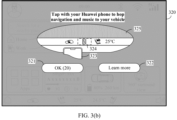
- FIG. 3(a) and FIG. 3(b) are diagrams of a group of graphical user interfaces (graphical user interfaces, GUIs) according to an embodiment of this application.
- FIG. 3(a) and FIG. 3(b) show a process in which the central display screen automatically displays the NFC location.
- the central display screen of the vehicle may display a display interface 300 and a function bar 310.
- the display interface 300 includes user account login information 301, a Bluetooth function icon 304, a Wi-Fi function icon 303, a cellular network signal icon 34, an in-vehicle map application search box 305, a widget 306 for switching to display all applications installed on the vehicle, a widget 307 for switching to display an in-vehicle music application, a widget 308 for displaying a charging status and an available range of the vehicle, and a widget 309 for displaying a 360-degree (°) surround view function of the vehicle.
- the in-vehicle map application search box 305 may include a "Home" control 3051 and a "Work" control 3052 that are set by the user.
- the display interface 300 may be a home screen of the central display screen.
- the function bar 310 may include at least an icon 311 for switching to display a home screen of the central display screen, a vehicle internal circulation icon 312, a driver seat heating function icon 313, a driver-area air conditioner temperature display icon 314, a front-passenger-area air conditioner temperature display icon 315, a front passenger seat heating function icon 316, and a volume setting icon 317.
- the vehicle may establish a communication connection to an electronic device.
- the vehicle may establish the communication connection to the electronic device through a soft bus.
- the central display screen of the vehicle may display a GUI shown in FIG. 3(b) .
- the electronic device needs to have a soft bus module, so that the electronic device can establish the communication connection to the vehicle through the soft bus.
- a Harmony operating system is installed on the electronic device, and the vehicle has a cockpit-specific Harmony operating system.
- the electronic device may establish the communication connection to the vehicle through Bluetooth.
- the electronic device may alternatively establish the communication connection to the vehicle in another wireless or wired manner.
- the electronic device and the vehicle are in a same local area network.
- the vehicle when the vehicle detects that the electronic device and the vehicle log in to a same account, the vehicle may establish the communication connection to the electronic device, and the vehicle further determines that the central display screen displays a home screen (or the central display does not display a display interface of another application). In this case, the central display screen of the vehicle may display a GUI shown in FIG. 3(b) .
- the vehicle when the vehicle detects that the electronic device and the vehicle log in to a same account, the vehicle may establish the communication connection to the electronic device. When further determining that the vehicle does not start navigation, the vehicle may display a GUI shown in FIG. 3(b) .
- the vehicle when the vehicle detects that the electronic device and the vehicle log in to a same account, the vehicle may establish the communication connection to the electronic device, and the vehicle further determines that the vehicle is in a P gear and the central display screen displays a home screen (or the central display does not display a display interface of another application). In this case, the central display screen of the vehicle may display a GUI shown in FIG. 3(b) . In some other examples, each time the vehicle detects that the vehicle switches from another gear to a P gear, the vehicle may trigger the central display screen to display a GUI shown in FIG. 3(b) .
- the vehicle when the vehicle detects that the electronic device and the vehicle log in to a same account, the vehicle may establish the communication connection to the electronic device. When further determining that the vehicle is in a P gear and the vehicle does not start navigation, the vehicle may display a GUI shown in FIG. 3(b) . In some other examples, each time the vehicle detects that the vehicle switches from another gear to a P gear, the vehicle may trigger the central display screen to display a GUI shown in FIG. 3(b) .
- the electronic device and the vehicle when the electronic device and the vehicle do not log in to a same account, the electronic device and the vehicle need to perform mutual authentication previously.
- the electronic device may also establish the communication connection to the vehicle.
- the GUI is a display interface 320 on which the central display screen prompts the NFC location.
- the display interface 320 may include text content "Tap with your Huawei phone to hop navigation and music to your vehicle", a display widget 325, a mobile phone icon 323, a function button 321, and a function button 322.
- the display widget 325 may include some function icons in the function bar and an NFC area identifier 324.
- a location of the NFC on the central display screen can be clearly presented to the user, so that the user can accurately implement a OneHop service.
- text content "OK (20)" may be displayed in the function button 321, and text content “Learn more” may be displayed in the function button 322.
- the vehicle may close the display interface 320.
- the vehicle may pop up a new display interface to introduce the NFC location or function in detail.
- the mobile phone icon 323 may alternatively be displayed as an animation effect.
- the mobile phone icon 323 may gradually approach the NFC area identifier 324 from a location away from the NFC area identifier 324, so that the user can be more intuitively guided to use the mobile phone to perform a OneHop service operation.
- the vehicle may further display the NFC identifier at a location that is at the bottom of the central display screen and that corresponds to the location of the NFC antenna, and does not need to display the display interface 320, so that use of the central display by the user is not affected.
- FIG. 4(a) and FIG. 4(b) are diagrams of another group of GUIs according to an embodiment of this application.
- FIG. 4(a) and FIG. 4(b) show another process in which the central display screen automatically displays the NFC location.
- FIG. 4(a) refer to the related descriptions in FIG. 3(a) .
- FIG. 4(a) refer to the related descriptions in FIG. 3(a) .
- details are not described herein again.
- An NFC icon 325 may be displayed in a function bar 310.
- the NFC icon 325 may be located between the vehicle internal circulation icon 312 and the driver seat heating function icon 313.
- the NFC icon 325 may alternatively be located at another location of the function bar 310. This is not limited in embodiments of this application. For example, when the NFC antenna is disposed between the icon 311 and the icon 312, the NFC icon 325 may be located between the icon 311 and the icon 312.
- the NFC icon 325 may be displayed at the corresponding location.
- the NFC icon 325 may alternatively be displayed with a blinking effect, to more clearly prompt the user with the NFC location.
- an area in which the NFC icon 325 is located in the function bar 310 may be a display identifier.
- the area in which the NFC icon 325 is located may be highlighted or displayed in a color.
- the central display screen may further display an arrow used to point to an area in which the NFC icon 325 is located, or the like.
- FIG. 5 is a schematic flowchart of an NFC location display method according to an embodiment of this application. As shown in FIG. 5 , the method 400 may include step 410 and step 420.
- a first device establishes a communication connection to a second device.
- the second device may be an electronic device like a smartphone, a tablet computer, or a wearable device.
- the first device may be a vehicle, or may be a large-screen electronic device like a tablet computer, a notebook computer, or a smart television. This is not limited in embodiments of this application.
- the second device is a smartphone on which a Harmony operating system is installed and the first device is a vehicle having a cockpit-specific Harmony operating system is used for description.
- This embodiment of this application may be applied to any scenario in which an NFC location needs to be prompted.
- the first device and the second device may establish the communication connection through a soft bus, so that data can be transmitted between the first device and the second device through the soft bus.
- the first device and the second device may alternatively be devices having other operating systems provided that the first device can establish a soft bus connection to the second device.
- a connection process may be automatically performed when the first device and the second device log in to a same account or are in a same local area network.
- the first device may alternatively establish a communication connection to the second device in another manner, for example, in a wireless or wired manner.
- the first display interface may be a display interface of the central display screen 202 of the vehicle.
- the first display interface may be a home screen of the central display screen, or the first display interface may be a display interface that is of another application and that is not shown on the central display screen.
- the vehicle may control the central display screen to display the prompt information indicating the NFC location, to prompt the user with a location of an NFC antenna on the central display screen.
- the prompt information may be the display interface 320.
- the prompt information may be a static picture, or may be a dynamic picture.
- the prompt information may alternatively be a guide animation indicating the mobile phone to be close to the NFC location, or the like. The user can intuitively determine the location of the NFC antenna on the central display screen by using the prompt information.
- the first display interface may alternatively be another display 203 or display 204 of the vehicle. This is not limited in embodiments of this application.
- the vehicle when establishing the communication connection to the mobile phone, the vehicle may further determine whether the central display screen displays the home screen. When determining that the central display screen displays the home screen, the vehicle may automatically display, on the central display screen, the prompt information indicating the NFC location. Therefore, the user can determine the location of the NFC antenna on the central display screen based on the prompt information. This helps the user perform a OneHop service operation.
- step 420 when displaying the first display interface, the vehicle may further directly display the prompt information indicating the NFC location, without performing a determining process.
- the method may further include: The vehicle determines that a gear of the vehicle is a parking gear (P gear).
- P gear parking gear
- step in which the vehicle determines that the vehicle is in the P gear may alternatively be in step 420. This is not limited in embodiments of this application.
- the prompt information for prompting the user with the NFC location is displayed on the central display screen, to prevent the user from performing the OneHop operation in a driving process of the vehicle. This ensures operation safety.
- the prompt information for prompting the user with the NFC location is displayed on the central display screen.
- the method may further include: determining that the second device supports a OneHop capability.
- the first device may obtain a capability of the second device, and the second device may obtain a capability of the first device.
- FIG. 6 is a schematic flowchart of another NFC location display method according to an embodiment of this application. As shown in FIG. 6 , the method 500 may include step 510 and step 520.
- a first device establishes a communication connection to a second device.
- step 510 refers to the related descriptions of step 410. For brevity, details are not described herein again.
- the navigation application may be Huawei Maps, Amap ® , Baidu Maps ® , or the like.
- the first device may display, on a central display screen, the prompt information indicating the NFC location.
- the central display screen of the first device may display a display interface of another application, or may display a home screen. This is not limited in embodiments of this application.
- the prompt information may be the display interface 320.
- the prompt information may alternatively be a guide animation indicating a mobile phone to be close to the NFC location.
- the prompt information may be an NFC identifier.
- step 520 when the vehicle does not run the navigation application, the vehicle may further directly display the prompt information indicating the NFC location, without performing a determining process.
- the vehicle when establishing the communication connection to the mobile phone, the vehicle may further determine whether the navigation application runs. When determining that the vehicle does not run the navigation application, the vehicle may automatically display, on the central display screen, the prompt information indicating the NFC location. Therefore, the user can determine a location of an NFC antenna on the central display screen based on the prompt information. This helps the user perform a OneHop service operation.
- the method may further include: The vehicle determines that a gear of the vehicle is a parking gear (P gear).
- P gear parking gear
- step in which the vehicle determines that the vehicle is in the P gear may alternatively be in step 520. This is not limited in embodiments of this application.
- the prompt information for prompting the user with the NFC location is displayed on the central display screen, to prevent the user from performing the OneHop operation in a driving process of the vehicle. This ensures operation security.
- step 520 may be performed.
- the prompt information for prompting the user with the NFC location is displayed on the central display screen.
- FIG. 7 is a schematic flowchart of another NFC location display method according to an embodiment of this application. As shown in FIG. 7 , the method 600 may include step 610 to step 660.
- a first device establishes a communication connection to a second device.
- step 610 refers to the related descriptions of step 410. For brevity, details are not described herein again.
- the soft bus of the first device may be further used to send a self-networking success message to a cockpit collaboration service.
- the soft bus of the first device may be used to send the self-networking success message to the cockpit collaboration service.
- the first device obtains a gear status.
- the gear status indicates a current gear of the first device, for example, a P gear, an N gear, a drive gear (D gear), or a reverse gear (R gear).
- the first device may obtain the current gear of the first device by using a cockpit subsystem.
- the first device obtains an activity status.
- an activity manager server (activity manager server, AMS) of the first device may manage an activity corresponding to an application running on the vehicle, and the first device may determine, by using the AMS, which application is running. For example, the first device may determine whether the navigation application is running.
- AMS activity manager server
- the first device obtains a location of the second device.
- the first device may include a mobile sensing development platform (mobile sensing development platform, MSDP), and the MSDP may include at least a plurality of sensors, for example, an ultrasonic sensor and a millimeter-wave sensor.
- MSDP mobile sensing development platform
- the MSDP may determine locations of the second device and the central display screen by using the plurality of sensors, so that the first device may obtain the location of the second device.
- the location of the second device may be on a left side (a driver side) of the central display screen, or the location of the second device may be on a right side (a front passenger side) of the central display screen.
- step 620 to step 640 are optional steps. In some examples, step 620 to step 640 may not be performed.
- the first device determines whether to display prompt information indicating an NFC location.
- the first device may determine, based on related content in step 620 to step 640, whether to display, on the central display screen, the prompt information indicating the NFC location.
- the first device when the first device determines that the gear is the P gear, and the first device does not run another application, the first device may determine to display the prompt information indicating the NFC location. Otherwise, the first device may determine not to display the prompt information indicating the NFC location.
- the first device when the first device determines that the gear is the P gear, and the first device does not run the navigation application, the first device may determine to display the prompt information indicating the NFC location. Otherwise, the first device may determine not to display the prompt information indicating the NFC location.
- the first device when determining that the central display screen displays the home screen, the first device may determine to display the prompt information indicating the NFC location. Otherwise, the first device may determine not to display the prompt information indicating the NFC location.
- the first device When determining to display the prompt information, the first device displays, on the central display screen, the prompt information indicating the NFC location.
- the first device displays, on the central display screen, the prompt information indicating the NFC location. For example, refer to FIG. 3(b) .
- the first device when determining to display the prompt information, may further display the prompt information based on the location of the second device. For example, when the cockpit collaboration service determines that the second device is located on the left side (the driver side) of the central display screen, an icon of the second device in the prompt information may be located on the left side of the central display screen.
- step 610 to step 660 is not limited in this application. In some embodiments, a part of steps in step 610 to step 660 may not be performed, or may be replaced with another step. For example, steps 620, 630, 640, and 650 may not be performed.
- the first device may obtain corresponding information like the gear status, the activity status, and the location of the second device, to comprehensively determine whether the prompt information indicating the NFC location needs to be displayed.
- the first device displays the prompt information on the central display screen, so that the user can determine the location of the NFC antenna on the central display based on the prompt information. This helps the user perform a OneHop service operation.
- FIG. 8 is a schematic flowchart of another NFC location display method according to an embodiment of this application. As shown in FIG. 8 , the method 700 may include step 710 to step 740.
- the first device determines that a distance between the first device and the second device is less than or equal to a first preset distance.
- both the first device and the second device are NFC devices, so that the distance between the first device and the second device can be determined by using an NFC technology. In some other examples, the distance between the first device and the second device may alternatively be determined by the second device.
- an NFC antenna of the first device sends an interrupt on signal to system software.
- a specific value of the first preset distance is not limited in embodiments of this application.
- the first preset distance may be 5 cm or 3 cm.
- the first device displays prompt information indicating an NFC location.
- the first device may control a central display screen or another display to display the prompt information.
- the first device may further control, after first preset duration, the central display screen to display the prompt information indicating the NFC location. In this way, it can be avoided that the first device still displays the prompt information when the second device accidentally touches the first device.
- a specific value of the first preset duration is not limited in embodiments of this application.
- the first preset duration may be 2s, 5s, or the like.
- the system software of the first device may control the central display screen to display the prompt information indicating the NFC location.
- the system software may be system software used to manage a home screen of the central display screen.
- the first device determines that the distance between the first device and the second device is greater than the first preset distance.
- the NFC antenna of the first device sends an interrupt off signal to the system software of the first device.
- the system software of the first device may control the central display screen to remove the prompt information.
- the prompt information may alternatively be an animation with a transparent background for guiding the NFC location, so that other content displayed on the central display screen may not be blocked.
- the system software of the first device controls the central display screen to remove the prompt information, so that the central display screen can quickly restore to an original state.
- step 710 and step 720 may be in a same step, and step 730 and step 740 may be in a same step. This is not limited in embodiments of this application.
- the first device when the distance between the first device and the second device is less than or equal to the first preset distance, the first device may directly display the prompt information indicating the NFC location, without performing a determining process.
- the first device when the distance between the second device and the first device is greater than the first preset distance, the first device may directly remove the prompt information indicating the NFC location, without performing a determining process.
- the first device when determining that the distance between the first device and the second device is less than or equal to the first preset distance, the first device may display the prompt information indicating the NFC location. When determining that the distance between the first device and the second device is greater than the first preset distance, the first device may remove the prompt information indicating the NFC location. In this technical solution, the first device can flexibly display or remove the prompt information of the NFC location based on the distance between the first device and the second device.
- FIG. 9 is a schematic flowchart of another NFC location display method according to an embodiment of this application. As shown in FIG. 9 , the method 800 may include step 810 to step 830.
- the first device determines that a distance between the first device and the second device is less than or equal to a first preset distance.
- steps 810 and 820 refer to the related descriptions of steps 710 and 720. For brevity, details are not described again.
- the prompt information is located at an uppermost layer of a display interface of a central display screen of the first device. In other words, the prompt information may be directly received and respond a user operation.
- a system may detect the tap operation. In this case, because the NFC prompt information is displayed at an uppermost layer of the central display screen, the system may intercept the tap operation.
- the tap operation may be a tap operation performed by the user on the central display screen of the first device, or may be a tap operation performed by the second device on the central display screen.
- a value of the preset quantity of times is set, so that it can be avoided that the prompt information is still removed when the second device accidentally touches the central display screen.
- a specific value of the second preset duration is not limited in embodiments of this application.
- the first device when determining that the distance between the first device and the second device is less than or equal to the first preset distance, the first device may display the prompt information indicating the NFC location. Within the second preset duration, when intercepting the tap operation the preset quantity of times, the first device may remove the prompt information. In this technical solution, it can be avoided that the prompt information of the NFC location is still removed when the user or the second device accidentally touches the central display screen of the first device.
- FIG. 10 is a schematic flowchart of an NFC location prompt method according to an embodiment of this application. As shown in FIG. 10 , the method may be applied to a first device, and the method may include step 1010 and step 1020.
- the first device is capable of performing near field communication NFC with a second device.
- the preset condition is a first condition or a second condition
- the first condition is that the second device establishes a communication connection to the first device
- the second condition is that a distance between the first device and the second device is less than or equal to a first preset distance
- both the first device and the second device are NFC devices, so that the distance between the first device and the second device can be determined by using an NFC technology.
- an NFC antenna of the first device sends an interrupt on signal to system software, so that the first device can determine that a current distance between the second device and the first device is less than or equal to the first preset distance.
- a specific value of the first preset distance is not limited in embodiments of this application.
- the prompt information indicating the NFC location may be a static picture, or may be a dynamic picture.
- the prompt information may alternatively be a guide animation indicating the mobile phone to be close to the NFC location, or the like.
- the prompt information may be an NFC identifier. A user can intuitively determine the location of the NFC antenna on the display by using the prompt information.
- the prompt information may be the display interface 320.
- the prompt information may include the NFC identifier 324 and the mobile phone icon 323, and may further include a text and the like.
- the prompt information may be the NFC identifier 325.
- the display may be a central display screen of the first device, or may be another display of the first device.
- the first device when determining that the preset condition is met, may display, on the display of the first device, the prompt information indicating the NFC location.
- the prompt information indicating the NFC location may be automatically displayed on the display under the preset condition, so that a user can determine a location of an NFC antenna on a central display screen based on the prompt information. This helps the user perform a OneHop service operation.
- the method 1000 may further include: determining that a home screen is displayed on the display of the first device or that no display interface of another application is displayed on the display of the first device.
- a home screen being displayed on the display of the first device may be understood as that a home screen is displayed on the display.
- the home screen may be a default home screen displayed when the first device is turned on, and the home screen may be one display interface, or may be a plurality of display interfaces.
- No display interface of another application being displayed on the display of the first device may be understood as that the first device does not run the another application, or the another application runs in the background, and a display interface of the another application is not displayed on the display.
- the display interface 300 may be the home screen of the central display screen.
- the first device displays the prompt information about the NFC location on the display, so that normal use of the display by the user can be not affected.
- the method 1000 may further include: determining that no navigation application runs on the first device.
- the navigation application may be Huawei Maps, Amap ® , or the like.
- the first device may display, on the central display screen, the prompt information indicating the NFC location.
- the prompt information indicating the NFC location.
- the method 1000 may further include: determining that the first device is in a first gear.
- the first gear may be a parking gear, or may be a neutral gear.
- the first device displays the prompt information. This prevents the user from performing a OneHop operation in a driving process of the vehicle, so that operation safety can be ensured.
- the method 1000 may further include: determining that the second device supports a OneHop capability.
- the first device and the second device may obtain capability information of each other, so that the first device can determine whether the second device supports the OneHop capability.
- the second device may send capability information of the second device to the first device through Bluetooth and the like.
- the first device displays, on the display, the prompt information indicating the NFC location, so that the user can perform the OneHop operation, and it can be avoided that the prompt information is still displayed when the second device does not support the OneHop capability, and the user may feel confused.
- the prompt information includes an identifier indicating the second device
- the method 1000 may further include: determining a location of the second device.
- the displaying, on a display of the first device, prompt information indicating an NFC location includes: The first device displays, based on the location of the second device, the identifier on a side that is of the display and that is close to the second device.
- the second device may determine the location of the second device based on an ultrasonic sensor, a laser sensor, or the like, for example, determine that the second device is located on a left side (a side close to a driver seat) or a right side (a side close to a passenger seat) of the display.
- the identifier may be the mobile phone icon 323.
- the mobile phone icon 323 in the prompt information may be displayed on the left side of the central display screen.
- the first device may display, on the side that is of the display and that is close to the second device based on the location, the identifier indicating the second device. This can accurately provide guidance for the user.
- the displaying, on a display of the first device, prompt information indicating an NFC location includes: displaying the prompt information on the display of the first device after first preset duration.
- the first preset duration may be 2s or 1s.
- a specific value of the first preset duration is not limited in embodiments of this application.
- the first device determines that the distance between the first device and the second device is less than or equal to the preset distance
- the first device displays the prompt information on the display after the first preset duration, so that it can be avoided that the second device still displays the prompt information on the display when the second device accidentally touches the first device.
- the first device may alternatively display the prompt information directly without a need to display the prompt information after the first preset duration.
- the prompt information is located at an uppermost layer of a display interface of the display, and the method 1000 may further include: The first device intercepts, within second preset duration, a tap operation performed on the display.
- the first device removes the prompt information when the first device intercepts the tap operation a preset quantity of times.
- the tap may be a tap operation performed by the user on the display of the first device, or may be a tap operation performed by the second device on the display.
- the prompt information may be located at the uppermost layer of the display interface of the display.
- a system may detect the tap operation, and intercept the tap operation.
- the first device may remove the prompt information. In this technical solution, it can be avoided that the first device still removes the prompt information when the second device or the user accidentally touches the display.
- the method 1000 may further include: The first device removes the prompt information when determining that the distance between the second device and the first device is greater than the first preset distance.
- the first device may remove the prompt information indicating the NFC location, so that the display can quickly restore to an original state, and use of the display by the user is not affected.
- the prompt information includes an NFC identifier.
- the first gear is a parking gear.
- the display is the central display screen of the first device.
- the display may alternatively be a display other than the central display screen of the first device.
- FIG. 11 is a block diagram of a device according to an embodiment of this application.
- the device 1100 may include one or more processors 1110 and one or more memories 1120.
- the one or more memories 1120 store one or more programs.
- the one or more programs include instructions. When the instructions are executed by the one or more processors 1110, the NFC location prompt method according to any one of the foregoing possible implementations is performed.
- the device 1100 may be the vehicle 100 described above.
- the device 1100 may be an electronic device like a smart television.
- An embodiment of this application further provides a chip.
- the chip includes a processor and a communication interface.
- the communication interface is configured to: receive a signal, and transmit the signal to the processor, and the processor processes the signal, so that the NFC location prompt method according to any one of the foregoing possible implementations is performed.
- the device includes corresponding hardware and/or software modules for performing the functions.
- Algorithm steps in the examples described with reference to embodiments disclosed in this specification can be implemented by hardware or a combination of hardware and software in this application. Whether a function is performed by hardware or software depends on particular applications and design constraint conditions of the technical solutions. A person skilled in the art may use different methods to implement the described functions for each particular application with reference to embodiments, but it should not be considered that the implementation goes beyond the scope of this application.
- the device may be divided into function modules according to the foregoing method examples.
- each function module may be obtained through division based on each corresponding function, or two or more functions may be integrated into one processing module.
- the integrated module may be implemented in a form of hardware. It should be noted that module division in this embodiment is an example and is merely logical function division. In actual implementation, there may be another division manner.
- An embodiment of this application further provides an NFC location prompt apparatus, including a module configured to implement the NFC location prompt method in any one of the foregoing embodiments.
- An embodiment of this application further provides a readable storage medium.
- the readable storage medium stores instructions. When the instructions are run on a device, the device is enabled to perform the foregoing related method steps, to implement the NFC location prompt method in the foregoing embodiments.
- An embodiment of this application further provides a program product.
- the program product runs on a device, the device is enabled to perform the foregoing related steps, to implement the NFC location prompt method in the foregoing embodiments.
- an embodiment of this application further provides an apparatus.
- the apparatus may be specifically a chip, a component, or a module.
- the apparatus may include a processor and a memory that are connected.
- the memory is configured to store executable instructions.
- the processor may execute the executable instructions stored in the memory, to enable the chip to perform the NFC location prompt method in the foregoing method embodiments.
- the device, the readable storage medium, the program product, or the chip provided in embodiments of this application is configured to perform the corresponding method provided above. Therefore, for beneficial effects that can be achieved by the device, the readable storage medium, the program product, or the chip, refer to the beneficial effects in the corresponding method provided above. Details are not described herein again.
- the disclosed system, apparatus, and method may be implemented in other manners.
- the described apparatus embodiment is merely an example.
- division into the units is merely logical function division and may be other division during actual implementation.
- a plurality of units or components may be combined or integrated into another system, or some features may be ignored or not performed.
- the displayed or discussed mutual couplings or direct couplings or communication connections may be implemented through some interfaces.
- the indirect couplings or communication connections between the apparatuses or units may be implemented in electronic, mechanical, or other forms.
- the units described as separate parts may or may not be physically separate, and parts displayed as units may or may not be physical units, in other words, may be located in one place, or may be distributed on a plurality of network units. Some or all of the units may be selected based on actual requirements to achieve the objectives of the solutions of embodiments.
- the functions When the functions are implemented in the form of a software functional unit and sold or used as an independent product, the functions may be stored in a computer-readable storage medium. Based on such an understanding, the technical solutions of this application essentially, or the part contributing to the conventional technology, or some of the technical solutions may be implemented in a form of a software product.
- the computer software product is stored in a storage medium, and includes several instructions for instructing a computer device (which may be a personal computer, a server, or a network device) to perform all or some of the steps of the methods described in embodiments of this application.
- the foregoing storage medium includes any medium that can store program code, such as a USB flash drive, a removable hard disk, a read-only memory (read-only memory, ROM), a random access memory (random access memory, RAM), a magnetic disk, or an optical disc.
- program code such as a USB flash drive, a removable hard disk, a read-only memory (read-only memory, ROM), a random access memory (random access memory, RAM), a magnetic disk, or an optical disc.
Landscapes
- Engineering & Computer Science (AREA)
- Computer Networks & Wireless Communication (AREA)
- Signal Processing (AREA)
- Mechanical Engineering (AREA)
- Chemical & Material Sciences (AREA)
- Combustion & Propulsion (AREA)
- Transportation (AREA)
- User Interface Of Digital Computer (AREA)
- Telephone Function (AREA)
Applications Claiming Priority (3)
| Application Number | Priority Date | Filing Date | Title |
|---|---|---|---|
| CN202211247421 | 2022-10-12 | ||
| CN202211641044.3A CN117880737A (zh) | 2022-10-12 | 2022-12-20 | Nfc位置提示方法和设备 |
| PCT/CN2023/123398 WO2024078417A1 (fr) | 2022-10-12 | 2023-10-08 | Procédé et dispositif d'invite de position par nfc |
Publications (2)
| Publication Number | Publication Date |
|---|---|
| EP4572348A1 true EP4572348A1 (fr) | 2025-06-18 |
| EP4572348A4 EP4572348A4 (fr) | 2025-11-12 |
Family
ID=90588848
Family Applications (1)
| Application Number | Title | Priority Date | Filing Date |
|---|---|---|---|
| EP23876619.0A Pending EP4572348A4 (fr) | 2022-10-12 | 2023-10-08 | Procédé et dispositif d'invite de position par nfc |
Country Status (4)
| Country | Link |
|---|---|
| US (1) | US20250267440A1 (fr) |
| EP (1) | EP4572348A4 (fr) |
| CN (1) | CN117880737A (fr) |
| WO (1) | WO2024078417A1 (fr) |
Family Cites Families (6)
| Publication number | Priority date | Publication date | Assignee | Title |
|---|---|---|---|---|
| WO2018058362A1 (fr) * | 2016-09-28 | 2018-04-05 | 北京小米移动软件有限公司 | Procédé d'affichage, appareil et enregistreur de conduite |
| US10104525B1 (en) * | 2017-07-24 | 2018-10-16 | GM Global Technology Operations LLC | NFC-enabled systems, methods and devices for wireless vehicle communication |
| CN110515576B (zh) * | 2019-07-08 | 2021-06-01 | 华为技术有限公司 | 显示控制方法及装置 |
| CN112351412B (zh) * | 2019-08-06 | 2025-03-11 | 华为技术有限公司 | 一种内容接续方法、系统及电子设备 |
| CN114125130B (zh) * | 2020-08-25 | 2022-12-16 | 荣耀终端有限公司 | 控制通信服务状态的方法、终端设备和可读存储介质 |
| CN114741008B (zh) * | 2020-12-24 | 2024-05-03 | 华为技术有限公司 | 分布式跨设备协同方法、电子设备及通信系统 |
-
2022
- 2022-12-20 CN CN202211641044.3A patent/CN117880737A/zh active Pending
-
2023
- 2023-10-08 WO PCT/CN2023/123398 patent/WO2024078417A1/fr not_active Ceased
- 2023-10-08 EP EP23876619.0A patent/EP4572348A4/fr active Pending
-
2025
- 2025-04-11 US US19/176,963 patent/US20250267440A1/en active Pending
Also Published As
| Publication number | Publication date |
|---|---|
| CN117880737A (zh) | 2024-04-12 |
| US20250267440A1 (en) | 2025-08-21 |
| EP4572348A4 (fr) | 2025-11-12 |
| WO2024078417A1 (fr) | 2024-04-18 |
Similar Documents
| Publication | Publication Date | Title |
|---|---|---|
| US10489100B2 (en) | Electronic device and method for sharing images | |
| EP3500470B1 (fr) | Visualisations de sécurité pour fond d'interface de navigation | |
| EP2645752B1 (fr) | Dispositif embarqué, son procédé de commande et système de commande à distance | |
| CA2516881C (fr) | Systeme d'acces transparent aux couches graphiques materielles | |
| US11372610B2 (en) | Display device, and display method | |
| EP4071608A1 (fr) | Dispositif de traitement de signaux et appareil d'affichage de véhicule le comprenant | |
| JP6318810B2 (ja) | 車両用表示装置 | |
| CN115309285A (zh) | 控制显示的方法、装置和移动载体 | |
| US12600231B2 (en) | Vehicle display system, vehicle display method, and storage medium storing vehicle display program | |
| CN115570976B (zh) | 画面呈现方法、装置、hud及存储介质 | |
| EP4572348A1 (fr) | Procédé et dispositif d'invite de position par nfc | |
| JP7571866B2 (ja) | 車両用表示システム、車両用表示方法、及び車両用表示プログラム | |
| KR20210129575A (ko) | 위젯을 이용한 차량용 인포테인먼트 장치와 그의 동작 방법 | |
| US9691182B1 (en) | System and method for adaptive display restriction in a headset computer | |
| JP2022094018A (ja) | 外部機器画面共有装置 | |
| US20230182571A1 (en) | Display method for vehicle, display system for vehicle, and vehicle | |
| WO2013179636A1 (fr) | Notification de la compatibilité d'un dispositif d'entrée tactile | |
| CN109634544B (zh) | 应用界面显示方法及装置、显示设备及存储介质 | |
| WO2024032149A1 (fr) | Procédé d'affichage, et appareil de commande et véhicule | |
| CN118140496A (zh) | 基于驾驶辅助功能调度通知的方法,设备及存储介质 | |
| KR20180093129A (ko) | 디스플레이 요소를 표시하기 위한 방법 및 장치 | |
| US20230054581A1 (en) | Vehicle input control device, vehicle input control system, vehicle input control method, and non-transitory storage medium in which program is stored | |
| WO2015083266A1 (fr) | Dispositif et procédé de commande d'affichage | |
| CN114546570B (zh) | 窗口的显示方法、窗口的显示装置、存储介质和车载终端 | |
| US11868610B1 (en) | Changeable vehicle driver evaluation interface apparatus, system, and method |
Legal Events
| Date | Code | Title | Description |
|---|---|---|---|
| STAA | Information on the status of an ep patent application or granted ep patent |
Free format text: STATUS: THE INTERNATIONAL PUBLICATION HAS BEEN MADE |
|
| PUAI | Public reference made under article 153(3) epc to a published international application that has entered the european phase |
Free format text: ORIGINAL CODE: 0009012 |
|
| STAA | Information on the status of an ep patent application or granted ep patent |
Free format text: STATUS: REQUEST FOR EXAMINATION WAS MADE |
|
| 17P | Request for examination filed |
Effective date: 20250310 |
|
| AK | Designated contracting states |
Kind code of ref document: A1 Designated state(s): AL AT BE BG CH CY CZ DE DK EE ES FI FR GB GR HR HU IE IS IT LI LT LU LV MC ME MK MT NL NO PL PT RO RS SE SI SK SM TR |
|
| A4 | Supplementary search report drawn up and despatched |
Effective date: 20251014 |
|
| RIC1 | Information provided on ipc code assigned before grant |
Ipc: H04W 4/80 20180101AFI20251008BHEP Ipc: H04W 4/024 20180101ALI20251008BHEP Ipc: B60R 16/023 20060101ALI20251008BHEP Ipc: H04W 4/02 20180101ALI20251008BHEP Ipc: H04W 4/40 20180101ALI20251008BHEP Ipc: H04W 76/14 20180101ALI20251008BHEP |
|
| DAV | Request for validation of the european patent (deleted) | ||
| DAX | Request for extension of the european patent (deleted) |