EP4575833A1 - Procédé et appareil d'interaction, dispositif électronique et support de stockage - Google Patents
Procédé et appareil d'interaction, dispositif électronique et support de stockage Download PDFInfo
- Publication number
- EP4575833A1 EP4575833A1 EP23854381.3A EP23854381A EP4575833A1 EP 4575833 A1 EP4575833 A1 EP 4575833A1 EP 23854381 A EP23854381 A EP 23854381A EP 4575833 A1 EP4575833 A1 EP 4575833A1
- Authority
- EP
- European Patent Office
- Prior art keywords
- media content
- text
- sentence
- sentences
- list
- Prior art date
- Legal status (The legal status is an assumption and is not a legal conclusion. Google has not performed a legal analysis and makes no representation as to the accuracy of the status listed.)
- Pending
Links
Images



Classifications
-
- G—PHYSICS
- G06—COMPUTING OR CALCULATING; COUNTING
- G06F—ELECTRIC DIGITAL DATA PROCESSING
- G06F16/00—Information retrieval; Database structures therefor; File system structures therefor
- G06F16/70—Information retrieval; Database structures therefor; File system structures therefor of video data
- G06F16/78—Retrieval characterised by using metadata, e.g. metadata not derived from the content or metadata generated manually
- G06F16/783—Retrieval characterised by using metadata, e.g. metadata not derived from the content or metadata generated manually using metadata automatically derived from the content
- G06F16/7834—Retrieval characterised by using metadata, e.g. metadata not derived from the content or metadata generated manually using metadata automatically derived from the content using audio features
-
- G—PHYSICS
- G06—COMPUTING OR CALCULATING; COUNTING
- G06F—ELECTRIC DIGITAL DATA PROCESSING
- G06F16/00—Information retrieval; Database structures therefor; File system structures therefor
- G06F16/70—Information retrieval; Database structures therefor; File system structures therefor of video data
- G06F16/74—Browsing; Visualisation therefor
- G06F16/745—Browsing; Visualisation therefor the internal structure of a single video sequence
-
- H—ELECTRICITY
- H04—ELECTRIC COMMUNICATION TECHNIQUE
- H04N—PICTORIAL COMMUNICATION, e.g. TELEVISION
- H04N21/00—Selective content distribution, e.g. interactive television or video on demand [VOD]
- H04N21/40—Client devices specifically adapted for the reception of or interaction with content, e.g. set-top-box [STB]; Operations thereof
- H04N21/47—End-user applications
- H04N21/488—Data services, e.g. news ticker
- H04N21/4884—Data services, e.g. news ticker for displaying subtitles
-
- G—PHYSICS
- G06—COMPUTING OR CALCULATING; COUNTING
- G06F—ELECTRIC DIGITAL DATA PROCESSING
- G06F16/00—Information retrieval; Database structures therefor; File system structures therefor
- G06F16/70—Information retrieval; Database structures therefor; File system structures therefor of video data
- G06F16/74—Browsing; Visualisation therefor
-
- G—PHYSICS
- G06—COMPUTING OR CALCULATING; COUNTING
- G06F—ELECTRIC DIGITAL DATA PROCESSING
- G06F16/00—Information retrieval; Database structures therefor; File system structures therefor
- G06F16/70—Information retrieval; Database structures therefor; File system structures therefor of video data
- G06F16/78—Retrieval characterised by using metadata, e.g. metadata not derived from the content or metadata generated manually
- G06F16/783—Retrieval characterised by using metadata, e.g. metadata not derived from the content or metadata generated manually using metadata automatically derived from the content
- G06F16/7844—Retrieval characterised by using metadata, e.g. metadata not derived from the content or metadata generated manually using metadata automatically derived from the content using original textual content or text extracted from visual content or transcript of audio data
-
- G—PHYSICS
- G06—COMPUTING OR CALCULATING; COUNTING
- G06F—ELECTRIC DIGITAL DATA PROCESSING
- G06F16/00—Information retrieval; Database structures therefor; File system structures therefor
- G06F16/90—Details of database functions independent of the retrieved data types
- G06F16/95—Retrieval from the web
- G06F16/953—Querying, e.g. by the use of web search engines
- G06F16/9532—Query formulation
-
- G—PHYSICS
- G06—COMPUTING OR CALCULATING; COUNTING
- G06F—ELECTRIC DIGITAL DATA PROCESSING
- G06F3/00—Input arrangements for transferring data to be processed into a form capable of being handled by the computer; Output arrangements for transferring data from processing unit to output unit, e.g. interface arrangements
- G06F3/01—Input arrangements or combined input and output arrangements for interaction between user and computer
- G06F3/048—Interaction techniques based on graphical user interfaces [GUI]
- G06F3/0481—Interaction techniques based on graphical user interfaces [GUI] based on specific properties of the displayed interaction object or a metaphor-based environment, e.g. interaction with desktop elements like windows or icons, or assisted by a cursor's changing behaviour or appearance
- G06F3/0482—Interaction with lists of selectable items, e.g. menus
-
- G—PHYSICS
- G06—COMPUTING OR CALCULATING; COUNTING
- G06F—ELECTRIC DIGITAL DATA PROCESSING
- G06F3/00—Input arrangements for transferring data to be processed into a form capable of being handled by the computer; Output arrangements for transferring data from processing unit to output unit, e.g. interface arrangements
- G06F3/01—Input arrangements or combined input and output arrangements for interaction between user and computer
- G06F3/048—Interaction techniques based on graphical user interfaces [GUI]
- G06F3/0484—Interaction techniques based on graphical user interfaces [GUI] for the control of specific functions or operations, e.g. selecting or manipulating an object, an image or a displayed text element, setting a parameter value or selecting a range
- G06F3/04842—Selection of displayed objects or displayed text elements
-
- G—PHYSICS
- G06—COMPUTING OR CALCULATING; COUNTING
- G06F—ELECTRIC DIGITAL DATA PROCESSING
- G06F3/00—Input arrangements for transferring data to be processed into a form capable of being handled by the computer; Output arrangements for transferring data from processing unit to output unit, e.g. interface arrangements
- G06F3/16—Sound input; Sound output
- G06F3/167—Audio in a user interface, e.g. using voice commands for navigating, audio feedback
-
- H—ELECTRICITY
- H04—ELECTRIC COMMUNICATION TECHNIQUE
- H04N—PICTORIAL COMMUNICATION, e.g. TELEVISION
- H04N21/00—Selective content distribution, e.g. interactive television or video on demand [VOD]
- H04N21/20—Servers specifically adapted for the distribution of content, e.g. VOD servers; Operations thereof
- H04N21/23—Processing of content or additional data; Elementary server operations; Server middleware
- H04N21/238—Interfacing the downstream path of the transmission network, e.g. adapting the transmission rate of a video stream to network bandwidth; Processing of multiplex streams
- H04N21/2387—Stream processing in response to a playback request from an end-user, e.g. for trick-play
Definitions
- the present disclosure relates to the field of computer technology, and more specifically, to an interaction method and apparatus, an electronic device and a storage medium.
- the present disclosure provides an interaction method and apparatus, an electronic device and a storage medium, to provide diversified methods for obtaining valuable information in video sounds and enhance the efficiency for obtaining valuable information in video sounds.
- Embodiments of the present disclosure provide an interaction method, comprising:
- Embodiments of the present disclosure also provide an interaction apparatus, comprising:
- Embodiments of the present disclosure also provide an electronic device, comprising:
- Embodiments of the present disclosure also provide a computer readable storage medium stored thereon with computer programs which, when executed by a processor, performing the interaction method according to the embodiments of the present disclosure.
- Steps disclosed in the method implementations of the present disclosure may be executed in different orders and/or in parallel. Besides, the method implementations may include additional steps and/or omit the demonstrated steps. The scope of the present disclosure is not restricted in this regard.
- the term “includes” and its variants are to be read as open-ended terms that mean “includes, but is not limited to.”
- the term “based on” is to be read as “based at least in part on.”
- the term “one embodiment” is to be read as “at least one embodiment.”
- the term “a further embodiment” is to be read as “at least a further embodiment.”
- the term “some embodiments” is to be read as “at least some embodiments”.
- Related definitions of other terms may be provided in the following description.
- first and second are disclosed in the present disclosure merely for distinguishing different apparatuses, modules or units, rather than restricting the sequence or interdependence of the functions executed by the apparatuses, modules or units.
- Names of the messages or information exchanged between a plurality of apparatuses in the implementations of the present disclosure are provided only for explanatory purpose, rather than restricting the scope of the messages or information.
- a prompt message is sent to the users to clearly inform them that the operation to be executed per request needs to obtain and use their personal information. Accordingly, the users may voluntarily select, in accordance with the prompt message, whether to provide their personal information to software or hardware that performs operations of the technical solution, such as an electronic device, an application program, a server or a storage medium.
- a prompt message is sent to the users, wherein the prompt message may be present in the form of pop-up window as an example and the prompt message may be displayed in text in the pop-up window.
- the pop-up window also may be provided with a select control through which the users may choose to "agree” or "disagree” the provision of personal information to the electronic device.
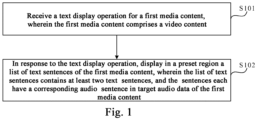
- Fig. 1 illustrates a schematic flowchart of an interaction method provided by embodiments of the present disclosure.
- the method may be executed by an interaction apparatus, wherein the apparatus may be implemented by a software and/or a hardware and configured in an electronic device, e.g., in a mobile phone or a tablet computer.
- the interaction method provided by the embodiments of the present disclosure is adapted to view scenarios of a list of text sentences of a video.
- the method is adapted to view scenarios of a list of text sentences of a video while watching videos.
- the interaction method provided by the embodiment may include the following steps.
- the text display operation may be a trigger operation for displaying a list of text sentences of a media content, such as an operation of triggering a text display control of one media content, an operation of triggering a media content jump control of other media contents (such as third media content) generated based on text sentences in one media content, or other gesture operations indicating display of the list of text sentences of the media content etc.
- the first media content may be a media content used by the text display operation to indicate display of a list of text sentences of the first media content, wherein the media content, for example, may be video content or image-text content.
- the types of the media content are not restricted in the embodiments.
- the first media content may be a video content including audio data (like human voices) apart from the background music. The following explanation is provided by taking the first media content as an example of the video content.
- the text display operation for the first media content may be received. For instance, an operation of triggering the text display control of the first media content by the user is received while the first media content is being displayed; or in case of displaying other media contents generated based on the text sentences in the first media content, a media content jump operation executed by the user is received, e.g., an operation of triggering a media content jump control corresponding to a third media content by the user is received.
- S102 in response to the text display operation, displaying in a preset region a list of text sentences of the first media content, wherein the list of text sentences contains at least two text sentences, and the text sentences each have a corresponding audio sentence in target audio data of the first media content.
- the preset region may be a region for displaying the list of text sentences of the first media content, and the position and the size of the preset region may be flexibly configured according to the requirements.
- the target audio data may be audio data of the first media content, such as human voice data (like valid human voice data) in the audio data of the first media content apart from the background music.
- the list of text sentences may be a list for displaying text sentences corresponding to at least one audio sentence in the target audio data of the first media content.
- the list of text sentences may include text sentences corresponding to audio sentences in the target audio data, e.g., text sentences in one-to-one correspondence with audio sentences in the target audio data.
- the list of text sentences may include at least two text sentences. If the target audio data include only one audio sentence, the list of text sentences may also only contain one text sentence.
- Each list of text sentences may be arranged according to a sequence of audio sentences in the target audio data corresponding to the list of text sentences.
- the display of the list of text sentences is independent of whether the first media content includes a subtitle.
- the list of text sentences of the first media content may be displayed.
- the list of text sentences of the first media content is displayed while the first media content and the current playing subtitle of the first media content are being displayed. Even if the first media content does not include a subtitle, the list of text sentences of the first media content may also be displayed.
- the list of text sentences mentioned in the embodiments is different from the subtitle.
- a subtitle corresponding to the currently playing audio sentence is presented alone, rather than all subtitle contents of the video content.
- the list of text sentences presented by the embodiments may include a text sentence corresponding to at least one audio sentence in the target audio data. Accordingly, the user may not only view the currently playing text sentence through the list of text sentences, but also view the already played text sentences and the text sentences not played yet through the list of text sentences.
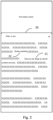
- the list of text sentences 20 of the first media content may be displayed in the preset region according to Fig. 2 .
- the list of text sentences 20 of the first media content may be displayed while the first media content is being played.
- the first media content is played in a media content play region of a media content display page
- the list of text sentences 20 of the first media content is displayed in the preset region of the media content display page.
- the media content play region and the preset region may overlap or not and the embodiments are not restricted in this regard.
- a preset interactive control of the first media content also may be displayed in the preset region.
- a publisher identifier e.g., profile photo
- a Like control, a comment control, a Favorite control or a sharing control of the first media content are displayed in the preset region.
- the user may view a personal homepage of the publisher of the first media content by triggering the publisher identifier of the first media content, give a thumbs up to the first media content by triggering the Like control, view the comment information of the first media content or comment the first media content by triggering the comment control to indicate the current application to display a comment panel of the first media content, add the first media content into a favorite list by triggering the Favorite control or share the first media content by triggering the sharing control to indicate the current application to display a sharing panel of the first media content.
- the user may indicate the current application to stop displaying the list of text sentences of the first media content through a corresponding triggering operation.
- the triggering operation for example, may include triggering a close control displayed in the preset region, clicking the media content play region and/or continuing to swipe down if a first text sentence in the list of text sentences is displayed in the preset region etc.
- the display of the list of text sentences of the video content allows the user to obtain the information in the video (such as video sound) through viewing the list of text sentences of the video content in addition to obtaining the information in the video by watching the video pictures or listening to the video sounds. Accordingly, the user still can quickly obtain the information contained in the video sound when it is inconvenient to listen to the video sound, for example it is inconvenient to turn on the video sound, or the environment is quite noisy or a hearing damage exists.
- the method according to the present disclosure can obtain the information in the video (e.g., video sound) in a more diversified way, improve the efficiency for obtaining information in the video and enhance the user experience.
- the information in the video e.g., video sound
- a current text sentence 21 (such as "these are the things we should consider seriously" shown in Fig. 2 ) in the list of text sentences 20 is automatically moved to the preset region for display.
- the current text sentence 21 and other text sentences in the list of text sentences 20 apart from the current text sentence 21 may be displayed in different ways, e.g., in different fonts, word sizes and/or colors etc., to facilitate the user to confirm and view the current text sentence.
- the at least two text sentences include a current text sentence and other text sentences apart from the current text sentence, and the current text sentence has a different display style from the other text sentences, where the current text sentence is a currently playing text sentence.
- the current text sentence may be a text sentence corresponding to the currently playing audio sentence in the target audio data of the first media content. With the playing of the first media content, the current text sentence may change.
- the keyword to be searched 22 and the content in the list of text sentences 20 apart from the keyword to be searched 22 may be displayed in different display styles in the list of text sentences 20.
- the keyword to be searched 22 and the content in the list of text sentences 20 apart from the keyword to be searched 22 may be displayed in different fonts, word sizes and/or colors etc.
- a search mark (such as a magnifying glass mark displayed at the upper right corner of the keyword to be searched "human capital" in Fig. 2 ) may be added to the keyword to be searched 22 to facilitate the user to determine the keyword to be searched 22 in the list of text sentences 20 and perform a quick search.
- a keyword to be searched contained in the at least two text sentences and other contents in the at least two text sentences apart from the keyword to be searched have different display styles, the keyword to be searched being provided for triggering display of a search result matching with a triggered keyword to be searched.
- the keyword to be searched may be determined based on a preset determination rule.
- a candidate keyword may be pre-labeled manually, and/or the candidate keyword may be determined in advance according to search frequency of a plurality of keywords in the current application and/or by a candidate keyword determination model; and a candidate keyword contained in at least one text sentence of the list of text sentences of the first media content acts as a keyword to be searched in the list of text sentences.
- a search result matching with the keyword to be searched may be obtained and displayed.
- a search result matching with the keyword to be searched is obtained from a server and the search result is displayed in the current page (e.g., preset region).
- the current page is switched to a search result page from the media content display page and the search result is displayed in the search result page etc.
- the display position and/or display style of the currently playing sentence in the preset region may be automatically adjusted before and after the change. For example, before a change occurs to the currently playing sentence, the currently playing sentence before the change may be displayed in a first display style at a set position of the preset region and the sentences other than the currently playing sentence in the list of text sentences is displayed in a second display style.
- At least one text sentence (including the currently playing sentence before the change) in the list of text sentences may be controlled to move, so as to move the changed currently playing sentence to the set position of the preset region for display; and the currently playing sentence before the change is switched from the first display style to the second display style, and the changed currently playing sentence is switched from the second display style to the first display style.
- the current text sentence is displayed at a set position of the preset region, and the method for interactions provided by the embodiments further comprises: in case of changes of the current text sentence, moving a changed current text sentence to the set position for display.
- the method after the displaying in a preset region a list of text sentences of the first media content, the method also comprises: in response to a sentence switching operation performed within the preset region, switching a text sentence displayed in the preset region and displaying a position control, wherein the position control is provided to trigger movement of the current text sentence to a set position of the preset region for display.
- the sentence switching operation may be a trigger operation for switching the text sentence displayed in the preset region, such as an operation for triggering a text sentence switching control or a swiping operation performed within the preset region etc.
- the position control may be a control for triggering the movement of the current text sentence to the set position of the preset region for display.
- the position control may be displayed immediately upon receipt of the sentence switching operation, and also may be displayed when the sentence switching operation is received and the currently playing sentence is not displayed in the preset region.
- the position control may be configured according to the requirements.
- the text sentence displayed in the preset region may be switched.
- at least one text sentence displayed in the preset region is controlled to move along with the swiping direction of the user, to move the text sentence not displayed in the preset region into the preset region for display; and the position control 30 is displayed when the sentence switching operation is received and/or the currently playing sentence is not displayed within the preset region as shown in Fig. 3 . Therefore, when intending to view the currently playing sentence, the user may trigger the position control 30.
- the current application detects that the user triggers the position control 30
- multiple text sentences displayed in the preset region may be controlled to move, so as to move the currently playing sentence to the set position of the present region for display.
- the currently playing sentence after the change can still be automatically moved to the set position of the preset region for display in case of changes of the currently playing sentence.
- the currently playing sentence after the change is no longer automatically moved to the set position of the preset region for display, to satisfy the needs of the user for viewing the text sentence displayed in the preset region after the switching.
- the method may resume to automatically move the changed currently playing sentence to the set position of the preset region for display, i.e., the changed currently playing sentence is automatically moved to the set position of the preset region for display in case of changes of the currently playing sentence.
- the method before the receiving a text display operation for a first media content, the method also comprises: playing the first media content; the displaying in a preset region a list of text sentences of the first media content includes: displaying in the preset region a list of text sentences of the first media content, and adjusting the first media content to be played outside the preset region.
- the user may execute the text display operation for the first media content while viewing the first media content.
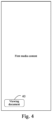
- the current application may play the first media content in the media content play region of the media content display page. Accordingly, when the user intends to view the list of text sentences 20 of the first media content, the user may execute the text display operation for the first media content, such as triggering the text display control 40 of the first media content. Correspondingly, upon receiving the text display operation for the first media content, the current application may display the list of text sentences 20 of the first media content in the preset region of the media content display page and adjust a display range of the media content play region in accordance with a display range of the preset region, so as to adjust the first media content to be played outside the preset region as shown in Fig. 2 .
- the display position of the text display control 40 may be flexibly configured.
- the text display control 40 of the first media content may be displayed at the preset position of the media content display page as shown in Fig. 4 ; the text display control 40 may also be displayed in the preset panel of the first media content. Therefore, when the user intends to execute the text display operation, the user may directly trigger the text display control 40 in the first media content; or perform a panel display operation to indicate the current application to display the preset panel of the first media content and trigger the text display control 40 displayed in the preset panel.
- the text display operation for the first media content also may include a mute play operation for the first media content.
- a mute play operation for the first media content For example, when it is detected that the user adjusts a playing volume of the first media content to mute, it is determined that the text display operation for the first media content is received.
- the list of text sentences of the first media content is displayed in the preset region of the media content display page and the first media content is adjusted to be played outside the preset region, to facilitate the user to obtain the information in the target audio data of the first media content.
- the text display operation includes a media content jump operation for a third media content; before the receiving a text display operation for a first media content, the method also comprises: playing the third media content, wherein the third media content is a media content generated based on a second text sentence in the first media content; the displaying in a preset region a list of text sentences of the first media content includes: playing the first media content outside the preset region and displaying a list of text sentences of the first media content in the preset region.
- the user may execute the text display operation for the first media content while watching the third media content generated based on the first media content.
- the third media content may be a media content generated based on the second text sentence in the first media content, e.g., the media content generated via the media content generating operation for the second text sentence.
- the third media content may be video content or image-text content etc.
- the second text sentence may include one or more text sentences in the list of text sentences of the first media content and may be the same as or different from the first text sentence.
- the third media content may be a media content posted by the current user or other users watching the first media content.
- the media content jump operation may be a trigger operation for indicating to jump to an original media content (e.g., first media content) corresponding to the currently playing media content (such as third media content).
- the media content jump operation may be an operation of triggering a jump to the further media content, e.g., an operation of triggering a media content jump control of the currently playing media content etc.
- the current application may display the third media content generated based on the second text sentence in the first media content.
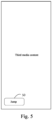
- the user may perform the text display operation for the first media content, e.g., triggering a media content jump control 50 corresponding to the third media content.
- the current application may play the first media content outside the preset region and display the list of text sentences 20 of the first media content in the preset region as shown in Fig. 2 .
- the current page may be switched to the media content display page of the first media content
- the first media content may be played outside the preset region of the media content display page
- the list of text sentences 20 of the first media content may be displayed in the preset region of the media content display page.
- the timing for display the media content jump control corresponding to the third media content may be flexibly configured. For example, when third media content is being displayed, the media content jump control corresponding to the third media content is also displayed. Besides, the media content jump control corresponding to the third media content may also be displayed when the control display operation for the third media content is received. At this moment, optionally, before the receiving a text display operation for a first media content, the method also comprises: in response to a control display operation for the third media content, displaying a media content jump control corresponding to the third media content, wherein the jump control is provided for triggering execution of the media content jump operation.
- control display operation for the third media content may be a trigger operation for indicating to display the media content jump control corresponding to the third media content, e.g., a pause display operation for the third media content.
- a trigger operation for indicating to display the media content jump control corresponding to the third media content e.g., a pause display operation for the third media content.
- the display of the third media content may be paused and the media content jump control corresponding to the third media is displayed.
- the playing the first media content outside the preset region may include: playing the first media content outside the preset region by taking a starting point of the first media content as a playing starting point; or playing the first media content outside the preset region by taking a time node in the first media content corresponding to a starting point of the second text sentence as a playing starting point.
- the first media content when the first media content is played outside the preset region in response to the media content jump operation for the third media content, the first media content may be played from its starting point as the playing starting point, or the first media content is played by taking a time node in the first media content corresponding to the starting point of the second text sentence as the playing starting point.
- the playing starting point may be configured according to the requirements.
- the interaction method provided by the embodiments comprises receiving a text display operation for a first media content, wherein the first media content includes a video content; and in response to the text display operation, displaying in a preset region a list of text sentences of the first media content, wherein the list of text sentences contains at least two text sentences, and the text sentences each have a corresponding audio sentence in target audio data of the first media content.
- the embodiments display the list of text sentences of the video content, such that the user may obtain the information in the video (such as video sound) through viewing the list of text sentences of the video content in addition to obtaining the information in the video by watching the video pictures or listening to the video sounds. Therefore, the information in the video can be obtained in a more diversified way, the efficiency for obtaining information in the video is improved and the user experience is enhanced.
- Fig. 6 illustrates a schematic flowchart of a further interaction method provided by embodiments of the present disclosure.
- the solution in these embodiments may be combined with one or more optional solution in the above embodiments.
- the method also comprises: in response to a sentence selecting operation performed within the preset region, determining a first text sentence selected by the text selecting operation and executing at least one of: in response to a copy operation for the first text sentence, copying the first text sentence; in response to a sharing operation for the first text sentence, sharing the first text sentence; in response to a play operation for the first text sentence, playing the first media content by taking a time node in the first media content corresponding to a starting point of the first text sentence as a playing starting point; in response to a media content generating operation for the first text sentence, generating a second media content containing the first text sentence.
- the method further comprises: displaying the first text sentence in a selected state.
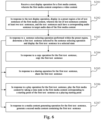
- the interaction method provided by the embodiments may include the following steps.
- S201 receiving a text display operation for a first media content, wherein the first media content includes a video content.
- S202 in response to the text display operation, displaying in a preset region a list of text sentences of the first media content, wherein the list of text sentences contains at least two text sentences, and the text sentences each have a corresponding audio sentence in target audio data of the first media content.
- S203 in response to a sentence selecting operation performed within the preset region, determining a first text sentence selected by the text selecting operation, displaying the first text sentence in a selected state and executing at least one of S204-S207.
- the sentence selecting operation may be an operation of selecting one or more text sentences in the list of text sentences of the first media content, such as a clicking operation in the preset region.
- the first text sentence may be the text sentence selected by the sentence selecting operation and the first text sentence may include one or more text sentences.
- the first text sentence selected by the sentence selecting operation may be determined.
- the first text sentence is displayed in the selected state and a copy control 70, a sharing control (not shown in Fig. 7 ), a play control 71 and/or a media content generating control 72 corresponding to the first text sentence may be displayed as demonstrated in Fig. 7 .
- the text sentence displayed at a trigger position of the clicking operation may serve as the first text sentence corresponding to the clicking operation.
- the first text sentence is displayed in the selected state, and the copy control, the sharing control, the play control and/or the media content generating control corresponding to the first text sentence are displayed.
- the user may adjust the selected range by adjusting the position of the starting point identifier and/or the position of the ending point identifier of the selected first text sentence, so as to adjust the contents contained in the first text sentence.
- the first text sentence when a copy operation for the first text sentence is received, the first text sentence may be copied and a prompt message may be displayed to prompt the user that the first text sentence is successfully copied. Afterwards, the user may input the first text sentence into other pages of the current application or other applications by pasting, wherein the copy operation for the first text sentence may be a trigger operation for indicating to copy the first text sentence, such as an operation of triggering a copy control 70 (as shown in Fig. 7 ) corresponding to the first text sentence.
- a trigger operation for indicating to copy the first text sentence such as an operation of triggering a copy control 70 (as shown in Fig. 7 ) corresponding to the first text sentence.
- the first text sentence when a sharing operation for the first text sentence is received, the first text sentence may be shared.
- a sharing panel is displayed for the current users to select other users with whom they intend to share the first text sentence; and when the current users finish the selection, the first text sentence is shared to other users selected by the current users; or the first text sentence is directly shared to the target user having a preset association with the current users.
- the copy operation for the first text sentence may be a trigger operation for indicating to display the sharing panel to share the first text sentence or a trigger operation for indicating to share the first text sentence, for example, an operation of triggering a sharing control corresponding to the first text sentence etc.
- the play progress of the first media content may be adjusted to the play progress indicated by a time node in the first media content corresponding to the starting point of the first text sentence. That is, the first media content may be played by taking a time node in the first media content corresponding to the starting point of the first text sentence as the playing starting point, so as to facilitate the user to listen to the audio sentence corresponding to the first text sentence.
- the play operation for the first text sentence may be a trigger operation for indicating to play the audio sentence corresponding to the first text sentence, e.g., an operation of triggering a play control 71 (as shown in Fig. 7 ) corresponding to the first text sentence.
- the media content generating operation for the first text sentence may be a trigger operation for indicating to generate the new media content from the first text sentence, such as an operation of triggering the media content generating control 72 (as shown in Fig. 7 ) corresponding to the first text sentence.
- the second media content may be a media content generated using the first text sentence.
- the second media content may be a video content or an image-text content etc.
- the image-text content may be appreciated as a media content in which the image serves as the content and the text is the introduction information of the media content.
- the second media content containing the first text sentence may be generated.
- a card containing the second text sentence may be generated when the second media content including the first text sentence is generated.
- the second media content is generated based on using the card as the content of the media content and using the music corresponding to the second text sentence and/or the card as the background music of the media content.
- the generating a second media content containing the first text sentence includes: generating a target card containing the first text sentence; generating the second media content by using the target card as content and using music corresponding to the first text sentence and/or the target card as background music.
- the target card may be a picture containing the first text sentence.
- the music corresponding to the first text sentence/target card may serve as the music associated with the first text sentence/target card.
- the music associated with a plurality of text sentences/cards may be determined by a pre-trained model or pre-configured.
- the target card may be determined randomly or selected from a plurality of preconfigured cards based on the first text sentence. Different cards may have various display styles. The embodiments are not restricted in this regard.
- the second media content including the first text sentence is generated without considering the length of the first text sentence.
- the length of the first text sentence may also be considered.
- the second media content including the first text sentence is generated upon receipt of the media content generating operation for the first text sentence only when the length of the first text sentence is within a preset length range (e.g., less than 150 words).
- the second media content is not generated based on the first text sentence.
- the media content generating control corresponding to the first text sentence is not displayed. This may be configured flexibly according to the requirements.
- a recreation may be made based on the text sentences in the list of text sentences of the first media content, to generate a new media content.
- a new method for creating media contents is provided, the difficulty for creating media contents is lowered and the creative experience of the user is enhanced.
- the second media content containing the first text sentence may be generated and posted in response to the media content generating operation for the first text sentence.
- the media content generating operation may be a trigger operation for indicating to generate and post the second media content.
- the media content generating operation may include a posting operation for the second media content including the first text sentence. Therefore, when the media content generating operation for the first text sentence is received, the second media content including the first text sentence may be generated and the second media content is posted.
- the generating a second media content containing the first text sentence includes: generating a second media content containing the first text sentence and posting the second media content.
- the method upon receipt of the media content generating operation for the first text sentence, only the second media content including the first text sentence is generated; and when a posting operation for the second media content is received, the second media content is posted.
- the second media content including the first text sentence is generated and an editing page of the second media content is displayed as shown in Fig. 8 , to allow the user to edit the second media content; and the second media content is posted when the posting operation (e.g., an operation of triggering a posting control 80 in the editing page of the second media content) performed on the editing page of the second media content or the posting operation performed in a posting page of the second media content is received.
- the method further comprises: in response to a posting operation for the second media content, posting the second media content.
- Display of the list of text sentences of the first media content and recreation based on the text sentences in the list of text sentences of the first media content are carried out under the authorization of the publisher of the first media content.
- the publisher of the first media content may turn on or turn off the display of authorization or recreation authorization for the list of text sentences of all media contents (including the first media content) posted by the publisher in the setting page, or the publisher may turn on or off the display of authorization or recreation authorization for the list of text sentences of the first media content in the setting panel of the first media content.
- the list of text sentences of the first media content will not be displayed in response to the text display operation by the user; if the publisher of the first media content does not authorize a recreation based on the text sentences in the list of text sentences of the first media content, no response is made to the media content generating operation of the user for the text sentences in the list of text sentences of the first media content.
- the method for interactions provided by the embodiments may support the user to copy, share and/or play the text sentences displayed in the list of text sentences, or to create new media contents based on the text sentences displayed in the list of text sentences, so as to satisfy the different needs of the users, lower the difficulty for creating media contents and enhance the user experience.
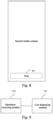
- Fig. 9 illustrates a structural diagram of an interaction apparatus provided by embodiments of the present disclosure.
- the apparatus may be implemented by software and/or hardware and may be configured in an electronic device, such as mobile phone or tablet computer.
- the apparatus may display the list of text sentences of the video through executing the method for interactions.
- the interaction apparatus provided by the embodiments may include: an operation receiving module 901 and a list display module 902.
- the operation receiving module 901 is configured to receive a text display operation for a first media content, wherein the first media content includes a video content;
- the list display module 902 is configured to, in response to the text display operation, display in a preset region a list of text sentences of the first media content, wherein the list of text sentences contains at least two text sentences, and the text sentences each have a corresponding audio sentence in target audio data of the first media content.
- the interaction apparatus comprises receiving, through the operation receiving module 901, a text display operation for a first media content, wherein the first media content includes a video content; and displaying in a preset region a list of text sentences of the first media content through the list display module 902, in response to the text display operation, wherein the list of text sentences contains at least two text sentences, and the text sentences each have a corresponding audio sentence in target audio data of the first media content.
- the embodiments display the list of text sentences of the video content, so as to obtain the information in the video (such as video sound) through viewing the list of text sentences of the video content in addition to obtaining the information in the video by watching the video pictures or listening to the video sounds. Therefore, the information in the video can be obtained in a more diversified way, the efficiency for obtaining information in the video is improved and the user experience is enhanced.
- the at least two text sentences include a current text sentence and other text sentences apart from the current text sentence, and the current text sentence has a different display style from the other text sentences, where the current text sentence is a currently playing text sentence.
- the current text sentence may be displayed at a set position of the preset region
- the interaction apparatus by the embodiments also may comprise: a sentence moving module configured to, when the current text sentence changes, move a changed current text sentence to the set position for display.
- the interaction apparatus also may comprise: a sentence switching module configured to, after the displaying in a preset region a list of text sentences of the first media content, switch a text sentence displayed in the preset region and display a position control in response to a sentence switching operation performed within the preset region, wherein the position control is provided to trigger movement of the current text sentence to a set position of the preset region for display.
- a sentence switching module configured to, after the displaying in a preset region a list of text sentences of the first media content, switch a text sentence displayed in the preset region and display a position control in response to a sentence switching operation performed within the preset region, wherein the position control is provided to trigger movement of the current text sentence to a set position of the preset region for display.
- the interaction apparatus also may comprise: a sentence selecting module configured to, after the displaying in a preset region a list of text sentences of the first media content, determine a first text sentence selected by the text selecting operation in response to a sentence selecting operation performed within the preset region, and call at least one of the following modules: a sentence copying module configured to, in response to a copy operation for the first text sentence, copy the first text sentence; a sentence sharing module configured to, in response to a sharing operation for the first text sentence, share the first text sentence; a sentence playing module configured to, in response to a play operation for the first text sentence, play the first media content by taking a time node in the first media content corresponding to a starting point of the first text sentence as a playing starting point; and a media content generating module configured to, in response to a media content generating operation for the first text sentence, generate a second media content containing the first text sentence.
- a sentence selecting module configured to, after the displaying in a preset region a list of text sentences of the
- the media content generating module may include: a card generating unit configured to generate a target card containing the first text sentence; and a media content generating unit configured to generate the second media content by using the target card as content and using music corresponding to the first text sentence and/or the target card as background music.
- the media content generating module may be configured to: generate a second media content containing the first text sentence and post the second media content; or the interaction apparatus provided by the embodiments also may comprise: a media content posting module configured to, after the generating a second media content containing the first text sentence, post the second media content in response to a posting operation for the second media content.
- the sentence selecting module may also be configured to: display the first text sentence in a selected state after the determining a first text sentence selected by the sentence selecting operation.
- a keyword to be searched contained in the at least two text sentences and other contents in the at least two text sentences apart from the keyword to be searched have different display styles, the keyword to be searched being provided for triggering display of a search result matching with a triggered keyword to be searched.
- the apparatus for interactions provided by the embodiments also may comprise: a first playing module configured to, before receiving a text display operation for a first media content, play the first media content; the list display module 902 may be configured to: display in the preset region a list of text sentences of the first media content, and adjust the first media content to be played outside the preset region.
- the text display operation may include a media content jump operation for a third media content
- the apparatus for interactions provided by the embodiments also may include: a second playing module configured to, before the receiving a text display operation for a first media content, play a third media content, wherein the third media content is a media content generated based on a second text sentence in the first media content;
- the list display module 902 may be configured to: play the first media content outside the preset region and display a list of text sentences of the first media content in the preset region.
- the interaction apparatus also may include: a control display module configured to, before the receiving a text display operation for a first media content, display a jump control corresponding to the third media content in response to a control display operation for the third media content, wherein the jump control is provided for triggering execution of the media content jump operation.
- a control display module configured to, before the receiving a text display operation for a first media content, display a jump control corresponding to the third media content in response to a control display operation for the third media content, wherein the jump control is provided for triggering execution of the media content jump operation.
- the list display module 902 may be configured to: play the first media content outside the preset region by taking a starting point of the first media content as a playing starting point; or play the first media content outside the preset region by taking a time node in the first media content corresponding to a starting point of the second text sentence as a playing starting point.
- the apparatus for interactions provided by the embodiments of the present disclosure may execute the method for interactions provided by any embodiments of the present disclosure, have corresponding functional modules for performing the method for interactions and achieve the corresponding effects.
- the technical details not elaborated in the embodiments may refer to the method for interactions provided by any embodiments of the present disclosure.
- Fig. 10 illustrates a structural diagram of an electronic device (such as terminal device) 1000 adapted to implement embodiments of the present disclosure.
- the terminal device may include mobile terminals, such as mobile phones, notebooks, digital broadcast receivers, Personal Digital Assistants (PDAs), Portable Android Devices (PADs), Portable Multimedia Players (PMPs) and vehicle terminals (such as car navigation terminal) and fixed terminals, e.g., digital TVs and desktop computers etc.
- PDAs Personal Digital Assistants
- PDAs Portable Android Devices
- PMPs Portable Multimedia Players
- vehicle terminals such as car navigation terminal
- fixed terminals e.g., digital TVs and desktop computers etc.
- the electronic device shown in Fig. 10 is just an example and will not put any restrictions on the functions and application ranges of the embodiments of the present disclosure.
- the electronic device 1000 may include a processor (e.g., central processor, graphic processor and the like) 1001, which can execute various suitable actions and processing based on the programs stored in the Read-Only Memory (ROM) 1002 or programs loaded in the Random-Access Memory (RAM) 1003 from a storage unit 1008.
- the RAM 1003 can also store all kinds of programs and data required by the operations of the electronic device 1000.
- Processor 1001, ROM 1002 and RAM 1003 are connected to each other via a bus 1004.
- the input/output (I/O) interface 1005 is also connected to the bus 1004.
- Input unit 1006 (including touch screen, touchpad, keyboard, mouse, camera, microphone, accelerometer, gyroscope and like) and output unit 1007 (including liquid crystal display (LCD), speaker and vibrator etc.), storage unit 1008 (including tape and hard disk etc.) and communication unit 1009 may be connected to the I/O interface 1005.
- the communication unit 1009 may allow the electronic device 1000 to exchange data with other devices through wired or wireless communications.
- Fig. 10 illustrates the electronic device 1000 having various units, it is not a prerequisite to implement or provide all illustrated units. Alternatively, more or less units may be implemented or provided.
- the process depicted above with reference to the flowchart may be implemented as computer software programs.
- the embodiments of the present disclosure include a computer program product including computer programs carried on a non-transient computer readable medium, wherein the computer programs include program codes for executing the method demonstrated by the flowchart.
- the computer programs may be loaded and installed from networks via the communication unit 1009, or installed from the storage unit 1008, or installed from the ROM 1002.
- the computer programs when executed by the processor 1001, performs the above functions defined in the method for video editing according to the embodiments of the present disclosure.
- the above disclosed computer readable medium may be computer readable signal medium or computer readable storage medium or any combinations thereof.
- the computer readable storage medium for example may include, but not limited to, electric, magnetic, optical, electromagnetic, infrared or semiconductor systems, apparatus or devices or any combinations thereof.
- the computer readable storage medium may include electrical connection having one or more wires, portable computer disk, hard disk, RAM, ROM, Erasable Programmable Read Only Memory (EPROM), flash memory, fiber optics, portable compact disk read only memory (CD-ROM), optical storage device, magnetic storage device, or any suitable combinations thereof.
- the computer readable storage medium may be any tangible medium that contains or stores programs. The programs may be utilized by instruction execution systems, apparatuses or devices in combination with the same.
- the computer readable signal medium may include a data signal propagated in baseband or as part of a carrier wave, carrying computer readable program codes therein. Such propagated data signals may take many forms, including but not limited to, electromagnetic signals, optical signals, or any suitable combinations thereof.
- the computer readable signal medium may also be any computer readable medium in addition to the computer readable storage medium.
- the computer readable signal medium may send, propagate, or transmit programs for use by or in connection with instruction execution systems, apparatuses or devices.
- Program codes contained on the computer readable medium may be transmitted by any suitable media, including: electric wires, fiber optic cables and Radio Frequency (RF) etc., or any suitable combinations thereof.
- RF Radio Frequency
- clients and servers may communicate with each other via any currently known or to be developed network protocols, such as HyperText Transfer Protocol (HTTP) and interconnect with digital data communications in any forms or media (such as communication networks).
- HTTP HyperText Transfer Protocol
- Examples of the communication networks include Local Area Network (LAN), Wide Area Network (WAN), internet work (e.g., Internet) and end-to-end network (such as ad hoc end-to-end network), and any currently known or to be developed networks.
- LAN Local Area Network
- WAN Wide Area Network
- Internet internet work
- end-to-end network such as ad hoc end-to-end network
- the above computer readable medium may be included in the aforementioned electronic device or stand-alone without fitting into the electronic device.
- the above computer readable medium bears one or more programs.
- the electronic device When the above one or more programs are executed by the electronic device, the electronic device is enabled to: receive a text display operation for a first media content, wherein the first media content includes a video content; in response to the text display operation, display in a preset region a list of text sentences of the first media content, wherein the list of text sentences contains at least two text sentences, the at least two text sentences each having a corresponding audio sentence in target audio data of the first media content.
- Computer program instructions for executing operations of the present disclosure may be written in one or more programming languages or combinations thereof.
- the above programming languages include object-oriented programming languages, e.g., Java, Smalltalk, C++ and so on, and traditional procedural programming languages, such as "C" language or similar programming languages.
- the program codes can be implemented fully on the user computer, partially on the user computer, as an independent software package, partially on the user computer and partially on the remote computer, or completely on the remote computer or server.
- the remote computer can be connected to the user computer via any type of networks, including local area network (LAN) and wide area network (WAN), or to the external computer (e.g., connected via Internet using the Internet service provider).
- LAN local area network
- WAN wide area network
- Internet service provider e.g., AT&T, MCI, Sprint, EarthLink, MSN, GTE, etc.
- Units described in the embodiments of the present disclosure may be implemented by software as well as hardware, wherein the name of the module does not restrict the unit per se under one condition.
- FPGAs Field-Programmable Gate Arrays
- ASICs Application-specific Integrated Circuits
- ASSPs Application-specific Standard Products
- SOCs System-on-a-chip systems
- CPLDs Complex Programmable Logic Devices
- Example 2 is directed to a method according to Example 1, wherein the at least two text sentences include a current text sentence and other text sentences apart from the current text sentence, and the current text sentence has a different display style from the other text sentences, where the current text sentence is a currently playing text sentence.
- Example 5 is directed to a method according to Example 1, wherein after displaying in a preset region a list of text sentences of the first media content, the method also comprises:
- Example 7 is directed to a method according to Example 5, wherein the generating a second media content containing the first text sentence includes: generating a second media content containing the first text sentence and posting the second media content; or, after the generating a second media content containing the first text sentence, the method further comprises: in response to a posting operation for the second media content, posting the second media content.
- Example 8 is directed to a method according to Example 5, wherein after the determining a first text sentence selected by the text selecting operation, the method further comprises: displaying the first text sentence in a selected state.
- Example 10 is directed to a method according to any of Examples 1-9, wherein before the receiving a text display operation for a first media content, the method also comprises:
- Example 13 is directed to a method according to Example 11, wherein the playing the first media content outside the preset region includes:
- Example 16 provides a computer readable storage medium stored thereon with computer programs which, when executed by a processor, performing the method for interactions according to any of claims 1-13.
Landscapes
- Engineering & Computer Science (AREA)
- Theoretical Computer Science (AREA)
- General Engineering & Computer Science (AREA)
- Multimedia (AREA)
- Physics & Mathematics (AREA)
- General Physics & Mathematics (AREA)
- Human Computer Interaction (AREA)
- Databases & Information Systems (AREA)
- Data Mining & Analysis (AREA)
- Library & Information Science (AREA)
- Signal Processing (AREA)
- General Health & Medical Sciences (AREA)
- Audiology, Speech & Language Pathology (AREA)
- Health & Medical Sciences (AREA)
- Mathematical Physics (AREA)
- User Interface Of Digital Computer (AREA)
- Indexing, Searching, Synchronizing, And The Amount Of Synchronization Travel Of Record Carriers (AREA)
- Management Or Editing Of Information On Record Carriers (AREA)
- Two-Way Televisions, Distribution Of Moving Picture Or The Like (AREA)
Applications Claiming Priority (2)
| Application Number | Priority Date | Filing Date | Title |
|---|---|---|---|
| CN202210977564.5A CN115269920A (zh) | 2022-08-15 | 2022-08-15 | 交互方法、装置、电子设备和存储介质 |
| PCT/CN2023/112810 WO2024037480A1 (fr) | 2022-08-15 | 2023-08-14 | Procédé et appareil d'interaction, dispositif électronique et support de stockage |
Publications (1)
| Publication Number | Publication Date |
|---|---|
| EP4575833A1 true EP4575833A1 (fr) | 2025-06-25 |
Family
ID=83751287
Family Applications (1)
| Application Number | Title | Priority Date | Filing Date |
|---|---|---|---|
| EP23854381.3A Pending EP4575833A1 (fr) | 2022-08-15 | 2023-08-14 | Procédé et appareil d'interaction, dispositif électronique et support de stockage |
Country Status (5)
| Country | Link |
|---|---|
| US (1) | US20260025559A1 (fr) |
| EP (1) | EP4575833A1 (fr) |
| JP (1) | JP2025521197A (fr) |
| CN (1) | CN115269920A (fr) |
| WO (1) | WO2024037480A1 (fr) |
Families Citing this family (2)
| Publication number | Priority date | Publication date | Assignee | Title |
|---|---|---|---|---|
| CN115269920A (zh) * | 2022-08-15 | 2022-11-01 | 北京字跳网络技术有限公司 | 交互方法、装置、电子设备和存储介质 |
| CN118870147A (zh) * | 2023-04-28 | 2024-10-29 | 北京字跳网络技术有限公司 | 内容交互方法、装置、设备和存储介质 |
Family Cites Families (15)
| Publication number | Priority date | Publication date | Assignee | Title |
|---|---|---|---|---|
| JP2003018491A (ja) * | 2001-07-04 | 2003-01-17 | Sony Corp | 字幕表示装置および方法 |
| JP2009152753A (ja) * | 2007-12-19 | 2009-07-09 | Funai Electric Co Ltd | 映像表示装置 |
| US20090210778A1 (en) * | 2008-02-19 | 2009-08-20 | Kulas Charles J | Video linking to electronic text messaging |
| JP2009218741A (ja) * | 2008-03-07 | 2009-09-24 | Sharp Corp | コンテンツ表示装置、コンテンツ表示方法、プログラム、および記録媒体 |
| US10546588B2 (en) * | 2015-03-13 | 2020-01-28 | Trint Limited | Media generating and editing system that generates audio playback in alignment with transcribed text |
| CN105657498B (zh) * | 2016-02-17 | 2018-11-06 | 腾讯科技(深圳)有限公司 | 移动终端的视频录制方法和装置 |
| CN106126535A (zh) * | 2016-06-15 | 2016-11-16 | 维沃移动通信有限公司 | 一种文本的处理方法及终端 |
| CN108962220B (zh) * | 2018-07-26 | 2021-03-09 | 北京小米移动软件有限公司 | 多媒体文件播放场景下的文本显示方法及装置 |
| CN109246472A (zh) * | 2018-08-01 | 2019-01-18 | 平安科技(深圳)有限公司 | 视频播放方法、装置、终端设备及存储介质 |
| CN109634700A (zh) * | 2018-11-26 | 2019-04-16 | 维沃移动通信有限公司 | 一种音频的文本内容显示方法及终端设备 |
| CN111970257B (zh) * | 2020-08-04 | 2022-01-11 | 腾讯科技(深圳)有限公司 | 一种文稿显示控制方法、装置、电子设备和存储介质 |
| CN112231498A (zh) * | 2020-09-29 | 2021-01-15 | 北京字跳网络技术有限公司 | 互动信息处理方法、装置、设备及介质 |
| WO2022132168A1 (fr) * | 2020-12-18 | 2022-06-23 | Google Llc | Traduction en temps réel sur dispositif de contenu multimédia sur un dispositif électronique mobile |
| CN113903021A (zh) * | 2021-09-22 | 2022-01-07 | 北京字跳网络技术有限公司 | 信息呈现方法、装置、电子设备和存储介质 |
| CN115269920A (zh) * | 2022-08-15 | 2022-11-01 | 北京字跳网络技术有限公司 | 交互方法、装置、电子设备和存储介质 |
-
2022
- 2022-08-15 CN CN202210977564.5A patent/CN115269920A/zh active Pending
-
2023
- 2023-08-14 JP JP2024571844A patent/JP2025521197A/ja active Pending
- 2023-08-14 EP EP23854381.3A patent/EP4575833A1/fr active Pending
- 2023-08-14 WO PCT/CN2023/112810 patent/WO2024037480A1/fr not_active Ceased
- 2023-08-14 US US18/875,644 patent/US20260025559A1/en active Pending
Also Published As
| Publication number | Publication date |
|---|---|
| CN115269920A (zh) | 2022-11-01 |
| WO2024037480A1 (fr) | 2024-02-22 |
| US20260025559A1 (en) | 2026-01-22 |
| JP2025521197A (ja) | 2025-07-08 |
Similar Documents
| Publication | Publication Date | Title |
|---|---|---|
| US11240050B2 (en) | Online document sharing method and apparatus, electronic device, and storage medium | |
| EP4387245A1 (fr) | Procédé et appareil d'affichage de liste de vidéo, dispositif électronique et support de stockage | |
| JP7412553B2 (ja) | 情報表示方法及び装置、電子デバイス、並びにコンピュータ読取可能媒体 | |
| US20240028189A1 (en) | Interaction method and apparatus, electronic device and computer readable medium | |
| CN114154012B (zh) | 一种视频推荐方法、装置、电子设备和存储介质 | |
| WO2023051297A1 (fr) | Procédé et appareil d'affichage d'informations, dispositif électronique et support d'enregistrement | |
| JP7481490B2 (ja) | 動画ファイルの処理方法、装置、電子機器及びコンピュータ記憶媒体 | |
| CN114363686B (zh) | 多媒体内容的发布方法、装置、设备和介质 | |
| EP4575833A1 (fr) | Procédé et appareil d'interaction, dispositif électronique et support de stockage | |
| JP2025522335A (ja) | コメント情報の投稿方法、装置、電子機器、記憶媒体及びコンピュータプログラム | |
| WO2023185647A1 (fr) | Procédé et appareil d'affichage de contenu multimédia, et dispositif, support de stockage et produit-programme | |
| WO2024251228A1 (fr) | Procédé et appareil d'affichage de contenu multimédia, dispositif électronique et support de stockage | |
| US12019669B2 (en) | Method, apparatus, device, readable storage medium and product for media content processing | |
| CN114697760A (zh) | 一种处理方法、装置、电子设备及介质 | |
| WO2022199426A1 (fr) | Procédé et appareil d'affichage vidéo, dispositif électronique et support de stockage | |
| WO2020220782A1 (fr) | Procédé et appareil de partage d'informations, ainsi que dispositif et support | |
| CN108874266A (zh) | 文本播放方法、客户端、终端和存储介质 | |
| CN112328094A (zh) | 信息输入方法、云端输入法系统和客户端 | |
| AU2024320916A1 (en) | Special effect generation method and apparatus, and electronic device and storage medium | |
| JP7586919B2 (ja) | 情報を交換するための方法及び装置 | |
| CN112114770A (zh) | 基于语音交互的界面引导方法、装置及设备 | |
| CN118672701B (zh) | 信息展示方法、装置、电子设备、存储介质和程序产品 | |
| EP4664898A1 (fr) | Procédé et appareil d'affichage d'informations, dispositif et support de stockage | |
| CN114398135B (zh) | 交互方法、装置、电子设备、存储介质和程序产品 | |
| CN112492381B (zh) | 信息显示方法、装置及电子设备 |
Legal Events
| Date | Code | Title | Description |
|---|---|---|---|
| STAA | Information on the status of an ep patent application or granted ep patent |
Free format text: STATUS: THE INTERNATIONAL PUBLICATION HAS BEEN MADE |
|
| PUAI | Public reference made under article 153(3) epc to a published international application that has entered the european phase |
Free format text: ORIGINAL CODE: 0009012 |
|
| STAA | Information on the status of an ep patent application or granted ep patent |
Free format text: STATUS: REQUEST FOR EXAMINATION WAS MADE |
|
| 17P | Request for examination filed |
Effective date: 20241204 |
|
| AK | Designated contracting states |
Kind code of ref document: A1 Designated state(s): AL AT BE BG CH CY CZ DE DK EE ES FI FR GB GR HR HU IE IS IT LI LT LU LV MC ME MK MT NL NO PL PT RO RS SE SI SK SM TR |
|
| DAV | Request for validation of the european patent (deleted) | ||
| DAX | Request for extension of the european patent (deleted) |