EP4580171A1 - Elektronische vorrichtung mit flexibler anzeige, betriebsverfahren dafür und speichermedium - Google Patents
Elektronische vorrichtung mit flexibler anzeige, betriebsverfahren dafür und speichermedium Download PDFInfo
- Publication number
- EP4580171A1 EP4580171A1 EP23872781.2A EP23872781A EP4580171A1 EP 4580171 A1 EP4580171 A1 EP 4580171A1 EP 23872781 A EP23872781 A EP 23872781A EP 4580171 A1 EP4580171 A1 EP 4580171A1
- Authority
- EP
- European Patent Office
- Prior art keywords
- window
- display
- electronic device
- area
- folding
- Prior art date
- Legal status (The legal status is an assumption and is not a legal conclusion. Google has not performed a legal analysis and makes no representation as to the accuracy of the status listed.)
- Pending
Links
Images









Classifications
-
- H—ELECTRICITY
- H04—ELECTRIC COMMUNICATION TECHNIQUE
- H04M—TELEPHONIC COMMUNICATION
- H04M1/00—Substation equipment, e.g. for use by subscribers
- H04M1/72—Mobile telephones; Cordless telephones, i.e. devices for establishing wireless links to base stations without route selection
- H04M1/724—User interfaces specially adapted for cordless or mobile telephones
- H04M1/72448—User interfaces specially adapted for cordless or mobile telephones with means for adapting the functionality of the device according to specific conditions
- H04M1/72454—User interfaces specially adapted for cordless or mobile telephones with means for adapting the functionality of the device according to specific conditions according to context-related or environment-related conditions
-
- G—PHYSICS
- G06—COMPUTING OR CALCULATING; COUNTING
- G06F—ELECTRIC DIGITAL DATA PROCESSING
- G06F1/00—Details not covered by groups G06F3/00 - G06F13/00 and G06F21/00
- G06F1/16—Constructional details or arrangements
- G06F1/1613—Constructional details or arrangements for portable computers
- G06F1/1633—Constructional details or arrangements of portable computers not specific to the type of enclosures covered by groups G06F1/1615 - G06F1/1626
- G06F1/1675—Miscellaneous details related to the relative movement between the different enclosures or enclosure parts
- G06F1/1677—Miscellaneous details related to the relative movement between the different enclosures or enclosure parts for detecting open or closed state or particular intermediate positions assumed by movable parts of the enclosure, e.g. detection of display lid position with respect to main body in a laptop, detection of opening of the cover of battery compartment
-
- G—PHYSICS
- G06—COMPUTING OR CALCULATING; COUNTING
- G06F—ELECTRIC DIGITAL DATA PROCESSING
- G06F1/00—Details not covered by groups G06F3/00 - G06F13/00 and G06F21/00
- G06F1/16—Constructional details or arrangements
- G06F1/1613—Constructional details or arrangements for portable computers
- G06F1/1615—Constructional details or arrangements for portable computers with several enclosures having relative motions, each enclosure supporting at least one I/O or computing function
- G06F1/1616—Constructional details or arrangements for portable computers with several enclosures having relative motions, each enclosure supporting at least one I/O or computing function with folding flat displays, e.g. laptop computers or notebooks having a clamshell configuration, with body parts pivoting to an open position around an axis parallel to the plane they define in closed position
-
- G—PHYSICS
- G06—COMPUTING OR CALCULATING; COUNTING
- G06F—ELECTRIC DIGITAL DATA PROCESSING
- G06F1/00—Details not covered by groups G06F3/00 - G06F13/00 and G06F21/00
- G06F1/16—Constructional details or arrangements
- G06F1/1613—Constructional details or arrangements for portable computers
- G06F1/1633—Constructional details or arrangements of portable computers not specific to the type of enclosures covered by groups G06F1/1615 - G06F1/1626
- G06F1/1637—Details related to the display arrangement, including those related to the mounting of the display in the housing
- G06F1/1652—Details related to the display arrangement, including those related to the mounting of the display in the housing the display being flexible, e.g. mimicking a sheet of paper, or rollable
-
- G—PHYSICS
- G06—COMPUTING OR CALCULATING; COUNTING
- G06F—ELECTRIC DIGITAL DATA PROCESSING
- G06F3/00—Input arrangements for transferring data to be processed into a form capable of being handled by the computer; Output arrangements for transferring data from processing unit to output unit, e.g. interface arrangements
- G06F3/01—Input arrangements or combined input and output arrangements for interaction between user and computer
- G06F3/048—Interaction techniques based on graphical user interfaces [GUI]
- G06F3/0481—Interaction techniques based on graphical user interfaces [GUI] based on specific properties of the displayed interaction object or a metaphor-based environment, e.g. interaction with desktop elements like windows or icons, or assisted by a cursor's changing behaviour or appearance
-
- G—PHYSICS
- G06—COMPUTING OR CALCULATING; COUNTING
- G06F—ELECTRIC DIGITAL DATA PROCESSING
- G06F3/00—Input arrangements for transferring data to be processed into a form capable of being handled by the computer; Output arrangements for transferring data from processing unit to output unit, e.g. interface arrangements
- G06F3/01—Input arrangements or combined input and output arrangements for interaction between user and computer
- G06F3/048—Interaction techniques based on graphical user interfaces [GUI]
- G06F3/0484—Interaction techniques based on graphical user interfaces [GUI] for the control of specific functions or operations, e.g. selecting or manipulating an object, an image or a displayed text element, setting a parameter value or selecting a range
-
- G—PHYSICS
- G06—COMPUTING OR CALCULATING; COUNTING
- G06F—ELECTRIC DIGITAL DATA PROCESSING
- G06F3/00—Input arrangements for transferring data to be processed into a form capable of being handled by the computer; Output arrangements for transferring data from processing unit to output unit, e.g. interface arrangements
- G06F3/01—Input arrangements or combined input and output arrangements for interaction between user and computer
- G06F3/048—Interaction techniques based on graphical user interfaces [GUI]
- G06F3/0484—Interaction techniques based on graphical user interfaces [GUI] for the control of specific functions or operations, e.g. selecting or manipulating an object, an image or a displayed text element, setting a parameter value or selecting a range
- G06F3/0485—Scrolling or panning
-
- G—PHYSICS
- G06—COMPUTING OR CALCULATING; COUNTING
- G06F—ELECTRIC DIGITAL DATA PROCESSING
- G06F3/00—Input arrangements for transferring data to be processed into a form capable of being handled by the computer; Output arrangements for transferring data from processing unit to output unit, e.g. interface arrangements
- G06F3/01—Input arrangements or combined input and output arrangements for interaction between user and computer
- G06F3/048—Interaction techniques based on graphical user interfaces [GUI]
- G06F3/0487—Interaction techniques based on graphical user interfaces [GUI] using specific features provided by the input device, e.g. functions controlled by the rotation of a mouse with dual sensing arrangements, or of the nature of the input device, e.g. tap gestures based on pressure sensed by a digitiser
- G06F3/0488—Interaction techniques based on graphical user interfaces [GUI] using specific features provided by the input device, e.g. functions controlled by the rotation of a mouse with dual sensing arrangements, or of the nature of the input device, e.g. tap gestures based on pressure sensed by a digitiser using a touch-screen or digitiser, e.g. input of commands through traced gestures
- G06F3/04883—Interaction techniques based on graphical user interfaces [GUI] using specific features provided by the input device, e.g. functions controlled by the rotation of a mouse with dual sensing arrangements, or of the nature of the input device, e.g. tap gestures based on pressure sensed by a digitiser using a touch-screen or digitiser, e.g. input of commands through traced gestures for inputting data by handwriting, e.g. gesture or text
-
- G—PHYSICS
- G06—COMPUTING OR CALCULATING; COUNTING
- G06F—ELECTRIC DIGITAL DATA PROCESSING
- G06F3/00—Input arrangements for transferring data to be processed into a form capable of being handled by the computer; Output arrangements for transferring data from processing unit to output unit, e.g. interface arrangements
- G06F3/01—Input arrangements or combined input and output arrangements for interaction between user and computer
- G06F3/048—Interaction techniques based on graphical user interfaces [GUI]
- G06F3/0487—Interaction techniques based on graphical user interfaces [GUI] using specific features provided by the input device, e.g. functions controlled by the rotation of a mouse with dual sensing arrangements, or of the nature of the input device, e.g. tap gestures based on pressure sensed by a digitiser
- G06F3/0488—Interaction techniques based on graphical user interfaces [GUI] using specific features provided by the input device, e.g. functions controlled by the rotation of a mouse with dual sensing arrangements, or of the nature of the input device, e.g. tap gestures based on pressure sensed by a digitiser using a touch-screen or digitiser, e.g. input of commands through traced gestures
- G06F3/04886—Interaction techniques based on graphical user interfaces [GUI] using specific features provided by the input device, e.g. functions controlled by the rotation of a mouse with dual sensing arrangements, or of the nature of the input device, e.g. tap gestures based on pressure sensed by a digitiser using a touch-screen or digitiser, e.g. input of commands through traced gestures by partitioning the display area of the touch-screen or the surface of the digitising tablet into independently controllable areas, e.g. virtual keyboards or menus
-
- H—ELECTRICITY
- H04—ELECTRIC COMMUNICATION TECHNIQUE
- H04M—TELEPHONIC COMMUNICATION
- H04M1/00—Substation equipment, e.g. for use by subscribers
- H04M1/02—Constructional features of telephone sets
-
- H—ELECTRICITY
- H04—ELECTRIC COMMUNICATION TECHNIQUE
- H04M—TELEPHONIC COMMUNICATION
- H04M1/00—Substation equipment, e.g. for use by subscribers
- H04M1/02—Constructional features of telephone sets
- H04M1/0202—Portable telephone sets, e.g. cordless phones, mobile phones or bar type handsets
- H04M1/0206—Portable telephones comprising a plurality of mechanically joined movable body parts, e.g. hinged housings
- H04M1/0208—Portable telephones comprising a plurality of mechanically joined movable body parts, e.g. hinged housings characterized by the relative motions of the body parts
- H04M1/0214—Foldable telephones, i.e. with body parts pivoting to an open position around an axis parallel to the plane they define in closed position
-
- H—ELECTRICITY
- H04—ELECTRIC COMMUNICATION TECHNIQUE
- H04M—TELEPHONIC COMMUNICATION
- H04M1/00—Substation equipment, e.g. for use by subscribers
- H04M1/02—Constructional features of telephone sets
- H04M1/0202—Portable telephone sets, e.g. cordless phones, mobile phones or bar type handsets
- H04M1/0206—Portable telephones comprising a plurality of mechanically joined movable body parts, e.g. hinged housings
- H04M1/0241—Portable telephones comprising a plurality of mechanically joined movable body parts, e.g. hinged housings using relative motion of the body parts to change the operational status of the telephone set, e.g. switching on/off, answering incoming call
- H04M1/0243—Portable telephones comprising a plurality of mechanically joined movable body parts, e.g. hinged housings using relative motion of the body parts to change the operational status of the telephone set, e.g. switching on/off, answering incoming call using the relative angle between housings
-
- H—ELECTRICITY
- H04—ELECTRIC COMMUNICATION TECHNIQUE
- H04M—TELEPHONIC COMMUNICATION
- H04M1/00—Substation equipment, e.g. for use by subscribers
- H04M1/02—Constructional features of telephone sets
- H04M1/0202—Portable telephone sets, e.g. cordless phones, mobile phones or bar type handsets
- H04M1/026—Details of the structure or mounting of specific components
- H04M1/0266—Details of the structure or mounting of specific components for a display module assembly
- H04M1/0268—Details of the structure or mounting of specific components for a display module assembly including a flexible display panel
-
- H—ELECTRICITY
- H04—ELECTRIC COMMUNICATION TECHNIQUE
- H04M—TELEPHONIC COMMUNICATION
- H04M1/00—Substation equipment, e.g. for use by subscribers
- H04M1/72—Mobile telephones; Cordless telephones, i.e. devices for establishing wireless links to base stations without route selection
- H04M1/724—User interfaces specially adapted for cordless or mobile telephones
- H04M1/72403—User interfaces specially adapted for cordless or mobile telephones with means for local support of applications that increase the functionality
-
- G—PHYSICS
- G06—COMPUTING OR CALCULATING; COUNTING
- G06F—ELECTRIC DIGITAL DATA PROCESSING
- G06F2203/00—Indexing scheme relating to G06F3/00 - G06F3/048
- G06F2203/048—Indexing scheme relating to G06F3/048
- G06F2203/04803—Split screen, i.e. subdividing the display area or the window area into separate subareas
Definitions
- Such a flexible electronic device may provide a larger display, while ensuring portability.
- the flexible electronic device may provide a foldable (or bendable) or rollable display, which is deformable by applying a force by a user.
- an electronic device 101 includes a flexible display 160, 260, or 560 and at least one processor 120 or 520.
- the at least one processor is configured to display, through the display, a first window of an application in a state where the display is unfolded, display a second window on an area of the first window, based on an input for displaying the second window, and separately display the first window and the second window in a first display area and a second display area divided by folding, respectively in a state where the display is at least partially folded.
- a method of operating an electronic device including a flexible display includes displaying a first window of an application in a state where the display is unfolded, displaying a second window on an area of the first window, based on an input for displaying the second window, and separately displaying the first window and the second window in a first display area and a second display area divided by folding, respectively in a state where the display is at least partially folded.
- a non-volatile storage medium stores instructions configured to enable an electronic device 101 to perform at least one operation, when executed by at least one processor 120 or 520 of the electronic device.
- the at least one operation includes displaying a first window of an application in a state where a flexible display of the electronic device is unfolded, displaying a second window on an area of the first window, based on an input for displaying the second window, and separately displaying the first window and the second window in a first display area and a second display area divided by folding, respectively in a state where the flexible display is at least partially folded.
- FIG. 1 is a block diagram illustrating an electronic device 101 in a network environment 100 according to an embodiment.
- the electronic device 101 in the network environment 100 may communicate with an electronic device 102 via a first network 198 (e.g., a short-range wireless communication network), or at least one of an electronic device 104 or a server 108 via a second network 199 (e.g., a long-range wireless communication network).
- the electronic device 101 may communicate with the electronic device 104 via the server 108.
- the electronic device 101 may include a processor 120, memory 130, an input module 150, a sound output module 155, a display module 160, an audio module 170, a sensor module 176, an interface 177, a connecting terminal 178, a haptic module 179, a camera module 180, a power management module 188, a battery 189, a communication module 190, a subscriber identification module(SIM) 196, or an antenna module 197.
- at least one of the components e.g., the connecting terminal 178) may be omitted from the electronic device 101, or one or more other components may be added in the electronic device 101.
- some of the components e.g., the sensor module 176, the camera module 180, or the antenna module 197) may be implemented as a single component (e.g., the display module 160).
- the processor 120 may execute, for example, software (e.g., a program 140) to control at least one other component (e.g., a hardware or software component) of the electronic device 101 coupled with the processor 120, and may perform various data processing or computation.
- the processor 120 may store a command or data received from another component (e.g., the sensor module 176 or the communication module 190) in volatile memory 132, process the command or the data stored in the volatile memory 132, and store resulting data in non-volatile memory 134.
- the auxiliary processor 123 may control at least some of functions or states related to at least one component (e.g., the display module 160, the sensor module 176, or the communication module 190) among the components of the electronic device 101, instead of the main processor 121 while the main processor 121 is in an inactive (e.g., sleep) state, or together with the main processor 121 while the main processor 121 is in an active state (e.g., executing an application).
- the auxiliary processor 123 e.g., an image signal processor or a communication processor
- the auxiliary processor 123 may include a hardware structure specified for artificial intelligence model processing.
- An artificial intelligence model may be generated by machine learning. Such learning may be performed, e.g., by the electronic device 101 where the artificial intelligence is performed or via a separate server (e.g., the server 108). Learning algorithms may include, but are not limited to, e.g., supervised learning, unsupervised learning, semi-supervised learning, or reinforcement learning.
- the artificial intelligence model may include a plurality of artificial neural network layers.
- the memory 130 may store various data used by at least one component (e.g., the processor 120 or the sensor module 176) of the electronic device 101.
- the various data may include, for example, software (e.g., the program 140) and input data or output data for a command related thereto.
- the memory 130 may include the volatile memory 132 or the non-volatile memory 134.
- the program 140 may be stored in the memory 130 as software, and may include, for example, an operating system (OS) 142, middleware 144, or an application 146.
- OS operating system
- middleware middleware
- application application
- the input module 150 may receive a command or data to be used by another component (e.g., the processor 120) of the electronic device 101, from the outside (e.g., a user) of the electronic device 101.
- the input module 150 may include, for example, a microphone, a mouse, a keyboard, a key (e.g., a button), or a digital pen (e.g., a stylus pen).
- the sound output module 155 may output sound signals to the outside of the electronic device 101.
- the sound output module 155 may include, for example, a speaker or a receiver.
- the speaker may be used for general purposes, such as playing multimedia or playing record.
- the receiver may be used for receiving incoming calls. According to an embodiment, the receiver may be implemented as separate from, or as part of the speaker.
- the display module 160 may visually provide information to the outside (e.g., a user) of the electronic device 101.
- the display module 160 may include, for example, a display, a hologram device, or a projector and control circuitry to control a corresponding one of the display, hologram device, and projector.
- the display module 160 may include a touch sensor adapted to detect a touch, or a pressure sensor adapted to measure the strength of force incurred by the touch.
- the audio module 170 may convert a sound into an electrical signal and vice versa. According to an embodiment, the audio module 170 may obtain the sound via the input module 150, or output the sound via the sound output module 155 or a headphone of an external electronic device (e.g., an electronic device 102) directly (e.g., wiredly) or wirelessly coupled with the electronic device 101.
- an external electronic device e.g., an electronic device 102
- directly e.g., wiredly
- wirelessly e.g., wirelessly
- the sensor module 176 may detect an operational state (e.g., power or temperature) of the electronic device 101 or an environmental state (e.g., a state of a user) external to the electronic device 101, and then generate an electrical signal or data value corresponding to the detected state.
- the sensor module 176 may include, for example, a gesture sensor, a gyro sensor, an atmospheric pressure sensor, a magnetic sensor, an acceleration sensor, a grip sensor, a proximity sensor, a color sensor, an infrared (IR) sensor, a biometric sensor, a temperature sensor, a humidity sensor, or an illuminance sensor.
- the interface 177 may support one or more specified protocols to be used for the electronic device 101 to be coupled with the external electronic device (e.g., the electronic device 102) directly (e.g., wiredly) or wirelessly.
- the interface 177 may include, for example, a high definition multimedia interface (HDMI), a universal serial bus (USB) interface, a secure digital (SD) card interface, or an audio interface.
- HDMI high definition multimedia interface
- USB universal serial bus
- SD secure digital
- a connecting terminal 178 may include a connector via which the electronic device 101 may be physically connected with the external electronic device (e.g., the electronic device 102).
- the connecting terminal 178 may include, for example, a HDMI connector, a USB connector, a SD card connector, or an audio connector (e.g., a headphone connector).
- the haptic module 179 may convert an electrical signal into a mechanical stimulus (e.g., a vibration or a movement) or electrical stimulus which may be recognized by a user via his tactile sensation or kinesthetic sensation.
- the haptic module 179 may include, for example, a motor, a piezoelectric element, or an electric stimulator.
- the camera module 180 may capture a still image or moving images.
- the camera module 180 may include one or more lenses, image sensors, image signal processors, or flashes.
- the power management module 188 may manage power supplied to the electronic device 101.
- the power management module 188 may be implemented as at least part of, for example, a power management integrated circuit (PMIC).
- PMIC power management integrated circuit
- the battery 189 may supply power to at least one component of the electronic device 101.
- the battery 189 may include, for example, a primary cell which is not rechargeable, a secondary cell which is rechargeable, or a fuel cell.
- the communication module 190 may support establishing a direct (e.g., wired) communication channel or a wireless communication channel between the electronic device 101 and the external electronic device (e.g., the electronic device 102, the electronic device 104, or the server 108) and performing communication via the established communication channel.
- the communication module 190 may include one or more communication processors that are operable independently from the processor 120 (e.g., the application processor (AP)) and supports a direct (e.g., wired) communication or a wireless communication.
- AP application processor
- the communication module 190 may include a wireless communication module 192 (e.g., a cellular communication module, a short-range wireless communication module, or a global navigation satellite system (GNSS) communication module) or a wired communication module 194 (e.g., a local area network (LAN) communication module or a power line communication (PLC) module).
- a wireless communication module 192 e.g., a cellular communication module, a short-range wireless communication module, or a global navigation satellite system (GNSS) communication module
- GNSS global navigation satellite system
- wired communication module 194 e.g., a local area network (LAN) communication module or a power line communication (PLC) module.
- LAN local area network
- PLC power line communication
- FIG. 2 is a diagram illustrating an unfolded state and a folded state of an electronic device of a first shape according to an embodiment.
- the electronic device 101 may be in a state in which a first housing structure 320 is in contact with a contact surface (e.g., a floor or a table), and a second housing structure 310 is placed upright on the contact surface. In this way, the electronic device 101 including the flexible display may be folded or bent with respect to one axis. According to an embodiment, when the electronic device 101 is in the partially folded state in the portrait mode, the first display 260 may be divided into the first display area 260a and the second display area 260b above and below each other with respect to the folding axis.
- a contact surface e.g., a floor or a table
- the first display 260 when the electronic device 101 is in the partially folded state in the landscape mode, the first display 260 may be divided into the first display area 260a and the second display area 260b to the left and right with respect to the folding axis.
- the first display area 260a corresponding to a left side viewed by the user with respect to the folding axis may be referred to as a left area of the first display 260 (or internal display)
- the second display area 260b corresponding to a right side may be referred to as a right area of the first display 260 (or internal display).
- the electronic device 101 may be in various partially folded states 400a, 400b, and 400c, as illustrated in FIG. 4 .
- the electronic device 101 may be in a state in which it is placed upright, while being folded in half inwardly, such as a compact form.
- both the first display area and the second display area of the first display, which are divided by folding may be in an active state in which a user input is enabled.
- an interaction input through the first display area and an interaction input through the second display area may be independent of each other. For example, when the first display area is controlled based on an interaction input in a designated direction, the second display area may be controlled based on an interaction input in the designated direction or a different direction.
- the electronic device 101 may be in the state 400c in which it is placed upright.
- This folding method may be referred to as an out-folding method. Even when the electronic device 101 is folded outwardly, an interaction input to one area (or one surface) of the display and an interaction input to another area (or another surface) of the display may be independent of each other.
- the 'front surface' or 'rear surface' of the electronic device 101 may be mentioned in the following detailed description, and regardless of the relative positions (e.g., unfolded or folded states) of the first housing structure (e.g., 320 in FIG. 3A ) and the second housing structure (e.g., 310 in FIG. 3A ), the surface on which the first display 260 of FIG. 2 is disposed is defined as the 'front surface of the electronic device 101', and the surface on which the second display 261 is disposed, facing in the opposite direction to the surface on which the first display 260 is disposed, is defined as the 'rear surface of the electronic device 101'.
- a "display" may refer to a flexible display.
- the first display 260 of FIG. 2 , FIG. 3A or FIG. 3B may refer to a flexible display.
- the electronic device 101 may be implemented by selectively combining components of different embodiments, and a component of an embodiment may be replaced by a component of another embodiment.
- the disclosure is not limited to a specific drawing or embodiment.
- FIG. 5 is an internal block diagram 500 illustrating an electronic device according to an embodiment.
- the electronic device 101 may include a processor 520 (e.g., the processor 120 in FIG. 1 , memory 530 (e.g., the memory 130 in FIG. 1 ), a display 560 (e.g., the display module 160 in FIG. 1 ), a sensor 576 (e.g., the sensor module 176 in FIG. 1 ), and/or a communication module 590 (e.g., the communication module 190 in FIG. 1 ). All components illustrated in FIG. 5 are not essential for the electronic device 101, and the electronic device 101 may be implemented with more or fewer components than the components illustrated in FIG. 5 .
- the display 560 may refer to a flexible display. According to an embodiment, the display 560 may include the first display 260 and the second display 261, as illustrated in FIGS. 2 to 3B . Since the following description is given with the appreciation that the display 560 is folded in the forward direction 330 of FIG. 3A by way of example, it is to be understood that the display 560 corresponds to the first display 260.
- the display 560 may be divided into a first display area and a second display area.
- the partially folded state (e.g., flex mode) of the display 560 may mean a state in which at least a portion of the display 560 is visually exposed to the outside.
- the entire screen of the display 560 may include the first display area and the second display area.
- the first display area may be controlled based on an interaction input in a designated direction
- the second display area may be controlled based on an interaction input in the designated direction or a different direction.
- An interaction input such as navigation or scrolling according to a running application may be applied in each of areas divided by folding, and includes various user inputs such as a text input in addition to 4-direction navigation and a vertical or horizontal scrolling input.
- the processor 520 may detect a physical state of the electronic device 101 and/or a change in the physical state, based on data received from the sensor 576.
- the processor 520 may detect a change (e.g., a folding event or an unfolding event) in the operating state (e.g., the unfolded state, the folded state, and/or the partially folded intermediate state). For example, when an angle between a first housing structure (e.g., 320 in FIG. 3A ) and a second housing structure (e.g., 310 in FIG. 3A ) falls within a specified angle range based on the sensor capable of detecting a change in the operating state, it may be determined that the electronic device 101 is in the partially unfolded (or partially folded) state.
- a change e.g., a folding event or an unfolding event
- the processor 520 may execute at least one application and visually output content corresponding to the application through the display 560.
- the processor 520 may execute the application in response to a request for executing the application from the user.
- the processor 520 may output an execution screen of the application through at least a portion (e.g., the entire screen) of the display 560 in response to the execution of the application in the unfolded state of the display 560.
- the execution screen of the application which is an output result of the current running application, may include a data object generated while the application is being executed, for example, at least one of video data, audio data, or display information.
- the execution screen of the application on the display 560 may be referred to as content, and may also be referred to as data related to the running application, or screen data.
- a screen interface for supporting a multi-window environment may be configured in a method in which two or more windows are displayed overlapped on one screen, and a method in which one screen is displayed separately into two or more areas, when the display 560 is in the unfolded state.
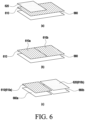
- FIG. 6 is a diagram illustrating a method of operating multiple windows in the unfolded state and partially folded state of an electronic device according to an embodiment.
- the plurality of windows 610 and 620 may be provided in a layered structure on one layout 660 in the unfolded state of the display 560.
- One of the two or more windows 610 and 620 may be in an active state in which an interaction input is enabled.
- an input may be enabled on the uppermost window 620, and when the window 610 covered by the uppermost window 620 is selected, the uppermost window 620 may be in an inactive state in which an interaction input is disabled, and the selected window 610 may be in the active state in which an interaction input is enabled.
- one window 610 may be provided on the single layout 660 in the unfolded state of the display 560. While a case in which the single window 610 is configured to include the areas 610a and 610b enabling different interaction inputs is described with reference to FIG. 6(b) by way of example, for convenience of description, this is only an example, and the first area 610a and the second area 610b may also be referred to as a first window and a second window, respectively.
- One of the two or more areas 610a and 610b may be in the active state in which an interaction input is enabled. Therefore, the two areas may be controlled selectively rather than simultaneously.
- the processor 520 may display the first window 610 of the application through the display 560 in the unfolded state of the display 560.
- the first window 610 may correspond to the execution screen of the application.
- the processor 520 may display the second window 620 on at least a portion of the first window 610.
- the first window 610 is a window displayed on the entire area of the display 560 and may be referred to as a main window.
- the main window may include data generated during an execution of an application (or task), and may refer to an image output on the display 560 by an application executed in a foreground environment.
- the second window 620 is a subwindow displayed as a window smaller than the area of the display 560, and may be displayed overlapped on a portion of the main window, as functions (or items) provided by the application are selected during the execution of the application. Since the first window 610 corresponds to the execution screen of the application, the user may manipulate a specific item displayed on the execution screen or perform a manipulation to navigate the execution screen. Accordingly, the first window 610 may be controlled based on an interaction input in a designated direction. Further, the second window 620 displayed overlapped on the first window 610 may be controlled based on an interaction input in the designated direction or a different direction.
- the processor 520 may detect the folding event of the display 560 using the sensor 576 while the second window 620 is displayed on the first window 610. For example, when different interaction inputs are enabled on the first window 610 and the second window 620, the processor 520 may separately display the first window 610 and the second window 620 in the first display area 660a and the second display area 660b of the display 56 divided by folding, respectively, in response to the folding event, as illustrated in FIG. 6(c) .
- the at least one processor may be configured to detect a folding event of the display, identify whether the first window and the second window enable different interaction inputs, in response to the detection of the folding event, and separately display the first window and the second window in the first display area and the second display area, respectively, in response to the identification of the first window and the second window enabling different interaction inputs.
- the at least one processor may be configured to detect a folding event of the display, and in response to the detection of the folding event, identify whether the first window of the application displayed on the display in the state where the display is unfolded includes two areas enabling different interaction inputs, and in response to the identification of the first window including the two areas enabling different interaction inputs, divide an entire area of the display into a first display area and a second display area according to the folding.
- the first window of the application when the first window of the application includes a first area and a second area enabling different interaction inputs, the first area may be controlled based on an interaction input in a designated direction, and the second area may be controlled based on an interaction input in a different direction.
- the at least one processor may be configured to, when a first area of the first window is controlled based on an interaction input in a designated direction, and a second area of the first window is controlled based on an interaction input in a different direction from the designated direction, separately display the first area controlled based on the interaction input in the designated direction and the second area controlled based on the interaction input in the different direction from the designated direction in the first display area and the second area divided by folding, respectively, when the display is in the at least partially folded state.
- the electronic device 101 may display a first window of an application in a state where flexible display of the electronic device 101 is unfolded.
- the first window of the application may correspond to an execution screen of the application.
- the electronic device 101 may display a second window on an area of the first window, based on an input for displaying the second window. For example, the electronic device 101 may receive a selection of one of items included in the execution screen. For example, the electronic device 101 may detect a selection of an item (e.g., a specific area, icon, text, or number) on the first window. The selection may include a hovering or touch event of a touch input (e.g., a finger or a stylus pen). The electronic device 101 may display the second window that provides content (or detailed information) associated with the execution screen, based on the selection.
- an item e.g., a specific area, icon, text, or number
- the selection may include a hovering or touch event of a touch input (e.g., a finger or a stylus pen).
- the electronic device 101 may display the second window that provides content (or detailed information) associated with the execution screen, based on the selection.
- the first window may be controlled based on an interaction input in a designated direction
- the second window may be controlled based on an interaction input in the designated direction or a different direction
- one of the first window and the second window may be in an active state in which an interaction input is enabled.
- the electronic device 101 may separately display the first window and the second window in the first display area and the second display area, respectively, in response to the identification of the first window and the second window enabling different interaction inputs.
- the electronic device 101 may detect a folding event of the display, and in response to the detection of the folding event, identify whether the first window of the application displayed in the state where the display is unfolded includes a first area and a second area enabling different interaction inputs. In response to the identification of the first window including the first area and the second area enabling different interaction inputs, the electronic device 101 may separately display the first area and the second area in the first display area and the second display area divided by folding, respectively, in the state where the display is at least partially folded.
- the first window of the application when the first window of the application includes a first area and a second area enabling different interaction inputs, the first area may be controlled based on an interaction input in a designated direction, and the second area may be controlled based on an interaction input in a different direction.
- FIG. 8 is a flowchart illustrating an operation of operating multiple windows in response to a folding event according to an embodiment.
- an operation method of an electronic device with a flexible display may include operations 805 to 835.
- Each operation of the operation method of FIG. 8 may be performed by at least one of the electronic device (e.g., the electronic device 101 in FIGS. 1 to 5 ) or at least one processor (e.g., the processor 120 in FIG. 1 or the processor 520 in FIG. 5 ) of the electronic device.
- at least one of operations 805 to 835 may be omitted, the order of some operations may be changed, or other operations may be added.
- FIGS. 9 to 12 To help understand the description of FIG. 8 , reference may be made to FIGS. 9 to 12 .
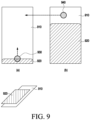
- FIG. 9 is a diagram illustrating multiple layers according to an embodiment
- FIG. 10 is a diagram illustrating multiple interactions according to an embodiment
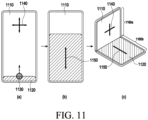
- FIG. 11 is a diagram illustrating a case in which with multiple windows displayed, inputs to areas divided by folding are independent of each other according to an embodiment
- FIG. 12 is a diagram illustrating a case in which with divided areas displayed, inputs to areas divided by folding are independent of each other according to an embodiment.
- the operation of FIG. 8 includes operations for operating multiple windows, upon detection of occurrence of a folding event in the electronic device 101.
- the electronic device 101 may identify whether it is multi-layered. For example, the electronic device 101 may identify whether it is multi-layered, upon detection of occurrence of a folding event. In response to the identification of multiple layers, the electronic device 101 may identify whether the number of layers is 2 in operation 810. On the contrary, when multiple layers are not identified in operation 805, the electronic device 101 may perform operation 815.
- the electronic device 101 may display the second window 920 overlapping at least a portion of the first window 910 as in FIG. 9(b) .
- the electronic device 101 may identify them as multiple layers.
- an input may be enabled on one of the first window 910 and the second window 920. Therefore, when a user input 940 occurs on the first window 910 as in FIG. 9(b) , the electronic device 101 may remove the display of the second window 920 as in FIG. 9(a) .
- the electronic device 101 may identify multiple interactions in operation 815. In response to the identification of the multiple interactions, the electronic device 101 may identify whether the number of interactions is 2 in operation 820. On the contrary, when multiple interactions are not identified, the electronic device 101 may terminate the operation of operating multiple windows in response to a folding event.
- the electronic device 101 may prepare multiple windows in operation 825. For example, the electronic device 101 may detect whether a folding event for operating multiple windows occurs. For example, as in FIG. 10(a) , when a screen (e.g., an application execution screen) includes a first area 1010 and a second area 1020, the first area 1010 may be controlled based on an interaction input 1040 in a designated direction, and the second area 1020 may be controlled based on an interaction input 1030 in a different direction. Accordingly, the size of the second area 1020 may be changed based on the interaction input 1030 in the different direction, as illustrated in FIG. 10(b) .
- a screen e.g., an application execution screen
- the number of layers is two, and the number of interactions is two, by way of example.
- the number of areas divided by folding may be two or more.
- a form factor in which one portion of the flexible display is in-folded and the other portion is out-folded may be referred to as a Z-folding structure, and in this case, the electronic device 101 may have a form factor that includes both in-folding and out-folding. Accordingly, since the number of divided areas may be plural according to the Z-folding structure, windows based on multiple layers and multiple interactions may be disposed in each divided area.
- the electronic device 101 may identify whether a folding angle is greater than a specified angle (e.g., 30 degrees). When the folding event is not detected or the folding angle is less than the specified angle, the operation of detecting a folding event may be performed continuously or periodically. Alternatively, when the folding angle is less than the specified angle, the operation of operating multiple windows in response to the folding event may be terminated.
- a specified angle e.g. 30 degrees
- the electronic device 101 may perform multi-window switching in operation 835.
- the specified angle e.g., 30 degrees
- the electronic device 101 may display a second window 1120 overlapped on at least a portion of the first window 1110 as in FIG. 11(b) , in response to an input 1130 for displaying the second window 1120 on the first window 1110 as in FIG. 11(a) .
- the electronic device 101 may dispose the first window 1110 in a first display area 1160a divided by folding and dispose the second window 1120 in a second display area 1160b, as illustrated in FIG. 11(c) . Accordingly, the first display area 1160a may be controlled based on an interaction input 1140 in a designated direction, and the second display area 1160b may be controlled based on an interaction input 1150 in a different direction.
- the first area 1210 may be controlled based on an interaction input 1230 in a designated direction.
- the second area 1220 may be controlled based on an interaction input 1240 in a different direction from the designated direction.
- the electronic device 101 may dispose the first area 1210 in a first display area 1260a divided by folding and dispose the second area 1220 in a second display area 1260b, as illustrated in FIG. 12(c) . Accordingly, the first display area 1260a may be controlled based on an interaction input 1230 in a designated direction, and the second display area 1260b may be controlled based on an interaction input 1240 in a different direction.
- the electronic device 101 may display an execution screen of an application.
- the execution screen of the application may be displayed to occupy the entire screen of the display, as illustrated in FIG. 14(a) .
- a first area of the execution screen of the application may be controlled based on an interaction input in a first direction.
- a second area of the application may be controlled based on an interaction input in a second direction.
- the electronic device 101 may identify whether a folding event occurs. When the occurrence of the folding event is not detected, the execution screen of the application may be maintained displayed.
- the electronic device 101 may determine whether a listview and a horizontalscrollview are identified on the execution screen in operation 1315.
- the listview may correspond to the first area of the execution screen of the application controlled based on an interaction input in the first direction.
- the horizontalscrollview may correspond to the second area of the execution screen of the application controlled based on an interaction input in the second direction.
- the execution screen of the application may include areas enabling different interaction inputs.
- the electronic device 101 may create an additional view in response to the execution screen including the listview and the horizontal scrollview.
- the electronic device 101 may dispose the listview in a first view and the horizontalscrollview in a second view.
- the listview and the horizontalscrollview may be provided through separate layers (e.g., the first view and the second view).
- the first view and the second view may refer to areas divided by folding in a multi-window environment.
- the first view may correspond to a first display area
- the second view may correspond to a second display area.
- the views may be provided in an overlaid manner in the first display area and the second display area.
- different interaction inputs may be applied independently in the views (e.g., the listview and the horizontalscrollview) disposed respectively in the areas (e.g., the upper area and the lower area) divided by folding. Accordingly, different interaction inputs may be simultaneously received through the areas divided by folding.
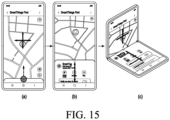
- the user when executing the second application (e.g., a map application), the user may manipulate a map display area by 4-direction navigation or in any direction on an area (or a first window) where a map is displayed.
- an item e.g., a specific location
- an area or a second window including content (or detailed information) related to the map application may be displayed on the map display area, as illustrated in FIG. 15(b) .
- the electronic device 101 may separately display the first window and the second window in areas divided by folding, respectively, as illustrated in FIG. 15(c) . Accordingly, a different interaction input may be enabled in each area.
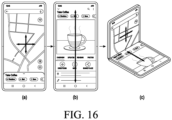
- FIG. 16 is a diagram illustrating an example of screens displaying an execution screen of a second application independently in each of areas divided by folding according to an embodiment.
- an item e.g., a specific location
- the second application e.g., map application
- an execution screen of the second application displayed, as illustrated in FIG. 16(a)
- an area (or second window) including content (or location information) related to the map application may be displayed, as illustrated in FIG. 16(b) .
- the second window may be displayed to overlap the entirety or at least a portion of a first window.
- the electronic device 101 may separately display the first window and the second window in areas divided by folding, respectively, as illustrated in FIG. 16(c) .
- an upper area may be controlled based on an interaction input in a designated direction (e.g., four directions)
- a lower area may be controlled based on an interaction input in the same direction as or a different direction from the designated direction.
- FIG. 17 is a diagram illustrating an example of screens displaying an execution screen of an application independently in each of areas divided by folding in a landscape mode of an electronic device of a second shape according to an embodiment.
- FIG. 17 illustrates the landscape mode of the electronic device 101 of the second shape, as illustrated in FIG. 3A .
- a first window (or upper area) 1710 and a second window (or lower area) 1720 of the electronic device 101 may be displayed as illustrated in FIG. 17(a) .
- the first window 1710 may be disposed in a first display area 1760a divided with respect to a folding axis
- the second window 1720 may be disposed in a second display area 1760b, as illustrated in FIG. 17(b) . Since the first window 1710 and the second window 1720 enable different interaction inputs, when the first display area 1760a is controlled based on an interaction input in a designated direction, the second display area 1760b may also be controlled based on an interaction input in a different direction.
- FIG. 18 is a diagram illustrating an example of screens displaying an execution screen of an application is independently in each of areas divided by folding in a portrait mode of an electronic device of a first shape according to an embodiment.
- FIG. 18 illustrates the portrait mode of the electronic device 101 of the first shape, as illustrated in FIG. 2 .
- the electronic device 101 may have the first shape that is longer in height than width on the front surface thereof.
- a first window 1810 and a second window 1820 of the electronic device 101 may be displayed as illustrated in FIG. 18(a) .
- the first window 1810 and the second window 1820 enable different interaction inputs, only one window may be in the active state in which an interaction input is enabled.
- the first window 1810 When the electronic device 101 detects a folding state in which it is folded inwardly by the user's bending motion from both sides, the first window 1810 may be disposed in a first display area 1860a divided with respect to the folding axis, and the second window 1820 may be disposed in a second display area 1860b, as illustrated in FIG. 18(b) . Since the first window 1810 and the second window 1820 enable different interaction inputs, when the first display area 1860a is controlled based on an interaction input in a designated direction, the second display area 1860b may also be controlled based on an interaction input in a different direction.
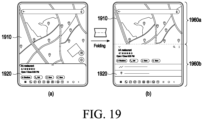
- FIG. 19 is a diagram illustrating an example of screens displaying an execution screen of an application is independently in each of areas divided by folding in a landscape mode of an electronic device of a first shape according to an embodiment.
- FIG. 19 illustrates the landscape mode of the electronic device 101 of the first shape, as illustrated in FIG. 2 .
- a state in which one of two side surfaces of the body of the electronic device 101 of the first shape faces downward with respect to a folding axis may be referred to as the landscape mode.
- the landscape mode when the display is in the unfolded state, a first window 1910 and a second window 1920 of the electronic device 101 may be displayed, as illustrated in FIG. 19(a) .
- the first window 1910 and the second window 1920 enable different interaction inputs, only one window may be in the active state where an interaction input is enabled, in the unfolded state.
- an execution screen of an application is divided into two areas according to a folding event that bends a flexible display, thereby enabling intuitive screen control through an independent interaction input to each divided area and thus improving usability.
- the electronic device may be one of various types of electronic devices.
- the electronic devices may include, for example, a portable communication device (e.g., a smartphone), a computer device, a portable multimedia device, a portable medical device, a camera, a wearable device, or a home appliance. According to an embodiment of the disclosure, the electronic devices are not limited to those described above.
- each of such phrases as “A or B”, “at least one of A and B”, “at least one of A or B”, “A, B, or C”, “at least one of A, B, and C”, and “at least one of A, B, or C”, may include any one of, or all possible combinations of the items enumerated together in a corresponding one of the phrases.
- such terms as “1 st “ and “2 nd “, or “first” and “second” may be used to simply distinguish a corresponding component from another, and does not limit the components in other aspect (e.g., importance or order).
- an element e.g., a first element
- the element may be coupled with the other element directly (e.g., wiredly), wirelessly, or via a third element.
- module may include a unit implemented in hardware, software, or firmware, and may interchangeably be used with other terms, for example, logic, logic block, part, or circuitry.
- a module may be a single integral component, or a minimum unit or part thereof, adapted to perform one or more functions.
- the module may be implemented in a form of an application-specific integrated circuit (ASIC).
- ASIC application-specific integrated circuit
- Various embodiments as set forth herein may be implemented as software (e.g., the program 140) including one or more instructions that are stored in a storage medium (e.g., intemal memory 136 or external memory 138) that is readable by a machine (e.g., the electronic device 101).
- a processor e.g., the processor 120
- the machine e.g., the electronic device 101
- the one or more instructions may include a code generated by a complier or a code executable by an interpreter.
- the machine-readable storage medium may be provided in the form of a non-transitory storage medium.
- non-transitory simply means that the storage medium is a tangible device, and does not include a signal (e.g., an electromagnetic wave), but this term does not differentiate between where data is semi-permanently stored in the storage medium and where the data is temporarily stored in the storage medium.
- a method may be included and provided in a computer program product.
- the computer program product may be traded as a product between a seller and a buyer.
- the computer program product may be distributed in the form of a machine-readable storage medium (e.g., compact disc read only memory (CD-ROM)), or be distributed (e.g., downloaded or uploaded) online via an application store (e.g., PlayStore TM ), or between two user devices (e.g., smart phones) directly. If distributed online, at least part of the computer program product may be temporarily generated or at least temporarily stored in the machine-readable storage medium, such as memory of the manufacturer's server, a server of the application store, or a relay server.
- CD-ROM compact disc read only memory
- an application store e.g., PlayStore TM
- two user devices e.g., smart phones
- each component e.g., a module or a program of the above-described components may include a single entity or multiple entities, and some of the multiple entities may be separately disposed in different components. According to various embodiments, one or more of the above-described components may be omitted, or one or more other components may be added. Alternatively or additionally, a plurality of components (e.g., modules or programs) may be integrated into a single component. In such a case, according to various embodiments, the integrated component may still perform one or more functions of each of the plurality of components in the same or similar manner as they are performed by a corresponding one of the plurality of components before the integration.
- operations performed by the module, the program, or another component may be carried out sequentially, in parallel, repeatedly, or heuristically, or one or more of the operations may be executed in a different order or omitted, or one or more other operations may be added.
- a non-volatile storage medium may store instructions configured to enable the electronic device 101 to perform at least one operation, when executed by the at least one processor 120 or 520 of the electronic device.
- the at least one operation may include displaying a first window of an application in a state where a flexible display of the electronic device is unfolded, displaying a second window on an area of the first window, based on an input for displaying the second window, and separately displaying the first window and the second window in a first display area and a second display area divided by folding, respectively in a state where the flexible display is at least partially folded.
Landscapes
- Engineering & Computer Science (AREA)
- Theoretical Computer Science (AREA)
- General Engineering & Computer Science (AREA)
- Human Computer Interaction (AREA)
- Signal Processing (AREA)
- Physics & Mathematics (AREA)
- General Physics & Mathematics (AREA)
- Computer Hardware Design (AREA)
- Computer Networks & Wireless Communication (AREA)
- Environmental & Geological Engineering (AREA)
- Mathematical Physics (AREA)
- User Interface Of Digital Computer (AREA)
Applications Claiming Priority (3)
| Application Number | Priority Date | Filing Date | Title |
|---|---|---|---|
| KR20220122284 | 2022-09-27 | ||
| KR1020220123420A KR20240043619A (ko) | 2022-09-27 | 2022-09-28 | 플렉서블 디스플레이를 포함하는 전자 장치, 그 동작 방법 및 저장 매체 |
| PCT/KR2023/011762 WO2024071658A1 (ko) | 2022-09-27 | 2023-08-09 | 플렉서블 디스플레이를 포함하는 전자 장치, 그 동작 방법 및 저장 매체 |
Publications (2)
| Publication Number | Publication Date |
|---|---|
| EP4580171A1 true EP4580171A1 (de) | 2025-07-02 |
| EP4580171A4 EP4580171A4 (de) | 2025-12-03 |
Family
ID=90478315
Family Applications (1)
| Application Number | Title | Priority Date | Filing Date |
|---|---|---|---|
| EP23872781.2A Pending EP4580171A4 (de) | 2022-09-27 | 2023-08-09 | Elektronische vorrichtung mit flexibler anzeige, betriebsverfahren dafür und speichermedium |
Country Status (4)
| Country | Link |
|---|---|
| US (1) | US20250227178A1 (de) |
| EP (1) | EP4580171A4 (de) |
| CN (1) | CN119968838A (de) |
| WO (1) | WO2024071658A1 (de) |
Family Cites Families (6)
| Publication number | Priority date | Publication date | Assignee | Title |
|---|---|---|---|---|
| KR102262721B1 (ko) * | 2014-05-12 | 2021-06-09 | 엘지전자 주식회사 | 폴더블 디스플레이 디바이스 및 그 제어 방법 |
| KR102358110B1 (ko) * | 2015-03-05 | 2022-02-07 | 삼성디스플레이 주식회사 | 표시 장치 |
| CN112714901B (zh) * | 2018-09-30 | 2024-03-01 | 华为技术有限公司 | 系统导航栏的显示控制方法、图形用户界面及电子设备 |
| KR102899378B1 (ko) * | 2019-11-19 | 2025-12-12 | 삼성전자 주식회사 | 폴더블 디스플레이를 갖는 전자 장치에서 사용자 인터페이스를 제공하는 방법 및 장치 |
| KR102859606B1 (ko) * | 2020-02-10 | 2025-09-16 | 삼성전자주식회사 | 어플리케이션의 실행 화면을 제공하기 위한 전자 장치 및 그 동작 방법 |
| KR20220103374A (ko) * | 2021-01-15 | 2022-07-22 | 삼성전자주식회사 | 전자 장치 및 전자 장치의 폴딩 상태에 기반하여 레이아웃 구성 방법 |
-
2023
- 2023-08-09 CN CN202380069414.7A patent/CN119968838A/zh active Pending
- 2023-08-09 WO PCT/KR2023/011762 patent/WO2024071658A1/ko not_active Ceased
- 2023-08-09 EP EP23872781.2A patent/EP4580171A4/de active Pending
-
2025
- 2025-03-27 US US19/092,712 patent/US20250227178A1/en active Pending
Also Published As
| Publication number | Publication date |
|---|---|
| WO2024071658A1 (ko) | 2024-04-04 |
| CN119968838A (zh) | 2025-05-09 |
| US20250227178A1 (en) | 2025-07-10 |
| EP4580171A4 (de) | 2025-12-03 |
Similar Documents
| Publication | Publication Date | Title |
|---|---|---|
| US12386398B2 (en) | Electronic device comprising display and screen operation method thereof | |
| EP4712456A2 (de) | Faltbare elektronische vorrichtung zur steuerung der bildschirmrotation und betriebsverfahren dafür | |
| US12131088B2 (en) | Electronic device including flexible display and method for controlling same | |
| US12099708B2 (en) | Electronic device comprising flexible display module and method for operating same | |
| US12321199B2 (en) | Use method according to folding state of display, and electronic apparatus using same | |
| US20250217091A1 (en) | Electronic device and method for controlling screen displayed on flexible display | |
| US20230247130A1 (en) | Method for providing screen by using flexible display, and electronic device supporting same | |
| KR20220050404A (ko) | 전자 장치 및 그의 형태에 기초한 기능 제어 방법 | |
| EP4580171A1 (de) | Elektronische vorrichtung mit flexibler anzeige, betriebsverfahren dafür und speichermedium | |
| KR20240043619A (ko) | 플렉서블 디스플레이를 포함하는 전자 장치, 그 동작 방법 및 저장 매체 | |
| CN119384823A (zh) | 电子设备和用于控制电子设备的显示器的方法 | |
| KR20230023416A (ko) | 터치 입력 처리 방법 및 이를 지원하는 전자 장치 | |
| US12549663B2 (en) | Electronic device and method for displaying screen thereof | |
| US12535981B2 (en) | Electronic device, method, and storage medium for changing display mode of display | |
| EP4546766A1 (de) | Verfahren zur anzeige von inhalten unter verwendung einer anzeige und elektronische vorrichtung zur unterstützung davon | |
| US11934602B2 (en) | Electronic device and operation method of electronic device for supporting one handed operation mode | |
| EP4550767A1 (de) | Mehrfenstersteuerungsverfahren einer elektronischen vorrichtung und elektronische vorrichtung | |
| EP4582922A1 (de) | Faltbare elektronische vorrichtung und verfahren zur verarbeitung von benutzereingaben durch eine faltbare elektronische vorrichtung | |
| US12360577B2 (en) | Image capture method and electronic device therefor | |
| EP4554198A1 (de) | Elektronische vorrichtung und verfahren zur anzeige eines bildschirms durch mehrere anzeigen | |
| EP4376396A1 (de) | Elektronische vorrichtung mit flexibler anzeige, betriebsverfahren und nichttransitorisches speichermedium | |
| EP4583500A1 (de) | Elektronische vorrichtung und verfahren zur anzeige von auf mehreren fenstern basierenden benachrichtigungsinformationen in einer elektronischen vorrichtung | |
| EP4614299A1 (de) | Elektronische vorrichtung und verfahren zur anzeige mehrerer bildschirme für benutzerinformationen | |
| EP4507286A1 (de) | Elektronische vorrichtung und verfahren zur anzeige eines bildschirms über eine flexible anzeige | |
| EP4538840A1 (de) | Elektronische vorrichtung zur anzeige eines oder mehrerer bildschirme auf basis des zustandes und verfahren dafür |
Legal Events
| Date | Code | Title | Description |
|---|---|---|---|
| STAA | Information on the status of an ep patent application or granted ep patent |
Free format text: STATUS: THE INTERNATIONAL PUBLICATION HAS BEEN MADE |
|
| PUAI | Public reference made under article 153(3) epc to a published international application that has entered the european phase |
Free format text: ORIGINAL CODE: 0009012 |
|
| STAA | Information on the status of an ep patent application or granted ep patent |
Free format text: STATUS: REQUEST FOR EXAMINATION WAS MADE |
|
| 17P | Request for examination filed |
Effective date: 20250328 |
|
| AK | Designated contracting states |
Kind code of ref document: A1 Designated state(s): AL AT BE BG CH CY CZ DE DK EE ES FI FR GB GR HR HU IE IS IT LI LT LU LV MC ME MK MT NL NO PL PT RO RS SE SI SK SM TR |
|
| REG | Reference to a national code |
Ref country code: DE Ref legal event code: R079 Free format text: PREVIOUS MAIN CLASS: H04M0001724540 Ipc: G06F0003048860 |
|
| A4 | Supplementary search report drawn up and despatched |
Effective date: 20251103 |
|
| RIC1 | Information provided on ipc code assigned before grant |
Ipc: G06F 3/04886 20220101AFI20251028BHEP Ipc: G06F 3/0481 20220101ALI20251028BHEP Ipc: G06F 3/04883 20220101ALI20251028BHEP Ipc: G06F 3/0485 20220101ALI20251028BHEP Ipc: G06F 1/16 20060101ALI20251028BHEP Ipc: H04M 1/02 20060101ALI20251028BHEP Ipc: H04M 1/72403 20210101ALI20251028BHEP Ipc: H04M 1/72454 20210101ALI20251028BHEP |
|
| DAV | Request for validation of the european patent (deleted) | ||
| DAX | Request for extension of the european patent (deleted) |