EP4582917A1 - Procédé de gestion de widget de service et dispositif électronique - Google Patents
Procédé de gestion de widget de service et dispositif électronique Download PDFInfo
- Publication number
- EP4582917A1 EP4582917A1 EP23867259.6A EP23867259A EP4582917A1 EP 4582917 A1 EP4582917 A1 EP 4582917A1 EP 23867259 A EP23867259 A EP 23867259A EP 4582917 A1 EP4582917 A1 EP 4582917A1
- Authority
- EP
- European Patent Office
- Prior art keywords
- electronic device
- service card
- application
- service
- user
- Prior art date
- Legal status (The legal status is an assumption and is not a legal conclusion. Google has not performed a legal analysis and makes no representation as to the accuracy of the status listed.)
- Pending
Links
Images





































Classifications
-
- G—PHYSICS
- G06—COMPUTING OR CALCULATING; COUNTING
- G06F—ELECTRIC DIGITAL DATA PROCESSING
- G06F3/00—Input arrangements for transferring data to be processed into a form capable of being handled by the computer; Output arrangements for transferring data from processing unit to output unit, e.g. interface arrangements
- G06F3/01—Input arrangements or combined input and output arrangements for interaction between user and computer
- G06F3/048—Interaction techniques based on graphical user interfaces [GUI]
- G06F3/0481—Interaction techniques based on graphical user interfaces [GUI] based on specific properties of the displayed interaction object or a metaphor-based environment, e.g. interaction with desktop elements like windows or icons, or assisted by a cursor's changing behaviour or appearance
-
- G—PHYSICS
- G06—COMPUTING OR CALCULATING; COUNTING
- G06F—ELECTRIC DIGITAL DATA PROCESSING
- G06F3/00—Input arrangements for transferring data to be processed into a form capable of being handled by the computer; Output arrangements for transferring data from processing unit to output unit, e.g. interface arrangements
- G06F3/01—Input arrangements or combined input and output arrangements for interaction between user and computer
- G06F3/048—Interaction techniques based on graphical user interfaces [GUI]
- G06F3/0484—Interaction techniques based on graphical user interfaces [GUI] for the control of specific functions or operations, e.g. selecting or manipulating an object, an image or a displayed text element, setting a parameter value or selecting a range
-
- G—PHYSICS
- G06—COMPUTING OR CALCULATING; COUNTING
- G06F—ELECTRIC DIGITAL DATA PROCESSING
- G06F3/00—Input arrangements for transferring data to be processed into a form capable of being handled by the computer; Output arrangements for transferring data from processing unit to output unit, e.g. interface arrangements
- G06F3/01—Input arrangements or combined input and output arrangements for interaction between user and computer
- G06F3/048—Interaction techniques based on graphical user interfaces [GUI]
- G06F3/0481—Interaction techniques based on graphical user interfaces [GUI] based on specific properties of the displayed interaction object or a metaphor-based environment, e.g. interaction with desktop elements like windows or icons, or assisted by a cursor's changing behaviour or appearance
- G06F3/04817—Interaction techniques based on graphical user interfaces [GUI] based on specific properties of the displayed interaction object or a metaphor-based environment, e.g. interaction with desktop elements like windows or icons, or assisted by a cursor's changing behaviour or appearance using icons
-
- G—PHYSICS
- G06—COMPUTING OR CALCULATING; COUNTING
- G06F—ELECTRIC DIGITAL DATA PROCESSING
- G06F3/00—Input arrangements for transferring data to be processed into a form capable of being handled by the computer; Output arrangements for transferring data from processing unit to output unit, e.g. interface arrangements
- G06F3/01—Input arrangements or combined input and output arrangements for interaction between user and computer
- G06F3/048—Interaction techniques based on graphical user interfaces [GUI]
- G06F3/0481—Interaction techniques based on graphical user interfaces [GUI] based on specific properties of the displayed interaction object or a metaphor-based environment, e.g. interaction with desktop elements like windows or icons, or assisted by a cursor's changing behaviour or appearance
- G06F3/0482—Interaction with lists of selectable items, e.g. menus
-
- G—PHYSICS
- G06—COMPUTING OR CALCULATING; COUNTING
- G06F—ELECTRIC DIGITAL DATA PROCESSING
- G06F3/00—Input arrangements for transferring data to be processed into a form capable of being handled by the computer; Output arrangements for transferring data from processing unit to output unit, e.g. interface arrangements
- G06F3/01—Input arrangements or combined input and output arrangements for interaction between user and computer
- G06F3/048—Interaction techniques based on graphical user interfaces [GUI]
- G06F3/0481—Interaction techniques based on graphical user interfaces [GUI] based on specific properties of the displayed interaction object or a metaphor-based environment, e.g. interaction with desktop elements like windows or icons, or assisted by a cursor's changing behaviour or appearance
- G06F3/0483—Interaction with page-structured environments, e.g. book metaphor
-
- G—PHYSICS
- G06—COMPUTING OR CALCULATING; COUNTING
- G06F—ELECTRIC DIGITAL DATA PROCESSING
- G06F3/00—Input arrangements for transferring data to be processed into a form capable of being handled by the computer; Output arrangements for transferring data from processing unit to output unit, e.g. interface arrangements
- G06F3/01—Input arrangements or combined input and output arrangements for interaction between user and computer
- G06F3/048—Interaction techniques based on graphical user interfaces [GUI]
- G06F3/0484—Interaction techniques based on graphical user interfaces [GUI] for the control of specific functions or operations, e.g. selecting or manipulating an object, an image or a displayed text element, setting a parameter value or selecting a range
- G06F3/0485—Scrolling or panning
-
- G—PHYSICS
- G06—COMPUTING OR CALCULATING; COUNTING
- G06F—ELECTRIC DIGITAL DATA PROCESSING
- G06F3/00—Input arrangements for transferring data to be processed into a form capable of being handled by the computer; Output arrangements for transferring data from processing unit to output unit, e.g. interface arrangements
- G06F3/01—Input arrangements or combined input and output arrangements for interaction between user and computer
- G06F3/048—Interaction techniques based on graphical user interfaces [GUI]
- G06F3/0487—Interaction techniques based on graphical user interfaces [GUI] using specific features provided by the input device, e.g. functions controlled by the rotation of a mouse with dual sensing arrangements, or of the nature of the input device, e.g. tap gestures based on pressure sensed by a digitiser
- G06F3/0488—Interaction techniques based on graphical user interfaces [GUI] using specific features provided by the input device, e.g. functions controlled by the rotation of a mouse with dual sensing arrangements, or of the nature of the input device, e.g. tap gestures based on pressure sensed by a digitiser using a touch-screen or digitiser, e.g. input of commands through traced gestures
-
- G—PHYSICS
- G06—COMPUTING OR CALCULATING; COUNTING
- G06F—ELECTRIC DIGITAL DATA PROCESSING
- G06F3/00—Input arrangements for transferring data to be processed into a form capable of being handled by the computer; Output arrangements for transferring data from processing unit to output unit, e.g. interface arrangements
- G06F3/01—Input arrangements or combined input and output arrangements for interaction between user and computer
- G06F3/048—Interaction techniques based on graphical user interfaces [GUI]
- G06F3/0487—Interaction techniques based on graphical user interfaces [GUI] using specific features provided by the input device, e.g. functions controlled by the rotation of a mouse with dual sensing arrangements, or of the nature of the input device, e.g. tap gestures based on pressure sensed by a digitiser
- G06F3/0488—Interaction techniques based on graphical user interfaces [GUI] using specific features provided by the input device, e.g. functions controlled by the rotation of a mouse with dual sensing arrangements, or of the nature of the input device, e.g. tap gestures based on pressure sensed by a digitiser using a touch-screen or digitiser, e.g. input of commands through traced gestures
- G06F3/04883—Interaction techniques based on graphical user interfaces [GUI] using specific features provided by the input device, e.g. functions controlled by the rotation of a mouse with dual sensing arrangements, or of the nature of the input device, e.g. tap gestures based on pressure sensed by a digitiser using a touch-screen or digitiser, e.g. input of commands through traced gestures for inputting data by handwriting, e.g. gesture or text
-
- G—PHYSICS
- G06—COMPUTING OR CALCULATING; COUNTING
- G06F—ELECTRIC DIGITAL DATA PROCESSING
- G06F3/00—Input arrangements for transferring data to be processed into a form capable of being handled by the computer; Output arrangements for transferring data from processing unit to output unit, e.g. interface arrangements
- G06F3/01—Input arrangements or combined input and output arrangements for interaction between user and computer
- G06F3/048—Interaction techniques based on graphical user interfaces [GUI]
- G06F3/0487—Interaction techniques based on graphical user interfaces [GUI] using specific features provided by the input device, e.g. functions controlled by the rotation of a mouse with dual sensing arrangements, or of the nature of the input device, e.g. tap gestures based on pressure sensed by a digitiser
- G06F3/0488—Interaction techniques based on graphical user interfaces [GUI] using specific features provided by the input device, e.g. functions controlled by the rotation of a mouse with dual sensing arrangements, or of the nature of the input device, e.g. tap gestures based on pressure sensed by a digitiser using a touch-screen or digitiser, e.g. input of commands through traced gestures
- G06F3/04886—Interaction techniques based on graphical user interfaces [GUI] using specific features provided by the input device, e.g. functions controlled by the rotation of a mouse with dual sensing arrangements, or of the nature of the input device, e.g. tap gestures based on pressure sensed by a digitiser using a touch-screen or digitiser, e.g. input of commands through traced gestures by partitioning the display area of the touch-screen or the surface of the digitising tablet into independently controllable areas, e.g. virtual keyboards or menus
-
- G—PHYSICS
- G06—COMPUTING OR CALCULATING; COUNTING
- G06Q—INFORMATION AND COMMUNICATION TECHNOLOGY [ICT] SPECIALLY ADAPTED FOR ADMINISTRATIVE, COMMERCIAL, FINANCIAL, MANAGERIAL OR SUPERVISORY PURPOSES; SYSTEMS OR METHODS SPECIALLY ADAPTED FOR ADMINISTRATIVE, COMMERCIAL, FINANCIAL, MANAGERIAL OR SUPERVISORY PURPOSES, NOT OTHERWISE PROVIDED FOR
- G06Q10/00—Administration; Management
- G06Q10/40—Business processes related to social networking or social networking services
-
- H—ELECTRICITY
- H04—ELECTRIC COMMUNICATION TECHNIQUE
- H04L—TRANSMISSION OF DIGITAL INFORMATION, e.g. TELEGRAPHIC COMMUNICATION
- H04L51/00—User-to-user messaging in packet-switching networks, transmitted according to store-and-forward or real-time protocols, e.g. e-mail
- H04L51/04—Real-time or near real-time messaging, e.g. instant messaging [IM]
-
- H—ELECTRICITY
- H04—ELECTRIC COMMUNICATION TECHNIQUE
- H04L—TRANSMISSION OF DIGITAL INFORMATION, e.g. TELEGRAPHIC COMMUNICATION
- H04L51/00—User-to-user messaging in packet-switching networks, transmitted according to store-and-forward or real-time protocols, e.g. e-mail
- H04L51/04—Real-time or near real-time messaging, e.g. instant messaging [IM]
- H04L51/046—Interoperability with other network applications or services
-
- G—PHYSICS
- G06—COMPUTING OR CALCULATING; COUNTING
- G06F—ELECTRIC DIGITAL DATA PROCESSING
- G06F2203/00—Indexing scheme relating to G06F3/00 - G06F3/048
- G06F2203/048—Indexing scheme relating to G06F3/048
- G06F2203/04808—Several contacts: gestures triggering a specific function, e.g. scrolling, zooming, right-click, when the user establishes several contacts with the surface simultaneously; e.g. using several fingers or a combination of fingers and pen
Definitions
- Embodiments of this application relate to the terminal display field, and more specifically, to a service card management method and an electronic device.
- a service card management method needs to be urgently provided, to enrich usage manners and application scenarios of service cards and improve user experience.
- a service card management method is provided, where the method is applied to an electronic device; and the method includes: The electronic device displays a first service card on a screen of the electronic device in response to an operation of touching and holding a first control on a current page of the electronic device by a user, where the first service card is used to display content corresponding to the first control, and is further used to provide, for the user, an operation entry of the content corresponding to the first control; and the electronic device displays the first service card at a target location in response to a second operation of the user, where the second operation is an operation of determining the target location, and the target location includes a desktop of the electronic device.
- the first control includes any one of the following controls: a large title, a small title, a tab, a subtab, a subtitle, a list, a banner advertisement, and a blank area of a page.
- the first control may include another control. This is not limited in this application.
- the operation entry of the content corresponding to the first control may be: Add to favorites, Share, Add to desktop, Use across devices, or the like.
- the second operation may be tapping a control "Add to desktop"; or if the target location is another device, the second operation may be tapping a share control.
- the target location may be another location, and the second operation may be an operation corresponding to adding to another location. This is not limited in this application.
- the user can trigger, by touching and holding a control or the like, initiation of a service card related to the control; and after the service card is initiated, the user can further add the service card to the target location.
- a control or the like initiation of a service card related to the control
- the user can further add the service card to the target location.
- different controls correspond to different service cards, so that more triggering manners and adding manners of the service cards are provided for the user, making the triggering manners and the adding manners of the service cards more flexible and convenient. This can improve user experience.
- the first service card is associated with a first icon
- that the electronic device displays the first service card at a target location in response to a second operation of the user includes: The electronic device displays the first service card on the desktop of the electronic device in response to an operation of tapping the first icon by the user.
- the first icon may be a push pin.
- a service card management method is provided, where the method is applied to an electronic device, and the electronic device displays an application page; and the method includes: The electronic device displays one or more second service cards on a screen of the electronic device in response to a third operation of a user, where the one or more second service cards are all service cards on the application page, or the one or more second service cards are all service cards of an application, and the third operation includes a first gesture operation; the electronic device determines one or more target service cards based on an operation of selecting the one or more target service cards from the one or more second service cards by the user; and the electronic device displays the one or more target service cards at a target location in response to a second operation of the user, where the second operation is an operation of determining the target location, and the target location includes a desktop of the electronic device.
- a service card management method is provided, where the method is applied to an electronic device, and a first card is displayed on a current page of the electronic device; and the method includes: The electronic device displays a third service card on a screen of the electronic device in response to an operation of touching and holding the first card by a user, where a service provided by the third service card is the same as or partially the same as a service provided by the first card; and the electronic device displays the third service card at a target location in response to a second operation of the user, where the second operation is an operation of determining the target location, and the target location includes a desktop of the electronic device.
- the first card may be a message notification card displayed in a notification bar
- the third service card may be a message notification service card displayed on the desktop of the electronic device.
- Both the message notification card and the message notification service card can provide a message viewing service.
- the message notification service card may further provide a message reply service or the like.
- the first card may be a music control card displayed in a control center
- the third service card may be a music control service card displayed on the desktop of the electronic device.
- Both the music control card and the music control service card can provide services such as music switching and music pause.
- the second operation may be tapping a control "Add to desktop"; or if the target location is another device, the second operation may be tapping a share control.
- the target location may be another location, and the second operation may be an operation corresponding to adding to another location. This is not limited in this application.
- service card conversion between different scenarios can be implemented. This improves user experience.
- the third service card is associated with a third icon
- that the electronic device displays the third service card at a target location in response to a second operation of the user includes: The electronic device displays the third service card on the desktop of the electronic device in response to an operation of tapping the third icon by the user.
- the third icon may be a push pin.
- the third service card is associated with a third selection card
- that the electronic device displays the third service card at a target location in response to a second operation of the user includes: The electronic device shares the third service card to a second electronic device in response to an operation of tapping a share control on the third selection card by the user.
- a service card management method is provided, where the method is applied to an electronic device, a display screen of the electronic device is on a page of a first application, and the first application is performing a data recording function; and the method includes: The electronic device displays a fourth service card on a current page of the electronic device in response to an operation of switching the first application by the user to run in a background, where the fourth service card is used to display, in real time, data recorded by the first application.
- the first application is a clock application
- a data recording function that is being performed by the clock application may be a function such as counting seconds with a stopwatch or countdown.
- the first application is a sports and health application
- a data recording function that is being performed by the sports and health application may be a function such as sports step counting, sports time recording, or sports mileage recording.
- a plurality of fourth service cards corresponding to the plurality of first applications may be simultaneously or not simultaneously displayed on a screen of the electronic device.
- Non-simultaneous display may be a display manner such as display at an equal time interval or display in an overlapping and alternating manner. This is not limited in this application.
- the fourth service card is associated with a fourth selection card; and the method further includes: The electronic device shares the fourth service card to a second electronic device in response to an operation of tapping a share control on the fourth selection card by the user.
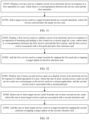
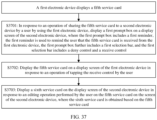
- a service card management method where a fifth service card is displayed on a screen of an electronic device; and the method includes: In response to an operation of sharing the fifth service card to a second electronic device by a user by using the electronic device, the second electronic device displays a first prompt box on a screen of the second electronic device, where the first prompt box includes a first reminder, the first reminder is used to remind the user that the fifth service card is received from the electronic device, the first prompt box further includes a first selection bar, and the first selection bar includes a deny control and a receive control; and the second electronic device displays the fifth service card on the screen of the second electronic device in response to an operation of tapping the receive control by the user.
- An operation method for sharing the fifth service card with the second electronic device by using the electronic device is the same as the sharing manner in the first aspect to the fourth aspect. For brevity, details are not described herein again.
- sharing of a service card between different electronic devices can be implemented, so that a status of the user and the like can be shared between the different electronic devices, and a sense of familiarity experience between users can be improved. This further improves user experience.
- the method further includes: When detecting that an application associated with the fifth service card is not installed on the second electronic device, the second electronic device displays a second reminder on the screen of the second electronic device, where the second reminder is located in the first prompt box, and the second reminder is used to remind the user that the application associated with the fifth service card needs to be installed to use the fifth service card.
- the displaying the fifth service card on the screen of the second electronic device in response to an operation of tapping the receive control by the user includes: In response to the operation of tapping the receive control by the user, the second electronic device installs the application associated with the fifth service card, and displays the fifth service card on the screen of the second electronic device.
- the application associated with the fifth service card is a MeeTime application, and the MeeTime application is not installed on the second electronic device, after the user taps the receive control, the second electronic device installs the MeeTime application, and displays the fifth service card on the screen of the second electronic device after the installation is completed.
- the electronic device when sharing the fifth service card with the second electronic device, the electronic device carries and shares an installation package of the application associated with the fifth service card.
- a service provided by the fifth service card may be provided after different services are assembled.
- the fifth service card may be associated with a plurality of applications.
- the fifth service card shared by the electronic device to the second electronic device carries data related to the fifth service card.
- mutual health monitoring between different users can be implemented by using a service card.
- a child can view a health status of a parent by using the service card, so that a sense of familiarity experience between users can be improved. This further improves user experience.
- that the electronic device shares the fifth service card to the second electronic device includes: The electronic device sends the fifth service card to the second electronic device through a social platform in a form of a link or a file.
- collaborative work between different electronic devices can be implemented by using a service card, so that working efficiency and convenience can be improved. This further improves user experience.
- the video codec is configured to compress or decompress a digital video.
- the electronic device 100 may support one or more video codecs. In this way, the electronic device 100 may play or record videos in a plurality of encoding formats, for example, moving picture experts group (moving picture experts group, MPEG)-1, MPEG-2, MPEG-3, and MPEG-4.
- moving picture experts group moving picture experts group, MPEG-1, MPEG-2, MPEG-3, and MPEG-4.
- the NPU is a neural-network (neural-network, NN) computing processor.
- the NPU quickly processes input information with reference to a structure of a biological neural network, for example, a transmission mode between human brain neurons, and may further continuously perform self-learning.
- Applications such as intelligent cognition of the electronic device 100 may be implemented through the NPU, for example, image recognition, facial recognition, speech recognition, and text understanding.
- the external memory interface 120 may be configured to connect to an external storage card, for example, a micro SD card, to extend a storage capability of the electronic device 100.
- the external memory card communicates with the processor 110 through the external memory interface 120, to implement a data storage function. For example, files such as music and videos are stored in the external storage card.
- the speaker 170A also referred to as a "loudspeaker" is configured to convert an audio electrical signal into a sound signal.
- the electronic device 100 may be used to listen to music or answer a call in a hands-free mode over the speaker 170A.
- the receiver 170B also referred to as an "earpiece", is configured to convert an audio electrical signal into a sound signal.
- the receiver 170B may be put close to a human ear to listen to a voice.
- the microphone 170C also referred to as a "mike” or a “mic”, is configured to convert a sound signal into an electrical signal.
- a user may make a sound near the microphone 170C through the mouth of the user, to input a sound signal to the microphone 170C.
- At least one microphone 170C may be disposed in the electronic device 100.
- two microphones 170C may be disposed in the electronic device 100, to collect a sound signal and implement a noise reduction function.
- three, four, or more microphones 170C may alternatively be disposed in the electronic device 100, to collect a sound signal, implement noise reduction, and identify a sound source, so as to implement a directional recording function and the like.
- the headset jack 170D is configured to connect to a wired headset.
- the headset jack 170D may be the USB interface 130, or may be a 3.5 mm open mobile terminal platform (open mobile terminal platform, OMTP) standard interface, or a cellular telecommunications industry association of the USA (cellular telecommunications industry association of the USA, CTIA) standard interface.
- the pressure sensor 180A is configured to sense a pressure signal, and can convert the pressure signal into an electrical signal.
- the pressure sensor 180A may be disposed on the display screen 194.
- the capacitive pressure sensor may include at least two parallel plates made of conductive materials. When force is applied to the pressure sensor 180A, capacitance between electrodes changes.
- the electronic device 100 determines pressure intensity based on the change in the capacitance. When a touch operation is performed on the display screen 194, the electronic device 100 detects intensity of the touch operation through the pressure sensor 180A.
- the acceleration sensor 180E may detect accelerations in various directions (usually on three axes) of the electronic device 100. When the electronic device 100 is still, a magnitude and a direction of gravity may be detected.
- the acceleration sensor 180E may be further configured to identify a posture of the electronic device, and is used in an application such as switching between a landscape mode and a portrait mode or a pedometer.
- the distance sensor 180F is configured to measure a distance.
- the electronic device 100 may measure the distance in an infrared manner or a laser manner. In some embodiments, in a photographing scenario, the electronic device 100 may measure a distance through the distance sensor 180F to implement quick focusing.
- the electronic device 100 may detect, by using the optical proximity sensor 180G, that the user holds the electronic device 100 close to an ear for a call, to automatically turn off a screen for power saving.
- the optical proximity sensor 180G may also be used in a smart cover mode or a pocket mode to automatically perform screen unlocking or locking.
- the temperature sensor 180J is configured to detect a temperature.
- the electronic device 100 executes a temperature processing strategy through the temperature detected by the temperature sensor 180J. For example, when the temperature reported by the temperature sensor 180J exceeds a threshold, the electronic device 100 lowers performance of a processor located near the temperature sensor 180J, to reduce power consumption for thermal protection. In some other embodiments, when the temperature is less than another threshold, the electronic device 100 heats the battery 142 to prevent the electronic device 100 from being shut down abnormally due to a low temperature. In some other embodiments, when the temperature is lower than still another threshold, the electronic device 100 boosts an output voltage of the battery 142 to avoid abnormal shutdown due to a low temperature.
- the touch sensor 180K is also referred to as a "touch panel”.
- the touch sensor 180K may be disposed on the display screen 194, and the touch sensor 180K and the display screen 194 constitute a touchscreen, which is also referred to as a "touch screen”.
- the touch sensor 180K is configured to detect a touch operation performed on or near the touch sensor.
- the touch sensor may transfer the detected touch operation to the application processor to determine a type of the touch event.
- a visual output related to the touch operation may be provided on the display screen 194.
- the touch sensor 180K may alternatively be disposed on a surface of the electronic device 100 at a location different from that of the display screen 194.
- the bone conduction sensor 180M may obtain a vibration signal.
- the bone conduction sensor 180M may obtain a vibration signal of a vibration bone of a human vocal-cord part.
- the bone conduction sensor 180M may also be in contact with a body pulse to receive a blood pressure beating signal.
- the bone conduction sensor 180M may alternatively be disposed in a headset, to obtain a bone conduction headset.
- the audio module 170 may obtain a speech signal through parsing based on the vibration signal that is of the vibration bone of the vocal-cord part and that is obtained by the bone conduction sensor 180M, to implement a speech function.
- the application processor may parse heart rate information based on the blood pressure beating signal obtained by the bone conduction sensor 180M, to implement a heart rate detection function.
- the motor 191 may generate a vibration prompt.
- the motor 191 may be configured to provide an incoming call vibration prompt and a touch vibration feedback.
- touch operations performed on different applications may correspond to different vibration feedback effects.
- the motor 191 may also correspond to different vibration feedback effects for touch operations performed on different areas of the display screen 194.
- Different application scenarios for example, a time reminder, information receiving, an alarm clock, and a game
- a touch vibration feedback effect may be further customized.
- the indicator 192 may be an indicator light, and may be configured to indicate a charging status and a power change, or may be configured to indicate a message, a missed call, a notification, and the like.
- the SIM card interface 195 is configured to connect to a SIM card.
- the SIM card may be inserted into the SIM card interface 195 or removed from the SIM card interface 195, to implement contact with or separation from the electronic device 100.
- the electronic device 100 may support one or N SIM card interfaces, where N is a positive integer greater than 1.
- the SIM card interface 195 may support a nano-SIM card, a micro-SIM card, a SIM card, and the like.
- a plurality of cards may be inserted into a same SIM card interface 195 at the same time.
- the plurality of cards may be of a same type or different types.
- the SIM card interface 195 may be compatible with different types of SIM cards.
- the SIM card interface 195 is also compatible with an external storage card.
- the electronic device 100 interacts with a network through the SIM card, to implement functions such as calling and data communication.
- the electronic device 100 uses an embedded-SIM (embedded-SIM, eSIM) card, namely, an embedded-SIM card.
- the eSIM card may be embedded into the electronic device 100, and cannot be separated from the electronic device 100.
- a calling card in embodiments of this application includes but is not limited to a SIM card, an eSIM card, a universal subscriber identity module (universal subscriber identity module, USIM) card, a universal integrated circuit card (universal integrated circuit card, UICC), and the like.
- a software system of the electronic device 100 may use a layered architecture, an event-driven architecture, a microkernel architecture, a micro service architecture, or a cloud architecture.
- an Android system with a layered architecture is used as an example to describe a software structure of the electronic device 100.
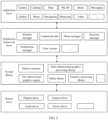
- FIG. 2 is a block diagram of the software structure of the electronic device 100 in this embodiment of this application.
- software is divided into several layers, and each layer has a clear role and task.
- the layers communicate with each other through a software interface.
- the Android system is divided into four layers: an application layer, an application framework layer, an Android runtime (Android runtime) and system library, and a kernel layer from top to bottom.
- the application layer may include a series of application packages.
- the application package may include applications such as Camera, Gallery, Calendar, Call, Map, Navigation, WLAN, Bluetooth, Music, Video, and Messaging.
- the surface manager is configured to manage a display subsystem and provide fusion of 2D and 3D layers for a plurality of applications.
- the two-dimensional graphics engine is a drawing engine for 2D drawing.
- the electronic device in embodiments of this application may be a television, a desktop computer, or a notebook computer, or may be a portable electronic device, for example, a mobile phone, a tablet computer, a camera, a camcorder, or a video recorder, or may be another electronic device having a screen display function, an electronic device in a 5G network, an electronic device in a future evolved public land mobile network (public land mobile network, PLMN), or the like. This is not limited in this application.
- each service card corresponds to only one application, can be displayed only on a desktop, and needs to be added from a fixed library.
- a triggering manner and an adding manner are simple.
- sharing and interaction functions of service cards between devices cannot be implemented, affecting user experience.
- the FA card is implemented through an atomic service.
- the atomic service has an independent entry and is an installation-free user application form that can provide one or more convenient services for the user.
- a tab (module-tab, Tab) is also referred to as a selection card.
- the tab means that different pieces of content are overlapped in a same layout and only one piece of content is visible on an application interface at a time.
- a selection card including options: Home, Hits, Zone, Education, and Me
- the selection card is a tab.
- the tab further includes a subtab.
- the selection card is a subtab.
- the subtitle can also be referred to as a subheading.
- a title is usually combined with a subtitle.
- the titles are classified into large titles and small titles. For example, after the video application is started, options “Music” and “Karaoke” are displayed at the top of the page, where both “Music” and “Karaoke” are displayed as large titles; and options “Recommendation” and “Featured” are displayed below the title “Music”, where both “Recommendation” and “Featured” are displayed as small titles.
- a recommendation page is entered from Home of the video application. Three pieces of sub-content respectively marked with recommended series 1, recommended series 2, and recommended series 3 are distributed on the recommendation page. The recommended series 1, the recommended series 2, and the recommended series 3 are all displayed as subtitles.
- the semi-modal is a manner of presenting content.
- the semi-modal is featured by appearing from the bottom of an interface: swiping upward to display more content, and pulling downward to turn off.
- the semi-modal gives the user a sense of a lightweight operation that comes when called upon and leaves when done.
- the user can trigger and manage a service card in an application by using a control.
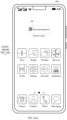
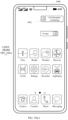
- FIG. 4(a) to FIG. 9(c) the following describes diagrams of display interfaces for triggering a service card by using a control and managing the service card according to an embodiment of this application.
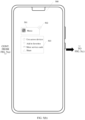
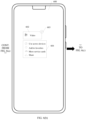
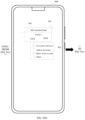
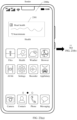
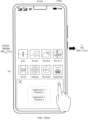
- FIG. 4(a) to FIG. 4(c) are a diagram of an interface for managing a service card according to an embodiment of this application.
- This example is a scenario in which the service card is triggered by using a small title.
- a display interface of an electronic device 400 is an interface of a Huawei music application, and tabs at the bottom of the Huawei music application include options: Home, Radio, Video, and Me.
- the application interface is on Home, and large titles of Home are "Music” and "Karaoke”. More specifically, the application interface is on a recommendation interface of Home (below the title "Music", which is not shown in the figure), and a small title of the page is Recommendation.
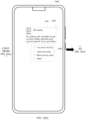
- the user may touch and hold the small title (as shown in FIG. 4(a) ).
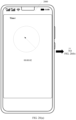
- the service card 401 corresponding to the small title is displayed on a card panel (as shown in FIG. 4(b) ).
- the service card 401 located on the card panel is associated with a push pin control 402 and an option box 403.
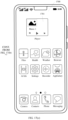
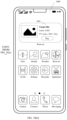
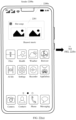
- the user can pin the service card 401 to a blank location of a desktop of the electronic device 400 by tapping the push pin control 402 (as shown in FIG. 4(c) ).
- the service card 401 added to the desktop includes a text.
- the text is recommendation and the text is from the small title "Recommendation”.
- an icon of the Huawei music application is displayed before the text, and an application name "Huawei music” is displayed below the service card 401.
- the service card 401 added to the desktop includes a text and an image.
- the text is recommendation
- the image is from an image provided by the small title "Recommendation”
- the text is from the small title "Recommendation”.
- an icon of the Huawei music application is displayed before the text, and an application name "Huawei music” is displayed below the service card 401.
- a generation rule of the service card 401 may be default, or may be specified based on a user input, or may be automatically selected by a system. This is not limited in this application.
- a size of the service card 401 is not limited in the solutions of this application.
- the size of the service card 401 may be determined based on a size of a placeable location in a target placement location, or may be determined based on a situation in which the user uses the electronic device 400. This is not limited in this application.
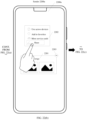
- the user may further manage the service card 401 by tapping a related option in the option box 403.
- the user may tap an option of adding to favorites to add the service card 401 to a favorites list.
- the user may directly view the favorites list and perform a further operation, without a need to specially start a corresponding application.
- an option “Add to desktop” is displayed in the option box 403.
- the user can directly tap the option "Add to desktop”, to add the service card 401 to a blank area of the desktop.
- the push pin in this embodiment of this application may be replaced with another icon having a same function. This is not limited in this application.
- the push pin appears in another embodiment of this application a same explanation is also applicable. A unified description is provided herein. For brevity, when the push pin appears again, details are not described again.
- content displayed on the service card and obtained through triggering is not necessarily the same as content corresponding to a corresponding control on an original page.
- the content displayed on the service card and obtained through triggering may be popular content in content below the control on the original page, or may be content that is below the control on the original page and that is set based on a user input, or may be content that is below the control on the original page and that is automatically and randomly displayed by a system.
- a service card obtained through triggering in another embodiment provided in this application is also applicable to this explanation. For brevity, when the service card appears again in the following, details are not described again.
- the user can trigger, by using the small title of the application page as a control, initiation of the service card related to the small title; and after the service card is initiated, the user can add the service card to a location such as the desktop by using a push pin, selecting an option, or the like.
- a new triggering manner and a new adding manner of the service card are provided for the user, making the triggering manner and the adding manner of the service card more flexible and convenient. This can improve user experience.
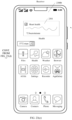
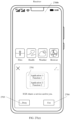
- FIG. 5(a) to FIG. 5(c) are a diagram of another interface for managing a service card according to an embodiment of this application.
- This example is a scenario in which the service card is triggered by using a large title.
- a display interface of an electronic device 500 is an interface of a Huawei music application, and tabs at the bottom of the Huawei music application include options: Home, Radio, Video, and Me.
- the application interface is on Home, and large titles of Home are "Music” and "Karaoke”. More specifically, the application interface is on a recommendation interface of Home (below the title "Music", which is not shown in the figure), and a small title of the page is Recommendation.
- the user may touch and hold a blank area at the top of the page (as shown in FIG. 5(a) ).
- the service card 501 associated with the large title (music) corresponding to the page is displayed on a card panel (as shown in FIG. 5(b) ).
- the service card 501 located on the card panel is associated with a push pin control 502 and an option box 503.
- the user can pin the service card 501 to a blank location of a desktop of the electronic device 500 by tapping the push pin control 502 (as shown in FIG. 5(c) ).
- the service card 501 added to the desktop includes a text.
- the text is music and the text is from the large title "Music” corresponding to the page.
- an icon of the Huawei music application is displayed before the text, and an application name "Huawei music” is displayed below the service card.
- the service card 501 added to the desktop includes a text and an image.
- the text is music
- the image is from an image provided by the large title "Music” corresponding to the page
- the text is from the large title "Music” corresponding to the page.
- an icon of the Huawei music application is displayed before the text, and an application name "Huawei music” is displayed below the service card 501.
- a generation rule of the service card 501 may be default, or may be specified based on a user input, or may be automatically selected by a system. This is not limited in this application.
- a size of the service card 501 is not limited in the solutions of this application.
- the size of the service card 501 may be determined based on a size of a placeable location in a target placement location, or may be determined based on a situation in which the user uses the electronic device 500. This is not limited in this application.
- the user may further manage the service card 501 by tapping a related option in the option box 503.
- the user may tap an option of adding to favorites to add the service card 501 to a favorites list.
- the user may directly view the favorites list and perform a further operation, without a need to specially start a corresponding application.
- an option “Add to desktop” is displayed in the option box 503.
- the user can directly tap the option "Add to desktop”, to add the service card 501 to a blank area of the desktop.
- the user can trigger, by using the blank area of the application page as a control, initiation of the service card related to the large title corresponding to the page; and after the service card is initiated, the user can add the service card to a location such as the desktop by using a push pin, selecting an option, or the like.
- a new triggering manner and a new adding manner of the service card are provided for the user, making the triggering manner and the adding manner of the service card more flexible and convenient. This can improve user experience.
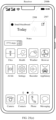
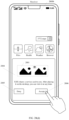
- the service card 602 added to the desktop includes a text.
- the text is video and the text is from the tab 601 corresponding to the page.
- an icon of the Huawei video application is displayed before the text, and an application name "Huawei video" is displayed below the service card 602.
- a generation rule of the service card 602 may be default, or may be specified based on a user input, or may be automatically selected by a system. This is not limited in this application.
- a size of the service card 602 is not limited in the solutions of this application.
- the size of the service card 602 may be determined based on a size of a placeable location in a target placement location, or may be determined based on a situation in which the user uses the electronic device 600. This is not limited in this application.
- the user may further manage the service card 602 by tapping a related option in the option box 604.
- the user may tap an option of adding to favorites to add the service card 602 to a favorites list.
- the user may directly view the favorites list and perform a further operation, without a need to specially start a corresponding application.
- an option “Add to desktop” is displayed in the option box 604.
- the user can directly tap the option "Add to desktop”, to add the service card 602 to a blank area of the desktop.
- a generation rule of the service card 802 may be default, or may be specified based on a user input, or may be automatically selected by a system. This is not limited in this application.
- the user may further manage the service card 802 by tapping a related option in the option box 804.
- the user may tap an option of adding to favorites to add the service card 802 to a favorites list.
- the user may directly view the favorites list and perform a further operation, without a need to specially start a corresponding application.
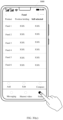
- FIG. 9(a) to FIG. 9(c) are a diagram of another interface for managing a service card according to an embodiment of this application.
- This example is a scenario in which the service card is triggered by using a list.
- a display interface of an electronic device 900 is a display interface of a fund application, a title “Fund” is displayed at the top of the page, and three subtitles “Product”, “Position holding”, and "Self-selected” are displayed under the title.
- the display interface is a page of the subtitle "Self-selected", and data of six self-selected funds (which are a fund 1, a fund 2, a fund 3, a fund 4, a fund 5, and a fund 6) is displayed under the subtitle "Self-selected”.
- the user may touch and hold a control "Fund 2" (as shown in FIG.
- the service card 901 associated with the fund 2 is displayed on a card panel (as shown in FIG. 9(b) ).
- the service card 901 located on the card panel is associated with a push pin control 902 and an option box 903.
- the user can pin the service card 901 to a blank location of a desktop of the electronic device 900 by tapping the push pin control 902.
- the user may further manage the service card 901 by tapping a related option in the option box 903.
- the user may tap an option of adding to favorites to add the service card 901 to a favorites list.
- the user may directly view the favorites list and perform a further operation, without a need to specially start a corresponding application.
- an option “Add to desktop” is displayed in the option box 903.
- the user can directly tap the option "Add to desktop”, to add the service card 901 to a blank area of the desktop.
- the user can trigger (filter) and manage a service card on a current page or in a current application, for example, by using a specific gesture.
- FIG. 10(a) to FIG. 15(c) the following describes diagrams of display interfaces for triggering (filtering) and managing a service card on a current page or in a current application according to an embodiment of this application.
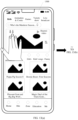
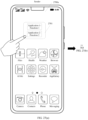
- FIG. 10(a) to FIG. 10(c) are a diagram of another interface for managing a service card according to an embodiment of this application.
- This example is a scenario in which the service card on the current page is triggered by using a shake gesture.
- a display interface of an electronic device 1000 is Home of a video application, tabs at the top of the display interface include title options: kids, Animation & Comic, Games, Variety show, and Live broadcast, and content below the title "Kids" is displayed on a current page (as shown in FIG. 10(a) ).
- a user does not know specific service cards.
- the user wants the display interface of the electronic device 1000 to display all service cards on the current page (that is, filter the service cards on the current page)
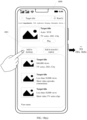
- the user may shake a mobile phone to display all the service cards on the current page on a card panel (as shown in FIG. 10(b) ). It can be learned from FIG.
- a service card on an interface shown in FIG. 10(a) includes only a service card 1001, and the service card 1001 located on the card panel is associated with a push pin control 1002.
- the electronic device 1000 displays an interface shown in FIG. 10(c) .
- a control 1003, a control 1004, and a control 1005 are displayed below the interface.
- the user can share the service card 1001 by tapping the control 1003.
- the user can also add the service card 1001 to favorites by tapping the control 1004.
- the user can also add the service card 1001 to a desktop by tapping the control 1005.
- the user may pin the service card 1001 on the desktop of the electronic device 1000 by directly tapping the push pin control 1002 shown in FIG. 10(b) .
- a form of adding the service card 1001 to the desktop is not limited.
- the form may be default, or may be determined based on a user input, or may be automatically determined by a system. This is not limited in this application.
- a size of the service card 1001 is not limited in the solutions of this application.
- the size of the service card 1001 may be determined based on a size of a placeable location in a target placement location, or may be determined based on a situation in which the user uses the electronic device 1000. This is not limited in this application.
- triggering (filtering) the service card on the current page by using the shake gesture is merely an example for description.
- the user may also trigger (filter) the service card on the current page by using another gesture or another method. This is not limited in this application.
- FIG. 11(a) to FIG. 11(c) are a diagram of another interface for managing a service card according to an embodiment of this application.
- This example is a scenario in which the service card on the current page is triggered (filtered) by using a gesture of sliding down with two fingers.
- a display interface of an electronic device 1100 is Home of a video application, tabs at the top of the display interface include title options: kids, Animation & Comic, Games, Variety show, and Live broadcast, and content below the title "Kids" is displayed on a current page (as shown in FIG. 11(a) ).
- a user does not know specific service cards.
- the user wants the display interface of the electronic device 1100 to display all service cards on the current page (that is, filter the service cards on the current page), the user may slide two fingers down on a screen of the electronic device 1100, so that all the service cards on the current page are displayed on a card panel (as shown in FIG.
- a service card on an interface shown in FIG. 11(a) includes only a service card 1101, and the service card 1101 located on the card panel is associated with a push pin control 1102.
- the electronic device 1100 displays an interface shown in FIG. 11(c) .
- a control 1103, a control 1104, and a control 1105 are displayed below the interface.
- the user can share the service card 1101 by tapping the control 1103.
- the user can also add the service card 1101 to favorites by tapping the control 1104.
- the user can also add the service card 1101 to a desktop by tapping the control 1105.
- the user may pin the service card 1101 on the desktop of the electronic device 1100 by directly tapping the push pin control 1102 shown in FIG. 11(b) .
- a form of adding the service card 1101 to the desktop is not limited.
- the form may be default, or may be determined based on a user input, or may be automatically determined by a system. This is not limited in this application.
- a size of the service card 1101 is not limited in the solutions of this application.
- the size of the service card 1101 may be determined based on a size of a placeable location in a target placement location, or may be determined based on a situation in which the user uses the electronic device 1100. This is not limited in this application.
- triggering the service card on the current page by using the gesture of sliding down with two fingers is merely an example for description.
- the user may also trigger the service card on the current page by using another gesture or another method. This is not limited in this application.
- the user can use a specific gesture or the like to trigger all the service cards on the current page of the application (filter all the service cards on the current page of the application), and select a target service card to perform a subsequent operation.
- This provides a new triggering manner and a new adding manner of the service card for the user, and can further improve user experience.
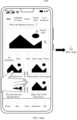
- FIG. 12(a) to FIG. 12(c) are a diagram of another interface for managing a service card according to an embodiment of this application.
- This example is a scenario in which all service cards in a current application are triggered (filtered) by shaking an electronic device (a shake gesture).
- a display interface of an electronic device 1200 is Home of a video application
- tabs at the top of the display interface include title options: kids, Animation & Comic, Games, Variety show, and Live broadcast, and content below the title "Kids" is displayed on a current page (as shown in FIG. 12(a) ).
- a user does not know specific service cards in the current application.
- the user may shake the electronic device 1200, so that all the service cards in the current application are displayed on a card panel (as shown in FIG. 12(b) ).
- the current application has a plurality of service cards, and five service cards can be seen on an interface shown in FIG. 12(b) .
- the five service cards are a service card 1201 (associated with a push pin control 1202) below the title "Kids”, a service card 1203 below the title “Games”, a service card 1204 below the title “Games”, a service card 1205 below the title "Live broadcast”, and a service card 1206 below the title "Live broadcast”.
- Each service card is associated with a push pin control.
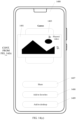
- the user taps the service card 1201, so that the electronic device 1200 displays an interface shown in FIG. 12(c) .
- a control 1207, a control 1208, and a control 1209 are displayed below the interface.
- the user can share the service card 1201 by tapping the control 1207.
- the user can also add the service card 1201 to favorites by tapping the control 1208.
- the user can also add the service card 1201 to a desktop of the electronic device 1200 by tapping the control 1209.
- the user may pin the service card 1201 on the desktop of the electronic device 1200 by directly tapping the push pin control 1202 shown in FIG. 12(b) .
- a form of adding the service card 1201 to the desktop is not limited.
- the form may be default, or may be determined based on a user input, or may be automatically determined by a system. This is not limited in this application.
- a size and an arrangement manner of each service card are not limited in the solutions of this application.
- the size of each service card may be determined based on a size of a placeable location in a target placement location, and the arrangement manner of each service card may be determined based on a priority; or the size and the arrangement manner may be determined based on a case in which the user is using the electronic device 1200. This is not limited in this application.
- filtering the service card in the current application by using the shake gesture is merely an example for description.
- the user may also filter the service card in the current application by using another gesture or another method. This is not limited in this application.
- FIG. 13(a) to FIG. 13(c) are a diagram of another interface for managing a service card according to an embodiment of this application.
- This example is a scenario in which all service cards in a current application are filtered by using a gesture of sliding down with two fingers.
- a display interface of an electronic device 1300 is Home of a video application
- tabs at the top of the display interface include titles: kids, Animation & Comic, Games, Variety show, and Live broadcast, and content below the title "Kids" is displayed on a current page (as shown in FIG. 13(a) ).
- a user does not know specific service cards in the current application.
- the user wants the display interface of the electronic device 1300 to display all service cards in the current application (that is, filter the service cards in the current application)
- the user may slide two fingers down on a screen of the electronic device 1300, so that all the service cards in the current application are displayed on a card panel (as shown in FIG.
- the current application has a plurality of service cards, and five service cards can be seen on an interface shown in FIG. 13(b) .
- the five service cards are a service card 1301 (associated with a push pin control 1302) below the title "Kids”, a service card 1303 below the title “Games”, a service card 1304 below the title “Games”, a service card 1305 below the title "Live broadcast”, and a service card 1306 below the title "Live broadcast”.
- Each service card is associated with a push pin control.
- the user taps the service card 1301, so that the electronic device 1300 displays an interface shown in FIG. 13(c) .
- a control 1307, a control 1308, and a control 1309 are displayed below the interface.
- the user can share the service card 1301 by tapping the control 1307.
- the user can also add the service card 1301 to favorites by tapping the control 1308.
- the user can also add the service card 1301 to a desktop of the electronic device 1300 by tapping the control 1309.
- the user may pin the service card 1301 on the desktop of the electronic device 1300 by directly tapping the push pin control 1302 shown in FIG. 13(b) .
- a form of adding the service card 1301 to the desktop is not limited.
- the form may be default, or may be determined based on a user input, or may be automatically determined by a system. This is not limited in this application.
- a size and an arrangement manner of each service card are not limited in the solutions of this application.
- the size of each service card may be determined based on a size of a placeable location in a target placement location, and the arrangement manner of each service card may be determined based on a priority; or the size and the arrangement manner may be determined based on a case in which the user is using the electronic device 1300. This is not limited in this application.
- filtering the service card in the current application by using the gesture of sliding down with two fingers is merely an example for description.
- the user may also filter the service card in the current application by using another gesture or another method. This is not limited in this application.
- the user can use a specific gesture or the like to access all the service cards in the current application (filter all the service cards in the current application), and select a target service card to perform a subsequent operation.
- This provides a new triggering manner and a new adding manner of the service card for the user, and can further improve user experience.
- FIG. 10(a) to FIG. 10(c) and the embodiment shown in FIG. 12(a) to FIG. 12(c) may be implemented simultaneously; and when the two embodiments are implemented simultaneously, triggering manners (for example, gestures) corresponding to the two embodiments are different.
- FIG. 11(a) to FIG. 11(c) and the embodiment shown in FIG. 13(a) to FIG. 13(c) may be implemented simultaneously; and when the two embodiments are implemented simultaneously, triggering manners (for example, gestures) corresponding to the two embodiments are different.
- FIG. 14(a) to FIG. 14(c) are a diagram of another interface for managing a service card according to an embodiment of this application.
- This example is a scenario in which a gesture is used to trigger all service cards in a current application to be displayed in a semi-modal form.
- a display interface of an electronic device 1400 is Home of a video application
- tabs at the top of the display interface include title options: kids, Animation & Comic, Games, Variety show, and Live broadcast, and content below the title "Kids" is displayed on a current page (as shown in FIG. 14(a) ).
- a user does not know specific service cards in the current application.
- the user When the user wants the display interface of the electronic device 1400 to display all service cards in the current application in a semi-modal form (that is, filter the service cards in the current application), the user may slide two fingers up on a screen of the electronic device 1400, so that all the service cards in the current application are displayed in a semi-modal form on a card panel (as shown in FIG. 14(b) ). It can be learned from FIG. 14(b) that the current application has a plurality of service cards, and five service cards can be seen on an interface shown in FIG. 14(b) .
- the five service cards are a service card 1401 (associated with a push pin control 1402) below the title “Kids”, a service card 1403 below the title “Games”, a service card 1404 below the title “Games”, a service card 1405 below the title “Live broadcast”, and a service card 1406 below the title "Live broadcast”.
- Each service card is associated with a push pin control.
- the user may view another service card of the application (not shown in the figure) by sliding up or down, or turn off display of a service card in the current application by pulling down.
- the user sequentially taps the service card 1401 and the service card 1403, so that the electronic device 1400 displays an interface shown in FIG. 14(c) .
- a control 1407, a control 1408, and a control 1409 are displayed below the interface.
- the user can share the service card 1401 and the service card 1403 by tapping the control 1407.
- the user can also add the service card 1401 and the service card 1403 to favorites by tapping the control 1408.
- the user can also add the service card 1401 and the service card 1403 to a desktop of the electronic device 1400 by tapping the control 1409.
- the user may pin a corresponding service card on the desktop of the electronic device 1400 by directly tapping a push pin control shown in FIG. 14(b) .
- a form of adding the service card to the desktop is not limited.
- the form may be default, or may be determined based on a user input, or may be automatically determined by a system. This is not limited in this application.
- a size and an arrangement manner of each service card are not limited in the solutions of this application.
- the size of each service card may be determined based on a size of a placeable location in a target placement location, and the arrangement manner of each service card may be determined based on a priority; or the size and the arrangement manner may be determined based on a case in which the user is using the electronic device 1400. This is not limited in this application.
- the user may further use another gesture or another method, for example, a gesture determined based on a user input, or another gesture or another method, to display the service card in the current application in a half-modal form.
- another gesture or another method for example, a gesture determined based on a user input, or another gesture or another method, to display the service card in the current application in a half-modal form. This is not limited in this application.
- the user can use a specific gesture or the like to display all the service cards in the current application in a half-modal form.
- the user can browse the service card in the current application by sliding up or down, and select a target service card to perform a subsequent operation. This provides a new triggering manner and a new adding manner of the service card for the user, and can further improve user experience.
- FIG. 15(a) to FIG. 15(c) are a diagram of another interface for managing a service card according to an embodiment of this application.
- This example is a scenario in which all service cards in a current application are triggered by using a side-slide gesture.
- a display interface of an electronic device 1500 is Home of a video application, tabs at the top of the display interface include title options: kids, Animation & Comic, Games, Variety show, and Live broadcast, and content below the title "Kids" is displayed on a current page (as shown in FIG. 15(a) ).
- a user does not know specific service cards in the current application.
- the user wants the display interface of the electronic device 1500 to display all service cards in the current application (that is, filter the service cards in the current application)
- the user may perform side sliding on a screen of the electronic device 1500, so that all the service cards in the current application are displayed on a card panel (as shown in FIG.
- the five service cards are a service card 1501 (associated with a push pin control 1502) below the title "Kids”, a service card 1503 below the title “Games”, a service card 1504 below the title “Games”, a service card 1505 below the title "Live broadcast”, and a service card 1506 below the title "Live broadcast”.
- Each service card is associated with a push pin control.
- the user may pin a corresponding service card on the desktop of the electronic device 1500 by directly tapping a push pin control shown in FIG. 15(b) .
- a form of adding the service card to the desktop is not limited.
- the form may be default, or may be determined based on a user input, or may be automatically determined by a system. This is not limited in this application.
- a size and an arrangement manner of each service card are not limited in the solutions of this application.
- the size of each service card may be determined based on a size of a placeable location in a target placement location, and the arrangement manner of each service card may be determined based on a priority; or the size and the arrangement manner may be determined based on a case in which the user is using the electronic device 1500. This is not limited in this application.
- the user may further use another gesture or another method, for example, a gesture determined based on a user input, or another gesture or another method, to display the service card in the current application.
- another gesture or another method for example, a gesture determined based on a user input, or another gesture or another method, to display the service card in the current application. This is not limited in this application.
- the user can use a specific gesture or the like to display all the service cards in the current application, and select a target service card to perform a subsequent operation.
- This provides a new triggering manner and a new adding manner of the service card for the user, and can further improve user experience.
- switching of a service card between different scenarios can be implemented.
- FIG. 16(a) to FIG. 16(c) are a diagram of an interface for service card conversion between different scenarios according to an embodiment of this application.
- a service card is converted between a notification center of an electronic device and a desktop of the electronic device.
- a display screen of the electronic device 1600 is on a display interface of a notification bar.
- the notification bar separately displays a notification related to a Huawei video application, a notification related to a Huawei health application, a notification related to a weather application, and a notification related to a messaging application.
- a user wants to view the notification related to the messaging application at any time, the user may touch and hold the notification related to the messaging application in the notification bar (as shown in FIG. 16(a) ).
- a service card 1601 associated with the notification related to the messaging application is displayed on a display interface of the electronic device 1600 (as shown in FIG. 16(b) ).
- the service card 1601 is associated with a push pin control 1602 and an option box 1603.
- the user can pin the service card 1601 to a blank location of a desktop of the electronic device 1600 by tapping the push pin control 1602 (as shown in FIG. 16(c) ).
- the notification related to the messaging application is displayed on the desktop in a form of the service card 1601
- the notification related to the messaging application in the notification bar list is no longer displayed, and a new message subsequently received by the messaging application is displayed in the service card 1601 rather than displayed in the notification center.
- a new message subsequently received by the messaging application is displayed in the notification center again.
- the service card 1601 includes a text.
- the text is messaging, a part of the text further includes content of a notification, and the text is from an application name corresponding to the notification and content of the notification.
- an icon of the messaging application is displayed before the text, and the application name "Messaging" is displayed under the service card.
- the service card 1601 includes a text and an image.
- the text is messaging, a part of the text further includes content of a notification, the image is from the notification, and the text is from an application name corresponding to the notification and the content of the notification.
- an icon of the messaging application is displayed before the text, and the application name "Messaging" is displayed under the service card 1601.
- a generation rule of the service card 1601 may be default, or may be specified based on a user input, or may be automatically selected by a system. This is not limited in this application.
- a size of the service card 1601 is not limited in the solutions of this application.
- the size of the service card 1601 may be determined based on a size of a placeable location in a target placement location, or may be determined based on a situation in which the user uses the electronic device 1600. This is not limited in this application.
- the user may further manage the service card 1601 by tapping a related option in the option box 1603. For example, the user may tap an option of adding to favorites to add the service card 1601 to a favorites list.
- the user may directly view the favorites list and perform a further operation, without a need to specially start a corresponding application.
- an option “Add to desktop” is displayed in the option box 1603.
- the user can directly tap the option "Add to desktop”, to add the service card 1601 to a blank area of the desktop.
- a specific notification card of the application in the notification center can be converted into a service card displayed on the desktop, so that the user can receive content of a latest notification in real time by using the service card displayed on the desktop, and perform an operation on the content of the latest notification. This improves user experience.
- FIG. 17(a) to FIG. 17(c) are a diagram of another interface for service card conversion between different scenarios according to an embodiment of this application.
- a service card is converted between a control center of an electronic device and a desktop of the electronic device.
- a display screen of the electronic device 1700 is on a display interface of a control center.
- a control interface of a music application, a Bluetooth control interface, a Wi-Fi control interface, and a screen brightness control interface are separately displayed on the interface of the control center.
- the user may touch and hold the control interface of the music application in the control center (as shown in FIG. 17(a) ).
- a service card 1701 associated with the control interface of the music application is displayed on a display interface of the electronic device 1700 (as shown in FIG. 17(b) ).
- the service card 1701 is associated with a push pin control 1702 and an option box 1703. The user can pin the service card 1701 to a blank location of a desktop of the electronic device 1700 by tapping the push pin control 1702 (as shown in FIG. 17(c) ).
- the control interface of the music application in the control center is no longer displayed.
- the control center displays the control interface of the music application again.
- a display screen of an electronic device 1800 is on a search interface in a browser application. More specifically, a user searches for a target title on a comprehensive tab of the browser application, and a search result page of the target title is displayed on the interface of the electronic device 1800 (as shown in FIG. 18(a) ).
- a service card 1801 associated with the target title is displayed at the top of the search result page. Two selection controls are distributed below the service card 1801: "Add to desktop” and "Add to transfer station". Other found results (not a service card) about the target title are displayed below the search result page.
- the service card 1801 is displayed on the desktop, the service card 1801 is no longer displayed on the search result page.
- the service card 1801 is displayed on the search result page again.
- a generation rule, a size, a layout manner, and the like of the service card 1801 are similar to those of the service card in the foregoing embodiments. For brevity, details are not described herein again.
- FIG. 19(a) to FIG. 19(c) are a diagram of another interface for service card conversion between different scenarios according to an embodiment of this application.
- a page on which an application is recording real-time data is converted into a service card displayed on a current page of an electronic device.
- a display screen of the electronic device 1900 is on a search interface in the clock application, and more specifically, a timer function use interface in the clock application (as shown in FIG. 19(a) ).
- the clock application may be returned to a background.
- the electronic device 1900 may be returned to a desktop or enter an interface of another application.
- a timing progress is displayed in real time on a current page of the electronic device 1900 in a form of a floating service card 1901 (as shown in FIG. 19(b) ).
- the service card displayed in a floating form may be pined to the desktop, so that the service card is not displayed in a floating manner.
- a generation rule, a size, a layout manner, and the like of the service card are similar to those of the service card in the foregoing embodiments. For brevity, details are not described herein again.
- the service card in this embodiment of this application is used to display corresponding real-time data.
- the service card automatically sends a message.
- the service card can switch between a plurality of states.
- the service card can switch among a state in which a driver accepts an order, a state in which the order is running, and a state in which the order is ended.
- a real-time data recording status of one or more applications running in the background can be displayed on the current page of the electronic device in a form of a service card.
- the user can also timely view the real-time data recording status of the one or more applications running in the background, without a need to specially start a corresponding application or stay on a corresponding interface. This can further improve user experience.
- FIG. 20(a) and FIG. 20(b) are a diagram of another interface for service card conversion between different scenarios according to an embodiment of this application.
- a page on which an application is recording real-time data is converted into a service card displayed on a current page of an electronic device.
- FIG. 20(a) and FIG. 20(b) and FIG. 19(a) to FIG. 19(c) lies in that a plurality of service cards in a floating form may be displayed in combination. In this way, the user can simultaneously view real-time data that is being recorded in a plurality of applications.
- FIG. 19(a) to FIG. 20(b) are merely examples for description. There may be another floating card display method. This is not limited in this application.
- FIG. 21(a) to FIG. 21(c) are a diagram of another interface for service card conversion between different scenarios according to an embodiment of this application.
- a banner notification is pined to a desktop for display as a service card.
- a display screen of an electronic device 2100 is on a desktop (or may be on another application interface).
- the electronic device 1900 receives a banner message related to a chat application.
- the user may touch and hold the banner message notification (as shown in FIG. 21(a) ).
- a service card 2101 corresponding to the message notification is displayed on a card panel (as shown in FIG. 21(b) ).
- the service card 2101 located on the card panel is associated with a push pin control 2102 and an option box 2103. The user can pin the service card 2101 to a blank location of the desktop of the electronic device 2100 by tapping the push pin control 2102 (as shown in FIG. 21(c) ).
- the service card 2101 may be pined to a current display interface of the electronic device 2100.
- the service card 2101 is also switched to be displayed on the another page.
- a new banner notification message is directly displayed by using the service card 2101.
- the new banner notification message is displayed by using the service card 2101.
- the service card 2101 added to the desktop includes a text.
- the text is a name of a message sender and content of a message notification.
- an icon of a message application is displayed before the text, and a remark of the service card is displayed below the service card 2101.
- a generation rule, a size, a layout manner, and the like of the service card 2101 are similar to those of the service card in the foregoing embodiments. For brevity, details are not described herein again.
- the banner notification when the banner notification is received, the banner notification can be converted into the service card displayed on the desktop or the current page of the electronic device, so that the user can view the banner notification message in time by using the service card, and can further process the received message on the service card without a need to specially start an application corresponding to the message. This can further improve user experience.
- FIG. 16(a) to FIG. 21(c) are merely examples for description.
- the user may further implement service card conversion between other scenarios according to a similar method. This is not limited in this application.
- a service card can be shared between a plurality of electronic devices, and the plurality of electronic devices can interact with each other by using the service card.
- FIG. 22(a) to FIG. 25(e) the following describes diagrams of display interfaces for sharing a service card between electronic devices according to an embodiment of this application.
- FIG. 22(a) to FIG. 22(f) are a diagram of a display interface for sharing a service card between different electronic devices according to this embodiment of this application.
- the example is a scenario in which a service card of a first electronic device is shared to a second electronic device, so that the second electronic device can view the service card of the first electronic device.
- a service card 2201 related to a subtitle "Hot songs” in a Huawei music application is displayed on a display screen of an electronic device 2200a (as shown in FIG. 22(a) ).
- an option box 2202 is displayed on a display interface of the electronic device 2200a.
- the service card 2201 is associated with a control 2203 (configured to cancel the option box 2202).
- the user continues to tap a control "Share" in the option box 2202 (as shown in FIG. 22(b) ).
- the display interface of the electronic device 2200a is shown in FIG. 22(c) .
- a MeeTime application of the electronic device 2200b receives the service card 2201 sent by the electronic device 2200a
- the electronic device 2200b displays a display interface shown in FIG. 22(e) .
- the service card 2201 and a prompt that the service card can be used only after the Huawei music application is installed are displayed on the interface.
- the user may choose to deny receiving the service card or choose to receive and install the service card on the interface.
- a generation rule, a size, a layout manner, and the like of the service card 2201 are similar to those of the service card in the foregoing embodiments. For brevity, details are not described herein again.
- the user may share the service card 2201 to the electronic device 2200b through a social platform in a form of a link or a file, or may share the service card 2201 in another form. This is not limited in this application.
- sharing of a service card between different electronic devices can be implemented, so that information such as a status of the user can be shared between the different electronic devices, and a sense of familiarity experience between users can be improved. This further improves user experience.
- FIG. 23(a) to FIG. 23(e) are a diagram of another interface for sharing a service card between different electronic devices according to this embodiment of this application.
- the example is a scenario in which a service card of a first electronic device with data is shared to a second electronic device, so that a user can view the service card and the data in the service card on a second electronic device end.
- a service card 2301 that is in a sports and health application and that is related to a title "Heart health” is displayed on a display screen of an electronic device 2300a (as shown in FIG. 23(a) ).
- the service card displays a heart rate of a user associated with the electronic device 2300a in real time.
- an option box 2302 is displayed on a display interface of the electronic device 2300a.
- the service card 2301 is associated with a control 2303 (configured to cancel the option box 2302).
- the user continues to tap a control "Share" in the option box 2302 (as shown in FIG. 23(b) ).
- FIG. 23(c) the display interface of the electronic device 2300a is shown in FIG. 23(c) .
- the user shares the service card 2301 to an electronic device 2300b on the interface by using Bluetooth.
- a prompt box 2304 pops up on a display page of the electronic device 2300b (as shown in FIG. 23(d) ).
- the prompt box 2304 displays the service card 2301, a control 2305 (configured to deny receiving the service card 2301), and a control 2306 (configured to receive the service card 2301).
- the service card 2301 is displayed on a desktop of the electronic device 2300b (as shown in FIG. 23(e) ).
- a user associated with the electronic device 2300b may view real-time heart rate data of the user associated with the electronic device 2300a at any time by using the service card 2301.
- a generation rule, a size, a layout manner, and the like of the service card 2301 are similar to those of the service card in the foregoing embodiments. For brevity, details are not described herein again.
- sharing of a service card with data between different electronic devices can be implemented, so that a real-time status of the user can be shared between the different electronic devices, and a sense of familiarity experience between users can be further improved. This further improves user experience.
- FIG. 24(a) to FIG. 24(e) are a diagram of another interface for sharing a service card between different electronic devices according to this embodiment of this application.
- the example is a scenario in which a service card of a first electronic device is shared to a second electronic device, so that the second electronic device can view the service card of the first electronic device.
- a service card 2401 related to a message board is displayed on a display screen of an electronic device 2400a (as shown in FIG. 24(a) ).
- the service card 2401 displays a message received from the message board of the electronic device 2400a.
- the user may share the service card 2401 by tapping a sharing icon 2402, and the user may select, by using a control 2403, whether to share the service card together with personal data.
- a display interface, displayed after the user taps the control 2402, of the electronic device 2400a is shown in FIG.
- a prompt box 2404 pops up on a display page of an electronic device 2400b (as shown in FIG. 24(d) ).
- the prompt box 2404 displays the service card 2401, a control 2405 (configured to deny receiving the service card 2401), and a control 2406 (configured to receive the service card 2401).
- the service card 2401 is displayed on a desktop of the electronic device 2400b (as shown in FIG. 24(e) ).
- a generation rule, a size, a layout manner, and the like of the service card 2401 are similar to those of the service card in the foregoing embodiments. For brevity, details are not described herein again.
- FIG. 25(a) to FIG. 25(e) are a diagram of another interface for sharing a service card between different electronic devices according to this embodiment of this application.
- This example is a scenario in which a service card of a first electronic device is shared to a second electronic device, to implement collaborative work between the first electronic device and the second electronic device by using the service card.
- a service card 2501 related to a small blackboard in a notes application is displayed on a display screen of an electronic device 2500a (as shown in FIG. 25(a) ).
- the service card 2501 displays a mark 1 recorded by a user on the small blackboard (for example, "Today" shown in FIG. 25(a) to FIG. 25(e) ).
- a display interface, displayed after the user touches and holds the service card 2501, of the electronic device 2500a is shown in FIG. 25(b) .
- the user may share the service card 2501 by tapping a sharing icon 2502.
- the service card 2501 is associated with a control 2503 (configured to cancel sharing of the service card 2501).
- FIG. 25(c) A display interface, displayed after the user taps the control 2502, of the electronic device 2500a is shown in FIG. 25(c) .
- the user selects a sharing manner on the interface.
- a prompt box 2504 pops up on a display page of an electronic device 2500b (as shown in FIG. 25(d) ).
- the prompt box 2504 displays the service card 2501, a control 2505 (configured to deny receiving the service card 2501), and a control 2506 (configured to receive the service card 2501).
- the service card 2501 is displayed on a desktop of the electronic device 2500b.
- the service card 2501 is associated with a control 2507 (configured to continue to edit the service card 2501).
- a control 2507 configured to continue to edit the service card 2501.
- a user associated with the electronic device 2500b taps the control 2507 to write a mark 2 on the small blackboard (for example, a sun icon shown in FIG. 25(a) to FIG. 25(e) )
- a service card 2508 is displayed on a display interface of the electronic device 2500b (as shown in FIG. 25(e) ).
- the service card 2508 is obtained based on the received service card 2501.
- a generation rule, a size, a layout manner, and the like of the service card 2501 are similar to those of the service card in the foregoing embodiments. For brevity, details are not described herein again.
- collaborative work between different electronic devices can be implemented by using a service card, so that working efficiency and convenience can be improved. This further improves user experience.
- a plurality of electronic devices can share a service card with each other.
- a service provided by the service card may be provided after different services are assembled, or a service provided by the service card may be jointly provided by one or more applications.
- FIG. 26(a) to FIG. 26(e) are a diagram of an interface for sharing a service card between electronic devices according to an embodiment of this application.
- a service provided by the service card is provided after different services are assembled.
- a display interface of an electronic device 2600a is Home of a Huawei video application, a tab is displayed at the bottom of the display interface, and the tab includes title options: Home, Hits, Zone, Education, and Me.
- a service card associated with the title "Zone” the user may touch and hold the title "Zone" (as shown in FIG. 26(a) ).
- a service card 2601 is displayed on the interface of the electronic device 2600a.
- the service card 2601 is associated with a push pin 2602 (used to pin the service card 2601 to a desktop) and a control 2603 (used to share the service card 2601), and the service card 2601 includes different services: Live broadcast, Movie, TV series, and Variety show.
- the user taps the control 2603 (as shown in FIG. 26(b) ).
- the display interface of the electronic device 2600a is shown in FIG. 26(c) .
- the user selects a sharing manner on the interface.
- a prompt box 2604 pops up on a display page of the electronic device 2600b (as shown in FIG. 26(d) ).
- the prompt box 2604 displays the service card 2601 and an installation reminder of the associated application (used to remind the user that the service card 2601 can be used only after the Huawei video application is installed).
- the prompt box 2604 further includes a control 2605 (configured to deny receiving the service card 2601) and a control 2606 (configured to agree to install and use the service card 2601).
- the electronic device 2500b installs the Huawei video application, and displays the service card 2501 on the desktop.
- the Huawei video application associated with the service card 2601 is installed on the electronic device 2600b
- the prompt box 2604 pops up on a display page of the electronic device 2600b (as shown in FIG. 26(e) ).
- the prompt box 2604 displays the service card 2601, the control 2605 (configured to deny receiving the service card 2601), and the control 2606 (configured to agree to use the service card 2601).
- the service card 2601 is displayed on the desktop of the electronic device 2600b.
- a generation rule, a size, a layout manner, and the like of the service card 2601 are similar to those of the service card in the foregoing embodiments. For brevity, details are not described herein again.
- the electronic device 2500b downloads and installs the Huawei video application.
- an application associated with the service card needs to be downloaded before installation depends on a definition of the service card. For example, the application associated with the service card needs to be downloaded only when the service card is greater than a first threshold.
- the first threshold may be 5 M, 10 M, or another value.
- service card in this embodiment of this application is merely an example for description, and a service of the service card may alternatively be provided after any other services are assembled.
- a plurality of electronic devices can share a service card with each other, and a service provided by the service card may be provided after different services are assembled.
- a service provided by the service card may be provided after different services are assembled.
- one-tap installation may be performed by using a receive control, and the user does not need to separately install the application. This improves operation convenience, and can avoid a case in which the service card cannot be normally used due to an application version, to further improve user experience.
- FIG. 27(a) to FIG. 27(e) are a diagram of another interface for sharing a service card between electronic devices according to an embodiment of this application.
- a service provided by the service card is provided by a combination of different applications.
- a service card 2701 is displayed on a desktop of the electronic device 2700a.
- the service card 2701 includes a function 1 of an application 1 and a function 2 of an application 2 (that is, a service of the service card 2701 is provided by a combination of the application 1 and the application 2).
- the user wants to share the service card 2702 to an electronic device 2700b, the user touches and holds the service card 2701 (as shown in FIG. 27(a) ).
- a display interface of the electronic device 2600a is shown in FIG. 27(b) .
- the user taps a sharing icon on the interface. In this case, the display interface of the electronic device 2600a is switched to that shown in FIG.
- the user selects a sharing manner on the interface. After the user selects Bluetooth for sharing, correspondingly, if applications associated with the service card 2701, namely, the application 1 and the application 2, are not installed on the electronic device 2700b, a prompt box 2702 pops up on a display page of the electronic device 2700b (as shown in FIG. 27(d) ).
- the prompt box 2702 displays the service card 2701 and an installation reminder of the associated application (used to remind the user that the service card 2701 can be used only after the application 1 and the application 2 are installed).
- the prompt box 2702 further includes a control 2703 (configured to deny receiving the service card 2701) and a control 2704 (configured to agree to install and use the service card 2701).
- the electronic device 2700b When the user taps the control 2704, the electronic device 2700b installs the application 1 and the application 2, and displays the service card 2701 on a desktop. If applications associated with the service card 2701, namely, the application 1 and the application 2, are installed on the electronic device 2700b, the prompt box 2702 pops up on a display page of the electronic device 2700b (as shown in FIG. 27(e) ). The prompt box 2702 displays the service card 2701, the control 2703 (configured to deny receiving the service card 2701), and the control 2704 (configured to agree to use the service card 2701). When the user taps the control 2704, the service card 2701 is displayed on the desktop of the electronic device 2700b.
- a generation rule, a size, a layout manner, and the like of the service card 2701 are similar to those of the service card in the foregoing embodiments. For brevity, details are not described herein again.
- service card in this embodiment of this application is merely an example for description, and a service of the service card may alternatively be provided by any other combination of applications.
- a plurality of electronic devices can share a service card with each other, and a service provided by the service card may be provided by a combination of different applications.
- a service provided by the service card may be provided by a combination of different applications.
- an application associated with the service card the foregoing different application
- one-tap installation may be performed by using a receive control, and the user does not need to separately install the application. This improves operation convenience, and can avoid a case in which the service card cannot be normally used due to an application version, to further improve user experience.
- the plurality of electronic devices can interact with each other by using the service card.
- FIG. 28(a) to FIG. 29(b) are a diagram of interfaces for implementing interaction between electronic devices by using a service card according to an embodiment of this application.
- a service card 2801 related to a trip shoot application is displayed on a desktop of an electronic device 2800a (as shown in FIG. 28(a) ).
- a display interface, displayed after the user touches and holds the service card 2801, of the electronic device 2800a is shown in FIG. 28(b) .
- the user may share the service card 2801 by tapping a sharing icon 2802.
- the service card 2801 is associated with a control 2803 (configured to cancel sharing of the service card 2801).
- a display interface, displayed after the user taps the control 2802, of the electronic device 2800a is shown in FIG. 28(c) . The user selects a sharing manner on the interface.
- a prompt box 2804 pops up on a display page of an electronic device 2800b (as shown in FIG. 28(d) ).
- the prompt box 2804 displays the service card 2801, a control 2805 (configured to deny receiving the service card 2801), and a control 2806 (configured to receive the service card 2801).
- the service card 2801 is displayed on a desktop of the electronic device 2800b.
- a heart pattern appears on the screen of the electronic device 2800a, and at the same time, a heart pattern is also dynamically displayed on a screen of the electronic device 2800b (as shown in FIG. 29(b) ).
- the heart pattern is displayed.
- this embodiment of this application merely describes an example of implementing interaction between electronic devices by using a service card, and does not constitute a limitation on this application. There may be a plurality of specific implementations of interaction between the electronic devices by using the service card, and any other method similar to the implementation method falls within the scope disclosed in this application.
- a generation rule, a size, a layout manner, and the like of the service card 2801 are similar to those of the service card in the foregoing embodiments. For brevity, details are not described herein again.
- application data of a plurality of electronic devices can be combined to form a complete service card, so that interaction between the plurality of electronic devices can be implemented by using the service card. This further improves user experience.
- a plurality of service cards can be combined for display.
- FIG. 30(a) to FIG. 30(c) are a diagram of an interface for combining a plurality of service cards for display according to an embodiment of this application. This method is applicable to a scenario in which different service cards or even service cards of different applications are combined for display.
- a tab is displayed below the electronic device 3000.
- the tab includes names of a plurality of service cards, for example, Messaging, Huawei video, and Fund.
- the user may implement switching between the plurality of service cards by tapping the names of the service cards. For example, a display interface, displayed when the user taps the title "Messaging", of an electronic device 3000 is shown in FIG. 30(a) ; a display interface, displayed when the user taps the title "Huawei video", of the electronic device 3000 is shown in FIG. 30(b) ; and a display interface, displayed when the user taps the title "Fund", of the electronic device 3000 is shown in FIG. 30(c) .
- a list of service cards in the tab in this embodiment of this application may be customized by the user.
- the different service cards may be combined into a large service card, and the large service card is simultaneously displayed on the screen of the electronic device 3000.
- each embodiment may be independently implemented, or a plurality of embodiments may be implemented in combination.
- FIG. 31 is a schematic flowchart of a service card management method 3100 according to an embodiment of this application. As shown in FIG. 31 , the method is applied to an electronic device, and a screen of the electronic device is on an application interface. The method 3100 includes the following steps.
- S3101 Display a service card on the display screen of the electronic device in response to a first operation of a user.
- the service card is displayed on a card panel of the electronic device.
- the first operation may be an operation of touching and holding a target control, or may be a specific gesture operation, or may be a voice input, or may be another operation. This is not limited in this application.
- service card displayed on the card panel There is an association relationship between the service card displayed on the card panel and the first operation. Different operations may trigger different service cards. In addition, one or more service cards may be displayed.
- S3102 Add a target service card to a target location based on a second operation.
- the second operation may be an operation option associated with the service card displayed on the card panel, or may be understood as an operation of adding the target service card to the target location.
- the target location may be a desktop of the electronic device, or may be favorites of the electronic device, or may be sharing to another electronic device, or may be another location. This is not limited in this application.
- the user can trigger, based on a specific operation, initiation of a service card related to the specific operation; and after the service card is initiated, the user can add the service card to a location such as the desktop by using a push pin, selecting an option, or the like.
- a location such as the desktop by using a push pin, selecting an option, or the like.
- FIG. 32 shows a service card management method 3200 according to an embodiment of this application.
- the method 3200 is applied to an electronic device, and a screen of the electronic device is on an application interface.
- the method 3200 includes the following steps.
- S3201 Display a first service card on the display screen of the electronic device in response to an operation of touching and holding a first control on a current page by a user, where there is a correspondence between the first service card and the first control, and the first service card is associated with a first push pin and a first selection card.
- the first service card is displayed on a card panel of the electronic device.
- the first control may be any one of a large title, a small title, a tab, a subtab, a subtitle, a search result, an entry in a list, a banner advertisement, a banner message notification, a message notification in a notification bar, or a card.
- the first control may be another control, for example, a shortcut key specified by a system. This is not limited in this application.
- the correspondence between the first service card and the first control may be that the first service card is a service card related to content corresponding to the first control, and a service provided by the service card is a service included in the first control.
- the first service card is a service card associated with content below the small title
- the provided service is a service below the small title.
- the first push pin is used to pin the first service card to a desktop of the electronic device, so that the first service card is displayed on the desktop of the electronic device.
- the first push pin may be replaced with any other icon having a same or similar function.
- the first selection card may include one or more of the following options: Use across devices, Add to favorites, More service cards, Share, Add to desktop, and More.
- the first selection card may further include another option. This is not limited in this application.
- S3202 Add the first service card to a target location by tapping the first push pin or tapping a target option on the first selection card.
- the user may pin the first service card to the desktop of the current electronic device by tapping the first push pin.
- the user may add the first service card to favorites by tapping the option "Add to favorites" on the first selection card.
- the user may share the first service card to another electronic device by tapping the option "Share" on the first selection card.
- the user can trigger, by touching and holding a control or the like, initiation of a service card related to the control; and after the service card is initiated, the user can add the service card to a location such as the desktop by using a push pin, selecting an option, or the like.
- a control or the like initiation of a service card related to the control
- the user can add the service card to a location such as the desktop by using a push pin, selecting an option, or the like.
- there are various types of controls and different controls correspond to different service cards, so that more triggering manners and adding manners of the service cards are provided for the user, making the triggering manners and the adding manners of the service cards more flexible and convenient. This can improve user experience.
- FIG. 33 shows another service card management method 3300 according to an embodiment of this application.
- the method 3300 is applied to an electronic device, and a screen of the electronic device is on an application interface.
- the method 3300 includes the following steps.
- S3301 Display one or more second service cards on a display screen of the electronic device in response to a third operation of a user, where the one or more second service cards are all service cards on a current page, or the one or more second service cards are all service cards in a current application.
- the second service card is associated with a second push pin.
- the second service card may be displayed on a card panel of the electronic device.
- the third operation may be an operation of performing a first gesture by the user, or may be an operation controlled by the user by using a voice, or may be another operation. This is not limited in this application.
- the first gesture operation may be any one or more of the following gesture operations: shaking the electronic device (for example, shaking up and down or shaking left and right), a gesture of sliding down with two fingers (or sliding up with two fingers) on the screen of the electronic device, and a gesture of sliding side (for example, sliding from left to right or sliding from right to left) on the screen of the electronic device.
- the first gesture operation may be another gesture, for example, sliding up or down with a single finger on the screen of the electronic device, or drawing an S shape on the screen of the electronic device.
- a specific gesture may be input by the user based on an actual situation or a habit of the user. This is not limited in this application.
- the one or more second service cards may be all service cards on the current page, or may be all service cards in the current application, or may be service cards in a partial range of the current application, for example, may be service cards related to a current title of the current application. This is not limited in this application.
- the one or more second service cards presented when the first gesture is sliding down with two fingers of the user on the screen of the electronic device are all the service cards on the current page.
- the one or more second service cards presented when the first gesture is sliding up with two fingers of the user on the screen of the electronic device are all the service cards in the current application.
- the one or more second service cards may be displayed in a half-modal form.
- the second push pin (which may be replaced with a second icon) is used to pin the second service card to a desktop of the electronic device.
- S3302 Select one or more target service cards from the one or more second service cards, where the one or more target service cards are associated with a second selection card.
- the second selection card may include one or more of the following options: Use across devices, Add to favorites, More service cards, Share, Add to desktop, and More.
- the second selection card may further include another option. This is not limited in this application.
- selecting the one or more target service cards may be sequentially tapping the target service cards, and after the selection is completed, tapping an OK icon or a complete icon.
- S3303 Add the one or more target service cards to a target location by tapping the second push pin or tapping a target option on the second selection card.
- the user may pin the one or more target service cards to the desktop of the current electronic device by tapping the second push pin.
- the user may add the one or more target service cards to favorites by tapping an option "Add to favorites" on the second selection card.
- the user may share the one or more target service cards to another electronic device by tapping an option "Share" on the second selection card.
- the user can trigger, by using a specific gesture or the like, initiation of all service cards on the current page or in the current application, and after the service card is initiated, the user can add one or more service cards to a location such as the desktop by using a push pin, selecting an option, or the like.
- more triggering manners and adding manners of the service card are provided for the user, making the triggering manners and the adding manners of the service card more flexible and convenient. This can improve user experience.
- FIG. 34 shows another service card management method 3400 according to an embodiment of this application.
- the method 3400 is applied to an electronic device, and a first card is displayed on a display interface of the electronic device.
- the method 3400 includes the following steps.
- S3401 The electronic device displays a third service card on a display screen of the electronic device in response to an operation of touching and holding the first card on a current page by a user, where there is a correspondence between the third service card and the first card, and a service provided by the third service card is the same as or partially the same as a service provided by the first card.
- the third service card is associated with a third push pin and a third selection card.
- the third service card may be displayed on a card panel of the electronic device.
- the first card may also be considered as a service card.
- the first card may be any one of the following: a notification card displayed in a notification center of the electronic device (for example, may be a message notification or a system notification), a control card displayed in a control center of the electronic device (for example, may be music playing control, screen brightness adjustment control, Bluetooth switch control, or wireless connection control), a search result card displayed on a search result page after the electronic device performs a search function (for example, may be a movie search result card), a banner notification displayed on the display screen when the electronic device receives a message notification (for example, may be a message notification received by chat software), or the like.
- the first card may be a service card in another scenario. This is not limited in this application.
- the service provided by the third service card is the same as or partially the same as the service provided by the first card.
- the service provided by the third service card is the same as or partially the same as the service provided by the first card.
- the user may view a first notification message by using the third service card, and perform a further operation on this basis.
- the user may control a first control object by using the third service card.
- the third push pin (which may also be replaced with a third icon) is used to pin the third service card to a desktop of the electronic device.
- the third selection card may include one or more of the following options: Use across devices, Add to favorites, More service cards, Share, Add to desktop, and More.
- the third selection card may further include another option. This is not limited in this application.
- S3402 Add the third service card to a target location by tapping the third push pin or tapping a target option on the third selection card.
- the first card is no longer displayed on an original page of the electronic device.
- the first card is displayed on an original page of the electronic device again, or when content of the service card is updated, the first card is displayed on an original page of the electronic device again.
- the user may pin the third service card to the desktop of the current electronic device by tapping the third push pin.
- the user may add the third service card to favorites by tapping an option "Add to favorites" on the third selection card.
- the user may share the third service card to another electronic device by tapping an option "Share" on the third selection card.
- service card conversion between different scenarios can be implemented. This improves user experience.
- FIG. 35 shows another service card management method 3500 according to an embodiment of this application.
- the method 3500 is applied to an electronic device, a screen of the electronic device is on an interface of a first application, and the first application is performing a data recording function.
- the method 3500 includes the following steps.
- the electronic device displays a fourth service card on a current page in response to an operation of returning the first application to a background by a user, where the fourth service card is used to display a data recording status in real time.
- the first application may be a clock, or may be sports and health (heart rate monitoring, step counting, or the like), or may be another application having a data recording function. This is not limited in this application.
- the service card in this embodiment of this application is used to display corresponding real-time data.
- the service card automatically sends a message.
- the service card can switch between a plurality of states.
- the service card can switch among a state in which a driver accepts an order, a state in which the order is running, and a state in which the order is ended.
- a plurality of service cards may be simultaneously displayed on the current page of the electronic device, and the plurality of service cards are used to display, in real time, data recorded by the plurality of applications running in the background.
- the plurality of service cards may be displayed in an overlapping manner, or may be displayed in a combined manner, or may be displayed independently. This is not limited in this application.
- a real-time data recording status of one or more applications running in the background can be displayed on the current page of the electronic device in a form of a service card.
- the user can also timely view the real-time data recording status of the one or more applications running in the background, without a need to specially start a corresponding application or stay on an application interface. This can further improve user experience.
- the following describes a method for sharing a service card between electronic devices and implementing interaction between the devices by using a service card according to an embodiment of this application.
- FIG. 36 shows a service card management method 3600 according to an embodiment of this application.
- the method 3600 is applied to an electronic device, and a fifth service card is displayed on a screen of the first electronic device.
- the method 3600 includes the following steps.
- S3601 In response to an operation of sharing the fifth service card to a second electronic device by a user by using the first electronic device, display a first prompt box on a screen of the second electronic device, where the first prompt box includes a first reminder, the first reminder is used to remind the user that the fifth service card is received from the first electronic device, the first prompt box further includes a first selection bar, and the first selection bar includes a deny control and a receive control.
- the deny control is used by the user to perform an operation of denying receiving the fifth service card
- the receive control is used by the user to perform an operation of agreeing to receive the fifth service card.
- the first prompt box further includes a second reminder.
- the second reminder is used to remind the user of the application that needs to be installed to use the fifth service card.
- the receive control may be: Install and use.
- the first electronic device sharing the fifth service card to the second electronic device may be sharing with data, or may be sharing without data.
- the first electronic device sharing the fifth service card to the second electronic device may be sharing through a link or a file.
- the link or the file may be sent by the first electronic device to the second electronic device through a social platform.
- S3602 Display the fifth service card on a display interface of the second electronic device in response to an operation of tapping the receive control by the user.
- sharing of a service card between different electronic devices can be implemented, so that a status of the user and the like can be shared between the different electronic devices, and a sense of familiarity experience between users can be improved. This further improves user experience.
- FIG. 37 shows a service card management method 3700 according to an embodiment of this application.
- the method 3700 is applied to an electronic device, and a fifth service card is displayed on a screen of the electronic device.
- the method 3700 includes the following steps.
- S3701 and S3702 are completely the same as S3601 and S3602. For brevity, details are not described herein again.
- S3703 Display a sixth service card on a display screen of a second electronic device in response to an editing operation performed by a user on the fifth service card on the screen of the second electronic device.
- the fifth service card is associated with an edit control. When the user taps the edit control, the fifth service card enters an editing state.
- the sixth service card is obtained based on the fifth service card.
- collaborative work between different electronic devices can be implemented by using a service card, so that working efficiency and convenience can be improved. This further improves user experience.
- FIG. 38 shows a service card management method 3800 according to an embodiment of this application.
- the method 3800 is applied to an electronic device, and a fifth service card is displayed on a screen of the electronic device.
- the method 3800 includes the following steps.
- S3801 and S3802 are completely the same as S3601 and S3602. For brevity, details are not described herein again.
- S3803 Display an effect corresponding to a first function on a screen of a second electronic device, when a user triggers the first function on a screen of a first electronic device based on a fourth operation.
- the first function may be, for example, a like function, or may be a function of displaying an emoticon, or may be another function that can be interacted. This is not limited in this application.
- a dynamic heart pattern is displayed on the screen of the second electronic device.
- the effect corresponding to the first function is displayed.
- application data of a plurality of electronic devices can be combined to form a complete service card, so that interaction between the devices can be implemented by using the service card. This further improves user experience.
- FIG. 39 shows a service card management method 3900 according to an embodiment of this application.
- the method 3900 is applied to an electronic device.
- the method 3900 includes the following steps.
- S3901 Set a custom list, where the custom list includes a plurality of marks corresponding to a plurality of service cards.
- S3902 Implement switching between the plurality of service cards by tapping the marks.
- the different service cards may be combined into a large service card, and the large service card is simultaneously displayed on the screen of the electronic device 3000.
- An embodiment of this application further provides an electronic device.
- the electronic device includes one or more processors, one or more memories, and one or more computer programs.
- the one or more computer programs are stored in the one or more memories.
- the one or more computer programs include instructions. When the instructions are executed by the one or more processors, the electronic device is enabled to perform the method according to any one of the embodiments shown in FIG. 31 to FIG. 39 .
- An embodiment of this application further provides a computer-readable storage medium.
- the storage medium stores a program or instructions. When the program or the instructions are run, the method according to any one of the embodiments shown in FIG. 31 to FIG. 39 is implemented.
- One or more of the modules or units described in this specification may be implemented by software, hardware, or a combination of software and hardware.
- the software exists in a form of a computer program instruction, and is stored in the memory.
- the processor may be configured to execute the program instruction and implement the foregoing method procedure.
- the processor may include but is not limited to at least one of the following: a central processing unit (central processing unit, CPU), a microprocessor, a digital signal processor (DSP), a microcontroller unit (microcontroller unit, MCU), and a computing device used for running software like an artificial intelligence processor.
- Each computing device may include one or more cores used to execute software instructions to perform operations or processing.
- the processor may be built in a SoC (system on chip) or an application-specific integrated circuit (application-specific integrated circuit, ASIC), or may be an independent semiconductor chip.
- the processor may include a necessary hardware accelerator, for example, a field programmable gate array (field programmable gate array, FPGA), a PLD (programmable logic device), or a logic circuit that implements a dedicated logic operation.
- the hardware may be any one of or any combination of a CPU, a microprocessor, a DSP, an MCU, an artificial intelligence processor, an ASIC, a SoC, an FPGA, a PLD, a dedicated digital circuit, a hardware accelerator, or a non-integrated discrete device.
- the hardware may run necessary software to execute the foregoing method procedure or execute the foregoing method procedure without software.
- the computer program product includes one or more computer instructions.
- the computer may be a general-purpose computer, a dedicated computer, a computer network, or another programmable apparatus.
- the computer instructions may be stored in the computer-readable storage medium or may be transmitted from a computer-readable storage medium to another computer-readable storage medium.
- the computer instructions may be transmitted from a website, computer, server, or data center to another website, computer, server, or data center in a wired (for example, a coaxial cable, an optical fiber, or a digital subscriber line (DSL)) or wireless (for example, infrared, radio, or microwave) manner.
- the computer-readable storage medium may be any usable medium accessible by the computer, or a data storage device, for example, a server or a data center, integrating one or more usable media.
- the usable medium may be a magnetic medium (for example, a floppy disk, a hard disk drive, or a magnetic tape), an optical medium (for example, a DVD), a semiconductor medium (for example, a solid state disk (solid state disk, SSD)), or the like.
- a magnetic medium for example, a floppy disk, a hard disk drive, or a magnetic tape
- an optical medium for example, a DVD
- a semiconductor medium for example, a solid state disk (solid state disk, SSD)
- the disclosed system, apparatus, and method may be implemented in other manners.
- the described apparatus embodiments are merely examples.
- division into the units is merely logical function division.
- a plurality of units or components may be combined or integrated into another system, or some features may be ignored or not performed.
- the displayed or discussed mutual couplings or direct couplings or communication connections may be implemented through some interfaces.
- the indirect couplings or communication connections between the apparatuses or units may be implemented in electronic, mechanical, or another form.
- the units described as separate parts may or may not be physically separate, and parts displayed as units may or may not be physical units, may be located in one position, or may be distributed on a plurality of network units. A part or all of the units may be selected based on actual requirements to achieve the objectives of the solutions of embodiments.
- the functions When the functions are implemented in a form of a software functional unit and sold or used as an independent product, the functions may be stored in the computer-readable storage medium. Based on such an understanding, the technical solutions of this application essentially, or the part contributing to the conventional technology, or some of the technical solutions may be implemented in a form of a software product.
- the computer software product is stored in a storage medium, and includes several instructions for instructing a computing device (which may be a personal computer, a server, a network device, or the like) to perform all or some of the steps of the methods described in embodiments of this application.
- the foregoing storage medium includes any medium that can store program code, such as a USB flash drive, a removable hard disk, a read-only memory (read-only memory, ROM), a random access memory (random access memory, RAM), a magnetic disk, or an optical disc.
- program code such as a USB flash drive, a removable hard disk, a read-only memory (read-only memory, ROM), a random access memory (random access memory, RAM), a magnetic disk, or an optical disc.
Landscapes
- Engineering & Computer Science (AREA)
- Theoretical Computer Science (AREA)
- General Engineering & Computer Science (AREA)
- Physics & Mathematics (AREA)
- General Physics & Mathematics (AREA)
- Human Computer Interaction (AREA)
- Computer Networks & Wireless Communication (AREA)
- Signal Processing (AREA)
- Business, Economics & Management (AREA)
- Entrepreneurship & Innovation (AREA)
- Economics (AREA)
- Human Resources & Organizations (AREA)
- Marketing (AREA)
- Operations Research (AREA)
- Quality & Reliability (AREA)
- Strategic Management (AREA)
- Tourism & Hospitality (AREA)
- General Business, Economics & Management (AREA)
- User Interface Of Digital Computer (AREA)
- Telephone Function (AREA)
Applications Claiming Priority (2)
| Application Number | Priority Date | Filing Date | Title |
|---|---|---|---|
| CN202211138826.5A CN117762281A (zh) | 2022-09-19 | 2022-09-19 | 管理服务卡片的方法和电子设备 |
| PCT/CN2023/116502 WO2024060968A1 (fr) | 2022-09-19 | 2023-09-01 | Procédé de gestion de widget de service et dispositif électronique |
Publications (2)
| Publication Number | Publication Date |
|---|---|
| EP4582917A1 true EP4582917A1 (fr) | 2025-07-09 |
| EP4582917A4 EP4582917A4 (fr) | 2025-12-31 |
Family
ID=90311066
Family Applications (1)
| Application Number | Title | Priority Date | Filing Date |
|---|---|---|---|
| EP23867259.6A Pending EP4582917A4 (fr) | 2022-09-19 | 2023-09-01 | Procédé de gestion de widget de service et dispositif électronique |
Country Status (4)
| Country | Link |
|---|---|
| US (1) | US20250244855A1 (fr) |
| EP (1) | EP4582917A4 (fr) |
| CN (1) | CN117762281A (fr) |
| WO (1) | WO2024060968A1 (fr) |
Families Citing this family (1)
| Publication number | Priority date | Publication date | Assignee | Title |
|---|---|---|---|---|
| CN120832055A (zh) * | 2024-04-18 | 2025-10-24 | 华为技术有限公司 | 一种元服务分发的方法、系统以及电子设备 |
Family Cites Families (5)
| Publication number | Priority date | Publication date | Assignee | Title |
|---|---|---|---|---|
| CN110572431A (zh) * | 2019-07-31 | 2019-12-13 | 华为技术有限公司 | 一种卡片分享方法、装置及系统 |
| CN113496426B (zh) * | 2020-04-02 | 2025-06-20 | 华为技术有限公司 | 一种推荐服务的方法、电子设备和系统 |
| CN114244955B (zh) * | 2020-09-08 | 2022-12-30 | 华为技术有限公司 | 服务的分享方法、系统、电子设备及计算机可读存储介质 |
| CN114690986A (zh) * | 2020-12-30 | 2022-07-01 | 荣耀终端有限公司 | 一种快捷方式的创建方法及相关设备 |
| CN115033140B (zh) * | 2021-03-05 | 2024-10-11 | 华为技术有限公司 | 一种卡片组件的显示方法、图形用户界面及相关装置 |
-
2022
- 2022-09-19 CN CN202211138826.5A patent/CN117762281A/zh active Pending
-
2023
- 2023-09-01 WO PCT/CN2023/116502 patent/WO2024060968A1/fr not_active Ceased
- 2023-09-01 EP EP23867259.6A patent/EP4582917A4/fr active Pending
-
2025
- 2025-03-18 US US19/082,793 patent/US20250244855A1/en active Pending
Also Published As
| Publication number | Publication date |
|---|---|
| CN117762281A (zh) | 2024-03-26 |
| US20250244855A1 (en) | 2025-07-31 |
| WO2024060968A1 (fr) | 2024-03-28 |
| EP4582917A4 (fr) | 2025-12-31 |
Similar Documents
| Publication | Publication Date | Title |
|---|---|---|
| US12254174B2 (en) | Method and device for displaying two application interfaces in folded and unfolded states of the device | |
| AU2019385366B2 (en) | Voice control method and electronic device | |
| EP4283454A1 (fr) | Procédé d'affichage de gadget logiciel de carte, interface utilisateur graphique et appareil associé | |
| EP3674866B1 (fr) | Procédé de traitement de notification, et dispositif électronique | |
| WO2021000881A1 (fr) | Procédé de division d'écran et dispositif électronique | |
| WO2020259452A1 (fr) | Procédé d'affichage plein écran pour terminal mobile et appareil | |
| US12028477B2 (en) | Display method applied to electronic device, graphical user interface, and electronic device | |
| EP4273687B1 (fr) | Procédé de partage d'image et dispositif électronique | |
| EP3958106B1 (fr) | Procédé d'affichage d'interface et dispositif électronique | |
| CN111669459A (zh) | 键盘显示方法、电子设备和计算机可读存储介质 | |
| US12375802B2 (en) | Photographing method and electronic device | |
| US12316952B2 (en) | Photo preview method, electronic device, and storage medium | |
| US20230418630A1 (en) | Operation sequence adding method, electronic device, and system | |
| US20250060860A1 (en) | Application widget management method, electronic device, and storage medium | |
| CN113438366A (zh) | 信息通知的交互方法、电子设备和存储介质 | |
| US20250244855A1 (en) | Service card management method and electronic device | |
| CN114222020B (zh) | 位置关系识别方法、设备及可读存储介质 | |
| WO2024139257A1 (fr) | Procédé d'affichage d'interfaces de programmes d'application et dispositif électronique |
Legal Events
| Date | Code | Title | Description |
|---|---|---|---|
| STAA | Information on the status of an ep patent application or granted ep patent |
Free format text: STATUS: THE INTERNATIONAL PUBLICATION HAS BEEN MADE |
|
| PUAI | Public reference made under article 153(3) epc to a published international application that has entered the european phase |
Free format text: ORIGINAL CODE: 0009012 |
|
| STAA | Information on the status of an ep patent application or granted ep patent |
Free format text: STATUS: REQUEST FOR EXAMINATION WAS MADE |
|
| 17P | Request for examination filed |
Effective date: 20250402 |
|
| AK | Designated contracting states |
Kind code of ref document: A1 Designated state(s): AL AT BE BG CH CY CZ DE DK EE ES FI FR GB GR HR HU IE IS IT LI LT LU LV MC ME MK MT NL NO PL PT RO RS SE SI SK SM TR |
|
| REG | Reference to a national code |
Ref country code: DE Ref legal event code: R079 Free format text: PREVIOUS MAIN CLASS: G06F0003048100 Ipc: G06F0003048170 |
|
| DAV | Request for validation of the european patent (deleted) | ||
| DAX | Request for extension of the european patent (deleted) | ||
| A4 | Supplementary search report drawn up and despatched |
Effective date: 20251127 |
|
| RIC1 | Information provided on ipc code assigned before grant |
Ipc: G06F 3/04817 20220101AFI20251121BHEP Ipc: G06F 3/0481 20220101ALI20251121BHEP Ipc: G06F 3/0482 20130101ALI20251121BHEP Ipc: G06F 3/0483 20130101ALI20251121BHEP Ipc: G06F 3/0485 20220101ALI20251121BHEP Ipc: G06F 3/04883 20220101ALI20251121BHEP Ipc: G06F 3/04886 20220101ALI20251121BHEP |