JP2004192563A - File processing system and control program - Google Patents
File processing system and control program Download PDFInfo
- Publication number
- JP2004192563A JP2004192563A JP2002362868A JP2002362868A JP2004192563A JP 2004192563 A JP2004192563 A JP 2004192563A JP 2002362868 A JP2002362868 A JP 2002362868A JP 2002362868 A JP2002362868 A JP 2002362868A JP 2004192563 A JP2004192563 A JP 2004192563A
- Authority
- JP
- Japan
- Prior art keywords
- session
- web browser
- file
- file processing
- applet
- Prior art date
- Legal status (The legal status is an assumption and is not a legal conclusion. Google has not performed a legal analysis and makes no representation as to the accuracy of the status listed.)
- Granted
Links
- 238000012545 processing Methods 0.000 title claims abstract description 120
- 230000005540 biological transmission Effects 0.000 claims description 123
- 238000000034 method Methods 0.000 claims description 43
- 238000004891 communication Methods 0.000 claims description 25
- 230000004913 activation Effects 0.000 claims description 6
- 230000003213 activating effect Effects 0.000 claims description 3
- 238000012790 confirmation Methods 0.000 claims 1
- 230000006870 function Effects 0.000 abstract description 18
- 238000011161 development Methods 0.000 abstract description 8
- 230000001737 promoting effect Effects 0.000 abstract 1
- 239000003795 chemical substances by application Substances 0.000 description 69
- 238000007781 pre-processing Methods 0.000 description 27
- 238000012805 post-processing Methods 0.000 description 18
- 238000010586 diagram Methods 0.000 description 10
- 230000005856 abnormality Effects 0.000 description 2
- 239000008186 active pharmaceutical agent Substances 0.000 description 2
- 230000000694 effects Effects 0.000 description 2
- 238000012546 transfer Methods 0.000 description 2
- 230000002159 abnormal effect Effects 0.000 description 1
- 230000001404 mediated effect Effects 0.000 description 1
- 238000012544 monitoring process Methods 0.000 description 1
Images






Landscapes
- Information Transfer Between Computers (AREA)
Abstract
Description
【0001】
【発明の属する技術分野】
本発明は、ファイル処理システム及び制御プログラムに関し、特にWebブラウザを介してファイル処理を行うファイル処理システム及び制御プログラムに関するものである。
【0002】
【従来の技術】
現在、アプリケーションサービスプロバイダ(ASP)と称され、インターネットを介してASP事業者のサーバに置かれた各種の業務用アプリケーションをユーザのクライアント端末のマイクロソフト社のInternet Explorer等のWebブラウザの画面上から利用可能に提供し、各種の業務データのアップロード、ダウンロード等をさせるサービスがある。この種のサービスの利用は、ユーザが独自に業務用アプリケーションを導入、運用する場合に比べて手間や経費を削減できることから、普及してきている。この種のASP事業者の運用システムとしては、例えば、特許文献1に開示されるものがある。これは、インターネットを介して業務用アプリケーションをユーザの支店のクライアント端末のWebブラウザの画面上に提供し、当該画面上に入力されたデータをASP事業者のサーバに受付して汎用データファイル化し、汎用データファイルをユーザの本社のコンピュータシステムにダウンロードするシステムである。
【0003】
また、例えば、特許文献2に開示されるものがある。これは、インターネットを介してファイル処理用アプリケーションをクライアント端末のWebブラウザの画面上に提供し、ファイルの加工、アップロードやダウンロードを可能とするシステムである。
【0004】
【特許文献1】
特開2001−357341号公報
【特許文献2】
特開平11−120137号公報
【0005】
【発明が解決しようとする課題】
しかしながら、上述の従来のシステムでは、ユーザが手動でWebブラウザを起動して、ASP事業者のサーバにアクセスして作業する必要があった。このため、売上データやファイル等の日々の業務データ入力やファイルのアップロード等の作業は煩雑なものであった。
【0006】
この手間を省くべく、データ入力やファイルのアップロード等を自動実行させるオートパイロットプログラムを提供することも考えられるが、ユーザのニーズ毎に異なるオートパイロットプログラムを別途開発することは、ASP事業者の負担となる。また、オートパイロットプログラムのようなWebブラウザと連携する他のアプリケーションプログラムの複数を導入するのでは、クライアント端末を含めシステム資源に負荷が掛かる。
【0007】
そこで、本発明は、Webブラウザと連携するアプリケーションプログラムの開発を容易とするとともに、システム資源の効率的利用を進めるファイル処理システム及び制御プログラムを提供すること、Webブラウザを自動および/または遠隔制御機能を備えたファイル処理システムを簡易に提供することを目的とする。
【0008】
【課題を解決するための手段】
本発明のファイル処理システムは、アプリケーションプログラムからファイルの伝送やファイルの加工等のファイル処理の要求を受けて、Webブラウザを起動して当該Webブラウザを介して上記ファイル処理を実行するセッションを制御するものであり、上記要求元の認識番号、上記ファイル処理のセッションの管理番号、起動された上記Webブラウザの認識番号等の上記ファイル処理のセッション毎の管理情報を管理テーブルに格納し、上記管理情報に基づいて上記セッションを制御するエージェントプログラムを備えたWebクライアント端末と、上記Webクライアント端末の上記Webブラウザからのアクセスを受けて、ファイル処理を実行する上記Webサーバ端末とを備えたことを特徴とする。
【0009】
これにより、エージェントプログラムによりファイル処理のセッションを管理するため、Webブラウザを自動および/または遠隔制御するアプリケーションプログラムのファイル処理のセッション管理に関わる機能を削減でき、アプリケーションプログラムの開発が容易にできるとともに、アプリケーションプログラムの規模を縮小できる。また、エージェントプログラムにより複数のアプリケーションプログラムのセッションの一元管理が可能で、アプリケーションプログラムの規模を縮小できることとあわせて、システム資源の効率的な利用を進めることが可能となる。
【0010】
また、上記アプリケーションプログラムの少なくとも1つは所定の日時に上記ファイル処理を実行させるものであり、上記所定日時に所定のファイル処理を指定するスケジュールテーブルと、上記スケジュールテーブルに基づいて上記エージェントを介してファイル処理を実行するステップとを備えたオートパイロットプログラムであり、当該オートパイロットプログラムを備える上記Webクライアントまたは他のクライアント端末を備えることが好ましい。
【0011】
これにより、オートパイロット機能を備えたファイル処理システムを簡易に提供することが可能となる。
【0012】
上記エージェントプログラムは、上記ファイル処理のセッション毎に、当該セッション毎の管理番号と、上記セッションの要求元との通信のための認識番号と、上記管理番号が占有されたか非占有かを示すフラグと、上記Webブラウザを動作させるオペレーティングシステムが上記Webブラウザを起動したときに当該Webブラウザに対応して生成する上記認識番号と、上記セッションにおいて上記Webサーバ端末との通信に使用するポート番号とを対応付けて1つの管理情報の組として格納する上記管理テーブルと、上記アプリケーションプログラムからの上記ファイル処理の要求に応答し、上記管理テーブルの非占有を示す上記フラグを格納した上記管理情報の組に、上記占有を示す上記フラグを格納して新たなセッションを生成するステップと、上記Webブラウザを起動し、当該起動によって得られた上記プロセス認識番号と、上記ポート番号とを上記管理テーブルの上記新たなセッションの管理情報の組に格納するステップと、上記管理テーブルに基づき、上記セッション毎に上記Webブラウザを介して上記Webサーバと上記アプリケーションプログラムとの通信を確立するステップと、上記アプリケーションプログラムからのファイル処理の終了の要求に応答し、上記管理テーブルに基づき、上記終了要求元に対応する上記セッションを特定し、当該特定セッションの上記Webブラウザを終了するとともに、上記管理テーブルの上記特定セッションの管理情報の組に上記非占有を示すフラグを格納するステップとを備えることが好ましい。ここで、エージェントプログラムは、上記アプリケーションプログラムからの要求に応じた上記ポート番号を取得するように上記Webブラウザを起動することが好ましい。
【0013】
また、上記アプリケーションプログラムは、上記エージェントプログラムから取得した当該管理情報の上記アプリケーションプログラムのセッションに関る管理情報に基づき、上記Webブラウザを介して上記Webサーバ端末に上記ファイル処理を要求するアプリケーションインターフェースプログラムを備えることが好ましい。
【0014】
また、上記エージェントプログラムは、上記ファイル処理のセッション毎に、当該セッション毎の管理番号と、上記セッションの要求元との通信のための認識番号と、上記管理番号が占有されたか非占有かを示すフラグと、上記Webブラウザを動作させるオペレーティングシステムが上記Webブラウザを起動したときに当該Webブラウザに対応して生成する上記認識番号と、上記セッションにおいて上記Webサーバ端末との通信に使用するポート番号とを対応付けて1つの管理情報の組として格納する上記管理テーブルを備え、上記アプリケーションプログラムは、上記エージェントプログラムから取得した当該管理情報の上記アプリケーションプログラムのセッションに関る管理情報に基づき、上記Webブラウザを介して上記Webサーバ端末に上記ファイル処理を要求するアプリケーションインターフェースプログラムを備え、上記アプリケーションインターフェースプログラムは、上記エージェントプログラムから取得した当該管理情報に基づき、上記ポート番号に空きがあれば、上記エージェントプログラムに当該空きポート番号を取得するように上記Webブラウザの起動を要求することが好ましい。
【0015】
また、上記Webサーバ端末は、上記Webブラウザからのアクセスに応答してアプレットを上記Webブラウザにダウンロードするとともに、上記アプレットからの要求に応じてファイル処理を実行するサーブレットを備えるものであり、上記アプリケーションプログラムは、上記エージェントプログラムから取得した当該管理情報の上記アプリケーションプログラムのセッションに関る管理情報に基づき、上記Webブラウザを仮想マシンとして実行される上記アプレットと通信し、上記アプレットは上記アプリケーションプログラムから、ファイル処理の要求を受け付けして、上記サーブレットにファイル処理を要求することが好ましい。
【0016】
また、上記Webサーバ端末は、上記Webブラウザからのアクセスに応答してアプレットを上記Webブラウザにダウンロードするとともに、上記アプレットからの要求に応じてファイル処理を実行するサーブレットを備えるものであり、上記アプリケーションプログラムは、上記エージェントプログラムから取得した当該管理情報の上記アプリケーションプログラムのセッションに関る管理情報に基づき、上記Webブラウザを仮想マシンとして実行される上記アプレットと通信し、上記アプレットは、上記アプリケーションプログラムから、ファイル処理の対象ファイルの認識番号、当該対象ファイルのユーザの認識番号及び当該ユーザのパスワードを受け付けし、当該受付した情報に基づき、上記サーブレットにファイル処理及び認証を要求し、上記サーブレットは上記認証により上記ファイル処理の要求が正当なものであれば、上記ファイル処理を実行することが好ましい。
【0017】
また、上記Webサーバ端末は、上記Webブラウザからのアクセスに応答してアプレットを上記Webブラウザにダウンロードするとともに、上記アプレットからの要求に応じてファイル処理を実行するサーブレットを備えるものであり、上記アプリケーションプログラムは、上記エージェントプログラムから取得した当該管理情報の上記アプリケーションプログラムのセッションに関る管理情報に基づき、上記Webブラウザを仮想マシンとして実行される上記アプレットと通信し、上記アプレットは、上記アプリケーションプログラムから、ファイル伝送の対象ファイルの認識番号、当該対象ファイルのユーザの認識番号及び当該ユーザのパスワードを受け付けし、当該受付した情報に基づき、上記サーブレットにファイル伝送及び認証を要求し、上記サーブレットは上記認証により上記ファイル伝送の要求が正当なものであれば、上記ファイル伝送を実行し、上記アプレットと上記サーブレットとの間の上記ファイル伝送は、上記対象ファイルを所定のデータ長に分割されてなる複数のテキストを順次伝送し、当該順次の伝送の都度、伝送状態を上記アプレットと上記サーブレットとの間で確認することが好ましい。
【0018】
また、本発明のファイル処理制御プログラムは、アプリケーションプログラムからファイルの伝送やファイルの加工等のファイル処理の要求を受け、Webブラウザを起動して当該Webブラウザを介してWebサーバに上記ファイル処理を実行させるセッションを制御するステップと、上記要求元の認識番号、上記ファイル処理のセッションの管理番号、起動された上記Webブラウザの認識番号等の上記ファイル処理のセッション毎の管理情報を管理テーブルに格納し、上記管理情報に基づいて上記セッションを制御するステップとを備えことを特徴とする。
【0019】
また、上記セッション毎に、当該セッション毎の管理番号と、上記セッションの要求元との通信のための認識番号と、上記管理番号が占有されたか非占有かを示すフラグと、上記Webブラウザを動作させるオペレーティングシステムが上記Webブラウザを起動したときに当該Webブラウザに対応して生成する上記認識番号と、上記セッションにおいて上記Webサーバ端末との通信に使用するポート番号とを対応付けて1つの管理情報の組として格納する上記管理テーブルと、上記アプリケーションプログラムからの上記ファイル処理の要求に応答し、上記管理テーブルの非占有を示す上記フラグを格納した上記管理情報の組に、上記占有を示す上記フラグを格納して新たなセッションを生成するステップと、上記Webブラウザを起動し、当該起動によって得られた上記プロセス認識番号と、上記ポート番号とを上記管理テーブルの上記新たなセッションの管理情報の組に格納するステップと、上記管理テーブルに基づき、上記セッション毎に上記Webブラウザを介して上記Webサーバと上記アプリケーションプログラムとの通信を確立するステップと、上記アプリケーションプログラムからのファイル処理の終了の要求に応答し、上記管理テーブルに基づき、上記終了要求元に対応する上記セッションを特定し、当該特定セッションの上記Webブラウザを終了するとともに、上記管理テーブルの上記特定セッションの管理情報の組に上記非占有を示すフラグを格納するステップとを備えることが好ましい。
【0020】
【発明の実施の形態】
以下、図面を参照して本発明を実施の形態について詳細に説明する。
図1に、本発明の第1の実施例によるファイル伝送システム及びプログラムの構成を示す。本例は、Webクライアント端末1のマイクロソフト社のInternet Explorer等のWebブラウザ11から、インターネットあるいはイントラネット上にWebを提供するWebサーバ端末2にアクセスし、Webサーバ端末2からWebクライアント端末1にダウンロードされたアプレット12とWebサーバ端末2のサーブレット22との間でファイル伝送を行うシステムである。なお、アプレットとは、サンマイクロシステムズ社のJava言語で記述され、WebサーバからWebブラウザにダウンロードされ、Webブラウザを仮想マシンとして実行されるプログラムの総称であり、サーブレットとは、Java言語で記述され、Webサーバプログラムを仮想マシンとして実行されるプログラムの総称である。本例のシステムは、ローカルシステム3のアプリケーションプログラム(以下、アプリケーションと言う)31の自動および/または遠隔制御により、Webブラウザ11にファイル伝送をさせるものであり、特にアプリケーション31の制御機能を軽減し、その開発を容易にするとともに、システム資源の効率的な利用を進めるものである。このため、Webクライアント端末1のWebブラウザ11及びアプレット12とアプリケーション31との調整をするため、エージェントプログラム(以下、エージェントと言う)13をWebクライアント端末1に常駐し、アプリケーション31内にエージェント13に対応するアプリケーションインターフェースプログラム(以下、APIと言う)32を設けたものである。
【0021】
本例の動作概要について図2を参照しながら述べる。アプリケーション31は、API32を介してファイル伝送を指示する各種コマンドをクライアント端末1に送る。エージェント13は、コマンドを受けてWebブラウザ11を起動し、アプリケーション31の指定するWebサーバ端末2にアクセスさせ、Webサーバ端末2からアプレット12をWebブラウザ11にダウンロードさせ、ファイル伝送のためのセッションを確立し、このセッション管理のための管理情報を後述するセッション管理テーブルに格納して以降のAPI32とアプレット12との通信及びWebブラウザ11の制御に利用し、サーブレット22とアプレット12との間でファイル伝送を実行させる。エージェント13は、同時に複数、例えば、4つのセッションをセッション管理テーブルで管理し、複数のファイル伝送を制御する。エージェント13により、複数のWebブラウザ11、アプレット12及びAPI32のファイル伝送等のファイル処理のセッションを一元管理するので、個々のアプリケーション31のWebブラウザを利用したファイル伝送等のファイル処理の自動および/または遠隔制御機能は軽減され、複数のアプリケーション31に対しても共通のAPI32を用意すれば良く、アプリケーション31の開発が容易になる。また、複数のアプリケーション31に対し、1つのエージェント13をWebクライアント端末1に設ければ良く、システム資源の効率的な利用が可能となる。
【0022】
次に図1に戻り、本例の構成の詳細について述べる。Webクライアント端末1は、マイクロソフト社のInternet Explorer等のアプレットの仮想マシン機能を備えたWebブラウザ11を備える。Webブラウザ11は、Webサーバ端末2からダウンロードされるアプレット12を実行し、Webサーバ端末2上のサーブレット22との間でファイル伝送を行うものである。Webクライアント端末1は、Webブラウザ11及びアプレット12をアプリケーション31から制御するためのエージェント13を備える。エージェント13はアプリケーション31から送られる後述する各種コマンドに応じてファイル伝送のセッション毎にWebブラウザ11及びアプレット12を制御するためにセッション管理テーブル130を備える。さらに、Webクライアント端末1は、目的のファイルを格納する格納領域14を備える。これら、Webブラウザ11、エージェント13、Webクライアント端末1のオペレーティングシステム15上で実行され、ペレーティングシステム15上で格納領域14は実現されるものとする。なお、オペレーティングシステム15としては、例えば、マイクロソフト社のWindows95/98/NT/2000等を利用すれば良い。
【0023】
Webサーバ端末2は、ファイル伝送のためのWebを提供するWebサーバプログラム(以下、Webサーバと言う)21を備えたものである。Webサーバ21は、サーブレット22を実行させるとともに、Webブラウザ11のアクセスを受け、アプレット12をクライアント端末1にダウンロードさせるものである。また、Webサーバ端末2は、伝送すべき目的のファイルへのアクセスを管理する情報(後述のファイルID、グループID、ユーザID、パスワード等)を格納するデータベース23、目的のファイルを格納する格納領域230を備える。また、Webサーバ端末2のオペレーティングシステムとしてはマイクロソフト社のWindows2000 Server SP1、IBM社のAIX4.3.3.10、レッドハット社のRedhat 7.1等を利用すれば良い。また、Webサーバ21を構築するWebサーバプログラム、言い換えれば、HTTP(Hyper Text Transfer Protocol)サーバプログラムとしては、アパッチソフトウェアファンデーションのApache 1.3.2X等が利用できる。また、サーブレット22を実行するJavaサーブレットコンテナとしてはアパッチソフトウェアファンデーションのTomcat 3.2.3等が利用できる。データベース23は、例えば、米国カリフォルニア大学本校及びPostgreSQL国際開発チームのPostgreSQL等を利用して構築できるし、その他のデータベースアプリケーションを利用しても良い。
【0024】
また、データベース23では、ファイル毎にファイルの認証番号(以下、ファイルIDと言う)、ファイルを使用するグループの認証番号(以下、グループIDと言う)、ファイルを使用する使用者の認証番号(以下、ユーザIDと言う)及びパスワードを対応付けて格納してあり、サーブレット22はこれに基づいてファイルのアクセス管理を行う。また、データベース23及び格納領域14、230は説明の便宜上Webクライアント端末1やWebサーバ端末2に置くこととしたかが、これらの端末とは別の端末に置き、ファイル伝送処理の際にWebクライアント端末1、Webサーバ端末2からアクセスするようなものであっても良い。
【0025】
ローカルシステム3は、アプリケーション31を備えた端末であり、便宜上Webクライアント端末1と異なる端末としてあるが、同一端末であっても良い。アプリケーション31は、アプレット12、エージェント13に対する各種コマンドを備えたAPI32を備える。アプリケーション31は、例えば、オートパイロットプログラムであり、所定の日時に所定のファイル伝送を行うためのスケジュールテーブル33と、これに基づいてAPI32を介してファイル伝送を実行するメインプログラム34を備える。
【0026】
次にエージェント13のセッション管理テーブル130の詳細を説明する。セッション管理テーブル130は、例えば、図3に示すように、Session−No131、TCP(Transmission Control Protocol)−Port132、URL(Uniform Resource Locator)133、Lock−Flag134、Socket−Discripter135、Start−Time136、Process−ID137を同図の行毎に対応付けて管理するものであり、説明の便宜上4組迄管理するものとする。Session−No131の内容は、ファイル伝送の各セッションを管理する管理番号を示し、予め1番から4番まで設けられている。これに限らず、適宜に必要なセッション数に応じて管理番号を増やしても良い。Session−No131の番号は、言い換えれば、セッション毎のWebブラウザ11の管理番号である。TCP−Port132の内容は、アプレット12がダウンロードされた際にアプリケーション31とTCP/IP通信する際のTCPポート番号を示す。URL133の内容は、Webサーバ端末2のURLを示す。Lock−Flag134の内容は、対応するSession−No131の管理番号が既にWebブラウザ11で占有されていること、すなわち、既に他のファイル伝送のセッションに占有されていることを示すものであり、当該管理番号にてWebブラウザ11が起動される際に占有を示す“1”が格納され、Webブラウザ11が終了されて占有状態を開放する場合には非占有を示す“0”が格納される。Socket−Discripter135の内容は、エージェント13とアプリケーション31との通信の際に使用されるソケットの認識番号を示す。Start−Time136の内容は、Webブラウザ11を起動した時刻を示す。エージェント13は、この時刻を起点に定期的にAPI32にファイル伝送の実行中を示すステータスを送り、アプリケーション31はこれによりファイル伝送の中断等の異常状態を監視できる。Process−ID137の内容は、起動したWebブラウザ11毎にオペレーティングシステム15が生成し、当該システム内で使用するWebブラウザ11のプロセス番号を示す。これにより、エージェント13は、プロセス番号を指定してオペレーティングシステム15にWebブラウザ11の終了をさせることが可能となっている。
【0027】
次にエージェント13及びアプレット12とAPI32との間で使用されるコマンドの詳細について説明する。コマンドの概要は図4に示す通りであり、コマンドI(管理情報の取得)は、セッションの管理情報を取得するためのものであり、エージェント13よりセッション管理テーブル130を参照するコマンドである。コマンドL(セッションロック)は、指定したセッションの管理番号、すなわち、Session−No131を占有するコマンドである。コマンドO(ブラウザオープン)は、指定したSession−No131でWebブラウザ11を起動させるコマンドである。コマンドT(ファイル伝送指示)は、ファイル伝送を指示するコマンドであり、目的のファイルID、グループID、ユーザID及びパスワードを添えてファイルのダウンロードまたはアップロードの指示をするものである。コマンドC(ブラウザクローズ)は、Session−No131で指定したWebブラウザを終了させるコマンドである。コマンドU(セッションアンロック)は、指定したSession−No131の開放を指示するコマンドである。コマンドS(状態照会)は、エージェント13及びアプレット12の動作状態を照会するコマンドである。
【0028】
次に本例のファイル伝送動作の詳細について説明する。図5はアプリケーション31の動作を示すフローチャートであり、まず、同図を参照しながらアプリケーション31の動作を説明する。アプリケーション31のメインプログラム34は、スケジュールテーブル33に基づいてファイル処理の日時を監視しており(ステップ5a)、所定の日時となると(ステップ5b)、スケジュールテーブル33からWebサーバ21のURL、伝送すべきファイルのファイルID、グループID、ユーザID、パスワード、アップロードかダウンロードかを示す伝送種別を読み出し、所定のファイルの伝送をAPI32に指示する(ステップ5c)。後述するAPI32によるファイル伝送を監視し(ステップ5d)、API32によるファイル伝送が終了すると(ステップ5e)、図示しない外部よりアプリケーション31の終了指示がなければ、一連の所定ファイルの伝送処理を終了し、ステップ5aの日時監視動作に戻る。
【0029】
次にAPI32のファイル伝送動作について図6のフローチャートを参照しながら述べる。アプリケーション31のメインプログラム34からの指示を受けたAPI32は、エージェント13にコマンドIを送り、セッション管理テーブル130の全管理情報を要求する(ステップ6a)。エージェント13から管理情報を受け取る(ステップ6b)と、Lock−Flag134に既に占有を示す“1”が立ってないSession−No131を特定して、これを占有するためコマンドLをエージェント13に送る(ステップ6c)。このとき、Lock−Flag134に既に占有を示す“1”が立ってないSession−No131が複数あった場合には、若い番号から占有する。また、コマンドLには、引数として、指定するSession−No131の番号と、アプレット12とのTCP/IP通信に使用するTCPポート番号とを添える。ここで、API32は、管理情報を参照し、既に使用中のTCPポート番号と重複しないようにTCPポート番号を選択する。
【0030】
API32は、エージェント13からコマンドLに対する応答を受け取ると(ステップ6d)、エージェント13にコマンドOを送り、Webブラウザ11の起動を指示する(ステップ6e)。ここで、API32は、Webサーバ21のURLをコマンドOの引数として添える。API32は、エージェント13からコマンドOに対する応答を受け取ると(ステップ6f)、エージェント13にコマンドIを送り、セッション管理テーブル130の全管理情報を要求し(ステップ6g)、エージェント13から全管理情報を受け取る(ステップ6h)。この時点では、Webブラウザ11か起動され、Webサーバ21からアプレット12がダウンロードされてあり、取得した全管理情報については、セッション管理テーブル130の先に占有したSession−No131の行において、TCP−Port132には先に指定したTCPポート番号が格納され、URL133には、以降のアクセス先となるWebサーバ21のサーブレット22のURLが格納され、Lock−Flag134が格納され、Socket−Discripter135にはエージェント13との通信のソケットの認識番号が格納され、Start−Time136にはWebブラウザ11の起動された時刻が格納され、Process−ID137にはこのセッションにおいてオペレーティングシステム15により生成されたWebブラウザ11のプロセス番号が格納された状態となっている。
【0031】
API32は、所得した管理情報を確認してWebサーバ21とのセッションが確立されたとし、TCPポート番号を使用してファイル伝送のコマンドTをアプレット12に送る(ステップ6i)。API32は、伝送すべきファイルIDユーザID、グループID、パスワード及び伝送種別をコマンドTの引数として添える。API32は、アプレット12からのコマンドTに対する応答を監視する。この間エージェント13からは所定期間毎にステータスが出されこれによりエージェント13及びアプレット12の動作状態を監視することとするが、必要があればAPI32からコマンドSを発し、エージェント13及びアプレット12の動作状態を照会するようにしても良い。API32は、アプレット12からファイル伝送の終了回答を受け取ると(ステップ6j)、当該ファイル伝送のセッションの管理番号を引数としてコマンドCをエージェント13に送り(ステップ6k)、Webブラウザ11の終了を指示する。API32は、エージェント13からコマンドCに対する応答を受け取ると(ステップ6l)、エージェント13にコマンドUを送り、指定したSession−No131の開放を指示する(ステップ6m)。API32は、エージェント13からコマンドUに対する応答を受け取ると(ステップ6n)、ファイル伝送動作を終了する。
【0032】
次にエージェント13のファイル伝送動作について図7のフローチャートを参照しながら述べる。エージェント13は、API32からコマンドIを受けると(ステップ7a)、セッション管理テーブル130の全管理情報をAPI32に送る(ステップ7b)。エージェント13は、API32からコマンドLを受けると(ステップ7c)、API32により指定されるセッション管理テーブル130のSession−No131の行において、Lock−Flag134に占有を示す“1”を格納し、Socket−Discripter135にソケットの認識番号を格納してAPI32に応答する(ステップ7d)。エージェント13は、API32からコマンドOを受けると(ステップ7e)、API32により指定されるURLに対応するWebサーバ21にアクセスすべく、Webブラウザ11を起動する(ステップ7f)。このとき、Webブラウザ11が開くURLに引数としてAPI32より指定されるTCPポート番号を添えて、Webサーバ21が指定のTCPポート番号を待受けポートとして使用するように要求する。例えば、TCPポート番号が1番と指定するとすれば、「HTTP://URL ?pno=01」等と通常のURLの記述に続けて所定の書式でTCPポート番号を添える。これにより、セッションの異なるアプリケーション13間でTCPポート番号が重複してTCPポート番号の付け替え処理の必要が生じることがないので、複数のセッションを同時に処理する場合であっても、処理時間を抑えることが可能となっている。
【0033】
また、Webブラウザ11の起動の際に、エージェント13は、API32により指定されるセッション管理テーブル130のSession−No131の行において、Webブラウザ11の起動の際にオペレーティングシステム15が生成したWebブラウザ11のプロセス番号をProcess−ID137に格納し、Start−Time136に起動時刻を格納する(ステップ7g)。
エージェント13は、Webサーバ21からWebブラウザ11にダウンロードされたアプレット12から、指定のTCPポート番号、Webサーバ21が実際に受付ポートとしたTCPポート番号及び以降にアクセスするサーブレット22のURLを示すコマンドPを受けると(ステップ7h)、API32により指定されるセッション管理テーブル130のSession−No131の行において、TCP−Port132にWebサーバ21が実際に受付ポートとしたTCPポート番号を格納し、アプレット12にコマンドPに対する応答を行う(ステップ7i)。
【0034】
エージェント13は、API32によりコマンドIを受けると(ステップ7j)、セッション管理テーブル130の全管理情報をAPI32に送る(ステップ7k)。これにより、以降、API32とアプレット12とはファイル伝送のためのコマンドを直接送信、受信することが可能となる。
【0035】
エージェント13は、API32からコマンドCを受けると(ステップ7l)、セッション管理テーブル130から、指定されたSession−No131のセッションの管理番号に対応するProcess−ID137のプロセス番号を読み取り、オペレーティングシステム15に当該プロセス番号に対応するWebブラウザ11の終了を指示し、API32にコマンドCに対する応答を送る(ステップ7m)。
【0036】
エージェント13は、API32からコマンドUを受けると(ステップ7n)、セッション管理テーブル130の指定されたSession−No131のセッションの管理番号に対応するLock−Flag134に“0”を格納して、当該セッションの管理番号を開放し、API32にコマンドCに対する応答を送る(ステップ7o)。
【0037】
次にWebサーバ21の動作、特に、Webブラウザ11からのクセスに対する応答動作について図8のフローチャートを参照しながら述べる。Webサーバ21は、Webブラウザ11からURLにTCPポート番号を付加したアクセス要求を受けると(ステップ8a)、以降のWebブラウザ11との間で行われるファイル伝送のセッションのため、Webブラウザ11に指定されたTCPポート番号を待受けポート番号としてサーブレット22を起動する(ステップ8b)。なお、指定されたTCPポート番号が何らかの理由で使用できない場合には、空いているTCPポート番号を使用する。これとともに、Webブラウザ11に指定されたTCPポート番号、実際に待受けポートとしたTCPポート番号及びサーブレット22のURLに関する情報を含んだアプレット12をWebブラウザ11にダウンロードする(ステップ8c)。これにより、以降のファイル伝送はアプレット12とサーブレット22との間で実行可能となる。
【0038】
次にアプレット12の動作、特にエージェント13及びAPI32との通信動作について図9のフローチャートを参照しながら述べる。アプレット12は、Webブラウザ11にダウンロードされると、コマンドPをエージェント13に送り、Webブラウザ11に指定されたTCPポート番号、実際に待受けポートとしたTCPポート番号及びサーブレット22のURLに関する情報を通知する(ステップ9a)。アプレット12は、エージェント13からコマンドPに対する応答を受けると(ステップ9b)、コマンドPの正常終了を確認する。アプレット12は、API32からコマンドTを受けると(ステップ9c)、コマンドTから、伝送すべきファイルID、グループID、ユーザID、パスワード、伝送処理がアップロードかダウンロードかを示す伝送種別を取得し、サーブレット22との間でファイル伝送を実行する(ステップ9d)。ここで、ファイル伝送に関わるサーブレット22からの応答は必要に応じてAPI32に送っても良い。また、アプレット12は、API32からコマンドSを受けると(ステップ9e)、初期状態、伝送中、伝送完了等の稼動状況を示す情報を添えて応答する(ステップ9f)。
【0039】
以上の説明では、API32、エージェント13及びアプレット12のそれぞれの動作を個々に述べたが、それぞれの動作連携を纏めると図10のシーケンス図の通りになる。同図において、APIはAPI32の送受するコマンドのシーケンスを示し、Agentはエージェント13の送受するコマンド及び処理のシーケンスを示し、Appletはアプレット12の送受するコマンドのシーケンスを示す。I()はコマンドIを示し、()の中は引数を示すというように、各アルファベットとそれに続く()は上述の各コマンドと引数を示す。また、PortConTblはセッション管理テーブル130を示し、FileID、GroupID、UserID、PasswordはファイルID、グループID、ユーザID、パスワードを示す。図10に添ってAPI32、エージェント13及びアプレット12の連携動作を述べると次のようになる。
【0040】
まず、API32からコマンドIがエージェント13に送られ(ステップ10a)、エージェント13はこれに応答してセッション管理テーブル130の全管理情報をAPI32に応答する(ステップ10b)。次にコマンドAPI32は管理情報から占有されていないセッションの管理番号を特定し、引数としてTCPポート番号の指定を添え、特定したセッション管理番号の行を占有するコマンドLがエージェント13に送られ(ステップ10c)、エージェント13は対応するセッション管理番号の行を占有する、すなわち、ロックし、API32に応答する(ステップ10d)。
【0041】
次にAPI32から引数とてWebサーバ21のURLを添えてコマンドOがエージェント13に送られ(ステップ10e)、エージェント13はこれに従ってTCPポート番号の指定を添えてWebブラウザ11を起動し、Webサーバ21にアクセスし、API32に応答する(ステップ10f)。これによりWebサーバ21からWebブラウザ11にアプレット12がダウンロードされる。アプレット12はWebブラウザ11で実行され、コマンドPをエージェント13に送る(ステップ10g)。 エージェント13はセッション管理テーブル130の当該セッションの行の管理情報にTCPポート番号を追加、すなわち、TCP−Port132に格納し、アプレット12に応答する(ステップ10h)。API32はコマンドOへの応答を受けた後、コマンドIをエージェント13送る(ステップ10i)。エージェント13はこれに応答してセッション管理テーブル130の全管理情報をAPI32に応答する(ステップ10j)。これにより、API32はサーブレット22のTCPポート番号、URLを確認し、アプレット12に直接コマンドTを送る(ステップ10k)。アプレット12はこれに応じてサーブレット22との間でファイル伝送を実行し、アプレット12はAPI32に対して応答する(ステップ10l)。
【0042】
ファイル伝送が完了するとAPI32はWebブラウザ11の終了を指示するコマンドCを送る(ステップ10m)。これに従ってエージェント13はWebブラウザ11を終了し、API32に対して応答する(ステップ10n)。これを受けたAPI32は当該セッションにおいて占用したセッション管理番号の行を開放するコマンドUをエージェント13に送り(ステップ10o)、エージェント13はこれに従って行をアンロック、すなわち、開放し、API32に対して応答する(ステップ10p)。以上により、1つのセッションの一連の動作が終了する。
【0043】
以上のように本例のシステムでは、エージェント13はセッション管理テーブル130に管理情報を格納しつつ、複数のセッションを同様に確立し、維持し、開放し、各セッションに関わるAPI32及びアプレット12はセッション管理テーブル130の管理情報に基づいてコマンドの送受信を行ってそれぞれにファイル伝送を実現する。このため、個々のアプリケーション31のファイル伝送に関わる負担は軽減され、複数のアプリケーション31に対しても共通のAPI32を用意すれば良く、アプリケーション31の開発が容易になる。また、複数のアプリケーション31に対し、1つのエージェント13をWebクライアント端末1に設ければ良く、システム資源の効率的な利用が可能となる。これにより、アプリケーション31として上述のようなオートパイロットプログラムの開発及び導入が容易なものとなり、従来、手動操作で行なわれていた、売上データやファイル等の業務ファイルのアップロード等の煩雑な日々の作業の自動化を進めることができる。
【0044】
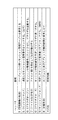
なお、以上の説明では、アプレット12とサーブレット22との間で実行されるファイル伝送の詳細について述べていないが、その詳細は次のようなものであり、ファイル伝送手順の概要を図11の表に示す。ファイル伝送手順はHTTP手順の上位に構築してあるが、HTTP手順が平衡プロトコルではないので(非対称プロトコルなので)、この手順もダウンロードとアップロードで夫々異なったものとしてある。具体的には、後述のように「認証」と「伝送」という大きく2つのフェーズを設定し、伝送フェーズは、さらに「ファイル開始」、「テキスト伝送部」及び「ファイル終了」という3つのサブフェーズから構成してある。
【0045】
認証フェーズでは、アプレット12からサーブレット22にユーザID、パスワードを送り、サーブレット22はデータベース23に予め登録されたユーザID、パスワードと照会し、正当なユーザからの要求か否かの認証を行い、正当性が確認できれば、そのユーザIDによりログオンさせる。
【0046】
伝送フェーズの最初のサブフェーズ、ファイル開始フェーズでは、アプレット12からサーブレット22にファイルID、グループIDを送り、サーブレット22はデータベース23を参照して目的のファイルを特定し、当該ファイルがログオンしたユーザの管理下にあることや、伝送可能なステータスとなっていることを確認する。
【0047】
伝送フェーズの中間のサブフェーズ、テキスト伝送フェーズでは、伝送されるファイルを構成するバイナリデータを所定のデータ長で分割してなる複数のテキストとして扱い、各テキスト毎にデータ長と、書き込み位置とを確認しながら伝送する。
【0048】
伝送フェーズの最終のサブフェーズ、ファイル終了フェーズでは、テキスト伝送後に、テキストから生成されたファイルのサイズをアプレット12、サーブレット22で互いに確認し、ファイル伝送が正常に終了していれば、処理を終了する。
【0049】
次に、ファイル伝送動作のダウンロード動作の詳細について、図12のシーケンス図を参照しながら述べる。同図は、伝送バッファサイズが500KBであり、テキストは500KB単位で伝送されるものとする。先ず、認証フェーズ(ステップ12a)において、アプレット12は、サーブレット22にグループID、ユーザID、パスワード等の認証情報を送る(ステップ12a−▲1▼)。サーブレット22は、サーブレット22はデータベース23に予め登録されたグループID、ユーザID、パスワードと照会し、認証結果をアプレット12に送る(ステップ12a−▲2▼)。ここで、ユーザのログオンが認められれば、伝送フェーズ(ステップ12b)に進む。
【0050】
伝送フェーズ(ステップ12b)では、先ずファイル開始フェーズの手順として、アプレット12は目的のファイルのファイルID、グループIDを含む伝送開始要求をサーブレット22に送る(ステップ12b−▲1▼)。アプレット12からのファイルID、グループIDを受けたサーブレット22は、データベース23を参照して目的のファイルを特定し、ログオンしたユーザに対して当該ファイルのダウンロードが許可されていることが確認できれば、伝送開始回答をアプレット12に送る(ステップ12b−▲2▼)。
【0051】
次にテキスト伝送フェーズに移り、アプレット12は1番目の伝送要求をサーブレット22に送る(ステップ12b−▲3▼)。サーブレット22はこれに応答して先に特定したファイルを構成する1番目のテキストを、伝送要求の番号(同図のSeq=1、“1”が伝送要求の番号を示す、以下のテキストの応答についても同様とする)、テキストのデータ長(同図のText−Len=500、“500”がデータ長を示す、以下のテキストの応答についても同様とする)、書き込み位置(同図のPointer=0、“0”が書き込み位置を示す、以下のテキストの応答についても同様とする)を添えてアプレット12に送る(ステップ12b−▲4▼)。アプレット12は、テキストのデータ長、書き込み位置を確認して異常がなければ、テキストを伝送要求の番号、データ長、書き込み位置に関連付けて図示しない所定の記憶領域に書き込み、次の伝送要求、ここでは、2番目の伝送要求をサーブレット22に送る(ステップ12b−▲5▼)。同様にしてアプレット12、サーブレット22は、ステップ12b−▲6▼乃至▲8▼までの動作を行う。なお、テキストのデータ長、書き込み位置に異常がある場合、伝送要求から所定期間経ってもテキストが受信できない場合には、該当番号の伝送要求を再度サーブレット22に送る。サーブレット22からの応答にテキストがファイルの終端を含むことを示す情報(同図のステップ12b−▲8▼では“EOF”で示す)が添えられていれば、アプレット12はファイル終了フェーズの処理を開始する。終了フェーズでは、アプレット12は、受信したテキストからファイルを生成し、ファイルのサイズを特定し、当該サイズを含む終了要求をサーブレット22に送る(ステップ12b−▲9▼)。サーブレット22は、終了要求に添えられたファイルのサイズを元のものと比較し、ファイル伝送が正常に終了したか否か確認し、終了回答をアプレット12に送る(ステップ12b−囲み数字10)。以上により、ファイルのダウンロード動作は終了する。
【0052】
次に、ファイル伝送動作のアップロード動作の詳細について、図13のシーケンス図を参照しながら述べる。同図においても、伝送バッファサイズが500KBであり、テキストは500KB単位で伝送されるものとする。アップロード動作においても先ず、ダウンロード動作と同様の認証フェーズ(ステップ13a)が行われ、アプレット12から認証情報を送り(ステップ13a−▲1▼)、これを受けたサーブレット22は認証結果を返す(ステップ13a−▲2▼)。ここで、ユーザのログオンが認められれば、伝送フェーズ(ステップ13b)に進む。
【0053】
伝送フェーズ(ステップ13b)では、先ずファイル開始フェーズの手順として、アプレット12は目的のファイルのファイルID、グループIDを含む伝送開始要求をサーブレット22に送る(ステップ13b−▲1▼)。アプレット12からのファイルID、グループIDを受けたサーブレット22は、データベース23を参照して目的のファイル格納領域または既存のファイルを特定し、ログオンしたユーザに対して当該アップロードが許可され得ることが確認できれば、伝送開始回答をアプレット12に送る(ステップ13b−▲2▼)。
【0054】
アプレット12は、アップロードを許可する伝送開始回答が得られると、テキスト伝送フェーズの手順に移り、ファイルを構成する1番目のテキストをサーブレット22に送る(ステップ13b−▲3▼)。このとき、伝送番号(同図のSeq=1、“1”が伝送番号を示す、以下のテキストの送信についても同様とする)、テキストのデータ長(同図のText−Len=500、“500”がデータ長を示す、以下のテキストの送信についても同様とする)、書き込み位置(同図のPointer=0、“0”が書き込み位置を示す、以下のテキストの送信についても同様とする)を添える。サーブレット22は、受信したテキストのデータ長、書き込み位置を確認して異常がなければ、テキストを伝送番号、データ長、書き込み位置に関連付けて図示しない所定の記憶領域に書き込み、テキストの受信を示す受信応答(同図のACK(Seq=1)、“1”が伝送番号を示す、以下の受信応答についても同様とする)をアプレット12に送る(ステップ13b−▲4▼)。受信応答を受けたアプレット12は、次のテキスト、ここでは、2番目のテキストをサーブレット22に送る(ステップ13b−▲5▼)。同様にしてアプレット12、サーブレット22は、ステップ13b−▲6▼乃至▲8▼までの動作を行う。なお、アプレット12は、サーブレット22から受信応答にテキストの異常、すなわち、エラーを示す情報が添えられた場合、テキスト送信から所定期間経っても受信応答がない場合は、該当する伝送番号のテキストを再送信する。
【0055】
アプレット12は、最終的な伝送番号に対する受信応答を受けると(ステップ13b−▲8▼)、ファイル終了フェーズの処理を開始する。アプレット12は、アップロードされたファイルのサイズを含む終了要求をサーブレット22に送る(ステップ13b−▲9▼)。サーブレット22は、受信したテキストからファイルを生成し、ファイルのサイズを特定し、終了要求に添えられたアップロードされたファイルのサイズと比較し、ファイル伝送が正常に終了したか否か確認し、終了回答をアプレット12に送る(ステップ13b−囲み数字10)。以上により、ファイルのダウンロード動作は終了する。
【0056】
以上のように本例のアプレット12とサーブレット22との間のファイル伝送手順は、ファイルを扱うユーザの認証、ファイルを構成するテキスト単位で伝送状態を確認しながら行うものであるから、信頼性の高いファイル伝送が可能となっている。これは、アプリケーション31との通信制御、Webブラウザ11の起動等をエージェント13、API32により仲介させる分だけ、アプレット12及びサーブレット22への負担が軽減され、その分これらの機能をファイル伝送の信頼性を向上させる処理に充てることが可能となっている。また、テキスト単位で伝送状態を確認するため、上述したAPI32によるコマンドSの実行が可能となっている。アプレット12はコマンドSを受けると、監視している伝送状態をAPI32に送ることができる。
【0057】
上述の第1の実施例では、単にファイル伝送を行うファイル伝送システムについて述べたが、本発明はこれに限るものではない。例えば、サーブレット22としては単にファイル伝送を行うだけではなく、ファイル伝送の際にファイルに所定の処理を施すシステムに応用しても良い。第2の実施例はそのようなファイル処理システムについて述べる。図14にその構成を示してある。同図において図1と同様の構成要素は、図1のものと同様の符号で示してある。本例のWebサーバ24は、前処理サーブレット241、中間処理サーブレット242、後処理サーブレット243を備え、また、これらに対応する前処理アプレット161、中間処理アプレット162、後処理アプレット163を備える。これらアプレットは、それぞれ要求に応じてWebブラウザ11にダウンロードされる。ここで言う前処理、中間処理、後処理については以下の通りのものとする。ここで、所定のファイル、例えば、日々更新される売上げ報告書ファイルを、表計算アプリケーションを使用して所定の書式で作成する業務を前提として述べる。売上げ報告書は日々の売上げ情報が追加されて更新すべきものであり、所定期間以前の古い売上げ情報は必要に応じて削除する必要がり、また、新たな売上げ報告書としては必要な情報(例えば、ユーザの担当業務に関連する売上げ情報)のみを含んでいれば良く、あるいは、新たな報告書の作成の際には売上げ内容等を除いたブランクな入力項目のみの報告書フォームさえあれば良い。前処理とは入力用のフォームのファイル、例えば、ブランクな入力項目を有する報告書のファイルを伝送する処理であり、中間処理とは、例えば、元となる売上げ報告書ファイルから必要な情報(例えば、ユーザの担当業務に関連する所定の期間の売上げ情報)のみを含む報告書ファイルを伝送する処理であり、後処理とは、新たな報告書ファイルの内容にて元となる売上げ報告書ファイルを更新する処理である。前処理サーブレット241は、Webブラウザ11から要求に応じて元となる売上げ報告書ファイルから必要な情報を除いてブランクな入力項目のみの報告書ファイルを生成し、Webブラウザ11にダウンロードするものとする。中間処理サーブレット242は、Webブラウザ11から要求に応じて元となる売上げ報告書ファイルから必要な情報のみを含む報告書ファイルを生成してWebブラウザ11にダウンロードするものとする。後処理サーブレット243は、Webブラウザ11から新たな報告書ファイルのアップロードを受け、新たな売上げ情報を元となる売上げ報告書ファイルに追加するものであり、必要ならば、最古の売上げ情報を削除するものとする。
【0058】
本例のローカルシステム3では、アプリケーション35は、上述の第1実施例のアプリケーション31の機能に加えて、所定日時に所定のファイルに前処理、中間処理、後処理を施す機能を実行するものである。アプリケーション35は、メインプログラム36と、スケジュールテーブル37と、API38と、アクセス管理テーブル39を備える。メインプログラム36は、上述の第1実施例のメインプログラム34の機能に加えて、スケジュールテーブル37を参照して所定日時に所定のファイルに前処理、中間処理、後処理を施す機能を実行するものである。スケジュールテーブル37には、スケジュールテーブル33の内容に加え、前処理、中間処理、後処理を施すための情報として、ファイルID、グループID、ユーザID、パスワードを前処理、中間処理、後処理及びそれを実行する日時と対応付けて可能している。API38は、API32のコマンド機能を備えるものであり、必要があれば前処理、中間処理、後処理のそれぞれのアプレット毎にコマンドを追加しても良い。アクセス管理テーブル39は、前処理、中間処理、後処理に対応したWebサーバ24のアクセス先、すなわち、前処理、中間処理、後処理のそれぞれのアプレットをダウンロードするためのURLを格納する。
【0059】
本例のシステムの動作の概要を述べると以下のようになる。アプリケーション35のメインプログラム36は、スケジュールテーブル37に基づいて前処理、中間処理、後処理の実行日時を監視しており、例えば、前処理を実行する日時となるとアクセス管理テーブル39から、前処理実行の際にアクセスするWebサーバ24のURLを読み出し、スケジュールテーブル37から目的のファイルのファイルID、グループID、ユーザID、パスワードを読み出し、前処理実行をAPI38に指示する。API38は、これに基づいてWebクライアント端末1のエージェント13にWebブラウザ11を起動してWebサーバ24にアクセスさせる。これは、上述の第1実施例のファイル伝送動作と同様の手順であり、Webブラウザ11には前処理アプレット161がダウンロードされ、API38と前処理アプレット161とは通信可能となる。API38は、前処理アプレット161を制御し、前処理サーブレット241から前処理を施したファイルのダウンロードをさせる。API38は、API32と同様にファイル伝送のコマンドTを前処理アプレット161に送り、前処理アプレット161はアプレット12と同様の手順でダウンロードを実行する。但し、本例では、前処理サーブレット241は、要求されたファイルに前処理を施して生成したファイルをサーブレット22と同様の手順で前処理アプレット161に送信する。API38は、ファイル伝送処理が終了すると、API38はエージェント13にWebブラウザ11を終了させ、メインプログラム36にファイル伝送処理の終了を通知する。詳しく述べないが、メインプログラム36は中間処理、後処理についても同様にAPI38を介して実行させる。
【0060】
以上のように本例のシステムは、上述の第1の実施例と同様の作用及び効果を奏し、さらに、Webサーバ24にファイルに対する前処理、中間処理、後処理それぞれのサーブレット及びアプレットを用意することにより、アプリケーション35を簡易な構成にしつつ、ファイルに対する前処理、中間処理、後処理を自動化することが可能となる。
【0061】
【発明の効果】
本発明のファイル処理システムは、他のアプリケーションプログラムからファイルの伝送やファイルの加工等のファイル処理の要求を受け、Webブラウザを起動して当該Webブラウザを介してファイル処理のセッションを制御するエージェントプログラムを設け、要求元の認識番号、セッションの管理番号、起動されたWebブラウザの認識番号等のセッション毎の管理情報を管理テーブルに格納し、管理情報に基づいてセッションを管理する。このため、アプリケーションプログラムのセッション管理に関わる機能を削減でき、Webブラウザの自動および/または遠隔制御によるファイル処理用のアプリケーションプログラムの開発が容易にできるとともに、アプリケーションプログラムの規模を縮小できる。また、エージェントプログラムにより複数のアプリケーションプログラムのセッションの一元管理が可能となり、アプリケーションプログラムの規模を縮小できることとあわせて、システム資源の効率的な利用を進めることが可能となる。また、オートパイロット機能を備えたファイル処理システムを簡易に提供することが可能となる。
【0062】
また、アプリケーションプログラムに、エージェントプログラムの管理情報に基づいてWebブラウザを介したファイル処理を要求するアプリケーションインターフェースプログラム(API)を設けることによれば、APIにセッション制御機能を集約でき、様々なアプリケーションプログラムにおいて、APIを汎用的に使用でき、アプリケーションプログラムの開発がさらに容易なものとなる。
【0063】
また、エージェントプログラムによるセッションの一元管理は、ファイル処理を実行するアプレット及びサーブレットのセッション管理機能の負担も軽減でき、軽減分を、ファイル処理の信頼性を高める機能に充てることができ、システムの信頼性を向上することができる。
【図面の簡単な説明】
【図1】本発明の第1の実施例のファイル伝送システムの構成図。
【図2】図1のファイル伝送システムの各プログラムの連携動作を示す概要図。
【図3】図1のエージェントプログラムのセッション管理テーブルの詳細を説明する構成図。
【図4】図1のAPIのコマンドの概要を示す説明図。
【図5】図1のアプリケーションプログラムの動作を示すフローチャート。
【図6】図1のAPIの動作を示すフローチャート。
【図7】図1のエージェントプログラムの動作を示すフローチャート。
【図8】図1のWebサーバの動作を示すフローチャート。
【図9】図1のアプレットの動作を示すフローチャート。
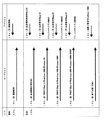
【図10】図1のAPI、エージェント及びアプレットの連携動作を示すシーケンス図。
【図11】図1のアプレット及びサーブレットのファイル伝送手順の概要を示す説明図。
【図12】図1のアプレット及びサーブレットのファイルのダウンロード動作を示すシーケンス図。
【図13】図1のアプレット及びサーブレットのファイルのアップロード動作を示すシーケンス図。
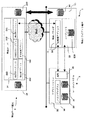
【図14】本発明の第1の実施例のファイル処理システムの構成図。
【符号の説明】
1 Webクライアント端末
11 Webブラウザ
12 アプレット
161 アプレット(前処理アプレット)
162 アプレット(中間処理アプレット)
163 アプレット(後処理アプレット)
13 エージェントプログラム(ファイル処理制御プログラム)
130 管理テーブル(セッション管理テーブル)
2 Webサーバ端末
21、24 Webサーバ
22 サーブレット
241 サーブレット(前処理サーブレット)
242 サーブレット(中間処理サーブレット)
243 サーブレット(後処理サーブレット)
31、35 アプリケーションプログラム
32、38 アプリケーションインターフェースプログラム[0001]
TECHNICAL FIELD OF THE INVENTION
The present invention relates to a file processing system and a control program, and more particularly to a file processing system and a control program for performing file processing via a Web browser.
[0002]
[Prior art]
Currently, it is called an application service provider (ASP), and uses various business applications placed on the server of the ASP operator via the Internet from the screen of a Web browser such as Microsoft Internet Explorer of a user's client terminal. There is a service that provides as much as possible and uploads and downloads various business data. The use of this type of service has become widespread because the user can reduce the labor and cost compared to the case where a user independently introduces and operates a business application. As an operation system of this kind of ASP company, for example, there is one disclosed in
[0003]
Further, for example, there is one disclosed in
[0004]
[Patent Document 1]
JP 2001-357341 A
[Patent Document 2]
JP-A-11-120137
[0005]
[Problems to be solved by the invention]
However, in the above-described conventional system, it is necessary for the user to manually start the Web browser and access the ASP provider's server to perform work. For this reason, tasks such as daily input of business data such as sales data and files and uploading of files have been complicated.
[0006]
In order to eliminate this trouble, it is conceivable to provide an auto-pilot program that automatically executes data input, file upload, etc. However, developing a different auto-pilot program separately for each user's needs is a burden on ASP operators. It becomes. Introducing a plurality of other application programs that cooperate with a Web browser, such as an auto pilot program, imposes a load on system resources including client terminals.
[0007]
Accordingly, the present invention provides a file processing system and a control program for facilitating the efficient use of system resources while facilitating the development of an application program that cooperates with a Web browser. The present invention provides an automatic and / or remote control function for a Web browser. It is an object of the present invention to provide a file processing system provided with a simple.
[0008]
[Means for Solving the Problems]
The file processing system of the present invention receives a request for file processing such as file transmission and file processing from an application program, starts a Web browser, and controls a session for executing the file processing via the Web browser. The management information for each file processing session, such as the identification number of the request source, the management number of the session of the file processing, and the identification number of the activated Web browser, is stored in a management table. A Web client terminal having an agent program for controlling the session based on the Web client terminal, and receiving the Web client terminal from the Web browser and executing the file processing. I do.
[0009]
As a result, since the file processing session is managed by the agent program, the function related to the file processing session management of the application program for automatically and / or remotely controlling the Web browser can be reduced, and the application program can be easily developed. The size of the application program can be reduced. In addition, the agent program can centrally manage sessions of a plurality of application programs, and can reduce the scale of the application programs, as well as promote efficient use of system resources.
[0010]
Further, at least one of the application programs causes the file processing to be executed at a predetermined date and time, and a schedule table for designating the predetermined file processing at the predetermined date and time, and via the agent based on the schedule table. Executing a file process, and preferably includes the Web client or another client terminal having the autopilot program.
[0011]
This makes it possible to easily provide a file processing system having an autopilot function.
[0012]
The agent program includes, for each session of the file processing, a management number for each session, an identification number for communication with a requester of the session, and a flag indicating whether the management number is occupied or non-occupied. The identification number generated in correspondence with the Web browser when the operating system that operates the Web browser activates the Web browser corresponds to the port number used for communication with the Web server terminal in the session. The management table, which is stored as a set of management information, and the management information set, which stores the flag indicating that the management table is not occupied in response to the file processing request from the application program, Generate a new session by storing the flag indicating the occupancy Activating the Web browser, storing the process identification number and the port number obtained by the activation in the set of management information of the new session in the management table, Establishing communication between the Web server and the application program via the Web browser for each session, and responding to a request to end file processing from the application program, based on the management table, Identifying the session corresponding to the termination request source, terminating the Web browser of the specific session, and storing a flag indicating the non-occupancy in a set of management information of the specific session in the management table. Preferably, it is provided. Here, it is preferable that the agent program activates the Web browser so as to acquire the port number in response to a request from the application program.
[0013]
Further, the application program is an application interface program for requesting the file processing to the Web server terminal via the Web browser based on management information on the session of the application program in the management information obtained from the agent program. It is preferable to provide
[0014]
Also, the agent program indicates, for each session of the file processing, a management number for each session, a recognition number for communication with a requester of the session, and whether the management number is occupied or not occupied. A flag, the identification number generated in correspondence with the Web browser when the operating system that operates the Web browser starts the Web browser, and a port number used for communication with the Web server terminal in the session. The management program stores the management table as a set of management information in association with each other, and the application program is configured to execute the Web browser based on management information on the application program session of the management information acquired from the agent program. Through W b. An application interface program for requesting the file processing to the server terminal. The application interface program, based on the management information obtained from the agent program, if the port number has an available port, the agent program has the available port. It is preferable to request activation of the Web browser so as to obtain a number.
[0015]
The Web server terminal includes a servlet that downloads an applet to the Web browser in response to access from the Web browser, and executes a file process in response to a request from the applet. The program communicates with the applet that is executed by using the Web browser as a virtual machine based on management information related to the application program session of the management information obtained from the agent program. It is preferable to receive a request for file processing and request the servlet for file processing.
[0016]
The Web server terminal includes a servlet that downloads an applet to the Web browser in response to access from the Web browser, and executes a file process in response to a request from the applet. The program communicates with the applet that is executed by using the Web browser as a virtual machine based on the management information related to the session of the application program in the management information obtained from the agent program. Receiving the identification number of the target file for file processing, the identification number of the user of the target file, and the password of the user, and based on the received information, the servlet performs file processing and authentication. Requests, the servlet as long as the legitimate requests of the file processing by the authentication, it is preferable to perform the file processing.
[0017]
The Web server terminal includes a servlet that downloads an applet to the Web browser in response to access from the Web browser, and executes a file process in response to a request from the applet. The program communicates with the applet that is executed by using the Web browser as a virtual machine based on the management information related to the session of the application program in the management information obtained from the agent program. Receiving the identification number of the target file for file transmission, the identification number of the user of the target file, and the password of the user, and transmitting and authenticating the file to the servlet based on the received information. If the request for the file transmission is valid by the authentication, the servlet executes the file transmission, and the file transmission between the applet and the servlet transmits the target file to a predetermined file. Preferably, a plurality of texts divided into data lengths are sequentially transmitted, and each time the transmission is sequentially performed, the transmission state is confirmed between the applet and the servlet.
[0018]
Further, the file processing control program of the present invention receives a request for file processing such as file transmission and file processing from an application program, activates a Web browser, and executes the file processing on a Web server via the Web browser. A step of controlling a session to be executed, and storing management information for each session of the file processing such as an identification number of the request source, a management number of the file processing session, and an identification number of the activated Web browser in a management table. Controlling the session based on the management information.
[0019]
For each session, a management number for each session, an identification number for communication with a requester of the session, a flag indicating whether the management number is occupied or non-occupied, and operating the Web browser When the operating system to be activated activates the Web browser, the identification number generated corresponding to the Web browser is associated with a port number used for communication with the Web server terminal in the session, and one piece of management information The management table stored as a set and the management information set storing the flag indicating non-occupation of the management table in response to the file processing request from the application program include the flag indicating the occupancy. Generating a new session by storing the Web browser, and starting the Web browser. Storing the process identification number and the port number obtained by the activation in the set of management information of the new session in the management table; and, based on the management table, the Web for each session. Establishing communication between the Web server and the application program via a browser, responding to a request for ending the file processing from the application program, and executing the session corresponding to the end request source based on the management table. And terminating the Web browser of the specific session, and storing the flag indicating the non-occupation in the set of management information of the specific session in the management table.
[0020]
BEST MODE FOR CARRYING OUT THE INVENTION
Hereinafter, embodiments of the present invention will be described in detail with reference to the drawings.
FIG. 1 shows a configuration of a file transmission system and a program according to a first embodiment of the present invention. In this example, a
[0021]
An outline of the operation of this example will be described with reference to FIG. The
[0022]
Next, returning to FIG. 1, the details of the configuration of this example will be described. The
[0023]
The
[0024]
In the
[0025]
The
[0026]
Next, details of the session management table 130 of the
[0027]
Next, details of commands used between the
[0028]
Next, details of the file transmission operation of this example will be described. FIG. 5 is a flowchart showing the operation of the
[0029]
Next, the file transmission operation of the
[0030]
When receiving a response to the command L from the agent 13 (step 6d), the
[0031]
The
[0032]
Next, the file transmission operation of the
[0033]
Also, when the
From the
[0034]
Upon receiving the command I through the API 32 (
[0035]
Upon receiving the command C from the API 32 (step 71), the
[0036]
Upon receiving the command U from the API 32 (Step 7n), the
[0037]
Next, an operation of the
[0038]
Next, the operation of the
[0039]
In the above description, each operation of the
[0040]
First, the command I is sent from the
[0041]
Next, a command O is sent from the
[0042]
When the file transmission is completed, the
[0043]
As described above, in the system of the present example, the
[0044]
In the above description, the details of the file transmission executed between the
[0045]
In the authentication phase, the
[0046]
In the first sub-phase of the transmission phase, the file start phase, the
[0047]
In the text transmission phase, which is an intermediate sub-phase of the transmission phase, the binary data constituting the file to be transmitted is treated as a plurality of texts divided by a predetermined data length, and the data length and the writing position are set for each text. Transmit while checking.
[0048]
In the final sub-phase of the transmission phase, the file end phase, after the text transmission, the size of the file generated from the text is mutually confirmed by the
[0049]
Next, details of the download operation of the file transmission operation will be described with reference to the sequence diagram of FIG. In the figure, it is assumed that the transmission buffer size is 500 KB and the text is transmitted in units of 500 KB. First, in the authentication phase (
[0050]
In the transmission phase (
[0051]
Next, the process proceeds to the text transmission phase, and the
[0052]
Next, details of the upload operation of the file transmission operation will be described with reference to the sequence diagram of FIG. Also in this figure, it is assumed that the transmission buffer size is 500 KB and the text is transmitted in units of 500 KB. In the upload operation, first, an authentication phase (step 13a) similar to the download operation is performed, authentication information is sent from the applet 12 (step 13a-1), and the
[0053]
In the transmission phase (
[0054]
When the
[0055]
When the
[0056]
As described above, the file transmission procedure between the
[0057]
In the first embodiment described above, the file transmission system that simply performs file transmission has been described, but the present invention is not limited to this. For example, the
[0058]
In the
[0059]
The outline of the operation of the system of this example is as follows. The
[0060]
As described above, the system according to the present embodiment has the same operations and effects as those of the above-described first embodiment, and further prepares a servlet and an applet for pre-processing, intermediate processing, and post-processing for a file in the
[0061]
【The invention's effect】
The file processing system according to the present invention is an agent program that receives a request for file processing such as file transmission and file processing from another application program, activates a Web browser, and controls a file processing session via the Web browser. And stores management information for each session, such as the identification number of the request source, the management number of the session, and the identification number of the activated Web browser, in the management table, and manages the session based on the management information. Therefore, functions related to session management of the application program can be reduced, and an application program for file processing by automatic and / or remote control of a Web browser can be easily developed, and the size of the application program can be reduced. In addition, the agent program makes it possible to manage sessions of a plurality of application programs in a unified manner, so that the scale of the application programs can be reduced and the efficient use of system resources can be promoted. Further, it is possible to easily provide a file processing system having an autopilot function.
[0062]
In addition, by providing an application program with an application interface program (API) that requests file processing via a Web browser based on management information of an agent program, the API can be integrated with a session control function, and various application programs can be integrated. , APIs can be used for general purposes, and application programs can be more easily developed.
[0063]
In addition, the centralized management of the session by the agent program can reduce the load on the session management function of the applet and servlet that execute the file processing, and the reduced amount can be used for the function of improving the reliability of the file processing. Performance can be improved.
[Brief description of the drawings]
FIG. 1 is a configuration diagram of a file transmission system according to a first embodiment of this invention.
FIG. 2 is an exemplary diagram showing a cooperative operation of each program of the file transmission system of FIG. 1;
FIG. 3 is a configuration diagram illustrating details of a session management table of the agent program of FIG. 1;
FIG. 4 is an explanatory view showing an outline of a command of the API in FIG. 1;
FIG. 5 is a flowchart showing the operation of the application program of FIG. 1;
FIG. 6 is a flowchart showing the operation of the API in FIG. 1;
FIG. 7 is a flowchart showing the operation of the agent program of FIG. 1;
FIG. 8 is a flowchart showing the operation of the Web server of FIG. 1;
FIG. 9 is a flowchart showing the operation of the applet shown in FIG. 1;
FIG. 10 is a sequence diagram showing the cooperative operation of the API, the agent, and the applet in FIG. 1;
FIG. 11 is an explanatory view showing an outline of a file transmission procedure of the applet and the servlet in FIG. 1;
FIG. 12 is a sequence diagram showing a download operation of the applet and servlet files of FIG. 1;
FIG. 13 is a sequence diagram showing an upload operation of the applet and servlet files of FIG. 1;
FIG. 14 is a configuration diagram of a file processing system according to the first embodiment of this invention.
[Explanation of symbols]
1 Web client terminal
11 Web browser
12 applets
161 applet (pre-processing applet)
162 applet (intermediate processing applet)
163 applet (post-processing applet)
13. Agent program (file processing control program)
130 management table (session management table)
2 Web server terminals
21, 24 Web server
22 servlets
241 servlet (pre-processing servlet)
242 servlet (intermediate processing servlet)
243 servlet (post-processing servlet)
31, 35 Application program
32, 38 Application interface program
Claims (11)
上記Webクライアント端末の上記Webブラウザからのアクセスを受けて、ファイル処理を実行するWebサーバ端末と
を備えたことを特徴とするファイル処理システム。In response to a request for file processing such as file transmission or file processing from an application program, a Web browser is started and a session for executing the file processing is controlled via the Web browser. A Web having an agent program for storing management information for each session, such as an identification number, a management number of the session, and an identification number of the activated Web browser, in a management table, and controlling the session based on the management information. A client terminal,
A file processing system comprising: a Web server terminal that executes file processing in response to an access from the Web browser of the Web client terminal.
上記セッション毎に、当該セッション毎の管理番号と、上記セッションの要求元との通信のための認識番号と、上記管理番号が占有されたか非占有かを示すフラグと、上記Webブラウザを動作させるオペレーティングシステムが上記Webブラウザを起動したときに当該Webブラウザに対応して生成する上記認識番号と、上記セッションにおいて上記Webサーバ端末との通信に使用するポート番号とを対応付けて1つの管理情報の組として格納する上記管理テーブルと、
上記アプリケーションプログラムからの上記ファイル処理の要求に応答し、上記管理テーブルの非占有を示す上記フラグを格納した上記管理情報の組に、上記占有を示す上記フラグを格納して新たなセッションを生成するステップと、
上記Webブラウザを起動し、当該起動によって得られた上記プロセス認識番号と、上記ポート番号とを上記管理テーブルの上記新たなセッションの管理情報の組に格納するステップと、
上記管理テーブルに基づき、上記セッション毎に上記Webブラウザを介して上記Webサーバと上記アプリケーションプログラムとの通信を確立するステップと、
上記アプリケーションプログラムからのファイル処理の終了の要求に応答し、上記管理テーブルに基づき、上記終了要求元に対応する上記セッションを特定し、当該特定セッションの上記Webブラウザを終了するとともに、上記管理テーブルの上記特定セッションの管理情報の組に上記非占有を示すフラグを格納するステップと
を備えることを特徴とする請求項1または2に記載のファイル処理システム。The above agent program
For each session, a management number for each session, an identification number for communication with a requester of the session, a flag indicating whether the management number is occupied or non-occupied, and an operating system for operating the Web browser One set of management information in which the identification number generated corresponding to the Web browser when the system starts up the Web browser is associated with a port number used for communication with the Web server terminal in the session. The above management table stored as
In response to the file processing request from the application program, a new session is generated by storing the flag indicating the occupancy in the set of management information storing the flag indicating the non-occupation of the management table. Steps and
Activating the web browser and storing the process identification number and the port number obtained by the activation in a set of management information of the new session in the management table;
Establishing communication between the Web server and the application program via the Web browser for each session based on the management table;
In response to a request for ending the file processing from the application program, the session corresponding to the ending request source is specified based on the management table, and the Web browser of the specified session is closed. 3. The file processing system according to claim 1, further comprising: storing a flag indicating the non-occupation in the set of management information of the specific session.
上記セッション毎に、当該セッション毎の管理番号と、上記セッションの要求元との通信のための認識番号と、上記管理番号が占有されたか非占有かを示すフラグと、上記Webブラウザを動作させるオペレーティングシステムが上記Webブラウザを起動したときに当該Webブラウザに対応して生成する上記認識番号と、上記セッションにおいて上記Webサーバ端末との通信に使用するポート番号とを対応付けて1つの管理情報の組として格納する上記管理テーブルと、
上記アプリケーションプログラムからの上記ファイル処理の要求に応答し、上記管理テーブルの非占有を示す上記フラグを格納した上記管理情報の組に、上記占有を示す上記フラグを格納して新たなセッションを生成するステップと、
上記アプリケーションプログラムからの要求に応じた上記ポート番号を取得するように上記Webブラウザを起動し、当該起動によって得られた上記プロセス認識番号と、上記ポート番号とを上記管理テーブルの上記新たなセッションの管理情報の組に格納するステップと、
上記管理テーブルに基づき、上記セッション毎に上記Webブラウザを介して上記Webサーバと上記アプリケーションプログラムとの通信を確立するステップと、
上記アプリケーションプログラムからのファイル処理の終了の要求に応答し、上記管理テーブルに基づき、上記終了要求元に対応する上記セッションを特定し、当該特定セッションの上記Webブラウザを終了するとともに、上記管理テーブルの上記特定セッションの管理情報の組に上記非占有を示すフラグを格納するステップと
を備えることを特徴とする請求項1乃至3の何れかに記載のファイル処理システム。The above agent program
For each session, a management number for each session, an identification number for communication with a requester of the session, a flag indicating whether the management number is occupied or non-occupied, and an operating system for operating the Web browser One set of management information in which the identification number generated corresponding to the Web browser when the system starts up the Web browser is associated with a port number used for communication with the Web server terminal in the session. The above management table stored as
In response to the file processing request from the application program, a new session is generated by storing the flag indicating the occupancy in the set of management information storing the flag indicating the non-occupation of the management table. Steps and
The Web browser is started so as to obtain the port number in response to a request from the application program, and the process identification number and the port number obtained by the start are used for the new session Storing in a set of management information;
Establishing communication between the Web server and the application program via the Web browser for each session based on the management table;
In response to a request for ending the file processing from the application program, the session corresponding to the ending request source is specified based on the management table, and the Web browser of the specified session is closed. 4. The file processing system according to claim 1, further comprising: storing a flag indicating the non-occupation in the set of management information of the specific session.
上記アプリケーションプログラムは、上記エージェントプログラムから取得した当該管理情報の上記アプリケーションプログラムのセッションに関る管理情報に基づき、上記Webブラウザを介して上記Webサーバ端末に上記ファイル処理を要求するアプリケーションインターフェースプログラムを備え、
上記アプリケーションインターフェースプログラムは、上記エージェントプログラムから取得した当該管理情報に基づき、上記ポート番号に空きがあれば、上記エージェントプログラムに当該空きポート番号を取得するように上記Webブラウザの起動を要求する
ことを特徴とする請求項1乃至5の何れかに記載のファイル処理システム。The agent program includes, for each session, a management number for each session, an identification number for communication with a requester of the session, a flag indicating whether the management number is occupied or non-occupied, The identification number generated in correspondence with the Web browser when the operating system operating the browser activates the Web browser is associated with a port number used for communication with the Web server terminal in the session. The management table stored as a set of two pieces of management information,
The application program includes an application interface program for requesting the Web server terminal to perform the file processing via the Web browser based on management information on the session of the application program in the management information obtained from the agent program. ,
The application interface program, based on the management information obtained from the agent program, requests the agent program to start the Web browser so as to obtain the empty port number if the port number is available. The file processing system according to any one of claims 1 to 5, wherein:
上記アプリケーションプログラムは、上記エージェントプログラムから取得した当該管理情報の上記アプリケーションプログラムのセッションに関る管理情報に基づき、上記Webブラウザを仮想マシンとして実行される上記アプレットと通信し、
上記アプレットは上記アプリケーションプログラムから、ファイル処理の要求を受け付けして、上記サーブレットにファイル処理を要求する
ことを特徴とする請求項1乃至6の何れかに記載のファイル処理システム。The Web server terminal includes a servlet that downloads an applet to the Web browser in response to an access from the Web browser and executes a file process in response to a request from the applet.
The application program communicates with the applet that executes the Web browser as a virtual machine based on management information related to the application program session of the management information obtained from the agent program,
7. The file processing system according to claim 1, wherein the applet receives a file processing request from the application program, and requests the servlet for file processing.
上記アプリケーションプログラムは、上記エージェントプログラムから取得した当該管理情報の上記アプリケーションプログラムのセッションに関る管理情報に基づき、上記Webブラウザを仮想マシンとして実行される上記アプレットと通信し、
上記アプレットは、上記アプリケーションプログラムから、ファイル処理の対象ファイルの認識番号、当該対象ファイルのユーザの認識番号及び当該ユーザのパスワードを受け付けし、当該受付した情報に基づき、上記サーブレットにファイル処理及び認証を要求し、
上記サーブレットは上記認証により上記ファイル処理の要求が正当なものであれば、上記ファイル処理を実行する
ことを特徴とする請求項1乃至7に記載のファイル処理システム。The Web server terminal includes a servlet that downloads an applet to the Web browser in response to an access from the Web browser and executes a file process in response to a request from the applet.
The application program communicates with the applet that executes the Web browser as a virtual machine based on management information related to the application program session of the management information obtained from the agent program,
The applet receives the identification number of the target file for file processing, the identification number of the user of the target file, and the password of the user from the application program, and performs file processing and authentication on the servlet based on the received information. Request,
8. The file processing system according to claim 1, wherein the servlet executes the file processing if the request for the file processing is valid by the authentication.
上記アプリケーションプログラムは、上記エージェントプログラムから取得した当該管理情報の上記アプリケーションプログラムのセッションに関る管理情報に基づき、上記Webブラウザを仮想マシンとして実行される上記アプレットと通信し、
上記アプレットは、上記アプリケーションプログラムから、ファイル伝送の対象ファイルの認識番号、当該対象ファイルのユーザの認識番号及び当該ユーザのパスワードを受け付けし、当該受付した情報に基づき、上記サーブレットにファイル伝送及び認証を要求し、
上記サーブレットは上記認証により上記ファイル伝送の要求が正当なものであれば、上記ファイル伝送を実行し、
上記アプレットと上記サーブレットとの間の上記ファイル伝送は、上記対象ファイルを所定のデータ長に分割されてなる複数のテキストを順次伝送し、当該順次の伝送の都度、伝送状態を上記アプレットと上記サーブレットとの間で確認する
ことを特徴とする請求項1乃至8に記載のファイル処理システム。The Web server terminal includes a servlet that downloads an applet to the Web browser in response to an access from the Web browser and executes a file process in response to a request from the applet.
The application program communicates with the applet that executes the Web browser as a virtual machine based on management information related to the application program session of the management information obtained from the agent program,
The applet receives, from the application program, the identification number of the target file for file transmission, the identification number of the user of the target file, and the password of the user, and based on the received information, performs file transmission and authentication to the servlet. Request,
The servlet executes the file transmission if the request for the file transmission is valid by the authentication,
In the file transmission between the applet and the servlet, a plurality of texts obtained by dividing the target file into a predetermined data length are sequentially transmitted, and each time the sequential transmission is performed, the transmission state is changed to the applet and the servlet. 9. The file processing system according to claim 1, wherein confirmation is made between the file processing system.
上記要求元の認識番号、上記ファイル処理のセッションの管理番号、起動された上記Webブラウザの認識番号等の上記ファイル処理のセッション毎の管理情報を管理テーブルに格納し、上記管理情報に基づいて上記セッションを制御するステップと
を備えことを特徴とするファイル処理制御プログラムReceiving a request for file processing such as file transmission or file processing from an application program, controlling a session that activates a web browser and causes a web server to execute the file processing via the web browser;
The management information for each session of the file processing, such as the identification number of the request source, the management number of the session of the file processing, and the identification number of the activated Web browser, is stored in a management table, and based on the management information, Controlling a session. A file processing control program characterized by comprising:
上記アプリケーションプログラムからの上記ファイル処理の要求に応答し、上記管理テーブルの非占有を示す上記フラグを格納した上記管理情報の組に、上記占有を示す上記フラグを格納して新たなセッションを生成するステップと、
上記Webブラウザを起動し、当該起動によって得られた上記プロセス認識番号と、上記ポート番号とを上記管理テーブルの上記新たなセッションの管理情報の組に格納するステップと、
上記管理テーブルに基づき、上記セッション毎に上記Webブラウザを介して上記Webサーバと上記アプリケーションプログラムとの通信を確立するステップと、
上記アプリケーションプログラムからのファイル処理の終了の要求に応答し、上記管理テーブルに基づき、上記終了要求元に対応する上記セッションを特定し、当該特定セッションの上記Webブラウザを終了するとともに、上記管理テーブルの上記特定セッションの管理情報の組に上記非占有を示すフラグを格納するステップと
を備えることを特徴とする請求項10に記載のファイル処理制御プログラム。For each session of the file processing, a management number for each session, an identification number for communication with a requester of the session, a flag indicating whether the management number is occupied or non-occupied, When the operating system to be operated activates the Web browser, the identification number generated corresponding to the Web browser is associated with a port number used for communication with the Web server terminal in the session, and one management is performed. The management table stored as a set of information;
In response to the file processing request from the application program, a new session is generated by storing the flag indicating the occupancy in the set of management information storing the flag indicating the non-occupation of the management table. Steps and
Activating the web browser and storing the process identification number and the port number obtained by the activation in a set of management information of the new session in the management table;
Establishing communication between the Web server and the application program via the Web browser for each session based on the management table;
In response to a request for ending the file processing from the application program, the session corresponding to the ending request source is specified based on the management table, and the Web browser of the specified session is closed. Storing the flag indicating the non-occupation in the set of management information of the specific session.
Priority Applications (1)
| Application Number | Priority Date | Filing Date | Title |
|---|---|---|---|
| JP2002362868A JP4163940B2 (en) | 2002-12-13 | 2002-12-13 | File processing system and control program |
Applications Claiming Priority (1)
| Application Number | Priority Date | Filing Date | Title |
|---|---|---|---|
| JP2002362868A JP4163940B2 (en) | 2002-12-13 | 2002-12-13 | File processing system and control program |
Publications (2)
| Publication Number | Publication Date |
|---|---|
| JP2004192563A true JP2004192563A (en) | 2004-07-08 |
| JP4163940B2 JP4163940B2 (en) | 2008-10-08 |
Family
ID=32761193
Family Applications (1)
| Application Number | Title | Priority Date | Filing Date |
|---|---|---|---|
| JP2002362868A Expired - Lifetime JP4163940B2 (en) | 2002-12-13 | 2002-12-13 | File processing system and control program |
Country Status (1)
| Country | Link |
|---|---|
| JP (1) | JP4163940B2 (en) |
Cited By (3)
| Publication number | Priority date | Publication date | Assignee | Title |
|---|---|---|---|---|
| JP2009042829A (en) * | 2007-08-06 | 2009-02-26 | Nippon Telegr & Teleph Corp <Ntt> | Information function providing system, information function providing apparatus, information function providing method, and information function providing program |
| WO2011058676A1 (en) * | 2009-11-13 | 2011-05-19 | パナソニック株式会社 | Client terminal, content utilizing system, data transmitting/receiving method, program, and recording medium |
| JP2021140587A (en) * | 2020-03-06 | 2021-09-16 | 株式会社C−Rise | Information processing method, computer program, and information processing device |
-
2002
- 2002-12-13 JP JP2002362868A patent/JP4163940B2/en not_active Expired - Lifetime
Cited By (5)
| Publication number | Priority date | Publication date | Assignee | Title |
|---|---|---|---|---|
| JP2009042829A (en) * | 2007-08-06 | 2009-02-26 | Nippon Telegr & Teleph Corp <Ntt> | Information function providing system, information function providing apparatus, information function providing method, and information function providing program |
| WO2011058676A1 (en) * | 2009-11-13 | 2011-05-19 | パナソニック株式会社 | Client terminal, content utilizing system, data transmitting/receiving method, program, and recording medium |
| JP5514224B2 (en) * | 2009-11-13 | 2014-06-04 | パナソニック株式会社 | Client terminal, content use system, data transmission / reception method, program, and recording medium |
| US8903896B2 (en) | 2009-11-13 | 2014-12-02 | Panasonic Corporation | Client terminal, content utilizing system, and data transmitting/receiving method |
| JP2021140587A (en) * | 2020-03-06 | 2021-09-16 | 株式会社C−Rise | Information processing method, computer program, and information processing device |
Also Published As
| Publication number | Publication date |
|---|---|
| JP4163940B2 (en) | 2008-10-08 |
Similar Documents
| Publication | Publication Date | Title |
|---|---|---|
| US7043537B1 (en) | System and method for remote device management | |
| US9967138B2 (en) | Method for configuring an application | |
| EP1014266B1 (en) | Method, apparatus and program storage device for a client and adaptive synchronization and transformation server | |
| CN1222886C (en) | System and method for globally and securely accessing unified information in a computer network | |
| JPH10312350A (en) | Resource naming method and mechanism | |
| JP2015001974A (en) | Authentication system, control method therefor, service providing device and computer program | |
| JP2013250915A (en) | Service providing device, information process device, image formation device, control method of printing system and computer program | |
| WO2002065315A1 (en) | System and method for remote control of software and an attached device | |
| CN101072163A (en) | Network file automatic dump method and system | |
| WO2017206960A1 (en) | Data transmission method, data transfer client and data transfer executor | |
| US11729334B2 (en) | Communication system, device, and recording medium for remote access to electronic device through relaying device and converter | |
| US8867073B2 (en) | Server apparatus, network system, job processing method, and storage medium | |
| EP1719320B1 (en) | Server-side protocol configuration of accessing clients | |
| JP4163940B2 (en) | File processing system and control program | |
| JP2003162449A (en) | Integrated access management system, integrated access management apparatus and method, and program | |
| US20030212587A1 (en) | Apparatus and methods for coordinating Web services using role based interpretation of coordination plans | |
| JP4989935B2 (en) | Session management method, server used therefor, session management program, and recording medium recording the program | |
| JP4532238B2 (en) | On-demand service provision system | |
| JP4873898B2 (en) | Web authentication method and web authentication server | |
| Karlsen et al. | Minimum intrusion grid-the simple model | |
| JPH11316717A (en) | Data transfer system | |
| JP4271639B2 (en) | Network system, computer system and computer program | |
| JP2008217376A (en) | Content sharing method and system | |
| JP2009217307A (en) | Monitoring control system and monitoring control method | |
| JP4496492B2 (en) | Information processing system and information processing method for Web service |
Legal Events
| Date | Code | Title | Description |
|---|---|---|---|
| A621 | Written request for application examination |
Free format text: JAPANESE INTERMEDIATE CODE: A621 Effective date: 20050616 |
|
| A977 | Report on retrieval |
Free format text: JAPANESE INTERMEDIATE CODE: A971007 Effective date: 20070928 |
|
| A131 | Notification of reasons for refusal |
Free format text: JAPANESE INTERMEDIATE CODE: A131 Effective date: 20080221 |
|
| A521 | Request for written amendment filed |
Free format text: JAPANESE INTERMEDIATE CODE: A523 Effective date: 20080414 |
|
| A131 | Notification of reasons for refusal |
Free format text: JAPANESE INTERMEDIATE CODE: A131 Effective date: 20080619 |
|
| A521 | Request for written amendment filed |
Free format text: JAPANESE INTERMEDIATE CODE: A523 Effective date: 20080620 |
|
| TRDD | Decision of grant or rejection written | ||
| A01 | Written decision to grant a patent or to grant a registration (utility model) |
Free format text: JAPANESE INTERMEDIATE CODE: A01 Effective date: 20080710 |
|
| A01 | Written decision to grant a patent or to grant a registration (utility model) |
Free format text: JAPANESE INTERMEDIATE CODE: A01 |
|
| A61 | First payment of annual fees (during grant procedure) |
Free format text: JAPANESE INTERMEDIATE CODE: A61 Effective date: 20080725 |
|
| FPAY | Renewal fee payment (event date is renewal date of database) |
Free format text: PAYMENT UNTIL: 20110801 Year of fee payment: 3 |
|
| R150 | Certificate of patent or registration of utility model |
Ref document number: 4163940 Country of ref document: JP Free format text: JAPANESE INTERMEDIATE CODE: R150 Free format text: JAPANESE INTERMEDIATE CODE: R150 |
|
| FPAY | Renewal fee payment (event date is renewal date of database) |
Free format text: PAYMENT UNTIL: 20110801 Year of fee payment: 3 |
|
| FPAY | Renewal fee payment (event date is renewal date of database) |
Free format text: PAYMENT UNTIL: 20120801 Year of fee payment: 4 |
|
| FPAY | Renewal fee payment (event date is renewal date of database) |
Free format text: PAYMENT UNTIL: 20130801 Year of fee payment: 5 |
|
| S111 | Request for change of ownership or part of ownership |
Free format text: JAPANESE INTERMEDIATE CODE: R313113 |
|
| R350 | Written notification of registration of transfer |
Free format text: JAPANESE INTERMEDIATE CODE: R350 |
|
| R250 | Receipt of annual fees |
Free format text: JAPANESE INTERMEDIATE CODE: R250 |
|
| R250 | Receipt of annual fees |
Free format text: JAPANESE INTERMEDIATE CODE: R250 |
|
| R250 | Receipt of annual fees |
Free format text: JAPANESE INTERMEDIATE CODE: R250 |
|
| R250 | Receipt of annual fees |
Free format text: JAPANESE INTERMEDIATE CODE: R250 |
|
| R250 | Receipt of annual fees |
Free format text: JAPANESE INTERMEDIATE CODE: R250 |
|
| R250 | Receipt of annual fees |
Free format text: JAPANESE INTERMEDIATE CODE: R250 |
|
| R250 | Receipt of annual fees |
Free format text: JAPANESE INTERMEDIATE CODE: R250 |
|
| R250 | Receipt of annual fees |
Free format text: JAPANESE INTERMEDIATE CODE: R250 |
|
| EXPY | Cancellation because of completion of term |