JP2005292891A - Communication terminal device and communication control processing program - Google Patents
Communication terminal device and communication control processing program Download PDFInfo
- Publication number
- JP2005292891A JP2005292891A JP2004102709A JP2004102709A JP2005292891A JP 2005292891 A JP2005292891 A JP 2005292891A JP 2004102709 A JP2004102709 A JP 2004102709A JP 2004102709 A JP2004102709 A JP 2004102709A JP 2005292891 A JP2005292891 A JP 2005292891A
- Authority
- JP
- Japan
- Prior art keywords
- character string
- received mail
- characters
- received
- Prior art date
- Legal status (The legal status is an assumption and is not a legal conclusion. Google has not performed a legal analysis and makes no representation as to the accuracy of the status listed.)
- Pending
Links
Images

Landscapes
- Information Transfer Between Computers (AREA)
- Telephone Function (AREA)
- Telephonic Communication Services (AREA)
Abstract
【課題】 受信したメールの内容を正確に分析して、削除すべき好ましくないメールを高い精度で抽出する。
【解決手段】 CPU1は、RAM3の受信BOXに受信メールが記憶されたときは、キーワードメモリ7に記憶されている複数種類のキーワードから各キーワードを順次読み出して、各キーワードと一致する文字列を受信メールから検出し、その検出結果に基づいて複数種類のキーワードと受信メールの文字列との一致率αを算出し、その算出した一致率αが基準値より大きい場合には受信されたメールを受信BOXから削除する。
【選択図】 図1PROBLEM TO BE SOLVED: To accurately analyze the contents of received mail and extract unfavorable mail to be deleted with high accuracy.
When a received mail is stored in a reception BOX of a RAM 3, a CPU 1 sequentially reads each keyword from a plurality of types of keywords stored in a keyword memory 7 and receives a character string that matches each keyword. Detects from mail, calculates match rate α between multiple types of keywords and received mail character string based on the detection result, and receives the received mail if the calculated match rate α is greater than the reference value Delete from BOX.
[Selection] Figure 1
Description
本発明は、通信端末装置およびその通信制御処理のプログラムに関し、特に、メールを送受信する通信端末装置および通信制御処理のプログラムに関するものである。 The present invention relates to a communication terminal device and a communication control processing program thereof, and more particularly to a communication terminal device that transmits and receives mail and a communication control processing program.
携帯電話などの通信端末装置においては、メールアドレスのセキュリティシステムが脆弱であるため、ユーザが希望しない不適切なメールを受信する場合がある。不特定多数のメールアドレスに文字列や画像を送信する場合には、その旨を通知することや、一度に送信するメールアドレスの数に制限がある等の法的規制がある。しかしながら、不特定多数へのメールを複数回に分けて送信することも可能であるので、ユーザが希望しないメールを拒絶することはできないのが現状である。このような不特定多数へのメールには猥褻な内容のものが多く、「成人」、「交際」、「見放題」、「無料体験」などの文字列を含む内容でユーザの感情を煽って、法外な金額で画像や写真などを売りつけたり、不法な男女交際を勧誘するようなものがある。今や携帯電話は、大人だけでなく、高校生や中学生に普及しており、さらには小学生にまで普及しつつある。このため、このような不適切なメールが自動的に受信BOXにストアされて、未成年者に見せることは好ましくない。 In a communication terminal device such as a mobile phone, since the security system of the mail address is weak, an inappropriate mail not desired by the user may be received. When a character string or an image is transmitted to an unspecified number of e-mail addresses, there are legal restrictions such as notification to that effect and restrictions on the number of e-mail addresses transmitted at a time. However, since it is possible to divide and send e-mails to an unspecified number of times, it is not possible to reject e-mails that the user does not want. Many of these e-mails to unspecified people have obscene content, and the user's emotions are spoken with content that includes character strings such as “adult”, “dating”, “unlimited viewing”, and “free trial”. There are things like selling images and photos for an unreasonable amount, and soliciting illegal gender dating. Mobile phones are now spreading not only to adults, but also to high school and junior high school students, and even to elementary school students. For this reason, it is not preferable that such inappropriate mail is automatically stored in the reception BOX and shown to minors.
このような不適切なメールを拒絶する提案は従来いくつか提案されている。例えば、ある提案によれば、個人情報が記録されたメモリカードを装着することにより通信可能となり、メモリカードの所有者に対して、課金処理を実行可能な情報通信装置において、メモリカード所有者の年齢情報に応じて、不適切なデータを受信した場合の削除などの処理を適切に実行可能にする。この提案の構成によれば、予め所有者の個人データが記録されたメモリカード、文字データや画像データなどを表示する表示部、不適切なデータの送信元(電子メールアドレス)のリストや不適切なデータ(文字列)のリスト、受信メールの保存領域などを有するメモリなどを備えている。そして、受信した電子メールに不適切なデータがある場合は、不適切なデータが何箇所あるかが表示部に表示される。不適切なデータがある場合は、その電子メールが削除される。ただし、自動削除機能がオフである場合には、その電子メールを表示することもできる。(特許文献1)
上記特許文献1においては、受信した電子メールに不適切なデータがある場合は、不適切なデータが何箇所あるかが表示部に表示されるが、自動削除機能がオンである場合には、それがたとえ1箇所であっても、その電子メールは削除される。しかしながら、受信メールにある特定の文字列が1箇所でも含まれているからといって、直ちにそのメールが不適切なメールであるとして削除するのは不適当である。例えば、「定期の成人病検診のお知らせです。成人病…」、「英会話の××です。無料体験キャンペーンの案内です…」、「ホテル隅田川です。いい部屋が確保できました。明日の花火大会は見放題です」、「今日の△△メールニュース事件簿。出会系で交際していた女性が…」といったメールを受信することもある。これらのメールに「成人」、「見放題」、「無料体験」、「出会」、「交際」の文字列が含まれているからといって全て削除するのは不適当である。
本発明は、上記従来の課題を解決するためのものであり、受信したメールの内容を正確に分析して、削除すべき好ましくないメールを高い精度で抽出することを目的とする。
In
An object of the present invention is to solve the above-described conventional problems, and an object of the present invention is to accurately analyze the contents of received mail and to extract undesired mail to be deleted with high accuracy.
請求項1に記載の通信端末装置は、所定の通信回線を介して受信された受信メールを第1の記憶手段(実施形態においては、図1のRAM3に相当する)に記憶するメール記憶手段(実施形態においては、CPU1に相当する)と、第1の記憶手段に受信メールが記憶されたときは、第2の記憶手段(実施形態においては、図1のキーワードメモリ7に相当する)に記憶されている複数種類の参照文字列(実施形態においては、キーワードに相当する)から各参照文字列を順次読み出して、各参照文字列と一致する文字列を受信メールから検出する文字列検出手段(実施形態においては、CPU1に相当する)と、文字列検出手段による検出結果に基づいて複数種類の参照文字列と受信メールの文字列との一致率(実施形態においては、αに相当する)を算出する演算手段(実施形態においては、CPU1に相当する)と、演算手段によって算出された一致率が基準値より大きい場合には受信されたメールを削除するメール処理手段(実施形態においては、CPU1に相当する)と、を備えた構成になっている。
The communication terminal device according to
請求項1の通信端末装置において、請求項2に記載したように、メール処理手段は、受信されたメールを削除する前に当該メールの削除を問うメッセージ(実施形態においては、図10における削除スイッチのアイコンに相当する)を算出された一致率とともに所定の表示手段(実施形態においては、図1の表示部8に相当する)に表示し、削除の指令が入力された場合に当該メールを削除するような構成にしてもよい。
また、請求項1の通信端末装置において、請求項3に記載したように、文字列検出手段は、1つの種類の参照文字列と一致する文字列の文字数と、当該参照文字列と一致する文字列の個数との乗算値を検出文字数として求め、第2の記憶手段から順次読み出した参照文字列と一致する文字列ごとに求めた検出文字数を累算して受信メール内の全検出文字数を求め、演算手段は、受信メール内の全文字数で全検出文字数を除算して一致率を算出するような構成にしてもよい。
In the communication terminal device according to
Moreover, in the communication terminal device according to
請求項4に記載の通信制御処理のプログラムは、所定の通信回線を介して受信された受信メールを第1の記憶手段(実施形態においては、図1のRAM3に相当する)に記憶する第1のステップと、第1の記憶手段に受信メールが記憶されたときは、第2の記憶手段(実施形態においては、図1のキーワードメモリ7に相当する)に記憶されている複数種類の参照文字列(実施形態においては、キーワードに相当する)から各参照文字列を順次読み出して、各参照文字列と一致する文字列を受信メールから検出する第2のステップと、第2のステップによる検出結果に基づいて複数種類の参照文字列と受信メールの文字列との一致率(実施形態においては、αに相当する)を算出する第3のステップと、第3のステップによって算出された一致率が基準値より大きい場合には受信されたメールを削除する第4のステップと、を備えた構成になっている。各ステップは、実施形態においては、CPU1の処理に相当する。
According to a fourth aspect of the present invention, there is provided a communication control processing program that stores received mail received via a predetermined communication line in first storage means (corresponding to the
本発明の通信端末装置および通信制御処理のプログラムによれば、受信したメールの内容を正確に分析して、削除すべき好ましくないメールを高い精度で抽出するという効果が得られる。 According to the communication terminal device and the communication control processing program of the present invention, it is possible to accurately analyze the contents of the received mail and extract an undesired mail to be deleted with high accuracy.
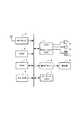
以下、本発明による通信端末装置の第1実施形態および第2実施形態について、携帯電話を例に採って、図1に示す各実施形態における携帯電話の構成を示すブロック図、図2ないし図7に示すフローチャート、図8および図9に示す表示画面を参照して説明する。
図1において、CPU1は、ベースバンド信号処理のDSP(ディジタル・シグナル・プロセッサ)を内蔵したワンチップICで構成されている。CPU1のシステムバスには、ROM2、RAM3、RFブロック4、スイッチ部5、表示ドライバ6、およびキーワードメモリ7が接続されている。表示ドライバ6には、LCD(液晶ディスプレイ)などからなる表示部8が接続されている。CPU1の入出力ポートには、マイク9、スピーカ10、バイブレータ11が接続されている。CPU1は、これら各部との間でコマンドおよびデータの授受を行ってこの携帯電話を制御する。
Hereinafter, the first and second embodiments of the communication terminal device according to the present invention will be described with reference to block diagrams showing the configuration of the mobile phone in each embodiment shown in FIG. Will be described with reference to the flowchart shown in FIG. 8 and the display screens shown in FIGS.
In FIG. 1, a
ROM2には、他の携帯電話と通話やメールを送受信する機能やCPU1に接続された各部を制御する機能を含む通信制御処理のプログラムが格納されている。RAM3は、CPU1のワークエリアであり、CPU1によって処理されるデータを一時的にストアするバッファエリアや、通信制御処理のプログラムの実行に必要な各種のレジスタやフラグのエリア、受信したメールおよび送信したメールを記録する受信BOXおよび送信BOXなどが設けられている。RFブロック4は、電話通信網との間で通話やメールを送受信するための無線送受信部、無線信号処理部など(図示せず)を備えている。
The
スイッチ部5は、オフフックスイッチ、オンフックスイッチ、メールスイッチ、発信スイッチ、カーソルスイッチ、文字入力スイッチ、その他のスイッチなどで構成されている。各スイッチの機能については後述する。キーワードメモリ7は、フラッシュROMなどの書込みおよび書き換え可能な不揮発性メモリで構成され、スイッチ部5の操作によって入力された文字列がキーワードとして登録される。表示部8はLCD(液晶ディスプレイ)などで構成され、受信したメールや送信するメールの画面、キーワード登録画面などを表示することができる。
また、スピーカ10によって発信時の呼出報知がなされ、マイク9およびスピーカ10によって通話がなされ、着信時にはスピーカ10又はバイブレータ11によって着信報知がなされる。
The
In addition, a call notification at the time of outgoing call is made by the
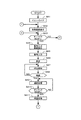
次に、図1の構成による第1実施形態の動作について、CPU1のフローチャートである図2ないし図6、および図8のキーワード登録画面を参照して説明する。
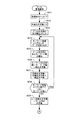
図2および図3は、メインルーチンのフローチャートである。図2において、所定のイニシャライズ(ステップSA1)の後、表示部8に待受画面を表示する(ステップSA2)。次に、オフフックスイッチがオンされたか否かを判別する(ステップSA3)。このスイッチがオンされたときは、番号入力の画面を表示して(ステップSA4)、入力された番号をRAM3にストアし、表示部8に表示する番号入力処理を行う(ステップSA5)。次に、発信スイッチのオン操作に応じて発信処理を行い(ステップSA6)、スピーカ10によって呼出報知を行う(ステップSA7)。そして、回線接続が確立したか否かを判別する(ステップSA8)。回線接続が確立したときは通話処理に遷移し(ステップSA9)、相手先のユーザとの通話が行われる。その後は、オンフックスイッチがオンされたか否かを判別し(ステップSA10)、このスイッチがオンされたときは回線切断などの終話処理を行って(ステップSA11)、ステップSA2に移行して再び待受画面を表示する。
Next, the operation of the first embodiment having the configuration shown in FIG. 1 will be described with reference to FIGS. 2 to 6 which are flowcharts of the
2 and 3 are flowcharts of the main routine. In FIG. 2, after a predetermined initialization (step SA1), a standby screen is displayed on the display unit 8 (step SA2). Next, it is determined whether or not the off-hook switch is turned on (step SA3). When this switch is turned on, a number input screen is displayed (step SA4), the input number is stored in the
ステップSA3において、オフフックスイッチがオンされない場合には、図3のフローチャートにおいて、メールスイッチがオンされたか否かを判別する(ステップSA12)。このスイッチがオンされたときは、メールリスト画面を表示する(ステップSA13)。メールリスト画面には、新規作成、受信BOX、送信BOX、キーワード登録などの複数の項目が表示される。そして、ひとつの項目にフォーカスを当てる(ステップSA14)。例えば、その項目の表示態様を反転表示して他の項目と区別する。 If the off-hook switch is not turned on in step SA3, it is determined whether or not the mail switch is turned on in the flowchart of FIG. 3 (step SA12). When this switch is turned on, a mail list screen is displayed (step SA13). On the mail list screen, a plurality of items such as new creation, reception BOX, transmission BOX, keyword registration, and the like are displayed. Then, one item is focused (step SA14). For example, the display mode of the item is highlighted to distinguish it from other items.
次に、カーソルスイッチがオンされたか否かを判別し(ステップSA15)、このスイッチがオンされたときは、フォーカス位置を移動する(ステップSA16)。次に、画面に表示された2つのアイコンスイッチの1つである決定スイッチがオンされたか否かを判別し(ステップSA17)、このスイッチがオンされない場合には、もう1つのアイコンスイッチであるクリアスイッチがオンされたか否かを判別する(ステップSA18)。このスイッチもオンでない場合には、ステップSA15に移行して、カーソルスイッチのオンを判別する。一方、クリアスイッチがオンされたときは、メールリスト画面を消去し、図2のステップSA2に移行して、待受画面を表示する。 Next, it is determined whether or not the cursor switch is turned on (step SA15). When this switch is turned on, the focus position is moved (step SA16). Next, it is determined whether or not a determination switch that is one of the two icon switches displayed on the screen is turned on (step SA17). If this switch is not turned on, the other icon switch is cleared. It is determined whether or not the switch is turned on (step SA18). If this switch is not on, the process proceeds to step SA15 to determine whether the cursor switch is on. On the other hand, when the clear switch is turned on, the mail list screen is deleted, the process proceeds to step SA2 in FIG. 2, and the standby screen is displayed.
図3のステップSA17において、決定スイッチがオンされたときは、そのときのフォーカス位置に応じた処理を行う。フォーカス位置が新規作成であるか否かを判別し(ステップSA19)、新規作成である場合には、メールの新規作成処理を行う(ステップSA20)。新規作成でない場合には、フォーカス位置が受信BOXであるか否かを判別し(ステップSA21)、受信BOXである場合には、受信BOX処理を行う(ステップSA22)。受信BOXでない場合には、フォーカス位置がキーワード登録であるか否かを判別し(ステップSA23)、キーワード登録である場合には、キーワード登録処理を行う(ステップSA24)。キーワード登録でない場合には、その他のメール処理を行う(ステップSA25)。フォーカス位置に応じていずれかの処理を行った後は、ステップSA13に移行して再びメールリスト画面を表示する。 In step SA17 in FIG. 3, when the determination switch is turned on, processing according to the focus position at that time is performed. It is determined whether or not the focus position is newly created (step SA19). If it is newly created, a new mail creation process is performed (step SA20). If it is not a new creation, it is determined whether or not the focus position is a reception BOX (step SA21). If it is a reception BOX, a reception BOX process is performed (step SA22). If it is not a reception BOX, it is determined whether or not the focus position is keyword registration (step SA23). If it is keyword registration, keyword registration processing is performed (step SA24). If the keyword is not registered, other mail processing is performed (step SA25). After any processing is performed according to the focus position, the process proceeds to step SA13 and the mail list screen is displayed again.
ステップSA12において、メールスイッチがオンでない場合には、その他のスイッチがオンされたか否かを判別し(ステップSA26)、その他のスイッチがオンされたときは、そのオンされたスイッチに対応するその他の処理を行い(ステップSA27)、図2のステップSA2に移行して、待受画面を表示する(ステップSA28)。ステップSA26において、その他のスイッチがオンでない場合には、図2のステップSA3に移行して、オフフックスイッチのオンを判別する。 If the mail switch is not on in step SA12, it is determined whether or not the other switch is turned on (step SA26). If the other switch is turned on, the other switch corresponding to the turned on switch is determined. Processing is performed (step SA27), the process proceeds to step SA2 in FIG. 2, and a standby screen is displayed (step SA28). If it is determined in step SA26 that the other switches are not on, the process proceeds to step SA3 in FIG. 2 to determine whether the off-hook switch is on.
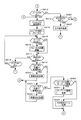
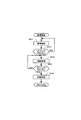
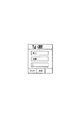
図4は、図3のステップSA24におけるキーワード登録処理のフローチャートである。まず、表示部8にキーワード登録画面を表示する(ステップSB1)。図8は、キーワード登録画面を示す図である。この画面には、登録するキーワード用の複数の文字入力エリア、決定スイッチのアイコン、クリアスイッチのアイコンを表示し、文字入力カーソルを文字入力エリアへ表示する(ステップSB2)。この画面を表示した最初は、1番上の文字入力エリアの左端に文字入力カーソルを表示する。 FIG. 4 is a flowchart of the keyword registration process in step SA24 of FIG. First, a keyword registration screen is displayed on the display unit 8 (step SB1). FIG. 8 is a diagram showing a keyword registration screen. On this screen, a plurality of character input areas for a keyword to be registered, a determination switch icon, and a clear switch icon are displayed, and a character input cursor is displayed in the character input area (step SB2). At the beginning of displaying this screen, a character input cursor is displayed at the left end of the uppermost character input area.
次に、カーソルスイッチがオンされたか否かを判別し(ステップSB3)、このスイッチがオンされたときは、それが上下カーソルであるか又は左右カーソルであるかを判別する(ステップSB4)。上下カーソルである場合には、文字入力カーソルを別の文字入力エリアへ移動する(ステップSB5)。一方、左右カーソルスイッチがオンされたときは、文字入力カーソルを同じ文字入力エリア内で移動する(ステップSB6)。ステップSB5若しくはステップSB6において文字入力カーソルを移動した後、又は、ステップSB3においてカーソルスイッチがオンでない場合には、スイッチ部5の操作によって、文字入力がされたか否かを判別する(ステップSB7)。
文字入力がされたときは、文字入力カーソルに入力文字を表示して(ステップSB8)、文字入力カーソルを1文字分だけ移動する(ステップSB9)。
Next, it is determined whether or not the cursor switch is turned on (step SB3). If this switch is turned on, it is determined whether it is a vertical cursor or a left and right cursor (step SB4). If the cursor is an up / down cursor, the character input cursor is moved to another character input area (step SB5). On the other hand, when the left / right cursor switch is turned on, the character input cursor is moved within the same character input area (step SB6). After the character input cursor is moved in step SB5 or SB6, or if the cursor switch is not turned on in step SB3, it is determined whether or not a character is input by operating the switch unit 5 (step SB7).
When a character is input, the input character is displayed on the character input cursor (step SB8), and the character input cursor is moved by one character (step SB9).
次に、決定スイッチがオンされたか否かを判別し(ステップSB10)、このスイッチがオンでない場合には、クリアスイッチがオンされたか否かを判別する(ステップSB11)。このスイッチもオンされない場合には、ステップSB3に移行して、カーソルスイッチがオンされたか否かを判別する。決定スイッチがオンされたときは、各入力エリアに入力された文字列の単語をキーワードメモリ7のキーワード登録エリアにキーワードとして登録する(ステップSB12)。
ステップSB12の登録の後、又は、ステップSB11においてクリアスイッチがオンされたときは、メインルーチンに戻る。
Next, it is determined whether or not the decision switch is turned on (step SB10). If this switch is not turned on, it is determined whether or not the clear switch is turned on (step SB11). If this switch is not turned on, the process proceeds to step SB3 to determine whether or not the cursor switch is turned on. When the determination switch is turned on, the word of the character string input in each input area is registered as a keyword in the keyword registration area of the keyword memory 7 (step SB12).
After the registration in step SB12 or when the clear switch is turned on in step SB11, the process returns to the main routine.
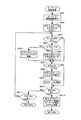
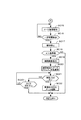
図5および図6は、メール着信検知処理のフローチャートである。図5において、メールを受信すると受信BOXへストアする(ステップSC1)。次に、全検出文字数のレジスタを「0」にクリアし(ステップSC2)、メール本文内の文字数をカウントする(ステップSC3)。次に、キーワード登録エリアから1つのキーワードを取り出す(ステップSC4)。そして、メール本文内にあるキーワード数を検出する(ステップSC5)。すなわち、キーワードと一致する文字列を検出する。次に、キーワードの文字数とキーワード数とを乗算して、その乗算結果を検出文字数のレジスタにストアする(ステップSC6)。次に、全検出文字数のレジスタに検出文字数を累算する(ステップSC7)。 5 and 6 are flowcharts of the incoming mail detection process. In FIG. 5, when a mail is received, it is stored in the reception BOX (step SC1). Next, the register of the total number of detected characters is cleared to “0” (step SC2), and the number of characters in the mail body is counted (step SC3). Next, one keyword is taken out from the keyword registration area (step SC4). Then, the number of keywords in the mail body is detected (step SC5). That is, a character string that matches the keyword is detected. Next, the number of characters of the keyword is multiplied by the number of keywords, and the multiplication result is stored in a register for the number of detected characters (step SC6). Next, the number of detected characters is accumulated in the register of the total number of detected characters (step SC7).
例えば、受信メール(1)のメール本文が「定期の成人病検診のお知らせです。成人病検診の予約をして下さい」であるとする。この場合には、メール本文内の文字数は「29」個である。キーワード登録エリアから括弧内の文字数である「成人(2)」のキーワードを取り出したときは、メール本文内のキーワード数は「2」個である。この場合の検出文字数は「4(=2×2))である。他のキーワードに一致する文字列がないので、全検出文字数は「4」となる。
一方、別の受信メール(2)のメール本文が「成人向けの画像が見放題!無料体験!新たな成人出会、成人交際も期待!」であるとする。この場合には、メール本文内の文字数は「29」個である。キーワード登録エリアから「成人(2)」、「交際(2)」、「見放題(3)」、「無料体験(4)」、「出会(2)」のキーワードを取り出したときは、全検出文字数は「19(=2×4+3×1+4×1+2×1+2×1)」である。
For example, assume that the email body of the received email (1) is “Notice of regular adult disease screening. Please make a reservation for adult disease screening”. In this case, the number of characters in the mail body is “29”. When the keyword “adult (2)”, which is the number of characters in parentheses, is extracted from the keyword registration area, the number of keywords in the mail text is “2”. In this case, the number of detected characters is “4 (= 2 × 2).” Since there is no character string that matches another keyword, the total number of detected characters is “4”.
On the other hand, it is assumed that the mail text of another received mail (2) is “Unlimited viewing of adult-oriented images! Free trial! Expect new adult encounters and adult dating!”. In this case, the number of characters in the mail body is “29”. When keywords "adult (2)", "dating (2)", "unlimited viewing (3)", "free experience (4)", "meeting (2)" are taken out from the keyword registration area, The number of detected characters is “19 (= 2 × 4 + 3 × 1 + 4 × 1 + 2 × 1 + 2 × 1)”.
そして、キーワード登録エリアにまだ調べていないキーワードがあるか否かを判別し(ステップSC8)、調べていないキーワードがある場合には、ステップSC4に移行して、次のキーワードを取り出して、ステップSC8までのループ処理を繰り返す。ステップSC8において、調べていないキーワードがない場合には、全検出文字数の値をメール内の文字数の値で除算して、その除算値を一致率αとしてレジスタにストアする(ステップSC9)。 Then, it is determined whether or not there is an unchecked keyword in the keyword registration area (step SC8). If there is an unchecked keyword, the process proceeds to step SC4, the next keyword is taken out, and step SC8 is taken. Repeat the loop process up to. If there is no keyword not checked in step SC8, the value of the total number of detected characters is divided by the value of the number of characters in the mail, and the divided value is stored in the register as the coincidence rate α (step SC9).
次に、図6のフローチャートにおいて、αの値が基準値以下であるか否かを判別する(ステップSC10)。この場合において、基準値を「0.33」とする。すなわち、メール本文の一致率αが1/3より大きい場合を好ましくないメールとする。例えば上記例で、受信メール(1)のαは、4/29=約0.14であり、受信メール(2)のαは、19/29=約0.66である。αの値が基準値以下である場合には、スピーカ10又はバイブレータ11によってメール着信報知を行って(ステップSC11)、一定時間が経過したか否かを判別する(ステップSC12)。一定時間が経過したときは、着信報知を停止して(ステップSC13)、メインルーチンに戻る。一方、αの値が基準値より大きい場合には、そのメールを受信BOXから削除して(ステップSC14)、メインルーチンに戻る。
したがって、上記例で、受信メール(1)は、αの値が約0.14(<0.33)であるので受信BOXにそのまま保存されるが、受信メール(2)は、αの値が約0.66(>0.33)であるので受信BOXから削除される。
Next, in the flowchart of FIG. 6, it is determined whether or not the value of α is equal to or less than a reference value (step SC10). In this case, the reference value is “0.33”. That is, a case where the matching rate α of the mail text is larger than 1/3 is regarded as an undesirable mail. For example, in the above example, α of the received mail (1) is 4/29 = about 0.14, and α of the received mail (2) is 19/29 = about 0.66. If the value of α is equal to or less than the reference value, the incoming mail notification is performed by the
Therefore, in the above example, the received mail (1) is stored in the received BOX as it is because the value of α is about 0.14 (<0.33), but the received mail (2) has the value of α. Since it is about 0.66 (> 0.33), it is deleted from the reception BOX.
図7は、電話の着信検知処理のフローチャートである。電話の着信を検知すると、スピーカ10又はバイブレータ11によって着信報知を行い(ステップSD1)、オフフックスイッチがオンされたか否かを判別する(ステップSD2)。このスイッチがオンされたときは、通話処理に遷移して(ステップSD3)、相手先のユーザとの通話が行われる。その後は、オンフックスイッチがオンされたか否かを判別し(ステップSD4)、このスイッチがオンされたときは回線切断などの終話処理回を行って(ステップSD5)、図2のメインルーチンに戻って待受画面を表示する。
FIG. 7 is a flowchart of incoming call detection processing. When the incoming call is detected, the incoming call is notified by the
以上のように、この第1実施形態によれば、受信BOXに受信メールが記憶されたときは、キーワードメモリ7に記憶されている複数種類のキーワードから各キーワードを順次読み出して、各キーワードと一致する文字列を受信メールから検出し、その検出結果に基づいて複数種類のキーワードと受信メールの文字列との一致率αを算出し、その算出した一致率αが基準値より大きい場合には受信されたメールを受信BOXから削除する。
この場合において、CPU1は、1つの種類のキーワードと一致する文字列の文字数と、そのキーワードと一致する文字列の個数との乗算値を検出文字数として求め、キーワードメモリ7から順次読み出したキーワードと一致する文字列ごとに求めた検出文字数を累算して、受信メール内の全検出文字数を求め、受信メール内の全文字数で全検出文字数を除算して一致率αを算出する。
したがって、受信したメールの内容を正確に分析して、削除すべき好ましくないメールを高い精度で抽出することができる。
As described above, according to the first embodiment, when a received mail is stored in the reception BOX, each keyword is sequentially read from a plurality of types of keywords stored in the
In this case, the
Therefore, it is possible to accurately analyze the contents of the received mail and extract unfavorable mail to be deleted with high accuracy.
次に、図1の構成による第2実施形態の動作について、図9に示すメール着信検知処理のフローチャートおよび図10に示す着信メールの表示画面を参照して説明する。第2実施形態におけるCPU1のメインルーチン、キーワード登録処理、メール着信検知処理の一部、および電話の着信検知処理の各フローチャートについては、第1実施形態において、図2および図3に示したメインルーチン、図4に示したキーワード登録処理、図5に示したメール着信の一部、および図7に示した着信検知処理における各フローチャートと同じであるので、必要に応じて、これらを援用して第2実施形態を説明する。
Next, the operation of the second embodiment configured as shown in FIG. 1 will be described with reference to the flowchart of the incoming mail detection process shown in FIG. 9 and the incoming mail display screen shown in FIG. The main routine of the
図5のステップSC9において、一致率αを算出した後は、図9のフローチャートにおいて、スピーカ10又はバイブレータ11によってメール着信報知を行って(ステップSC15)、一定時間が経過したか否かを判別する(ステップSC16)。一定時間が経過したときは、着信報知を停止して(ステップSC17)、αの値が基準値より大きいか否かを判別する(ステップSC18)。αの値が基準値より大きい場合には、表示部8に確認画面を表示して(ステップSC19)、その確認画面にメールアドレス、件名、一致率αなどを表示する(ステップSC20)。
After calculating the coincidence rate α in step SC9 in FIG. 5, in the flowchart in FIG. 9, mail arrival notification is performed by the
図10は、一致率αの値が基準値より大きい場合の確認画面を示す図である。この画面には、メールアドレス、件名、一致率α、削除スイッチのアイコンおよびクリアスイッチのアイコンが表示される。
そして、削除スイッチがオンされたか否かを判別し(ステップSC21)、このスイッチがオンされたときは、受信B0Xからこのメールを削除する(ステップSC22)。そして、メインルーチンに戻る。一方、クリアスイッチがオンされたか否かを判別し(ステップSC23)、このスイッチがオンされたときは、このメールを削除することなく、メインルーチンに戻る。
FIG. 10 is a diagram showing a confirmation screen when the value of the coincidence rate α is larger than the reference value. On this screen, a mail address, a subject, a matching rate α, a deletion switch icon, and a clear switch icon are displayed.
Then, it is determined whether or not the deletion switch is turned on (step SC21). When this switch is turned on, this mail is deleted from the reception B0X (step SC22). Then, the process returns to the main routine. On the other hand, it is determined whether or not the clear switch is turned on (step SC23). When this switch is turned on, the process returns to the main routine without deleting this mail.
以上のように、この第2実施形態によれば、受信BOXに受信メールが記憶されたときは、キーワードメモリ7に記憶されている複数種類のキーワードから各キーワードを順次読み出して、各キーワードと一致する文字列を受信メールから検出し、その検出結果に基づいて複数種類のキーワードと受信メールの文字列との一致率αを算出する。その算出した一致率αが基準値より大きい場合には、その好ましくないメールを削除する前に、そのメールの削除を問うメッセージを算出された一致率αとともに表示部8に表示し、削除の指令が入力された場合に、そのメールを受信BOXから削除する。したがって、第1実施形態と同様に、受信したメールの内容を正確に分析して、削除すべき好ましくないメールを高い精度で抽出することができるとともに、強制的に削除するのではなく、削除するか削除しないかをユーザの自由裁量に委ねることができる。
As described above, according to the second embodiment, when a received mail is stored in the reception BOX, each keyword is sequentially read out from a plurality of types of keywords stored in the
上記各実施形態においては、キーワードの文字数とメール本文内のキーワード数とを乗算して検出文字数を求める構成にしたが、キーワードを登録する際に、登録するキーワードに重み付けをして登録してもよい。例えば、「成人」、「交際」、「見放題」、「無料体験」、「出会」の各キーワードに対して、「3」、「3」、「2」、「2」、「1」、「2」と重み付けをして登録し、検出文字数を求める際に、文字数の代わりに重み付けを用いて、「成人(3)」、「交際(3)」、「見放題(2)」、「無料体験(1)」、「出会(2)」とメール本文内のキーワード数とを乗算して検出文字数を求める構成してもよい。
さらに、その後、CPU1は、受信した好ましくないメールを分析して、頻度の多い文字列のキーワードの重み付けの数値を変更するような構成にしてもよい。また、受信した好ましくないメールを分析して、キーワードに登録されていないが、頻繁に出てくる文字列をキーワードとして追加登録するような構成にしてもよい。例えば、「アダルト」、「H体験」の文字列や、「♂」、「♀」のような記号を追加登録する。
In each of the above embodiments, the number of detected characters is calculated by multiplying the number of characters of the keyword and the number of keywords in the mail body. However, when registering a keyword, the keyword to be registered may be weighted and registered. Good. For example, “3”, “3”, “2”, “2”, “1” for the keywords “adult”, “dating”, “unlimited viewing”, “free trial”, “meeting” , “2” is weighted and registered, and when the number of detected characters is calculated, weighting is used instead of the number of characters, and “adult (3)”, “dating (3)”, “unlimited (2)”, The number of detected characters may be calculated by multiplying “free trial (1)”, “meeting (2)” and the number of keywords in the mail text.
Further, after that, the
なお、上記各実施形態においては、ROM2にあらかじめ記憶されている通信制御処理のプログラムをCPU1が実行する装置の発明について説明したが、RFブロック4によってネットワークを介して、外部のサーバーなどからダウンロードされた通信制御処理のプログラムを書き込み可能な不揮発性メモリなどにインストールし、その通信制御処理のプログラムをCPU1が実行するような構成も可能である。この場合には、プログラムの発明を実現する。
In each of the above embodiments, the invention of an apparatus in which the
すなわち、そのプログラムは、所定の通信回線を介して受信された受信メールを第1の記憶手段に記憶する第1のステップと、前記第1の記憶手段に受信メールが記憶されたときは、第2の記憶手段に記憶されている複数種類の参照文字列から各参照文字列を順次読み出して、各参照文字列と一致する文字列を前記受信メールから検出する第2のステップと、前記第2のステップによる検出結果に基づいて前記複数種類の参照文字列と前記受信メールの文字列との一致率を算出する第3のステップと、
前記第3のステップによって算出された一致率が基準値より大きい場合には前記受信されたメールを削除する第4のステップと、を実行する。
That is, the program stores a first step of storing received mail received via a predetermined communication line in the first storage means, and when the received mail is stored in the first storage means, A second step of sequentially reading each reference character string from a plurality of types of reference character strings stored in the storage means 2 and detecting a character string that matches each reference character string from the received mail; A third step of calculating a match rate between the plurality of types of reference character strings and the character string of the received mail based on the detection result of the step of:
And a fourth step of deleting the received mail if the matching rate calculated in the third step is larger than a reference value.
1 CPU
2 ROM
3 RAM
4 RFブロック
5 スイッチ部
6 表示ドライバ
7 キーワードメモリ
8 表示部
9 マイク
10 スピーカ
11 バイブレータ
1 CPU
2 ROM
3 RAM
4
Claims (4)
前記第1の記憶手段に受信メールが記憶されたときは、第2の記憶手段に記憶されている複数種類の参照文字列から各参照文字列を順次読み出して、各参照文字列と一致する文字列を前記受信メールから検出する文字列検出手段と、
前記文字列検出手段による検出結果に基づいて前記複数種類の参照文字列と前記受信メールの文字列との一致率を算出する演算手段と、
前記演算手段によって算出された一致率が基準値より大きい場合には前記受信されたメールを削除するメール処理手段と、
を備えた通信端末装置。 Mail storage means for storing received mail received via a predetermined communication line in the first storage means;
When the received mail is stored in the first storage means, each reference character string is sequentially read out from a plurality of types of reference character strings stored in the second storage means, and the characters that match the reference character strings A character string detecting means for detecting a string from the received mail;
An arithmetic means for calculating a matching rate between the plurality of types of reference character strings and the character string of the received mail based on a detection result by the character string detection means;
A mail processing means for deleting the received mail when the matching rate calculated by the calculating means is larger than a reference value;
A communication terminal device.
前記第1の記憶手段に受信メールが記憶されたときは、第2の記憶手段に記憶されている複数種類の参照文字列から各参照文字列を順次読み出して、各参照文字列と一致する文字列を前記受信メールから検出する第2のステップと、
前記第2のステップによる検出結果に基づいて前記複数種類の参照文字列と前記受信メールの文字列との一致率を算出する第3のステップと、
前記第3のステップによって算出された一致率が基準値より大きい場合には前記受信されたメールを削除する第4のステップと、
を実行する通信制御処理のプログラム。
A first step of storing received mail received via a predetermined communication line in a first storage means;
When the received mail is stored in the first storage means, each reference character string is sequentially read out from a plurality of types of reference character strings stored in the second storage means, and the characters that match the reference character strings A second step of detecting a column from the received mail;
A third step of calculating a matching rate between the plurality of types of reference character strings and the character string of the received mail based on the detection result of the second step;
A fourth step of deleting the received mail if the matching rate calculated in the third step is greater than a reference value;
Communication control processing program that executes
Priority Applications (1)
| Application Number | Priority Date | Filing Date | Title |
|---|---|---|---|
| JP2004102709A JP2005292891A (en) | 2004-03-31 | 2004-03-31 | Communication terminal device and communication control processing program |
Applications Claiming Priority (1)
| Application Number | Priority Date | Filing Date | Title |
|---|---|---|---|
| JP2004102709A JP2005292891A (en) | 2004-03-31 | 2004-03-31 | Communication terminal device and communication control processing program |
Publications (1)
| Publication Number | Publication Date |
|---|---|
| JP2005292891A true JP2005292891A (en) | 2005-10-20 |
Family
ID=35325797
Family Applications (1)
| Application Number | Title | Priority Date | Filing Date |
|---|---|---|---|
| JP2004102709A Pending JP2005292891A (en) | 2004-03-31 | 2004-03-31 | Communication terminal device and communication control processing program |
Country Status (1)
| Country | Link |
|---|---|
| JP (1) | JP2005292891A (en) |
-
2004
- 2004-03-31 JP JP2004102709A patent/JP2005292891A/en active Pending
Similar Documents
| Publication | Publication Date | Title |
|---|---|---|
| JP4447045B2 (en) | Mobile communication terminal providing integrated management function of character message and method thereof | |
| US8228361B2 (en) | Information processing device, information processing method, information processing program, and portable terminal device | |
| JP2005318467A (en) | Communication terminal device and communication terminal processing program | |
| EP1983750A2 (en) | Control device, mobile communication system, and communication terminal | |
| JP2009151823A (en) | Electronic device and electronic device processing program | |
| KR20120040880A (en) | Device and method for controlling giro charge payment in wireless terminal | |
| JP2008544629A (en) | Mobile communication terminal and method for providing a hyperlink function to a telephone number included in a text message | |
| CN101309320B (en) | Electronic device and processing program of electronic device | |
| JP5660663B2 (en) | Terminal device and program | |
| JPH11289346A (en) | Terminal device | |
| KR20070106524A (en) | Handheld terminal | |
| KR100790177B1 (en) | Method and device for displaying image on mobile terminal | |
| CN101291465A (en) | Control device, mobile communication system and communication terminal | |
| JP5344587B2 (en) | Terminal device and program | |
| JP2005292891A (en) | Communication terminal device and communication control processing program | |
| JP2008270911A (en) | Control device, mobile communication system, and communication terminal | |
| JP5885002B2 (en) | Terminal device and program | |
| JP4229806B2 (en) | Communication terminal, program for realizing search function in communication terminal, and recording medium on which program is recorded | |
| JP2005292890A (en) | Information processing apparatus and information processing program | |
| KR20070057351A (en) | Mobile terminal for converting braille to voice | |
| KR100678157B1 (en) | How to set up shortcut keys on your mobile device and how to use them | |
| JP5472766B2 (en) | Electronic device and electronic device processing program | |
| JP2016105303A (en) | Terminal device and program | |
| KR100663433B1 (en) | How to display data on a mobile terminal | |
| JP2006005537A (en) | Mobile terminal device |
Legal Events
| Date | Code | Title | Description |
|---|---|---|---|
| RD02 | Notification of acceptance of power of attorney |
Free format text: JAPANESE INTERMEDIATE CODE: A7422 Effective date: 20060209 |
|
| RD04 | Notification of resignation of power of attorney |
Free format text: JAPANESE INTERMEDIATE CODE: A7424 Effective date: 20060314 |