JP2005293523A - Visualization and classification method of information - Google Patents
Visualization and classification method of information Download PDFInfo
- Publication number
- JP2005293523A JP2005293523A JP2004130445A JP2004130445A JP2005293523A JP 2005293523 A JP2005293523 A JP 2005293523A JP 2004130445 A JP2004130445 A JP 2004130445A JP 2004130445 A JP2004130445 A JP 2004130445A JP 2005293523 A JP2005293523 A JP 2005293523A
- Authority
- JP
- Japan
- Prior art keywords
- information
- display
- classification
- category
- folder
- Prior art date
- Legal status (The legal status is an assumption and is not a legal conclusion. Google has not performed a legal analysis and makes no representation as to the accuracy of the status listed.)
- Pending
Links
- 238000000034 method Methods 0.000 title claims abstract description 35
- 238000012800 visualization Methods 0.000 title claims description 13
- 238000013507 mapping Methods 0.000 claims description 8
- 238000012545 processing Methods 0.000 claims description 8
- 230000004044 response Effects 0.000 claims description 4
- 238000007794 visualization technique Methods 0.000 claims 1
- 230000002123 temporal effect Effects 0.000 abstract 2
- 238000007726 management method Methods 0.000 description 42
- 230000006870 function Effects 0.000 description 7
- 238000013480 data collection Methods 0.000 description 4
- 238000013523 data management Methods 0.000 description 4
- 238000010586 diagram Methods 0.000 description 3
- 238000012217 deletion Methods 0.000 description 2
- 230000037430 deletion Effects 0.000 description 2
- PCTMTFRHKVHKIS-BMFZQQSSSA-N (1s,3r,4e,6e,8e,10e,12e,14e,16e,18s,19r,20r,21s,25r,27r,30r,31r,33s,35r,37s,38r)-3-[(2r,3s,4s,5s,6r)-4-amino-3,5-dihydroxy-6-methyloxan-2-yl]oxy-19,25,27,30,31,33,35,37-octahydroxy-18,20,21-trimethyl-23-oxo-22,39-dioxabicyclo[33.3.1]nonatriaconta-4,6,8,10 Chemical compound C1C=C2C[C@@H](OS(O)(=O)=O)CC[C@]2(C)[C@@H]2[C@@H]1[C@@H]1CC[C@H]([C@H](C)CCCC(C)C)[C@@]1(C)CC2.O[C@H]1[C@@H](N)[C@H](O)[C@@H](C)O[C@H]1O[C@H]1/C=C/C=C/C=C/C=C/C=C/C=C/C=C/[C@H](C)[C@@H](O)[C@@H](C)[C@H](C)OC(=O)C[C@H](O)C[C@H](O)CC[C@@H](O)[C@H](O)C[C@H](O)C[C@](O)(C[C@H](O)[C@H]2C(O)=O)O[C@H]2C1 PCTMTFRHKVHKIS-BMFZQQSSSA-N 0.000 description 1
- 238000012937 correction Methods 0.000 description 1
- 238000013500 data storage Methods 0.000 description 1
- 230000000694 effects Effects 0.000 description 1
- 230000002708 enhancing effect Effects 0.000 description 1
- 230000010365 information processing Effects 0.000 description 1
- 238000012986 modification Methods 0.000 description 1
- 230000004048 modification Effects 0.000 description 1
- 238000012546 transfer Methods 0.000 description 1
Images









Landscapes
- Information Retrieval, Db Structures And Fs Structures Therefor (AREA)
Abstract
Description
情報を収集管理するシステムにおいて、情報の再利用性を高める目的で各情報に付されたキーワードを頼りにキーワード検索する方法とは別に、情報の発見的な探索方法を容易にするユーザインタフェースを実現するための情報の管理方法と、情報の検索方法と、情報の視覚化とそのための分類方法。 In a system that collects and manages information, a user interface that facilitates a heuristic search method for information apart from a keyword search that relies on keywords assigned to each information to improve the reusability of information Information management method, information retrieval method, information visualization and classification method therefor.
従来から情報検索においてはキーワード検索が良く用いられているが、分野別の情報検索には有効であるものの同一分野内では多数の候補情報が提示されるため、ユーザが真に所望する情報の検索には必ずしも効率的ではない。そこで、これを補うために情報を構造的に分類した上で、所望の情報の発見的な探索方法を助けるために三次元表示を適用してその情報構造を視覚化する方法と手段が提案されてきた。
従来提案されてきた三次元表示によるグラフィックユーザインタフェースでは、演算処理の負荷が大きくポインタ等を用いたユーザの指示に対する応答速度が遅い上に、情報の一覧性と詳細表示による発見的探索を容易にするための情報の分類方法が必ずしも適切でなかったために利便性が高くなかったという問題点があった。そこで、本発明は情報を視覚化して所望の情報の発見的探索を容易にするために一般のユーザが識別しやすい分類法と、情報群の概観を与える演算負荷の小さい三次元空間表示法と、情報探索の結果を最近に参照または登録した順に該当するファイルの概略情報をリスト表示(以降、フロー形式の表示と表す)する方法と手段を提供することを目的とする。 The conventionally proposed graphic user interface with 3D display has a heavy processing load and a slow response speed to user instructions using pointers, etc., and facilitates heuristic search by information listability and detailed display. However, there is a problem in that convenience is not high because the information classification method is not always appropriate. Therefore, the present invention provides a classification method that is easy for general users to identify in order to visualize information and facilitate the heuristic search of desired information, and a three-dimensional space display method that gives an overview of information groups and has a low computational load. It is an object of the present invention to provide a method and means for displaying summary information of corresponding files in the order in which information search results have been recently referred to or registered (hereinafter, referred to as flow format display).
上記の課題を解決するために本願の請求項1に記載の情報の視覚化と分類方法の発明は、テキスト、画像、音声、映像のような様々なタイプの情報を入力するデータ収集手段と、該情報を記録する記憶装置と、収集している情報または該記憶装置内の情報を閲覧するときに該情報を確認するための表示手段と、情報の記録または再生両方の動作を制御するシステムコントローラとキー操作部を備え、さらにユーザが選んだデータ管理システム(DBMS)が実装された情報収集管理システムにおいて、情報収集管理用ユーザインタフェースに適用されることにより情報の発見的探索を容易にすることを特徴とする。 In order to solve the above-mentioned problem, the invention of the information visualization and classification method according to
前記情報収集管理システムにおいて、記録ならびに再生動作を制御する前記システムコントローラは、中央処理ユニット(CPU)と、時間管理用のリアルタイムクロック(RTC)と、主記憶メモリと、不揮発メモリと、高性能化のために必要とあれば画像や音声、映像データを前記記憶装置に記録する際に圧縮し、または前記記憶装置内のデータを再生して前記表示手段に出力する際に該データを伸長する機能を併せ持つデータ処理サブシステムと、該データ処理サブシステムが前記データ処理に使用するビデオメモリを加えて構成され、本発明が提供する情報の視覚化と分類法を適用した情報収集管理用ユーザインタフェースは主に前記CPUと主記憶メモリと不揮発メモリを用いて実現されることを特徴とする。 In the information collection management system, the system controller that controls recording and reproduction operations includes a central processing unit (CPU), a real-time clock (RTC) for time management, a main memory, a nonvolatile memory, and high performance. A function of compressing image, audio and video data when recording to the storage device, or decompressing the data when reproducing the data in the storage device and outputting it to the display means, if necessary And a data processing subsystem including the video memory used for the data processing, and an information collection management user interface to which the information visualization and classification method provided by the present invention is applied. The present invention is mainly realized by using the CPU, main memory, and nonvolatile memory.
請求項1に記載の情報の視覚化と分類法において、収集した情報や作成した情報を包括的に管理する上でユーザが識別しやすいような分類項目により前記情報を階層的に分類すると共に、一般に最近に利用された情報が再利用される頻度が高いことから、情報を参照または登録した時刻により時間軸上の単一の位置に記録更新する方策を採り、仮想的に三次元の時空間に情報を収納する。情報の視覚化には前記階層構造を三次元的に空間表示することにより情報群の概観を与え、前記概観表示においてポインタで選ばれた情報の最小区分の内容を前記フロー形式で表示することにより情報の発見的探索を容易にして情報の再利用性を高めることを特徴とする。 In the information visualization and classification method according to
請求項2と請求項3に記載の情報の視覚化と分類法において、ユーザが識別しやすい分類法として、まず情報の利用目的別に大分類、次に知識分野で中分類し、該知識分野の中で特化した知識項目をフォルダ単位で小分類する一方、該フォルダに収納する情報内容をファイルと総称し、ユーザが作成する著作物をレコード、該レコードの作成に用いられる資料をマテリアル、画像や音声や映像データはストリームという項目で前記階層分類とは横断的に分類した上で、分類されたファイルをさらに相互に性質の異なるタイプ別に細分類する。さらに、仮想的に情報を収納する前記時空間において、探索期間を指定した上で前記分類項目を任意に組み合わせて情報の探索範囲を狭めて探索した結果を前記フロー形式で表示することにより情報の発見的探索を容易にすることを特徴とする。 In the information visualization and classification methods according to
請求項4に記載の情報の視覚化において、利用目的別に大分類された情報群であるカラセルの種類と個数が分かるように画面の一部にアイコンを表示し、特定のカラセルの内容を概観するために、該カラセルの構成要素である中分類の各カテゴリーラベルをルートとする小分類のフォルダ群を円環状に回転木馬または回転コンベア風に配し遠近法を適用して三次元表示することにより前方のカテゴリー群を後方のカテゴリー群に比して拡大表示して強調する。各カテゴリーと関連するフォルダ群の画面上での表示枠は、前記情報収集管理システムにおける前記情報収集管理用ユーザインタフェースを通してユーザが定義した前記カラセルのカテゴリー数により、あらかじめメモリに用意している遠近法を適用したカラセル風の標準的な表示画面を選び出し、各カテゴリーと関連するフォルダ群と各表示枠を対応させるマッピング関係を初期設定して表示する。その後、ユーザは該表示画面の中の各カテゴリーラベルと関連するフォルダ群の表示枠の画面上の位置とサイズならびに該表示枠毎の表示文字サイズを対話的に変更する。ユーザが表示画面中の回転指示アイコンを操作して前記カテゴリーラベルと関連するフォルダ群の表示が左右いずれか隣に移動するように指示したとき、またはポインタで特定のカテゴリーラベルまたは関連するフォルダ群を選定して前記情報収集管理ユーザインタフェースが該カテゴリーを強調表示のために前方の特定の表示位置へ瞬時に移動するとき、前記情報収集管理用ユーザインタフェースは前記マッピング関係を変えることにより瞬時的な移動を実行する。これにより、三次元表示を採用しながら演算処理の負荷を抑えることができ応答速度を向上させて電力消費も低減できることを特徴とする。 5. In the visualization of information according to
以上説明したように、本発明によれば、収集した情報と作成した情報を包括的に管理する上で情報の全体像が把握しやすくしかも管理する情報群の中から所望の情報を発見的に探索することが容易になり情報の再利用性を高めることができる。 As described above, according to the present invention, in comprehensively managing collected information and created information, it is easy to grasp the overall image of information and desired information can be found heuristically from a group of information to be managed. It becomes easy to search and can improve the reusability of information.
以下に、本発明を実施するための形態を図1〜図16を用いて説明する。 Below, the form for implementing this invention is demonstrated using FIGS.
図1に情報収集管理システム10のブロック図を示した。該情報収集管理システム10は、記録または再生機能と、該記録再生機能に関連する機能の実行を制御するシステムコントローラ100と、キー操作部200と、ディスプレイ310とスピーカ320からなる表示手段300と、メモリカード410、HDD420、DVD430からなるデータ記憶装置400と、音声や動画像データを入力するラジオ、テレビのチューナ510、ネットワークインタフェース520、マイク531、スピーカ531からなるライブ入力手段530を含むデータ収集手段500から構成される。 FIG. 1 shows a block diagram of the information collection management system 10. The information collection management system 10 includes a recording / reproducing function, a system controller 100 that controls execution of functions related to the recording / reproducing function, a
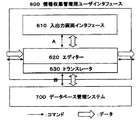
図2に、本発明を適用する情報収集管理用ユーザインタフェース600と前記情報収集管理システム10が内蔵するユーザが選んだデータ管理システム700との関係を示した。該情報管理用ユーザインタフェース600は、ユーザが前記データ管理システム700の詳細な操作法を知ることなくユーザが収集した情報や作成した情報を管理する上で本発明が提供する情報の発見的探索能力を備えることによりその利便性を高めるのが目的であり、ユーザと対話するための入出力画面インタフェース610と、該入出力画面インタフェースにおいて情報を参照するための情報探索または検索用の画面や、探索または検索結果の表示画面や、情報収集または作成時に閲覧するためのビューアーや、ファイル登録情報の変更と、関連情報の表示と変更と、利用実績登録と、データベースへのファイルの新規登録のための様々なダイアログを画面上に形成するエディター620と、前記入出力画面インタフェース610を通して伝達されるユーザの情報収集管理要求に応じて実際に前記データベース管理システム700にアクセスするためのコマンド列を発生して情報の授受を実行するトランスレータ630で構成される。該トランスレータ630は、適用するデータベース管理システム700により前期コマンド列とデータフォーマットが変わるものである。本発明による情報の視覚化と分類法により、情報収集管理用ユーザインタフェース600内に仮想的に形成される情報を収納し管理するための三次元時空間は、トランスレータ630内で生成されエディター620とデータベース管理システム700との橋渡し用の媒体として利用される。すなわち、情報の前記分類法による空間的な分類表と、情報を参照または登録した時刻を時間軸上の単一の位置に記録更新することにより作成される実績表を用いて形成される情報の収納管理のための前記仮想的時空間において、管理されるファイルのデータベース管理システム内のアドレスを示すポインタを管理する。すなわち、選択された空間分類項目と指定された探索期間で限定された前記実績表内において、前記トランスレータ630が最近の該当するファイルに関する概略情報から順に集めて前記エディター620に送り、該エディター620が前記フロー形式の表示リストを作成して入出力画像インタフェース610に送り前記表示手段300のディスプレイ310に表示する。 FIG. 2 shows a relationship between an information collection management user interface 600 to which the present invention is applied and a data management system 700 selected by a user built in the information collection management system 10. The information management user interface 600 is a heuristic search capability of information provided by the present invention for managing information collected and created by the user without knowing the detailed operation method of the data management system 700. The input / output screen interface 610 for interacting with the user, the information search or search screen for referring to information in the input / output screen interface, the search Or a search result display screen, a viewer for browsing when collecting or creating information, file registration information change, related information display and change, usage record registration, and new file registration to the database An editor 620 for forming various dialogs on the screen and the input / output screen interface 610 Constituted by the translator 630 to perform the actual transfer of the database management system 700 generates a command sequence for accessing the information in accordance with the user's information collection management request is transmitted. The translator 630 has a command sequence and data format that change depending on the database management system 700 to be applied. According to the information visualization and classification method of the present invention, a three-dimensional space-time for storing and managing information virtually formed in the information collection and management user interface 600 is generated in the translator 630 and the editor 620. It is used as a medium for bridging with the database management system 700. That is, information formed using a spatial classification table according to the classification method of information and a result table created by recording and updating the time at which information was referenced or registered at a single position on the time axis. In the virtual space-time for storage management, a pointer indicating an address in a database management system of a file to be managed is managed. That is, in the performance table limited by the selected spatial classification item and the specified search period, the translator 630 collects the summary information about the latest relevant file in order, and sends it to the editor 620. The editor 620 The flow format display list is created and sent to the input / output image interface 610 and displayed on the
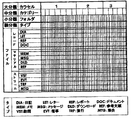
図3に一般のユーザが識別しやすい分類法を示した。情報群をまず階層的に、たとえば利用目的別に大分類し、次に知識分野別に中分類し、さらに特化された項目別にフォルダ単位に小分類する。該フォルダに収納する情報をファイルと総称して、前記階層的分類とは横断的に細分類する。ユーザが識別しやすい分類法として、該ファイルの中でユーザが作成する情報をレコードと名付け、日記(DIA)、レター(LET)、レポート(REP)、ドキュメント(DOC)の4タイプに、該レコードの作成に用いられる資料をマテリアルと名付け、メモ(MEM)、メッセージ(MSG)、ダウンロード情報(DLD)、参考文献(REF)の4タイプに、そして画像や音声や映像はストリームと名付け、訪問(VST)、旅行(TRP)、催事(EVT)、集会(MTG)の4タイプに細分類する例を示した。さらに、前記空間的分類と併せて情報を参照または登録した時刻を時間軸上の単一の位置に記録更新することにより、前記情報収集管理用ユーザインタフェース600内のトランスレータ630で仮想的に形成される図4に示すような情報収納用の時空間において、先ず探索期間を定めた上で分類項目を任意に組み合わせて探索範囲を狭めることにより情報の発見的探索を容易にする。 FIG. 3 shows a classification method that can be easily identified by general users. The information group is first classified hierarchically, for example, according to the purpose of use, then classified into a medium category according to the knowledge field, and further classified into folders for each specialized item. The information stored in the folder is collectively referred to as a file, and the hierarchical classification is subdivided in a transverse manner. As a classification method that is easy for the user to identify, information created by the user in the file is named a record, and the record is classified into four types: diary (DIA), letter (LET), report (REP), and document (DOC). The material used to create the material is named material, memo (MEM), message (MSG), download information (DLD), reference (REF), and images, audio and video are named streams, visit ( An example of subdividing into four types, VST), travel (TRP), special event (EVT), and assembly (MTG) was shown. Further, the time when the information is referred to or registered together with the spatial classification is recorded and updated at a single position on the time axis, so that it is virtually formed by the translator 630 in the information collection management user interface 600. In the time space for storing information as shown in FIG. 4, first, a search period is determined, and then the search range is narrowed by arbitrarily combining the classification items, thereby facilitating the heuristic search for information.
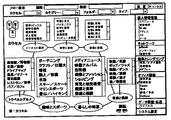
最初、ディスプレイ310上に表示されるのは、図5に示す表示画面の中で右端に機能を選択するための縦に帯状のウィンドウである。ここで、「情報検索」機能を選択すれば、情報探索または検索用の選択指示のための図5に示す画面が表示される。図5では利用目的別に大分類されたカラセルが第1〜3と3個あり、そのうち選ばれた第1カラセルの内容を概観するために、該カラセルを構成する中分類のカテゴリーラベルと関連する小分類のフォルダ群を円環状に配置し回転木馬(カラセル)風に配置した形で遠近法を適用して3次元的な空間表示をする一方、画面上端には探索期間の他に発見的探索のためのカラセル、カテゴリー、フォルダ、ファイルのタイプや検索のためのキーワードを入力するためのウィンドウが設けている。 Initially, what is displayed on the
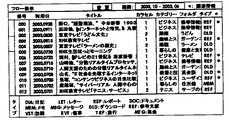
前記第1カラセルの内容を概観するための三次元空間表示において、ユーザがポインタ等で選んだフォルダの内容を詳細表示するために、画面上端のバー中の「期間」ウィンドウで指定した探索期間内で検索したファイルを図6に示すように画面右端に縦に帯状に前記フロー形式で表示することにより、前記第1カラセルの階層的な情報構造の概観の空間的表示と、該情報群の中でユーザによりポインタで選択されたフォルダの中のファイルに関する概略情報が、同一画面上に前記フロー形式で表示されて情報の発見的探索を容易にする。前記フロー形式の表示リストの中で特定のファイルを選んでダブルクリックすれば、前記入出力画面インタフェース610から前記エディター620にユーザの要求が伝わり、該エディター620は対応する指示を前記トランスレータ630に送る。該トランスレータ630は該指示をデータベース管理システム700へのコマンド列に変換して送ることにより得た該当のファイル情報を前記エディター620に返す。該ファイル情報を該エディター620が図13に示すようなビューアー上に展開し、入出力画面インタフェース610に送ることにより前記ファイル情報がディスプレイ310上に表示される。 In the three-dimensional space display for overview of the contents of the first carousel, within the search period specified in the “period” window in the bar at the top of the screen in order to display the contents of the folder selected by the user with a pointer or the like in detail. As shown in FIG. 6, the files retrieved in (1) are displayed in the above-mentioned flow format in the form of a vertical band at the right edge of the screen, thereby providing a spatial display of the overview of the hierarchical information structure of the first carousel and the information group. The summary information about the files in the folder selected by the pointer by the user is displayed in the flow format on the same screen to facilitate the heuristic search for information. If a specific file is selected and double-clicked in the flow format display list, the user request is transmitted from the input / output screen interface 610 to the editor 620, and the editor 620 sends a corresponding instruction to the translator 630. . The translator 630 returns the corresponding file information obtained by converting the instruction into a command string to the database management system 700 and sending it to the editor 620. The file information is displayed on the
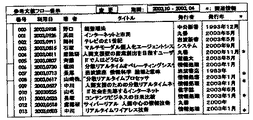
図5において画面上端に設けられたバー上の情報の発見的探索のためのウィンドウを用いて「期間」ウィンドウより探索期間のみを指定して決定ボタンをクリックし探索した結果のフロー形式による表示例を図7に示した。(図4でABCD面とEFGH面で挟まれた探索空間での探索結果)また、探索期間の他にカラセルとカテゴリーを入力して探索した結果のフロー形式による表示例を図8に(図4でpqrs面とtuvw面で挟まれた探索空間での探索結果)、探索期間の他にREF:参考文献タイプのファイルのみを入力して探索した結果のフロー形式による表示例を図9に(図4でabcd面とefgh面で挟まれた探索空間での探索結果)示した。いずれの表示画面上でも、指定された探索期間の中で該当するファイルに関する概略情報が前記フロー形式で表示される。探索結果の表示リストの中で特定のファイルをクリックして選択して該表示画面の上端のバーに設けられた「変更」ボタンをクリックすれば、図10に示す登録情報変更ダイアログが前記探索結果の表示画面にオーバレイして表示される。ダイアログの2段目のバーには前記表示リストで指定されたファイルの概略情報が再度表示され、その下欄に詳細な該ファイルの分類項目や属性が表示されるので、修正箇所があれば直接書き換えて「決定」ボタンをクリックすればよい。該ファイルの登録を削除するときは「削除」ボタンをクリックすれば、該当の表示内容がすべて消去され登録が抹消される。また、「挿入]ボタンをクリックして新規ファイルの概略情報や分類項目や属性等を入力し「決定」ボタンをクリックすれば、新規登録できる。これは参考文献が電子化されていないために記憶装置に入力できないが、参照記録を残したいときに有効である。新規登録されたファイルはトランスレータ630の中で最新ファイルとして扱われる。また、前記表示リストの右端にある*印欄は関連情報があることを示す記号で、*印のボタンをクリックすれば図11に示す関連情報の表示と変更ダイアログが該表示リストにオーバレイ表示される。該ダイアログ中の表示リストの最上段には前記表示リストにおいてクリックされたファイルの概略情報が再度表示され、その下に関連ファイルが表示される。前記ダイアログの最上段のバーに設けられた「新規」ボタンをクリックすれば、該ダイアログの表示リストに関連ファイルに関する前記情報収集管理システム内のデータベースに既存のファイルの概略情報と分類項目や属性等が直接記入して「決定」ボタンをクリックすれば新規登録される。修正、削除の場合には前記ダイアログの表示リストにおいて該当の関連情報をクリックして選び直接変更した後に、「決定」ボタンをクリックすればよい。上記の表示画面はすべて、エディター620内で作成され管理される。また、いずれの表示リストにおいてもファイルを選んでダブルクリックすれば、エディター620からの指示によりトランスレータ630がデータベース管理システム700にアクセスして得た該当のファイル情報を前記エディター620に返す。該ファイル情報を該エディター620が図13に示すようなビューアー上に展開して入出力画面インタフェースに送ることにより、前記ファイル情報がディスプレイ310上に表示される。 FIG. 5 shows an example of display in the flow format of the result of searching by specifying only the search period from the “Period” window and clicking the decision button using the window for heuristic search for information on the bar provided at the upper end of the screen in FIG. Is shown in FIG. (Search result in the search space sandwiched between the ABCD plane and the EFGH plane in FIG. 4) In addition to the search period, a display example in the flow format of the search result by inputting a carousel and a category is shown in FIG. FIG. 9 shows a display example in the form of a flow of the result of searching by inputting only a REF: reference type file in addition to the search period in addition to the search period (search result in the search space sandwiched between the pqrs plane and the tuvw plane). 4 shows a search result in a search space sandwiched between the abcd plane and the efgh plane). On any display screen, summary information about the corresponding file in the designated search period is displayed in the flow format. When a specific file is clicked and selected in the search result display list and a “change” button provided on the upper bar of the display screen is clicked, the registration information change dialog shown in FIG. Is displayed on the display screen. In the second bar of the dialog, the summary information of the file specified in the display list is displayed again, and the detailed classification items and attributes of the file are displayed in the lower column. You can rewrite it and click the “OK” button. When deleting the registration of the file, clicking the “delete” button deletes all the corresponding display contents and deletes the registration. Also, new information can be registered by clicking the “Insert” button, inputting the outline information, classification items, attributes, etc. of the new file and clicking the “Determine” button. This is effective when it is desired to keep a reference record, although the reference cannot be input to the storage device because it is not digitized. The newly registered file is handled as the latest file in the translator 630. In addition, the * mark column at the right end of the display list is a symbol indicating that there is related information, and when the * mark button is clicked, the display and change dialog of related information shown in FIG. 11 is overlaid on the display list. The The summary information of the file clicked on the display list is displayed again at the top of the display list in the dialog, and the related file is displayed below it. If you click the "New" button provided in the top bar of the dialog, the dialog list will display the summary information, classification items, attributes, etc. of existing files in the database in the information collection management system related to related files Enter directly and click the “OK” button to newly register. In the case of correction or deletion, click the relevant information in the display list of the dialog to select and change it directly, and then click the “OK” button. All the above display screens are created and managed in the editor 620. If a file is selected and double-clicked in any of the display lists, the translator 630 accesses the database management system 700 according to an instruction from the editor 620 and returns the corresponding file information to the editor 620. The file information is displayed on the
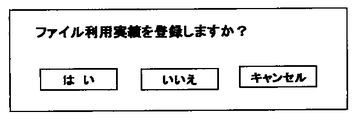
で説明した発見的情報探索により得た前記フロー形式による表示リスト中の特定のファイルを選択してデータベース管理システム700から得たファイル情報をエディター620が受け取り該ファイル情報を該エディター620が図13に示すようなビューアー上に展開して前記入出力画面インタフェース610に送ることにより、前記ディスプレイ310上に表示された該ファイル情報をユーザが閲覧した際、該ファイルを前記ビューアーの上端のバー上の「X」印のファイルを閉じるためのボタンをクリックすると、図12に示す利用実績登録ダイアログがオーバレイ表示される。ここで「はい」ボタンをクリックすると、トランスレータ630が管理するファイルの利用実績表は更新され、「いいえ」ボタンをクリックすれば更新されない。The editor 620 receives the file information obtained from the database management system 700 by selecting a specific file in the display list in the flow format obtained by the heuristic information search described in FIG. 13, and the editor 620 receives the file information in FIG. When the file information displayed on the
図1に示した情報収集管理システム10において、キー操作部200を操作して図13に示すようなビューアー上で作成されたテキストファイルや、データ収集手段500により入力されたストリーム情報や、メモリカード410を媒体にして取り込まれた様々なタイプのファイルを前記ビューアー上で確認した上で、メニューバー上の「ファイル」ボタンをプルダウンして「名前をつけて保存」を選べば、図14のファイル登録ダイアログが表示される。該ダイアログの中で保存先としてカラセル、カテゴリー、フォルダを選択する。カラセル、カテゴリー、フォルダのいずれかを新規に追加したいときは該当の欄を選択して「新規」ボタンをクリックすれば、該当の欄の最下行の下にカーソルが表示されるので名前を入力すれば良い。保存先の名前の修正や削除のような変更は、該当欄をクリックして直接変更する。新規ファイルの保存のとき、下欄でファイルの名前を入力しファイルのタイプを選択する。必要とあればキーワードも入力する。いずれの場合にも、最後に「保存」ボタンをクリックすれば、新規カラセル、新規カテゴリー、新規フォルダの追加、既存のフォルダへの新規ファイルの登録、または既存カラセル、既存カテゴリー、既存フォルダの名称変更や削除が可能である。 In the information collection management system 10 shown in FIG. 1, the text file created on the viewer as shown in FIG. 13 by operating the
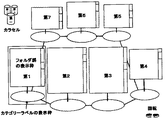
図5に、大分類情報であるカラセルの情報群を概観するために三次元表示の例を示した。前記三次元表示において、ファイル登録ダイアログを介してユーザにより定義された前記カラセルのカテゴリー数により、エディター620内にあらかじめ用意しているカラセル風の標準的な遠近法を適用した表示画面が、図5の表示画面の右端の縦に帯状に表示されている機能群から「情報検索」を選択すると表示される。図15にカテゴリー数が7の例を示した。ユーザは該表示画面の中でカテゴリー表示のための第1から第7までの各表示枠の位置とサイズそして表示枠毎の表示文字サイズを対話的に変更する。最初は、前記情報収集管理システム10の情報収集管理用ユーザインタフェース600内のエディター620により第1枠から第7枠まで順に第1カテゴリーから第7カテゴリーまでが対応するようマッピング関係が初期設定された結果が表示される。その後、前記入出力画面インタフェース610を通して、ユーザが三次元表示画面右下にある左右回転指示アイコンを操作して前記カテゴリーラベルが左右いずれか隣に移動するように指示したとき、またはポインタで特定のカテゴリーラベルまたは関連するフォルダ群を選定して前記エディター620が該カテゴリーを強調表示のために前方の特定の表示位置へ瞬時に移動させるとき、前記エディター620は前記マッピング関係を変えることにより瞬時的な移動を実行する。図16に各カテゴリーのフォルダ群を表示するための表示枠に関するパラメータと、該表示枠に表示する前記フォルダ群の部分を指す表示窓とのマッピング関係を示した。表示(可能)行数は、表示枠の画面上の位置とサイズを示すXY座標と表示文字サイズ(フォント数)により決められ、実際に表示枠に表示されるフォルダ群の表示行は表示窓の位置を示すものであり、前記表示枠の右端のスクロールボタンの位置(表示位置)で決められる。 FIG. 5 shows an example of three-dimensional display in order to give an overview of the information group of carousel that is large classification information. In the three-dimensional display, a display screen to which a standard carousel-like perspective prepared in advance in the editor 620 is applied according to the number of categories of the carousel defined by the user through the file registration dialog is shown in FIG. This is displayed when “search information” is selected from a group of functions displayed in a strip shape at the right end of the display screen. FIG. 15 shows an example in which the number of categories is seven. The user interactively changes the position and size of the first to seventh display frames for category display and the display character size for each display frame on the display screen. Initially, the mapping relationship was initialized by the editor 620 in the information collection management user interface 600 of the information collection management system 10 so that the first category to the seventh category correspond in order from the first frame to the seventh frame. The result is displayed. After that, when the user operates the left / right rotation instruction icon at the lower right of the 3D display screen to instruct the category label to move to the left or right through the input / output screen interface 610, or with the pointer, When a category label or group of related folders is selected and the editor 620 instantly moves the category to a specific forward display position for highlighting, the editor 620 changes the mapping relationship to instantly Perform the move. FIG. 16 shows the mapping relationship between the parameters related to the display frame for displaying the folder group of each category and the display window indicating the part of the folder group displayed in the display frame. The number of display (possible) lines is determined by XY coordinates indicating the position and size of the display frame on the screen and the display character size (number of fonts). The display lines of the folder group actually displayed in the display frame are displayed on the display window. This indicates the position, and is determined by the position (display position) of the scroll button at the right end of the display frame.
簡便な実現法として、データベース管理システム700を用いることなく、前記トランスレータ630が前記システムコントローラ100の中のCPU110に常駐する基本システムソフトであるオペレーティングシステムを介して記憶装置400に直接アクセスする形態を採る方法が考えられる。 As a simple realization method, a method is adopted in which the translator 630 directly accesses the
データベース管理システム700に前記情報収集管理ユーザインタフェースを上乗せして一体化し、本発明で提案する情報の分類法に用いる分類名または分類コードと情報を参照または登録した時刻情報を前記データベース管理システム700で取り扱う情報の属性として直接的に使用することによりデータベース管理システムを構築すれば簡潔で応答速度の向上も期待できる。 The information management user interface is added to and integrated with the database management system 700, and the database management system 700 stores the classification name or classification code used in the information classification method proposed in the present invention and the time information referring to or registering the information. If a database management system is constructed by directly using it as an attribute of information to be handled, it is possible to expect a simple and improved response speed.
本発明は個人が収集し作成する情報の管理のための情報収集管理用ユーザインタフェースに適用するのに向いているが、ローカルエリアネットワーク(LAN)が構築されているオフィスにおいて、そのLANのサーバ内の記憶装置にオフィスで共通に管理されるデータベース用の記憶領域と共に個人で管理する情報のための記憶領域を割り当てたような統合データベース管理環境で使用すれば、各個人が収集した情報でも共通利用向けの情報は共通記憶領域へ直接ストアし、また個人向けの情報は個人向けに割り当てられた前記記憶領域を利用することにより、個人で使用する情報収集管理システムの負担が軽減できて好都合である。 The present invention is suitable for application to an information collection and management user interface for managing information collected and created by an individual. In an office where a local area network (LAN) is constructed, If you use it in an integrated database management environment in which a storage area for personally managed information is allocated together with a storage area for a database that is commonly managed in the office, the information collected by each individual can be shared. Information is stored directly in the common storage area, and information for individuals is conveniently used by using the storage area allocated for individuals, reducing the burden on the information collection management system used by individuals. .
10 情報収集管理システム
100 システムコントローラ
110 中央処理ユニット(CPU)
120 主記憶メモリ
130 不揮発メモリ
140 リアルタイムクロック(RTC)
150 データ処理サブシステム
160 ビデオメモリ
200 キー操作部
300 表示手段
310 ディスプレイ
320 スピーカ
400 記憶装置
410 メモリカード
420 ハードディスクドライブ(HDD)
430 ディジタルビデオディスク(DVD)
500 データ収集手段
510 ラジオ、テレビチューナ
520 ネットワークインタフェース
530 ライブ入力手段
531 マイク
532 カメラ
600 情報収集管理ユーザインタフェース
610 入出力画面インタフェース
620 エディター
630 トランスレータ
700 データ管理システム10 Information Collection Management System 100
120 Main memory 130
150
430 Digital Video Disc (DVD)
500 Data collection means 510 Radio / TV tuner 520 Network interface 530 Live input means 531 Microphone 532 Camera 600 Information collection management user interface 610 Input / output screen interface 620 Editor 630 Translator 700 Data management system
Claims (4)
Priority Applications (1)
| Application Number | Priority Date | Filing Date | Title |
|---|---|---|---|
| JP2004130445A JP2005293523A (en) | 2004-03-31 | 2004-03-31 | Visualization and classification method of information |
Applications Claiming Priority (1)
| Application Number | Priority Date | Filing Date | Title |
|---|---|---|---|
| JP2004130445A JP2005293523A (en) | 2004-03-31 | 2004-03-31 | Visualization and classification method of information |
Publications (1)
| Publication Number | Publication Date |
|---|---|
| JP2005293523A true JP2005293523A (en) | 2005-10-20 |
Family
ID=35326345
Family Applications (1)
| Application Number | Title | Priority Date | Filing Date |
|---|---|---|---|
| JP2004130445A Pending JP2005293523A (en) | 2004-03-31 | 2004-03-31 | Visualization and classification method of information |
Country Status (1)
| Country | Link |
|---|---|
| JP (1) | JP2005293523A (en) |
Cited By (4)
| Publication number | Priority date | Publication date | Assignee | Title |
|---|---|---|---|---|
| KR100989080B1 (en) | 2007-11-22 | 2010-10-25 | 한국전자통신연구원 | Method and system for providing experiential knowledge combined with space-time information |
| KR20180058600A (en) * | 2016-11-24 | 2018-06-01 | 아주대학교산학협력단 | Visualization method and apparatus for multi-dimensional data |
| KR20200061863A (en) * | 2018-11-26 | 2020-06-03 | 아주대학교산학협력단 | Method and apparatus for adjusting visualization of multi-dimensional data |
| CN118796779A (en) * | 2024-09-13 | 2024-10-18 | 江铃汽车股份有限公司 | Office data management method and system |
-
2004
- 2004-03-31 JP JP2004130445A patent/JP2005293523A/en active Pending
Cited By (7)
| Publication number | Priority date | Publication date | Assignee | Title |
|---|---|---|---|---|
| KR100989080B1 (en) | 2007-11-22 | 2010-10-25 | 한국전자통신연구원 | Method and system for providing experiential knowledge combined with space-time information |
| KR20180058600A (en) * | 2016-11-24 | 2018-06-01 | 아주대학교산학협력단 | Visualization method and apparatus for multi-dimensional data |
| KR101955421B1 (en) | 2016-11-24 | 2019-03-11 | 아주대학교산학협력단 | Visualization method and apparatus for multi-dimensional data |
| KR20200061863A (en) * | 2018-11-26 | 2020-06-03 | 아주대학교산학협력단 | Method and apparatus for adjusting visualization of multi-dimensional data |
| KR102161467B1 (en) | 2018-11-26 | 2020-10-05 | 아주대학교산학협력단 | Method and apparatus for adjusting visualization of multi-dimensional data |
| CN118796779A (en) * | 2024-09-13 | 2024-10-18 | 江铃汽车股份有限公司 | Office data management method and system |
| CN118796779B (en) * | 2024-09-13 | 2025-02-11 | 江铃汽车股份有限公司 | Office data management method and system |
Similar Documents
| Publication | Publication Date | Title |
|---|---|---|
| JP4828220B2 (en) | A file management system that uses a timeline-based representation of data | |
| JP4936719B2 (en) | Architecture and engine for timeline-based visualization of data | |
| JP3956553B2 (en) | Icon display processing device | |
| US7428705B2 (en) | Web map tool | |
| JP2007280125A (en) | Information processing apparatus and information processing method | |
| JP4669912B2 (en) | Content browsing system, program, and content browsing method | |
| JP4552005B2 (en) | Electronic newspaper display device | |
| JP4745726B2 (en) | File management apparatus, control method therefor, computer program, and computer-readable storage medium | |
| CN1280717C (en) | Generationg of multi-media content structure using marking langaage to describe | |
| JP3478331B2 (en) | Structure display method and computer-readable recording medium storing a program for causing a computer to execute the method | |
| JP2005293523A (en) | Visualization and classification method of information | |
| JP2002041571A (en) | Information retrieving device | |
| JP2001109877A (en) | Image display device and method, medium | |
| JP3599405B2 (en) | Data display method and system | |
| JP4999614B2 (en) | Information processing apparatus and information processing method | |
| JP3612387B2 (en) | Information processing apparatus and control method therefor | |
| JP7302146B2 (en) | Information processing device, information processing system and program | |
| JP2001147922A (en) | Document management apparatus, document management method, and storage medium | |
| JP2002024231A (en) | Information providing method, system, and recording medium recording information providing program | |
| US20070055928A1 (en) | User workflow lists to organize multimedia files | |
| JP2010146439A (en) | Information processor, information processing method and program | |
| JP6194050B1 (en) | Data hierarchy display device, data hierarchy display program, and data hierarchy display method | |
| JP2002024065A (en) | Document management system, document management method, and recording medium storing program for implementing the method | |
| JPH10254754A (en) | Information recording / reproducing device | |
| JPH05108457A (en) | Hyper text information management device |