JP2005298216A - Elevator with car operation panel - Google Patents
Elevator with car operation panel Download PDFInfo
- Publication number
- JP2005298216A JP2005298216A JP2005100932A JP2005100932A JP2005298216A JP 2005298216 A JP2005298216 A JP 2005298216A JP 2005100932 A JP2005100932 A JP 2005100932A JP 2005100932 A JP2005100932 A JP 2005100932A JP 2005298216 A JP2005298216 A JP 2005298216A
- Authority
- JP
- Japan
- Prior art keywords
- elevator
- button
- floor
- cage
- color
- Prior art date
- Legal status (The legal status is an assumption and is not a legal conclusion. Google has not performed a legal analysis and makes no representation as to the accuracy of the status listed.)
- Pending
Links
Images

Classifications
-
- B—PERFORMING OPERATIONS; TRANSPORTING
- B66—HOISTING; LIFTING; HAULING
- B66B—ELEVATORS; ESCALATORS OR MOVING WALKWAYS
- B66B1/00—Control systems of elevators in general
- B66B1/34—Details, e.g. call counting devices, data transmission from car to control system, devices giving information to the control system
- B66B1/46—Adaptations of switches or switchgear
- B66B1/461—Adaptations of switches or switchgear characterised by their shape or profile
- B66B1/463—Touch sensitive input devices
-
- B—PERFORMING OPERATIONS; TRANSPORTING
- B66—HOISTING; LIFTING; HAULING
- B66B—ELEVATORS; ESCALATORS OR MOVING WALKWAYS
- B66B1/00—Control systems of elevators in general
- B66B1/34—Details, e.g. call counting devices, data transmission from car to control system, devices giving information to the control system
- B66B1/46—Adaptations of switches or switchgear
- B66B1/468—Call registering systems
-
- Y—GENERAL TAGGING OF NEW TECHNOLOGICAL DEVELOPMENTS; GENERAL TAGGING OF CROSS-SECTIONAL TECHNOLOGIES SPANNING OVER SEVERAL SECTIONS OF THE IPC; TECHNICAL SUBJECTS COVERED BY FORMER USPC CROSS-REFERENCE ART COLLECTIONS [XRACs] AND DIGESTS
- Y10—TECHNICAL SUBJECTS COVERED BY FORMER USPC
- Y10S—TECHNICAL SUBJECTS COVERED BY FORMER USPC CROSS-REFERENCE ART COLLECTIONS [XRACs] AND DIGESTS
- Y10S187/00—Elevator, industrial lift truck, or stationary lift for vehicle
- Y10S187/901—Control modified for use by disabled individual
Landscapes
- Engineering & Computer Science (AREA)
- Automation & Control Theory (AREA)
- Computer Networks & Wireless Communication (AREA)
- Elevator Control (AREA)
- Indicating And Signalling Devices For Elevators (AREA)
Abstract
Description
本発明は、エレベータ呼出しを登録するためのケージ操作パネルを有するエレベータに関する。 The present invention relates to an elevator having a cage operating panel for registering elevator calls.
新型の小さな建物用の安価なエレベータにおいて、10個の数字(0から9)を表すキーパッドを有するケージ操作パネルの考えが導入された。この10数字キーパッドシステムは、明らかなコストの利点とロジスティックの利点とによって、全てのエレベータに関する独特な工場生産のケージ操作パネルの目標に到達している。 In an inexpensive elevator for a new small building, the idea of a cage control panel with a keypad representing 10 numbers (0 to 9) was introduced. This 10-digit keypad system has reached a unique factory-produced cage control panel goal for all elevators with obvious cost advantages and logistic advantages.
更なる特徴としてケージパネルは、10数字キーパッドと数個の表示装置の存在によって保守ツールとしても使用できるであろう。 As a further feature, the cage panel could also be used as a maintenance tool due to the presence of a 10 numeric keypad and several displays.
不都合なことに、常に同じケージ操作パネルが届けられ得ることによって導き出されるロジスティックと保守とに関する利点と共に、旧式のカスタマイズされたケージ操作パネルの幾つかの重要で有利な特徴が失われている。 Unfortunately, some important and advantageous features of the old-fashioned customized cage operation panel are lost, along with the logistic and maintenance benefits derived from always being able to deliver the same cage operation panel.
ボタンの明確な作用:特定の数または文字によって識別されるボタンは、過去には、ある呼出しをその数に対応する階に位置づける機能だけを持っていた。10数字キーパッドによる解決方法によって、このことはもはや不可能である。なぜなら、例えば数1によって識別されるボタンが、エレベータ呼出しを12階または−1階に位置づける他のボタンと組み合わせて使用されるからである。
Unambiguous action of buttons: Buttons identified by a specific number or letter have in the past only the ability to place a call on the floor corresponding to that number. This is no longer possible with the 10 numeric keypad solution. This is because, for example, the button identified by
マルチボタン入力:エレベータの利用者インタフェースは、1操作の機械−人間インタフェースであった。10数字キーパッドによる解決方法によって、エレベータの利用者インタフェースは、2操作の機械−人間インタフェースになった。なぜなら、例えば呼出しを12階または−1階に位置づけるために、利用者が2個のボタンを順次に押さなくてはならないからである。 Multi-button input: The elevator user interface was a one-operation machine-human interface. With the 10 numeric keypad solution, the elevator user interface has become a two-operation machine-human interface. This is because, for example, in order to position a call on the 12th or -1st floor, the user must press two buttons in sequence.
光学的肯定応答:1個のボタンが異なる入力のために機能するので、押されたボタンまたは登録された呼出しの光学的肯定応答は、不明確になるであろう。 Optical Acknowledgment: Since one button functions for different inputs, the optical acknowledgment of the pressed button or registered call will be unclear.
昇降路の限界:これらは、10数字キーパッドによる解決方法によってはもはや認識可能ではない。利用者は、建物の最上階が、6階、7階、10階、あるいは12階であるかを認識できない。 Hoistway limitations: these are no longer recognizable by the 10 numeric keypad solution. The user cannot recognize whether the top floor of the building is the 6th floor, 7th floor, 10th floor, or 12th floor.
存在しない階:ケージ操作パネル上の10個の数字全ての表示は、顧客が、建物のどの階にも対応しない最も大きい数字(9、8・・・)の存在によって混乱するので、ほんの僅かの階しか持たない建物のエレベータを所有する顧客を悩ませる。 Non-existing floor: The display of all 10 numbers on the cage control panel is only a few because the customer is confused by the presence of the largest number (9, 8 ...) that does not correspond to any floor of the building Annoy customers who have elevators in buildings that only have floors.
したがってエレベータ設備自身において完全にカスタマイズでき、かつ工場における特別のカスタマイズ作業を必要としない、標準のケージ操作パネルを開発することが必要である。前記ケージ操作パネルは、好ましくは、特別の構成要素を追加することなく使用でき、また好ましくはエレベータパラメータを変更するための保守インタフェースを示す。 It is therefore necessary to develop a standard car operation panel that can be fully customized in the elevator installation itself and does not require any special customization work in the factory. The cage operation panel can preferably be used without adding special components and preferably presents a maintenance interface for changing elevator parameters.
これらの目標を達成しようとする試みは、例えばドイツ特許第19539288号によって例示されており、この特許には、自由に構成可能でカスタマイズ可能なエレベータ用ケージ操作パネルが開示されており、このケージ操作パネルは、自由にプログラム可能なタッチ感応ボタンとエレベータ修理用保守モードとを示す。 Attempts to achieve these goals are illustrated, for example, by German Patent No. 19539288, which discloses a freely configurable and customizable elevator car operating panel, which can be The panel shows freely programmable touch sensitive buttons and an elevator repair maintenance mode.
しかしながらこのようなケージ操作パネルは、高価でありユーザフレンドリーでなく、構成するのに複雑であり、審美的に魅力的でないという欠点を示す。更にこの装置は、困難な製造と組立てとを示し、十分に確立された構成要素を使用して製造できない。したがってロジスティックに関する利点が失われる。
したがって、自由に構成可能で安価でユーザフレンドリーであって、十分に確立された標準の構成要素を使用して組み立てられ、利用者にとって審美的に魅力的である、エレベータ設備のためのケージ操作パネルを提供することは、本発明の目的である。 Thus, a cage operating panel for elevator installations that is freely configurable, inexpensive and user friendly, assembled using well-established standard components and aesthetically appealing to the user It is an object of the present invention to provide
本発明にしたがってこの問題を解決するケージ操作パネルは、独立請求項1において請求されている。この請求項は、タッチ感応ボタンを備えるエレベータ呼出しを登録するためのケージ操作パネルを有するエレベータであって、前記ボタンは、指定された構成にしたがって建物の階に対応するように自由に構成可能であり、前記ボタンは、指定された構成において作動するときに、目に見えるように第1の色の光で点灯されるように構成され、かつ前記ボタンは、指定された構成において作動しないときに、目に見えないように消灯されるように構成されるエレベータに関する。
A cage operating panel which solves this problem according to the invention is claimed in the
タッチ感応ボタンは、例えばエレベータ利用者の指によってタッチされたとき、あるいは単にかすめられたときでも、エレベータ呼出しを位置づけることができるケージ操作パネルの領域である。 A touch sensitive button is an area of the cage control panel where an elevator call can be positioned, for example, when touched by an elevator user's finger or when it is simply grazed.
これらのボタンは、これらボタンが対応する階、およびタッチされた場合にこれらボタンが呼出しを位置づける階が、自由に変更できかつプログラムできるときに、自由に構成可能であると言われる。 These buttons are said to be freely configurable when the floor they correspond to and the floor on which they are located when touched can be freely changed and programmed.
ボタンと階との組合せのセットは、前記建物によって示される階の数に基づいてその建物におけるエレベータの設置の際に、例えば修理要員によって設定できる指定された構成を形成する。 The set of button and floor combinations forms a specified configuration that can be set by, for example, repair personnel when installing an elevator in the building based on the number of floors indicated by the building.
もしボタンが建物の実際の物理的階に対応すれば、これらボタンは作動するとして構成される。 If the buttons correspond to the actual physical floor of the building, these buttons are configured as activated.
もしボタンが建物の如何なる実際の物理的階にも対応しなければ、これらボタンは作動しないとして構成される。 If the buttons do not correspond to any actual physical floor of the building, they are configured as inoperative.
作動するボタンは、光源が、利用者の視覚によってボタンが目に見えて認識できるようにする光を発生させるときに点灯される。作動するボタンは、エレベータ制御部によっても呼出しを位置づけできるようにされる。 The actuating button is lit when the light source generates light that allows the button to be visibly recognized by the user. The actuated button can be positioned by the elevator controller as well.
ボタンは、このケージ操作パネル領域がタッチされた場合に、ケージ操作パネル領域が、エレベータ呼出しを位置づけできるようにされることを、視覚または触覚によってエレベータ利用者が認識できるときに、視覚可能である。 The button is visible when an elevator user can visually or tactilely recognize that the cage operation panel area is enabled to position an elevator call when this cage operation panel area is touched. .
もしエレベータ利用者が、エレベータ呼出しを位置づけできるような領域を自分の感覚で識別できなければ、ボタンは視覚不可能である。 If the elevator user cannot identify with his own sense an area where the elevator call can be located, the button is not visible.
請求項1に述べられた発明は、請求項に記載のケージ操作パネルが、高価な構成要素や複雑な作業の必要なしに、極めてユーザフレンドリーな仕方で取り付けられる建物にしたがって自由に構成できるという利点を示している。構成は、それぞれ作動するおよび作動しないタッチ感応ボタンに対応する、ケージ操作パネルの決められた領域を点灯または消灯することによってのみ実施されるので、前記構成は、極めて迅速で明快な時間のかからない仕方で実施できる。光源自体を除いて、追加の機械部品は必要とされない。構成は、このような仕方で独特な工場生産のケージ操作パネルによって与えられる全てのロジスティック的利点を維持しながら、常に同じタイプのケージ操作パネルに対して実施できる。
The invention as claimed in
請求項2によれば、前記ボタンは、好適には、エレベータ呼出しを登録するために起動されたとき、エレベータ呼出しの肯定応答が目に見える仕方で、第1の色とは異なる色の光で点灯されるように構成される。
According to
この好適な実施形態は、色の変化が、エレベータ利用者によって容易に迅速に直感的に認識されるので、追加の高価な部品、電子回路、またはソフトウエアルーチンの必要なしに、エレベータ呼出しが、ユーザフレンドリーで明確かつ明快な仕方で肯定応答されるという利点を示す。 This preferred embodiment allows the elevator call to be made without the need for additional expensive parts, electronic circuitry, or software routines, as color changes are easily and intuitively recognized by elevator users. Shows the advantage of being acknowledged in a user-friendly, clear and clear manner.
更に有利な実施形態は、他の従属請求項に請求されている。 Further advantageous embodiments are claimed in the other dependent claims.
ケージ操作パネルは、3列4行に配列された12個の構成可能なタッチ感応ボタンの対称マトリックスからなる10数字キーパッドを示すことができる。実際にはこの構造は、更に多くの階を有する構成に拡張でき、制限は存在しない。 The cage control panel can show a 10-digit keypad consisting of a symmetric matrix of 12 configurable touch sensitive buttons arranged in 3 columns and 4 rows. In practice, this structure can be extended to a configuration with more floors and there is no limit.
この実施形態は、現在既に市場に存在する標準の部品を使用するという利点を示す。 This embodiment shows the advantage of using standard parts that are currently on the market.
請求項3によれば、タッチ感応ボタンの構成は、ケージ操作パネルのベースとカバーとの間に配置された不透明のストリップの位置によって決定され、そのストリップには、光によって照明された場合に目に見えるように階番号が彫刻されている。
According to
この実施形態は、構成が、極めて安価な部品を使用して簡単な作業で極めて迅速に実行できるという利点を示す。 This embodiment shows the advantage that the configuration can be performed very quickly with simple operations using very inexpensive parts.
請求項4によれば、作動するボタンは、−3階から8階までの階を有する構成のために、目に見えるように第1の色の光で点灯されるように構成される。
According to
この実施形態は、市場に見られる最も普及した建物と最も一般的な階構成とに適しているという利点を示す。 This embodiment shows the advantage of being suitable for the most popular buildings and most common floor configurations found on the market.
請求項5によれば、ボタンに対応する建物の階の番号は、指定された構成が建物におけるエレベータの設置の際に確立された後に、ケージ操作パネル上に消えないように表示される。
According to
この実施形態は、階構成の追加の恒久的表示が設けられるという利点を示す。 This embodiment shows the advantage that an additional permanent display of the floor structure is provided.
請求項6によれば、ケージ操作パネルの表面は、完全に平滑であり、および/またはタッチ感応ボタンは、人間の指によって生成される電磁場の乱れによって動作可能である。
According to
この実施形態は、審美的外観が改善され、また指によって加えられる力が、最小にまで減らされ得るかまたは存在しないようにさえできるという利点を示す。 This embodiment shows the advantage that the aesthetic appearance is improved and that the force applied by the finger can be reduced to a minimum or even absent.
請求項7によれば、ボタンが作動することを示す第1の色は青であり、登録されたエレベータ呼出しに肯定応答する第2の色は赤である。
According to
この実施形態は、色変化の直感的認識が、人間の脳において最大化されるという利点を示す。 This embodiment shows the advantage that intuitive recognition of color changes is maximized in the human brain.
請求項8によれば、登録されたエレベータ呼出しに肯定応答する第2の色の光は、予め決められた断続性で明滅する。
According to
この実施形態は、呼出し位置づけの直感的認識が、色盲の人々の場合にも達成されるという利点を示す。 This embodiment shows the advantage that intuitive recognition of call positioning is also achieved in the case of color blind people.
請求項9によれば、ボタンは、LEDによって生成されるバックライトによって照明される。
According to
この実施形態は、発光装置が極めて小型で安価であるという利点を示す。 This embodiment shows the advantage that the light emitting device is very small and inexpensive.
請求項10によれば、ボタンは、保守または修理中に実施および/または作動される、エレベータ動作および/または機能に対応するように構成可能である。
According to
この実施形態は、追加の保守用人間−エレベータインタフェースが必要とされず、場所と費用が節約できるという利点を示す。 This embodiment shows the advantage that no additional maintenance human-elevator interface is required, saving space and cost.
請求項11によれば、ボタンが視覚障害者によって認識可能であるような仕方でボタンに割り当てられた階を示す、浮出しのブライユ点字(Braille)記号を備えたシルクスクリーン印刷が付けられる。更に、ボタンのタッチ領域を局所化する方向付けフレームまたはラインが設けられ得る。
According to
この実施形態は、請求項に記載のケージ操作パネルが、より容易な仕方のボタンの識別で身体障害者を支援するという利点を示す。 This embodiment shows the advantage that the claimed cage control panel assists the disabled with the easier way to identify the buttons.
本発明の更に完全な説明のためおよび本発明の更なる目的と利点とに関しては、添付の図面に関連して行われる以下の説明への参照が行われる。 For a more complete description of the present invention and for further objects and advantages of the present invention, reference is made to the following description, taken in conjunction with the accompanying drawings.
図1は、最新技術で知られているケージ操作パネル1を示す。ケージ操作パネルは、キーパッド2を示し、キーパッド2は、この例では、予め決められた空間的順序に配列された10個の数字(0から9)(10数字キーパッド)によって特徴付けられる。キーパッドは、エレベータ呼出しを建物の階に位置づけるために使用されるタッチ感応ボタン6を示す。タッチボタンに対応する階は、キーパッド表面領域に消えないように刻印され目に見える、際立たされたマークによって表示される。タッチ感応ボタンに対応する領域の背後に配置された容量センサは、人間の指のタッチによって乱される電磁場を生成する。この仕方でケージ操作パネルは、利用者によって位置づけられたエレベータ呼出しを検出して、エレベータ制御部にエレベータ呼出しを送信できる。操作パネルはまた、位置インジケータ3を備え、位置インジケータ3は、エレベータケージが、ある特定の瞬間にどの階を走行中であるかを表示する。位置づけられていてまだ作用さなくてはならない全ての呼出しを示す、行き先インジケータ4も、通常設けられる。好ましくは、警報、緊急時、および同様な補助表示といったエレベータ装置の特殊な状態を示す補助記号5も設けられる。警報記号と緊急記号は、通常の使用時には目に見えない。したがってエレベータ利用者は、この可能性に関して恐怖感を持たされることはない。ケージ操作パネルは、通常、ベース7にカバー8を組み合わせることによって組み立てられる。
FIG. 1 shows a
このケージ操作パネルは、この形式の独特の操作パネルが、劇的なコスト的メリットを以って工業的に製造でき、かつ異なるタイプの建物のいたるところに導入できるので、ロジスティックの観点から明らかな利点を示す。 This cage operation panel is obvious from a logistic point of view because this type of unique operation panel can be manufactured industrially with dramatic cost advantages and can be installed throughout different types of buildings. Show the benefits.
しかしながらこのケージ操作パネルは、10個の数字が、ケージ操作パネル表面に消えないように刻印されているので、10個の数字が、キーパッド上に常に表示されているという欠点を示す。10個の数字は、例えば、ケージ操作パネルが、3から9までの数字が不必要である単に二つの階を有する建物に取り付けられるときにも表示され、これは、関係する顧客と利用者側に混乱と不満をもたらす。 However, this cage operation panel has the disadvantage that ten numbers are always displayed on the keypad because the ten numbers are imprinted on the surface of the cage operation panel so as not to disappear. Ten numbers are also displayed when, for example, a cage control panel is installed in a building with only two floors where numbers from 3 to 9 are not needed, which is related to the customer and user side involved. Cause confusion and dissatisfaction.
更にこのようなケージ操作パネルは、構成可能ではなく、またキーパッドの決められた領域に対応する階は、タッチ感応ボタン上のマークが適応できないので変更できない。 Further, such a cage operation panel is not configurable, and the floor corresponding to a predetermined area of the keypad cannot be changed because the marks on the touch sensitive buttons cannot be adapted.
これは例えば、地下の階が存在する(−1、−2、・・・)建物と、キーパッドの左最下部領域に最下階の数字を有することが望ましいか必須である状況とに、このような操作パネルが適応することを妨げる。 For example, in a building where there is a basement floor (-1, -2, ...) and a situation where it is desirable or essential to have the lowest floor number in the left bottom area of the keypad, It prevents that such an operation panel adapts.
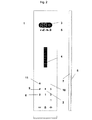
図2は、上述の全ての問題を解決する本発明の好適な実施形態を示す。 FIG. 2 shows a preferred embodiment of the present invention that solves all of the above problems.
この実施形態では、建物に有効に存在する階に対応し、したがって作動するキーパッドのタッチ感応ボタンに設けられた数字は、青い光を放射するLED(発光ダイオード)によって生成されるバックライトによって目に見えるようにされる。したがって作動するタッチ感応ボタン(9)は、点灯されて利用者にとってはっきり目に見える。キーパッドのタッチ感応ボタン上に設けられた数字が、建物に有効に存在する階に対応せず、したがって作動しないときには、この数字は、対応するLEDをスイッチオフすることによって目に見えなくされる。したがって作動しないタッチ感応ボタン(10)は消灯され、利用者にとってまったく目に見えない。同時にエレベータ制御部は、これらの領域がエレベータ呼出しを位置づけることをできなくする。 In this embodiment, the numbers provided on the touch sensitive buttons on the keypad that correspond to the floors that are effectively present in the building and thus actuated by the backlight generated by the LED (light emitting diode) emitting blue light. To be visible. The activated touch sensitive button (9) is therefore lit and clearly visible to the user. When the number provided on the touch sensitive button on the keypad does not correspond to a floor that is effectively present in the building and therefore does not work, this number is made invisible by switching off the corresponding LED. . Therefore, the touch sensitive button (10) which does not operate is turned off and is completely invisible to the user. At the same time, the elevator controller prevents these areas from positioning the elevator call.
したがってタッチ感応ボタンは、自由に構成可能であり、極めてユーザフレンドリーかつ安価な仕方で建物構成にカスタマイズできる。 The touch sensitive buttons can therefore be freely configured and can be customized to the building configuration in a very user friendly and inexpensive manner.
階を表す数字は、対応する数を不透明なストリップに刻み込むことによって得られる。それからストリップは、アルミニウムベース7とガラスカバー8との間に挿入される。ストリップの位置は、どの数が、LEDの光によってスイッチオンまたはスイッチオフできるかを決定し、エレベータケージ操作パネルの全体的構成可能性が達成されることを可能にする。好適には、ガラスカバーはまた、半透明のシルクスクリーンを呈する。
The number representing the floor is obtained by engraving the corresponding number into an opaque strip. The strip is then inserted between the
図2の例では、3枚の垂直なストリップが、ベースとカバーとの間に並んで挿入されている。左の1番目のストリップには、数字−3、0、3、6、9(下から上に)が刻み込まれている。 In the example of FIG. 2, three vertical strips are inserted side by side between the base and the cover. The first strip on the left is engraved with numbers -3, 0, 3, 6, 9 (from bottom to top).
左から2番目のストリップには、数字−2、1、4、7、10(下から上に)が刻み込まれている。 The second strip from the left is engraved with numbers -2, 1, 4, 7, 10 (from bottom to top).
左から3番目のストリップには、数字−1、2、5、8、11(下から上に)が刻み込まれている。 The third strip from the left is engraved with numbers -1, 2, 5, 8, 11 (from bottom to top).
ストリップの順序とそれらの相対的な垂直位置とを変えることによって、ケージ操作パネルが設置された建物における階構成によって必要とされる、全ての数字の連続を実現することが可能である。 By changing the order of the strips and their relative vertical position, it is possible to achieve a sequence of all the numbers required by the floor structure in the building where the cage control panel is installed.
存在する階に対応する数字は、生成された青い光によって、これらの数字がバックライトで照明できるようにするために、光を生成するLEDが数字の下に設けられるようにキーパッド表面領域に位置決めされなくてはならない。 The numbers corresponding to the floors present are on the keypad surface area so that the generated blue light will be able to illuminate these numbers with a backlight, so that the LEDs that generate the light are placed under the numbers. Must be positioned.
図2では、−1から6の数字に対応するLEDは、エレベータが設置された建物が、−1階から6階を示すので、スイッチオンされてこれらの数字を目に見えるようにする。6より高い数字と−1より低い数字は、下に在るLEDがスイッチオフされているので、目に見えない。これらのボタンは、存在しない階に対応し、目に見えなくされており、エレベータ制御部によって呼出しの位置づけができなくされている。 In FIG. 2, the LEDs corresponding to the numbers -1 to 6 are switched on so that these numbers are visible because the building where the elevator is installed shows the -1th to 6th floors. Numbers higher than 6 and lower than -1 are not visible because the underlying LED is switched off. These buttons correspond to floors that do not exist and are not visible, and are not positioned by the elevator control.
不透明なストリップをカバーの下に配置して、LEDをスイッチオンまたはスイッチオフすることによって、全ての可能な数字の連続が達成できる。したがってケージ操作パネルは、完全に構成可能であり、各建物と必要な階構成とにカスタマイズできる。 By placing an opaque strip under the cover and switching the LEDs on or off, all possible number sequences can be achieved. The cage operation panel is therefore fully configurable and can be customized to each building and required floor structure.
ケージ操作パネルの部品は、常に同じであることに留意されたい。同じカバー、ベース、ストリップ、およびLED配列が、エレベータ工場によって製造されなくてはならない。ロジスティックと工業生産との観点からは、本発明のケージ操作パネルの導入に起因する不都合が発生することはない。 Note that the parts of the cage control panel are always the same. The same cover, base, strip, and LED array must be manufactured by an elevator factory. From the viewpoint of logistic and industrial production, there is no inconvenience caused by the introduction of the cage operation panel of the present invention.
また、構成作業は非常に簡単であって、如何なる特別の電子ハードウエアも実行すべきソフトウエアプログラムも必要としないことに留意されたい。構成は、十分に確立された工場生産の構成要素を使用することによって、極めて迅速に、ユーザフレンドリーに、安価な仕方で、誰にでも手作業で実施できる。 It should also be noted that the configuration work is very simple and does not require any special electronic hardware or software program to run. Configuration can be performed manually by anyone in a very fast, user-friendly and inexpensive manner by using well-established factory production components.
この考えによれば、いったんボタン記号と呼出しボタンの最大数が規定されると、ケージパネルは、工場でのカスタマイゼーションの必要なしに、現場で直接カスタマイズできる。修理要員は、建物の最下階オフセットを入力することによって、どの呼出しボタンがスイッチオンまたはスイッチオフされなくてはならないかを規定できる。エレベータ制御部は、建物に幾つの階が在るかを知り、必要なタッチ感応ボタンを自動的に作動させることができる。 According to this idea, once the maximum number of button symbols and call buttons has been defined, the cage panel can be directly customized in the field without the need for factory customization. Repair personnel can define which call buttons must be switched on or off by entering the lowest floor offset of the building. The elevator controller knows how many floors there are in the building and can automatically activate the necessary touch sensitive buttons.
図2の好適な実施形態では、エレベータ呼出しを登録するために起動されるボタン11は、エレベータ呼出しの肯定応答が目に見える仕方で、前述の第1の色である青とは異なる色の赤い光で、点灯されるように構成される。
In the preferred embodiment of FIG. 2, the
青から赤への色変化に加えて、エレベータ呼出しは、また、赤い光の予め決められた断続性での明滅によって肯定応答される。可聴信号も同様に設けることができるであろう。 In addition to the color change from blue to red, the elevator call is also acknowledged by a flashing red light with a predetermined intermittent. An audible signal could be provided as well.
審美的理由から、ケージ操作パネルの表面は、完全に平滑であり、またタッチ感応ボタンは、ケージ操作パネルから如何なる可動部分も除去できるように、人間の指によって生成されかつ容量センサによって感知される電磁場の乱れを介して動作可能である。 For aesthetic reasons, the surface of the cage operation panel is completely smooth and the touch sensitive buttons are generated by human fingers and sensed by a capacitive sensor so that any moving parts can be removed from the cage operation panel It can operate through disturbance of electromagnetic field.
ボタンに対応する建物の階の番号は、指定された構成が、図1に示す仕方と同様の仕方で建物におけるエレベータの設置の際に確立された後に、ケージ操作パネル上に消えないように表示され得るであろう。 The building floor number corresponding to the button is displayed on the cage control panel so that it does not disappear after the specified configuration is established during elevator installation in the building in a manner similar to that shown in FIG. Could be done.
図2は、−1階から6階までの階を有する建物に設置される、本発明によるケージ操作パネルを示す。このケージ操作パネルは、最も多く使用される階構成である、例えば−3階から8階までの決められた範囲の階に適しており、この場合では−1階から6階が選択された。この範囲内で異なる構成、例えば−2階から6階、0階から8階、−1階から4階などが可能である。 FIG. 2 shows a cage operation panel according to the present invention installed in a building having floors from -1 floor to 6 floors. This cage operation panel is suitable for floors in a predetermined range, for example, from the −3rd floor to the 8th floor, which is the most frequently used floor configuration. In this case, the first floor to the sixth floor are selected. Different configurations within this range are possible, for example, -2 floor to 6 floor, 0 floor to 8 floor, -1 floor to 4 floor.
ケージ操作パネルには、ボタンに割り当てられた階を示す浮出しのブライユ点字記号を有し、更にボタンが、視覚障害者によって認識可能であるような仕方でボタンのタッチ領域を局所化する方向付けフレームまたはラインを有する、シルクスクリーン印刷が付けられ得る。 The cage control panel has raised braille symbols that indicate the floor assigned to the button, and the direction that the button touches the button touch area in such a way that it can be recognized by the visually impaired Silk screen printing can be applied with an attached frame or line.
図2のケージ操作パネルのボタンは、保守または修理時に実施されかつ作動される、エレベータ動作と機能とに対応するように構成可能である。 The buttons on the cage control panel of FIG. 2 can be configured to accommodate elevator operations and functions that are performed and activated during maintenance or repair.
保守インタフェースは、古典的な10数字キーパッドインタフェースであって、エレベータの保守および構成機能のための入力として使用される。 The maintenance interface is a classic 10 numeric keypad interface that is used as an input for elevator maintenance and configuration functions.
ケージ操作パネルは、例えばドア開放ボタンとドア閉鎖ボタンとを同時に10秒間押すことによって、構成モードに入れられる。 The cage operation panel is put into the configuration mode, for example, by simultaneously pressing the door opening button and the door closing button for 10 seconds.
それから10数字キーパッド構成モードは、エレベータ制御部によって青いバックライトで点灯される。 Then the 10 numeric keypad configuration mode is illuminated with a blue backlight by the elevator controller.
マスクまたは10数字キーパッドのボタンマップは、異なるボタンの機能を見出すために修理技術員によって使用されなくてはならない。 The button map of the mask or 10 numeric keypad must be used by repair technicians to find different button functions.
ボタンが押されると、バックライト色は、ちょうど通常動作モードにあるように赤に変化する。 When the button is pressed, the backlight color changes to red just as in the normal operating mode.
使用されないボタンは、通常モードでは存在していても、10数字キーパッド構成モードではスイッチオフされる。 Unused buttons are switched off in the 10-digit keypad configuration mode, even though they exist in the normal mode.
1 ケージ操作パネル
2 キーパッド
3 位置インジケータ
4 行き先インジケータ
5 補助記号
6 タッチ感応ボタン
7 ベース
8 カバー
9 第1の色
10 作動しないボタン
11 起動されるボタン
DESCRIPTION OF
Claims (13)
Applications Claiming Priority (1)
| Application Number | Priority Date | Filing Date | Title |
|---|---|---|---|
| EP04405216 | 2004-04-08 |
Publications (1)
| Publication Number | Publication Date |
|---|---|
| JP2005298216A true JP2005298216A (en) | 2005-10-27 |
Family
ID=34932052
Family Applications (1)
| Application Number | Title | Priority Date | Filing Date |
|---|---|---|---|
| JP2005100932A Pending JP2005298216A (en) | 2004-04-08 | 2005-03-31 | Elevator with car operation panel |
Country Status (13)
| Country | Link |
|---|---|
| US (1) | US7398865B2 (en) |
| EP (1) | EP1584598B1 (en) |
| JP (1) | JP2005298216A (en) |
| CN (1) | CN100463844C (en) |
| AU (1) | AU2005201476B2 (en) |
| BR (1) | BRPI0501181B1 (en) |
| CA (1) | CA2503999C (en) |
| DK (1) | DK1584598T3 (en) |
| ES (1) | ES2399237T3 (en) |
| NO (1) | NO334497B1 (en) |
| NZ (1) | NZ539155A (en) |
| PL (1) | PL1584598T3 (en) |
| PT (1) | PT1584598E (en) |
Cited By (1)
| Publication number | Priority date | Publication date | Assignee | Title |
|---|---|---|---|---|
| JP2012532077A (en) * | 2009-06-29 | 2012-12-13 | オーチス エレベータ カンパニー | Elevator car emergency lighting |
Families Citing this family (29)
| Publication number | Priority date | Publication date | Assignee | Title |
|---|---|---|---|---|
| WO2006025096A1 (en) * | 2004-08-30 | 2006-03-09 | Mitsubishi Denki Kabushiki Kaisha | Destination floor register for elevator |
| USD546724S1 (en) * | 2004-09-13 | 2007-07-17 | Inventio Ag | Elevator car operating panel |
| EP2132125B2 (en) * | 2007-02-22 | 2022-05-04 | Otis Elevator Company | Multifunction call buttons for an elevator system |
| FI120645B (en) | 2008-02-11 | 2010-01-15 | Kone Corp | Elevator call and display arrangement |
| FI121010B (en) * | 2009-02-16 | 2010-06-15 | Kone Corp | invitation panel |
| US7714244B1 (en) * | 2009-03-31 | 2010-05-11 | Marta Elena De Pedro | Button panel for elevators, lifts, and similar machinery |
| WO2011132308A1 (en) * | 2010-04-23 | 2011-10-27 | 三菱電機株式会社 | Elevator display apparatus |
| BR112013024033A2 (en) * | 2011-03-21 | 2017-06-27 | Inventio Ag | elevator having minimum elevator shaft depth and a permanent protective space |
| TWI414476B (en) * | 2011-04-26 | 2013-11-11 | Golden Friends Gfc Ltd Corp | Elevator lift control and floor display method |
| CN202542608U (en) * | 2011-11-10 | 2012-11-21 | 李明 | Universal elevator control disc |
| FI124165B (en) * | 2012-09-26 | 2014-04-15 | Kone Corp | Lift system |
| CN102862887B (en) * | 2012-10-24 | 2014-09-17 | 上海新时达电气股份有限公司 | Keyboard type elevator operation box |
| AU349909S (en) * | 2013-01-11 | 2013-07-29 | Kone Corp | Directional button for lifting devices |
| USD781736S1 (en) | 2014-04-01 | 2017-03-21 | Inventio Ag | Operating panel |
| FI125158B (en) * | 2014-06-17 | 2015-06-30 | Kone Corp | Invitation panel and invitation panel fabrication method |
| CN105347126A (en) * | 2015-12-01 | 2016-02-24 | 戈尔电梯(天津)有限公司 | Elevator state display device based on lattice |
| CN105632342A (en) * | 2016-03-11 | 2016-06-01 | 南通昌荣机电有限公司 | Display panel manufacturing method |
| CN105621174A (en) * | 2016-03-11 | 2016-06-01 | 南通昌荣机电有限公司 | Novel display panel |
| US10875742B2 (en) | 2017-11-09 | 2020-12-29 | Otis Elevator Company | Elevator service request using user device with filtered destination floor selection |
| US11440767B2 (en) | 2018-07-30 | 2022-09-13 | Otis Elevator Company | Dynamic assignment of selection buttons on a destination entry system of an elevator |
| US10596997B1 (en) | 2018-10-02 | 2020-03-24 | Ford Global Technologies, Llc | User interface of autonomous delivery vehicle |
| CN111285212A (en) | 2018-12-10 | 2020-06-16 | 奥的斯电梯公司 | Elevator operation panel, elevator system and elevator panel display method |
| AU2021258387B2 (en) * | 2020-04-20 | 2024-09-19 | Inventio Ag | Interface for operating an elevator car, elevator car and method of producing an elevator car |
| USD1046671S1 (en) * | 2020-04-30 | 2024-10-15 | Inventio Ag | Operating panel |
| USD1052109S1 (en) * | 2021-04-02 | 2024-11-19 | Otis Elevator Company | Elevator hall call board |
| CN113562558B (en) * | 2021-07-07 | 2023-11-03 | 西柏思机电设备(嘉兴)有限公司 | Method for realizing automatic adaptation of elevator touch control panel to floor number |
| USD1056747S1 (en) * | 2021-12-30 | 2025-01-07 | Inventio Ag | Elevator operating/indicating panel |
| USD1024821S1 (en) | 2022-03-28 | 2024-04-30 | Inventio Ag | Elevator operating panel |
| CN117185069A (en) * | 2022-05-31 | 2023-12-08 | 奥的斯电梯公司 | Method and operating panel for indicating elevator service status |
Citations (5)
| Publication number | Priority date | Publication date | Assignee | Title |
|---|---|---|---|---|
| JPS62185687A (en) * | 1986-02-13 | 1987-08-14 | 株式会社東芝 | Cage console panel for elevator |
| JPS63154594A (en) * | 1987-11-20 | 1988-06-27 | 株式会社日立製作所 | Elevator operating device |
| JPS63161270U (en) * | 1987-04-06 | 1988-10-21 | ||
| JPH08208157A (en) * | 1994-10-21 | 1996-08-13 | Kone Oy | Elevator car control panel |
| JP2004094394A (en) * | 2002-08-29 | 2004-03-25 | Pioneer Electronic Corp | Device and method for inputting through touch panel |
Family Cites Families (8)
| Publication number | Priority date | Publication date | Assignee | Title |
|---|---|---|---|---|
| US5454448A (en) * | 1992-10-21 | 1995-10-03 | Otis Elevator Company | Elevator call buttons having plural illuminated indications of availability and use |
| US5969306A (en) * | 1998-03-26 | 1999-10-19 | Otis Elevator Company | Elevator car call buttons indicating car floor position |
| FR2779559B1 (en) * | 1998-06-09 | 2000-07-21 | Otis Elevator Co | METHOD AND DEVICE FOR DISPLAYING A VIRTUAL IMAGE, IN PARTICULAR FROM THE CONTROL PANEL OF AN ELEVATOR CAB |
| FR2797858B1 (en) | 1999-08-26 | 2004-10-22 | Otis Elevator Co | METHOD FOR REALIZING A PANEL FOR IMPLEMENTING AN ELEVATOR CAB WITH GENERIC TOUCH SCREEN WITH SITE CONFIGURATION AND ELEVATOR CAB PANEL OBTAINED |
| US6227335B1 (en) * | 1999-12-10 | 2001-05-08 | Invento Ag | Elevator car operating panel |
| US6502668B1 (en) * | 2000-06-20 | 2003-01-07 | Mitsubishi Denki Kabushiki Kaisha | Touch panel with click button for elevator |
| EP1321414B1 (en) * | 2001-12-19 | 2006-03-01 | Inventio Ag | Control panel and method for using a control panel in an elevator |
| MY137800A (en) * | 2001-12-19 | 2009-03-31 | Inventio Ag | Control panel and method for using a control panel in an elevator |
-
2005
- 2005-03-30 NZ NZ539155A patent/NZ539155A/en not_active IP Right Cessation
- 2005-03-31 JP JP2005100932A patent/JP2005298216A/en active Pending
- 2005-04-01 PT PT51026094T patent/PT1584598E/en unknown
- 2005-04-01 ES ES05102609T patent/ES2399237T3/en not_active Expired - Lifetime
- 2005-04-01 DK DK05102609.4T patent/DK1584598T3/en active
- 2005-04-01 PL PL05102609T patent/PL1584598T3/en unknown
- 2005-04-01 EP EP05102609A patent/EP1584598B1/en not_active Expired - Lifetime
- 2005-04-05 CN CNB2005100626798A patent/CN100463844C/en not_active Expired - Lifetime
- 2005-04-06 CA CA2503999A patent/CA2503999C/en not_active Expired - Lifetime
- 2005-04-06 BR BRPI0501181A patent/BRPI0501181B1/en not_active IP Right Cessation
- 2005-04-07 AU AU2005201476A patent/AU2005201476B2/en not_active Ceased
- 2005-04-07 NO NO20051720A patent/NO334497B1/en not_active IP Right Cessation
- 2005-04-08 US US11/102,022 patent/US7398865B2/en active Active
Patent Citations (5)
| Publication number | Priority date | Publication date | Assignee | Title |
|---|---|---|---|---|
| JPS62185687A (en) * | 1986-02-13 | 1987-08-14 | 株式会社東芝 | Cage console panel for elevator |
| JPS63161270U (en) * | 1987-04-06 | 1988-10-21 | ||
| JPS63154594A (en) * | 1987-11-20 | 1988-06-27 | 株式会社日立製作所 | Elevator operating device |
| JPH08208157A (en) * | 1994-10-21 | 1996-08-13 | Kone Oy | Elevator car control panel |
| JP2004094394A (en) * | 2002-08-29 | 2004-03-25 | Pioneer Electronic Corp | Device and method for inputting through touch panel |
Cited By (1)
| Publication number | Priority date | Publication date | Assignee | Title |
|---|---|---|---|---|
| JP2012532077A (en) * | 2009-06-29 | 2012-12-13 | オーチス エレベータ カンパニー | Elevator car emergency lighting |
Also Published As
| Publication number | Publication date |
|---|---|
| CN1680182A (en) | 2005-10-12 |
| BRPI0501181B1 (en) | 2018-05-08 |
| CN100463844C (en) | 2009-02-25 |
| NZ539155A (en) | 2005-11-25 |
| EP1584598A1 (en) | 2005-10-12 |
| CA2503999C (en) | 2012-12-11 |
| AU2005201476A1 (en) | 2005-10-27 |
| NO334497B1 (en) | 2014-03-17 |
| NO20051720L (en) | 2005-10-10 |
| CA2503999A1 (en) | 2005-10-08 |
| PT1584598E (en) | 2013-02-15 |
| HK1083620A1 (en) | 2006-07-07 |
| US7398865B2 (en) | 2008-07-15 |
| BRPI0501181A (en) | 2005-11-16 |
| DK1584598T3 (en) | 2013-02-18 |
| EP1584598B1 (en) | 2012-12-05 |
| ES2399237T3 (en) | 2013-03-26 |
| NO20051720D0 (en) | 2005-04-07 |
| US20050224298A1 (en) | 2005-10-13 |
| AU2005201476B2 (en) | 2010-06-03 |
| PL1584598T3 (en) | 2013-04-30 |
Similar Documents
| Publication | Publication Date | Title |
|---|---|---|
| JP2005298216A (en) | Elevator with car operation panel | |
| US7404470B2 (en) | Elevator car operating panel | |
| CN210339978U (en) | Elevator contact-free registration operating device | |
| US7404471B2 (en) | Push button for elevator car operating panel | |
| CN100461314C (en) | Operation button device | |
| JP7406844B2 (en) | Automatic toilet door system and voice guidance method | |
| EP1308410A4 (en) | DISPLAY CONTROL DEVICE FOR ELEVATOR | |
| JP4226921B2 (en) | Elevator operation panel | |
| JP2016216166A (en) | Landing guide device of elevator and landing guide method of elevator | |
| HK1083620B (en) | Elevator with car operating panel | |
| JP2004099222A (en) | Operating device in elevator car | |
| EP1604933A1 (en) | Elevator with car operating panel | |
| CN216945727U (en) | Elevator with a movable elevator car | |
| JP2007149580A (en) | Switch device | |
| JP5682234B2 (en) | Elevator operation device | |
| JP2010018418A (en) | Elevator control system | |
| HK1086245A (en) | Elevator with car operating panel | |
| KR200258113Y1 (en) | Movementing indication device of elevator for room | |
| CN113200426A (en) | Elevator car button panel and control method thereof | |
| JP2006143451A (en) | Elevator operation device | |
| ES1140707U (en) | Keyboard of an electronic device. (Machine-translation by Google Translate, not legally binding) | |
| US20060108876A1 (en) | Automatic lighting for input keys of device in unlit area | |
| KR20200006931A (en) | Elevator buttons to facilitate numerical identification | |
| KR20030021101A (en) | Movementing indication device of elevator for room |
Legal Events
| Date | Code | Title | Description |
|---|---|---|---|
| A621 | Written request for application examination |
Free format text: JAPANESE INTERMEDIATE CODE: A621 Effective date: 20080328 |
|
| A977 | Report on retrieval |
Free format text: JAPANESE INTERMEDIATE CODE: A971007 Effective date: 20110713 |
|
| A131 | Notification of reasons for refusal |
Free format text: JAPANESE INTERMEDIATE CODE: A131 Effective date: 20110802 |
|
| A601 | Written request for extension of time |
Free format text: JAPANESE INTERMEDIATE CODE: A601 Effective date: 20111031 |
|
| A602 | Written permission of extension of time |
Free format text: JAPANESE INTERMEDIATE CODE: A602 Effective date: 20111104 |
|
| A521 | Written amendment |
Free format text: JAPANESE INTERMEDIATE CODE: A523 Effective date: 20120201 |
|
| A02 | Decision of refusal |
Free format text: JAPANESE INTERMEDIATE CODE: A02 Effective date: 20121002 |