JP2008009815A - Decoration screen display method and program - Google Patents
Decoration screen display method and program Download PDFInfo
- Publication number
- JP2008009815A JP2008009815A JP2006180913A JP2006180913A JP2008009815A JP 2008009815 A JP2008009815 A JP 2008009815A JP 2006180913 A JP2006180913 A JP 2006180913A JP 2006180913 A JP2006180913 A JP 2006180913A JP 2008009815 A JP2008009815 A JP 2008009815A
- Authority
- JP
- Japan
- Prior art keywords
- decoration
- decoration screen
- screen
- display
- content
- Prior art date
- Legal status (The legal status is an assumption and is not a legal conclusion. Google has not performed a legal analysis and makes no representation as to the accuracy of the status listed.)
- Pending
Links
- 238000005034 decoration Methods 0.000 title claims abstract description 170
- 238000000034 method Methods 0.000 title claims description 28
- 230000000717 retained effect Effects 0.000 claims description 3
- 230000006870 function Effects 0.000 description 4
- 238000010586 diagram Methods 0.000 description 2
- 238000004519 manufacturing process Methods 0.000 description 2
- 230000010365 information processing Effects 0.000 description 1
Images
Landscapes
- Controls And Circuits For Display Device (AREA)
- User Interface Of Digital Computer (AREA)
- Digital Computer Display Output (AREA)
- Editing Of Facsimile Originals (AREA)
Abstract
Description
本発明は、任意のアプリケーションプログラムによって構成されるデータ処理手段が表示装置に表示するウインドウの前面に当該ウインドウの表示内容を装飾する文字、画像等の装飾画面を重畳して表示する装飾画面表示方法及びプログラムに関するものである。 The present invention relates to a decoration screen display method for displaying a decoration screen such as characters and images for decorating the display content of a window superimposed on the front of a window displayed on a display device by a data processing means constituted by an arbitrary application program. And programs.
各種の業務処理用アプリケーションプログラムにおいては、当該アプリケーションプログラムに固有のウインドウを表示装置に表示し、このウインドウ中のツールバーやアイコンに設定された機能を選択しながら必要な入力処理、編集処理、出力処理等を行うようにしている。
このような処理を進めている過程で、特定の操作イベントが行われた場合には、例えば注意を促すメッセージ、あるいはアプリケーションプログラムのウインドウの表示内容を装飾する絵柄等を表示させたい場合がある。
これらのメッセージ、あるいは絵柄等を表示させる場合、ポップアップ画面を別ウインドウで表示することが考えられる。
In various business processing application programs, a window specific to the application program is displayed on the display device, and necessary input processing, editing processing, and output processing are performed while selecting functions set in the toolbar and icons in the window. And so on.
If a specific operation event is performed in the course of such a process, for example, a message that calls attention or a picture that decorates the display contents of the application program window may be displayed.
When displaying these messages or pictures, it is conceivable to display a pop-up screen in a separate window.
ところが、ポップアップ画面はアプリケーションプログラムのウインドウの前面に表示されるため、アプリケーションプログラムのウインドウの一部が隠蔽されてしまい、アプリケーションプログラムのウインドウを見ながら操作することができなくなるという問題がある。
そこで、下記の特許文献1に開示されているように、アプリケーションプログラムの第1ウインドウの前面に重ねて表示する第2ウインドウについては、第2ウインドウの背景色を透明色に設定して重ね合わせ表示する表示方法を採用することが考えられる。
However, since the pop-up screen is displayed in front of the application program window, there is a problem that a part of the application program window is hidden and cannot be operated while viewing the application program window.
Therefore, as disclosed in
しかしながら、上記特許文献1に開示されたウインドウ表示方法にあっては、第2ウインドウに表示する内容を変更する場合、アプリケーションプログラム中で第2ウインドウに表示する内容を指定する部分を再構築しなければならなくなり、重ね合わせ表示する第2ウインドウの表示内容の変更に際して再構築費用か発生したうえ、容易に対応できないという問題がある。
However, in the window display method disclosed in
本発明は、このような事情に鑑み、アプリケーションプログラムが表示するウインドウに対して重ね合わせ表示する装飾画面を重ねあわせ対象のウインドウを表示するアプリケーションプログラムを再構築することなく、自由に変更して表示することが可能な装飾画面表示方法及びプログラムを提供することを目的とするものである。 In view of such circumstances, the present invention can freely change and display an application program that displays a window to be overlapped with a decoration screen that is superimposed on a window displayed by the application program. It is an object of the present invention to provide a decoration screen display method and program that can be performed.
上記目的を達成するために、本発明に係る装飾画面表示方法は、任意のアプリケーションプログラムによって構成されるデータ処理手段が表示装置に表示するウインドウの前面に、当該ウインドウの表示内容を装飾する文字等の装飾画面を重畳して表示する装飾画面表示方法であって、
前記データ処理手段が、予め設定された装飾画面表示用のイベント発生時に、前記装飾画面を生成する装飾画面生成手段に対し、当該イベントの発生を通知する第1のステップと、前記イベントの発生通知を受けた前記装飾画面生成手段が、装飾画面を非表示状態で起動し、前記データ処理手段のウインドウの表示内容を装飾する装飾用コンテンツを予め設定されたリソースから取得して展開した後、その装飾用コンテンツの背景色を透明色に変更して透過型の装飾画面を生成し、前記データ処理手段が表示装置に表示するウインドウの前面に重畳して表示する第2のステップを備えることを特徴とする。
また、前記装飾画面生成手段は、前記リソースから取得した装飾用コンテンツ中に、次回のイベント発生時におけるリソースの指定情報が設定されていた場合には、当該リソースの指定情報を保持し、次回のイベント発生時には当該指定情報で指定されたリソースから装飾用コンテンツを取得することを特徴とする方法。
また、前記装飾画面生成手段は、透過型の装飾画面を生成した後、当該装飾画面を表示する期間を定めるタイムアウト値を装飾用コンテンツ中から取得してタイマに設定して起動し、そのタイムアウト値で設定された期間の満了時に装飾画面の表示を終了することを特徴とする。
また、前記装飾画面生成手段は、Webブラウザで構成されるものであることを特徴とする。
In order to achieve the above object, a decoration screen display method according to the present invention includes a character processing or the like for decorating display contents of a window on a front surface of a window displayed on a display device by data processing means configured by an arbitrary application program. A decoration screen display method for superimposing and displaying the decoration screen of
A first step in which the data processing means notifies the occurrence of the event to a decoration screen generation means for generating the decoration screen when a preset decoration screen display event occurs; and the occurrence notification of the event The decoration screen generating means that has received the image data starts up the decoration screen in a non-display state, acquires the decoration content that decorates the display contents of the window of the data processing means from a preset resource, A second step of generating a transparent decoration screen by changing the background color of the decoration content to a transparent color and displaying the superimposed image on the front of the window displayed on the display device by the data processing means is provided. And
The decoration screen generating means holds the resource designation information when the resource designation information at the next event occurrence is set in the decoration content acquired from the resource, and the next time A method of acquiring decoration content from a resource designated by the designation information when an event occurs.
The decoration screen generation means, after generating the transparent decoration screen, acquires a timeout value for determining a period for displaying the decoration screen from the decoration content, sets the timer, and starts the timeout value. The display of the decoration screen is terminated when the period set in (4) expires.
Further, the decoration screen generating means is constituted by a Web browser.
本発明に係る装飾画面表示プログラムは、任意のアプリケーションプログラムによって構成されるデータ処理手段が表示装置に表示するウインドウの前面に、当該ウインドウの表示内容を装飾する文字等の装飾画面を重畳して表示するための装飾画面表示プログラムであって、
前記データ処理手段から予め設定された装飾画面表示用のイベント発生通知を受けた場合に、装飾画面を非表示状態で起動し、前記データ処理手段のウインドウの表示内容を装飾する装飾用コンテンツを予め設定されたリソースから取得して展開した後、その装飾用コンテンツの背景色を透明色に変更して透過型の装飾画面を生成し、前記データ処理手段が表示装置に表示するウインドウの前面に重畳して表示する処理をコンピュータに実行させるステップを備えることを特徴とする。
また、前記リソースから取得した装飾用コンテンツ中に、次回のイベント発生時におけるリソースの指定情報が設定されていた場合には、当該リソースの指定情報を保持し、次回のイベント発生時には当該指定情報で指定されたリソースから装装飾用コンテンツを取得するステップを備えることを特徴とする。
また、透過型の装飾画面を生成した後、当該装飾画面を表示する期間を定めるタイムアウト値を装飾用コンテンツ中から取得してタイマに設定して起動し、そのタイムアウト値で設定された期間の満了時に装飾画面の表示を終了させるステップを備えることを特徴とする。
また、前記装飾画面表示プログラムは、Webブラウザで構成されるものであることを特徴とする。
The decoration screen display program according to the present invention displays a decoration screen of characters and the like that decorate the display contents of the window superimposed on the front of the window displayed on the display device by the data processing means configured by an arbitrary application program. A decoration screen display program for
When receiving a preset decoration screen display event occurrence notification from the data processing means, the decoration screen is activated in a non-display state, and the decoration content for decorating the display contents of the window of the data processing means After acquiring from the set resource and expanding it, the background color of the decoration content is changed to a transparent color to generate a transparent decoration screen, which is superimposed on the front of the window displayed on the display device by the data processing means And a step of causing the computer to execute a process of displaying the image.
In addition, if the specified information of the resource at the time of the next event is set in the decoration content acquired from the resource, the specified information of the resource is retained, and the specified information is used when the next event occurs. It is characterized by comprising the step of acquiring content for decoration from a designated resource.
In addition, after generating a transparent decoration screen, a timeout value that determines the period for displaying the decoration screen is acquired from the decoration content, set in the timer and started, and the period set by the timeout value expires It is characterized by the step of sometimes terminating the display of the decoration screen.
Further, the decoration screen display program is constituted by a Web browser.
本発明によれば、任意のアプリケーションプログラムによって構成されるデータ処理手段から予め設定された装飾画面表示用のイベント発生通知を受けた場合に、装飾画面を非表示状態で起動し、前記データ処理手段のウインドウの表示内容を装飾する装飾内容を予め設定されたリソースから取得して展開した後、その装飾内容の背景色を透明色に変更して透過型の装飾画面を生成し、前記データ処理手段が表示装置に表示するウインドウの前面に重畳して表示するため、重畳対象のウインドウの表示内容を隠蔽することなく装飾内容を表示することができ、また、装飾内容を変更する必要が生じた場合には、装飾内容を保持したリソースのみを変更するのみで容易に対処することができる。 According to the present invention, when receiving a preset decoration screen display event occurrence notification from a data processing means configured by an arbitrary application program, the decoration screen is activated in a non-display state, and the data processing means The data processing means generates the transparent decoration screen by acquiring the decoration contents for decorating the display contents of the window from a preset resource and expanding the contents, changing the background color of the decoration contents to a transparent color, and generating the transparent decoration screen. Is displayed superimposed on the front of the window to be displayed on the display device, so that the decoration contents can be displayed without hiding the display contents of the window to be superimposed, and the decoration contents need to be changed Can be easily dealt with by changing only the resource holding the decoration contents.
以下、本発明に係る装飾画面表示方法を適用した情報処理装置の一実施の形態について説明する。
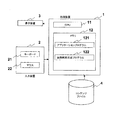
図1は、本発明の実施形態の一例を示す構成図であり、パーソナルコンピュータ等で構成される処理装置1、その付属装置である入力装置2及び表示装置3、コンテンツファイル4で構成されている。
処理装置1は、CPU11、メモリ12を内蔵し、メモリ12には任意のアプリケーションプログラム121の他に、本発明の主要な構成である装飾画面生成プログラム122が記憶されている。
入力装置2は、キーボード21、マウス22から構成されている。
コンテンツファイル4には、HTMLファイルとして作成されたコンテンツ(HTMLコンテンツ)、装飾画面で使用する画像データ、音楽データなどのコンテンツが格納されている。
本実施の形態では、生成プログラム122は、いわゆるWebブラウザで構成されるものであるが、コンテンツファイル4を表示する機能を備えたプログラムであればプログラムの形態は問わない。
また、本実施の形態ではアプリケーションプログラムと装飾画面生成プログラムを別個の構成として記載しているが、アプリケーションプログラム内に装飾画面生成プログラムの機能を備えるように構成しても良い。
Hereinafter, an embodiment of an information processing apparatus to which a decoration screen display method according to the present invention is applied will be described.
FIG. 1 is a configuration diagram illustrating an example of an embodiment of the present invention, which includes a
The
The
The
In the present embodiment, the
In the present embodiment, the application program and the decoration screen generation program are described as separate configurations. However, the application program may be configured to have the function of the decoration screen generation program.
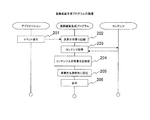
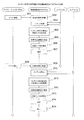
図2は、アプリケーションプログラム121が表示装置3に表示するウインドウに対して重畳表示する装飾画面生成プログラム122の処理を示すフローチャートである。
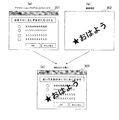
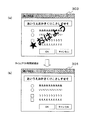
このフローチャートは、例えば、図3(a)に示すようなアプリケーションプログラム121のウインドウ301に対して、図3(b)に示すような表示内容の装飾画面302を生成し、図3(c)に示すように重畳表示させる場合の処理を示すものである。
まず、アプリケーションプログラム121は、装飾画面を表示させるための操作イベント、あるいは処理過程において装飾画面を表示させるため所定のイベントが発生したことを検出したならば(ステップ201)、このイベントが発生したこととコンテンツファイル4の場所を装飾画面生成プログラム122に通知する。
装飾画面生成プログラム122は、イベントの発生通知を受け、図3の装飾画面302を非表示状態で起動する(ステップ202)。
非表示状態で起動するとは、後述するステップ204において背景色を取得し、ステップ205において、背景色を透明に設定してから表示装置3に表示することを意味する。
FIG. 2 is a flowchart showing the process of the decoration
In this flowchart, for example, a
First, if the application program 121 detects that an operation event for displaying a decoration screen or a predetermined event for displaying a decoration screen in the process is generated (step 201), the event has occurred. And the location of the
The decoration
Starting in the non-display state means that the background color is acquired in
次に、ウインドウ301の表示内容を装飾する装飾内容であるHTMLコンテンツを予め設定されたコンテンツファイル4から取得し、非表示状態の装飾画面302に展開(貼り付け)し(ステップ203)、次にそのHTMLコンテンツの背景色を取得し(ステップ204)、装飾画面302に展開したHTMLコンテンツの背景色を透明色に設定する(ステップ205)。
HTMLコンテンツの背景色を透明色に設定することは、HTMLコンテンツを展開した装飾画面302を透明に設定することを意味する。これにより、HTMLコンテンツが展開された透過型の装飾画面302が生成される。
次に、その装飾画面302をウインドウ301の前面に重畳して可視化して表示する(ステップ206)。これにより、図3(c)に示すような表示内容の装飾画面302がウインドウ301に重ね合わせ表示される。
なお、装飾画面302を表示する場合、ウインドウ301の現在の表示位置とサイズが一致するように、ウインドウ301の現在の表示位置とサイズをアプリケーションプログラムが属性として保持しているサイズと位置情報を得、その表示位置とサイズに装飾画面302の表示位置とサイズを一致させるように制御する。これは、ステップ206で行う。
オペレーティングシステム画面(デスクトップ画面)を装飾したい場合は、オペレーティングシステム(図示しない)から、画面サイズを取得して装飾画面をそのサイズで表示する。
Next, the HTML content which is the decoration content for decorating the display content of the
Setting the background color of the HTML content to a transparent color means setting the
Next, the
When the
When it is desired to decorate the operating system screen (desktop screen), the screen size is acquired from the operating system (not shown) and the decoration screen is displayed in that size.
以上の処理により、ウインドウ301に表示させる装飾内容を変更する必要が生じた場合、コンテンツファイル4に格納されたHTMLコンテンツを変更するのみで容易に対処することができる。
また、アプリケーションプログラム121が表示するウインドウ301に対して透過した状態で、コンテンツファイル4に格納された装飾用のHTMLコンテンツを表示させることができる。
With the above processing, when it is necessary to change the decoration content displayed on the
Further, the decorative HTML content stored in the
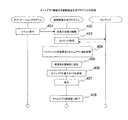
図4は、図3(b)に例示した装飾画面302を予め設定したタイムアウト値で示される時間に満了後に表示終了とする場合の実施形態を示すフローチャートである。
図4において、アプリケーションプログラム121は、装飾画面を表示させるための操作イベント、あるいは処理過程において装飾画面を表示させるため所定のイベントが発生したことを検出したならば(ステップ401)、このイベントが発生したことを装飾画面生成プログラム122に通知する。
装飾画面生成プログラム122は、イベントの発生通知を受け、図2の装飾画面302を非表示状態で起動する(ステップ402)。
FIG. 4 is a flowchart illustrating an embodiment in the case where the display is terminated after the
In FIG. 4, when the application program 121 detects that an operation event for displaying the decoration screen or a predetermined event for displaying the decoration screen in the process is generated (step 401), this event is generated. This is notified to the decoration
The decoration
次に、ウインドウ301の表示内容を装飾する装飾内容であるHTMLコンテンツを予め設定されたコンテンツファイル4から取得し、非表示状態の装飾画面302に展開(貼り付け)し(ステップ403)、次にそのHTMLコンテンツの背景色とタイムアウト値を取得し(ステップ404)、装飾画面302に展開したHTMLコンテンツの背景色を透明色に変更する(ステップ405)。
HTMLコンテンツの背景色を透明色に変更することは、HTMLコンテンツを展開した装飾画面302を透明に設定することを意味する。これにより、HTMLコンテンツが展開された透過型の装飾画面302が生成される。
Next, the HTML content that is the decoration content that decorates the display content of the
Changing the background color of the HTML content to a transparent color means setting the
次に、タイマの値をHTMLコンテンツから取得したタイムアウト値に設定して起動し(ステップ406)、装飾画面302をウインドウ301の前面に重畳して可視化して表示する(ステップ407)。これにより、図3(c)に示すような表示内容がウインドウ301に重ね合わせ表示される。
装飾画面生成プログラム122は、タイマの値がタイムアウト値に一致したならば、装飾画面302の表示を終了する(ステップ408)。
なお、装飾画面302を表示する場合、ウインドウ301の現在の表示位置とサイズが一致するように、ウインドウ301の現在の表示位置とサイズをアプリケーションプログラムが属性として保持しているサイズと位置情報を得、その表示位置とサイズに装飾画面302の表示位置とサイズを一致させるように制御する。これは、ステップ407で行う。
オペレーティングシステム画面(デスクトップ画面)を装飾したい場合は、オペレーティングシステム(図示しない)から、画面サイズを取得して装飾画面をそのサイズで表示する。
以上の処理により、図3のウインドウ301に重畳表示された装飾画面303は、図5(b)に示すように、コンテンツ中に記述されたタイムアウト期間だけ表示され、ウインドウ301のみの表示となる。
Next, the timer value is set to the timeout value acquired from the HTML content and started (step 406), and the
If the timer value matches the timeout value, the decoration
When the
When it is desired to decorate the operating system screen (desktop screen), the screen size is acquired from the operating system (not shown) and the decoration screen is displayed in that size.
As a result of the above processing, the
図6は、本発明の他の実施形態を示すフローチャートである。
ここで示す処理は、コンテンツファイル4から取得した装飾用HTMLコンテンツ中に、次回のイベント発生時におけるリソースの指定情報が設定されていた場合には、当該リソースの指定情報を保持し、次回のイベント発生時には当該指定情報で指定されたリソースから装装飾用HTMLコンテンツを取得するステップを付加したものである。
図6において、アプリケーションプログラム121は、装飾画面を表示させるための操作イベント、あるいは処理過程において装飾画面を表示させるため所定のイベントが発生したことを検出したならば(ステップ601)、このイベントが発生したこととコンテンツファイル4の場所を装飾画面生成プログラム122に通知する。
装飾画面生成プログラム122は、イベントの発生通知を受け、図2の装飾画面302を非表示状態で起動する(ステップ602)。
FIG. 6 is a flowchart showing another embodiment of the present invention.
In the process shown here, if the resource designation information at the time of the next event occurrence is set in the decorative HTML content acquired from the
In FIG. 6, when the application program 121 detects that an operation event for displaying the decoration screen or a predetermined event for displaying the decoration screen in the process is generated (step 601), this event is generated. The decoration
The decoration
次に、ウインドウ301の表示内容を装飾する装飾内容であるHTMLコンテンツを予め設定されたコンテンツファイルAから取得し、非表示状態の装飾画面302に展開(貼り付け)し(ステップ603)、次にそのHTMLコンテンツの背景色と次回イベント発生時のリンク先(リソースの指定情報)値を取得し(ステップ604)、装飾画面302に展開したHTMLコンテンツの背景色を透明色に変更する(ステップ605)。
HTMLコンテンツの背景色を透明色に変更することは、HTMLコンテンツを展開した装飾画面302を透明に設定することを意味する。これにより、HTMLコンテンツが展開された透過型の装飾画面302が生成される。
Next, the HTML content that is the decoration content that decorates the display content of the
Changing the background color of the HTML content to a transparent color means setting the
次に、ステップ604で取得したリンク先の情報を保持した後(ステップ606)、装飾画面302をウインドウ301の前面に重畳して可視化して表示する(ステップ607)。これにより、図3(c)に示すような表示内容がウインドウ301に重ね合わせ表示される。
この状態で、アプリケーションプログラム121が次のイベントを検出し(ステップ608)、そのイベントの発生を装飾画面生成プログラム122に通知した場合、装飾画面生成プログラム122は、図2の装飾画面302を非表示状態で起動する(ステップ609)。
Next, after holding the link destination information acquired in step 604 (step 606), the
In this state, when the application program 121 detects the next event (step 608) and notifies the occurrence of the event to the decoration
次に、ウインドウ301の表示内容を装飾する装飾内容であるHTMLコンテンツをステップ606で保持しておいたリンク先のコンテンツファイルBから取得し、非表示状態の装飾画面302に展開(貼り付け)し(ステップ610)、次にそのHTMLコンテンツの背景色と次回イベント発生時のリンク先(リソースの指定情報)値を取得し(ステップ611)、装飾画面302に展開したHTMLコンテンツの背景色を透明色に変更する(ステップ612)。
これにより、ステップ606で指定されたリンク先のHTMLコンテンツが展開された透過型の装飾画面302が生成される。
Next, the HTML content that is the decoration content that decorates the display content of the
As a result, a
次に、ステップ611で取得したリンク先の情報を保持した後(ステップ613)、装飾画面302をウインドウ301の前面に重畳して可視化して表示する(ステップ614)。
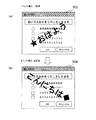
これにより、1回目のイベント発生時において図3(b)の装飾画面を重畳表示したウインドウ303は、2回目のイベント発生により、図7(b)のウインドウ304に示すように、次回イベント発生時のリンク先で指定されたHTMLコンテンツに対応したものに切り替わる。
以上の処理により、装飾画面の内容をHTMLコンテンツに記述するリンク先によってイベント発生毎に切替えることができる。
Next, after holding the link destination information acquired in step 611 (step 613), the
As a result, when the first event occurs, the
With the above processing, the contents of the decoration screen can be switched for each event occurrence by the link destination described in the HTML content.
なお、本実施の形態では、コンテンツ上の背景色を取得する処理(たとえばステップ204)を行うようにしているが、予め透明にする背景色を定義しておくことで、コンテンツ上の背景色を取得する処理を省略するようにしても良い。
また、図6の処理において、図4に示したようにHTMLコンテンツ中にタイムアウト値を設定し、そのタイムアウト値で示される期間だけ装飾内容を表示するように構成することができる。
また、HTMLコンテンツには、画像や音声のデータを埋め込むことができる。また、JavaSript(登録商標)などのスクリプト言語により、画像のアニメーションに関する記述も埋め込むことができる。このHTMLコンテンツの機能を利用することにより、画像や音声、アニメーションを装飾内容とする装飾画面を生成して表示させることができ、文字、画像、音声、アニメーションを適宜に組み合わせたアプリケーションを構築することが可能になる。
また、本発明はHTMLコンテンツに限定されるものではなく、装飾画面生成プログラムが処理可能なコンテンツの形式であれば形式は問わない。たとえば、マークアップ言語によるコンテンツであればSGML、XMLなどにより作成されたコンテンツでも良い。
なお、リンク先の指定情報は、ネットワークで接続されたサーバ上に保持されたコンテンツファイルであっても良い。
また、図2、図4、図6で示した処理はコンピュータで実行可能なプログラムとして提供することができる。
In the present embodiment, the process of acquiring the background color on the content (for example, step 204) is performed. However, by defining the background color to be transparent in advance, the background color on the content is changed. You may make it abbreviate | omit the process to acquire.
In the process of FIG. 6, a timeout value can be set in the HTML content as shown in FIG. 4, and the decoration contents can be displayed only during the period indicated by the timeout value.
Also, image data and audio data can be embedded in the HTML content. In addition, a description relating to the animation of an image can be embedded by a script language such as Java Script (registered trademark). By using this HTML content function, it is possible to generate and display a decoration screen having decoration contents such as images, sounds, and animations, and to construct an application that appropriately combines characters, images, sounds, and animations. Is possible.
The present invention is not limited to HTML content, and any format can be used as long as it is a content format that can be processed by the decoration screen generation program. For example, content created in SGML, XML, or the like may be used as long as the content is in a markup language.
The link destination designation information may be a content file held on a server connected via a network.
2, 4, and 6 can be provided as a computer-executable program.
1…処理装置、12…メモリ、121…アプリケーションプログラム、122…装飾画面生成プログラム、4…コンテンツファイル。
DESCRIPTION OF
Claims (8)
前記データ処理手段が、予め設定された装飾画面表示用のイベント発生時に、前記装飾画面を生成する装飾画面生成手段に対し、当該イベントの発生を通知する第1のステップと、
前記イベントの発生通知を受けた前記装飾画面生成手段が、装飾画面を非表示状態で起動し、前記データ処理手段のウインドウの表示内容を装飾する装飾用コンテンツを予め設定されたリソースから取得して展開した後、その装飾用コンテンツの背景色を透明色に変更して透過型の装飾画面を生成し、前記データ処理手段が表示装置に表示するウインドウの前面に重畳して表示する第2のステップを備えることを特徴とする装飾画面表示方法。 A decoration screen display method for displaying a decoration screen such as characters that decorate display contents of the window superimposed on a front surface of a window displayed on a display device by a data processing means configured by an arbitrary application program,
A first step in which the data processing means notifies the occurrence of the event to a decoration screen generation means for generating the decoration screen when a preset decoration screen display event occurs;
Upon receiving the event occurrence notification, the decoration screen generation means starts up the decoration screen in a non-display state, acquires the decoration content for decorating the display contents of the window of the data processing means from a preset resource. After the expansion, a second step of generating a transparent decoration screen by changing the background color of the decoration content to a transparent color and displaying the image on the front of the window displayed on the display device by the data processing means. The decoration screen display method characterized by comprising.
前記データ処理手段から予め設定された装飾画面表示用のイベント発生通知を受けた場合に、装飾画面を非表示状態で起動し、前記データ処理手段のウインドウの表示内容を装飾する装飾用コンテンツを予め設定されたリソースから取得して展開した後、その装飾用コンテンツの背景色を透明色に変更して透過型の装飾画面を生成し、前記データ処理手段が表示装置に表示するウインドウの前面に重畳して表示する処理をコンピュータに実行させるステップを備えることを特徴とする装飾画面表示プログラム。 A decoration screen display program for superimposing and displaying a decoration screen of characters or the like for decorating the display contents of the window on the front of the window displayed on the display device by the data processing means configured by an arbitrary application program. ,
When receiving a preset decoration screen display event occurrence notification from the data processing means, the decoration screen is activated in a non-display state, and the decoration content for decorating the display contents of the window of the data processing means After acquiring from the set resource and expanding it, the background color of the decoration content is changed to a transparent color to generate a transparent decoration screen, which is superimposed on the front of the window displayed on the display device by the data processing means A decoration screen display program comprising a step of causing a computer to execute processing to be displayed.
Priority Applications (1)
| Application Number | Priority Date | Filing Date | Title |
|---|---|---|---|
| JP2006180913A JP2008009815A (en) | 2006-06-30 | 2006-06-30 | Decoration screen display method and program |
Applications Claiming Priority (1)
| Application Number | Priority Date | Filing Date | Title |
|---|---|---|---|
| JP2006180913A JP2008009815A (en) | 2006-06-30 | 2006-06-30 | Decoration screen display method and program |
Publications (1)
| Publication Number | Publication Date |
|---|---|
| JP2008009815A true JP2008009815A (en) | 2008-01-17 |
Family
ID=39067947
Family Applications (1)
| Application Number | Title | Priority Date | Filing Date |
|---|---|---|---|
| JP2006180913A Pending JP2008009815A (en) | 2006-06-30 | 2006-06-30 | Decoration screen display method and program |
Country Status (1)
| Country | Link |
|---|---|
| JP (1) | JP2008009815A (en) |
Citations (11)
| Publication number | Priority date | Publication date | Assignee | Title |
|---|---|---|---|---|
| JPH06124183A (en) * | 1992-10-13 | 1994-05-06 | Toshiba Corp | Multi-window system |
| JPH06141120A (en) * | 1992-10-28 | 1994-05-20 | Ricoh Co Ltd | Tele-writing equipment |
| JPH06259217A (en) * | 1993-03-02 | 1994-09-16 | Toshiba Corp | Multiwindow system |
| JPH06314184A (en) * | 1993-04-30 | 1994-11-08 | Kokusai Electric Co Ltd | Display device and control method thereof |
| JPH08152989A (en) * | 1994-11-25 | 1996-06-11 | Canon Inc | Window system and transparent window generation method thereof |
| JPH10116174A (en) * | 1996-10-14 | 1998-05-06 | Toshiba Eng Co Ltd | Memo screen display method and medium recording memo screen display control program |
| JPH1165798A (en) * | 1997-08-19 | 1999-03-09 | Toshiba Corp | Message display device, message display method, and recording medium recording message display program |
| JP2001022489A (en) * | 1999-07-07 | 2001-01-26 | Just Syst Corp | INFORMATION PROCESSING DEVICE, INFORMATION PROCESSING METHOD, AND COMPUTER-READABLE RECORDING MEDIUM RECORDING PROGRAM FOR CAUSING COMPUTER TO EXECUTE THE METHOD |
| JP2001134415A (en) * | 1999-11-09 | 2001-05-18 | Oki Electric Ind Co Ltd | How to annotate the display of any application |
| JP2002312285A (en) * | 2001-04-11 | 2002-10-25 | Katsuichiro Yamaguchi | Electronic greeting cards sent and received on the web |
| JP2007122511A (en) * | 2005-09-29 | 2007-05-17 | Agyo:Kk | Program, plug-in program and information processing method |
-
2006
- 2006-06-30 JP JP2006180913A patent/JP2008009815A/en active Pending
Patent Citations (11)
| Publication number | Priority date | Publication date | Assignee | Title |
|---|---|---|---|---|
| JPH06124183A (en) * | 1992-10-13 | 1994-05-06 | Toshiba Corp | Multi-window system |
| JPH06141120A (en) * | 1992-10-28 | 1994-05-20 | Ricoh Co Ltd | Tele-writing equipment |
| JPH06259217A (en) * | 1993-03-02 | 1994-09-16 | Toshiba Corp | Multiwindow system |
| JPH06314184A (en) * | 1993-04-30 | 1994-11-08 | Kokusai Electric Co Ltd | Display device and control method thereof |
| JPH08152989A (en) * | 1994-11-25 | 1996-06-11 | Canon Inc | Window system and transparent window generation method thereof |
| JPH10116174A (en) * | 1996-10-14 | 1998-05-06 | Toshiba Eng Co Ltd | Memo screen display method and medium recording memo screen display control program |
| JPH1165798A (en) * | 1997-08-19 | 1999-03-09 | Toshiba Corp | Message display device, message display method, and recording medium recording message display program |
| JP2001022489A (en) * | 1999-07-07 | 2001-01-26 | Just Syst Corp | INFORMATION PROCESSING DEVICE, INFORMATION PROCESSING METHOD, AND COMPUTER-READABLE RECORDING MEDIUM RECORDING PROGRAM FOR CAUSING COMPUTER TO EXECUTE THE METHOD |
| JP2001134415A (en) * | 1999-11-09 | 2001-05-18 | Oki Electric Ind Co Ltd | How to annotate the display of any application |
| JP2002312285A (en) * | 2001-04-11 | 2002-10-25 | Katsuichiro Yamaguchi | Electronic greeting cards sent and received on the web |
| JP2007122511A (en) * | 2005-09-29 | 2007-05-17 | Agyo:Kk | Program, plug-in program and information processing method |
Similar Documents
| Publication | Publication Date | Title |
|---|---|---|
| US20220317825A1 (en) | Method and apparatus for displaying multimedia resources, and storage medium | |
| CN107809504B (en) | Method, device, terminal and storage medium for displaying information | |
| US9276990B1 (en) | Virtual application execution system and method | |
| JP5087674B2 (en) | Remoting applications based on Windows Presentation Framework in an unconfigured desktop | |
| CN103092612B (en) | Realize method and the electronic installation of Android operation system 3D desktop pinup picture | |
| CN104980563B (en) | Operate demenstration method and operation apparatus for demonstrating | |
| JP5585585B2 (en) | Information terminal, display method and program | |
| CN104935497A (en) | Communication session method and device | |
| CN113325979B (en) | Video generation method and device, storage medium and electronic device | |
| CN105094824B (en) | A kind of notification message methods of exhibiting on smartwatch and a kind of smartwatch | |
| WO2016150388A1 (en) | Interface processing method, apparatus, and system | |
| CN103731759A (en) | Watermark adding method and device | |
| CN106980503B (en) | Page processing method, device and equipment | |
| US20150319215A1 (en) | Methods for facilitating a remote interface and devices thereof | |
| CN114610429A (en) | Multimedia interface display method and device, electronic equipment and storage medium | |
| JP2002208022A (en) | Display control method, information display device, and medium | |
| KR20160113135A (en) | Providing print view of document for editing in web-based application | |
| JP2010282200A (en) | Structure of animation font file and text output method of portable terminal | |
| CN115329225A (en) | Page prerendering method, system and equipment based on server browser | |
| CN105824646A (en) | Processing method and processing device for notification bar messages of computing device | |
| JP5455714B2 (en) | How to print the web page capture screen | |
| JP2010182176A (en) | Server device, client device, server based computing system, and program | |
| CN103336818A (en) | Method and device for alignment after webpage zoom on electronic equipment | |
| JP2010218031A (en) | Discussion support device and discussion support program | |
| JP2013528875A (en) | Updating graphical display content |
Legal Events
| Date | Code | Title | Description |
|---|---|---|---|
| A621 | Written request for application examination |
Free format text: JAPANESE INTERMEDIATE CODE: A621 Effective date: 20090120 |
|
| A977 | Report on retrieval |
Free format text: JAPANESE INTERMEDIATE CODE: A971007 Effective date: 20101224 |
|
| A131 | Notification of reasons for refusal |
Free format text: JAPANESE INTERMEDIATE CODE: A131 Effective date: 20110114 |
|
| A521 | Request for written amendment filed |
Free format text: JAPANESE INTERMEDIATE CODE: A523 Effective date: 20110217 |
|
| A02 | Decision of refusal |
Free format text: JAPANESE INTERMEDIATE CODE: A02 Effective date: 20111208 |