JP2008502995A - Multipurpose medium access data processing system - Google Patents
Multipurpose medium access data processing system Download PDFInfo
- Publication number
- JP2008502995A JP2008502995A JP2007516488A JP2007516488A JP2008502995A JP 2008502995 A JP2008502995 A JP 2008502995A JP 2007516488 A JP2007516488 A JP 2007516488A JP 2007516488 A JP2007516488 A JP 2007516488A JP 2008502995 A JP2008502995 A JP 2008502995A
- Authority
- JP
- Japan
- Prior art keywords
- user
- data
- multipurpose
- media access
- access device
- Prior art date
- Legal status (The legal status is an assumption and is not a legal conclusion. Google has not performed a legal analysis and makes no representation as to the accuracy of the status listed.)
- Pending
Links
- 238000012545 processing Methods 0.000 title claims description 3
- 238000004891 communication Methods 0.000 claims abstract description 28
- 238000012546 transfer Methods 0.000 claims abstract description 11
- 238000013500 data storage Methods 0.000 claims abstract description 8
- 238000000034 method Methods 0.000 claims description 18
- 238000011084 recovery Methods 0.000 claims description 16
- 230000008569 process Effects 0.000 claims description 12
- 238000005192 partition Methods 0.000 claims description 7
- 230000015654 memory Effects 0.000 description 16
- 238000003860 storage Methods 0.000 description 14
- 230000006870 function Effects 0.000 description 13
- 238000010586 diagram Methods 0.000 description 12
- 238000013519 translation Methods 0.000 description 7
- 238000007726 management method Methods 0.000 description 6
- 230000007246 mechanism Effects 0.000 description 6
- 230000010365 information processing Effects 0.000 description 4
- 230000000694 effects Effects 0.000 description 3
- 230000002093 peripheral effect Effects 0.000 description 3
- 230000003111 delayed effect Effects 0.000 description 2
- 238000005516 engineering process Methods 0.000 description 2
- 230000003993 interaction Effects 0.000 description 2
- 238000012423 maintenance Methods 0.000 description 2
- 230000008439 repair process Effects 0.000 description 2
- 238000012795 verification Methods 0.000 description 2
- 230000000007 visual effect Effects 0.000 description 2
- UEKHZPDUBLCUHN-UHFFFAOYSA-N 2-[[3,5,5-trimethyl-6-[2-(2-methylprop-2-enoyloxy)ethoxycarbonylamino]hexyl]carbamoyloxy]ethyl 2-methylprop-2-enoate Chemical compound CC(=C)C(=O)OCCOC(=O)NCCC(C)CC(C)(C)CNC(=O)OCCOC(=O)C(C)=C UEKHZPDUBLCUHN-UHFFFAOYSA-N 0.000 description 1
- 125000002066 L-histidyl group Chemical group [H]N1C([H])=NC(C([H])([H])[C@](C(=O)[*])([H])N([H])[H])=C1[H] 0.000 description 1
- 241000700605 Viruses Species 0.000 description 1
- 230000001413 cellular effect Effects 0.000 description 1
- 238000006243 chemical reaction Methods 0.000 description 1
- 230000007257 malfunction Effects 0.000 description 1
- 238000004519 manufacturing process Methods 0.000 description 1
- 238000012986 modification Methods 0.000 description 1
- 230000004048 modification Effects 0.000 description 1
- 238000012544 monitoring process Methods 0.000 description 1
- 230000003287 optical effect Effects 0.000 description 1
- 238000003825 pressing Methods 0.000 description 1
- 238000013515 script Methods 0.000 description 1
- 239000004065 semiconductor Substances 0.000 description 1
- 230000011664 signaling Effects 0.000 description 1
- 238000012549 training Methods 0.000 description 1
Images



Classifications
-
- H—ELECTRICITY
- H04—ELECTRIC COMMUNICATION TECHNIQUE
- H04L—TRANSMISSION OF DIGITAL INFORMATION, e.g. TELEGRAPHIC COMMUNICATION
- H04L63/00—Network architectures or network communication protocols for network security
- H04L63/08—Network architectures or network communication protocols for network security for authentication of entities
- H04L63/083—Network architectures or network communication protocols for network security for authentication of entities using passwords
-
- H—ELECTRICITY
- H04—ELECTRIC COMMUNICATION TECHNIQUE
- H04L—TRANSMISSION OF DIGITAL INFORMATION, e.g. TELEGRAPHIC COMMUNICATION
- H04L63/00—Network architectures or network communication protocols for network security
- H04L63/10—Network architectures or network communication protocols for network security for controlling access to devices or network resources
- H04L63/102—Entity profiles
-
- H—ELECTRICITY
- H04—ELECTRIC COMMUNICATION TECHNIQUE
- H04L—TRANSMISSION OF DIGITAL INFORMATION, e.g. TELEGRAPHIC COMMUNICATION
- H04L2463/00—Additional details relating to network architectures or network communication protocols for network security covered by H04L63/00
- H04L2463/101—Additional details relating to network architectures or network communication protocols for network security covered by H04L63/00 applying security measures for digital rights management
Landscapes
- Engineering & Computer Science (AREA)
- Computer Hardware Design (AREA)
- Computer Security & Cryptography (AREA)
- Computing Systems (AREA)
- General Engineering & Computer Science (AREA)
- Computer Networks & Wireless Communication (AREA)
- Signal Processing (AREA)
- Information Transfer Between Computers (AREA)
- Computer And Data Communications (AREA)
- Storage Device Security (AREA)
Abstract
多目的媒体アクセスデバイスであって、該デバイスは、多目的ユーザデバイスと少なくとも1つの通信ネットワークとの間にデータの転送を制御するように動作可能な通信インターフェイスと、ユーザデータおよび固有ユーザ識別子を記憶するように動作可能なデータ記憶モジュールと、少なくとも1つの実行可能プログラムが記憶されたプログラム記憶モジュールとを含み、前記プログラムは、前記固有ユーザ識別子に関連づけられたユーザプロファイルに従い、通信ネットワーク上においてデータ転送能力のうちのいくつかの限定されたセットを可能にする多目的媒体アクセスデバイスのオペレーショナルフィーチャの所定のセットを可能にするために、固有ユーザ識別子を使用する命令を含み、かつ、該デバイスは、プログラム記憶モジュールに記憶された実行可能プログラムを実行し、ユーザデータのセットを生成するよう動作可能なプロセッサと、処理されたユーザデータを表示するディスプレイとを含む。A multipurpose media access device, said device being operable to control transfer of data between said multipurpose user device and at least one communication network, and to store user data and a unique user identifier A data storage module operable on the communication network and a program storage module storing at least one executable program, wherein the program has a data transfer capability over a communication network according to a user profile associated with the unique user identifier. Including instructions that use unique user identifiers to enable a predetermined set of operational features of a multipurpose media access device that allows for a limited set of them, and the device includes a program storage module Run the executable program stored in Yuru, comprising a processor operable to generate a set of user data, and a display for displaying the processed user data.
Description
本発明は、情報処理システムの分野に関し、より詳細には、多目的媒体(メディア)アクセスデータ処理システムに関する。 The present invention relates to the field of information processing systems, and more particularly to a multipurpose media access data processing system.
コンピュータシステムは、今日の近代社会の多くの分野にコンピュータパワーを供給すべく、広く使用されるようになった。パソコンシステムは通常、システムプロセッサ、関連する揮発性メモリ、および不揮発性メモリを有するシステムユニットと、ディスプレイモニタと、キーボードと、1つ以上のディスクドライブと、固定ディスク記憶装置と、任意のプリンタとを含むマイクロコンピュータとして定義することができる。これらのパソコンシステムは、主として、シングルユーザ(またはコンピュータサーバ・システムとして機能するパソコンの場合のユーザのグループ)に独立した情報処理能力を与えるように構成され、個人または小企業に購入されるように低価格に設定された、情報処理システムである。 Computer systems have become widely used to provide computer power to many areas of today's modern society. A personal computer system typically includes a system processor, a system unit having an associated volatile memory, and non-volatile memory, a display monitor, a keyboard, one or more disk drives, a fixed disk storage device, and an optional printer. It can be defined as a microcomputer containing. These personal computer systems are mainly configured to give independent information processing capabilities to single users (or a group of users in the case of personal computers functioning as computer server systems) and purchased by individuals or small businesses. It is an information processing system set at a low price.
既知のコンピュータシステムは、様々なハードウェアコンポーネントを含んでいる。さらに、ユーザがコンピュータシステムを受け取る際、そのコンピュータシステムには、インターネットのブラウジングを可能にするブラウザ・アプリケーション、ワードプロセッサ、または電子メールプログラムのような、所定のソフトウェア・アプリケーションが予めインストールされている可能性がある。 Known computer systems include various hardware components. In addition, when a user receives a computer system, the computer system may be pre-installed with certain software applications, such as browser applications, word processors, or e-mail programs that allow browsing the Internet. There is.
インターネットの構成要素の1つは、ワールド・ワイド・ウェブ(Web)であり、これは、複数のウェブ「ページ」を含むネットワークにグローバルに接続されている。ウェブページは、ブラウザソフトの使用を通じてユーザによって見ることができる情報の集合である。本発明においては、ブラウザソフトを「ブラウザ」と呼ぶことがある。ブラウザは、通信リンクによるウェブページの要求および表示を実行する専用のソフトウェア・アプリケーション・プログラムである。 One component of the Internet is the World Wide Web (Web), which is globally connected to a network that includes multiple web “pages”. A web page is a collection of information that can be viewed by a user through the use of browser software. In the present invention, browser software may be referred to as “browser”. A browser is a dedicated software application program that performs the request and display of web pages over a communication link.
ウェブページは、テキスト、グラフィックス、音楽やスピーチを含む音、アニメーション、およびビデオイメージを含む様々なマルチメディア成分を組み込むことができる。音成分を含んだウェブページは、ブラウザを使用して、見ることができると共に聞くことができる。 ウェブページは、ユーザが、任意のウェブページから別のウェブページ、グラフィックス、バイナリ・ファイル、マルチメディアファイルへの移動を、インターネット・リソースと同様に可能にするハイパーテキストを使用して、互いに相互連結される。 Web pages can incorporate various multimedia components including text, graphics, sounds including music and speech, animations, and video images. Web pages containing sound components can be viewed and heard using a browser. Web pages interact with each other using hypertext that allows users to move from any web page to another web page, graphics, binary file, multimedia file, as well as Internet resources. Connected.
ウェブは、クライアント/サーバ・モデルで動作する。ウェブは、サーバ・コンピュータ・システムが、グラフィカルなウェブページ情報を遠隔クライアントコンピュータシステムに送信することを可能にする。サーバ・コンピュータ・システム(「サーバシステム」)は、以下に記載するように、ウェブ「サイト」を構築するソフトウェア・ウェブページと同様、ハードウェア・サーバも含んでいる。ハードウェア「サーバ」および「サイト」の用語は、区別なく使用されることがある。 The web operates in a client / server model. The web allows a server computer system to send graphical web page information to a remote client computer system. Server computer systems (“server systems”) include hardware servers as well as software web pages that build web “sites”, as described below. The terms hardware “server” and “site” may be used interchangeably.
遠隔クライアントコンピュータシステムはブラウザを含んでいるので、ウェブページを表示することができる。ユーザは、ユーザコンピュータ上で、ネットスケープ・ナビゲータ(商標)またはマイクロソフト・インターネット・エクスプローラ(商標)のような、Webクライアント・ブラウザソフトを実行する。このブラウザソフトは、ウェブサーバに接触し、情報またはリソースを要求するクライアントの役割をする。ウェブサーバは、ウェブブラウザに対する情報のロケーションを行い、その後、この情報を送信する。ウェブブラウザは、ユーザのコンピュータ上にユーザに対する結果を表示する。 The remote client computer system includes a browser so that it can display web pages. The user runs Web client browser software, such as Netscape Navigator ™ or Microsoft Internet Explorer ™, on the user computer. This browser software acts as a client that contacts a web server and requests information or resources. The web server locates the information for the web browser and then sends this information. The web browser displays the results for the user on the user's computer.
ウェブページは、ハイパーテキスト・マークアップ言語(「HTML」)と呼ばれるマークアップ言語を使用して定義される。HTMLは、ウェブページをどのようにして表示するかを定義するタグの標準セットを提供する。HTMLは、遠隔クライアントコンピュータ上のブラウザに、テキスト、グラフィックス、およびマルチメディアファイルを表示する方法を伝えるためにサーバから送信されるコマンドを含んでいる。HTMLはさらに、ウェブページを、他のウェブページおよび他のインターネット・リソースにリンクするためのコマンドを含んでいる。 Web pages are defined using a markup language called hypertext markup language (“HTML”). HTML provides a standard set of tags that define how web pages are displayed. HTML includes commands sent from the server to tell the browser on the remote client computer how to display text, graphics, and multimedia files. The HTML further includes commands for linking web pages to other web pages and other internet resources.
今日のコンピュータシステムを購入可能な世界人口よりも多くの世界人口のセグメントにコンピュータシステム機能を有したデバイスを提供することが望ましい。 It would be desirable to provide devices with computer system functionality in a larger segment of the world population than the world population where today's computer systems can be purchased.
本発明のシステムは、ハードドライブの複製による不正コピーあるいはシステムイメージおよびアプリケーションの再利用を防止するために利用される、固有(ユニークな)IDを含む。この固有IDは、オペレーティングシステムイメージのアプリケーションにアクセスすることができる。これは、オペレーティングシステムレベルで暗号化されたID形式でのアクセスであってもよく、インターネット・サービス・プロバイダへのアクセスを獲得するために、不正システム上にIDが複製されないようにする。一つの実装形態では、固有IDの暗号化キーを公開キーとして供給する。この公開キーは、インターネット・サービス・プロバイダによってダウンロードされて、インターネット・サービス・プロバイダによって周期的にアップデートされ得るような方法で実装される。利用者にシステムが供給されると、利用者はこの固有IDを登録し、インターネットおよびEメールアカウントへのアクセスが可能になる。インターネット・サービス・プロバイダは、指定されたアカウント(UUID)へのサービスを無効にすることによって、インターネットあるいはEメールサーバへのアクセスを禁止するように、この固有IDを使用することができる。 The system of the present invention includes a unique (unique) ID that is used to prevent unauthorized copying due to hard drive duplication or reuse of system images and applications. This unique ID can access the application of the operating system image. This may be access in the form of an ID encrypted at the operating system level, preventing the ID from being duplicated on the unauthorized system in order to gain access to the Internet service provider. In one implementation, an encryption key with a unique ID is supplied as a public key. This public key is implemented in such a way that it can be downloaded by an Internet service provider and periodically updated by the Internet service provider. Once the system is supplied to the user, the user registers this unique ID and can access the Internet and email accounts. The internet service provider can use this unique ID to prohibit access to the internet or email server by disabling service to the specified account (UUID).
一実施形態では、本発明は、多目的媒体アクセス・デバイスに関する。この多目的媒体アクセス・デバイスは、この多目的ユーザデバイスと少なくとも1つの通信ネットワークとの間のデータ転送を制御するように動作可能な通信インターフェイス、ユーザデータと固有ユーザ識別子とを記憶するように動作可能なデータ記憶モジュール、少なくとも1つの実行可能プログラムが記憶されたプログラム記憶モジュールを含む。この実行可能プログラムは、この固有ユーザ識別子に関連づけられたユーザプロファイルに従い、通信ネットワーク上で限定されたテータ転送能力のセットを可能にする、多目的媒体アクセスデバイスの所定のオペレーショナルフィーチャのセットを可能にするために、固有ユーザ識別子を使用する命令を含む。また、多目的媒体アクセス・デバイスは、プログラム記憶モジュールに記憶された実行可能プログラムを実行するように動作可能なプロセッサを含み、このデータ記憶モジュールに記憶されたデータを処理し、ユーザデータのセットを生成する。処理されたユーザデータを表示するためのディスプレイも含まれる。 In one embodiment, the invention relates to a multipurpose media access device. The multipurpose media access device is operable to store a communication interface operable to control data transfer between the multipurpose user device and at least one communication network, user data and a unique user identifier. A data storage module includes a program storage module in which at least one executable program is stored. The executable program enables a predetermined set of operational features of a multipurpose media access device that allows a limited set of data transfer capabilities over a communication network according to a user profile associated with the unique user identifier. In order to do so, it includes instructions for using the unique user identifier. The multipurpose media access device also includes a processor operable to execute an executable program stored in the program storage module, and processes the data stored in the data storage module to generate a set of user data. To do. A display for displaying the processed user data is also included.
本発明は、低価格の多目的インターネット接続可能コンピューティングデバイスを提供する。このシステムは、固有ユーザ識別子にリンクされている、パソコンの情報処理能力の固定され、限定されたサブセットを提供する。本発明のシステムは、WindowsベースのオペレーティングシステムとLinuxベースのオペレーティングシステムの両方をサポートすることができる。本発明の一実施形態では、オペレーティングシステムはWindows CEなどの、モバイル版Windowsに基づく。本発明では、このオペレーティングシステムは、工場出荷時にインストール済みのイメージで事前に設定されており、ユーザが変更することはできない。事前設定されているソフトウェアアプリケーションとしては、ワードプロセッサ、スプレッドシート、ウェブブラウザ、PDFビューア、メディアプレーヤ、および描画アプリケーションが挙げられる。本発明のシステムは、いずれかのマーケットに特有のアプリケーションは含まない。むしろ、デスクトップ上にはインターネットリンクが定義されて事前に設定されており、ユーザは、ウェブメール、オンラインゲーム、および、音楽、映画、スポーツのリンクを含むエンターテイメント、ローカルニュース、天気、および人気のある検索エンジンを使用することができる。ディスプレイ装置上に与えられるデスクトップは、オペレーティングシステムのロードの一部としてこれらのウェブリンクを含むように事前設定されている。 The present invention provides a low cost, multipurpose internet connectable computing device. This system provides a fixed and limited subset of personal computer information processing capabilities linked to unique user identifiers. The system of the present invention can support both Windows-based operating systems and Linux-based operating systems. In one embodiment of the invention, the operating system is based on a mobile version of Windows, such as Windows CE. In the present invention, this operating system is set in advance with an image installed at the time of factory shipment, and cannot be changed by the user. Preconfigured software applications include word processors, spreadsheets, web browsers, PDF viewers, media players, and drawing applications. The system of the present invention does not include any market specific applications. Rather, Internet links are defined and pre-configured on the desktop, and users are popular with webmail, online games, and entertainment, including music, movies, and sports links, local news, weather, and popularity. A search engine can be used. The desktop provided on the display device is preconfigured to include these web links as part of the operating system load.
本発明では、ユーザデータのバックアップは、インターネット・サービス・プロバイダを介して供給されてもよい。本発明の一実施形態では、ユーザデータは、システムデータを含むディスクパーティションとは分離されたディスクパーティションに記憶されたリカバリイメージ上に記憶される。このリカバリイメージにより、ユーザあるいは修理人は、わずかな費用でフィールドのオペレーティングシステムイメージをアップデートあるいは修復することができる。 In the present invention, a backup of user data may be provided via an internet service provider. In one embodiment of the present invention, user data is stored on a recovery image stored in a disk partition that is separate from the disk partition containing the system data. This recovery image allows the user or repairer to update or repair the field operating system image for a fraction of the cost.
別の実施形態では、本発明は、データ通信ネットワークとともに、オペレーションのために多目的媒体アクセス・デバイスを制御する方法に関連する。このデータ通信ネットワークは、多目的媒体アクセス・デバイスの記憶モジュールに固有ユーザ識別子を記憶させるステップを含む。固有ユーザ識別子は、多目的媒体アクセス・デバイスの所定のオペレーショナルフィーチャのセットに対応し、固有ユーザ識別子に関連付けられたユーザプロファイルに従って、通信ネットワーク上において、限定されたデータ転送能力のセットを可能に(イネーブルに)する。また、データ通信ネットワークは、多目的媒体アクセス・デバイスのプログラク記憶モジュールに記憶されたプログラムを実行する。このプログラムは所定のオペレーショナルフィーチャのセットが、固有ユーザ識別子に関連づけられたユーザプロファイルに従い、多目的媒体アクセス・デバイスと通信ネットワークとの間で限定されたデータ転送を可能にするように、固有ユーザ識別子を使用する命令を含む。 In another embodiment, the present invention relates to a method for controlling a multipurpose media access device for operation with a data communications network. The data communication network includes storing the unique user identifier in a storage module of the multipurpose media access device. The unique user identifier corresponds to a predetermined set of operational features of the multipurpose media access device and allows a limited set of data transfer capabilities over the communication network according to the user profile associated with the unique user identifier (enabled). To). The data communication network also executes a program stored in the program storage module of the multipurpose medium access device. The program sets a unique user identifier so that a predetermined set of operational features allows limited data transfer between the multipurpose media access device and the communication network according to a user profile associated with the unique user identifier. Contains instructions to use.
本発明は、電話会社などのインターネット・サービス・プロバイダと複数の低価格の多目的インターネット接続可能コンピューティングデバイスとの間にアカウントを維持するための環境を提供する。この環境は、あらゆるコンピューティングデバイスに関連付けられた固有IDを使用し、装置がインターネットへのアクセスを有するかどうか認証する。この環境により、インターネット・サービス・プロバイダは、多目的媒体アクセスデバイスに対する支払いが遅れていないかどうか、装置が盗難報告されているかどうか、同一装置の複製コピーが存在するかどうか(従って、ソフトウェアの不正コピーが作成されたことを示す)、装置が接続を確立している位置が予測した位置に一致しているかどうか、を含む複数の判断基準に基づいて、装置が有効システムであるかどうかの判定を行うことができる。従って、インターネット・サービス・プロバイダはこの判定を用いて、ユーザとの関係のビジネス部分を管理することができる。 The present invention provides an environment for maintaining an account between an Internet service provider, such as a telephone company, and a plurality of low-cost multi-purpose Internet-enabled computing devices. This environment uses a unique ID associated with every computing device to authenticate whether the device has access to the Internet. This environment allows Internet service providers to check whether payment for multipurpose media access devices has been delayed, whether devices have been reported theft, whether duplicate copies of the same device exist (and therefore unauthorized copies of software) Determining whether the device is a valid system based on a number of criteria including whether the location where the device has established a connection matches the predicted location. It can be carried out. Thus, the internet service provider can use this determination to manage the business portion of the relationship with the user.
別の実施形態では、本発明はサービスプロバイダと多目的媒体アクセス・デバイスとの間にアカウントを維持する環境に関し、これには、通信媒体に結合された多目的媒体アクセス・デバイスを含む。多目的媒体アクセス・デバイスは、関連する固有IDと、通信媒体に結合されたサービスプロバイダとを含む。サービスプロバイダは、検証モジュールを含む。この検証モジュールは、多目的媒体アクセス・デバイスがサービスプロバイダによって供給されるサービスへアクセスを望む場合に、この多目的媒体アクセス・デバイスが有効システムであるかどうか判定する。 In another embodiment, the invention relates to an environment for maintaining an account between a service provider and a multipurpose media access device, including a multipurpose media access device coupled to a communication medium. The multipurpose media access device includes an associated unique ID and a service provider coupled to the communication medium. The service provider includes a verification module. The verification module determines whether the multipurpose media access device is a valid system if the multipurpose media access device desires access to a service provided by a service provider.
本発明は、添付の図面を参照することにより、この発明の属する技術分野における通常の知識を有する者にとって、より良く理解されるであろう。また、数多くの目的、特徴、および有利な効果も明らかになるであろう。いくつかの図面における同じ参照番号の使用は、類似の構成要素または同一の構成要素を示す。 The present invention will be better understood by those having ordinary skill in the art to which the present invention pertains by referring to the accompanying drawings. Numerous objectives, features, and advantageous effects will also become apparent. The use of the same reference numbers in several drawings indicates similar or identical components.
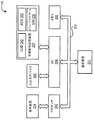
図1は、複数のユーザに、低コストのコンピューティング多目的媒体アクセス・デバイスを供給するための環境100のブロック図である。より具体的には、複数の多目的媒体アクセス・デバイス110は、電話回線のような通信リンク122によってインターネット・サービス・プロバイダ120に接続される。1つ以上の多目的の媒体アクセス・デバイス110およびインターネット・サービス・プロバイダ120の組み合わせは、低価格コンピューティング多目的媒体アクセス/デバイスを複数のユーザに供給するためのシステムを提供する。その後、インターネット・サービス・プロバイダ120は、インターネット140に接続される。その後、インターネット140は、複数のウェブホストサーバ150に接続される。
FIG. 1 is a block diagram of an
インターネット上の情報にアクセスすることを望むユーザは、「クライアントワークステーション」とも呼ばれる、多目的媒体アクセス・デバイス110を使用する。多目的媒体アクセス・デバイス110は、ウェブブラウザとして知られているアプリケーション・プログラムを実行する。
A user who wants to access information on the Internet uses a multipurpose
多目的媒体アクセス・デバイス110は、多目的媒体アクセス・デバイス110が、インターネット・サービス・プロバイダ120との間で情報の送受信をできるようにする、通信系ハードウェアおよびソフトウェアを含んでいる。通信系ハードウェアおよびソフトウェアは、多目的媒体アクセス・デバイス110がインターネット・サービス・プロバイダ120と通信リンクを確立することを可能にする。この通信リンクは、デジタル加入者線(DSL)のようなダイレクトリンク、T1、総合サービスデジタル網(ISDN)またはケーブル接続のような有線接続、セル方式、衛星ネットワークによる無線接続またはローカルエリアネットワークによるイーサネットまたはトークン・リングのようなローカルデータ転送システムを含む、様々な接続方式のいずれかであり得る。
Multipurpose
利用者がウェブブラウザにコマンドを入力することによって情報の要求を入力する場合、多目的媒体アクセス・デバイス110は、指定されたトピックに関係するドキュメントの捜索、またはインターネット・サービス・プロバイダ120への特定のウェブページのように、情報の要求を送信する。インターネット・サービス・プロバイダ120は次に、インターネット140を介して適切なウェブホスト・サーバ150へリクエストを転送する。
When a user enters a request for information by entering a command into a web browser, the multipurpose
インターネット・サービス・プロバイダ120は、ブラウザから送信された要求を受信し、読み込むためのソフトウェアを実行する。インターネット・サービス・プロバイダ120は、リクエストを監視し、特定のウェブサーバ上の情報に対する要求を処理し、ユーザの多目的媒体アクセス・デバイス110にその情報を送信する、ウェブサーバ・アプリケーション・プログラムを実行する。
The
インターネット上のウェブホスト・サーバ150はそれぞれ、適切なウェブホスト・サーバ150に接続するために、ウェブブラウザにユーザが供給する既知のアドレスを有している。情報がユーザのウェブホスト・サーバ150で利用可能でない場合、インターネット140は、リクエストされた情報を提供すべく、ウェブサーバ150が互いに通信することを可能にする中央のリンクとしての役割を果たす。ウェブサーバ150は1つ以上のウェブページを含むことができるので、ユーザはさらに、自分が特定のどのウェブページを見たいかをアドレスで明示することになる。サーバ上のホームページの、ユニバーサル・リソース・ロケータ(URL)としても知られるアドレスは、サーバ、およびサーバ上のページの位置を示す、受信用住所に類似した一連の番号である。簡素化のため、ユーザが、番号の代わりに名前を使用するサーバとドキュメントとを指定することを可能にする、ドメイン名システムが開発された。URLはさらに、ドメインネームの終わりに追加情報を含むことによって、コンテンツ・プロバイダに属するページのグループにおける特定のページを指定することができる。
Each
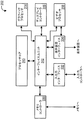
図2は、多目的媒体アクセス・デバイス110のブロック図である。多目的媒体アクセス・デバイス110は、プロセッサ202、キーボード、マウス等のような入出力デバイス205に接続される入出力(I/O)制御装置204、およびランダムアクセスメモリ(RAM)のような揮発性メモリを含むメモリ206を含んでいる。入出力制御デバイス204はまた、ハードディスクドライブのような不揮発性記憶装置207に接続される。 多目的媒体アクセス・デバイス110はさらに、モデムのような通信装置211を含んでいる。 プロセッサ202、I/Oコントローラ204、メモリ206および通信装置211は、1つ以上のバス212によって互いに接続される。プロセッサ202はまた、表示装置214に接続されるように構成される。不揮発性記憶装置207は、固有ユーザ識別子(unique user identifier)(UUID)240とともに多目的媒体アクセス・デバイス・ソフトウェア230を含んでいる。この多目的媒体アクセス・デバイス・ソフトウェア230は、プロセッサ202上で実行される。固有ユーザ識別子240は、例えば読み取り専用メモリデバイス(ROM)またはハードワイヤードの集積回路上に格納され得る。
FIG. 2 is a block diagram of multipurpose
ある実施形態の一例においては、多目的媒体アクセス・デバイス110は、DDRメモリとともに、366MHzで動作するAMDジオードGX2プロセッサおよびCRT出力を有する。
In one example embodiment, the multipurpose
さらに、ある実施形態においては、メモリ206は、128メガバイトの、266MHzのDDRAMを含んでいる。このDDRAMは、サポートすべき設置面積(foot print)の互換性を備えた構成に搭載されてサポートされる(例えばロード・オプションを備えた64から2512MBの間)か、またはDIMM/SODIMM構成によってサポートされる。 メモリ206の実装は、最良のコスト/フレキシビリティ・トレードオフ・アセスメントに基づく。 メモリは、アップグレードのためにエンド・ユーザがアクセス可能になることを意図していないが、OEM要求に基づき、製造時に増加され得る。いずれの場合も、コストおよび電力消費を減少させるよう、メモリインターフェースはターミネートしていない。
Further, in some embodiments,
多目的媒体アクセス・デバイス110の不揮発性記憶装置207は、BIOS250を格納し、それからブートするための、ブートROMデバイスを含んでいる。このROMデバイスは、ソフトウェアとハードウェアの両方のメカニズムによって、現場で更新(フィールドアップデート)が可能である。BIOS250を更新するソフトウェアメカニズムは、システムソフトウェア更新プロセスの一部であって、ユーザには見えない。ROM中のBIOS250を更新するハードウェアメカニズムは、エンド・ユーザが利用可能である。
The non-volatile storage 207 of the multipurpose
多目的媒体アクセス・デバイス110の不揮発性記憶装置207には、最小容量の、例えば10ギガバイトの、3.5インチハードディスクドライブが含まれる。ユーザは、交換あるいはアップグレードするためにこのハードディスクドライブにアクセスすることはできない。このハードディスクは、電圧変換の必要がなくなるよう、UDMA66(モード5)のシグナリングを3.3ボルトでサポートする。
The non-volatile storage 207 of the multipurpose
多目的媒体アクセス・デバイス110の通信装置211は、例えば、多目的媒体アクセス・デバイス110上に外部コネクタを備えた、56K ITU V.92モデムを含む。このモデムは、世界中の様々な地域の電話システムをサポートする。モデムはソフトモデムであってよいことが理解されるであろう。
The
多目的媒体アクセス・デバイス110は固有ユーザID(UUID)を実装する手段を含む。このUUIDは、システムを修復あるいはアップデートすることでUUIDが容易に変更あるいは損失されることがないように実装される。
Multipurpose
多目的媒体アクセス・デバイス110には、ステレオヘッドホン端子とマイクロホン端子とが内蔵されており、これらの端子はステレオオーディオ再生あるいはボイスオーバーIPなどに利用する全二重オーディオをサポートすることができる。このヘッドフォン端子はヘッドフォンを直接駆動することができ、あるいはアンプ内蔵の外部スピーカに接続することができる。ライン入力端子も供給される。このオーディオコネクタには、翻訳を必要としないグラフィカルなシンボルがラベル表示されている。
The multipurpose
多目的媒体アクセス・デバイス110は4つのUSBコネクタを含む。すべてのUSBポートはハイパワーUSBデバイスへ接続することができる。これらのUSBポートには、翻訳を必要としないグラフィカルなシンボルがラベル表示されている。システム前面のUSBコネクタはマウスおよびキーボードのサポートを目的としているので、これらの部分には、マウスおよびキーボードの、翻訳を必要としない、万人に認識可能なグラフィカルシンボルがラベル表示されている。システム背面のUSBコネクタはプリンタおよび指定された任意の装置のサポートを目的としているため、これらの部分には、翻訳を必要としない、プリンタおよびUSBコネクタの、万人に認識可能なグラフィカルシンボルがラベル表示されている。
Multipurpose
多目的媒体アクセス・デバイス10は、リアパネル上にVGAコネクタを供給し、解像度がSXGA、24ビットカラーで、85HZのリフレッシュレートの外部CRTをサポートする。標準アスペクト比4:3がサポートされる。VGAコネクタには、翻訳を必要としないグラフィカルなシンボルがラベル表示されている。 The multipurpose media access device 10 provides a VGA connector on the rear panel, supports an external CRT with a resolution of SXGA, 24-bit color and a refresh rate of 85 Hz. Standard aspect ratio 4: 3 is supported. The VGA connector is labeled with graphical symbols that do not require translation.
電話システムへ接続するために、バックパネル上に1つのRJ−11コネクタが設けられる。多目的媒体アクセス・デバイス110は、パススルーコネクタを提供しない。モデムポートコネクタには、翻訳を必要としないモデムのグラフィカルなシンボルがラベル表示されている。
One RJ-11 connector is provided on the back panel for connection to the telephone system. Multipurpose
多目的媒体アクセス・デバイス110は、多目的媒体アクセス・デバイスをイメージリカバリモードにするための複数のメカニズムを含む。そのような方法の1つには、あるボタンを押すことが挙げられる。このボタンは、ユーザが通常知ることのない隠しボタンであり、このボタンを誤って押すことは起こり得ない。このボタンの一例においては、ペーパークリップあるいはこれに類似する小さな物体を用いて筐体上の穴を押すことによってボタンを作動させる。
Multipurpose
多目的媒体アクセス・デバイス110は、システムに必要な全電圧を供給するために、十分な電流と電力とを供給できるオンボードレギュレータに接続される、外部AC/DCアダプタを含む。様々な国で同じ電源が使用される可能性があるので、入力は、50〜60Hzで交流100〜240Vに対応する。
The multipurpose
多目的媒体アクセス・デバイスとその他のコンピュータ間にファイルを移動させる第2手段として、USB接続されたフラッシュ記憶装置がサポートされる。ファイルを移動させる第1手段は電子メールである。多目的媒体アクセス・デバイスへのアクセサリとして、OEMにより、低価格のフラッシュキーのソースが利用可能にされる。このフラッシュキーは特有のドライバを必要としない。 As a second means of moving files between the multipurpose media access device and other computers, a USB-connected flash storage device is supported. The first means for moving the file is email. As an accessory to multipurpose media access devices, OEMs make available low cost flash key sources. This flash key does not require a specific driver.
図3はプロセッサ202のブロック図である。一実施形態では、このプロセッサ202は、Advanced Micro Devices社より入手可能なGeode GX2プロセッサである。プロセッサ202は、プロセッサコア310、インターフェイスユニット312、グラフィックプロセッサ314、ディスプレイコントローラ316、およびビデオプロセッサ318を含む。プロセッサ202はさらに、メモリコントローラ330、入出力(I/O)インターフェイス332、およびディスプレイデバイス(表示装置)インターフェイス334を含む。図3には、プロセッサ202の更なる特徴は示していない。
FIG. 3 is a block diagram of the
図4は、I/O制御装置204のブロック図である。一実施形態では、このI/O制御装置は、Advanced Micro Devices社より入手可能なGeode CS5535 I/Oコンパニオンデバイスである。このI/O制御装置204は、プロセッサインターフェイスモジュール410、USBコントローラモジュール412、IDEコントローラモジュール414、フラッシュメモリコントローラモジュール416、オーディオコントローラモジュール418、および、システムパワーマネージメントモジュール420を含む。
FIG. 4 is a block diagram of the I /
図5は、多目的媒体アクセス・デバイスのパワー状態を示したブロック図である。より具体的には、この多目的媒体アクセス・デバイス110は、デバイスのパワー状態を制御するパワーボタンを含む。このパワーボタンは、誤作動しないように保護されている。このパワーボタンには、翻訳の必要がないグラフィカルなシンボルがラベル表示されている。
FIG. 5 is a block diagram illustrating the power state of a multipurpose media access device. More specifically, the multipurpose
このパワーボタンは、多目的媒体アクセス・デバイス110の通常オペレーションの間に、デバイスをハイバネート、サスペンド、あるいはスリープ状態から復帰させるか、あるいは、デバイスをこれらの状態の1つにする。オン状態あるいはスリープ状態の間、このパワーボタンを4秒間作動させることで、システムがハードオフの状態にされる。
This power button causes the device to resume from hibernate, suspend, or sleep state during normal operation of the multipurpose
LEDは、スリープ状態の間はオフ状態であり、ディスプレイデバイスは不動作状態(ディスエイブル)になり、ハードディスクは低パワー状態になるかパーク(parked)され、USBデバイスは不動作状態になる。この状態は、ユーザにとっては、電源が切られた状態と同じようにみえる。スリープ状態からのレジュームは、パワーボタンが(4秒未満)操作されて放される場合に生じる。レジューム時間はモニタ同期時間よりも速い。 The LED is off during the sleep state, the display device is inactive (disabled), the hard disk is in a low power state or parked, and the USB device is inactive. This state appears to the user in the same way as when the power is turned off. Resume from the sleep state occurs when the power button is operated and released (less than 4 seconds). The resume time is faster than the monitor synchronization time.
ディスクにセーブ(save to disk)状態はオフ状態と電気的に同じである。しかし、レジュームの際(パワーボタンが押される)、BIOS250は、通常ブートパスではなくハイバネートファイルを使用してシステムをレジュームする。ディスクにセーブ状態からのレジュームには10秒もかからない。このオペレーティングシステムはスリープ状態をサポートする。ブート時間はそれほど問題でもないので、ディスクにセーブ状態をサポートする必要はない。停電の場合、システムはオフ状態となる。システムがこの”オン”状態の間、パワーボタンが瞬間的に押された場合と同様に、システムの非アクティブ状態はシステムをスリープ状態にさせる。システムの非アクティブ状態の持続時間は、初期設定では15分に設定されている。このタイムアウトは、多目的媒体アクセス・デバイスシステム構造において、ユーザにより設定可能である。
The save to disk state is electrically the same as the off state. However, when resuming (the power button is pressed), the
多目的媒体アクセス・デバイス110に適用される状態は、S0、S1,S3(エミュレートされている)およびS5だけである。ユーザが認知しうるオペレーティングシステムの状態は、オン(S0)、スタンバイ(S1あるいはS3)、およびシャットダウン(S5)である。
The only states that apply to the multipurpose
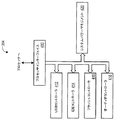
図6を参照すると、多目的媒体アクセス・デバイス・ソフトウェア230は、オペレーティングシステム610、アプリケーションプログラムパーティション612、ソフトウェアアップデートモジュール614、イメージリカバリモジュール616、および、アカウントマネージメントモジュール618を含む。
Referring to FIG. 6, the multipurpose media access device software 230 includes an
パソコン互換のBIOS250は、不揮発性記憶装置207に格納される。このBIOSは、WindowsベースのオペレーティングシステムとLinuxベースのオペレーティングシステムの両方をサポートする。BIOS250は、オペレーティングシステム610を、Windows CEタイプのオペレーティングシステムなどの、組み込みクローズドオペレーティングシステムとすることができるよう、互換性のあるブートローダを含んでもよい。このBIOS/ブートローダ250は、原則的にユーザには見えないものであり、また、オペレーティングシステムをブートするものである。
The personal computer
より具体的には、オペレーティングシステム610は、WindowsベースのオペレーティングシステムまたはLinuxベースのオペレーティングシステムであってよい。Windowsオペレーティングシステム、またはLinuxオペレーティングシステムは、システムの性能に影響を及ぼしうる、いくつかの設定可能なオペレーションパラメータを独自に有する。このような設定可能なオペレーションパラメータには、アニメーション化されたメニュー、ドラッグする間のウインドウ内容の表示、あるいはポップアップバルーンを含み、さらにブート設定をも含む。オペレーティングシステムがWindowsであろうとLinuxであろうと、すべてのオペレーティングシステムの特徴は、プロセッサを使用するシステムの価格対性能効果に応じて評価される。このようなコンフィギュレーション設定は、インストールされたイメージに事前に設定されている。
More specifically, the
多目的媒体アクセス・デバイス110は、多目的媒体デバイス110が指定されたように機能するために必要なすべてのアプリケーションプログラム612を搭載して出荷される。ユーザはこのオペレーティングシステム610にソフトウエアをインストールすることはできない。アプリケーションを追加する、あるいはアップデートするには、多目的媒体アクセスデバイス・ソフトウェアアップデートモジュール614を介するのが唯一の方法である。
The multipurpose
この多目的媒体アクセス・デバイス110は、いずれかのマーケットに特有のアプリケーションは含まない。むしろ、デスクトップ上にはインターネットリンクが定義され、事前に設定されており、そのようなインターネットリンクは、ウェブメール、オンラインゲーム、音楽、映画、スポーツのリンクを含むエンターテインメント、ローカルニュース、天気、および人気のある検索エンジンを含む、対象エリアをターゲットにしたものである。表示装置214上に示されるデスクトップは、このようなウェブリンクをオペレーティングシステムのロードの一部として含むよう、事前設定がなされている。
This multipurpose
この多目的媒体アクセス・デバイス110は、パソコン機能の制限され、固定されたサブセットを供給する。このオペレーティングシステムに含まれる機能はパソコン版のそれと概ね同じである。アプリケーションとしては、ワードプロセッサ、表計算、ウェブブラウザ、PDFビューア、メディアプレーヤ、および、描画アプリケーションが挙げられる。
This multipurpose
クローズドオペレーティングシステム・アプリケーションは、フルスクリーンのみに対応する場合が多いので、アプリケーション間の切り替えは、初期設定のユーザインターフェースでは直感的ではない。従って、このクローズドオペレーティングシステムには、機能強化されたタスクバーが含まれる。 Since closed operating system applications often only support full screen, switching between applications is not intuitive with the default user interface. Accordingly, the closed operating system includes an enhanced task bar.
多目的媒体アクセス・デバイス110はCD−ROMドライブを含まない、あるいはサポートしない。CD−ROMドライブは、ソフトウェアあるいはデバイスドライバパッケージをインストールするために通常行われる方法である。ソフトウェアのインストールが不作動になり、代わりに、インターネットサービスプロバイダ120を介してソフトウェアの管理が行われる。このように、USBの周辺機器の使用を、イメージプレロードにおいてサポートされているもの、および固有のドライバまたはソフトウェアを必要としない一般的種類の装置に限定することが必要である。この多目的媒体アクセス・デバイス110の主要な目的は、マウス、キーボード、指定されたプリンタ、およびフラッシュ記憶装置(ディスクオンキー)をサポートすることである。一部のインターネット・サービス・プロバイダ120はUSBワイヤレス、ケーブルモデム、およびDSLモデムなどのUSBネットワーク周辺機器に対するサポートを必要とし得る。このようなデバイスのサポートには、プレインストールされたドライバを介する。
Multipurpose
製品の文書化によりこのような制限が明確になるが、プレインストールされたドライバを備えていない周辺装置を取り付けようとした際には、システムはユーザに規格外のメッセージングを与える。USBデバイスからのブートは、エンドユーザに対して許可されない。しかし、多目的媒体アクセスドライブ110は、USBを介したサービスおよびサポートを可能にする装置を含む。
Although product documentation makes this limitation clear, the system gives the user non-standard messaging when attempting to install a peripheral device that does not have a pre-installed driver. Booting from a USB device is not allowed for end users. However, the multipurpose
この多目的媒体アクセスドライブ110システムは、固有の見た目や操作感(ルック&フィール)を与える。このルック&フィールには、一般的なグラフィカルユーザインターフェース(GUI)、スクリーンプロンプト、およびサウンドが含まれる。このソフトウェアは、パソコンのような機能を提供するが、パソコンではない機器を提供する。多目的媒体アクセス・デバイスとパソコンとをさらに区別するために、ブート、ログイン、サスペンド、およびレジュームなどの機能に用いる標準のスクリーンは、多目的媒体アクセス・デバイスシステムのブランド(branding)のルック&フィールに一致しており、とりわけ、パソコンのルック&フィールには見えない。 This multipurpose media access drive 110 system provides a unique look and feel (look and feel). This look and feel includes a general graphical user interface (GUI), screen prompts, and sounds. This software provides functions similar to a personal computer, but provides a device that is not a personal computer. To further distinguish between multipurpose media access devices and personal computers, standard screens used for functions such as boot, login, suspend, and resume are consistent with the branding look and feel of multipurpose media access device systems. I don't see the look and feel of a computer.
多目的媒体アクセス・デバイス110がコールドブートプロセスにあろうと、サスペンドトゥディスクからのリターンプロセスにあろうと、プロセスは速く進む。ディスプレイはどのようなテキストベースのスクリーンも表示しない。グラフィカルスクリーンを表示するために、プロセスが1〜2秒以上を必要とする場合、擬似グラフィカルスクリーンが表示され、多目的媒体アクセス・デバイス110がブートプロセスにあるというデモンストレーションを行う。システムがグラフィカルスクリーンの表示をできるようになると、ユーザログインスクリーンが表示されるまで、多目的媒体アクセス・デバイスとOEMロゴとを示したディスプレイが表示される。システムがブートしている間、システムがスタートアップ中であることを示すよう、ユーザにアクティブグラフィカルフィードバックが供給される。
Whether the multipurpose
ログインスクリーンは、特定のユーザアカウントを選択する、単純なグラフィカル手段を供給する。ユーザアカウントを選択した後、ユーザは自分のパスワードを入力する。 The login screen provides a simple graphical means to select a specific user account. After selecting a user account, the user enters his password.
PCのオペレーティングシステムを初めて体験するユーザにとって、GUIをどのようにナビゲートし、使用するかを学ぶことは、やる気をそぐような作業である。多目的媒体アクセス・デバイス110の主要な目的は、この製品と標準のPCとを区別することなので、ユーザは、簡易化されたユーザインターフェースあるいはシェルオプションを利用することができる。簡易化されたユーザインターフェースは設定可能オプションであり、これは、難しい設定などが一切ない、初期設定のユーザインターフェースである。この簡易化されたユーザインターフェースは、チュートリアル、ウェブブラウジング、サポートあるいはヘルプ、ターゲットとする国のユーザを対象としたウェブサイトへのショートカット、およびその他のアプリケーションを含む、オンラインおよびオフライン機能を開始するための、ナビゲートしやすい方法を含む。この簡易化されたインターフェイスのビジュアル的特徴により、統一されて認識可能な装置のブランドがもたらされるが、GUIを魅力的なものにするために、また、地域文化に基づいて使い易くするために、このビジュアル的特徴を特定のターゲット国用に、およびOEM用にカストマイズしてもよい。
For users who are experiencing the PC operating system for the first time, learning how to navigate and use the GUI is a motivating task. Because the primary purpose of the multi-purpose
多目的媒体アクセス・デバイス110の独創的技術は、実際には、パソコン技術よりも単純である。初心者ユーザは、他人の助けがなくてもこのシステムをセットアップし、設定することができる。
The original technology of the multipurpose
ユーザが初めてシステムをブートする際に、設定すべきいくつかの項目がある。このような項目としては、ユーザアカウント、時間と日付、ディスプレイ設定、およびダイアルアップ接続が挙げられる。このような設定は、簡単で直感的な、誘導型グラフィカルインターフェースを通じて行われる。Windowsでは、この方法で、時間と日付の設定がすでに行われている。Windows上のインターネット接続ウイザードが利用され得る。システムは、初期設定により、シングルユーザアカウントのルック&フィールを供給する。あるユーザは、更なるアカウントを使用可能にできる。初期のディスプレイ設定は、モニタにとっては理想の設定であると定義される。 There are several items to set when the user boots the system for the first time. Such items include user accounts, time and date, display settings, and dial-up connections. Such settings are made through a simple and intuitive guided graphical interface. In Windows, the time and date are already set by this method. An Internet connection wizard on Windows can be used. The system provides a single user account look and feel by default. Some users can enable additional accounts. The initial display settings are defined as ideal settings for the monitor.
このシステムは初心者ユーザをターゲットとしているので、アプリケーションプログラム612は、オペレーティングシステムとアプリケーションの用法についての基本トレーニングを含む。ユーザはこのようなチュートリアルを自由に見ることができる。これは、チュートリアルのガイドツアーを開始するアイコンをデスクトップに配置した形式であっても、または最初にアプリケーションを実行するときにチュートリアルを実行するユーザプロンプトであっても、もしくはその両方であってもよい。 Since the system is targeted at novice users, the application program 612 includes basic training on operating system and application usage. Users can view such tutorials freely. This can be in the form of an icon on the desktop that starts a guided tour of the tutorial, or a user prompt to run the tutorial when you first run the application, or both .
様々な家族のメンバーがこの多目的媒体アクセス・デバイス110を使用できる。大人ユーザは未成年ユーザとは別の特権を有することができる。また、異なるユーザアカウントを持つことで、各個人は自分たちのコンフィグレーション・プリファレンスを設定でき、また、自分たちのドキュメントフォルダへのデフォルトアクセスを有する。システムのコアアカウントは、新規ユーザ追加オプションを利用できる。コアアカウントは、システム上の初期アカウントであり、家族の中の大人であると考えられる。新規ユーザ追加プロセスは、システムのコンフィグレーションメニュのアイコンを作動し、ユーザ名とパスワードとを設定し、大人のアカウントであるか、子供のアカウントであるかを選択するという簡単なプロセスである。そのアカウントが子供のアカウントである場合は、ある種のウェブページへのアクセスを規制するよう、インターネット・ペアレンタル・コントロールを設定することができる。
Various family members can use the multipurpose
クローズドオペレーティングシステムとともに、別々のデスクトップ環境と別々のデフォルトユーザファイルディレクトリが与えられ、複数のユーザアカウントを使用可能にする。 Along with a closed operating system, different desktop environments and different default user file directories are provided, enabling multiple user accounts.
多目的媒体アクセス・デバイス110は、様々なシナリオに対して、ソフトウェアイメージのメンテナンスを可能にする。そのようなシナリオとしては、オペレーティングシステムセキュリティパッチ、アプリケーションパッチ、BIOSアップデート、新たなドライバおよび/またはアプリケーションなどが挙げられる。
The multipurpose
パッチマネージメントのメカニズムがソフトウェア内に含まれる。最小限、インターネット・サービス・プロバイダ120がパッチ機能を有する必要がある。あるいは、オペレーティングシステムのメンテナンスを、そのオペレーティングシステムの製造供給元の設備で直接管理することもできる。例えば、Windowsは、標準の”Windows Update”サービスを使用することで維持され得るが、インターネット・サービス・プロバイダは、システムを維持するためのメカニズムを提供する。
A patch management mechanism is included in the software. At a minimum, the
多目的媒体アクセス・デバイス110は、ワードプロセッサおよびスプレッドシートなどの、生産性アプリケーション612を含むとともに、インターネットの閲覧、ブックマークの保存、画像ファイルの保存、および、システムにその他のデータを保存できる能力を含む。ユーザ・コンフィグレーション設定はシステム上に保存される。ユーザのすべてのデータは、ファイルシステムを操作する方法を知る必要なしに、ユーザが直接アクセスできる場所に保存されるべきである。このユーザデータは、ウイルスやその他の手段によりデータが破壊されるのを防止するために、残りのオペレーティングシステムから保護される。フルシステムイメージリカバリの際、ユーザデータは、ハードディスクハードウェアが破壊的に故障しない限りは上書きされるか、あるいは、不変である。
Multipurpose
一実施形態では、ユーザデータはシステムデータとは別のディスク・パーティションに保存される。クローズドシステムに基づく多目的媒体アクセス・デバイスは、ハードディスク・セントリック・ファイルマネージメント・メタファー(a hard disk centric file management metaphor)をサポートする。デフォルトの保存先はハードディスクドライブであって、メモリではない。また、アプリケーション612は、ユーザのデータファイル構造を認識しているので、文書を保存し、かつ開く初期位置は、ユーザのドキュメントフォルダからである。 In one embodiment, user data is stored on a separate disk partition from system data. Multipurpose media access devices based on closed systems support a hard disk centric file management metaphor. The default destination is the hard disk drive, not memory. Also, since the application 612 recognizes the user's data file structure, the initial location for saving and opening the document is from the user's document folder.
単純な機能、つまりディスクから外部の記憶装置へのユーザファイルのコピーではない、ユーザデータのバックアップは、インターネット・サービス・プロバイダ120を介して行われ得る。
Backup of user data, not a simple function, that is, copying user files from disk to external storage, can be done via the
図7は、イメージリカバリモジュール616のオペレーションのフローチャートである。このイメージリカバリモジュール616は、ユーザあるいは修理人がわずかな費用でオペレーティングシステムイメージを現場でアップデート、または修復可能にする。イメージリカバリ法の一例としては、アップデートCDからブートすることが挙げられる。しかし、この多目的媒体アクセス・デバイス110はCD−ROMを備えていないので、ディスクの隠れた(パーティションされていない)部分からイメージを回復させる解決法が提供される。回復されたイメージは、多目的媒体アクセス・デバイス110がこれまでに受け取っているすべてのアップデートとパッチとを含む。ユーザのデータとコンフィグレーション設定は、リカバリの間、変わらない。ユーザは、イメージリカバリの前に、リカバリプロセスを続けたいかどうかについて、また、所要時間を表示したいかどうかについて注意をうながされる。ディスプレイデバイス214は、イメージリカバリの間、システムがロックされていないことを保証するために、アクティビティインジケータを用いて、リカバリ中であるというフィードバックをユーザへ送る。
FIG. 7 is a flowchart of the operation of the
多目的媒体アクセス・デバイス110は固有IDを含み、それは、ハードドライブの複製による不正コピー、あるいはシステムイメージおよびアプリケーションの再利用を防ぐために利用される。この固有IDは、オペレーティングシステムイメージのアプリケーションからアクセス可能である。このアクセスは、オペレーティングシステムレベルで暗号化されたID形式であり、インターネット・サービス・プロバイダへのアクセスを獲得するために、不正システム上にIDが複製されるのを防止する。1つの実装形態は、インターネット・サービス・プロバイダによってダウンロードされ、インターネット・サービス・プロバイダによって周期的にアップデートされるような方法で実装される公開キーとして、この固有IDの暗号化キーを供給する。インターネット・サービス・プロバイダ120へ接続後、固有IDは、インターネット・サービス・プロバイダの秘密キーを使用して、インターネットサーバにより解読されて、インターネットサーバあるいは電子メールサーバへのアクセスが許可される。
The multipurpose
システムが利用者へ提供されると、この固有IDが利用者について登録され、インターネットアカウントおよび電子メールアカウントへのアクセスが可能になる。不正なシステムを試す者がいる場合は、インターネット・サービス・プロバイダ120は、指定されたアカウント(UUID)へのサービスを無効にすることによって、インターネットサーバあるいは電子メールサーバへのアクセスを防止する。インターネットへアクセスするために、海賊版システム上の不正暗号化キーを使用する者がいる場合、このアクセスは、サービスプロバイダが公開キーをアップデートした後は機能しなくなる。
When the system is provided to the user, this unique ID is registered for the user, allowing access to the Internet account and email account. If there is a person trying an unauthorized system, the
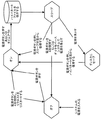
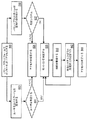
図8は、複数のユーザに低価格の多目的媒体アクセス・デバイスを提供するための、アカウントマネージメントモジュール618とインターネット・サービス・プロバイダ120とのインタラクションのフローチャートである。より具体的には、ユーザは、多目的媒体アクセス・デバイスでインターネットにアクセスすることによって、多目的媒体アクセス・デバイス110でインターネットセッションを開始する(ステップ810)。通信装置を介して、インターネット・サービス・プロバイダ120への接続が確立される。次に、ユーザは、インターネット・サービス・プロバイダにユーザ名とパスワードとを提供する(ステップ820)。次に、インターネット・サービス・プロバイダ120は、ユーザが承認されたユーザであるかどうかの判断をする(ステップ822)。ユーザが承認されていないユーザの場合、インターネット・サービス・プロバイダはインターネットへのアクセスを拒否する(ステップ824)。ユーザが承認されたユーザの場合、インターネット・サービス・プロバイダはセッションを承認し(ステップ826)、ユーザはインターネット・サービス・プロバイダ120を介してインターネットに接続される。
FIG. 8 is a flowchart of the interaction between the
さらに、ユーザが自分のユーザ名を提供している間、多目的媒体アクセス・デバイス110は、ユーザの認識なしに、あるいはユーザが操作しなくても、バックグラウンドでインターネット・サービス・プロバイダ120にUUIDを供給する(ステップ830)。次に、インターネット・サービス・プロバイダは、この多目的媒体アクセス・デバイスが有効なシステムであるかどうかを判断する(ステップ832)。インターネット・サービス・プロバイダ120は、多目的媒体アクセス・デバイスに対する支払いが遅れていないかどうか、多目的媒体アクセス・デバイス110に盗難の届出が出されているかどうか、同一装置の複製コピーがあるかどうか(したがって、ソフトウェアの不正コピーが作成されたことを示す)、および、装置が接続を確立している場所が予測される場所に一致しているかどうか、を含む複数の判断基準に基づいて、この多目的媒体アクセス・デバイス110が有効システムであるかどうかの判定を行うことができる。本来は、インターネット・サービス・プロバイダ120は、ユーザとの関係のビジネス部分を維持するためにこの判定を使用することができる。例えば、多目的媒体アクセス・デバイス110がユーザにリースされた場合、この判定により、リース条件が守られているかどうかを判断することができる。システムが有効なシステムの場合、ユーザは、インターネット・サービス・プロバイダを介してインターネットに接続される(ステップ826)。
In addition, while the user provides his / her username, the multipurpose
次に、インターネット・サービス・プロバイダ120は、接続が有効な時間の長さなどのある特定の判断基準に基づいてインターネットセッションを監視してもよい(ステップ840)。その監視に基づいて、インターネット・サービス・プロバイダ120は、接続された多目的媒体アクセス・デバイス110が有効なシステムであるかどうかの判定を周期的に行い得る(ステップ832)。接続された多目的媒体アクセス・デバイス110が有効なシステムである場合、インターネット・サービス・プロバイダ110はセッションの許可を継続する(ステップ826)。接続された多目的媒体アクセス・デバイス110が有効システムでない場合、インターネット・サービス・プロバイダ120はインターネットへのアクセスを終了する(ステップ844)。
本発明は、上述した利点に加えて、本発明に特有のその他の利点を達成するようにうまく構成されている。本発明の特定の実施形態を参照することにより、本発明を示し、説明し、かつ定義しているが、そのような参照は本発明を限定することを意味するのではなく、また、いずれのそのような限定をも暗示しているものではない。関連技術の当業者であれば思いつくであろうが、本発明は、形状および機能において多くの修正、変更、および均等物が存在しうる。図示し説明した実施形態は単なる例であり、本発明の範囲を限定するものではない。 The present invention is well configured to achieve other advantages specific to the present invention in addition to those described above. While the invention has been illustrated, described and defined by reference to specific embodiments thereof, such reference is not meant to limit the invention, nor is any Such limitations are not implied. As those skilled in the relevant art will appreciate, the present invention may have many modifications, changes and equivalents in form and function. The illustrated and described embodiments are merely examples and do not limit the scope of the invention.
例えば、上述の実施形態は、あるタスクを実行するモジュールを含む。本文に説明したモジュールは、ハードウェアモジュールまたはソフトウェアモジュールを含み得る。ハードウェアモジュールは、アプリケーション・スペシフィック・サーキット内に実装されてもよく、あるいは、何らかの、プログラム可能な論理デバイスの形状で実装されてもよい。ソフトウェアモジュールは、スクリプト、バッチ、あるいはその他の実行可能ファイルを含み得る。このモジュールは、ディスクドライブなどの、機械が解読できる、あるいはコンピュータが読み込み可能な記憶媒体に格納される。本発明の実施形態に従ってソフトウェアモジュールを格納するために用いられる記憶装置としては、例えば、磁気フロッピーディスク、ハードディスク、あるいはCD−ROMまたはCD−Rなどの光学ディスクが挙げられる。本発明の実施形態に従ってファームウェアあるいはハードウェアモジュールを格納するために用いられる記憶装置としては、永続的に、取り外し可能に、あるいは遠隔的にマイクロプロセッサ/メモリシステムに接続できる、半導体ベースメモリがある。その結果、モジュールは、モジュールの機能を実行するためにコンピュータシステムを構築するよう、コンピュータシステムメモリ内に記憶され得る。本文中で検討されたモジュールを格納するために、その他の新しい様々な種類のコンピュータ読み込み可能記憶媒体を使用してもよい。更に、当業者であれば、機能をモジュールに分けることは例示の目的であることが理解されるであろう。別の実施形態では、複数のモジュールの機能を1つのモジュールにまとめることができ、あるいは、複数のモジュールの機能を互いに分解してもよい。例えば、サブモジュールを呼び出すソフトウェアモジュールは、各サブモジュールが自身の機能を実行し、別のサブモジュールへ直接的にコントロールをパスすることができるように、分解してもよい。 For example, the above-described embodiments include modules that perform certain tasks. The modules described herein can include hardware modules or software modules. The hardware module may be implemented in an application specific circuit or may be implemented in the form of some programmable logic device. Software modules may include scripts, batches, or other executable files. This module is stored in a machine readable or computer readable storage medium, such as a disk drive. Examples of storage devices used to store software modules according to embodiments of the present invention include magnetic floppy disks, hard disks, or optical disks such as CD-ROM or CD-R. Storage devices used to store firmware or hardware modules in accordance with embodiments of the present invention include semiconductor-based memories that can be permanently, removably or remotely connected to a microprocessor / memory system. As a result, the module can be stored in computer system memory to build a computer system to perform the functions of the module. Various other new types of computer readable storage media may be used to store the modules discussed herein. Further, those skilled in the art will understand that the division of functionality into modules is for illustrative purposes. In another embodiment, the functions of multiple modules may be combined into a single module, or the functions of multiple modules may be decomposed together. For example, a software module that invokes a submodule may be decomposed so that each submodule can perform its function and pass control directly to another submodule.
また、例えば、多目的媒体アクセス・デバイスに関連して検討されたすべてのソフトウェアは、搬送波に組み込まれた信号として動作可能であることが理解されるであろう。 It will also be appreciated that all software discussed in connection with, for example, a multipurpose media access device can operate as a signal embedded in a carrier wave.
また、例えば、その他の多目的媒体アクセス・デバイスは本発明の範疇に属することが理解されるであろう。 It will also be appreciated that, for example, other multipurpose media access devices are within the scope of the present invention.
その結果、本発明は 添付の請求項の精神と範囲とによって限定され、あらゆる点において均等物を完全に考慮したものである。 As a result, the invention is limited by the spirit and scope of the appended claims, and their full equivalents are considered in all respects.
Claims (10)
前記多目的アクセスデバイスと少なくとも1つの通信ネットワークとの間にデータ転送を制御するように動作可能な通信インターフェイスと、
ユーザデータと固有ユーザ識別子とを記憶するよう動作可能なデータ記憶モジュールと、
少なくとも1つの実行可能プログラムが記憶されたプログラム記憶モジュールであって、前記プログラムは、前記固有ユーザ識別子に関連づけられたユーザプロファイルに従い、前記通信ネットワーク上においてデータ転送能力のうちのいくつかの限られたセットを可能にする、前記多目的媒体アクセスデバイスの所定のオペレーショナルフィーチャのセットを可能にするために、前記ユーザ識別子を使用する命令を含む、プログラム記憶モジュールと、
前記ユーザプロファイルに従い処理されたユーザデータのセットを生成するために、前記データ記憶モジュールに記憶されたデータを処理するために、前記プログラム記憶モジュールに記憶された前記実行可能プログラムを実行するように動作可能なデータプロセッサと、
前記処理されたユーザデータを表示するように動作可能なディスプレイとを含む、多目的媒体アクセスデバイス。 In a multipurpose media access device,
A communication interface operable to control data transfer between the multipurpose access device and at least one communication network;
A data storage module operable to store user data and a unique user identifier;
A program storage module having at least one executable program stored therein, the program being in accordance with a user profile associated with the unique user identifier, a limited number of data transfer capabilities on the communication network A program storage module comprising instructions for using the user identifier to enable a set of predetermined operational features of the multi-purpose media access device that enable a set;
Operative to execute the executable program stored in the program storage module to process the data stored in the data storage module to generate a set of user data processed according to the user profile A possible data processor;
A multipurpose media access device including a display operable to display the processed user data.
前記多目的アクセスデバイスと少なくとも1つの通信ネットワークとの間にデータ転送を制御する手段と、
ユーザデータと固有ユーザ識別子とを記憶する手段と、
少なくとも1つの実行可能プログラムが記憶されたプログラムを記憶する手段であって、前記プログラムは、前記固有ユーザ識別子に関連づけられたユーザプロファイルに従い、前記通信ネットワーク上においてデータ転送能力のうちのいくつかの限られたセットを可能にする、前記多目的媒体アクセスデバイスの所定のオペレーショナルフィーチャのセットを可能にするために、前記ユーザ識別子を使用する命令を含む、プログラムを記憶する手段と、
前記ユーザプロファイルに従い処理されたユーザデータのセットを生成するために、前記データ記憶モジュールに記憶されたデータを処理するために、前記プログラム記憶モジュールに記憶された前記実行可能プログラムを実行するためのデータ処理手段と、
前記処理されたユーザデータを表示する手段を含む、多目的媒体アクセスデバイス。 In a multipurpose media access device,
Means for controlling data transfer between said multipurpose access device and at least one communication network;
Means for storing user data and a unique user identifier;
Means for storing a program in which at least one executable program is stored, the program according to a user profile associated with the unique user identifier, in accordance with some limitation of data transfer capability on the communication network. Means for storing a program, including instructions for using the user identifier to enable a predetermined set of operational features of the multi-purpose media access device,
Data for executing the executable program stored in the program storage module to process the data stored in the data storage module to generate a set of user data processed according to the user profile Processing means;
A multipurpose media access device comprising means for displaying the processed user data.
Applications Claiming Priority (3)
| Application Number | Priority Date | Filing Date | Title |
|---|---|---|---|
| US58029704P | 2004-06-16 | 2004-06-16 | |
| US10/897,135 US20050283828A1 (en) | 2004-06-16 | 2004-07-22 | Multipurpose media access data processing system |
| PCT/US2005/015292 WO2006007038A1 (en) | 2004-06-16 | 2005-04-29 | Multipurpose media access data processing system |
Publications (1)
| Publication Number | Publication Date |
|---|---|
| JP2008502995A true JP2008502995A (en) | 2008-01-31 |
Family
ID=34968716
Family Applications (1)
| Application Number | Title | Priority Date | Filing Date |
|---|---|---|---|
| JP2007516488A Pending JP2008502995A (en) | 2004-06-16 | 2005-04-29 | Multipurpose medium access data processing system |
Country Status (6)
| Country | Link |
|---|---|
| US (1) | US20050283828A1 (en) |
| JP (1) | JP2008502995A (en) |
| DE (1) | DE112005001420T5 (en) |
| GB (1) | GB2433007A (en) |
| TW (1) | TW200620939A (en) |
| WO (1) | WO2006007038A1 (en) |
Families Citing this family (13)
| Publication number | Priority date | Publication date | Assignee | Title |
|---|---|---|---|---|
| US8831991B2 (en) * | 2005-01-21 | 2014-09-09 | The Invention Science Fund I, Llc | Limited-life electronic mail account as intermediary |
| US7765583B2 (en) * | 2005-02-28 | 2010-07-27 | France Telecom | System and method for managing virtual user domains |
| US7487516B1 (en) * | 2005-05-24 | 2009-02-03 | Nvidia Corporation | Desktop composition for incompatible graphics applications |
| US8078740B2 (en) | 2005-06-03 | 2011-12-13 | Microsoft Corporation | Running internet applications with low rights |
| WO2007002848A2 (en) * | 2005-06-28 | 2007-01-04 | Automated Media Processing Solution Dba Equilibrium | Method and system for pre-loading media players |
| US7571483B1 (en) * | 2005-08-25 | 2009-08-04 | Lockheed Martin Corporation | System and method for reducing the vulnerability of a computer network to virus threats |
| US8185737B2 (en) | 2006-06-23 | 2012-05-22 | Microsoft Corporation | Communication across domains |
| US7765394B2 (en) * | 2006-10-31 | 2010-07-27 | Dell Products, Lp | System and method for restoring a master boot record in association with accessing a hidden partition |
| US7721078B2 (en) * | 2006-10-31 | 2010-05-18 | Dell Products, Lp | Method and system to dynamically boot to a non-visible partition |
| US10019570B2 (en) * | 2007-06-14 | 2018-07-10 | Microsoft Technology Licensing, Llc | Protection and communication abstractions for web browsers |
| US20100131683A1 (en) * | 2008-11-26 | 2010-05-27 | Moore Clay S | System for storing, accessing and automatically updating documents |
| WO2010099243A1 (en) * | 2009-02-24 | 2010-09-02 | Doxo, Inc. | Provider relationship management system that facilitates interaction between an individual and organizations |
| JP6005887B1 (en) * | 2016-04-12 | 2016-10-12 | 株式会社Cygames | Program, information processing apparatus, information processing method, and information processing system |
Citations (4)
| Publication number | Priority date | Publication date | Assignee | Title |
|---|---|---|---|---|
| JPH10275042A (en) * | 1997-03-31 | 1998-10-13 | Fujitsu General Ltd | Information terminal equipment |
| WO2002007407A1 (en) * | 2000-07-17 | 2002-01-24 | Tresor Tv Produktions Gmbh | User interface for networked applications |
| US20020114461A1 (en) * | 2001-02-20 | 2002-08-22 | Muneki Shimada | Computer program copy management system |
| US6711660B1 (en) * | 2001-06-22 | 2004-03-23 | Western Digital Ventures, Inc. | System and method for performing disk drive diagnostics and restoration using a host-inaccessible hidden partition |
Family Cites Families (8)
| Publication number | Priority date | Publication date | Assignee | Title |
|---|---|---|---|---|
| US5784564A (en) * | 1996-05-03 | 1998-07-21 | High Technology Solutions, Inc. | Closed browser for computer and computer network |
| US5881225A (en) * | 1997-04-14 | 1999-03-09 | Araxsys, Inc. | Security monitor for controlling functional access to a computer system |
| US6412070B1 (en) * | 1998-09-21 | 2002-06-25 | Microsoft Corporation | Extensible security system and method for controlling access to objects in a computing environment |
| US6944766B2 (en) * | 2000-05-02 | 2005-09-13 | Canon Kabushiki Kaisha | Information processing apparatus |
| US7921290B2 (en) * | 2001-04-18 | 2011-04-05 | Ipass Inc. | Method and system for securely authenticating network access credentials for users |
| JP2003223287A (en) * | 2001-11-22 | 2003-08-08 | Toshiba Corp | Storage device, backup method and program for the storage device |
| US7299491B2 (en) * | 2003-04-30 | 2007-11-20 | Microsoft Corporation | Authenticated domain name resolution |
| CA2434276A1 (en) * | 2003-07-03 | 2005-01-03 | Ibm Canada Limited - Ibm Canada Limitee | Password management |
-
2004
- 2004-07-22 US US10/897,135 patent/US20050283828A1/en not_active Abandoned
-
2005
- 2005-04-29 DE DE112005001420T patent/DE112005001420T5/en not_active Withdrawn
- 2005-04-29 GB GB0625635A patent/GB2433007A/en not_active Withdrawn
- 2005-04-29 WO PCT/US2005/015292 patent/WO2006007038A1/en not_active Ceased
- 2005-04-29 JP JP2007516488A patent/JP2008502995A/en active Pending
- 2005-06-14 TW TW094119588A patent/TW200620939A/en unknown
Patent Citations (4)
| Publication number | Priority date | Publication date | Assignee | Title |
|---|---|---|---|---|
| JPH10275042A (en) * | 1997-03-31 | 1998-10-13 | Fujitsu General Ltd | Information terminal equipment |
| WO2002007407A1 (en) * | 2000-07-17 | 2002-01-24 | Tresor Tv Produktions Gmbh | User interface for networked applications |
| US20020114461A1 (en) * | 2001-02-20 | 2002-08-22 | Muneki Shimada | Computer program copy management system |
| US6711660B1 (en) * | 2001-06-22 | 2004-03-23 | Western Digital Ventures, Inc. | System and method for performing disk drive diagnostics and restoration using a host-inaccessible hidden partition |
Also Published As
| Publication number | Publication date |
|---|---|
| TW200620939A (en) | 2006-06-16 |
| GB0625635D0 (en) | 2007-02-07 |
| DE112005001420T5 (en) | 2007-05-03 |
| WO2006007038A1 (en) | 2006-01-19 |
| US20050283828A1 (en) | 2005-12-22 |
| GB2433007A (en) | 2007-06-06 |
Similar Documents
| Publication | Publication Date | Title |
|---|---|---|
| CA2818207C (en) | Contextual history of computing objects | |
| US9164749B2 (en) | Differential software provisioning on virtual machines having different configurations | |
| US9178759B2 (en) | Configuring and customizing a specific-purpose client having a windows-based embedded image using extensible markup language (XML) configuration | |
| AU2013390850B2 (en) | Synchronizing device association data among computing devices | |
| CN105210031B (en) | Kiosk application mode for operating systems | |
| US20050283828A1 (en) | Multipurpose media access data processing system | |
| CN1327345C (en) | Information processing equipment and programs | |
| CN107368232A (en) | A kind of display control method, electronic equipment and computer-readable recording medium | |
| JP2008502996A (en) | System for controlling a multipurpose media access data processing system | |
| US7788701B1 (en) | Content transfer restriction system for personal internet communicator | |
| JP2008502994A (en) | System for managing multiple multipurpose media access data processing systems | |
| US20090070572A1 (en) | Method and apparatus for portable computing environment | |
| CN1969258A (en) | Multipurpose media access data processing system | |
| KR20070020513A (en) | Versatile Media Access Data Processing System | |
| AU2016238887B2 (en) | Contextual history of computing objects | |
| JP2008269198A (en) | Thin client operating system, thin client device, server-thin client system, and execution method of thin client operating system | |
| JP2009517781A (en) | Simple multipurpose communication device and information client | |
| Davis | Mastering Microsoft Windows Vista Home: Premium and Basic | |
| KR100464212B1 (en) | Method for on-line information presentation with security key and apparatus thereof | |
| Halsey | Dealing with Common Windows Annoyances | |
| TWI384368B (en) | Method and apparatus for providing an access port for a personal internet communicator | |
| Weinert | Ubuntu for remote services | |
| AU2015200649B2 (en) | Contextual history of computing objects | |
| Preppernau et al. | Windows Vista step by step | |
| KR20120133276A (en) | Multiple Display Apparatus having a panel for displaying only specific contents, Computer adapted the same, and Forced Displaying Method of specific contents |
Legal Events
| Date | Code | Title | Description |
|---|---|---|---|
| A621 | Written request for application examination |
Free format text: JAPANESE INTERMEDIATE CODE: A621 Effective date: 20080402 |
|
| A131 | Notification of reasons for refusal |
Free format text: JAPANESE INTERMEDIATE CODE: A131 Effective date: 20110412 |
|
| A02 | Decision of refusal |
Free format text: JAPANESE INTERMEDIATE CODE: A02 Effective date: 20110913 |