JP2012123473A - Operation method and acoustic device - Google Patents
Operation method and acoustic device Download PDFInfo
- Publication number
- JP2012123473A JP2012123473A JP2010271759A JP2010271759A JP2012123473A JP 2012123473 A JP2012123473 A JP 2012123473A JP 2010271759 A JP2010271759 A JP 2010271759A JP 2010271759 A JP2010271759 A JP 2010271759A JP 2012123473 A JP2012123473 A JP 2012123473A
- Authority
- JP
- Japan
- Prior art keywords
- displayed
- menu
- button
- icon
- display
- Prior art date
- Legal status (The legal status is an assumption and is not a legal conclusion. Google has not performed a legal analysis and makes no representation as to the accuracy of the status listed.)
- Granted
Links
- 238000000034 method Methods 0.000 title claims abstract description 89
- 238000012790 confirmation Methods 0.000 claims description 9
- 230000006870 function Effects 0.000 description 37
- 238000003825 pressing Methods 0.000 description 36
- 238000012545 processing Methods 0.000 description 15
- 230000007704 transition Effects 0.000 description 11
- 238000010586 diagram Methods 0.000 description 10
- 238000012217 deletion Methods 0.000 description 7
- 230000037430 deletion Effects 0.000 description 7
- 238000004891 communication Methods 0.000 description 5
- 238000009826 distribution Methods 0.000 description 5
- 239000004973 liquid crystal related substance Substances 0.000 description 4
- 238000003860 storage Methods 0.000 description 3
- 230000005540 biological transmission Effects 0.000 description 2
- 238000013461 design Methods 0.000 description 2
- 230000000694 effects Effects 0.000 description 2
- 238000012544 monitoring process Methods 0.000 description 2
- 238000010187 selection method Methods 0.000 description 2
- 230000000007 visual effect Effects 0.000 description 2
- 238000013500 data storage Methods 0.000 description 1
- 230000000994 depressogenic effect Effects 0.000 description 1
- 238000001514 detection method Methods 0.000 description 1
- 238000004519 manufacturing process Methods 0.000 description 1
- 238000005259 measurement Methods 0.000 description 1
- 239000010813 municipal solid waste Substances 0.000 description 1
- 230000002093 peripheral effect Effects 0.000 description 1
- 239000011347 resin Substances 0.000 description 1
- 229920005989 resin Polymers 0.000 description 1
- 238000000926 separation method Methods 0.000 description 1
Images



Landscapes
- Navigation (AREA)
- User Interface Of Digital Computer (AREA)
Abstract
Description
本発明は、操作方法及び音響装置に関し、特に、車載装置の操作方法及び車載用音響装置に好適で、表示装置に表示した表示リストから特定の項目を選択し、選択した項目に設定し、表示することが可能な操作方法及び音響装置に関する。 The present invention relates to an operation method and an audio device, and is particularly suitable for an on-vehicle device operation method and an on-vehicle audio device. A specific item is selected from a display list displayed on a display device, set to the selected item, and displayed. The present invention relates to an operation method and an audio device that can be used.
近年、電子機器の多機能化に伴い、操作ボタンも増加傾向にある。特に、車載表示装置の場合は、前面部に確保できる面積に制限があり、そこにディスプレイと操作ボタンを配置しなければならない。そのため、操作ボタンのサイズが小さくなったり、ディスプレイのサイズが小さくなったりする。また車載装置では、安全運転を確保するために、「見やすいディスプレイ」、「シンプルな操作」が求められている。 In recent years, operation buttons have been increasing with the increase in functionality of electronic devices. In particular, in the case of an in-vehicle display device, there is a limit to the area that can be secured on the front surface, and a display and operation buttons must be arranged there. For this reason, the size of the operation button is reduced and the size of the display is reduced. In addition, in-vehicle devices are required to have an “easy-to-see display” and “simple operation” in order to ensure safe driving.
そこで、操作ボタンを大きなサイズとするために、操作ボタンの機能をカテゴライズし、上位階層のボタンのみを配置し、下位階層のボタンについては上位階層を選択した場合にのみ選択可能にリストを表示する技術が知られている(特許文献1)。 Therefore, in order to increase the size of the operation buttons, categorize the functions of the operation buttons, arrange only the upper layer buttons, and display a list that can be selected only when the lower layer buttons are selected. A technique is known (Patent Document 1).
しかしながら、このような技術においては、操作ボタンを大きなサイズとするので「見やすいディスプレイ」は実現できるが、「シンプルな操作」については実現できていない。具体的には、従来技術のような階層構造を有するボタンから特定の機能を選択するユーザーインタイフェースでは、まず上位階層のボタンから機能カテゴリを選択し、更に下位階層の機能リストを選択するといった多段階の操作を、特定の機能を選択するたびに行う必要があり、ユーザに複雑な操作を要求するとの問題がある。特に音響装置においては、音源の種類や楽曲記録曲数が多くなっており、便利な操作が望まれている。 However, in such a technique, since the operation buttons have a large size, an “easy-to-see display” can be realized, but “simple operation” cannot be realized. Specifically, in a user interface that selects a specific function from buttons having a hierarchical structure as in the prior art, first, a function category is selected from a button in an upper hierarchy, and a function list in a lower hierarchy is further selected. It is necessary to perform a multi-stage operation every time a specific function is selected, and there is a problem that a complicated operation is required from the user. Particularly in an acoustic apparatus, the types of sound sources and the number of music recording songs are increasing, and a convenient operation is desired.
そこで、本発明は、操作ボタンの配置数を少なくしてもシンプルな操作で機能選択ができる操作方法及びシンプルな操作で音源選択ができる音響装置を提供することを目的とする。 Therefore, an object of the present invention is to provide an operation method capable of selecting a function with a simple operation and a sound apparatus capable of selecting a sound source with a simple operation even when the number of operation buttons is reduced.
本発明に係る操作方法は、第1メニューにおけるメニュー項目を選択操作し、さらに確定操作することにより、選択されたメニュー項目に対応する動作が行なわれる操作方法であって、前記メニュー項目の選択操作により、当該メニュー項目の上位階層に該当する上位メニュー項目を表示し、前記上位メニュー項目を選択操作し、さらに確定操作することによって、当該上位メニュー項目の下位階層に含まれる下位メニュー項目の第2メニューを表示して、下位メニュー項目の選択操作を可能とすることを特徴とする。 An operation method according to the present invention is an operation method in which an operation corresponding to a selected menu item is performed by selecting and then confirming a menu item in a first menu, wherein the selection operation of the menu item is performed. By displaying the upper menu item corresponding to the upper layer of the menu item, selecting the upper menu item, and further performing the confirmation operation, the second lower menu item included in the lower layer of the upper menu item is displayed. A menu is displayed to enable selection operation of lower menu items.
本発明に係る音響装置は、通常動作状態において表示される第1メニューにおける音響映像再生系の音源を選択操作し、さらに確定操作することにより、選択された音源の再生動作が行なわれる音響装置であって、前記音源の選択操作により、当該音源選択操作項目を表示する音源選択操作項目表示手段と、前記音源選択操作項目を選択操作し、さらに確定操作することによって、音響映像再生系の音源の第2メニューを表示して、音源選択操作を可能とする音源メニュー表示手段を備えたことを特徴とする。 An audio device according to the present invention is an audio device that performs a reproduction operation of a selected sound source by selecting and confirming a sound source of an audio video reproduction system in a first menu displayed in a normal operation state. The sound source selection operation item display means for displaying the sound source selection operation item by the sound source selection operation, and the sound source selection operation item is selected and further confirmed, so that the sound source of the audio / video reproduction system is selected. Sound source menu display means for displaying a second menu and enabling a sound source selection operation is provided.
本発明に係る操作方法においては、操作ボタンの配置数を少なくしてもシンプルな操作で機能選択をすることが可能となった。特に、車両の運転中での機能選択や車載用音響装置における音源や楽曲の選択を少ない操作で実現できるという優れた効果を奏することが可能となった。 In the operation method according to the present invention, it is possible to select a function with a simple operation even if the number of operation buttons is reduced. In particular, it has become possible to achieve an excellent effect that function selection during driving of a vehicle and selection of a sound source and music in an in-vehicle acoustic device can be realized with few operations.
以下図面を参照して、本発明に係る音響装置について説明する。但し、本発明の技術的範囲はそれらの実施の形態に限定されず、特許請求の範囲に記載された発明とその均等物に及ぶ点に留意されたい。 Hereinafter, an audio device according to the present invention will be described with reference to the drawings. However, it should be noted that the technical scope of the present invention is not limited to these embodiments, but extends to the invention described in the claims and equivalents thereof.
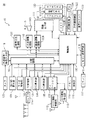
図1は、表示装置を有する車載装置(オーディオ・ビジュアル・ナビゲーション一体機)10の概略構成図である。 FIG. 1 is a schematic configuration diagram of an in-vehicle device (audio / visual navigation integrated device) 10 having a display device.
図1において、100は制御部、101はCD/MD再生部、102はラジオ受信部(AM,FM)、103はTV受信部、104はDVD再生部、105はHD(Hard Disk)再生部、106はナビゲーション部、107は分配回路、108は画像調整回路、110は音声調整回路、111は画像出力部、112はVICS情報受信部、113はGPS情報受信部、114はセレクタ、115は操作部、116はリモコン送受信部、117はリモコン、118はメモリ、119は外部音声/映像入力部、120はカメラ、121はUSB接続部、122は外部接続機器、123は通信ユニット、124はUSB接続により音楽データ(デジタル)等の転送が可能な携帯型デジタル音楽再生機、例として本実施例ではiPod(登録商標)、126は音声発生回路、128はマイクである。
In FIG. 1, 100 is a control unit, 101 is a CD / MD playback unit, 102 is a radio reception unit (AM, FM), 103 is a TV reception unit, 104 is a DVD playback unit, 105 is an HD (Hard Disk) playback unit, 106 is a navigation unit, 107 is a distribution circuit, 108 is an image adjustment circuit, 110 is an audio adjustment circuit, 111 is an image output unit, 112 is a VICS information reception unit, 113 is a GPS information reception unit, 114 is a selector, and 115 is an
制御部100は、車載装置内の各部や各回路を統括的に制御しているCPUを備え、車載装置の動作に必要な各種のプログラムを保持するROMからなるプログラム記憶部と、各種のデータを保持するRAMからなるデータ記憶部とを、有している。なお、ROM及びRAM等は、CPUに内蔵されたものでも、外部に設けたものでも使用することが可能であり(外部メモリ118)、ROMはフラッシュメモリのように電気的に書き換え可能な不揮発性メモリでもよい。
The
制御部100は、分配回路107を介して、各種ソース(CD/MD再生部101、ラジオ受信部102(AM,FM)、TV受信部103、DVD再生部104、HD再生部105及びナビゲーション部106)からの画像データを画像調整部108へ、各種ソースからの音声データを音声調整回路110へそれぞれ分配する。画像調整回路108では、輝度や色調、コントラストなどが調整され、調整された各画像データを画像出力部111にて、表示部130に表示させる。また音声調整回路110では各スピーカへの分配や音量、音声が調整され、調整された音声が、スピーカ140から出力される。
The
また、ソースとしては、iPod(登録商標)124、外部接続機器122又はダウンロードしたアプリケーションを用いることもできる。iPod(登録商標)124は、USB接続部を介して制御部に接続される。
As a source, iPod (registered trademark) 124,
TV受信部103は、アンテナからセレクタ114を介して、アナログTV放送波及びデジタルTV放送波を受信する。
The
HD再生部105が含むハードディスク(HD)には、MP3ファイル等の音楽データやJPEGファイル等の画像データ、ナビゲーション用の地図データ等や、各種データを選択するためのメニュー画面例等を記録することが可能に構成されている。HD再生部105は、HDに記録された各種データを分配回路107へ出力するように構成されている。
The hard disk (HD) included in the
ナビゲーション部106は、ナビゲーションの為に利用される地図情報を記憶した地図情報記憶部を備え、VICS(登録商標)情報受信部112、GPS情報受信部113から情報を入手し、ナビゲーション動作の為の画像を作成し、表示部130に表示させることができる。
The
ユーザは、上記各種ソースのコントロール及び音声入力/再生等を、表示部130の表面に取り付けられているタッチパネル133や表示部130の周囲に設けられた操作部115、もしくはマイク128を介した音声認識等の入力操作によって行うことができる。また、ユーザは、リモコン送受信部116を介して、リモコン117により入力もしくは選択操作をしてもよい。
The user can perform control of various sources, voice input / playback, and the like through voice recognition via the
制御部100は、外部音声/画像入力部119に接続された、例えば、前方及び/又は後方監視用のカメラ120からの画像を表示部130に表示するように構成されている。
なお、監視用カメラ120以外に、ビデオカメラ及びゲーム機等を外部音声/画像入力部119に接続し、表示部130で各種画像を表示するようにしても良い。
The
In addition to the
通信ユニット123は、例えば、Bluetooth(登録商標)用の接続ユニットであって、携帯電話と無線接続する為に利用される。事前の設定により、携帯電話のハンズフリー機能(直接、携帯電話を操作することなく、電話をかける及び電話を受ける動作)を実行することが可能となる。この場合、制御部100は、ユーザによる音声入力をマイク128を介して行い、発呼者からの音声をスピーカ140から出力するように制御する。
The
音声発生回路126は、制御部100の内蔵メモリ、HD及び/又はメモリ118等に予め記録されている制御データに応じた音声を発生させ、音声調整回路110を介して、スピーカ140から出力するように構成されている。
The
表示部130は、バックライト131、液晶パネル132及びタッチパネル133から構成される。液晶パネル132上に表示される各種制御ボタンとタッチパネル133が連動することによって、タッチパネル133を利用して様々な制御入力を行うことが可能であるように構成されている。なお、液晶パネル132の代わりに、液晶パネル以外のフラットパネルディスレイ、例えば有機ELディスプレイパネル、プラズマディスプレイパネル、冷陰極フラットパネルディスプレイ等を用いることもできる。
The
図1に示した画像データ及び音声データの再生表示を行う車載装置10は本発明の特徴を有する装置の一例であって、これに限定されるものではない。画像データ及び音声データの再生表示を行うための車載装置10としては、少なくとも、制御部100、メモリ118、各種ソース(CD/MD再生部101、ラジオ受信部102(AM,FM)、TV受信部103、DVD再生部104、HD再生部105及びナビゲーション部106、iPod(登録商標)124、外部接続機器122等で、これらに限らない)のいずれか、表示部130及びスピーカ140に対応する要素を有していれば良く、他の構成は必ずしも必要ではない。なお、iPod(登録商標)124を接続するためには、USB接続ケーブルが必要である。また、本発明に係る車載装置は、一般のナビゲーション装置に表示部130及びスピーカ140に対応する要素を装着することにより実施できる場合も考えられる。
The in-
[タッチパネルによる操作]
最初に、タッチパネル(TP)133(図1参照)の操作について説明する。尚、タッチパネル入力の基本的動作は、装置の動作・操作状態に応じてタッチパネル画面に操作ボタンやリストが表示され、それらの操作表示領域を指等により押圧(接触)することにより、該当の動作が行なわれることになるものである。通常状態で表示画面には、同階層(説明を分かり易くするために、この階層をB階層とし、その上位階層をA階層、下位階層を順次C・D・E・・と表す)の複数のメニュー項目が表示されたメニューが表示される。表示画面に表示されたメニューにおけるメニュー項目を押圧して選択すると、そのメニュー項目は選択された状態となる。その後、押圧して選択された状態で、メニュー項目から離脱すること(リリース(R))、すなわち、押圧状態を解除することにより、押圧されていたメニュー項目は選択確定状態となり、装置は対応した動作を行ないユーザ操作に対応した状態となる。
[Operation by touch panel]
First, an operation of the touch panel (TP) 133 (see FIG. 1) will be described. Note that the basic operation of touch panel input is that the operation buttons and lists are displayed on the touch panel screen according to the operation / operation state of the device, and the operation display area is pressed (contacted) with a finger etc. Will be carried out. In the normal state, the display screen has a plurality of the same hierarchy (in order to make the explanation easy to understand, this hierarchy is B hierarchy, the upper hierarchy is A hierarchy, and the lower hierarchy is sequentially represented as C, D, E,. A menu with menu items is displayed. When a menu item in the menu displayed on the display screen is pressed and selected, the menu item is selected. After that, the menu item that has been pressed is released from the menu item (Release (R)), that is, by releasing the pressed state, the pressed menu item is in a selection confirmation state, and the device is compatible. The operation is performed and a state corresponding to the user operation is obtained.
また、表示画面に表示されたあるメニュー項目を押圧して選択すると、そのメニュー項目の隣に選択しているメニュー項目を下位階層として含む上位階層(A階層)のメニュー項目(B階層選択機能)が表示される。B階層選択機能項目は、B階層メニュー項目からスライドして出現するような表示が行われる。そして、好ましくは、B階層選択機能項目にB階層のメニュー項目から項目を選択する操作である旨を示唆する表記を行なう。これらにより、ユーザに対して、B階層選択機能項目には選択状態にあったメニュー項目(B階層)と同階層(B階層)のメニュー項目から項目を選択する操作画面に移行するとの認識を与えることができ、直感的に分かりやすいUIを提供できる。 When a menu item displayed on the display screen is pressed and selected, the menu item in the upper hierarchy (A hierarchy) including the menu item selected next to the menu item as the lower hierarchy (B hierarchy selection function) Is displayed. The B layer selection function item is displayed so as to appear by sliding from the B layer menu item. Preferably, a notation indicating that the operation is to select an item from the menu item of the B layer is given to the B layer selection function item. Accordingly, the user is recognized that the B layer selection function item shifts to an operation screen for selecting an item from the menu item in the same layer (B layer) as the menu item (B layer) in the selected state. Can provide an intuitive and easy-to-understand UI.
そして、メニュー項目を押圧して選択した状態で、メニューの隣に表示されるB階層選択機能項目方向に接触したまま(押圧したまま)スライドさせ、B階層選択機能項目に押圧位置を移動させてから離脱する(フリック・リリース(F・R))、すなわち、B階層選択機能項目に対する押圧状態を解除する。すると、初めに押圧したメニューにおけるメニュー項目の表示がB階層選択機能項目を示唆するB階層選択機能表示に置き換わり、この上位選択操作メニュー項目の隣にB階層のメニュー項目リストが表示された、B階層のメニュー項目選択画面(B階層メニュー画面)となる。そして、この状態でB階層のメニュー項目を押圧し所望のメニュー項目位置で離脱することにより、当該メニュー項目の選択が確定されて該当する動作が実行される。また、初めに押圧した機能メニューにおけるメニュー項目の表示が、この選択確定したメニュー項目を示唆する表示となる。 Then, in a state where the menu item is pressed and selected, it is slid while touching (while pressed) in the direction of the B layer selection function item displayed next to the menu, and the pressing position is moved to the B layer selection function item. (Flick / Release (F / R)), that is, the pressed state for the B layer selection function item is released. Then, the menu item display in the first pressed menu is replaced with the B layer selection function display indicating the B layer selection function item, and the menu item list of the B layer is displayed next to the upper selection operation menu item. The menu item selection screen (B layer menu screen) is displayed. In this state, by pressing the menu item in the B layer and leaving at the desired menu item position, the selection of the menu item is confirmed and the corresponding operation is executed. In addition, the display of the menu item in the function menu pressed first is a display that suggests the menu item that has been selected and confirmed.
従って、メニュー項目の表示領域を追加することなく、この選択確定したメニュー項目は表示され、直ぐに選択確定操作できる状態となっているので、この選択確定したメニュー項目を再度選択操作する場合、シンプルな操作となる。また、新たなメニュー項目を追加して表示することがなくなるため、表示領域の有効活用が図られる。尚、最も間近に選択された項目は、同じメニュー内に表示される項目の内では再度選択される可能性が高いため、効果的である。 Therefore, the menu item that has been selected and confirmed is displayed without adding a menu item display area, and the selection and confirmation operation can be performed immediately. It becomes operation. In addition, since a new menu item is not added and displayed, the display area can be effectively used. Note that the item selected most recently is effective because it is highly likely that the item displayed in the same menu will be selected again.
なお、本実施形態では、機能メニューの表示をソースという表示に置き換える構成を記載したが、それに限定されず、機能メニューの選択によって出現するサブメニューの項目が選択された場合に、機能メニューが表示されている領域の表示を選択された項目の表示に置き換える構成であればよい。 In this embodiment, the configuration in which the display of the function menu is replaced with the display of the source is described. However, the present invention is not limited to this, and the function menu is displayed when a submenu item that appears by selecting the function menu is selected. Any configuration may be used as long as the displayed area is replaced with the display of the selected item.
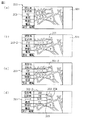
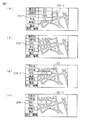
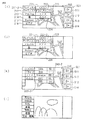
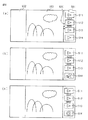
次に上述で説明した動作に関して、より理解し易くするために具体的状態遷移例を用いて説明する。図2,3,4は、画面の遷移状態を示す図である。また、本例では車載装置10は、ナビゲーション動作における地図表示中で、またオーディオ再生はFMラジオを受信再生中の状態となっている。表示画面のメニューについて、タッチパネル133を用いて機能メニューを選択する場合の機能メニューの選択手順について、図2〜図4の表示画面の遷移図及び図5の電源がONとなった後の表示画面の生成のための処理フローを参照して説明する。
Next, the operation described above will be described using specific state transition examples for easier understanding. 2, 3 and 4 are diagrams showing screen transition states. Further, in this example, the in-
まず、通常動作状態においては、画面左側に操作メニュー200が表示されている。本例ではメニュー項目として、自車位置が地図上の所定位置(中央やや下の位置)になるように地図を移動する「現在地」、目的地を設定する操作画面に移行する「目的地」、FM放送受信状態にすると共にFM放送受信操作画面に移行する「FM」、車両の各種装備(例えばエアコン)の操作画面に移行する「車両」、インターネット等を利用して各種情報を取得する情報機能の操作画面に移行する「情報」、電話操作を行なうための「電話」、車載装置10の各種設定、自宅位置の登録、通信設定、ユーザ情報の登録等を行なう操作画面に移行する「設定・編集」が、操作ボタン形態で連なり表示されている。
First, in the normal operation state, the
尚、図面イメージに合致させて説明を分かり易くするために、以降、メニュー項目の操作領域をボタン、例えば「FM」ボタンとして表記する。また、画面右側にはショートカットボタンの表示領域が表示され、このショートカットボタンの表示領域には複数の操作を組み合わせた操作群を単一操作で行なわせるショートカットボタンが複数表示できるようになっている。 In order to make the explanation easy to understand in conformity with the drawing image, the operation area of the menu item is hereinafter referred to as a button, for example, an “FM” button. In addition, a shortcut button display area is displayed on the right side of the screen, and a plurality of shortcut buttons can be displayed in the shortcut button display area.
本例の状態では、FM放送受信再生状態であるためオーディオ・ビジュアル(AV)系ソースの最新の選択ソースである「FM」ボタンが表示されている。尚、この領域はAV系のソースボタンが配置される領域であって、例えば最新の選択ソースがDVDであれば「DVD」が表示される。また、再生停止状態であっても、停止前の再生ソースが表示されることになる。尚、このような最新(停止前の状態)の選択状態や動作状態ことを、以降ラストモードと称する。 In the state of this example, since it is an FM broadcast reception / playback state, an “FM” button which is the latest selected source of an audio / visual (AV) source is displayed. This area is an area where AV source buttons are arranged. For example, if the latest selected source is a DVD, “DVD” is displayed. Even in the playback stop state, the playback source before the stop is displayed. The latest selected state (operating state before stopping) and the operating state are hereinafter referred to as a last mode.
この状態で、画面中央部の地図画面を押圧すると、一定時間画面の全領域が地図表示となり、地図に関する操作が行なわない状態が所定時間継続した場合にメニュー200を有する図2(a)の通常画面に戻る。 When the map screen at the center of the screen is pressed in this state, the entire area of the screen is displayed as a map for a certain period of time, and the normal operation shown in FIG. Return to the screen.
また、「FM」ボタン203を押圧すると、「FM」ボタン203は選択された状態となり(203−2)、その表示色が反転する。さらに、その隣(右側)に、AV系のソースを選択するためのソース選択画面に移行する「ソース」ボタン201が表示される。「FM」ボタン203選択状態で「FM」ボタン203に対する押圧状態を解除すると「FM」ボタン203に対する操作が確定され、FM放送受信の操作画面が表示される。
When the “FM”
尚、FM放送受信状態で無かった場合は、FM放送受信が開始される。一方、「FM」ボタン203の押圧状態を維持したまま「ソース」ボタン201の方向へスライドさせると、「ソース」ボタン201が選択状態となりその表示色が反転する(図2(c))。その後「ソース」ボタン201位置で押圧を解除すると、「ソース」ボタン201に該当する動作、つまりここではソース選択画面が表示される(図2(d))。ソース選択画面は、AV系ソースの選択操作領域に「ソース」ボタン201が表示され、その隣に各種ソースのリスト、ここではAM放送受信再生の「AM」ボタン、「FM」ボタン、iPod(登録商標)等のメモリオーディオ再生の「MAU(メモリオーディオ)」ボタン、TV放送再生の「TV」ボタンが表示される。
If the FM broadcast is not received, FM broadcast reception is started. On the other hand, when the “FM”
このソース選択画面において、例えば、「MAU」ボタンを押圧するとメモリオーディオの機能が選択され(204−2)、「MAU」ボタンの表示色が反転する。そして「MAU」ボタンの位置でその押圧状態を解除すると、メモリオーディオの機能が実行され(図3(e))、メモリオーディオにおけるラストモードの再生状態(停止前の曲再生状態)となる。尚、前回と異なったメモリオーディオが接続された場合(内蔵のメモリが交換された場合等も含む)は、第1曲目が再生されることになる。そして、表示画面においては、AV系ソースボタン配置位置に、最新の選択状態にある「MAU」ボタンに表示が変更され、最新の選択状態にあるソースが変更されるまでは、通常表示における「MAU」ボタン表示が維持される。 On this source selection screen, for example, when the “MAU” button is pressed, the function of the memory audio is selected (204-2), and the display color of the “MAU” button is inverted. When the pressed state is released at the position of the “MAU” button, the function of the memory audio is executed (FIG. 3E), and the playback mode of the last mode in the memory audio (song playback state before stopping) is set. When memory audio different from the previous one is connected (including when the built-in memory is replaced, etc.), the first music is played. In the display screen, the display is changed to the “MAU” button in the latest selected state at the AV source button arrangement position, and the “MAU” in the normal display is changed until the source in the latest selected state is changed. "Button display is maintained.
この「MAU」ボタン表示状態において、上述の「FM」ボタン表示状態における操作と同様の操作を行なうと、「FM」ボタンの操作と同様に図3(e)〜(h)に示すような状態遷移となる。また、「MAU」ボタン表示状態において、「MAU」ボタンを押圧した状態から「MAU」ボタンに対する押圧状態を解除すると、「MAU」ボタンに対する操作が確定され、MAUの操作画面が表示される。尚、MAUの操作画面は、MAUの操作が無い状態が所定時間継続すると、通常画面に戻る。また、MAU再生状態で無かった場合は、MAU再生がラストモードで開始される。 In the “MAU” button display state, when an operation similar to the operation in the “FM” button display state described above is performed, the states as shown in FIGS. It becomes a transition. When the “MAU” button is released from the state in which the “MAU” button is pressed in the “MAU” button display state, the operation for the “MAU” button is confirmed and the MAU operation screen is displayed. Note that the MAU operation screen returns to the normal screen when no MAU operation continues for a predetermined time. If there is no MAU playback state, MAU playback is started in the last mode.
MAUの操作画面は、図4(i)に示すような画面で、画面左端領域に選曲メニューが表示される。選曲メニューは、ユーザが選曲し登録したリストに基づき再生する「プレイリスト」ボタン、アーティストに基づき楽曲を検索し選曲する「アーティスト」ボタン、アルバム名(CD等のディスクタイトル)に基づき楽曲を検索し選曲する「アルバム」ボタン、曲名に基づき楽曲を検索し選曲する「楽曲」ボタン等のボタン(メニュー項目)を有する。 The operation screen of the MAU is a screen as shown in FIG. 4 (i), and a music selection menu is displayed in the left end area of the screen. The music selection menu searches for a music based on a “play list” button for reproducing based on a list selected and registered by the user, an “artist” button for searching for and selecting music based on an artist, and an album name (disc title such as a CD). It has buttons (menu items) such as an “album” button for selecting a song and a “music” button for searching for and selecting a song based on the song name.
そして、例えば、このMAUの操作画面(選曲メニューが表示状態)において、プレイリストを押圧操作すると、その下位階層であるユーザにより登録されたプレイリストの名称リスト(プレイリスト名称ボタン)が表示され、さらにプレイリスト名称ボタンを押圧操作すると当該プレイリストに登録された楽曲名リスト(楽曲名ボタン)が表示される。尚、プレイリスト名称ボタンの押圧により、ラストモードで当該プレイリストの登録曲の再生が開始される。さらに、楽曲名ボタンを押圧操作すると当該楽曲の再生が開始され、その後プレイリストに記憶された順番で各楽曲が再生される。 For example, when a playlist is pressed on the MAU operation screen (music selection menu is displayed), a playlist name list (playlist name button) registered by the user at the lower hierarchy is displayed. When the playlist name button is further pressed, a song name list (music name button) registered in the playlist is displayed. Note that, by pressing the playlist name button, reproduction of the registered music in the playlist is started in the last mode. Furthermore, when the music name button is pressed, the music starts to be played, and then each music is played in the order stored in the playlist.
また、各リストの表示状態において右方向へのフリック操作(押圧状態を維持しながら左方向に移動しながら離脱する)を行なうと、表示リストの内の最下位階層のリストの表示が消去される。尚、下位階層のリストが表示されていても、上位階層のボタンを押圧操作することも可能で、その場合には操作したボタンに対応した動作、例えばそのボタンに対応する下位階層のリストの表示状態となる動作が行なわれることとなる。 In addition, when a flick operation in the right direction is performed in the display state of each list (moving leftward while maintaining the pressed state), the display of the lowest-level list in the display list is deleted. . Even if the lower layer list is displayed, it is possible to press the upper layer button. In this case, the operation corresponding to the operated button, for example, the display of the lower layer list corresponding to the button is displayed. An operation to become a state is performed.
尚、メニュー200には、操作ボタン(メニュー項目)の変更が可能な操作ボタン領域と、その変更ができない操作ボタン領域がある。例えば、当該項目に下位階層が無い項目や、同階層の他メニューが無い(設定されていない)項目、例えば「現在地」ボタンは項目の変更ができない操作ボタン(メニュー項目)であり、「目的地」ボタンは下位階層に「施設名」(施設名で目的地を検索)、「住所」(住所で目的地を検索)、「電話番号」(電話番号で目的地を検索)等が考えられる項目の変更できる操作ボタンである。尚、これらは設計時に適宜設定されるもので、「目的地」ボタンを変更できない操作ボタンとして設定することも可能である。また、ユーザが設定操作により、これらの設定を行なえるようにしても良い。
The
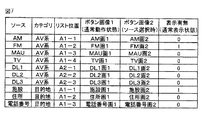
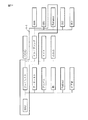
図7は、上述の操作ボタンの表示を行なうための、表示設定メモリの一例を示す図である。表示設定メモリには、通常動作状態においてボタン表示を行なう可能性のあるメニュー項目(「ソース」)と対応づけて、その上位階層(AV系,目的地)データ「カテゴリ」、メニュー項目(ソース)選択時のリスト表示位置を示すデータ「リスト位置データ」、通常動作状態におけるボタン表示の画像データ「ボタン画像1」、メニュー項目(ソース)選択時のリスト表示画像を示す画像データ「ボタン画像2」、通常動作状態においてボタン表示を行なうか否かを示すデータ「表示有無」が記憶され、固定化されたデータ以外は必要に応じてデータが追加・更新される。
FIG. 7 is a diagram showing an example of a display setting memory for displaying the above-described operation buttons. The display setting memory is associated with a menu item (“source”) that may display a button in a normal operation state, and its upper layer (AV system, destination) data “category”, menu item (source) Data “list position data” indicating the list display position at the time of selection, image data “
例えば、「MAU」を通常動作状態においてボタン表示を行なう場合には、ソース「MAU」における表示有無を「0」から「1」に更新する。そして、通常動作状態においてボタン表示を行なう場合は、表示有無が「1」のソースを選択し、そのソースに該当する「カテゴリ」の表示領域に「ボタン画像1」の画像データに基づき画像を表示する。また、「ソース」の選択場面、つまり「ソース」のリスト(各ソースボタンのリスト表示)を表示する。
For example, when button display of “MAU” is performed in the normal operation state, the presence / absence of display in the source “MAU” is updated from “0” to “1”. When button display is performed in the normal operation state, a source with “1” displayed is displayed, and an image is displayed based on the image data of “
本例では、例えばFMに関しては、通常動作状態において「AV系」の表示領域に「FM画1」の画像を表示し、「ソース」の選択場面では、「A1−2」の表示位置に「FM画2」の画像を表示する。
In this example, for FM, for example, the image of “
また、本実施形態では、通常動作状態における操作ボタンに対する押圧状態をそのまま解除するか、メニュー項目に対応するメニューリスト方向(右方向)に押圧状態を維持したままスライドさせて解除するかによって選択される項目が異なる処理を記載したが、これに限定されることなく、他の実施形態として、通常動作状態における操作ボタンを押圧することで該当のメニューリストを出現させ、操作ボタンに対する押圧状態を一旦解除した後に再度当該操作ボタンを押圧したら、その操作ボタンに該当する機能を実行させ、操作ボタンに対する押圧状態を一旦解除した後にメニューリストのメニュー項目(操作ボタン)を押圧し、その押圧状態をそのまま解除するか、もしくは押圧状態を維持したまま表示部の中央方向にスライドさせることによって、ソース選択機能の選択を確定し、ソース選択画面を表示させる構成であってもよい。 Further, in the present embodiment, it is selected depending on whether the pressed state with respect to the operation button in the normal operation state is released as it is or by sliding it while maintaining the pressed state in the menu list direction (right direction) corresponding to the menu item. However, the present invention is not limited to this, and as another embodiment, the corresponding menu list appears by pressing the operation button in the normal operation state, and the pressing state for the operation button is temporarily changed. When the operation button is pressed again after being released, the function corresponding to the operation button is executed, and after pressing the operation button, the menu item (operation button) in the menu list is pressed, and the pressed state is left as it is. Release or slide in the center of the display while maintaining the pressed state By, then confirm the selection of the source selection function may be configured to display the source selection screen.
このように、通常動作状態における操作ボタンの表示に関して、直前に実行された機能のメニュー項目を選択可能に表示することによって、例えば、再度メモリオーディオの機能を実行させたい場合は、メニューのメニュー項目としてすでに表示されている「MAU」操作ボタンを選択操作するだけで実行できるため、メモリオーディオの機能を実行させるたびにソース選択画面を出現させて選択するといった煩雑な操作を行う必要がなくなり、ユーザにシンプルな操作を提供できる。 As described above, regarding the display of the operation button in the normal operation state, for example, when it is desired to execute the function of the memory audio again by selectively displaying the menu item of the function executed immediately before, the menu item of the menu is displayed. This operation can be performed simply by selecting and operating the “MAU” operation button that is already displayed, and thus there is no need to perform complicated operations such as making a source selection screen appear and selecting each time the memory audio function is executed. Can provide simple operation.
次に、iPod(登録商標)の機能の実行が決定されると、iPod(登録商標)の機能の実行に必要なメニューが表示される。具体的には、再生データ検索画面が表示される。iPod(登録商標)は、再生データとして音楽データや動画データ等を記憶媒体に格納している。再生データ検索画面の項目としては、例えば、音楽データを再生する順序が登録されているプレイリスト211−2、音楽データをアーティスト名から検索するアーティスト212、音楽データをアルバム名から検索するアルバム213、音楽データを曲名から検索する曲214等がある。そして、再生データ検索画面の項目のいずれか一つ、例えば、プレイリスト211−2を押圧すると、プレイリスト211−2は選択された状態(アクティブ状態)となり、その隣(右側)にサブメニューとして選択可能なアルバムリストを含んでアルバム選択画面が表示される(図4(i))。
Next, when execution of the iPod (registered trademark) function is determined, a menu necessary for executing the iPod (registered trademark) function is displayed. Specifically, a reproduction data search screen is displayed. iPod (registered trademark) stores music data, moving image data, and the like as reproduction data in a storage medium. As items of the reproduction data search screen, for example, a playlist 211-2 in which the order of reproducing music data is registered, an
ここで、本実施形態では、再生データ検索画面の項目のいずれか一つが押圧された場合に、その項目を選択された状態にするという構成を記載したが、これに限定されず、他の実施形態として、iPod(登録商標)の機能の実行が決定されたら、再生データ検索画面の項目のいずれか一つが既に(自動で)選択された状態で表示されるような構成であってもよい。この場合、既に(自動で)選択された項目としては、再生データ検索画面の項目の最上位に表示される項目であってもよいし、前回の実行で選択された項目であってもよいし、ユーザがよく利用する項目であってもよい。 Here, in the present embodiment, a configuration has been described in which, when any one of the items on the reproduction data search screen is pressed, the item is selected. As a form, when the execution of the function of iPod (registered trademark) is decided, any one of the items on the reproduction data search screen may be displayed in the already selected state (automatically). In this case, the item already selected (automatically) may be the item displayed at the top of the items on the reproduction data search screen, or may be the item selected in the previous execution. It may be an item frequently used by the user.
次に、具体的操作例で説明する。アルバム選択画面に表示されたアルバムリストのうちの一つ、例えば、ドライブソング222を押圧すると、ドライブソング222は選択された状態(アクティブ状態:反転色表示)となり(222−2)(図4(j))、その隣(右側)に下位階層メニューとして選択可能な楽曲リストの楽曲選択画面が表示される(図4(k))。この楽曲選択画面に表示される楽曲リストは、ドライブソング222−2に含まれる楽曲である。楽曲リストでは、楽曲名とアーティスト名が対応付けられて表示される(図4(k))。そして、例えば、楽曲名「Romance」ボタンと歌手名「RR」ボタンを押圧し、その押圧状態を解除すると、楽曲名「Romance」に対応する音楽データが再生され、表示部130に再生中の音楽データが有する楽曲情報に関連する静止画像又は動画像が表示される(図4(l))。
Next, a specific operation example will be described. When one of the album lists displayed on the album selection screen, for example, the
なお、本実施形態では、メニュー項目(操作ボタン)に対して押圧し、この押圧状態を解除することで、選択したり、その選択を確定して機能を実行したりする構成を記載したが、これに限定されず、メニューを押圧し、その押圧状態を維持したまま表示部130の中央方向にスライドさせることによって、下位階層のメニュー(選択操作ボタン)を表示させる構成であってもよい。このような構成は、各メニューが階層構造を有している場合に、直感的に操作できるUIとして有効である。例えば、上位階層から下位階層に遷移する場合には、メニューを広げる方向にスライド操作し、下位階層から上位階層に戻るように遷移する場合には、メニューを閉じる方向にスライド操作すると言った操作となる。
In the present embodiment, a configuration is described in which the menu item (operation button) is pressed and the pressed state is released to select or confirm the selection and execute the function. However, the present invention is not limited to this, and the menu (selection operation button) in the lower hierarchy may be displayed by pressing the menu and sliding it in the center direction of the
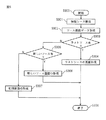
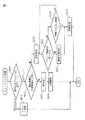
次に、通常動作状態における操作ボタンの表示処理について説明する。図5は、通常動作状態における操作ボタンの表示処理を示す処理の1つで、表示装置の電源をONとした後の表示画面を生成する処理の一例を示すフローチャートである。尚、この処理はAV系の操作ボタンに関する処理で、同様の操作ボタン表示を行なう系統の機能については同様に行なわれる。 Next, operation button display processing in the normal operation state will be described. FIG. 5 is a flowchart showing an example of processing for generating a display screen after turning on the power of the display device, which is one of the processing for displaying the operation button in the normal operation state. This process is a process related to AV operation buttons, and the functions of the system for displaying the same operation buttons are similarly performed.
尚、この処理は、制御部100の内部メモリ等に予め記憶されたプログラムにしたがって、制御部100により、車載装置10の各種構成要素及び各種回路を用いて、表示装置の電源ON時、また装置の接続状態に変化があった場合(接続状態を常時監視し、その変化で割り込みをかける)に実行される。
This process is performed when the display device is turned on by the
最初に、制御部100は、接続されているソースの検出を行う(S301)。例えば、メモリオーディオ等は着脱可能なため、接続されているかどうか判断して、後の制御に反映させる。実行可能なソースを検出する一例としては、各装置に装置種別のデータを送信する指令を行い、返信されてきたデータに基づき接続装置を判断する。尚、予め所定の通信規格に従った通信モジュールを各装置が備えておく必要がある。ここで、ソースとしては、ラジオ(AM,FM)、TV,CD/MD,DVD,メモリオーディオ、ナビゲーションおよびダウンロードしたアプリケーションなどがあるが、一体化されて分離できないソースについてはこの処理を省略できる。なお、メモリオーディオは、例えばUSBケーブルにより接続される。
First, the
次に、その検出結果に基づいて、図7の表示設定メモリに記憶するソース画面データを生成し記憶する(S302)。これらの必要なデータ(画像データ等)は、予め表示装置のメモリに記憶されているか、あるいはダウンロードアプリケーションソフトについてはダウンロードしたソフトに含まれるデータ、例えば画像データ等に基づき生成する。 Next, based on the detection result, source screen data to be stored in the display setting memory of FIG. 7 is generated and stored (S302). These necessary data (image data and the like) are stored in advance in the memory of the display device, or download application software is generated based on data included in the downloaded software, for example, image data.
次に、AV系のラストモードに対応するソースがあるかどうか判断し、あればステップS304に移行し、無ければステップS305に移行する。これは、メモリオーディオの着脱可能なソースはラストモードに該当するソースであっても接続されていない可能性があるための処理である。そして、ステップS304ではラストモードに該当するソースに該当する画面を形成する、つまりラストモードに該当するソース(例えば「FM」)の操作ボタンを生成し、表示される状態として処理を終える。また、ステップS305では、新しく接続されたソースがあるか判断し、あればステップS306に移行し、無ければステップS307に移行する。これは、新しく接続されたソースはユーザが選択する可能性が高いと考えられる為、操作ボタンを優先表示するための処理である。 Next, it is determined whether there is a source corresponding to the AV system last mode. If there is a source, the process proceeds to step S304, and if not, the process proceeds to step S305. This is a process for the possibility that the detachable source of the memory audio may not be connected even if the source corresponds to the last mode. In step S304, a screen corresponding to the source corresponding to the last mode is formed, that is, an operation button of the source corresponding to the last mode (for example, “FM”) is generated, and the process ends as a display state. In step S305, it is determined whether or not there is a newly connected source. If there is a newly connected source, the process proceeds to step S306, and if not, the process proceeds to step S307. This is a process for preferentially displaying the operation buttons because the user is likely to select a newly connected source.
そして、ステップS306では新しく接続されたソースに該当する画面を形成する、つまり新しく接続されたソース(例えば「FM」)の操作ボタンを生成し、表示される状態として処理を終える。また、ステップS307では、デフォルトに設定されているソースに該当する画面を形成する、つまり予め設定されているソース(例えば「FM」)の操作ボタンを生成し、表示される状態として処理を終える。 In step S306, a screen corresponding to the newly connected source is formed, that is, an operation button of the newly connected source (for example, “FM”) is generated, and the process ends as a displayed state. In step S307, a screen corresponding to the source set as a default is formed, that is, an operation button for a preset source (for example, “FM”) is generated, and the process ends as a display state.
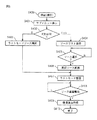
次に、ソース選択操作処理について説明する。図6はソース選択操作処理を示すフローチャートで、AV系のソース選択操作領域の操作ボタンが押圧操作された時に、制御部100により実行される。
Next, the source selection operation process will be described. FIG. 6 is a flowchart showing the source selection operation process, which is executed by the
まず、AV系のソース選択操作領域の操作ボタン、例えば「FM」ボタン203が押圧されると、押圧した操作ボタン(「FM」ボタン203)の表示色を反転(アクティブ化)し、またその右隣に上位階層の操作ボタンである「ソース」ボタンも表示する。次に、押圧操作ボタン位置で押圧を解除したか、「ソース」ボタン位置で押圧を解除したかを判断し、押圧操作ボタン位置であればステップS403に移り、「ソース」ボタン位置であればステップS404に移る。尚、この際、押圧位置が「ソース」ボタン位置に移動すると「ソース」ボタンがアクティブ状態となる。つまり、押圧位置にある操作ボタンがアクティブ状態となる。ステップS403では、操作画面を押圧操作ボタンに対応するソースのラストモードにおける操作画面として、ステップS407に移行する。
First, when an operation button in the AV source selection operation area, for example, the “FM”
またステップS404では、ソースリストを表示し、ソース選択操作を待つ(ステップS404,S405)。そして、選択されたソース(例えばMAU)におけるラストモードの操作画面を表示すると共に、ラストモードでそのソースを再生状態とする(S406)。次に、新しく選択される前のソースに関して最後(選択前直前)の状態(表示状態,再生状態等)を記憶する(S407)。そして、ソース選択画面の離脱条件の成立を待ち、例えば操作の無い状態が所定時間継続する、離脱を伴う操作が行なわれた(例えば他操作ボタン、例えば現在地ボタン操作)等の状態を検知する、等の条件が成立すれば、ステップS409に移る。そして、復帰画面、即ち通常画面の生成を行い、当該生成した通常画面を表示し、処理を終える。尚、通常画面においては、再生状態にあるソースの操作ボタンがソース選択操作領域に表示するよう処理を行なう。 In step S404, a source list is displayed and a source selection operation is waited (steps S404 and S405). Then, the operation screen of the last mode in the selected source (for example, MAU) is displayed, and the source is set in the reproduction state in the last mode (S406). Next, the last state (immediately before the selection) (display state, reproduction state, etc.) of the source before the new selection is stored (S407). Then, waiting for the release condition of the source selection screen to be established, for example, detecting a state in which no operation continues for a predetermined period of time, for example, an operation with separation (for example, another operation button, for example, current location button operation) is performed, If the above condition is satisfied, the process proceeds to step S409. Then, a return screen, that is, a normal screen is generated, the generated normal screen is displayed, and the process ends. In the normal screen, processing is performed so that the source operation buttons in the playback state are displayed in the source selection operation area.
これまでは、表示画面の左端にメニュー200が表示され、下位階層メニュー(図2(b)の201等)、メモリオーディオ204のコンテンツ等が左端から順次表示されると説明した。
しかしながら、メニュー200の表示は表示画面の右端とし、下位階層メニュー(図2(b)の201等)、メモリオーディオ204のコンテンツ等を右端から順次表示するようにしてもよい。この場合には、ショートカット登録領域501は、左端に表示される。
So far, it has been described that the
However, the
さらに、メニュー200の表示を表示画面の上端又は、下端とし、他の表示を適宜、順次下方向に(プルダウンメニューのように)又は、順次上方向に(プルアップメニューのように)表示してもよい。その場合には、ショートカット登録領域501は、メニュー200の表示される端と反対の端に表示される。
Further, the display of the
[ロータリースイッチによる操作]
表示部130における表示画面に表示されたメニュー項目の選択は、ハンドル930(図8)の近傍又は表示部130の近傍に配置されたロータリースイッチ(RS)を用いて選択することもできる。まず、ロータリースイッチ(RS)の基本的操作について説明する。なお、ロータリースイッチ(RS)は、以下に説明する操作に限定されない。
図2(d)、図3(e)、(g)、(h)、図4(i)の各図を参照して、ロータリースイッチの操作による表示画面の遷移について説明する。
[Operation by rotary switch]
The menu item displayed on the display screen of the
With reference to FIGS. 2D, 3E, 3G, 4H, and 4I, transition of the display screen by operating the rotary switch will be described.
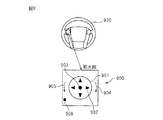
ロータリースイッチの一例を図8に示す。ロータリースイッチ(RS)900は操作部が樹脂等で形成され、押圧方向への変移操作と、押圧方向に垂直な平面に対する傾動操作が可能で、バネ等の弾性部材により操作前の初期位置への復帰力が付されている。また、操作部の中央下部と、図示上下左右の外周端部付近の下部には押圧スイッチが配置されており、それらスイッチの接点状態、およびその設定状態の変化状態(変化の順番)により操作部の押圧操作、傾動操作(ON状態となるスイッチの組み合わせにより8方向、つまり1つのスイッチだけがONだとその方向の傾動操作、2つのスイッチがONだとその間の方向の傾動操作)、また回転操作(回転状に押圧操作位置を変移させる操作で、ONとなるスイッチ位置の順で回転操作されたことを検知)を検知できるようになっている。 An example of the rotary switch is shown in FIG. The rotary switch (RS) 900 has an operation portion made of resin or the like, and can be moved in the pressing direction and tilted with respect to a plane perpendicular to the pressing direction. An elastic member such as a spring can be used to return to the initial position before the operation. Restoring force is attached. In addition, push switches are arranged at the center lower part of the operation part and the lower part near the outer peripheral end of the upper, lower, left and right in the figure, and the operation part depends on the contact state of these switches and the change state (change order) of the set state. Pressing and tilting operations (eight directions depending on the combination of switches that are in the ON state, that is, tilting operation in that direction when only one switch is ON, tilting operation in the direction when two switches are ON), rotation It is possible to detect an operation (detecting that the rotation operation is performed in the order of the switch positions that are turned on by the operation of changing the pressing operation position in a rotating manner).
ロータリースイッチ(RS)900を上下左右の4方向のいずれかの矢印方向902に倒す(押す)と、倒した方向のメニュー項目(操作ボタン)へ、選択状態が移動する。また、時計回りの方向(右回転)904にロータリースイッチ(RS)を、倒し(押し)つつ回転すると、選択メニュー項目がリスト内で順次下に移動し、反時計回りの方向(左回転)905にロータリースイッチ(RS)を、倒し(押し)つつ回転すると、選択メニュー項目がリスト内で順次上に移動する。さらに、ロータリースイッチ(RS)の中心部903を押下げると、選択状態のメニュー項目の選択が決定され、確定されたメニュー項目に対応する動作が実行され、また対応する表示画面が表示される。また、ナビゲーションにおける地図操作画面においては、傾動操作の8方向への地図スクロール動作がなされる。
When the rotary switch (RS) 900 is tilted (pressed) in any of the four
さらに、垂直方向への押圧を検出するスイッチ906におけるON状態の継続時間に基づき、操作部の短押しと長押しを検出でき、この違いにより動作内容を異ならせることができる。例えば、短押しにより、選択状態にある操作ボタンの選択を確定する動作を行い、長押しにより、ロータリースイッチ(RS)の操作対象となるメニュー(操作ボタンの領域)を順次変える、例えば左側のメニューと中央の地図と右側のショートカット間で順次ロータリースイッチ(RS)、操作部の傾動操作の対象を切り替えると言った動作を行なう。
Furthermore, based on the duration of the ON state in the
次に、タッチパネル操作とロータリースイッチ操作の対応関係について説明する。タッチパネル操作は、指でタッチパネルを押圧することで、その押圧位置に応じた動作の選択状態となり、その押圧を解除することによりその選択状態が確定され対応する動作が行なわれることになる。例えば、操作ボタン部分を押圧するとその操作ボタンに該当する動作が行なわれ、地図画面上(操作ボタンに該当する部分以外)を押圧するとその位置を中心とした地図表示となるように地図をスクロールする動作が行なわれると言うものである。 Next, the correspondence between the touch panel operation and the rotary switch operation will be described. When the touch panel operation is performed by pressing the touch panel with a finger, an operation is selected according to the pressed position, and by canceling the press, the selected state is determined and a corresponding operation is performed. For example, when the operation button part is pressed, the operation corresponding to the operation button is performed, and when the map screen (other than the part corresponding to the operation button) is pressed, the map is scrolled so that the map display is centered on the position. The operation is performed.
これに対して、本実施例におけるロータリースイッチにおける基本的動作は、ロータリースイッチの上下左右方向への傾動操作で表示されている操作ボタン間での移動が行なわれて操作ボタンの選択状態となり、垂直方向への押圧操作でその操作が確定されて該当する動作が実行されることになる。尚、操作ボタンの表示されていない画面におけるロータリースイッチの上下左右方向への傾動操作では、当該画面、例えば地図の傾動操作方向に対応したスクロール動作が行なわれる。また、ロータリースイッチの回転操作でメニュー項目リスト内におけるメニュー項目の選択変更(表示順に切り替わる・変更方向は回転方向に対応)が行なわれる。 On the other hand, the basic operation of the rotary switch in this embodiment is to move between the operation buttons displayed by the tilting operation of the rotary switch in the up / down / left / right directions, and to select the operation button. The operation is confirmed by the pressing operation in the direction, and the corresponding operation is executed. Note that in a tilting operation of the rotary switch in the up / down / left / right direction on a screen on which no operation buttons are displayed, a scrolling operation corresponding to the tilting operation direction of the screen, for example, a map, is performed. Further, the menu item in the menu item list is selected and changed (the display order is changed / the change direction corresponds to the rotation direction) by rotating the rotary switch.
次に具体的操作例をあげて、表示画面のメニューを、ロータリースイッチ(RS)を用いて選択した場合における、メニューの選択手順について説明する。
まず、左端のメニューバーからソースとして「MAU」を選択する手順について、図2,3,4を参照して説明する。
Next, as a specific operation example, a menu selection procedure when a menu on the display screen is selected using a rotary switch (RS) will be described.
First, the procedure for selecting “MAU” as the source from the leftmost menu bar will be described with reference to FIGS.
ナビゲーション装置の電源をON(自動車のイグニッションスイッチON)にして表示される初期画面には、ナビゲーション画面が表示されており、左端のメニューには、「目的地」、「MAU」、「車両」、「情報・G」、「電話」、「設定・編集」のボタン(メニュー項目)が表示されている。そして、初期状態として「現在地」が選択状態となっており、表示色が反転している。ロータリースイッチ(RS)を右に回転すると、左端のメニューの「目的地」、「MAU」、「車両」、「情報・G」、「電話」、「設定・編集」ボタンの順位、順次選択状態が変移し、その表示色が反転する。尚、ロータリースイッチ(RS)を左に回転すると上方向に順次選択状態が変移する。尚、選択された項目が最下端の場合はロータリースイッチ(RS)を右に回転しても選択状態は変わらず、また最上端の場合は左に回転しても選択状態は変わらない。 The navigation screen is displayed on the initial screen that is displayed when the power of the navigation device is turned on (the ignition switch of the vehicle is turned on). The menu on the left end includes “Destination”, “MAU”, “Vehicle”, “Information / G”, “phone”, and “setting / editing” buttons (menu items) are displayed. In addition, “current location” is selected as an initial state, and the display color is reversed. When the rotary switch (RS) is turned to the right, the order of the "Destination", "MAU", "Vehicle", "Information / G", "Phone", "Settings / Edit" buttons in the menu on the left is sequentially selected Changes and the display color is reversed. Note that when the rotary switch (RS) is rotated to the left, the selection state is sequentially shifted upward. When the selected item is the lowermost end, the selection state does not change even if the rotary switch (RS) is rotated to the right, and when the selected item is the uppermost end, the selection state does not change even if it is rotated to the left.
「MAU」ボタン204が選択された状態(図2(f)参照)において、確定操作(ロータリースイッチ(RS)の押圧操作)が行なわれると、「MAU」ボタン204の右に「ソース」ボタン201が表示される(図3(g)参照)。この状態で、ロータリースイッチ(RS)を右に傾動すると、「ソース」ボタン201−2が選択された状態となり、その表示色が反転表示される(図3(h)参照)。
In the state where the “MAU”
「ソース」ボタン201−2の選択状態で、ロータリースイッチ(RS)の押圧操作(確定操作)をすると、左端のメニューの「MAU」ボタン204の位置(AV系操作ボタン領域)に「ソース」ボタン201が表示され、「ソース」ボタン201の右側に、ソースのリスト例えば、「AM」ボタン202、「FM」ボタン203、「MAU」ボタン204及び「TV」ボタン205が上下方向に並んで表示され、一番上に表示される「AM」ボタン202−2が、選択された状態に表示される(図2(d)参照)。
When the rotary switch (RS) is pressed (determined) while the “source” button 201-2 is selected, the “source” button is displayed at the position of the “MAU” button 204 (AV operation button area) in the leftmost menu. 201 is displayed, and on the right side of the “source”
そして、この状態で、ロータリースイッチ(RS)を右に回転すると、メニューバーの「FM」203、「MAU」204、「TV」205の順に順次、選択状態が移行し、選択状態のボタンが表示色を反転して表示される。尚、ロータリースイッチ(RS)を左に回転すると、選択状態が上方向に順次移行する。 In this state, when the rotary switch (RS) is rotated to the right, the selection state sequentially shifts in the order of “FM” 203, “MAU” 204, “TV” 205 on the menu bar, and the selection state button is displayed. Displayed in reverse color. When the rotary switch (RS) is rotated to the left, the selection state is sequentially shifted upward.
ソースリストに表示された「MAU」204−2が選択された状態(図3(e)参照)で、ロータリースイッチ(RS)を押圧する(確定操作)と、「MAU」204−2の選択操作が確定し、メモリオーディオがラストモードで再生状態となる。さらに、表示画面上にはメモリオーディオの選曲操作画面がラストモード(最新の選曲操作状態)で表示される(図4(i)参照)。即ち、左端には、上から下に、例えば、「プレイリスト」ボタン、「アーティスト」ボタン、「アルバム」ボタン、「曲」ボタン等の操作ボタンが表示され、最新の選曲状態である「プレイリスト」ボタンが選択状態(表示色反転状態)となって表示される。また「プレイリスト」の下位階層として「プレイリスト」等メニューの右側に例えば、「ドライブソング」ボタン等からなるプレイリストのリスト(操作ボタン群)が表示される(図4(i)参照)。 When the “MAU” 204-2 displayed in the source list is selected (see FIG. 3E), when the rotary switch (RS) is pressed (confirmation operation), the “MAU” 204-2 is selected. Is confirmed, and the memory audio is played back in the last mode. Further, a memory audio music selection operation screen is displayed in the last mode (the latest music selection operation state) on the display screen (see FIG. 4I). That is, operation buttons such as a “play list” button, an “artist” button, an “album” button, and a “song” button are displayed on the left end from the top to the bottom, and the “play list” that is the latest music selection state is displayed. "Button is displayed in a selected state (display color inverted state). Further, a list of playlists (operation button group) including, for example, a “drive song” button is displayed on the right side of a menu such as “playlist” as a lower hierarchy of “playlist” (see FIG. 4I).
この状態で、ロータリースイッチ(RS)による確定操作を行なうと「ドライブソング」ボタン操作が確定され、プレイリスト「ドライブソング」に登録された楽曲がラストモードで再生される。また、「ドライブソング」222−2ボタンの右側にプレイリスト「ドライブソング」に登録された楽曲のリスト(ボタン)が表示され、「ドライブソング」再生に関するラストモードの楽曲に対応する操作ボタンが選択状態となっている。そして、ロータリースイッチ(RS)の回転操作により、上述の操作と同様、選択状態が上下方向に移行し、確定操作により選択状態にある楽曲ボタンの操作が確定され、当該楽曲が再生されることになる。例えば、「Romance」ボタンを選択した状態で、ロータリースイッチ(RS)を押圧操作する(確定する)と、楽曲「Romance」の演奏が開始される。 In this state, when a confirmation operation is performed by the rotary switch (RS), the “drive song” button operation is confirmed, and the music registered in the playlist “drive song” is reproduced in the last mode. In addition, a list (buttons) of songs registered in the playlist “drive song” is displayed on the right side of the “drive song” 222-2 button, and an operation button corresponding to the last mode song related to the “drive song” playback is selected. It is in a state. Then, the rotation state of the rotary switch (RS) causes the selection state to move up and down as in the above-described operation, and the operation of the music button in the selection state is confirmed by the confirmation operation, and the music is reproduced. Become. For example, when the rotary switch (RS) is pressed (determined) in a state where the “Romance” button is selected, the performance of the music “Romance” is started.
ここで、楽曲(「Romance」)を選択した状態で、ロータリースイッチ(RS)を左側に傾動操作すると、「ドライブソング」ボタンに選択状態が移行し、「ドライブソング」ボタンが表示色反転表示される(図4(j)参照)。
また、「プレイリスト」ボタン211−2が選択され、表示された状態(図4(i))で、ロータリースイッチ(RS)を左側に傾動操作すると、上位リスト、つまりソースリストの表示となり、当該表示のラストモード、つまり「MAU」ボタン204−2が選択された状態(図3(e)参照)となる。
When the rotary switch (RS) is tilted to the left with the music ("Romance") selected, the selected state moves to the "Drive Song" button, and the "Drive Song" button is displayed in reverse color. (See FIG. 4 (j)).
Further, when the “play list” button 211-2 is selected and displayed (FIG. 4 (i)), when the rotary switch (RS) is tilted to the left, the upper list, that is, the source list is displayed. The last display mode, that is, a state in which the “MAU” button 204-2 is selected (see FIG. 3E).
これまで、タッチパネル、ロータリースイッチを用いて階層構造の上位階層、下位階層のメニュー(リスト)からメニュー項目(操作ボタン)を選択する操作について説明したが、このような操作は、メニュー項目の選択、リスト内での上下の順次選択等の操作が実質的に可能であれば、マウス、音声等、他の入力装置を利用しても実現可能である。 So far, the operation of selecting menu items (operation buttons) from the menu (list) of the upper hierarchy and lower hierarchy of the hierarchical structure using the touch panel and the rotary switch has been described. If an operation such as sequential selection in the upper and lower order in the list is substantially possible, it can be realized by using other input devices such as a mouse and a voice.
次に、画面右側のショートカット登録領域にショートカットアイコンを登録する登録方法について説明する。具体的な実施例として、空アイコンを用いたショートカットアイコン登録方法、登録操作アイコンを用いたショートカットアイコン登録方法、及びドラッグアンドドロップによるショートカットアイコン登録方法について、図9から図14を参照して順次説明する。 Next, a registration method for registering a shortcut icon in the shortcut registration area on the right side of the screen will be described. As specific examples, a shortcut icon registration method using an empty icon, a shortcut icon registration method using a registration operation icon, and a shortcut icon registration method using drag and drop are sequentially described with reference to FIGS. 9 to 14. To do.
[空アイコンを用いるショートカットアイコン登録方法]
空アイコンを用いたショートカットアイコン登録方法について、図9から図11を参照して説明する。
[How to register shortcut icons using empty icons]
A shortcut icon registration method using an empty icon will be described with reference to FIGS.
表示画面は、メニュー502、表示領域500及びショートカット登録領域501を含む。そして、画面の左端には、ソースを含めたメニュー502が表示され、画面中央の表示領域500には、楽曲や映像に関する表示や、ナビゲーションの地図表示等が行われ、画面の右端のショートカット登録領域501には、ショートカットアイコン(ボタン)が表示される。
The display screen includes a
ショートカットアイコンには装置の動作状態が登録されていない空アイコン513、514と、動作状態が登録されている(コンテンツ(楽曲、動画等)の再生の実行等)実アイコン511、512があり、それぞれ異なった表示形態でショートカット登録領域501に表示されている。尚、これ以降、動作状態が登録されているアイコンを実アイコンと称し、登録されていないアイコンを空アイコンと称する。
Shortcut icons include
実アイコンを押圧操作すると、当該アイコンに登録されている装置状態となるように処理が実行され、例えばあるコンテンツ(楽曲、動画等)の再生状態が登録されていると当該楽器が再生される。一方、空アイコンが押圧操作されたら、操作時点の装置状態、例えばコンテンツ(楽曲、動画等)の再生状態が、このアイコンに登録される。尚、装置状態の詳細さは、適宜設計時に設定すれば良く、例えば楽曲の再生状態であれば楽曲名を最小単位(この場合、実アイコンの操作で該当楽曲の曲頭から再生される)で、あるいは再生位置(時間)単位(この場合、実アイコンの操作で該当楽曲の該当位置から再生される)等を適宜設定すれば良い。 When a real icon is pressed, processing is performed so that the device state registered in the icon is obtained. For example, when a reproduction state of a certain content (music, video, etc.) is registered, the instrument is reproduced. On the other hand, when the empty icon is pressed, the device state at the time of operation, for example, the playback state of content (music, video, etc.) is registered in this icon. The details of the device state may be set as appropriate at the time of design. For example, in the case of a music playback state, the music name is the smallest unit (in this case, the actual icon is played from the beginning of the corresponding music). Alternatively, a playback position (time) unit (in this case, playback from the corresponding position of the corresponding music by operating the actual icon) may be appropriately set.
そして、実アイコンには、登録された装置状態、例えばコンテンツと関連する画像(例えば、楽曲再生登録の場合、楽曲のアルバムジャケットの縮小画像やアーティストの顔写真など)やコンテンツのタイトル、アーティスト名等がアイコン内に、又はその近傍に表示される。例えば、図9(a)のアイコン511と512には、アイコンの下にそれぞれ、「AAA」、「BBB」といったようなコンテンツのタイトル、アーティスト名が表示されている。
The real icon includes a registered device state, for example, an image related to the content (for example, in the case of music playback registration, a reduced image of a music album jacket, a face photo of an artist, etc.), a title of the content, an artist name, etc. Is displayed in or near the icon. For example,
また、空アイコンには、アイコン内に空アイコンを連想させる表示、例えば白抜きの三角矢印の表示を行うことで、ショートカット登録されていないことをユーザに認知させている。なお、ショートカット登録されていないことを示すマークは白抜きの三角矢印に限定されず、「未」という文字を表示させてもよいし、灰色で塗りつぶして表現してもよい。 In addition, the empty icon is displayed so as to be associated with the empty icon in the icon, for example, a white triangle arrow, thereby allowing the user to recognize that the shortcut is not registered. Note that the mark indicating that the shortcut is not registered is not limited to the white triangle arrow, and the character “unknown” may be displayed or may be expressed in gray.
ショートカット登録できるアイコンの上限数を、例えば、12とし、1画面に4つのアイコンを表示可能と設計した場合、8個のアイコンの表示ができない。この場合、3つの画面に分割表示してページ切替ボタンを設ける、あるいはスクロール操作ボタンを設けてスクロール操作により表示するボタンを順次移動させる等の対策が必要となる。この場合、表示アイコンの位置を、例えば、ショートカット登録領域501内に表示中のアイコンのページや相対位置関係を表すインジケーター520を表示することによって認知できるようにするのが好ましい。なお、図9(a)以外の図面においては、インジケーター520の記載は省略している。
If the upper limit number of icons that can be registered as shortcuts is set to 12, for example, four icons can be displayed on one screen, eight icons cannot be displayed. In this case, it is necessary to take measures such as providing a page switching button by dividing the display into three screens, or providing a scroll operation button and sequentially moving buttons displayed by the scroll operation. In this case, it is preferable that the position of the display icon can be recognized by displaying, for example, a page of the icon being displayed or an
次に図14を参照して、アイコンに対応付けて装置状態を登録する方法について説明する。登録方法には、装置の状態を記憶し、そのデータに基づき装置の動作状態を再現する方法と、最上位階層の操作画面からの操作手順を記憶し、そのデータに基づき装置の動作状態を再現する方法等がある。ここでは、後者について具体例で説明する。後者の方法は、例えばメモリオーディオに収録された楽曲等の中の「プレイリスト」を選択し、更にその下位の項目の「ドライブソング」を選択し、更にその下位の項目の「Romance」を選択して楽曲を再生している状態をショートカット登録する場合、「AV系操作の選択」,「メモリオーディオの選択操作」、「プレイリストの選択操作」,「ドライブソングの選択操作」、「Romanceの選択操作」の操作手順を記憶する。そして、再現時には、「AV系操作の選択」,「メモリオーディオの選択操作」、「プレイリストの選択操作」,「ドライブソングの選択操作」、「Romanceの選択操作」の操作手順をメモリから読み出し、その手順で操作があったものとして対応する処理を行なうものである。 Next, with reference to FIG. 14, a method for registering a device state in association with an icon will be described. The registration method stores the device status and reproduces the operation status of the device based on the data, and stores the operation procedure from the operation screen of the highest hierarchy and reproduces the device operation status based on the data. There are ways to do this. Here, the latter will be described with a specific example. In the latter method, for example, a “play list” in a music recorded in a memory audio is selected, a lower-level item “drive song” is selected, and a lower-level item “Romance” is selected. If you are registering a shortcut for playing a song, select “AV operation selection”, “Memory audio selection operation”, “Playlist selection operation”, “Drive song selection operation”, “Romance” The operation procedure of “selection operation” is stored. At the time of reproduction, the operation procedures of “AV operation selection”, “memory audio selection operation”, “playlist selection operation”, “drive song selection operation”, and “Romance selection operation” are read from the memory. The corresponding processing is performed assuming that the operation is performed in the procedure.
ここで、実アイコンが登録アイコンの上限数12個の場合、新たなショートカット登録ができない。新たなショートカット登録を行うためには、いずれかの実アイコンの登録状態を解除し、空アイコンを作成する。次にこの空アイコンの作成方法等について説明する。 If the upper limit number of registered icons is 12, the new shortcut cannot be registered. In order to register a new shortcut, the registration state of any real icon is canceled and an empty icon is created. Next, a method for creating this empty icon will be described.
先ず、動作・操作の概要について説明する。アイコンを、ショートカット登録を解除する場合、該当する実アイコンを、例えば所定時間(例えば、2〜3秒)連続して押下(長押し)する。すると、そのアイコンはショートカット登録を解除できる状態となり、またアイコンがショートカット登録を解除できる状態にあることを示す表示が行われる(例えば、対応する実アイコンに「◎」の表示が行われる)(図9(c)参照)。 First, an outline of the operation / operation will be described. When canceling shortcut registration of an icon, the corresponding real icon is continuously pressed (long press) for a predetermined time (for example, 2 to 3 seconds), for example. Then, the icon is in a state where the shortcut registration can be canceled, and a display indicating that the icon is in a state where the shortcut registration can be canceled is performed (for example, “◎” is displayed on the corresponding actual icon) (see FIG. 9 (c)).
この処理では、アイコンをショートカット登録を解除できる状態としてから、表示領域500上にドラッグしないと登録を解除できないので、ショートカット操作時(装置動作の再現)における操作ミス等によって、不意にショートカット登録が解除されるといったことを防止できる。
In this process, since the icon can be released from the shortcut registration state, the registration cannot be canceled unless the icon is dragged onto the
この状態で、この実アイコンを、ショートカット登録領域501から、表示領域500上にドラッグする(図10(d)参照)。すると、アイコンのショートカット登録が解除される(図10(e)参照)。尚、ショートカット登録が解除されたアイコンは空アイコンの表示画像に変更される(図10(e)参照)。
In this state, this real icon is dragged from the
このとき、表示領域500は、登録解除を印象付ける、例えばゴミ箱を意味する映像が表示される(図10(e)参照)。そして、その所定時間(1〜2秒)の後、映像表示部分は、例えばナビゲーション用の地図画像が表示される(図10(f)参照)等、ショートカット登録解除操作前の表示に復帰する。
At this time, the
なお、アイコンの押圧時間が短ければ、このアイコンにショートカット登録されている、例えばコンテンツ(楽曲、動画等)の再生等、対応する装置状態が再現される。 If the pressing time of the icon is short, the corresponding device state such as reproduction of content (music, moving image, etc.) registered in the shortcut is reproduced.
次に、図11のフローチャートを参照して、ショートカット処理について説明する。このショートカット処理は、ショートカットアイコンの押圧操作(押圧操作検知による割り込み処理)により実行される。 Next, shortcut processing will be described with reference to the flowchart of FIG. This shortcut process is executed by a pressing operation of a shortcut icon (interrupt process by detecting a pressing operation).
まず、操作されたアイコンが実アイコンか空アイコンかを判断し(ステップS601)、実アイコンであればステップS602に移り、空アイコンであればステップS610に移る。次にステップS602では、操作された実アイコンに対応する操作時間(押圧解除までの時間を計測)が所定時間より(例えば3秒程度)長いかどうか判断し、長ければステップS620に移行し、短ければステップS603に移行する。ステップS603では、操作された実アイコンに対応する装置状態データをメモリから読み出し、当該メモリから読み出した装置状態となるように装置の動作状態制御を行って(ステップS604)、処理を終える。 First, it is determined whether the operated icon is a real icon or an empty icon (step S601). If it is a real icon, the process proceeds to step S602, and if it is an empty icon, the process proceeds to step S610. Next, in step S602, it is determined whether or not the operation time corresponding to the operated real icon (measurement of time until pressing is released) is longer than a predetermined time (for example, about 3 seconds), and if it is longer, the process proceeds to step S620. If so, the process proceeds to step S603. In step S603, the device state data corresponding to the operated real icon is read from the memory, the operation state of the device is controlled so as to be the device state read from the memory (step S604), and the process ends.
またステップS610では、装置の動作状態(アイコン操作時点)、例えば再生中のソース名、楽曲名等を読み取り、操作された空アイコンに対応するメモリに記録し処理を終える。その際に、装置に動作状態を表す画像、例えば表示領域500に表示されているコンテンツ(楽曲、動画等)に関連する画像や写真、文字、例えば、楽曲のアルバムジャケットの縮小画像やアーティストの顔写真、コンテンツのタイトル、アーティスト名等に基づきアイコンの表示サイズに納まるような画像を生成し、アイコン画像として表示する(アイコン表示画像データとして記憶する)。
In step S610, the operation state of the apparatus (at the time of icon operation), for example, the name of the source being played, the name of the music, etc. are read, recorded in the memory corresponding to the operated empty icon, and the process ends. At that time, an image representing the operating state of the apparatus, for example, an image, a photograph, or a character related to the content (music, video, etc.) displayed in the
ステップS620では、該当する実アイコンに対してショートカット登録を解除できる状態であることを示す表示を行なう。次に、当該実アイコンの表示領域500上へのドラッグ操作の有無を判断し(ステップS621)、ドラッグ操作がなされればステップS621に移行する。ドラッグ操作無の場合、このステップS621の処理は制限時間(例えば10秒間)繰り返し行なわれ(ステップS630)、この制限時間を経過すると実アイコン押圧操作前の操作状態に復帰する処理(ステップS631)を実行して処理を終える。
In step S620, a display indicating that shortcut registration can be canceled for the corresponding real icon is performed. Next, it is determined whether or not there is a drag operation on the
ステップS622では、当該実アイコンに対応する装置の動作状態の記憶を消去すると共に、当該アイコンの表示画像を空アイコンの画像に書き換える。そして、実アイコン押圧操作前の操作状態に復帰する処理(ステップS631)を実行して処理を終える。
これにより、実アイコンを選択操作すれば実アイコンに対して登録された装置状態が再現され、空アイコンを選択操作すれば空アイコンに対してその時点の装置状態が登録される。また、実アイコンには、アイコン操作時の再現動作に関連する画像が表示されるので、選択する際の目安となると共に、登録操作時には空アイコン514へのショートカット登録が完了したことが認識できる。
また、空アイコンの一押しでショートカット登録できるため、ショートカット設定登録用の画面を表示させてショートカット登録する必要がなく、ユーザにとって使いやすいUIを提供できる。
In step S622, the storage of the operation state of the device corresponding to the real icon is deleted, and the display image of the icon is rewritten to an empty icon image. And the process (step S631) which returns to the operation state before real icon press operation is performed, and a process is complete | finished.
Accordingly, if the real icon is selected and operated, the device status registered for the real icon is reproduced, and if the empty icon is selected and operated, the current device status is registered for the empty icon. In addition, since an image related to the reproduction operation at the time of icon operation is displayed on the real icon, it can be used as a guideline for selection, and it can be recognized that the shortcut registration to the
In addition, since the shortcut can be registered by pressing the blank icon, it is not necessary to display the shortcut setting registration screen to register the shortcut, and a user-friendly UI can be provided.
[登録操作アイコンを用いるショートカットアイコン登録方法]
次に別のショートカットアイコン登録方法、具体的には登録アイコン(+)を用いたショートカットアイコン登録方法について、図12、図13を参照して説明する。
[Shortcut icon registration method using registration operation icon]
Next, another shortcut icon registration method, specifically, a shortcut icon registration method using the registration icon (+) will be described with reference to FIGS.
この方法は、ショートカット登録時に専用のショートカット登録操作アイコン704を操作する点で、上述の登録方法と異なる。以下、上述の登録方法と異なる点について説明する。
This method is different from the above-described registration method in that a dedicated shortcut
ショートカット登録操作アイコン704はショートカット登録領域内の最下部に表示されており、表示アイコンをページ送り操作、スクロール操作により非表示状態あるアイコンに切り替えた場合にも、登録操作アイコン704はショートカット登録領域内の最下部に表示され、移動しない。
The shortcut
ここで、空アイコンにショートカット登録する場合、先ず登録操作アイコン704を押圧操作する。この後、空アイコンを押圧操作すると、その時点の装置動作状態が、当該空アイコンに対応付けられて記憶され、対応するアイコン用画像が当該アイコンに表示される。また、実アイコンを押圧操作すると、当該実アイコンに対応する装置動作状態の記憶内容が消去され、その時点の装置動作状態が新たに当該実アイコンに対応付けられて記憶され、対応するアイコン用画像が当該アイコンに表示される。例えば、再生中のコンテンツ(楽曲、動画等)が、このアイコンに対してショートカット登録され、ジャケット写真等の画像がその大きさ等が適度に調整されてアイコンに表示される。また、登録操作アイコン704の操作がなされた場合、空アイコンの有無(数)を表示し、登録するアイコンの選択の参考となるようにしている。
Here, when registering a shortcut to the empty icon, the
次に、図13のフローチャートを参照して、上述の動作を実現するショートカット処理について説明する。このショートカット処理は、登録操作アイコン704の押圧操作(押圧操作検知による割り込み処理)により実行される。
まず、実アイコンあるいは空アイコンの操作が有無を判断し(ステップS701)、操作があればステップS702に移行する。実アイコンあるいは空アイコンの操作無の場合、このステップS701の処理は制限時間(例えば10秒間)繰り返し行なわれ(ステップS730)、この制限時間を経過すると実アイコンあるいは空アイコン押圧操作前の操作状態に復帰する処理(ステップS731)を実行して処理を終える。
Next, a shortcut process for realizing the above-described operation will be described with reference to the flowchart of FIG. This shortcut process is executed by a pressing operation of the registration operation icon 704 (interrupt processing by detecting a pressing operation).
First, it is determined whether there is an operation on a real icon or an empty icon (step S701). When there is no operation of the real icon or the empty icon, the process of step S701 is repeatedly performed for a limited time (for example, 10 seconds) (step S730). The returning process (step S731) is executed to finish the process.
ステップS701では、装置の動作状態(アイコン操作時点)、例えば再生中のソース名、楽曲名等を読み取り、操作された空アイコンあるいは実アイコンに対応するメモリに記録し(実アイコンの場合、書き換えとなる)、処理を終える。その際に、装置に動作状態を表す画像、例えば表示領域500に表示されているコンテンツ(楽曲、動画等)に関連する画像や写真、文字、例えば、楽曲のアルバムジャケットの縮小画像やアーティストの顔写真、コンテンツのタイトル、アーティスト名等に基づきアイコンの表示サイズに納まるような画像を生成し、アイコン画像として表示する(アイコン表示画像データとして記憶する)。次に、実アイコンあるいは空アイコン押圧操作前の操作状態に復帰する処理(ステップS731)を実行して処理を終える。
In step S701, the operating state of the apparatus (at the time of icon operation), for example, the name of the source being played, the name of the song, etc. are read and recorded in the memory corresponding to the operated empty icon or real icon (in the case of a real icon, rewriting is performed). ), The process is finished. At that time, an image representing the operating state of the apparatus, for example, an image, a photograph, or a character related to the content (music, video, etc.) displayed in the
これにより、登録操作アイコン704の押圧操作後に、実アイコンあるいは空アイコンの操作を行なうと言う分かり易い操作で、アイコンに対するショートカット登録を行なうことができる。
Accordingly, it is possible to perform shortcut registration for an icon with an easy-to-understand operation of performing an operation on a real icon or an empty icon after a pressing operation on the
尚、実アイコンに対するショートカット登録を禁止することも可能で、これは実アイコンに対するショートカット登録操作がなされた場合に処理を停止し、登録禁止である旨を表示することにより実現できる。尚、12の空ボタンの全てにショートカット登録がなされていると、登録ボタンに新たにショートカット登録ができず、新たにショートカット登録を行なうためには、いずれかの実アイコンのショートカットの登録を削除することが必要である。この場合の対象方法として次のようなショートカット登録削除方法がある。 It is also possible to prohibit shortcut registration for a real icon, and this can be realized by stopping processing when a shortcut registration operation for a real icon is performed and displaying that registration is prohibited. If a shortcut is registered for all 12 blank buttons, a new shortcut cannot be registered for the registration button, and in order to perform a new shortcut registration, the shortcut registration of any real icon is deleted. It is necessary. In this case, the following shortcut registration deletion method is available.
先ず、全ての空ボタンにショートカットが登録されており、新たにショートカットを登録できない場合に、登録操作アイコン704の押圧操作を検出すると、全実アイコンを削除可能状態(削除実行領域へのドラッグ操作を有効とする)とし、その旨を示す表示(例えば、◎)を実アイコンに表示する。そして、削除可能状態にある実アイコンの削除実行領域へのドラッグを検出して、当該実アイコンに対して記憶された装置状態データを削除すると共に、空アイコンの表示状態とする。
これにより、登録操作アイコン704の押圧操作時に空アイコンが存在しなければ、削除操作可能な実アイコンに削除可能の表示がなされ、ユーザはそれを確認した容易に空アイコンを作成することができる。
First, when a shortcut is registered in all empty buttons and a new shortcut cannot be registered, when a pressing operation of the
As a result, if there is no empty icon at the time of pressing the
また、他方法として、実アイコンを長押しすることにより、削除可能状態として、その後の削除実行領域へのドラッグ操作で空アイコンにする方法等も可能である。 Further, as another method, a method of making a deletion possible state by long-pressing a real icon to make it a blank icon by a subsequent drag operation to the deletion execution area is also possible.
[ドラッグアンドドロップによるショートカットアイコン登録方法]
次にさらに他のショートカットアイコン登録方法としてドラッグアンドドロップによるショートカットアイコン登録方法について、図4(k)を参照して説明する。以下、上述の登録方法と異なる点について説明する。
[Drag and drop shortcut icon registration method]
Next, as another shortcut icon registration method, a shortcut icon registration method by drag and drop will be described with reference to FIG. Hereinafter, differences from the above registration method will be described.
この方法では、ショートカット登録領域501には、実アイコンしか表示されない(空アイコン自体存在しない)。そして、登録は、表示領域500の操作ボタン領域以外の領域を押圧操作し、そのままショートカット登録領域501までドラッグ操作することにより、ショートカット登録がなされる。例えば、図4(k)の例では、「ドライブソング」222に含まれている「Romance」の楽曲が再生されており、その楽曲情報や関連画像が表示領域500に表示されている。
In this method, only a real icon is displayed in the shortcut registration area 501 (the empty icon itself does not exist). The registration is performed by pressing an area other than the operation button area in the
この状態で、表示領域500における「Romance」の楽曲情報や関連画部分(操作ボタン領域で無い)をショートカット登録領域501までドラッグすることにより、「Romance」の再生動作を実現するショートカット登録がなされ、ショートカット登録領域501に「Romance」の再生動作を選択操作する実アイコンが表示される。尚、実アイコンの登録数に上限を設ける場合は、例えばショートカット登録のためのドラッグ操作が行なわれた際に登録不可の旨を示す表示を行なう。また、実アイコンの削除については、上述の削除方法等を適用することができる。
In this state, by dragging the music information of “Romance” in the
100 制御部
101 CD/MD再生部
102 ラジオ受信部
103 TV受信部
104 DVD再生部
105 HD再生部
106 ナビゲーション部
107 分配回路
108 画像調整回路
110 音声調整回路
111 画像出力部
115 操作部
118 メモリ
119 外部音声/映像入力部
120 カメラ
130 表示部
140 スピーカ
DESCRIPTION OF
Claims (4)
前記メニュー項目の選択操作により、当該メニュー項目の上位階層に該当する上位メニュー項目を表示し、
前記上位メニュー項目を選択操作し、さらに確定操作することによって、当該上位メニュー項目の下位階層に含まれる下位メニュー項目の第2メニューを表示して、下位メニュー項目の選択操作を可能とすることを特徴とする操作方法。 An operation method in which an operation corresponding to a selected menu item is performed by selecting and confirming a menu item in the first menu,
By selecting the menu item, the upper menu item corresponding to the upper layer of the menu item is displayed,
By selecting and then confirming the upper menu item, the second menu of the lower menu item included in the lower hierarchy of the upper menu item is displayed and the lower menu item can be selected. Characteristic operation method.
前記音源の選択操作により、当該音源選択操作項目を表示する音源選択操作項目表示手段と、
前記音源選択操作項目を選択操作し、さらに確定操作することによって、音響映像再生系の音源の第2メニューを表示して、音源選択操作を可能とする音源メニュー表示手段を備えたことを特徴とする音響装置。 A sound device that performs a reproduction operation of a selected sound source by selecting and further confirming a sound source of an audio video reproduction system in a first menu displayed in a normal operation state,
Sound source selection operation item display means for displaying the sound source selection operation item by the sound source selection operation;
A sound source menu display means for displaying a second menu of a sound source of an audio / video playback system and performing a sound source selection operation by selecting and confirming the sound source selection operation item is provided. Sound device.
Priority Applications (1)
| Application Number | Priority Date | Filing Date | Title |
|---|---|---|---|
| JP2010271759A JP5641906B2 (en) | 2010-12-06 | 2010-12-06 | Operation method and sound device |
Applications Claiming Priority (1)
| Application Number | Priority Date | Filing Date | Title |
|---|---|---|---|
| JP2010271759A JP5641906B2 (en) | 2010-12-06 | 2010-12-06 | Operation method and sound device |
Publications (2)
| Publication Number | Publication Date |
|---|---|
| JP2012123473A true JP2012123473A (en) | 2012-06-28 |
| JP5641906B2 JP5641906B2 (en) | 2014-12-17 |
Family
ID=46504880
Family Applications (1)
| Application Number | Title | Priority Date | Filing Date |
|---|---|---|---|
| JP2010271759A Expired - Fee Related JP5641906B2 (en) | 2010-12-06 | 2010-12-06 | Operation method and sound device |
Country Status (1)
| Country | Link |
|---|---|
| JP (1) | JP5641906B2 (en) |
Cited By (3)
| Publication number | Priority date | Publication date | Assignee | Title |
|---|---|---|---|---|
| CN103863222A (en) * | 2012-12-07 | 2014-06-18 | 本田技研工业株式会社 | Vehicle coordinating system |
| WO2022018926A1 (en) * | 2020-07-22 | 2022-01-27 | 日本電産サンキョー株式会社 | Input device and control method for input device |
| JP2024001488A (en) * | 2022-06-22 | 2024-01-10 | 株式会社東海理化電機製作所 | User interface devices, control devices, and computer programs |
Families Citing this family (1)
| Publication number | Priority date | Publication date | Assignee | Title |
|---|---|---|---|---|
| WO2020070979A1 (en) * | 2018-10-04 | 2020-04-09 | パナソニック インテレクチュアル プロパティ コーポレーション オブ アメリカ | Apparatus control device and apparatus control method |
Citations (4)
| Publication number | Priority date | Publication date | Assignee | Title |
|---|---|---|---|---|
| JPH06162125A (en) * | 1992-11-17 | 1994-06-10 | Mutoh Ind Ltd | Command input method and device |
| JPH06342358A (en) * | 1993-10-08 | 1994-12-13 | Casio Comput Co Ltd | Menu display method |
| JPH07160456A (en) * | 1993-12-06 | 1995-06-23 | Dainippon Screen Mfg Co Ltd | Image processing device |
| JP2006107424A (en) * | 2004-09-13 | 2006-04-20 | Victor Co Of Japan Ltd | Menu image display method and electronic information device |
-
2010
- 2010-12-06 JP JP2010271759A patent/JP5641906B2/en not_active Expired - Fee Related
Patent Citations (4)
| Publication number | Priority date | Publication date | Assignee | Title |
|---|---|---|---|---|
| JPH06162125A (en) * | 1992-11-17 | 1994-06-10 | Mutoh Ind Ltd | Command input method and device |
| JPH06342358A (en) * | 1993-10-08 | 1994-12-13 | Casio Comput Co Ltd | Menu display method |
| JPH07160456A (en) * | 1993-12-06 | 1995-06-23 | Dainippon Screen Mfg Co Ltd | Image processing device |
| JP2006107424A (en) * | 2004-09-13 | 2006-04-20 | Victor Co Of Japan Ltd | Menu image display method and electronic information device |
Cited By (5)
| Publication number | Priority date | Publication date | Assignee | Title |
|---|---|---|---|---|
| CN103863222A (en) * | 2012-12-07 | 2014-06-18 | 本田技研工业株式会社 | Vehicle coordinating system |
| JP2014113873A (en) * | 2012-12-07 | 2014-06-26 | Honda Motor Co Ltd | Vehicular cooperation system |
| WO2022018926A1 (en) * | 2020-07-22 | 2022-01-27 | 日本電産サンキョー株式会社 | Input device and control method for input device |
| JP2024001488A (en) * | 2022-06-22 | 2024-01-10 | 株式会社東海理化電機製作所 | User interface devices, control devices, and computer programs |
| JP7752094B2 (en) | 2022-06-22 | 2025-10-09 | 株式会社東海理化電機製作所 | User interface device, control device, and computer program |
Also Published As
| Publication number | Publication date |
|---|---|
| JP5641906B2 (en) | 2014-12-17 |
Similar Documents
| Publication | Publication Date | Title |
|---|---|---|
| JP2012123477A (en) | Shortcut icon registration method | |
| CN101789250B (en) | Apparatus and method for adjusting a characteristics of a multimedia item | |
| US10296173B2 (en) | In-vehicle apparatus and control method of in-vehicle apparatus | |
| CN102080965A (en) | In-vehicle display system | |
| JP4026071B2 (en) | In-vehicle device and content providing method | |
| JP5357464B2 (en) | Menu display device and menu display method | |
| CN100410863C (en) | Playback device and menu display method | |
| WO2008083741A1 (en) | Improved navigation device interface | |
| CN101794606B (en) | Method and an apparatus for playing of multimedia items | |
| US20150012941A1 (en) | Vehicle-mounted apparatus, information providing method for use with vehicle-mounted apparatus, and recording medium recorded information providing method program for use with vehicle-mounted apparatus therein | |
| US20080288867A1 (en) | Mobile communication device and method of controlling the same | |
| WO2009084185A1 (en) | Information terminal device, information processing method, and information processing program | |
| JP2012123475A (en) | Information processor and display method | |
| CN101789249A (en) | Device and method for playing multimedia items | |
| JP5641906B2 (en) | Operation method and sound device | |
| JP4962965B2 (en) | Information terminal device, information processing method of information terminal device, and information processing program | |
| KR100948290B1 (en) | Multimedia playback device and its screen display method | |
| JP6289324B2 (en) | Mobile terminal and display control method | |
| JP2011118605A (en) | Information processing apparatus and program | |
| JP2009163365A (en) | Information terminal device, information processing method of information terminal device, and information processing program | |
| WO2012060352A1 (en) | Touch panel processing device, touch panel processing method, and program | |
| KR100987512B1 (en) | Menu display method and media device | |
| JP2010055441A (en) | Menu display device and method | |
| JP2013191124A (en) | Information processing apparatus, information processing method, information processing program, and terminal apparatus | |
| JP2012010252A (en) | Operation device, operation method and operation program |
Legal Events
| Date | Code | Title | Description |
|---|---|---|---|
| A621 | Written request for application examination |
Free format text: JAPANESE INTERMEDIATE CODE: A621 Effective date: 20130809 |
|
| A977 | Report on retrieval |
Free format text: JAPANESE INTERMEDIATE CODE: A971007 Effective date: 20140221 |
|
| A131 | Notification of reasons for refusal |
Free format text: JAPANESE INTERMEDIATE CODE: A131 Effective date: 20140225 |
|
| A521 | Request for written amendment filed |
Free format text: JAPANESE INTERMEDIATE CODE: A523 Effective date: 20140422 |
|
| TRDD | Decision of grant or rejection written | ||
| A01 | Written decision to grant a patent or to grant a registration (utility model) |
Free format text: JAPANESE INTERMEDIATE CODE: A01 Effective date: 20140930 |
|
| A61 | First payment of annual fees (during grant procedure) |
Free format text: JAPANESE INTERMEDIATE CODE: A61 Effective date: 20141028 |
|
| R150 | Certificate of patent or registration of utility model |
Ref document number: 5641906 Country of ref document: JP Free format text: JAPANESE INTERMEDIATE CODE: R150 |
|
| R250 | Receipt of annual fees |
Free format text: JAPANESE INTERMEDIATE CODE: R250 |
|
| R250 | Receipt of annual fees |
Free format text: JAPANESE INTERMEDIATE CODE: R250 |
|
| LAPS | Cancellation because of no payment of annual fees |