JP2012146151A - Terminal and method for image output receiving, and program - Google Patents
Terminal and method for image output receiving, and program Download PDFInfo
- Publication number
- JP2012146151A JP2012146151A JP2011004437A JP2011004437A JP2012146151A JP 2012146151 A JP2012146151 A JP 2012146151A JP 2011004437 A JP2011004437 A JP 2011004437A JP 2011004437 A JP2011004437 A JP 2011004437A JP 2012146151 A JP2012146151 A JP 2012146151A
- Authority
- JP
- Japan
- Prior art keywords
- data
- image
- text
- image data
- Prior art date
- Legal status (The legal status is an assumption and is not a legal conclusion. Google has not performed a legal analysis and makes no representation as to the accuracy of the status listed.)
- Pending
Links
Images




Landscapes
- Record Information Processing For Printing (AREA)
Abstract
【課題】画像データと、画像データに付加されている音声データから変換されたテキストデータを好適に配置して印刷することが可能な画像出力受付端末等を提供する。
【解決手段】画像出力受付端末内のコンピュータが有するテキスト変換部64は、画像選択部63によって受け付けられた選択画像のうち、音声データが付加されている場合には、その音声データをテキストに変換する。またテキスト変換部64は、音声データの特徴量(音量や周波数など)を抽出し、その特徴量に応じて、文字の種類(フォント)、文字のサイズ、文字の色などを決定する。印刷実行部67は、印刷対象の画像データおよび変換されたテキストデータを所定位置に配した後、印刷データに変換し、印刷データの印刷を実行する。
【選択図】図4An image output receiving terminal and the like capable of suitably arranging and printing image data and text data converted from audio data added to the image data are provided.
A text conversion unit 64 included in a computer in an image output receiving terminal converts audio data into text when audio data is added among selected images received by an image selection unit 63. To do. In addition, the text conversion unit 64 extracts the feature amount (sound volume, frequency, etc.) of the audio data, and determines the character type (font), character size, character color, etc. according to the feature amount. The print execution unit 67 places the image data to be printed and the converted text data at predetermined positions, converts them to print data, and executes printing of the print data.
[Selection] Figure 4
Description
本発明は、音声データ付き画像データの印刷を行う画像出力受付端末に関し、特に、画像データと、画像データに付加されている音声データから変換されたテキストデータを好適に配置して印刷することが可能な画像出力受付端末等に関するものである。 The present invention relates to an image output receiving terminal that prints image data with audio data, and in particular, image data and text data converted from audio data added to the image data can be suitably arranged and printed. The present invention relates to a possible image output receiving terminal and the like.
近年、利用者が所有する記憶媒体に記憶されている画像データの印刷を行う画像プリントシステムが広く普及している。利用者は、画像プリントシステムの画像出力受付端末を操作することにより、デジタルカメラ等で撮影した画像を印刷することができる。 In recent years, image printing systems that print image data stored in storage media owned by users have become widespread. A user can print an image taken with a digital camera or the like by operating an image output receiving terminal of the image print system.
例えば、特許文献1には、デジタルカメラ等で撮影された写真を取り込み、印刷用紙に印刷する印字処理装置に関し、写真データに対応する音声データがある場合には、音声データを文字情報に変換し、その文字情報を吹出絵として画像上に配置して印刷する技術が提案されている。 For example, Patent Document 1 relates to a print processing apparatus that takes a photograph taken with a digital camera or the like and prints it on printing paper. If there is sound data corresponding to the photograph data, the sound data is converted into character information. A technique has been proposed in which the character information is arranged on an image as a balloon picture and printed.
特許文献1の技術では、予め決められたレイアウト様式に、変換された文字情報が吹出絵として配置されてしまうため、文字情報の文字数が多いと、文字情報を格納する吹出絵の領域が大きくなってしまう課題があった。 In the technique of Patent Document 1, since the converted character information is arranged as a balloon in a predetermined layout style, if the number of characters in the character information is large, the area of the balloon for storing the character information becomes large. There was a problem.
本発明は、前述した問題点に鑑みてなされたもので、その目的とすることは、音声データ付き画像データの印刷において、画像データと、画像データに付加されている音声データから変換されたテキストデータを好適に配置して印刷することが可能な画像出力受付端末および画像出力受付方法、並びに、そのプログラムである。 The present invention has been made in view of the above-described problems, and an object of the present invention is to print image data and text converted from audio data added to the image data when printing image data with audio data. An image output receiving terminal, an image output receiving method, and a program thereof capable of suitably arranging and printing data.
前述した目的を達成するために、第1の発明は、記憶媒体または携帯端末に記憶されている画像データの入力を制御する入力制御手段と、前記画像データに音声データが付加されている場合、前記音声データをテキストデータに変換するテキスト変換手段と、前記変換手段により変換された前記テキストデータの表示を制御する表示制御手段と、前記画像データおよび前記テキストデータが配置された印刷データを生成し、印刷の実行を指示する印刷実行手段とを備えることを特徴とする画像出力受付端末である。第1の発明によって、画像データと、画像データに付加されている音声データから変換されたテキストデータを好適に配置して印刷することができる。 In order to achieve the above-described object, the first invention provides an input control means for controlling input of image data stored in a storage medium or a portable terminal, and audio data is added to the image data. Generating text conversion means for converting the voice data into text data; display control means for controlling display of the text data converted by the conversion means; and print data in which the image data and the text data are arranged. An image output receiving terminal comprising: a print execution means for instructing execution of printing. According to the first aspect, image data and text data converted from audio data added to the image data can be suitably arranged and printed.
前記画像データの中から、印刷する所定の画像データを選択する選択手段をさらに備え、前記テキスト変換手段は、前記選択手段により選択された前記所定の画像データに音声データが付加されていた場合に、前記音声データをテキストデータに変換する。
これにより、全ての音声データをテキストデータに変換するのではなく、選択された画像データに付加されている音声データのみをテキストデータに変換することで、効率良く印刷処理を行うことができる。
The image conversion apparatus further includes a selection unit that selects predetermined image data to be printed from the image data, and the text conversion unit is configured to add audio data to the predetermined image data selected by the selection unit. The voice data is converted into text data.
As a result, it is possible to efficiently perform the printing process by converting only the audio data added to the selected image data into text data instead of converting all the audio data into text data.
前記テキスト変換手段は、前記音声データの特徴量に基づいて、前記テキストデータの文字サイズ、フォント、文字色のうち、少なくとも1つを決定する。
これにより、より娯楽性のあるプリントサービスを提供することができる。
The text conversion means determines at least one of a character size, a font, and a character color of the text data based on the feature amount of the audio data.
Thereby, a more entertaining print service can be provided.
前記テキストデータを編集する編集手段をさらに備える。
これにより、利用者が自分好みのプリント物に編集することができる。
Editing means for editing the text data is further provided.
As a result, the user can edit the printed matter as desired.
前記表示制御手段は、前記画像データのサムネイル画像の一覧の表示をさらに制御するとともに、前記画像データのサムネイル画像上に、前記音声データが付加されていることを示すマークの表示を制御する。
これにより、利用者は、画像データに音声データが付加されているか否かを容易に確認することができる。
The display control means further controls display of a list of thumbnail images of the image data, and also controls display of a mark indicating that the audio data is added on the thumbnail image of the image data.
Thereby, the user can easily confirm whether or not audio data is added to the image data.
前記入力制御手段により入力が制御された前記画像データの中から、前記音声データが付加されている画像データと、前記音声データが付加されていない画像データを区別して検索する検索手段をさらに備える。
これにより、利用者は、音声データが付加されている画像データのみの印刷注文を容易に行うことができる。
The image processing apparatus further includes search means for distinguishing and searching image data to which the audio data is added and image data to which the audio data is not added from the image data whose input is controlled by the input control means.
As a result, the user can easily place a print order for only the image data to which the audio data is added.
前記印刷実行手段は、前記画像データに撮影位置情報が付加されている場合、前記撮影位置情報に基づいて、撮影ポイントを示す地図が配置された印刷データを生成し、印刷の実行を指示する。
これにより、利用者は、旅の足取りなどを記したプリント物を得ることができる。
When the shooting position information is added to the image data, the print execution unit generates print data in which a map indicating a shooting point is arranged based on the shooting position information, and instructs execution of printing.
As a result, the user can obtain a printed matter in which the gait of the trip is recorded.
第2の発明は、記憶媒体または携帯端末に記憶されている画像データの入力を制御する入力制御ステップと、前記画像データに音声データが付加されている場合、前記音声データをテキストデータに変換するテキスト変換ステップと、前記変換ステップにより変換された前記テキストデータの表示を制御する表示制御ステップと、前記画像データおよび前記テキストデータが配置された印刷データを生成し、印刷の実行を指示する印刷実行ステップとを含むことを特徴とする画像出力受付方法である。 According to a second aspect of the present invention, there is provided an input control step for controlling input of image data stored in a storage medium or a portable terminal, and when audio data is added to the image data, the audio data is converted into text data. A text conversion step; a display control step for controlling display of the text data converted by the conversion step; and print execution for generating print data in which the image data and the text data are arranged and instructing execution of printing An image output receiving method comprising: steps.
第3の発明は、記憶媒体または携帯端末に記憶されている画像データの入力を制御する入力制御ステップと、前記画像データに音声データが付加されている場合、前記音声データをテキストデータに変換するテキスト変換ステップと、前記変換ステップにより変換された前記テキストデータの表示を制御する表示制御ステップと、前記画像データおよび前記テキストデータが配置された印刷データを生成し、印刷の実行を指示する印刷実行ステップとを含む処理をコンピュータに実行させるためのプログラムである。 According to a third aspect of the present invention, there is provided an input control step for controlling input of image data stored in a storage medium or a portable terminal, and when audio data is added to the image data, the audio data is converted into text data. A text conversion step; a display control step for controlling display of the text data converted by the conversion step; and print execution for generating print data in which the image data and the text data are arranged and instructing execution of printing A program for causing a computer to execute processing including steps.
本発明により、音声データ付き画像データの印刷において、画像データと、画像データに付加されている音声データから変換されたテキストデータを好適に配置して印刷することが可能な画像出力受付端末および画像出力受付方法、並びに、そのプログラムを提供することができる。 According to the present invention, in printing image data with audio data, an image output reception terminal and an image capable of suitably arranging and printing image data and text data converted from audio data added to the image data An output receiving method and its program can be provided.
以下、図面に基づいて、本発明の実施形態を詳細に説明する。 Hereinafter, embodiments of the present invention will be described in detail with reference to the drawings.
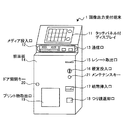
図1は、本発明の実施の形態に係る画像出力受付端末1の外観斜視図である。 FIG. 1 is an external perspective view of an image output receiving terminal 1 according to an embodiment of the present invention.
画像出力受付端末1は、店頭において、入力メディア(記憶媒体)や携帯端末に記憶されている画像データの印刷を受け付け、印刷を行う端末である。画像出力受付端末1は、予め画像データが記憶された入力メディアや携帯端末(いずれも不図示)から画像データを取得し、内部に保持する。 The image output receiving terminal 1 is a terminal that receives and prints image data stored in an input medium (storage medium) or a portable terminal at a store. The image output receiving terminal 1 acquires image data from an input medium or a portable terminal (both not shown) in which image data is stored in advance, and holds the image data therein.
入力メディアは、例えば、DVD-ROM/CD-ROM/CD-R/CD-RW、コンパクトフラッシュ(登録商標)、SD(Secure Digital)カード、ミニSDカード、マイクロSDカード、xD−ピクチャーカード、Smart Media(登録商標)、MEMORY STICK(登録商標)、USB(Universal Serial Bus)メモリ等である。 Input media is, for example, DVD-ROM / CD-ROM / CD-R / CD-RW, CompactFlash (registered trademark), SD (Secure Digital) card, Mini SD card, Micro SD card, xD-Picture card, Smart Media (registered trademark), MEMORY STICK (registered trademark), USB (Universal Serial Bus) memory, and the like.
携帯端末は、例えば、スマートフォン、iPhone(登録商標)、カメラ付き携帯電話機、iPad(登録商標)、携帯型パーソナルコンピュータ等である。通信方法は、例えば、blue
tooth(登録商標)、IR(赤外線通信)等である。
Examples of the mobile terminal include a smartphone, an iPhone (registered trademark), a mobile phone with a camera, an iPad (registered trademark), and a portable personal computer. The communication method is, for example, blue
tooth (registered trademark), IR (infrared communication), and the like.
画像出力受付端末1の上部正面には、タッチパネル付ディスプレイ11が配置されている。タッチパネル付ディスプレイ11は、操作の案内、操作の状況、読み込んだ画像データ等を表示するとともに、利用者からの指示を受け付ける。利用者は、タッチパネル付ディスプレイ11を介して、印刷注文する画像データの選択、画像データの画像処理の指示等を行う。 A display 11 with a touch panel is arranged on the upper front of the image output receiving terminal 1. The display 11 with a touch panel displays operation guidance, operation status, read image data, and the like, and accepts instructions from the user. The user selects image data to be ordered for printing, instructs image processing of the image data, and the like via the display 11 with a touch panel.
タッチパネル付ディスプレイ11の下部には、メディア投入口12および通信口13が設けられている。メディア投入口12は、各メディアの挿入口であり、複数の挿入口が1箇所にまとめて配置されている。通信口13は、各携帯端末と通信を行うための通信ポートであり、複数の通信ポート(赤外線ポートやUSB(Universal Serial Bus)ポートなど)が1箇所にまとめて配置されている。
A
画像出力受付端末1の下段部の前面板14には、レシート取出口15、硬貨投入口16および紙幣挿入口17のような料金投入口、つり銭返却口18、プリント物取出口19、ドア開閉キー20、メンテナンスキー21等が設けられている。
The
レシート取出口15、硬貨投入口16、紙幣挿入口17、つり銭返却口18は、利用者によるプリント物の注文内容に応じた入金を要求する課金手段として機能する。利用者は、硬貨投入口16に硬貨を投入したり、紙幣挿入口17に紙幣を挿入したりすることにより、プリント物の料金を支払う。つり銭がある場合には、つり銭返却口18から放出される。また、料金徴収後、徴収金額や注文内容等が印刷されたレシートがレシート取出口15から放出される。 The receipt outlet 15, the coin insertion slot 16, the bill insertion slot 17, and the change return slot 18 function as billing means for requesting payment according to the order contents of the printed matter by the user. The user pays a fee for the printed matter by inserting a coin into the coin insertion slot 16 or inserting a banknote into the banknote insertion slot 17. If there is change, it is discharged from the change return port 18. Further, after collecting the fee, a receipt on which the collected amount, order contents, etc. are printed is discharged from the receipt outlet 15.
プリント物取出口19には、画像出力受付端末1の筐体内に設置されるプリンタにより印刷されたプリント物が排出される。ドア開閉キー20は、画像出力受付端末1の前面板14を開閉するためのキーである。メンテナンスキー21は、利用者が画像出力受付端末1を利用可能な運転モードと、管理者が画像出力受付端末1のメンテナンスや設定、レシートの再印刷等を行う管理モードを切り替えるためのキーである。
A printed matter printed by a printer installed in the housing of the image output receiving terminal 1 is discharged to the printed
本実施の形態で用いられる画像データには、音声データ(録音データ)付きのものがある。この音声データ付き画像データが印刷注文された場合には、画像出力受付端末1は、音声データをテキストデータに変換し、変換したテキストデータを対応する画像の所定位置に配置して印刷する。 Some of the image data used in this embodiment includes audio data (recorded data). When the image data with audio data is ordered to be printed, the image output receiving terminal 1 converts the audio data into text data, arranges the converted text data at a predetermined position of the corresponding image, and prints it.
つまり、利用者が所有するデジタルスチルカメラや携帯端末に搭載されているデジタルカメラには、撮影時に録音機能も併せ持っていることが前提である。デジタルカメラは、予め利用者の声を登録して認識することができ、撮影時の録音データを認識された利用者情報とともに画像データに関連付けて保存する。 In other words, it is premised that the digital still camera owned by the user or the digital camera mounted on the portable terminal also has a recording function at the time of shooting. The digital camera can register and recognize a user's voice in advance, and stores recording data at the time of photographing in association with image data together with the recognized user information.
次に、画像出力受付端末1の基本的動作について説明する。 Next, the basic operation of the image output reception terminal 1 will be described.
画像出力受付端末1は、入力メディアから読み込んだ画像データを液晶ディスプレイ等のタッチパネル付ディスプレイ11に表示する。利用者は、タッチパネル付ディスプレイ11に設けられたタッチパネルにより、入力メディアや携帯端末等から読み込んだ画像の中から印刷注文する画像を選択する。 The image output receiving terminal 1 displays the image data read from the input medium on a display 11 with a touch panel such as a liquid crystal display. The user selects an image to be ordered for printing from images read from an input medium, a portable terminal, or the like using a touch panel provided on the display 11 with a touch panel.
本実施の形態において、印刷注文の内容には、「プリント」と「フォトブック」の2種類がある。「プリント」は、熱転写方式などで片面または両面に印画した用紙を出力する(通常の画像印刷を行う)ものである。「フォトブック」は、画像やテキストを熱転写方式などで片面または両面に印画した複数の用紙を用いて製本を行い、製本物を出力(提供)するものである。 In the present embodiment, there are two types of print order contents: “print” and “photo book”. “Print” is to output a sheet printed on one or both sides by a thermal transfer method or the like (perform normal image printing). A “photo book” is a book that uses a plurality of sheets of images or text printed on one or both sides by a thermal transfer method or the like, and outputs (provides) a bookbinding product.
利用者は、タッチパネル付ディスプレイ11に表示された画面上で、印刷注文する画像を選択した後、印刷の実行を指示すると、画像出力受付端末1内のコンピュータが内部プリンタに画像データを転送する。 When the user selects an image to be printed on the screen displayed on the display 11 with the touch panel and then instructs execution of printing, the computer in the image output reception terminal 1 transfers the image data to the internal printer.
画像出力受付端末1は、利用者にプリント物の印刷注文に応じた料金を算出、表示し、必要に応じてレシートプリンタによりレシート(引換券)を発行し、利用者に支払いを要求する。画像出力受付端末1は、課金手段により利用者の入金が完了すると、印刷データの印刷を開始する。印刷されたプリント物は、プリント物取出口19から排出され、利用者に提供される。
The image output reception terminal 1 calculates and displays a charge corresponding to the print order of the printed matter to the user, issues a receipt (voucher) with a receipt printer as required, and requests the user to pay. The image output reception terminal 1 starts printing the print data when the user's payment is completed by the charging unit. Printed printed matter is discharged from the printed
また画像出力受付端末1は、「フォトブック」を作成する場合、印刷されたプリント物を内部製本機に搬送し、プリント物を所定の製本方法で製本する。製本されたフォトブックは、図示せぬフォトブック取出口から排出され、利用者に提供される。
更に、本発明は、その場でプリント物を受け取る場合に限られず、いわゆる「オンライン製本」にも適用可能である。「オンライン製本」とは、利用者などが所有するコンピュータから同様の手順によってプリント物の発注を行い、業者がプリント物を製本し、郵送によってプリント物を受け取るというものである。本発明を「オンライン製本」に適用する場合、後述する図6、図7に示す処理を実行する為のプログラムを、利用者などが所有する汎用のコンピュータにインストールすることによって同様に実現することができる。すなわち、画像出力受付端末とは、図6、図7に示す処理を実行する為のプログラムがインストールされた汎用のコンピュータも含むものである。
Further, when creating the “photo book”, the image output receiving terminal 1 conveys the printed matter to the internal bookbinding machine and binds the printed matter by a predetermined bookbinding method. The bound photo book is discharged from a photo book outlet (not shown) and provided to the user.
Furthermore, the present invention is not limited to receiving printed matter on the spot, and can also be applied to so-called “online binding”. “Online binding” means that a printed matter is ordered from a computer owned by a user or the like according to the same procedure, and a vendor binds the printed matter and receives the printed matter by mail. When the present invention is applied to “online binding”, it can be similarly realized by installing a program for executing the processing shown in FIGS. 6 and 7 described later on a general-purpose computer owned by a user or the like. it can. That is, the image output receiving terminal includes a general-purpose computer in which a program for executing the processes shown in FIGS. 6 and 7 is installed.
なお、画像出力受付端末1は、料金算出、レシート(引換券)の発行を行うだけでなく、課金機を装備しているため、利用者に入金を要求して現金による課金処理を行うようにすることもできる。 The image output receiving terminal 1 is not only for calculating charges and issuing receipts (vouchers), but also equipped with a billing machine, so that the user is requested to deposit and perform billing with cash. You can also
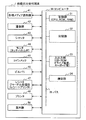
図2は、画像出力受付端末1のハードウエアの構成例を示すブロック図である。 FIG. 2 is a block diagram illustrating a hardware configuration example of the image output receiving terminal 1.
コンピュータ30は、制御部31、記憶部32、入出力部33、通信部34等から構成され、各種メディア読取部41、通信部42、シャッタ43、モニタ44、コインメック45、ビルバリ46、レシートジャーナル処理部47、およびプリンタ48、および製本機50を制御する。
The
制御部31は、プログラムの実行を行うCPU(Central processing Unit)と、プログラム命令あるいはデータ等を格納するためのRAM(Random Access Memory)、ROM(Read Only Memory)等で構成される。制御部31は、記憶部32等に格納されたプログラムに従って、バス35を介して接続された各装置を制御する。
The
記憶部32には、制御部31が実行するプログラム、プログラム実行に必要なデータ、OS(Operating System)等が格納される。プログラムは、例えば、画像入力プログラム、課金処理プログラム、レシート印刷処理プログラム、保守プログラム等である。データは、例えば、画像データや印刷データ等である。
The
プログラムのコードは、制御部31により必要に応じて読み出され、RAMに移され、CPUに読み出されて各種機能として実行される。
The program code is read by the
入出力部33は、記憶部32に格納されているプログラム等の更新や、画像出力受付端末1の設定等を行うメンテナンス時に用いられる。
The input /
通信部34は、通信制御装置、通信ポート等を有し、画像出力受付端末1と図示せぬネットワーク間の通信を媒介する通信インターフェースである。通信部34は、ネットワークを介して画像出力受付端末1と他の外部装置(例えば、後述するオンラインサイト)間の通信制御を行う。
The
各種メディア読取部41は、メディア投入口12の各メディアの挿入口に対応して画像出力受付端末1内部に設けられ、挿入された入力メディアに予め記憶されている画像データを読み込む。通信部42は、通信口13の各通信ポートに対応して設置されており、通信中の携帯端末に予め記憶されている画像データを読み込む。
The
シャッタ43は、メディア投入口12の各挿入口に設けられ、入力メディアの挿入口を開閉し、読取処理の最中や、課金処理が完了するまで、入力メディアを取り出せないようにする。モニタ44は、タッチパネル付ディスプレイ11である。
The
コインメック45、ビルバリ46、レシートジャーナル処理部47は、課金機能の役割を果たす。コインメック45は、硬貨投入口16に対応して画像出力受付端末1内部に設けられ、硬貨の入出力を管理する。ビルバリ46は、紙幣挿入口17に対応して画像出力受付端末1内部に設けられ、紙幣の入出力を管理する。
The
レシートジャーナル処理部47は、レシート取出口15に対応して画像出力受付端末1内部に設けられ、利用者の徴収金額や注文内容に応じたレシートを印刷する。
The receipt
プリンタ48は、プリント物取出口19に対応して画像出力受付端末1内部に設けられ、プリント物を印刷する。プリンタ48は、画像データを印刷する高解像度カラープリンタであり、熱転写プリンタあるいはインクジェット型など、プリンタの方式は特に問わない。印刷を行うべく紙は、シート状またはロール状である。
The
製本機50は、ローラや搬送路等を有し、プリンタ48で印刷されたプリント物を所定の製本方法で製本しフォトブック等の製本物を作成して出力する。
The
なお、プリンタ48は、画像出力受付端末1内部に設けられ、そこで印刷が行われるが、これに限らず、例えば、通信部34およびネットワークを介して接続されたプリンタサーバに画像データを転送し、そこで印刷を行わせることも勿論可能である。また、製本機50も、画像出力受付端末1内部に設けられ、そこで製本が行われるが、これに限らず、例えば、図示せぬ搬送路を介して接続された外部の製本機にプリント物を搬送し、そこで製本を行わせるようにしてもよい。すなわち、画像出力受付端末1と、プリンタ48、製本機50はそれぞれ別体であってもよい。
The
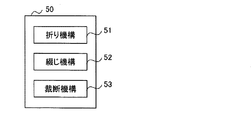
図3は、製本機50のハードウエアの構成例を示すブロック図である。
FIG. 3 is a block diagram illustrating a hardware configuration example of the
製本機50は、プリント物を折りたたむ折り機構51、プリント物をホチキスや製本テープ、背表紙、糊等で綴じる綴じ機構52、プリント物を化粧断裁する裁断機構53等を備えるものを用いることができる。これらの機構としては、既知のものを使用できる。フォトブックの製本方法の詳細については、特開2010−137564号公報等に記載されている通り公知の技術である。
The
図4は、画像出力受付端末1内のコンピュータ30の機能構成例を示すブロック図である。図4に示す機能部のうちの少なくとも一部は、図2の制御部31により画像印刷プログラムが実行されることによって実現される。
FIG. 4 is a block diagram illustrating a functional configuration example of the
入力制御部61は、各種メディア読取部41で読み込まれた画像データや通信部42で読み込まれた画像データの入力を制御する。
The
表示制御部62は、入力制御部61に入力された画像データの一覧表示画面、画像データの印刷サービスを利用者に提供するための画像出力サービス案内画面、および、音声データ付き画像データのテキスト編集を受け付けるためのテキスト編集画面等の各種画面のモニタ44上への表示を制御する。
The
画像選択部63は、モニタ44に表示されている画像データの一覧表示画面において、利用者による画像の選択を受け付ける。
The
テキスト変換部64は、画像選択部63によって受け付けられた選択画像のうち、音声データが付加されている場合には、その音声データをテキストに変換する。またテキスト変換部64は、音声データの特徴量(音量や周波数など)を抽出し、その特徴量に応じて、文字の種類(フォント)、文字のサイズ、文字の色などを決定する。ここで特徴量としては、MFCC(Mel Frequency Cestrum Coefficient)などが利用できる。この特徴量の詳細は、例えば、特開2009−301125号公報等に記載されている通り、この分野の当業者には周知であるため説明を省略する。
The
テキスト編集部65は、利用者によりテキストの編集が行われた場合、入力制御部61に入力された編集内容を表わす入力データに基づいて、テキスト変換部64で変換されたテキストデータを更新(編集)する。
When the text is edited by the user, the
課金部66は、印刷注文に応じた料金を算出し、その算出結果をモニタ44に表示させ、利用者に支払いを要求する。また課金部67は、コインメック45やビルバリ46の金銭の入出力を管理する。
The
印刷実行部67は、課金部66によって課金処理が完了すると、印刷対象の画像データ(およびテキストデータも含む場合はテキストデータも)を所定位置に配した後、印刷データに変換し、印刷データの印刷を実行する。
When the billing process is completed by the
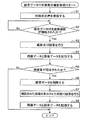
次に、図5のフローチャートを参照して、利用者が所有するデジタルスチルカメラや携帯端末に搭載されているデジタルカメラを用いた、録音データ付き画像の撮影処理について説明する。 Next, with reference to the flowchart of FIG. 5, a process for shooting an image with recorded data using a digital still camera owned by the user or a digital camera mounted on a portable terminal will be described.
まず、録音データ付き画像の撮影処理の開始にあたり、事前処理として、ステップS1において、デジタルカメラは、利用者の声を登録する。具体的には、利用者Aが、「Aです」と発話すると、その声の特徴量と「A」が紐付けられて登録される。勿論、利用者が複数人いる場合には、利用者毎の声の特徴量と、利用者を一意に識別する情報(名前、ニックネームなど)が紐付けられて登録される。なお、話者の識別には、GMM(Gaussian Mixture Model)などが利用できる。この話者識別の詳細は、例えば、特開2009−301125号公報等に記載されている通り、この分野の当事業者には周知であるため説明を省略する。 First, at the start of the photographing process of an image with recorded data, as a pre-process, the digital camera registers the user's voice in step S1. Specifically, when the user A utters “A”, the feature amount of the voice and “A” are associated and registered. Of course, when there are a plurality of users, the voice feature amount for each user and information (name, nickname, etc.) uniquely identifying the user are linked and registered. For identification of a speaker, GMM (Gaussian Mixture Model) or the like can be used. Details of this speaker identification are well known to those skilled in this field as described in, for example, Japanese Patent Application Laid-Open No. 2009-301125, and the description thereof is omitted.
ステップS2において、デジタルカメラは、録音データ付き画像の撮影が開始されたか否かを判定し、録音データ付き画像の撮影が開始されるまで待機する。例えば、利用者が、録音ボタンを押下するか、シャッタボタンを半押しすることで、録音データ付き画像の撮影が検知される。ステップS2において、デジタルカメラは、録音データ付き画像の撮影が開始されたと判定すると、ステップS3に進み、利用者の操作に応じて撮影および録音を行う。録音の終了時、利用者は、録音ボタンを再度押下する。 In step S2, the digital camera determines whether or not shooting of an image with recording data is started, and waits until shooting of an image with recording data is started. For example, when the user presses the recording button or presses the shutter button halfway, photographing of an image with recording data is detected. In step S2, if the digital camera determines that shooting of an image with recording data has started, the digital camera proceeds to step S3 and performs shooting and recording in accordance with a user operation. At the end of recording, the user presses the recording button again.
録音が終了されると、ステップS4において、デジタルカメラは、撮影された画像データと録音データを関連付けて記憶媒体に記憶する。このとき、ステップS1の処理で登録された利用者の声に基づいて話者(利用者)が識別され、利用者情報も関連付けられる。 When the recording is finished, in step S4, the digital camera associates the captured image data with the recording data and stores them in the storage medium. At this time, a speaker (user) is identified based on the voice of the user registered in the process of step S1, and user information is also associated.
ステップS5において、デジタルカメラは、再録音が指示されたか否かを判定し、再録音が指示されていないと判定した場合、撮影処理を終了する。一方、デジタルカメラは、再録音が指示されたと判定した場合、ステップS6に進み、ステップS4の処理で記憶媒体に記憶された録音データを削除する。 In step S5, the digital camera determines whether or not re-recording is instructed. If it is determined that re-recording is not instructed, the digital camera ends the photographing process. On the other hand, if it is determined that re-recording has been instructed, the digital camera proceeds to step S6 and deletes the recording data stored in the storage medium in the process of step S4.
ステップS7において、デジタルカメラは、撮影された画像を表示させた状態で録音を行う。例えば、利用者は、撮影された画像が表示されている状態において、録音ボタンを押下して録音を開始し、終了時、再度録音ボタンを押下する。 In step S7, the digital camera performs recording in a state where the captured image is displayed. For example, the user presses the record button to start recording while the captured image is displayed, and presses the record button again at the end.
ステップS8において、デジタルカメラは、ステップS3の処理で撮影された画像データとステップS7の処理で再録音された録音データを関連付けて記憶媒体に記憶する。このとき、ステップS1の処理で登録された利用者の声に基づいて、話者(利用者)が識別され、利用者情報も関連付けられる。 In step S8, the digital camera associates the image data captured in step S3 with the recording data re-recorded in step S7, and stores them in the storage medium. At this time, a speaker (user) is identified based on the voice of the user registered in the process of step S1, and user information is also associated.
以上のようにして、利用者が所有するデジタルスチルカメラや携帯端末に搭載されているデジタルカメラの記憶媒体には、音声データ付き画像データが記憶される。 As described above, image data with audio data is stored in a storage medium of a digital still camera owned by a user or a digital camera mounted on a portable terminal.
なお、本実施の形態で用いられる画像データには、デジタルカメラに搭載されている録音機能によって録音された音声データが付加される以外にも、デジタルカメラに搭載されているテキスト追加機能によって、テキストデータが付加されているものもある。また、画像データがデジタルカメラからパソコン等に取り込まれ、パソコン上でテキストデータが付加される場合もある。 In addition to the audio data recorded by the recording function installed in the digital camera, the image data used in the present embodiment is added by the text addition function installed in the digital camera. Some have data attached. In some cases, image data is taken from a digital camera to a personal computer or the like, and text data is added on the personal computer.
以上説明した録音データ付き画像の撮影処理は、録音データ付き画像の撮影が開始されたことをトリガとして(ステップS2)、それ以降の処理が行われるようにしたが、これに限らず、通常の撮影処理が行われた後で、新規録音が指示された場合にも、ステップS7およびステップS8の処理を行うことで、録音データ付き画像データを得ることができる。 The above-described shooting process of an image with recorded data is triggered by the start of shooting of an image with recorded data (step S2), but the subsequent processes are performed. Even when a new recording is instructed after the photographing process is performed, the image data with the recording data can be obtained by performing the processes of steps S7 and S8.
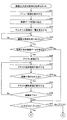
次に、図6および図7のフローチャートを参照して、画像出力受付端末1の処理について説明する。この処理は、画像出力受付端末1が起動中、常に実行されているものである。なお、画像出力受付端末1の起動中に表示される各画面を総称して、本発明では「画像出力サービス案内画面」と呼ぶ。 Next, processing of the image output reception terminal 1 will be described with reference to the flowcharts of FIGS. 6 and 7. This process is always executed while the image output receiving terminal 1 is activated. It should be noted that the screens displayed during startup of the image output receiving terminal 1 are collectively referred to as “image output service guide screen” in the present invention.
ステップS21において、画像出力受付端末1の表示制御部62は、タッチパネル付ディスプレイ11(モニタ44)にサービス内容、手順、案内等を示すメニュー画面を表示し、利用者に各種機能を選択させる。例えば、利用者は、タッチパネル付ディスプレイ11に表示されたメニュー画面から、入力メディアの種別や注文内容(プリントまたはフォトブック)等を選択し、案内に従って、所定のメディア投入口12に入力メディアを挿入する。
In step S21, the
ステップS22において、画像出力受付端末1の入力制御部61は、各種メディア読取部41によって読み取らせた入力メディアに記憶されている画像データを読み込む。
In step S <b> 22, the
ステップS23において、画像出力受付端末1の表示制御部62は、ステップS22の処理で読み込んだ画像データのサムネイル画像の一覧をタッチパネル付ディスプレイ11に表示する。
In step S23, the
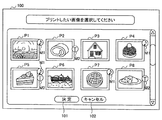
図8は、サムネイル画面100の表示例を示す図である。
FIG. 8 is a diagram illustrating a display example of the
図8に示すように、サムネイル画面100には、入力メディアから読み込んだ画像データのサムネイル画像P1〜P8が一覧表示されている。またマークM1は、対応する画像データに音声データが付加されていることを表し、マークM2は、対応する画像データにテキストデータが付加されていることを表している。図8の例の場合、サムネイル画像P1、P4、P7に対応する画像データにはそれぞれ音声データが付加されており、サムネイル画像P2、P8に対応する画像データにはそれぞれテキストデータが付加されており、サムネイル画像P5に対応する画像データには音声データとテキストデータが付加されている。
As shown in FIG. 8, the
また、サムネイル画面100には、画像の選択を決定するための「決定」ボタン101、印刷注文をキャンセルするための「キャンセル」ボタン102も表示されている。
The
利用者は、図8に示すサムネイル画面100において、印刷注文する画像を選択し、「決定ボタン」101を押下することで、次の画像出力サービス案内画面へと進むことができる。また利用者は、「キャンセル」ボタン102を押下することで、メニュー画面に戻ることができる。
The user can proceed to the next image output service guidance screen by selecting an image to be printed on the
図6の説明に戻る。ステップS24において、画像出力受付端末1の画像選択部63は、利用者による画像の選択を受け付けたか否かを判定し、画像の選択を受け付けるまで待機する。そして、ステップS24において、画像出力受付端末1の画像選択部63は、画像の選択を受け付けたと判定した場合、ステップS25に進む。
Returning to the description of FIG. In step S24, the
ステップS25において、画像出力受付端末1のテキスト変換部64は、画像選択部63で選択された画像データの中に、音声データ付き画像データがあるか否かを判定し、音声データ付き画像データがあると判定した場合、ステップS26に進む。
In step S <b> 25, the
ステップS26において、画像出力受付端末1のテキスト変換部64は、画像データに付加されている音声データをテキストデータに変換する。このとき、テキスト変換部64は、音声データの特徴量や画像データに付加されている利用者情報から、文字の種類、文字のサイズ、文字の色等を決定する。
In step S26, the
例えば、テキスト変換部64は、音声データの特徴量や利用者情報から、文字の種類(利用者Aや女性ならば明朝、利用者Bや男性ならばゴシック、利用者Cや子供ならばポップ体など)を決定したり、文字の色(利用者Aや女性ならば赤、利用者Bや男性ならば青、利用者Cや子供ならばピンクなど)を決定したりすることができる。また、声の大きさに応じて、文字のサイズを決定することができる。さらに、声が大きい場合には、感嘆符を付けたり、女性や子供の声(高い周波数)の場合には、柔らかいイメージのフォントを用いるようにすることができる。
For example, the
ステップS27において、画像出力受付端末1の表示制御部62は、テキスト変換部64によって変換されたテキストを確認する画面を、タッチパネル付ディスプレイ11に表示する。
In step S27, the
図9は、テキスト確認画面110の表示例を示す図である。図9に示すように、テキスト確認画面110には、音声データ付き画像データを表示するための表示エリア111、変換されたテキストを表示するための表示エリア112が表示されている。
FIG. 9 is a diagram illustrating a display example of the
表示エリア112に表示されているテキストにおいて、例えば、「わあ!かわいいケーキ!すっごいおいしそう!」は、音声データの特徴量や利用者情報から大きな声で利用者Aにより発話されているため、他のテキストよりも大きい文字サイズで、かつ、赤色で表示されている。「声大きいよ」は、音声データの特徴量や利用者情報から普通の声の大きさで利用者Bにより発話されているため、通常の文字サイズで、かつ、青色で表示されている。「あ。ごめんごめん。」と「これが、・・・想像以上においしいです。」は、音声データの特徴量や利用者情報から普通の声の大きさで利用者Aにより発話されているため、通常の文字サイズで、かつ、赤色で表示されている。
In the text displayed in the
また、テキスト確認画面110には、対象の画像を変更するためのスクロールボタン113R、113L、および、表示エリア112に表示されているテキストを編集するための「編集する」ボタン114も表示されている。利用者は、図9に示すテキスト確認画面110において、「編集する」ボタン114を選択することで、テキストを編集する画面に進むことができる。
The
図6の説明に戻る。ステップS28において、画像出力受付端末1の入力制御部61は、編集が指示されたか否か、すなわち、テキスト確認画面110の「編集する」ボタン114が押下されたか否かを判定し、編集が指示されたと判定した場合、ステップS29に進む。ステップS29において、画像出力受付端末1の表示制御部62は、テキストを編集する画面をタッチパネル付ディスプレイ11に表示する。
Returning to the description of FIG. In step S28, the
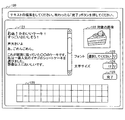
図10は、テキスト編集画面120の表示例を示す図である。図10に示すように、テキスト編集画面120には、編集するテキストを表示するための表示エリア121、対象の画像データを表示するための表示エリア122、フォントを編集するための編集領域123、文字サイズを編集するための編集領域124、編集を完了する場合に押下される「完了」ボタン125、および、テキストを変更する場合に文字入力するためのキーボード126が表示されている。
FIG. 10 is a diagram illustrating a display example of the
利用者は、図10に示すテキスト編集画面120において、表示エリア121に表示されているテキストのうち、編集したい所定のテキストを選択し、キーボード126を用いて新たなテキストを入力したり、削除したりすることができるとともに、編集領域123で所定のフォントを設定したり、編集領域124で所定の文字サイズを設定したりすることができる。そして「完了」ボタン125を押下することで、編集を完了して図9に示したテキスト確認画面110へと戻ることができる。
In the
図6の説明に戻る。ステップS30において、画像出力受付端末1の入力制御部61は、テキスト編集終了が指示されたか否か、すなわち、図示せぬ編集終了ボタンが押下されたか否かを判定し、テキスト編集終了が指示されていないと判定した場合、ステップS27に戻り、上述した処理を繰り返し実行する。
Returning to the description of FIG. In step S30, the
ステップS30において、画像出力受付端末1の入力制御部61が、テキスト編集終了が指示されたと判定した場合、または、ステップS25において、画像出力受付端末1のテキスト変換部64が、画像選択部63で選択された画像データの中に、音声データ付き画像データがないと判定した場合、または、ステップS28において、画像出力受付端末1の入力制御部61が、編集が指示されていないと判定した場合、ステップS31に進む。
When the
ステップS31において、画像出力受付端末1の表示制御部62は、ステップS21で表示させたメニュー画面において利用者により入力された注文内容がフォトブックであるか否かを判定し、注文内容がフォトブックであると判定した場合、図7のステップS32に進む。
In step S31, the
ステップS32において、画像出力受付端末1の表示制御部62は、テキストデータを対応する画像データの所定位置に配置し、印刷プレビュー画面(図示せず)をタッチパネル付ディスプレイ11に表示する。テキストデータは、デフォルトの位置(画像出力受付端末1の管理者により予め設定されている位置)に配置されるが、利用者が自由に変更することもできる。
In step S32, the
ステップS32の処理の後、利用者によって印刷プレビュー画面の確認が行われると、ステップS33において、画像出力受付端末1の課金部66は、利用者に対して、印刷注文するフォトブックのページ数や冊数の指定等を促す。例えば、利用者は、タッチパネル付ディスプレイ11に表示された注文画面から、作成するフォトブックのページ数や冊数を入力する。また画像出力受付端末1の課金部66は、利用者からの印刷注文に対する代金の合計金額を算出し、タッチパネル付ディスプレイ11に算出結果(印刷代金)を表示する。
When the print preview screen is confirmed by the user after the process of step S32, the charging
ステップS34において、画像出力受付端末1の印刷実行部67は、印刷対象の画像データ(およびテキストデータも含む場合はテキストデータも)を印刷データに変換し、印刷データをプリンタ48で印刷させる。印刷されたプリント物は、製本機50に搬送され、所定の製本方法で製本され、図示せぬフォトブック取出口から排出され、フォトブックとして利用者に提供される。
更に、前述したように、本発明は、その場でプリント物を受け取る場合に限られず、「オンライン製本」にも適用可能である。「オンライン製本」の場合、利用者が、自宅などに設置されているコンピュータから同様の手順によってプリント物の発注を行い、業者がプリント物を製本し、郵送によってプリント物が提供される。
In step S <b> 34, the
Furthermore, as described above, the present invention is not limited to receiving printed matter on the spot, but can also be applied to “online binding”. In the case of “online bookbinding”, a user places an order for a printed material from a computer installed at home or the like by a similar procedure, a vendor binds the printed material, and the printed material is provided by mail.
そして、フォトブック作成終了後、画像出力受付端末1の制御部31は、図6のステップS21に戻り、メニュー画面を再び表示し、待機状態となる。
After the creation of the photo book, the
一方、ステップS31において、画像出力受付端末1の表示制御部62は、注文内容がフォトブックではない、つまり通常のプリントであると判定した場合、図7のステップS35に進む。ステップS35において、画像出力受付端末1の表示制御部62は、テキストデータの挿入位置を指定する画面(図示せず)をタッチパネル付ディスプレイ11に表示する。利用者は、テキストデータの挿入位置を、画像内、画像外の余白、あるいは、裏面などに設定することができる。
On the other hand, if the
ステップS35において、画像出力受付端末1の入力制御部61は、テキスト位置が指定されたか否かを判定し、テキスト位置が指定されるまで待機する。そして、ステップS35において、画像出力受付端末1の入力制御部61は、テキスト位置が指定されたと判定した場合、ステップS33に進む。
In step S35, the
ステップS33において、画像出力受付端末1の課金部66は、利用者に対して、印刷注文する画像の印刷枚数の指定等を促す。例えば、利用者は、タッチパネル付ディスプレイ11に表示された注文画面から、印刷する画像の印刷枚数を入力する。また画像出力受付端末1の課金部66は、利用者からの印刷注文に対する代金の合計金額を算出し、タッチパネル付ディスプレイ11に算出結果(印刷代金)を表示する。
In step S33, the charging
ステップS34において、画像出力受付端末1の印刷実行部67は、印刷対象の画像データ(およびテキストデータも含む場合はテキストデータも)を印刷データに変換し、印刷データをプリンタ48で印刷させる。印刷されたプリント物は、プリント物取出口19から排出され、利用者に提供される。
In step S <b> 34, the
そして、印刷終了後、画像出力受付端末1の制御部31は、図6のステップS21に戻り、メニュー画面を再び表示し、待機状態となる。
Then, after the printing is completed, the
[発明の実施の形態における効果]
1.以上のように、印刷注文された画像データに音声データが付加されている場合には、音声データをテキストデータに変換し、画像とともに印刷することができる。
[Effects of the embodiment of the invention]
1. As described above, when audio data is added to image data ordered for printing, the audio data can be converted into text data and printed together with the image.
2.また、音声データの特徴量や利用者情報に基づいて設定された、文字の種類、文字のサイズ、文字の色などを利用者が自由に編集することができるため、娯楽性のあるプリントサービスを提供することができる。 2. In addition, since the user can freely edit the character type, character size, character color, etc., set based on the feature amount of the audio data and the user information, an entertaining print service can be provided. Can be provided.
3.また、撮影時に録音された音声データをテキストデータに変換して印刷することで、利用者は、撮影時のシチュエーションをいつでも思い出すことができる。例えば、メモ代わりに会議風景の撮影と録音を行うようにしたり、結婚式の場面でメッセージとともに撮影したり、料理の手順や分量を話しながら撮影したりすることにより、利用者は、撮影から長時間経過した場合にも、音声データ付き画像データを印刷することで、どのような目的で撮影されたものかを容易に知ることができる。 3. Also, by converting the voice data recorded at the time of shooting into text data and printing it, the user can always remember the situation at the time of shooting. For example, instead of taking notes, you can shoot and record a meeting scene, take a picture with a message at a wedding scene, or take a picture while talking about cooking procedures and quantity, so users can take a long time from shooting. Even when time elapses, it is possible to easily know what purpose the image was taken by printing the image data with audio data.
[変形例]
1.以上においては、図8に示したようなサムネイル画面100を表示させ、利用者に、印刷注文する画像を選択させるようにしたが、本実施の形態はこれに限らず、音声データ付き画像データを予め絞り込み、その中から印刷注文する画像を選択させるようにすることもできる。
[Modification]
1. In the above, the
図11は、音声付き画像選択画面130の表示例を示す図である。
FIG. 11 is a diagram illustrating a display example of the image selection screen with
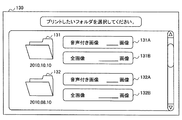
図11に示すように、音声付き画像選択画面130には、入力メディアから読み込んだ画像データが日付毎に分類(区別)され、画像フォルダ131、132として表示されている。また音声付き画像選択画面130には、画像フォルダ131内に格納されている音声付き画像データを選択するための選択ボタン131A、画像フォルダ131内に格納されている全画像データを選択するための選択ボタン131B、画像フォルダ132に格納されている音声付き画像データを選択するための選択ボタン132A、画像フォルダ132内に格納されている全画像データを選択するための選択ボタン132Bが表示されている。
As shown in FIG. 11, the image data read from the input medium is classified (differentiated) by date and displayed as
つまり、図11に示す音声付き画像選択画面130を表示する前に、制御部31により日付毎および音声データの有無で画像データが絞り込み検索され、日付および音声データの有無で分類された画像フォルダが選択可能になされている。
That is, before displaying the image selection screen with
例えば、利用者は、図11に示す画像選択画面130において、選択ボタン131Aを選択することで、図12に示すプリント方法選択画面140へと進むことができる。
For example, the user can proceed to the print
図12に示すように、プリント方法選択画面140には、「2010年10月10日」の日付情報を有する画像データのうち、音声データ付き画像データのみが絞り込み検索され、検索された音声データ付き画像データが格納された画像フォルダが表示されている。またプリント方法選択画面140には、絞り込み検索された音声データ付き画像データを全て印刷注文するための選択ボタン141、絞り込み検索された音声データ付き画像データのサムネイル画像の一覧を表示するための選択ボタン142も表示されている。
As shown in FIG. 12, in the print
利用者は、図12に示すプリント方法選択画面140において、絞り込み検索された音声データ付き画像データを全て印刷注文する場合には、選択ボタン141を押下することで、次の処理へと進むことができる。つまり、選択ボタン141が押下されると、図6のステップS25の処理に進み、上述したようにして、音声データがテキストデータに変換され、必要に応じてテキストデータが編集されたれた後、印刷が実行され、フォトブックまたはプリント物が提供される。
In the print
また利用者は、図12に示すプリント方法選択画面140において、絞り込み検索された音声データ付き画像データのサムネイル画像の一覧を表示する場合には、選択ボタン142を押下することで、次の処理へと進むことができる。つまり、選択ボタン142が押下されると、図6のステップS23の処理に進み、図8に示したようなサムネイル画面100が表示される。それ以降の処理は、上述した通りである。
In addition, when displaying a list of thumbnail images of the image data with audio data subjected to the narrowing search on the print
以上のように、利用者が印刷注文すると推測される音声データ付き画像データを予め絞り込み検索することにより、利用者は、容易に音声データ付き画像データのみの印刷注文を行うことができる。 As described above, the user can easily place a print order of only the image data with audio data by previously narrowing down and searching for the image data with audio data that is predicted to be printed by the user.
2.また以上においては、音声データやテキストデータが付加された画像データを印刷する場合を例に挙げ説明したが、本実施の形態はこれに限らず、GPS(Global Positioning System)情報が付加された画像データを用いて、旅の足取りを示す地図を印刷することも可能である。この場合、利用者が所有するデジタルスチルカメラや携帯端末に搭載されているデジタルカメラに、位置情報を検出するためのGPS受信機などが実装され、撮影された画像データに、撮影ポイントとして検出されたGPS情報が付加される。また画像出力受付端末1の記憶部32には、地図配信サーバ(図示せぬ)から受信した地図データが記憶される。
2. In the above description, the case of printing image data to which audio data or text data is added has been described as an example. However, the present embodiment is not limited to this, and an image to which GPS (Global Positioning System) information is added. It is also possible to print a map showing the gait of the trip using the data. In this case, a digital still camera owned by the user or a digital camera mounted on a mobile terminal is equipped with a GPS receiver or the like for detecting position information, and is detected as a shooting point in the captured image data. GPS information is added. The
画像出力受付端末1の表示制御部62は、入力制御部61が読み込んだ、音声データ、テキストデータ、またはGPS情報が付加された画像データのサムネイル画像の一覧をタッチパネル付ディスプレイ11に表示する。
The
図13は、サムネイル画面150の表示例を示す図である。
FIG. 13 is a diagram illustrating a display example of the
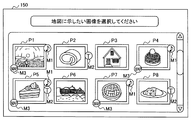
図13に示すように、サムネイル画面150には、入力メディアから読み込んだ画像データのサムネイル画像P1〜P8が一覧表示されている。マークM1、M2は、対応する画像データに、音声データまたはテキストデータが付加されていることを表している。マークM3は、対応する画像データにGPS情報が付加されていることを表している。図13の例の場合、サムネイル画像P1、P4、P7に対応する画像データにはそれぞれ音声データとGPS情報が付加されており、サムネイル画像P2、P8に対応する画像データにはそれぞれテキストデータが付加されており、サムネイル画像P5に対応する画像データには音声データ、テキストデータ、およびGPS情報が付加されている。
As shown in FIG. 13, the
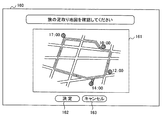
利用者は、図13に示すサムネイル画面150において、旅の足取りを示す地図に印刷する画像(撮影ポイント)を選択すると、画像出力受付端末1の表示制御部62は、選択された画像データに付加されているGPS情報に基づいて、記憶部32から地図データを読み出し、図14に示す旅の足取りを示す地図画面をタッチパネル付ディスプレイ11に表示する。
When the user selects an image (photographing point) to be printed on a map showing a trip in the
図14は、地図画面160の表示例を示す図である。図14に示すように、地図画面160には、旅の足取り地図を表示するための表示エリア161、地図を印刷注文する場合に押下される「OK」ボタン162、地図の印刷注文をキャンセルする場合に押下される「キャンセル」163が表示されている。
FIG. 14 is a diagram illustrating a display example of the
図14に示す表示エリア161には、「10:00」に撮影された画像データ、「12:00」に撮影された画像データ、「14:00」に撮影された画像データ、「17:00」に撮影された画像データにそれぞれ付加されているGPS情報に基づいて、地図上の所定位置に撮影ポイントおよび撮影時刻が示されている。
In the
以上のように、利用者は、撮影時に検出されたGPS情報に基づいて、旅の足取りを示す地図も印刷注文することができる。 As described above, based on the GPS information detected at the time of shooting, the user can also place an order for printing a map showing the gait of the trip.
また、旅の足取りを示す地図の印刷において、選択された画像データに付加されているGPS情報が広範囲に亘っている場合には、地図を適切なサイズに縮小したり、あるいは、複数枚に分割したりして印刷することができる。 In addition, when printing a map showing the gait of a trip, if the GPS information added to the selected image data covers a wide range, the map can be reduced to an appropriate size or divided into multiple sheets. Can be printed.
以上、添付図面を参照しながら、本発明に係る画像出力受付端末等の好適な実施形態について説明したが、本発明はかかる例に限定されない。当業者であれば、本願で開示した技術的思想の範疇内において、各種の変更例又は修正例に想到し得ることは明らかであり、それらについても当然に本発明の技術的範囲に属するものと了解される。 The preferred embodiments of the image output receiving terminal and the like according to the present invention have been described above with reference to the accompanying drawings, but the present invention is not limited to such examples. It will be apparent to those skilled in the art that various changes or modifications can be conceived within the scope of the technical idea disclosed in the present application, and these naturally belong to the technical scope of the present invention. Understood.
1………画像出力受付端末
11………タッチパネル付ディスプレイ
31………制御部
61………入力制御部
62………表示制御部
64………テキスト変換部
67………印刷実行部
DESCRIPTION OF SYMBOLS 1 ......... Image output reception terminal 11 ......... Display with
Claims (9)
前記画像データに音声データが付加されている場合、前記音声データをテキストデータに変換するテキスト変換手段と、
前記変換手段により変換された前記テキストデータの表示を制御する表示制御手段と、
前記画像データおよび前記テキストデータが配置された印刷データを生成し、印刷の実行を指示する印刷実行手段と
を備えることを特徴とする画像出力受付端末。 Input control means for controlling input of image data stored in a storage medium or a portable terminal;
When audio data is added to the image data, text conversion means for converting the audio data into text data;
Display control means for controlling the display of the text data converted by the conversion means;
An image output receiving terminal comprising: print execution means for generating print data in which the image data and the text data are arranged and instructing execution of printing.
前記テキスト変換手段は、前記選択手段により選択された前記所定の画像データに音声データが付加されていた場合に、前記音声データをテキストデータに変換する
ことを特徴とする請求項1に記載の画像出力受付端末。 A selecting means for selecting predetermined image data to be printed from the image data;
2. The image according to claim 1, wherein the text conversion unit converts the audio data into text data when audio data is added to the predetermined image data selected by the selection unit. 3. Output reception terminal.
ことを特徴とする請求項1または請求項2に記載の画像出力受付端末。 The said text conversion means determines at least 1 among the character size of the said text data, a font, and a character color based on the feature-value of the said audio | voice data. The Claim 1 or Claim 2 characterized by the above-mentioned. Image output acceptance terminal.
ことを特徴とする請求項1乃至請求項3のいずれかに記載の画像出力受付端末。 The image output receiving terminal according to any one of claims 1 to 3, further comprising editing means for editing the text data.
ことを特徴とする請求項1乃至請求項4のいずれかに記載の画像出力受付端末。 The display control means further controls display of a list of thumbnail images of the image data, and also controls display of a mark indicating that the audio data is added on the thumbnail image of the image data. The image output reception terminal according to any one of claims 1 to 4, wherein the image output reception terminal is characterized in that:
ことを特徴とする請求項1乃至請求項5のいずれかに記載の画像出力受付端末。 The image processing apparatus further comprises search means for distinguishing and searching image data to which the sound data is added and image data to which the sound data is not added from the image data whose input is controlled by the input control means. The image output reception terminal according to claim 1, wherein:
ことを特徴とする請求項1乃至請求項6のいずれかに記載の画像出力受付端末。 When the shooting position information is added to the image data, the print execution unit generates print data in which a map indicating a shooting point is arranged based on the shooting position information, and instructs execution of printing. The image output reception terminal according to claim 1, wherein:
前記画像データに音声データが付加されている場合、前記音声データをテキストデータに変換するテキスト変換ステップと、
前記変換ステップにより変換された前記テキストデータの表示を制御する表示制御ステップと、
前記画像データおよび前記テキストデータが配置された印刷データを生成し、印刷の実行を指示する印刷実行ステップと
を含むことを特徴とする画像出力受付方法。 An input control step for controlling input of image data stored in a storage medium or a portable terminal;
When audio data is added to the image data, a text conversion step for converting the audio data into text data;
A display control step for controlling the display of the text data converted by the conversion step;
A print execution step of generating print data in which the image data and the text data are arranged and instructing execution of printing.
前記画像データに音声データが付加されている場合、前記音声データをテキストデータに変換するテキスト変換ステップと、
前記変換ステップにより変換された前記テキストデータの表示を制御する表示制御ステップと、
前記画像データおよび前記テキストデータが配置された印刷データを生成し、印刷の実行を指示する印刷実行ステップと
を含む処理をコンピュータに実行させるためのプログラム。 An input control step for controlling input of image data stored in a storage medium or a portable terminal;
When audio data is added to the image data, a text conversion step for converting the audio data into text data;
A display control step for controlling the display of the text data converted by the conversion step;
A program for generating a print data in which the image data and the text data are arranged and causing a computer to execute a process including a print execution step for instructing the execution of the print.
Priority Applications (1)
| Application Number | Priority Date | Filing Date | Title |
|---|---|---|---|
| JP2011004437A JP2012146151A (en) | 2011-01-13 | 2011-01-13 | Terminal and method for image output receiving, and program |
Applications Claiming Priority (1)
| Application Number | Priority Date | Filing Date | Title |
|---|---|---|---|
| JP2011004437A JP2012146151A (en) | 2011-01-13 | 2011-01-13 | Terminal and method for image output receiving, and program |
Publications (1)
| Publication Number | Publication Date |
|---|---|
| JP2012146151A true JP2012146151A (en) | 2012-08-02 |
Family
ID=46789651
Family Applications (1)
| Application Number | Title | Priority Date | Filing Date |
|---|---|---|---|
| JP2011004437A Pending JP2012146151A (en) | 2011-01-13 | 2011-01-13 | Terminal and method for image output receiving, and program |
Country Status (1)
| Country | Link |
|---|---|
| JP (1) | JP2012146151A (en) |
Citations (8)
| Publication number | Priority date | Publication date | Assignee | Title |
|---|---|---|---|---|
| JPH11109988A (en) * | 1997-10-03 | 1999-04-23 | Nippon Telegr & Teleph Corp <Ntt> | Sound information visualization method and apparatus, and storage medium storing sound information visualization program |
| JP2000108445A (en) * | 1998-10-07 | 2000-04-18 | Canon Inc | Print processing device |
| JP2001318928A (en) * | 2000-05-10 | 2001-11-16 | Nec Saitama Ltd | Information retrieving service method, information retrieving system, its method, and recording medium recording information retrieving program |
| WO2004079709A1 (en) * | 2003-03-07 | 2004-09-16 | Nec Corporation | Scroll display control |
| JP2006185242A (en) * | 2004-12-28 | 2006-07-13 | Fuji Photo Film Co Ltd | Image synthesizer, image synthesizing program, image synthesizing program storage medium and image synthesizing method |
| JP2007233075A (en) * | 2006-03-01 | 2007-09-13 | Murata Mach Ltd | Minutes preparation device |
| JP2008146461A (en) * | 2006-12-12 | 2008-06-26 | Yahoo Japan Corp | Conversation recording blogging device |
| JP2008172582A (en) * | 2007-01-12 | 2008-07-24 | Ricoh Co Ltd | Minutes creation and playback device |
-
2011
- 2011-01-13 JP JP2011004437A patent/JP2012146151A/en active Pending
Patent Citations (8)
| Publication number | Priority date | Publication date | Assignee | Title |
|---|---|---|---|---|
| JPH11109988A (en) * | 1997-10-03 | 1999-04-23 | Nippon Telegr & Teleph Corp <Ntt> | Sound information visualization method and apparatus, and storage medium storing sound information visualization program |
| JP2000108445A (en) * | 1998-10-07 | 2000-04-18 | Canon Inc | Print processing device |
| JP2001318928A (en) * | 2000-05-10 | 2001-11-16 | Nec Saitama Ltd | Information retrieving service method, information retrieving system, its method, and recording medium recording information retrieving program |
| WO2004079709A1 (en) * | 2003-03-07 | 2004-09-16 | Nec Corporation | Scroll display control |
| JP2006185242A (en) * | 2004-12-28 | 2006-07-13 | Fuji Photo Film Co Ltd | Image synthesizer, image synthesizing program, image synthesizing program storage medium and image synthesizing method |
| JP2007233075A (en) * | 2006-03-01 | 2007-09-13 | Murata Mach Ltd | Minutes preparation device |
| JP2008146461A (en) * | 2006-12-12 | 2008-06-26 | Yahoo Japan Corp | Conversation recording blogging device |
| JP2008172582A (en) * | 2007-01-12 | 2008-07-24 | Ricoh Co Ltd | Minutes creation and playback device |
Similar Documents
| Publication | Publication Date | Title |
|---|---|---|
| JP5953821B2 (en) | Image output system, image output method, image output reception terminal, and program | |
| JP2004255740A (en) | Image output device, program, recording medium | |
| JP2013106257A (en) | Photograph automatic selling apparatus, photograph automatic selling method, and computer program | |
| JP2009083236A (en) | Image forming apparatus | |
| JP6402515B2 (en) | Photobook creation program, terminal, editing method, photobook manufacturing method, and photobook creation system | |
| JP2002057820A (en) | Image printer | |
| JP4220212B2 (en) | Photo print providing apparatus and method | |
| JP2005119083A (en) | Image output apparatus, image display method, program, and recording medium | |
| JP2014146939A (en) | Photo book creation terminal, photo book creation method and program | |
| JP5585165B2 (en) | Image printing system | |
| JP6011024B2 (en) | Image output reception terminal, image output reception method, and program | |
| JP2012150626A (en) | Image output reception terminal, method, and program | |
| JP2005303800A (en) | Photographing apparatus | |
| JP2012146151A (en) | Terminal and method for image output receiving, and program | |
| JP2006078781A (en) | Photo order receiving apparatus and photo processing apparatus | |
| JP5838752B2 (en) | Image output reception terminal, image output reception method, and program | |
| JP2006060662A (en) | Image output apparatus, program, and recording medium | |
| JP6029381B2 (en) | Photo sticker creation system and photo sticker creation method | |
| JP2002059591A (en) | Image printing system with current affairs information, current affairs information distribution server and current affairs information synthesizing server | |
| JP4484609B2 (en) | Automatic photo creation device and automatic photo creation method | |
| JP5887769B2 (en) | Image output system, image output method, image output reception terminal, and program | |
| JP2003094733A (en) | Printing terminal, printing order system having the same, method of ordering printing, and method for printing order service | |
| JP2008243131A (en) | Image transfer service system, program, and recording medium | |
| JP2008040748A (en) | Photo print acceptance device | |
| JP2005322066A (en) | Charging function combined print order system |
Legal Events
| Date | Code | Title | Description |
|---|---|---|---|
| A621 | Written request for application examination |
Free format text: JAPANESE INTERMEDIATE CODE: A621 Effective date: 20131118 |
|
| A977 | Report on retrieval |
Free format text: JAPANESE INTERMEDIATE CODE: A971007 Effective date: 20140611 |
|
| A131 | Notification of reasons for refusal |
Free format text: JAPANESE INTERMEDIATE CODE: A131 Effective date: 20140617 |
|
| A521 | Written amendment |
Free format text: JAPANESE INTERMEDIATE CODE: A523 Effective date: 20140808 |
|
| A02 | Decision of refusal |
Free format text: JAPANESE INTERMEDIATE CODE: A02 Effective date: 20141007 |