JP2012507764A - Communication device including multi-level virtual keyboard - Google Patents
Communication device including multi-level virtual keyboard Download PDFInfo
- Publication number
- JP2012507764A JP2012507764A JP2011533637A JP2011533637A JP2012507764A JP 2012507764 A JP2012507764 A JP 2012507764A JP 2011533637 A JP2011533637 A JP 2011533637A JP 2011533637 A JP2011533637 A JP 2011533637A JP 2012507764 A JP2012507764 A JP 2012507764A
- Authority
- JP
- Japan
- Prior art keywords
- display
- pointer
- predetermined distance
- display mode
- control signal
- Prior art date
- Legal status (The legal status is an assumption and is not a legal conclusion. Google has not performed a legal analysis and makes no representation as to the accuracy of the status listed.)
- Pending
Links
Images


Classifications
-
- G—PHYSICS
- G06—COMPUTING OR CALCULATING; COUNTING
- G06F—ELECTRIC DIGITAL DATA PROCESSING
- G06F3/00—Input arrangements for transferring data to be processed into a form capable of being handled by the computer; Output arrangements for transferring data from processing unit to output unit, e.g. interface arrangements
- G06F3/01—Input arrangements or combined input and output arrangements for interaction between user and computer
- G06F3/02—Input arrangements using manually operated switches, e.g. using keyboards or dials
- G06F3/023—Arrangements for converting discrete items of information into a coded form, e.g. arrangements for interpreting keyboard generated codes as alphanumeric codes, operand codes or instruction codes
- G06F3/0233—Character input methods
- G06F3/0236—Character input methods using selection techniques to select from displayed items
-
- G—PHYSICS
- G06—COMPUTING OR CALCULATING; COUNTING
- G06F—ELECTRIC DIGITAL DATA PROCESSING
- G06F3/00—Input arrangements for transferring data to be processed into a form capable of being handled by the computer; Output arrangements for transferring data from processing unit to output unit, e.g. interface arrangements
- G06F3/01—Input arrangements or combined input and output arrangements for interaction between user and computer
- G06F3/02—Input arrangements using manually operated switches, e.g. using keyboards or dials
- G06F3/023—Arrangements for converting discrete items of information into a coded form, e.g. arrangements for interpreting keyboard generated codes as alphanumeric codes, operand codes or instruction codes
-
- G—PHYSICS
- G06—COMPUTING OR CALCULATING; COUNTING
- G06F—ELECTRIC DIGITAL DATA PROCESSING
- G06F3/00—Input arrangements for transferring data to be processed into a form capable of being handled by the computer; Output arrangements for transferring data from processing unit to output unit, e.g. interface arrangements
- G06F3/01—Input arrangements or combined input and output arrangements for interaction between user and computer
- G06F3/048—Interaction techniques based on graphical user interfaces [GUI]
- G06F3/0487—Interaction techniques based on graphical user interfaces [GUI] using specific features provided by the input device, e.g. functions controlled by the rotation of a mouse with dual sensing arrangements, or of the nature of the input device, e.g. tap gestures based on pressure sensed by a digitiser
- G06F3/0488—Interaction techniques based on graphical user interfaces [GUI] using specific features provided by the input device, e.g. functions controlled by the rotation of a mouse with dual sensing arrangements, or of the nature of the input device, e.g. tap gestures based on pressure sensed by a digitiser using a touch-screen or digitiser, e.g. input of commands through traced gestures
-
- G—PHYSICS
- G06—COMPUTING OR CALCULATING; COUNTING
- G06F—ELECTRIC DIGITAL DATA PROCESSING
- G06F3/00—Input arrangements for transferring data to be processed into a form capable of being handled by the computer; Output arrangements for transferring data from processing unit to output unit, e.g. interface arrangements
- G06F3/01—Input arrangements or combined input and output arrangements for interaction between user and computer
- G06F3/048—Interaction techniques based on graphical user interfaces [GUI]
- G06F3/0487—Interaction techniques based on graphical user interfaces [GUI] using specific features provided by the input device, e.g. functions controlled by the rotation of a mouse with dual sensing arrangements, or of the nature of the input device, e.g. tap gestures based on pressure sensed by a digitiser
- G06F3/0488—Interaction techniques based on graphical user interfaces [GUI] using specific features provided by the input device, e.g. functions controlled by the rotation of a mouse with dual sensing arrangements, or of the nature of the input device, e.g. tap gestures based on pressure sensed by a digitiser using a touch-screen or digitiser, e.g. input of commands through traced gestures
- G06F3/04886—Interaction techniques based on graphical user interfaces [GUI] using specific features provided by the input device, e.g. functions controlled by the rotation of a mouse with dual sensing arrangements, or of the nature of the input device, e.g. tap gestures based on pressure sensed by a digitiser using a touch-screen or digitiser, e.g. input of commands through traced gestures by partitioning the display area of the touch-screen or the surface of the digitising tablet into independently controllable areas, e.g. virtual keyboards or menus
-
- H—ELECTRICITY
- H04—ELECTRIC COMMUNICATION TECHNIQUE
- H04M—TELEPHONIC COMMUNICATION
- H04M2250/00—Details of telephonic subscriber devices
- H04M2250/12—Details of telephonic subscriber devices including a sensor for measuring a physical value, e.g. temperature or motion
-
- H—ELECTRICITY
- H04—ELECTRIC COMMUNICATION TECHNIQUE
- H04M—TELEPHONIC COMMUNICATION
- H04M2250/00—Details of telephonic subscriber devices
- H04M2250/22—Details of telephonic subscriber devices including a touch pad, a touch sensor or a touch detector
Landscapes
- Engineering & Computer Science (AREA)
- General Engineering & Computer Science (AREA)
- Theoretical Computer Science (AREA)
- Human Computer Interaction (AREA)
- Physics & Mathematics (AREA)
- General Physics & Mathematics (AREA)
- Input From Keyboards Or The Like (AREA)
- User Interface Of Digital Computer (AREA)
- Position Input By Displaying (AREA)
Abstract
本発明は、文字入力及び画像表示のための共用とされた入力および表示装置を備える通信装置及び前記文字入力及び画像表示を制御する方法に関する。装置は、ポインタが入力および表示装置から第1の所定の距離内にある状態をセンサにより検出可能であり、且つポインタが検出されると制御ユニットが第1の表示モードから第2の表示モードに表示モードを変更する第1の制御信号を生成するように構成される制御ユニットと、近接センサとを備える。第2の表示モードは、ポインタが表示装置から第1の所定の距離より大きく後退するまで維持される。この場合、制御ユニットは、第2の表示モードから第1の表示モードに表示モードを変更する第2の制御信号を生成するように構成される。 The present invention relates to a communication device including a shared input and display device for character input and image display, and a method for controlling the character input and image display. The apparatus is capable of detecting by the sensor that the pointer is within the first predetermined distance from the input and display device, and when the pointer is detected, the control unit changes from the first display mode to the second display mode. A control unit configured to generate a first control signal for changing a display mode, and a proximity sensor. The second display mode is maintained until the pointer retracts more than the first predetermined distance from the display device. In this case, the control unit is configured to generate a second control signal that changes the display mode from the second display mode to the first display mode.
Description
本発明は、通信装置の分野に関し、特に文字入力と画像表示のための共用とされた入力および表示ユニットを備える通信装置に関する。また、本発明は、通信装置において文字の入力及び表示を制御する方法に更に関する。本発明は、表示を目的とした限られた領域を有する通信装置に関連して使用されるのが好ましい。 The present invention relates to the field of communication devices, and more particularly to a communication device including a shared input and display unit for character input and image display. The present invention further relates to a method for controlling character input and display in a communication device. The present invention is preferably used in connection with a communication device having a limited area for display purposes.
例えば携帯電話等の通信装置は、物理的なキーボード又はキーパッド及びある種の表示装置等のMMI(マンマシンインタフェース)、例えば従来のTFT表示装置、共用とされたTFT仮想キーボード/表示装置、あるいは他のあらゆる種類の入力および表示装置の組合せを提供してもよい。 For example, a communication device such as a mobile phone may be a physical keyboard or keypad and an MMI (man-machine interface) such as a display device, such as a conventional TFT display device, a shared TFT virtual keyboard / display device, or Any other type of input and display combination may be provided.
最も広範に使用されている英字キーボードの配列はQWERTY配列であるが、AZERTY配列又はDVORAC配列等他にも多くの配列がある。上述したように、英字キーボードの配列は、数値キーパッドの配列と組み合わせて示されることが多い。 The most widely used alphabetic keyboard layout is the QWERTY layout, but there are many other layouts such as the AZERTY layout or the DVORAC layout. As described above, the alphabet keyboard arrangement is often shown in combination with the numeric keypad arrangement.
一般的な配列において、数字1〜9及び0は英字キーの上に位置付けられる。共用とされた英字キーボードと数値キーパッドを含む携帯通信装置も知られている。 In a typical arrangement, the numbers 1-9 and 0 are positioned on the alphabetic keys. Mobile communication devices including a shared English keyboard and numeric keypad are also known.
通信装置の中には、複数の英字をある特定のキーに割り当てることにより数値キーの数を減少するより少ない数の英字キーボードを内蔵するものもある。そのような装置において、最初のキー打ちでは対象となる文字のリストを表示し、後続のキー打ちではリストをスクロールして選択する。ここで、各キーはより大きくてもよいが、一般に文字等を入力するのに必要なキー打ち回数は、従来の配列を有する装置を操作するのに必要なものと比較して増加する。 Some communication devices incorporate a smaller number of alphabetic keyboards that reduce the number of numeric keys by assigning a plurality of alphabetic characters to a particular key. In such a device, a list of target characters is displayed at the first keystroke, and the list is scrolled and selected at subsequent keystrokes. Here, each key may be larger, but in general, the number of keystrokes required to input characters and the like is increased compared to that required to operate a device having a conventional arrangement.
他の通信装置は、キー打ちの順序を解析し且つ文字列又は単語を提案する曖昧さ回避エンジンを含んでもよい。曖昧さ回避エンジンはある割り当てられた用語集に基づいて確率を計算する。意図した単語が割り当てられた用語集に列挙される限り、操作は効率的である。しかし、外来語、取引条件、適切な名詞、名称又は俗語の入力は、対象となる提案された文字の組合せを検索するために複数のキー打ちが必要となる可能性が高いか、あるいは曖昧さ回避エンジンの無効化が必要となる可能性が高い。 Other communication devices may include an ambiguity engine that analyzes the order of keystrokes and suggests strings or words. The disambiguation engine calculates probabilities based on some assigned glossary. As long as the intended word is listed in the assigned glossary, the operation is efficient. However, the entry of foreign words, trade terms, appropriate nouns, names or slang is likely to require multiple keystrokes or ambiguity to search for the proposed proposed character combination It is likely that the avoidance engine will need to be disabled.
QWERTYキーボード等の従来の英字キーボードを同一の通信装置上の従来の数値キーパッドと組み合わせることは、一般に望ましくなく人間工学的にかつ直感的に使いにくい妥協したMMIを含む。殆どの人はQWERTY配列に慣れており且つQWERTY配列を好む。しかし、そのような配列が携帯電話等の小型の装置に適応させるために、個々のキーは、指で操作するのが不可能であるか又は眼で識別するのが困難な程度にまで小型化されなければならない。スタイラスは入力ユニットの一部として含まれることもある。スタイラスは操作を容易にできるが、識別性を改善するわけではない。また、スタイラスは、必要な時に見当たらないという厄介な傾向がある。 Combining a traditional English keyboard, such as a QWERTY keyboard, with a conventional numeric keypad on the same communication device typically involves a compromised MMI that is undesirable and ergonomically and difficult to use intuitively. Most people are familiar with the QWERTY sequence and prefer the QWERTY sequence. However, in order for such an arrangement to adapt to small devices such as mobile phones, individual keys are miniaturized to the extent that they cannot be operated with fingers or difficult to identify with the eyes. It must be. A stylus may be included as part of the input unit. A stylus can be easily manipulated, but does not improve discrimination. Also, the stylus tends to be troublesome that it cannot be found when needed.
従って、入力された文字は識別するのが容易であり且つ同時に装置に情報を入力するのに必要なキー打ちを最小限にする通信装置や方法のニーズがある。 Accordingly, there is a need for a communication device and method that is easy to identify entered characters and at the same time minimizes the keystrokes required to enter information into the device.
本発明の1つの目的は、識別性を改善し、必要なキー打ちの量を低減し且つ文字の選択を高速化するために、情報の入力に関連して発生する低い精度、使い勝手及び人間工学の問題を解決することである。 One object of the present invention is to reduce the accuracy, usability and ergonomics associated with the input of information in order to improve discrimination, reduce the amount of keystrokes required and speed up the selection of characters. Is to solve the problem.
本発明の第1の態様によると、この目的は、文字入力及び画像表示のための共用とされた入力および表示装置と、制御ユニットと、近接センサとを備える通信装置により実現され、近接センサ及び制御ユニットは、ポインタが入力および表示装置から第1の所定の距離内にある状態をセンサにより検出可能であり、且つポインタが検出されると制御ユニットが第1の表示モードから第2の表示モードに表示モードを変更する第1の制御信号を生成するように構成される。 According to a first aspect of the present invention, this object is achieved by a communication device comprising a shared input and display device for character input and image display, a control unit, and a proximity sensor, The control unit can detect a state where the pointer is within the first predetermined distance from the input and the display device by the sensor, and when the pointer is detected, the control unit moves from the first display mode to the second display mode. The first control signal for changing the display mode is generated.
更なる態様によると、通信装置は、ポインタに最も近い表示の座標が検出されるとそれを記憶する記憶手段を更に含む。 According to a further aspect, the communication device further includes storage means for storing the coordinates of the display closest to the pointer when detected.
別の態様によると、制御ユニット及び近接センサは、ポインタが表示装置から第2の所定の距離より大きく後退する状態を検出可能であり、且つポインタの後退が検出されると制御ユニットが第2の表示モードから第1の表示モードに表示モードを変更する第2の制御信号を生成するように構成される。 According to another aspect, the control unit and the proximity sensor are capable of detecting a state in which the pointer is retracted more than the second predetermined distance from the display device, and the control unit detects that the pointer is retracted when the pointer is retracted. A second control signal for changing the display mode from the display mode to the first display mode is generated.
第2の所定の距離は第1の所定の距離より長いのが好ましい。 The second predetermined distance is preferably longer than the first predetermined distance.
本発明の更に別の態様によると、近接センサ及び制御ユニットは、ポインタが入力および表示装置から第3の所定の距離内にある状態を検出可能であり、且つポインタが検出されると制御ユニットが通信装置に値を入力する第3の制御信号を生成するように構成される。 According to yet another aspect of the present invention, the proximity sensor and the control unit can detect a state where the pointer is within a third predetermined distance from the input and display device, and when the pointer is detected, the control unit It is comprised so that the 3rd control signal which inputs a value into a communication apparatus may be generated.
第3の所定の距離は第1の所定の距離より短いのが好ましい。 The third predetermined distance is preferably shorter than the first predetermined distance.
本発明の更に別の実施形態によると、共用とされた入力および表示装置はタッチ感応性であり、第3の制御信号はポインタが表示に触れている場合に生成される。 According to yet another embodiment of the present invention, the shared input and display device is touch sensitive and the third control signal is generated when the pointer is touching the display.
第1の表示モードはマルチ選択キーを含む配列であり、第2の表示モードはシングル選択キーを含む配列であり且つシングル選択キーの各セットは1つの特定のマルチ選択キーと関連付けられるのが好ましい。更に、各モードにおける個々のシングルモードキー又はマルチモードキーは、表示の座標の個々のセットと関連付けられる。 Preferably, the first display mode is an array including multi-select keys, the second display mode is an array including single select keys, and each set of single select keys is associated with one particular multi-select key. . Furthermore, individual single mode keys or multimode keys in each mode are associated with an individual set of coordinates of the display.
本発明の第2の態様によると、共用とされた入力および表示装置と、制御ユニットと、近接センサとを備える通信装置において文字入力及び画像表示を制御する方法が提供される。前記方法は、
ポインタが表示装置から第1の所定の距離内にある状態を検出するステップと、
ポインタが第1の所定の距離内にあることが検出されると第1の制御信号を生成するステップと、
第1の制御信号への応答として第1の表示モードから第2の表示モードに表示モードを変更するステップとを備える。
According to a second aspect of the present invention, there is provided a method for controlling character input and image display in a communication device comprising a shared input and display device, a control unit, and a proximity sensor. The method
Detecting a state in which the pointer is within a first predetermined distance from the display device;
Generating a first control signal when it is detected that the pointer is within a first predetermined distance;
Changing the display mode from the first display mode to the second display mode as a response to the first control signal.
更に方法は、ポインタに最も近い表示の座標が検出されるとそれを記憶するステップを含む。 The method further includes storing the display coordinates closest to the pointer when they are detected.
別の実施形態において、方法は、
ポインタが表示装置から第2の所定の距離より大きく後退する状態を検出するステップと、
ポインタの後退が検出されると第2の制御信号を生成するステップと、
第2の制御信号への応答として第2の表示モードから第1の表示モードに表示モードを変更するステップとを更に含む。
In another embodiment, the method comprises:
Detecting a state in which the pointer is retracted more than a second predetermined distance from the display device;
Generating a second control signal when a pointer retraction is detected;
Changing the display mode from the second display mode to the first display mode in response to the second control signal.
第2の所定の距離は第1の所定の距離より長い。 The second predetermined distance is longer than the first predetermined distance.
更に別の実施形態において、方法は、
ポインタが表示装置から第3の所定の距離内にある状態を検出するステップと、
第3の所定の距離内にあるポインタが検出されると第3の制御信号を生成するステップと、
第3の制御信号に応答して通信装置に値を入力するステップと、を含む。
In yet another embodiment, the method comprises:
Detecting a state in which the pointer is within a third predetermined distance from the display device;
Generating a third control signal when a pointer within a third predetermined distance is detected;
Inputting a value to the communication device in response to the third control signal.
第3の所定の距離は第1の所定の距離より短い。 The third predetermined distance is shorter than the first predetermined distance.
共用とされた入力および表示装置はタッチ感応性であり、第3の制御信号はポインタが表示に触れている場合に生成される。 The shared input and display device is touch sensitive and the third control signal is generated when the pointer is touching the display.
本発明の好適な一実施形態において、第1の表示モードはマルチ選択キーを含む配列を示し、第2の表示モードはシングル選択キーを含む配列を示す。シングル選択キーの各セットは1つの特定のマルチ選択キーと関連付けられ、各モードにおける個々のシングルモードキー又はマルチモードキーは表示の座標の個々のセットと関連付けられる。 In a preferred embodiment of the present invention, the first display mode shows an arrangement including multi-select keys, and the second display mode shows an arrangement including single selection keys. Each set of single selection keys is associated with one specific multi-select key, and each single-mode key or multi-mode key in each mode is associated with an individual set of display coordinates.
第3の態様によると、本発明は、制御ユニット上で実行される場合に方法のいずれか1つのステップを実行するコード手段を含むコンピュータプログラムを更に提供する。 According to a third aspect, the invention further provides a computer program comprising code means for performing any one step of the method when executed on a control unit.
第4の態様によると、本発明は、制御ユニット上で実行される場合に方法を実行するコンピュータ可読媒体上に記憶されたプログラムコード手段を含むコンピュータプログラムを更に含む。 According to a fourth aspect, the present invention further comprises a computer program comprising program code means stored on a computer readable medium for performing the method when executed on the control unit.
従って、本発明により、入力キーの識別性を改善することにより入力の精度を向上できる。また、入力の効率及び人間工学は本発明により向上する。 Therefore, according to the present invention, the input accuracy can be improved by improving the identification of the input key. Input efficiency and ergonomics are also improved by the present invention.
次に、添付の図面に関連して本発明を更に詳細に説明する。
理解しやすいように、用語「ポインタ」は、以下においてスタイラス、指、キー又は他のあらゆる実現可能な物体を意味するものと解釈するべきである。 For ease of understanding, the term “pointer” should be taken in the following to mean a stylus, finger, key or any other possible object.
次に、本発明の好適な変形例である携帯電話に関連して本発明に係る通信装置を説明する。しかし、通信装置は、電話、通信モジュール、PDA又はラップトップコンピュータ、あるいは画面を備えた他のあらゆる装置であってもよい。しかし、本発明は、入力ユニット及び表示ユニットに対して使用可能な限られたスペースを有する装置と組み合わせて最適に使用される。 Next, a communication apparatus according to the present invention will be described in relation to a mobile phone which is a preferred modification of the present invention. However, the communication device may be a phone, a communication module, a PDA or laptop computer, or any other device with a screen. However, the present invention is optimally used in combination with a device having limited space available for the input unit and the display unit.
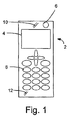
図1は、本発明の一実施形態に係る携帯電話2を概略的に示す正面図である。電話2は、共用とされた入力および表示装置4と、近接センサ6と、共用とされた入力および表示装置4の下部に設けられたキーパッド上の複数のキー8と、スピーカ10と、マイク12とを含む。これらは、全て携帯通信装置の一般的な特徴であり且つ当業者には既知であるため、詳細には説明しない。
FIG. 1 is a front view schematically showing a mobile phone 2 according to an embodiment of the present invention. The telephone 2 includes a shared input and
入力および表示装置4は、ユーザが表示装置を入力装置として使用できるようにするタッチスクリーンを備えるのが好ましい。しかし、使用される画面の種類は本発明にとって重要ではなく、画面は市販のあらゆる画面であってもよい。本発明の場合、キー又はキーパッド8を省略し、代わりに通信装置2の入力ユニットとして共用とされた入力および表示装置4のみを使用することも可能である。
The input and
図1に示された近接センサ6は3D近接感知機能を持つ。従って、近接センサ6は、周囲のデータを収集することにより表示装置4の前方に出現するポインタを追跡してもよい。本発明の好適な一実施形態において、近接センサは、0〜10cmの距離で表示装置4の上方で静止するあらゆる物体を追跡してもよい。
The proximity sensor 6 shown in FIG. 1 has a 3D proximity sensing function. Therefore, the proximity sensor 6 may track a pointer that appears in front of the
近接センサは、市販の入手可能なあらゆる適切なセンサであってもよい。重要なことは、近接センサが3D感知でき、それにより表示装置上のポインタからあらゆる所定の点までの距離を測定できることである。従って、近接センサは、オプトロニクセンサ、熱センサ等として実現されてもよい。また、本願においてセンサという用語を使用する場合、それは単一のセンサでなければならないことを意味しているのではなく、「センサ」は近接を感知するために複数のセンサを備えてもよいことが理解されるであろう。 The proximity sensor may be any suitable commercially available sensor. What is important is that the proximity sensor can sense 3D, thereby measuring the distance from the pointer on the display to any given point. Accordingly, the proximity sensor may be realized as an optronic sensor, a thermal sensor, or the like. Also, when the term sensor is used in this application, it does not mean that it must be a single sensor, but a “sensor” may comprise multiple sensors to sense proximity. Will be understood.
図1に示されない場合であっても、携帯電話2は、当業者に周知の制御ユニット及び記憶手段を更に含む。制御ユニットは、例えば近接センサ6を用いて収集されたデータを受信し且つそのデータに従って作動する近接センサ6に接続されてもよい。 Even if not shown in FIG. 1, the mobile phone 2 further includes a control unit and storage means well known to those skilled in the art. The control unit may be connected to a proximity sensor 6 that receives and collects data collected using, for example, the proximity sensor 6.
図2は第1の表示モードにおける共用とされた入力および表示装置2を示し、図3は第2の表示モードにおける共用とされた入力および表示装置2を示す。第1の表示モード及び第2の表示モードを以下に詳細に説明する。 FIG. 2 shows the input and display device 2 shared in the first display mode, and FIG. 3 shows the input and display device 2 shared in the second display mode. The first display mode and the second display mode will be described in detail below.
この第1の表示モードでは、その配列は2×3キーのキーパッドを含む。各キーは、複数の文字が1つのキーと関連付けられるマルチ選択キーを示す。例えば、文字1、2、3、4、Q、W、E及びRは左上のキーと関連付けられ、文字4、5、6、7、T、Y及びUは上中央のキーと関連付けられる等である。どの文字又は記号がどのキーにあるかは重要ではなく、第1の表示モードで表示されたキーはマルチ選択キーであることが理解されるであろう。
In this first display mode, the arrangement includes a 2 × 3 keypad. Each key represents a multi-select key in which multiple characters are associated with one key. For example, the
第2の表示モードにおいて、その配列は、第1の表示モードでマルチ選択キーに表示され且つマルチ選択キーと関連付けられた英数字の数に対応する複数のシングル選択キーを含む。図3は、第1の表示モードにおける左上のキーと関連付けられた7つのシングル選択キーを示す。 In the second display mode, the arrangement includes a plurality of single selection keys corresponding to the number of alphanumeric characters displayed on the multi-select key and associated with the multi-select key in the first display mode. FIG. 3 shows seven single selection keys associated with the upper left key in the first display mode.
ここで本発明の物理的な要素が説明されたので、次に通信装置で文字の入力及び表示を制御する方法を説明する。 Now that the physical elements of the present invention have been described, the method for controlling the input and display of characters in the communication device will now be described.
その方法は、通信が通常モードである場合、すなわち共用とされた入力および表示装置4がマルチ選択キーを示す第1の表示モードである場合に開始する。次に、ユーザが左上のキーから第1の所定の距離よりポインタを近づけた場合、近接センサ6はこれを検出し且つ制御ユニットは第1の制御信号を生成する。この第1の制御信号は、第1の表示モードから第2の表示モードに表示モードを変更する。上述したように、第2の表示モードは、マルチ選択キーではなくシングル選択キーを示す。これにより、ユーザが正しいボタンを「押下する」のが非常に簡単になり且つ文字を入力するのに必要なキー打ちの回数が従来技術と比較して大幅に減少する。第2の表示モードにおいて表示されたシングル選択キーは、第1の表示モードから第2の表示モードへの表示モードの変更をトリガとしたマルチ選択キーと関連付けられる。第1の表示モードの配列及び第2の表示モードの配列の双方は同等のサイズであるのが好ましく、それらのうちのいずれかが画面全体を埋める。
The method starts when the communication is in the normal mode, i.e. when the shared input and
第1の所定の距離は、2cmであるのが好ましいが、当然あらゆる適切な値に設定されてもよい。従って、上述したように、近接センサ6は、ポインタが入力および表示装置4から例えば2cm以内にあることを制御ユニットに認識させる。次に、制御ユニットは、ポインタに最も近い且つ表示モードの変更をトリガとした表示の座標が記憶手段に記憶される処理を開始する。その結果、制御ユニットは、ポインタに最も近いマルチ選択キーのうちのどれか1つを決定するためにこれらの座標を使用する。左上のマルチ選択キーが最も近いと判断される場合、それと関連付けられたシングル選択キーは第2の表示モードにおいて表示される。
The first predetermined distance is preferably 2 cm, but may of course be set to any suitable value. Therefore, as described above, the proximity sensor 6 makes the control unit recognize that the pointer is within 2 cm, for example, from the input and
本発明の好適な一実施形態において、第2の表示モードは、ポインタが表示装置から第2の所定の距離より大きく入力および表示装置4から後退しない限り維持される。第2の所定の距離は第1の所定の距離より長いのが好ましい。好適な一実施形態において、第2の所定の距離は例えば3cmである。ポインタがこの第2の所定の距離より大きく後退する場合、近接センサ6はこれを検出し且つ制御ユニットは第2の制御信号を生成する。この第2の制御信号は、第2の表示モードから第1の表示モードに表示モードを変更する。
In a preferred embodiment of the present invention, the second display mode is maintained as long as the pointer does not enter and retract from the
第1の所定の距離より長い第2の所定の距離を有する利点は、例えば第1の所定の距離及び第2の所定の距離の双方が同一であり且つポインタがその距離に常時維持される場合に発生する揺れが回避されることである。従って、本発明によると、ユーザが表示モードの変更をトリガとせずに、画面全体にわたって及びまた画面から種々の距離内でポインタを前後に移動可能となる。 The advantage of having a second predetermined distance longer than the first predetermined distance is, for example, when both the first predetermined distance and the second predetermined distance are the same and the pointer is always maintained at that distance This is to avoid the shaking that occurs in Therefore, according to the present invention, the user can move the pointer back and forth over the entire screen and within various distances from the screen without triggering the change of the display mode.
第2の所定の距離は、必ずしも3cmでなければならないということはなく、第1の所定の距離より長いあらゆる距離であってもよいことが理解されるであろう。 It will be appreciated that the second predetermined distance does not necessarily have to be 3 cm and may be any distance longer than the first predetermined distance.
本発明の好適な一実施形態において、タッチスクリーンではない一般的な表示画面が入力装置として使用されうる。この場合、近接センサ6は、ポインタが第2の表示モードでシングル選択キーから第3の所定の距離内にあるかを検出する。ポインタがこの近くに到達する場合、制御ユニットは、ポインタの検出をトリガとしたシングル選択キーに対応する値の入力を開始する第3の制御信号を生成する。 In a preferred embodiment of the present invention, a general display screen that is not a touch screen may be used as the input device. In this case, the proximity sensor 6 detects whether the pointer is within a third predetermined distance from the single selection key in the second display mode. When the pointer reaches this vicinity, the control unit generates a third control signal that starts to input a value corresponding to the single selection key triggered by detection of the pointer.
この第3の所定の距離は1mmであるのが好ましい。従って、本発明の場合、一般的な画面を使用しても依然としてそれがタッチスクリーンであるとユーザに知覚させることができる。 This third predetermined distance is preferably 1 mm. Therefore, in the case of the present invention, even if a general screen is used, the user can still perceive that it is a touch screen.
第3の所定は1mmである必要はなく、第1の所定の距離より短いあらゆる距離であってもよいことが理解されるであろう。 It will be appreciated that the third predetermined need not be 1 mm and may be any distance shorter than the first predetermined distance.
別の実施形態において、通信装置はタッチスクリーンを備える。この場合、第3の制御信号は、ユーザが第3の所定の距離である代わりに表示装置に触れる場合に生成される。 In another embodiment, the communication device comprises a touch screen. In this case, the third control signal is generated when the user touches the display device instead of the third predetermined distance.
本発明に係る携帯通信装置は、先に開示されたものとは別の多くの方法で変更されてもよい。例えば、シングル選択キーを有する第2の表示モードの代わりに、シングル選択キーを有する第3の表示モードと一緒にマルチ選択キーを含む第2の表示モードを有することが可能である。本発明がある特徴を有する好適な実施形態を用いて説明された場合であっても、一方の実施形態における個々の特徴が他方の実施形態又は他方の実施形態における他の個々の特徴と組み合わされてもよいことは当業者には明らかであることが更に理解されるであろう。 The mobile communication device according to the present invention may be modified in many ways different from those previously disclosed. For example, instead of the second display mode having a single selection key, it is possible to have a second display mode including a multi-select key together with a third display mode having a single selection key. Even when the invention is described using preferred embodiments having certain features, individual features in one embodiment are combined with other embodiments or other individual features in the other embodiment. It will be further understood that it may be obvious to those skilled in the art.
Claims (24)
ポインタが前記表示から第1の所定の距離内にある状態を検出するステップと、
前記ポインタが前記第1の所定の距離内にあることが検出されると第1の制御信号を生成するステップと、
前記第1の制御信号への応答として第1の表示モードから第2の表示モードに表示モードを変更するステップと、を備える方法。 A method for controlling character input and image display in a communication device including a shared input and display device, a control unit, and a proximity sensor,
Detecting a state in which the pointer is within a first predetermined distance from the display;
Generating a first control signal when it is detected that the pointer is within the first predetermined distance;
Changing the display mode from the first display mode to the second display mode as a response to the first control signal.
前記ポインタの後退が検出されると第2の制御信号を生成するステップと、
前記第2の制御信号への応答として前記第2の表示モードから前記第1の表示モードに表示モードを変更するステップと、を更に含む請求項12又は13記載の方法。 Detecting a state in which the pointer is retracted more than a second predetermined distance from the display device;
Generating a second control signal when the backward movement of the pointer is detected;
The method according to claim 12 or 13, further comprising: changing a display mode from the second display mode to the first display mode in response to the second control signal.
前記第3の所定の距離内にあるポインタが前記検出されると第3の制御信号を生成するステップと、
前記第3の制御信号に応答して前記通信装置に値を入力するステップと、を更に含む請求項12から15に記載の方法。 Detecting a state in which the pointer is within a third predetermined distance from the display device;
Generating a third control signal when the pointer within the third predetermined distance is detected;
16. The method of claims 12-15, further comprising inputting a value to the communication device in response to the third control signal.
Applications Claiming Priority (3)
| Application Number | Priority Date | Filing Date | Title |
|---|---|---|---|
| US12/265,994 | 2008-11-06 | ||
| US12/265,994 US20100110002A1 (en) | 2008-11-06 | 2008-11-06 | Communication device with combined input and display device |
| PCT/EP2009/055670 WO2010052036A1 (en) | 2008-11-06 | 2009-05-11 | Communication device with multilevel virtual keyboard |
Publications (1)
| Publication Number | Publication Date |
|---|---|
| JP2012507764A true JP2012507764A (en) | 2012-03-29 |
Family
ID=41528691
Family Applications (1)
| Application Number | Title | Priority Date | Filing Date |
|---|---|---|---|
| JP2011533637A Pending JP2012507764A (en) | 2008-11-06 | 2009-05-11 | Communication device including multi-level virtual keyboard |
Country Status (6)
| Country | Link |
|---|---|
| US (1) | US20100110002A1 (en) |
| EP (1) | EP2342617A1 (en) |
| JP (1) | JP2012507764A (en) |
| KR (1) | KR20110082532A (en) |
| CN (1) | CN102177486A (en) |
| WO (1) | WO2010052036A1 (en) |
Families Citing this family (6)
| Publication number | Priority date | Publication date | Assignee | Title |
|---|---|---|---|---|
| US9323410B2 (en) * | 2008-10-13 | 2016-04-26 | Sony Ericsson Mobile Communications Ab | User input displays for mobile devices |
| US8890818B2 (en) * | 2010-09-22 | 2014-11-18 | Nokia Corporation | Apparatus and method for proximity based input |
| US8514190B2 (en) * | 2010-10-06 | 2013-08-20 | Sony Corporation | Displays for electronic devices that detect and respond to the contour and/or height profile of user input objects |
| CN102508550B (en) * | 2011-11-15 | 2015-03-11 | 深圳市中兴移动通信有限公司 | Method for virtualizing input equipment by using sensor |
| CN104765478A (en) * | 2014-01-02 | 2015-07-08 | 中兴通讯股份有限公司 | Touch method, device and terminal |
| US20240168571A1 (en) * | 2022-11-23 | 2024-05-23 | Aberra Molla | Systems and Methods for Rendering Characters using a Combination of Keystrokes on a Physical or Virtual Keyboard |
Citations (2)
| Publication number | Priority date | Publication date | Assignee | Title |
|---|---|---|---|---|
| WO2007107824A1 (en) * | 2006-03-17 | 2007-09-27 | Nokia Corporation | Improved mobile communication terminal and method therefore |
| WO2008085749A2 (en) * | 2007-01-07 | 2008-07-17 | Apple Inc. | Portable multifunction device with soft keyboards |
Family Cites Families (12)
| Publication number | Priority date | Publication date | Assignee | Title |
|---|---|---|---|---|
| US5488204A (en) * | 1992-06-08 | 1996-01-30 | Synaptics, Incorporated | Paintbrush stylus for capacitive touch sensor pad |
| AU2003225484A1 (en) * | 2002-05-21 | 2003-12-02 | Koninklijke Philips Electronics N.V. | Object entry into an electronic device |
| DE10310794B4 (en) * | 2003-03-12 | 2012-10-18 | Hewlett-Packard Development Co., L.P. | Operating device and communication device |
| JP2004302958A (en) * | 2003-03-31 | 2004-10-28 | Kyocera Mita Corp | Information input device and image forming device |
| JP2006072489A (en) * | 2004-08-31 | 2006-03-16 | Toshiba Corp | Information processing apparatus and display control program |
| JP2007074537A (en) * | 2005-09-08 | 2007-03-22 | Canon Inc | Video camera equipment |
| US7694231B2 (en) * | 2006-01-05 | 2010-04-06 | Apple Inc. | Keyboards for portable electronic devices |
| US8432365B2 (en) * | 2007-08-30 | 2013-04-30 | Lg Electronics Inc. | Apparatus and method for providing feedback for three-dimensional touchscreen |
| US8085242B2 (en) * | 2007-09-10 | 2011-12-27 | Ricoh Company, Ltd. | Input control device and image forming apparatus |
| US20090251422A1 (en) * | 2008-04-08 | 2009-10-08 | Honeywell International Inc. | Method and system for enhancing interaction of a virtual keyboard provided through a small touch screen |
| US20100053089A1 (en) * | 2008-08-27 | 2010-03-04 | Research In Motion Limited | Portable electronic device including touchscreen and method of controlling the portable electronic device |
| WO2010040199A1 (en) * | 2008-10-07 | 2010-04-15 | Research In Motion Limited | Dynamic alteration of input mode on touch screen device |
-
2008
- 2008-11-06 US US12/265,994 patent/US20100110002A1/en not_active Abandoned
-
2009
- 2009-05-11 KR KR1020117009612A patent/KR20110082532A/en not_active Withdrawn
- 2009-05-11 EP EP09779441A patent/EP2342617A1/en not_active Ceased
- 2009-05-11 WO PCT/EP2009/055670 patent/WO2010052036A1/en not_active Ceased
- 2009-05-11 CN CN2009801404476A patent/CN102177486A/en active Pending
- 2009-05-11 JP JP2011533637A patent/JP2012507764A/en active Pending
Patent Citations (2)
| Publication number | Priority date | Publication date | Assignee | Title |
|---|---|---|---|---|
| WO2007107824A1 (en) * | 2006-03-17 | 2007-09-27 | Nokia Corporation | Improved mobile communication terminal and method therefore |
| WO2008085749A2 (en) * | 2007-01-07 | 2008-07-17 | Apple Inc. | Portable multifunction device with soft keyboards |
Also Published As
| Publication number | Publication date |
|---|---|
| WO2010052036A1 (en) | 2010-05-14 |
| CN102177486A (en) | 2011-09-07 |
| EP2342617A1 (en) | 2011-07-13 |
| US20100110002A1 (en) | 2010-05-06 |
| KR20110082532A (en) | 2011-07-19 |
Similar Documents
| Publication | Publication Date | Title |
|---|---|---|
| US8390583B2 (en) | Pressure sensitive user interface for mobile devices | |
| JP5572059B2 (en) | Display device | |
| US8281251B2 (en) | Apparatus and method for inputting characters/numerals for communication terminal | |
| US8417855B2 (en) | Handheld electronic device and associated method employing a multiple-axis input device and learning a context of a text input for use by a disambiguation routine | |
| US7642934B2 (en) | Method of mapping a traditional touchtone keypad on a handheld electronic device and associated apparatus | |
| US20110032200A1 (en) | Method and apparatus for inputting a character in a portable terminal having a touch screen | |
| US20140282203A1 (en) | System and method for predictive text input | |
| US20100225592A1 (en) | Apparatus and method for inputting characters/numerals for communication terminal | |
| CN101390039A (en) | Keyboards for Portable Electronic Devices | |
| US20120271620A1 (en) | Word completion in a handheld electronic device | |
| CN102339196A (en) | Touch screen input device and method | |
| JP2012507764A (en) | Communication device including multi-level virtual keyboard | |
| JP5495702B2 (en) | Input device | |
| KR101284771B1 (en) | Apparatus and method for inputting characters in portable terminal | |
| JP5623053B2 (en) | Input device | |
| CA2610116C (en) | Method for automatically preferring a diacritical version of a linguistic element on a handheld electronic device based on linguistic source and associated apparatus | |
| US20120146910A1 (en) | Portable electronic device including touch-sensitive display | |
| KR101255801B1 (en) | Mobile terminal capable of inputting hangul and method for displaying keypad thereof | |
| KR101298304B1 (en) | Sliding 4-buttons complex input system and character input method | |
| CA2719387C (en) | System and method for facilitating character capitalization in handheld electronic device | |
| WO2011158064A1 (en) | Mixed ambiguity text entry | |
| US20060202965A1 (en) | Handheld electronic device having improved display of disambiguation choices, and associated method | |
| JP5381630B2 (en) | Character input device, portable terminal device, character input detection method, and program | |
| EP2770407B1 (en) | Method and apparatus for word completion | |
| WO2008055355A1 (en) | Mapping a touchtone telephone keypad on a handheld device |
Legal Events
| Date | Code | Title | Description |
|---|---|---|---|
| A977 | Report on retrieval |
Free format text: JAPANESE INTERMEDIATE CODE: A971007 Effective date: 20121115 |
|
| A131 | Notification of reasons for refusal |
Free format text: JAPANESE INTERMEDIATE CODE: A131 Effective date: 20121122 |
|
| A02 | Decision of refusal |
Free format text: JAPANESE INTERMEDIATE CODE: A02 Effective date: 20130802 |