JP2014170548A - マウスポインタ制御方法 - Google Patents
マウスポインタ制御方法 Download PDFInfo
- Publication number
- JP2014170548A JP2014170548A JP2014038044A JP2014038044A JP2014170548A JP 2014170548 A JP2014170548 A JP 2014170548A JP 2014038044 A JP2014038044 A JP 2014038044A JP 2014038044 A JP2014038044 A JP 2014038044A JP 2014170548 A JP2014170548 A JP 2014170548A
- Authority
- JP
- Japan
- Prior art keywords
- gesture
- mouse
- touch pad
- pressing
- pressing gesture
- Prior art date
- Legal status (The legal status is an assumption and is not a legal conclusion. Google has not performed a legal analysis and makes no representation as to the accuracy of the status listed.)
- Pending
Links
Images



Classifications
-
- G—PHYSICS
- G06—COMPUTING OR CALCULATING; COUNTING
- G06F—ELECTRIC DIGITAL DATA PROCESSING
- G06F3/00—Input arrangements for transferring data to be processed into a form capable of being handled by the computer; Output arrangements for transferring data from processing unit to output unit, e.g. interface arrangements
- G06F3/01—Input arrangements or combined input and output arrangements for interaction between user and computer
- G06F3/03—Arrangements for converting the position or the displacement of a member into a coded form
- G06F3/033—Pointing devices displaced or positioned by the user, e.g. mice, trackballs, pens or joysticks; Accessories therefor
- G06F3/0354—Pointing devices displaced or positioned by the user, e.g. mice, trackballs, pens or joysticks; Accessories therefor with detection of two-dimensional [2D] relative movements between the device, or an operating part thereof, and a plane or surface, e.g. 2D mice, trackballs, pens or pucks
- G06F3/03547—Touch pads, in which fingers can move on a surface
-
- G—PHYSICS
- G06—COMPUTING OR CALCULATING; COUNTING
- G06F—ELECTRIC DIGITAL DATA PROCESSING
- G06F3/00—Input arrangements for transferring data to be processed into a form capable of being handled by the computer; Output arrangements for transferring data from processing unit to output unit, e.g. interface arrangements
- G06F3/01—Input arrangements or combined input and output arrangements for interaction between user and computer
- G06F3/03—Arrangements for converting the position or the displacement of a member into a coded form
- G06F3/033—Pointing devices displaced or positioned by the user, e.g. mice, trackballs, pens or joysticks; Accessories therefor
- G06F3/038—Control and interface arrangements therefor, e.g. drivers or device-embedded control circuitry
-
- G—PHYSICS
- G06—COMPUTING OR CALCULATING; COUNTING
- G06F—ELECTRIC DIGITAL DATA PROCESSING
- G06F3/00—Input arrangements for transferring data to be processed into a form capable of being handled by the computer; Output arrangements for transferring data from processing unit to output unit, e.g. interface arrangements
- G06F3/01—Input arrangements or combined input and output arrangements for interaction between user and computer
- G06F3/048—Interaction techniques based on graphical user interfaces [GUI]
- G06F3/0487—Interaction techniques based on graphical user interfaces [GUI] using specific features provided by the input device, e.g. functions controlled by the rotation of a mouse with dual sensing arrangements, or of the nature of the input device, e.g. tap gestures based on pressure sensed by a digitiser
- G06F3/0488—Interaction techniques based on graphical user interfaces [GUI] using specific features provided by the input device, e.g. functions controlled by the rotation of a mouse with dual sensing arrangements, or of the nature of the input device, e.g. tap gestures based on pressure sensed by a digitiser using a touch-screen or digitiser, e.g. input of commands through traced gestures
- G06F3/04883—Interaction techniques based on graphical user interfaces [GUI] using specific features provided by the input device, e.g. functions controlled by the rotation of a mouse with dual sensing arrangements, or of the nature of the input device, e.g. tap gestures based on pressure sensed by a digitiser using a touch-screen or digitiser, e.g. input of commands through traced gestures for inputting data by handwriting, e.g. gesture or text
Landscapes
- Engineering & Computer Science (AREA)
- General Engineering & Computer Science (AREA)
- Theoretical Computer Science (AREA)
- Human Computer Interaction (AREA)
- Physics & Mathematics (AREA)
- General Physics & Mathematics (AREA)
- Position Input By Displaying (AREA)
- User Interface Of Digital Computer (AREA)
Abstract
【課題】本発明は、使用するのに便利であるマウスポインタ制御方法を提供する。
【解決手段】本発明に係るマウスポインタ制御方法は、タッチパッド及びマウスポインタを表示するためのディスプレイを備えるコンピュータに適用され、タッチパッドが第一押圧ジェスチャーを感知するステップと、タッチパッドが、第一押圧ジェスチャーがタッチパッド上で感知され続ける間、第二押圧ジェスチャーを感知するステップと、コンピュータシステムが第一押圧ジェスチャーと第二押圧ジェスチャーとの位置関係に基づいて、マウスの左ボタン或いは右ボタンの機能を実現するステップと、を備える。
【選択図】図7
【解決手段】本発明に係るマウスポインタ制御方法は、タッチパッド及びマウスポインタを表示するためのディスプレイを備えるコンピュータに適用され、タッチパッドが第一押圧ジェスチャーを感知するステップと、タッチパッドが、第一押圧ジェスチャーがタッチパッド上で感知され続ける間、第二押圧ジェスチャーを感知するステップと、コンピュータシステムが第一押圧ジェスチャーと第二押圧ジェスチャーとの位置関係に基づいて、マウスの左ボタン或いは右ボタンの機能を実現するステップと、を備える。
【選択図】図7
Description
本発明は、マウスポインタ制御方法に関するものである。
従来のノート型パソコンにおいて、タッチパッド(Touchpad)は、マウスに替わって、データの入力などに使用されおり、ユーザは、このタッチパッドを操作することにより、表示画面に表示されるマウスポインタを移動することができる。しかし、従来のタッチパッドは、タッチパッド上に設けられた2つのボタンによってマウスの左右ボタンの機能を実現するため、使用するのに不便である。
前記課題を解決するために、本発明は、使用するのに便利であるマウスポインタ制御方法を提供する。
本発明に係るマウスポインタ制御方法は、タッチパッド及びマウスポインタを表示するためのディスプレイを備えるコンピュータに適用され、前記タッチパッドが第一押圧ジェスチャーを感知するステップと、前記タッチパッドが、前記第一押圧ジェスチャーが前記タッチパッド上で感知され続ける間、第二押圧ジェスチャーを感知するステップと、コンピュータシステムが前記第一押圧ジェスチャーと前記第二押圧ジェスチャーとの位置関係に基づいて、マウスの左ボタン或いは右ボタンの機能を実現するステップと、を備える。
従来の技術と比べて、本発明のマウスポインタ制御方法は、タッチパッドに入力する異なるジェスチャーに応じて、マウスの左右ボタンの機能を実現することができる。従って、使用するのに便利である。
以下、図面を参照して、本発明の実施形態について説明する。
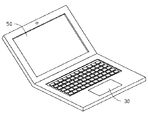
図1を参照すると、本発明の実施形態に係るマウスポインタ制御方法を実行するコンピュータは、コンピュータシステム10、タッチパッド30及びディスプレイ50を備える。コンピュータシステム10は、タッチパッド30及びディスプレイ50に接続される。また、コンピュータシステム10は、中央処理装置(CPU)11、記憶装置13及び入出力インターフェース15を備える。コンピュータシステム10は、オペレーティングシステムによってディスプレイ50に表示されるマウスポインタの、クリック、移動、ドラッグ、スクロール等の動作を実行することができる。
図2を参照すると、前記コンピュータは、ノート型パソコンである。タッチパッド30は、ほぼ矩形を呈する。また、タッチパッド30は、カーボンナノチューブからなるタッチパッドであっても良い。
コンピュータシステム10は、ユーザがタッチパッド30に入力する異なるジェスチャーに応じて、マウスの左右ボタンの機能を実現する。図3に示すように、例えば、ユーザが右手の中指でタッチパッド30を押した後、人差指でタッチパッド30を押すと、コンピュータシステム10は、ユーザが入力した前記ジェスチャーに応じて、マウスの左ボタンの機能を実現する。これにより、ユーザが人差指でタッチパッド30をクリックすると、コンピュータシステム10は、マウスの左ボタンのクリック機能を実現し、また、人差指でタッチパッド30をダブルクリックすると、コンピュータシステム10は、マウスの左ボタンのダブルクリック機能を実現する。
図4に示すように、ユーザが右手の中指でタッチパッド30を押した後、薬指でタッチパッド30を押すと、コンピュータシステム10は、ユーザが入力した前記ジェスチャーに応じて、マウスの右ボタンの機能を実現する。これにより、薬指でタッチパッド30をクリックすると、コンピュータシステム10は、マウスの右ボタンのクリック機能を実現する。
図5に示すように、ユーザが右手の中指でタッチパッド30を押した後、人差指でタッチパッド30を押すと、コンピュータシステム10は、ユーザが入力した前記ジェスチャーに応じて、マウスの左ボタンの機能を実現する。この際、人差指及び中指のタッチパッド30におけるタッチポイントをそれぞれAとBとに設定した後、人差指及び中指を共にタッチポイントA及びBからタッチパッド30上でスライドさせると、コンピュータシステム10は、ユーザが入力した前記ジェスチャーに応じて、マウスの左ボタンのドラッグ機能を実現する。これにより、マウスポインタは、表示画面の中で移動する。
図6に示すように、ユーザが右手の中指でタッチパッド30を押した後、薬指でタッチパッド30を押すと、コンピュータシステム10は、ユーザが入力した前記ジェスチャーに応じて、マウスの右ボタンの機能を実現する。この際、中指及び薬指のタッチパッド30におけるタッチポイントをそれぞれBとCとに設定した後、薬指及び中指を共にタッチポイントB及びCからタッチパッド30上でスライドさせると、コンピュータシステム10は、ユーザが入力した前記ジェスチャーに応じて、マウスの右ボタンのドラッグ機能を実現する。
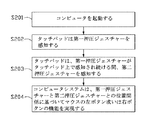
図7に示すように、本発明の実施形態に係るマウスポインタ制御方法は、以下のステップS201〜ステップS204を備える。
ステップS201において、コンピュータを起動する。
ステップS202において、タッチパッド30は、第一押圧ジェスチャーを感知する。ここで第一押圧ジェスチャーとは、例えば、中指でタッチパッド30を押すことである。
ステップS203において、タッチパッド30は、第一押圧ジェスチャーがタッチパッド30上で感知され続ける間、第二押圧ジェスチャーを感知する。ここで第二押圧ジェスチャーとは、例えば、人差指でタッチパッド30を押すことである。
ステップS204において、コンピュータシステム10は、第一押圧ジェスチャーと第二押圧ジェスチャーとの位置関係に基づいて、マウスの左ボタン或いは右ボタンの機能を実現する。例えば、人差指が中指の左側に位置する(つまり右手)場合、コンピュータシステム10は、マウスの左ボタン機能を実現する。
さらに、マウスポインタ制御方法は、タッチパッド30において、二本の指をこの二本の指のタッチポイントからスライドさせることによって、ドラッグ機能を実現することを備える。例えば、タッチパッド30上における人差指及び中指のタッチポイントをそれぞれAとBとに設定した後、人差指及び中指をタッチパッド30上で共にこのタッチポイントA及びBからスライドさせると、コンピュータシステム10は、ユーザが入力した前記ジェスチャーに応じて、マウスの左ボタン或いは右ボタンのドラッグ機能を実現する。さらに、マウスポインタ制御方法は、図3及び図4に示すようなマウスの左右ボタンのクリック機能及びマウスの左ボタンのダブルクリック機能を実現することを備える。
10 コンピュータシステム
11 中央処理装置
13 記憶装置
15 入出力インターフェース
30 タッチパッド
50 ディスプレイ
11 中央処理装置
13 記憶装置
15 入出力インターフェース
30 タッチパッド
50 ディスプレイ
Claims (4)
- タッチパッド及びマウスポインタを表示するためのディスプレイを備えるコンピュータに適用されるマウスポインタ制御方法であって、
前記タッチパッドが、第一押圧ジェスチャーを感知するステップと、
前記タッチパッドが、前記第一押圧ジェスチャーが前記タッチパッド上で感知され続ける間、第二押圧ジェスチャーを感知するステップと、
コンピュータシステムが、前記第一押圧ジェスチャーと前記第二押圧ジェスチャーとの位置関係に基づいて、マウスの左ボタン或いは右ボタンの機能を実現するステップと、
を備えることを特徴とするマウスポインタ制御方法。 - 前記コンピュータシステムは、前記第二押圧ジェスチャーが前記第一押圧ジェスチャーの左側に位置する場合、マウスの左ボタン機能を実現し、前記第二押圧ジェスチャーが前記第一押圧ジェスチャーの右側に位置する場合、マウスの右ボタン機能を実現することを特徴とする、請求項1に記載のマウスポインタ制御方法。
- 前記第二押圧ジェスチャーが前記第一押圧ジェスチャーの左側に位置する場合、前記タッチパッドが、クリックジェスチャーを示す第二押圧ジェスチャーを継続的に感知すると、前記コンピュータシステムは、マウスの左ボタンのクリック機能を実現し、前記タッチパッドが、ダブルクリックジェスチャーを示す第二押圧ジェスチャーを継続的に感知すると、前記コンピュータシステムは、マウスの左ボタンのダブルクリック機能を実現し、前記第二押圧ジェスチャーが前記第一押圧ジェスチャーの右側に位置する場合、前記タッチパッドが、クリックジェスチャーを示す第二押圧ジェスチャーを継続的に感知すると、前記コンピュータシステムは、マウスの右ボタンのクリック機能を実現することを特徴とする、請求項2に記載のマウスポインタ制御方法。
- 前記第一押圧ジェスチャーと前記タッチパッドとの接触区域は、第一タッチポイントであり、前記第二押圧ジェスチャーと前記タッチパッドとの接触区域は、第二タッチポイントであり、前記タッチパッドが、前記第二押圧ジェスチャーが前記第一押圧ジェスチャーの左側に位置することを感知した後、前記第一タッチポイント及び第二タッチポイントからスライドするスライドジェスチャーを感知すると、マウスの左ボタンのドラッグ機能を実現し、前記タッチパッドが、前記第二押圧ジェスチャーが前記第一押圧ジェスチャーの右側に位置することを感知した後、前記第一タッチポイント及び第二タッチポイントからスライドするスライドジェスチャーを感知すると、マウスの右ボタンのドラッグ機能を実現することを特徴とする請求項2に記載のマウスポインタ制御方法。
Applications Claiming Priority (2)
| Application Number | Priority Date | Filing Date | Title |
|---|---|---|---|
| TW102107147A TW201435720A (zh) | 2013-03-01 | 2013-03-01 | 滑鼠遊標控制方法 |
| TW102107147 | 2013-03-01 |
Publications (1)
| Publication Number | Publication Date |
|---|---|
| JP2014170548A true JP2014170548A (ja) | 2014-09-18 |
Family
ID=51420731
Family Applications (1)
| Application Number | Title | Priority Date | Filing Date |
|---|---|---|---|
| JP2014038044A Pending JP2014170548A (ja) | 2013-03-01 | 2014-02-28 | マウスポインタ制御方法 |
Country Status (3)
| Country | Link |
|---|---|
| US (1) | US9201525B2 (ja) |
| JP (1) | JP2014170548A (ja) |
| TW (1) | TW201435720A (ja) |
Families Citing this family (1)
| Publication number | Priority date | Publication date | Assignee | Title |
|---|---|---|---|---|
| BE1026977B1 (nl) * | 2019-01-20 | 2020-08-24 | Inventrans Bvba | Werkwijze en inrichting en systeem voor het verschaffen van dubbele muis ondersteuning |
Family Cites Families (4)
| Publication number | Priority date | Publication date | Assignee | Title |
|---|---|---|---|---|
| US5943044A (en) * | 1996-08-05 | 1999-08-24 | Interlink Electronics | Force sensing semiconductive touchpad |
| NZ523065A (en) * | 2000-05-11 | 2004-11-26 | Nes Stewart Irvine | A graphical user interface where a procedure is activated by movement of a pointer over a predetermined path |
| US8681096B2 (en) * | 2010-11-19 | 2014-03-25 | Lenovo (Singapore) Pte. Ltd. | Automatic switching between functions emulated by a click pad device |
| KR101397847B1 (ko) * | 2012-07-09 | 2014-06-27 | 삼성전기주식회사 | 정전용량 감지 장치, 정전용량 감지 방법 및 터치스크린 장치 |
-
2013
- 2013-03-01 TW TW102107147A patent/TW201435720A/zh unknown
-
2014
- 2014-02-28 JP JP2014038044A patent/JP2014170548A/ja active Pending
- 2014-02-28 US US14/192,882 patent/US9201525B2/en not_active Expired - Fee Related
Also Published As
| Publication number | Publication date |
|---|---|
| US9201525B2 (en) | 2015-12-01 |
| TW201435720A (zh) | 2014-09-16 |
| US20140247217A1 (en) | 2014-09-04 |
Similar Documents
| Publication | Publication Date | Title |
|---|---|---|
| CN103809888B (zh) | 移动终端及其操控方法 | |
| CN105122256B (zh) | 在手持设备上用于单手及多模式交互的握力传感器阵列及方法 | |
| TWI585672B (zh) | 電子顯示裝置及圖標控制方法 | |
| CN101243382B (zh) | 处理跟踪板装置的原始数据的系统和方法 | |
| US8941600B2 (en) | Apparatus for providing touch feedback for user input to a touch sensitive surface | |
| CN104123024B (zh) | 一种终端设备及设备控制方法 | |
| US20090102809A1 (en) | Coordinate Detecting Device and Operation Method Using a Touch Panel | |
| US9542020B2 (en) | Remote session control using multi-touch inputs | |
| US20120105367A1 (en) | Methods of using tactile force sensing for intuitive user interface | |
| US20110060986A1 (en) | Method for Controlling the Display of a Touch Screen, User Interface of the Touch Screen, and an Electronic Device using The Same | |
| US20110216015A1 (en) | Apparatus and method for directing operation of a software application via a touch-sensitive surface divided into regions associated with respective functions | |
| TWI463355B (zh) | 多點觸控介面之訊號處理裝置、訊號處理方法及使用者介面圖像選取方法 | |
| TW201003468A (en) | Virtual touchpad | |
| CN104641324A (zh) | 姿势发起的键盘功能 | |
| TW201337717A (zh) | 可觸控式電子裝置 | |
| TW201137692A (en) | Control method for touchpad and touch device using the same | |
| TWI451321B (zh) | 可攜式裝置及可攜式裝置的操作方法 | |
| CN104965669A (zh) | 物理按键触控方法及装置、移动终端 | |
| KR20080051459A (ko) | 스크롤 처리 방법 및 장치 | |
| US20140285445A1 (en) | Portable device and operating method thereof | |
| CN100592248C (zh) | 触摸传感器指点杆和方法 | |
| TWI471762B (zh) | 觸控筆、電子裝置與互動操作方法 | |
| US20140359541A1 (en) | Terminal and method for controlling multi-touch operation in the same | |
| CN101377725A (zh) | 手持式电子装置及其控制方法 | |
| CN101498983A (zh) | 触控板游标的控制方法 |