JP2016194792A - Information processing apparatus, information processing method, and program - Google Patents
Information processing apparatus, information processing method, and program Download PDFInfo
- Publication number
- JP2016194792A JP2016194792A JP2015074086A JP2015074086A JP2016194792A JP 2016194792 A JP2016194792 A JP 2016194792A JP 2015074086 A JP2015074086 A JP 2015074086A JP 2015074086 A JP2015074086 A JP 2015074086A JP 2016194792 A JP2016194792 A JP 2016194792A
- Authority
- JP
- Japan
- Prior art keywords
- display
- user
- trajectory
- information processing
- control unit
- Prior art date
- Legal status (The legal status is an assumption and is not a legal conclusion. Google has not performed a legal analysis and makes no representation as to the accuracy of the status listed.)
- Pending
Links
Images


Classifications
-
- G—PHYSICS
- G06—COMPUTING OR CALCULATING; COUNTING
- G06F—ELECTRIC DIGITAL DATA PROCESSING
- G06F3/00—Input arrangements for transferring data to be processed into a form capable of being handled by the computer; Output arrangements for transferring data from processing unit to output unit, e.g. interface arrangements
- G06F3/01—Input arrangements or combined input and output arrangements for interaction between user and computer
-
- G—PHYSICS
- G06—COMPUTING OR CALCULATING; COUNTING
- G06F—ELECTRIC DIGITAL DATA PROCESSING
- G06F3/00—Input arrangements for transferring data to be processed into a form capable of being handled by the computer; Output arrangements for transferring data from processing unit to output unit, e.g. interface arrangements
- G06F3/01—Input arrangements or combined input and output arrangements for interaction between user and computer
- G06F3/048—Interaction techniques based on graphical user interfaces [GUI]
- G06F3/0487—Interaction techniques based on graphical user interfaces [GUI] using specific features provided by the input device, e.g. functions controlled by the rotation of a mouse with dual sensing arrangements, or of the nature of the input device, e.g. tap gestures based on pressure sensed by a digitiser
- G06F3/0488—Interaction techniques based on graphical user interfaces [GUI] using specific features provided by the input device, e.g. functions controlled by the rotation of a mouse with dual sensing arrangements, or of the nature of the input device, e.g. tap gestures based on pressure sensed by a digitiser using a touch-screen or digitiser, e.g. input of commands through traced gestures
-
- G—PHYSICS
- G09—EDUCATION; CRYPTOGRAPHY; DISPLAY; ADVERTISING; SEALS
- G09G—ARRANGEMENTS OR CIRCUITS FOR CONTROL OF INDICATING DEVICES USING STATIC MEANS TO PRESENT VARIABLE INFORMATION
- G09G5/00—Control arrangements or circuits for visual indicators common to cathode-ray tube indicators and other visual indicators
-
- G—PHYSICS
- G09—EDUCATION; CRYPTOGRAPHY; DISPLAY; ADVERTISING; SEALS
- G09G—ARRANGEMENTS OR CIRCUITS FOR CONTROL OF INDICATING DEVICES USING STATIC MEANS TO PRESENT VARIABLE INFORMATION
- G09G5/00—Control arrangements or circuits for visual indicators common to cathode-ray tube indicators and other visual indicators
- G09G5/36—Control arrangements or circuits for visual indicators common to cathode-ray tube indicators and other visual indicators characterised by the display of a graphic pattern, e.g. using an all-points-addressable [APA] memory
- G09G5/38—Control arrangements or circuits for visual indicators common to cathode-ray tube indicators and other visual indicators characterised by the display of a graphic pattern, e.g. using an all-points-addressable [APA] memory with means for controlling the display position
Landscapes
- Engineering & Computer Science (AREA)
- Theoretical Computer Science (AREA)
- Physics & Mathematics (AREA)
- General Physics & Mathematics (AREA)
- General Engineering & Computer Science (AREA)
- Computer Hardware Design (AREA)
- Human Computer Interaction (AREA)
- User Interface Of Digital Computer (AREA)
- Controls And Circuits For Display Device (AREA)
Abstract
Description
本開示は、情報処理装置、情報処理方法およびプログラムに関する。 The present disclosure relates to an information processing apparatus, an information processing method, and a program.
近年、壁面大画面や卓上大壁面などを表示領域として使用し、かかる表示領域に表示オブジェクトを表示させる技術が普及している。例えば、複数のユーザそれぞれに対応する表示オブジェクトを表示領域に表示させる技術が開示されている(例えば、特許文献1参照)。かかる技術においては、複数のユーザそれぞれの位置に応じて複数のユーザそれぞれに対応する表示オブジェクトの位置やサイズが制御される。 In recent years, a technique for using a large wall surface, a large desktop wall surface, or the like as a display area and displaying a display object in the display area has become widespread. For example, a technique for displaying a display object corresponding to each of a plurality of users in a display area is disclosed (for example, see Patent Document 1). In such a technique, the position and size of a display object corresponding to each of a plurality of users are controlled according to the positions of the plurality of users.
しかし、複数のユーザが順次に閲覧しやすいように表示オブジェクトを提示することが可能な技術が提供されることが望まれる。 However, it is desired to provide a technique that can present a display object so that a plurality of users can easily browse sequentially.
本開示によれば、表示領域を視認するユーザである第一のユーザの身体に関連する第一の位置と第二のユーザの身体に関連する第二の位置とに基づいて、前記表示領域に表示される1または複数の表示オブジェクトの軌道を制御する表示制御部を備える、情報処理装置が提供される。 According to the present disclosure, based on the first position related to the body of the first user who is the user viewing the display area and the second position related to the body of the second user, the display area An information processing apparatus is provided that includes a display control unit that controls the trajectory of one or more display objects to be displayed.
本開示によれば、プロセッサにより、表示領域を視認するユーザである第一のユーザの身体に関連する第一の位置と第二のユーザの身体に関連する第二の位置とに基づいて、前記表示領域に表示される1または複数の表示オブジェクトの軌道を制御することを含む、情報処理方法が提供される。 According to the present disclosure, based on the first position related to the body of the first user who is the user viewing the display area and the second position related to the body of the second user by the processor, the An information processing method is provided that includes controlling the trajectory of one or more display objects displayed in a display area.
本開示によれば、コンピュータを、表示領域を視認するユーザである第一のユーザの身体に関連する第一の位置と第二のユーザの身体に関連する第二の位置とに基づいて、前記表示領域に表示される1または複数の表示オブジェクトの軌道を制御する表示制御部を備える、情報処理装置として機能させるためのプログラムが提供される。 According to the present disclosure, the computer is configured based on the first position related to the body of the first user who is the user viewing the display area and the second position related to the body of the second user. A program for functioning as an information processing apparatus is provided, which includes a display control unit that controls the trajectory of one or more display objects displayed in the display area.
以上説明したように本開示によれば、複数のユーザが順次に閲覧しやすいように表示オブジェクトを提示することが可能な技術が提供される。なお、上記の効果は必ずしも限定的なものではなく、上記の効果とともに、または上記の効果に代えて、本明細書に示されたいずれかの効果、または本明細書から把握され得る他の効果が奏されてもよい。 As described above, according to the present disclosure, a technique capable of presenting a display object so that a plurality of users can easily browse sequentially is provided. Note that the above effects are not necessarily limited, and any of the effects shown in the present specification, or other effects that can be grasped from the present specification, together with or in place of the above effects. May be played.
以下に添付図面を参照しながら、本開示の好適な実施の形態について詳細に説明する。なお、本明細書及び図面において、実質的に同一の機能構成を有する構成要素については、同一の符号を付することにより重複説明を省略する。 Hereinafter, preferred embodiments of the present disclosure will be described in detail with reference to the accompanying drawings. In addition, in this specification and drawing, about the component which has the substantially same function structure, duplication description is abbreviate | omitted by attaching | subjecting the same code | symbol.
また、本明細書および図面において、実質的に同一の機能構成を有する複数の構成要素を、同一の符号の後に異なる数字を付して区別する場合もある。ただし、実質的に同一の機能構成を有する複数の構成要素の各々を特に区別する必要がない場合、同一符号のみを付する。 In the present specification and drawings, a plurality of components having substantially the same functional configuration may be distinguished by adding different numerals after the same reference numerals. However, when it is not necessary to particularly distinguish each of a plurality of constituent elements having substantially the same functional configuration, only the same reference numerals are given.
なお、説明は以下の順序で行うものとする。
1.本開示の実施形態
1.1.システム構成例
1.2.機能構成例
1.3.情報処理システムの機能詳細
1.4.ハードウェア構成例
2.むすび
The description will be made in the following order.
1. Embodiment of the present disclosure 1.1. System configuration example 1.2. Functional configuration example 1.3. Functional details of information processing system 1.4. 1. Hardware configuration example Conclusion
<1.本開示の実施形態>
[1.1.システム構成例]
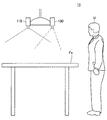
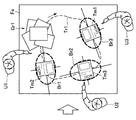
まず、図面を参照しながら本開示の実施形態に係る情報処理システム10の構成例について説明する。図1は、本開示の実施形態に係る情報処理システム10の構成例を示す図である。図1に示したように、本開示の実施形態に係る情報処理システム10は、センサ部110と、操作入力部115と、表示部130とを備える。情報処理システム10は、ユーザU(以下、単に「ユーザ」とも言う。)に対して表示オブジェクトを提示することが可能である。なお、表示オブジェクトは、表示され得るオブジェクトであれば特に限定されない。例えば、表示オブジェクトは、画像であってもよいし、アプリケーションのウィンドウであってもよいし、アイコンであってもよいし、テキストデータであってもよい。
<1. Embodiment of the present disclosure>
[1.1. System configuration example]
First, a configuration example of the
センサ部110は、ユーザUの身体に関連する所定のセンサデータを入力する機能を有する。図1に示した例では、センサ部110は、テーブルに埋め込まれた2つのカメラを含んでいる。しかし、センサ部110に含まれるカメラの数は1以上であれば特に限定されない。かかる場合、センサ部110に含まれる1以上のカメラそれぞれが設けられる位置も特に限定されない。また、1以上のカメラには、可視光カメラが含まれてもよいし、赤外線カメラが含まれてもよいし、デプスカメラが含まれていてもよい。また、センサ部110の代わりに、他のセンサ(例えば、超音波センサ、熱センサ、荷重センサ、照度センサなど)が用いられてもよい。
The
操作入力部115は、ユーザUの操作を入力する機能を有する。図1に示した例では、操作入力部115は、表示領域Faの上方に存在する天井から吊り下げられた1つのカメラを含んでいる。しかし、操作入力部115に含まれるカメラが設けられる位置は特に限定されない。また、カメラには、単眼カメラが含まれてもよいし、ステレオカメラが含まれてもよい。また、操作入力部115はユーザUの操作を入力する機能を有していればカメラでなくてもよく、例えば、タッチパネルであってもよいし、圧力センサであってもよいし、ハードウェアボタンであってもよい。
The
表示部130は、表示領域Faに画面を表示する機能を有する。図1に示した例では、表示部130は、表示領域Faの上方に天井から吊り下げられている。しかし、表示部130が設けられる位置は特に限定されない。また、典型的には、表示部130は、表示領域Faの天面に画面を投影することが可能なプロジェクタであってよいが、画面を表示する機能を有すれば、他の形態のディスプレイであってもよい。
The
なお、本明細書では、テーブルの天面が表示領域Faとして利用される場合を主に説明するが、表示領域Faは、テーブルの天面以外であってもよい。例えば、表示領域Faは、壁であってもよいし、建物であってもよいし、床面であってもよいし、地面であってもよいし、天井であってもよい。あるいは、表示領域Faは、カーテンのヒダなどの非平面であってもよいし、他の場所にある面であってもよい。また、表示部130が表示面を有する場合には、表示領域Faは、表示部130が有する表示面であってもよい。
In the present specification, the case where the top surface of the table is used as the display area Fa will be mainly described, but the display area Fa may be other than the top surface of the table. For example, the display area Fa may be a wall, a building, a floor, a ground, or a ceiling. Alternatively, the display area Fa may be a non-planar surface such as a curtain fold, or may be a surface in another place. When the
以上、本開示の実施形態に係る情報処理システム10の構成例について説明した。
The configuration example of the
[1.2.機能構成例]
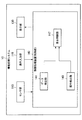
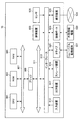
続いて、本開示の実施形態に係る情報処理システム10の機能構成例について説明する。図2は、本開示の実施形態に係る情報処理システム10の機能構成例を示すブロック図である。図2に示したように、本開示の実施形態に係る情報処理システム10は、センサ部110と、操作入力部115と、表示部130と、情報処理装置140(以下、「制御部140」とも言う。)と、を備える。
[1.2. Functional configuration example]
Subsequently, a functional configuration example of the
情報処理装置140は、情報処理システム10の各部の制御を実行する。例えば、情報処理装置140は、表示部130から出力する情報を生成する。また、例えば、情報処理装置140は、センサ部110および操作入力部115それぞれが入力した情報を、表示部130から出力する情報に反映させる。図2に示したように、情報処理装置140は、データ検出部141と、操作検出部143と、表示制御部147とを備える。これらの各機能ブロックについての詳細は、後に説明する。
The
なお、情報処理装置140は、例えば、CPU(Central Processing Unit;中央演算処理装置)などで構成されていてもよい。情報処理装置140がCPUなどといった処理装置によって構成される場合、かかる処理装置は、電子回路によって構成され得る。
Note that the
以上、本開示の実施形態に係る情報処理システム10の機能構成例について説明した。
The function configuration example of the
[1.3.情報処理システムの機能詳細]
続いて、本開示の実施形態に係る情報処理システム10の機能詳細について説明する。本開示の実施形態においては、データ検出部141が、センサ部110によって検出されたセンサデータに基づいて、複数のユーザそれぞれの身体に関連する所定の位置を検出する。例えば、複数のユーザそれぞれの身体に関連する所定の位置は、複数のユーザそれぞれの身体の位置または身体の所定部位の位置を含んでよい。
[1.3. Function details of information processing system]
Subsequently, functional details of the
以下では、センサ部110によって検出された画像の解析によって複数のユーザそれぞれの目の位置が検出される例を説明する。しかし、センサ部110によって検出された画像の解析によって複数のユーザそれぞれの他の部位(例えば、頭頂部、顔など)の位置が、目の位置に代わりにデータ検出部141によって検出されてもよい。また、超音波センサによって検出された超音波、熱センサによって検出された熱、荷重センサによって検出された荷重、照度センサによって検出された照度などに基づいて、複数のユーザそれぞれの身体の位置が検出されてもよい。
Hereinafter, an example in which the positions of the eyes of a plurality of users are detected by analyzing the image detected by the
あるいは、複数のユーザそれぞれが装着しているウェアラブルデバイスから送信されたビーコンのシステム側での受信結果に基づいて、複数のユーザそれぞれの身体の位置が検出されてもよい。あるいは、システム側から送信されたビーコンの複数のユーザそれぞれが装着しているウェアラブルデバイスでの受信結果に基づいて、複数のユーザそれぞれの身体の位置が検出されてもよい。また、学習機能によって複数のユーザそれぞれの身体の位置が把握されてもよい。 Or based on the reception result by the side of the system of the beacon transmitted from the wearable device with which each of a some user is mounted | worn, the position of each body of a some user may be detected. Or the position of the body of each of a plurality of users may be detected based on the reception result in the wearable device which each of the plurality of users of the beacon transmitted from the system side wears. Further, the positions of the bodies of the plurality of users may be grasped by the learning function.
また、データ検出部141は、センサ部110によって検出されたセンサデータに基づいて、複数のユーザそれぞれの身体の向きまたは身体の所定部位の向きを、追加的に検出してもよい。以下では、センサ部110によって検出された画像の解析によって複数のユーザそれぞれの目の向きが検出される例を説明する(目の位置および目の向きによって視線が検出される)。しかし、センサ部110によって検出された画像の解析によって複数のユーザそれぞれの他の部位(例えば、腕、頭、指、顔など)の向きが、目の向きの代わりに、データ検出部141によって検出されてもよい。
Further, the
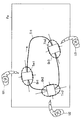
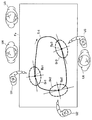
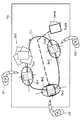
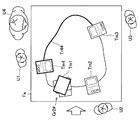
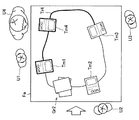
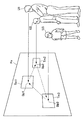
図3は、本開示の実施形態に係る情報処理システム10の機能の詳細を説明するための図である。図3に示した例では、データ検出部141によって複数のユーザとしてユーザU1〜U3が検出される。しかし、データ検出部141によって検出されるユーザ数は特に限定されない。データ検出部141によって検出されたユーザU1〜U3は、自動的に閲覧者として特定されてよい。また、図3に示した例では、表示制御部147が、1または複数の表示オブジェクトとして、表示オブジェクトTm1〜Tm3を表示領域Faに表示させている。しかし、表示領域Faに表示される表示オブジェクトの数も限定されない。
FIG. 3 is a diagram for explaining details of functions of the
表示制御部147は、データ検出部141によって検出されたユーザU1〜U3それぞれの視線に基づいて、表示領域Faに表示される表示オブジェクトTm1〜Tm3の軌道Tr1を制御する。かかる軌道Tr1の制御により、ユーザU1〜U3が順次に閲覧しやすいように表示オブジェクトTm1〜Tm3を提示することが可能となる。ユーザU1〜U3の一部または全部によるオブジェクト移動操作(例えば、ドラッグ操作など)が操作検出部143によって検出されると、表示制御部147は、オブジェクト移動操作に従って表示オブジェクトTm1〜Tm3の移動を制御してよい。
The
例えば、図3に示すように、表示制御部147は、時計回りへのオブジェクト移動操作が検出されると、軌道Tr1上を時計回りに移動するように表示オブジェクトTm1〜Tm3の移動を制御してよい。一方、表示制御部147は、反時計回りへのオブジェクト移動操作が検出されると、軌道Tr1上を反時計回りに移動するように表示オブジェクトTm1〜Tm3の移動を制御してよい。図3に示すように、表示オブジェクト間は、ユーザ間と等しく離れているのがよい。
For example, as shown in FIG. 3, when a clockwise object movement operation is detected, the
ここで、表示オブジェクトTm1〜Tm3は、表示領域Faに表示されている他の表示オブジェクトと重ならないように、かつ、ユーザU1〜U3以外の非閲覧者の妨げとならないように移動されるのがよい。そこで、表示制御部147は、表示オブジェクトTm1〜Tm3それぞれが移動しているか否かに応じて、表示オブジェクトTm1〜Tm3それぞれの表示態様を異ならせてよい。表示態様は、透過度、明度、彩度およびサイズの少なくともいずれか一方を含んでよい。
Here, the display objects Tm1 to Tm3 are moved so as not to overlap with other display objects displayed in the display area Fa and so as not to interfere with non-viewers other than the users U1 to U3. Good. Therefore, the
例えば、表示制御部147は、表示オブジェクトTm1〜Tm3が移動している場合には、表示オブジェクトTm1〜Tm3が静止している場合よりも、表示オブジェクトTm1〜Tm3の透過度を増加させるとよい。あるいは、表示制御部147は、表示オブジェクトTm1〜Tm3が移動している場合には、表示オブジェクトTm1〜Tm3が静止している場合よりも、表示オブジェクトTm1〜Tm3のサイズを小さくするとよい。
For example, the
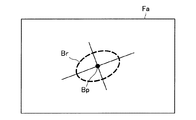
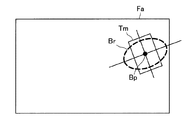
続いて、軌道Tr1の制御の例についてより詳細に説明する。まず、表示制御部147は、ユーザU1〜U3それぞれの視線に応じてユーザU1〜U3それぞれに対応する基準領域Br1〜Br3を規定する。図4は、基準領域Brを規定する手法の例を説明するための図である。図4に示すように、表示制御部147は、表示領域Faのうち視線の当たる位置(視点)Bpを基準とした所定の領域(図4に示した例では、楕円)を基準領域Brとして規定してよい。
Subsequently, an example of control of the trajectory Tr1 will be described in more detail. First, the
なお、ここでは、視点Bpを基準領域Brの中心とする例を示したが、視点Bpが基準領域Brの中心でなくてもよい。また、ここでは、表示領域Faの形状を楕円とする例を示したが、表示領域Faの形状は、楕円以外の形状であってもよく、円であってもよいし、矩形であってもよい。このようにして、ユーザに対応する基準領域Brが規定される。以下では、表示制御部147が、視点Bpを基準位置(軌跡算出の基準となる位置)として規定する例について説明する。しかし、基準位置Bpは、基準領域Brの内部であれば特に限定されない。基準位置Bpは動くことも想定されるため、所定期間の視点の履歴を利用して、基準位置Bpが決定されてもよい。具体的には、履歴から得られる基準位置Bpの平均値が基準位置Bpとして算出されてよい。
Here, an example in which the viewpoint Bp is the center of the reference area Br is shown, but the viewpoint Bp may not be the center of the reference area Br. In addition, here, an example in which the shape of the display region Fa is an ellipse has been shown, but the shape of the display region Fa may be a shape other than an ellipse, a circle, or a rectangle. Good. In this way, the reference area Br corresponding to the user is defined. Hereinafter, an example will be described in which the
図5は、表示オブジェクトTmと基準領域Brとの関係の例を示す図である。図5に示すように、表示制御部147は、基準領域Brの内部を、表示オブジェクトTmの設定位置が通過するように、表示オブジェクトTmの軌道を制御する。より具体的には、表示制御部147は、基準位置Bpを設定位置が通過するように、表示オブジェクトTmの軌道を制御してよい。なお、図5に示した例では、設定位置は表示オブジェクトTmの中心であるが、設定位置はかかる例に限定されない。例えば、設定位置は、表示オブジェクトTmの形状(例えば、多角形、円形、歪な形状など)の重心であってよい。
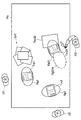
FIG. 5 is a diagram illustrating an example of the relationship between the display object Tm and the reference region Br. As shown in FIG. 5, the
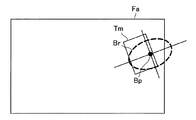
また、表示オブジェクトTmが表示領域Faの内部に収まらなくなってしまう場合も想定される。かかる場合には、表示オブジェクトTmの一部が欠けてしまうという状況が生じ得る。そこで、図6に示すように、表示制御部147は、表示オブジェクトTmが表示領域Faの内部に収まるように、表示オブジェクトTmのあらかじめ設定された設定位置をシフトしてもよい。このように設定位置がシフトされれば、表示オブジェクトTmが欠けてしまうことを防ぐことが可能である。
It is also assumed that the display object Tm does not fit inside the display area Fa. In such a case, a situation may occur in which a part of the display object Tm is missing. Therefore, as illustrated in FIG. 6, the
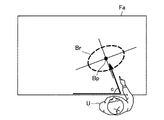
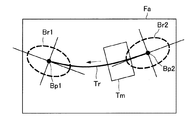
また、表示制御部147は、複数のユーザそれぞれの身体の向きまたは身体の所定部位の向きに基づいて、基準領域Brの向きを制御してもよい。図7には、表示制御部147は、ユーザUの(表示領域FaにおけるユーザUに最も近い辺を基準とした)腕の角度cに合わせて基準領域Brを傾けている例が示されている。図8は、基準領域Br1および基準領域Br2の向きが制御された場合に決定される軌道Trの例を示す図である。図8に示すように、軌道Trは、基準領域Br1および基準領域Br2の向きに合わせるように決定される。
Further, the
図8に示すように、基準領域Br1および基準領域Br2の向きに合わせるように軌道Trが決定されると、表示制御部147は、基準領域Br2に対応するユーザにも閲覧しやすく、かつ、基準領域Br1に対応するユーザにも閲覧しやすい向きで、表示オブジェクトTmを表示させることが可能となる。図3に戻って説明を続ける。
As shown in FIG. 8, when the trajectory Tr is determined so as to match the orientation of the reference area Br1 and the reference area Br2, the
このように、表示制御部147は、ユーザU1〜U3それぞれに対応する基準領域Br1〜Br3の内部を、表示オブジェクトTm1〜Tm3それぞれの設定位置が通過するように、軌道Tr1を制御することが可能である。より詳細には、表示制御部147は、ユーザU1〜U3それぞれに対応する基準領域Br1〜Br3の内部の基準位置Bp1〜Bp3を、表示オブジェクトTm1〜Tm3それぞれの設定位置が通過するように、軌道Tr1を制御することが可能である。
As described above, the
以上においては、データ検出部141によって検出された複数のユーザが、自動的に閲覧者として特定される例を説明した。しかし、データ検出部141によって検出された複数のユーザには、表示オブジェクトの閲覧に向いていない1または複数のユーザが含まれている場合もあり得る。そこで、表示制御部147は、複数のユーザに紐付けられた属性情報に基づいて軌道を制御してもよい。
In the above description, an example in which a plurality of users detected by the
より具体的には、表示制御部147は、属性情報に基づいて関連付けられるグループ(例えば、属性情報を包含するグループなど)ごとに軌道を設定してよい(例えば、属性情報が小学生または中学生を示す場合に、属性情報を包含するグループとして子供が挙げられる。また、例えば、属性情報が子供に対応する年齢である場合に、属性情報を包含するグループとして子供が挙げられる。)。このとき、表示制御部147は、表示オブジェクトが属するグループと一致するグループに属するユーザに対応する基準領域(または基準領域の内部の基準位置)を通過するように軌道を制御してもよい。あるいは、表示制御部147は、属性情報ごとに軌道を設定してもよい。このとき、表示制御部147は、表示オブジェクトが有する属性と一致する属性を有するユーザに対応する基準領域(または基準領域の内部の基準位置)を通過するように軌道を制御してもよい。図9は、複数のユーザそれぞれの属性情報に基づいて軌道Tr1を制御する例を説明するための図である。
More specifically, the
図9を参照すると、ユーザU1〜U3の他に、データ検出部141によってユーザU4〜U6も検出されている。例えば、ユーザU1〜U3は子供であり、ユーザU4〜U6は大人である場合を想定する。さらに、表示オブジェクトは子供向けである場合を想定する。かかる場合には、表示制御部147は、ユーザU1〜U3それぞれに対応する基準領域Br1〜Br3の内部の基準位置Bp1〜Bp3を通過するように、軌道Tr1を制御すればよい。
Referring to FIG. 9, in addition to users U1 to U3, users U4 to U6 are also detected by
なお、ここでは、ユーザが子供であるか大人であるかを属性情報として使用する例を説明したが、属性情報は、かかる例に限定されない。例えば、属性情報は、年齢であってもよいし、性別であってもよいし、国籍であってもよいし、リーダであるか否かであってもよい。表示オブジェクトの属性情報は、表示オブジェクトに付されていてもよいし、表示オブジェクトの内容を解析することによって得られてもよい。また、ユーザの属性情報は、センサ部110によって検出された画像の解析によりデータ検出部141によって得られてもよい。
In addition, although the example which uses whether a user is a child or an adult as attribute information was demonstrated here, attribute information is not limited to this example. For example, the attribute information may be age, gender, nationality, or whether or not the reader is a leader. The attribute information of the display object may be attached to the display object, or may be obtained by analyzing the content of the display object. In addition, user attribute information may be obtained by the
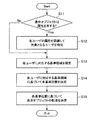
続いて、属性情報に基づいて軌道を制御する例における情報処理システム10の動作の流れについて説明する。図10は、属性情報に基づいて軌道を制御する例における情報処理システム10の動作の流れを示す図である。なお、図10のフローチャートは、属性情報に基づいて軌道を制御する例における情報処理システム10の動作の流れの例に過ぎないため、属性情報に基づいて軌道を制御する例における情報処理システム10の動作の流れは、図10のフローチャートに示された例に限定されない。
Next, the flow of operations of the
まず、表示制御部147は、表示オブジェクトが属性を有しない場合には(S11において「No」)、S13に動作を移行させる。一方、表示制御部147は、表示オブジェクトが属性を有する場合には(S11において「Yes」)、各ユーザの属性を認識して、表示オブジェクトが有する属性に一致する属性を有するユーザを対象のユーザ(表示オブジェクトの閲覧者)として特定する(S12)。
First, when the display object has no attribute (“No” in S11), the
S13に動作が移行されると、表示制御部147は、各ユーザに対応する基準領域を規定する(S13)。続いて、表示制御部147は、各ユーザに対応する基準領域に基づいて、各基準位置を決定する(S14)。続いて、表示制御部147は、各基準位置に基づいて、表示オブジェクトの軌道を決定する(S15)。より具体的には、表示制御部147は、各基準位置を通過するように、表示オブジェクトの軌道を決定する。
When the operation is shifted to S13, the
上記した例では、表示オブジェクトが1または複数の場合を想定した。例えば、表示オブジェクトは複数であってよい。かかる場合、表示制御部147は、複数の表示オブジェクトの軌道を制御してよい。ここで、複数の表示オブジェクトは、所定の条件に基づいてグルーピングされていてもよい。グルーピングされた結果には、ユーザグループが自動的に、または、ユーザグループに属するいずれかのユーザによる設定により、紐付けられてよい。所定の条件は特に限定されないが、同じ種類の表示オブジェクト(例えば、ファイル形式がすべて画像である表示オブジェクトなど)であるという条件であってもよいし、同じフォルダに入っているという条件であってもよいし、同じ属性を有するという条件であってもよい。例えば、属性の例としては、ユーザやグループに紐づくものがあげられる。また、同じ属性を有する表示オブジェクトの例としては、同一のユーザが撮影した画像、同一のユーザが映る画像などが挙げられる。
In the above example, the case where the number of display objects is one or more is assumed. For example, there may be a plurality of display objects. In such a case, the
複数のグループそれぞれに属する表示オブジェクト群が表示される場合、表示オブジェクト群の間において基準領域同士が重なってしまう可能性がある。また、複数のグループそれぞれに属する表示オブジェクト群が表示される場合、一方のグループに属する表示オブジェクト群の軌道が他方のグループに属する表示オブジェクト群の表示領域に重なってしまう可能性もある。このような重なりが解消されれば、複数のグループそれぞれに属する表示オブジェクト群が表示される場合であっても、互いに閲覧を妨げる可能性を低減することが可能となる。 When display object groups belonging to each of a plurality of groups are displayed, there is a possibility that the reference areas overlap between the display object groups. Further, when a display object group belonging to each of a plurality of groups is displayed, there is a possibility that the trajectory of the display object group belonging to one group overlaps the display area of the display object group belonging to the other group. If such an overlap is eliminated, even if display object groups belonging to each of a plurality of groups are displayed, it is possible to reduce the possibility of preventing browsing.
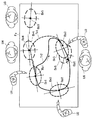
図11は、複数のグループそれぞれに属する表示オブジェクト群が表示される例を示す図である。図11を参照すると、データ検出部141によってユーザU1〜U6が検出され、ユーザU1〜U3は子供という属性を有しており、ユーザU4〜U6は大人という属性を有している。また、図11には、ユーザU1〜U3それぞれに対応する基準領域Br1〜Br3の内部の基準位置Bp1〜Bp3とユーザU4〜U6それぞれに対応する基準領域Br4〜Br6の内部の基準位置Bp4〜Bp6とが示されている。
FIG. 11 is a diagram illustrating an example in which display object groups belonging to a plurality of groups are displayed. Referring to FIG. 11, the
このとき、表示制御部147は、ユーザU4〜U6それぞれに対応する基準領域Br4〜Br6と基準位置Bp1〜Bp3を通過する軌道Tr1とが交差しないように軌道Tr1を制御するとよい。図11を参照すると、軌道Tr1と基準領域Br4とは交差してしまっている。そこで、表示制御部147は、軌道Tr1と基準領域Br4とが交差しないように軌道Tr1を軌道Tr2に変更すればよい。
At this time, the
また、表示制御部147は、ユーザU4〜U6それぞれに対応する基準領域Br4〜Br6の内部の基準位置Bp4〜Bp6とユーザU1〜U3それぞれに対応する基準領域Br1〜Br3とが重ならないように基準位置Bp4〜Bp6を制御するとよい。そこで、図11に示すように、表示制御部147は、基準位置Bp6が基準領域Br3に重ならないように基準位置Bp6をシフトするとよい。
Further, the
さらに、表示制御部147は、ユーザU1〜U3それぞれに対応する基準領域Br1〜Br3の内部の基準位置Bp1〜Bp3とユーザU4〜U6それぞれに対応する基準領域Br4〜Br6とが重ならないように基準位置Bp1〜Bp3を制御するとよい。そこで、図11に示すように、表示制御部147は、基準位置Bp3が基準領域Br6に重ならないように基準位置Bp3をシフトするとよい。なお、軌道を変更する処理と基準位置をシフトする処理とは、独立して行われてもよいし、順に行われてもよい。例えば、表示制御部147は、軌道を変更した後、基準位置が基準領域に重なってしまう場合に、基準位置をシフトしてもよい。
Further, the
また、表示オブジェクトが障害物と重なってしまうとユーザにとっては表示オブジェクトが閲覧しにくくなってしまう。そのため、表示オブジェクトと障害物とが重なってしまう場合にも、その重なりが解消されるとよい。そうすれば、ユーザにとって閲覧しやすい表示オブジェクトが提示される。なお、障害物は、表示領域Faに置かれている3次元的な物体であってもよいし、表示領域Faに表示されている仮想的な物体であってもよい。例えば、仮想な物体には、ウィンドウ、アイコン、サムネイル、実物を模したオブジェクトなどが含まれ得る。 Further, if the display object overlaps with an obstacle, it becomes difficult for the user to view the display object. Therefore, even when the display object and the obstacle overlap, it is preferable that the overlap is eliminated. Then, a display object that is easy for the user to browse is presented. Note that the obstacle may be a three-dimensional object placed in the display area Fa or a virtual object displayed in the display area Fa. For example, the virtual object may include a window, an icon, a thumbnail, an object imitating the real object, and the like.
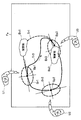
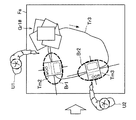
図12は、表示オブジェクトと障害物との重なりを解消する例を説明するための図である。図12を参照すると、表示領域Faには、障害物Bs1および障害物Bs2が置かれている。そして、軌道Tr1と障害物Bs1とが重なってしまっている。そのため、表示制御部147は、障害物Bs1の位置に基づいて軌道Tr1を制御するとよい。より具体的には、表示制御部147は、障害物Bs1に重ならないように軌道Tr1を軌道Tr3に変更するとよい。
FIG. 12 is a diagram for explaining an example of eliminating the overlap between the display object and the obstacle. Referring to FIG. 12, an obstacle Bs1 and an obstacle Bs2 are placed in the display area Fa. The track Tr1 and the obstacle Bs1 are overlapped. Therefore, the
また、表示制御部147は、ユーザU1〜U3それぞれに対応する基準位置Bp1〜Bp3が、基準領域Br1〜Br3の内部において障害物Bs2と重ならない位置に変更されるように制御するとよい。例えば、図12に示すように、表示制御部147は、ユーザU3に対応する基準位置Bp3が、基準領域Br3の内部において障害物Bs2と重ならない位置に変更されるように制御するとよい。
In addition, the
なお、障害物が3次元的な物体である場合において障害物がどのように検出されるかは特に限定されない。例えば、データ検出部141が、センサ部110によって検出される画像を解析することによって、表示領域Faに置かれている3次元的な物体を検出してもよい。あるいは、表示領域Faにタッチパネルや圧力センサが積層されている場合には、タッチパネルや圧力センサによる検出結果に基づいて、表示領域Faに置かれている3次元的な物体が検出されてもよい。
In addition, when an obstacle is a three-dimensional object, how an obstacle is detected is not specifically limited. For example, the
また、複数のグループそれぞれに属する表示オブジェクト群が表示される場合、表示オブジェクト群の間において軌道同士が重なってしまう可能性がある。このような重なりが解消されれば、複数の表示オブジェクト群が表示される場合であっても、互いに閲覧を妨げる可能性を低減することが可能となる。そこで、表示制御部147は、1の軌道と他の軌道とが交差しないように1の軌道を制御してもよい。
Further, when display object groups belonging to each of a plurality of groups are displayed, there is a possibility that trajectories may overlap between the display object groups. If such an overlap is eliminated, even when a plurality of display object groups are displayed, it is possible to reduce the possibility of interfering with browsing. Therefore, the
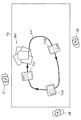
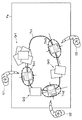
以下、具体的なユースケースを意識しながら、表示オブジェクトTmの表示例について具体的に説明を続ける。図13および図14は、具体的な表示オブジェクトTmの表示例を説明するための図である。図13に示すように、ユーザU1(以下、「閲覧開始者」とも言う。)が、表示領域Faに表示されたWebページPgを閲覧しながら、購入する商品に関連する表示オブジェクトTm(図13に示した例では、表示オブジェクトTm1〜Tm4)を他のユーザと一緒に選ぼうとする場合を想定する。 Hereinafter, specific examples of display of the display object Tm will be described in detail while being conscious of specific use cases. 13 and 14 are diagrams for explaining specific display examples of the display object Tm. As shown in FIG. 13, a user U1 (hereinafter, also referred to as “viewing starter”) browses a Web page Pg displayed in the display area Fa, and displays a display object Tm related to a product to be purchased (FIG. 13). In the example shown in FIG. 5, a case is assumed where the display objects Tm1 to Tm4) are to be selected together with other users.
例えば、ユーザU1がWebページPgからオブジェクト選択操作(例えば、タップ操作など)によって1または複数の表示オブジェクトを選択すると、操作入力部115によってオブジェクト選択操作が入力され、操作検出部143によってオブジェクト選択操作が検出される。このとき、1または複数の表示オブジェクトは、所定の順序(例えば、選択順など)に並べられる。図14に示すように、ユーザU1〜U3の一部または全部によるオブジェクト移動操作(例えば、ドラッグ操作など)が操作検出部143によって検出されると、表示制御部147は、オブジェクト移動操作に従って、選択された1または複数の表示オブジェクトを先頭から順次に移動させてよい。
For example, when the user U1 selects one or a plurality of display objects from the web page Pg by an object selection operation (for example, a tap operation), the object selection operation is input by the
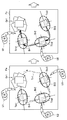
このとき、表示制御部147は、1または複数の表示オブジェクトのうち、複数のユーザの人数を超える数に相当する表示オブジェクトを所定の蓄積領域に表示させてもよい。例えば、図14に示すように、表示制御部147は、ユーザU1〜U3の人数(3人)を超える数に相当する表示オブジェクトを、整っていない状態(蓄積オブジェクト群Gr1)または整った状態(蓄積オブジェクト群Gr1#)で閲覧開始者であるユーザU1の近くに表示させもよい。ここでは、蓄積オブジェクト群Gr1を用いて説明する。
At this time, the
図14に示した例では、先頭の表示オブジェクトTm1、2番目の表示オブジェクトTm2および3番目の表示オブジェクトTm3が順次に軌道Tr1の上を移動されている。また、蓄積オブジェクト群Gr1から表示オブジェクトが1つずつ取り出されて軌道Tr1の上を移動される。そのとき、蓄積オブジェクト群Gr1の先頭の表示オブジェクトから順次に軌道Tr1に取り出されてもよい。また、蓄積オブジェクト群Gr1に到達した表示オブジェクトは、蓄積オブジェクト群Gr1の最後尾に付けられてもよい。 In the example shown in FIG. 14, the first display object Tm1, the second display object Tm2, and the third display object Tm3 are sequentially moved on the trajectory Tr1. Further, display objects are taken out one by one from the accumulated object group Gr1 and moved on the trajectory Tr1. At that time, the storage object group Gr1 may be sequentially extracted from the head display object to the trajectory Tr1. Further, the display object that has reached the accumulation object group Gr1 may be attached to the tail of the accumulation object group Gr1.
このようにして、複数のユーザそれぞれによって順次に表示オブジェクトが閲覧されることによって、以下のような効果を奏することが期待される。すなわち、表示オブジェクトが複数のユーザそれぞれによって確実に閲覧されることとなるため、表示オブジェクトを閲覧し損なうユーザが生じてしまう可能性を低減することが可能となる。また、複数のユーザが一体感を覚えながら表示オブジェクトを閲覧することが可能となる。 Thus, it is expected that the following effects can be obtained by sequentially viewing the display object by each of a plurality of users. That is, since the display object is reliably browsed by each of a plurality of users, it is possible to reduce the possibility that a user who fails to browse the display object will occur. In addition, it is possible for a plurality of users to browse display objects while feeling unity.
また、複数のユーザそれぞれによって一度ずつ閲覧された表示オブジェクトは、再度複数のユーザそれぞれによって閲覧される必要がない場合もあり得る。したがって、表示制御部147は、複数のユーザそれぞれに対応する基準領域すべてを通過した表示オブジェクトが検出された場合、表示オブジェクトを所定の移動先領域に移動させてもよい。移動先領域の場所は特に限定されないが、例えば、軌道Tr1の内側の領域であってもよい。
Moreover, the display object browsed once by each of the plurality of users may not need to be browsed again by each of the plurality of users. Therefore, the
以上においては、蓄積領域および移動先領域について説明したが、蓄積領域および移動先領域それぞれに表示オブジェクトがどの程度溜まっているかを容易に把握させるようにしてもよい。例えば、表示制御部147は、蓄積領域に存在する表示オブジェクトの数に応じて、蓄積領域の表示を変化させてもよい。例えば、図14に示すように、表示制御部147は、蓄積領域に存在する表示オブジェクトの数に応じた量の表示オブジェクトを蓄積領域に積層させてもよい。あるいは、表示制御部147は、蓄積領域に存在する表示オブジェクトの数を表示させてもよい。
In the above description, the accumulation area and the movement destination area have been described. However, how much display objects are accumulated in the accumulation area and the movement destination area may be easily grasped. For example, the
同様に、例えば、表示制御部147は、移動先領域に存在する表示オブジェクトの数に応じて、移動先領域の表示を変化させてもよい。例えば、表示制御部147は、移動先領域に存在する表示オブジェクトの数に応じた量の表示オブジェクトを移動先領域に積層させてもよい。あるいは、表示制御部147は、蓄積領域に存在する表示オブジェクトの数を表示させてもよい。
Similarly, for example, the
また、ユーザは、表示オブジェクトを閲覧している間に気になる表示オブジェクトを発見した場合には、その表示オブジェクトをオブジェクト複製操作(例えば、表示オブジェクトをドラッグする操作など)によって複製することが可能であってよい。図15は、ユーザが気になる表示オブジェクトを複製する例を説明するための図である。例えば、ユーザU3が気になる表示オブジェクトとして表示オブジェクトTm2を発見したとする。そのとき、ユーザU3が表示オブジェクトTm2のオブジェクト複製操作を行うと、操作入力部115によってオブジェクト複製操作が入力され、操作検出部143によってオブジェクト複製操作が検出される。
In addition, when a user finds a display object of interest while browsing the display object, the display object can be copied by an object duplication operation (for example, an operation of dragging the display object). It may be. FIG. 15 is a diagram for explaining an example of copying a display object that the user is interested in. For example, it is assumed that the display object Tm2 is found as a display object that the user U3 is interested in. At this time, when the user U3 performs an object duplication operation of the display object Tm2, the operation duplication operation is input by the
操作検出部143によってオブジェクト複製操作が検出されると、表示制御部147は、表示オブジェクトTm2を表示オブジェクトTm2#として複製する。その後、オブジェクト移動操作に従って表示オブジェクトTm2は、軌道Tr1の上を移動され、図15に示すように、ユーザU2の前に到達する。このような複製により、表示領域Faには、元の表示オブジェクトTm2と複製された表示オブジェクトTm2#とが表示される。表示オブジェクトTm1#も、同様な手法により表示オブジェクトTm1から複製されたオブジェクトに相当する。
When the operation duplication operation is detected by the
このようにして、表示オブジェクトが複製されることによって、ユーザは、他のユーザには元の表示オブジェクトの閲覧を続けさせつつ、自分自身は複製された表示オブジェクトに基づいて、Webページなどで詳細にその表示オブジェクトに関連する商品について調べることが可能となる。 By duplicating the display object in this way, the user can continue to view the original display object while allowing the other user to continue to view the details on the Web page based on the duplicated display object. In addition, it is possible to check the products related to the display object.
このようにして決定された軌道は、一度決定されたらその軌道のまま固定されてもよいが、所定の条件が満たされた場合に変更されたほうがよい場合も想定される。そこで、表示制御部147は、所定の条件が満たされた場合に、軌道を変更してよい。所定の条件は、基準領域または基準位置が変更されたという条件であってもよいし、軌道が変更されたという条件であってもよい。あるいは、所定の条件は、ユーザ数の変更が検出されたという条件であってもよいし、複数のユーザのうちいずれかのユーザの視線が変化したという条件であってもよいし、複数のユーザのうちいずれかのユーザの位置が移動したという条件であってもよい。あるいは、所定の条件は、所定の時間が経過したという条件であってもよい。
The trajectory determined in this way may be fixed as it is once determined, but it may be assumed that the trajectory should be changed when a predetermined condition is satisfied. Therefore, the
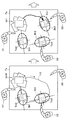
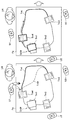
図16および図17は、複数のユーザからいずれかのユーザが検出されなくなった場合に軌道を変更する例を説明するための図である。図16に示すように、ユーザU3がデータ検出部141によって検出されなくなった場合を想定する。かかる場合、図17に示すように、表示制御部147は、軌道Tr1を変更してよい。より具体的には、表示制御部147は、軌道Tr1を決定するときに考慮した基準領域Br3を考慮せずに、基準領域Br1および基準領域Br2のみを考慮した軌道Tr3を決定すればよい。
16 and 17 are diagrams for explaining an example in which the trajectory is changed when any user is no longer detected from a plurality of users. As illustrated in FIG. 16, it is assumed that the user U3 is no longer detected by the
このとき、図16に示すように、表示制御部147は、検出されなくなったユーザU3に対応する基準領域Br3にある表示オブジェクトTm3から、蓄積オブジェクト群Gr1が蓄積された蓄積領域の1つ手前にある表示オブジェクトTm1までを一つずつ先に進めるとよい。一方、表示制御部147は、蓄積領域に蓄積された蓄積オブジェクト群Gr1は、先に進めなくてよい(蓄積領域からユーザU3に対応する表示オブジェクトTm3の一つ手前までに表示オブジェクトがあれば、その表示オブジェクトも同様に先に進めなくてよい)。
At this time, as shown in FIG. 16, the
図17を参照すると、表示オブジェクトTm1〜Tm3が一つずつ先に進められた結果、蓄積領域に蓄積オブジェクト群Gr1#が蓄積されている。また、基準領域Br1には表示オブジェクトTm2が移動し、基準領域Br2には表示オブジェクトTm3が移動している。また、図17を参照すると、基準領域Br1および基準領域Br2が考慮された(基準領域Br3が除外された)軌道Tr3が決定されている。 Referring to FIG. 17, as a result of the display objects Tm1 to Tm3 being advanced one by one, the accumulation object group Gr1 # is accumulated in the accumulation area. The display object Tm2 is moved to the reference area Br1, and the display object Tm3 is moved to the reference area Br2. Referring to FIG. 17, the trajectory Tr3 is determined in consideration of the reference region Br1 and the reference region Br2 (excluding the reference region Br3).
なお、検出されなくなったユーザを除いたユーザ数が表示オブジェクト数より多い場合には、基準領域に表示オブジェクトがないユーザが存在し得る。また、検出されなくなったユーザを除いたユーザ数が表示オブジェクト数を超えた場合には、蓄積領域に蓄積オブジェクトが蓄積され始める。 When the number of users excluding users that are no longer detected is greater than the number of display objects, there may be users who do not have display objects in the reference area. Further, when the number of users excluding users that are no longer detected exceeds the number of display objects, the accumulated objects start to be accumulated in the accumulation area.
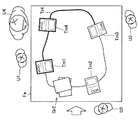
あるいは、表示制御部147は、新たなユーザが検出された場合、軌道を変更してもよい。図18および図19は、新たなユーザが検出された場合に軌道を変更する例を説明するための図である。図18に示すように、ユーザU3が新たにデータ検出部141によって検出された場合を想定する。かかる場合、図19に示すように、表示制御部147は、軌道Tr3を変更してよい。より具体的には、表示制御部147は、軌道Tr3を決定するときに考慮しなかった基準領域Br3を考慮して、基準領域Br1、基準領域Br2および基準領域Br3を考慮した軌道Tr1を決定すればよい。
Alternatively, the
このとき、図18に示すように、表示制御部147は、蓄積オブジェクト群Gr1の先頭の表示オブジェクトを一つ先に進めるとよい(蓄積領域から基準領域Br3の一つ手前までに表示オブジェクトがあれば、その表示オブジェクトも同様に先に進めなくてよい)。一方、表示制御部147は、新たに検出されたユーザU3に対応する基準領域Br3の一つ先の基準領域Br2にある表示オブジェクトTm3から、蓄積領域の一つ手前の基準領域Br1にある表示オブジェクトTm2までは、先に進めなくてよい。
At this time, as shown in FIG. 18, the
図19を参照すると、表示オブジェクトTm1が一つ先に進められた結果、蓄積領域に蓄積オブジェクト群Gr1#から表示オブジェクトTm1が取り出されて、蓄積オブジェクト群Gr1が蓄積されている。また、図19を参照すると、基準領域Br1、基準領域Br2および基準領域Br3が考慮された軌道Tr1が決定されている。 Referring to FIG. 19, as a result of the display object Tm1 being advanced one step further, the display object Tm1 is extracted from the storage object group Gr1 # in the storage area, and the storage object group Gr1 is stored. Referring to FIG. 19, the trajectory Tr1 is determined in consideration of the reference region Br1, the reference region Br2, and the reference region Br3.
なお、新たに検出されたユーザを加えたユーザ数が表示オブジェクト数と等しくなった場合には、蓄積オブジェクト群は消失する。また、新たに検出されたユーザを加えたユーザ数が表示オブジェクト数より多い場合には、基準領域に表示オブジェクトがないユーザが生じ得る。 When the number of users including newly detected users becomes equal to the number of display objects, the accumulated object group disappears. Further, when the number of users including newly detected users is larger than the number of display objects, there may be users who do not have display objects in the reference area.
上記では、軌道を制御する例について説明したが、軌道は表示領域Faに表示されてもよい。図20は、軌道が表示領域Faに表示される例を説明するための図である。図20に示すように、表示制御部147は、軌道Ln1が表示されるように制御してもよい。このようにして軌道Ln1が表示されれば、ユーザU1〜U3は、表示オブジェクトTm1〜Tm3が移動する軌道を把握することが可能となる。例えば、ユーザU1〜U3は、閲覧したい表示オブジェクトがどちらの方向からきて、閲覧し終わった表示オブジェクトがどちらの方向に行くかを把握することが可能となる。
Although the example which controls a track | orbit was demonstrated above, a track | orbit may be displayed on the display area Fa. FIG. 20 is a diagram for explaining an example in which a trajectory is displayed in the display area Fa. As illustrated in FIG. 20, the
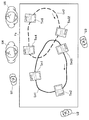
また、複数のグループそれぞれに属する表示オブジェクト群が表示領域Faに表示される場合もある。このとき、複数のグループそれぞれに属する表示オブジェクト群の軌道も同様に表示領域Faに表示されるとよい。図21は、複数のグループそれぞれに属する表示オブジェクト群の軌道が表示領域Faに表示される例を説明するための図である。 In addition, a display object group belonging to each of a plurality of groups may be displayed in the display area Fa. At this time, the trajectories of the display object groups belonging to each of the plurality of groups may be displayed in the display area Fa as well. FIG. 21 is a diagram for explaining an example in which the trajectories of display object groups belonging to each of a plurality of groups are displayed in the display area Fa.
図21に示すように、表示制御部147は、一方のグループに属する表示オブジェクト群(表示オブジェクトTm1、Tm2、Tm31)の軌道Ln1と他方のグループに属する表示オブジェクト群(表示オブジェクトTm32、Tm4、Tm5)の軌道Ln2とを表示させてよい。
As shown in FIG. 21, the
例えば、表示オブジェクトTm31、Tm32は、ユーザU3に対応する基準領域に表示されているが、軌道Ln1および軌道Ln2が表示されることによって、ユーザU3は、表示オブジェクトTm31、Tm32それぞれがどちらのグループに属するのかを把握することが可能となる。 For example, the display objects Tm31 and Tm32 are displayed in the reference area corresponding to the user U3. By displaying the trajectory Ln1 and the trajectory Ln2, the user U3 can display the display objects Tm31 and Tm32 in each group. It becomes possible to grasp whether it belongs.
このとき、表示制御部147は、軌道Ln1および軌道Ln2それぞれの色を異ならせるとよく、軌道Ln1の上を移動する表示オブジェクト群(表示オブジェクトTm1、Tm2、Tm31)の枠には、軌道Ln1の色と同一の色を付し、軌道Ln2の上を移動する表示オブジェクト群(表示オブジェクトTm32、Tm4、Tm5)の枠には、軌道Ln2の色と同一の色を付するとよい。
At this time, the
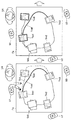
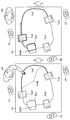
また、軌道が表示されることによって、所定の軌道変更操作(例えば、ドラッグ操作など)に基づいて軌道を変更することが可能である。このとき、閲覧者であったユーザを非閲覧者に変更したり、非閲覧者であったユーザを新たに閲覧者に変更したりすることも可能である。図22および図23は、他のユーザによる軌道変更操作によって1のユーザが閲覧者から非閲覧者に変更される例を説明するための図である。 Moreover, by displaying the trajectory, it is possible to change the trajectory based on a predetermined trajectory changing operation (for example, a drag operation). At this time, it is also possible to change a user who was a viewer to a non-browser, or to change a user who was a non-browser to a viewer. 22 and 23 are diagrams for explaining an example in which one user is changed from a viewer to a non-viewer by a trajectory change operation by another user.
図22に示すように、ユーザU1〜U4が表示オブジェクトTm1〜Tm4の閲覧者であった場合を想定する。このとき、表示オブジェクトTm1〜Tm4の軌道Tr4が表示されている。かかる場合、ユーザU1がユーザU4を閲覧者から非閲覧者に変更しようとし、ユーザU4の近くの軌道Tr4に対してユーザU4から遠ざけるような軌道変更操作を行うと、かかる軌道変更操作が操作検出部143によって検出される。 As shown in FIG. 22, it is assumed that users U1 to U4 are viewers of display objects Tm1 to Tm4. At this time, the trajectory Tr4 of the display objects Tm1 to Tm4 is displayed. In such a case, when the user U1 tries to change the user U4 from the viewer to the non-viewer and performs a trajectory change operation that moves away from the user U4 with respect to the trajectory Tr4 near the user U4, the trajectory change operation is detected. 143 is detected.
操作検出部143によって軌道変更操作が検出されると、表示制御部147は、ユーザU4に対応する基準位置を除外した(ユーザU1〜U3に対応する基準位置を通過する)軌道Tr4#を変更し、軌道Tr4#を表示領域Faに表示させる。このとき、図23に示すように、表示制御部147は、非閲覧者に変更されたユーザU4の閲覧していた表示オブジェクトTm4から、蓄積オブジェクト群Gr2の一つ手前の表示オブジェクトTm1までを、非閲覧者に変更されたユーザU4に対応する基準位置から軌道変更操作を行ったユーザU1に対応する基準位置の方向に進めてよい。
When the trajectory changing operation is detected by the
図22および図23を参照すると、蓄積オブジェクト群Gr2には表示オブジェクトTm1が加えられて、蓄積オブジェクト群Gr2#が形成されている。なお、蓄積オブジェクト群Gr2が存在しない場合には、表示制御部147は、非閲覧者に変更されたユーザU4および軌道変更操作を行ったユーザU1それぞれの基準位置の間に蓄積領域を設け、その蓄積領域に移動してきた表示オブジェクトを蓄積オブジェクトとして蓄積し始めてもよい。
Referring to FIGS. 22 and 23, a storage object group Gr2 # is formed by adding a display object Tm1 to the storage object group Gr2. When the accumulation object group Gr2 does not exist, the
図24および図25は、他のユーザによる軌道変更操作によって1のユーザが非閲覧者から閲覧者に変更される例を説明するための図である。 24 and 25 are diagrams for explaining an example in which one user is changed from a non-viewer to a viewer by a trajectory change operation by another user.
図24に示すように、ユーザU1〜U3が閲覧者であり、ユーザU4が非閲覧者であった場合を想定する。このとき、表示オブジェクトTm1〜Tm4の軌道Tr4#が表示されている。かかる場合、ユーザU1がユーザU4を非閲覧者から閲覧者に変更しようとし、ユーザU4の近くの軌道Tr4に対してユーザU4に近づけるような軌道変更操作を行うと、かかる軌道変更操作が操作検出部143によって検出される。 As shown in FIG. 24, it is assumed that users U1 to U3 are viewers and user U4 is a non-viewer. At this time, the trajectory Tr4 # of the display objects Tm1 to Tm4 is displayed. In this case, when the user U1 tries to change the user U4 from a non-viewer to a viewer and performs a trajectory change operation that brings the user U4 closer to the user U4 with respect to the trajectory Tr4 near the user U4, the trajectory change operation is detected. 143 is detected.
操作検出部143によって軌道変更操作が検出されると、表示制御部147は、ユーザU4に対応する基準位置を考慮した(ユーザU1〜U4に対応する基準位置を通過する)軌道Tr4を変更し、軌道Tr4を表示領域Faに表示させる。このとき、図25に示すように、表示制御部147は、蓄積オブジェクト群Gr2の先頭の表示オブジェクトTm1から、非閲覧者に変更されたユーザU4の一つ手前のユーザU1の閲覧していた表示オブジェクトTm4までを、軌道変更操作を行ったユーザU1に対応する基準位置から非閲覧者に変更されたユーザU4に対応する基準位置の方向に進めてよい。
When the trajectory changing operation is detected by the
図24および図25を参照すると、蓄積オブジェクト群Gr2#からは表示オブジェクトTm1が取り出されて、蓄積オブジェクト群Gr2が形成されている。なお、蓄積オブジェクト群Gr2#が存在しない場合には、表示制御部147は、軌道Tr4に存在する表示オブジェクトTm1〜Tm4すべてを、軌道変更操作を行ったユーザU1に対応する基準位置から非閲覧者に変更されたユーザU4に対応する基準位置の方向に進めてよい。
Referring to FIGS. 24 and 25, the display object Tm1 is extracted from the accumulation object group Gr2 #, and the accumulation object group Gr2 is formed. When the accumulated object group Gr2 # does not exist, the
図26および図27は、ユーザ自身による軌道変更操作によってユーザが非閲覧者から閲覧者に変更される例を説明するための図である。 26 and 27 are diagrams for explaining an example in which the user is changed from a non-viewer to a viewer by a trajectory change operation by the user himself.
図26に示すように、ユーザU1〜U3が閲覧者であり、ユーザU4が非閲覧者であった場合を想定する。このとき、表示オブジェクトTm1〜Tm4の軌道Tr4#が表示されている。かかる場合、ユーザU4が自分自身を非閲覧者から閲覧者に変更しようとし、ユーザU4の近くの軌道Tr4に対してユーザU4に近づけるような軌道変更操作を行うと、かかる軌道変更操作が操作検出部143によって検出される。 As shown in FIG. 26, it is assumed that users U1 to U3 are viewers and user U4 is a non-viewer. At this time, the trajectory Tr4 # of the display objects Tm1 to Tm4 is displayed. In this case, when the user U4 tries to change himself from a non-viewer to a viewer and performs a trajectory change operation that brings the user closer to the user U4 with respect to the trajectory Tr4 near the user U4, the trajectory change operation is detected as an operation. 143 is detected.
操作検出部143によって軌道変更操作が検出されると、表示制御部147は、ユーザU4に対応する基準位置を考慮した(ユーザU1〜U4に対応する基準位置を通過する)軌道Tr4を変更し、軌道Tr4を表示領域Faに表示させる。このとき、図27に示すように、表示制御部147は、蓄積オブジェクト群Gr2の先頭の表示オブジェクトTm1から、非閲覧者に変更されたユーザU4の一つ手前のユーザU1の閲覧していた表示オブジェクトTm4までを、蓄積オブジェクト群Gr2から非閲覧者に変更されたユーザU4に対応する基準位置の方向に進めてよい。
When the trajectory changing operation is detected by the
図26および図27を参照すると、蓄積オブジェクト群Gr2#からは表示オブジェクトTm1が取り出されて、蓄積オブジェクト群Gr2が形成されている。なお、蓄積オブジェクト群Gr2#が存在しない場合には、表示制御部147は、軌道Tr4に存在する表示オブジェクトTm1〜Tm4すべてを、いずれかの方向に進めてよい。
Referring to FIGS. 26 and 27, the display object Tm1 is extracted from the accumulation object group Gr2 # to form the accumulation object group Gr2. When the accumulated object group Gr2 # does not exist, the
上記では、軌道を表示領域Faに表示させる例を説明したが、基準領域が表示領域Faに表示されてもよい。図28は、基準領域が表示領域Faに表示される例を説明するための図である。図28に示すように、表示制御部147は、ユーザU1〜U3それぞれに対応する基準領域Rg1、Rg2、Rg31が表示されるように制御してもよい。このようにして、基準領域Rg1、Rg2、Rg31が表示されることによって、ユーザU1〜U3それぞれは、表示オブジェクトTm1、Tm2、Tm31が表示される位置を把握することが可能となる。
In the above, the example in which the trajectory is displayed in the display area Fa has been described, but the reference area may be displayed in the display area Fa. FIG. 28 is a diagram for explaining an example in which the reference area is displayed in the display area Fa. As illustrated in FIG. 28, the
また、基準領域Rg1、Rg2、Rg31が表示されることによって、ユーザU1〜U3それぞれは、どのユーザが閲覧者であるのかを把握することが可能となる。また、新たに閲覧者となったユーザに対応する基準領域が表示されることによって、新たに閲覧者となったユーザは、自身に対応する基準領域に表示オブジェクトが表示されることに気づくことが可能となる。 Moreover, by displaying the reference regions Rg1, Rg2, and Rg31, each of the users U1 to U3 can grasp which user is a viewer. In addition, by displaying the reference area corresponding to the user who newly becomes the viewer, the user who becomes the new viewer may notice that the display object is displayed in the reference area corresponding to himself / herself. It becomes possible.
また、このようにして基準領域Rg1、Rg2、Rg31が表示されることによって、ユーザU1〜U3は、表示オブジェクトTm1、Tm2、Tm31が表示される位置を変更することが可能となる。図28に示すように、ユーザU3が基準領域Rg31に対する所定の領域移動操作(例えば、ドラッグ操作など)を行った場合、かかる領域移動操作が操作検出部143によって検出される。
Further, by displaying the reference areas Rg1, Rg2, and Rg31 in this way, the users U1 to U3 can change the positions at which the display objects Tm1, Tm2, and Tm31 are displayed. As shown in FIG. 28, when the user U3 performs a predetermined region moving operation (for example, a drag operation) on the reference region Rg31, the
操作検出部143によって領域移動操作が検出されると、表示制御部147は、領域移動操作に従って基準領域Rg31を移動させる。このようにして、基準領域Rg31が移動された場合、移動後の基準領域Rg31#の内部の基準位置に表示オブジェクトTm31の設定位置が表示されるようになる。また、移動後の基準領域Rg31#は、次回以降の表示オブジェクトを表示させる際に反映され得る。
When the region moving operation is detected by the
上記においては、軌道の上に存在する1または複数の表示オブジェクトすべてが移動する例を説明したが、ユーザの状況や表示オブジェクトの性質によっては、表示オブジェクトごとに移動されるタイミングが指定され得るほうが、ユーザにとって閲覧しやすい場合も想定される。そこで、表示オブジェクトを一時的に保留することが可能な保留領域が設けられるのがよい。 In the above, an example in which one or a plurality of display objects existing on the trajectory moves has been described. However, depending on the situation of the user and the nature of the display object, it is more possible to specify the timing of movement for each display object. It is also assumed that the user can easily browse. Therefore, it is preferable to provide a holding area where the display object can be temporarily held.
図29は、表示オブジェクトを一時的に保留することが可能な保留領域が設けられる例を説明するための図である。表示領域Faは、ユーザによる所定の保留操作により一時的に保留可能であり、かつ、ユーザによる所定の取り出し操作により取り出し可能な保留領域を有するのがよい。保留操作は、保留領域の外部から内部に表示オブジェクトをドラッグする操作であってよく、取り出し操作は、保留領域の内部から外部に表示オブジェクトをドラッグする操作であってよい。 FIG. 29 is a diagram for describing an example in which a holding area in which a display object can be temporarily held is provided. The display area Fa may have a holding area that can be temporarily held by a predetermined holding operation by the user and can be taken out by a predetermined taking-out operation by the user. The hold operation may be an operation of dragging a display object from the outside of the hold area to the inside, and the take-out operation may be an operation of dragging the display object from the inside of the hold area to the outside.
図29に示した例では、ユーザU1とユーザU3との間の保留領域に表示オブジェクト群Gr1が保留されている。ユーザU1が閲覧した表示オブジェクトをこの保留領域に保留させ、ユーザU3は閲覧したいタイミングで保留領域から表示オブジェクトを取り出せばよい。同様に、ユーザU3とユーザU2との間の保留領域に表示オブジェクト群Gr3が保留されており、ユーザU2とユーザU1との間の保留領域に表示オブジェクト群Gr2が保留されている。 In the example shown in FIG. 29, the display object group Gr1 is held in the holding area between the user U1 and the user U3. The display object browsed by the user U1 is held in the holding area, and the user U3 may take out the display object from the holding area at a timing when the user U3 wants to browse. Similarly, the display object group Gr3 is held in the holding area between the users U3 and U2, and the display object group Gr2 is held in the holding area between the users U2 and U1.
なお、保留領域に表示オブジェクトがどの程度溜まっているかを容易に把握させるようにしてもよい。例えば、表示制御部147は、保留領域に存在する表示オブジェクトの数に応じて、保留領域の表示を変化させてもよい。例えば、図29に示すように、表示制御部147は、保留領域に存在する表示オブジェクトの数に応じた量の表示オブジェクトを保留領域に積層させてもよい。あるいは、表示制御部147は、保留領域に存在する表示オブジェクトの数を表示させてもよい。
In addition, you may make it grasp | ascertain easily how much display objects have accumulated in the holding | maintenance area | region. For example, the
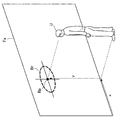
上記した例では、テーブルの天面が表示領域Faとして利用される場合を説明した。しかし、表示領域Faは、テーブルの天面以外であってもよい。図30は、表示領域Faが壁面である場合における基準領域Brおよび基準位置Bpの例を示す図である。図30に示すように、表示制御部147は、表示領域Faの床面に対する接触方向におけるユーザUの位置(立ち位置)とユーザUの背丈とから、ユーザUの視点が検出されると、ユーザの視点を基準位置(x,y)として決定し、基準位置Bpを基準とした基準領域Brを決定してよい。
In the above example, the case where the top surface of the table is used as the display area Fa has been described. However, the display area Fa may be other than the top surface of the table. FIG. 30 is a diagram illustrating an example of the reference region Br and the reference position Bp when the display region Fa is a wall surface. As illustrated in FIG. 30, when the viewpoint of the user U is detected from the position (standing position) of the user U in the direction of contact with the floor surface of the display area Fa and the height of the user U, the
また、壁面が表示領域Faとして利用される場合には、ユーザUを基準とした上下方向と表示領域Faを基準として上下方向とは同じであるため、表示領域Faに対して基準領域Brは傾けなくてよい。図31は、表示領域Faが壁面である場合における軌道の制御を示す図である。図31を参照すると、ユーザU1〜U3それぞれに対応する基準位置Bp1〜Bp3を通過する軌道が示されている。かかる軌道を表示オブジェクトTm1〜tm3が移動されることによって、ユーザU1〜U3は、表示オブジェクトTm1〜Tm3を順次に閲覧することが可能となる。 When the wall surface is used as the display area Fa, the vertical direction with respect to the user U is the same as the vertical direction with respect to the display area Fa, and therefore the reference area Br is inclined with respect to the display area Fa. It is not necessary. FIG. 31 is a diagram illustrating trajectory control when the display area Fa is a wall surface. Referring to FIG. 31, a trajectory passing through the reference positions Bp1 to Bp3 corresponding to the users U1 to U3 is shown. When the display objects Tm1 to tm3 are moved along the trajectory, the users U1 to U3 can sequentially browse the display objects Tm1 to Tm3.
以上、本開示の実施形態に係る情報処理システム10の機能詳細について説明した。
The function details of the
[1.4.ハードウェア構成例]
次に、図32を参照して、本開示の実施形態に係る情報処理システム10のハードウェア構成について説明する。図32は、本開示の実施形態に係る情報処理システム10のハードウェア構成例を示すブロック図である。
[1.4. Hardware configuration example]
Next, a hardware configuration of the
図32に示すように、情報処理システム10は、CPU(Central Processing unit)901、ROM(Read Only Memory)903、およびRAM(Random Access Memory)905を含む。また、情報処理システム10は、ホストバス907、ブリッジ909、外部バス911、インターフェース913、入力装置915、出力装置917、ストレージ装置919、ドライブ921、接続ポート923、通信装置925を含んでもよい。さらに、情報処理システム10は、必要に応じて、撮像装置933、およびセンサ935を含んでもよい。情報処理システム10は、CPU901に代えて、またはこれとともに、DSP(Digital Signal Processor)またはASIC(Application Specific Integrated Circuit)と呼ばれるような処理回路を有してもよい。
As shown in FIG. 32, the
CPU901は、演算処理装置および制御装置として機能し、ROM903、RAM905、ストレージ装置919、またはリムーバブル記録媒体927に記録された各種プログラムに従って、情報処理システム10内の動作全般またはその一部を制御する。ROM903は、CPU901が使用するプログラムや演算パラメータなどを記憶する。RAM905は、CPU901の実行において使用するプログラムや、その実行において適宜変化するパラメータなどを一時的に記憶する。CPU901、ROM903、およびRAM905は、CPUバスなどの内部バスにより構成されるホストバス907により相互に接続されている。さらに、ホストバス907は、ブリッジ909を介して、PCI(Peripheral Component Interconnect/Interface)バスなどの外部バス911に接続されている。
The
入力装置915は、例えば、マウス、キーボード、タッチパネル、ボタン、スイッチおよびレバーなど、ユーザによって操作される装置である。入力装置915は、ユーザの音声を検出するマイクロフォンを含んでもよい。入力装置915は、例えば、赤外線やその他の電波を利用したリモートコントロール装置であってもよいし、情報処理システム10の操作に対応した携帯電話などの外部接続機器929であってもよい。入力装置915は、ユーザが入力した情報に基づいて入力信号を生成してCPU901に出力する入力制御回路を含む。ユーザは、この入力装置915を操作することによって、情報処理システム10に対して各種のデータを入力したり処理動作を指示したりする。また、後述する撮像装置933も、ユーザの手の動き、ユーザの指などを撮像することによって、入力装置として機能し得る。このとき、手の動きや指の向きに応じてポインティング位置が決定されてよい。
The
出力装置917は、取得した情報をユーザに対して視覚的または聴覚的に通知することが可能な装置で構成される。出力装置917は、例えば、LCD(Liquid Crystal Display)、PDP(Plasma Display Panel)、有機EL(Electro−Luminescence)ディスプレイ、プロジェクタなどの表示装置、ホログラムの表示装置、スピーカおよびヘッドホンなどの音声出力装置、ならびにプリンタ装置などであり得る。出力装置917は、情報処理システム10の処理により得られた結果を、テキストまたは画像などの映像として出力したり、音声または音響などの音声として出力したりする。また、出力装置917は、周囲を明るくするためライトなどを含んでもよい。
The
ストレージ装置919は、情報処理システム10の記憶部の一例として構成されたデータ格納用の装置である。ストレージ装置919は、例えば、HDD(Hard Disk Drive)などの磁気記憶部デバイス、半導体記憶デバイス、光記憶デバイス、または光磁気記憶デバイスなどにより構成される。このストレージ装置919は、CPU901が実行するプログラムや各種データ、および外部から取得した各種のデータなどを格納する。
The storage device 919 is a data storage device configured as an example of a storage unit of the
ドライブ921は、磁気ディスク、光ディスク、光磁気ディスク、または半導体メモリなどのリムーバブル記録媒体927のためのリーダライタであり、情報処理システム10に内蔵、あるいは外付けされる。ドライブ921は、装着されているリムーバブル記録媒体927に記録されている情報を読み出して、RAM905に出力する。また、ドライブ921は、装着されているリムーバブル記録媒体927に記録を書き込む。
The
接続ポート923は、機器を情報処理システム10に直接接続するためのポートである。接続ポート923は、例えば、USB(Universal Serial Bus)ポート、IEEE1394ポート、SCSI(Small Computer System Interface)ポートなどであり得る。また、接続ポート923は、RS−232Cポート、光オーディオ端子、HDMI(登録商標)(High−Definition Multimedia Interface)ポートなどであってもよい。接続ポート923に外部接続機器929を接続することで、情報処理システム10と外部接続機器929との間で各種のデータが交換され得る。
The
通信装置925は、例えば、通信ネットワーク931に接続するための通信デバイスなどで構成された通信インターフェースである。通信装置925は、例えば、有線または無線LAN(Local Area Network)、Bluetooth(登録商標)、またはWUSB(Wireless USB)用の通信カードなどであり得る。また、通信装置925は、光通信用のルータ、ADSL(Asymmetric Digital Subscriber Line)用のルータ、または、各種通信用のモデムなどであってもよい。通信装置925は、例えば、インターネットや他の通信機器との間で、TCP/IPなどの所定のプロトコルを用いて信号などを送受信する。また、通信装置925に接続される通信ネットワーク931は、有線または無線によって接続されたネットワークであり、例えば、インターネット、家庭内LAN、赤外線通信、ラジオ波通信または衛星通信などである。
The
撮像装置933は、例えば、CCD(Charge Coupled Device)またはCMOS(Complementary Metal Oxide Semiconductor)などの撮像素子、および撮像素子への被写体像の結像を制御するためのレンズなどの各種の部材を用いて実空間を撮像し、撮像画像を生成する装置である。撮像装置933は、静止画を撮像するものであってもよいし、また動画を撮像するものであってもよい。
The
センサ935は、例えば、加速度センサ、ジャイロセンサ、地磁気センサ、光センサ、音センサなどの各種のセンサである。センサ935は、例えば情報処理システム10の筐体の姿勢など、情報処理システム10自体の状態に関する情報や、情報処理システム10の周辺の明るさや騒音など、情報処理システム10の周辺環境に関する情報を取得する。また、センサ935は、GPS(Global Positioning System)信号を受信して装置の緯度、経度および高度を測定するGPSセンサを含んでもよい。
The
以上、情報処理システム10のハードウェア構成の一例を示した。上記の各構成要素は、汎用的な部材を用いて構成されていてもよいし、各構成要素の機能に特化したハードウェアにより構成されていてもよい。かかる構成は、実施する時々の技術レベルに応じて適宜変更され得る。
Heretofore, an example of the hardware configuration of the
<2.むすび>
以上説明したように、本開示の実施形態によれば、複数のユーザそれぞれの身体に関連する所定の位置に基づいて、表示領域に表示される1または複数の表示オブジェクトの軌道を制御する表示制御部147を備える、情報処理装置140が提供される。かかる構成によれば、複数のユーザが順次に閲覧しやすいように表示オブジェクトを提示することが可能となる。ユーザの身体に関連する所定の位置は、ユーザの身体の位置または身体の所定部位を含んでよい。このとき、ユーザの身体の所定部位の位置には、ユーザの視野またはユーザの注視点が含まれてもよい。
<2. Conclusion>
As described above, according to the embodiment of the present disclosure, the display control that controls the trajectory of one or more display objects displayed in the display area based on a predetermined position related to the body of each of the plurality of users. An
以上、添付図面を参照しながら本開示の好適な実施形態について詳細に説明したが、本開示の技術的範囲はかかる例に限定されない。本開示の技術分野における通常の知識を有する者であれば、特許請求の範囲に記載された技術的思想の範疇内において、各種の変更例または修正例に想到し得ることは明らかであり、これらについても、当然に本開示の技術的範囲に属するものと了解される。 The preferred embodiments of the present disclosure have been described in detail above with reference to the accompanying drawings, but the technical scope of the present disclosure is not limited to such examples. It is obvious that a person having ordinary knowledge in the technical field of the present disclosure can come up with various changes or modifications within the scope of the technical idea described in the claims. Of course, it is understood that it belongs to the technical scope of the present disclosure.
また、コンピュータに内蔵されるCPU、ROMおよびRAMなどのハードウェアを、上記した情報処理装置140が有する機能と同等の機能を発揮させるためのプログラムも作成可能である。また、該プログラムを記録した、コンピュータに読み取り可能な記録媒体も提供され得る。
In addition, it is possible to create a program for causing hardware such as a CPU, ROM, and RAM incorporated in a computer to exhibit functions equivalent to the functions of the
また、表示制御部147は、表示部130に表示内容を表示させるための表示制御情報を生成し、生成した表示制御情報を表示部130に出力することで、当該表示内容が表示部130に表示されるように表示部130を制御することが可能である。かかる表示制御情報の内容はシステム構成にあわせて適宜変更されてよい。
In addition, the
具体的な一例として、情報処理装置140を実現するためのプログラムは、ウェブアプリケーションであってもよい。かかる場合、表示制御情報は、HTML(HyperText Markup Language)、SGML(Standard Generalized Markup Language)、XML(Extensible Markup Language)などのマークアップ言語により実現されてもよい。
As a specific example, the program for realizing the
なお、上述した情報処理システム10の動作が実現されれば、各構成の位置は特に限定されない。具体的な一例として、センサ部110と操作入力部115と表示部130と情報処理装置140とは、ネットワークを介して接続された互いに異なる装置に設けられてもよい。この場合には、情報処理装置140が、例えば、ウェブサーバやクラウドサーバのようなサーバに相当し、センサ部110と操作入力部115と表示部130とが当該サーバにネットワークを介して接続されたクライアントに相当し得る。
Note that the position of each component is not particularly limited as long as the operation of the
また、情報処理装置140が有するすべての構成要素が同一の装置に収まっていなくてもよい。例えば、データ検出部141と操作検出部143と表示制御部147とのうち、一部は情報処理装置140とは異なる装置に存在していてもよい。例えば、データ検出部141は、操作検出部143と表示制御部147とを備える情報処理装置140とは異なるサーバに存在していてもよい。
In addition, all the components included in the
また、本明細書に記載された効果は、あくまで説明的または例示的なものであって限定的ではない。つまり、本開示に係る技術は、上記の効果とともに、または上記の効果に代えて、本明細書の記載から当業者には明らかな他の効果を奏し得る。 Further, the effects described in the present specification are merely illustrative or exemplary and are not limited. That is, the technology according to the present disclosure can exhibit other effects that are apparent to those skilled in the art from the description of the present specification in addition to or instead of the above effects.
なお、以下のような構成も本開示の技術的範囲に属する。
(1)
表示領域を視認するユーザである第一のユーザの身体に関連する第一の位置と第二のユーザの身体に関連する第二の位置とに基づいて、前記表示領域に表示される1または複数の表示オブジェクトの軌道を制御する表示制御部を備える、
情報処理装置。
(2)
前記表示制御部は、複数の表示オブジェクトの軌道を制御する、
前記(1)に記載の情報処理装置。
(3)
前記表示制御部は、前記ユーザに紐付けられた属性情報に基づいて、前記軌道を制御する、
前記(1)または(2)に記載の情報処理装置。
(4)
前記表示制御部は、前記属性情報に基づいて関連付けられるグループごとに前記軌道を設定する、
前記(3)に記載の情報処理装置。
(5)
前記表示制御部は、前記属性情報ごとに前記軌道を設定する、
前記(4)に記載の情報処理装置。
(6)
前記表示制御部は、障害物の位置に基づいて前記軌道を制御する、
前記(1)〜(5)のいずれか一項に記載の情報処理装置。
(7)
前記表示制御部は、前記軌道が前記障害物に重ならないように前記軌道を制御する、
前記(6)に記載の情報処理装置。
(8)
前記障害物は、前記表示領域に表示される仮想的なオブジェクトまたは実空間に存在する物体を含む、
前記(6)または(7)に記載の情報処理装置。
(9)
前記第一の位置は、前記第一のユーザの身体の位置または当該身体の所定部位の位置を含み、前記第二の位置は、前記第二のユーザの身体の位置または当該身体の所定部位の位置を含む、
前記(1)〜(8)のいずれか一項に記載の情報処理装置。
(10)
前記表示制御部は、前記第一のユーザおよび前記第二のユーザそれぞれの身体の向きまたは身体の所定部位の向きに基づいて、前記軌道を制御する、
前記(1)〜(9)のいずれか一項に記載の情報処理装置。
(11)
前記表示制御部は、前記第一の位置および前記第二の位置に応じて規定される前記第一のユーザおよび前記第二のユーザそれぞれに対応する基準領域の内部を、前記1または複数の表示オブジェクトそれぞれの所定の設定位置が通過するように、前記軌道を制御する、
前記(1)〜(10)のいずれか一項に記載の情報処理装置。
(12)
前記表示制御部は、前記第一のユーザおよび前記第二のユーザそれぞれに対応する前記基準領域と他の軌道とが交差しないように前記他の軌道を制御する、
前記(11)に記載の情報処理装置。
(13)
前記表示制御部は、基準位置が他の基準領域に重なる場合、前記基準位置が前記他の基準領域に含まれないように前記基準位置を制御する、
前記(11)に記載の情報処理装置。
(14)
前記表示制御部は、前記軌道を示す表示が表示されるように制御する、
前記(1)〜(13)のいずれか一項に記載の情報処理装置。
(15)
前記表示制御部は、前記第一のユーザおよび前記第二のユーザそれぞれに対応する前記基準領域または前記基準位置が表示されるように制御する、
前記(13)に記載の情報処理装置。
(16)
前記表示制御部は、前記第一の位置および前記第二の位置のうちいずれかの位置が変化した場合、所定の軌道変更操作が検出された場合、前記第一のユーザおよび前記第二のユーザのいずれかが検出されなくなった場合、または、前記第一のユーザおよび前記第二のユーザとは異なる第三のユーザが検出された場合に、前記軌道を変更する、
前記(1)〜(15)のいずれか一項に記載の情報処理装置。
(17)
前記表示制御部は、前記表示オブジェクトが移動しているか否かに応じて、前記表示オブジェクトの表示態様を異ならせる、
前記(1)〜(16)のいずれか一項に記載の情報処理装置。
(18)
前記表示制御部は、前記1または複数の表示オブジェクトのうち、少なくとも1以上の表示オブジェクトを所定の蓄積領域に表示させる、
前記(1)〜(17)のいずれか一項に記載の情報処理装置。
(19)
プロセッサにより、表示領域を視認するユーザである第一のユーザの身体に関連する第一の位置と第二のユーザの身体に関連する第二の位置とに基づいて、前記表示領域に表示される1または複数の表示オブジェクトの軌道を制御することを含む、
情報処理方法。
(20)
コンピュータを、
表示領域を視認するユーザである第一のユーザの身体に関連する第一の位置と第二のユーザの身体に関連する第二の位置とに基づいて、前記表示領域に表示される1または複数の表示オブジェクトの軌道を制御する表示制御部を備える、
情報処理装置として機能させるためのプログラム。
The following configurations also belong to the technical scope of the present disclosure.
(1)
One or more displayed in the display area based on a first position related to the body of the first user who is the user viewing the display area and a second position related to the body of the second user A display control unit for controlling the trajectory of the display object of
Information processing device.
(2)
The display control unit controls trajectories of a plurality of display objects.
The information processing apparatus according to (1).
(3)
The display control unit controls the trajectory based on attribute information associated with the user.
The information processing apparatus according to (1) or (2).
(4)
The display control unit sets the trajectory for each group associated based on the attribute information.
The information processing apparatus according to (3).
(5)
The display control unit sets the trajectory for each attribute information.
The information processing apparatus according to (4).
(6)
The display control unit controls the trajectory based on an obstacle position;
The information processing apparatus according to any one of (1) to (5).
(7)
The display control unit controls the trajectory so that the trajectory does not overlap the obstacle.
The information processing apparatus according to (6).
(8)
The obstacle includes a virtual object displayed in the display area or an object existing in real space,
The information processing apparatus according to (6) or (7).
(9)
The first position includes a position of the body of the first user or a position of a predetermined part of the body, and the second position is a position of the body of the second user or a predetermined part of the body. Including location,
The information processing apparatus according to any one of (1) to (8).
(10)
The display control unit controls the trajectory based on the body orientation of each of the first user and the second user or the orientation of a predetermined part of the body,
The information processing apparatus according to any one of (1) to (9).
(11)
The display control unit displays the inside of a reference area corresponding to each of the first user and the second user defined according to the first position and the second position, with the one or more displays. Controlling the trajectory so that a predetermined set position of each object passes;
The information processing apparatus according to any one of (1) to (10).
(12)
The display control unit controls the other trajectory so that the reference region corresponding to each of the first user and the second user does not intersect with another trajectory.
The information processing apparatus according to (11).
(13)
The display control unit controls the reference position so that the reference position is not included in the other reference area when the reference position overlaps with another reference area.
The information processing apparatus according to (11).
(14)
The display control unit controls the display indicating the trajectory to be displayed.
The information processing apparatus according to any one of (1) to (13).
(15)
The display control unit controls the reference region or the reference position corresponding to the first user and the second user to be displayed,
The information processing apparatus according to (13).
(16)
The display control unit is configured such that when one of the first position and the second position changes, when a predetermined trajectory change operation is detected, the first user and the second user If any of the above is not detected, or if a third user different from the first user and the second user is detected, the trajectory is changed.
The information processing apparatus according to any one of (1) to (15).
(17)
The display control unit varies a display mode of the display object according to whether or not the display object is moving.
The information processing apparatus according to any one of (1) to (16).
(18)
The display control unit displays at least one or more display objects among the one or more display objects in a predetermined accumulation area;
The information processing apparatus according to any one of (1) to (17).
(19)
Based on the first position related to the body of the first user who is the user viewing the display area and the second position related to the body of the second user, the processor displays the display area on the display area. Controlling the trajectory of one or more display objects,
Information processing method.
(20)
Computer
One or more displayed in the display area based on a first position related to the body of the first user who is the user viewing the display area and a second position related to the body of the second user A display control unit for controlling the trajectory of the display object of
A program for functioning as an information processing apparatus.
10 情報処理システム
110 センサ部
115 操作入力部
130 表示部
140 情報処理装置(制御部)
141 データ検出部
143 操作検出部
147 表示制御部
Bp(Bp1〜Bp6) 基準位置(視点)
Br(Br1〜Br6) 基準領域
Bs(Bs1、Bs2) 障害物
Fa 表示領域
Tm(Tm1〜Tm4) 表示オブジェクト
Tr(Tr1〜Tr4) 軌道
U(U1〜U6) ユーザ
DESCRIPTION OF
141
Br (Br1-Br6) Reference area Bs (Bs1, Bs2) Obstacle Fa Display area Tm (Tm1-Tm4) Display object Tr (Tr1-Tr4) Orbit U (U1-U6) User
Claims (20)
情報処理装置。 One or more displayed in the display area based on a first position related to the body of the first user who is the user viewing the display area and a second position related to the body of the second user A display control unit for controlling the trajectory of the display object of
Information processing device.
請求項1に記載の情報処理装置。 The display control unit controls trajectories of a plurality of display objects.
The information processing apparatus according to claim 1.
請求項1に記載の情報処理装置。 The display control unit controls the trajectory based on attribute information associated with the user.
The information processing apparatus according to claim 1.
請求項3に記載の情報処理装置。 The display control unit sets the trajectory for each group associated based on the attribute information.
The information processing apparatus according to claim 3.
請求項4に記載の情報処理装置。 The display control unit sets the trajectory for each attribute information.
The information processing apparatus according to claim 4.
請求項1に記載の情報処理装置。 The display control unit controls the trajectory based on an obstacle position;
The information processing apparatus according to claim 1.
請求項6に記載の情報処理装置。 The display control unit controls the trajectory so that the trajectory does not overlap the obstacle.
The information processing apparatus according to claim 6.
請求項6に記載の情報処理装置。 The obstacle includes a virtual object displayed in the display area or an object existing in real space,
The information processing apparatus according to claim 6.
請求項1に記載の情報処理装置。 The first position includes a position of the body of the first user or a position of a predetermined part of the body, and the second position is a position of the body of the second user or a predetermined part of the body. Including location,
The information processing apparatus according to claim 1.
請求項1に記載の情報処理装置。 The display control unit controls the trajectory based on the body orientation of each of the first user and the second user or the orientation of a predetermined part of the body,
The information processing apparatus according to claim 1.
請求項1に記載の情報処理装置。 The display control unit displays the inside of a reference area corresponding to each of the first user and the second user defined according to the first position and the second position, with the one or more displays. Controlling the trajectory so that a predetermined set position of each object passes;
The information processing apparatus according to claim 1.
請求項11に記載の情報処理装置。 The display control unit controls the other trajectory so that the reference region corresponding to each of the first user and the second user does not intersect with another trajectory.
The information processing apparatus according to claim 11.
請求項11に記載の情報処理装置。 The display control unit controls the reference position so that the reference position is not included in the other reference area when the reference position overlaps with another reference area.
The information processing apparatus according to claim 11.
請求項1に記載の情報処理装置。 The display control unit controls the display indicating the trajectory to be displayed.
The information processing apparatus according to claim 1.
請求項13に記載の情報処理装置。 The display control unit controls the reference region or the reference position corresponding to the first user and the second user to be displayed,
The information processing apparatus according to claim 13.
請求項1に記載の情報処理装置。 The display control unit is configured such that when one of the first position and the second position changes, when a predetermined trajectory change operation is detected, the first user and the second user If any of the above is not detected, or if a third user different from the first user and the second user is detected, the trajectory is changed.
The information processing apparatus according to claim 1.
請求項1に記載の情報処理装置。 The display control unit varies a display mode of the display object according to whether or not the display object is moving.
The information processing apparatus according to claim 1.
請求項1に記載の情報処理装置。 The display control unit displays at least one or more display objects among the one or more display objects in a predetermined accumulation area;
The information processing apparatus according to claim 1.
情報処理方法。 Based on the first position related to the body of the first user who is the user viewing the display area and the second position related to the body of the second user, the processor displays the display area on the display area. Controlling the trajectory of one or more display objects,
Information processing method.
表示領域を視認するユーザである第一のユーザの身体に関連する第一の位置と第二のユーザの身体に関連する第二の位置とに基づいて、前記表示領域に表示される1または複数の表示オブジェクトの軌道を制御する表示制御部を備える、
情報処理装置として機能させるためのプログラム。
Computer
One or more displayed in the display area based on a first position related to the body of the first user who is the user viewing the display area and a second position related to the body of the second user A display control unit for controlling the trajectory of the display object of
A program for functioning as an information processing apparatus.
Priority Applications (2)
| Application Number | Priority Date | Filing Date | Title |
|---|---|---|---|
| JP2015074086A JP2016194792A (en) | 2015-03-31 | 2015-03-31 | Information processing apparatus, information processing method, and program |
| PCT/JP2015/086008 WO2016157654A1 (en) | 2015-03-31 | 2015-12-24 | Information processing device, information processing method, and program |
Applications Claiming Priority (1)
| Application Number | Priority Date | Filing Date | Title |
|---|---|---|---|
| JP2015074086A JP2016194792A (en) | 2015-03-31 | 2015-03-31 | Information processing apparatus, information processing method, and program |
Publications (1)
| Publication Number | Publication Date |
|---|---|
| JP2016194792A true JP2016194792A (en) | 2016-11-17 |
Family
ID=57006887
Family Applications (1)
| Application Number | Title | Priority Date | Filing Date |
|---|---|---|---|
| JP2015074086A Pending JP2016194792A (en) | 2015-03-31 | 2015-03-31 | Information processing apparatus, information processing method, and program |
Country Status (2)
| Country | Link |
|---|---|
| JP (1) | JP2016194792A (en) |
| WO (1) | WO2016157654A1 (en) |
Cited By (3)
| Publication number | Priority date | Publication date | Assignee | Title |
|---|---|---|---|---|
| JP2019086911A (en) * | 2017-11-02 | 2019-06-06 | 三菱自動車工業株式会社 | In-vehicle user interface device |
| US10474020B2 (en) | 2017-06-02 | 2019-11-12 | Seiko Epson Corporation | Display apparatus and method for controlling display apparatus to display an image with an orientation based on a user's position |
| KR20220137930A (en) | 2020-02-18 | 2022-10-12 | 스미또모 가가꾸 가부시키가이샤 | optical laminate |
Family Cites Families (2)
| Publication number | Priority date | Publication date | Assignee | Title |
|---|---|---|---|---|
| US8464160B2 (en) * | 2008-09-29 | 2013-06-11 | Panasonic Corporation | User interface device, user interface method, and recording medium |
| WO2010035491A1 (en) * | 2008-09-29 | 2010-04-01 | パナソニック株式会社 | User interface device, user interface method, and recording medium |
-
2015
- 2015-03-31 JP JP2015074086A patent/JP2016194792A/en active Pending
- 2015-12-24 WO PCT/JP2015/086008 patent/WO2016157654A1/en not_active Ceased
Cited By (3)
| Publication number | Priority date | Publication date | Assignee | Title |
|---|---|---|---|---|
| US10474020B2 (en) | 2017-06-02 | 2019-11-12 | Seiko Epson Corporation | Display apparatus and method for controlling display apparatus to display an image with an orientation based on a user's position |
| JP2019086911A (en) * | 2017-11-02 | 2019-06-06 | 三菱自動車工業株式会社 | In-vehicle user interface device |
| KR20220137930A (en) | 2020-02-18 | 2022-10-12 | 스미또모 가가꾸 가부시키가이샤 | optical laminate |
Also Published As
| Publication number | Publication date |
|---|---|
| WO2016157654A1 (en) | 2016-10-06 |
Similar Documents
| Publication | Publication Date | Title |
|---|---|---|
| US11969666B2 (en) | Head-mounted display for navigating virtual and augmented reality | |
| US9782684B2 (en) | Remote controlled vehicle with a handheld display device | |
| US9563202B1 (en) | Remote controlled vehicle with a head-mounted display apparatus | |
| CN113534951B (en) | Virtual anchoring system and method for augmented reality | |
| US9672588B1 (en) | Approaches for customizing map views | |
| JP7099444B2 (en) | Information processing equipment, information processing methods, and programs | |
| JP6459972B2 (en) | Display control apparatus, display control method, and program | |
| US20180160194A1 (en) | Methods, systems, and media for enhancing two-dimensional video content items with spherical video content | |
| US20150121225A1 (en) | Method and System for Navigating Video to an Instant Time | |
| JP6443340B2 (en) | Information processing apparatus, information processing method, and program | |
| JP2013145468A (en) | Information processing apparatus and information processing method, and computer program | |
| JPWO2013105443A1 (en) | Information processing apparatus, information processing method, and computer program | |
| JP2013145463A (en) | Information processing apparatus and information processing method, and computer program | |
| JP6337907B2 (en) | Display control apparatus, display control method, and program | |
| EP3528024B1 (en) | Information processing device, information processing method, and program | |
| JP2014044735A (en) | Information processing apparatus, information processing method, and computer program | |
| JPWO2017030193A1 (en) | Information processing apparatus, information processing method, and program | |
| JP6149862B2 (en) | Display control device, display control system, and display control method | |
| WO2016157654A1 (en) | Information processing device, information processing method, and program | |
| JP6093074B2 (en) | Information processing apparatus, information processing method, and computer program | |
| JP2015111371A (en) | Information processing apparatus, information processing method, and program | |
| CN116540905A (en) | Virtual reality equipment and focus operation method | |
| CN111258482A (en) | Information sharing method, head-mounted device, and medium | |
| CN118447193A (en) | Virtual content display method, system, device, medium and computer product | |
| JP2006048415A (en) | Image synthesizer |