JP2017004380A - Information processing system, information processing apparatus, information processing method, and information processing program - Google Patents

Information processing system, information processing apparatus, information processing method, and information processing program Download PDF

Info

Publication number
JP2017004380A
JP2017004380A JP2015119583A JP2015119583A JP2017004380A JP 2017004380 A JP2017004380 A JP 2017004380A JP 2015119583 A JP2015119583 A JP 2015119583A JP 2015119583 A JP2015119583 A JP 2015119583A JP 2017004380 A JP2017004380 A JP 2017004380A
Authority
JP
Japan
Prior art keywords
information
image
campaign
unit
search
Prior art date
Legal status (The legal status is an assumption and is not a legal conclusion. Google has not performed a legal analysis and makes no representation as to the accuracy of the status listed.)
Pending
Application number
JP2015119583A
Other languages
Japanese (ja)
Inventor
伊藤 篤
Atsushi Ito
篤 伊藤
脇田 由喜
Yoshiki Wakita
由喜 脇田
岸 秀信
Hidenobu Kishi
秀信 岸
邦和 岡嶋
Kunikazu Okajima
邦和 岡嶋
Current Assignee (The listed assignees may be inaccurate. Google has not performed a legal analysis and makes no representation or warranty as to the accuracy of the list.)
Ricoh Co Ltd
Original Assignee
Ricoh Co Ltd
Priority date (The priority date is an assumption and is not a legal conclusion. Google has not performed a legal analysis and makes no representation as to the accuracy of the date listed.)
Filing date
Publication date
Application filed by Ricoh Co Ltd filed Critical Ricoh Co Ltd
Priority to JP2015119583A priority Critical patent/JP2017004380A/en
Priority to US15/177,666 priority patent/US20160364415A1/en
Publication of JP2017004380A publication Critical patent/JP2017004380A/en
Pending legal-status Critical Current

Links

Images

Classifications

    • GPHYSICS
    • G06COMPUTING OR CALCULATING; COUNTING
    • G06FELECTRIC DIGITAL DATA PROCESSING
    • G06F16/00Information retrieval; Database structures therefor; File system structures therefor
    • G06F16/50Information retrieval; Database structures therefor; File system structures therefor of still image data
    • G06F16/58Retrieval characterised by using metadata, e.g. metadata not derived from the content or metadata generated manually
    • G06F16/5866Retrieval characterised by using metadata, e.g. metadata not derived from the content or metadata generated manually using information manually generated, e.g. tags, keywords, comments, manually generated location and time information
    • GPHYSICS
    • G06COMPUTING OR CALCULATING; COUNTING
    • G06FELECTRIC DIGITAL DATA PROCESSING
    • G06F16/00Information retrieval; Database structures therefor; File system structures therefor
    • G06F16/50Information retrieval; Database structures therefor; File system structures therefor of still image data
    • G06F16/53Querying
    • G06F16/532Query formulation, e.g. graphical querying
    • GPHYSICS
    • G06COMPUTING OR CALCULATING; COUNTING
    • G06FELECTRIC DIGITAL DATA PROCESSING
    • G06F18/00Pattern recognition
    • G06F18/40Software arrangements specially adapted for pattern recognition, e.g. user interfaces or toolboxes therefor

Landscapes

  • Engineering & Computer Science (AREA)
  • Theoretical Computer Science (AREA)
  • Physics & Mathematics (AREA)
  • General Physics & Mathematics (AREA)
  • General Engineering & Computer Science (AREA)
  • Data Mining & Analysis (AREA)
  • Computer Vision & Pattern Recognition (AREA)
  • Databases & Information Systems (AREA)
  • Artificial Intelligence (AREA)
  • Evolutionary Computation (AREA)
  • Evolutionary Biology (AREA)
  • Bioinformatics & Computational Biology (AREA)
  • Bioinformatics & Cheminformatics (AREA)
  • Life Sciences & Earth Sciences (AREA)
  • Mathematical Physics (AREA)
  • Human Computer Interaction (AREA)
  • Library & Information Science (AREA)
  • Information Retrieval, Db Structures And Fs Structures Therefor (AREA)
  • Management, Administration, Business Operations System, And Electronic Commerce (AREA)

Abstract

【課題】画像検索で取得された連携情報に関連する連携情報を容易に取得可能とする。【解決手段】情報処理システムは、端末装置と、画像と連携情報とが関連付けられて登録される登録部から検索対象画像に類似する画像を検索し、検索された画像に関連付けられた連携情報を端末装置に送信する画像検索装置と、連携情報を登録部に登録する情報処理装置とを含む。キャンペーン情報DB16は、画像と連携情報とを含むキャンペーン情報のうち第1および第2のキャンペーン情報が関連付けて登録される。履歴DB17は、端末装置から送信された検索対象画像に基づき検索した画像に対応するキャンペーン情報と、端末装置の識別情報とを関連付けた履歴情報を記憶する。履歴情報の識別情報に関連付けられた第1のキャンペーン情報に関連付けられて登録される第2のキャンペーン情報に含まれる連携情報を、端末装置に対して提示する。【選択図】図2It is possible to easily obtain cooperation information related to cooperation information acquired by image search. An information processing system searches an image similar to a search target image from a terminal device and a registration unit that registers and associates an image and link information, and stores link information associated with the searched image. An image search device that transmits to a terminal device and an information processing device that registers cooperation information in a registration unit are included. The campaign information DB 16 is registered in association with the first and second campaign information among the campaign information including the image and the linkage information. The history DB 17 stores history information in which campaign information corresponding to the image searched based on the search target image transmitted from the terminal device is associated with the identification information of the terminal device. The link information included in the second campaign information registered in association with the first campaign information associated with the identification information of the history information is presented to the terminal device. [Selection] Figure 2

Description

本発明は、情報処理システム、情報処理装置、情報処理方法および情報処理プログラムに関する。   The present invention relates to an information processing system, an information processing apparatus, an information processing method, and an information processing program.

例えばカメラで撮像して得た撮像画像から特徴点を抽出して、予め登録された画像群から類似した特徴点を多く持つ画像を検索する画像検索技術が知られている。この画像検索技術を利用して、特定の写真や印刷物の画像を様々な電子データと関連付けてデータベースに登録し、これら写真や印刷物を撮像した撮像画像を用いてこのデータベースから類似画像を検索して、類似画像に関連付けられた連携情報を提示する画像検索システムが知られている(例えば特許文献1:特開2014−010723号公報)。   For example, an image search technique is known in which feature points are extracted from a captured image obtained by imaging with a camera, and an image having many similar feature points is searched from a previously registered image group. Using this image search technology, images of specific photos and printed materials are registered in a database in association with various electronic data, and similar images are searched from this database using captured images obtained by capturing these photos and printed materials. An image search system that presents cooperative information associated with similar images is known (for example, Japanese Patent Application Laid-Open No. 2014-010723).

撮像画像に基づき提示された連携情報に関連する、さらに他の連携情報が存在する場合がある。従来技術による画像検索システムでは、この他の連携情報を、画像検索を行ったユーザが知ることが困難であるという問題点があった。一例として、この他の連携情報が、撮像画像に基づき提示された連携情報の公開時期よりも時間的に後に公開されるような場合、従来技術による画像検索システムでは、ユーザは、この他の連携情報を知ることが困難であると考えられる。   There may be further other cooperation information related to the cooperation information presented based on the captured image. In the image search system according to the prior art, there is a problem that it is difficult for the user who has performed the image search to know other cooperation information. As an example, in a case where the other cooperation information is disclosed in time after the publication time of the cooperation information presented based on the captured image, in the conventional image search system, the user It is considered difficult to know information.

撮像画像に基づき提示される連携情報として、WebサイトのURL(Uniform Resource Locator)を用いることができる。この場合、当該Webサイトにユーザ情報の登録手段を設けておき、登録されたユーザ情報に基づき、Webサイトからユーザに対して関連イベントの通知を行うことが考えられる。しかしながら、この場合、ユーザは、登録手段によりユーザ名やパスワードといった、ユーザを識別するための識別情報を登録する必要があり、ユーザの負担になってしまうおそれがある。   A URL (Uniform Resource Locator) of a website can be used as cooperation information presented based on a captured image. In this case, it is conceivable that user information registration means is provided on the Web site, and related events are notified from the Web site to the user based on the registered user information. However, in this case, the user needs to register identification information for identifying the user, such as a user name and a password, by the registration unit, which may be a burden on the user.

本発明は、上記に鑑みてなされたものであって、画像検索で取得された連携情報に関連する連携情報を容易に取得可能とすることを目的とする。   The present invention has been made in view of the above, and an object of the present invention is to enable easy acquisition of cooperation information related to cooperation information acquired by image search.

上述した課題を解決し、目的を達成するために、本発明は、端末装置と、画像と連携情報とが関連付けられて登録される画像情報登録部から、検索対象画像に類似する画像を検索する検索部と、検索された画像に関連付けられた連携情報を端末装置に送信する送信部とを備える画像検索装置と、連携情報の画像情報登録部への登録を制御する情報処理装置とを含む情報処理システムであって、互いに関連付けられた画像と連携情報とを含むキャンペーン情報のうち第1のキャンペーン情報と第2のキャンペーン情報とを関連付けて登録するキャンペーン情報登録部と、端末装置から送信された検索対象画像に基づき検索部が検索した画像に対応するキャンペーン情報と、端末装置を識別する識別情報とを関連付けて、履歴情報として記憶する記憶部と、履歴情報の識別情報に関連付けられた第1のキャンペーン情報に関連付けられてキャンペーン情報登録部に登録される第2のキャンペーン情報に含まれる連携情報を端末装置に対して提示する提示部とを備える。   In order to solve the above-described problems and achieve the object, the present invention searches for an image similar to a search target image from a terminal device and an image information registration unit that registers and associates an image and linkage information. Information that includes a search unit, an image search device that includes a transmission unit that transmits cooperation information associated with the searched image to the terminal device, and an information processing device that controls registration of the cooperation information in the image information registration unit A campaign information registration unit, which is a processing system for registering the first campaign information and the second campaign information in association with each other among campaign information including images and linkage information associated with each other, and transmitted from the terminal device The campaign information corresponding to the image searched by the search unit based on the search target image is associated with identification information for identifying the terminal device, and stored as history information. And a presentation unit for presenting, to the terminal device, cooperation information included in the second campaign information associated with the first campaign information associated with the identification information of the history information and registered in the campaign information registration unit With.

本発明によれば、画像検索で取得された連携情報に関連する連携情報を容易に取得可能となるという効果を奏する。   According to the present invention, there is an effect that it is possible to easily acquire link information related to link information acquired by image search.

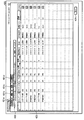
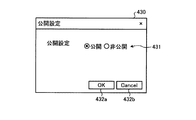
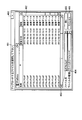
図1は、実施形態に適用可能な画像検索システムの一例の構成を概略的に示す図である。FIG. 1 is a diagram schematically illustrating a configuration of an example of an image search system applicable to the embodiment. 図2は、実施形態に係る検索サーバの機能を説明するための一例の機能ブロック図である。FIG. 2 is an exemplary functional block diagram for explaining functions of the search server according to the embodiment. 図3は、実施形態に係る、対象領域を示す情報が記述されるXMLコードの一例を示す図である。FIG. 3 is a diagram illustrating an example of an XML code in which information indicating a target area is described according to the embodiment. 図4は、実施形態に係るキャンペーンの構造の例を概略的に示す図である。FIG. 4 is a diagram schematically illustrating an example of a campaign structure according to the embodiment. 図5は、実施形態に係るキャンペーン情報DBに格納されるキャンペーン情報の例を示す図である。FIG. 5 is a diagram illustrating an example of campaign information stored in the campaign information DB according to the embodiment. 図6は、実施形態に係るキャンペーン情報DBに格納されるキャンペーン情報の別の例を示す図である。FIG. 6 is a diagram illustrating another example of campaign information stored in the campaign information DB according to the embodiment. 図7は、実施形態に係る履歴DBに格納される履歴情報の例を示す図である。FIG. 7 is a diagram illustrating an example of history information stored in the history DB according to the embodiment. 図8は、実施形態に係る情報処理システムの一例の構成を概略的に示す図である。FIG. 8 is a diagram schematically illustrating a configuration of an example of an information processing system according to the embodiment. 図9は、実施形態に適用可能な登録端末のハードウェアの一例の構成を示すブロック図である。FIG. 9 is a block diagram illustrating a configuration example of hardware of a registration terminal applicable to the embodiment. 図10は、実施形態に係る検索サーバに適用可能なハードウェアの一例の構成を示すブロック図である。FIG. 10 is a block diagram illustrating a configuration example of hardware applicable to the search server according to the embodiment. 図11は、実施形態に適用可能な検索端末のハードウェアの一例の構成を示すブロック図である。FIG. 11 is a block diagram illustrating a configuration example of hardware of a search terminal applicable to the embodiment. 図12は、実施形態に係る登録端末の機能を説明するための一例の機能ブロック図である。FIG. 12 is an exemplary functional block diagram for explaining functions of the registration terminal according to the embodiment. 図13は、実施形態に適用可能な検索端末の機能を説明するための一例の機能ブロック図である。FIG. 13 is a functional block diagram illustrating an example of functions of a search terminal applicable to the embodiment. 図14は、実施形態に係る、登録ツールによって実行される画像登録処理の一例を示すフローチャートである。FIG. 14 is a flowchart illustrating an example of image registration processing executed by the registration tool according to the embodiment. 図15は、実施形態に適用可能なログイン画面の例を示す図である。FIG. 15 is a diagram illustrating an example of a login screen applicable to the embodiment. 図16は、実施形態に適用可能なメニュー画面の例を示す図である。FIG. 16 is a diagram illustrating an example of a menu screen applicable to the embodiment. 図17は、実施形態に適用可能な登録情報一覧画面の例を示す図である。FIG. 17 is a diagram illustrating an example of a registration information list screen applicable to the embodiment. 図18は、実施形態に適用可能な公開設定画面の例を示す図である。FIG. 18 is a diagram illustrating an example of a public setting screen applicable to the embodiment. 図19は、実施形態に適用可能なキャンペーン登録画面の例を示す図である。FIG. 19 is a diagram illustrating an example of a campaign registration screen applicable to the embodiment. 図20は、実施形態に係る編集画面の例を示す図である。FIG. 20 is a diagram illustrating an example of an editing screen according to the embodiment. 図21は、実施形態に適用可能なファイル選択画面の例を示す図である。FIG. 21 is a diagram illustrating an example of a file selection screen applicable to the embodiment. 図22は、実施形態に係るキャンペーン設定画面の例を示す図である。FIG. 22 is a diagram illustrating an example of a campaign setting screen according to the embodiment. 図23は、実施形態に適用可能な警告画面の例を示す図である。FIG. 23 is a diagram illustrating an example of a warning screen applicable to the embodiment. 図24は、実施形態に係る検索端末の動作例を示す一例のフローチャートである。FIG. 24 is an exemplary flowchart illustrating an operation example of the search terminal according to the embodiment. 図25は、実施形態に係る、検索端末に表示されるプッシュ情報の表示画面の例を示す図である。FIG. 25 is a diagram illustrating an example of a push information display screen displayed on the search terminal according to the embodiment. 図26は、実施形態に係る検索サーバの動作例を示す一例のフローチャートである。FIG. 26 is an exemplary flowchart illustrating an operation example of the search server according to the embodiment. 図27は、実施形態に係る、検索端末に表示される連携情報の表示例を示す図である。FIG. 27 is a diagram illustrating a display example of cooperation information displayed on the search terminal according to the embodiment. 図28は、実施形態に係る、検索端末に表示される連携情報の表示例を示す図である。FIG. 28 is a diagram illustrating a display example of the cooperation information displayed on the search terminal according to the embodiment. 図29は、実施形態に係る、検索端末に表示される連携情報の表示例を示す図である。FIG. 29 is a diagram illustrating a display example of cooperation information displayed on the search terminal according to the embodiment.

以下に、添付図面を参照して、情報処理システム、情報処理装置、情報処理方法および情報処理プログラムの実施形態を詳細に説明する。   Hereinafter, embodiments of an information processing system, an information processing apparatus, an information processing method, and an information processing program will be described in detail with reference to the accompanying drawings.

(実施形態に適用可能なシステム)
図1は、実施形態に適用可能な画像検索システムの一例の構成を概略的に示す。図1において、画像検索システムは、検索サーバ10を含み、検索サーバ10は、登録端末20および検索端末30とネットワークを介して通信が可能とされている。検索サーバ10は、1台の情報処理装置により構成してもよいし、互いに接続された複数台の情報処理装置により機能を分散させて構成してもよい。
(System applicable to the embodiment)
FIG. 1 schematically shows a configuration of an example of an image search system applicable to the embodiment. In FIG. 1, the image search system includes a search server 10, and the search server 10 can communicate with a registration terminal 20 and a search terminal 30 via a network. The search server 10 may be configured by a single information processing apparatus, or may be configured by distributing functions by a plurality of information processing apparatuses connected to each other.

登録端末20は、画像と、当該画像に関連付けるための連携情報とを取得して、検索サーバ10に送信する。検索サーバ10は、登録端末20から送信された画像および連携情報を関連付けて画像検索用データベース(DB)に登録する。連携情報は、例えばインターネット41上のWebサイト42aやWebサイト42bのURL(Uniform Resource Locator)を含むことができる。   The registration terminal 20 acquires an image and cooperation information for associating with the image and transmits the acquired image to the search server 10. The search server 10 associates the image transmitted from the registration terminal 20 with the cooperation information and registers it in the image search database (DB). The link information can include, for example, the URL (Uniform Resource Locator) of the Web site 42a and the Web site 42b on the Internet 41.

なお、図1の例では、登録端末20は、被写体40を撮像した撮像画像を、画像検索用DBに登録するための画像として用いている。これはこの例に限定されず、登録端末20は、画像検索用DBに登録するための画像として、外部から供給された画像や、登録端末20の内部で作成した画像を用いてもよい。   In the example of FIG. 1, the registration terminal 20 uses a captured image obtained by capturing the subject 40 as an image for registering in the image search DB. This is not limited to this example, and the registration terminal 20 may use an image supplied from the outside or an image created inside the registration terminal 20 as an image for registration in the image search DB.

検索端末30は、撮像機能を備え、被写体40を撮像した画像をネットワークを介して検索サーバ10に送信することができる。検索端末30は、例えばユーザ操作に応じて撮像機能を起動させて被写体40を撮像し、撮像して得た画像と、この画像に類似する画像の検索を要求する検索要求とを検索サーバ10に送信する。   The search terminal 30 has an imaging function and can transmit an image of the subject 40 to the search server 10 via the network. For example, the search terminal 30 activates the imaging function in response to a user operation to image the subject 40, and sends an image obtained by imaging and a search request for requesting an image similar to this image to the search server 10. Send.

検索サーバ10は、検索端末30から送信された、被写体40を撮像した撮像画像および検索要求に応じて画像検索用DBから当該画像に類似する画像を検索し、検索された画像の識別情報を検索結果として取得する。検索サーバ10は、検索された画像に関連付けられた連携情報を検索端末30に送信する。   The search server 10 searches for an image similar to the image from the image search DB in response to a captured image obtained by capturing the subject 40 and the search request transmitted from the search terminal 30, and searches for identification information of the searched image. Get as a result. The search server 10 transmits cooperation information associated with the searched image to the search terminal 30.

例えば、連携情報がURLを含む場合、検索端末30は、被写体40を撮像した撮像画像に基づき検索サーバ10で検索され送信された連携情報に応じて、インターネット41を介してWebサイト42aやWebサイト42bにアクセスすることができる。   For example, when the cooperation information includes a URL, the search terminal 30 uses the Web site 42a or the Web site via the Internet 41 according to the cooperation information searched and transmitted by the search server 10 based on the captured image obtained by capturing the subject 40. 42b can be accessed.

図2は、実施形態に係る検索サーバ10の機能を説明するための一例の機能ブロック図である。検索サーバ10は、画像検索部100と、キャンペーン管理部101と、通信部102と、提示部103とを含む。通信部102は、検索サーバ10と、登録端末20および検索端末30との間の通信を行う。提示部103は、登録端末20および検索端末30に対して提示するための情報を生成する。提示部103で提示された情報は、通信部102により登録端末20および検索端末30に送信される。   FIG. 2 is a functional block diagram illustrating an example of functions of the search server 10 according to the embodiment. The search server 10 includes an image search unit 100, a campaign management unit 101, a communication unit 102, and a presentation unit 103. The communication unit 102 performs communication between the search server 10 and the registration terminal 20 and the search terminal 30. The presentation unit 103 generates information for presentation to the registration terminal 20 and the search terminal 30. Information presented by the presentation unit 103 is transmitted to the registration terminal 20 and the search terminal 30 by the communication unit 102.

画像検索部100は、検索端末30から送信された撮像画像に基づく検索処理を実行する。画像検索部100は、画像検索用DB11と、解析部12と、検索部13とを含む。画像検索用DB11は、画像DB14と連携情報DB15とを含む。画像DB14は、画像を検索可能に登録する。連携情報DB15は、画像DB14に登録された画像と連携するための連携情報が、当該画像と関連付けられて登録される。   The image search unit 100 executes search processing based on the captured image transmitted from the search terminal 30. The image search unit 100 includes an image search DB 11, an analysis unit 12, and a search unit 13. The image search DB 11 includes an image DB 14 and a linkage information DB 15. The image DB 14 registers images so as to be searchable. In the cooperation information DB 15, cooperation information for linking with an image registered in the image DB 14 is registered in association with the image.

ここで、画像と連携情報との関連付けの具体的な例について説明する。実施形態においては、画像内に1以上の領域を指定して、指定した各領域に対して連携情報を関連付けることができる。この、画像内に指定される、連携情報を関連付けるための領域を、以下、対象領域と呼ぶ。   Here, a specific example of the association between the image and the cooperation information will be described. In the embodiment, it is possible to specify one or more areas in the image and associate the linkage information with each specified area. This area for associating linkage information specified in the image is hereinafter referred to as a target area.

対象領域を示す情報は、画像識別情報と関連付けられて連携情報DB15に格納されて登録される。実施形態では、対象領域を示す情報は、例えば、タグを用いてデータの意味や構造を定義して記述するマークアップ言語の一種であるXML(Extensible Markup Language)を用いて記述される。連携情報DB15には、例えば、この対象領域を示す情報が記述されるXMLコードが格納されるファイルのファイル名と、画像識別情報とが関連付けられて格納される。   Information indicating the target area is stored and registered in the cooperation information DB 15 in association with the image identification information. In the embodiment, the information indicating the target area is described using, for example, XML (Extensible Markup Language) which is a kind of markup language described by defining the meaning and structure of data using tags. In the cooperation information DB 15, for example, a file name of a file storing an XML code describing information indicating the target area and image identification information are stored in association with each other.

図3は、実施形態に係る、対象領域を示す情報が記述されるXMLコードの一例を示す。図3において、XMLコード140は、最も外側のタグ「<page>」および「</page>」に挟まれた部分により、ページを定義する。すなわち、タグ「<page>」および「</page>」に挟まれた部分に、1つの画像が関連付けられる。各部分1411、1412において、タグ「<hotspot>」および「</hotspot>」に挟まれた部分により、それぞれ1つの対象領域が定義される。このように、1ページ(1画像)に対して複数の対象領域を定義することができる。 FIG. 3 shows an example of an XML code in which information indicating a target area is described according to the embodiment. In FIG. 3, the XML code 140 defines a page by a portion sandwiched between outermost tags “<page>” and “</ page>”. That is, one image is associated with the portion sandwiched between the tags “<page>” and “</ page>”. In each of the portions 141 1 and 141 2 , one target region is defined by a portion sandwiched between the tags “<hotspot>” and “</ hotspot>”. Thus, a plurality of target areas can be defined for one page (one image).

部分1411において、最初の行142は、タグ「<area>」および「</area>」に挟まれた部分により、対象領域のページ内での範囲が例えば左上隅の座標(x1,y1)および右下隅の座標(x2,y2)で定義される。 In the portion 141 1 , the first line 142 indicates that the range in the page of the target area is, for example, the coordinates (x1, y1) of the upper left corner by the portion sandwiched between the tags “<area>” and “</ area>”. And the coordinates of the lower right corner (x2, y2).

各部分1431、1432において、タグ「<link>」および「</link>」に挟まれた部分により、それぞれ1つの連携情報が定義される。このように、1つの対象領域に対して複数の連携情報を定義することができる。例えば、図3において部分1431に例示されるように、タグ「<title>」および「</title>」に挟まれた部分により連携情報のタイトルが定義される。タグ「<type>」および「</type>」に挟まれた部分によりこの連携情報のタイプが定義される。 In each of the portions 143 1 and 143 2 , one piece of linkage information is defined by the portion sandwiched between the tags “<link>” and “</ link>”. In this way, a plurality of pieces of cooperation information can be defined for one target area. For example, as illustrated in portion 143 1 3, the tag "<title>" and "</ title>" by a portion held in cooperation information title is defined. The type of the linkage information is defined by the portion sandwiched between the tags “<type>” and “</ type>”.

この例では、連携情報として、タグ「<URI>」および「</URI>」に挟まれた部分により、例えばインターネット41といったネットワーク上でのアドレス情報がURI(Uniform Resource Identifier)を用いて定義されている。この場合、URIに対して引数を付加することで、例えばURIを読み込んだブラウザアプリケーションの振る舞いを指定することができる。また、連携情報は、URIに限られない。予めタグを定義することで、様々な種類の連携情報を記述することが可能である。例えば、連携情報として、特定のアプリケーションプログラムを起動させるための情報を記述することもできる。   In this example, as link information, address information on a network such as the Internet 41 is defined using a URI (Uniform Resource Identifier) by a portion sandwiched between tags “<URI>” and “</ URI>”. ing. In this case, by adding an argument to the URI, for example, the behavior of the browser application that has read the URI can be specified. Further, the cooperation information is not limited to the URI. By defining tags in advance, various types of linkage information can be described. For example, information for starting a specific application program can be described as the linkage information.

また、この例では、タグ「<link>」および「</link>」に挟まれた部分に定義される連携情報において、タグ「<title>」および「</title>」、タグ「<type>」および「</type>」、ならびに、タグ「<URI>」および「</URI>」により、3つの項目が定義されている。   In this example, in the linkage information defined in the part sandwiched between the tags "<link>" and "</ link>", the tags "<title>" and "</ title>" and the tag "<type" > ”And“ </ type> ”and tags“ <URI> ”and“ </ URI> ”define three items.

これはこの例に限定されず、タグ「<link>」および「</link>」に挟まれた部分に、さらに多くの項目を定義することができる。タグ「<link>」および「</link>」に挟まれた部分に、項目として画像データを定義し、対象領域の画像データそのものを記述してもよい。   This is not limited to this example, and more items can be defined in the portion between the tags “<link>” and “</ link>”. Image data may be defined as an item in a portion between tags “<link>” and “</ link>”, and the image data itself of the target area may be described.

このように、XMLコード140により、ページ内の対象領域および当該対象領域における連携情報を定義しているため、ページ内の当該対象領域に含まれるオブジェクトに関連付けられる連携情報による機能を実行することができる。   As described above, since the XML code 140 defines the target area in the page and the cooperation information in the target area, the function based on the cooperation information associated with the object included in the target area in the page can be executed. it can.

検索サーバ10による画像の登録処理は、概略的には、以下のように行われる。検索サーバ10は、登録対象となる画像を解析部12により解析して、当該画像の特徴を表す特徴情報を抽出する。検索サーバ10は、抽出された特徴情報を、画像を識別するための画像識別情報と関連付けて画像DB14に格納する。検索サーバ10は、また、ユーザに提供するための連携情報を画像識別情報と関連付けて連携情報DB15に格納する。画像(特徴情報)および連携情報がそれぞれ画像識別情報に関連付けられて画像DB14および連携情報DB15に格納されることで、当該画像の画像検索用DB11への登録が行われる。   The image registration process by the search server 10 is generally performed as follows. The search server 10 analyzes an image to be registered by the analysis unit 12 and extracts feature information representing the feature of the image. The search server 10 stores the extracted feature information in the image DB 14 in association with image identification information for identifying an image. The search server 10 also stores cooperation information to be provided to the user in the cooperation information DB 15 in association with the image identification information. The image (feature information) and the link information are associated with the image identification information and stored in the image DB 14 and the link information DB 15, respectively, so that the image is registered in the image search DB 11.

検索サーバ10による画像の検索処理は、概略的には、以下のように行われる。例えば、検索端末30から送信された画像は、検索サーバ10の通信部102に受信され、検索部13を介して解析部12に渡される。解析部12は、渡された画像を解析して当該画像から特徴情報を抽出し、抽出した特徴情報を検索部13に渡す。検索部13は、解析部12から渡された特徴情報に基づき、当該特徴情報と類似度の高い特徴情報を画像DB14から検索する。検索部13は、検索された特徴情報に対応する画像識別情報に関連付けられた連携情報を連携情報DB15から取得して、例えば提示部103に渡す。   The image search processing by the search server 10 is generally performed as follows. For example, an image transmitted from the search terminal 30 is received by the communication unit 102 of the search server 10 and passed to the analysis unit 12 via the search unit 13. The analysis unit 12 analyzes the passed image, extracts feature information from the image, and passes the extracted feature information to the search unit 13. Based on the feature information passed from the analysis unit 12, the search unit 13 searches the image DB 14 for feature information having a high degree of similarity to the feature information. The search unit 13 acquires the link information associated with the image identification information corresponding to the searched feature information from the link information DB 15 and passes it to the presentation unit 103, for example.

提示部103は、渡された連携情報に基づき検索端末30に対して提示するための提示情報を生成する。生成された提示情報は、提示部103から通信部102に渡され、通信部102から検索端末30に送信される。   The presentation unit 103 generates presentation information to be presented to the search terminal 30 based on the received cooperation information. The generated presentation information is transferred from the presentation unit 103 to the communication unit 102 and transmitted from the communication unit 102 to the search terminal 30.

図2の説明に戻り、キャンペーン管理部101は、画像検索用DB11に登録される複数の画像を含むキャンペーンを管理する。ここで、実施形態に係るキャンペーンについて説明する。実施形態に係る検索サーバ10において、画像の登録は、キャンペーンを単位として行われる。   Returning to the description of FIG. 2, the campaign management unit 101 manages a campaign including a plurality of images registered in the image search DB 11. Here, the campaign according to the embodiment will be described. In the search server 10 according to the embodiment, image registration is performed in units of campaigns.

図4は、実施形態に係るキャンペーンの構造の例を概略的に示す。図4において、キャンペーン70は、キャンペーンIDにより識別され、1以上の画像71、71、…と、メタデータ72と、関連キャンペーン情報73とを含む。各画像71、71、…は、1以上の連携情報74、74、…を含む。キャンペーン70に含まれる各画像71、71、…は、ページと呼ばれる。換言すれば、キャンペーン70は、ページ単位で各画像71、71、…が含まれる。   FIG. 4 schematically illustrates an example of a campaign structure according to the embodiment. 4, the campaign 70 is identified by a campaign ID, and includes one or more images 71, 71,..., Metadata 72, and related campaign information 73. Each image 71, 71,... Includes one or more pieces of linkage information 74, 74,. Each image 71, 71,... Included in the campaign 70 is called a page. In other words, the campaign 70 includes each image 71, 71,.

メタデータ72は、キャンペーン70の属性情報を含む。メタデータ72は、キャンペーン70の属性情報として、キャンペーンID、キャンペーン名、キャンペーン70の検索サーバ10への登録を依頼したクライアント名、キャンペーン70が更新された更新日時、キャンペーン70が公開中および非公開中の何れであるかを示す状態などを含む。関連キャンペーン情報73は、このキャンペーン70に関連する他のキャンペーン70を示す情報(例えばキャンペーンID)である。   The metadata 72 includes attribute information of the campaign 70. The metadata 72 includes, as attribute information of the campaign 70, the campaign ID, the campaign name, the name of the client who requested registration of the campaign 70 in the search server 10, the update date and time when the campaign 70 was updated, the campaign 70 being published and unpublished. Including a state indicating which one of them is included. The related campaign information 73 is information (for example, campaign ID) indicating another campaign 70 related to the campaign 70.

図2において、キャンペーン管理部101は、キャンペーン情報DB16と、履歴DB17と、履歴管理部18とを含む。キャンペーン情報DB16は、上述したキャンペーン70を示す情報が格納される。図5は、実施形態に係るキャンペーン情報DB16に格納されるキャンペーン情報の例を示す。図5の例では、1つのキャンペーン70を示すキャンペーン情報は、行方向に「キャンペーンID」、「キャンペーン名」、「クライアント名」、「担当者名」、「状態」、「リンク情報」、「関連キャンペーンID」および「画像識別情報」の各項目を含むレコードとして示されている。   In FIG. 2, the campaign management unit 101 includes a campaign information DB 16, a history DB 17, and a history management unit 18. The campaign information DB 16 stores information indicating the campaign 70 described above. FIG. 5 shows an example of campaign information stored in the campaign information DB 16 according to the embodiment. In the example of FIG. 5, campaign information indicating one campaign 70 includes “campaign ID”, “campaign name”, “client name”, “person in charge”, “state”, “link information”, “link information” in the row direction. It is shown as a record including each item of “related campaign ID” and “image identification information”.

なお、キャンペーン情報に含まれる各項目のうち、例えば項目「キャンペーン名」、項目「担当者名」、項目「状態」および項目「リンク情報」は、上述したメタデータ72に含まれる情報である。また、項目「関連キャンペーンID」は、関連キャンペーン情報73に含まれる情報である。   Of the items included in the campaign information, for example, the item “campaign name”, the item “person in charge”, the item “state”, and the item “link information” are information included in the metadata 72 described above. The item “related campaign ID” is information included in the related campaign information 73.

項目「キャンペーンID」は、キャンペーン70を識別する識別情報であるキャンペーンIDを示す。項目「キャンペーン名」は、キャンペーン70に設定された名前を示す。項目「クライアント名」および「担当者名」は、それぞれ、キャンペーン70の検索サーバ10への登録を依頼したクライアントと担当者の名前を示す。項目「状態」は、キャンペーン70が公開および非公開の何れの状態となっているかを示す。項目「リンク情報」は、キャンペーン70そのものに関連付けられるリンク情報(例えばURI)を示す。項目「画像識別情報」は、キャンペーン70に含まれるページ(画像)の画像識別情報が列挙される。   The item “campaign ID” indicates a campaign ID which is identification information for identifying the campaign 70. The item “campaign name” indicates a name set for the campaign 70. The items “client name” and “person in charge” indicate the names of the client and the person in charge who requested registration of the campaign 70 in the search server 10, respectively. The item “state” indicates whether the campaign 70 is in a public or non-public state. The item “link information” indicates link information (for example, URI) associated with the campaign 70 itself. In the item “image identification information”, image identification information of pages (images) included in the campaign 70 is listed.

項目「関連キャンペーンID」は、キャンペーン70に関連付けられる他のキャンペーン70である関連キャンペーンのキャンペーンIDを示す。図5の例では、キャンペーンID「2」のキャンペーンに対して、関連キャンペーンとしてキャンペーンID「1」のキャンペーンが関連付けられている。また例えば、キャンペーンID「5」のキャンペーンに対して、キャンペーンID「1」および「2」のキャンペーンが関連付けられている。このように、1のキャンペーンに対して、複数の関連キャンペーンを関連付けることが可能である。   The item “related campaign ID” indicates a campaign ID of a related campaign which is another campaign 70 associated with the campaign 70. In the example of FIG. 5, the campaign with the campaign ID “1” is associated with the campaign with the campaign ID “2” as the related campaign. Also, for example, campaigns with campaign IDs “1” and “2” are associated with the campaign with campaign ID “5”. In this way, a plurality of related campaigns can be associated with one campaign.

なお、キャンペーン情報の構造は、図5の例に限定されない。例えば、キャンペーン情報は、メタデータ72としてさらに多くの項目を含むことができる。また、図5では、1つのテーブルとしてキャンペーン情報が示されているが、これはこの例に限定されない。キャンペーン情報は、図6に例示されるように、例えばキャンペーンIDをキーとして、複数のテーブルに分散して構成してもよい。   The structure of the campaign information is not limited to the example in FIG. For example, the campaign information can include more items as metadata 72. In FIG. 5, the campaign information is shown as one table, but this is not limited to this example. As illustrated in FIG. 6, the campaign information may be configured to be distributed in a plurality of tables using, for example, a campaign ID as a key.

図6の例では、キャンペーン情報を、図6(a)の項目「関連キャンペーンID」と項目「キャンペーンID」とを関連付けたテーブルと、図6(b)のメタデータ72に含まれる各項目と項目「キャンペーンID」とを関連付けたテーブルと、図6(c)の項目「画像識別情報」と項目「キャンペーンID」とを関連付けたテーブルとを用いて構成している。   In the example of FIG. 6, the campaign information includes a table in which the item “related campaign ID” and the item “campaign ID” in FIG. 6A are associated, and each item included in the metadata 72 in FIG. The table is configured by associating the item “campaign ID” with the table associating the item “image identification information” and the item “campaign ID” in FIG.

図2の説明に戻り、履歴DB17は、検索端末30から検索サーバ10に対してなされた画像検索の履歴を示す履歴情報が格納される。履歴管理部18は、履歴DB17に格納される履歴情報を管理する。履歴管理部18は、例えば、履歴DB17に対する履歴情報の格納と、履歴情報の検索とを行う。   Returning to the description of FIG. 2, the history DB 17 stores history information indicating a history of image searches performed from the search terminal 30 to the search server 10. The history management unit 18 manages history information stored in the history DB 17. The history management unit 18 stores, for example, history information in the history DB 17 and searches for history information.

図7は、実施形態に係る履歴DB17に格納される履歴情報の例を示す。図7の例では、履歴情報は、「キャンペーンID」、「端末識別情報」および「アクセス日時」の各項目を含む。   FIG. 7 shows an example of history information stored in the history DB 17 according to the embodiment. In the example of FIG. 7, the history information includes items of “campaign ID”, “terminal identification information”, and “access date / time”.

項目「キャンペーンID」は、図5のキャンペーン情報の項目「キャンペーンID」に対応する。項目「端末識別情報」は、検索サーバ10に対して画像検索を要求した検索端末30を識別する識別情報を示す。端末識別情報としては、検索端末30に付与されるMACアドレス(Media Access Control address)を用いることができる。これに限らず、検索端末30において検索サーバ10による画像検索を行うために用いる、画像検索システムに対応する検索アプリケーション毎にユニークに生成されるアプリIDを、端末識別情報として用いることができる。アプリIDについては、後述する。項目「アクセス日時」は、検索端末30により検索サーバ10が画像検索のためにアクセスされた日時を示す。   The item “campaign ID” corresponds to the item “campaign ID” of the campaign information in FIG. The item “terminal identification information” indicates identification information for identifying the search terminal 30 that has requested the search server 10 to perform an image search. As the terminal identification information, a MAC address (Media Access Control address) assigned to the search terminal 30 can be used. Not limited to this, an application ID that is uniquely generated for each search application corresponding to the image search system that is used to perform an image search by the search server 10 in the search terminal 30 can be used as the terminal identification information. The application ID will be described later. The item “access date and time” indicates the date and time when the search server 10 was accessed by the search terminal 30 for image search.

このように、履歴DB17は、検索端末30から送信された撮像画像に基づく画像検索に対して、キャンペーン単位で履歴情報を登録する。例えば、履歴管理部18は、画像検索部100から、検索端末30からの撮像画像に基づく画像検索の結果、撮像画像と類似度が高いとされた画像の画像識別情報を取得する。履歴管理部18は、取得したこの画像識別情報を含むキャンペーン70のキャンペーンIDを、キャンペーン情報DB16から取得する。履歴管理部18は、取得したキャンペーンIDと、検索端末30を識別する端末識別情報と、画像検索を実行した日時とを関連付けて、履歴DB17に格納する。なお、端末識別情報は、例えば、通信部102が検索端末30と通信を行った際に、通信部102により取得される。   Thus, the history DB 17 registers history information in units of campaigns for image searches based on captured images transmitted from the search terminal 30. For example, the history management unit 18 acquires, from the image search unit 100, image identification information of an image that has a high similarity to the captured image as a result of an image search based on the captured image from the search terminal 30. The history management unit 18 acquires the campaign ID of the campaign 70 including the acquired image identification information from the campaign information DB 16. The history management unit 18 associates the acquired campaign ID, the terminal identification information for identifying the search terminal 30, and the date and time when the image search is executed, and stores them in the history DB 17. The terminal identification information is acquired by the communication unit 102 when the communication unit 102 communicates with the search terminal 30, for example.

図8は、実施形態に係る情報処理システムの一例の構成を概略的に示す。なお、図8において、上述した図1および図2と共通する部分には同一の符号を付して、詳細な説明を省略する。   FIG. 8 schematically illustrates an exemplary configuration of an information processing system according to the embodiment. In FIG. 8, the same reference numerals are given to the same parts as those in FIGS. 1 and 2 described above, and detailed description thereof is omitted.

図8において、情報処理システム1は、検索サーバ10と、登録端末20と、登録サーバ50とを含む。情報処理システム1は、ユーザ管理サーバ60をさらに含んでもよい。なお、図8では、説明のため、画像検索用DB11およびキャンペーン情報DB16が検索サーバ10の外部に接続されるように示されている。   In FIG. 8, the information processing system 1 includes a search server 10, a registration terminal 20, and a registration server 50. The information processing system 1 may further include a user management server 60. In FIG. 8, the image search DB 11 and the campaign information DB 16 are shown to be connected to the outside of the search server 10 for explanation.

検索サーバ10は、上述したように、検索端末30からインターネット41を介して送信された画像(撮像画像)を解析部12で解析して特徴情報を抽出し、検索部13により、抽出した特徴情報と類似した特徴情報を画像DB14から検索する。そして、検索サーバ10は、画像DB14から検索された特徴情報に関連付けられた画像識別情報に対応する連携情報を連携情報DB15から取得して、検索端末30に送信する。   As described above, the search server 10 analyzes the image (captured image) transmitted from the search terminal 30 via the Internet 41 and extracts the feature information, and the search unit 13 extracts the feature information. Is retrieved from the image DB 14. Then, the search server 10 acquires cooperation information corresponding to the image identification information associated with the feature information searched from the image DB 14 from the cooperation information DB 15 and transmits it to the search terminal 30.

登録サーバ50は、画像検索用DB11と対応する画像検索用DB11’を備え、検索サーバ10と同様に、解析部12および検索部13を含む画像検索部100を備える。また、登録サーバ50は、キャンペーン情報DB16と対応するキャンペーン情報DB16’を備える。   The registration server 50 includes an image search DB 11 ′ corresponding to the image search DB 11, and includes an image search unit 100 including an analysis unit 12 and a search unit 13, similar to the search server 10. Further, the registration server 50 includes a campaign information DB 16 ′ corresponding to the campaign information DB 16.

登録端末20は、登録ツール21を含む。登録端末20は、顧客62a、62b、62c、…から画像および画像に関連付けるための連携情報がそれぞれ提供される。登録端末20は、顧客62a、62b、62c、…から提供された各画像に対して連携情報をそれぞれ関連付けて、登録サーバ50に送信する。また、登録端末20は、顧客62a、62b、62c、…から提供された各画像に対してキャンペーンIDを付加し、さらに、メタデータ72および関連キャンペーン情報73をキャンペーンIDに関連付けて、キャンペーン70のキャンペーン情報を作成する。登録端末20は、作成したキャンペーン情報を登録サーバ50に送信する。   The registration terminal 20 includes a registration tool 21. The registration terminal 20 is provided with images and association information for associating with the images from the customers 62a, 62b, 62c,. The registration terminal 20 associates the cooperation information with each image provided from the customers 62a, 62b, 62c,... And transmits it to the registration server 50. Further, the registration terminal 20 adds a campaign ID to each image provided from the customers 62a, 62b, 62c,..., And further associates the metadata 72 and the related campaign information 73 with the campaign ID, Create campaign information. The registration terminal 20 transmits the created campaign information to the registration server 50.

この、顧客62a、62b、62c、…から提供された画像に連携情報を関連付けて登録サーバ50に送信する処理、および、当該画像にメタデータ72や関連キャンペーン情報73を関連付けて追加してキャンペーン情報を作成して登録サーバ50に送信する処理は、登録端末20において登録ツール21により実行される処理である。   The process of associating the linkage information with the images provided by the customers 62a, 62b, 62c,... And transmitting it to the registration server 50, and adding the metadata 72 and the related campaign information 73 in association with the images to the campaign information. The process of creating and transmitting to the registration server 50 is a process executed by the registration tool 21 in the registration terminal 20.

登録サーバ50は、登録端末20から送信された画像および連携情報を画像検索用DB11’に登録する。すなわち、登録サーバ50は、登録端末20から送信された画像を、登録サーバ50に含まれる解析部12で解析して、当該画像から、当該画像の特徴を表す特徴情報を抽出する。登録サーバ50は、抽出された特徴情報に画像識別情報を関連付けて、画像検索用DB11’に含まれる画像DB14に格納し、画像DB14に格納した画像に対応する連携情報に画像識別情報を関連付けて連携情報DB15に格納して、画像の画像検索用DB11’への登録を行う。登録サーバ50は、さらに、登録端末20から送信されたキャンペーン情報をキャンペーン情報DB16’に登録する。   The registration server 50 registers the image and linkage information transmitted from the registration terminal 20 in the image search DB 11 ′. That is, the registration server 50 analyzes the image transmitted from the registration terminal 20 by the analysis unit 12 included in the registration server 50, and extracts feature information representing the feature of the image from the image. The registration server 50 associates the image identification information with the extracted feature information, stores the image identification information in the image DB 14 included in the image search DB 11 ′, and associates the image identification information with the cooperation information corresponding to the image stored in the image DB 14. The image is stored in the linkage information DB 15 and registered in the image search DB 11 ′. The registration server 50 further registers the campaign information transmitted from the registration terminal 20 in the campaign information DB 16 '.

登録サーバ50への画像の登録に際して、登録端末20は、登録を行おうとする画像と類似した画像が登録サーバ50に既に登録されているか否かをチェックする、類似画像チェックを行うことができる。   When registering an image in the registration server 50, the registration terminal 20 can perform a similar image check that checks whether an image similar to the image to be registered is already registered in the registration server 50.

例えば、登録端末20は、類似画像が既に登録されているか否かをチェックしたい画像を登録サーバ50に送信する。登録サーバ50は、この要求に応じて、登録端末20から送信された画像を解析部12で解析して特徴情報を抽出し、抽出した特徴情報に基づき、検索部13により画像検索用DB11’内の画像DB14を検索し、検索結果を登録端末20に送信する。登録端末20は、例えば、登録サーバ50から送信された検索結果を示すメッセージを例えばディスプレイに表示させて提示する。このメッセージにより、チェック対象の画像に類似する画像が既に画像検索用DB11’に登録されているか否かを知ることができ、その結果に応じて画像の変更や修正を行うことができる。   For example, the registration terminal 20 transmits to the registration server 50 an image for which it is desired to check whether a similar image has already been registered. In response to this request, the registration server 50 analyzes the image transmitted from the registration terminal 20 by the analysis unit 12 and extracts feature information. Based on the extracted feature information, the search unit 13 stores the image information in the image search DB 11 ′. The image DB 14 is searched, and the search result is transmitted to the registration terminal 20. For example, the registration terminal 20 presents a message indicating the search result transmitted from the registration server 50 on a display, for example. From this message, it is possible to know whether an image similar to the image to be checked is already registered in the image search DB 11 ′, and it is possible to change or modify the image according to the result.

登録サーバ50は、画像検索用DB11’に登録された画像(特徴情報)および連携情報のうち、公開可能に設定された画像および連携情報を検索サーバ10に送信して、画像検索用DB11に登録させる。例えば、登録サーバ50は、夜間など所定のタイミングで検索サーバ10と通信を行い、登録サーバ50の画像検索用DB11’に登録されている画像のうち、公開可能に設定されており、且つ、検索サーバ10の画像検索用DB11に未登録の画像を検索する。そして、登録サーバ50は、検索された画像と、当該画像に関連付けられている連携情報とを検索サーバ10に送信する。検索サーバ10は、登録サーバ50から送信された画像および連携情報を、画像検索用DB11に登録する。   The registration server 50 transmits, to the search server 10, the image and the linkage information that are set to be public among the images (feature information) and the linkage information registered in the image search DB 11 ′, and registers them in the image search DB 11. Let For example, the registration server 50 communicates with the search server 10 at a predetermined timing such as at night, and is set to be openable among images registered in the image search DB 11 ′ of the registration server 50, and the search An image not registered in the image search DB 11 of the server 10 is searched. Then, the registration server 50 transmits the searched image and the cooperation information associated with the image to the search server 10. The search server 10 registers the image and linkage information transmitted from the registration server 50 in the image search DB 11.

また、登録サーバ50は、画像検索用DB11’に登録された画像および連携情報を検索サーバ10に送信すると共に、キャンペーン情報DB16’に登録されたキャンペーン情報を検索サーバ10に送信し、キャンペーン情報DB16に登録させる。   In addition, the registration server 50 transmits the image and linkage information registered in the image search DB 11 ′ to the search server 10, and transmits the campaign information registered in the campaign information DB 16 ′ to the search server 10. To register.

ユーザ管理サーバ60は、ユーザDB61を備え、情報処理システム1を利用するユーザの情報を管理する。例えば、ユーザDB61は、顧客62a、62b、62c、…の情報や、登録端末20(登録ツール21)の機能を利用可能なユーザの情報、検索サーバ10および登録サーバ50を管理する管理者の情報が登録される。   The user management server 60 includes a user DB 61 and manages information on users who use the information processing system 1. For example, the user DB 61 includes information on customers 62a, 62b, 62c,..., Information on users who can use the functions of the registration terminal 20 (registration tool 21), and information on managers who manage the search server 10 and the registration server 50. Is registered.

ユーザ管理サーバ60は、例えば、全体管理者、ドメイン管理者、クライアント管理者およびクライアントの4つの階層でユーザ情報を管理する。全体管理者は、ドメイン管理者、クライアント管理者およびクライアントの情報にアクセス可能な権限を有する。ドメイン管理者は、クライアント管理者およびクライアントの情報にアクセス可能な権限を有し、クライアント管理者は、クライアントの情報にアクセス可能な権限を有する。クライアントは、各クライアント自身の情報のみ、アクセス可能とされている。ユーザDB61に登録される各情報は、登録端末20から登録ツール21を用いて、各階層に与えられた権限に応じて閲覧および編集することが可能である。   The user management server 60 manages user information in four layers, for example, a general administrator, a domain administrator, a client administrator, and a client. The general administrator has the authority to access domain administrator, client administrator, and client information. The domain administrator has the authority to access the client administrator and client information, and the client administrator has the authority to access the client information. Clients are allowed to access only their own information. Each information registered in the user DB 61 can be browsed and edited according to the authority given to each level using the registration tool 21 from the registration terminal 20.

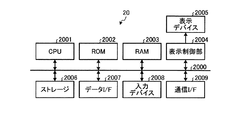
図9は、実施形態に適用可能な登録端末20のハードウェアの一例の構成を示す。図9に示される登録端末20において、バス2000に対してCPU2001、ROM(Read Only Memory)2002、RAM(Random Access Memory)2003および表示制御部2004が接続される。また、バス2000に対して、ストレージ2006、データI/F(インターフェイス)2007、入力デバイス2008および通信I/F2009が接続される。   FIG. 9 shows a configuration example of hardware of the registration terminal 20 applicable to the embodiment. In the registration terminal 20 shown in FIG. 9, a CPU 2001, a ROM (Read Only Memory) 2002, a RAM (Random Access Memory) 2003, and a display control unit 2004 are connected to the bus 2000. A storage 2006, a data I / F (interface) 2007, an input device 2008, and a communication I / F 2009 are connected to the bus 2000.

ストレージ2006は、データを不揮発に記憶することが可能な記憶媒体であって、例えばハードディスクドライブが用いられる。これに限らず、ストレージ2006として、フラッシュメモリなどの不揮発性の半導体メモリを用いてもよい。ストレージ2006は、CPU2001が実行するためのプログラムや各種データが格納される。   The storage 2006 is a storage medium capable of storing data in a nonvolatile manner, and for example, a hard disk drive is used. The storage 2006 is not limited to this, and a non-volatile semiconductor memory such as a flash memory may be used. The storage 2006 stores programs to be executed by the CPU 2001 and various data.

CPU2001は、ROM2002およびストレージ2006に記憶されるプログラムに従い、RAM2003をワークメモリとして用いて、この登録端末20の全体を制御する。   The CPU 2001 controls the entire registration terminal 20 using the RAM 2003 as a work memory in accordance with programs stored in the ROM 2002 and the storage 2006.

表示制御部2004は、CPU2001により生成された表示制御信号を、表示デバイス2005が表示可能な信号に変換して出力する。表示制御部2004は、CPU2001により生成された表示制御信号に基づき表示デバイス2005を駆動する。表示デバイス2005は、表示制御部2004により駆動されて表示制御信号に応じた表示を行う。   The display control unit 2004 converts the display control signal generated by the CPU 2001 into a signal that can be displayed by the display device 2005 and outputs the converted signal. The display control unit 2004 drives the display device 2005 based on the display control signal generated by the CPU 2001. The display device 2005 is driven by the display control unit 2004 and performs display according to the display control signal.

データI/F2007は、外部機器との間でデータの入出力を行う。データI/F2007としては、例えば、USB(Universal Serial Bus)やBluetooth(登録商標)といったインターフェイスを適用することができる。通信I/F2009は、CPU2001の制御に従いネットワークを介した通信を無線通信により行う。   The data I / F 2007 performs data input / output with an external device. As the data I / F 2007, for example, an interface such as USB (Universal Serial Bus) or Bluetooth (registered trademark) can be applied. A communication I / F 2009 performs communication via a network by wireless communication under the control of the CPU 2001.

入力デバイス2008は、例えばマウスなどのポインティングデバイスや、キーボードを含み、ユーザ入力を受け付ける。ユーザは、例えば表示デバイス2005に対する表示に応じて入力デバイス2008を操作することで、登録端末20に対して指示を出すことができる。   The input device 2008 includes a pointing device such as a mouse and a keyboard, for example, and accepts user input. The user can issue an instruction to the registration terminal 20 by operating the input device 2008 according to the display on the display device 2005, for example.

図10は、実施形態に係る検索サーバ10に適用可能なハードウェアの一例の構成を示す。図10において、検索サーバ10は、バス1000に対してCPU1001、ROM1002、RAM1003、ストレージ1004および通信部1005が接続される。ストレージ1004は、データを不揮発に記憶することが可能な記憶媒体であって、例えばハードディスクドライブである。これに限らず、ストレージ1004として、フラッシュメモリなどの不揮発性の半導体メモリを用いてもよい。   FIG. 10 shows a configuration of an example of hardware applicable to the search server 10 according to the embodiment. In FIG. 10, the search server 10 is connected to a bus 1000 with a CPU 1001, a ROM 1002, a RAM 1003, a storage 1004, and a communication unit 1005. The storage 1004 is a storage medium capable of storing data in a nonvolatile manner, and is a hard disk drive, for example. The storage 1004 is not limited to this, and a nonvolatile semiconductor memory such as a flash memory may be used.

CPU1001は、ROM1002およびストレージ1004に記憶されるプログラムに従い、RAM1003をワークメモリとして用いて、この検索サーバ10の全体を制御する。   The CPU 1001 controls the entire search server 10 using the RAM 1003 as a work memory in accordance with programs stored in the ROM 1002 and the storage 1004.

ストレージ1004は、CPU1001が実行するためのプログラムや各種データが格納される。また、上述した画像検索用DB11、キャンペーン情報DB16および履歴DB17は、このストレージ1004上の記憶領域を用いて構成される。なお、図10では、ストレージ1004が1のハードウェアから構成されるように示しているが、これはこの例に限定されず、例えば複数のストレージ装置を1つのストレージ1004として統合的に管理するようにしてもよい。   The storage 1004 stores programs executed by the CPU 1001 and various data. Further, the above-described image search DB 11, campaign information DB 16 and history DB 17 are configured using storage areas on the storage 1004. In FIG. 10, the storage 1004 is shown to be configured by one piece of hardware, but this is not limited to this example. For example, a plurality of storage apparatuses are integratedly managed as one storage 1004. It may be.

通信部1005は、CPU1001の制御に従いネットワークを介した通信を無線通信により行う通信I/Fを含む。   The communication unit 1005 includes a communication I / F that performs communication via a network by wireless communication under the control of the CPU 1001.

なお、図10では、検索サーバ10が1のハードウェアから構成されるように示しているが、これはこの例に限定されず、検索サーバ10を、同等の構成を有する複数のサーバ装置を統合的に制御することで構成してもよい。また、登録サーバ50は、検索サーバ10と同様の構成で実現可能であるので、ここでの説明を省略する。   Although FIG. 10 shows that the search server 10 is configured by one piece of hardware, this is not limited to this example, and the search server 10 is integrated with a plurality of server devices having an equivalent configuration. You may comprise by controlling automatically. Further, since the registration server 50 can be realized with the same configuration as the search server 10, the description thereof is omitted here.

図11は、実施形態に適用可能な検索端末30のハードウェアの一例の構成を示す。図11に示される検索端末30において、バス3000に対してCPU3001、ROM3002、RAM3003および表示制御部3004が接続される。また、バス3000に対して、ストレージ3006、データI/F3007、入力デバイス3008、通信I/F3009、撮像部3010およびGPS部3030が接続される。   FIG. 11 shows a configuration example of hardware of the search terminal 30 applicable to the embodiment. In the search terminal 30 shown in FIG. 11, a CPU 3001, a ROM 3002, a RAM 3003, and a display control unit 3004 are connected to a bus 3000. In addition, a storage 3006, a data I / F 3007, an input device 3008, a communication I / F 3009, an imaging unit 3010 and a GPS unit 3030 are connected to the bus 3000.

ストレージ3006は、データを不揮発に記憶することが可能な記憶媒体であって、例えばフラッシュメモリなどの不揮発性の半導体メモリである。これに限らず、ストレージ3006としてハードディスクドライブを用いてもよい。ストレージ3006は、CPU3001が実行するためのプログラムや各種データが格納される。なお、ストレージ3006およびROM3002は、例えば1つの書き換え可能な不揮発性半導体メモリなどを共用してもよい。   The storage 3006 is a storage medium capable of storing data in a nonvolatile manner, and is a nonvolatile semiconductor memory such as a flash memory, for example. Not limited to this, a hard disk drive may be used as the storage 3006. The storage 3006 stores programs executed by the CPU 3001 and various data. Note that the storage 3006 and the ROM 3002 may share one rewritable nonvolatile semiconductor memory, for example.

CPU3001は、ROM3002およびストレージ3006に記憶されるプログラムに従い、RAM3003をワークメモリとして用いて、この検索端末30の全体を制御する。表示制御部3004は、CPU3001により生成された表示制御信号を、表示デバイス3005が表示可能な信号に変換して出力する。   The CPU 3001 controls the entire search terminal 30 using the RAM 3003 as a work memory in accordance with programs stored in the ROM 3002 and the storage 3006. The display control unit 3004 converts the display control signal generated by the CPU 3001 into a signal that can be displayed by the display device 3005 and outputs the signal.

データI/F3007は、外部機器との間でデータの入出力を行う。データI/F3007としては、例えば、USBやBluetooth(登録商標)といったインターフェイスを適用することができる。   The data I / F 3007 performs data input / output with an external device. As the data I / F 3007, for example, an interface such as USB or Bluetooth (registered trademark) can be applied.

表示制御部3004は、CPU3001により生成された表示制御信号に基づき表示デバイス3005を駆動する。表示デバイス3005は、例えばLCD(Liquid Crystal Display)を含み、表示制御部3004により駆動されて表示制御信号に応じた表示を行う。   The display control unit 3004 drives the display device 3005 based on the display control signal generated by the CPU 3001. The display device 3005 includes an LCD (Liquid Crystal Display), for example, and is driven by the display control unit 3004 to perform display according to the display control signal.

入力デバイス3008は、ユーザ入力を受け付ける。ユーザは、例えば表示デバイス3005に対する表示に応じて入力デバイス3008を操作することで、検索端末30に対して指示を出すことができる。なお、入力デバイス3008と表示デバイス3005とを一体的に構成し、押圧した位置に応じた制御信号を出力すると共に、表示デバイス3005の画像を透過するタッチパネルとして構成すると、好ましい。   The input device 3008 accepts user input. The user can issue an instruction to the search terminal 30 by operating the input device 3008 according to the display on the display device 3005, for example. Note that it is preferable that the input device 3008 and the display device 3005 are integrally configured to output a control signal corresponding to the pressed position and to be configured as a touch panel that transmits the image of the display device 3005.

通信I/F3009は、CPU3001の制御に従いネットワークを介した通信を無線通信により行う。   A communication I / F 3009 performs communication via a network by wireless communication under the control of the CPU 3001.

撮像部3010は、光学系と、撮像素子と、光学系および撮像素子の制御駆動回路とを備え、撮像素子から出力される撮像信号に所定の処理を施してディジタル信号による撮像画像として出力する。撮像部3010は、入力デバイス3008に対するユーザ操作による指示に従い、撮像やズームなどの機能を実行する。撮像部3010から出力された撮像画像は、バス3000を介してCPU3001に送られ、プログラムに従い所定の画像処理を施される。撮像部3010から出力され画像処理を施した撮像画像を、例えばストレージ3006に記憶することができる。また、CPU3001は、ストレージ3006から撮像画像を読み出して、通信I/F3009によりネットワークに対して送信することができる。   The imaging unit 3010 includes an optical system, an imaging device, and a control drive circuit for the optical system and the imaging device. The imaging unit 3010 performs a predetermined process on the imaging signal output from the imaging device and outputs the captured image as a digital signal. The imaging unit 3010 executes functions such as imaging and zooming according to an instruction by a user operation on the input device 3008. The captured image output from the imaging unit 3010 is sent to the CPU 3001 via the bus 3000 and subjected to predetermined image processing according to a program. A captured image output from the imaging unit 3010 and subjected to image processing can be stored in the storage 3006, for example. Further, the CPU 3001 can read a captured image from the storage 3006 and transmit it to the network via the communication I / F 3009.

GPS部3030は、GPS(Global Positioning System)による信号を受信し、受信した信号に基づき緯度および経度からなる現在位置を計算する。   The GPS unit 3030 receives a GPS (Global Positioning System) signal, and calculates a current position composed of latitude and longitude based on the received signal.

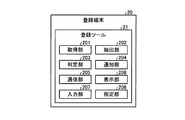
図12は、実施形態に係る登録端末20の機能を説明するための一例の機能ブロック図である。登録端末20は、登録ツール21を含み、登録ツール21は、取得部201と、抽出部202と、判定部203と、通知部204と、通信部205と、表示部206と、入力部207と、指定部208とを含む。   FIG. 12 is a functional block diagram illustrating an example of functions of the registration terminal 20 according to the embodiment. The registration terminal 20 includes a registration tool 21. The registration tool 21 includes an acquisition unit 201, an extraction unit 202, a determination unit 203, a notification unit 204, a communication unit 205, a display unit 206, and an input unit 207. , And a designation unit 208.

これら取得部201、抽出部202、判定部203、通知部204、通信部205、表示部206、入力部207および指定部208は、CPU2001上で動作するプログラムにより実現される。これに限らず、これら各部の一部または全部を、互いに協働して動作するハードウェアにより構成してもよい。   These acquisition unit 201, extraction unit 202, determination unit 203, notification unit 204, communication unit 205, display unit 206, input unit 207, and designation unit 208 are realized by a program operating on the CPU 2001. However, the present invention is not limited to this, and some or all of these units may be configured by hardware that operates in cooperation with each other.

通信部205は、ネットワークを介した通信を制御し、ネットワーク上にデータを送信する送信部と、ネットワークからのデータを受信する受信部として機能する。   The communication unit 205 functions as a transmission unit that controls communication via the network and transmits data on the network and a reception unit that receives data from the network.

表示部206は、表示デバイス2005に表示させるための表示情報を生成する。すなわち、登録端末20において、CPU2001は、表示部206により生成された表示情報に基づき表示制御信号を生成し、生成した表示制御信号を表示制御部2004に渡す。表示制御部2004は、この表示制御信号に従い表示デバイス2005に対して表示情報に従った表示を行う。なお、以下では、この、表示部206が生成した表示情報に従い表示デバイス2005に表示を行う一連の動作を、表示部206が表示を行う、などのように記述する。   The display unit 206 generates display information to be displayed on the display device 2005. That is, in the registration terminal 20, the CPU 2001 generates a display control signal based on the display information generated by the display unit 206, and passes the generated display control signal to the display control unit 2004. The display control unit 2004 performs display according to the display information on the display device 2005 according to the display control signal. Hereinafter, a series of operations for displaying on the display device 2005 in accordance with the display information generated by the display unit 206 will be described such as the display unit 206 performing display.

入力部207は、入力デバイス2008に対する入力操作で入力された情報を受け付ける。例えば、入力部207は、メタデータ72に含まれる各項目に対して入力された情報を受け付ける。指定部208は、入力部207が入力を受け付けたキャンペーン情報に対して、当該キャンペーン情報が示すキャンペーン70に関連付ける他の関連キャンペーンを指定する。   The input unit 207 receives information input by an input operation on the input device 2008. For example, the input unit 207 receives information input for each item included in the metadata 72. The designation unit 208 designates other related campaigns associated with the campaign 70 indicated by the campaign information, for the campaign information received by the input unit 207.

取得部201は、登録端末20の外部から画像を取得する。取得部201は、例えば顧客62aから画像を取得する。取得部201は、顧客62aが有する他の機器からネットワークを介して送信された画像を取得してもよいし、CD(Compact Disk)やDVD(Digital Versatile Disk)といった記録媒体を介して画像を受け取ってもよい。さらに、取得部201は、紙などの印刷媒体から画像を取得してもよい。また、取得部201は、顧客62aから、画像に関連付ける連携情報のための情報を取得する。   The acquisition unit 201 acquires an image from outside the registration terminal 20. For example, the acquisition unit 201 acquires an image from the customer 62a. The acquisition unit 201 may acquire an image transmitted from another device of the customer 62a via a network, or may receive an image via a recording medium such as a CD (Compact Disk) or a DVD (Digital Versatile Disk). May be. Furthermore, the acquisition unit 201 may acquire an image from a print medium such as paper. Moreover, the acquisition part 201 acquires the information for the cooperation information linked | related with an image from the customer 62a.

抽出部202は、取得部201により取得された画像における所定領域の画像を抽出する。判定部203は、登録サーバ50に登録しようとする画像の一部または全体と類似する画像が登録サーバ50に既に登録されているか否かを判定する。通知部204は、判定部203による判定結果を示す情報の通知を行う。   The extraction unit 202 extracts an image of a predetermined area in the image acquired by the acquisition unit 201. The determination unit 203 determines whether an image similar to a part or all of the image to be registered in the registration server 50 is already registered in the registration server 50. The notification unit 204 notifies information indicating the determination result by the determination unit 203.

上述した登録ツール21に含まれる取得部201、抽出部202、判定部203、通知部204、通信部205、表示部206、入力部207および指定部208は、CPU2001上で動作する情報処理プログラムによって実現される。この情報処理プログラムは、例えば、登録端末20が登録サーバ50に接続することにより、登録サーバ50により提供される。   The acquisition unit 201, the extraction unit 202, the determination unit 203, the notification unit 204, the communication unit 205, the display unit 206, the input unit 207, and the designation unit 208 included in the registration tool 21 described above are executed by an information processing program operating on the CPU 2001. Realized. This information processing program is provided by the registration server 50 when the registration terminal 20 connects to the registration server 50, for example.

例えば、登録端末20は、一般的なコンピュータに搭載されるものと同等のブラウザアプリケーション(以下、ブラウザ)が搭載される。ブラウザは、CPU2001上で動作して、例えばHTML(HyperText Markup Language)に従い記述されたファイルを読み込み、所定の動作を行う。登録端末20において、ブラウザを用いて登録サーバ50にアクセスすることで、登録サーバ50上の情報処理プログラムがブラウザに読み込まれる。   For example, the registration terminal 20 is equipped with a browser application (hereinafter referred to as a browser) equivalent to that installed in a general computer. The browser operates on the CPU 2001, reads a file described in accordance with, for example, HTML (HyperText Markup Language), and performs a predetermined operation. When the registration terminal 20 accesses the registration server 50 using a browser, the information processing program on the registration server 50 is read into the browser.

情報処理プログラムは、例えば、上述した各部(取得部201、抽出部202、判定部203、通知部204、通信部205、表示部206、入力部207および指定部208)を含むモジュール構成となっている。実際のハードウェアとしては、CPU2001上で動作するブラウザが、登録サーバ50から読み込んだ情報処理プログラムを実行することにより上記各部が主記憶装置(例えばRAM2003)上にロードされ、各部が主記憶装置上に生成されるようになっている。   The information processing program has a module configuration including, for example, the above-described units (acquisition unit 201, extraction unit 202, determination unit 203, notification unit 204, communication unit 205, display unit 206, input unit 207, and designation unit 208). Yes. As actual hardware, a browser operating on the CPU 2001 executes an information processing program read from the registration server 50, whereby the above-described units are loaded onto a main storage device (for example, the RAM 2003), and the respective units are stored on the main storage device. To be generated.

これに限らず、情報処理プログラムを、例えばストレージ2006に予め記憶させて提供されるようにしてもよい。また、この情報処理プログラムを、ネットワークに接続されたコンピュータ上に格納し、通信I/F2009によりネットワーク経由でダウンロードさせることにより提供するように構成することができる。また、この情報処理プログラムを、ネットワーク経由で提供または配布するように構成してもよい。   For example, the information processing program may be stored in advance in the storage 2006 and provided. The information processing program can be stored on a computer connected to a network and provided by being downloaded via the network by the communication I / F 2009. The information processing program may be configured to be provided or distributed via a network.

これに限らず、情報処理プログラムは、インストール可能な形式または実行可能な形式のファイルでCD、DVDなどのコンピュータで読み取り可能な記録媒体に記録して提供してもよい。この場合、記録媒体に記録された情報処理プログラムは、例えばデータI/F2007に接続された外部のドライブ装置を介して登録端末20に供給される。これに限らず、記録媒体に記録された情報処理プログラムを、パーソナルコンピュータなど他の情報処理装置上に一旦記憶させ、この他の情報処理装置から通信I/F2009やデータI/F2007を介した通信により、登録端末20に供給してもよい。   However, the present invention is not limited to this, and the information processing program may be provided by being recorded in a computer-readable recording medium such as a CD or a DVD in an installable or executable format file. In this case, the information processing program recorded on the recording medium is supplied to the registration terminal 20 via an external drive device connected to the data I / F 2007, for example. Not limited to this, an information processing program recorded in a recording medium is temporarily stored on another information processing apparatus such as a personal computer, and communication via the communication I / F 2009 or data I / F 2007 is performed from the other information processing apparatus. May be supplied to the registration terminal 20.

図13は、実施形態に適用可能な検索端末30の機能を説明するための一例の機能ブロック図である。図13において、検索端末30は、内部ブラウザ部301と、外部ブラウザ部302と、受信部303と、送信部304と、入力部305と、表示部306とを有する。受信部303、送信部304、入力部305および表示部306は、内部ブラウザ部301および外部ブラウザ部302から共通して使用される。   FIG. 13 is a functional block diagram illustrating an example of functions of the search terminal 30 applicable to the embodiment. In FIG. 13, the search terminal 30 includes an internal browser unit 301, an external browser unit 302, a reception unit 303, a transmission unit 304, an input unit 305, and a display unit 306. The reception unit 303, the transmission unit 304, the input unit 305, and the display unit 306 are used in common by the internal browser unit 301 and the external browser unit 302.

受信部303は、ネットワークを介して送信されるデータの受信処理を行う。送信部304は、ネットワークを介したデータの送信処理を行う。入力部305は、検索端末30が備える入力デバイス3008に対する入力操作を受け付け、操作に応じたデータを取得する。表示部306は、検索端末30が備える表示デバイス3005に対する情報の表示を制御する。入力部305と表示部306とで、検索端末30のユーザインターフェイスが構成される。   The reception unit 303 performs reception processing for data transmitted via the network. The transmission unit 304 performs a data transmission process via the network. The input unit 305 receives an input operation on the input device 3008 provided in the search terminal 30 and acquires data corresponding to the operation. The display unit 306 controls display of information on the display device 3005 included in the search terminal 30. The input unit 305 and the display unit 306 constitute a user interface of the search terminal 30.

内部ブラウザ部301は、UI制御部3011、撮像処理部3012、検索要求部3013および呼出部3014を含む。内部ブラウザ部301は、情報処理システム1に対応する機能を実現するもので、情報処理システム1における検索サーバ10による画像検索を行うための検索アプリケーションプログラムである。以下、この検索アプリケーションプログラムを「検索アプリ」と略称する。   The internal browser unit 301 includes a UI control unit 3011, an imaging processing unit 3012, a search request unit 3013, and a calling unit 3014. The internal browser unit 301 realizes a function corresponding to the information processing system 1 and is a search application program for performing an image search by the search server 10 in the information processing system 1. Hereinafter, this search application program is abbreviated as “search application”.

UI(User Interface)制御部3011は、内部ブラウザ部301の各部(撮像処理部3012、検索要求部3013および呼出部3014)の制御と、内部ブラウザ部301によるユーザインターフェイスの制御を行う。すなわち、UI制御部3011は、表示デバイス3005に表示させるための表示情報を生成して表示部306に渡す。また、UI制御部3011は、表示部306による表示に応じて入力部305が受け付けた入力操作に応じた処理を行う。   A UI (User Interface) control unit 3011 controls each unit (the imaging processing unit 3012, the search request unit 3013, and the calling unit 3014) of the internal browser unit 301 and controls the user interface by the internal browser unit 301. That is, the UI control unit 3011 generates display information to be displayed on the display device 3005 and passes it to the display unit 306. In addition, the UI control unit 3011 performs a process according to the input operation received by the input unit 305 according to the display by the display unit 306.

撮像処理部3012は、UI制御部3011の制御に従い、検索端末30が備えるカメラ機能を起動して撮像部3010を制御し、撮像画像を出力する。検索要求部3013は、UI制御部3011の制御に従い、撮像処理部3012により取得された撮像画像に基づく検索を要求する検索要求を生成し、生成した検索要求と、撮像画像とを送信部304から検索サーバ10に対して送信する。呼出部3014は、UI制御部3011の制御に従い外部ブラウザ部302を呼び出し、外部ブラウザ部302の機能を実行させる。   In accordance with the control of the UI control unit 3011, the imaging processing unit 3012 activates a camera function included in the search terminal 30, controls the imaging unit 3010, and outputs a captured image. The search request unit 3013 generates a search request for requesting a search based on the captured image acquired by the imaging processing unit 3012 under the control of the UI control unit 3011, and transmits the generated search request and the captured image from the transmission unit 304. It transmits to the search server 10. The calling unit 3014 calls the external browser unit 302 according to the control of the UI control unit 3011 and causes the function of the external browser unit 302 to be executed.

外部ブラウザ部302は、ブラウザ機能部3021を含む。ブラウザ機能部3021は、一般的なコンピュータに搭載されるのと同等のブラウザアプリケーションであって、例えばHTMLに従い記述されたファイルを読み込み、所定の表示を行う。   The external browser unit 302 includes a browser function unit 3021. The browser function unit 3021 is a browser application equivalent to that installed in a general computer, and reads a file described according to, for example, HTML and performs a predetermined display.

これら内部ブラウザ部301、外部ブラウザ部302、受信部303、送信部304、入力部305および表示部306は、CPU3001上で動作するプログラムによって実現される。これに限らず、内部ブラウザ部301、外部ブラウザ部302、受信部303、送信部304、入力部305および表示部306のうち一部または全部を、互いに協働して動作するハードウェアにより実現してもよい。   The internal browser unit 301, external browser unit 302, receiving unit 303, transmitting unit 304, input unit 305, and display unit 306 are realized by a program operating on the CPU 3001. Not limited to this, some or all of the internal browser unit 301, the external browser unit 302, the reception unit 303, the transmission unit 304, the input unit 305, and the display unit 306 are realized by hardware that operates in cooperation with each other. May be.

なお、検索端末30は、上述した内部ブラウザ部301および外部ブラウザ部302の他にも、様々な機能を含むことができる。例えば、検索端末30は、電話機能や電子メール機能を含むことができる。また、検索端末30は、インターネット41上の所定のWebサイトで提供される動画配信サービスに専用に対応する動画再生機能をさらに含むことができる。   The search terminal 30 can include various functions in addition to the internal browser unit 301 and the external browser unit 302 described above. For example, the search terminal 30 can include a telephone function and an e-mail function. In addition, the search terminal 30 can further include a video playback function that corresponds exclusively to a video distribution service provided on a predetermined website on the Internet 41.

上述した検索端末30に含まれる内部ブラウザ部301および外部ブラウザ部302、ならびに、受信部303、送信部304、入力部305および表示部306は、CPU3001上で動作するプログラムによって実現される。これらのプログラムのうち、外部ブラウザ部302、受信部303、送信部304、入力部305および表示部306は、例えばストレージ3006に予め記憶させて提供される。   The internal browser unit 301 and the external browser unit 302, the reception unit 303, the transmission unit 304, the input unit 305, and the display unit 306 included in the search terminal 30 described above are realized by a program that operates on the CPU 3001. Among these programs, the external browser unit 302, the reception unit 303, the transmission unit 304, the input unit 305, and the display unit 306 are provided by being stored in advance in the storage 3006, for example.

また、これらのプログラムのうち、内部ブラウザ部301を実現するための内部ブラウザプログラムは、ネットワークに接続されたコンピュータ上に格納し、通信I/F3009によりネットワーク経由でダウンロードさせることにより提供するように構成することができる。また、この内部ブラウザプログラムを、ネットワーク経由で提供または配布するように構成してもよい。   Among these programs, an internal browser program for realizing the internal browser unit 301 is stored on a computer connected to a network and is provided by being downloaded via the network by the communication I / F 3009. can do. The internal browser program may be configured to be provided or distributed via a network.

これに限らず、内部ブラウザプログラムは、インストール可能な形式または実行可能な形式のファイルでCD、DVDなどのコンピュータで読み取り可能な記録媒体に記録して提供してもよい。この場合、記録媒体に記録された内部ブラウザプログラムは、例えばデータI/F3007に接続された外部のドライブ装置を介して検索端末30に供給される。これに限らず、記録媒体に記録された内部ブラウザプログラムを、パーソナルコンピュータなど他の情報処理装置上に一旦記憶させ、この他の情報処理装置から通信I/F3009やデータI/F3007を介した通信により、検索端末30に供給してもよい。   However, the present invention is not limited to this, and the internal browser program may be provided by being recorded in a computer-readable recording medium such as a CD or a DVD in an installable or executable format file. In this case, the internal browser program recorded on the recording medium is supplied to the search terminal 30 via an external drive device connected to the data I / F 3007, for example. Not limited to this, the internal browser program recorded in the recording medium is temporarily stored in another information processing apparatus such as a personal computer, and communication is performed from the other information processing apparatus via the communication I / F 3009 or the data I / F 3007. May be supplied to the search terminal 30.

内部ブラウザプログラムは、例えば、上述した各部(UI制御部3011、撮像処理部3012、検索要求部3013および呼出部3014)を含むモジュール構成となっており、検索端末30にインストールされることで、検索アプリとして動作可能となる。   The internal browser program has a module configuration including, for example, the above-described units (UI control unit 3011, imaging processing unit 3012, search request unit 3013, and call unit 3014). It can operate as an app.

内部ブラウザプログラムは、実際のハードウェアとしては、CPU3001が例えばストレージ3006から内部ブラウザプログラムを読み出して実行することにより上記各部が主記憶装置(例えばRAM3003)上にロードされ、各部が主記憶装置上に生成されるようになっている。   As for the internal browser program, as the actual hardware, the CPU 3001 reads the internal browser program from, for example, the storage 3006 and executes the internal browser program so that the above-described units are loaded onto the main storage device (for example, the RAM 3003). It is to be generated.

また、内部ブラウザプログラムは、上述のようにして供給、提供または配布され、検索端末30にインストールされた際に、当該内部ブラウザプログラムのインストール毎に固有の識別情報であるアプリIDが付与される。例えば、内部ブラウザプログラムは、検索端末30に対するインストールが完了すると、ネットワークを介して特定のサーバにアクセスし、この特定サーバに対してインストールの完了を通知する。   Further, when the internal browser program is supplied, provided or distributed as described above and installed in the search terminal 30, an application ID that is unique identification information is assigned for each installation of the internal browser program. For example, when the installation on the search terminal 30 is completed, the internal browser program accesses a specific server via the network and notifies the specific server of the completion of the installation.

特定サーバは、検索端末30からのインストール完了の通知に応じて、ユニークなアプリIDを生成する。アプリIDは、乱数を用いて生成してもよいし、通番など管理された情報を用いて生成してもよい。特定サーバは、生成したアプリIDを、インストール完了の通知の送信元の検索端末30に送信する。検索端末30は、特定サーバから送信されたアプリIDを受信し、内部ブラウザ部301は、受信したアプリIDを、例えばストレージ3006に不可視に記憶する。   The specific server generates a unique application ID in response to the installation completion notification from the search terminal 30. The application ID may be generated using a random number, or may be generated using managed information such as a serial number. The specific server transmits the generated application ID to the search terminal 30 that is the transmission source of the notification of installation completion. The search terminal 30 receives the application ID transmitted from the specific server, and the internal browser unit 301 stores the received application ID invisible in the storage 3006, for example.

アプリIDは、検索アプリ(内部ブラウザプログラム)のインストール毎にユニークな識別情報であるので、検索端末30毎にユニークな識別情報と略同義である。   Since the application ID is unique identification information for each installation of the search application (internal browser program), it is substantially synonymous with unique identification information for each search terminal 30.

(実施形態に係る画像登録処理)
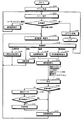
次に、実施形態に係る画像登録処理について説明する。図14は、実施形態に係る、登録端末20において登録ツール21によって実行される画像登録処理の一例を示すフローチャートである。なお、図14のフローチャートの処理に先立って、登録ツール21を利用するユーザの情報(ユーザIDおよびパスワード)は、ユーザ管理サーバ60によりユーザDB61に登録されているものとする。また、以下において、画像は、キャンペーンを単位として登録されるものとする。
(Image Registration Processing According to Embodiment)
Next, an image registration process according to the embodiment will be described. FIG. 14 is a flowchart illustrating an example of an image registration process executed by the registration tool 21 in the registration terminal 20 according to the embodiment. Prior to the processing of the flowchart of FIG. 14, information (user ID and password) of the user who uses the registration tool 21 is registered in the user DB 61 by the user management server 60. In the following, it is assumed that images are registered in units of campaigns.

登録端末20において登録ツール21が起動されると、ステップS100で、登録ツール21は、ユーザに対するログイン処理を行う。例えば、登録ツール21は、表示部206により図15に例示されるログイン画面400の表示を行う。図15の例では、ログイン画面400は、ユーザ情報(ユーザIDおよびパスワード)を入力するための入力部401と、ログインを指示するためのボタン402と、パスワードの再発行を依頼するためのボタン403とが配置されている。   When the registration tool 21 is activated in the registration terminal 20, the registration tool 21 performs login processing for the user in step S100. For example, the registration tool 21 displays the login screen 400 illustrated in FIG. In the example of FIG. 15, the login screen 400 includes an input unit 401 for inputting user information (user ID and password), a button 402 for instructing login, and a button 403 for requesting reissue of a password. And are arranged.

例えば、登録ツール21は、入力部401にユーザIDおよびパスワードが入力されると、入力されたユーザIDおよびパスワードをユーザ管理サーバ60に送信し、ユーザIDの認証を要求する。登録ツール21は、ユーザ管理サーバ60からの、ユーザIDの認証が成功したことを示す情報を受信した場合に、処理をステップS101に移行させる。   For example, when the user ID and password are input to the input unit 401, the registration tool 21 transmits the input user ID and password to the user management server 60, and requests authentication of the user ID. When the registration tool 21 receives information from the user management server 60 indicating that the user ID has been successfully authenticated, the registration tool 21 shifts the processing to step S101.

ステップS101で、登録ツール21は、表示部206により、図16に例示されるメニュー画面410の表示を行う。図16の例では、メニュー画面410は、タブ411a、411bおよび411cと、ボタン群412と、検索入力部413と、リスト表示領域414と、終了ボタン415とが配置される。   In step S101, the registration tool 21 displays the menu screen 410 illustrated in FIG. In the example of FIG. 16, the menu screen 410 includes tabs 411a, 411b, and 411c, a button group 412, a search input unit 413, a list display area 414, and an end button 415.

タブ411a、411bおよび411cは、メニュー項目を選択して登録ツール21の動作モードを決定するためのタブである。タブ411aおよび411bは、ユーザ管理モードに移行するためのタブであって、操作することでそれぞれ管理者一覧およびクライアント一覧が表示される。また、タブ411cは、画像登録モードに移行するためのタブであって、操作することでキャンペーン一覧が表示される。   The tabs 411a, 411b, and 411c are tabs for selecting the menu item and determining the operation mode of the registration tool 21. The tabs 411a and 411b are tabs for shifting to the user management mode, and an administrator list and a client list are displayed by operating the tabs 411a and 411b, respectively. The tab 411c is a tab for shifting to the image registration mode, and a campaign list is displayed by operating the tab 411c.

リスト表示領域414は、タブ411a、411bおよび411cにより選択したメニュー項目に対応するリストが表示される。図16の例では、タブ411bが操作されクライアント一覧が選択されている。以下では、リストの各行をレコードと呼び、各列を項目と呼ぶ。   The list display area 414 displays a list corresponding to the menu item selected by the tabs 411a, 411b and 411c. In the example of FIG. 16, the tab 411b is operated and the client list is selected. In the following, each row of the list is called a record, and each column is called an item.

ボタン群412は、リスト表示領域414に表示されるリストに対する処理を選択する。図16の例では、ボタン群412は4個のボタンを含み、各ボタンは、左から、「新規登録」、「編集」、「削除」、「CSV出力」の各機能が割り当てられている。「新規登録」ボタンは、リスト表示領域414に表示されるリストに対して新規にレコードを追加する。「編集」ボタンは、リスト表示領域414に表示されるリストにおいて選択されたレコードの情報を編集する。「削除」ボタンは、リスト表示領域414に表示されるリストにおいて選択されたレコードの情報を削除する。「CSV出力」は、リスト表示領域414に表示されるリストの情報をCSV(Comma-Separated Values)形式のテキストファイルで出力する。   The button group 412 selects a process for the list displayed in the list display area 414. In the example of FIG. 16, the button group 412 includes four buttons, and each button is assigned functions “new registration”, “edit”, “delete”, and “CSV output” from the left. The “new registration” button adds a new record to the list displayed in the list display area 414. The “edit” button edits the information of the record selected in the list displayed in the list display area 414. The “delete” button deletes the information of the record selected in the list displayed in the list display area 414. “CSV output” outputs the information of the list displayed in the list display area 414 as a text file in CSV (Comma-Separated Values) format.

検索入力部413は、リスト表示領域414に表示されるリストから、選択または入力された検索キーに基づきレコードが選択される。終了ボタン415は、登録ツール21による処理を終了する。   The search input unit 413 selects a record from the list displayed in the list display area 414 based on the selected or input search key. The end button 415 ends the process by the registration tool 21.

説明は図14に戻り、ステップS101でメニュー表示がなされると、処理が次のステップS102に移行され、登録ツール21は、タブ411a、411bおよび411c、ならびに、終了ボタン415の何れかが操作され、処理が選択されるのを待機する。若し、終了ボタン415が操作された場合、登録ツール21は、処理をステップS103に移行させ、ユーザのログアウト処理を行い、登録ツール21の動作を終了させる。   Returning to FIG. 14, when the menu is displayed in step S <b> 101, the process proceeds to the next step S <b> 102, and the registration tool 21 operates any of the tabs 411 a, 411 b and 411 c, and the end button 415. , Wait for the process to be selected. If the end button 415 is operated, the registration tool 21 shifts the process to step S103, performs a logout process for the user, and ends the operation of the registration tool 21.

また、ステップS102で、タブ411aまたはタブ411bが操作されユーザ管理モードが選択された場合、登録ツール21は、処理をステップS104に移行させる。そして、登録ツール21は、ステップS104において、ステップS102でタブ411aおよび411bの何れが操作されたかに応じて、管理者一覧画面およびクライアント一覧画面のうち何れかの表示を行う。登録ツール21は、管理者一覧画面またはクライアント一覧画面での処理が終了した旨の操作がなされると、処理をステップS101に戻し、メニュー表示を行う。   In step S102, when the tab 411a or the tab 411b is operated and the user management mode is selected, the registration tool 21 shifts the processing to step S104. In step S104, the registration tool 21 displays one of the administrator list screen and the client list screen depending on which of the tabs 411a and 411b is operated in step S102. When an operation to the effect that the process on the administrator list screen or the client list screen has been completed is performed, the registration tool 21 returns the process to step S101 to display a menu.

さらに、ステップS102で、タブ411cが操作され画像登録モードが選択された場合、登録ツール21は、処理をステップS105に移行させる。ステップS105で、登録ツール21は、表示部206により、図17に例示するような登録情報一覧画面420の表示を行い、ユーザ操作を待機する。図17において、登録情報一覧画面420は、ボタン421a〜421dと、検索入力部422と、リスト表示領域423と、終了ボタン424とが配置される。   Furthermore, when the tab 411c is operated and the image registration mode is selected in step S102, the registration tool 21 shifts the processing to step S105. In step S105, the registration tool 21 displays the registration information list screen 420 illustrated in FIG. 17 on the display unit 206, and waits for a user operation. In FIG. 17, the registration information list screen 420 includes buttons 421a to 421d, a search input unit 422, a list display area 423, and an end button 424.

リスト表示領域423は、登録サーバ50に登録されるキャンペーンのリストが表示される。このとき、登録ツール21は、登録サーバ50に登録されるキャンペーンのうち、登録ツール21にログインしたユーザがアクセス可能なキャンペーンを選択してリスト表示領域423に表示させることができる。例えば、登録ツール21は、ユーザ管理サーバ60からログイン中のユーザに関する情報を取得し、この情報に基づき登録サーバ50のキャンペーン情報DB16’から、当該ユーザがアクセス可能なキャンペーンのリストを取得する。   The list display area 423 displays a list of campaigns registered in the registration server 50. At this time, the registration tool 21 can select a campaign that can be accessed by the user logged in to the registration tool 21 from the campaigns registered in the registration server 50 and display the campaign in the list display area 423. For example, the registration tool 21 acquires information about the logged-in user from the user management server 60, and acquires a list of campaigns accessible to the user from the campaign information DB 16 'of the registration server 50 based on this information.

ボタン421aは、リスト表示領域423に表示されるリストに対して新規にレコードを追加する「新規登録」ボタンである。ボタン421bは、リスト表示領域423に表示されるリストにおいて選択されたレコードの情報を編集する「編集」ボタンである。ボタン421cは、リスト表示領域423に表示されるリストにおいて選択されたレコードの情報を削除する「削除」ボタンである。また、ボタン421dは、リスト表示領域423に表示されるリストにおいて選択されたレコードに登録されたキャンペーンの公開および非公開を設定するためのボタンである。   The button 421 a is a “new registration” button for adding a new record to the list displayed in the list display area 423. The button 421 b is an “edit” button for editing information of a record selected in the list displayed in the list display area 423. The button 421c is a “delete” button for deleting information of a record selected in the list displayed in the list display area 423. The button 421d is a button for setting whether the campaign registered in the record selected in the list displayed in the list display area 423 is open or closed.

図17の例では、リスト表示領域423に表示されるリストにおいて、各レコードは、「キャンペーンID」、「キャンペーン名」、「クライアント名」、「ユーザID」、「担当者名」、「公開ページ数」、「利用ページ数」、「最終更新日」、「状態」、「担当管理者」、「所属ドメイン」、「関連キャンペーン」および「CSV出力」の各項目を含む。レコードの情報は、当該レコードに示されるキャンペーン70のメタデータ72および関連キャンペーン情報73を含み、例えば、登録サーバ50におけるキャンペーン情報DB16’に格納される。   In the example of FIG. 17, in the list displayed in the list display area 423, each record includes “campaign ID”, “campaign name”, “client name”, “user ID”, “person in charge”, “public page”. Number of items, “Number of pages used”, “Last updated date”, “Status”, “Manager in charge”, “Affiliation domain”, “Related campaign”, and “CSV output” are included. The record information includes metadata 72 and related campaign information 73 of the campaign 70 indicated in the record, and is stored in, for example, the campaign information DB 16 ′ in the registration server 50.

リスト表示領域423に表示されるリストの各レコードにおいて、項目「キャンペーン名」は、レコードに登録されるキャンペーンに付けられた名前を示す。項目「クライアント名」は、そのレコードのキャンペーンの所有者を示す。項目「ユーザID」は、そのレコードのキャンペーンの所有者のIDを示す。項目「担当者名」は、そのレコードのキャンペーンの情報を入力したユーザ名を示す。   In each record of the list displayed in the list display area 423, the item “campaign name” indicates a name given to the campaign registered in the record. The item “client name” indicates the owner of the campaign of the record. The item “user ID” indicates the ID of the owner of the campaign of the record. The item “person in charge” indicates the name of the user who has input the campaign information of the record.

項目「公開ページ数」は、そのレコードのキャンペーンに含まれるページのうち、公開するように設定された公開ページ数を示す。例えば、後述する対象領域が指定されたページが、公開ページとされる。項目「利用ページ数」は、そのレコードのキャンペーンに含まれる全ページ数を示す。すなわち、項目「利用ページ数」に示されるページ数は、そのレコードのキャンペーンが非公開状態であっても表示される。なお、項目「公開ページ数」および「利用ページ数」が何れも「0」となっているレコードは、キャンペーン情報の登録だけ行って、未だ画像が登録されていないことを示す。   The item “number of public pages” indicates the number of public pages set to be public among pages included in the campaign of the record. For example, a page in which a target area described later is designated as a public page. The item “number of used pages” indicates the total number of pages included in the campaign of the record. That is, the number of pages indicated in the item “number of used pages” is displayed even if the campaign of the record is in a non-public state. It should be noted that a record in which the items “number of public pages” and “number of used pages” are both “0” indicates that only the campaign information is registered and no image is registered yet.

項目「最終更新日」は、そのレコードのキャンペーンの情報を最後に編集した日付を示す。項目「状態」は、そのレコードのキャンペーンが公開状態および非公開状態の何れの状態にあるかを示す。項目「担当管理者」は、そのレコードのキャンペーンを担当するユーザの上位の管理者を示す。項目「所属ドメイン」は、項目「担当管理者」が属するドメインの情報を示す。また、項目「CSV出力」は、そのレコードの情報をCSV形式のテキストファイルで出力する。レコードに含まれる項目は、これらに限られない。レコードに、任意の情報を入力することができる項目「備考」など他の項目をさらに含めてもよい。   The item “last update date” indicates the date when the campaign information of the record was last edited. The item “state” indicates whether the campaign of the record is in a public state or a private state. The item “administrator in charge” indicates an upper manager of the user who is in charge of the campaign of the record. The item “affiliation domain” indicates information on the domain to which the item “administrator in charge” belongs. The item “CSV output” outputs the record information as a CSV text file. Items included in the record are not limited to these. The record may further include other items such as an item “remarks” in which arbitrary information can be input.

ステップS105で登録情報一覧画面420が表示されると、登録ツール21は、処理を次のステップS110に移行させ、ボタン421a〜421d、ならびに、終了ボタン424に対する操作を待機する。以下、各ボタンに対する操作に応じた処理を、下記の項目(1)〜(5)に従い説明する。   When the registration information list screen 420 is displayed in step S105, the registration tool 21 shifts the processing to the next step S110, and waits for operations on the buttons 421a to 421d and the end button 424. Hereinafter, the processing according to the operation on each button will be described according to the following items (1) to (5).

(1)ステップS110で、登録ツール21は、処理の終了を指示するボタン424が操作された場合、例えば処理をステップS101に戻し、メニュー表示を行う。 (1) In step S110, when the button 424 for instructing the end of the process is operated, the registration tool 21 returns the process to step S101, for example, and displays a menu.

(2)ステップS110で、登録ツール21は、リスト表示領域423においてレコードが選択された状態で、キャンペーンの公開および非公開を設定するためのボタン421dが操作された場合、処理をステップS120に移行させる。ステップS120で、登録ツール21は、表示部206により、選択されたレコードに示されるキャンペーンの公開および非公開を設定するための公開設定画面の表示を行う。 (2) In step S110, the registration tool 21 moves the process to step S120 when the button 421d for setting the publication and non-publication of the campaign is operated in a state where the record is selected in the list display area 423. Let In step S120, the registration tool 21 causes the display unit 206 to display a disclosure setting screen for setting the disclosure and non-disclosure of the campaign indicated in the selected record.

図18は、実施形態に適用可能な公開設定画面の例を示す。図18において、公開設定画面430は、公開設定部431と、OKボタン432aおよびキャンセルボタン432bとが配置される。図18の例では、公開設定部431は、ラジオボタンにより公開および非公開を排他的に設定可能となっており、選択されたレコードの項目「状態」の値が初期値とされる。登録ツール21は、OKボタン432aが操作されると、公開設定部431において公開および非公開の何れかに設定された公開状態が当該レコードに対して設定される。登録ツール21は、公開状態が設定されると、リスト表示領域423の表示を更新して、処理をステップS105に戻す。また、登録ツール21は、キャンセルボタン432bが操作された場合、当該レコードの公開状態を公開設定画面430の表示前の状態として、処理をステップS105に戻す。   FIG. 18 shows an example of a public setting screen applicable to the embodiment. In FIG. 18, the public setting screen 430 includes a public setting unit 431, an OK button 432a, and a cancel button 432b. In the example of FIG. 18, the disclosure setting unit 431 can exclusively set disclosure and non-disclosure by radio buttons, and the value of the item “state” of the selected record is set as an initial value. When the OK button 432a is operated, the registration tool 21 sets the public state set to public or non-public in the public setting unit 431 for the record. When the disclosure state is set, the registration tool 21 updates the display of the list display area 423 and returns the process to step S105. In addition, when the cancel button 432b is operated, the registration tool 21 sets the publishing state of the record as the state before displaying the publishing setting screen 430, and returns the process to step S105.

(3)ステップS110で、登録ツール21は、リスト表示領域423においてレコードが選択された状態で、画像の削除を指定するボタン421cが操作された場合、処理をステップS121に移行させる。ステップS121で、登録ツール21は、選択されたレコードの情報を削除する。このとき、登録ツール21は、レコードの削除を本当に行うか否か、また、レコードに関連付けられた画像の情報を含めてレコードを削除するか否かなどの確認画面を表示させると、好ましい。登録ツール21は、レコードが削除されると、リスト表示領域423の表示を更新して、処理をステップS105に戻す。 (3) In step S110, if the record 421 is selected in the list display area 423 and the button 421c for designating image deletion is operated, the registration tool 21 shifts the processing to step S121. In step S121, the registration tool 21 deletes the information of the selected record. At this time, it is preferable that the registration tool 21 displays a confirmation screen such as whether or not to really delete the record and whether or not to delete the record including information on the image associated with the record. When the record is deleted, the registration tool 21 updates the display of the list display area 423 and returns the process to step S105.

(4)ステップS110で、登録ツール21は、画像の編集を指示するボタン421bが操作された場合、処理をステップS122に移行させる。ステップS122で、登録ツール21は、登録情報一覧画面420のリスト表示領域423に表示されるリストにおいて選択されたレコードに示されるキャンペーンに含まれる画像を、登録サーバ50から取得する。登録ツール21は、取得した画像に連携情報が関連付けられている場合、この連携情報も取得する。そして、登録ツール21は、処理をステップS124に移行させる。 (4) In step S110, when the button 421b for instructing image editing is operated, the registration tool 21 shifts the processing to step S122. In step S <b> 122, the registration tool 21 acquires an image included in the campaign indicated by the record selected in the list displayed in the list display area 423 of the registration information list screen 420 from the registration server 50. When the cooperation information is associated with the acquired image, the registration tool 21 also acquires this cooperation information. Then, the registration tool 21 shifts the process to step S124.

(5)また、ステップS110で、登録ツール21は、新規登録を指示するボタン421aが操作された場合、処理をステップS123に移行させ、新規キャンペーンの登録処理を実行する。ステップS123において、登録ツール21は、先ず、表示部206により、キャンペーンの新規登録を行うための、図19に例示されるようなキャンペーン登録画面440の表示を行う。 (5) In step S110, when the button 421a for instructing new registration is operated in step S110, the registration tool 21 shifts the processing to step S123 and executes new campaign registration processing. In step S123, the registration tool 21 first causes the display unit 206 to display a campaign registration screen 440 as illustrated in FIG. 19 for newly registering a campaign.

図19において、キャンペーン登録画面440は、キャンペーン名およびユーザIDを入力するための入力部441および442と、OKボタン443aおよびキャンセルボタン443bとが配置される。入力部441に入力された文字列が、レコードにおける項目「キャンペーン名」の値となる。同様に、入力部442に入力された文字列が、レコードにおける項目「ユーザID」の値となる。   In FIG. 19, the campaign registration screen 440 includes input units 441 and 442 for inputting a campaign name and a user ID, and an OK button 443a and a cancel button 443b. The character string input to the input unit 441 becomes the value of the item “campaign name” in the record. Similarly, the character string input to the input unit 442 becomes the value of the item “user ID” in the record.

登録ツール21は、OKボタン443aが操作されると、キャンペーン登録画面440において入力部441および442に入力された各文字列を当該レコードの項目「キャンペーン名」および「ユーザID」として設定し、処理をステップS124に移行させる。   When the OK button 443a is operated, the registration tool 21 sets each character string input to the input units 441 and 442 on the campaign registration screen 440 as the items “campaign name” and “user ID” of the record, To step S124.

ステップS124で、登録ツール21は、表示部206により、キャンペーンの情報を編集するための編集画面の表示を行う。図20は、実施形態に係る編集画面の例を示す。図20において、編集画面480は、ヘッダ領域481と、サムネイル表示領域483と、ページ編集領域484と、プレビュー領域485と、対象領域一覧領域486と、リンクアイコン一覧領域487と、ツールバー488とを含む。   In step S124, the registration tool 21 causes the display unit 206 to display an editing screen for editing campaign information. FIG. 20 shows an example of an edit screen according to the embodiment. 20, the edit screen 480 includes a header area 481, a thumbnail display area 483, a page edit area 484, a preview area 485, a target area list area 486, a link icon list area 487, and a tool bar 488. .

ヘッダ領域481は、この編集画面480の編集対象となるキャンペーンの名前が左端に表示され、右端には、登録ツール21にログインしているユーザの権限で利用できるメニューが表示されるユーザメニュー表示部482が配置される。   In the header area 481, the name of the campaign to be edited on the editing screen 480 is displayed on the left end, and on the right end is a user menu display section that displays a menu that can be used with the authority of the user logged in to the registration tool 21. 482 is arranged.

サムネイル表示領域483は、キャンペーンに含まれる各画像を縮小したサムネイル画像が表示される領域である。例えば、処理が上述のキャンペーン情報の編集を指示するステップS122からこのステップS124に移行された場合、登録ツール21は、ステップS122で登録サーバ50から取得された、リスト表示領域423から選択されたレコードに示されるキャンペーンに含まれる各画像を登録サーバ50の画像DB14から取得する。そして、登録ツール21は、取得した各画像を縮小してサムネイル画像を生成し、サムネイル表示領域483に表示させる。図20の例では、サムネイル表示領域483に対し、サムネイル画像48301、48302、48303、…が表示されている。 The thumbnail display area 483 is an area in which thumbnail images obtained by reducing each image included in the campaign are displayed. For example, when the process proceeds from step S122 instructing editing of the campaign information described above to step S124, the registration tool 21 acquires the record selected from the list display area 423 acquired from the registration server 50 in step S122. Each image included in the campaign shown in FIG. 5 is acquired from the image DB 14 of the registration server 50. The registration tool 21 reduces each acquired image to generate a thumbnail image, and displays the thumbnail image in the thumbnail display area 483. In the example of FIG. 20, thumbnail images 4830 1 , 4830 2 , 4830 3 ,... Are displayed in the thumbnail display area 483.

なお、処理が上述のキャンペーン情報の新規登録を指示するステップS123からこのステップS124に移行した場合は、サムネイル表示領域483は、空欄となる。また、サムネイル表示領域483の右端に設けられるスクロールバーを操作することで、サムネイル表示領域483外に仮想的に表示される他のサムネイル画像を、サムネイル表示領域483内に順次表示させることができる。   When the process proceeds from step S123 for instructing new registration of the above-described campaign information to step S124, the thumbnail display area 483 is blank. Further, by operating a scroll bar provided at the right end of the thumbnail display area 483, other thumbnail images virtually displayed outside the thumbnail display area 483 can be sequentially displayed in the thumbnail display area 483.

ページ編集領域484は、キャンペーンに含まれる各画像のうち、編集対象となる画像4840が表示される。例えば、登録ツール21は、サムネイル表示領域483に表示される各サムネイル画像48301、48302、48303、…から選択したサムネイル画像の元画像を、画像4840としてページ編集領域484に表示させる。図20の例では、サムネイル表示領域483においてサムネイル画像48302が選択され、この選択されたサムネイル画像48302の元画像が画像4840としてページ編集領域484に表示されている。また、サムネイル表示領域483では、選択され現在ページ編集領域484に表示されるサムネイル画像48302が周囲の枠4832により強調表示されて示されている。 The page editing area 484 displays an image 4840 to be edited among the images included in the campaign. For example, the registration tool 21 displays the original image of the thumbnail image selected from the thumbnail images 4830 1 , 4830 2 , 4830 3 ,. In the example of FIG. 20, the thumbnail image 4830 2 is selected in the thumbnail display area 483, and the original image of the selected thumbnail image 4830 2 is displayed as the image 4840 in the page editing area 484. Also, in the thumbnail display area 483, the thumbnail image 4830 2 that is currently displayed is selected in the page editing area 484 is shown highlighted by the surrounding frame 4832.

登録ツール21は、ページ編集領域484に表示される画像4840に対して範囲が指定された場合、指定された範囲を対象領域として設定することができる。範囲の指定は、例えばユーザによる入力デバイス2008の操作が入力部207に受け付けられてなされる。例えば、ページ編集領域484に表示される画像4840内の任意の2点を指定することで、指定された2点を対角上の頂点とする矩形範囲が指定される。図20の例では、ページ編集領域484の画像4840に対して矩形の範囲により対象領域4841aおよび4841bがそれぞれ設定されている。   When a range is specified for the image 4840 displayed in the page editing area 484, the registration tool 21 can set the specified range as a target area. For example, the range is specified when the input unit 207 accepts an operation of the input device 2008 by the user. For example, by designating two arbitrary points in the image 4840 displayed in the page editing area 484, a rectangular range having the designated two points as diagonal vertices is designated. In the example of FIG. 20, target areas 4841a and 4841b are set for the image 4840 in the page edit area 484 by rectangular ranges.

登録ツール21は、設定された対象領域4841aおよび4841bを、例えば領域内の色を領域外と異ならせて表示させることで、対象領域4841aおよび4841bを明示的に示すことができる。また、対象領域の形状は、矩形に限られず、閉じた形状であれば任意の形状を設定することができる。   The registration tool 21 can explicitly indicate the target areas 4841a and 4841b by displaying the set target areas 4841a and 4841b, for example, with the colors in the areas different from those outside the areas. In addition, the shape of the target region is not limited to a rectangle, and any shape can be set as long as it is a closed shape.

登録ツール21は、設定された各対象領域4841aおよび4841bを識別する識別情報(通し番号など)を生成し、各対象領域4841aおよび4841bに関連付ける。識別情報は、編集対象のキャンペーンに含まれる各画像を通して対象領域を識別可能に生成される。   The registration tool 21 generates identification information (such as a serial number) for identifying the set target areas 4841a and 4841b, and associates them with the target areas 4841a and 4841b. The identification information is generated so that the target area can be identified through each image included in the campaign to be edited.

また、詳細は後述するが、登録ツール21は、ページ編集領域484において設定された対象領域4841aおよび4841bに対して、1以上の連携情報を関連付けることができる。   Although details will be described later, the registration tool 21 can associate one or more pieces of linkage information with the target areas 4841a and 4841b set in the page editing area 484.

さらに、登録ツール21は、サムネイル表示領域483に表示される各サムネイル画像48301、48302、48303、…のうち、ページ編集領域484において何らかの編集、例えば対象領域の指定が行われ、且つ、未保存の画像に対応するサムネイル画像に対して、マーカ画像4831を付加する。 Further, the registration tool 21 performs some editing in the page editing area 484 among the thumbnail images 4830 1 , 4830 2 , 4830 3 ,... Displayed in the thumbnail display area 483, for example, specifies the target area, and A marker image 4831 is added to the thumbnail image corresponding to the unsaved image.

プレビュー領域485は、ページ編集領域484において編集中の画像がこの情報処理システム1に対応するアプリケーションプログラムにより検索端末30の表示デバイス3005に表示される画面をエミュレートしたプレビュー画面4850を表示する。登録ツール21は、プレビュー領域485において、ページ編集領域484において設定された各対象領域4841aおよび4841bを強調表示などにより明示的に表示させる。また、登録ツール21は、プレビュー領域485において、各対象領域4841aおよび4841bに設定された連携情報を示す情報を、各対象領域4841aおよび4841bに対応させて表示させる。   The preview area 485 displays a preview screen 4850 that emulates a screen in which the image being edited in the page editing area 484 is displayed on the display device 3005 of the search terminal 30 by the application program corresponding to the information processing system 1. In the preview area 485, the registration tool 21 explicitly displays the target areas 4841a and 4841b set in the page editing area 484 by highlighting or the like. In addition, the registration tool 21 displays information indicating the cooperation information set in each of the target areas 4841a and 4841b in the preview area 485 so as to correspond to each of the target areas 4841a and 4841b.

対象領域一覧領域486は、編集対象のキャンペーンに含まれる各画像に設定された各対象領域に付加されている連携情報の一覧がアイコン画像600、600、…にて表示される。図20の例では、登録ツール21は、連携情報を、対応する対象領域に付加された識別情報(通し番号)毎に纏めて対象領域一覧領域486に表示している。また、対象領域一覧領域486において、右端に設けられるスクロールバーを操作することで、対象領域一覧領域486外に仮想的に表示される他の対象領域の連携情報を、対象領域一覧領域486内に順次表示させることができる。   In the target area list area 486, a list of cooperation information added to each target area set for each image included in the campaign to be edited is displayed as icon images 600, 600,. In the example of FIG. 20, the registration tool 21 displays the cooperation information collectively in the target area list area 486 for each identification information (serial number) added to the corresponding target area. Further, in the target area list area 486, by operating the scroll bar provided at the right end, the link information of other target areas virtually displayed outside the target area list area 486 is displayed in the target area list area 486. It can be displayed sequentially.

リンクアイコン一覧領域487は、対象領域に対して設定可能な連携情報を、各連携情報に対応するアイコン画像600、600、…を用いて一覧表示する。登録ツール21は、リンクアイコン一覧領域487に表示されるアイコン画像600を所謂ドラッグアンドドロップ操作により移動させ、ページ編集領域484内に設定された例えば対象領域4841aに重ねることで、当該アイコン画像600、600、…に対応する連携情報を当該対象領域4841aに関連付けることができる。また、1つの対象領域に対して、複数の連携情報を関連付けることができる。すなわち、登録ツール21は、対象画像に関連付ける連携情報を選択する選択部として機能する。   The link icon list area 487 displays the link information that can be set for the target area as a list using the icon images 600, 600,... Corresponding to each link information. The registration tool 21 moves the icon image 600 displayed in the link icon list area 487 by a so-called drag-and-drop operation, and superimposes the icon image 600 on the target area 4841a set in the page editing area 484, for example. 600,... Can be associated with the target area 4841a. In addition, a plurality of pieces of cooperation information can be associated with one target area. That is, the registration tool 21 functions as a selection unit that selects cooperation information associated with the target image.

リンクアイコン一覧領域487において、右端に設けられるスクロールバーを操作することで、リンクアイコン一覧領域487外に仮想的に配置される他のアイコン画像600を、リンクアイコン一覧領域487内に順次登場させ表示させることができる。   In the link icon list area 487, by operating a scroll bar provided at the right end, other icon images 600 virtually arranged outside the link icon list area 487 appear in the link icon list area 487 sequentially. Can be made.

なお、対象領域に対して連携情報が関連付けられた場合に、当該対象領域の所定位置に、関連付けられた連携情報を示すアイコン画像600を表示させることができる。こうすることで、当該対象領域4841aにどの連携情報を関連付けたかを容易に知ることができ、好ましい。また、対象領域に対する連携情報の関連付けは、プレビュー領域485の表示に反映させる。   When cooperation information is associated with a target area, an icon image 600 indicating the associated cooperation information can be displayed at a predetermined position in the target area. This is preferable because it is possible to easily know which linkage information is associated with the target area 4841a. In addition, the association of the cooperation information with the target area is reflected in the display of the preview area 485.

ツールバー488には、ページ編集領域484に表示されるページ(画像)を指定するページ指定部4880と、登録ツール21が備える様々な機能を実行させるためのボタンまたはボタン群4881〜4889とが配置される。ボタン4881は、編集画面480から登録情報一覧画面420に戻るためのボタンである。   In the tool bar 488, a page specifying unit 4880 for specifying a page (image) displayed in the page editing area 484 and buttons or button groups 4881 to 4889 for executing various functions provided in the registration tool 21 are arranged. The A button 4881 is a button for returning from the editing screen 480 to the registration information list screen 420.

ボタン4882は、登録端末20から登録サーバ50に対して画像をアップロードするためのボタンである。ボタン4882が操作されると、登録ツール21は、表示部206により、例えば図21に例示されるようなファイル選択画面460の表示を行う。図21において、ファイル選択画面460は、例えば登録端末20のCPU2001上で動作するOS(Operating System)により提供される、標準のファイル選択画面であって、フォルダ指定部461と、ファイル一覧表示領域462と、ファイル名表示部463と、ファイル形式指定部464と、ボタン465および466とが配置される。   A button 4882 is a button for uploading an image from the registration terminal 20 to the registration server 50. When the button 4882 is operated, the registration tool 21 causes the display unit 206 to display a file selection screen 460 as exemplified in FIG. In FIG. 21, a file selection screen 460 is a standard file selection screen provided by, for example, an OS (Operating System) operating on the CPU 2001 of the registration terminal 20, and includes a folder designation section 461 and a file list display area 462. A file name display section 463, a file format designation section 464, and buttons 465 and 466.

ファイル一覧表示領域462は、フォルダ指定部461で指定されたフォルダに格納されるファイルの一覧を表示する。ファイル形式指定部464は、ファイル一覧表示領域462に表示させるファイルの形式を指定する。ファイル名表示部463は、ファイル一覧表示領域462において選択されたファイルのファイル名を表示する。ファイル一覧表示領域462に表示されるファイルから1以上のファイルを選択してボタン465を操作することで、例えば、選択されたファイルを示す情報がOSから登録ツール21に渡される。登録ツール21は、OSから渡されたファイル情報に示されるファイルを登録端末20から登録サーバ50に送信し、画像の登録サーバ50に対するアップロードを実行する。ボタン466は、ファイルのアップロードを行わずに編集画面480に戻る際に用いる。   The file list display area 462 displays a list of files stored in the folder designated by the folder designation unit 461. The file format designation unit 464 designates the format of a file to be displayed in the file list display area 462. The file name display unit 463 displays the file name of the file selected in the file list display area 462. By selecting one or more files from the files displayed in the file list display area 462 and operating the button 465, for example, information indicating the selected files is passed from the OS to the registration tool 21. The registration tool 21 transmits the file indicated by the file information passed from the OS from the registration terminal 20 to the registration server 50, and executes uploading of the image to the registration server 50. A button 466 is used when returning to the editing screen 480 without uploading a file.

図20の説明に戻り、ボタン群4883は、ページ編集領域484に表示される画像4840の表示サイズを調整するための2つのボタンを含む。   Returning to the description of FIG. 20, the button group 4883 includes two buttons for adjusting the display size of the image 4840 displayed in the page editing area 484.

ボタン4884は、ページ編集領域484内に領域を設定する領域設定モードを、対象領域の設定を行う対象領域設定モードに切り替える。登録ツール21は、このボタン4884が操作され編集モードが対象領域設定モードに切り替えられた上で、ページ編集領域484に表示される画像4840上に領域が指定された場合に、当該領域を対象領域に設定する。   A button 4884 switches an area setting mode for setting an area in the page editing area 484 to an object area setting mode for setting an object area. When the button 4884 is operated to switch the edit mode to the target area setting mode and the area is specified on the image 4840 displayed in the page edit area 484, the registration tool 21 selects the area as the target area. Set to.

ボタン4885は、ページ編集領域484内に領域を指定する領域設定モードを、解析部12による特徴情報の抽出の対象としないマスク領域を指定するマスク設定モードに切り替える。登録ツール21は、このボタン4885が操作され編集モードがマスク設定モードに切り替えられた上で、ページ編集領域484に表示される画像4840上に領域が指定された場合に、当該領域をマスク領域に設定する。   A button 4885 switches an area setting mode for designating an area in the page editing area 484 to a mask setting mode for designating a mask area that is not subject to extraction of feature information by the analysis unit 12. When the button 4885 is operated to switch the edit mode to the mask setting mode and the area is designated on the image 4840 displayed in the page edit area 484, the registration tool 21 sets the area as a mask area. Set.

ボタン4886は、キャンペーンの詳細を設定するためのキャンペーン設定画面を表示させるためのボタンである。図22は、実施形態に係るキャンペーン設定画面の例を示す。図22において、キャンペーン設定画面450は、表示領域451aおよび451bと、入力領域451c〜451e、453、454、455および456と、公開方法設定部452と、ボタン457aおよび457bとが配置される。表示領域451aおよび451bは、それぞれ、図17に示した登録情報一覧画面420におけるレコードの項目「ユーザID」および「クライアント名」の値が変更不可に表示される。   A button 4886 is a button for displaying a campaign setting screen for setting the details of the campaign. FIG. 22 shows an example of a campaign setting screen according to the embodiment. In FIG. 22, the campaign setting screen 450 includes display areas 451a and 451b, input areas 451c to 451e, 453, 454, 455, and 456, a disclosure method setting unit 452, and buttons 457a and 457b. In the display areas 451a and 451b, the values of the record items “user ID” and “client name” in the registration information list screen 420 shown in FIG. 17 are displayed in an unchangeable manner.

入力領域451cは、キャンペーン名を入力する。入力領域451cは、デフォルトで登録情報一覧画面420におけるレコードの項目「キャンペーン名」の値が入力されている。入力領域451dは、検索端末30において当該キャンペーンを表示させる際に用いる表示名を入力する。入力領域451eは、例えばキャンペーンの登録を行う担当者の名前を入力する。   In the input area 451c, a campaign name is input. In the input area 451c, the value of the record item “campaign name” in the registration information list screen 420 is input by default. The input area 451d is used to input a display name used when the search terminal 30 displays the campaign. In the input area 451e, for example, the name of the person in charge who registers the campaign is input.

公開方法設定部452は、キャンペーンの公開方法を設定する。なお、ここでいう公開は、検索端末30上で所定の操作を行った場合の検索端末30における動作をいう。図22の例では、公開方法設定部452は、設定項目として「コレクション」と、「SNS#A」および「SNS#B」といった複数のSNS(Social Networking Service)と、「外部アプリ」とが設けられている。公開方法設定部452は、同時に複数の公開方法を指定可能となっている。   The publication method setting unit 452 sets a campaign publication method. Here, “public” means an operation in the search terminal 30 when a predetermined operation is performed on the search terminal 30. In the example of FIG. 22, the disclosure method setting unit 452 includes “collection”, a plurality of SNSs (Social Networking Service) such as “SNS # A” and “SNS # B”, and “external application” as setting items. It has been. The disclosure method setting unit 452 can designate a plurality of disclosure methods at the same time.

公開方法設定部452で設定可能な公開方法のうち、設定項目「コレクション」は、キャンペーンの情報を検索端末30に保存する。設定項目「SNS#A」および「SNS#B」は、それぞれ、キャンペーンの情報をSNS#AやSNS#Bに投稿する。設定項目「SNS#A」および「SNS#B」において、「投稿にURLを含めるか?」にチェックを入れることで、投稿内容にURLを含めることができる。設定項目「外部アプリ」は、検索端末30において当該情報処理システム1に対応するアプリケーションプログラムに対して外部のアプリケーションプログラムを用いてキャンペーンの情報を表示させる。   Among the disclosure methods that can be set by the disclosure method setting unit 452, the setting item “collection” stores campaign information in the search terminal 30. The setting items “SNS # A” and “SNS # B” respectively post campaign information to SNS # A and SNS # B. In the setting items “SNS # A” and “SNS # B”, the URL can be included in the posted content by checking “Include URL in post?”. The setting item “external application” causes the search terminal 30 to display campaign information using an external application program for an application program corresponding to the information processing system 1.

入力領域453は、公開方法設定部452において設定項目「SNS#A」および「SNS#B」による公開を設定した場合に、SNS#AおよびSNS#Bにキャンペーンの情報を投稿する際の投稿文を入力する。入力領域454は、キャンペーンのリンク情報(例えばURI)を入力する。入力領域455は、例えばキャンペーンに関する備考が入力される。   The input area 453 is a post message when posting the information of the campaign to SNS # A and SNS # B when the disclosure method setting unit 452 sets the disclosure by the setting items “SNS # A” and “SNS # B”. Enter. The input area 454 is used to input campaign link information (for example, URI). In the input area 455, for example, remarks regarding the campaign are input.

また、入力領域456は、このキャンペーンに関連する関連キャンペーンのキャンペーンIDが入力される。指定部208(図12参照)は、この入力領域456に入力されたキャンペーンIDのキャンペーンを、このキャンペーン設定画面450が設定対象としているキャンペーンの関連キャンペーンとして指定する。   In the input area 456, a campaign ID of a related campaign related to this campaign is input. The designation unit 208 (see FIG. 12) designates the campaign with the campaign ID input in the input area 456 as the related campaign of the campaign that is set as the setting target on the campaign setting screen 450.

ボタン457aは、入力領域451c〜451e、453、454、455および456と、公開方法設定部452に入力および設定された各情報をキャンペーンの設定情報として反映させて、編集画面480に戻る。このキャンペーンの設定情報のうち、関連キャンペーンの情報以外は、当該キャンペーンのメタデータに含まれる情報である。登録ツール21は、ボタン457aが操作された場合、例えば、入力領域451c〜451e、453、454、455および456に入力された情報と、公開方法設定部452により設定された設定値とに基づき、キャンペーンに対応するレコードやメタデータを更新し、更新された内容を、キャンペーン情報DB16’に反映させる。ボタン457bは、キャンペーンに対応するレコードやメタデータの更新を行わずに、編集画面480に戻る。   The button 457a reflects the input areas 451c to 451e, 453, 454, 455, and 456 and the information input and set in the disclosure method setting unit 452 as campaign setting information, and returns to the editing screen 480. Among the campaign setting information, information other than related campaign information is information included in the metadata of the campaign. When the button 457a is operated, the registration tool 21 is based on, for example, information input in the input areas 451c to 451e, 453, 454, 455, and 456 and a setting value set by the disclosure method setting unit 452. Records and metadata corresponding to the campaign are updated, and the updated contents are reflected in the campaign information DB 16 ′. The button 457b returns to the editing screen 480 without updating the record and metadata corresponding to the campaign.

説明は図20に戻り、ボタン群4887は、情報のコピー、ペーストおよび削除をそれぞれ実行する3つのボタンを含む。   The description returns to FIG. 20, and the button group 4887 includes three buttons that respectively execute copy, paste, and deletion of information.

ボタン4888は、編集画面480のページ編集領域484に現在表示されている画像(ページ)4840の一部または全部に類似する部分を含む画像が検索サーバ10に既に登録されているか否かをチェックする類似画像チェックを行う。これは、例えば、検索サーバ10の代わりに登録サーバ50を対象とし、登録サーバ50に登録される画像のうち、キャンペーンの設定情報により「公開」が設定された画像をチェック対象とすることで行う。これに限らず、登録サーバ50に登録される「非公開」が設定される画像をさらにチェック対象としてもよいし、検索サーバ10を直接的にチェック対象としてもよい。登録ツール21は、登録サーバ50から送信された検索結果を、表示部206により表示する。ユーザは、この検索結果に基づき画像の再編集を行うことができる。   A button 4888 checks whether or not an image including a part similar to part or all of the image (page) 4840 currently displayed in the page editing area 484 of the editing screen 480 is already registered in the search server 10. Perform a similar image check. For example, this is performed by targeting the registration server 50 instead of the search server 10 and checking images that are set to “public” by the campaign setting information among images registered in the registration server 50. . However, the present invention is not limited to this, and an image registered as “non-public” registered in the registration server 50 may be further checked, or the search server 10 may be directly checked. The registration tool 21 displays the search result transmitted from the registration server 50 on the display unit 206. The user can re-edit the image based on the search result.

このとき、登録ツール21は、例えば、ボタン4884の操作に応じて設定された対象領域内の画像のみをチェックの対象として登録サーバ50に送信し、類似画像の検索を要求してもよい。また、登録ツール21は、ボタン4885の操作に応じて設定されたマスク領域内の画像をチェックの対象から除外することもできる。さらに、登録ツール21は、ページ編集領域484に現在表示されている画像4840を分割し、分割した画像のそれぞれを登録サーバ50に送信して類似画像の検索を要求して、各々の画像について類似画像チェックを行ってもよい。   At this time, for example, the registration tool 21 may transmit only the image in the target area set according to the operation of the button 4884 to the registration server 50 as a check target and request a search for similar images. In addition, the registration tool 21 can exclude an image in the mask area set according to the operation of the button 4885 from the check target. Further, the registration tool 21 divides the image 4840 that is currently displayed in the page editing area 484, sends each of the divided images to the registration server 50, requests a similar image search, and resembles each image. An image check may be performed.

ボタン4889は、編集画面480において編集中のキャンペーンの保存を指示する。   A button 4889 instructs to save the campaign being edited on the edit screen 480.

ここで、説明を図14に戻し、ボタン4889が操作されると、登録ツール21は、処理をステップS125に移行させ、キャンペーンの保存処理を開始する。保存処理が開始されると、登録ツール21は、処理をステップS126に移行させ、保存対象のキャンペーンが新規登録のキャンペーンであるか否かを判定する。登録ツール21は、処理が上述したステップS122からこのステップS126に移行された場合に、新規登録のキャンペーンではないと判定し、処理をステップS127に移行させる。   Returning to FIG. 14, when the button 4889 is operated, the registration tool 21 shifts the process to step S <b> 125 and starts a campaign saving process. When the saving process is started, the registration tool 21 shifts the process to step S126, and determines whether the campaign to be saved is a newly registered campaign. When the process is shifted from step S122 described above to step S126, the registration tool 21 determines that the campaign is not a newly registered campaign, and shifts the process to step S127.

一方、登録ツール21は、処理が上述したステップS123からこのステップS126に移行された場合に、新規登録のキャンペーンであると判定し、処理をステップS130に移行させる。   On the other hand, the registration tool 21 determines that the campaign is a new registration when the process proceeds from step S123 described above to step S126, and the process proceeds to step S130.

ステップS130で、登録ツール21は、保存対象のキャンペーンに含まれる画像のうち対象領域が設定された画像について、上述した、各画像の一部または全部に類似する部分を含む画像が登録サーバ50に既に登録されているか否かを判定する、類似画像チェックを実行する。例えば、登録ツール21は、保存対象のキャンペーンに含まれる全ての画像を登録サーバ50に送信し、類似画像の検索を要求する。登録ツール21は、次のステップS131で、検索結果に基づき登録サーバ50に類似画像が登録されていないと判定した場合、処理をステップS127に移行させる。   In step S <b> 130, the registration tool 21 stores, in the registration server 50, an image including a part similar to a part or all of the above-described image for the image in which the target area is set among the images included in the campaign to be saved. A similar image check is performed to determine whether the image has already been registered. For example, the registration tool 21 transmits all images included in the campaign to be saved to the registration server 50 and requests a similar image search. If the registration tool 21 determines in step S131 that no similar image is registered in the registration server 50 based on the search result, the registration tool 21 shifts the processing to step S127.

一方、登録ツール21は、ステップS131で、検索結果に基づき登録サーバ50に類似画像が登録されていると判定した場合、処理をステップS132に移行させる。登録ツール21は、ステップS132で、表示部206により例えば図23に例示される警告画面の表示を行う。図23において、警告画面470は、登録サーバ50に類似画像が既に登録されている旨を示す警告メッセージ471が表示されると共に、「はい」ボタン472および「いいえ」ボタン473が配置される。   On the other hand, when the registration tool 21 determines in step S131 that a similar image is registered in the registration server 50 based on the search result, the registration tool 21 shifts the processing to step S132. In step S132, the registration tool 21 displays a warning screen illustrated in FIG. 23 on the display unit 206, for example. In FIG. 23, a warning message 471 indicating that a similar image has already been registered in the registration server 50 is displayed on the warning screen 470, and a “Yes” button 472 and a “No” button 473 are arranged.

登録ツール21は、警告画面470において「いいえ」ボタン473が操作された場合、類似画像の登録に対する回避処理を実行することができる。一例として、登録ツール21は、表示部206により、類似画像の登録に対する回避処理の実行を促すメッセージの表示を行い、処理をステップS124に戻す。この場合、回避処理としては、例えば、保存対象のキャンペーンに含まれる画像の変更や、当該画像に対するマスク領域の設定、対象領域の変更などが考えられる。回避処理が実行されると、処理がステップS127に移行される。   When the “No” button 473 is operated on the warning screen 470, the registration tool 21 can execute avoidance processing for registration of similar images. As an example, the registration tool 21 causes the display unit 206 to display a message that prompts execution of avoidance processing for similar image registration, and returns the processing to step S124. In this case, as the avoidance process, for example, change of an image included in a campaign to be saved, setting of a mask area for the image, change of a target area, and the like can be considered. When the avoidance process is executed, the process proceeds to step S127.

一方、登録ツール21は、警告画面470において「はい」ボタン472が操作された場合、上述した回避処理を実行せずに処理をステップS127に移行させ、画像の登録を実行することができる。   On the other hand, when the “Yes” button 472 is operated on the warning screen 470, the registration tool 21 can shift the process to step S127 without executing the avoidance process described above, and execute image registration.

ステップS127で、登録ツール21は、キャンペーンの情報を登録サーバ50に送信し、登録サーバ50に対して登録される情報の更新を要求する。例えば、登録ツール21は、キャンペーンに含まれる各画像と、各画像に関連付けられる各連携情報と、当該キャンペーンのメタデータとを登録サーバ50に送信する。登録サーバ50は、登録ツール21からの要求に応じて、登録端末20から送信された各情報に基づき画像DB14および連携情報DB15と、キャンペーン情報DB16’とを更新する。   In step S127, the registration tool 21 transmits campaign information to the registration server 50, and requests the registration server 50 to update the registered information. For example, the registration tool 21 transmits each image included in the campaign, each link information associated with each image, and metadata of the campaign to the registration server 50. The registration server 50 updates the image DB 14, the linkage information DB 15, and the campaign information DB 16 ′ based on each information transmitted from the registration terminal 20 in response to a request from the registration tool 21.

登録ツール21は、ステップS127で登録サーバ50に対する情報更新の要求を送信すると、処理をステップS105に戻す。   When the registration tool 21 transmits an information update request to the registration server 50 in step S127, the process returns to step S105.

(実施形態に係る検索端末の動作例)
次に、実施形態に係る検索端末30の動作例について、図24のフローチャートを用いて説明する。ステップS200で、検索端末30において、例えば検索端末30に対するユーザ操作により検索アプリが起動される。次のステップS201で、検索アプリは、検索サーバ10にアクセスする。
(Example of operation of search terminal according to embodiment)
Next, an operation example of the search terminal 30 according to the embodiment will be described using the flowchart of FIG. In step S200, the search application is activated in the search terminal 30 by, for example, a user operation on the search terminal 30. In the next step S201, the search application accesses the search server 10.

検索サーバ10へのアクセスの際に、検索アプリは、当該検索端末30を識別可能な端末識別情報を検索サーバ10に送信する。端末識別情報としては、検索端末30に付与されるMACアドレスや、検索アプリのインストール毎にユニークに生成されるアプリIDを用いることができる。   When accessing the search server 10, the search application transmits terminal identification information that can identify the search terminal 30 to the search server 10. As the terminal identification information, a MAC address assigned to the search terminal 30 or an application ID uniquely generated every time a search application is installed can be used.

次のステップS202で、検索アプリは、検索サーバ10上の所定の格納場所に自分宛のプッシュ情報が存在するか否かを判定する。詳細は後述するが、プッシュ情報は、関連キャンペーンに関する情報を含む。また、プッシュ情報は、1以上の関連キャンペーンに関する情報を含むことができる。検索アプリは、ステップS202で自分宛のプッシュ情報が検索サーバ10上の所定の格納場所に存在しないと判定した場合、処理をステップS205に移行させる。   In the next step S <b> 202, the search application determines whether push information addressed to itself exists in a predetermined storage location on the search server 10. Although details will be described later, the push information includes information related to the related campaign. Also, the push information may include information regarding one or more related campaigns. If the search application determines in step S202 that the push information addressed to itself does not exist in the predetermined storage location on the search server 10, the search application shifts the processing to step S205.

なお、「自分宛」とは、端末識別情報がMACアドレスである場合には、当該検索端末30自身を指し、端末識別情報がアプリIDである場合には、当該検索アプリ自身を指す。   Note that “addressed to itself” indicates the search terminal 30 itself when the terminal identification information is a MAC address, and indicates the search application itself when the terminal identification information is an application ID.

一方、検索アプリは、ステップS202で、検索サーバ10上に自分宛のプッシュ情報が存在すると判定した場合、処理をステップS203に移行させる。ステップS203で、検索アプリは、検索サーバ10から自分宛のプッシュ情報を取得する。例えば、検索アプリは、検索サーバ10の自分宛のプッシュ情報を、インターネット41を介して検索端末30にダウンロードして、プッシュ情報を取得する。次のステップS204で、検索アプリは、表示部306により、検索サーバ10から取得したプッシュ情報を表示デバイス3005に表示させる。   On the other hand, if the search application determines in step S202 that the push information addressed to itself exists on the search server 10, the process proceeds to step S203. In step S <b> 203, the search application acquires push information addressed to itself from the search server 10. For example, the search application downloads the push information addressed to the search server 10 to the search terminal 30 via the Internet 41 and acquires the push information. In the next step S <b> 204, the search application causes the display device 306 to display the push information acquired from the search server 10 on the display device 306.

図25は、実施形態に係る、検索端末30の表示デバイス3005に表示されるプッシュ情報の表示画面の例を示す。図25において、プッシュ情報表示画面700は、プッシュ情報が表示される表示領域701と、ボタン703とを含む。また、表示領域701には、表示内容を垂直方向に移動させるためのスクロールバー702が設けられており、スクロールバー702を操作することで、表示領域701内に表示しきれない分のプッシュ情報を表示領域701内に表示させることができる。検索アプリは、ボタン703が操作されると、プッシュ情報表示画面700を消去する。   FIG. 25 shows an example of a push information display screen displayed on the display device 3005 of the search terminal 30 according to the embodiment. In FIG. 25, the push information display screen 700 includes a display area 701 in which push information is displayed and a button 703. The display area 701 is provided with a scroll bar 702 for moving display contents in the vertical direction. By operating the scroll bar 702, push information that cannot be displayed in the display area 701 is displayed. It can be displayed in the display area 701. When the button 703 is operated, the search application deletes the push information display screen 700.

プッシュ情報が複数の関連キャンペーンに関する情報を含む場合、この複数の関連キャンペーンに関する情報は、関連キャンペーンのキャンペーン情報の作成日時や公開日時順に並べて、表示領域701に表示させることが考えられる。これに限らず、複数の関連キャンペーンに関する情報をランダムな順序に並べて表示させてもよい。また、各キャンペーン情報に優先度を設定し、複数の関連キャンペーンのキャンペーン情報のうち優先度が所定以上のキャンペーン情報を選択的に表示させてもよい。   When the push information includes information related to a plurality of related campaigns, the information related to the plurality of related campaigns may be displayed in the display area 701 in the order of creation date and release date of the campaign information of the related campaigns. Not limited to this, information on a plurality of related campaigns may be displayed in a random order. Alternatively, priority may be set for each campaign information, and campaign information having a priority level of a predetermined level or higher may be selectively displayed among campaign information of a plurality of related campaigns.

ステップS204において、検索アプリは、例えばボタン703が操作されてプッシュ情報表示画面700が消去されると、処理をステップS205に移行させる。ステップS205では、検索アプリは、検索端末30に対して撮像操作が行われたか否かを判定する。検索アプリは、撮像操作が行われていないと判定した場合、処理をステップS205に戻す。   In step S204, for example, when the push information display screen 700 is erased by operating the button 703, the search application shifts the processing to step S205. In step S <b> 205, the search application determines whether an imaging operation has been performed on the search terminal 30. When it is determined that the imaging operation is not performed, the search application returns the process to step S205.

検索アプリは、ステップS205で撮像操作が行われたと判定した場合、処理をステップS206に移行させる。ステップS206で、検索アプリは、撮像処理部3012により撮像部3010を制御して、撮像操作に応じた撮像処理を行う。次のステップS207で、検索アプリは、検索要求部3013により、撮像処理により取得された撮像画像を検索サーバ10に送信し、撮像画像に基づく画像検索を検索サーバ10に対して要求する。   If the search application determines in step S205 that an imaging operation has been performed, the search application shifts the processing to step S206. In step S <b> 206, the search application controls the imaging unit 3010 by the imaging processing unit 3012 and performs imaging processing according to the imaging operation. In the next step S207, the search application uses the search request unit 3013 to transmit the captured image acquired by the imaging process to the search server 10, and requests the search server 10 to perform an image search based on the captured image.

次のステップS208で、検索アプリは、ステップS207で送信した画像検索要求に応じた検索結果を検索サーバ10から受信したか否かを判定する。検索アプリは、受信していないと判定した場合、処理をステップS208に戻す。一方、検索アプリは、検索結果を検索サーバ10から受信したと判定した場合、処理をステップS209に移行させる。ステップS209で、検索アプリは、UI制御部3011により、検索サーバ10から受信した検索結果に含まれる連携情報を、表示部306により表示デバイス3005に表示させる。この、UI制御部3011による連携情報の表示例については、後述する。   In the next step S208, the search application determines whether a search result corresponding to the image search request transmitted in step S207 has been received from the search server 10. If the search application determines that it has not been received, the process returns to step S208. On the other hand, if the search application determines that the search result has been received from the search server 10, the process proceeds to step S209. In step S209, the search application causes the UI control unit 3011 to display the link information included in the search result received from the search server 10 on the display device 3005 using the display unit 306. A display example of cooperation information by the UI control unit 3011 will be described later.

ステップS209で連携情報の表示が行われると、この図24のフローチャートによる一連の処理が終了される。   When the cooperation information is displayed in step S209, a series of processes according to the flowchart of FIG. 24 is ended.

(実施形態に係る検索サーバの動作例)
実施形態に係る検索サーバ10の動作例について、図26のフローチャートを用いて説明する。ステップS220で、検索サーバ10は、キャンペーン管理部101内の履歴管理部18により、検索端末30から端末識別情報を受信したか否かを判定する。履歴管理部18は、端末識別情報を受信していないと判定した場合、処理をステップS220に戻す。一方、履歴管理部18は、ステップS220で端末識別情報を受信したと判定した場合、処理をステップS221に移行させる。
(Operation example of search server according to embodiment)
An operation example of the search server 10 according to the embodiment will be described with reference to the flowchart of FIG. In step S <b> 220, the search server 10 determines whether or not terminal identification information has been received from the search terminal 30 by the history management unit 18 in the campaign management unit 101. When it is determined that the terminal identification information has not been received, the history management unit 18 returns the process to step S220. On the other hand, if the history management unit 18 determines that the terminal identification information has been received in step S220, the history management unit 18 shifts the process to step S221.

ステップS221で、履歴管理部18は、履歴DB17から、端末識別情報がステップS220で受信した端末識別情報に対応するキャンペーンIDを検索する。より具体的には、履歴管理部18は、履歴DB17から、項目「端末識別情報」(図7参照)に示される端末識別情報が、ステップS220で受信した端末識別情報と一致する履歴情報を検索し、検索された履歴情報に含まれるキャンペーンIDを取得する。   In step S221, the history management unit 18 searches the history DB 17 for a campaign ID whose terminal identification information corresponds to the terminal identification information received in step S220. More specifically, the history management unit 18 searches the history DB 17 for history information in which the terminal identification information indicated in the item “terminal identification information” (see FIG. 7) matches the terminal identification information received in step S220. The campaign ID included in the retrieved history information is acquired.

次のステップS222で、履歴管理部18は、ステップS221で取得したキャンペーンIDに対応する関連キャンペーンが存在するか否かを判定する。より具体的には、履歴管理部18は、キャンペーン情報DB16から、項目「キャンペーンID」(図5参照)に示されるキャンペーンIDが、ステップS221で取得したキャンペーンIDと一致するキャンペーン情報を検索し、検索されたキャンペーン情報の項目「関連キャンペーンID」(図5参照)に、キャンペーンIDが格納されているか否かを判定する。履歴管理部18は、関連キャンペーンが存在しないと判定した場合、処理をステップS225に移行させる。   In next step S222, the history management unit 18 determines whether or not there is a related campaign corresponding to the campaign ID acquired in step S221. More specifically, the history management unit 18 searches the campaign information DB 16 for campaign information in which the campaign ID indicated in the item “campaign ID” (see FIG. 5) matches the campaign ID acquired in step S221. It is determined whether or not a campaign ID is stored in the item “related campaign ID” (see FIG. 5) of the searched campaign information. When the history management unit 18 determines that the related campaign does not exist, the history management unit 18 shifts the processing to step S225.

一方、履歴管理部18は、ステップS222で関連キャンペーンが存在すると判定した場合、処理をステップS223に移行させる。ステップS223で、履歴管理部18は、ステップS222で項目「関連キャンペーンID」に、キャンペーンIDが格納されていると判定されたキャンペーン情報のうち、公開中のキャンペーンの情報を取得する。具体的には、履歴管理部18は、項目「関連キャンペーンID」にキャンペーンIDが格納されていると判定されたキャンペーン情報の項目「状態」(図5参照)の値を参照し、この値が「公開中」となっているキャンペーン情報を取得する。   On the other hand, if the history management unit 18 determines in step S222 that a related campaign exists, the history management unit 18 shifts the processing to step S223. In step S223, the history management unit 18 obtains information on a campaign that is open to public among the campaign information for which it is determined in step S222 that the campaign ID is stored in the item “related campaign ID”. Specifically, the history management unit 18 refers to the value of the item “state” (see FIG. 5) of the campaign information for which it is determined that the campaign ID is stored in the item “related campaign ID”. Get campaign information that is “published”.

なお、履歴管理部18は、ステップS223において、ステップS222で項目「関連キャンペーンID」に、キャンペーンIDが格納されていると判定されたキャンペーン情報に、公開中のキャンペーンの情報が含まれていない場合には、処理をステップS225に移行させる。   In step S223, the history management unit 18 determines that the item “related campaign ID” in step S222 does not include information on a campaign that is currently published in the campaign information determined to store the campaign ID. In step S225, the process proceeds to step S225.

次のステップS224で、履歴管理部18は、ステップS223で取得した関連キャンペーンのキャンペーン情報に基づき、検索端末30に提示するための、上述したプッシュ情報を生成する。より具体的には、履歴管理部18は、項目「キャンペーンID」(図5参照)の項目が関連キャンペーンのキャンペーンIDと一致するキャンペーン情報を取得し、取得したキャンペーン情報に基づきプッシュ情報を生成する。   In the next step S224, the history management unit 18 generates the above-described push information to be presented to the search terminal 30 based on the campaign information of the related campaign acquired in step S223. More specifically, the history management unit 18 acquires campaign information in which the item “campaign ID” (see FIG. 5) matches the campaign ID of the related campaign, and generates push information based on the acquired campaign information. .

履歴管理部18は、ステップS224で生成したプッシュ情報を、例えば検索サーバ10上の、検索端末30がアクセス可能な所定の場所に格納する。これにより、プッシュ情報が検索サーバ10から検索端末30に対して提示される。一例として、端末識別情報としてアプリIDを用いる場合、検索サーバ10は、アプリIDを生成した際に、アプリIDに対応するURIを生成すると共に、このURIに示されるパスに従い格納場所を作成する。履歴管理部18は、プッシュ情報を、このアプリIDに対応するURIに示される格納場所に格納する。端末識別情報としてMACアドレスを用いる場合も同様である。   The history management unit 18 stores the push information generated in step S224 at a predetermined location accessible by the search terminal 30 on the search server 10, for example. Thereby, push information is presented from the search server 10 to the search terminal 30. As an example, when the application ID is used as the terminal identification information, the search server 10 generates a URI corresponding to the application ID and generates a storage location according to the path indicated by the URI when the application ID is generated. The history management unit 18 stores the push information in the storage location indicated by the URI corresponding to the application ID. The same applies when a MAC address is used as terminal identification information.

このようにプッシュ情報の格納場所を定めることで、検索端末30において検索アプリは、自身のアプリID、または、自身が搭載される検索端末30のMACアドレスといった自身の端末識別情報を取得して、取得した端末識別情報に基づき自分宛のプッシュ情報の格納場所を知ることができる。したがって、上述した図24のフローチャートにおけるステップS201での検索サーバ10へのアクセスの際に、自分宛のプッシュ情報を容易に取得することが可能となる。   By determining the storage location of the push information in this way, the search application in the search terminal 30 acquires its own terminal identification information such as its own application ID or the MAC address of the search terminal 30 on which it is installed, Based on the acquired terminal identification information, the storage location of the push information addressed to the user can be known. Therefore, when accessing the search server 10 in step S201 in the flowchart of FIG. 24 described above, it is possible to easily acquire push information addressed to the user.

ここで、プッシュ情報は、キャンペーン情報に基づき作成することができる。例えば、履歴管理部18は、キャンペーン情報に含まれる項目「リンク情報」(図5参照)に示されるURIにアクセスして、このURIに格納されるファイルから、プッシュ情報として検索端末30に提示する情報を取得することができる。   Here, the push information can be created based on the campaign information. For example, the history management unit 18 accesses the URI indicated in the item “link information” (see FIG. 5) included in the campaign information, and presents it as push information to the search terminal 30 from the file stored in this URI. Information can be acquired.

説明は、図26のフローチャートに戻り、履歴管理部18により、ステップS224でプッシュ情報が検索端末30に提示されると、処理がステップS225に移行される。ステップS225で、検索サーバ10の画像検索部100は、ステップS220で受信した端末識別情報の送信元の検索端末30からの撮像画像を受信したか否かを判定する。画像検索部100は、受信していないと判定した場合、処理をステップS225に戻す。   Returning to the flowchart of FIG. 26, when the push information is presented to the search terminal 30 by the history management unit 18 in step S224, the process proceeds to step S225. In step S225, the image search unit 100 of the search server 10 determines whether a captured image is received from the search terminal 30 that is the transmission source of the terminal identification information received in step S220. When determining that the image has not been received, the image search unit 100 returns the process to step S225.

一方、画像検索部100は、ステップS225で撮像画像を受信したと判定した場合、処理をステップS226に移行させる。また、受信された撮像画像は、画像検索部100において検索部13に渡され、さらに、検索部13から解析部12に渡される。ステップS226で、解析部12は、渡された撮像画像を解析して特徴量を求め、検索部13は、解析結果に基づき画像検索用DB11の画像DB14から撮像画像と類似度が高い画像を検索する。   On the other hand, if the image search unit 100 determines that the captured image is received in step S225, the image search unit 100 shifts the process to step S226. The received captured image is transferred to the search unit 13 in the image search unit 100, and further transferred from the search unit 13 to the analysis unit 12. In step S226, the analysis unit 12 analyzes the received captured image to obtain a feature amount, and the search unit 13 searches the image DB 14 of the image search DB 11 for an image having a high similarity to the captured image based on the analysis result. To do.

次のステップS227で、検索部13は、ステップS226で画像DB14から検索された画像に関連付けられた連携情報を、連携情報DB15から取得する。検索サーバ10は、ステップS227で検索部13に取得された連携情報を、ステップS225で受信した撮像画像の送信元の検索端末30に送信する。   In the next step S227, the search unit 13 acquires the cooperation information associated with the image searched from the image DB 14 in step S226 from the cooperation information DB 15. The search server 10 transmits the cooperation information acquired by the search unit 13 in step S227 to the search terminal 30 that is the transmission source of the captured image received in step S225.

次のステップS228で、検索サーバ10のキャンペーン管理部101において、履歴管理部18は、ステップS220で受信した端末識別情報の送信元の検索端末30により検索サーバ10に対して行われた画像検索を示す情報を、履歴DB17に、履歴情報として格納する。すなわち、履歴管理部18は、当該端末識別情報と、画像検索の結果得られた画像を含むキャンペーンを示すキャンペンIDと、当該端末識別情報に対応する検索端末30により検索サーバ10が画像検索のためにアクセスされた日時を示すアクセス情報とを関連付けて、履歴情報として履歴DB17に格納する。   In the next step S228, in the campaign management unit 101 of the search server 10, the history management unit 18 performs an image search performed on the search server 10 by the search terminal 30 that is the transmission source of the terminal identification information received in step S220. The information shown is stored in the history DB 17 as history information. That is, the history management unit 18 causes the search server 10 to search for an image using the terminal identification information, the campaign ID indicating the campaign including the image obtained as a result of the image search, and the search terminal 30 corresponding to the terminal identification information. Is stored in the history DB 17 as history information in association with access information indicating the date and time of access.

履歴情報の履歴DB17への格納が行われると、この図26のフローチャートによる一連の処理が終了される。   When the history information is stored in the history DB 17, the series of processes according to the flowchart of FIG.

ここで、上述したステップS220〜ステップS224によるプッシュ情報の提示処理について、概略的に説明する。一例として、上述した図7の履歴情報における、端末識別情報「10023875」で識別される検索端末30(検索アプリ)に注目する。以下、この端末識別情報「10023875」で識別される検索端末30(検索アプリ)を、対象端末と呼ぶ。   Here, the push information presentation processing in steps S220 to S224 described above will be schematically described. As an example, attention is focused on the search terminal 30 (search application) identified by the terminal identification information “10023875” in the history information of FIG. 7 described above. Hereinafter, the search terminal 30 (search application) identified by the terminal identification information “10023875” is referred to as a target terminal.

対象端末は、キャンペーンID「2」で示されるキャンペーン情報に含まれる画像を、「2014年12月27日13時41分00秒」に検索している。また、当該対象端末は、キャンペーンID「1」で示されるキャンペーン情報に含まれる画像を、「2014年12月27日13時53分00秒」に検索している。   The target terminal searches for an image included in the campaign information indicated by the campaign ID “2” on “December 27, 2014, 13:41:00”. Further, the target terminal searches for an image included in the campaign information indicated by the campaign ID “1” at “December 27, 2014, 13:53:00”.

一方、図5を参照して、キャンペーンID「5」で示されるキャンペーン情報は、関連キャンペーンIDとしてキャンペーンID「1」および「2」が関連付けられていることが分かる。また、このキャンペーンID「5」で示されるキャンペーン情報のキャンペーンが、例えば「2015年4月4日」に開催されるものとする。   On the other hand, referring to FIG. 5, it can be seen that the campaign information indicated by the campaign ID “5” is associated with the campaign IDs “1” and “2” as related campaign IDs. Also, it is assumed that the campaign with the campaign information indicated by the campaign ID “5” is held on “April 4, 2015”, for example.

ここで、対象端末により、検索サーバ10が、「2014年12月27日13時53分00秒」より後で、且つ、「2015年4月4日」よりも前に、画像検索のためにアクセスされた場合について考える。この場合、履歴管理部18は、ステップS220で受信された対象端末の端末識別情報「10023875」に基づき、ステップS221で履歴DB17から、対象端末に対応するキャンペーンIDを検索する。キャンペーン情報を検索する。図7の例では、端末識別情報「10023875」に対してキャンペーンID「1」および「2」が検索結果として得られることになる。   Here, the search server 10 uses the target terminal to search for an image after “December 27, 2014, 13:53:00” and before “April 4, 2015”. Think about when it is accessed. In this case, the history management unit 18 searches for the campaign ID corresponding to the target terminal from the history DB 17 in step S221 based on the terminal identification information “10023875” received in step S220. Search for campaign information. In the example of FIG. 7, campaign IDs “1” and “2” are obtained as search results for the terminal identification information “10023875”.

履歴管理部18は、キャンペーン情報DB16から、これらキャンペーンID「1」および「2」を項目「関連キャンペーンID」に含むキャンペーン情報を検索する。図5の例では、キャンペーンID「5」のキャンペーン情報が項目「関連キャンペーンID」にキャンペーンID「1」および「2」を含んでいる。したがって、履歴管理部18は、図26のステップS222において、関連キャンペーン有りと判定し、関連キャンペーンの情報としてキャンペーンID「5」のキャンペーン情報を取得する。また、キャンペーンID「5」のキャンペーン情報は、項目「状態」の値が「公開中」となっているため、処理がステップS224に移行される。   The history management unit 18 searches the campaign information DB 16 for campaign information including these campaign IDs “1” and “2” in the item “related campaign ID”. In the example of FIG. 5, the campaign information of the campaign ID “5” includes the campaign IDs “1” and “2” in the item “related campaign ID”. Accordingly, the history management unit 18 determines in step S222 in FIG. 26 that there is a related campaign, and acquires campaign information of the campaign ID “5” as related campaign information. In addition, since the value of the item “state” is “public” for the campaign information of the campaign ID “5”, the process proceeds to step S224.

ステップS224で、履歴管理部18は、キャンペーンID「5」のキャンペーン情報の項目「リンク情報」に示されるURIにアクセスし、プッシュ情報を取得する。そして、履歴管理部18は、取得したプッシュ情報を、対象端末がアクセス可能な所定の場所に格納する。対象端末は、例えば検索アプリの起動時にこのプッシュ情報の格納場所にアクセスして、プッシュ情報を取得し、取得したプッシュ情報を表示する(図24のステップS200〜ステップS204)。   In step S224, the history management unit 18 accesses the URI indicated by the item “link information” of the campaign information with the campaign ID “5”, and acquires push information. Then, the history management unit 18 stores the acquired push information in a predetermined location accessible by the target terminal. For example, when the search application is activated, the target terminal accesses the storage location of the push information, acquires the push information, and displays the acquired push information (steps S200 to S204 in FIG. 24).

図5の例では、キャンペーンID「5」のキャンペーン情報の項目「キャンペーン名」が「AAライブ15春」となっており、図25において表示領域701に、イベント「AAライブ」に関する情報が提示されている。また、このイベント「AAライブ」は、2015年4月4日に開催される旨と、チケットの入手方法とが記載されている。   In the example of FIG. 5, the item “campaign name” of the campaign information with the campaign ID “5” is “AA live 15 spring”, and information regarding the event “AA live” is presented in the display area 701 in FIG. ing. In addition, this event “AA Live” describes that it will be held on April 4, 2015 and a method for obtaining a ticket.

このように、実施形態では、検索端末30において検索アプリが起動された際に、検索端末30から検索サーバ10に対して端末識別情報が送信される。検索サーバ10は、検索端末30から送信された端末識別情報に対応する履歴情報を履歴DB17から検索する。そして、検索サーバ10は、検索された履歴情報に含まれるキャンペーンIDに示されるキャンペーン情報に関連キャンペーンが関連付けられているか否かを判定する。そして、関連付けられていると判定した場合に、関連キャンペーンのキャンペーンIDに基づき関連キャンペーンの情報を、プッシュ情報として検索端末30に提示する。   Thus, in the embodiment, when the search application is activated on the search terminal 30, the terminal identification information is transmitted from the search terminal 30 to the search server 10. The search server 10 searches the history DB 17 for history information corresponding to the terminal identification information transmitted from the search terminal 30. Then, the search server 10 determines whether or not the related campaign is associated with the campaign information indicated by the campaign ID included in the searched history information. And when it determines with it being related, the information of a related campaign is shown to the search terminal 30 as push information based on campaign ID of a related campaign.

そのため、実施形態によれは、検索端末30を操作するユーザは、例えば検索アプリの起動時に、過去に検索した結果に関連する他のキャンペーンの情報を知ることができる。このとき、ユーザは、検索端末30に対して関連キャンペーンの検索操作などを行う必要が無いため、極めて容易にこの他のキャンペーン情報を得ることができる。   Therefore, according to the embodiment, the user who operates the search terminal 30 can know information on other campaigns related to the search result in the past, for example, when the search application is activated. At this time, since the user does not need to perform a related campaign search operation or the like on the search terminal 30, other campaign information can be obtained very easily.

また、実施形態によれば、検索サーバ10は、検索端末30から送信された端末識別情報に基づき、当該検索端末30に対応する関連キャンペーンの情報を検索し、当該検索端末30に送信する。そのため、検索端末30のユーザは、例えば関連キャンペーン情報の提供元にユーザ登録などを行うこと無く、関連キャンペーン情報を入手することができる。またそのため、ユーザ登録に伴う個人情報の漏洩などを抑制することが可能である。   In addition, according to the embodiment, the search server 10 searches for related campaign information corresponding to the search terminal 30 based on the terminal identification information transmitted from the search terminal 30 and transmits the information to the search terminal 30. Therefore, the user of the search terminal 30 can obtain the related campaign information without performing user registration or the like with the provider of the related campaign information, for example. Therefore, it is possible to suppress leakage of personal information accompanying user registration.

(検索端末における画像検索結果の表示例)
次に、上述した図24のフローチャートにおけるステップS209による、連携情報の表示例について、図27〜図29を用いて説明する。
(Display example of image search result on search terminal)
Next, the display example of cooperation information by step S209 in the flowchart of FIG. 24 mentioned above is demonstrated using FIGS.

上述したように、検索サーバ10は、画像内に指定された対象領域に連携情報を関連付けており、この対象領域と連携情報との関連付けの情報を、図3に示したXMLコード140により記述している。検索サーバ10は、画像検索の結果、このXMLコード140を含めた検索結果を検索端末30に送信する。検索端末30は、検索サーバ10から送信された検索結果に含まれるXMLコード140を受信部303により受信し、内部ブラウザ部301のUI制御部3011に渡す。UI制御部3011は、渡されたXMLコード140に基づき閲覧画面を生成し、表示部306により表示させる。   As described above, the search server 10 associates the cooperation information with the target area specified in the image, and describes the association information between the target area and the cooperation information by the XML code 140 shown in FIG. ing. The search server 10 transmits the search result including the XML code 140 to the search terminal 30 as a result of the image search. The search terminal 30 receives the XML code 140 included in the search result transmitted from the search server 10 by the receiving unit 303 and passes it to the UI control unit 3011 of the internal browser unit 301. The UI control unit 3011 generates a browsing screen based on the passed XML code 140 and causes the display unit 306 to display it.

図27は、実施形態に係る、UI制御部3011の制御により表示される閲覧画面の例を示す。図27において、閲覧画面500は、リンク表示領域501と、ページ画像表示領域502とを含む。ページ画像表示領域502は、XMLコード140に従ったページ510が表示される領域である。ページのサイズは、固定としてもよいし、XMLコード140に含めてもよい。UI制御部3011は、図3を参照し、XMLコード140の行142の記述に従い各対象領域520a、520bおよび520cの表示を行う。   FIG. 27 shows an example of a browsing screen displayed under the control of the UI control unit 3011 according to the embodiment. In FIG. 27, the browsing screen 500 includes a link display area 501 and a page image display area 502. The page image display area 502 is an area in which a page 510 according to the XML code 140 is displayed. The page size may be fixed or included in the XML code 140. The UI control unit 3011 displays the target areas 520a, 520b, and 520c in accordance with the description of the line 142 of the XML code 140 with reference to FIG.

UI制御部3011は、XMLコード140に記述されるリンク情報に従い取得した画像を各対象領域520a、520bおよび520cに表示させる。これに限らず、UI制御部3011は、XMLコード140に画像データが含まれている場合は、その画像データに従った画像を各対象領域520a、520bおよび520cに表示することができる。   The UI control unit 3011 displays the images acquired according to the link information described in the XML code 140 in each of the target areas 520a, 520b, and 520c. However, the UI control unit 3011 can display an image according to the image data in each of the target areas 520a, 520b, and 520c when the XML code 140 includes image data.

さらに、UI制御部3011は、各対象領域520a、520bおよび520cに対し、各対象領域520a、520bおよび520cに関連付けられた連携情報を示すアイコン画像530a〜530gを表示させる。図27の例では、対象領域520aに4つのアイコン画像530a〜530dが表示され、対象領域520aに対して4つの連携情報が関連付けられていることが示される。同様に、対象領域520cにアイコン画像530fおよび530gが表示され、対象領域520cに対して2つの連携情報が関連付けられていることが示される。また、対象領域520bには1つのアイコン画像530eが表示され、対象領域520bに対して1つの連携情報が関連付けられていることが示されている。   Furthermore, the UI control unit 3011 displays icon images 530a to 530g indicating the cooperation information associated with the target areas 520a, 520b, and 520c on the target areas 520a, 520b, and 520c. In the example of FIG. 27, four icon images 530a to 530d are displayed in the target area 520a, indicating that four pieces of cooperation information are associated with the target area 520a. Similarly, icon images 530f and 530g are displayed in the target area 520c, indicating that two pieces of cooperation information are associated with the target area 520c. In addition, one icon image 530e is displayed in the target area 520b, indicating that one piece of cooperation information is associated with the target area 520b.

このような閲覧画面500の表示に対し、1つの対象領域を指定することで、ユーザは、指定した対象領域に関連付けられた連携情報を利用することができる。図28は、図27の閲覧画面500に対して対象領域520aを指定した例を示す。図28の例では、指定された対象領域520aが強調表示されている。対象領域520aが指定されると、UI制御部3011は、リンク表示領域501に対して、指定された対象領域520aに関連付けられた連携情報を示すアイコン画像530a’、530b’、530c’および530d’を表示させる。これらアイコン画像530a’〜530d’は、それぞれアイコン画像530a〜530dに対応する。   By designating one target area for the display of the browsing screen 500 as described above, the user can use the cooperation information associated with the designated target area. FIG. 28 shows an example in which the target area 520a is designated on the browsing screen 500 of FIG. In the example of FIG. 28, the designated target area 520a is highlighted. When the target area 520a is specified, the UI control unit 3011 displays icon images 530a ′, 530b ′, 530c ′, and 530d ′ that indicate cooperation information associated with the specified target area 520a with respect to the link display area 501. Is displayed. These icon images 530a 'to 530d' correspond to the icon images 530a to 530d, respectively.

また、UI制御部3011は、ページ画像表示領域502の各アイコン画像530a’、530b’、530c’および530d’に対応する位置に、タブ5302a、5302b、5302cおよび5302dを表示させる。タブ5302a、5302b、5302cおよび5302dを操作することで、操作されたタブに対応するアイコン画像に示される連携情報が利用可能となる。   Also, the UI control unit 3011 displays tabs 5302a, 5302b, 5302c, and 5302d at positions corresponding to the icon images 530a ′, 530b ′, 530c ′, and 530d ′ of the page image display area 502. By operating the tabs 5302a, 5302b, 5302c, and 5302d, the cooperation information indicated in the icon image corresponding to the operated tab can be used.

図29(a)および図29(b)は、図28の表示において、タブ5302aおよび5302dを操作した例を示す。この例では、例えばタブ5302aが操作されると、タブ5302aの画像が、恰もタブ5302aがページ画像表示領域502の方向に向けて伸びたような画像に変更される。また、タブ5302aの伸びた先端部分に、当該タブ5302aに対応するアイコン画像530a’が表示される。タブ5302dについても、同様である。さらに、リンク表示領域501のアイコン画像530a’および530d’が表示されていた各位置には、アイコン画像530a’および530d’に示される機能の利用を指定するアイコン画像5301aおよび5301dがそれぞれ表示される。このように、操作されたタブ5302aの画像を変更することで、当該タブ5302aに対応するアイコン画像530a’が示す連携情報が利用可能な状態にあることが示される。   FIGS. 29A and 29B show an example in which the tabs 5302a and 5302d are operated in the display of FIG. In this example, for example, when the tab 5302a is operated, the image of the tab 5302a is changed to an image in which the tab 5302a extends toward the page image display area 502. In addition, an icon image 530a 'corresponding to the tab 5302a is displayed at the extended tip portion of the tab 5302a. The same applies to the tab 5302d. Further, icon images 5301a and 5301d for designating the use of the functions shown in the icon images 530a ′ and 530d ′ are respectively displayed at the positions where the icon images 530a ′ and 530d ′ of the link display area 501 were displayed. . Thus, by changing the image of the operated tab 5302a, it is indicated that the cooperation information indicated by the icon image 530a 'corresponding to the tab 5302a is in a usable state.

一例として、アイコン画像530a’に対し、起動アプリケーションプログラムとして内部ブラウザ部301が指定され、アイコン画像530a’が示す連携情報が、当該連携情報を検索端末30に記憶可能に指定している場合について考える。この場合、UI制御部3011は、図29(a)に例示されるように、タブ5302a上に「コレクションに追加」のメッセージ5303aを表示させ、ユーザに対して、アイコン画像530a’が示す連携情報を検索端末30に記憶させるよう促す。UI制御部3011は、アイコン画像5301aに対する操作がなされると、アイコン画像530a’が示す連携情報を、例えば検索端末30のストレージ3006に記憶させる。   As an example, consider a case where the internal browser unit 301 is designated as the startup application program for the icon image 530a ′, and the cooperation information indicated by the icon image 530a ′ specifies that the cooperation information can be stored in the search terminal 30. . In this case, as illustrated in FIG. 29A, the UI control unit 3011 displays a message 5303a of “add to collection” on the tab 5302a, and displays cooperation information indicated by the icon image 530a ′ to the user. Is stored in the search terminal 30. When an operation is performed on the icon image 5301 a, the UI control unit 3011 stores the cooperation information indicated by the icon image 530 a ′, for example, in the storage 3006 of the search terminal 30.

別の例として、アイコン画像530d’に対し、起動アプリケーションプログラムとして内部ブラウザ部301が指定され、アイコン画像530d’が示す連携情報が、当該連携情報の、検索端末30への記憶と、SNS#Aでの共有と、SNS#Bに対する投稿とを指定している場合について考える。この場合、UI制御部3011は、図29(b)に例示されるように、タブ5302d上に、「コレクションに追加」と、「SNS#Bに投稿」と、「SNS#Aでシェア」とを選択可能としたメッセージ5303dを表示させ、ユーザに対して処理の選択を促す。UI制御部3011は、メッセージ5303dに応じて選択された処理を実行する。例えば、UI制御部3011は、「SNS#Bに投稿」が選択された場合、アイコン画像530d’が示す連携情報に基づき、SNS#Bに対する投稿処理を行う。   As another example, for the icon image 530d ′, the internal browser unit 301 is designated as the activation application program, and the cooperation information indicated by the icon image 530d ′ is stored in the search terminal 30 and the SNS # A Let us consider a case in which sharing on the Internet and posting to SNS # B are designated. In this case, as illustrated in FIG. 29B, the UI control unit 3011 displays “add to collection”, “post to SNS # B”, and “share with SNS # A” on the tab 5302d. Is displayed to prompt the user to select a process. The UI control unit 3011 executes processing selected according to the message 5303d. For example, when “Post to SNS # B” is selected, the UI control unit 3011 performs a posting process for SNS # B based on the cooperation information indicated by the icon image 530d ′.

さらに別の例として、アイコン画像530a’に対して起動アプリケーションプログラムとして外部ブラウザ部302が指定されている場合、UI制御部3011は、このアイコン画像530a’に対応するアイコン画像5301aに対する操作に応じて、呼出部3014により外部ブラウザ部302を呼び出し、起動させる。   As yet another example, when the external browser unit 302 is designated as the activation application program for the icon image 530a ′, the UI control unit 3011 responds to an operation on the icon image 5301a corresponding to the icon image 530a ′. Then, the external browser unit 302 is called by the calling unit 3014 and activated.

(実施形態の変形例)
なお、実施形態では、関連キャンペーンは、関連キャンペーンの参照元のキャンペーンと異なるキャンペーンであれば、任意のキャンペーンを指定することができる。このとき、関連キャンペーンとして、参照元キャンペーンに対して時間的に後に公開されるキャンペーンを指定することが好ましい。
(Modification of the embodiment)
In the embodiment, as long as the related campaign is a campaign different from the campaign that is the reference source of the related campaign, an arbitrary campaign can be designated. At this time, as a related campaign, it is preferable to designate a campaign that is released later in time with respect to the reference source campaign.

また、上述では、検索端末30における検索アプリの起動をトリガとして、関連キャンペーンの情報が検索端末30に提示されているが、これはこの例に限定されない。例えば、検索アプリは、動作中の一定時間毎に検索サーバ10にアクセスしてプッシュ情報を取得してもよい。また、検索アプリが検索端末30における他のアプリやOS(Operating System)の動作中にバックグラウンドで動作する場合、検索サーバ10から検索端末30に対して一定時間毎にプッシュ情報を送信するようにもできる。   In the above description, the information on the related campaign is presented to the search terminal 30 with the trigger of the search application on the search terminal 30 as a trigger, but this is not limited to this example. For example, the search application may acquire the push information by accessing the search server 10 at regular intervals during operation. Further, when the search application operates in the background while another application or OS (Operating System) is operating on the search terminal 30, push information is transmitted from the search server 10 to the search terminal 30 at regular intervals. You can also.

さらに、上述では、検索サーバ10は、検索端末30からの端末識別情報の受信をトリガとしてプッシュ情報を作成しているが、これはこの例に限定されない。例えば、検索サーバ10は、各検索端末30毎にプッシュ情報を予め作成しておいてもよい。例えば、検索サーバ10は、画像検索のために検索サーバ10にアクセスした検索端末30の端末識別情報を記憶し、記憶した端末識別情報毎にプッシュ情報を作成することが考えられる。   Furthermore, in the above description, the search server 10 creates push information triggered by reception of terminal identification information from the search terminal 30, but this is not limited to this example. For example, the search server 10 may create push information for each search terminal 30 in advance. For example, the search server 10 may store the terminal identification information of the search terminal 30 that has accessed the search server 10 for image search, and create push information for each stored terminal identification information.

さらにまた、関連キャンペーンを指定可能なユーザを制限することができる。上述したように、ユーザ管理サーバ60は、例えば、全体管理者、ドメイン管理者、クライアント管理者およびクライアントの4つの階層でユーザ情報を管理している。この場合、上位の階層のユーザは、自身に対して下位の階層のユーザが担当するキャンペーンについて、関連キャンペーンを指定可能とすることが考えられる。   Furthermore, it is possible to restrict users who can specify related campaigns. As described above, the user management server 60 manages user information in four layers, for example, a general administrator, a domain administrator, a client administrator, and a client. In this case, it is conceivable that a user in a higher hierarchy can specify a related campaign for a campaign for which a user in a lower hierarchy is responsible.

例えば、最下位の階層である階層「クライアント」のユーザは、自身が作成または担当するキャンペーン情報についてのみ、関連キャンペーンIDを指定可能とする。階層「クライアント」に対して1階層上位の階層である階層「クライアント管理者」のユーザは、自身が作成または担当するキャンペーン情報と、自身に対して下位の階層である階層「クライアント」のユーザが作成または担当するキャンペーン情報とについて、関連キャンペーンIDを指定可能とする。   For example, the user of the hierarchy “client”, which is the lowest hierarchy, can specify the related campaign ID only for the campaign information that he / she creates or is in charge of. The user of the hierarchy “client administrator”, which is a hierarchy one level higher than the hierarchy “client”, has the campaign information that he / she creates or is responsible for and the user of the hierarchy “client” which is a hierarchy lower than the hierarchy Related campaign IDs can be specified for the campaign information to be created or handled.

ここで、上述したように、キャンペーン情報に対して、当該キャンペーン情報以外の任意のキャンペーン情報を関連キャンペーンとして関連付けることが可能であるが、あるキャンペーン情報に関連キャンペーンとして関連付け可能なキャンペーン情報に制限を設けることも可能である。例えば、あるキャンペーン情報に関連キャンペーンとして関連付け可能なキャンペーン情報を、同一のユーザが作成または担当したキャンペーン情報に限定することが考えられる。   Here, as described above, any campaign information other than the campaign information can be associated with the campaign information as a related campaign, but the campaign information that can be associated with a certain campaign information as a related campaign is limited. It is also possible to provide it. For example, it is conceivable that campaign information that can be associated with a certain campaign information as a related campaign is limited to the campaign information created or handled by the same user.

なお、上述の実施形態は、本発明の好適な実施の例ではあるがこれに限定されるものではなく、本発明の要旨を逸脱しない範囲において種々の変形による実施が可能である。   The above-described embodiment is a preferred embodiment of the present invention, but is not limited thereto, and various modifications can be made without departing from the scope of the present invention.

1 情報処理システム
10 検索サーバ
11,11’ 画像検索用DB
12 解析部
13 検索部
14 画像DB
15 連携情報DB
16,16’ キャンペーン情報DB
17 履歴DB
18 履歴管理部
20 登録端末
21 登録ツール
30 検索端末
50 登録サーバ
60 ユーザ管理サーバ
61 ユーザDB
70 キャンペーン
71 画像
72 メタデータ
73 関連キャンペーン情報
74 連携情報
100 画像検索部
101 キャンペーン管理部
102 通信部
103 提示部
201 取得部
202 抽出部
203 判定部
204 通知部
205 通信部
206 表示部
207 入力部
208 指定部
301 内部ブラウザ部
302 外部ブラウザ部
430 公開設定画面
440 キャンペーン登録画面
450 キャンペーン設定画面
451c〜451e,453,454,455,456 入力領域
480 編集画面
484 ページ編集領域
485 プレビュー領域
486 対象領域一覧領域
487 リンクアイコン一覧領域
488 ツールバー
700 プッシュ情報表示画面
1 Information processing system 10 Search server 11, 11 ′ Image search DB
12 Analysis unit 13 Search unit 14 Image DB
15 Cooperation information DB
16, 16 'Campaign information DB
17 History DB
18 History management unit 20 Registration terminal 21 Registration tool 30 Search terminal 50 Registration server 60 User management server 61 User DB
70 campaign 71 image 72 metadata 73 related campaign information 74 linkage information 100 image search unit 101 campaign management unit 102 communication unit 103 presentation unit 201 acquisition unit 202 extraction unit 203 determination unit 204 notification unit 205 communication unit 206 display unit 207 input unit 208 Designation part 301 Internal browser part 302 External browser part 430 Public setting screen 440 Campaign registration screen 450 Campaign setting screens 451c to 451e, 453, 454, 455, 456 Input area 480 Editing screen 484 Page editing area 485 Preview area 486 Target area list area 487 Link icon list area 488 Toolbar 700 Push information display screen

特開2014−010723号公報JP, 2014-010723, A

Claims (11)

端末装置と、画像と連携情報とが関連付けられて登録される画像情報登録部から、検索対象画像に類似する画像を検索する検索部と、検索された画像に関連付けられた連携情報を前記端末装置に送信する送信部とを備える画像検索装置と、該連携情報の該画像情報登録部への登録を制御する情報処理装置とを含む情報処理システムであって、
互いに関連付けられた前記画像と前記連携情報とを含むキャンペーン情報のうち第1のキャンペーン情報と第2のキャンペーン情報とを関連付けて登録するキャンペーン情報登録部と、
端末装置から送信された検索対象画像に基づき前記検索部が検索した前記画像に対応する前記キャンペーン情報と、該端末装置を識別する識別情報とを関連付けて、履歴情報として記憶する記憶部と、
前記履歴情報の前記識別情報に関連付けられた前記第1のキャンペーン情報に関連付けられて前記キャンペーン情報登録部に登録される前記第2のキャンペーン情報に含まれる連携情報を該端末装置に対して提示する提示部と
を備える情報処理システム。
A terminal unit, a search unit that searches for an image similar to a search target image from an image information registration unit that is registered in association with the image and link information, and the link information that is associated with the searched image An information processing system including an image search device including a transmission unit that transmits to the image information, and an information processing device that controls registration of the cooperation information in the image information registration unit,
A campaign information registration unit for registering the first campaign information and the second campaign information in association with each other among the campaign information including the image and the link information associated with each other;
A storage unit that associates the campaign information corresponding to the image searched by the search unit based on a search target image transmitted from a terminal device and identification information for identifying the terminal device, and stores the information as history information;
Coordination information included in the second campaign information associated with the first campaign information associated with the identification information of the history information and registered in the campaign information registration unit is presented to the terminal device. An information processing system comprising a presentation unit.
前記第2のキャンペーン情報は、前記第1のキャンペーン情報の公開よりも後に公開される前記キャンペーン情報である
請求項1に記載の情報処理システム。
The information processing system according to claim 1, wherein the second campaign information is the campaign information that is disclosed after the first campaign information is disclosed.
前記キャンペーン情報登録部は、
1つの前記第1のキャンペーン情報に対して1以上の前記第2のキャンペーン情報を関連付けて登録する
請求項1または請求項2に記載の情報処理システム。
The campaign information registration unit
The information processing system according to claim 1, wherein one or more pieces of the second campaign information are registered in association with one piece of the first campaign information.
ユーザ入力を受け付ける入力部をさらに備え、
前記キャンペーン情報登録部は、
前記入力部に対する前記ユーザ入力によりそれぞれ指定された、前記第1のキャンペーン情報と前記第2のキャンペーン情報とを関連付けて登録する
請求項1乃至請求項3の何れか1項に記載の情報処理システム。
An input unit for receiving user input;
The campaign information registration unit
The information processing system according to any one of claims 1 to 3, wherein the first campaign information and the second campaign information specified by the user input to the input unit are registered in association with each other. .
前記端末装置は、
前記画像検索装置に前記検索対象画像を送信し、前記送信部から送信された前記連携情報を取得する通信部を備え、
前記通信部は、
当該通信部の起動に応じて、前記第2のキャンペーン情報に含まれる連携情報を前記提示部から取得する
請求項1乃至請求項4の何れか1項に記載の情報処理システム。
The terminal device
A communication unit that transmits the search target image to the image search device and acquires the cooperation information transmitted from the transmission unit;
The communication unit is
The information processing system according to any one of claims 1 to 4, wherein cooperation information included in the second campaign information is acquired from the presentation unit in response to activation of the communication unit.
前記通信部は、さらに、
前記第2のキャンペーン情報に含まれる連携情報を前記提示部から繰り返し取得する
請求項5に記載の情報処理システム。
The communication unit further includes:
The information processing system according to claim 5, wherein cooperation information included in the second campaign information is repeatedly acquired from the presentation unit.
画像と連携情報とが関連付けられて登録される画像情報登録部から、検索対象画像に類似する画像を検索する検索部と、検索された画像に関連付けられた連携情報を端末装置に送信する送信部と、該端末装置から送信された該検索対象画像に基づき該検索部が検索した該画像に対応する、互いに関連付けられた該画像と該連携情報とを含むキャンペーン情報と、該端末装置を識別する識別情報とを関連付けて、履歴情報として記憶する記憶部と、該履歴情報の該識別情報に関連付けられた、該キャンペーン情報に含まれる第1のキャンペーン情報に関連付けられて登録される、該キャンペーン情報に含まれる第2のキャンペーン情報に含まれる連携情報を該端末装置に対して提示する提示部とを備える画像検索装置の、該連携情報の該画像情報登録部への登録を制御する情報処理装置であって、
ユーザ入力を受け付ける入力部と、
前記入力部に対する前記ユーザ入力に従い、前記画像と前記連携情報とを含む画像情報に関連付けられた前記第1のキャンペーン情報に対して関連付ける前記第2のキャンペーン情報を指定する指定部と、
前記第1のキャンペーン情報と、該第1のキャンペーンに対して前記指定部で指定された前記第2のキャンペーン情報とを関連付けて前記画像検索装置に送信する関連付け情報送信部と
を備える情報処理装置。
A search unit that searches for an image similar to the search target image from an image information registration unit that is registered in association with the image and the link information, and a transmission unit that transmits link information associated with the searched image to the terminal device And the campaign information including the images associated with each other and the link information corresponding to the image searched by the search unit based on the search target image transmitted from the terminal device, and the terminal device A storage unit that associates identification information with each other and stores it as history information, and the campaign information that is registered in association with the first campaign information included in the campaign information that is associated with the identification information of the history information. And a presentation unit that presents the cooperation information included in the second campaign information included in the terminal device to the terminal device. An information processing apparatus for controlling the registration of the registering unit,
An input unit that accepts user input;
A designation unit for designating the second campaign information to be associated with the first campaign information associated with the image information including the image and the linkage information according to the user input to the input unit;
An information processing apparatus comprising: an association information transmission unit that associates the first campaign information with the second campaign information designated by the designation unit with respect to the first campaign and transmits the association information to the image search device. .
前記第2のキャンペーン情報は、前記第1のキャンペーン情報の公開よりも後に公開される前記キャンペーン情報である
請求項7に記載の情報処理装置。
The information processing apparatus according to claim 7, wherein the second campaign information is the campaign information that is disclosed after the first campaign information is disclosed.
前記指定部は、
1の前記第1のキャンペーン情報に対して関連付ける1以上の前記第2のキャンペーン情報を指定する
請求項7または請求項8に記載の情報処理装置。
The designation unit is:
The information processing apparatus according to claim 7 or 8, wherein one or more pieces of second campaign information to be associated with one first campaign information are designated.
端末装置と、画像と連携情報とが関連付けられて登録される画像情報登録部から、検索対象画像に類似する画像を検索する検索部と、検索された画像に関連付けられた連携情報を前記端末装置に送信する送信部とを備える画像検索装置と、該連携情報の該画像情報登録部への登録を制御する情報処理装置とを含む情報処理システムの情報処理方法であって、
互いに関連付けられた前記画像と前記連携情報とを含むキャンペーン情報のうち第1のキャンペーン情報と第2のキャンペーン情報とを関連付けて登録するキャンペーン情報登録ステップと、
端末装置から送信された検索対象画像に基づき前記検索部が検索した前記画像に対応する前記キャンペーン情報を、該端末装置を識別する識別情報と関連付けて、履歴情報として記憶する記憶ステップと、
前記履歴情報の前記識別情報に関連付けられた前記第1のキャンペーン情報に関連付けられて前記キャンペーン情報登録ステップにより登録される前記第2のキャンペーン情報に含まれる連携情報を該端末装置に対して提示する提示ステップと
を備える情報処理方法。
A terminal unit, a search unit that searches for an image similar to a search target image from an image information registration unit that is registered in association with the image and link information, and the link information that is associated with the searched image An information processing method for an information processing system, comprising: an image search device including a transmission unit that transmits to the image information; and an information processing device that controls registration of the cooperation information in the image information registration unit,
A campaign information registration step of registering the first campaign information and the second campaign information in association with each other among the campaign information including the image and the link information associated with each other;
A storage step of storing the campaign information corresponding to the image searched by the search unit based on the search target image transmitted from the terminal device as history information in association with identification information for identifying the terminal device;
Coordination information included in the second campaign information associated with the first campaign information associated with the identification information of the history information and registered in the campaign information registration step is presented to the terminal device. An information processing method comprising a presenting step.
画像と連携情報とが関連付けられて登録される画像情報登録部から、検索対象画像に類似する画像を検索する検索部と、検索された画像に関連付けられた連携情報を端末装置に送信する送信部と、該端末装置から送信された該検索対象画像に基づき該検索部が検索した該画像に対応する、互いに関連付けられた該画像と該連携情報とを含むキャンペーン情報を、該端末装置を識別する識別情報と関連付けて、履歴情報として記憶する記憶部と、該履歴情報の該識別情報に関連付けられた、該キャンペーン情報に含まれる第1のキャンペーン情報に関連付けられて登録される、該キャンペーン情報に含まれる第2のキャンペーン情報に含まれる連携情報を該端末装置に対して提示する提示部とを備える画像検索装置の、該連携情報の該画像情報登録部への登録を制御する情報処理装置の情報処理方法をコンピュータに実行させるための情報処理プログラムであって、
前記情報処理方法は、
ユーザ入力を受け付ける入力ステップと、
前記ユーザ入力に従い、前記画像と前記連携情報とを含む画像情報に関連付けられた前記第1のキャンペーン情報に対して関連付ける前記第2のキャンペーン情報を指定する指定ステップと、
前記第1のキャンペーン情報と、該第1のキャンペーンに対して前記指定ステップにより指定された前記第2のキャンペーン情報とを関連付けて前記画像検索装置に送信する関連付け情報送信ステップと
を備える情報処理プログラム。
A search unit that searches for an image similar to the search target image from an image information registration unit that is registered in association with the image and the link information, and a transmission unit that transmits link information associated with the searched image to the terminal device And the campaign information including the image associated with each other and the link information corresponding to the image searched by the search unit based on the search target image transmitted from the terminal device, the terminal device is identified. In the campaign information registered in association with the first campaign information included in the campaign information associated with the identification information of the history information, a storage unit that stores the history information in association with the identification information The image information of the cooperation information of an image search device comprising: a presentation unit that presents the cooperation information included in the included second campaign information to the terminal device An information processing program for executing an information processing method for an information processing apparatus for controlling the registration of the recording unit to the computer,
The information processing method includes:
An input step for accepting user input;
A designation step for designating the second campaign information to be associated with the first campaign information associated with the image information including the image and the linkage information according to the user input;
An information processing program comprising: an association information transmission step of associating the first campaign information with the second campaign information designated by the designation step for the first campaign and transmitting the association information to the image search device .
JP2015119583A 2015-06-12 2015-06-12 Information processing system, information processing apparatus, information processing method, and information processing program Pending JP2017004380A (en)

Priority Applications (2)

Application Number Priority Date Filing Date Title
JP2015119583A JP2017004380A (en) 2015-06-12 2015-06-12 Information processing system, information processing apparatus, information processing method, and information processing program
US15/177,666 US20160364415A1 (en) 2015-06-12 2016-06-09 Information processing system, information processing apparatus, and information processing method

Applications Claiming Priority (1)

Application Number Priority Date Filing Date Title
JP2015119583A JP2017004380A (en) 2015-06-12 2015-06-12 Information processing system, information processing apparatus, information processing method, and information processing program

Publications (1)

Publication Number Publication Date
JP2017004380A true JP2017004380A (en) 2017-01-05

Family

ID=57517049

Family Applications (1)

Application Number Title Priority Date Filing Date
JP2015119583A Pending JP2017004380A (en) 2015-06-12 2015-06-12 Information processing system, information processing apparatus, information processing method, and information processing program

Country Status (2)

Country Link
US (1) US20160364415A1 (en)
JP (1) JP2017004380A (en)

Cited By (7)

* Cited by examiner, † Cited by third party
Publication number Priority date Publication date Assignee Title
JP2018159963A (en) * 2017-03-21 2018-10-11 株式会社リコー Information processing system and information processing method
US10242030B2 (en) 2015-08-07 2019-03-26 Ricoh Company, Ltd. Information processing system, information processing method, and information processing apparatus
JP2020038611A (en) * 2018-08-31 2020-03-12 株式会社リコー Information processing apparatus, information processing system, method, and program
JP2020052509A (en) * 2018-09-25 2020-04-02 富士ゼロックス株式会社 Information processing apparatus, program and information processing system
JP2020533718A (en) * 2017-09-12 2020-11-19 テンセント・テクノロジー・(シェンジェン)・カンパニー・リミテッド Information push method, storage medium, terminal equipment and server
US11010424B2 (en) 2016-01-20 2021-05-18 Ricoh Company, Ltd. Information processing system and information processing method
US11163899B2 (en) 2016-02-15 2021-11-02 Ricoh Company, Ltd. Information processing system and information processing method

Families Citing this family (2)

* Cited by examiner, † Cited by third party
Publication number Priority date Publication date Assignee Title
EP3629167A1 (en) * 2018-09-27 2020-04-01 Ricoh Company, Ltd. Information processing system, information processing apparatus, method of processing information, and carrier means
EP4156057A1 (en) * 2021-09-28 2023-03-29 Ricoh Company, Ltd. Information processing apparatus, data management method, and carrier medium

Family Cites Families (2)

* Cited by examiner, † Cited by third party
Publication number Priority date Publication date Assignee Title
JP4817932B2 (en) * 2006-03-31 2011-11-16 キヤノン株式会社 Information processing apparatus, display control method, and program
JP5124680B1 (en) * 2011-11-30 2013-01-23 楽天株式会社 Information processing apparatus, information processing method, information processing program, and recording medium

Cited By (9)

* Cited by examiner, † Cited by third party
Publication number Priority date Publication date Assignee Title
US10242030B2 (en) 2015-08-07 2019-03-26 Ricoh Company, Ltd. Information processing system, information processing method, and information processing apparatus
US11010424B2 (en) 2016-01-20 2021-05-18 Ricoh Company, Ltd. Information processing system and information processing method
US11163899B2 (en) 2016-02-15 2021-11-02 Ricoh Company, Ltd. Information processing system and information processing method
JP2018159963A (en) * 2017-03-21 2018-10-11 株式会社リコー Information processing system and information processing method
JP2020533718A (en) * 2017-09-12 2020-11-19 テンセント・テクノロジー・(シェンジェン)・カンパニー・リミテッド Information push method, storage medium, terminal equipment and server
JP6990772B2 (en) 2017-09-12 2022-01-12 テンセント・テクノロジー・(シェンジェン)・カンパニー・リミテッド Information push method, storage medium, terminal equipment and server
JP2020038611A (en) * 2018-08-31 2020-03-12 株式会社リコー Information processing apparatus, information processing system, method, and program
JP7272100B2 (en) 2018-08-31 2023-05-12 株式会社リコー Information processing device, information processing system, method, and program
JP2020052509A (en) * 2018-09-25 2020-04-02 富士ゼロックス株式会社 Information processing apparatus, program and information processing system

Also Published As

Publication number Publication date
US20160364415A1 (en) 2016-12-15

Similar Documents

Publication Publication Date Title
JP2017004380A (en) Information processing system, information processing apparatus, information processing method, and information processing program
US20190012065A1 (en) Seamless editing and saving of online content items using applications
US7860747B2 (en) Method system of software for publishing images on a publicly available website and for ordering of goods or services
US10162479B2 (en) Graphic-based electronic signature management system and method
US9075551B2 (en) Printing device, printing method, computer program product, and recording medium
KR20100127282A (en) Method and apparatus for providing location based service
US11163899B2 (en) Information processing system and information processing method
JP2008257317A (en) Information processing apparatus, information processing system and program
JP2009042856A (en) Document management device, document management system, and program
JP7000727B2 (en) Information processing system, information processing method, information processing program and search terminal
US9824447B2 (en) Information processing apparatus, information processing system, and information processing method
US9805471B2 (en) Information processing apparatus, information processing system, and information processing method
JP2009187401A (en) Document management system, document management apparatus, document management method, and program
US10242030B2 (en) Information processing system, information processing method, and information processing apparatus
JP2011022856A (en) Method, apparatus and program for coordinating web application
JP2017037437A (en) Information processing system, information processing apparatus, information processing method, and information processing program
JP6724403B2 (en) Information processing system and information processing method
KR100845355B1 (en) Image Preference Application, System and Its Operation Method
JP6579236B2 (en) Information processing system, information processing apparatus, and information processing method
US20140324948A1 (en) Information processing apparatus and control method thereof
US11010424B2 (en) Information processing system and information processing method
JP2017068803A (en) Information processing apparatus, information processing system, information processing method, and information processing program
JP2017146681A (en) Information processing system and information processing method
JP2017130157A (en) Information processing apparatus, information processing system, information processing method, and information processing program
JP2012053565A (en) Information processor, information processing system and program