JP2017174201A - Electronic book display device and program - Google Patents
Electronic book display device and program Download PDFInfo
- Publication number
- JP2017174201A JP2017174201A JP2016060229A JP2016060229A JP2017174201A JP 2017174201 A JP2017174201 A JP 2017174201A JP 2016060229 A JP2016060229 A JP 2016060229A JP 2016060229 A JP2016060229 A JP 2016060229A JP 2017174201 A JP2017174201 A JP 2017174201A
- Authority
- JP
- Japan
- Prior art keywords
- electronic book
- page
- display device
- page data
- display
- Prior art date
- Legal status (The legal status is an assumption and is not a legal conclusion. Google has not performed a legal analysis and makes no representation as to the accuracy of the status listed.)
- Pending
Links
Images






Landscapes
- Information Retrieval, Db Structures And Fs Structures Therefor (AREA)
- User Interface Of Digital Computer (AREA)
Abstract
【課題】電子書籍が表示されたページに対するユーザの直感的な操作によって、ユーザのニーズに合った動作を可能にする電子書籍表示装置及びプログラムを提供する。【解決手段】電子書籍を表示可能な電子書籍表示装置1は、電子書籍のページデータを表示するタッチパネルディスプレイ25と、タッチパネルディスプレイ25に、電子書籍の第1のページデータを表示するページ表示部11と、タッチパネルディスプレイ25に対する操作を受け付ける操作受付部12と、操作受付部12により第1の操作を受け付けた場合に、第1のページデータとは異なる同じ電子書籍の第2のページデータを、第1のページデータの上に重ねて表示させる重畳表示部16とを備える。【選択図】図6An electronic book display device and a program that enable an operation that meets a user's needs by a user's intuitive operation on a page on which the electronic book is displayed. An electronic book display device capable of displaying an electronic book includes a touch panel display that displays page data of the electronic book, and a page display unit that displays first page data of the electronic book on the touch panel display. And the operation receiving unit 12 that receives an operation on the touch panel display 25, and the second page data of the same electronic book different from the first page data when the first operation is received by the operation receiving unit 12. And a superimposing display unit 16 that displays the data on one page data. [Selection] Figure 6
Description
本発明は、電子書籍表示装置及びプログラムに関する。 The present invention relates to an electronic book display device and a program.
電子書籍を含む本を、読みかけの状態でしばらく経ってから続きを読もうとした場合に、直前の内容を忘れてしまっていることがある。そのような場合に、電子書籍において、要約データを表示することで、前回までの内容の理解を補う装置が開示されている(例えば、特許文献1)。他方、電子化されていない本では、読みかけのページの位置から前のページに移動して内容を確認した後に、再度、読みかけのページの位置に戻って読み進めることが行われる。
ところで、電子書籍は、電子化されていない本とは、操作に関する部分が異なる。そこで、タッチスクリーンに関するユーザインタフェースに関する方法が開示されている(例えば、特許文献2)。
When you try to read a continuation of a book, including an electronic book, for a while after reading it, you may forget the previous contents. In such a case, an apparatus that supplements understanding of the content up to the previous time by displaying summary data in an electronic book is disclosed (for example, Patent Document 1). On the other hand, in a book that has not been digitized, after moving from the position of the page to be read to the previous page and confirming the contents, it is read again by returning to the position of the page to be read.
By the way, an electronic book is different from a non-electronic book in terms of operation. Therefore, a method related to a user interface related to a touch screen is disclosed (for example, Patent Document 2).
電子書籍は、操作性の向上により、さらに普及するものになると考えられる。一方、電子化されていない本のニーズもあり、電子書籍においては、電子化されていない本と同じような動きを可能にする操作性が求められる。 Electronic books are expected to become more widespread with improved operability. On the other hand, there is a need for books that are not digitized, and electronic books are required to have operability that enables movement similar to that of books that are not digitized.
そこで、本発明は、電子書籍が表示されたページに対するユーザの直感的な操作によって、ユーザのニーズに合った動作を可能にする電子書籍表示装置及びプログラムを提供することを目的とする。 SUMMARY An advantage of some aspects of the invention is that it provides an electronic book display device and a program that enable an operation that meets a user's needs by a user's intuitive operation on a page on which the electronic book is displayed.
本発明は、以下のような解決手段により、前記課題を解決する。なお、理解を容易にするために、本発明の実施形態に対応する符号を付して説明するが、これに限定されるものではない。また、符号を付して説明した構成は、適宜改良してもよく、また、少なくとも一部を他の構成物に代替してもよい。 The present invention solves the above problems by the following means. In addition, in order to make an understanding easy, although the code | symbol corresponding to embodiment of this invention is attached | subjected and demonstrated, it is not limited to this. In addition, the configuration described with reference numerals may be improved as appropriate, or at least a part thereof may be replaced with another configuration.
第1の発明は、電子書籍を表示可能な電子書籍表示装置(1,201)であって、電子書籍のページデータを表示するタッチパネルディスプレイ(25)と、前記タッチパネルディスプレイに、電子書籍の第1のページデータを表示するページ表示手段(11)と、前記タッチパネルディスプレイ又は前記電子書籍表示装置に対する操作を受け付ける操作受付手段(12,212)と、前記操作受付手段により第1の操作を受け付けた場合に、前記第1のページデータとは異なる前記電子書籍の第2のページデータを、前記第1のページデータの上に重ねて表示させる重畳表示手段(16)と、を備えること、を特徴とする電子書籍表示装置である。
第2の発明は、第1の発明の電子書籍表示装置(1,201)において、前記第2のページデータは、前記第1のページデータよりも前のページを示すページデータであり、前記操作受付手段(12,212)が受け付けた前記第1の操作の度合いにより、前記第2のページデータを決定するページ決定手段(14,214)を備えること、を特徴とする電子書籍表示装置である。
第3の発明は、第2の発明の電子書籍表示装置において、前記ページ決定手段は、前記第2のページデータを、予め指定されたページデータの中から決定すること、を特徴とする電子書籍表示装置である。
第4の発明は、第2の発明又は第3の発明の電子書籍表示装置(1)において、前記第1の操作は、前記タッチパネルディスプレイ(25)の任意の面に対する接触操作であり、前記ページ決定手段(14)は、前記第1の操作の持続時間が長いほど、又は、前記第1の操作により加える圧力の量が大きいほど、前記第1のページデータより前のページに戻る度合いを大きくした前記第2のページデータを決定すること、を特徴とする電子書籍表示装置である。
第5の発明は、第2の発明から第4の発明までのいずれかの電子書籍表示装置において、前記第1の操作による接触位置が前記第1のページデータが示す文字を含む場合に、前記文字及びその前後から単語を認識する単語認識手段を備え、前記ページ決定手段は、前記単語認識手段により認識された前記単語を含む前記第2のページデータを決定すること、を特徴とする電子書籍表示装置である。
第6の発明は、第4の発明又は第5の発明の電子書籍表示装置(1)において、前記操作受付手段(12)が前記第1の操作を受け付けた後に、前記第1の操作に続けて第2の操作を受け付けたことに応じて、前記重畳表示手段(16)が表示している前記第2のページデータを、前記第2の操作に対応して前後の内容を含むものに変更して表示させる表示変更手段(17)を備えること、を特徴とする電子書籍表示装置である。
第7の発明は、第2の発明又は第3の発明の電子書籍表示装置(1)において、前記第1の操作は、前記タッチパネルディスプレイの任意の位置に対して接触した後に接触位置を移動させる操作であり、前記ページ決定手段(14)は、前記第1の操作による移動距離が長く、又は、移動速度が速いほど、前記第1のページデータより前のページに戻る度合いを大きくした前記第2のページデータを決定すること、を特徴とする電子書籍表示装置である。
第8の発明は、第2の発明又は第3の発明の電子書籍表示装置(1)において、前記第1の操作は、前記タッチパネルディスプレイの任意の面に対する接触操作であり、前記ページ決定手段(14)は、前記第1の操作による接触している面の数が多いほど、前記第1のページデータより前のページに戻る度合いを大きくした前記第2のページデータを決定すること、を特徴とする電子書籍表示装置である。
第9の発明は、第2の発明から第8の発明までのいずれかの電子書籍表示装置(1)において、前記ページ決定手段(14)による決定状況を表示させる決定状況表示手段(15)を備えること、を特徴とする電子書籍表示装置である。
第10の発明は、第4の発明から第8の発明までのいずれかの電子書籍表示装置(1)において、前記操作受付手段(12)が第3の操作を受け付けた場合に、前記重畳表示手段(16)により表示している前記第2のページデータを消去させる消去手段(18)を備え、前記第3の操作は、前記タッチパネルディスプレイ(25)から接触物を離す操作であること、を特徴とする電子書籍表示装置である。
第11の発明は、第2の発明又は第3の発明の電子書籍表示装置(201)において、傾きを検出する傾き検出部(227)を備え、前記第1の操作は、前記電子書籍表示装置を傾けて戻す操作であり、前記ページ決定手段(214)は、前記第1の操作により前記傾き検出部が検出した傾きの度合いが大きいか、傾けている時間が長いか、又は、傾きの速度が速いほど、前記第1のページデータより前のページに戻る度合いを大きくした前記第2のページデータを決定すること、を特徴とする電子書籍表示装置である。
第12の発明は、第11の発明の電子書籍表示装置(201)において、前記ページ決定手段(214)による決定状況を、音により出力させる決定状況出力手段(215)を備えること、を特徴とする電子書籍表示装置である。
第13の発明は、第11の発明又は第12の発明の電子書籍表示装置(201)において、前記操作受付手段(212)が第3の操作を受け付けた場合に、前記重畳表示手段(16)により表示している前記第2のページデータを消去させる消去手段(218)を備え、前記第3の操作は、前記第1の操作と同じ操作であること、を特徴とする電子書籍表示装置である。
第14の発明は、第1の発明から第13の発明までのいずれかの電子書籍表示装置(1,201)としてコンピュータを機能させるためのプログラム(21a,221a)である。
1st invention is an electronic book display apparatus (1,201) which can display an electronic book, Comprising: The touchscreen display (25) which displays the page data of an electronic book, and the 1st of an electronic book on the said touchscreen display A page display means (11) for displaying the page data, an operation accepting means (12, 212) for accepting an operation on the touch panel display or the electronic book display device, and a case where a first operation is accepted by the operation accepting means And superimposing display means (16) for displaying the second page data of the electronic book different from the first page data on the first page data. The electronic book display device.
According to a second invention, in the electronic book display device (1, 201) of the first invention, the second page data is page data indicating a page before the first page data, and the operation An electronic book display device comprising: a page determination unit (14, 214) that determines the second page data according to the degree of the first operation received by the reception unit (12, 212). .
According to a third aspect of the present invention, there is provided the electronic book display device according to the second aspect, wherein the page determining means determines the second page data from previously specified page data. It is a display device.
4th invention is the electronic book display apparatus (1) of 2nd invention or 3rd invention, The said 1st operation is contact operation with respect to the arbitrary surfaces of the said touch-panel display (25), The said page The determination means (14) increases the degree of return to the page before the first page data as the duration of the first operation is longer or as the amount of pressure applied by the first operation is larger. And determining the second page data.
5th invention WHEREIN: In the electronic book display apparatus in any one of 2nd invention from 4th invention, when the contact position by said 1st operation contains the character which said 1st page data shows, An electronic book comprising character recognition means for recognizing a word from characters and its front and back, wherein the page determination means determines the second page data including the word recognized by the word recognition means It is a display device.
According to a sixth invention, in the electronic book display device (1) of the fourth or fifth invention, the operation accepting means (12) continues the first operation after accepting the first operation. When the second operation is accepted, the second page data displayed by the superimposing display means (16) is changed to include the previous and subsequent contents corresponding to the second operation. It is an electronic book display device characterized by comprising display change means (17) to be displayed.
According to a seventh aspect of the present invention, in the electronic book display device (1) of the second or third aspect, the first operation moves the contact position after touching an arbitrary position of the touch panel display. The page determination means (14) increases the degree of return to the page before the first page data as the moving distance by the first operation is longer or the moving speed is faster. 2 is an electronic book display device characterized in that the second page data is determined.
According to an eighth aspect of the present invention, in the electronic book display device (1) of the second or third aspect, the first operation is a contact operation with respect to an arbitrary surface of the touch panel display. 14) determining the second page data in which the degree of returning to the previous page with respect to the first page data is increased as the number of surfaces in contact with the first operation increases. The electronic book display device.
According to a ninth aspect, in the electronic book display device (1) from the second aspect to the eighth aspect, the determination status display means (15) for displaying the determination status by the page determination means (14) It is an electronic book display device characterized by comprising.
According to a tenth aspect of the present invention, in the electronic book display device (1) from the fourth aspect to the eighth aspect, when the operation receiving means (12) receives a third operation, the superimposed display is performed. Erasing means (18) for erasing the second page data displayed by the means (16), wherein the third operation is an operation of releasing the contact object from the touch panel display (25). The electronic book display device is characterized.
An eleventh aspect of the present invention is the electronic book display device (201) of the second or third aspect, further comprising an inclination detection unit (227) for detecting inclination, wherein the first operation is performed by the electronic book display apparatus. And the page determination means (214) has a high degree of inclination detected by the inclination detection unit by the first operation, a long inclination time, or an inclination speed. The electronic book display device is characterized in that the second page data having a higher degree of return to the previous page than the first page data is determined as the speed is faster.
A twelfth invention is characterized in that, in the electronic book display device (201) of the eleventh invention, a decision status output means (215) for outputting a decision status by the page decision means (214) by sound is provided. The electronic book display device.
In a thirteenth aspect of the present invention, in the electronic book display device (201) of the eleventh aspect or the twelfth aspect of the present invention, when the operation receiving means (212) receives a third operation, the superimposed display means (16) An electronic book display device comprising: an erasing unit (218) for erasing the second page data displayed by the
The fourteenth invention is a program (21a, 221a) for causing a computer to function as any one of the electronic book display devices (1, 201) from the first invention to the thirteenth invention.
本発明によれば、電子書籍が表示されたページに対するユーザの直感的な操作によって、ユーザのニーズに合った動作を可能にする電子書籍表示装置及びプログラムを提供することができる。 ADVANTAGE OF THE INVENTION According to this invention, the electronic book display apparatus and program which enable operation | movement according to a user's needs by the user's intuitive operation with respect to the page on which the electronic book was displayed can be provided.
以下、本発明を実施するための形態について、図を参照しながら説明する。なお、これは、あくまでも一例であって、本発明の技術的範囲はこれに限られるものではない。
(第1実施形態)
<電子書籍表示装置1>
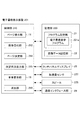
図1は、第1実施形態に係る電子書籍表示装置1の機能ブロック図である。
図2は、第1実施形態に係る電子書籍表示装置1の書籍データ記憶部22の例を示す図である。
電子書籍表示装置1は、電子書籍を表示する装置である。電子書籍表示装置1は、例えば、タブレット端末に代表されるコンピュータの機能を併せ持った携帯型の装置である。電子書籍表示装置1は、その他、スマートフォン等でもよい。また、電子書籍表示装置1は、電子書籍を表示する専用の端末であってもよい。
DESCRIPTION OF EMBODIMENTS Hereinafter, embodiments for carrying out the present invention will be described with reference to the drawings. This is merely an example, and the technical scope of the present invention is not limited to this.
(First embodiment)
<Electronic
FIG. 1 is a functional block diagram of an electronic
FIG. 2 is a diagram illustrating an example of the book
The electronic
図1に示すように、電子書籍表示装置1は、制御部10と、記憶部20と、タッチパネルディスプレイ25と、通信インタフェース部29とを備える。
制御部10は、電子書籍表示装置1の全体を制御する中央処理装置(CPU)である。制御部10は、記憶部20に記憶されているオペレーティングシステム(OS)やアプリケーションプログラムを適宜読み出して実行することにより、上述したハードウェアと協働し、各種機能を実行する。
As shown in FIG. 1, the electronic
The control unit 10 is a central processing unit (CPU) that controls the entire electronic
制御部10は、ページ表示部11(ページ表示手段)と、操作受付部12(操作受付手段)と、操作種類判定部13と、ページ決定部14(ページ決定手段)と、決定状況表示部15(決定状況表示手段)と、重畳表示部16(重畳表示手段)と、変更表示部17(変更表示手段)と、消去部18(消去手段)とを備える。
ページ表示部11は、電子書籍のうちユーザP(電子書籍表示装置1の操作者)が読みかけ中であったページ(以下、読みかけページという。)のページデータ(第1のページデータ)を、ページ表示画面に表示させる。
操作受付部12は、ユーザPの指によるタッチパネルディスプレイ25に対する操作を受け付ける。
The control unit 10 includes a page display unit 11 (page display unit), an operation reception unit 12 (operation reception unit), an operation type determination unit 13, a page determination unit 14 (page determination unit), and a determination
The
The
操作種類判定部13は、操作受付部12が受け付けた操作に基づいて、操作の種類がオーバーレイ表示の対象であるか否かを判定する。具体的には、操作受付部12が受け付けた操作が、ユーザPの指によるタッチパネルディスプレイ25の面への長押し操作(第1の操作)である場合に、操作種類判定部13は、オーバーレイ表示の対象であると判定する。
ページ決定部14は、操作状況(操作の度合い)に応じて、オーバーレイ表示をさせるページを決定する。ここで、操作状況とは、例えば、長押し操作の時間の長さのことをいう。具体的には、ページ決定部14は、長押し操作の時間が長いほど、オーバーレイ表示をさせるページを、より遡るように決定する。
決定状況表示部15は、ページ決定部14による決定状況を表示させる。具体的には、決定状況表示部15は、オーバーレイ表示させるそのページ番号(表示位置)やスライダバーを表示させる。
重畳表示部16は、ページ決定部14が決定したページのページデータ(第2のページデータ)をオーバーレイ表示させる。ここで、オーバーレイ表示とは、ページ表示画面の上にオーバーレイ画面を重ねて表示させることをいう。
変更表示部17は、オーバーレイ画面に表示されているページに関して、操作に対応して前後の内容が見えるように変更して表示させる。
消去部18は、ユーザPの指がタッチパネルディスプレイ25から離れることで、表示されていたオーバーレイ画面を消去する。
なお、各処理の詳細については、後述する。
The operation type determination unit 13 determines whether the operation type is an overlay display target based on the operation received by the
The page determination unit 14 determines a page to be overlaid according to the operation status (the degree of operation). Here, the operation status refers to, for example, the length of time for a long press operation. Specifically, the page determination unit 14 determines that the page to be overlaid is displayed more retroactively as the long press operation time is longer.
The determination
The superimposed
The
The erasing
Details of each process will be described later.
記憶部20は、制御部10が各種の処理を実行するために必要なプログラム、データ等を記憶するための半導体メモリ素子等の記憶領域である。
記憶部20は、プログラム記憶部21と、書籍データ記憶部22とを備える。
プログラム記憶部21は、各種のプログラムを記憶する記憶領域である。プログラム記憶部21は、電子書籍表示プログラム21aを記憶している。
電子書籍表示プログラム21aは、電子書籍表示装置1の制御部10が実行する各種機能を行うためのプログラムである。電子書籍表示プログラム21aは、予め電子書籍表示装置1にインストールされているものとする。
The storage unit 20 is a storage area such as a semiconductor memory element for storing programs, data, and the like necessary for the control unit 10 to execute various processes.
The storage unit 20 includes a
The
The electronic
書籍データ記憶部22は、電子書籍の書籍データを記憶する記憶領域である。書籍データ記憶部22は、書籍に関するデータが記憶されている。図2に示すように、書籍データ記憶部22は、書籍名と、書籍データと、読みかけページの位置情報とを対応付けて記憶する。書籍名は、書籍データが示す書籍の名称である。書籍データは、書籍の中身を示すデータであり、例えば、EPUBや、PDF等の形式のデータである。読みかけページの位置情報は、書籍データのうち読みかけページの位置を特定するための情報である。読みかけページの位置情報は、例えば、読みかけ時点での文字数を使用して、%表示と示すことができる。未だユーザPが読み始めていない場合には、位置情報は、0%である。なお、ページの位置情報として、ページ数(番号)を用いてもよい。
図2に示す例では、書籍名「春ちゃんとたま」は、ユーザPによって読みかけであり、書籍名「○×△」は、ユーザPがまだ読み始めていないことを示す。
書籍データ記憶部22に記憶されている書籍データは、例えば、電子書籍ストアを構成する電子書籍サーバ(図示せず)から、通信ネットワークを介してダウンロードされたものである。
The book
In the example illustrated in FIG. 2, the book name “Haru-chan and Tama” is read by the user P, and the book name “◯ × Δ” indicates that the user P has not yet started reading.
The book data stored in the book
図1に戻り、タッチパネルディスプレイ25は、液晶パネル等で構成される表示部としての機能と、ユーザPからの指等によるタッチ入力を検出する入力部としての機能とを有する。
通信インタフェース部29は、通信ネットワークを介して他の装置(例えば、電子書籍サーバ)との通信を行うためのインタフェース部である。
Returning to FIG. 1, the
The
<電子書籍表示装置1の処理>
次に、電子書籍表示装置1の処理について説明する。
図3は、第1実施形態に係る電子書籍表示装置1での表示処理を示すフローチャートである。
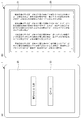
図4及び図6から図8までは、第1実施形態に係る電子書籍表示装置1の表示例を示す図である。
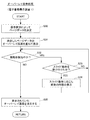
図5は、第1実施形態に係る電子書籍表示装置1でのオーバーレイ表示処理を示すフローチャートである。
図3のステップS(以下、「S」という。)10において、制御部10は、初期画面30を、タッチパネルディスプレイ25に表示させる。
図4(A)は、電子書籍表示装置1に表示された初期画面30の例を示す。初期画面30は、書籍データ記憶部22に記憶されている書籍データの書籍名を、ユーザPによって選択可能な態様で表示した画面である。
<Processing of Electronic
Next, processing of the electronic
FIG. 3 is a flowchart showing display processing in the electronic
4 and 6 to 8 are diagrams showing display examples of the electronic
FIG. 5 is a flowchart showing an overlay display process in the electronic
In step S (hereinafter referred to as “S”) 10 in FIG. 3, the control unit 10 displays an
FIG. 4A shows an example of the
図3に戻り、S11において、ユーザPが初期画面30から1つの書籍名を選択する操作をすることで、制御部10(ページ表示部11)は、選択された書籍名に対応する書籍データを、書籍データ記憶部22から取得する。そして、制御部10(ページ表示部11)は、読みかけページの位置情報に対応するページデータ(第1のページデータ)を抽出して、ページ表示画面31に表示する。
図4(B)は、電子書籍表示装置1に表示されたページ表示画面31の例を示す。ページ表示画面31には、書籍名が「春ちゃんとたま」の7ページ目が表示されている。
Returning to FIG. 3, when the user P performs an operation of selecting one book name from the
FIG. 4B shows an example of a
図3に戻り、S12において、制御部10(操作受付部12)は、タッチパネルディスプレイ25に対する操作を受け付けたか否かを判断する。タッチパネルディスプレイ25に対する操作を受け付けた場合(S12:YES)には、制御部10は、処理をS13に移す。他方、タッチパネルディスプレイ25に対する操作を受け付けていない場合(S12:NO)は、制御部10は、本処理に留まる。
S13において、制御部10(操作種類判定部13)は、受け付けた操作がオーバーレイ表示に関するものであるか否かを判断する。ここでは、ユーザPの指によるタッチパネルディスプレイ25の長押しが、オーバーレイ表示に関する操作(第1の操作)であるものとし、その場合を例に説明する。オーバーレイ表示に関するものである場合(S13:YES)には、制御部10は、処理をS14に移す。他方、オーバーレイ表示に関するものではない場合(S13:NO)には、制御部10は、処理をS15に移す。
S14において、制御部10は、オーバーレイ表示処理を行う。その後、制御部10は、処理をS16に移す。
Returning to FIG. 3, in S <b> 12, the control unit 10 (operation receiving unit 12) determines whether an operation on the
In S13, the control unit 10 (operation type determination unit 13) determines whether or not the received operation is related to overlay display. Here, it is assumed that the long press of the
In S14, the control unit 10 performs an overlay display process. Thereafter, the control unit 10 moves the process to S16.
ここで、オーバーレイ表示処理について、図5に基づき説明する。
図5のS30において、制御部10(ページ決定部14)は、操作状況(度合い)によって、オーバーレイ表示をさせるページデータ(第2のページデータ)を決定する。この例では、制御部10は、長押しする時間に応じてページデータを決定するものであり、時間が長くなるほど、より前のページデータに遡る。
S31において、制御部10(重畳表示部16)は、ページ決定部14が決定したページデータを表示するオーバーレイ画面32を、ページ表示画面31の上に重ねて表示させる。その際、制御部10(決定状況表示部15)は、操作の状況を視覚的に表示させる。
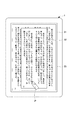
図6は、オーバーレイ画面32が表示された電子書籍表示装置1の例を示す。電子書籍表示装置1は、タッチパネルディスプレイ25に、オーバーレイ画面32を、ページ表示画面31の上に重ねて表示している。また、オーバーレイ画面32には、表示しているページの位置情報(この例では、2%)が表示されている。
Here, the overlay display process will be described with reference to FIG.
In S <b> 30 of FIG. 5, the control unit 10 (page determination unit 14) determines page data (second page data) to be displayed in an overlay depending on the operation status (degree). In this example, the control unit 10 determines the page data according to the long press time, and the longer the time is, the more the previous page data is traced back.
In S <b> 31, the control unit 10 (superimposition display unit 16) displays an
FIG. 6 shows an example of the electronic
図5に戻り、S32において、制御部10(操作受付部12)は、タッチパネルディスプレイ25に対するユーザPの指による接触を検出中であるか否かを判断する。接触を検出中である場合(S32:YES)には、制御部10は、処理をS33に移す。他方、接触を検出しなくなった場合(S32:NO)には、制御部10は、処理をS35に移す。ここで、接触を検出しなくなった場合とは、ユーザPの指が、タッチパネルディスプレイ25から離れた場合をいう。つまり、ユーザPが指をタッチパネルディスプレイ25から離す操作(第3の操作)をした場合である。
Returning to FIG. 5, in S <b> 32, the control unit 10 (operation receiving unit 12) determines whether or not contact with the finger of the user P on the
S33において、制御部10(操作受付部12)は、スライド操作(第2の操作)を受け付けたか否かを判断する。ここで、スライド操作とは、ユーザPの指を、例えば、左右のいずれかの方向に移動させる操作をいう。スライド操作を受け付けた場合(S33:YES)には、制御部10は、処理をS34に移す。他方、スライド操作を受け付けていない場合(S33:NO)には、制御部10は、処理をS32に移す。
ここで、スライド操作を受け付けていない場合とは、ユーザPが、指を最初にタッチパネルディスプレイ25に接触させてから、その指を動かさずに長押しし続けている状態をいう。その場合には、制御部10は、処理をS32に戻し、長押ししている時間に応じて、前のページに遡ったページデータを決定して、オーバーレイ画面32の表示を変更する処理を行う。
In S33, the control unit 10 (operation receiving unit 12) determines whether or not a slide operation (second operation) has been received. Here, the slide operation refers to an operation of moving the finger of the user P in, for example, one of the left and right directions. When the slide operation is accepted (S33: YES), the control unit 10 moves the process to S34. On the other hand, when the slide operation is not received (S33: NO), the control unit 10 moves the process to S32.
Here, the case where the slide operation is not accepted refers to a state in which the user P keeps pressing the finger without moving the finger after first contacting the
S34において、制御部10(変更表示部17)は、スライド操作に応じて、オーバーレイ画面32に表示されているページデータの前後の内容が見えるように、オーバーレイ画面32に表示するページデータの内容を変更する。その後、制御部10は、処理をS32に移す。
図7は、ユーザPの指を右方向にスライドさせた場合に、電子書籍表示装置1に表示されたオーバーレイ画面32の例を示す。この図の例のように、ユーザPの指を右方向にスライドすると、制御部10は、オーバーレイ画面32に表示されていたページデータを、次のページの内容が見えるようにスライドさせて表示させる。なお、ユーザPの指を左方向にスライドした場合には、制御部10は、オーバーレイ画面32に表示されていたページデータを、前のページの内容が見えるようにスライドさせて表示させる。
In S34, the control unit 10 (change display unit 17) changes the contents of the page data displayed on the
FIG. 7 shows an example of the
このように、ユーザPの指によるスライド操作により、操作に応じた内容を表示させることで、直感的な操作に合った内容を表示させることができる。
なお、ユーザPの指をスライドさせる方向は、左右方向に限定するものではない。例えば、ユーザPの指を上方向にスライドさせた場合には、制御部10は、次のページの内容が見えるようにし、ユーザPの指を下方向にスライドさせた場合には、制御部10は、前のページの内容が見えるようにしてもよい。
Thus, by displaying the content according to the operation by the slide operation with the finger of the user P, the content suitable for the intuitive operation can be displayed.
Note that the direction in which the finger of the user P slides is not limited to the left-right direction. For example, when the finger of the user P is slid upward, the control unit 10 makes the contents of the next page visible, and when the finger of the user P is slid downward, the control unit 10 The contents of the previous page may be visible.
図5に戻り、S35において、制御部10(消去部18)は、タッチパネルディスプレイ25に表示させていたオーバーレイ画面32を消去させる。その後、制御部10は、本処理を終了し、処理を図3に移す。
図8は、ユーザPの指をタッチパネルディスプレイ25から離したときの電子書籍表示装置1の表示例である。タッチパネルディスプレイ25には、直前まで表示されていたオーバーレイ画面32が消えて、元のページ表示画面31のみが表示された状態になる。
このように、ユーザPが継続して接触させ続けていた指を離す、という直観的な操作によって、制御部10は、直前まで表示していたオーバーレイ画面32を消去させることができる。よって、ユーザPは、直ちに読みかけページから読み始めることができる。
Returning to FIG. 5, in S <b> 35, the control unit 10 (erase unit 18) erases the
FIG. 8 is a display example of the electronic
In this manner, the control unit 10 can erase the
図3に戻り、S15において、制御部10は、通常の操作を行う。通常の操作とは、例えば、ページ表示画面31の左側がタップされた場合には、次のページに進み、右側がタップされたら前のページに戻る、といった処理をいう。また、通常の操作とは、例えば、図示しない操作画面の操作ボタンを選択する場合をいう。
S16において、制御部10は、終了ボタン(図示せず)が選択されることで、電子書籍表示装置1での表示を終了するか否かを判断する。表示を終了する場合(S16:YES)には、制御部10は、処理をS17に移す。他方、表示を終了しない場合(S16:NO)には、制御部10は、処理をS12に移す。
S17において、制御部10は、ページ表示画面31に表示されているページの位置情報を、書籍データ記憶部22の該当の書籍名に対応した読みかけページの位置情報に記憶させる。その後、制御部10は、本処理を終了する。
Returning to FIG. 3, in S15, the control unit 10 performs a normal operation. The normal operation means, for example, a process of proceeding to the next page when the left side of the
In S <b> 16, the control unit 10 determines whether or not to end the display on the electronic
In S <b> 17, the control unit 10 stores the position information of the page displayed on the
次に、オーバーレイ表示をする他の操作例を説明する。
上述の例では、長押しの時間に応じて、オーバーレイ画面32の表示が変化するものを説明した。しかし、他の操作によっても、同様にオーバーレイ画面32の表示を変化させることができる。
(例1)加圧の大きさによる表示
制御部10(操作受付部12)がユーザPの指がタッチパネルディスプレイ25に印加する操作(第1の操作)を受け付けることで、制御部10(ページ決定部14)は、その圧力に応じて、オーバーレイ画面32に表示させるページデータを決定してもよい。この場合、タッチパネルディスプレイ25は、検出した圧力データを制御部10に送出することで、制御部10は、圧力データの値に応じてページデータを決定する。その際、制御部10は、圧力データの値が大きいほど、前のページに遡る度合いを大きくする。
Next, another operation example for displaying an overlay will be described.
In the above-described example, the case where the display of the
(Example 1) Display by magnitude of pressurization When the control unit 10 (operation receiving unit 12) receives an operation (first operation) applied by the user P's finger to the
(例2)ドラッグの距離による表示
制御部10(操作受付部12)は、ユーザPの指によって、タッチパネルディスプレイ25に接触した後にその指を移動させる操作(第1の操作)を受け付ける。そうすることで、制御部10(ページ決定部14)は、その移動距離に応じて、オーバーレイ画面32に表示させるページデータを決定してもよい。この場合、スライド操作を判別可能にするために、制御部10は、速度が0にならない描画の軌跡を検出し続ける限りにおいて、その移動距離に応じたページデータを決定するようにすればよい。その際、制御部10は、移動距離が長いほど、前のページに遡る度合いを大きくする。なお、制御部10は、検出した位置の移動速度が0になった場合には、その後さらに移動を検出しても、ページデータを遡ることはせずに、オーバーレイ画面32をスライド表示させる。
(Example 2) Display by drag distance The control unit 10 (operation receiving unit 12) receives an operation (first operation) of moving the finger after touching the
(例3)同時タッチ数による表示
制御部10(操作受付部12)は、ユーザPの複数の指をタッチパネルディスプレイ25に同時に接触させる操作(第1の操作)を受け付ける。そうすることで、制御部10(ページ決定部14)は、タッチパネルディスプレイ25の面に同時に接触している位置の数、つまり、タッチパネルディスプレイ25に同時に接触しているユーザPの指の数に応じて、オーバーレイ画面32に表示させるページデータを決定してもよい。この場合、タッチパネルディスプレイ25は、接触している位置の数を制御部10に送出することで、制御部10は、タッチ位置の数に応じたページデータを決定する。その際、制御部10は、タッチ位置の数が多いほど、前のページに遡る度合いを大きくする。
なお、接触位置が2か所の場合には、ピンチインやピンチアウト操作があることから、制御部10がオーバーレイ画面32を表示させる同時接触数を、3か所以上とすることが望ましい。
(Example 3) Display by the number of simultaneous touches The control unit 10 (operation reception unit 12) receives an operation (first operation) in which a plurality of fingers of the user P are simultaneously brought into contact with the
Note that when there are two contact positions, there are pinch-in and pinch-out operations. Therefore, it is desirable that the number of simultaneous contacts on which the control unit 10 displays the
次に、オーバーレイ表示に関する表示例を説明する。
上述の例では、オーバーレイ画面32に表示されているページデータの位置を、ページの位置情報を表示することによって示すものを説明した。しかし、他の表示方法であっても、同様にオーバーレイ画面32に表示されているページデータの位置を把握できる。
図9は、第1実施形態に係る電子書籍表示装置1の他の表示例を示す図である。
Next, a display example related to overlay display will be described.
In the above-described example, the description has been given of the position of the page data displayed on the
FIG. 9 is a diagram illustrating another display example of the electronic
(例1)ページの色の変化
図9(A)に示すように、制御部10(決定状況表示部15)は、ページ表示画面31に表示されているページの位置情報と、オーバーレイ画面32に表示されているページの位置情報との離れ度合いに応じて、ページ表示画面31の色を変化させる。例えば、制御部10(決定状況表示部15)は、ページ表示画面31に表示されているページの位置情報と、オーバーレイ画面32に表示されているページの位置情報とが離れるほど、ページ表示画面31の色を濃い色(例えば、黒色)に変化させる。具体的には、1ページしか離れていない場合には、ページ表示画面31の色には変化がなく白色であるが(図9(A−1))、10ページ程度離れると、ページ表示画面31の色が少し灰色っぽくなり(図9(A−2))、50ページ程度離れると、ページ表示画面31の色が黒っぽい色になる(図9(A−3))。
このように表示することで、ユーザPは、ページ表示画面31の色の変化によって、オーバーレイ画面32に表示されているページの遡り度合いが確認できる。また、ユーザPが読むオーバーレイ画面32の色は変化しないので、オーバーレイ画面32が読みやすい状態を維持できる。
(Example 1) Change in Page Color As shown in FIG. 9A, the control unit 10 (determination status display unit 15) displays the page position information displayed on the
By displaying in this way, the user P can confirm the retroactive degree of the page displayed on the
(例2)スケール表示
図9(B)に示すように、制御部10(決定状況表示部15)は、ページ表示画面31に表示されているページと先頭ページとを両端にしたスライダバー33aを表示し、オーバーレイ画面32に表示されているページ位置を、スライダ33bで表示する。
このようにすれば、オーバーレイ画面32に表示されているページ位置の変化が、スライダ33bによって示されるため、ユーザPは、スライダ33bの位置によって遡った度合いが確認できる。
なお、制御部10は、スライダバー33aの長さを、この書籍データの全ページ分の長さとし、ページ表示画面31とオーバーレイ画面32との各ページ位置を、スライダによって表示するようにしてもよい。
(Example 2) Scale display As shown in FIG. 9B, the control unit 10 (determination status display unit 15) displays a
In this way, since the change in the page position displayed on the
The control unit 10 may set the length of the
(例3)厚みを視覚的に表す
図9(C)に示すように、制御部10(決定状況表示部15)は、ページ表示画面31に表示されているページの位置情報と、オーバーレイ画面32に表示されているページの位置情報との離れ度合いに応じて、オーバーレイ画面32を立体的に表示させる厚み部34を変化させる。制御部10は、ページ表示画面31と、オーバーレイ画面32とのページの位置情報が離れていくほど、厚み部34の厚みを大きく変化させる。
このような方法によっても、ユーザPが読んでいるオーバーレイ画面32自体は変化しないので、オーバーレイ画面32の読みやすい状態を維持しつつ、読みかけページとの差を直観的に把握でき、遡った度合いを確認しやすくできる。
(Example 3) Representing thickness visually As shown in FIG. 9C, the control unit 10 (determination status display unit 15) displays the position information of the page displayed on the
Even with such a method, since the
このように、第1実施形態の電子書籍表示装置1によれば、以下のような効果がある。
(1)ユーザPの指による長押し操作を受け付けた場合に、ページ表示画面31に表示している読みかけページとは異なるページを、読みかけページの上にオーバーレイ表示させることができる。よって、読みかけページを残しつつ、別のページを表示させることができる。
(2)ユーザPの指による長押し操作の操作時間に応じて、オーバーレイ表示をさせるページを遡るように変えることができる。よって、ユーザPの指による操作のみによって、遡って見たいページを表示させることができ、操作が簡単である。
(3)ユーザPの指による長押し操作中にスライド操作をすることで、オーバーレイ画面32に表示されているページの内容を、スライド操作に応じて前後に移動させることができる。よって、オーバーレイ表示には、ちょっと前やちょっと後の内容を含めることができるので、ユーザPに対する利便性を向上できる。
Thus, according to the electronic
(1) When a long press operation with the finger of the user P is accepted, a page different from the reading page displayed on the
(2) Depending on the operation time of the long press operation by the finger of the user P, the page to be overlaid can be changed back. Therefore, a page to be viewed retrospectively can be displayed only by an operation with the finger of the user P, and the operation is simple.
(3) By performing the slide operation during the long press operation by the user P's finger, the content of the page displayed on the
(4)オーバーレイ画面32に表示されているページ位置を表示させることで、オーバーレイ画面32に表示されているページの位置を、ユーザPが確認できる。そして、オーバーレイ画面32に表示させるページを遡る操作をしている途中であっても、途中でのページ位置を、決定状況として表示させることで、ユーザPが遡る操作を止める際の参考にすることができる。
また、読みかけページから遡って表示されるオーバーレイ画面32に表示されたページのページ位置を、表示態様を変化させることで示すため、ユーザPにとって直感的に分かりやすい表示にできる。
(5)長押ししていたユーザPの指を、タッチパネルディスプレイ25から離すという簡易な操作によって、表示されていたオーバーレイ画面32を消去することができる。よって、操作が簡単である。また、オーバーレイ画面32を消去することで、オーバーレイ画面32の下にある読みかけページを、ユーザPにすぐに見せることができる。
(4) By displaying the page position displayed on the
Further, since the page position of the page displayed on the
(5) The displayed
(6)ユーザPの指によるタッチパネルディスプレイ25に対する加圧の大きさによっても、ユーザPの指による長押し操作と同様に、オーバーレイ画面32に別のページを表示させることができる。よって、簡単な操作によって、別ページをオーバーレイ表示させることができる。
そして、加圧の大きさが大きいほど、オーバーレイ画面32に表示させる別ページの遡り度合いを大きく変えるため、別ページの決定を、直感的な操作によって行うことができる。
(7)ユーザPの指がタッチパネルディスプレイ25に接触してからその指を移動することによって、オーバーレイ画面32に別のページを表示させることができる。よって、簡単な操作によって、別ページをオーバーレイ表示させることができる。
そして、移動距離が長いほど、オーバーレイ画面32に表示させる別ページの遡り度合いを大きく変えるため、別ページの決定を、直感的な操作によって行うことができる。
(8)タッチパネルディスプレイ25に同時に接触しているユーザPの指の数が複数(例えば、3か所以上)であることを条件として、オーバーレイ画面32に別のページを表示させることができる。よって、簡単な操作によって、別ページをオーバーレイ表示させることができる。
そして、同時接触数が多いほど、オーバーレイ画面32に表示させる別ページの遡り度合いを大きく変えるため、別ページの決定を、直感的な操作によって行うことができる。
(6) Another page can be displayed on the
Since the degree of retroactiveness of another page displayed on the
(7) Another page can be displayed on the
Then, as the moving distance is longer, the degree of retroactiveness of another page displayed on the
(8) Another page can be displayed on the
And, as the number of simultaneous contacts increases, the retroactive degree of another page to be displayed on the
(第2実施形態)
第2実施形態では、タッチパネルディスプレイに対する接触操作ではなく、他の操作によって前のページデータをオーバーレイ表示させるものについて説明する。なお、以降の説明において、上述した第1実施形態と同様の機能を果たす部分には、同一の符号又は末尾に同一の符号を付して、重複する説明を適宜省略する。
(Second Embodiment)
In the second embodiment, a description will be given of an example in which the previous page data is displayed in an overlay manner by other operations instead of a touch operation on the touch panel display. In the following description, parts that perform the same functions as those in the first embodiment described above are given the same reference numerals or the same reference numerals at the end, and redundant descriptions are omitted as appropriate.
<電子書籍表示装置201>
図10は、第2実施形態に係る電子書籍表示装置201の機能ブロック図である。
電子書籍表示装置201は、制御部210と、記憶部220と、タッチパネルディスプレイ25と、加速度センサ227(傾き検出部)と、スピーカ228と、通信インタフェース部29とを備える。
制御部210は、ページ表示部11と、操作受付部212と、ページ決定部214と、決定状況出力部215(決定状況出力手段)と、重畳表示部16と、消去部218とを備える。
操作受付部212は、ユーザPによるこの電子書籍表示装置201を傾けて戻す操作(第1の操作、第3の操作)を受け付ける。
<Electronic
FIG. 10 is a functional block diagram of the electronic
The electronic
The control unit 210 includes a
The operation accepting unit 212 accepts an operation (first operation, third operation) by the user P to tilt the electronic
ページ決定部214は、操作状況に応じて、オーバーレイ表示をさせるページを決定する。具体的には、ページ決定部214は、加速度センサ227が検出したこの電子書籍表示装置201が傾いている時間の長さに応じて、オーバーレイ表示をさせるページを決定する。
決定状況出力部215は、ページ決定部214による決定状況を、スピーカ228を介して出力させる。具体的には、決定状況出力部215は、オーバーレイ表示させるページの移動状況として、「パラパラ」という音を出力させる。
消去部218は、操作受付部212が受け付けた操作に応じて、表示されていたオーバーレイ画面32を消去する。
The page determination unit 214 determines a page to be displayed in overlay according to the operation status. Specifically, the page determination unit 214 determines a page to be overlaid according to the length of time that the electronic
The determination status output unit 215 outputs the determination status by the page determination unit 214 via the
The
記憶部220は、プログラム記憶部21と、書籍データ記憶部22とを備える。
プログラム記憶部21は、電子書籍表示プログラム221aを記憶している。
電子書籍表示プログラム221aは、電子書籍表示装置201の制御部210が実行する各種機能を行うためのプログラムである。
加速度センサ227は、この電子書籍表示装置201の傾きを検出する。
スピーカ228は、音を出力する装置である。
The storage unit 220 includes a
The
The electronic book display program 221a is a program for performing various functions executed by the control unit 210 of the electronic
The
The
<電子書籍表示装置201の処理>
次に、電子書籍表示装置201の処理について説明する。
図11は、第2実施形態に係る電子書籍表示装置201での表示処理を示すフローチャートである。
図12は、第2実施形態に係る電子書籍表示装置201の表示例を示す図である。
図13は、第2実施形態に係る電子書籍表示装置201でのオーバーレイ表示処理を示すフローチャートである。
図11のS210及びS211は、第1実施形態(図3)のS10及びS11と同様である。S211の処理によって、図12(A)に示すように、電子書籍表示装置201は、タッチパネルディスプレイ25に、読みかけページのページ表示画面31を表示している。
<Processing of Electronic
Next, processing of the electronic
FIG. 11 is a flowchart showing display processing in the electronic
FIG. 12 is a diagram illustrating a display example of the electronic
FIG. 13 is a flowchart showing an overlay display process in the electronic
11 are the same as S10 and S11 of the first embodiment (FIG. 3). By the process of S211, the electronic
図11に戻り、S212において、制御部210は、タッチパネルディスプレイ25に対する操作を受け付けたか否かを判断する。タッチパネルディスプレイ25に対する操作を受け付けた場合(S212:YES)には、制御部210は、処理をS213に移す。他方、タッチパネルディスプレイ25に対する操作を受け付けていない場合(S212:NO)は、制御部210は、処理をS214に移す。
S213において、制御部210は、通常の操作を行う。通常の操作に関しては、第1実施形態で説明したものと同様である。
S214において、ユーザPが電子書籍表示装置201を傾ける操作(第1の操作)をすることで、制御部210(操作受付部212)が、加速度センサ227からの検出信号によって傾きを検出したか否かを判断する。傾きを検出した場合(S214:YES)には、制御部210は、処理をS215に移す。他方、傾きを検出していない場合(S214:NO)には、制御部210は、処理をS216に移す。
S215において、制御部210は、オーバーレイ表示処理を行う。
Returning to FIG. 11, in S <b> 212, the control unit 210 determines whether an operation on the
In S213, the control unit 210 performs a normal operation. The normal operation is the same as that described in the first embodiment.
Whether or not the control unit 210 (operation receiving unit 212) detects the tilt based on the detection signal from the
In S215, the control unit 210 performs an overlay display process.
ここで、オーバーレイ表示処理について、図13に基づき説明する。
図13のS230において、制御部210(決定状況出力部215)は、ページが捲られている態様を示すため、「パラパラ」という音を、スピーカ228から出力させる。
図12(B)は、電子書籍表示装置201が傾いた状態で、音が出力されている態様を示す。
図13に戻り、S231において、制御部210(ページ決定部214)は、操作状況(度合い)によって、オーバーレイ表示をさせるページデータを決定する。この例では、傾けている時間の長さに応じてページデータを決定するものであり、制御部210は、時間が長くなるほど、より前のページデータに遡るように制御する。
Here, the overlay display process will be described with reference to FIG.
In S230 of FIG. 13, the control unit 210 (determination status output unit 215) causes the
FIG. 12B illustrates a state in which sound is output in a state where the electronic
Returning to FIG. 13, in S231, the control unit 210 (page determination unit 214) determines page data to be displayed in an overlay depending on the operation status (degree). In this example, the page data is determined according to the length of the tilted time, and the control unit 210 performs control so as to go back to the previous page data as the time becomes longer.
S232において、制御部210(操作受付部212)は、傾きを検出中であるか否かを判断する。傾きを検出中である場合(S232:YES)には、制御部210は、処理をS230に移す。他方、傾きを検出しなくなった場合(S232:NO)には、制御部210は、処理をS233に移す。なお、傾きを検出しなくなった場合とは、ユーザPが、傾いていた電子書籍表示装置201を元の状態に戻す操作(第1の操作)をした場合をいう。
S233において、制御部210(重畳表示部16)は、ページ決定部214が決定したページデータのオーバーレイ画面32を、ページ表示画面31の上に重ねて表示させる。図12(C)は、オーバーレイ画面32が表示された例を示す。
In S232, the control unit 210 (operation receiving unit 212) determines whether or not the inclination is being detected. When the inclination is being detected (S232: YES), the control unit 210 moves the process to S230. On the other hand, when the inclination is no longer detected (S232: NO), the control unit 210 moves the process to S233. The case where the tilt is no longer detected refers to a case where the user P performs an operation (first operation) for returning the tilted electronic
In step S <b> 233, the control unit 210 (superimposition display unit 16) displays the
S234において、ユーザPが電子書籍表示装置201を再度傾ける操作(第3の操作)をすることで、制御部210(操作受付部212)が、加速度センサ227からの検出信号によって傾きを検出したか否かを判断する。傾きを検出した場合(S234:YES)には、制御部210は、処理をS235に移す。他方、傾きを検出していない場合(S234:NO)には、制御部210は、本処理に留まる。
S235において、制御部210(操作受付部212)は、規定時間内に傾きを検出しなくなったか否かを判断する。ここで、規定時間とは、予め定められた時間であり、例えば、1秒等の短い時間である。つまり、ユーザPが電子書籍表示装置201を傾ける操作をした後に、素早く元の状態に戻す操作(第3の操作)をすることで、制御部210は、規定時間内に傾きを検出しなくなったと判断する。規定時間内に傾きを検出しなくなった場合(S235:YES)には、制御部210は、処理をS236に移す。他方、規定時間を越えて傾きを検出中である場合(S235:NO)には、制御部210は、処理をS230に移す。
なお、この処理では、再度オーバーレイ表示させるページデータを決定させる処理と、オーバーレイ表示を消す処理とを、電子書籍表示装置201の傾きを検出している時間が規定時間内であるか否かにより区別しているが、他の区別方法によるものであってもよい。
In S234, whether the control unit 210 (operation receiving unit 212) has detected the tilt from the detection signal from the
In S235, the control unit 210 (operation receiving unit 212) determines whether or not the inclination is not detected within the specified time. Here, the specified time is a predetermined time, for example, a short time such as 1 second. In other words, after the user P performs an operation of tilting the electronic
In this process, the process of determining the page data to be overlaid again and the process of erasing the overlay display are divided depending on whether or not the time during which the tilt of the electronic
S236において、制御部210(消去部218)は、表示されていたオーバーレイ画面32を消去させる。図12(D)及び(E)は、電子書籍表示装置201を再度傾けて戻す操作をした場合に、タッチパネルディスプレイ25からオーバーレイ画面32が消去された例を示す。その後、制御部210は、本処理を終了し、処理を図11に移す。
図11に戻り、S216及びS217の処理は、第1実施形態(図3)のS16及びS17と同様である。
In S236, the control unit 210 (erase unit 218) deletes the displayed
Returning to FIG. 11, the processes of S216 and S217 are the same as S16 and S17 of the first embodiment (FIG. 3).
次に、オーバーレイ表示をする他の例を説明する。
上述の例では、電子書籍表示装置201を傾けている時間に応じて、オーバーレイ画面32の表示が変化するものを説明した。しかし、他の操作によっても、同様にオーバーレイ画面32の表示を変化させることができる。
(例1)傾きの大きさによる表示
制御部210(ページ決定部)は、加速度センサ227が検出した傾きの度合いに応じて、オーバーレイ画面32に表示させるページデータを決定してもよい。その際、制御部210は、加速度センサ227から取得した傾き度合いを示すデータが大きいほど、前のページに遡る度合いを大きくする。また、制御部210(決定状況出力部)は、前のページに遡る度合いに応じた音を出力する。例えば、遡るページ数が少ない場合には、制御部210は「パラパラ」という音をゆっくり出力する。他方、遡るページ数が多い場合には、制御部210は「パラパラ」という音を速く出力する。
Next, another example of overlay display will be described.
In the above-described example, the case where the display of the
(Example 1) Display by Inclination Size The control unit 210 (page determination unit) may determine page data to be displayed on the
(例2)傾きの速度による表示
制御部210(ページ決定部)は、加速度センサ227が検出した傾きの速度に応じて、オーバーレイ画面32に表示させるページデータを決定してもよい。その際、制御部210は、加速度センサ227から取得した傾きの単位時間あたりの傾き度合いを示すデータが大きいほど、前のページに遡る度合いを大きくする。また、制御部210(決定状況出力部)は、上述の傾きの大きさの場合(例1)と同様に、音を出力できる。
(Example 2) Display by Inclination Speed The control unit 210 (page determination unit) may determine page data to be displayed on the
このように、第2実施形態によれば、電子書籍表示装置201は、以下のような効果がある。
(1)ユーザPが、電子書籍表示装置201を傾けて戻すという操作をすることで、ページ表示画面31に表示している読みかけページとは異なるページを、読みかけページの上にオーバーレイ表示させることができる。よって、読みかけページを残しつつ、別のページを表示させることができる。
ユーザPによる傾ける操作を受け付けた場合に、その傾けている時間の長さに応じて、オーバーレイ表示をさせるページの遡る度合いを変えることができる。よって、ユーザPによる傾ける操作のみによって、遡って見たいページを表示させることができ、操作が簡単である。
As described above, according to the second embodiment, the electronic
(1) When the user P performs an operation of tilting and returning the electronic
When an operation of tilting by the user P is received, the degree of going back to the page to be overlaid can be changed according to the length of the tilting time. Therefore, the page to be viewed retrospectively can be displayed only by the tilting operation by the user P, and the operation is simple.
(2)前のページに遡っている様子を音によって出力するので、電子書籍表示装置201を傾けることによって電子書籍表示装置201のタッチパネルディスプレイ25がユーザPから見えない状態であっても、ページの遡り状況をユーザPが確認できる。
(3)ユーザPによって、電子書籍表示装置201を再度傾けて戻すという操作をすることで、表示されていたオーバーレイ画面32を消去することができる。このように、オーバーレイ画面32を表示する操作と、消去する操作が同じ操作であるため、操作が簡単である。また、オーバーレイ画面32を消去することで、オーバーレイ画面32の下にある読みかけページを、ユーザPにすぐに見せることができる。
(2) Since the state of going back to the previous page is output by sound, even if the
(3) The displayed
以上、本発明の実施形態について説明したが、本発明は上述した実施形態に限定されるものではない。また、実施形態に記載した効果は、本発明から生じる最も好適な効果を列挙したに過ぎず、本発明による効果は、実施形態に記載したものに限定されない。なお、上述した実施形態及び後述する変形形態は、適宜組み合わせて用いることもできるが、詳細な説明は省略する。 As mentioned above, although embodiment of this invention was described, this invention is not limited to embodiment mentioned above. In addition, the effects described in the embodiments are merely a list of the most preferable effects resulting from the present invention, and the effects of the present invention are not limited to those described in the embodiments. In addition, although embodiment mentioned above and the deformation | transformation form mentioned later can also be used in combination as appropriate, detailed description is abbreviate | omitted.
(変形形態)
(1)各実施形態では、ユーザによるオーバーレイ表示操作によって、読みかけページから順番に遡ったページをオーバーレイ画面に表示させるものを説明したが、これに限定されない。例えば、いわゆる、しおり機能を用いて、予めユーザが自分のお気に入りのページに印を付けておいた場合に、オーバーレイ画面には、印を付けたページを遡って表示するようにしてもよい。そのようにすることで、ユーザが予め重要だと思ったページ内で遡って表示させることができる。
(2)第1実施形態では、ユーザの指によるタッチパネルディスプレイへの接触によって、読みかけページから遡ったページを、オーバーレイ画面に表示させるものを説明したが、これに限定されない。例えば、ユーザの指による接触位置に文字を含む場合に、その文字を含む単語を認識し、オーバーレイ画面には、その単語を含むページを遡って表示するようにしてもよい。そのようにすることで、その単語が出てきたページをユーザが見ることができ、例えば、単語が登場人物であれば、登場人物の理解を深めることができる。
また、オーバーレイ画面に表示されるその単語を含むページは、最もその単語の説明がよくされているページとしてもよい。
(Deformation)
(1) In each of the embodiments, the description has been given of the case in which the page that is traced back from the read page is displayed on the overlay screen by the overlay display operation by the user, but is not limited thereto. For example, when a user has previously marked his favorite page using a so-called bookmark function, the marked page may be displayed retrospectively on the overlay screen. By doing so, it can be displayed retroactively in a page that the user previously thought was important.
(2) In the first embodiment, a description has been given of displaying a page traced back from a read page on the overlay screen by touching the touch panel display with a user's finger. However, the present invention is not limited to this. For example, when a character is included in the contact position of the user's finger, a word including the character may be recognized, and a page including the word may be displayed retrospectively on the overlay screen. By doing so, the user can see the page on which the word appears. For example, if the word is a character, the understanding of the character can be deepened.
Further, the page including the word displayed on the overlay screen may be a page with the best explanation of the word.
(3)第1実施形態では、ユーザの指がタッチパネルディスプレイを長押ししている状態のときにオーバーレイ画面を表示させ、そのオーバーレイ画面の表示位置は固定であったが、これに限定されない。例えば、タッチパネルディスプレイを長押しつつ、その指を移動させることで、表示されているオーバーレイ画面を、指の移動位置に応じて上下左右にドラッグさせるようにしてもよい。
(4)第1実施形態では、ユーザの指がタッチパネルディスプレイから離れた場合に、オーバーレイ画面を消去させるものを説明したが、これに限定されない。所定の操作をした場合には、ユーザの指がタッチパネルディスプレイから離れても、オーバーレイ画面を表示し続けるようにしてもよい。そして、例えば、オーバーレイ画面をタッチ操作することで、表示し続けていたオーバーレイ画面を消去するようにしてもよい。
(5)第1実施形態では、ユーザの指がタッチパネルディスプレイを長押ししている状態のときにオーバーレイ画面に表示されるページが遡るものを説明した。そのページを遡る速度について、例えば、ユーザの指を上下左右のいずれかのオーバーレイ画面の枠までドラッグしたときには、ページが高速に移動し続けるものであってもよい。
(3) In the first embodiment, the overlay screen is displayed when the user's finger is pressing and holding the touch panel display, and the display position of the overlay screen is fixed. However, the present invention is not limited to this. For example, the displayed overlay screen may be dragged up, down, left, or right according to the movement position of the finger by moving the finger while pressing and holding the touch panel display.
(4) In the first embodiment, the description has been given of the case where the overlay screen is erased when the user's finger is separated from the touch panel display. However, the present invention is not limited to this. When a predetermined operation is performed, the overlay screen may continue to be displayed even when the user's finger leaves the touch panel display. Then, for example, the overlay screen that has been continuously displayed may be deleted by touching the overlay screen.
(5) In the first embodiment, a description has been given of a page that goes back on the overlay screen when the user's finger is pressing and holding the touch panel display for a long time. Regarding the speed of going back to the page, for example, when the user's finger is dragged to the frame of the overlay screen on the top, bottom, left or right, the page may continue to move at high speed.
(6)第2実施形態では、電子書籍表示装置の傾きを検出中である場合には、音を出力し、傾きを検出しなくなった場合に、オーバーレイ画面を表示するものを説明したが、これに限定されない。音の出力と共に、オーバーレイ画面を表示させるようにしてもよい。そして、表示させるオーバーレイ画面は、パラパラ捲るようなアニメーションの表示態様にしてもよい。そのようにすることで、音による効果の他に、ユーザが、電子書籍表示装置を傾けながらオーバーレイ画面に表示されたページを参照することで、表示したいページを探すことができる。
(7)各実施形態では、オーバーレイ画面を表示させる例を説明したが、このオーバーレイ画面の表示機能をON/OFFする設定を設けておき、設定がOFFであれば、同じ動作をしても表示されないようにしてもよい。
また、ON/OFFする設定は、例えば、第2実施形態の場合には、傾きが軽度である場合には、OFFとし、一定値以上の傾きである場合に、ONにするようにしてもよい。そのようにすることで、例えば、第2実施形態の場合には、電子書籍表示装置をユーザが意図しないで傾けた場合に、オーバーレイ画面が表示させることを防ぐことができる。
(6) In the second embodiment, a description has been given of the case where the tilt is detected while the electronic book display device is being detected, and a sound is output, and the tilt screen is not detected, and an overlay screen is displayed. It is not limited to. An overlay screen may be displayed together with the sound output. Then, the overlay screen to be displayed may be displayed in an animated display mode. By doing so, in addition to the sound effect, the user can search for a page to be displayed by referring to the page displayed on the overlay screen while tilting the electronic book display device.
(7) In each embodiment, an example in which an overlay screen is displayed has been described. However, a setting for turning on / off the display function of this overlay screen is provided, and if the setting is OFF, the same operation is displayed. It may not be done.
Further, for example, in the case of the second embodiment, the ON / OFF setting may be set to OFF when the inclination is light, and may be set to ON when the inclination is a certain value or more. . By doing so, for example, in the case of the second embodiment, it is possible to prevent the overlay screen from being displayed when the user tilts the electronic book display device without intention.
(8)各実施形態では、電子書籍表示装置が書籍データを記憶する書籍データ記憶部を備えるものを説明したが、これに限定されない。例えば、電子書籍表示装置が書籍データ記憶部を備えず、電子書籍サーバにある書籍データを使用するようにしてもよい。その場合には、電子書籍表示装置は、通信ネットワークを介して電子書籍サーバにアクセスして、電子書籍サーバに記憶された書籍データを表示させるようにすればよい。また、読みかけページの位置情報も、電子書籍サーバに送信することで、電子書籍サーバが記憶すればよい。
(9)各実施形態では、ページ表示画面の上に表示するオーバーレイ画面を、ページ表示画面を一部隠すような態様で示したが、これに限定されない。電子書籍表示装置は、オーバーレイ画面を、例えば、ページ表示画面の全体を覆うように表示させてもよい。また、オーバーレイ画面を矩形で示したが、これに限定されない。例えば、オーバーレイ画面を吹き出しのような形で表してもよい。
(8) In each embodiment, the electronic book display device includes a book data storage unit that stores book data. However, the present invention is not limited to this. For example, the electronic book display device may not include a book data storage unit, and may use book data in an electronic book server. In that case, the electronic book display device may access the electronic book server via the communication network and display the book data stored in the electronic book server. Further, the position information of the read page may be stored in the electronic book server by transmitting the information to the electronic book server.
(9) In each embodiment, the overlay screen displayed on the page display screen is shown in such a manner as to partially hide the page display screen, but the present invention is not limited to this. The electronic book display device may display the overlay screen so as to cover the entire page display screen, for example. Although the overlay screen is shown as a rectangle, the present invention is not limited to this. For example, the overlay screen may be represented in the form of a balloon.
1,201 電子書籍表示装置
10,210 制御部
11 ページ表示部
12,212 操作受付部
14,214 ページ決定部
15 決定状況表示部
16 重畳表示部
17 変更表示部
18,218 消去部
20,220 記憶部
21a,221a 電子書籍表示プログラム
22 書籍データ記憶部
25 タッチパネルディスプレイ
31 ページ表示画面
32 オーバーレイ画面
215 決定状況出力部
227 加速度センサ
228 スピーカ
P ユーザ
DESCRIPTION OF SYMBOLS 1,201 Electronic book display apparatus 10,210
Claims (14)
電子書籍のページデータを表示するタッチパネルディスプレイと、
前記タッチパネルディスプレイに、電子書籍の第1のページデータを表示するページ表示手段と、
前記タッチパネルディスプレイ又は前記電子書籍表示装置に対する操作を受け付ける操作受付手段と、
前記操作受付手段により第1の操作を受け付けた場合に、前記第1のページデータとは異なる前記電子書籍の第2のページデータを、前記第1のページデータの上に重ねて表示させる重畳表示手段と、
を備えること、
を特徴とする電子書籍表示装置。 An electronic book display device capable of displaying an electronic book,
A touch panel display for displaying page data of the electronic book;
Page display means for displaying first page data of an electronic book on the touch panel display;
Operation accepting means for accepting an operation on the touch panel display or the electronic book display device;
When the first operation is accepted by the operation accepting unit, the superimposed display for displaying the second page data of the electronic book different from the first page data on the first page data. Means,
Providing
An electronic book display device characterized by the above.
前記第2のページデータは、前記第1のページデータよりも前のページを示すページデータであり、
前記操作受付手段が受け付けた前記第1の操作の度合いにより、前記第2のページデータを決定するページ決定手段を備えること、
を特徴とする電子書籍表示装置。 The electronic book display device according to claim 1.
The second page data is page data indicating a page before the first page data,
Page determination means for determining the second page data according to the degree of the first operation received by the operation reception means;
An electronic book display device characterized by the above.
前記ページ決定手段は、前記第2のページデータを、予め指定されたページデータの中から決定すること、
を特徴とする電子書籍表示装置。 The electronic book display device according to claim 2,
The page determining means determines the second page data from pre-specified page data;
An electronic book display device characterized by the above.
前記第1の操作は、前記タッチパネルディスプレイの任意の面に対する接触操作であり、
前記ページ決定手段は、前記第1の操作の持続時間が長いほど、又は、前記第1の操作により加える圧力の量が大きいほど、前記第1のページデータより前のページに戻る度合いを大きくした前記第2のページデータを決定すること、
を特徴とする電子書籍表示装置。 The electronic book display device according to claim 2 or claim 3,
The first operation is a contact operation on an arbitrary surface of the touch panel display,
The page determination means increases the degree of return to the page before the first page data as the duration of the first operation is longer or as the amount of pressure applied by the first operation is larger. Determining the second page data;
An electronic book display device characterized by the above.
前記第1の操作による接触位置が前記第1のページデータが示す文字を含む場合に、前記文字及びその前後から単語を認識する単語認識手段を備え、
前記ページ決定手段は、前記単語認識手段により認識された前記単語を含む前記第2のページデータを決定すること、
を特徴とする電子書籍表示装置。 The electronic book display device according to any one of claims 2 to 4,
When the contact position by the first operation includes a character indicated by the first page data, a word recognition unit that recognizes a word from the character and its front and back,
The page determination means determines the second page data including the word recognized by the word recognition means;
An electronic book display device characterized by the above.
前記操作受付手段が前記第1の操作を受け付けた後に、前記第1の操作に続けて第2の操作を受け付けたことに応じて、前記重畳表示手段が表示している前記第2のページデータを、前記第2の操作に対応して前後の内容を含むものに変更して表示させる表示変更手段を備えること、
を特徴とする電子書籍表示装置。 The electronic book display device according to claim 4 or 5,
The second page data displayed by the superimposing display unit in response to receiving the second operation following the first operation after the operation receiving unit has received the first operation. Display changing means for changing to a display including the contents before and after corresponding to the second operation,
An electronic book display device characterized by the above.
前記第1の操作は、前記タッチパネルディスプレイの任意の位置に対して接触した後に接触位置を移動させる操作であり、
前記ページ決定手段は、前記第1の操作による移動距離が長く、又は、移動速度が速いほど、前記第1のページデータより前のページに戻る度合いを大きくした前記第2のページデータを決定すること、
を特徴とする電子書籍表示装置。 The electronic book display device according to claim 2 or claim 3,
The first operation is an operation of moving a contact position after touching an arbitrary position of the touch panel display,
The page determination means determines the second page data in which the degree of returning to the page before the first page data is increased as the moving distance by the first operation is longer or the moving speed is faster. about,
An electronic book display device characterized by the above.
前記第1の操作は、前記タッチパネルディスプレイの任意の面に対する接触操作であり、
前記ページ決定手段は、前記第1の操作による接触している面の数が多いほど、前記第1のページデータより前のページに戻る度合いを大きくした前記第2のページデータを決定すること、
を特徴とする電子書籍表示装置。 The electronic book display device according to claim 2 or claim 3,
The first operation is a contact operation on an arbitrary surface of the touch panel display,
The page determining means determines the second page data with a larger degree of returning to the previous page than the first page data, as the number of surfaces in contact with the first operation increases.
An electronic book display device characterized by the above.
前記ページ決定手段による決定状況を表示させる決定状況表示手段を備えること、
を特徴とする電子書籍表示装置。 The electronic book display device according to any one of claims 2 to 8,
Comprising a determination status display means for displaying the determination status by the page determination means;
An electronic book display device characterized by the above.
前記操作受付手段が第3の操作を受け付けた場合に、前記重畳表示手段により表示している前記第2のページデータを消去させる消去手段を備え、
前記第3の操作は、前記タッチパネルディスプレイから接触物を離す操作であること、
を特徴とする電子書籍表示装置。 The electronic book display device according to any one of claims 4 to 8,
An erasure unit for erasing the second page data displayed by the superimposed display unit when the operation reception unit receives a third operation;
The third operation is an operation of releasing a contact object from the touch panel display;
An electronic book display device characterized by the above.
傾きを検出する傾き検出部を備え、
前記第1の操作は、前記電子書籍表示装置を傾けて戻す操作であり、
前記ページ決定手段は、前記第1の操作により前記傾き検出部が検出した傾きの度合いが大きいか、傾けている時間が長いか、又は、傾きの速度が速いほど、前記第1のページデータより前のページに戻る度合いを大きくした前記第2のページデータを決定すること、
を特徴とする電子書籍表示装置。 The electronic book display device according to claim 2 or claim 3,
Equipped with an inclination detector for detecting inclination,
The first operation is an operation of tilting and returning the electronic book display device,
The page determination means determines that the degree of inclination detected by the inclination detection unit by the first operation is large, the inclination time is long, or the inclination speed is faster than the first page data. Determining the second page data with a greater degree of return to the previous page;
An electronic book display device characterized by the above.
前記ページ決定手段による決定状況を、音により出力させる決定状況出力手段を備えること、
を特徴とする電子書籍表示装置。 The electronic book display device according to claim 11.
A determination status output means for outputting the determination status by the page determination means by sound;
An electronic book display device characterized by the above.
前記操作受付手段が第3の操作を受け付けた場合に、前記重畳表示手段により表示している前記第2のページデータを消去させる消去手段を備え、
前記第3の操作は、前記第1の操作と同じ操作であること、
を特徴とする電子書籍表示装置。 The electronic book display device according to claim 11 or 12,
An erasure unit for erasing the second page data displayed by the superimposed display unit when the operation reception unit receives a third operation;
The third operation is the same operation as the first operation;
An electronic book display device characterized by the above.
Priority Applications (1)
| Application Number | Priority Date | Filing Date | Title |
|---|---|---|---|
| JP2016060229A JP2017174201A (en) | 2016-03-24 | 2016-03-24 | Electronic book display device and program |
Applications Claiming Priority (1)
| Application Number | Priority Date | Filing Date | Title |
|---|---|---|---|
| JP2016060229A JP2017174201A (en) | 2016-03-24 | 2016-03-24 | Electronic book display device and program |
Publications (1)
| Publication Number | Publication Date |
|---|---|
| JP2017174201A true JP2017174201A (en) | 2017-09-28 |
Family
ID=59973979
Family Applications (1)
| Application Number | Title | Priority Date | Filing Date |
|---|---|---|---|
| JP2016060229A Pending JP2017174201A (en) | 2016-03-24 | 2016-03-24 | Electronic book display device and program |
Country Status (1)
| Country | Link |
|---|---|
| JP (1) | JP2017174201A (en) |
Cited By (1)
| Publication number | Priority date | Publication date | Assignee | Title |
|---|---|---|---|---|
| KR20230063649A (en) * | 2021-11-02 | 2023-05-09 | 주식회사 플렉슬 | Electronic apparatus that can display the pages constituting an electronic document by two pages in an optimal ratio on one screen, and operating method thereof |
Citations (10)
| Publication number | Priority date | Publication date | Assignee | Title |
|---|---|---|---|---|
| JP2000242390A (en) * | 1999-02-18 | 2000-09-08 | Sony Corp | Information display method and information display device |
| JP2003140802A (en) * | 2001-07-18 | 2003-05-16 | Hewlett Packard Co <Hp> | Document reading device |
| JP2005525628A (en) * | 2002-03-19 | 2005-08-25 | イー−ブック システムズ ピーティーイー リミテッド | Method and system for tracking pattern of reading e-book |
| US20110050594A1 (en) * | 2009-09-02 | 2011-03-03 | Kim John T | Touch-Screen User Interface |
| JP2012113352A (en) * | 2010-11-19 | 2012-06-14 | Casio Comput Co Ltd | Electronic dictionary device and program |
| JP2012174188A (en) * | 2011-02-24 | 2012-09-10 | Casio Comput Co Ltd | Information display device and program |
| JP2013504128A (en) * | 2009-09-02 | 2013-02-04 | アマゾン テクノロジーズ インコーポレイテッド | Touch screen user interface |
| JP2014102594A (en) * | 2012-11-16 | 2014-06-05 | Canon Marketing Japan Inc | Information processor, processing method thereof, and program |
| JP2014109866A (en) * | 2012-11-30 | 2014-06-12 | Toshiba Corp | Instrument operation device and program |
| US9389757B1 (en) * | 2013-12-02 | 2016-07-12 | Amazon Technologies, Inc. | Content preview for electronic devices |
-
2016
- 2016-03-24 JP JP2016060229A patent/JP2017174201A/en active Pending
Patent Citations (10)
| Publication number | Priority date | Publication date | Assignee | Title |
|---|---|---|---|---|
| JP2000242390A (en) * | 1999-02-18 | 2000-09-08 | Sony Corp | Information display method and information display device |
| JP2003140802A (en) * | 2001-07-18 | 2003-05-16 | Hewlett Packard Co <Hp> | Document reading device |
| JP2005525628A (en) * | 2002-03-19 | 2005-08-25 | イー−ブック システムズ ピーティーイー リミテッド | Method and system for tracking pattern of reading e-book |
| US20110050594A1 (en) * | 2009-09-02 | 2011-03-03 | Kim John T | Touch-Screen User Interface |
| JP2013504128A (en) * | 2009-09-02 | 2013-02-04 | アマゾン テクノロジーズ インコーポレイテッド | Touch screen user interface |
| JP2012113352A (en) * | 2010-11-19 | 2012-06-14 | Casio Comput Co Ltd | Electronic dictionary device and program |
| JP2012174188A (en) * | 2011-02-24 | 2012-09-10 | Casio Comput Co Ltd | Information display device and program |
| JP2014102594A (en) * | 2012-11-16 | 2014-06-05 | Canon Marketing Japan Inc | Information processor, processing method thereof, and program |
| JP2014109866A (en) * | 2012-11-30 | 2014-06-12 | Toshiba Corp | Instrument operation device and program |
| US9389757B1 (en) * | 2013-12-02 | 2016-07-12 | Amazon Technologies, Inc. | Content preview for electronic devices |
Non-Patent Citations (1)
| Title |
|---|
| KINDLE VOYAGE ユーザーガイド第2版[ONLINE], JPN6019042865, pages 32, ISSN: 0004319339 * |
Cited By (2)
| Publication number | Priority date | Publication date | Assignee | Title |
|---|---|---|---|---|
| KR20230063649A (en) * | 2021-11-02 | 2023-05-09 | 주식회사 플렉슬 | Electronic apparatus that can display the pages constituting an electronic document by two pages in an optimal ratio on one screen, and operating method thereof |
| KR102620258B1 (en) * | 2021-11-02 | 2024-01-02 | 주식회사 플렉슬 | Electronic apparatus that can display the pages constituting an electronic document by two pages in an optimal ratio on one screen, and operating method thereof |
Similar Documents
| Publication | Publication Date | Title |
|---|---|---|
| EP2835731B1 (en) | Image display apparatus, image display method, and image display program | |
| US9400567B2 (en) | Explicit touch selection and cursor placement | |
| EP2256614B1 (en) | Display control apparatus, display control method, and computer program | |
| US20140325433A1 (en) | Information processing device, display control method, and computer program recording medium | |
| US20090278806A1 (en) | Extended touch-sensitive control area for electronic device | |
| KR20100130671A (en) | Apparatus and Method for Providing Selection Area in Touch Interface | |
| WO2011141622A1 (en) | User interface | |
| EP2474896A2 (en) | Information processing apparatus, information processing method, and computer program | |
| US20130290884A1 (en) | Computer-readable non-transitory storage medium having stored therein information processing program, information processing apparatus, information processing system, and information processing control method | |
| JP6991486B2 (en) | Methods and systems for inserting characters into strings | |
| US9201503B2 (en) | User interface device, image forming apparatus, user interface control method, and computer program product | |
| JP2002304256A (en) | Information processing device | |
| US20150355798A1 (en) | Document reader, document page turn over method and program | |
| EP2829967A2 (en) | Method of processing input and electronic device thereof | |
| EP2827229A1 (en) | Information processing device | |
| CN108874216A (en) | Display device, display control method and recording medium | |
| JP7431301B2 (en) | Information processing device, information processing method, and program | |
| CN108958511B (en) | Interactive display device, writing control method, mobile terminal and storage medium | |
| KR102403141B1 (en) | Display apparatus and Method for controlling the display apparatus thereof | |
| JP7496699B2 (en) | Display device | |
| JP2017174201A (en) | Electronic book display device and program | |
| KR20120043862A (en) | Electronic book apparatus and user interface providing method of the same | |
| JP2015153197A (en) | Pointing position deciding system | |
| JP7337520B2 (en) | Information processing device, information processing device control method, program, and storage medium | |
| JP2018106480A (en) | Electronic device, control method thereof and program |
Legal Events
| Date | Code | Title | Description |
|---|---|---|---|
| RD04 | Notification of resignation of power of attorney |
Free format text: JAPANESE INTERMEDIATE CODE: A7424 Effective date: 20160928 |
|
| A621 | Written request for application examination |
Free format text: JAPANESE INTERMEDIATE CODE: A621 Effective date: 20190124 |
|
| A977 | Report on retrieval |
Free format text: JAPANESE INTERMEDIATE CODE: A971007 Effective date: 20190926 |
|
| A131 | Notification of reasons for refusal |
Free format text: JAPANESE INTERMEDIATE CODE: A131 Effective date: 20191112 |
|
| A521 | Request for written amendment filed |
Free format text: JAPANESE INTERMEDIATE CODE: A523 Effective date: 20191217 |
|
| A131 | Notification of reasons for refusal |
Free format text: JAPANESE INTERMEDIATE CODE: A131 Effective date: 20200212 |
|
| A02 | Decision of refusal |
Free format text: JAPANESE INTERMEDIATE CODE: A02 Effective date: 20200804 |