JP2017194749A - Commodity sales data processing device and program - Google Patents
Commodity sales data processing device and program Download PDFInfo
- Publication number
- JP2017194749A JP2017194749A JP2016083108A JP2016083108A JP2017194749A JP 2017194749 A JP2017194749 A JP 2017194749A JP 2016083108 A JP2016083108 A JP 2016083108A JP 2016083108 A JP2016083108 A JP 2016083108A JP 2017194749 A JP2017194749 A JP 2017194749A
- Authority
- JP
- Japan
- Prior art keywords
- tax
- tax exemption
- transaction
- product
- amount
- Prior art date
- Legal status (The legal status is an assumption and is not a legal conclusion. Google has not performed a legal analysis and makes no representation as to the accuracy of the status listed.)
- Granted
Links
Images











Landscapes
- Cash Registers Or Receiving Machines (AREA)
- Management, Administration, Business Operations System, And Electronic Commerce (AREA)
Abstract
【課題】会計処理が行われた取引に関して免税適用の可否の変更についての訂正が行えるようにする。
【解決手段】会計処理が行われた取引を検索する取引検索手段と、取引検索手段により検索された取引について、免税適用の可否を宣言する免税適用可否宣言手段とを備えて商品販売データ処理装置を構成する。
【選択図】図40An object of the present invention is to make it possible to correct a change in whether or not tax exemption can be applied to a transaction that has been accounted for.
A merchandise sales data processing apparatus comprising: transaction search means for searching for transactions for which accounting processing has been performed; and tax exemption applicability declaration means for declaring whether or not tax exemptions can be applied to transactions searched by the transaction search means. Configure.
[Selection] Figure 40
Description
本発明は、商品販売データ処理装置及びプログラムに関する。 The present invention relates to a merchandise sales data processing apparatus and program.
商品販売データ処理装置で処理された取引情報を検索し、検索した取引情報を訂正する技術が知られている(例えば、特許文献1参照)。 A technique for searching for transaction information processed by a merchandise sales data processing apparatus and correcting the searched transaction information is known (see, for example, Patent Document 1).
非居住者(日本国に一時的に滞在し、旅券(パスポート)等を所持した外国人旅行客等)に対し、一定条件のもとで消費税が免除される免税制度が存在する。非居住者が、自分の購入する商品について免税を適用してもらうにあたっては、例えばパスポートを店員に提示して免税の適用を受けることについての申告を行う。しかし、例えば非居住者のパスポートの提示や申告が遅れてしまった場合には、店員が免税を適用せずに締め操作を行ってしまう場合がある。この場合には免税が可能であったにもかかわらず、税率適用での取引が成立したことになる。
しかしながら、検索訂正では、登録された商品についての取り消しなどに応じた再会計には対応しているが、免税の適用の変更には対応していない。このため、上記のように例えば免税可能な条件を満たしていたのにかかわらず、店員が免税を適用せずに成立してしまった取引があったような場合には、成立した取引自体を取り消して再度会計を行ったり、店員が計算のやり直しを行ったりする必要があることから、手間や時間がかかっていた。
本発明は、このような事情に鑑みてなされたもので、会計処理が行われた取引に関して免税適用の可否の変更についての訂正が行えるようにすることを目的とする。
There is a tax exemption system in which consumption tax is exempted under certain conditions for non-residents (such as foreign tourists who temporarily stay in Japan and have a passport). When a non-resident has tax exemption applied to a product he / she purchases, he / she submits a report indicating that the tax exemption is applied by presenting a passport to a store clerk, for example. However, for example, when the presentation or declaration of a non-resident's passport is delayed, the store clerk may perform a tightening operation without applying tax exemption. In this case, despite the fact that tax exemption was possible, a transaction with tax rate application was established.
However, the search correction supports re-accounting in response to cancellation of registered products, but does not support changes in tax exemption. For this reason, if there is a transaction that has been concluded without applying tax exemption, even if the tax exemption conditions were satisfied, for example, as described above, the established transaction itself is canceled. It takes time and effort because it is necessary to perform accounting again and the clerk must redo the calculation.
The present invention has been made in view of such circumstances, and an object of the present invention is to make it possible to correct a change in whether or not tax exemption can be applied to a transaction for which accounting processing has been performed.
上記課題を解決するため、本発明の一態様は、会計処理が行われた取引を検索する取引検索手段と、前記取引検索手段により検索された取引について、免税適用の可否を宣言する免税適用可否宣言手段とを備える商品販売データ処理装置である。 In order to solve the above-described problem, according to one aspect of the present invention, there is provided transaction search means for searching for transactions for which accounting processing has been performed, and whether or not tax exemption can be applied for transactions searched by the transaction search means. A merchandise sales data processing apparatus comprising a declaring means.
また、本発明の一態様は、コンピュータを、会計処理が行われた取引を検索する取引検索手段、前記取引検索手段により検索された取引について、免税適用の可否を宣言する免税適用可否宣言手段として機能させるためのプログラムである。 Further, according to one aspect of the present invention, the computer may be used as transaction search means for searching for transactions for which accounting processing has been performed, and tax exemption applicability declaration means for declaring whether tax exemption is applicable for the transactions searched by the transaction search means. It is a program to make it function.
本発明によれば、会計処理が行われた取引に関して免税適用の可否の変更についての訂正が行えるようになるという効果が得られる。 According to the present invention, it is possible to correct the change of whether or not tax exemption can be applied to a transaction for which accounting processing has been performed.
以下、本発明を実施するための形態について、図面を参照して詳細に説明する。
[第1実施形態]
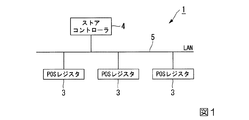
図1は、本発明の一実施形態であるPOSレジスタ(商品販売データ処理装置)が適用されたPOSシステムの概略のブロック図である。図1に示すように、POSシステム1は、3台のPOSレジスタ3と、ストアコントローラ4と、ローカルエリアネットワーク(Local Area Network;LAN)5とを含む。3台のPOSレジスタ3とストアコントローラ4とは、LAN5を介してそれぞれ接続されている。なお、図1には、3台のPOSレジスタ3の例を示すが、これらPOSレジスタ3の台数は3台に限られるものではない。
Hereinafter, embodiments for carrying out the present invention will be described in detail with reference to the drawings.
[First Embodiment]
FIG. 1 is a schematic block diagram of a POS system to which a POS register (product sales data processing apparatus) according to an embodiment of the present invention is applied. As shown in FIG. 1, the
POSレジスタ3は、顧客の買上対象の商品の商品登録処理を実行する商品登録処理部と、商品登録処理部で登録された商品販売データに基づいて会計処理(精算処理)を実行する会計処理部とを備えるキャッシュレジスタ端末である。本実施形態において、顧客は非居住者である。非居住者とは、日本国に一時的に滞在している、旅券(パスポート)等を所持した外国人旅行客等である。
The
よって、POSレジスタ3は、所定の条件において免税対象物品の商品登録処理と会計処理とを実行する。免税対象物品は、例えば、一般物品及び消耗品に区分される。一般物品は、例えば、家電製品、着物、服、鞄である。同一の非居住者に対する同一店舗における一日の一般物品の販売合計額が1万円を超える場合に免税となる。また、消耗品は、例えば、食品類、飲料類、薬品類、化粧品類、その他の消耗品である。同一の非居住者に対する同一店舗における一日の消耗品の販売合計額が5千円を超え、50万円までの範囲内である場合に免税となる。
Therefore, the
POSレジスタ3のオペレータ(輸出物品販売場である免税店の店員)は、非居住者から旅券等の提示がされて免税対象物品の買上げの申し出があった場合に、POSレジスタ3を免税処理モードに設定して動作させる。この免税処理モードに設定されたPOSレジスタ3は、購入記録票に貼付するための商品の明細書と、購入者誓約書に貼付するための商品の明細書と、梱包リストのための商品の明細書と、非居住者の控えのための商品の明細書とを印刷する。その他、店舗の控えのための商品の明細書を印刷してもよい。
The operator of the POS register 3 (the clerk of the duty-free store, which is an export goods sales office), when a non-resident presents a passport, etc. and offers to purchase goods exempt from tax, the
購入記録票は、店舗により作成される帳票である。購入記録票には、以下の(1)〜(6)の項目が記載される。
(1)購入者の氏名、国籍、生年月日、在留資格、及び上陸年月日
(2)購入者の所持する旅券等の種類及び番号
(3)輸出物品販売場を経営する事業者の氏名または名称
(4)輸出物品販売場を経営する事業者の納税地及び所轄税務署名、輸出物品販売場の所在地
(5)購入年月日
(6)品名、品名ごとの数量、及び価額、物品の価額の合計額、販売価額の合計額
上記の(6)として、POSレジスタ3が印刷した商品の明細書が用いられる。つまり、購入記録票の貼付用明細書を購入記録票に貼付し割印することによって、項目(6)の購入記録票への記載が省略できる。
The purchase record form is a form created by the store. The following items (1) to (6) are described in the purchase record slip.
(1) Purchaser's name, nationality, date of birth, status of residence, date of landing (2) Type and number of passport, etc. possessed by the purchaser (3) Name of the business operator who operates the export goods sales office Or name (4) Tax payment place of the company that operates the export goods sales office and the tax signature of the jurisdiction, the location of the export goods sales office (5) Date of purchase (6) Product name, quantity and price for each product name, The total price and the total sales price The item description printed by the
購入者誓約書は、非居住者により署名され、店舗に少なくとも7年間保存される帳票である。購入者誓約書には、以下の(1)〜(6)の項目が記載される。
(1)購入者の氏名、国籍、生年月日、在留資格、及び上陸年月日
(2)購入者の所持する旅券等の種類及び番号
(3)輸出物品販売場を経営する事業者の氏名または名称
(4)購入年月日
(5)品名、品名ごとの数量、及び価額、物品の価額の合計額、販売価額の合計額
(6)購入後において輸出することを誓約する旨(消耗品の場合、購入した日から30日以内に輸出することを誓約する旨)及び購入者の署名
上記の(5)として、POSレジスタ3が印刷した商品の明細書が用いられる。つまり、購入者誓約書の貼付用明細書を購入者誓約書に貼付し割印することによって、項目(5)の購入者誓約書への記載が省略できる。
A purchase pledge is a form signed by a non-resident and stored at the store for at least 7 years. The following items (1) to (6) are described in the purchase pledge.
(1) Purchaser's name, nationality, date of birth, status of residence, date of landing (2) Type and number of passport, etc. possessed by the purchaser (3) Name of the business operator who operates the export goods sales office Or name (4) Date of purchase (5) Product name, quantity and price for each product name, total price of goods, total price of goods (6) Pledge to export after purchase (consumables) In the case of (3), a commitment to export within 30 days from the date of purchase) and the purchaser's signature As (5) above, the description of the product printed by the
梱包リストは、例えば、消耗品が箱で梱包されることによって内容物やその個数が確認できない場合に、その梱包箱に添付または貼付される帳票である。梱包リストには、少なくとも、内容物の品名及び品名ごとの数量が記載される。梱包リストとしてPOSレジスタ3が印刷した商品の明細書、またはこの明細書から品名及び品名ごとの数量を抽出して印刷したリストが用いられる。
The packing list is, for example, a form that is attached to or attached to the packing box when the contents and the number of the consumables cannot be confirmed by packing the box in a box. At least the product name of the contents and the quantity for each product name are written in the packing list. As the packing list, a description of the product printed by the
ストアコントローラ4は、商品情報の管理、免税店の販売実績の集計、顧客の管理等の事務処理が行われる情報処理装置である。ストアコントローラ4は、商品ごとの商品情報を格納した商品情報テーブルを記憶する。例えば、商品情報テーブルには、商品の商品コードと当該商品の免税の種別を表す免税種別情報とが関係付けられて格納されている。免税種別情報は、商品が免税対象物品であるか非免税対象物品であるかを示す。また、免税種別情報は、商品が免税対象物品である場合、一般物品であるか消耗品であるかを示す。
LAN5は、店舗内に敷設されたコンピュータネットワークである。LAN5は、インターネットと接続されていてもよい。
The
The
POSシステム1において、3台のPOSレジスタ3は店舗内のチェックアウトコーナに設置され、ストアコントローラ4は店舗のバックヤード(事務所等)に設置される。
In the
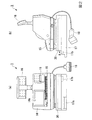
図2は、POSレジスタ3の概略の外観平面図である。図2(a)は前方(オペレータ側)からみた場合の正面図であり、図2(b)は側面図である。また、図4は、POSレジスタ3の外観例を右前方からみた斜視図である。
POSレジスタ3は、タッチパネル付表示部14と、キー操作部15と、顧客用表示部16と、自動釣銭機17と、スキャナ部18と、印字部19と、ドロア30とを備える。キー操作部15及びスキャナ部18は、商品コード入力部である。また、キー操作部15及び自動釣銭機17は、入金部である。また、タッチパネル付表示部14及び顧客用表示部16は、報知部である。
FIG. 2 is a schematic external plan view of the
The
タッチパネル付表示部14は、商品登録処理時及び会計処理時における入力操作が可能なタッチパネル14aを備えたオペレータ(店員)用の表示装置である。後述する中央処理装置(Central Processing Unit;CPU)がプログラムを実行することによって、タッチパネル付表示部14に、POSレジスタ3を免税処理モードに設定するための免税モード設定キー、免税処理モード時における小計キーである免税指定キー(免税キー(ボタン))等のグラフィカルユーザインターフェース(Graphical User Interface;GUI)画像が表示され、タッチパネル14aの当該GUI画像部分がキー(ボタン)として機能する。キー操作部15は、商品登録処理時において数量、会計処理時において顧客から受け取った預金の金額の入力を行うための数字キー、会計を締めるための締めキー等の操作キーが設けられたキーボードである。顧客用表示部16は、顧客に対して買上対象の商品の商品名や価格を通知するための表示装置である。自動釣銭機17は、顧客に支払うべき釣銭のうち、少なくとも貨幣を釣銭排出口17aに排出するための釣銭機であり、顧客から預かった預金のうち少なくとも貨幣を投入するための預金投入口17bを備える。
The
スキャナ部18は、買上げ対象の商品に付されたコード情報(例えば、バーコード等)、または、商品カタログや商品注文シートに表記されたコード情報を読み取る。なお、スキャナ部18は、バーコードのみならず、例えば二次元コードを読み取る読取り装置であってもよい。印字部19は、買上げ対象の商品の明細書を各種帳票(レシート)として印字出力するプリンタ装置である。ドロア30は、顧客から受け取った紙幣及び貨幣を収納する収納部であり、キー操作部15の操作に応じて図2(b)の矢印Aの方向に引き出されるようになっている。
The
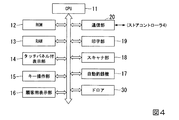
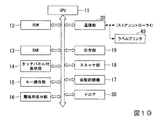
図4は、POSレジスタ3の電気的な構成を示すブロック図である。図4において、図2に示した構成に対応するブロックには同一の符号を付してその説明を省略する。図4に示すように、POSレジスタ3は、CPU11と、ROM(Read Only Memory)12と、RAM(Random Access Memory)13と、タッチパネル付表示部14と、キー操作部15と、顧客用表示部16と、自動釣銭機17と、スキャナ部18と、印字部19(印刷部)と、通信部20と、ドロア30とを備える。CPU11と、ROM12と、RAM13と、タッチパネル付表示部14と、キー操作部15と、顧客用表示部16と、自動釣銭機17と、スキャナ部18と、印字部19と、通信部20と、ドロア30とは、内部バス及び通信線を介してそれぞれ接続されている。
FIG. 4 is a block diagram showing an electrical configuration of the
通信部20は、ストアコントローラ4との間で通信を行う。ROM12は、CPU11に実行させるプログラムやタッチパネル付表示部14に表示させるGUI画像データ等を記憶する。RAM13は、ROM12から読み出されたプログラムやワークエリアを展開するメモリである。また、RAM13には、ストアコントローラ4から取り込んだ商品情報テーブルが展開される。商品情報には、商品コードと免税種別情報とが関係付けて含まれている。よって、RAM13は、商品の商品コードと当該商品の免税の種別を表す免税種別情報とを関係付けて記憶する免税種別情報記憶部である。なお、免税種別情報記憶部は、ROM12に含まれていてもよい。CPU11は、ROM12から読み込んだプログラムを実行することにより、図4に示したCPU11以外の各部を制御する。
The
CPU11がROM12から読み込んだプログラムを実行することにより、POSレジスタ3は、商品登録処理部と、免税指定受付部と、制御部と、判定部と、エラー情報出力部と、印刷制御部と、分割部との機能を実現する。また、CPU11がプログラムを実行して、ROM12に記憶、またはRAM13に展開されたGUI画像をタッチパネル付表示部14に表示させることにより、免税指定キーと、選択キーと、領収書印刷キーと、梱包リスト印刷キーと、追加印刷キーと、言語選択キーと、集計レポートキーとの機能を実現する。
When the
商品登録処理部は、商品コード入力部によって入力された商品コードに基づいて、買上げ対象の商品を登録する。
免税指定受付部は、商取引(以下、単に「取引」とも記載する場合がある。)が免税対象であることの指定を受け付ける。例えば、POSレジスタ3のオペレータが、顧客である非居住者から旅券を提示された場合、商取引が免税対象であることの指定を後述する免税指定キーの操作によって行う。また、例えば、免税指定受付部は、ICチップ(集積回路)が埋め込まれた旅券の当該ICチップに記憶された情報を読み取り可能な読取り装置としてもよい。これにおいて、免税指定受付部は、顧客から提示された旅券のICチップから国籍情報を読み取り、国籍情報が示す国籍が日本国でない場合に、商取引が免税対象であることの指定を受け付ける。
The product registration processing unit registers the product to be purchased based on the product code input by the product code input unit.
The tax exemption designation accepting unit accepts designation that a commercial transaction (hereinafter sometimes simply referred to as “transaction”) is tax exempt. For example, when the operator of the
制御部は、免税指定受付部が、商取引が免税対象であることの指定を受け付けた場合、商品コード入力部によって入力された商品コードに関係付けられた免税種別情報を免税種別情報記憶部から読み出し、免税種別情報別(例えば、一般物品、消耗品、及び非免税対象物品別)に、商品登録処理部に商品を登録させる。 When the tax exemption designation accepting unit accepts the designation that the commercial transaction is tax exempt, the control unit reads the tax exemption type information related to the product code input by the product code input unit from the tax exemption type information storage unit. The product registration processing unit registers products for each tax exemption type information (for example, for general articles, consumables, and non-tax exempt articles).
判定部は、免税指定受付部が、商取引が免税対象であることの指定を受け付けた場合、スキャナ部18またはキー操作部15によって入力された商品コードに関係付けられた免税種別情報をRAM13、ROM12、またはストアコントローラ4から取得し、免税種別情報に基づいて商品コードに対応する商品の免税の種別(例えば、一般物品、消耗品、または非免税対象物品)を判定する。すなわち、判定部は、免税指定受付部が、商取引が免税対象であることの指定を受け付けた場合、商品コード入力部によって入力された商品コードに関係付けられた免税種別情報を免税種別情報記憶部から読み出し、免税種別情報に基づいて商品コードに対応する商品の免税の種別を判定する。
When the tax exemption designation receiving unit accepts the designation that the commercial transaction is tax exempt, the determination unit displays the tax exemption type information related to the product code input by the
エラー情報出力部は、免税指定受付部が、商取引が免税対象であることの指定を受け付けた場合であって、判定部が読み出した免税種別情報が非免税対象物品を示す場合に、エラー情報を出力する。エラー情報の出力方法は、例えば、タッチパネル付表示部14への表示である。具体的に、エラー情報出力部は、タッチパネル付表示部14に、「この商品は、免税対象ではありません。」という内容のメッセージを表示させる。表示方法は、例えば、メッセージのポップアップ表示でもよい。また、エラー情報出力部は、エラー情報を、顧客用表示部16に表示させてもよい。また、エラー情報出力部は、エラー情報の内容を音声とした音声情報を、POSレジスタ3が具備するスピーカから出力させてもよい。
The error information output unit is configured to display error information when the tax exemption designation accepting unit accepts the designation that the commercial transaction is tax exempt, and the tax exemption type information read by the determination unit indicates a non-tax exempt product. Output. The error information output method is, for example, display on the
ただし、免税指定受付部が、商取引が免税対象であることの指定を受け付けた場合であって、判定部が読み出した免税種別情報が免税対象物品(例えば、一般物品または消耗品)を示す場合に、前記の商品登録処理部は、免税種別情報に応じた免税ルールにしたがって商品登録を行う。例えば、商品登録処理部は、一般物品の同日における販売合計額が1万円を超える場合に、消費税額を免税するように商品を登録する。また、例えば、商品登録処理部は、消耗品の同日における販売合計額が5千円を超え、50万円までの範囲内である場合に、消費税額を免税するように商品を登録する。 However, when the tax exemption designation receiving unit accepts the designation that the commercial transaction is tax exempt, and the tax exemption type information read by the determination unit indicates the tax exempted item (for example, general article or consumable item) The product registration processing unit performs product registration according to a tax exemption rule corresponding to the tax exemption type information. For example, the merchandise registration processing unit registers the merchandise so as to exempt the consumption tax when the total sales amount of the general goods on the same day exceeds 10,000 yen. Further, for example, the product registration processing unit registers the product so as to exempt the consumption tax when the total sales amount of the consumables exceeds 5,000 yen and is within a range of 500,000 yen.
印刷制御部は、商品登録処理部が登録した商品の明細を、印字部19により紙媒体(例えば、レシート用紙)に印刷させる。商品の明細は、例えば、買上げ対象の商品ごとの、商品名、価格、数量、免税額、合計額を含む。商品の明細の具体例については、後述する。例えば、免税指定受付部が、商取引が免税対象であることの指定を受け付けた場合、印刷制御部は、商品の明細を、購入記録票の貼付用明細書、購入者誓約書の貼付用明細書、及び控えとして、印字部19によりそれぞれ紙媒体に印刷させる。
The print control unit causes the
なお、免税指定受付部が、商取引が免税対象であることの指定を受け付けた場合、印刷制御部は、商品登録処理部が登録した商品の明細のうち、消耗品に該当する商品の明細及び取引番号を、印字部19により紙媒体に印刷させてもよい。取引番号は、バーコードや二次元コードであってもよい。一取引では免税対象額に達していない場合でも、同日の同一店舗のおける複数回の取引により合算額が免税対象額に達する場合は、免税対象となる。例えば、1回目の取引で3500円(外税)の消耗品を購入した場合、この購入金額は免税対象額の範囲外であるため、免税とはならず、顧客は消費税も含めて3780円(8%消費税の場合)を支払う。その後、この同一顧客が同日に同一店舗にて2000円(外税)の消耗品を購入した場合、販売合計額が5500円(5千円を超える)となるため、販売合計額に対して免税となる。よって、この顧客は、販売合計額である5500円から既に支払った3780円を差し引いた1720円を支払えばよい。POSレジスタ3は、商品の明細を取引番号に関係付けてRAM13またはストアコントローラ4に記憶させるとともに、紙媒体に取引番号を印刷しておくことにより、取引番号に基づいて複数回にわたる取引から販売額を抽出することができる。よって、POSレジスタ3は、抽出した販売額を合算して得た額が免税額の範囲内(5千円を超え、50万円以下)に入ると判断した場合に、免税した会計処理を行う。
あるいは、同日の同一店舗における複数回の取引により合算額が免税対象額に達する場合の会計としては、以下のような処理によって行われてもよい。即ち、同日の同一店舗のおける複数回の取引のうち、免税対象額に達していないことで免税対象とならなかった取引については、「返品」、「訂正」、「取り消し」などにより一旦キャンセルされた状態とする。そのうえで、同日の同一店舗のおけるこれまでの各取引をまとめて会計するようにしてもよい。
なお、顧客の要求に応じて、所定のキーを押下することにより、印刷制御部は、後の合算精算の意思があることを示す文章またはマーキングを、消耗品に該当する商品の明細書と取引番号とともに、紙媒体に印刷させてもよい。
In addition, when the tax exemption designation accepting unit accepts the designation that the commercial transaction is tax exempt, the print control unit describes the details of the product corresponding to the consumable item and the transaction among the details of the product registered by the product registration processing unit. The number may be printed on a paper medium by the
Or as the accounting when the total amount reaches the tax exemption amount due to multiple transactions at the same store on the same day, the following processing may be performed. In other words, among the multiple transactions at the same store on the same day, transactions that were not eligible for tax exemption because they did not reach the tax exempt amount were canceled once by "Return", "Correction", "Cancel", etc. State. Then, you may make it account for each transaction so far in the same store on the same day collectively.
In response to the customer's request, by pressing a predetermined key, the print control unit will send a statement or marking indicating that there is a willingness to add up later and transaction with the description of the product corresponding to the consumable item. You may make it print on a paper medium with a number.
また、印刷制御部は、免税指定受付部が、商取引が免税対象であることの指定を受け付けた場合、商品登録処理部が登録した商品の明細のうち、消耗品に該当する商品のみの明細を、印字部19により紙媒体に印刷させてもよい。
In addition, when the tax exemption designation accepting unit accepts the designation that the commercial transaction is tax exempt, the print control unit displays the details of only the products corresponding to the consumables among the details of the products registered by the product registration processing unit. The
分割部は、判定部が読み出した免税種別情報が示す免税の種別に応じて商品の明細を分割する。例えば、分割部は、一般物品、消耗品、及び非免税対象物品別に、商品の明細を分割する。または、例えば、分割部は、商品の種類(分類)ごとに、商品の明細を分割する。または、例えば、分割部は、商品登録順の所定数の商品ごとに、商品の明細を分割する。そして、印刷制御部は、分割部が分割した商品の各明細を、印字部19により、明細ごとの紙媒体に印刷させる。つまり、例えば、印字部19は、一般物品の明細と、消耗品の明細と、非免税対象物品の明細とを別々の紙媒体に印刷する。なお、各紙媒体に、頁数と総頁数とを、例えば、“頁数/総頁数”として印刷してもよい。
なお、分割部は、免税指定キーが操作されたことに応じて上記の処理を行うようにされてもよい、また、同日の同一店舗における複数の取引をまとめて会計した場合には、一般物品と消耗品とが混在する可能性がある。そこで、このような状況に対応して、POSレジスタ3について以下のように構成してもよい。つまり、POSレジスタ3が、まとめられた複数の取引のうちから消耗品を選別して免税対象額に達しているか否かについて判定したうえで、一般物品の明細と消耗品の明細とを個別に発行するようにしてもよい。この際、免税対象額に達しているとの判定が得られていれば、消耗品の明細には、免税を適用して会計された結果が示されるように印字が行われる。このような構成とすれば、例えば店員が一般物品と消耗品とを振り分けて、消耗品について免税対象額に達しているか否かをPOSレジスタ3に判定させる操作を行わなくともよくなり、利便性が向上する。
The division unit divides the product details according to the tax exemption type indicated by the tax exemption type information read by the determination unit. For example, the dividing unit divides the details of the commodity for each of general articles, consumables, and non-tax exempt articles. Alternatively, for example, the dividing unit divides the product details for each product type (classification). Alternatively, for example, the dividing unit divides the product details for each predetermined number of products in the product registration order. Then, the print control unit causes the
In addition, the division unit may be configured to perform the above-described processing in response to the operation of the tax exemption designation key, and when accounting for a plurality of transactions at the same store on the same day, And consumables may be mixed. In view of this situation, the
なお、印刷制御部は、分割部が分割した商品の各明細を、印字部19により紙媒体に区分して印刷させてもよい。つまり、印字部19は、例えば、一般物品の明細と、消耗品の明細と、非免税対象物品の明細とを紙媒体上で区分して印刷する。区分の方法は、空欄や区分線でもよいし、広告情報や店舗情報等の情報でもよい。
Note that the print control unit may print the details of the product divided by the dividing unit on the paper medium by the
免税指定キーは、免税販売を指定するための、タッチパネル付表示部14に表示されるGUIキーである。例えば、免税指定キーは、オペレータが顧客から旅券の提示を受けた後の商取引の最初または登録途中において押下されるキーであってもよいし、買上げ対象の商品を登録する際に小計キーとして押下されるキーであってもよい。
The tax exemption designation key is a GUI key displayed on the
選択キーは、購入記録票、購入者誓約書、及び控えの各帳票を選択するための、タッチパネル付表示部14に表示されるGUIキーである。免税指定受付部が、商取引が免税対象であることの指定を受け付けた場合、印刷制御部は、押下された選択キーに対応付けられた帳票のための商品の明細を、印字部19により紙媒体に印刷させる。
The selection key is a GUI key displayed on the
領収書印刷キーは、領収書を印刷させるための、タッチパネル付表示部14に表示されるGUIキーである。免税指定受付部が、商取引が免税対象であることの指定を受け付けた場合であって、領収書印刷キーが押下された場合に、印刷制御部は、商品の明細のうち、現計の金額、及び消費税が“0円”であること(免税されたこと)を表した領収書を、印字部19により紙媒体に印刷させる。
The receipt print key is a GUI key displayed on the
梱包リスト印刷キーは、梱包リストを印刷させるための、タッチパネル付表示部14に表示されるGUIキーである。免税指定受付部が、商取引が免税対象であることの指定を受け付けた場合であって、梱包リスト印刷キーが押下された場合に、印刷制御部は、商品の明細または、明細のうち、品名及び品名ごとの数量を示す情報を、梱包リストとして印字部19により紙媒体に印刷させる。
The packing list print key is a GUI key displayed on the
追加印刷キーは、梱包リストを追加印刷させるための、タッチパネル付表示部14に表示されるGUIキーである。免税指定受付部が、商取引が免税対象であることの指定を受け付けた場合であって、追加印刷キーが押下された場合に、印刷制御部は、商品の明細と頁数を表す頁数情報とを、追加梱包リストとして印字部19により紙媒体に印刷させる。
頁数情報は、例えば、“1”から始まる頁番号と総頁数とを、“頁番号/総頁数”として含む。印字制御部は、頁数情報を、例えば、紙媒体の下端部付近または上端部付近に印字部19により印字させる。なお、例えば、商品名の左側に“□”マークを印刷するようにしてもよい。これにより、梱包の内容物のチェックを行う場合に、“□”マークに印を記入して用いる等の利用が可能である。
The additional print key is a GUI key displayed on the
The page number information includes, for example, the page number starting from “1” and the total page number as “page number / total page number”. The print control unit causes the
言語選択キーは、紙媒体に印字される言語を選択するための、タッチパネル付表示部14に表示されるGUIキーである。言語選択キーは、各言語のキー(例えば、日本語キー、英語キー、中国語キー、韓国語キー)をタッチパネル付表示部14に並べて表示させてもよいし、言語選択キーが押下(タップ)された場合に、各言語の選択キーをタッチパネル付表示部14の画面にポップアップ表示させてもよい。免税指定受付部が、商取引が免税対象であることの指定を受け付けた場合、印刷制御部は、消耗品に該当する商品の明細を、押下された言語選択キーに対応付けられた言語で、印字部19により紙媒体に印刷させる。または、免税指定受付部が、商取引が免税対象であることの指定を受け付けた場合、印刷制御部は、商品の明細を、押下された言語選択キーに対応付けられた言語で、印字部19により紙媒体に印刷させる。なお、店舗の控え用として明細を印字させる場合は、印刷制御部は、商品の明細を、日本語で紙媒体に印刷させる。また、領収書印刷キーが押下された場合は、印刷制御部は、領収書を、押下された言語選択キーに対応付けられた言語で、印字部19により紙媒体に印刷させる。
The language selection key is a GUI key displayed on the
なお、免税指定受付部が、ICチップが埋め込まれた旅券の当該ICチップに記憶された情報を読み取り可能な読取り装置である場合、免税指定受付部が、商取引が免税対象であることの指定を受け付けると、印刷制御部は、消耗品に該当する商品の明細を、免税指定受付部が旅券のICチップから読み取った国籍に対応する外国語によって、印字部19により紙媒体に印刷させてもよい。
If the tax exemption designation accepting unit is a reading device capable of reading the information stored in the IC chip of the passport embedded with the IC chip, the tax exemption designation accepting unit designates that the commercial transaction is tax exempt. Upon receipt, the print control unit may cause the
また、免税指定受付部が、商取引が免税対象であることの指定を受け付けた場合、印刷制御部は、消耗品に該当する商品の明細を、外国語及び日本語の併記によって、印字部19により紙媒体に印刷させてもよい。外国語及び日本語の併記の方法は、例えば、2行にわたって併記してもよいし、日本語の後に外国語、または外国語の後に日本語を記載してもよい。
In addition, when the tax exemption designation accepting unit accepts the designation that the commercial transaction is tax exempt, the printing control unit gives the details of the product corresponding to the consumable item by the
集計レポートキーは、例えば、日締め等、締めた後の集計レポートを印刷させるための、タッチパネル付表示部14に表示されるGUIキーである。会計処理を締めた後、集計レポートキーが押下された場合、印刷制御部は、所定期間分(例えば、1日分)の商品の売上合計額、免税対象額、免税額等を含む集計レポートを、印字部19により紙媒体に印刷させる。
The total report key is a GUI key displayed on the
図5は、ストアコントローラ4に格納される商品情報テーブルのデータ構成の例を示す図である。商品情報テーブルは、商品ごとの商品情報を含む。図5に示すように、商品情報は、例えば、商品コードと、商品名と、大分類と、中分類と、小分類と、税区分と、税率と、免税種類と、価格とを関係付けて含む。商品コードは、商品を識別する識別情報である。商品名は、商品の名称を表す情報である。大分類は、商品の最上位の分類(商品カテゴリ)を表す情報である。中分類は、商品の中位の分類を表す情報である。小分類は、商品の最下位の分類を表す情報である。税区分は、外税か内税かを表す情報である。税率は、消費税率を表す情報である。免税種類は、商品が、一般物品であるか、消耗品であるか、非免税対象物品であるかを表す情報である。価格は、商品の価格である。税区分が外税である場合、免税価格は、価格そのものであり、税区分が内税(例えば8%)である場合、免税価格は、価格を1.08で除算して得た価格(小数点以下は切り上げ)となる。
FIG. 5 is a diagram illustrating an example of a data configuration of a product information table stored in the
図5の商品情報テーブルには、商品コードが“12345678”、商品名が“化粧品”、大分類が“生活用品”、中分類が“雑貨”、小分類が“化粧品”、税区分が“外”(外税)、税率が“8%”、免税種類が“消耗品”、価格が“5500”(5500円)である商品情報が含まれている。また、図5の商品情報テーブルには、商品コードが“34567890”、商品名が“ドレス”、大分類が“衣料品”、中分類が“婦人服”、小分類が“ドレス”、税区分が“外”(外税)、税率が“8%”、免税種類が“一般物品”、価格が“23000”(23000円)である商品情報が含まれている。 In the product information table of FIG. 5, the product code is “12345678”, the product name is “cosmetics”, the major category is “lifestyle”, the middle category is “miscellaneous goods”, the minor category is “cosmetics”, and the tax category is “outside” "(Foreign tax), product information with a tax rate of" 8% ", a tax exemption type of" consumables ", and a price of" 5500 "(5500 yen) is included. In the product information table of FIG. 5, the product code is “34567890”, the product name is “dress”, the major category is “clothing”, the middle category is “ladies' clothing”, the minor category is “dress”, and the tax category Is “outside” (external tax), the tax rate is “8%”, the tax exemption type is “general goods”, and the price is “23000” (23,000 yen).
なお、大分類、中分類、小分類は空欄(“null”ヌル)であってもよい。
また、商品情報テーブルには、商品名、大分類、中分類、及び小分類の各項目について、日本語のほか、外国語の項目を含めてもよい。または、商品コードと、商品名と、大分類と、中分類と、小分類とを関係付けた言語ごとのテーブルを設けてもよい。この場合、商品コードをキーとして、所望の言語の商品名を読み出すことができる。
The major classification, middle classification, and minor classification may be blank ("null").
The product information table may include items in foreign languages in addition to Japanese for each item of product name, major category, middle category, and minor category. Alternatively, a table for each language in which the product code, the product name, the major category, the middle category, and the minor category are associated may be provided. In this case, the product name in a desired language can be read using the product code as a key.
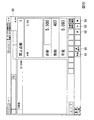
図6は、POSレジスタ3のタッチパネル付表示部14の商品登録画面の表示の例を示す図である。図6の商品登録画面50は、5500円(8%内税)の商品“化粧品”を商品登録する際の画面である。免税指定キー(免税キー)51が押下されることにより、5500円の8%内税額である407円が免税欄に表示され、内税額を除く5093円が請求金額欄(不足欄)に表示される。
FIG. 6 is a diagram illustrating an example of display of the product registration screen of the
また、商品登録画面50には、言語選択キーである英語キー52と、中国語キー53と、韓国語キー54とが表示される。英語キー52が押下されることにより、印字部19が印字する商品の明細書は英語表記となる。同様に、中国語キー53が押下されることにより、印字部19が印字する商品の明細書は中国語表記となる。同様に、韓国語キー54が押下されることにより、印字部19が印字する商品の明細書は韓国語表記となる。
On the
また、商品登録画面50には、明細書を再発行するための再発行キー55が表示される。免税取引後に、再発行キー55が押下されると、例えば、お客様控え用明細書、購入記録票の貼付用明細書、購入者誓約書の貼付用明細書、及び貼付リスト用明細書が選択可能な選択画面が表示される。この選択画面において、所望の明細書が選択されることにより、POSレジスタ3は、印字部19によって選択された明細書を印刷させて再発行する。なお、再発行される明細書には、当該明細書が再発行されたものであることが分かる表記(例えば“再発行”)があってもよい。
The
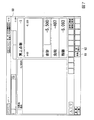
図7は、POSレジスタ3のタッチパネル付表示部14の商品返品画面の表示の例を示す図である。図7の商品返品画面60は、5500円(8%内税)の商品“化粧品”を返品登録する際の画面である。免税指定キー(免税キー)61が押下されることにより、−5500円の8%内税額である−407円が免税欄に表示され、内税額を除く−5093円が返金額欄(残額欄)に表示される。なお、マイナス符号は、返品による返金を表す。また、商品返品画面60においても、再発行キー62が押下されることにより、明細書の再発行が可能である。
FIG. 7 is a diagram illustrating an example of display of the merchandise return screen of the
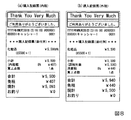
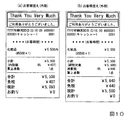
図8は、印字部19が印刷する購入記録票の貼付用明細書の例を示す図である。図8(a)は内税の場合の例であり、図8(b)は外税の場合の例である。図8(a),(b)に示すように、購入記録票の貼付用明細書には、例えば“購入記録票(添付用)”というタイトルが印刷される。また、図8(a)の購入記録票の貼付用明細書には、商品名が“化粧品”、価格が5500円、単価が5500円、組み合わせ数が1個、小計が5500円、内税額が407円、買上点数が1点、合計が5500円、免税が407円、現計が5093円、お釣りが0円であることが印刷されている。また、図8(b)の購入記録票の貼付用明細書には、商品名が“化粧品”、価格が5500円、単価が5500円、組み合わせ数が1個、小計が5500円、課税対象が5500円、消費税が440円、買上点数が1点、合計が5940円、免税が440円、現計が5500円、お釣りが0円であることが印刷されている。なお、図8(a),(b)において、組み合わせ数が1個である場合は、単価及び組み合わせ数の記載を省略してもよい。
FIG. 8 is a diagram showing an example of a purchase record sticking specification printed by the
図9は、印字部19が印刷する購入者誓約書の貼付用明細書の例を示す図である。図9(a)は内税の場合の例であり、図9(b)は外税の場合の例である。図9(a),(b)に示すように、購入者誓約書の貼付用明細書には、例えば“購入者誓約書(添付用)”というタイトルが印刷される。また、図9(a)の購入者誓約書の貼付用明細書には、商品名が“化粧品”、価格が5500円、単価が5500円、組み合わせ数が1個、小計が5500円、内税額が407円、買上点数が1点、合計が5500円、免税が407円、現計が5093円、お釣りが0円であること、及びサインのための署名欄が印刷されている。また、図9(b)の購入者誓約書の貼付用明細書には、商品名が“化粧品”、価格が5500円、単価が5500円、組み合わせ数が1個、小計が5500円、課税対象が5500円、消費税が440円、買上点数が1点、合計が5940円、免税が440円、現計が5500円、お釣りが0円であること、及びサインのための署名欄が印刷されている。なお、図9(a),(b)において、組み合わせ数が1個である場合は、単価及び組み合わせ数の記載を省略してもよい。
FIG. 9 is a diagram illustrating an example of a specification for pasting a purchase agreement written by the
図10は、印字部19が印刷するお客様控え用明細書(レシート)の例を示す図である。図10(a)は内税の場合の例であり、図10(b)は外税の場合の例である。図10(a),(b)に示すように、お客様控え用明細書には、例えば“お客様控”というタイトルが印刷される。また、図10(a)のお客様控え用明細書には、商品名が“化粧品”、価格が5500円、単価が5500円、組み合わせ数が1個、小計が5500円、内税額が407円、買上点数が1点、合計が5500円、免税が407円、現計が5093円、お釣りが0円であることが印刷されている。また、図10(b)のお客様控え用明細書には、商品名が“化粧品”、価格が5500円、単価が5500円、組み合わせ数が1個、小計が5500円、課税対象が5500円、消費税が440円、買上点数が1点、合計が5940円、免税が440円、現計が5500円、お釣りが0円であることが印刷されている。なお、図10(a),(b)において、組み合わせ数が1個である場合は、単価及び組み合わせ数の記載を省略してもよい。
FIG. 10 is a diagram showing an example of a customer copy (receipt) printed by the
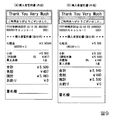
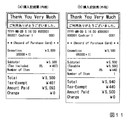
図11は、印字部19が印刷する購入記録票の英語の貼付用明細書の例を示す図である。図11(a)は内税の場合の例であり、図11(b)は外税の場合の例である。図11(a),(b)に示すように、購入記録票の英語の貼付用明細書には、例えば“Record of Purchase Card”(購入記録票)というタイトルが印刷される。また、図11(a)の購入記録票の英語の貼付用明細書には、商品名が“Cosmetics”、価格が5500円、単価が5500円、組み合わせ数が1個、小計(Subtotal)が5500円、内税(Tax included)が407円、買上点数(Number of Item)が1点、合計(Total)が5500円、免税(Tax−Exempt)が407円、現計(Amount Paid)が5093円、お釣り(Change)が0円であることが印刷されている。また、図11(b)の購入記録票の英語の貼付用明細書には、商品名が“Cosmetics”、価格が5500円、単価が5500円、組み合わせ数が1個、小計(Subtotal)が5500円、課税対象(Taxable)が5500円、消費税(Tax)が440円、買上点数(Number of Item)が1点、合計(Total)が5940円、免税(Tax−Exempt)が440円、現計(Amount Paid)が5500円、お釣り(Change)が0円であることが印刷されている。
なお、図11(a),(b)において、組み合わせ数が1個である場合は、単価及び組み合わせ数の記載を省略してもよい。
FIG. 11 is a diagram illustrating an example of an English pasting specification for a purchase record slip printed by the
In FIGS. 11A and 11B, when the number of combinations is 1, description of the unit price and the number of combinations may be omitted.
図12は、印字部19が印刷する購入者誓約書の英語の貼付用明細書の例を示す図である。図12(a)は内税の場合の例であり、図12(b)は外税の場合の例である。図12(a),(b)に示すように、購入者誓約書の英語の貼付用明細書には、例えば“Covenant of Purchaser”(購入者誓約書)というタイトルが印刷される。また、図12(a)の購入者誓約書の英語の貼付用明細書には、商品名が“Cosmetics”、価格が5500円、単価が5500円、組み合わせ数が1個、小計(Subtotal)が5500円、内税(Tax included)が407円、買上点数(Number of Item)が1点、合計(Total)が5500円、免税(Tax−Exempt)が407円、現計(Amount Paid)が5093円、お釣り(Change)が0円であることが印刷されている。また、図12(b)の購入者誓約書の英語の貼付用明細書には、商品名が“Cosmetics”、価格が5500円、単価が5500円、組み合わせ数が1個、小計(Subtotal)が5500円、課税対象(Taxable)が5500円、消費税(Tax)が440円、買上点数(Number of Item)が1点、合計(Total)が5940円、免税(Tax−Exempt)が440円、現計(Amount Paid)が5500円、お釣り(Change)が0円であることが印刷されている。なお、図12(a),(b)において、組み合わせ数が1個である場合は、単価及び組み合わせ数の記載を省略してもよい。
FIG. 12 is a diagram showing an example of an English pasting specification of the purchase pledge written by the
図13は、印字部19が印刷する英語のお客様控え用明細書の例を示す図である。図13(a)は内税の場合の例であり、図13(b)は外税の場合の例である。図13(a),(b)に示すように、英語のお客様控え用明細書には、例えば“Customer's Copy”(お客様控)というタイトルが印刷される。また、図13(a)の英語のお客様控え用明細書には、商品名が“Cosmetics”、価格が5500円、単価が5500円、組み合わせ数が1個、小計(Subtotal)が5500円、内税(Tax included)が407円、買上点数(Number of Item)が1点、合計(Total)が5500円、免税(Tax−Exempt)が407円、現計(Amount Paid)が5093円、お釣り(Change)が0円であることが印刷されている。また、図13(b)の英語のお客様控え用明細書には、商品名が“Cosmetics”、価格が5500円、単価が5500円、組み合わせ数が1個、小計(Subtotal)が5500円、課税対象(Taxable)が5500円、消費税(Tax)が440円、買上点数(Number of Item)が1点、合計(Total)が5940円、免税(Tax−Exempt)が440円、現計(Amount Paid)が5500円、お釣り(Change)が0円であることが印刷されている。なお、図13(a),(b)において、組み合わせ数が1個である場合は、単価及び組み合わせ数の記載を省略してもよい。
FIG. 13 is a diagram showing an example of an English customer copy specification printed by the
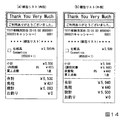
図14は、印字部19が印刷する梱包リスト用明細書の例を示す図である。図14(a)は内税の場合の例であり、図14(b)は外税の場合の例である。図14(a),(b)に示すように、梱包リスト用明細書には、例えば“梱包リスト”というタイトルが印刷される。また、図14(a)の梱包リスト用明細書には、商品名が“化粧品”及び“Cosmetics”(併記)、価格が5500円、単価が5500円、組み合わせ数が1個、小計が5500円、内税額が407円、買上点数が1点、合計が5500円、免税が407円、現計が5093円、お釣りが0円であることが印刷されている。そして、商品名の左側には、□マークのチェック欄(筆記具によるチェック欄)が印刷されている。また、図14(b)の梱包リスト用明細書には、商品名が“化粧品”及び“Cosmetics”(併記)、価格が5500円、単価が5500円、組み合わせ数が1個、小計が5500円、課税対象が5500円、消費税が440円、買上点数が1点、合計が5940円、免税が440円、現計が5500円、お釣りが0円であることが印刷されている。そして、商品名の左側には、□マークのチェック欄(筆記具によるチェック欄)が印刷されている。
なお、梱包リストには、内容物の品名及び品名ごとの数量が記載されていればよいため、図14(a),(b)において梱包リスト用明細書の小計以下の欄を省略してもよい。また、図14(a),(b)において、組み合わせ数が1個である場合は、単価及び組み合わせ数の記載を省略してもよい。
FIG. 14 is a diagram illustrating an example of a packing list specification printed by the
Since the packing list only needs to describe the product name of the contents and the quantity for each product name, the columns below the subtotal of the packing list specification in FIGS. 14 (a) and 14 (b) may be omitted. Good. In FIGS. 14A and 14B, when the number of combinations is one, the description of the unit price and the number of combinations may be omitted.
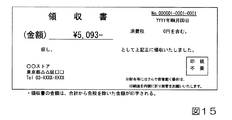
図15は、印字部19が印刷する領収書の例を示す図である。図15の領収書には、現計の金額が5093円、消費税額が0円(免税されていることを示す。)であることが印刷されている。
FIG. 15 is a diagram illustrating an example of a receipt printed by the
図16は、印字部19が印刷する集計レポートの例を示す図である。図16は、客数が“2”、点数が“2”、総売上が“10593円”についての集計レポートの例である。図16に示すように、免税販売を行った場合の集計レポートには、符号70で示された枠内にあるように、免税対象額“10593”(10593円)と、免税額“847”(847円)とが記載される。
FIG. 16 is a diagram illustrating an example of a summary report printed by the
次に、POSレジスタ3の動作について説明する。
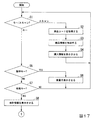
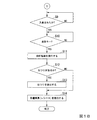
図17及び図18は、POSレジスタ3の処理手順の例を示すフローチャートである。CPU11がROM12に記憶されたプログラムを読み込んで実行し、免税モード設定キーが押下されることにより、POSレジスタ3は免税処理モードに設定され、本フローチャートによる処理が実行される。
Next, the operation of the
17 and 18 are flowcharts showing an example of the processing procedure of the
制御部は、キー操作部15のキーの押下、またはスキャナ部18によるバーコードのスキャンが行われるまで待機している。スキャナ部18によって買上げ対象の商品に対応付けられたバーコードのスキャンが行われた場合(ステップS1:スキャン)はステップS2の処理に移し、キー操作部15のキーが押下された場合(ステップS1:キー)はステップS5の処理に移す。
The control unit waits until the key of the
ステップS2において、制御部は、バーコードを読み取ったスキャナ部18が供給する商品コードを取り込む。
次に、ステップS3において、制御部は、商品コードをキーとして、ストアコンピュータから予め取得した商品情報テーブルを検索し、商品コードに対する商品情報(商品名、大分類、中分類、小分類、税区分、税率、免税種類、価格等)を抽出する。
次に、ステップS4において、制御部は、商品情報のうち購入情報(例えば、商品名、税区分、税率、価格等)をタッチパネル付表示部14に表示させる。なお、制御部は、購入情報を顧客用表示部16にも表示させてもよい。次に、制御部は、ステップS1の処理に戻す。
In step S2, the control unit takes in the product code supplied by the
Next, in step S3, the control unit searches the product information table acquired in advance from the store computer using the product code as a key, and product information (product name, major classification, middle classification, minor classification, tax classification) for the commodity code. , Tax rate, tax exemption type, price, etc.).
Next, in step S4, the control unit displays the purchase information (for example, the product name, tax classification, tax rate, price, etc.) of the product information on the
一方、ステップS5において、制御部は、キー操作部15から操作情報を取得し、この操作情報に基づき、数字キーが押下されたと判定した場合(ステップS5:YES)はステップS6の処理に移し、数字キー以外のキーが押下されたと判定した場合(ステップS5:NO)はステップS7の処理に移す。
On the other hand, in step S5, the control unit acquires operation information from the
ステップS6において、制御部は、操作情報(数の情報)により数量を取得し、この数量をタッチパネル付表示部14に表示させる。なお、制御部は、数量を顧客用表示部16に表示させてもよい。次に、ステップS1の処理に戻す。
In step S <b> 6, the control unit acquires a quantity based on the operation information (number information), and causes the display unit with a
ステップS7において、制御部は、操作情報に基づき、免税指定キー(免税キー)が押下されたと判定した場合(ステップS7:YES)はステップS8の処理に移し、免税指定キー以外のキーが押下されたと判定した場合(ステップS7:NO)はステップS1の処理に戻す。 In step S7, when it is determined that the tax exemption designation key (tax exemption key) has been pressed based on the operation information (step S7: YES), the control section moves to the process of step S8, and a key other than the tax exemption designation key is pressed. If it is determined that it has been (step S7: NO), the process returns to step S1.
ステップS8において、制御部は、会計情報を顧客用表示部16に表示させる。
次に、ステップS9において、制御部は、紙幣及び硬貨またはいずれかが自動釣銭機17に投入されるまで待機する(ステップS9:NO)。
In step S <b> 8, the control unit displays the transaction information on the
Next, in step S9, the control unit waits until a bill and / or coin is inserted into the automatic change machine 17 (step S9: NO).
ステップS10において、紙幣及び硬貨またはいずれかが自動釣銭機17に投入されると、制御部は、会計開始画面をタッチパネル付表示部14に表示させて会計キーが押下されるまで待機する(ステップS10:NO)。ステップS1からステップS10:NOまでの処理が、商品登録処理である。
In step S10, when a bill and / or a coin is inserted into the
オペレータによって会計キーが押下されると(ステップS10:YES)、ステップS11において、制御部は、会計処理の実行を開始する。なお、この会計キーを免税指定キーとしてもよい。 When the accounting key is pressed by the operator (step S10: YES), in step S11, the control unit starts executing the accounting process. This accounting key may be used as a tax exemption designation key.
次に、ステップS12において、預かり金額と合計金額とに差額がある場合(ステップS12:YES)はステップS13の処理に移し、差額がない場合(ステップS12:NO)はステップS14の処理に移す。 Next, in step S12, if there is a difference between the deposit amount and the total amount (step S12: YES), the process proceeds to step S13. If there is no difference (step S12: NO), the process proceeds to step S14.
ステップS13において、制御部は、差額分の紙幣及び硬貨またはいずれかを自動釣銭機17に排出する。自動釣銭機17は、紙幣排出口及び硬貨排出口から紙幣及び硬貨が取り去られたか否かをセンサにより検出し、検出結果を制御部に通知する。制御部は、紙幣及び硬貨が取り去られたとの検出結果にしたがってステップS14の処理に移す。
In step S <b> 13, the control unit discharges the banknotes and / or coins corresponding to the difference amount to the
次に、ステップS14において、印刷制御部は、商品の明細を、購入記録票の貼付用明細書、購入者誓約書の貼付用明細書、及び控えとして、印字部19によりそれぞれ紙媒体に印刷させ、この印刷後の紙媒体を排出口から出力する。ステップS10:YESからステップS14までの処理が、会計処理である。
Next, in step S14, the print control unit causes the
なお、図17及び図18のフローチャートは、数量を示す数字キーを押下してバーコードをスキャンする操作に従う処理の流れを示したが、例えば、数字キーの押下によって割引や値引きの置数を行った後、所定のプリセットキー(「×」、「%」、「円引き」)の押下によって割引や値引きを指定するようにしてもよい。 Note that the flowcharts of FIGS. 17 and 18 show the flow of processing according to the operation of pressing the number key indicating the quantity and scanning the barcode. For example, the number of discounts or discounts is set by pressing the number key. After that, discounts and discounts may be designated by pressing predetermined preset keys (“×”, “%”, “yen discount”).
[第2実施形態]
図19は、本発明の第2実施形態であるPOSレジスタの電気的な構成を示すブロック図である。図19に示すブロック図は、上述した実施形態における図4のブロック図に対して、通信部20にラベルプリンタ40(印刷部)が追加されたものである。ラベルプリンタ40は、台紙付ラベルに印刷するプリンタでもよいし、台紙レスラベル(ロール式ラベル紙)に印刷するプリンタでもよい。ラベルは、紙媒体である。ラベルプリンタ40が用いるラベルは、貼付後の引き剥がしが容易なように、弱粘着タイプであることが好ましい。免税指定受付部が、商取引が免税対象であることの指定を受け付けた場合、印刷制御部は、商品登録処理部が登録した商品の明細のうち、消耗品に該当する商品の明細を、ラベルプリンタ40によりラベルに印刷させる。または、印刷制御部は、印字部19に印刷する内容を、ラベルプリンタ40によりラベルに印刷させてもよい。
[Second Embodiment]
FIG. 19 is a block diagram showing an electrical configuration of a POS register according to the second embodiment of the present invention. The block diagram shown in FIG. 19 is obtained by adding a label printer 40 (printing unit) to the
POSレジスタは、レシートの印刷部である印字部19とラベルの印刷部であるラベルプリンタ40とのうちいずれかを選択する選択部を有してもよい。この場合、印刷制御部は、選択部で選択された印刷部(印字部19またはラベルプリンタ40)により、消耗品に該当する商品の明細を印刷させる。これにより、例えば、購入記録票の貼付用明細書や梱包リスト用明細書をラベルで印刷し、購入者誓約書の貼付用明細書やお客様控え用明細書をレシートで印刷することができる。
また、一般的なプリンタ(例えば、レーザプリンタ、インクジェットプリンタ)をPOSレジスタに接続し、POSレジスタが、商品名や数量を含む取引データをもとに、購入記録票や購入者誓約書の印字フォーマットにデータを埋め込んで印刷してもよい。また、選択部は、印刷形態がそれぞれ異なる、レシートの印刷部である印字部19と、ラベルプリンタ40と、上記の一般的なプリンタとを、帳票の種類に応じて選択できるようにしてもよい。また、POSレジスタをコンピュータ装置に接続し、POSレジスタが、コンピュータ装置を介して印刷を行ってもよい。
The POS register may include a selection unit that selects one of the
In addition, a general printer (for example, a laser printer or an inkjet printer) is connected to a POS register, and the POS register prints a purchase record slip or a purchase pledge on the basis of transaction data including the product name and quantity. The data may be embedded and printed. The selection unit may be configured to select a
なお、購入記録票は旅券に貼付されるものであるため、購入記録票の貼付用明細書としてのラベルは、旅券の見開きの大きさよりも小さい大きさとするのがよい。また、購入者誓約書は店舗に少なくとも7年間保管される帳票であるため、上記の一般的なプリンタを用いて印刷するのが好ましい。梱包リストは、長期間の保存の義務があるわけではない(長くても購入から30日間程度)ため、感熱タイプのレシートを用いるプリンタやラベルプリンタで印刷するのがよく、特に、ラベルプリンタを用いるのが好ましい。 Since the purchase record slip is affixed to the passport, the label as the purchase record sticker specification is preferably smaller than the size of the spread of the passport. Further, since the purchase pledge is a form stored in the store for at least 7 years, it is preferable to print using the above general printer. The packing list is not obligated to be stored for a long time (about 30 days from the purchase at the longest), so it is best to print it with a printer that uses a heat-sensitive receipt or a label printer. Is preferred.
上述した実施形態は、商品登録処理部及び会計処理部を備えたPOSレジスタであったが、実施形態は、商品登録処理部と会計処理部とが分離したPOSシステムにも適用できる。このPOSシステムは、商品登録処理部の機能を実現する商品登録装置と、会計処理部の機能を実現する精算装置とを含む。このPOSシステムにおいて、商品登録装置は、登録された商品の情報(商品販売データ)を直接、またはストアコントローラ4を介して精算装置に送信する。商品販売データを受信した精算装置は、会計処理を実行するとともに、各種帳票(購入記録票の貼付用明細書、購入者誓約書の貼付用明細書、控え、梱包リスト等)を印刷する。
The above-described embodiment is a POS register including a product registration processing unit and an accounting processing unit. However, the embodiment can also be applied to a POS system in which the product registration processing unit and the accounting processing unit are separated. This POS system includes a product registration device that realizes the function of the product registration processing unit and a payment device that realizes the function of the accounting processing unit. In this POS system, the merchandise registration apparatus transmits information on the registered merchandise (merchandise sales data) to the checkout apparatus directly or via the
または、商品登録装置が商品販売データを記録した二次元コードを印刷した会計用レシートを発行し、この会計用レシートの二次元コードを精算装置で読み取らせることによって、精算装置が商品販売データを取得し、会計処理を実行するとともに、各種帳票を印刷してもよい。 Alternatively, the merchandise registration device can issue a receipt for printing a two-dimensional code that records the merchandise sales data, and the settlement device can read the two-dimensional code of the accounting receipt to obtain the merchandise sales data. Then, the accounting process may be executed and various forms may be printed.
なお、印刷制御部は、購入記録票の貼付用明細書ではなく、購入記録票そのものを印字部19により印刷させてもよい。具体的に、購入記録票の印刷内容は、商品の明細書の他、以下の(1)〜(5)の項目の記載欄を含む。
(1)購入者の氏名、国籍、生年月日、在留資格、及び上陸年月日の記載欄
(2)購入者の所持する旅券等の種類及び番号の記載欄
(3)輸出物品販売場を経営する事業者の氏名または名称の記載欄
(4)輸出物品販売場を経営する事業者の納税地及び所轄税務署名、輸出物品販売場の所在地の記載欄
(5)購入年月日の記載欄
Note that the print control unit may cause the
(1) Name column of purchaser, nationality, date of birth, status of residence, date of landing (2) Column of type and number of passport, etc. possessed by purchaser (3) Export goods sales area Column of name or name of the business operator to be managed (4) Tax payment location and tax signature of the business operator of the export goods sales place, location field of the export goods sales place (5) Date of purchase date column
また、印刷制御部は、購入者誓約書の貼付用明細書ではなく、購入者誓約書そのものを印字部19により印刷させてもよい。具体的に、購入者誓約書の印刷内容は、商品の明細書の他、以下の(1)〜(5)の項目の記載欄を含む。
(1)購入者の氏名、国籍、生年月日、在留資格、及び上陸年月日の記載欄
(2)購入者の所持する旅券等の種類及び番号の記載欄
(3)輸出物品販売場を経営する事業者の氏名または名称の記載欄
(4)購入年月日の記載欄
(5)購入後において輸出することを誓約する旨(消耗品の場合、購入した日から30日以内に輸出することを誓約する旨)及び購入者の署名の記載欄
Further, the printing control unit may cause the
(1) Name column of purchaser, nationality, date of birth, status of residence, date of landing (2) Column of type and number of passport, etc. possessed by purchaser (3) Export goods sales area (4) Date of purchase date column (5) Pledge to export after purchase (in the case of consumables, export within 30 days from the date of purchase) And voucher of the purchaser's signature
なお、免税指定受付部が、ICチップ(集積回路)が埋め込まれた旅券の当該ICチップに記憶された情報を読み取り可能な読取り装置である場合、顧客の旅券のICチップを免税指定受付部に読み取らせることによって、印刷制御部は、ICチップから読み取られた顧客の氏名、国籍、生年月日、旅券番号等の情報を、購入記録票や購入者誓約書に印字させてもよい。 If the tax exemption designation accepting unit is a reading device that can read information stored in the IC chip of the passport in which the IC chip (integrated circuit) is embedded, the IC chip of the customer passport is used as the tax exemption designation accepting unit. By reading the information, the print control unit may print information such as the customer's name, nationality, date of birth, and passport number read from the IC chip on the purchase record slip or purchase pledge.
[第3実施形態]
続いて第3実施形態について説明する。
一回の商取引について免税対象であることが指定されたのであるが、例えば顧客(非居住者)の勘違いなどで、小計キーに対する操作(小計操作)に応じてPOSレジスタ3が算出した登録商品についての小計金額が下限免税対象額に到達していなかったという状況となる可能性がある。ここで、下限免税対象額とは、免税対象になるものとして定められた購入金額の範囲における最小額である。具体的に、一般物品の下限免税対象額は10001円であり、消耗品の下限免税対象額は5001円である。
[Third Embodiment]
Next, a third embodiment will be described.
Although it is specified that a single transaction is tax-exempt, for example, a registered product calculated by the
小計金額が下限免税対象額未満である場合には、一部のケース(後述する)を除いて、その商取引について免税対象とすることができない。ただし、上記の一部のケースの場合においても、同じ日に同じ店舗で既に免税適用を受けた買い物を顧客が行っていることを顧客が証明する必要がある。このために、小計金額が下限免税対象額未満であるのにかかわらず、免税対象であることが指定されていることにより、POSレジスタ3が無条件で免税対応の会計を行ってしまうことは避けられるようにすることが好ましい。
If the subtotal amount is less than the lower tax exempt amount, the commercial transaction cannot be exempted except in some cases (described later). However, even in the case of some of the above cases, it is necessary for the customer to prove that the customer is already shopping for tax exemption at the same store on the same day. For this reason, it is avoided that the
そこで、本実施形態においては、免税対象として指定された商取引において、小計操作に応じて求められた小計金額が下限免税対象額に満たない場合には、小計金額が下限免税対象額に満たないことを報知するように構成される。具体的には、POSレジスタ3のタッチパネル付表示部14において、小計金額が下限免税対象額に満たないことを報知するエラー画面(免税対象額不足通知画面)が表示される。
Therefore, in this embodiment, if the subtotal amount calculated in accordance with the subtotal operation is less than the lower limit tax exempt amount in a commercial transaction designated as tax exempt, the subtotal amount is not less than the lower limit tax exemption amount. It is comprised so that it may alert | report. Specifically, on the
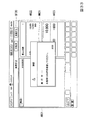
図20は、免税対象額不足通知画面の態様例を示している。同図の免税対象額不足通知画面は、商品登録画面に対して重畳して配置されるダイアログボックスDLB1として表示される。同図のダイアログボックスDLB1は、小計操作が行われ、この際の小計金額が下限免税対象額に満たなかった場合に表示される。
免税対象額不足通知画面としてのダイアログボックスDLB1においては、小計金額が下限免税対象額未満であることを店員に通知するメッセージが表示される。同図では「免税額に達していません」とのメッセージが表示された例が示されている。
FIG. 20 shows an example of a tax exemption target shortage notification screen. The tax exemption amount shortage notification screen shown in the figure is displayed as a dialog box DLB1 that is superimposed on the product registration screen. The dialog box DLB1 shown in the figure is displayed when a subtotal operation is performed and the subtotal amount at this time does not reach the lower limit tax exemption amount.
In the dialog box DLB1 as the tax exemption target shortage notification screen, a message is displayed to notify the store clerk that the subtotal amount is less than the lower limit tax exemption target amount. In the figure, an example in which the message “Tax-free amount has not been reached” is displayed is shown.
また、ダイアログボックスDLB1においては、商品追加ボタンBT1、免税無効ボタンBT2及び免税有効ボタンBT3が配置されている。これらのボタンは、小計金額が下限免税対象額未満であった場合に応じた会計方法を選択するためのボタンである。
小計金額が下限免税対象額未満であった場合の会計方法としては、3つの選択肢がある。まず、1つの会計方法は、「商品追加」である。「商品追加」の会計方法の場合、POSレジスタ3は、最後に行われた小計操作を取り消して商品登録が可能なモードに戻すことで、買上対象として登録する商品を追加できるようにする。「商品追加」の会計方法は、商品追加ボタンBT1を操作することによって選択される。
もう1つの会計方法は、「免税無効」である。「免税無効」の会計方法の場合、POSレジスタ3は、今回の取引について先に行われた免税対象としての指定を解除(無効化)し、免税を行うことなく規定の税率を適用した通常の小計金額を算出しなおしたうえで、会計を行う。「免税無効」の会計方法は、免税無効ボタンBT2を操作することによって選択される。
もう1つの会計方法は、「免税有効」である。POSレジスタ3が配置された店で、今回の商取引を行った顧客が、当日において既に下限免税対象額以上の商取引を行って免税を受けている場合がある。この場合、今回の商取引における小計金額が下限免税対象額であっても、当日における買上金額としては、既に下限免税対象額以上となっている。この場合、例えば顧客が、当日において既に下限免税対象額以上の買い物を行ったことを証明するレシート(お客様控)や領収書などを店員に提示すれば、今回の商取引については、小計金額が下限免税対象額未満であっても免税対象となる。この場合、POSレジスタ3は、「免税有効」の会計方法として、今回の小計操作に応じて、免税を適用して求められた小計金額に応じた会計を行う。「免税有効」の会計方法は、免税有効ボタンBT3を操作することによって選択される。
In the dialog box DLB1, a product addition button BT1, a tax exemption invalid button BT2, and a tax exemption valid button BT3 are arranged. These buttons are buttons for selecting an accounting method according to the case where the subtotal amount is less than the lower limit tax-exempt amount.
There are three options for accounting when the subtotal amount is less than the tax exempt amount. First, one accounting method is “product addition”. In the case of the “add product” accounting method, the
Another accounting method is “tax exemption”. In the case of the “tax exemption” accounting method, the
Another accounting method is “tax effective”. In some cases, a customer who has made a commercial transaction at the store where the
上記のように、1回の商取引について免税対象であることが指定された場合において、当該商取引において小計操作が行われたことに応じて求められた小計金額が下限免税対象額未満であった場合には、免税対象額不足通知画面が表示される。免税対象額不足通知画面が表示されることで、店員は、小計金額が下限免税対象額未満であることを把握できる。これにより、小計金額が下限免税対象額未満である状態のまま免税が適用された会計が行われてしまうことが防がれる。特に、免税対象額不足通知画面を表示させることによっては、所定の操作が行われなければ他の画面には移行できないようにすることができるので、店員が気付くことなく免税が適用された会計が行われてしまうことは確実に避けられる。
具体的に、免税対象額不足通知画面においては、小計金額が下限免税対象額未満であった場合に対応し得る会計方法を選択可能なようにされている。これにより、顧客の意思や、同じ店舗における前回までの買い物の実績に応じて、迅速に適切な対応を図ることができる。
As stated above, when it is specified that a single transaction is exempt from tax, the subtotal amount calculated in response to the subtotal operation being performed in the transaction is less than the lower tax exempt amount Displays a notification screen for insufficient tax-exempt amount. By displaying the tax exemption target shortage notification screen, the store clerk can grasp that the subtotal amount is less than the lower limit tax exemption target amount. As a result, it is possible to prevent accounting with tax exemption applied while the subtotal amount is less than the lower tax exemption amount. In particular, by displaying the tax exemption amount shortage notification screen, it is possible to prevent transition to other screens unless a prescribed operation is performed, so the tax exemption is applied without the store clerk being aware. It will definitely be avoided.
Specifically, on the tax exemption amount shortage notification screen, an accounting method that can cope with the case where the subtotal amount is less than the lower limit tax exemption amount can be selected. Accordingly, it is possible to promptly take an appropriate response in accordance with the intention of the customer and the past shopping results in the same store.
図21のフローチャートを参照して、本実施形態のPOSレジスタ3が実行する処理手順例について説明する。なお、同図の説明にあたっては、商取引を免税対象として指定する操作と小計操作とが分けられている場合を例に挙げる。つまり、本実施形態においては、商取引を免税対象として指定する操作(免税宣言操作)が行われる免税指定キーと、小計操作を行う小計キーとがそれぞれ個別に設けられている。そのうえで、免税指定キーは、1回の商取引の最初、または商品登録が開始されてから小計キーが操作されるまでの間において操作される。従って、1商取引は、免税指定キーに対する操作または1回目の商品登録のための操作(商品登録操作)に応じて開始される。そして、商品登録を終えて小計を求めるときには、免税指定キーと異なる小計キーが操作されるものである。
An example of a processing procedure executed by the
ステップS101:POSレジスタ3は、商品登録操作が行われたか否かについて判定する。
ステップS102:ステップS101により商品登録操作の行われたことが判定されると、POSレジスタ3は、商品登録処理を行う。この際、POSレジスタ3は、登録された商品について、通常に税率を適用して会計に関する処理を行うモード(通常モード)に対応する商品データと、免税を適用して会計に関する処理を行うモード(免税処理モード)に対応する商品データとをバッファに保持させる。また、免税処理モードが設定されたうえで商品登録が行われた場合には、商品登録画面に表示される商品登録内容として免税を適用した商品の単価が示される。一方、免税処理モードが設定されない通常モードのもとで商品登録が行われた場合には、商品登録画面に表示される商品登録内容として規定の税率が適用された商品の単価が示される。
ステップS103:ステップS101にて商品登録操作が行われなかったことが判定された場合、あるいはステップS102の処理の後、POSレジスタ3は、免税宣言操作が行われたか否かについて判定する。免税宣言操作は、通常モードが設定されている状態での免税指定キーに対する操作である。
ステップS104:ステップS103により免税宣言操作が行われたことが判定された場合、POSレジスタ3は免税処理モードを設定する。
Step S101: The
Step S102: When it is determined in step S101 that a product registration operation has been performed, the
Step S103: When it is determined in step S101 that the product registration operation has not been performed, or after the processing in step S102, the
Step S104: If it is determined in step S103 that the tax exemption declaration operation has been performed, the
ステップS105:ステップS103により免税宣言操作が行われなかったことが判定された場合、あるいはステップS104の処理の後、POSレジスタ3は、小計操作が行われたか否かについて判定する。
小計操作が行われないことが判定された場合にはステップS101に処理が戻される。なお、商取引が開始されていない段階、即ち、1回目の商品登録操作と免税宣言操作とのいずれもが行われていない段階において小計キーに対する操作が行われたとしても、この際の小計キーに対する操作は小計操作としては無効であるとして扱われ、ステップS101に処理が戻される。
Step S105: When it is determined in step S103 that the tax exemption declaration operation has not been performed, or after the processing in step S104, the
If it is determined that the subtotal operation is not performed, the process returns to step S101. Even if the operation for the subtotal key is performed at the stage where the commercial transaction is not started, that is, when neither the first product registration operation nor the tax exemption declaration operation is performed, The operation is treated as invalid as a subtotal operation, and the process returns to step S101.
ステップS106:ステップS105により小計操作が行われたことが判定された場合、POSレジスタ3は、現在において免税処理モードが設定されているか否かについて判定する。
ステップS107:免税処理モードが設定されてないことが判定された場合、POSレジスタ3は、通常モードに対応する小計金額を算出する。つまり、POSレジスタ3は、これまでの商品登録処理によってバッファに保持された商品ごとの商品データのうち、通常モードの会計に対応する商品データを利用して小計金額を算出する。このように算出される小計金額は、規定の税率が適用された金額となる。
ステップS108:次に、POSレジスタ3は、ステップS107により算出された通常モード対応の小計金額が示される小計画面を表示する。
ステップS109:次に、POSレジスタ3は、通常モードに対応した会計処理を実行する。ステップS109の会計処理において、POSレジスタ3は、規定の税率が適用された小計金額に対応する会計結果が示されたレシート(お客様控え用明細書)を発行する。この場合、購入記録票の貼付用明細書、購入者誓約書の貼付用明細書及び梱包リスト用明細書については発行されない。
Step S106: When it is determined in step S105 that the subtotal operation has been performed, the
Step S107: When it is determined that the tax exemption processing mode is not set, the
Step S108: Next, the
Step S109: Next, the
ステップS110:ステップS106にて免税処理モードであることが判定された場合、POSレジスタ3は免税処理モード対応の小計金額を算出する。つまり、POSレジスタ3は、これまでの商品登録処理によってバッファに保持された商品ごとの商品データのうち、免税処理モードに対応する商品データを利用して小計金額を算出する。このように算出される小計金額は、税率が適用されていない金額となる。
ステップS111:次にPOSレジスタ3は、ステップS110により算出された小計金額が下限免税対象額以上であるか否かについて判定する(ステップS111)。
ステップS112:算出された小計金額が下限免税対象額未満であった場合、POSレジスタ3は、図20に例示したように免税対象額不足通知画面をタッチパネル付表示部14に表示させる。
Step S110: If it is determined in step S106 that the tax exemption processing mode is selected, the
Step S111: Next, the
Step S112: If the calculated subtotal amount is less than the lower limit tax exemption amount, the
ステップS113:図20にて説明したように、免税対象額不足通知画面が表示されると、店員は、顧客から確認をとったうえで適切な会計方法を選択すると、商品追加ボタンBT1、免税無効ボタンBT2及び免税有効ボタンBT3のうちから、選択した会計方法に対応するボタンを操作する。つまり、店員は会計方法を指定する操作を行う。
そこで、POSレジスタ3は、商品追加ボタンBT1、免税無効ボタンBT2及び免税有効ボタンBT3のいずれかが操作されたことに応じて、選択された会計方法が「商品追加」と「免税無効」と「免税有効」とのうちのいずれであるのかについて判定する。
ステップS113にて選択された会計方法が「商品追加」であることが判定された場合、ステップS101に処理が戻される。これにより、免税処理モードが維持されたうえで、商品登録が可能な状態となる。
Step S113: As described with reference to FIG. 20, when the tax exemption amount shortage notification screen is displayed, the store clerk selects the appropriate accounting method after confirming from the customer, and the product addition button BT1, tax exemption is disabled. The button corresponding to the selected accounting method is operated from the button BT2 and the tax exemption valid button BT3. That is, the store clerk performs an operation for designating an accounting method.
Therefore, the
If it is determined that the accounting method selected in step S113 is “add product”, the process returns to step S101. Thereby, after the tax exemption processing mode is maintained, the product can be registered.
ステップS114:選択された会計方法が「免税無効」であることがステップS113により判定された場合、POSレジスタ3は、先のステップS104により設定した免税処理モードを解除する。そのうえで、ステップS107〜S109の処理を実行する。つまり、この場合のPOSレジスタ3は、改めて通常モードに対応する小計金額を算出したうえで会計処理を行う。
Step S114: If it is determined in step S113 that the selected accounting method is “tax exemption invalid”, the
ステップS115:小計金額が下限免税対象額以上であることがステップS111により判定された場合、あるいはステップS113にて「免税有効」の会計方法が選択された場合、POSレジスタ3は以下の処理を行う。つまり、POSレジスタ3は、ステップS110により算出された免税処理モード対応の小計金額が示される小計画面を表示する。
ステップS116:次に、POSレジスタ3は、免税処理モードに対応した会計処理を実行する。ステップS116の会計処理において、POSレジスタ3は、免税が適用された小計金額に対応する会計結果が示されたレシート(お客様控え用明細書)、購入記録票の貼付用明細書、購入者誓約書の貼付用明細書及び梱包リスト用明細書などを発行する。
Step S115: If it is determined in step S111 that the subtotal amount is equal to or greater than the lower limit tax exemption amount, or if the “tax exemption valid” accounting method is selected in step S113, the
Step S116: Next, the
なお、同図においては省略したが、商品登録が開始されてから小計キーが操作されるまでの間において、免税処理モードを解除する操作に応じて、POSレジスタ3が免税処理モードを解除するようにしてもよい。
Although omitted in the figure, the
[第4実施形態]
続いて、第4実施形態について説明する。先に図8、図9、図11、図12及び図14に示したように、購入記録票の貼付用明細書、購入者誓約書の貼付用明細書及び梱包リスト用明細書においては、税率と、免税により価格から差し引かれる金額(免税額)とが印刷(印字)されていた。更に、釣銭の金額などについても印刷されていた。
ここで、購入記録票の貼付用明細書と梱包リスト用明細書は、税関にて職員が梱包された商品の内容を確認し、例えば免税適用が取り消されるべき場合には、税額を不足分として徴収するのに用いられる。この点で、購入記録票の貼付用明細書と梱包リスト用明細書とにおいて必要な情報は、商品ごとの税率適用後の価格(少なくとも単価)と個数である。このような観点からすると、例えば、図8などのように、合計金額または小計金額として税率適用価格を示したうえで、税率と免税額とを示し、税率適用価格から免税額を減算した価格を現計として示す様式は冗長であって、かえって紛らわしく見づらくなる場合もある。
また、店舗が保管する購入者誓約書の貼付用明細書は、店舗にて帳簿に記入する際に用いられるが、この際には、免税が適用された金額を記入することが行われる。この場合にも、税率、免税額、釣銭などの情報は記入する必要がないことから不要であり、これらの情報が印刷されていることで、免税が適用された金額を即座に認識しにくくなる可能性がある。
このような観点からすれば、税率適用価格、税率、免税額を示したうえで現計として免税適用価格を示すという様式は、購入記録票の貼付用明細書、購入者誓約書の貼付用明細書及び梱包リスト用明細書には不向きであるとの考え方をとることができる。
そこで、本実施形態におけるPOSレジスタ3は、購入記録票の貼付用明細書、購入者誓約書の貼付用明細書及び梱包リスト用明細書について、以下のような様式で印刷を行うように構成される。
[Fourth Embodiment]
Subsequently, a fourth embodiment will be described. As previously shown in FIGS. 8, 9, 11, 12, and 14, the tax rate is applied to the purchase record sticker specification, the purchase pledge specification, and the packing list specification. And the amount deducted from the price due to tax exemption (tax exemption amount) was printed. In addition, the amount of change was printed.
Here, the details for the pasting of the purchase record slip and the packing list specification are confirmed by the customs staff at the contents of the packed product. For example, if tax exemption is to be canceled, Used to collect. In this respect, the information necessary for the specification for attaching the purchase record slip and the specification for the packing list is the price (at least unit price) and the number after application of the tax rate for each product. From this point of view, for example, as shown in Fig. 8, the tax rate application price is shown as the total amount or subtotal amount, the tax rate and the tax exemption amount are shown, and the price obtained by subtracting the tax exemption amount from the tax rate application price is The style shown as current is tedious and can be confusing and difficult to see.
In addition, the purchase specification written on the purchaser's pledge stored in the store is used when entering the book in the store. At this time, the amount to which tax exemption is applied is entered. In this case as well, information such as tax rate, tax exemption amount, and change is not necessary because it is not necessary to fill in, and it is difficult to immediately recognize the amount of tax exemption applied because this information is printed. there is a possibility.
From this point of view, the tax rate application price, the tax rate, and the tax exemption amount are shown, and the tax exemption applicable price is shown as the current total. It is possible to take the idea that it is not suitable for a written specification and a packing list specification.
In view of this, the
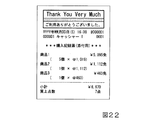
図22は、本実施形態における購入記録票の貼付用明細書の一例を示している。同図に示される購入記録票の貼付用明細書の内容は、商品1、商品2及び商品3が購入された場合に対応する。
商品1については、免税適用による単価(即ち、税率が適用されてない本体価格)が1,019円であり、5個が購入されたことに応じて、免税適用による合計価格が5,095円であることが示されている。ここで、5,095円の金額には「免」の文字が付加されていることで、免税適用による合計価格であることが示されている。
同様に、商品2については、免税適用による単価が1,112円であり、1個が購入されたことに応じて免税適用による合計価格も同じ1,112円であることが示されている。
同様に、商品3については、免税適用による単価が463円であり、1個が購入されたことに応じて免税適用による合計価格も同463円であることが示されている。
また、各商品の会計内容の欄の下において会計の集計的な内容を示す集計欄においては、小計金額と買上点数が示されているが釣銭については示されていない。なお、釣銭のほか、例えば顧客が支払いのために店員に渡した預け入れ金額など、精算に関する内容も印字が省略されている。
このように、本実施形態の購入記録票の貼付用明細書においては、商品ごとの購入数と免税適用後の価格(単価及び合計金額)とについては示されているが、税率、免税額及び精算に関する内容については省略されている。
FIG. 22 shows an example of a purchase record sticking specification in the present embodiment. The contents of the specification for pasting the purchase record slip shown in the figure correspond to the case where
For
Similarly, for
Similarly, for
Further, in the totaling column showing the total content of the accounting under the accounting details column of each product, the subtotal amount and the purchase points are shown, but the change is not shown. In addition to the change, the contents related to the settlement, such as the amount of money deposited by the customer to the store clerk for payment, are also omitted.
As described above, in the specification for attaching the purchase record slip of this embodiment, the number of purchases for each product and the price (unit price and total amount) after tax exemption are shown, but the tax rate, tax exemption amount and The contents relating to the settlement are omitted.
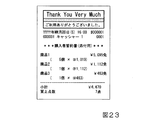
図23は、本実施形態における購入者誓約書の貼付用明細書の一例を示している。同図は、図22と同様に商品1、商品2及び商品3が購入された場合に対応する。同図に示されるように、購入者誓約書の貼付用明細書においても、図22と同様の様式により、商品ごとの購入数と免税適用後の価格(単価及び合計金額)とについては示されているが、税率、免税額及び精算に関する内容が省略される。
FIG. 23 shows an example of a specification for pasting a purchaser's pledge in the present embodiment. This figure corresponds to the case where
図24は、本実施形態における梱包リスト用明細書の一例を示している。同図は、図22と同様に商品1、商品2及び商品3が購入された場合に対応する。同図のように、梱包リスト用明細書においても、図22と同様の様式により、商品ごとの購入数と免税適用後の価格(単価及び合計金額)とについては示されているが、税率、免税額及び精算に関する内容が省略される。
FIG. 24 shows an example of a packing list specification in the present embodiment. This figure corresponds to the case where
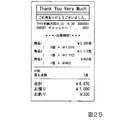
また、本実施形態においては、レシート(お客様控え用明細書)についても、図25に示すように、図22と同様の様式により税率、免税額に関する内容が省略されてもよい。ただし、レシートに関しては、顧客が自分の買い物についての会計内容を確認するためのものであるため、預かり金や釣銭などの情報は省略されることなく印刷されている。
また、上記のように顧客の会計内容の確認に用いられるものであることを考慮すれば、レシートに関しては、購入記録票の貼付用明細書、購入者誓約書の貼付用明細書及び梱包リスト用明細書とは異なり、税率、免税額についても印刷されるようにしてよい。
Further, in the present embodiment, as for the receipt (specification for customer records), as shown in FIG. 25, the contents regarding the tax rate and the tax exemption amount may be omitted in the same manner as in FIG. However, since the receipt is for the customer to confirm the accounting content of his / her shopping, information such as deposit and change is printed without being omitted.
In addition, taking into account that it is used for confirming the customer's account as described above, for receipts, the purchase record slip affix specification, the purchase pledge affix specification and the packing list Unlike the statement, the tax rate and tax exemption amount may be printed.
次に、第4実施形態の変形例について説明する。
非居住者への商品の販売にあたり、免税に加えて、更に店舗独自のサービスとしてクーポンなどの提示に応じた割引きをすることも考えられる。このように免税と割引きとを併用した会計が行われた場合に応じてPOSレジスタ3が発行する購入記録票の貼付用明細書の一例を図26(a)に示す。
Next, a modification of the fourth embodiment will be described.
When selling products to non-residents, in addition to tax exemption, it is also possible to offer discounts according to the presentation of coupons as a store-specific service. FIG. 26 (a) shows an example of a specification for affixing a purchase record slip issued by the
図26(a)の購入記録票の貼付用明細書には、お土産品1、お土産品2及びお土産品3の3つの商品が購入された場合に対応する。同図には、まず、お土産品1について、免税適用による単価が1,019円であり、購入数が5個であることと、5個のお土産品1についての免税適用による合計金額が5,095円であることが示されている。つまり、同図の例においても、図22と同様に、税率及び免税額などの印刷が省略されている。
そのうえで、お土産品1については、1個あたり20%の割引きが行われることに応じて、割引率が20%であることと、免税適用による合計金額である5,095円の20%である1,020円の割引額を減額することが示されている。
また、お土産品2ついては、免税適用による単価が1,112円であり、1個が購入されたことに応じて免税適用による合計価格も同じ1,112円であることが示されている。
同様に、お土産品3については、免税適用による単価が463円であり、1個が購入されたことに応じて免税適用による合計価格も同463円であることが示されている。
なお、同図の購入記録票の貼付用明細書についても、図22と同様に、集計欄においては、小計金額と買上点数は示されているが、釣銭などの精算に関する内容の印刷は省略されている。
26A corresponds to the case where three products,
On top of that, for
In addition, for
Similarly, for
As for FIG. 22, the subtotal amount and the number of purchases are shown in the tabulation column as well as FIG. 22, but printing of the contents related to the settlement of the change, etc. is omitted. ing.
ここで、前述のように、購入記録票の貼付用明細書に必要な情報としては、商品ごとの商品名、購入個数、価格であることを考慮すると、図26(a)の購入記録票の貼付用明細書のお土産1において示されるような、税率適用の合計価格に対して、割引率と割引額とを示す様式も冗長であるとの考えをとることもできる。そこで、購入記録票の貼付用明細書について、割引率と割引額との印刷を省略し、税率適用と割引きとのいずれもが反映された単価及び合計金額とが示されるようにした様式としてもよい。
Here, as described above, in consideration of the product name, the purchased quantity, and the price for each product as the information necessary for the specification for attaching the purchase record slip, the purchase record slip of FIG. As shown in the
図26(b)は、図26(a)の購入記録票の貼付用明細書について、上記のように割引き率と割引額との印刷を省略した様式とした例を示している。
同図と図26(a)とを比較して分かるように、お土産品1については、購入数が5個であることが示されるとともに、免税を適用し、かつ20%の割引きも適用した後の単価が815円であることが示される。そして、5個のお土産品1の合計金額としては、免税を適用し、かつ20%の割引きも適用した後の4,075円(=815円×5個)が示される。
FIG. 26B shows an example in which the discount rate and the discount amount are not printed as described above with respect to the specification for attaching the purchase record slip of FIG.
As can be seen by comparing FIG. 26 and FIG. 26 (a), for
なお、本実施形態においては、図26(a)の様式と図26(b)の様式とのいずれが採用されてもよい。また、図示は省略するが、本実施形態においては、購入者誓約書の貼付用明細書と梱包リスト用明細書とについても、図26(a)と図26(b)のいずれかと同様の様式とされればよい。更には、レシートについても、図26(a)と図26(b)のいずれかと同様の様式とされてよい。 In the present embodiment, either the style of FIG. 26 (a) or the style of FIG. 26 (b) may be adopted. In addition, although illustration is omitted, in the present embodiment, the specification for pasting the purchaser's pledge and the specification for packing list are the same as those in either of FIG. 26 (a) or FIG. 26 (b). It should be done. Furthermore, the receipt may be in the same manner as in either FIG. 26 (a) or FIG. 26 (b).
また、非居住者への商品の販売にあたり、免税に加えて、更に店舗独自のサービスとして、同一商品について規定の複数個をまとめ買いした場合に、まとめ買いした個数の商品を対象として値引き(組み合わせ値引き)をすることも考えられる。このように免税と組み合わせ値引きとを併用した会計が行われた場合に応じてPOSレジスタ3が発行する購入記録票の貼付用明細書の一例を図27(a)に示す。
In addition to tax exemption for sales of products to non-residents, as a store-specific service, if you purchase multiple specified items for the same product at the same time, discounts are applied to the number of products purchased in bulk (combination discount) It is also conceivable to do. FIG. 27 (a) shows an example of a specification for attaching a purchase record slip issued by the
図27(a)の購入記録票の貼付用明細書には、お土産品1、お土産品2及びお土産品3の3つの商品が購入された場合に対応する。同図では、お土産品1について免税適用お及び組み合わせ値引きが行われた例が示されている。この場合の組み合わせ値引きは、お土産品1を3個まとめて購入すると、3個に対して300円を値引きするというものである。
同図では、お土産品1について、免税適用による単価が1,019円であり、購入数が5個であることと、5個のお土産品1についての免税適用による合計金額が5,095円であることが示されている。そのうえで、5個のうちの3個が組み合わせ値引きの対象となることに応じて、300円の組み合わせ値引き額が合計金額から減算されることが示されている。
お土産品2、お土産品3ごとの会計内容と集計欄の内容については、図26(a)と同様である。
27A corresponds to the case where three products,
In the figure, for
The contents of accounting for each
また、この場合にも、購入記録票の貼付用明細書に必要な情報としては、商品ごとの商品名、購入個数、価格であることを考慮すると、図27(a)のように税率適用の合計価格に対して、組み合わせ値引き額を示す様式も冗長であるとの考えをとることもできる。そこで、購入記録票の貼付用明細書について、図27(a)から組み合わせ値引き額を省略し、税率適用と組み合わせ値引き額とのいずれもが反映された単価及び合計金額とが示されるようにした様式としてもよい。 Also in this case, the tax rate application as shown in FIG. 27 (a) is considered in consideration of the product name, the number of purchased items, and the price for each product as information necessary for the specification for attaching the purchase record slip. It can be considered that the form of the combination discount amount is redundant with respect to the total price. Therefore, with regard to the specification for attaching the purchase record slip, the combination discount amount is omitted from FIG. 27 (a), and the unit price and the total amount reflecting both the tax rate application and the combination discount amount are shown. It is good also as a style.
図27(b)は、図27(a)の購入記録票の貼付用明細書について、上記のように組み合わせ値引き額を省略した様式とした例を示している。
同図と図27(a)とを比較して分かるように、お土産品1に関して、5個の購入数のうちの2個については、免税は適用されるが組み合わせ値引きの適用されない1,019円の単価であることが示される。また、5個の購入数のうちの3個については、免税適用と組み合わせ値引きの適用とが併用されたことで、919円の単価であることが示される。919円の単価は、3個の組み合わせで300円の値引きが行われることに応じて、300円の組み合わせ値引き額を「3」で除算した金額である100円を1,019円から減算して得られるものである。また、お土産品1について組み合わせ値引き後の単価が示される形式とされたことに伴い、免税適用されたお土産品1の総額は、4,795円となる。
お土産品2、お土産品3ごとの会計内容と集計欄の内容については、図27(a)と同様である。
FIG. 27 (b) shows an example in which the combination discount amount is omitted as described above for the purchase record slip pasting specification in FIG. 27 (a).
As can be seen by comparing FIG. 27 and FIG. 27A, with respect to
The contents of accounting for each
なお、本実施形態においては、図27(a)の様式と図27(b)の様式とのいずれが採用されてもよい。また、図示は省略するが、本実施形態においては、購入者誓約書の貼付用明細書と梱包リスト用明細書とについても、図27(a)と図27(b)のいずれかと同様の様式とされてよい。更には、レシートについても、図27(a)と図27(b)のいずれかと同様の様式とされてよい。 In the present embodiment, either the style of FIG. 27 (a) or the style of FIG. 27 (b) may be adopted. Although not shown in the drawings, in the present embodiment, the specification for sticking the purchaser's pledge and the specification for packing list are the same as those in either FIG. 27 (a) or FIG. 27 (b). May be. Further, the receipt may be in the same manner as in either FIG. 27 (a) or FIG. 27 (b).
[変形例]
続いて、上記第1〜第4実施形態における各種変形例について説明する。
(第1の変形例)
例えば切手、商品券などのように課税対象とされていない、非課税商品と呼ばれる商品がある。このような非課税商品は免税対象とすることができない場合がある。そこで、このような場合に対応して、POSレジスタ3について、免税宣言操作が行われて免税処理モードとされた状態において、非課税商品については商品登録処理を行わないように構成してもよい。
[Modification]
Subsequently, various modifications of the first to fourth embodiments will be described.
(First modification)
For example, there are products called non-taxable products that are not taxable, such as stamps and gift certificates. Such tax-free products may not be eligible for tax exemption. Therefore, in response to such a case, the
また、例えば乾電池などのように免税対象から除外された分類外商品と呼ばれるものがある。そこで、POSレジスタ3について、免税処理モードの状態では分類外商品については商品登録処理を行わないように構成してもよい。
また、POSレジスタ3について、非課税商品と分類外商品との少なくともいずれか一方が登録された後においては免税宣言が行えないように構成されてもよい。
In addition, there is a so-called non-classified product excluded from tax exemption, such as a dry battery. Therefore, the
Further, the
(第2の変形例)
また、店舗の運用により、非居住者には店舗の会員となる資格を与えないものと定めている場合がある。このような場合に対応して、POSレジスタ3について、会員向けに値引き価格や特売価格などが設定された商品については免税対象から除外するように構成してもよい。
(Second modification)
In addition, depending on the operation of the store, it may be determined that non-residents are not entitled to become members of the store. Corresponding to such a case, the
(第3の変形例)
また、一般物品に関して購入金額が規定の金額(現状では100万円)を越えた場合には、パスポートの写しを店舗で管理することが定められている。そこで、POSレジスタ3について、登録された商品についての小計金額が上記の規定の金額を超えた場合には、規定の金額を超過した旨(即ち、パスポートの写しが必要である旨)を店員に報知するように構成してもよい。
なお、消耗品について上記の規定が適用された場合には、消耗品に関しても上記と同様の構成が採られればよい。
(Third Modification)
In addition, it is stipulated that a copy of a passport is managed at a store when the purchase amount of a general article exceeds a prescribed amount (currently 1 million yen). Therefore, in the case of the
Note that when the above provisions are applied to consumables, the same configuration as described above may be adopted for consumables.
(第4の変形例)
また、例えば酒類やたばこなどのように未成年が購入することのできない商品(未成年購入禁止商品)がある。このような未成年購入禁止商品の購入に際しては、年齢確認の操作を受け付けた後でなければ会計ができないようにされたPOSレジスタがある。
しかし、免税品として購入される場合には、免税適用を受けた国内で消費しないことが前提であり、また、国によっては、18歳で飲酒、喫煙が可能である。
そこで、上記したことを考慮して、POSレジスタ3について、未成年購入禁止商品が購入される場合であっても、免税宣言操作が行われた場合には、年齢確認の操作を受け付けなくとも会計が行えるように構成してもよい。
(Fourth modification)
In addition, there are products that cannot be purchased by minors, such as alcoholic beverages and cigarettes (products under prohibited purchase of minors). There is a POS register that can only be used for accounting for the purchase of such underage-prohibited products after accepting an age confirmation operation.
However, when it is purchased as a duty-free product, it is assumed that it will not be consumed in the country where tax exemption is applied. In some countries, drinking and smoking are possible at the age of 18.
Therefore, in view of the above, even if a product forbidden to purchase underage is purchased for the
また、例えば商品マスタなどの商品管理情報において、未成年購入禁止商品については、国ごとの未成年購入禁止商品の購入が許可される最低年齢情報を記憶させておくようにする。
そのうえで、例えば商品の登録操作または小計操作などに際して、国と最低年齢との組み合わせを示すボタンをタッチパネル付表示部14に表示させ、客からの年齢の申し出に応じて店員が該当のボタンを操作したことに応じて、未成年購入禁止商品についての購入が可能となるようにPOSレジスタ3を構成することもできる。
あるいは、POSレジスタ3について、以下のように構成することができる。つまり、POSレジスタ3は、例えば非居住者に関する情報が記憶されたICチップを備えるパスポートから国及び年齢の情報を読み込み、最低年齢情報と照合する。そして、POSレジスタ3は、照合の結果、未成年購入禁止商品の購入が可能であることが判定されれば、未成年購入禁止商品についての購入が可能なようにする。
Further, for example, in the product management information such as the product master, the minimum age information in which purchase of the underage purchase prohibited product for each country is permitted is stored for the underage purchase prohibited product.
In addition, for example, when a product registration operation or subtotal operation is performed, a button indicating the combination of the country and the minimum age is displayed on the
Alternatively, the
(第5の変形例)
また、例えば商品マスタなどの商品管理情報において、消耗品については、容積や重量などの容量に関する容量関連情報を記憶させておく。そして、例えば小計の際などにおいて、POSレジスタ3が、容量関連情報に基づいて、消耗品について最適とされる包装の仕方を特定し、特定した包装の仕方をタッチパネル付表示部14に表示して店員に提示するように構成してもよい。包装の仕方として、例えば商品を容れる包装用品の種別(段ボール製の箱、プラスチック製の袋などの種別)、包装用品のサイズ、包装用品の数などを提示することができる。
(Fifth modification)
For example, in product management information such as a product master, for consumables, capacity-related information related to capacity such as volume and weight is stored. Then, for example, at the time of subtotal, the
(第6の変形例)
また、これまでの説明において図により示した購入記録票の貼付用明細書、購入者誓約書の貼付用明細書、お客様控え用明細書、及び梱包リスト用明細書などには、発行を行った店舗の名称及び住所などの店舗を示す情報が印字されることが好ましい。
(Sixth Modification)
In addition, we issued the details for pasting the purchase record slip, the details for pasting the purchase pledge, the customer copy, the packing list, etc. Information indicating the store such as the store name and address is preferably printed.
(第7の変形例)
また、現状において、免税による商品の販売にあっては、非居住者である顧客に免税手続についての説明シートを店員が提示して説明を行ったり、免税品が消耗品である場合には免税向けの特有の梱包を行ったりすることが必要である。このため、現状では有人対応による会計が行われている。その一方で、POSシステムとして、店員が商品の登録を行う登録装置と顧客が精算を行う精算装置とが分離された構成が知られている。このようなPOSシステムは、登録装置は有人対応であるものの、精算装置は店員による対応がない。
しかし、例えば上記のようなPOSシステムについて、登録装置にて免税宣言操作を行ってから精算装置にて顧客が精算を完了するまでの所定のタイミング(例えば支払いのための現金の投入に応じたタイミング(投入開始時、投入中、または投入完了時)、あるいはクレジットカードの読み込みが行われたタイミングなど)で、説明シートで説明を行う店員を呼び出すように構成する。店員の呼出は、例えばランプなどの点灯、店員の端末への通知などにより実現できる。そして、精算後において店員により梱包が行われるようにする。このようにすれば、登録装置と精算装置とが分離された構成のPOSシステムにも本実施形態の構成を適用可能になる。
(Seventh Modification)
In addition, at present, when selling products with tax exemption, the salesclerk presents an explanation sheet for tax exemption procedures to non-resident customers and explains the tax exemption if the tax exempt is a consumable item. It is necessary to carry out special packaging for For this reason, accounting is currently underway for manned employees. On the other hand, as a POS system, a configuration is known in which a registration device for registering merchandise by a store clerk and a settlement device for settlement by a customer are separated. In such a POS system, the registration device is manned, but the checkout device is not handled by a store clerk.
However, for example, with respect to the POS system as described above, a predetermined timing (for example, timing according to the insertion of cash for payment) from when the tax exemption declaration operation is performed at the registration device to when the customer completes the settlement at the settlement device. It is configured to call a sales clerk to explain on the explanation sheet (at the start of the insertion, during the insertion, or at the completion of the insertion) or when the credit card is read). The calling of the store clerk can be realized by, for example, lighting a lamp or the like, or notifying the store clerk's terminal. Then, after the payment is completed, the clerk is packed. In this way, the configuration of this embodiment can be applied to a POS system having a configuration in which the registration device and the settlement device are separated.
(第8の変形例)
また、商品の登録から精算までを店員が対応せずに顧客自身が行うようにされた、セルフ型のPOSレジスタも知られている。例えば免税手続の説明について、対人によらず、例えば画面に表示させた説明シートの内容に対して顧客が確認の操作を行うようにしてもよい状況となった場合には、例えば以下のように、セルフ型のPOSレジスタによっても免税適用の会計に対応することができる。
つまり、顧客は、旅券のICチップをPOSレジスタに読み取らせることで免税宣言を行う。そのうえで、顧客はPOSレジスタに対して商品登録と精算とに応じた操作を行う。POSレジスタは、操作に応じて免税適用に応じた商品登録処理と会計処理とを行うようにされる。この際、POSレジスタは、会計が完了するまでの所定のタイミングで、免税手続の説明シートを画面に表示させる。免税手続の説明シートの表示にあたっては、所定の複数の言語による説明シートが表示されるようにしてよい。そして、顧客が表示された説明シートの内容に対して確認(承諾)したことの操作を行うと、POSレジスタは免税適用に応じた会計を許可する。
(Eighth modification)
There is also known a self-type POS register in which a customer does not deal with the registration to the settlement of merchandise by the customer himself / herself. For example, regarding the explanation of the tax exemption procedure, if it becomes a situation where the customer may perform the confirmation operation on the contents of the explanation sheet displayed on the screen, for example, regardless of the person, for example, as follows The self-type POS register can also deal with tax exemption accounting.
That is, the customer makes a tax exemption declaration by causing the POS register to read the IC chip of the passport. In addition, the customer performs operations corresponding to the merchandise registration and payment on the POS register. The POS register is configured to perform merchandise registration processing and accounting processing according to tax exemption application in accordance with the operation. At this time, the POS register displays an explanation sheet for the tax exemption procedure on the screen at a predetermined timing until the accounting is completed. In displaying the tax exemption procedure explanation sheet, explanation sheets in a predetermined plurality of languages may be displayed. When the customer confirms (accepts) the contents of the displayed explanation sheet, the POS register permits the accounting according to the tax exemption application.
[第1実施形態から第4実施形態のまとめ]
以上、詳述したように、実施形態であるPOSレジスタ3は、商品コード入力部によって入力された商品コードに基づいて、商品登録処理部が買上げ対象の商品を登録するPOSレジスタである。POSレジスタ3は、商品ごとに、商品の商品コードと商品の免税の種別を表す免税種別情報とを関係付けて記憶する免税種別情報記憶部と、商取引が免税対象であることの指定を受け付ける免税指定受付部と、免税指定受付部が、商取引が免税対象であることの指定を受け付けた場合、商品コード入力部によって入力された商品コードに関係付けられた免税種別情報を免税種別情報記憶部から読み出し、免税種別情報に基づいて商品コードに対応する商品の免税の種別を判定する判定部と、を備える。
この構成により、商取引が免税対象である場合、POSレジスタ3は、取引する商品が免税対象であるか否か、また、免税対象である場合は、その種別を取得することができる。
[Summary of First to Fourth Embodiments]
As described above in detail, the
With this configuration, when a commercial transaction is tax-exempt, the
また、POSレジスタ3において、免税指定受付部が、商取引が免税対象であることの指定を受け付けた場合であって、判定部が読み出した免税種別情報が非免税対象物品を示す場合に、エラー情報を出力するエラー情報出力部、を更に備えてもよい。
これにより、商取引が免税対象である場合、非免税対象物品を誤って免税により精算するおそれを低減することができる。
Further, in the
Thereby, when a commercial transaction is tax-exempt, it is possible to reduce the risk that a non-tax-exempt product is erroneously settled by tax exemption.
また、POSレジスタ3において、免税指定受付部が、商取引が免税対象であることの指定を受け付けた場合であって、判定部が読み出した免税種別情報が免税対象物品を示す場合に、商品登録処理部は、免税種別情報に応じた免税ルールにしたがって商品登録を行ってもよい。
これにより、商取引が免税対象である場合、免税の種別に応じた免税ルール、例えば、免税対象額の範囲内に入っているか否か等を判定して、正しい免税の精算を行うことができる。
Further, in the
Thereby, when a commercial transaction is tax-exempt, tax exemption rules according to the type of tax exemption, for example, whether or not it is within the range of the tax exemption amount, etc. can be determined, and correct tax exemption can be performed.
また、POSレジスタ3において、前記免税指定受付部は、免税販売を指定するための免税指定キーとしてもよい。この免税指定キーは、オペレータが顧客から旅券の提示を受けた後の商取引の最初において押下されるキーであってもよいし、買上げ対象の商品を登録する際に小計キーとして押下されるキーであってもよい。
In the
また、POSレジスタ3において、免税指定受付部は、ICチップ(集積回路)が埋め込まれた旅券のICチップに記憶された情報を読み取り可能な読取り装置としてもよい。ここで、読取り装置によってICチップから読み取られる情報は、例えば、国籍を表す国籍情報である。
In the
また、POSレジスタ3において、印字部19(印刷部)と、商品登録処理部が登録した商品の明細を、印字部19により紙媒体に印刷させる印刷制御部と、を更に備えてもよい。
また、POSレジスタ3において、免税指定受付部が、商取引が免税対象であることの指定を受け付けた場合、印刷制御部は、商品の明細を、購入記録票の貼付用明細書、購入者誓約書の貼付用明細書、及び控えとして、前記印刷部によりそれぞれ紙媒体に印刷させてもよい。
この構成により、顧客及び輸出物品販売場の免税店の店員は、購入記録票や購入者誓約書への、商品の品名、品名ごとの数量及び価格、物品の価格の合計額、販売価格の合計額等の記入の手間を省くことができる。
The
In the
With this configuration, the customer and the clerk of the duty-free store of the export goods sales floor can add the product name, the quantity and price for each product name, the total price of the product, and the total sales price to the purchase record slip and purchase pledge. This saves you the trouble of entering the amount.
また、POSレジスタ3において、購入記録票、購入者誓約書、及び控えの各帳票を選択するための選択キー、を更に備え、免税指定受付部が、商取引が免税対象であることの指定を受け付けた場合、印刷制御部は、押下された選択キーに対応付けられた帳票のための商品の明細を、印字部19により紙媒体に印刷させてもよい。
これにより、POSレジスタ3のオペレータは、所望の帳票を選んで印刷させることができる。
The
As a result, the operator of the
また、POSレジスタ3において、梱包リストを印刷させるための梱包リスト印刷キー、を更に備え、免税指定受付部が、商取引が免税対象であることの指定を受け付けた場合であって、梱包リスト印刷キーが押下された場合に、印刷制御部は、商品の明細を、梱包リストとして印字部19により紙媒体に印刷させてもよい。
これにより、例えば、消耗品が箱詰めされて外側から内容物を確認できない場合等に、箱の内容を示す梱包リストとして用いることができる。
The
Thereby, for example, when consumables are packed in a box and the contents cannot be confirmed from the outside, it can be used as a packing list indicating the contents of the box.
また、POSレジスタ3において、梱包リストを追加印刷させるための追加印刷キー、を更に備え、免税指定受付部が、商取引が免税対象であることの指定を受け付けた場合であって、追加印刷キーが押下された場合に、印刷制御部は、商品の明細と頁数を表す頁数情報とを、追加梱包リストとして印字部19により紙媒体に印刷させてもよい。
この構成により、複数の箱を用いて商品を梱包する場合に、梱包リストを箱の数量分だけ印刷することができる。
The
With this configuration, when a product is packed using a plurality of boxes, the packing list can be printed by the number of boxes.
また、POSレジスタ3において、判定部が読み出した免税種別情報が示す免税の種別に応じて商品の明細を分割する分割部、を更に備え、印刷制御部は、分割部が分割した商品の各明細を、印字部19により、明細ごとの紙媒体に印刷させてもよい。
この構成により、商品の明細を、免税の種別ごとの紙媒体に印刷することができる。
The
With this configuration, the product details can be printed on a paper medium for each type of tax exemption.
また、POSレジスタ3において、印刷制御部は、分割部が分割した商品の各明細を、印字部19により紙媒体に区分して印刷させてもよい。
この構成により、商品の明細を、免税の種別ごとに区分して、一枚の紙媒体に印刷することができる。
Further, in the
With this configuration, it is possible to divide the product details for each type of tax exemption and print them on a single paper medium.
また、本実施形態であるPOSレジスタ3は、商品コード入力部によって入力された商品コードに基づいて、商品登録処理部が買上げ対象の商品を登録するPOSレジスタである。そして、POSレジスタ3は、商品ごとに、商品の商品コードと商品の免税の種別を表す免税種別情報とを関係付けて記憶する免税種別情報記憶部と、商取引が免税対象であることの指定を受け付ける免税指定受付部と、免税指定受付部が、商取引が免税対象であることの指定を受け付けた場合、商品コード入力部によって入力された商品コードに関係付けられた免税種別情報を免税種別情報記憶部から読み出し、免税種別情報別に、商品登録処理部に商品を登録させる制御部と、を備える。
この構成により、免税の種別ごとに、買上げ対象の商品を登録することができる。
The
With this configuration, it is possible to register a product to be purchased for each tax exemption type.
なお、POSレジスタ3において、ラベルプリンタ40と、免税指定受付部が、商取引が免税対象であることの指定を受け付けた場合、商品登録処理部が登録した商品の明細のうち、消耗品に該当する商品の明細を、ラベルプリンタ40によりラベルに印刷させる印刷制御部と、を更に備えてもよい。
In the
また、POSレジスタ3において、免税指定受付部が、商取引が免税対象であることの指定を受け付けた場合、印刷制御部は、商品登録処理部が登録した商品の明細のうち、消耗品に該当する商品の明細及び取引番号を、ラベルプリンタ40によりラベルに印刷させてもよい。
この構成により、同一日において同一店舗における複数回にわたる商品の明細を用いて合計額の合算をすることができる。これにより、一取引では免税対象額に達していない場合でも、同日の複数回の取引により合算額が免税対象額に達する場合は、免税対象の精算処理を行うことができる。
In the
With this configuration, the total amount can be summed up using a plurality of product details in the same store on the same day. As a result, even if the transaction does not reach the tax-exempt amount, if the combined amount reaches the tax-exempt amount due to multiple transactions on the same day, the tax-exempt target settlement can be performed.
また、POSレジスタ3において、外国語を選択するための言語選択キー、を更に備え、免税指定受付部が、商取引が免税対象であることの指定を受け付けた場合、印刷制御部は、消耗品に該当する商品の明細を、押下された言語選択キーに対応付けられた外国語で、ラベルプリンタ40によりラベルに印刷させてもよい。
この構成により、所望の言語による商品の明細書を得ることができる。
In addition, the
With this configuration, a product description in a desired language can be obtained.
また、POSレジスタ3において、免税指定受付部は、ICチップ(集積回路)が埋め込まれた旅券のICチップに記憶された情報を読み取り可能な読取り装置であり、免税指定受付部が、商取引が免税対象であることの指定を受け付けた場合、印刷制御部は、消耗品に該当する商品の明細を、免税指定受付部が旅券のICチップから読み取った国籍に対応する外国語によって、ラベルプリンタ40によりラベルに印刷させてもよい。
この構成により、言語選択キーを選ぶ手間が省ける。
In the
This configuration saves the trouble of selecting a language selection key.
また、POSレジスタ3において、免税指定受付部が、商取引が免税対象であることの指定を受け付けた場合、印刷制御部は、消耗品に該当する商品の明細を、外国語及び日本語の併記によって、前記ラベル印刷部によりラベルに印刷させてもよい。
これにより、店舗のオペレータにも、顧客である非居住者にも見易い明細書を得ることができる。
In the
As a result, it is possible to obtain a statement that is easy to read for both the store operator and the non-resident who is the customer.
また、POSレジスタ3において、登録された商品についての小計結果が免税対象となる条件を満たさない場合に、小計結果が免税対象となる条件を満たさないことを報知する免税対象条件対応報知部を更に備えてもよい。
これにより、小計結果が免税対象となる条件を満たさない状態のまま免税が適用された会計が行われてしまうことが防がれる。ここで、小計結果が免税対象となる条件を満たさない場合とは、これまでに説明した、小計金額が下限免税対象額に満たない場合のほか、例えば、消耗品についての小計金額が規定の免税対象上限金額(例えば現行では50万円)を越える場合も含まれてよい。また、例えば購入商品数について免税対象の条件が適用されることとなった場合には、小計結果が免税対象となる条件を満たさない場合として、購入商品数が上限より多かったり下限より少なかったりした場合も含まれてよい。
なお、ここでの「小計結果」とは、必ずしも小計キー操作などの小計操作が行われたことに応じて求められる小計に限定されない。例えば、ここでの「小計結果」は、小計操作が行われる前において免税宣言操作が行われたときにおいて、これまでに登録された商品について求められる小計も含まれてよい。この場合においては、免税宣言操作が行われた後においてもPOSレジスタ3に対する商品の登録が可能である。そこで、この場合のPOSレジスタ3は、免税宣言操作後において、小計結果が免税対象となる条件が満たされる状態となるまで、小計結果が免税対象となる条件を満たさないことを報知する状態を継続する。そして、POSレジスタ3は、或る商品が登録された段階で小計結果が免税対象となる条件を満たしたことに応じて、小計結果が免税対象となる条件が満たされたことの報知に切り替えるようにしてもよい。このような構成において、小計結果が免税対象となる条件を満たさないことを報知する態様としては、例えば、タッチパネル付表示部14に表示される商品登録画面の所定位置におけるメッセージの表示、商品登録画面の全体もしくは一部について警告を表す色で表示したり点滅あるいは明滅させたりするといった例を挙げることができる。また、小計結果が免税対象となる条件が満たされる状態となったことを報知する態様としては、商品登録画面に表示されていた小計結果が免税対象となる条件を満たさないことを報知するメッセージの消去、商品登録画面の全体もしくは一部において行われていた警告を表す色や点滅、明滅などの表示の停止、更には、例えば商品登録画面における免税宣言キーなどの特定のキーについて免税適用可能であることを表す所定の態様の表示に変更するなどの例を挙げることができる。
In addition, in the
As a result, it is possible to prevent the tax exemption from being applied while the subtotal result does not satisfy the condition for tax exemption. Here, the case where the subtotal result does not meet the conditions for tax exemption is the case where the subtotal amount is less than the lower limit exemption amount as described above, for example, excluding the subtotal amount for consumables The case where the target upper limit amount (for example, 500,000 yen at present) is exceeded may also be included. In addition, for example, if the tax-exempt conditions are applied to the number of purchased items, the number of purchased items is more than the upper limit or less than the lower limit as the subtotal result does not satisfy the conditions for exemption. Cases may also be included.
The “subtotal result” here is not necessarily limited to a subtotal obtained in response to a subtotal operation such as a subtotal key operation. For example, the “subtotal result” herein may include a subtotal required for a product registered so far when a tax exemption declaration operation is performed before the subtotal operation is performed. In this case, the product can be registered in the
また、POSレジスタ3において、前記免税対象条件対応報知部による報知が行われたことに応じて、小計結果が免税対象となる条件を満たさない場合に対応する会計方法を選択する会計方法選択部を更に備えてもよい。
これにより、小計結果が免税対象となる条件を満たさなかった場合に、迅速に適切な対応を図ることができる。
なお、小計結果が免税対象となる条件を満たさなかった場合の対応としては、上記実施形態にて挙げた、小計金額が下限免税対象額に満たない場合に応じた例のほか、消耗品についての小計金額が規定の免税対象上限金額を越えた場合において、「返品」、「訂正」、「取り消し」等の処理によって登録された商品の内訳を変更して、免税対象となる条件が満たされるように処理することも含まれてよい。
また、購入商品数が上限より多かったり下限より少なかったりした場合に、「返品」、「訂正」、「取り消し」「登録追加」の処理などによって、購入商品数が免税対象となる条件を満たすように処理することも含まれてよい。
Further, in the
Thereby, when a subtotal result does not satisfy the conditions for tax exemption, an appropriate response can be promptly taken.
In addition, as a countermeasure when the subtotal result does not meet the conditions for tax exemption, in addition to the examples given in the above embodiment when the subtotal amount is less than the lower limit tax exemption amount, consumables When the subtotal amount exceeds the prescribed tax-exempt maximum amount, the breakdown of products registered through processing such as “Return”, “Correction”, “Cancellation” will be changed so that the conditions for tax exemption are satisfied Processing may also be included.
In addition, if the number of purchased products is more than the upper limit or less than the lower limit, the number of purchased products will satisfy the tax-exempt condition by processing “Return”, “Correction”, “Cancellation”, “Add Registration”, etc. Processing may also be included.
以上により、本発明の実施形態によれば、POSレジスタ3の操作性が良く、これにより免税対象物品の販売を容易に行わせることができる。
As described above, according to the embodiment of the present invention, the
[第5実施形態]
続いて、第5実施形態について説明する。なお、以降の説明にあたり、免税を適用して会計処理が行われた取引については免税適用取引といい、免税を適用せずに会計処理が行われた取引については免税非適用取引という。
例えば非居住者が下限免税対象額やパスポート所持などの免税適用条件を満たしていたにもかかわらず、POSレジスタ3を操作するオペレータ(店員)が免税を適用せずに商品税率を適用して非居住者の買い物についての会計処理を行ってしまう場合がある。
このように誤って免税を非適用として会計処理を行ってしまったことによる免税非適用取引は、例えばPOSレジスタ3にて非居住者が会計を受けている際に、オペレータへの免税適用の申告やパスポートの提示などが遅れてしまったような場合に生じる。あるいは、POSレジスタ3にて会計処理を受けていた際には、非居住者がパスポートを所持し忘れたため免税適用条件を満たしていないと思い込んでいたのであるが、会計を受け終わってから改めて身の回りを確認してみたところパスポートを所持していたといったような場合に生じる。
このような免税非適用取引が行われた後に、例えば非居住者から免税適用条件が満たされていたことを伝えられたなどにより、免税を適用してよい取引であったことが判明した場合の対応としては、例えば以下のように行われていた。つまり、オペレータは、対象の免税非適用取引そのものを一旦取り消す操作を行ったうえで、再度、免税を適用した会計処理の操作を行っていた。あるいは、免税非適用から免税適用への変更に応じた会計金額の変更を店員が計算して改めて会計を行うようなことが行われていた。このような作業はかなりの手間と時間がかかっていた。
そこで、本実施形態のPOSレジスタ3は、上記のように免税非適用取引が行われた場合の対応として、これまでに会計処理が行われた取引のうちから、訂正対象の免税非適用取引を検索する。そのうえで、POSレジスタ3は、検索された免税非適用取引について、免税が適用された内容に訂正できるように構成される。即ち、本実施形態におけるPOSレジスタ3は、免税非適用取引を免税適用取引に変更する検索訂正を行うことができる。
[Fifth Embodiment]
Subsequently, a fifth embodiment will be described. In the following description, a transaction that is accounted for by applying tax exemption is referred to as a tax exempt transaction, and a transaction that is processed without applying tax exemption is referred to as a tax exempt transaction.
For example, even if a non-resident satisfies the tax exemption conditions such as the minimum tax exemption amount and possession of a passport, the operator (store clerk) who operates the
The tax exemption non-applicable transaction due to the fact that the tax exemption is not applied in this way and the tax exemption is applied, for example, when a non-resident is accounting at the
After such a non-tax-exempt transaction has been conducted, for example, when a non-resident has been informed that the exemption-applicable conditions have been met, etc. As a countermeasure, for example, it has been performed as follows. In other words, the operator once performed the operation of canceling the target tax-free application transaction itself, and then again performed the accounting process to which the tax exemption was applied. Alternatively, the store clerk calculated the change in the accounting amount according to the change from non-tax exemption to tax exemption, and re-accounted. This kind of work took a lot of time and effort.
Therefore, the
また、上記の免税非適用取引とは逆に、免税適用条件を満たしていなかったにもかかわらず、POSレジスタ3のオペレータが免税を適用して会計処理を行ってしまうことにより誤って免税適用取引が生じる場合もある。
このような免税適用取引は、例えばPOSレジスタ3にて非居住者が会計を受ける際に、免税適用を申告していないのにかかわらず、店員が免税適用の申告があったと勘違いして会計処理を行ってしまったような場合に生じる。あるいは、免税適用取引は、POSレジスタ3に第3実施形態の構成が適用されていない場合に、登録された商品の小計が下限免税対象額に満たなかったのであるが、オペレータが下限免税対象額以上であると勘違いして免税を適用して会計処理を行ってしまった場合に生じる。
このような免税適用取引が行われた後に、免税を適用できない取引であったことが判明した場合にも、オペレータは、免税適用取引が行われた取引そのものを一旦取り消す操作を行い、再度、免税を適用しない会計処理を行うようにされていた。あるいは、免税適用から免税非適用への変更に応じた会計金額の変更を店員が計算して改めて会計を行うようなことが行われていた。
そこで、本実施形態のPOSレジスタ3は、上記のように免税適用取引による取引が行われた場合の対応として、これまでに会計処理が行われた取引のうちから、免税適用取引が行われた訂正対象の取引を検索する。そのうえで、POSレジスタ3は、検索された取引について、免税が適用されない内容に訂正できるように構成される。即ち、本実施形態におけるPOSレジスタ3は、免税適用取引を免税非適用取引に変更する検索訂正を行うことができる。
Also, contrary to the above tax exempt transaction, the tax exemption transaction is erroneously caused by the fact that the operator of
Such tax-exempt transactions are accounted for, for example, when the clerk has filed a tax exemption application when the non-resident is accounting at the
After such a tax exemption transaction is performed, even if it is determined that the transaction cannot be exempt from tax, the operator performs an operation to cancel the transaction for which the tax exemption transaction has been performed, Was to be accounted for without accounting. Alternatively, a store clerk calculated a change in the accounting amount according to a change from tax exemption to non-tax exemption, and re-accounted.
Therefore, the
また、複数の商品が買上商品として登録された取引について免税適用条件が満たされていたことで免税を適用して会計処理を行ったのであるが、その後において、取引を行った非居住者が購入した商品の一部の返品を申し出てくるような場合がある。
このような場合にも、オペレータは、免税を適用して会計処理を行った対象の免税適用取引を取り消す操作を行ったうえで、返品されずに残った商品について会計処理を行って取引のデータを変更し、返品に応じた返金金額を計算するようにされていた。この場合において、例えば返品後においては、小計が下限免税対象額に満たなくなったために、取引について免税が適用できなくなる場合がある。このような場合の払い戻しの再計算も店員が行っていることから、店員の負担も大きかった。
そこで、本実施形態のPOSレジスタ3は、免税適用取引について返品に応じた訂正を行うにあたり、免税適用から免税非適用への変更に応じた会計処理が可能なように構成される。この場合のPOSレジスタ3は、これまでに会計処理が行われた取引のうちから、返品の申し出があった免税適用取引を検索する。POSレジスタ3は、オペレータの操作に応じて検索された取引のうちから返品に対応する商品を取り消し、取り消しに応じて会計金額の再計算を行うように会計処理を行う。
In addition, tax exemptions were applied for transactions where multiple products were registered as purchased products, and the non-residents who made transactions purchased the transactions. You may be asked to return part of the product.
Even in such a case, the operator performs an operation to cancel the tax-exempt transaction for which the tax exemption is applied and performs the accounting process for the remaining goods that are not returned. Was changed to calculate the refund amount according to the return. In this case, for example, after the return, there may be a case where the tax exemption cannot be applied to the transaction because the subtotal is less than the lower limit tax exempt amount. Since the store clerk also recalculates the refund in such a case, the burden on the store clerk was heavy.
Therefore, the
なお、以降の説明にあたり、免税非適用取引を免税適用取引に変更する検索訂正については第1免税対応検索訂正ともいう。また、免税適用取引を免税非適用取引に変更する検索訂正については第2免税対応検索訂正ともいう。また、免税適用取引の返品に対応した検索訂正については第3免税対応検索訂正ともいう。
また、以降の説明にあたり、消費税率は一律で8%である場合を例に挙げる。
In the following explanation, the search correction that changes the tax-exempt transaction to the tax-exempt transaction is also referred to as a first tax-exempt search correction. In addition, the search correction that changes the tax-exempt transaction to the tax-exempt transaction is also referred to as a second tax-free search correction. In addition, the search correction corresponding to the return of the tax-exempt transaction is also referred to as a third tax-free search correction.
Further, in the following explanation, a case where the consumption tax rate is uniformly 8% is taken as an example.
図28〜図33を参照して、第1免税対応検索訂正(免税非適用取引を免税適用取引に変更する検索訂正)に関してオペレータが行う操作手順例について説明する。
ここでの第1免税対応検索訂正の説明にあたっては、消耗品の免税対象物品であって税抜価格が10000円の商品を1つ購入した取引を例に挙げる。
この場合、オペレータは、税抜価格が10000円の商品を1つ登録する。また、この場合の店員は、免税が適用されない取引であるとの認識であることから、免税ボタンBT10を操作しないようにして、免税を適用しない。そのうえで、オペレータは小計操作を行い、非居住者である顧客から預かり金などを預かったうえで現計操作を行う。現計操作は、例えばキー操作部15または小計画面の所定位置に配置された預かり/現計キーに対する操作である。
With reference to FIGS. 28-33, the example of the operation procedure which an operator performs regarding the 1st tax exemption corresponding search correction (search correction which changes a tax exemption application transaction to a tax exemption application transaction) is demonstrated.
In the description of the first tax-free search and correction here, an example is given of a transaction in which one item that is a consumable item that is tax-exempt and has a tax-excluded price of 10,000 yen is purchased.
In this case, the operator registers one product with a tax-excluded price of 10,000 yen. In addition, since the clerk in this case recognizes that the transaction does not apply to tax exemption, the tax exemption is not applied by not operating the tax exemption button BT10. In addition, the operator performs a subtotal operation and performs the current total operation after depositing a deposit from a non-resident customer. The current total operation is, for example, an operation on the
図28は、上記の現計操作が行われたことに応じてPOSレジスタ3のタッチパネル付表示部14に表示される現計画面の一例を示している。同図の現計画面においては、登録商品エリアAR11、合計内訳エリアAR12及び精算エリアAR13が配置されている。同図の現計画面は、タブTAB1に対応して表示されている。タブTAB1は1取引についての操作画面に対応する。例えば、タブTAB2またはタブTAB3に対してタッチ操作を行うと、それぞれに対応する他の1取引に対応する操作画面が表示される。
登録商品エリアAR11には、今回の取引においてこれまでに登録された商品についての各項目が、上段から下段にかけて登録順に従った配列順で配置される。同図の登録商品エリアAR11の場合には、「商品1」の項目が1つ配置される。「商品1」の項目においては、「商品1」の税抜金額が10000円であることが示されている。
FIG. 28 shows an example of the current plan surface displayed on the
In the registered merchandise area AR11, items regarding the merchandise registered so far in the current transaction are arranged in the arrangement order according to the registration order from the upper stage to the lower stage. In the case of the registered product area AR11 in the figure, one item “
合計内訳エリアAR12は、これまでの商品の登録結果に基づく合計金額の内訳が示される。同図の合計内訳エリアAR12においては、登録された商品の数(買上点数)が1つであること、商品についての小計金額が10000円であること、課税対象額が小計金額と同じ10000円であること、及び税額合計が800円であることが示されている。
精算エリアAR13は、精算に関する金額が示される。同図の精算エリアAR13においては、小計金額と税額合計とを合わせた合計金額が10800円であること、現計金額も合計金額と同じ10800円であることが示される。
この場合、オペレータは、例えば顧客から10800円を支払ってもらい、現計操作を行うことで、取引を完了させている。このように1つの取引が完了することで、POSレジスタ3は、締め処理に際して、例えば今回の会計処理が反映された内容を印字したレシート等の伝票を発行し、完了した取引を記憶する。つまり、POSレジスタ3は、取引について行われた会計処理の結果を示す取引データを記憶する。本実施形態において会計処理は、1取引に対応する商品の登録処理から、登録された商品についての精算処理までを含む。
The total breakdown area AR12 shows a breakdown of the total amount based on the registration results of the products so far. In the total breakdown area AR12 in the figure, the number of registered products (the number of purchases) is 1, the subtotal amount for the product is 10,000 yen, and the taxable amount is 10000 yen, the same as the subtotal amount. And that the total tax amount is 800 yen.
In the settlement area AR13, an amount related to settlement is shown. In the settlement area AR13 in the figure, it is shown that the total amount of the subtotal amount and the total tax amount is 10800 yen, and the current total amount is 10800 yen which is the same as the total amount.
In this case, the operator completes the transaction by, for example, paying 10800 yen from the customer and performing the current operation. When one transaction is completed in this way, the
上記のように免税非適用取引が完了した後において、この免税非適用取引が実は免税適用条件を満たしていたため、顧客から免税を適用するように訂正してもらいたいとの申し出が行われた。そこで、オペレータは、訂正対象の免税非適用取引のレシートを顧客から受け取り、受け取ったレシートを利用して、例えば以下のように訂正対象の免税非適用取引を検索する操作を行う。 After the non-tax-exempt transaction was completed as described above, the non-tax-exempt transaction actually met the exemption conditions, and the customer requested that it be corrected to apply the exemption. Therefore, the operator receives a receipt of the tax exemption non-applied transaction to be corrected from the customer, and uses the received receipt to perform an operation of searching for the tax exempt non applicable transaction to be corrected, for example, as follows.
オペレータは、検索訂正を指示する操作(検索訂正指示操作)を行う。検索訂正指示操作は、例えば、商品登録画面に表示された検索訂正ボタンに対する操作、あるいは、キー操作部15に含まれる検索訂正キーに対する操作である。
検索訂正指示操作に応じてタッチパネル付表示部14には取引検索画面が表示される。図29は、取引検索画面の一例を示している。同図の取引検索画面においては、「営業日」、「レジ番号」、「レシート番号」及び「合計金額」の各項目に対応する入力ボックスが配置されている。
本実施形態のレシートには、取引が行われた営業日、会計処理が行われたPOSレジスタ3の番号(レジ番号)、レシートごとに付与された連番であるレシート番号、及び合計金額の各情報を含むバーコードが印字されている。オペレータは、例えば取引検索画面が表示された状態のもとで、顧客から受け取ったレシートに印字されたバーコードをスキャナ部18により読み取らせる操作を行う。バーコードがスキャナ部18により読み取られることで、バーコードに含まれていた営業日、レジ番号、レシート番号及び合計金額が、それぞれ、取引検索画面における対応の項目の入力ボックスにて表示される。
The operator performs an operation for instructing search correction (search correction instruction operation). The search / correction instruction operation is, for example, an operation on a search / correction button displayed on the product registration screen or an operation on a search / correction key included in the
In response to the search correction instruction operation, a transaction search screen is displayed on the
The receipt of this embodiment includes the business day on which the transaction was performed, the number of the POS register 3 (registration number) for which the accounting process was performed, the receipt number that is a serial number assigned to each receipt, and the total amount A bar code containing information is printed. The operator performs an operation of causing the
また、バーコードが印字されていない様式のレシートである場合、オペレータは、レシートに文字、数字等により印字されている営業日、レジ番号、レシート番号及び合計金額を確認する。店員は、例えばキー操作部15に対する置数などの操作によって、取引検索画面における「営業日」、「レジ番号」、「レシート番号」及び「合計金額」の各項目に対応する入力ボックスに対する入力を行う。
When the receipt is in a form in which the barcode is not printed, the operator confirms the business day, the registration number, the receipt number, and the total amount printed on the receipt with characters, numbers, and the like. For example, the store clerk performs input to the input boxes corresponding to the items “business day”, “registration number”, “receipt number”, and “total amount” on the transaction search screen by operating the
上記のように、訂正対象の免税非適用取引についての各項目を取引検索画面に入力したうえで、オペレータは、取引検索画面に配置される実行ボタンBT20に対する操作を行う。実行ボタンBT20に対する操作が行われたことに応じて、POSレジスタ3は、記憶されている取引のうちから、取引検索画面に入力された各項目のアンド条件を検索キーとする検索処理を実行する。
検索処理によって訂正対象の免税非適用取引が検索される。POSレジスタ3は、検索された免税非適用取引についての検索訂正画面を表示させる。図30は、このように表示される検索訂正画面の一例を示している。
同図の検索訂正画面においては、登録商品エリアAR21、合計内訳エリアAR22及び精算エリアAR23が配置されている。
As described above, the operator performs an operation on the execution button BT20 arranged on the transaction search screen after inputting each item about the duty-free application to be corrected on the transaction search screen. In response to the operation on the execution button BT20 being performed, the
The search process searches for non-tax-exempt transactions to be corrected. The
In the search and correction screen of FIG. 6, a registered product area AR21, a total breakdown area AR22, and a settlement area AR23 are arranged.
登録商品エリアAR21には、訂正対象の免税非適用取引において登録された商品についての各項目が、上段から下段にかけて登録順に従った配列順で配置される。同図の登録商品エリアAR21の場合には、「商品1」の項目が1つ配置される。「商品1」の項目においては、「商品1」の税抜金額が10000円であることが示されている。
In the registered merchandise area AR21, the items about the merchandise registered in the tax exemption non-applicable transaction to be corrected are arranged in the arrangement order according to the registration order from the upper level to the lower level. In the case of the registered product area AR21 in the figure, one item “
合計内訳エリアAR22は、登録された商品の登録結果に基づく合計金額の内訳が示される。同図の合計内訳エリアAR22においては、登録された商品の数が1つであること、商品についての小計金額が10000円であること、課税対象額が小計金額と同じ10000円であること、税額合計が800円であることが示されている。 The total breakdown area AR22 shows a breakdown of the total amount based on the registration result of the registered products. In the total breakdown area AR22 in the figure, the number of registered products is one, the subtotal amount for the product is 10,000 yen, the taxable amount is 10000 yen which is the same as the subtotal amount, the tax amount It is shown that the total is 800 yen.
精算エリアAR23は、今回の訂正に応じた精算に関する金額が示される。同図の精算エリアAR23においては、合計金額と返金金額とが示される。合計金額は、小計金額と税額合計とを合わせた金額である。返金金額は、免税適用、非適用の間での変更に応じた合計金額の変更に伴って顧客に返金することとなる金額である。 In the settlement area AR23, an amount related to settlement according to the current correction is shown. In the settlement area AR23 of the figure, the total amount and the refund amount are shown. The total amount is the sum of the subtotal amount and the total tax amount. The refund amount is an amount to be refunded to the customer in accordance with the change in the total amount according to the change between the tax exemption application and non-application.
そして、同図の検索訂正画面には免税設定ボタンBT30が配置される。免税設定ボタンBT30は、訂正対象の取引について免税適用の可否を変更(宣言)するための操作が行われるボタンである。
また、免税設定ボタンBT30は、ボタン上の表示により、訂正対象の取引についての現在における免税適用の可否についての設定状態を示す。
A tax exemption setting button BT30 is arranged on the search and correction screen of FIG. The tax exemption setting button BT30 is a button for performing an operation for changing (declaring) the applicability of tax exemption for the transaction to be corrected.
Further, the tax exemption setting button BT30 indicates a setting state as to whether or not tax exemption can be applied at present for the transaction to be corrected by displaying on the button.
同図の検索訂正画面は、図29の検索画面に応じて検索された取引に対応する初期表示であり、訂正前の状態である。訂正対象として検索された取引は免税非適用取引である。このため、同図の免税設定ボタンBT30は、「免税しない」との表示により、現在においては免税非適用の状態であることを示している。
また、初期表示の状態では、前述のように訂正前の状態であることから、現段階において返金に対応する差額は発生していない。このため、精算エリアAR23における返金金額については0円であることが示されている。
The search and correction screen in FIG. 29 is an initial display corresponding to the transaction searched according to the search screen in FIG. 29 and is in a state before correction. Transactions searched for correction are non-tax exempt transactions. For this reason, the tax exemption setting button BT30 in the figure indicates that tax exemption is not currently applied by displaying “No tax exemption”.
Further, since the initial display state is the state before correction as described above, there is no difference corresponding to the refund at this stage. For this reason, it is shown that the refund amount in the settlement area AR23 is 0 yen.
このように、同図の検索訂正画面は、検索された免税非適用取引の会計処理の結果を示している。オペレータは、検索された免税非適用取引を免税適用取引に変更するために、免税設定ボタンB30に対する操作を行う。
「免税しない」が表示された免税設定ボタンB30に対する操作は、検索訂正画面に表示されている訂正対象の免税非適用取引を免税適用取引に変更(訂正)する指示である。この場合のPOSレジスタ3は、免税設定ボタンB30の操作に応じて、訂正対象の免税非適用取引を免税適用取引に変更して、支払金額の再計算を含む会計処理を実行する。ここでの会計処理において、POSレジスタ3は、訂正前の取引における支払金額と再計算された支払金額とを利用して、免税適用取引への変更に応じた返金金額を算出する。
As described above, the search and correction screen of FIG. 6 shows the result of the accounting processing of the searched tax-exempt transaction. The operator performs an operation on the tax exemption setting button B30 in order to change the searched tax exemption non-applicable transaction to the tax exemption applicable transaction.
The operation on the tax exemption setting button B30 on which “No tax exemption” is displayed is an instruction to change (correct) the tax exemption non-applicable transaction to be corrected displayed on the search correction screen to the tax exempt applicable transaction. In this case, the
POSレジスタ3は、訂正対象の免税非適用取引を免税適用取引に変更したことに応じて、検索訂正画面により免税適用取引への変更後の会計処理が反映された内容の表示を行う。図31は、免税適用取引への変更後の会計処理が反映された表示が行われた検索訂正画面の一例を示している。
同図の検索訂正画面において、免税設定ボタンBT30は、先の図30の「免税しない」との表示から「免税する」との表示に変更されていることで、現在における訂正対象の取引は、免税が適用されて会計処理が行われたものであることを示している。
The
In the search and correction screen of the same figure, the tax exemption setting button BT30 has been changed from the display of “Do not tax exempt” in FIG. 30 to the display of “Exclude tax exemption”. It shows that tax exemption was applied and the accounting treatment was performed.
なお、免税設定ボタンBT30は、先の図30のように「免税しない」との表示を行う状態と、同図のように「免税する」の表示を行っている状態とで、ボタン自体の色が異なるようにされている。これにより、オペレータは、文字による表示と併せてより明確に、免税適用と免税非適用とのいずれを示しているのかを確認できる。 It should be noted that the tax exemption setting button BT30 has a color of the button itself in a state in which “no tax exemption” is displayed as shown in FIG. 30 and a state in which “tax exemption” is indicated as shown in FIG. Have been made different. Thereby, the operator can confirm whether the tax exemption application or the tax exemption non-application is shown more clearly together with the display by characters.
また、免税非適用から免税適用に変更されたことに応じて、この場合のPOSレジスタ3は、訂正対応の会計処理において、支払金額を10000円に訂正する計算を行う。また、POSレジスタ3は、訂正前の支払金額である10800円と訂正後の支払金額である10000円との差分に応じて返金金額(払戻金)が800円であると算出する。
顧客に対して800円の返金のあることについては、同図の精算エリアAR23において示されるように、「−800円」の返金金額として示される。「−800円」との表示は、店側が先の免税非適用で行われた取引において客から受領した10800円のうちから800円を客に払い戻すことを示す。
本実施形態において、返金金額は、上記のように負の値により店側から顧客への払戻金を示す。また、本実施形態の返金金額は、正の値により、顧客から店側に支払われる代金の不足金を示す。
Further, in accordance with the change from tax exemption to tax exemption, the
As shown in the settlement area AR23 in the figure, a refund amount of 800 yen to the customer is indicated as a refund amount of "-800 yen". The display of “−800 yen” indicates that 800 yen out of 10800 yen received from the customer in the transaction that the store side has performed without tax exemption is refunded to the customer.
In this embodiment, the refund amount indicates a refund amount from the store side to the customer by a negative value as described above. Further, the refund amount of the present embodiment indicates a shortage of money paid from the customer to the store side by a positive value.
オペレータは、同図の訂正内容で問題が無いことを確認すると、今回の訂正に応じた精算処理の実行を指示する操作(訂正対応精算指示操作)を行う。訂正対応精算指示操作は、例えば現計操作であればよい。 When the operator confirms that there is no problem with the correction contents shown in the figure, the operator performs an operation (correction corresponding adjustment instruction operation) for instructing execution of the adjustment process according to the current correction. The correction corresponding adjustment instruction operation may be a current operation, for example.
訂正対応精算指示操作に応じて、金種変更画面が表示される。図32は、図31の検索訂正画面のもとで訂正対応精算指示操作が行われたことに応じて表示される金種変更画面の一例を示している。
同図の例では、金種変更画面AR24は、図31の検索訂正画面上に重畳するように表示されている。金種変更画面AR24は、訂正後に顧客からの不足金の受領が発生した場合に、顧客からの預かり金などを入力することができる画面である。
この場合のオペレータは、今回の訂正に応じた精算の締め処理を指示する操作として、例えば、金種変更画面AR24に配置される実行ボタンBT40に対する操作を行う。
The denomination change screen is displayed in response to the correction corresponding settlement instruction operation. FIG. 32 shows an example of a denomination change screen that is displayed in response to the correction corresponding settlement instruction operation being performed under the search and correction screen of FIG.
In the example of the figure, the denomination change screen AR24 is displayed so as to be superimposed on the search correction screen of FIG. The denomination change screen AR24 is a screen that allows a customer to input deposits and the like when a shortage is received from the customer after correction.
In this case, the operator performs an operation on the execution button BT40 arranged on the denomination change screen AR24, for example, as an operation for instructing the closing process of the settlement according to the current correction.
実行ボタンBT40が操作されることに応じて、締め処理が行われる。締め処理に際しては、図33に示すように、金種変更画面AR24は消去され、締め処理が実行中であることをオペレータに報知するメッセージウィンドウMW21が検索訂正画面上に重畳するように表示される。メッセージウィンドウMW21においては、訂正に応じて算出された返金金額を示したうえで、客に返金すべきことを店員に知らせるメッセージが表示されている。具体例として、同図には「お客様に800円を返金してください。」とのメッセージが表示されている。
締め処理において、POSレジスタ3は、取引についての訂正後の内容が反映されたレシートを発行する。また、締め処理において、POSレジスタ3は、今回の検索訂正で検索された取引データに今回の訂正による会計処理の内容を追加するように変更する。
締め処理が終了すると、検索訂正画面上に表示されたメッセージウィンドウMW21が消去される。この後、オペレータは、画面またはキー操作部15に対する所定操作によって商品登録画面などの他の画面に遷移させることができる。なお、例えば締め処理に応じて、メッセージウィンドウMW21とともに検索訂正画面も消去し、例えば商品登録画面などの所定の画面に遷移するようにしてもよい。
The tightening process is performed in response to the execution button BT40 being operated. In the tightening process, as shown in FIG. 33, the denomination change screen AR24 is deleted, and a message window MW21 for notifying the operator that the tightening process is being executed is displayed so as to be superimposed on the search and correction screen. . In the message window MW21, a message indicating the refund amount calculated in accordance with the correction and informing the store clerk that the customer should be refunded is displayed. As a specific example, a message “Please refund 800 yen to the customer” is displayed in the figure.
In the closing process, the
When the tightening process ends, the message window MW21 displayed on the search correction screen is deleted. Thereafter, the operator can make a transition to another screen such as a product registration screen by a predetermined operation on the screen or the
なお、図30から図31の遷移として示したように「免税しない」の表示の免税設定ボタンBT30を操作して「免税する」の表示とする(即ち、免税非適用から免税適用の設定に変更する)にあたり、POSレジスタ3について以下のような構成が採られてもよい。
つまり、POSレジスタ3に旅券の旅券番号が入力されない場合、免税非適用から免税適用への設定変更が不可となるように構成されてもよい。旅券番号の入力については、例えば店員が旅券に印刷されている番号を確認して置数の操作を行うようにされればよい。あるいは、旅券に記憶されている旅券番号をカードリーダにより読み取ったり、旅券にバーコードまたは二次元コードとして印刷された旅券番号をスキャナ部18により読み取ったりすることで、旅券番号が入力されるようにしてもよい。
上記構成の場合、「免税しない」との表示の免税設定ボタンBT30を操作した後に旅券番号の入力が行われたことに応じて、免税非適用から免税適用への設定変更が行われるようにされればよい。この際、例えば「免税しない」との表示の免税設定ボタンBT30が操作されたことに応じて、旅券番号の入力を店員に促すメッセージが表示や音声などによって出力されるようにするとよい。
あるいは、先に旅券番号を入力する操作を行ってから、「免税しない」との表示の免税設定ボタンBT30を操作する手順により、免税非適用から免税適用への設定変更が行われるようにしてもよい。この場合、旅券番号を入力されることなく「免税しない」との表示の免税設定ボタンBT30が操作された場合には、旅券番号が入力されていないことを店員に通知するエラーメッセージが表示や音声などによって出力されるようにするとよい。
また、前述のように、旅券番号の入力がなくとも免税非適用から免税適用への設定変更が行えるようにされている場合においても、以下のようにメッセージが出力されてもよい。つまり、例えば「免税しない」の表示の免税設定ボタンBT30が操作されたタイミングで、「お客様のパスポートを確認してください。」といったように旅券の確認を店員に促すメッセージが表示や音声などによって出力されるようにしてもよい。
In addition, as shown as a transition from FIG. 30 to FIG. 31, the tax exemption setting button BT30 with a display of “do not tax exempt” is operated to display “exempt tax” (that is, change from non-tax exemption to setting of exemption from tax exemption)
That is, when the passport number of the passport is not input to the
In the case of the above configuration, the setting change from non-tax exemption to tax exemption is performed in response to the input of the passport number after the operation of the tax exemption setting button BT30 indicating “no tax exemption”. Just do it. At this time, for example, a message prompting the store clerk to input the passport number may be output by display, voice, or the like in response to the operation of the tax exemption setting button BT30 that displays “no tax exemption”.
Alternatively, after the operation for inputting the passport number is performed first, the setting change from non-tax exemption to tax exemption is performed according to the procedure for operating the tax exemption setting button BT30 displayed as “No tax exemption”. Good. In this case, when the tax exemption setting button BT30, which displays “No tax exemption”, is operated without entering the passport number, an error message for notifying the store clerk that the passport number has not been input is displayed or voiced. It is good to make it output by.
In addition, as described above, even when the passport number is not input and the setting can be changed from non-tax exemption to tax exemption, the message may be output as follows. In other words, a message prompting the store clerk to confirm the passport, such as “Please check your passport”, is displayed or displayed at the timing when the tax exemption setting button BT30 is displayed, for example, “No tax exemption” is displayed. You may be made to do.
次に、図34〜図37を参照して、第2免税対応検索訂正(免税適用取引を免税非適用取引に変更する検索訂正)に関してオペレータが行う操作手順例について説明する。第2免税対応検索訂正の説明にあたっては、消耗品の免税対象物品であって税抜価格が10000円の商品を2つ購入した取引を例に挙げる。
この場合、オペレータは、税抜価格が10000円の商品を2つ登録する。また、この場合の店員は、今回の取引が免税適用条件を満たしているとの認識であることから、免税ボタンBT10を操作し、免税を適用する。そのうえで、オペレータは小計操作を行い、非居住者である顧客から預かり金などを預かったうえで現計操作を行う。
Next, with reference to FIGS. 34 to 37, an example of an operation procedure performed by the operator regarding the second tax-free search correction (search correction for changing a tax-exempt transaction to a tax-free transaction) will be described. In the description of the second tax-free search and correction, an example is given of a transaction in which two items that are consumable items that are tax-exempt and that have a tax-excluded price of 10,000 yen are purchased.
In this case, the operator registers two products with a tax-excluded price of 10,000 yen. In addition, the store clerk in this case recognizes that the current transaction satisfies the tax exemption application conditions, and operates the tax exemption button BT10 to apply tax exemption. In addition, the operator performs a subtotal operation and performs the current total operation after depositing a deposit from a non-resident customer.
図34は、上記の現計操作が行われたことに応じてPOSレジスタ3のタッチパネル付表示部14に表示される現計画面の一例を示している。
同図の登録商品エリアAR11には、今回の取引において2つの商品が登録されたことに応じて、1つ目の「商品1」の項目と、続く2つ目の「商品2」の項目との2つの項目が配置される。また、「商品1」、「商品2」の各項目においては、それぞれ、対応の商品の税抜金額が10000円であることが示されている。
FIG. 34 shows an example of the current plan surface displayed on the
In the registered merchandise area AR11 in the figure, in response to the registration of two merchandise in the current transaction, the first “
同図の合計内訳エリアAR12においては、登録された商品の数(買上点数)が2つであること、商品についての小計金額が20000円(=10000円×2)であること、課税対象額が小計金額と同じ20000円であること、及び税額合計が1600円(=20000円×0.08)であることが示されている。
精算エリアAR13は、精算に関する金額が示される。同図の精算エリアAR13においては、小計金額と税額合計とを合わせた合計金額が21600円であることが示されている。また、この場合は、免税適用が指定された取引であることから、精算エリアAR13においては、免税金額が1600円であることが示されている。この場合、顧客が支払うべき免税後の支払金額は20000円となる。顧客の支払金額である20000円は、精算エリアAR13において不足金額として示されるようになっている。
この場合、オペレータは、例えば顧客から20000円を支払ってもらい、現計操作を行うことでPOSレジスタ3に締め処理を実行させ、取引を完了させている。このように1つの免税適用の取引が完了した場合にも、POSレジスタ3は、締め処理に際して、例えば今回の会計処理が反映された内容を印字したレシート等の伝票を発行し、完了した取引を記憶する。
In the total breakdown area AR12 in the figure, the number of registered products (the number of purchases) is 2, the subtotal amount of the product is 20000 yen (= 10000 yen x 2), and the taxable amount is It is shown that it is 20000 yen which is the same as the subtotal amount, and the total tax amount is 1600 yen (= 20000 yen x 0.08).
In the settlement area AR13, an amount related to settlement is shown. In the settlement area AR13 in the figure, it is shown that the total sum of the subtotal amount and the total tax amount is 21600 yen. Further, in this case, since the transaction is designated to apply tax exemption, it is indicated that the tax exemption amount is 1600 yen in the settlement area AR13. In this case, the payment amount after tax exemption to be paid by the customer is 20000 yen. The customer's payment amount of 20000 yen is shown as a shortage in the settlement area AR13.
In this case, for example, the operator pays 20000 yen from the customer, and performs the tightening process in the
上記のように免税適用取引が完了した後において、この免税適用取引について免税適用条件の満たされていないことが判明したため、免税を適用しない取引に訂正することとなった。この場合、オペレータは、訂正対象の免税適用取引のレシートを顧客から受け取り、受け取ったレシートを利用して、図29により説明したように、訂正対象の免税非適用取引を検索するための検索訂正指示操作を行う。 After the completion of the tax exemption transaction as described above, it became clear that the tax exemption conditions were not met for this tax exemption transaction, so it was corrected to a transaction that does not apply the tax exemption. In this case, the operator receives a receipt of the tax exemption applicable transaction to be corrected from the customer, and uses the received receipt to search for a correction correction instruction for searching for the tax exemption non applicable transaction to be corrected as described with reference to FIG. Perform the operation.
POSレジスタ3は、検索訂正指示操作に応じて訂正対象の取引を検索し、検索された取引についての検索訂正画面を表示させる。図35は、このように表示される検索訂正画面の一例を示している。 The POS register 3 searches for a transaction to be corrected in response to a search / correction instruction operation, and displays a search / correction screen for the searched transaction. FIG. 35 shows an example of the search correction screen displayed in this way.
同図の検索訂正画面において、登録商品エリアAR21には、訂正対象の免税適用取引において登録された商品についての各項目が、上段から下段にかけて登録順に従った配列順で配置される。同図の登録商品エリアAR21の場合には、「商品1」の項目と続く「商品2」の項目とが配置される。「商品1」、「商品2」の各項目においては、それぞれ、「商品1」、「商品2」の税抜金額が10000円であることが示されている。
In the search and correction screen shown in the figure, in the registered merchandise area AR21, items about the merchandise registered in the tax-exempt transaction to be corrected are arranged in the arrangement order according to the registration order from the top to the bottom. In the case of the registered product area AR21 in the figure, an item “
また、同図の合計内訳エリアAR22においては、登録された商品の数が2つであること、商品についての小計金額が20000円であること、課税対象額が小計金額と同じ20000円であること、税額合計が1600円であることが示されている。 In addition, in the total breakdown area AR22 in the figure, the number of registered products is two, the subtotal amount for the product is 20000 yen, and the taxable amount is 20000 yen which is the same as the subtotal amount. The total tax amount is 1600 yen.
また、同図の精算エリアAR23においては、税額を含む合計金額が21600であることが示される。また、検索訂正画面の初期表示である現段階においては、未だ検索された免税適用取引について訂正が為されていないことから、訂正前と訂正後との間で顧客が支払うべき支払金額についての差額は発生していない。このため、同図の精算エリアAR23において返金金額については0円であることが示される。 In addition, in the settlement area AR23 in the figure, the total amount including the tax amount is 21600. In addition, at the present stage, which is the initial display of the search correction screen, since the tax-exempt transactions that have been searched have not yet been corrected, the difference in the payment amount that the customer should pay between before and after the correction. Has not occurred. Therefore, it is indicated that the refund amount is 0 yen in the settlement area AR23 of FIG.
また、検索訂正画面の初期表示である現段階においては、免税設定ボタンBT30は、訂正対象の取引について、現在免税適用が設定されていることを示す表示が行われている。 Also, at the current stage, which is the initial display of the search correction screen, the tax exemption setting button BT30 is displayed to indicate that tax exemption application is currently set for the transaction to be corrected.
オペレータは、訂正対象として検索された免税適用取引を免税非適用取引に変更するために、免税設定ボタンB30に対する操作を行う。
同図の場合のように免税適用が設定されていることを示す免税設定ボタンBT30に対する操作は、訂正対象の免税適用取引を免税非適用取引に変更する指示である。POSレジスタ3は、免税設定ボタンB30の操作に応じて、訂正対象の免税適用取引を免税非適用取引に変更して会計処理を再実行する。POSレジスタ3は、免税適用取引への変更に応じた会計処理にあたり、免税非適用取引への変更に応じた返金金額(不足金)を算出する。
The operator performs an operation on the tax exemption setting button B30 in order to change the tax exemption applicable transaction searched for correction to the tax exemption non applicable transaction.
The operation on the tax exemption setting button BT30 indicating that the tax exemption application is set as in the case of the figure is an instruction to change the tax exemption applicable transaction to be corrected to the tax exemption non applicable transaction. In response to the operation of the tax exemption setting button B30, the
POSレジスタ3は、訂正対象の取引を免税非適用取引に変更したことに応じて、検索訂正画面について変更後の会計処理が反映された内容の表示を行う。図36は、免税適用取引への変更後の会計処理が反映された表示が行われた検索訂正画面の一例を示している。
同図の検索訂正画面において、免税設定ボタンBT30は、免税適用であることを示す表示(図35)から免税非適用であることを示す表示に変更されていることで、現在における訂正対象の取引は、免税が適用されることなく会計処理が行われたものであることを示している。
The
In the search and correction screen of the same figure, the tax exemption setting button BT30 has been changed from a display indicating that tax exemption is applied (FIG. 35) to a display indicating that tax exemption is not applied, so that the transaction to be corrected at present Indicates that the account was processed without tax exemption.
また、免税適用から免税非適用に変更されたことに応じて、この場合のPOSレジスタ3は、訂正対応の会計処理において、支払金額について21600円に訂正する計算を行う。また、POSレジスタ3は、訂正前の支払金額である20000円と訂正後の支払金額である21600円との差分に応じた返金金額(不足金)が1600円であると算出する。
顧客が支払うこととなる不足金が1600円であることについては、同図の精算エリアAR23において示されるように、「1600円」の返金金額として示される。
Further, in response to the change from tax exemption to non tax exemption, the
The shortage payable by the customer of 1600 yen is indicated as a refund amount of "1600 yen" as shown in the settlement area AR23 of the figure.
オペレータは、同図の訂正内容で問題が無いことを確認すると、今回の訂正に応じて訂正対応精算指示操作を行う。この場合には、訂正対応精算指示操作に応じて、図37に示す金種変更画面が表示される。オペレータは、今回の訂正に応じた精算の締め処理を指示するために実行ボタンBT40に対する操作を行う。 When the operator confirms that there is no problem with the correction contents shown in the figure, the operator performs a correction corresponding settlement instruction operation in accordance with the current correction. In this case, the denomination change screen shown in FIG. 37 is displayed in response to the correction corresponding settlement instruction operation. The operator performs an operation on the execution button BT40 in order to instruct the closing process of the settlement according to the current correction.
実行ボタンBT40が操作されることに応じて、締め処理が行われる。締め処理に際しては、先の図33の場合と同様に、金種変更画面AR24は消去され、締め処理が実行中であることを示すメッセージウィンドウが検索訂正画面上に重畳するように表示される。なお、この場合のメッセージウィンドウにおいては、例えば「お客様から1600円の不足金を受け取ってください。」などのように、1600円の不足金を顧客から受け取るように店員に知らせるメッセージが表示される。この場合にも、POSレジスタ3は、締め処理において、取引についての訂正後の内容が反映されたレシートを発行し、今回の検索訂正で検索された取引データに今回の訂正による会計処理の内容を追加するように変更する。
The tightening process is performed in response to the execution button BT40 being operated. In the tightening process, as in the case of FIG. 33 above, the denomination change screen AR24 is deleted, and a message window indicating that the tightening process is being executed is displayed so as to be superimposed on the search and correction screen. In the message window in this case, a message informing the store clerk to receive 1600 yen shortage from the customer is displayed, for example, “Please receive 1600 yen shortage from the customer”. Also in this case, the
なお、上記の第1免税対応検索訂正と第2免税対応検索訂正の例では、店員が訂正対象の取引の検索をPOSレジスタ3に実行させ、検索後において免税設定ボタンBT30を操作することで、訂正対象の取引について免税設定の変更を行うという手順であった。
しかしながら、例えば免税設定の変更のための検索訂正を行う場合には、POSレジスタ3に対して先に免税設定の変更を宣言する操作を行ったうえで、訂正対象の取引の検索を実行させるという手順としてもよい。免税設定の変更を宣言する操作にあっては、免税非適用から免税適用への変更を宣言する操作と、免税適用から免税非適用への変更を宣言する操作とのいずれかが行われる。
また、上記の構成が採られる場合において、免税非適用から免税適用への変更を宣言する操作に際しては、前述のように、旅券番号の入力が行われなければ、免税非適用から免税適用への変更が有効とならないように構成してもよい。あるいは、免税非適用から免税適用への変更を宣言する操作が行われたことに応じて、旅券の確認を店員に促すメッセージが表示や音声などによって出力されるようにしてもよい。
In the example of the first duty-free search correction and the second tax-free search correction, the store clerk causes the
However, for example, in the case of performing search correction for changing the tax exemption setting, the operation of declaring the change of the tax exemption setting to the
In addition, when the above configuration is adopted, when declaring a change from tax exemption to tax exemption, as described above, if the passport number is not entered, the tax exemption is not applied to the tax exemption. You may comprise so that a change may not become effective. Alternatively, a message that prompts the store clerk to confirm the passport may be output by display or voice in response to an operation for declaring a change from tax exemption to tax exemption.
次に、図38及び図39を参照して、第3免税対応検索訂正(返品対応の免税適用取引の検索訂正)に関してオペレータが行う操作手順例について説明する。第2免税対応検索訂正の説明にあたっては、消耗品の免税対象物品であって税抜価格が10000円の商品を1つと、消耗品の免税対象物品であって税抜価格が1000円の商品を1つとの2つの商品が購入された場合を例に挙げる。
オペレータは、はじめに税抜価格が10000円の1つの商品を登録し、次に税抜価格が1000円の1つの商品を登録した。この場合、2つの商品の小計金額は11000円であって下限免税対象額を越えており、他の免税適用条件も満たされていた。そこで、オペレータは、免税ボタンBT10を操作し、免税を適用して精算を行った。
Next, with reference to FIG. 38 and FIG. 39, an example of an operation procedure performed by the operator regarding the third tax exemption corresponding search correction (retrieval exemption applicable transaction search correction) will be described. In explaining the second tax exemption search correction, one item is a consumable item exempted from tax with a tax-excluded price of 10,000 yen, and another item is a consumable item exempted from tax with a tax-excluded price of 1000 yen. An example will be given where two and one product are purchased.
The operator first registered one product with a tax-excluded price of 10,000 yen, and then registered one product with a tax-excluded price of 1000 yen. In this case, the subtotal amount of the two products was 11,000 yen, exceeding the lower limit tax-exempt amount, and other tax exemption conditions were also satisfied. Therefore, the operator operates the tax exemption button BT10 and pays it by applying tax exemption.
図38は、今回の取引の精算にあたってタッチパネル付表示部14に表示される現計画面の一例を示している。
同図の登録商品エリアAR11には、今回の取引において2つの商品が登録されたことに応じて、1つ目の「商品1」の項目と、続く2つ目の「商品2」の項目との2つの項目が配置される。「商品1」の項目においては、「商品1」としての商品の税抜金額が10000円であることが示される。「商品2」の項目においては、「商品2」としての商品の税抜金額が1000円であることが示される。
FIG. 38 shows an example of the current plan surface displayed on the
In the registered merchandise area AR11 in the figure, in response to the registration of two merchandise in the current transaction, the first “
同図の合計内訳エリアAR12においては、登録された商品の数(買上点数)が2つであること、商品についての小計金額が11000円(=10000円+1000円)であること、課税対象額が小計金額と同じ11000円であること、及び税額合計が880円(=11000円×0.08)であることが示されている。
同図の精算エリアAR13においては、小計金額と税額合計とを合わせた合計金額が211800円であることが示されている。また、この場合は、免税適用が指定された取引であることから、精算エリアAR13においては、免税金額が880円であることが示されている。この場合、顧客が支払うべき免税後の支払金額は11000円となる。顧客の支払金額である11000円は、精算エリアAR13において不足金額として示されている。
この場合、オペレータは、例えば顧客から11000円を支払ってもらい、現計操作を行うことでPOSレジスタ3に締め処理を実行させ、取引を完了させている。このように1つの免税適用の取引が完了した場合にも、POSレジスタ3は、締め処理に際して、例えば今回の会計処理が反映された内容を印字したレシート等の伝票を発行し、完了した取引を記憶する。
In the total breakdown area AR12 in the figure, the number of registered products (purchased points) is 2, the subtotal amount of the product is 11000 yen (= 10000 yen + 1000 yen), and the taxable amount is It is shown that it is 11000 yen which is the same as the subtotal amount, and the total tax amount is 880 yen (= 11000 yen x 0.08).
In the settlement area AR13 of the figure, it is shown that the total sum of the subtotal amount and the total tax amount is 211800 yen. Further, in this case, since the transaction is designated to apply tax exemption, it is indicated that the tax exemption amount is 880 yen in the settlement area AR13. In this case, the payment amount after tax exemption to be paid by the customer is 11,000 yen. The customer's payment amount of 11,000 yen is shown as a shortage amount in the settlement area AR13.
In this case, the operator pays 11,000 yen from the customer, for example, and makes the
上記のように免税適用取引が完了した後において、この免税適用取引により購入した商品のうち「商品1」を返品する申し出が客から行われた。返品に応じることとなったオペレータは、免税適用取引の返品に応じた訂正を、検索訂正により行うことになる。そこで、この場合のオペレータは、訂正対象となる免税適用取引のレシートを顧客から受け取り、受け取ったレシートを利用して、訂正対象となる免税適用取引を検索するための検索訂正指示操作を行う。
After the tax exemption transaction was completed as described above, the customer made an offer to return “
POSレジスタ3は、検索訂正指示操作に応じて訂正対象の取引を検索し、検索された取引についての検索訂正画面を表示させる。そして、表示された検索訂正画面に対して、「商品1」の登録を取り消す操作を行う。ここで、税抜金額が10000円の「商品1」の登録を取り消すことによっては、税抜金額が1000円の「商品2」のみが登録された状態となるので、小計金額は1000円となり、下限免税対象額以下となる。オペレータは、このように小計金額が下限免税対象額以下となったことで税率が適用されなくなったことが分かる。そこで、オペレータは、検索訂正画面において、免税適用であることを示していた免税設定ボタンBT30を操作して、免税非適用を指定する。
なお、POSレジスタ3は、「商品1」の登録の取り消しに応じて小計金額を再計算することで、訂正後の小計金額が下限免税対象額以下となることを判定できる。そこで、POSレジスタ3は、免税設定ボタンBT30の操作を受け付けなくとも、訂正後の小計金額が下限免税対象額以下となったことを判定した場合に、免税非適用の設定に変更するようにしてもよい。
The POS register 3 searches for a transaction to be corrected in response to a search / correction instruction operation, and displays a search / correction screen for the searched transaction. Then, an operation for canceling the registration of “
Note that the
図39は、上記のように「商品2」の登録の取り消しを行ったうえで免税非適用を指定したことに応じた検索訂正画面の例を示している。
同図の検索訂正画面における免税設定ボタンBT30は、免税非適用であることを示す状態となっている。
FIG. 39 shows an example of a search / correction screen in response to the cancellation of the registration of “
The tax exemption setting button BT30 on the search and correction screen shown in the figure is in a state indicating that tax exemption is not applied.
また、同図の登録商品エリアAR21には、訂正対象の免税適用取引において登録された2つの商品である「商品1」、「商品2」のそれぞれに応じた2つの項目が配置されている。2つの項目のうち「商品1」の項目に対しては横方向に沿って取消線が重畳されて表示されている。つまり、「商品1」については登録の取り消しの行われたことが示される。
In addition, in the registered product area AR21 in the figure, two items corresponding to “
また、同図の合計内訳エリアAR22においては、「商品1」の登録が取り消されて「商品2」のみが登録された状態に訂正されたことに応じて、登録された商品の数が1つであるこが示されている。また、商品についての小計金額が1000円であり、課税対象額が小計金額と同じ1000円であること、税額合計が80円(=1000円×0.08)であることが示されている。
In addition, in the total breakdown area AR22 of FIG. 10, the number of registered products is one when the registration of “
また、同図の精算エリアAR23においては、税額を含む合計金額について1080円であることが示される。また、POSレジスタ3は、商品1の登録の取り消しと、免税非適用の指定とに応じて発生した返金金額を算出し、算出した返金金額を精算エリアAR23に表示する。この場合の返金金額は、先の免税適用取引における支払金額である11000円と、「商品1」の登録の取り消しに応じた、免税非適用による「商品2」の支払金額である1080円との差分による9920円の払戻金となる。9920の払戻金は、同図の精算エリアAR23において、「−9920」として表されている。
Further, in the settlement area AR23 of the figure, the total amount including the tax amount is 1080 yen. The
オペレータは、同図の訂正内容で問題が無いことを確認すると、今回の訂正に応じて訂正対応精算指示操作を行って金種変更画面を表示させたうえで、精算の締め処理を指示する操作を行う。実行ボタンBT40が操作されることに応じて、締め処理が行われる。締め処理に際しては、メッセージウィンドウが検索訂正画面上に表示され、レシートが発行され、今回の検索訂正で検索された取引データに今回の訂正による会計処理の内容が追加される。この場合のメッセージウィンドウにおいては、例えば、登録が取り消された商品に応じた払戻金の金額が示される。そのうえで、例えば払戻金の金額は、免税対象から免税非対象となったことに応じて税額が差し引かれたものである旨もメッセージウィンドウにおいて示すようにされてよい。具体的には、例えば「お客様に9920円を払い戻してください。払戻金は税額を差し引き済みの金額です。」といった内容のメッセージとすることができる。 When the operator confirms that there are no problems with the correction contents shown in the figure, an operation for instructing the closing process for the adjustment is performed after the denomination change instruction screen is displayed in accordance with the correction and the denomination change screen is displayed. I do. The tightening process is performed in response to the execution button BT40 being operated. During the closing process, a message window is displayed on the search and correction screen, a receipt is issued, and the contents of the accounting process by this correction are added to the transaction data searched by the current search and correction. In the message window in this case, for example, the amount of refund according to the product whose registration has been canceled is shown. In addition, for example, the amount of refund may be shown in the message window that the tax amount is subtracted in response to the tax exemption from the tax exemption target. Specifically, for example, a message such as “Please refund 9920 yen to the customer. The refund is the amount after deducting the tax amount” can be used.
上記の説明から理解されるように、本実施形態においては、会計処理が行われた取引について、免税非適用取引の免税適用取引への変更、免税適用取引の免税非適用取引への訂正、返品対応の免税適用取引の訂正のいずれについても、検索訂正によって対応できる。これにより、これらの訂正に要する手間や時間が省かれる。 As can be understood from the above description, in this embodiment, for transactions that have been accounted for, changes to transactions exempted from tax-exempt transactions, corrections to transactions exempted from tax-exempt transactions, returns Any correction of the corresponding tax-exempt transaction can be handled by search correction. This saves time and effort required for these corrections.
なお、例えば免税適用取引を免税非適用取引に変更する第2免税対応検索訂正に際して不足金を支払うにあたり、顧客は、不足金よりも多い金額の預かり金をオペレータに渡して、切りのよい金額のお釣りを受け取ることができる。具体的に、図36の例のように不足金が1600円である場合、顧客は、2100円を預かり金として預けることで、500円をお釣りとして受け取ることができる。
本実施形態のPOSレジスタ3は、上記のような第2免税対応検索訂正における精算処理として、上記のような釣銭の計算に対応している。つまり、上記の場合であれば、オペレータは、1600円の不足金支払いに対して顧客から2100円を受け取ると、例えば金種変更画面に対して預かり金としての2100円をPOSレジスタ3に入力する。POSレジスタ3は、1600円の不足金に対する2100円の預かり金の差額をお釣りの金額として算出し、検索訂正画面における精算エリアAR23に500のお釣りの金額も表示させることができる。
For example, when paying a shortage for the second tax exemption search and correction for changing a tax exempt transaction to a non-tax exempt transaction, the customer gives the operator a deposit larger than the shortage amount, You can receive a change. Specifically, when the shortage is 1600 yen as in the example of FIG. 36, the customer can receive 500 yen as a change by depositing 2100 yen as a deposit.
The
図40のフローチャートを参照して、本実施形態のPOSレジスタ3が、免税対応検索訂正(第1免税対応検索訂正、第2免税対応検索訂正、第3免税対応検索訂正)に対応して実行する処理手順例について説明する。
ステップS201:検索訂正にあたっては、前述のように訂正対象の取引の検索に関連する操作がオペレータによって行われる。POSレジスタ3は、訂正対象の取引の検索に関連する操作に応じて、訂正対象の取引の検索に関連する処理を実行する。具体的に、POSレジスタ3は、検索訂正指示操作が行われたことに応じて、取引検索画面を表示する。
POSレジスタ3は、レシートのバーコードの読み取りもしくは取引検索画面に対する数値などの入力操作が行われることに応じて、取引検索画面における項目の入力を行う。POSレジスタ3は、取引検索画面における実行ボタンBT20に対する操作に応じて、POSレジスタ3において記憶されている取引のうちから、取引検索画面に対して入力された項目に対応する検索キーに一致する取引を検索する。
ステップS202:POSレジスタ3は、ステップS201により訂正対象の取引を検索すると、先に図30などに例示したように、検索訂正画面を表示する。検索訂正画面の初期表示における免税設定ボタンBT30では、前述のように、検索された訂正対象の取引が免税適用の取引であれば、免税適用であることを示す表示が行われ、免税非適用の取引であれば免税適用で無いことを示す表示が行われる。
Referring to the flowchart of FIG. 40, the
Step S201: In the search correction, as described above, an operation related to the search for the transaction to be corrected is performed by the operator. The
The
Step S202: When searching for a transaction to be corrected in step S201, the
ステップS203:POSレジスタ3は、検索訂正画面が表示された状態のもとで、免税設定ボタンBT30が操作されたか否かについて判定する。
ステップS204:免税設定ボタンBT30が操作された場合、POSレジスタ3は、今回の免税設定ボタンBT30の操作が、免税非適用から免税適用への変更を指示するものであるか、あるいは免税適用から免税非適用への変更を指示するものであるかについて判定する。免税非適用であることを示す表示が行われている免税設定ボタンBT30に対して操作が行われたのであれば、免税非適用から免税適用への変更の指示であり、免税適用であることを示す表示が行われている免税設定ボタンBT30に対して操作が行われたのであれば、免税適用から免税非適用への変更の指示である。
Step S203: The
Step S204: When the tax exemption setting button BT30 is operated, the
ステップS205:免税設定ボタンBT30の操作が、免税非適用から免税適用への変更を指示するものであった場合、POSレジスタ3は、免税非適用から免税適用への変更に応じた返金金額(払戻金)を算出し、算出した返金金額を検索訂正画面における精算エリアAR23に表示する。
ステップS206:免税設定ボタンBT30の操作が、免税適用から免税非適用への変更を指示するものであった場合、POSレジスタ3は、免税適用から免税非適用への変更に応じた返金金額(不足金額)を算出し、算出した返金金額を検索訂正画面における精算エリアAR23に表示する。
Step S205: When the operation of the tax exemption setting button BT30 is an instruction to change from tax exemption application to tax exemption application, the
Step S206: When the operation of the tax exemption setting button BT30 is an instruction to change from tax exemption to non tax exemption, the
ステップS207:ステップS203にて免税設定ボタンが操作されないことが判定された場合、POSレジスタ3は、更に、訂正対象の取引において登録されている商品のうちから商品を指定して取り消す操作(商品取消操作)が行われたか否かについて判定する。
ステップS208:商品取消操作が行われた場合、POSレジスタ3は、商品の取り消しに応じて支払金額の再計算(訂正)を実行し、再計算された支払金額を、検索訂正画面における精算エリアAR23に表示させる。
ステップS209:POSレジスタ3は、ステップS208により再計算後の合計金額を表示した後、免税設定ボタンBT30が操作されたか否かについて判定する。
訂正対象の取引が免税適用であったが、商品の取り消しに応じてステップS208により表示された再計算後の合計金額が下限免税対象額未満となった場合、訂正対象の取引について免税適用から免税非適用に訂正する必要も生じる。この場合、オペレータは、免税設定ボタンを操作して、免税適用から免税非適用への変更を指示する。
ステップS209にて免税設定ボタンが操作された場合には、POSレジスタ3は、ステップS206の処理に移行する。
Step S207: When it is determined in step S203 that the tax exemption setting button is not operated, the
Step S208: When the product cancellation operation is performed, the
Step S209: The
If the transaction to be corrected is tax-exempt, but the total amount after recalculation displayed in step S208 in response to the cancellation of the product is less than the minimum tax-exempt amount, the transaction to be corrected is exempted from tax exemption. There is also a need to correct for non-application. In this case, the operator operates the tax exemption setting button to instruct a change from tax exemption application to tax exemption non application.
When the tax exemption setting button is operated in step S209, the
ステップS210:ステップS205、S206のいずれかの処理の終了後、またはステップS209にて免税設定ボタンが操作されなかったことが判定された場合、POSレジスタ3は以下の処理を実行する。つまり、POSレジスタ3は、訂正対応精算指示操作が行われた否かについて判定する。
訂正対応精算指示操作が行われないと判定した場合、ステップS203に処理が戻される。これにより、オペレータは、引き続き、検索訂正画面に上での免税適用と免税非適用の切り替えや、追加で商品を取り消す操作などを行うことができる。
Step S210: After completion of any one of steps S205 and S206, or when it is determined in step S209 that the tax exemption setting button has not been operated, the
If it is determined that the correction corresponding settlement instruction operation is not performed, the process returns to step S203. As a result, the operator can continue to switch between applying tax exemption and excluding tax exemption on the search correction screen, or additionally canceling the product.
ステップS211:訂正対応精算指示操作が行われた場合、POSレジスタ3は、図32などに例示した金種変更画面AR24を表示する。
ステップS212:金種変更画面AR24が表示された状態のもとで、POSレジスタ3は、金種変更画面AR24に対して行われる精算関連の操作を受け付ける。例えば、ここでの精算関連の操作には、例えば第2免税対応検索訂正または第3免税対応検索訂正に応じて顧客が支払うべき不足金額(返金金額)が発生した場合において、顧客から不足金額の支払いのために受け取った預かり金の金額を入力する操作が含まれる。
Step S211: When the correction corresponding settlement instruction operation is performed, the
Step S212: Under the state where the denomination change screen AR24 is displayed, the
ステップS213:POSレジスタ3は、金種変更画面AR24に配置されている実行ボタンBT40に対する操作が行われたか否かについて判定する。実行ボタンBT40に対する操作が行われるまで、金種変更画面AR24は表示され、精算関連の操作が行われれば、操作の受け付けがステップS212にて行われる。
ステップS214:実行ボタンの操作されたことが判別されると、POSレジスタ3は、締め処理を実行する。締め処理に際して、POSレジスタ3は、不足金が発生していたことに応じて預かり金の金額が入力されていた場合には、お釣りの金額を計算する。また、締め処理において、POSレジスタ3は、前述のように取引の訂正内容と訂正に応じた精算結果を示すレシートを発行し、今回の検索訂正で検索された取引データに、今回の訂正による会計処理の内容を追加するように変更する。
Step S213: The
Step S214: When it is determined that the execution button has been operated, the
なお、第3免税対応検索訂正は、これまでに説明した返品への対応のほか、以下のような場合にも対応した訂正が行えるようにされてよい。
例えば、本来は1つ登録すればよい商品を、店員の操作ミスやPOSレジスタ3の誤動作などにより重複して2回以上登録してしまうような場合がある。このように商品の登録が重複した場合、本来の小計金額であれば免税非適用であるにもかかわらず、本来よりも小計金額が多くなったため免税適用として扱われて会計処理が行われる場合がある。第3免税対応検索訂正は、このような場合に対応して登録数を訂正し、免税非適用となるように会計処理のやり直しを行うようにしてもよい。
また、商品の価格を本来よりも高い金額で入力するような操作ミスやPOSレジスタ3の誤動作が生じた場合にも、本来は免税非適用である取引が免税適用となる場合がある。第3免税対応検索訂正は、このような場合にも対応して商品の価格を訂正し、免税非適用となるように会計処理のやり直しを行うようにしてもよい。
また、上記とは逆に、商品の登録数を本来の数よりも少ない数で入力してしまったり、商品の価格を本来よりも低い金額で入力するような操作ミスやPOSレジスタ3の誤動作の発生により、本来は免税適用である取引が免税非適用となる場合がある。第3免税対応検索訂正は、このような場合にも対応して、商品の登録数や価格を訂正し、免税適用となるように会計処理のやり直しを行うようにしてもよい。
In addition to the response to the return described so far, the third tax exemption corresponding search correction may be performed in the following cases.
For example, there may be a case where a product that should be registered originally is registered twice or more due to an operation error of a store clerk or a malfunction of the
In addition, even when an operation error such as inputting the price of a product with an amount higher than the original or a malfunction of the
In contrast to the above, an operation mistake or a malfunction of the
なお、上記の説明では、第3免税対応検索訂正は、返品前は免税適用であった取引が返品後において免税非適用の取引となる場合に対応したものとして説明した。しかしながら、本実施形態のPOSレジスタ3は、返品前において免税適用の取引であったが、返品後においても下限免税対象額以上であるために免税適用が維持される場合にも対応して返金金額を適正に算出し、訂正を行うことができる。同様に、POSレジスタ3は、返品前において免税非適用の取引であったため、返品後においても免税非適用となる場合にも対応して返金金額を適正に算出し、訂正を行うようにしてもよい。
In the above description, the third tax exemption search correction has been described as corresponding to a case where a transaction that was tax-exempt before return is a transaction that does not apply tax after return. However, the
なお、手続委託型輸出物品販売場制度により、免税手続一括カウンターを運営する第三者にまとめて免税手続を委託できることが可能とされている。このような制度により、例えば、同じ商店街やショッピングモール等の複合店舗施設における免税店としての複数の店舗において購入された商品の金額を合算したうえで一括で免税の手続が可能となる。
このような免税手続一括カウンターにPOSレジスタ3が対応している場合、例えば、複合店舗施設における免税店の取引のみを合算し、免税に対応しない非免税店の取引については合算しないように構成することができる。
一具体例として、各店舗での取引(会計結果)を入力する際に店員がPOSレジスタ3に店舗番号を入力する操作を行うようにされる。そして、POSレジスタ3は、入力された店舗番号が免税店ではない場合には、その旨を店員に通知するメッセージを、表示や音声などにより出力するようにしてもよい。このようなメッセージの出力により、店員が免税店でない店舗での会計を免税対象として合算してしまうような誤操作を防ぐことができる。
また、免税手続一括カウンターに対応するPOSレジスタ3は、複合店舗施設における各店舗について、免税店と免税に対応しない非免税店とで区分して管理するようにしてもよい。そのうえで、POSレジスタ3は、免税対応検索訂正(第1免税対応検索訂正、第2免税対応検索訂正、第3免税対応検索訂正)のいずれかを行う場合に、上記の店舗区分に基づいて、非免税店の取引については検索対象から除外するようにしてもよい。これにより、例えば誤って非免税店の取引を指定して検索したとしても検索結果が得られないことから、非免税店の取引について免税対応検索訂正を行ってしまうことが防がれる。
In addition, it is possible to entrust the tax exemption procedure collectively to a third party who operates the tax exemption procedure collective counter by the procedure consignment type export goods sales place system. With such a system, for example, it is possible to perform tax exemption procedures in a lump after summing up the amounts of products purchased at a plurality of stores as duty-free stores in a complex store facility such as the same shopping street or shopping mall.
When the
As a specific example, a store clerk performs an operation of inputting a store number into the
Further, the
また、免税対応検索訂正(第1免税対応検索訂正、第2免税対応検索訂正、第3免税対応検索訂正)のもとで締め処理に応じて表示されるメッセージウィンドウにおいては、例えば客への返金が発生した理由、あるいは客から受け取るべき不足金が発生した理由を表示してもよい。
客への返金が発生した理由としては、第1免税対応検索訂正により免税非適用取引から免税適用取引に変更されたため、あるいは第3免税対応検索訂正により返品に対応したため、などが挙げられる。客から受け取るべき不足金が発生した理由としては、第2免税対応検索訂正により免税適用取引から免税非適用取引に変更されたため、といったものが挙げられる。
また、上記の理由の表示は、メッセージウィンドウとは別の表示としてタッチパネル付表示部14において行われてもよい。また、上記の理由の表示は、顧客用表示部16において客向けに行われてもよい。
また、上記のような理由を締め処理に際して発行されるレシートに印字するようにしてもよい。
このように理由が表示あるいは印字などとして出力されることで、店員や顧客は、返金あるいは不足金が発生した理由を確認できるために、円滑に会計を進めることができる。
In the message window that is displayed according to the closing process under the duty-free search correction (first tax-free search correction, second tax-free search correction, and third tax-free search correction), for example, refund to the customer The reason for the occurrence of the shortage or the reason for the shortage to be received from the customer may be displayed.
Reasons for refunds to customers include a change from a tax-exempt transaction to a tax-exempt transaction due to the first tax-exempt search correction or a response to a return by a third tax-exempt search correction. The reason for the shortage to be received from the customer is that the tax-exempt transaction was changed from the tax-exempt transaction to the second tax-exempt search and correction.
The above reason display may be performed on the
Further, the reason described above may be printed on a receipt issued during the closing process.
Since the reason is output as a display or a print in this way, the store clerk and the customer can confirm the reason why the refund or the shortage has occurred, so that the accounting can proceed smoothly.
また、例えば免税対応検索訂正(第1免税対応検索訂正、第2免税対応検索訂正、第3免税対応検索訂正)をPOSレジスタ3により実行させた後において、店員の操作により、免税対応検索訂正が発生した理由をPOSレジスタ3に入力できるようにしてもよい。
上記のような免税対応検索訂正発生の理由の入力としては、例えば予め用意した複数の理由を選択肢として表示させ、表示された理由のうちから店員が該当すると判断した理由を選択する操作を行うようにされればよい。一例として、第1免税対応検索訂正が発生した理由としては、店員の操作ミス、旅券の提示が無かったこと、などが挙げられる。
POSレジスタ3は、入力された理由を、訂正が行われた対象の取引のデータに対応付けて記憶する。このように記憶された理由のデータは、例えば免税対応検索訂正の発生を抑止するための対策を考える場合の参考として用いることができる。
Further, for example, after a tax-free search correction (first tax-free search correction, second tax-free search correction, and third tax-free search correction) is executed by the
As an input of the reason for the occurrence of the tax-free search correction as described above, for example, a plurality of reasons prepared in advance are displayed as options, and an operation of selecting a reason determined by the store clerk from among the displayed reasons is performed. It only has to be done. As an example, the reason for the occurrence of the first tax-free search correction is that the store clerk has made a mistake in operation or that a passport has not been presented.
The POS register 3 stores the input reason in association with the data of the target transaction that has been corrected. The reason data stored in this way can be used as a reference when considering measures for suppressing the occurrence of tax-free search correction.
[第6実施形態]
続いて、第6実施形態について説明する。本実施形態が対応する免税制度では、免税適用条件の1つに「同一の非居住者に対して、同一店舗における1日の販売合計額が下限免税対象額以上であること」という条件が含まれる。
そこで、前述のように、第3実施形態のもとでは、POSレジスタ3は、今回の取引を行った顧客が、当日に同じ店舗において既に下限免税対象額以上の取引を行って免税を受けている場合に応じて、「免税有効」の会計処理を行うようにされている。「免税有効」の会計処理は、既に下限免税対象額以上の買い物を行ったことを証明するレシートがオペレータに提示されたことに応じて、今回の取引が下限免税対象額未満であっても、POSレジスタ3が今回の取引について免税を適用して行う会計処理である。
[Sixth Embodiment]
Subsequently, a sixth embodiment will be described. In the tax exemption system supported by this embodiment, one of the tax exemption conditions includes the condition that the total daily sales at the same store is equal to or greater than the lower tax exemption amount for the same non-resident. It is.
Therefore, as described above, under the third embodiment, the
上記の第3実施形態の「免税有効」の会計処理では、既に下限免税対象額以上で免税が適用された取引のあることが前提とされている。しかしながら、非居住者が既に行った取引が下限免税対象額未満であったが、同日に同じ非居住者が同一店舗で行おうとする今回の取引での小計金額を、前回の小計金額と合算すると下限免税対象額以上となって免税適用条件が満たされるという場合もある。
そこで、本実施形態のPOSレジスタ3は、既に行われた下限免税対象額未満の取引と今回の取引とを連結した場合に、下限免税対象額以上となって免税適用条件が満たされる場合に対応して、会計処理(取引連結対応会計処理)が可能なように構成される。
In the accounting process of “tax exemption effective” in the third embodiment, it is assumed that there is already a transaction in which tax exemption is applied at an amount not less than the lower limit exemption target. However, if a transaction that a non-resident has already conducted is less than the lower tax exempt amount, the subtotal amount of this transaction that the same non-resident wants to perform at the same store on the same day is added to the previous subtotal amount. In some cases, the tax exemption conditions will be met by exceeding the minimum tax exemption amount.
Therefore, the
図41のフローチャートを参照して、本実施形態のPOSレジスタ3が取引連結対応会計処理に関連して実行する処理手順例について、オペレータが行う操作の流れとともに説明する。
ステップS301:オペレータは、非居住者である顧客の1取引に対応する買上商品の登録操作をPOSレジスタ3に対して行う。商品の登録操作に応じて、POSレジスタ3は商品登録処理を実行する。
ステップS302:オペレータは、今回の取引における全ての商品についての登録操作を終えると小計操作を行う。小計操作が行われたことに応じて、POSレジスタ3は、小計画面を表示する。小計画面においては、登録された商品ごとの項目のリストと、小計金額、課税対象額、税額合計、合計金額などが表示される。
With reference to the flowchart of FIG. 41, the example of the process sequence which the
Step S301: The operator performs an operation for registering purchased products corresponding to one transaction of a non-resident customer with respect to the
Step S302: The operator performs a subtotal operation after completing the registration operation for all commodities in the current transaction. In response to the subtotal operation being performed, the
今回の取引の顧客は、当日において店舗にて既に取引を行っている。そのうえで、この場合には、今回の取引の小計金額と当日に既に行った取引との小計金額を合算すると、下限免税対象額以上となって免税適用条件が満たされるというケースである。そこで、顧客は、今回の取引の会計を受けるにあたり、POSレジスタ3のオペレータに、前回の取引のレシートを渡し、例えば今回の取引と会計処理済の当日の取引とにより下限免税対象額以上となって免税が適用されることを申し出る。
なお、ここで、顧客が店舗にて当日に既に会計処理を行った取引が複数であって、これらの複数の取引における小計金額を合算した金額が下限免税額未満であるという場合がある。この場合、顧客は、当日に既に行った複数の取引ごとに対応する複数枚のレシートをオペレータに渡せばよい。
この場合、オペレータは、小計画面が表示されている状態において、顧客から受け取ったレシートを利用して、今回の取引に連結する会計処理済みの取引(連結対象取引)を検索する操作を行う。この際、オペレータは、例えば連結対象取引の検索を指示(連結対象取引検索宣言操作)する操作を行って、取引検索画面を表示させる。そのうえで、オペレータは、レシートのバーコードをPOSレジスタ3のスキャナ部18により読み取らせることで、読み取られたバーコードにおいて示されている営業日、レジ番号、レシート番号、及び合計金額などの情報を検索キーとして入力する。あるいは、オペレータは、キー操作部15に対する操作により取引検索画面に対する検索キーの入力を行う。そして、オペレータが検索実行のための操作を行うことで、POSレジスタ3は、検索処理を実行する。
なお、複数のレシートを受け取った場合には、オペレータは、複数のレシートごとに対応する検索キーの入力を行う。この場合のPOSレジスタ3は複数の取引を検索する。
なお、オペレータは、今回の取引と会計処理済の当日の取引とを連結する必要の無い場合には、上記のような検索に関する操作は必要ない。
The customer of this transaction has already made a transaction at the store on that day. In addition, in this case, the sum of the subtotal amount of the current transaction and the subtotal amount of the transaction already performed on that day is a case where the tax exemption applicable condition is satisfied because the sum is equal to or higher than the lower limit tax exemption amount. Therefore, in order to receive the accounting for the current transaction, the customer gives the receipt of the previous transaction to the operator of the
Here, there may be a case where there are a plurality of transactions that the customer has already accounted for at the store on the day, and the sum of the subtotal amounts of these transactions is less than the lower tax exemption amount. In this case, the customer may give the operator a plurality of receipts corresponding to a plurality of transactions already made on that day.
In this case, the operator uses the receipt received from the customer in a state where the small plan surface is displayed to perform an operation of searching for a transaction processed transaction (consolidation target transaction) to be linked to the current transaction. At this time, for example, the operator performs an operation of instructing a search for a connection target transaction (a connection target transaction search declaration operation) to display a transaction search screen. In addition, the operator reads the receipt bar code by the
When a plurality of receipts are received, the operator inputs a search key corresponding to each of the plurality of receipts. In this case, the
Note that when the operator does not need to connect the current transaction and the transaction on the day of accounting, the above-described operation related to the search is not necessary.
ステップS303:そこで、POSレジスタ3は、ステップS302において小計画面が表示された状態のもとで、連結対象取引検索宣言操作が行われたか否かについて判定する。
Step S303: Therefore, the
ステップS304:ステップS303により、連結対象取引検索宣言操作の行われたことが判定された場合、POSレジスタ3は、取引検索画面を表示する。POSレジスタ3は、取引検索画面を表示した状態でオペレータの操作により入力された検索キーに一致する取引を、会計処理済みの取引のうちから検索する。このように検索された取引が今回の取引に対する連結対象となる取引である。なお、ステップS304においては、前述のように、複数の取引ごとに対応する検索キーが入力された場合には複数の取引を検索することが可能である。
Step S304: When it is determined in step S303 that the connection target transaction search declaration operation has been performed, the
ステップS305:ステップS304により連結対象取引を検索すると、POSレジスタ3は、検索された連結対象取引の小計金額の合計が下限免税対象額未満であるか否かについて判定する。
Step S305: When a consolidation target transaction is retrieved in step S304, the
ステップS306:連結対象取引の小計金額の合計が下限免税対象額未満ではない(下限免税対象額以上である)と判定された場合、今回の取引については、今回の取引における小計金額が下限免税対象額以上であるか未満であるかにかかわらず、免税適用されてよい。そこで、この場合のPOSレジスタ3は、今回の取引について免税を適用した精算処理を行う。免税の適用にあたっては、オペレータは、免税ボタンBT10(図28)の操作により免税適用を指示する操作を行ったうえで、以降の精算に関する操作を行うようにすればよい。あるいは、POSレジスタ3は、ステップS305にて下限免税対象額以上であることが判定された段階で、今回の取引について免税適用を設定してもよい。このように一旦免税適用が設定されたとしても、例えば今回の取引の商品が免税対象物品ではなかったなどの理由で、免税非適用であることが判明した場合には、オペレータは、免税ボタンBT10を操作して免税非適用の設定に変更できる。
なお、ステップS306の処理は、第3実施形態における「免税有効」の会計処理の一態様としても捉えられる。
Step S306: When it is determined that the total of the subtotal amount of the consolidated transaction is not less than the lower limit tax exempt amount (or greater than the lower limit tax exemption amount), the subtotal amount in the current transaction is subject to the lower limit tax exemption for this transaction Tax exemption may be applied regardless of whether the amount is above or below the amount. Therefore, the
Note that the processing in step S306 can also be regarded as one aspect of the “tax exemption effective” accounting process in the third embodiment.
ステップS307:連結対象取引の小計金額の合計が下限免税対象額未満であることが判定された場合、POSレジスタ3は、更に以下の判定を行う。つまり、POSレジスタ3は、連結対象取引の小計金額の合計と、今回の取引の小計金額の合計とを合算した連結小計金額が下限免税対象額以上であるか否かについて判定する。
Step S307: When it is determined that the sum of the subtotal amounts of the transactions to be consolidated is less than the lower limit tax exempt amount, the
ステップS308:ステップS307にて、連結小計金額が下限免税対象額以上ではない(下限免税対象額未満である)と判定された場合、今回の取引については、免税非適用である。そこで、この場合のPOSレジスタ3は、今回の取引について免税を適用せずに精算処理を行う。免税を適用せずにPOSレジスタ3に精算処理を実行させるにあたり、オペレータは、免税ボタンBT10(図28)の操作により免税非適用を指示する操作を行ったうえで、以降の精算に関する操作を行うようにすればよい。あるいは、POSレジスタ3は、ステップS307にて下限免税対象額以上ではないことが判定された段階で、今回の取引について免税非適用を設定してもよい。
Step S308: If it is determined in step S307 that the consolidated subtotal amount is not equal to or greater than the lower limit tax exempt amount (below the lower limit tax exemption amount), the current transaction is exempt from tax exemption. Therefore, the
ステップS309:ステップS307にて、連結小計金額が下限免税対象額以上であると判定された場合、今回の取引については、免税適用となる。更に、連結対象取引についても、遡って免税非適用から免税適用となる。
そこで、この場合のPOSレジスタ3は、免税適用連結取引に対応する精算処理を実行する。つまり、POSレジスタ3は、今回の取引について免税適用による合計金額を算出する。また、POSレジスタ3は、連結対象取引について免税非適用から免税適用に変更したことに応じて発生する顧客への払戻金の金額(返金金額)を算出する。そのうえで、POSレジスタ3は、今回の取引について算出した合計金額から払戻金の金額を減算した金額を顧客の支払金額とする精算処理を行う。また、この場合には、POSレジスタ3は、精算処理の終了に応じた締め処理にあたり、連結対象取引の取引データについて免税適用への変更が反映されるように変更する。
Step S309: If it is determined in step S307 that the consolidated subtotal amount is equal to or greater than the lower limit tax exemption amount, tax exemption is applied for the current transaction. Furthermore, for transactions subject to consolidation, tax exemption will be applied retroactively.
Therefore, the
なお、本実施形態において、ステップS307により、連結小計金額が下限免税対象額未満であると判定された場合には、例えば、POSレジスタ3は、以下のようなメッセージの出力を行ってもよい。
つまり、POSレジスタ3は、連結小計金額と下限免税対象額との差額を算出して、算出された差額以上の買い物をすれば免税対象となる旨を通知するメッセージを表示や音声などによって出力するようにしてもよい。具体的に、算出された差額が100円であれば、「あと100円以上の買い物をすれば免税対象になります。」といったメッセージの内容とすればよい。また、表示によりメッセージを出力する場合は、例えばタッチパネル付表示部14により店員に向けて行うようにしてもよいし、顧客用表示部16により顧客に向けて行うようにしてもよい。
また、上記のような差額を通知するメッセージの出力は、本実施形態のような連結取引のもとで行うだけではなく、単独の取引の際にも行われるようにしてよい。
また、単独の取引あるいは連結取引における小計金額が免税対象上限金額を越えた場合には、免税対象上限額を超えてしまったことを店員や客に通知するメッセージを表示や音声などによって出力するようにしてもよい。例えば小計金額が免税対象上限金額を1000円越えた場合には、「小計金額が免税対象上限金額を1000円超えています」といった内容のメッセージを出力することができる。
In this embodiment, if it is determined in step S307 that the consolidated subtotal amount is less than the lower limit tax exempt amount, for example, the
In other words, the
Further, the output of the message for notifying the difference as described above may be performed not only in the consolidated transaction as in the present embodiment but also in the case of a single transaction.
In addition, if the subtotal amount in a single transaction or consolidated transaction exceeds the tax exempt limit, a message notifying the store clerk or customer that the tax exemption limit has been exceeded will be output by display or voice. It may be. For example, if the subtotal amount exceeds the tax-exempt upper limit amount of 1000 yen, a message such as “subtotal amount exceeds the tax-exempt upper limit amount of 1000 yen” can be output.
また、POSレジスタ3は、検索訂正のもとで検索した取引について、免税適用の有無と小計金額とを照らし合わせる処理を行うことで、免税適用に関して誤りのある取引か否かを判定するようにしてよい。免税適用に関して誤りのある取引とは、下限免税対象額以上の小計金額であるのに免税適用されていない取引、あるいは、下限免税対象額未満の小計金額であるのに免税適用された取引である。
POSレジスタ3は、免税適用に関して誤りのある取引であることを判定した場合には、免税適用が誤っていることを通知するメッセージを出力するようにしてもよい。例えば、免税適用に誤りのある取引として、下限免税対象額以上の小計金額であるのに免税適用されていない取引であることが判定された場合には、「検索された取引は免税適用に訂正できます。」といった内容のメッセージを出力することができる。一方、下限免税対象額未満の小計金額であるのに免税適用された取引であることが判定された場合には、「検索された取引は免税適用ではありません。訂正してください。」といった内容のメッセージとすることができる。
In addition, the
The
なお、第5実施形態及び第6実施形態においても、先の第1実施形態から第4実施形態に対応する第1の変形例から第8の変形例のうちから適用可能なものを適用してよい。 In the fifth embodiment and the sixth embodiment, the applicable ones from the first to eighth modifications corresponding to the first to fourth embodiments are applied. Good.
[第5実施形態及び第6実施形態のまとめ]
以上説明したように、本実施形態の一態様は、会計処理が行われた取引を検索する取引検索手段と、取引検索手段により検索された取引について、免税適用の可否を宣言する免税適用可否宣言手段とを備えるPOSレジスタ3(商品販売データ処理装置)である。
上記構成によれば、会計処理が行われた取引のうちから訂正対象の取引を検索し、検索された取引について免税適用の可否を設定できる。これにより、会計処理が行われた取引に関して免税適用の可否の変更についての訂正が行えるようになる。
[Summary of Fifth and Sixth Embodiments]
As described above, according to one aspect of the present embodiment, the transaction search unit that searches for transactions for which accounting processing has been performed, and the tax exemption application declaration that declares whether tax exemptions can be applied to transactions searched by the transaction search unit A POS register 3 (commodity sales data processing device).
According to the above configuration, it is possible to search for a transaction to be corrected from among transactions for which accounting processing has been performed, and to set whether or not tax exemption can be applied to the searched transaction. As a result, it becomes possible to correct the change in whether or not the tax exemption is applied to the transaction for which the accounting process is performed.
また、本実施形態の一態様は、上記のPOSレジスタ3であり、免税適用可否宣言手段は、免税が適用されずに会計処理が行われた取引について、免税の適用を宣言する。
上記構成によれば、免税を適用せずに会計処理が行われた取引について、免税が適用された会計処理に訂正することができる。
In addition, one aspect of the present embodiment is the
According to the above configuration, a transaction that has been accounted for without applying tax exemption can be corrected to an accounting process with tax exemption applied.
また、本実施形態の一態様は、上記のPOSレジスタ3であり、免税適用可否宣言手段は、免税が適用されて会計処理が行われた取引について、免税の適用の取り消しを宣言する。
上記構成によれば、免税を適用して会計処理が行われた取引について、免税を適用しない会計処理に訂正することができる。
Further, one aspect of the present embodiment is the
According to the above configuration, a transaction that is accounted for by applying tax exemption can be corrected to an accounting process that does not apply tax exemption.
また、本実施形態の一態様は、上記のPOSレジスタ3であり、免税適用可否宣言手段は、免税が適用されて会計処理が行われた取引において登録されていた商品の一部について取り消しが行われたことに応じて免税適用条件が満たされなくなった場合に、免税の適用取り消しを宣言する。
上記構成によれば、免税が適用されて会計処理が行われた取引について、例えば商品の一部返品などに応じて、一部商品の取り消しの訂正を行ったことに応じて免税適用条件が満たされなくなった場合に、免税を適用しない会計処理に訂正することができる。
Further, one aspect of the present embodiment is the
According to the above configuration, for transactions that are accounted for with tax exemption, the tax exemption conditions are met by correcting the cancellation of some products, for example, depending on the partial return of the product, etc. If it is no longer available, it can be corrected to an accounting treatment that does not apply tax exemption.
また、本実施形態の一態様は、上記のPOSレジスタ3であり、検索された取引について免税適用可否宣言手段により免税の適用への変更または免税の取り消しへの変更が行われたことに応じて、検索された取引における支払金額を再計算し、再計算前と再計算後との支払金額の差分に応じた精算処理が行われるようにする会計処理手段を更に備える。
上記構成によれば、訂正対象の取引についての免税の適用への変更または免税の取り消しへの変更に応じて生じる顧客への払戻金または顧客が支払うべき不足金を算出することができる。
In addition, one aspect of the present embodiment is the
According to the above configuration, it is possible to calculate a refund to the customer or a shortage to be paid by the customer in response to a change to the application of the tax exemption or the change to the cancellation of the tax exemption for the transaction to be corrected.
また、本実施形態の一態様は、上記のPOSレジスタ3であり、取引検索手段により検索された取引と、他の取引とを1取引としてまとめた場合に免税適用条件が満たされるか否かについて判定する連結取引判定手段を更に備える。
上記構成によれば、例えば個々の取引では免税適用条件が満たされない場合であっても、これらの取引を連結した場合に免税適用条件が満たされる場合に対応して、適切に取引について免税が適用されるか否かについて判定できる。
In addition, one aspect of the present embodiment is the
According to the above configuration, for example, even if the tax exemption conditions are not satisfied in individual transactions, the tax exemption is appropriately applied to the transactions corresponding to the case where the tax exemption conditions are satisfied when these transactions are consolidated. It can be determined whether or not.
また、本実施形態の一態様は、コンピュータを、会計処理が行われた取引を検索する取引検索手段、取引検索手段により検索された取引について、免税適用の可否を宣言する免税適用可否宣言手段として機能させるためのプログラムである。 Further, according to one aspect of the present embodiment, the computer is used as a transaction search means for searching for a transaction for which accounting processing has been performed, and for a transaction searched by the transaction search means, a tax exemption applicability declaration means for declaring whether tax exemption is applicable. It is a program to make it function.
以上、本発明の実施の形態について図面を参照して詳述したが、具体的な構成はその実施形態に限られるものではなく、本発明の要旨を逸脱しない範囲の設計等も含まれる。 As mentioned above, although embodiment of this invention was explained in full detail with reference to drawings, the specific structure is not restricted to that embodiment, The design of the range which does not deviate from the summary of this invention, etc. are included.
1…POSシステム、3…POSレジスタ、4…ストアコントローラ、5…LAN、11…CPU、12…ROM、13…RAM、14…タッチパネル付表示部、14a…タッチパネル、15…キー操作部、16…顧客用表示部、17…自動釣銭機、17a…釣銭排出口、17b…預金投入口、18…スキャナ部、19…印字部、20…通信部、30…ドロア、40…ラベルプリンタ
DESCRIPTION OF
Claims (7)
前記取引検索手段により検索された取引について、免税適用の可否を宣言する免税適用可否宣言手段と
を備える商品販売データ処理装置。 Transaction search means for searching for transactions that have been accounted for;
A merchandise sales data processing device comprising: a tax exemption applicability declaration unit that declares whether tax exemption is applicable for the transaction searched by the transaction search unit.
請求項1に記載の商品販売データ処理装置。 The merchandise sales data processing apparatus according to claim 1, wherein the tax exemption applicability declaration means declares the application of tax exemption for a transaction that has been accounted for without tax exemption.
請求項1または2に記載の商品販売データ処理装置。 The merchandise sales data processing apparatus according to claim 1, wherein the tax exemption applicability declaration unit declares cancellation of tax exemption for a transaction that has been accounted for by applying tax exemption.
請求項1から3のうちいずれか一項に記載の商品販売データ処理装置。 The tax exemption applicability declaration means is used when the exemption conditions are no longer met in response to cancellation of a part of products registered in a transaction in which tax exemption is applied and accounted for. The merchandise sales data processing apparatus according to any one of claims 1 to 3, wherein a tax exemption cancellation is declared.
請求項2から4のうちのいずれか一項に記載の商品販売データ処理装置。 Recalculate and recalculate the amount of payment in the searched transaction in response to the tax exemption applicability declaration means being changed to tax exemption application or tax exemption change for the searched transaction The merchandise sales data processing apparatus according to any one of claims 2 to 4, further comprising accounting processing means for performing a settlement process according to a difference between the payment amount before and after recalculation.
請求項1から5のいずれか一項に記載の商品販売データ処理装置。 The consolidated transaction determination means for determining whether or not the tax exemption application condition is satisfied when the transaction searched by the transaction search means and other transactions are combined as one transaction. The product sales data processing device according to one item.
会計処理が行われた取引を検索する取引検索手段、
前記取引検索手段により検索された取引について、免税適用の可否を宣言する免税適用可否宣言手段
として機能させるためのプログラム。 Computer
Transaction search means for searching for transactions that have been accounted for,
A program for causing a transaction searched by the transaction search means to function as a tax exemption applicability declaration means for declaring the applicability of tax exemption.
Priority Applications (1)
| Application Number | Priority Date | Filing Date | Title |
|---|---|---|---|
| JP2016083108A JP6742016B2 (en) | 2016-04-18 | 2016-04-18 | Product sales data processing device and program |
Applications Claiming Priority (1)
| Application Number | Priority Date | Filing Date | Title |
|---|---|---|---|
| JP2016083108A JP6742016B2 (en) | 2016-04-18 | 2016-04-18 | Product sales data processing device and program |
Related Child Applications (1)
| Application Number | Title | Priority Date | Filing Date |
|---|---|---|---|
| JP2020124327A Division JP2020187784A (en) | 2020-07-21 | 2020-07-21 | Commodity sales data processing device and program |
Publications (2)
| Publication Number | Publication Date |
|---|---|
| JP2017194749A true JP2017194749A (en) | 2017-10-26 |
| JP6742016B2 JP6742016B2 (en) | 2020-08-19 |
Family
ID=60156457
Family Applications (1)
| Application Number | Title | Priority Date | Filing Date |
|---|---|---|---|
| JP2016083108A Active JP6742016B2 (en) | 2016-04-18 | 2016-04-18 | Product sales data processing device and program |
Country Status (1)
| Country | Link |
|---|---|
| JP (1) | JP6742016B2 (en) |
Cited By (14)
| Publication number | Priority date | Publication date | Assignee | Title |
|---|---|---|---|---|
| JP2017207996A (en) * | 2016-05-20 | 2017-11-24 | 東芝テック株式会社 | Sales data processor and program |
| JP2019219745A (en) * | 2018-06-15 | 2019-12-26 | 株式会社寺岡精工 | Commodity sales data processing device and program |
| JP2019220223A (en) * | 2019-09-20 | 2019-12-26 | 東芝テック株式会社 | Commodity data processing device and program |
| JP2020154423A (en) * | 2019-03-18 | 2020-09-24 | 東芝テック株式会社 | Information processing device |
| JP2020197812A (en) * | 2019-05-31 | 2020-12-10 | 株式会社寺岡精工 | Commodity sales data processor |
| JP2021051794A (en) * | 2020-12-22 | 2021-04-01 | 東芝テック株式会社 | Commodity data processing device and program |
| JP2021089627A (en) * | 2019-12-05 | 2021-06-10 | カシオ計算機株式会社 | Information processing device and program |
| JP2021149242A (en) * | 2020-03-17 | 2021-09-27 | 東芝テック株式会社 | Information processing apparatus, control program thereof, and information processing method |
| JP2022060275A (en) * | 2020-07-15 | 2022-04-14 | 東芝テック株式会社 | Product sales data processing equipment and programs |
| JP2022171930A (en) * | 2018-06-15 | 2022-11-11 | 株式会社寺岡精工 | Commodity sales data processing device and program |
| JP2022185299A (en) * | 2021-06-02 | 2022-12-14 | 株式会社寺岡精工 | Item sales data processor and item sales data processing method |
| JP2022189890A (en) * | 2018-03-22 | 2022-12-22 | 日本電気株式会社 | Adjustment system, adjustment method, program, and adjustment device |
| JP2023098184A (en) * | 2021-12-28 | 2023-07-10 | 株式会社寺岡精工 | Information processing equipment |
| JP2023184235A (en) * | 2022-06-17 | 2023-12-28 | 東芝テック株式会社 | Sales data processing device and program |
Citations (1)
| Publication number | Priority date | Publication date | Assignee | Title |
|---|---|---|---|---|
| JP2017068364A (en) * | 2015-09-28 | 2017-04-06 | 東芝テック株式会社 | Product sales data processing apparatus and program |
-
2016
- 2016-04-18 JP JP2016083108A patent/JP6742016B2/en active Active
Patent Citations (1)
| Publication number | Priority date | Publication date | Assignee | Title |
|---|---|---|---|---|
| JP2017068364A (en) * | 2015-09-28 | 2017-04-06 | 東芝テック株式会社 | Product sales data processing apparatus and program |
Cited By (29)
| Publication number | Priority date | Publication date | Assignee | Title |
|---|---|---|---|---|
| JP2017207996A (en) * | 2016-05-20 | 2017-11-24 | 東芝テック株式会社 | Sales data processor and program |
| JP7375891B2 (en) | 2018-03-22 | 2023-11-08 | 日本電気株式会社 | Settlement system, settlement method, program, and settlement device |
| JP2022189890A (en) * | 2018-03-22 | 2022-12-22 | 日本電気株式会社 | Adjustment system, adjustment method, program, and adjustment device |
| JP7151991B2 (en) | 2018-06-15 | 2022-10-12 | 株式会社寺岡精工 | Merchandise sales data processor and program |
| JP2019219745A (en) * | 2018-06-15 | 2019-12-26 | 株式会社寺岡精工 | Commodity sales data processing device and program |
| JP2023126575A (en) * | 2018-06-15 | 2023-09-07 | 株式会社寺岡精工 | Commodity sales data processing device and program |
| JP7321597B2 (en) | 2018-06-15 | 2023-08-07 | 株式会社寺岡精工 | Merchandise sales data processor and program |
| JP2022171930A (en) * | 2018-06-15 | 2022-11-11 | 株式会社寺岡精工 | Commodity sales data processing device and program |
| JP2020154423A (en) * | 2019-03-18 | 2020-09-24 | 東芝テック株式会社 | Information processing device |
| JP7248461B2 (en) | 2019-03-18 | 2023-03-29 | 東芝テック株式会社 | Information processing equipment |
| JP2023160874A (en) * | 2019-05-31 | 2023-11-02 | 株式会社寺岡精工 | Commodity sales data processing device, system, and program |
| JP7345822B2 (en) | 2019-05-31 | 2023-09-19 | 株式会社寺岡精工 | Product sales data processing equipment, systems, and programs |
| JP7580831B2 (en) | 2019-05-31 | 2024-11-12 | 株式会社寺岡精工 | Product sales data processing device, system, and program |
| JP2020197812A (en) * | 2019-05-31 | 2020-12-10 | 株式会社寺岡精工 | Commodity sales data processor |
| JP2019220223A (en) * | 2019-09-20 | 2019-12-26 | 東芝テック株式会社 | Commodity data processing device and program |
| JP2021089627A (en) * | 2019-12-05 | 2021-06-10 | カシオ計算機株式会社 | Information processing device and program |
| JP7495253B2 (en) | 2020-03-17 | 2024-06-04 | 東芝テック株式会社 | Information processing device, its control program, and information processing method |
| JP2021149242A (en) * | 2020-03-17 | 2021-09-27 | 東芝テック株式会社 | Information processing apparatus, control program thereof, and information processing method |
| JP2022060275A (en) * | 2020-07-15 | 2022-04-14 | 東芝テック株式会社 | Product sales data processing equipment and programs |
| JP7321308B2 (en) | 2020-07-15 | 2023-08-04 | 東芝テック株式会社 | Merchandise sales data processor and program |
| JP2021051794A (en) * | 2020-12-22 | 2021-04-01 | 東芝テック株式会社 | Commodity data processing device and program |
| JP2022161945A (en) * | 2020-12-22 | 2022-10-21 | 東芝テック株式会社 | Sales data processor and program |
| JP7436585B2 (en) | 2020-12-22 | 2024-02-21 | 東芝テック株式会社 | Sales data processing equipment and programs |
| JP7123118B2 (en) | 2020-12-22 | 2022-08-22 | 東芝テック株式会社 | Product data processor and program |
| JP2022185299A (en) * | 2021-06-02 | 2022-12-14 | 株式会社寺岡精工 | Item sales data processor and item sales data processing method |
| JP2023098184A (en) * | 2021-12-28 | 2023-07-10 | 株式会社寺岡精工 | Information processing equipment |
| JP7856285B2 (en) | 2021-12-28 | 2026-05-11 | 株式会社寺岡精工 | Information processing device, program |
| JP2023184235A (en) * | 2022-06-17 | 2023-12-28 | 東芝テック株式会社 | Sales data processing device and program |
| JP7744879B2 (en) | 2022-06-17 | 2025-09-26 | 東芝テック株式会社 | Sales data processing device and program |
Also Published As
| Publication number | Publication date |
|---|---|
| JP6742016B2 (en) | 2020-08-19 |
Similar Documents
| Publication | Publication Date | Title |
|---|---|---|
| JP7555621B2 (en) | POS register | |
| JP6742016B2 (en) | Product sales data processing device and program | |
| JP6409432B2 (en) | POS register and program | |
| JP7223096B2 (en) | Information processing device, program and processing method | |
| JP5880623B2 (en) | Checkout system | |
| JP7151991B2 (en) | Merchandise sales data processor and program | |
| JP7570725B2 (en) | Product sales data processing device and program | |
| JP4933992B2 (en) | Product sales data processing device | |
| JP2025164922A (en) | Merchandise sales data processing device and program | |
| JP5444657B2 (en) | Sales data processor | |
| JP2017117297A (en) | Commodity sales data processing device and control program thereof | |
| JP7378843B2 (en) | Product sales data processing device and program | |
| JP7321597B2 (en) | Merchandise sales data processor and program | |
| JP2019049821A (en) | Merchandise sales data processing device, merchandise sales data processing system and program | |
| JP2022161945A (en) | Sales data processor and program | |
| JP7755341B2 (en) | Merchandise sales data processing device and program | |
| JP7745870B2 (en) | Merchandise sales data processing device, merchandising sales data processing method, and program | |
| JP2020161197A (en) | Product sales data processing device and its control program | |
| JP7393497B2 (en) | Tax exemption processing system, information processing equipment and its program | |
| JP6648810B2 (en) | Checkout system and program | |
| JP2018142373A (en) | Commodity sales data processing device and program | |
| JP6451816B2 (en) | Payment apparatus, checkout system, program, payment method and checkout method | |
| KR20240130596A (en) | Product sales data processing device and program | |
| JP2020064686A (en) | Checkout system and program | |
| JP2019215898A (en) | Commodity sales data processing device, commodity sales data processing method, and program |
Legal Events
| Date | Code | Title | Description |
|---|---|---|---|
| RD03 | Notification of appointment of power of attorney |
Free format text: JAPANESE INTERMEDIATE CODE: A7423 Effective date: 20181026 |
|
| A621 | Written request for application examination |
Free format text: JAPANESE INTERMEDIATE CODE: A621 Effective date: 20190410 |
|
| A131 | Notification of reasons for refusal |
Free format text: JAPANESE INTERMEDIATE CODE: A131 Effective date: 20200303 |
|
| A977 | Report on retrieval |
Free format text: JAPANESE INTERMEDIATE CODE: A971007 Effective date: 20200228 |
|
| A521 | Request for written amendment filed |
Free format text: JAPANESE INTERMEDIATE CODE: A523 Effective date: 20200501 |
|
| TRDD | Decision of grant or rejection written | ||
| A01 | Written decision to grant a patent or to grant a registration (utility model) |
Free format text: JAPANESE INTERMEDIATE CODE: A01 Effective date: 20200623 |
|
| A61 | First payment of annual fees (during grant procedure) |
Free format text: JAPANESE INTERMEDIATE CODE: A61 Effective date: 20200721 |
|
| R150 | Certificate of patent or registration of utility model |
Ref document number: 6742016 Country of ref document: JP Free format text: JAPANESE INTERMEDIATE CODE: R150 |
|
| R250 | Receipt of annual fees |
Free format text: JAPANESE INTERMEDIATE CODE: R250 |
|
| R250 | Receipt of annual fees |
Free format text: JAPANESE INTERMEDIATE CODE: R250 |
|
| R250 | Receipt of annual fees |
Free format text: JAPANESE INTERMEDIATE CODE: R250 |