JP2019074948A - 情報処理装置 - Google Patents
情報処理装置 Download PDFInfo
- Publication number
- JP2019074948A JP2019074948A JP2017200858A JP2017200858A JP2019074948A JP 2019074948 A JP2019074948 A JP 2019074948A JP 2017200858 A JP2017200858 A JP 2017200858A JP 2017200858 A JP2017200858 A JP 2017200858A JP 2019074948 A JP2019074948 A JP 2019074948A
- Authority
- JP
- Japan
- Prior art keywords
- pinch
- touch screen
- displayed
- touch
- information processing
- Prior art date
- Legal status (The legal status is an assumption and is not a legal conclusion. Google has not performed a legal analysis and makes no representation as to the accuracy of the status listed.)
- Granted
Links
Images



Classifications
-
- G—PHYSICS
- G06—COMPUTING OR CALCULATING; COUNTING
- G06F—ELECTRIC DIGITAL DATA PROCESSING
- G06F3/00—Input arrangements for transferring data to be processed into a form capable of being handled by the computer; Output arrangements for transferring data from processing unit to output unit, e.g. interface arrangements
- G06F3/01—Input arrangements or combined input and output arrangements for interaction between user and computer
- G06F3/048—Interaction techniques based on graphical user interfaces [GUI]
- G06F3/0484—Interaction techniques based on graphical user interfaces [GUI] for the control of specific functions or operations, e.g. selecting or manipulating an object, an image or a displayed text element, setting a parameter value or selecting a range
- G06F3/04842—Selection of displayed objects or displayed text elements
-
- G—PHYSICS
- G06—COMPUTING OR CALCULATING; COUNTING
- G06F—ELECTRIC DIGITAL DATA PROCESSING
- G06F3/00—Input arrangements for transferring data to be processed into a form capable of being handled by the computer; Output arrangements for transferring data from processing unit to output unit, e.g. interface arrangements
- G06F3/01—Input arrangements or combined input and output arrangements for interaction between user and computer
- G06F3/048—Interaction techniques based on graphical user interfaces [GUI]
- G06F3/0481—Interaction techniques based on graphical user interfaces [GUI] based on specific properties of the displayed interaction object or a metaphor-based environment, e.g. interaction with desktop elements like windows or icons, or assisted by a cursor's changing behaviour or appearance
- G06F3/0482—Interaction with lists of selectable items, e.g. menus
-
- G—PHYSICS
- G06—COMPUTING OR CALCULATING; COUNTING
- G06F—ELECTRIC DIGITAL DATA PROCESSING
- G06F3/00—Input arrangements for transferring data to be processed into a form capable of being handled by the computer; Output arrangements for transferring data from processing unit to output unit, e.g. interface arrangements
- G06F3/01—Input arrangements or combined input and output arrangements for interaction between user and computer
- G06F3/048—Interaction techniques based on graphical user interfaces [GUI]
- G06F3/0484—Interaction techniques based on graphical user interfaces [GUI] for the control of specific functions or operations, e.g. selecting or manipulating an object, an image or a displayed text element, setting a parameter value or selecting a range
- G06F3/04845—Interaction techniques based on graphical user interfaces [GUI] for the control of specific functions or operations, e.g. selecting or manipulating an object, an image or a displayed text element, setting a parameter value or selecting a range for image manipulation, e.g. dragging, rotation, expansion or change of colour
-
- G—PHYSICS
- G06—COMPUTING OR CALCULATING; COUNTING
- G06F—ELECTRIC DIGITAL DATA PROCESSING
- G06F3/00—Input arrangements for transferring data to be processed into a form capable of being handled by the computer; Output arrangements for transferring data from processing unit to output unit, e.g. interface arrangements
- G06F3/01—Input arrangements or combined input and output arrangements for interaction between user and computer
- G06F3/048—Interaction techniques based on graphical user interfaces [GUI]
- G06F3/0487—Interaction techniques based on graphical user interfaces [GUI] using specific features provided by the input device, e.g. functions controlled by the rotation of a mouse with dual sensing arrangements, or of the nature of the input device, e.g. tap gestures based on pressure sensed by a digitiser
- G06F3/0488—Interaction techniques based on graphical user interfaces [GUI] using specific features provided by the input device, e.g. functions controlled by the rotation of a mouse with dual sensing arrangements, or of the nature of the input device, e.g. tap gestures based on pressure sensed by a digitiser using a touch-screen or digitiser, e.g. input of commands through traced gestures
- G06F3/04883—Interaction techniques based on graphical user interfaces [GUI] using specific features provided by the input device, e.g. functions controlled by the rotation of a mouse with dual sensing arrangements, or of the nature of the input device, e.g. tap gestures based on pressure sensed by a digitiser using a touch-screen or digitiser, e.g. input of commands through traced gestures for inputting data by handwriting, e.g. gesture or text
-
- G—PHYSICS
- G06—COMPUTING OR CALCULATING; COUNTING
- G06F—ELECTRIC DIGITAL DATA PROCESSING
- G06F40/00—Handling natural language data
- G06F40/10—Text processing
- G06F40/12—Use of codes for handling textual entities
- G06F40/123—Storage facilities
-
- G—PHYSICS
- G06—COMPUTING OR CALCULATING; COUNTING
- G06F—ELECTRIC DIGITAL DATA PROCESSING
- G06F40/00—Handling natural language data
- G06F40/10—Text processing
- G06F40/166—Editing, e.g. inserting or deleting
-
- G—PHYSICS
- G06—COMPUTING OR CALCULATING; COUNTING
- G06F—ELECTRIC DIGITAL DATA PROCESSING
- G06F2203/00—Indexing scheme relating to G06F3/00 - G06F3/048
- G06F2203/048—Indexing scheme relating to G06F3/048
- G06F2203/04808—Several contacts: gestures triggering a specific function, e.g. scrolling, zooming, right-click, when the user establishes several contacts with the surface simultaneously; e.g. using several fingers or a combination of fingers and pen
Landscapes
- Engineering & Computer Science (AREA)
- Theoretical Computer Science (AREA)
- General Engineering & Computer Science (AREA)
- Physics & Mathematics (AREA)
- General Physics & Mathematics (AREA)
- Human Computer Interaction (AREA)
- Health & Medical Sciences (AREA)
- Artificial Intelligence (AREA)
- Audiology, Speech & Language Pathology (AREA)
- Computational Linguistics (AREA)
- General Health & Medical Sciences (AREA)
- User Interface Of Digital Computer (AREA)
Abstract
Description
そこで、本発明は、タッチスクリーンに表示されているオブジェクトを他の場所に貼り付けるまでの手間を軽減することを目的とする。
さらに、タッチスクリーンに表示されているオブジェクトを選択する選択操作を受け付ける第1受付部を備え、前記指定判定部は、受け付けられた前記選択操作によりオブジェクトが選択された状態で行われたピンチイン操作を、当該オブジェクトを指定する前記指定操作であると判定してもよい。
さらに、前記第1受付部は、1以上の行又は列に沿って並べられたオブジェクト群に対するピンチアウト操作を、当該ピンチアウト操作の第1タッチ位置に表示されているオブジェクトから第2タッチ位置に表示されているオブジェクトまで並べられたオブジェクト群を選択する前記選択操作として受け付けてもよい。
さらに、前記指示判定部は、タッチスクリーンがタッチされた状態で当該タッチとは別の箇所に対して行われたピンチアウト操作を前記指示操作であると判定してもよい。
前記指示判定部は、受け付けられた前記指定操作により前記貼付位置が指定された状態で行われたピンチアウト操作を前記指示操作であると判定してもよい。
さらに、前記指示判定部は、最初の2カ所のタッチ位置がタッチされた期間が所定の期間以上であるピンチアウト操作を前記指示操作であると判定してもよい。
図1は実施例に係るスマートフォン1のハードウェア構成を表す。スマートフォン1は、プロセッサ2と、メモリ3と、ストレージ4と、通信装置5と、入力装置6と、出力装置7と、バス8という各装置を備えるコンピュータである。なお、ここでいう「装置」という文言は、回路、デバイス及びユニット等に読み替えることができる。
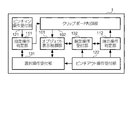
図2はスマートフォン1が実現する機能構成を表す。スマートフォン1は、オブジェクト表示制御部101と、クリップボード制御部102と、指定操作判定部111と、指示操作判定部112と、ピンチイン操作受付部121と、ピンチアウト操作受付部122と、選択操作受付部131と、指定操作受付部132とを備える。
図3はオブジェクトの選択操作の一例を表す。図3では、オブジェクト表示制御部101がタッチスクリーン10に文書編集アプリで編集された文字列を1以上の行に沿って並べられたオブジェクト群として表示させている。
上述した実施例は本発明の実施の一例に過ぎず、以下のように変形させてもよい。
実施例では、ピンチイン操作及びピンチアウト操作に他の処理が割り当てられていなかったが、割り当てられていてもよい。例えばピンチイン操作には画像の縮小表示処理が割り当てられ、ピンチアウト操作には画像の拡大表示処理が割り当てられることが一般的である。
オブジェクトの選択操作の受け付け、貼付位置の指定操作の受け付け、オブジェクトの指定操作の判定及び貼り付けの指示操作の判定は、実施例とは異なる方法で行われてもよい。本変形例では、ピンチイン操作及びピンチアウト操作が行われるときに、タッチスクリーン10の他の位置がタッチされた状態であるか否かによって、操作を受け付けるか否か及び操作を判定するか否かを決定する。
図8は本変形例のオブジェクトの選択操作の一例を表す。図8では、図3に表す文字列がオブジェクト群として表示されている。
ピンチイン操作及びピンチアウト操作が行われるときに、最初のタッチ位置で長押しが行われたか否かによって、オブジェクトの選択操作の受け付け又は貼付位置の指定操作の受け付けと、オブジェクトの指定操作の判定又は貼り付けの指示操作の判定が行われてもよい。
オブジェクトの選択方法及び貼付範囲の指定方法は、上記の各例で述べた方法と従来の方法のどれが用いられてもよい。例えば従来の方法で選択されたオブジェクトを実施例で述べたオブジェクトの指定操作(ピンチイン操作)によりクリップボードに保存してもよい。また、上記変形例で述べたタッチ+なぞる操作で指定した貼付位置に実施例で述べた指示操作(ピンチアウト操作)によりオブジェクトを貼り付けてもよい。いずれの場合も、少なくともオブジェクトの指定操作及び貼り付けの指示操作として実施例又は変形例で述べた方法が用いられていれば、それらの操作に従来の方法が用いられる場合に比べて、タッチスクリーンに表示されているオブジェクトを他の場所に貼り付けるまでの手間を軽減することができる。
スマートフォンの機能構成は図2に表すものに限らない。例えば図2に表す複数の機能ブロックを1つの機能ブロックに統合してもよい。また、1つの機能ブロックに複数の機能が含まれている場合に、機能の一部を分離させて新たな機能ブロックを設けてもよい。
本発明は、スマートフォンに限らず、例えばタブレット端末及びフィーチャーフォンにも適用可能である。また、例えばデスクトップパソコンの本体は、タッチスクリーンを備えていないが、タッチスクリーンを備える外付けのディスプレイを接続することで、本発明を適用することができる。要するに、本発明は、タッチスクリーンを制御する処理を行う情報処理装置であって図2に表す各機能を実現するものであれば適用することができる。
本明細書で説明した各実施例の処理手順、シーケンス、フローチャートなどは、矛盾がない限り、順序を入れ替えてもよい。例えば、本明細書で説明した方法については、例示的な順序で様々なステップの要素を提示しており、提示した特定の順序に限定されない。
入出力された情報等は特定の場所(例えばメモリ)に保存されてもよいし、管理テーブルで管理してもよい。入出力される情報等は、上書き、更新、又は追記され得る。出力された情報等は削除されてもよい。入力された情報等は他の装置へ送信されてもよい。
ソフトウェアは、ソフトウェア、ファームウェア、ミドルウェア、マイクロコード、ハードウェア記述言語と呼ばれるか、他の名称で呼ばれるかを問わず、命令、命令セット、コード、コードセグメント、プログラムコード、プログラム、サブプログラム、ソフトウェアモジュール、アプリケーション、ソフトウェアアプリケーション、ソフトウェアパッケージ、ルーチン、サブルーチン、オブジェクト、実行可能ファイル、実行スレッド、手順、機能などを意味するよう広く解釈されるべきである。
本明細書で説明した情報、信号などは、様々な異なる技術のいずれかを使用して表されてもよい。例えば、上記の説明全体に渡って言及され得るデータ、命令、コマンド、情報、信号、ビット、シンボル、チップなどは、電圧、電流、電磁波、磁界若しくは磁性粒子、光場若しくは光子、又はこれらの任意の組み合わせによって表されてもよい。
本明細書で使用する「に基づいて」という記載は、別段に明記されていない限り、「のみに基づいて」を意味しない。言い換えれば、「に基づいて」という記載は、「のみに基づいて」と「に少なくとも基づいて」の両方を意味する。
本明細書において、「A及びB」でも「A又はB」でも実施可能な構成については、一方の表現で記載された構成を、他方の表現で記載された構成として用いてもよい。例えば「A及びB」と記載されている場合、他の記載との不整合が生じず実施可能であれば、「A又はB」として用いてもよい。
本明細書で説明した各実施例は単独で用いてもよいし、組み合わせて用いてもよいし、実行に伴って切り替えて用いてもよい。また、所定の情報の通知(例えば、「Xであること」の通知)は、明示的に行うものに限られず、暗黙的(例えば、当該所定の情報の通知を行わない)ことによって行われてもよい。
さらに、前記タッチスクリーンに表示されているオブジェクトを選択する選択操作を受け付ける第1受付部を備え、前記指定判定部は、受け付けられた前記選択操作によりオブジェクトが選択された状態で前記ピンチイン操作が行われた場合に、当該オブジェクトが指定されたと判定してもよい。
さらに、前記第1受付部は、1以上の行又は列に沿って並べられたオブジェクト群に対するピンチアウト操作を、当該ピンチアウト操作の第1タッチ位置に表示されているオブジェクトから第2タッチ位置に表示されているオブジェクトまで並べられたオブジェクト群を選択する操作として受け付けてもよい。
さらに、前記指示判定部は、最初の2カ所のタッチ位置がタッチされた期間が所定の期間以上であるピンチアウト操作を、前記オブジェクトを指定する操作であると判定してもよい。
Claims (10)
- 1以上のオブジェクトを含む画像をタッチスクリーンに表示させる表示制御部と、
前記オブジェクトが表示されている前記タッチスクリーンにピンチイン操作が行われた場合に当該ピンチイン操作が当該オブジェクトを指定する指定操作であるか否かを判定する指定判定部と、
前記ピンチイン操作が前記指定操作であると判定された場合、当該指定操作により指定されたオブジェクトをクリップボードに保存する保存部と
を備える情報処理装置。 - タッチスクリーンにピンチアウト操作が行われた場合に当該ピンチアウト操作がクリップボードに保存されたオブジェクトの貼り付けを指示する指示操作であるか否かを判定する指示判定部と、
1以上のオブジェクトを含む画像をタッチスクリーンに表示させる表示制御部であって、前記ピンチアウト操作が前記指示操作であると判定された場合、クリップボードに保存されているオブジェクトを貼り付けた画像を当該タッチスクリーンに表示させる表示制御部と
を備える情報処理装置。 - 前記指定判定部は、前記画像が表示されたタッチスクリーンがタッチされた状態で当該タッチとは別の箇所に対して行われたピンチイン操作を、当該画像に含まれているオブジェクトを指定する前記指定操作であると判定する
請求項1に記載の情報処理装置。 - タッチスクリーンに表示されているオブジェクトを選択する選択操作を受け付ける第1受付部を備え、
前記指定判定部は、受け付けられた前記選択操作によりオブジェクトが選択された状態で行われたピンチイン操作を、当該オブジェクトを指定する前記指定操作であると判定する
請求項1に記載の情報処理装置。 - 前記指定判定部は、前記画像が表示されたタッチスクリーンに対して行われた最初の2カ所のタッチ位置がタッチされた期間が所定の期間以上であるピンチイン操作を、当該画像に含まれているオブジェクトを指定する前記指定操作であると判定する
請求項1に記載の情報処理装置。 - 前記第1受付部は、1以上の行又は列に沿って並べられたオブジェクト群に対するピンチアウト操作を、当該ピンチアウト操作の第1タッチ位置に表示されているオブジェクトから第2タッチ位置に表示されているオブジェクトまで並べられたオブジェクト群を選択する前記選択操作として受け付ける
請求項4に記載の情報処理装置。 - 前記第1受付部は、タッチスクリーンに並べて表示されたオブジェクトをなぞる操作が他の箇所をタッチしながら行われた場合に、当該操作によりなぞられたオブジェクト群を選択する選択操作として受け付ける
請求項4に記載の情報処理装置。 - 前記指示判定部は、タッチスクリーンがタッチされた状態で当該タッチとは別の箇所に対して行われたピンチアウト操作を前記指示操作であると判定する
請求項2に記載の情報処理装置。 - オブジェクトの貼付位置を指定する指定操作を受け付ける第2受付部を備え、
前記指示判定部は、受け付けられた前記指定操作により前記貼付位置が指定された状態で行われたピンチアウト操作を前記指示操作であると判定する
請求項2に記載の情報処理装置。 - 前記指示判定部は、最初の2カ所のタッチ位置がタッチされた期間が所定の期間以上であるピンチアウト操作を前記指示操作であると判定する
請求項2に記載の情報処理装置。
Priority Applications (4)
| Application Number | Priority Date | Filing Date | Title |
|---|---|---|---|
| JP2017200858A JP6592056B2 (ja) | 2017-10-17 | 2017-10-17 | 情報処理装置 |
| US16/648,924 US20200249832A1 (en) | 2017-10-17 | 2017-12-25 | Information processing terminal |
| EP17929009.3A EP3674875A4 (en) | 2017-10-17 | 2017-12-25 | DATA PROCESSING TERMINAL DEVICE |
| PCT/JP2017/046430 WO2019077766A1 (ja) | 2017-10-17 | 2017-12-25 | 情報処理端末 |
Applications Claiming Priority (1)
| Application Number | Priority Date | Filing Date | Title |
|---|---|---|---|
| JP2017200858A JP6592056B2 (ja) | 2017-10-17 | 2017-10-17 | 情報処理装置 |
Publications (2)
| Publication Number | Publication Date |
|---|---|
| JP2019074948A true JP2019074948A (ja) | 2019-05-16 |
| JP6592056B2 JP6592056B2 (ja) | 2019-10-16 |
Family
ID=66173919
Family Applications (1)
| Application Number | Title | Priority Date | Filing Date |
|---|---|---|---|
| JP2017200858A Active JP6592056B2 (ja) | 2017-10-17 | 2017-10-17 | 情報処理装置 |
Country Status (4)
| Country | Link |
|---|---|
| US (1) | US20200249832A1 (ja) |
| EP (1) | EP3674875A4 (ja) |
| JP (1) | JP6592056B2 (ja) |
| WO (1) | WO2019077766A1 (ja) |
Cited By (1)
| Publication number | Priority date | Publication date | Assignee | Title |
|---|---|---|---|---|
| US12561046B2 (en) | 2022-04-26 | 2026-02-24 | Canon Kabushiki Kaisha | Information processing apparatus and information processing method for specifying a changed display content |
Families Citing this family (1)
| Publication number | Priority date | Publication date | Assignee | Title |
|---|---|---|---|---|
| US20180039401A1 (en) * | 2016-08-03 | 2018-02-08 | Ge Aviation Systems Llc | Formatting text on a touch screen display device |
Citations (9)
| Publication number | Priority date | Publication date | Assignee | Title |
|---|---|---|---|---|
| JP2010102375A (ja) * | 2008-10-21 | 2010-05-06 | Nec Corp | コマンド入力システム、その方法及びそのプログラム |
| JP2010176568A (ja) * | 2009-01-30 | 2010-08-12 | Toshiba Corp | 情報処理装置、情報操作方法およびプログラム |
| JP2012098844A (ja) * | 2010-10-29 | 2012-05-24 | Canon Marketing Japan Inc | 情報処理装置、情報処理方法、およびそのプログラム |
| JP2013097593A (ja) * | 2011-11-01 | 2013-05-20 | Sony Corp | 情報処理装置、情報処理方法及びプログラム |
| JP2013218521A (ja) * | 2012-04-09 | 2013-10-24 | Kyocera Document Solutions Inc | 表示入力装置及びこれを備えた画像形成装置 |
| JP2014153833A (ja) * | 2013-02-06 | 2014-08-25 | Fujitsu Mobile Communications Ltd | 電子機器、文字列操作方法、及びプログラム |
| JP2016062155A (ja) * | 2014-09-16 | 2016-04-25 | 京セラドキュメントソリューションズ株式会社 | 電子機器、及び、タッチパネルの操作方法 |
| WO2016157330A1 (ja) * | 2015-03-27 | 2016-10-06 | 日本電気株式会社 | モバイル監視装置、プログラム、及び制御方法 |
| JP2017079073A (ja) * | 2009-03-16 | 2017-04-27 | アップル インコーポレイテッド | タッチスクリーンディスプレイを有する多機能デバイスでの編集の方法およびグラフィカルユーザインターフェース |
Family Cites Families (3)
| Publication number | Priority date | Publication date | Assignee | Title |
|---|---|---|---|---|
| US9239673B2 (en) * | 1998-01-26 | 2016-01-19 | Apple Inc. | Gesturing with a multipoint sensing device |
| CN103608760A (zh) * | 2011-06-03 | 2014-02-26 | 谷歌公司 | 用于选择文本的手势 |
| US9225810B2 (en) * | 2012-07-03 | 2015-12-29 | Sony Corporation | Terminal device, information processing method, program, and storage medium |
-
2017
- 2017-10-17 JP JP2017200858A patent/JP6592056B2/ja active Active
- 2017-12-25 EP EP17929009.3A patent/EP3674875A4/en not_active Ceased
- 2017-12-25 US US16/648,924 patent/US20200249832A1/en not_active Abandoned
- 2017-12-25 WO PCT/JP2017/046430 patent/WO2019077766A1/ja not_active Ceased
Patent Citations (9)
| Publication number | Priority date | Publication date | Assignee | Title |
|---|---|---|---|---|
| JP2010102375A (ja) * | 2008-10-21 | 2010-05-06 | Nec Corp | コマンド入力システム、その方法及びそのプログラム |
| JP2010176568A (ja) * | 2009-01-30 | 2010-08-12 | Toshiba Corp | 情報処理装置、情報操作方法およびプログラム |
| JP2017079073A (ja) * | 2009-03-16 | 2017-04-27 | アップル インコーポレイテッド | タッチスクリーンディスプレイを有する多機能デバイスでの編集の方法およびグラフィカルユーザインターフェース |
| JP2012098844A (ja) * | 2010-10-29 | 2012-05-24 | Canon Marketing Japan Inc | 情報処理装置、情報処理方法、およびそのプログラム |
| JP2013097593A (ja) * | 2011-11-01 | 2013-05-20 | Sony Corp | 情報処理装置、情報処理方法及びプログラム |
| JP2013218521A (ja) * | 2012-04-09 | 2013-10-24 | Kyocera Document Solutions Inc | 表示入力装置及びこれを備えた画像形成装置 |
| JP2014153833A (ja) * | 2013-02-06 | 2014-08-25 | Fujitsu Mobile Communications Ltd | 電子機器、文字列操作方法、及びプログラム |
| JP2016062155A (ja) * | 2014-09-16 | 2016-04-25 | 京セラドキュメントソリューションズ株式会社 | 電子機器、及び、タッチパネルの操作方法 |
| WO2016157330A1 (ja) * | 2015-03-27 | 2016-10-06 | 日本電気株式会社 | モバイル監視装置、プログラム、及び制御方法 |
Cited By (1)
| Publication number | Priority date | Publication date | Assignee | Title |
|---|---|---|---|---|
| US12561046B2 (en) | 2022-04-26 | 2026-02-24 | Canon Kabushiki Kaisha | Information processing apparatus and information processing method for specifying a changed display content |
Also Published As
| Publication number | Publication date |
|---|---|
| JP6592056B2 (ja) | 2019-10-16 |
| WO2019077766A1 (ja) | 2019-04-25 |
| US20200249832A1 (en) | 2020-08-06 |
| EP3674875A1 (en) | 2020-07-01 |
| EP3674875A4 (en) | 2020-11-18 |
Similar Documents
| Publication | Publication Date | Title |
|---|---|---|
| US11301126B2 (en) | Icon control method and terminal | |
| JP6364893B2 (ja) | 端末装置、電子ホワイトボードシステム、電子ホワイトボードの入力支援方法、及びプログラム | |
| JP5627985B2 (ja) | 情報処理装置、情報処理装置の制御方法、制御プログラム、および記録媒体 | |
| JP6488653B2 (ja) | 表示装置、表示制御方法および表示システム | |
| US9513772B2 (en) | Information processing device, information processing method, and computer-readable medium | |
| US9632697B2 (en) | Information processing apparatus and control method thereof, and non-transitory computer-readable medium | |
| EP2650797A2 (en) | Electronic device and method for annotating data | |
| US9189150B2 (en) | Information processing device, information processing method, and computer-readable medium that determine an area of a display screen to which an input operation belongs | |
| CN113849091A (zh) | 移动终端中应用程序图标的管理方法和装置 | |
| JP5981175B2 (ja) | 図面表示装置、及び図面表示プログラム | |
| JP7732283B2 (ja) | 表示装置、表示システム、表示制御方法、及びプログラム | |
| CN105426049B (zh) | 一种删除方法及终端 | |
| JP6592056B2 (ja) | 情報処理装置 | |
| US20140165011A1 (en) | Information processing apparatus | |
| US10755461B2 (en) | Display device, display method, and recording medium | |
| JP6773977B2 (ja) | 端末装置及び操作制御プログラム | |
| US20150026552A1 (en) | Electronic device and image data displaying method | |
| JP2016224804A (ja) | 情報処理装置、情報処理プログラム、及び情報処理方法 | |
| KR20150012010A (ko) | 사용자 단말에 표시되는 아이콘 그룹핑 수행장치, 수행방법 및 그 기록매체 | |
| JP2014071539A (ja) | 画像データ編集装置、および画像データ編集方法 | |
| JP2019204384A (ja) | 情報処理装置、情報処理方法、及びプログラム | |
| KR101405822B1 (ko) | 터치기반 편집 어플을 위한 시각적 편집보조 제공 방법 및 이를 위한 컴퓨터로 판독가능한 기록매체 | |
| KR20170126213A (ko) | 리스트 상의 복수의 아이템에 대한 기능 실행 방법 및 그 장치 | |
| KR101332644B1 (ko) | 모바일 디바이스 환경에서 사용자 인터페이스 제공 방법 및 이를 저장하는 기록매체 | |
| KR102208628B1 (ko) | 휴대 장치의 문서 편집 방법 및 이를 사용하는 휴대 장치 |
Legal Events
| Date | Code | Title | Description |
|---|---|---|---|
| A621 | Written request for application examination |
Free format text: JAPANESE INTERMEDIATE CODE: A621 Effective date: 20171130 |
|
| A131 | Notification of reasons for refusal |
Free format text: JAPANESE INTERMEDIATE CODE: A131 Effective date: 20180904 |
|
| A521 | Request for written amendment filed |
Free format text: JAPANESE INTERMEDIATE CODE: A523 Effective date: 20181030 |
|
| A131 | Notification of reasons for refusal |
Free format text: JAPANESE INTERMEDIATE CODE: A131 Effective date: 20190226 |
|
| A521 | Request for written amendment filed |
Free format text: JAPANESE INTERMEDIATE CODE: A523 Effective date: 20190423 |
|
| TRDD | Decision of grant or rejection written | ||
| A01 | Written decision to grant a patent or to grant a registration (utility model) |
Free format text: JAPANESE INTERMEDIATE CODE: A01 Effective date: 20190910 |
|
| A61 | First payment of annual fees (during grant procedure) |
Free format text: JAPANESE INTERMEDIATE CODE: A61 Effective date: 20190919 |
|
| R150 | Certificate of patent or registration of utility model |
Ref document number: 6592056 Country of ref document: JP Free format text: JAPANESE INTERMEDIATE CODE: R150 |
|
| R250 | Receipt of annual fees |
Free format text: JAPANESE INTERMEDIATE CODE: R250 |
|
| R250 | Receipt of annual fees |
Free format text: JAPANESE INTERMEDIATE CODE: R250 |
|
| R250 | Receipt of annual fees |
Free format text: JAPANESE INTERMEDIATE CODE: R250 |