JP4732624B2 - Printing apparatus and printing method - Google Patents
Printing apparatus and printing method Download PDFInfo
- Publication number
- JP4732624B2 JP4732624B2 JP2001210670A JP2001210670A JP4732624B2 JP 4732624 B2 JP4732624 B2 JP 4732624B2 JP 2001210670 A JP2001210670 A JP 2001210670A JP 2001210670 A JP2001210670 A JP 2001210670A JP 4732624 B2 JP4732624 B2 JP 4732624B2
- Authority
- JP
- Japan
- Prior art keywords
- printing
- print data
- data
- rate
- Prior art date
- Legal status (The legal status is an assumption and is not a legal conclusion. Google has not performed a legal analysis and makes no representation as to the accuracy of the status listed.)
- Expired - Fee Related
Links
- 238000000034 method Methods 0.000 title claims description 22
- 230000005856 abnormality Effects 0.000 claims description 22
- 230000008569 process Effects 0.000 description 15
- 238000006243 chemical reaction Methods 0.000 description 10
- 230000006870 function Effects 0.000 description 9
- 238000004891 communication Methods 0.000 description 6
- 238000010586 diagram Methods 0.000 description 2
- 230000000694 effects Effects 0.000 description 2
- 230000004044 response Effects 0.000 description 2
- 230000002159 abnormal effect Effects 0.000 description 1
- 230000008859 change Effects 0.000 description 1
- 230000001186 cumulative effect Effects 0.000 description 1
- 238000001514 detection method Methods 0.000 description 1
- 239000000463 material Substances 0.000 description 1
- 230000007246 mechanism Effects 0.000 description 1
- 229920000740 poly(D-lysine) polymer Polymers 0.000 description 1
Images



Landscapes
- Accessory Devices And Overall Control Thereof (AREA)
Description
【0001】
【発明の属する技術分野】
本発明は、ホストと印刷装置からなる印刷システムに関する。
【0002】
【従来の技術】
ホストと印刷装置からなる印刷システムにおいて、ホストにおいてアプリケーションからプリンタドライバに印刷要求が行われると、プリンタドライバでは、印刷データを作成して印刷装置に送る。印刷装置では、受信した印刷データをビットデータに展開して用紙に印刷する。
【0003】
【発明が解決しようとする課題】
印刷を行ったときに、印刷装置に適合しないプリンタドライバを用いて印刷を実行した場合に異常が生じることがある。また、プリンタドライバ又は印刷装置自体の異常又は両者の不適切な組合せによる異常が生じることがある。そのような場合、期待した印刷結果が得られないだけでなく、無意味な印刷が延々と続くことがある。したがって、異常な印刷を防止することが必要である。
印刷の異常を防止する1つの対策が特開平8−185292号公報に記載されている。ユーザがプリンタドライバを用いて設定した内容(用紙サイズなどの印刷環境データ)を、印刷データより先に印刷装置に別送信し、プリンタ側が印刷データを解析しながら、印刷データが環境データと差異がないかを判断する。プリンタは、異常があればホストに報告する。このように、プリンタドライバによる設定を基に異常の有無をチェックしている。
【0004】
この発明の目的は、無駄な印刷を未然に防ぐことである。
【0005】
【課題を解決するための手段】
ホストのプリンタドライバ又は印刷装置自体の異常又は両者の不適切な組合せによる印刷の異常を高い精度で検知し、無駄な印刷を未然に防ぐため、用紙の印字率を基準として異常検知を行う。ここで、印字率は、実際のプリンタ言語に変換した状態により判断する。これにより、ユーザの設定に依存せずに、プリンタドライバと印刷装置それぞれの処理結果を印字率という統一した尺度で数値化することが可能になり、両者の比較を行うことで精度の高い異常検知を実現する。
【0006】
具体的には、本発明に係る印刷装置は、印刷データと、前記印刷データを解析して得られた各ページの第1の印字率とを、画像処理装置から受信する受信部と、受信部により受信された印刷データを、印刷されるべきドットイメージを示すドットイメージデータに展開するイメージ作成部と、イメージ作成部により展開された前記ドットイメージデータについて各ページの第2の印字率を計算する印字率計算部と、前記第1と第2の印字率を比較し異常の有無を判断する異常判断部とを備える。
【0009】
本発明に係る印刷方法は、画像処理装置と印刷装置とからなるシステムにおける印刷方法であって、前記画像処理装置において、アプリケーションから受け取ったデータを印刷装置が理解できる印刷データに変換し、前記印刷データを解析して各ページの第1の印字率を計算し、前記印刷データと前記第1の印字率を前記印刷装置に送信する。また、前記印刷装置において、前記印刷データと前記第1の印字率とを前記画像処理装置から受信し、受信した前記印刷データを、印刷されるべきドットイメージを示すドットイメージデータに展開し、前記展開されたドットイメージデータについて各ページの第2の印字率を計算し、前記第1と第2の印字率を比較して異常の有無を判断する。
【0014】
【発明の実施の形態】
以下、添付の図面を参照して本発明の実施の形態を説明する。
図1は、本発明の第1の実施形態の印刷システムの構成を示す。この印刷システムは、ホストコンピュータ100と印刷装置200からなる。ホストコンピュータ100では、通常のコンピュータと同様に、全体を制御するCPU102は、プログラムなどを記憶するROM104、ワークエリアとして使用されるRAM106、記憶装置であるハードディスク装置108、入力手段としてのキーボード110とマウス112、ディスプレイ装置114及び通信装置116に接続される。このコンピュータで実行されるプログラムは、ROM104、ハードディスク装置108内のハードディスク(図示せず)等の記録媒体に記録されている。
【0015】
ホストコンピュータ100には、印刷を行うアプリケーション120があり、ユーザの印刷命令により、アプリケーション120からプリンタドライバ130に印刷要求が行われ、データが送られる。プリンタドライバ130は、アプリケーションから受け取った印刷データを印刷装置200が理解できるページ記述言語(PDL)(ポストスクリプトなど)に変換するPDL変換部132と、PDLへの変換と同時に印字率を計算する印字率計算部134を有する。印字率の計算に含まれる印刷オブジェクトは、文字列、四角形や円、直線や曲線などの図形や写真のビットマップデータ等、印刷される全てのオブジェクトが含まれる。ここで、ページの印字率とは、用紙に占めるトナー等の記録材によって印字・描画される部分の割合である。すなわち、印字率=[印字部分の積算面積]/[印字されている用紙全体の面積]。プリンタドライバ130は、PDLへの変換を終えると、変換したデータを印刷装置200に送信する。
【0016】
印刷装置200は、受信した印刷データを処理するプリンタコントローラ202、印刷を行うプリンタエンジン240及び各種データの入力や表示を行う操作パネル250を備える。プリンタコントローラ202は、全体を制御するCPU204、プログラムなどを記憶するROM206、ワークエリアとして使用されるRAM208および通信装置210を備える。この印刷装置で実行されるプログラムは、ROM206に記録されている。プリンタコントローラ202において、PDL解析部220は、受信した印刷データ(PDL)をイメージに展開するために解析を行い、イメージ作成部222は、プリンタエンジンに送信するドットイメージを作成する。また、印字率計算部224は、印字率を計算し、異常判断部226は、プリンタドライバ130から受け取った印字率と印刷装置の印字率計算部224で計算された印字率とを比較して異常の有無を判断する。異常がない場合、ドットイメージに展開された印刷データはプリンタエンジン240に送られ、ここで印刷が行われる。なお、印刷装置200によっては複数のPDLに対応しており、PDL解析部220をそのPDL毎に用意している。イメージ作成部222は各PDLに共通である。
【0017】
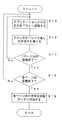
図2は、プリンタドライバ130の印字率計算部112の印字率計算動作を示したフローチャートである。プリンタドライバ104は、アプリケーション102から受け取った印刷データを解析し、順番にページ記述言語(PDL)に変換していく。ページ記述言語は、各言語によって様式は異なるが、文字や図形を描画するためのオペレータによって記述される。このフローにおいて、ステップS10では、印刷データを1つ1つオペレータに変換を行っている。このオペレータヘの変換作業に引き続いて、ステップS12では、そのオペレータが、引数として与えられたパラメータのときどれだけの印字率で用紙上に印刷されるかを計算する。ここで、文字コードやベクターコードの場合は、印字率変換用のテーブルを用意しておく。文字コード、ベクターコードおよびビットマップコードのなかでは、特にフォントの変換における誤差が生じる。ステップS14では、変換したオペレータがページの最後を示すものか否かを判断し、最後でなければステップS10およびS12を繰り返す。印字率は各オペレータごとに加算される。もし1ページ分の変換が終了すればその時点で該当ページの印字率を一旦メモリに保存する。ステップS16では、1ページ分の変換が終了する度に、そのページが印刷データ全体の最終ページであるか否かを判断する。最終ページでなければ再びステップS10〜S14を繰り返す。最終ページであればこのループを抜け出す。
【0018】
ステップS18では、PDLへの変換を終えた印刷データのヘッダー部に、メモリに保存しておいた各ページの印字率を付加する。以上の処理がプリンタドライバ130内で行われ、印字率を含む印刷データは印刷装置200に送られる。
【0019】
図3は、印刷装置200内のプリンタコントローラ202の印字率計算部224の印字率計算処理のフローチャートである。プリンタコントローラ202では、受信した印刷データをそのPDLに適合したPDL解析部220によって解析し、それをイメージ作成部でドットイメージに展開する。ステップS20では、PDL解析部220で解析を終えた印刷データを、ドットイメージに展開する。ステップS22では、展開されたドットイメージの各ドットの0n/0ffを判定して、印字率を計算する。このフローでは、ステップS20で1ページ全てのドットイメージを作成してから印字率を求める手順となっているが、これは1ページをいくつかの領域(バンド)に分けてその領域毎に印字率を求めて1ページ分を合算するという手順でもよい。ステップS24では、印刷データに付属してきた、プリンタドライバが計算した印字率と、ステップS22で計算した印字率を比較する。プリンタドライバと印刷装置がお互いに正しく機能していれば、プリンタドライバがPDLに変換した際の印字率と、印刷装置がそのPDLを元にドットイメージに展開した印字率は一致するはずである。
【0020】
印字率が同じであればステップS26に進み、異なっていれば、ステップS30に進む。印字率が同じであれば、まずステップS26で、ドットイメージをプリンタエンジン240に送信する。これによって、印刷装置はプリンタエンジンで印刷を実行することになる。次に、ステップS28では、ステップS26まで行った処理が最終ページのものであるか否かを判定し、最終ページでなければステップS20に戻り、次のぺージの処理を継続して実行する。最終ページであれば、処理を終了する。
【0021】
一方、ステップS24で印字率が異なる場合は、ステップS30でエラー処理を実行してから、印刷処理を終了する。エラー処理は、表示装置にエラーを通知(表示)する処理を含む。なお、エラー対策としては、たとえばラスターモードに変換することや、印刷装置に適合した別のドライバを使用することなどが考えられる。
【0022】
このフローでは、異常が発生したページで印刷処理全体を中断することを示している。しかし、そのページの印刷だけを中止し、次ページ以降についてはステップS20以降を実行して処理を継続させてもよい。
また、ステップS24での印字率の比較において、どの程度一致しているか、その割合(しきい値)を設定できるようにしてもよい。また、その値の設定は、プリンタドライバ側と印刷装置側のどちらでもできるようにしてもよい。
【0023】
次に、第2の実施形態について説明する。第1の実施形態は、ホスト側と印刷装置側のそれぞれに印字率を計算する機能を付加した印刷システムである。これに対して、本実施形態は、イメージデータの展開をホストコンピュータ側で行う印刷システムであり、2つの印字率の計算機能をプリンタドライバ側だけに持たして、同様の効果をもたらす。本実施形態の第1の実施形態と異常検知の違いは、プリンタドライバが、解析した結果と実際に印刷される結果(ドットイメージ)とに差異がないかを判断することにある。
【0024】
図4は、プリンタドライバ側だけに印字率計算機能を付加した本実施形態の印刷システムを示している。この印刷システムは、ホストコンピュータ300と印刷装置400からなる。ホストコンピュータ300では、通常のコンピュータと同様に、全体を制御するCPU302は、プログラムなどを記憶するROM304、ワークエリアとして使用されるRAM306、記憶装置であるハードディスク装置308、入力手段としてのキーボード310とマウス312、ディスプレイ装置314及び通信装置316に接続される。このコンピュータで実行されるプログラムは、ROM304、ハードディスク装置308内のハードディスク(図示せず)等の記録媒体に記録されている。
【0025】
ホストコンピュータ300には、印刷を行うアプリケーション320があり、ユーザの印刷命令により、アプリケーションからプリンタドライバ330に印刷要求が行われ、データが送られる。プリンタドライバ330は、アプリケーション320から受け取った印刷データをPDL解析部332で解析し、その際に各印刷オブジェクト(文字列、図形等)ごとの印字率を、第1印字率計算部334で計算する。イメージ作成部336では、解析したデータをドットイメージに展開する。その際に、第2印字率計算部338は、各ドットの0n/0ffから印字率を計算する。異常判断部339は、第1印字率計算部334と第2印字率計算部338の印字率の計算結果を比較する。同じであれば、プリンタドライバ330は、印刷装置400にデータを送信し、プリンタコントローラ402を経てプリンタエンジン440によって印刷が行われる。
【0026】
印刷装置400は、受信した印刷データを処理するプリンタコントローラ402、印刷を行うプリンタエンジン440及び各種データの入力や表示を行う操作パネル450を備える。プリンタコントローラ402は、全体を制御するCPU404、プログラムなどを記憶するROM406、ワークエリアとして使用されるRAM408および通信装置410を備える。この印刷装置で実行されるプログラムは、ROM406に記録されている。プリンタコントローラ402において、PDL解析部420は、受信した印刷データ(PDL)をイメージに展開するために解析を行い、イメージ作成部422は、プリンタエンジンに送信するドットイメージを作成する。
【0027】
次に、本発明の第3の実施形態について説明する。第1の実施形態は、ホスト側と印刷装置側のそれぞれに印字率を計算する機能を付加した印刷システムであるが、本実施形態では、2つの印字率の計算機能を印刷装置側だけに持たせて、印刷異常を検知する。
【0028】
図5は、印刷装置側だけに印字率計算機能を付加した本実施形態のシステムを示している。この印刷システムは、ホストコンピュータ500と印刷装置600からなる。ホストコンピュータ500では、通常のコンピュータと同様に、全体を制御するCPU502は、プログラムなどを記憶するROM504、ワークエリアとして使用されるRAM506、記憶装置であるハードディスク装置508、入力手段としてのキーボード510とマウス512、ディスプレイ装置514及び通信装置516に接続される。このコンピュータで実行されるプログラムは、ROM504、ハードディスク装置508内のハードディスク(図示せず)等の記録媒体に記録されている。
【0029】
ホストコンピュータ500には、印刷を行うアプリケーション520があり、ユーザの印刷命令により、アプリケーションからプリンタドライバ530に印刷要求が行われ、データが送られる。プリンタドライバ530は、アプリケーション520から受け取った印刷データをPDL変換部532でPDLに変換を行い、変換したデータを印刷装置600に送信する。
【0030】
印刷装置600は、受信した印刷データを処理するプリンタコントローラ602、印刷を行うプリンタエンジン640及び各種データの入力や表示を行う操作パネル650を備える。プリンタコントローラ602は、全体を制御するCPU604、プログラムなどを記憶するROM606、ワークエリアとして使用されるRAM608および通信装置610を備える。この印刷装置で実行されるプログラムは、ROM606に記録されている。
【0031】
印刷装置600は、PDL解析部620は、受信した印刷データ(PDL)をイメージに展開するために解析を行い、イメージ作成部222は、プリンタエンジンに送信するドットイメージを作成する。解析の際に第1印字率計算部622が各オペレータ毎の第1印字率を計算する。イメージ作成部622は、PDL解析部620で解析したデータをドットイメージに展開する。その際に、第2印字率計算部626は、各ドットの0n/0ffから第2印字率を計算する。異常判断部628は、第1印字率計算部624と第2印字率計算部426の2つの印字率の計算結果を比較して異常の有無を判断する。同じであれば、プリンタコントローラ602はイメージデータをプリンタエンジン640に送信して、印刷を行う。
【0032】
【発明の効果】
画像処理装置及び/または印刷装置に印字率を計算する機能を付加することによって、印字率を出力データに基いて判断して高い精度で異常を検知できる。それによって、印刷装置に適合しないプリンタドライバを用いて印刷を実行した場合やプリンタドライバ又は印刷装置が何らかの異常で正しく処理できなかった場合などに、むだな印刷を防止することができる。また、印刷装置の機構はページ記述言語に依存しないため、将来的に対応するページ記述言語が増加した場合でも変更が不要である。
【図面の簡単な説明】
【図1】 第1の実施の形態の印刷システムの構成を示す図
【図2】 プリンタドライバの印字率計算のフローチャート
【図3】 プリンタコントローラの印字率計算のフローチャート
【図4】 プリンタドライバ側だけに印字率計算機能を付加した第2の実施の形態の印刷システムの構成図
【図5】 印刷装置側だけに印字率計算機能を付加した第3の実施の形態の印刷システムの構成図
【符号の説明】
100 ホストコンピュータ、 102 CPU、 130 プリンタドライバ、 200 印刷装置、 202 プリンタコントローラ、 300 ホストコンピュータ、 302 CPU、 330 プリンタドライバ、 400 印刷装置、 402 プリンタコントローラ、 500 ホストコンピュータ、 502 CPU、 530 プリンタドライバ、 600 印刷装置、 602 プリンタコントローラ。[0001]
BACKGROUND OF THE INVENTION
The present invention relates to a printing system including a host and a printing apparatus.
[0002]
[Prior art]
In a printing system including a host and a printing apparatus, when a print request is made from an application to the printer driver in the host, the printer driver creates print data and sends it to the printing apparatus. In the printing apparatus, the received print data is expanded into bit data and printed on paper.
[0003]
[Problems to be solved by the invention]
When printing is performed, an abnormality may occur when printing is performed using a printer driver that is not compatible with the printing apparatus. In addition, an abnormality may occur due to an abnormality in the printer driver or the printing apparatus itself or an inappropriate combination of both. In such a case, not only the expected printing result is not obtained, but also meaningless printing may continue. Therefore, it is necessary to prevent abnormal printing.
One countermeasure for preventing printing abnormality is described in Japanese Patent Laid-Open No. 8-185292. The contents set by the user using the printer driver (print environment data such as paper size) are sent separately to the printing device prior to the print data, and the printer side analyzes the print data. Judge whether there is. The printer will report any abnormalities to the host. In this way, the presence or absence of an abnormality is checked based on the setting by the printer driver.
[0004]
An object of the present invention is to prevent unnecessary printing.
[0005]
[Means for Solving the Problems]
In order to detect a printing error due to an abnormality in the host printer driver or the printing apparatus itself or an inappropriate combination of both with high accuracy and prevent unnecessary printing, the abnormality is detected based on the printing rate of the paper. Here, the printing rate is determined based on the state converted into the actual printer language. This makes it possible to quantify the processing results of the printer driver and the printing device on a unified scale called the print rate without depending on the user settings. Is realized.
[0006]
Specifically, engaging Ru printing apparatus according to the present invention, the print data, and a first printing ratio for each page obtained by analyzing the print data, a reception unit that receives from the image processing apparatus, the print data received by the receiving unit, an image creating unit that developed into dot image data representing a dot image to be printed, for the dot image data developed by the image creating unit and the second printing ratio of each page comprising a printing rate calculation unit that calculates for, and the first abnormality determination unit that determines whether the comparison abnormally the second printing ratio.
[0009]
Printing method according to the present invention is a printing method in a system consisting of an image processing apparatus and a printing apparatus, in the image processing apparatus converts the printing device data received from the application to print data that can be understood, the printing Data is analyzed to calculate a first printing rate for each page, and the print data and the first printing rate are transmitted to the printing apparatus. Further, in the printing apparatus receives said print data and said first printing ratio from the image processing apparatus, the print data received, expanded into a dot image data representing a dot image to be printed, the for expanded dot image data to calculate the second printing ratio of each page to determine the presence or absence of an abnormality by comparing the first and second printing ratio.
[0014]
DETAILED DESCRIPTION OF THE INVENTION
Hereinafter, embodiments of the present invention will be described with reference to the accompanying drawings.
FIG. 1 shows the configuration of a printing system according to the first embodiment of the present invention. This printing system includes a
[0015]
The
[0016]
The
[0017]
FIG. 2 is a flowchart showing the printing rate calculation operation of the printing
[0018]
In step S18, the print rate of each page stored in the memory is added to the header portion of the print data that has been converted to PDL. The above processing is performed in the
[0019]
FIG. 3 is a flowchart of the printing rate calculation process of the printing
[0020]
If the printing rate is the same, the process proceeds to step S26, and if different, the process proceeds to step S30. If the printing rates are the same, first, in step S26, the dot image is transmitted to the
[0021]
On the other hand, if the printing rates are different in step S24, error processing is executed in step S30, and then the printing process is terminated. The error process includes a process of notifying (displaying) an error on the display device. As countermeasures against errors, for example, conversion to the raster mode or use of another driver suitable for the printing apparatus may be considered.
[0022]
This flow shows that the entire printing process is interrupted at a page where an abnormality has occurred. However, only the printing of the page may be stopped, and the process may be continued by executing step S20 and subsequent steps for subsequent pages.
In addition, in the comparison of the printing rates in step S24, it may be possible to set the degree (threshold value) of how much they match. The value may be set on either the printer driver side or the printing apparatus side.
[0023]
Next, a second embodiment will be described. The first embodiment is a printing system in which a function for calculating a printing rate is added to each of a host side and a printing apparatus side. On the other hand, this embodiment is a printing system in which image data is developed on the host computer side, and has two printing rate calculation functions only on the printer driver side, and brings about the same effect. The difference between the first embodiment and abnormality detection is that the printer driver determines whether there is a difference between the analyzed result and the actually printed result (dot image).
[0024]
FIG. 4 shows a printing system of this embodiment in which a printing rate calculation function is added only to the printer driver side. This printing system includes a
[0025]
The
[0026]
The
[0027]
Next, a third embodiment of the present invention will be described. The first embodiment is a printing system in which a function for calculating the printing rate is added to each of the host side and the printing device side. In this embodiment, only the printing device side has two printing rate calculation functions. To detect printing errors.
[0028]
FIG. 5 shows a system of this embodiment in which a printing rate calculation function is added only to the printing apparatus side. This printing system includes a
[0029]
The
[0030]
The
[0031]
In the
[0032]
【The invention's effect】
By adding a function for calculating the printing rate to the image processing device and / or the printing device, it is possible to detect the abnormality with high accuracy by judging the printing rate based on the output data. Accordingly, it is possible to prevent unnecessary printing when printing is performed using a printer driver that is not compatible with the printing apparatus or when the printer driver or the printing apparatus cannot be processed correctly due to some abnormality. Further, since the mechanism of the printing apparatus does not depend on the page description language, no change is necessary even if the corresponding page description language increases in the future.
[Brief description of the drawings]
FIG. 1 is a diagram showing the configuration of a printing system according to a first embodiment. FIG. 2 is a flowchart for calculating a printing rate of a printer driver. FIG. 3 is a flowchart for calculating a printing rate of a printer controller. FIG. 5 is a block diagram of a printing system according to the second embodiment in which a printing rate calculation function is added to the printing apparatus. Explanation of]
100 host computer, 102 CPU, 130 printer driver, 200 printing apparatus, 202 printer controller, 300 host computer, 302 CPU, 330 printer driver, 400 printing apparatus, 402 printer controller, 500 host computer, 502 CPU, 530 printer driver, 600 Printing device, 602 printer controller.
Claims (2)
受信部により受信された前記印刷データを、印刷されるべきドットイメージを示すドットイメージデータに展開するイメージ作成部と、
イメージ作成部により展開された前記ドットイメージデータについて各ページの第2の印字率を計算する印字率計算部と、
前記第1と第2の印字率を比較し異常の有無を判断する異常判断部とを備える印刷装置。And print data, and a first printing ratio for each page obtained by analyzing the print data, a reception unit that receives from the image processing apparatus,
The print data received by the receiving unit, an image creating unit that developed into dot image data representing a dot image to be printed,
For the dot image data developed by the image creation unit and the printing rate calculation unit for calculating a second printing ratio of each page,
A printing apparatus comprising: an abnormality determining unit that compares the first and second printing rates to determine whether there is an abnormality.
前記画像処理装置において、
アプリケーションから受け取ったデータを印刷装置が理解できる印刷データに変換し、
前記印刷データを解析して各ページの第1の印字率を計算し、
前記印刷データと前記第1の印字率を前記印刷装置に送信し、
前記印刷装置において、
前記印刷データと前記第1の印字率とを前記画像処理装置から受信し、
受信した前記印刷データを、印刷されるべきドットイメージを示すドットイメージデータに展開し、
前記展開されたドットイメージデータについて各ページの第2の印字率を計算し、
前記第1と第2の印字率を比較して異常の有無を判断する、
ことを特徴とする印刷方法。 A printing method in a system comprising an image processing device and a printing device,
In the image processing apparatus,
Convert the data received from the application into print data that can be understood by the printer,
By analyzing the print data to calculate the first printing of each page,
Sending the print data and the first print rate to the printing device;
In the printing apparatus,
Receiving the print data and the first print rate from the image processing apparatus;
The received print data is expanded into dot image data indicating a dot image to be printed ,
Calculating a second printing rate of each page for the developed dot image data ;
Determining the presence or absence of an abnormality by comparing the first and second printing ratio,
A printing method characterized by the above .
Priority Applications (1)
| Application Number | Priority Date | Filing Date | Title |
|---|---|---|---|
| JP2001210670A JP4732624B2 (en) | 2001-07-11 | 2001-07-11 | Printing apparatus and printing method |
Applications Claiming Priority (1)
| Application Number | Priority Date | Filing Date | Title |
|---|---|---|---|
| JP2001210670A JP4732624B2 (en) | 2001-07-11 | 2001-07-11 | Printing apparatus and printing method |
Publications (3)
| Publication Number | Publication Date |
|---|---|
| JP2003029952A JP2003029952A (en) | 2003-01-31 |
| JP2003029952A5 JP2003029952A5 (en) | 2006-05-18 |
| JP4732624B2 true JP4732624B2 (en) | 2011-07-27 |
Family
ID=19046102
Family Applications (1)
| Application Number | Title | Priority Date | Filing Date |
|---|---|---|---|
| JP2001210670A Expired - Fee Related JP4732624B2 (en) | 2001-07-11 | 2001-07-11 | Printing apparatus and printing method |
Country Status (1)
| Country | Link |
|---|---|
| JP (1) | JP4732624B2 (en) |
Families Citing this family (1)
| Publication number | Priority date | Publication date | Assignee | Title |
|---|---|---|---|---|
| JP4175346B2 (en) * | 2005-06-30 | 2008-11-05 | ブラザー工業株式会社 | Image conversion program, control method, and image data processing system |
-
2001
- 2001-07-11 JP JP2001210670A patent/JP4732624B2/en not_active Expired - Fee Related
Also Published As
| Publication number | Publication date |
|---|---|
| JP2003029952A (en) | 2003-01-31 |
Similar Documents
| Publication | Publication Date | Title |
|---|---|---|
| US8373873B2 (en) | Apparatus and method for determining execution order of private print jobs in a variable print system | |
| US8891108B2 (en) | Printing system according to detection of the print preview command | |
| US6078400A (en) | Printing system having function of displaying error information and method of displaying error information | |
| JP2002268847A (en) | Print system and method for customizing print jobs | |
| US8851593B1 (en) | Image processing apparatus, image forming apparatus, non-transitory computer readable medium, and image processing method | |
| US8213031B2 (en) | Image forming apparatus and method of preventing printing error from being generated | |
| US20100123935A1 (en) | Document processing apparatus and document processing method | |
| US11386309B2 (en) | Printing apparatus, printing method, and non-transitory computer-readable recording medium therefor | |
| KR100574059B1 (en) | Image Forming Device and Automatic Emulation Mode Selection Method | |
| US7583396B2 (en) | Printing system, printing method, and computer program | |
| US20170147912A1 (en) | Print control system, print control apparatus, and program | |
| US20240193355A1 (en) | Information processing apparatus, control method thereof, and storage medium | |
| JP2003029952A (en) | Image processing apparatus, printing apparatus, and printing method in printing system | |
| JP3097558B2 (en) | Printing control method and printing apparatus | |
| US7106462B2 (en) | Systems and methods for analyzing a print job | |
| JP3702580B2 (en) | Print control apparatus, print control system, print control method, and computer-readable recording medium on which print control program is recorded | |
| JP3183862B2 (en) | Information processing apparatus and data processing method of information processing apparatus | |
| JP2915774B2 (en) | Print processing apparatus and method | |
| JP3250337B2 (en) | Print control device and print control method | |
| JPH0667507A (en) | Printer | |
| KR100307592B1 (en) | Announcement apparatus for printer output | |
| KR100538208B1 (en) | Apparatus for preventing print error and method thereof in network printer | |
| KR100274640B1 (en) | Divece and Method for Display of Printable Memory | |
| CA2370959A1 (en) | Proofing with watermark information created by a raster imaging processor | |
| JPH07104954A (en) | Printer and control method thereof |
Legal Events
| Date | Code | Title | Description |
|---|---|---|---|
| A711 | Notification of change in applicant |
Free format text: JAPANESE INTERMEDIATE CODE: A712 Effective date: 20050614 |
|
| A521 | Written amendment |
Free format text: JAPANESE INTERMEDIATE CODE: A523 Effective date: 20060323 |
|
| A621 | Written request for application examination |
Free format text: JAPANESE INTERMEDIATE CODE: A621 Effective date: 20060323 |
|
| A521 | Written amendment |
Free format text: JAPANESE INTERMEDIATE CODE: A821 Effective date: 20060419 |
|
| RD02 | Notification of acceptance of power of attorney |
Free format text: JAPANESE INTERMEDIATE CODE: A7422 Effective date: 20060419 |
|
| A977 | Report on retrieval |
Free format text: JAPANESE INTERMEDIATE CODE: A971007 Effective date: 20090128 |
|
| A131 | Notification of reasons for refusal |
Free format text: JAPANESE INTERMEDIATE CODE: A131 Effective date: 20090303 |
|
| A521 | Written amendment |
Free format text: JAPANESE INTERMEDIATE CODE: A523 Effective date: 20090507 |
|
| A02 | Decision of refusal |
Free format text: JAPANESE INTERMEDIATE CODE: A02 Effective date: 20090609 |
|
| A01 | Written decision to grant a patent or to grant a registration (utility model) |
Free format text: JAPANESE INTERMEDIATE CODE: A01 |
|
| A61 | First payment of annual fees (during grant procedure) |
Free format text: JAPANESE INTERMEDIATE CODE: A61 Effective date: 20110421 |
|
| FPAY | Renewal fee payment (event date is renewal date of database) |
Free format text: PAYMENT UNTIL: 20140428 Year of fee payment: 3 |
|
| R150 | Certificate of patent or registration of utility model |
Free format text: JAPANESE INTERMEDIATE CODE: R150 |
|
| S111 | Request for change of ownership or part of ownership |
Free format text: JAPANESE INTERMEDIATE CODE: R313111 |
|
| R350 | Written notification of registration of transfer |
Free format text: JAPANESE INTERMEDIATE CODE: R350 |
|
| LAPS | Cancellation because of no payment of annual fees |