JP5114887B2 - POS register - Google Patents
POS register Download PDFInfo
- Publication number
- JP5114887B2 JP5114887B2 JP2006201181A JP2006201181A JP5114887B2 JP 5114887 B2 JP5114887 B2 JP 5114887B2 JP 2006201181 A JP2006201181 A JP 2006201181A JP 2006201181 A JP2006201181 A JP 2006201181A JP 5114887 B2 JP5114887 B2 JP 5114887B2
- Authority
- JP
- Japan
- Prior art keywords
- pos register
- points
- receipt
- point
- product
- Prior art date
- Legal status (The legal status is an assumption and is not a legal conclusion. Google has not performed a legal analysis and makes no representation as to the accuracy of the status listed.)
- Expired - Lifetime
Links
Images



Landscapes
- Cash Registers Or Receiving Machines (AREA)
Description
本発明はPOSレジスタに係り、特に会員顧客が買上げた商品の金額からポイントを算出し、当該会員の総ポイント数を累計して加算するPOSレジスタに関する。 The present invention relates to a POS register, and more particularly to a POS register that calculates points from the amount of goods purchased by a member customer and adds up the total number of points of the member.
スーパーマーケットやコンビニエンスストア等の小売店において、顧客が買上げた商品の精算などの処理を行うPOS(Point of Sales)レジスタが利用されている。また、会員登録された顧客が買上げた商品の金額に相当するポイントを累積加算して当該会員に付与し、このポイントをある特定のサービスと交換するというようなビジネスモデルも広く一般的に行われており、こうしたポイント管理の機能を備えたPOSレジスタも存在している。 In a retail store such as a supermarket or a convenience store, a POS (Point of Sales) register that performs processing such as settlement of products purchased by a customer is used. A business model is also widely used in which a customer who is registered as a member is accumulatively awarded points corresponding to the amount of merchandise purchased and given to the member, and the points are exchanged for a specific service. There is also a POS register having such a point management function.
ところで、上記のポイント付与サービスでは、会員顧客であることを店側に示すために所定の会員カードの提示が必要とされるため、会員カードを忘れるとポイントの付与を受けることができない。このような問題を解決するため、会員カードを忘れた場合、精算時に「発券キー」を押すことによってその時の買い上げ商品のポイント数や店舗コードなどをバーコード化してレシートに印字し、そのレシートを受け取った会員顧客が会員カードを持って次回来店した際に、当該レシートからバーコードをスキャナで読み取り、会員カード中に格納されている累積ポイントに前記読み取ったバーコード中のポイントを加算することを可能にした装置が提案されている(例えば、特許文献1参照)。この装置によれば、会員カードを忘れた時のポイント分も正しく累積ポイントに反映させることが可能である。
しかしながら、上記の従来技術を用いた場合、次回来店時にポイントを正しく累積するのに必要となるレシートを発行するために、店員がPOSレジスタの「発券キー」を押す操作をしなければならず、商品の精算の作業途中に余計な操作が入ることから店員の作業効率を低下させてしまうという問題がある。また、キーが増えると作業ミスの発生確率も高くなるが、キーを押し間違えると復旧までに時間がかかってしまったり、必要なレシートを発行できなかったりするという問題もあった。 However, when using the above-mentioned conventional technology, in order to issue a receipt necessary for accumulating points correctly at the next visit to the store, the store clerk has to press the “ticketing key” in the POS register, There is a problem that the operation efficiency of the store clerk is lowered because an extra operation is performed during the checkout of the product. In addition, when the number of keys increases, the probability of work mistakes increases, but if the key is pressed incorrectly, there is a problem that it takes time to recover or the necessary receipts cannot be issued.
本発明は上記の点に鑑みてなされたものであり、その目的は、会員カードを忘れた場合でも精算時に余計な操作が必要とされず、会員顧客のポイント数を簡単に正しく累積加算することが可能なPOSレジスタを提供することにある。 The present invention has been made in view of the above points. The purpose of the present invention is to easily and correctly add the number of points of member customers without requiring any additional operation at the time of settlement even if the member card is forgotten. To provide a POS register capable of
本発明は上記の課題を解決するためになされたものであり、請求項1に記載の発明は、買上げた商品を精算してその買上げデータに応じたポイントを算出し、算出したポイントを会員毎に第1の記憶手段に記憶して管理するPOSレジスタにおいて、ポイント加算キーと返品のための訂正キーと、精算した買上げ商品の前記買上げデータを含む取引データと、該取引データに対応付けた識別番号とを記憶する第2の記憶手段と、前記識別番号をバーコード化してレシートに印字して発行する印字手段と、会員を特定する情報を読み取る第1の読取手段と、前記レシート上のバーコード化された前記識別番号を読み取る第2の読取手段と、前記ポイント加算キーの操作がなされた場合には前記第1の読取手段による読み取りとともに行われた前記第2の読取手段により読み取られた識別番号に対応する取引データを前記第2の記憶手段から読み出し、該取引データ内の買上げデータに応じたポイントを前記第1の記憶手段の前記特定された会員のポイントに加算する加算手段と、前記返品のための訂正キーの操作がなされた場合には前記第2の読取手段により読み取られた前記識別番号に対応する前記取引データを前記第2の記憶手段から読み出して返品処理を行う訂正手段と、を備えたことを特徴とするPOSレジスタである。
The present invention has been made to solve the above-mentioned problems, and the invention according to
この発明に係るPOSレジスタでは、買上げ商品の精算時において、買上げ金額等が印字されるレシートに所定の識別番号がバーコードとして印字されてレシートが発行されるとともに、この識別番号が買上げ金額などの取引データと対応付けられて第2の記憶手段に記憶される。そして、上記の精算時に会員カードを忘れた会員顧客が発行されたレシートと会員カードを持参して再度来店した際に、当該レシートからバーコードの識別番号が読み取られ、対応する取引データが第2の記憶手段から読み出され、読み出された取引データから計算された前回精算時のポイントが、会員カードにより特定された会員顧客のポイントに累計して加算される。このように、取引データを記憶してポイント加算時にこれを読み出してポイントの加算を行なうので、精算時にPOSレジスタの特別な操作を行うことを必要とせずに次回来店時にポイント数を正しく加算することができる。また、そのための精算時の操作が簡便となる。したがって、会員カードを忘れた場合であっても、店員にも顧客にも負担を掛けることなくポイントの加算を行うことが可能である。また、レシートに印字されたバーコード化された識別番号を読み取り、対応する取引データを第2の記憶手段から読み出すことで、取引データの訂正が行われる。すなわち、レシートに印字された識別番号を利用して、会員カードを忘れた顧客に対するポイントの加算と、商品の交換や返品をしたい顧客に対する交換・返品の受付けおよびそのための取引データ訂正とを行うことができ、POSレジスタを使用する店舗の利便性が高まる。 In the POS register according to the present invention, at the time of settlement of purchased products, a predetermined identification number is printed as a barcode on a receipt on which the purchase amount is printed, and the receipt is issued. It is stored in the second storage means in association with the transaction data. Then, when the customer who has forgotten the membership card at the time of the above check-in and the customer visits the store again with the receipt issued and the membership card, the barcode identification number is read from the receipt, and the corresponding transaction data is the second The points at the previous settlement calculated from the read transaction data are accumulated and added to the points of the member customers specified by the member card. In this way, transaction data is stored and read when points are added, and points are added, so that the number of points can be correctly added at the next visit without the need to perform special operations on the POS register during checkout. Can do. Moreover, the operation at the time of payment for that purpose becomes simple. Therefore, even if the member card is forgotten, points can be added without burdening the store clerk and the customer. The transaction data is corrected by reading the bar-coded identification number printed on the receipt and reading the corresponding transaction data from the second storage means. In other words, using the identification number printed on the receipt, add points to customers who have forgotten their membership cards, accept exchanges / returns for customers who want to exchange or return products, and correct transaction data for that. The convenience of the store using the POS register is increased.
また、請求項2に記載の発明は、請求項1に記載のPOSレジスタにおいて、前記第2の記憶手段に前記取引データ毎に所定のフラグを設け、該フラグの状態に従って前記加算手段による加算を許可することを特徴とする。 According to a second aspect of the present invention, in the POS register according to the first aspect, a predetermined flag is provided for each transaction data in the second storage means, and the addition by the addition means is performed according to the state of the flag. It is characterized by permission.
この発明において、フラグを利用することによりポイントの加算処理の実行および禁止が制御される。これにより、例えば一つの取引について一度ポイントの加算をするとそのことを示すフラグがセットされるようにしておけば、当該フラグに基づき、再び同一の取引についてポイントを加算することを不可能にすることができる。したがって、店員の不注意やミス等によって、商品の精算時に会員カードを忘れた顧客が後になって何度も繰り返してポイントを加算してしまうことを防止できる。 In the present invention, execution and prohibition of the point addition process are controlled by using the flag. This makes it impossible to add points for the same transaction again based on the flag, for example, if a flag indicating that the point is added once for one transaction is set. Can do. Therefore, it is possible to prevent a customer who has forgotten the membership card at the time of the checkout of the merchandise and repeatedly adding points again and again due to carelessness of the store clerk or mistakes.
また、請求項3に記載の発明は、請求項1または請求項2に記載のPOSレジスタにおいて、前記訂正手段による返品処理に応じて、前記第1の記憶手段の前記特定された会員のポイントを減算する減算手段をさらに備えたことを特徴とする。 According to a third aspect of the present invention, in the POS register according to the first or second aspect, the point of the specified member of the first storage means is determined according to the return processing by the correction means. Further, subtracting means for subtracting is further provided.
本発明のPOSレジスタによれば、会員カードを忘れた場合でも精算時に余計な操作を必要とすることなく、会員顧客のポイント数を簡単に正しく累積加算することが可能である。 According to the POS register of the present invention, even if the member card is forgotten, it is possible to easily and correctly add the number of points of the member customer without requiring an extra operation at the time of payment.
以下、図面を参照しながら本発明の実施形態について詳しく説明する。
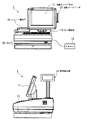
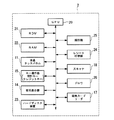
図1は、本発明の一実施形態によるPOSレジスタ1の外観図(正面図および側面図)を示したものであり、図2は、POSレジスタ1の電気的な構成を表すブロック図を示したものである。
これら図1および図2に示されるように、POSレジスタ1は、液晶タッチパネル(店員用表示器)11、客用表示器14、キー操作部15、レシート発行口16、磁気カードリーダ17、スキャナ18、CPU20、ROM21、RAM22、ハードディスク装置23、レシート印字部24、時計部25、ドロワ26を備えている。
Hereinafter, embodiments of the present invention will be described in detail with reference to the drawings.
FIG. 1 is an external view (a front view and a side view) of a
As shown in FIGS. 1 and 2, the
CPU20は、POSレジスタ1の各部を制御する中央処理装置であり、ROM21から所定のプログラムをロードして実行する。ROM21は、CPU20が実行する各種プログラムを格納している記憶部である。RAM22は、CPU20が動作時に呼び出し、また使用するデータを一時的に記憶する記憶部である。
The
ハードディスク装置23は、後述する会員ファイルや買上ログファイル、その他、商品の品名・販売価格等が記録された商品ファイル、商品の販売個数・販売合計金額等が例えば販売日毎に記録された実績ファイル、取引毎の取引番号と扱者番号を含むPOSレジスタ1で発行したレシートの全印字内容が記録された電子ジャーナルデータ、POSレジスタ1の各種の動作パラメータが定義され記憶されたプリセット用ファイル、などの各データを記憶する記憶装置である。なお、CPU20で実行されるプログラムを記憶するようにしてもよい。
The
液晶タッチパネル11は、各種メニュー画面、商品登録に必要なプリセットキー、登録した商品データ・精算データ、その他画面キー(精算が終了した取引明細を呼び出して訂正するためのキー)などを表示するとともに、表示された各種のキーから入力を受け付ける、表示・入力デバイスである。なお、この液晶タッチパネル11は店員側に向けて設置されており、店員により使用される。
The liquid
客用表示器14は、買上げ商品の商品名、買上げ価格、買上げ合計金額などを顧客に対して表示する表示装置であり、例えば液晶パネル等で構成される。
キー操作部15は、商品登録と精算の処理において使用頻度の高いファンクションキーとテンキー、その他、クレジットカードや現金による精算を確定するためのクレジットキー、現計キーなどが設けられている入力装置である。
The
The
磁気カードリーダ17は、会員番号などの会員を特定するための情報が記録された会員カードや、顧客が買上げ商品の精算に用いるクレジットカード等の各種磁気カードから、所定の情報を読み取るための読取装置(第1の読取手段)である。
スキャナ18は、商品に貼り付けられた商品登録を行うためのバーコードを読み取るとともに、レシートに印字された、後述する識別番号を表すバーコードを読み取る光学式読取装置(第2の読取手段)である。
The
The
レシート印字部24は、顧客が買上げた商品の商品名、価格、買上げ合計金額、顧客の保有ポイント数、日付、時刻、店舗名などの登録・精算結果と、上記識別番号を表すバーコードとをレシートに印字する印字装置である。印字されたレシートは、レシート発行口16から発行される。
時計部25は、カレンダ機能を有しており、年月日時分を表す時計データを出力する。
ドロワ26は、予備の紙幣、硬貨、その他商品券や売掛伝票を収納する金庫である。
The
The
The
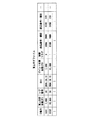
図3は、ハードディスク装置23に記憶される会員ファイルの一例を示したものである。会員ファイル(第1の記憶手段)は、会員顧客が買上げた商品の買上げ金額に応じたポイント(図3では有効ポイント数)を会員毎に累計して記憶するファイルである。ポイントを付与された会員顧客は、ポイントを消費することにより、例えば次回の買上げ金額の支払いに充当させたり、店舗から特別な特典を受けたりできる。図3において、会員ファイルには、会員毎に、会員番号、名前、住所、有効ポイント数、ポイント対象合計金額の各欄が設けられている。ここで、ポイント対象合計金額は、その会員が過去に買上げたポイント付与対象商品の買上げ合計金額である。また、有効ポイント数は、それぞれのポイント付与対象商品に予め設定されているポイント付与率(例えば10%)を商品価格に乗じて算出された各商品の個別のポイントを累計したものである。図3の例の最初のエントリでは、会員番号「3333」の会員のポイント対象合計金額は35000円であり、この会員の有効ポイント数は350ポイントとなっている。なお、会員がポイントを消費した場合には、その分のポイント数が減算されて、有効ポイント数の欄には会員が現在保有している分のポイントが記録される。
FIG. 3 shows an example of a member file stored in the
図4は、ハードディスク装置23に記憶される買上ログファイルの一例を示したものである。買上ログファイル(第2の記憶手段)は、一取引毎に、取引データと取引データに対応付けられた識別番号とを記憶するファイルである。ここで、取引データとしては、顧客が買上げた商品の買上合計金額(一取引で一つの商品を購入するときは当該商品の買上金額、複数商品を購入するときはそれら全ての合計金額)、買上合計金額のうちポイント付与対象商品の分であるポイント対象金額、当該取引の行われた日付、の各データがある。また、取引データに対応付けられた識別番号としては、ID番号とレジ番号がある。ID番号は、各POSレジスタで一取引すなわちレシートを発行する毎に連番で生成される4桁の番号(例えばある取引でID番号が「0001」だったとすると、その次の取引ではID番号は「0002」となる)であり、一つのPOSレジスタでは重複がない番号である。レジ番号は、各POSレジスタに予め割り振られたPOSレジスタを区別する2桁の番号であり、顧客が精算したPOSレジスタがこのレジ番号で特定できる。また、買上ログファイルには、各取引において購入された商品の商品番号とその値段も記録されるようになっている。例えば、図4のID番号「0001」の取引では、商品番号「0004」の商品と商品番号「0010」の商品が、それぞれ2000円と500円で購入されている。
FIG. 4 shows an example of a purchase log file stored in the
また、以上のほかに、買上ログファイルには「加算フラグ」が記憶される。加算フラグは、顧客が商品を精算する一取引が終わり買上ログファイルに当該取引分のエントリ(図4の1行分)が記録される際には、値“0”が記録される。そしてその後、顧客が次回来店時に当該取引で発生したポイントを自分の有効ポイント数に加算する手続(後述するポイント加算処理)をとった際に、加算フラグは値“1” に更新される。すなわち、加算フラグは、値が0であれば加算処理が未実施であり、値が1であれば加算処理が実施済みであることを示す。 In addition to the above, an “addition flag” is stored in the purchase log file. The value “0” is recorded in the addition flag when an entry for the transaction (one line in FIG. 4) is recorded in the purchase log file after one transaction in which the customer settles the product. After that, when the customer takes a procedure (point addition processing described later) for adding the points generated in the transaction at the next visit to his / her own valid point number, the addition flag is updated to the value “1”. That is, the addition flag indicates that if the value is 0, the addition process has not been performed, and if the value is 1, the addition process has been performed.
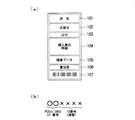
図5は、商品の精算が終わった時にPOSレジスタ1が発行するレシートの印字の一例を示したものである。図5(a)において、レシートには、レシートを発行した店名101、特売セール期間や特売商品を広告宣伝する広告文102、取引のあった日付103、顧客が買上げた商品の商品名や数量、小計金額などを表示した購入商品明細104、買上合計金額や顧客からの預かり金額、釣銭の金額などの精算データ105、店舗の責任者106、バーコード表示されたレシート番号107、が表示される。
FIG. 5 shows an example of printing a receipt issued by the
ここで、レシート番号107は、図5(b)にそのデータ形式を示すように、上述したPOSレジスタのレジ番号(2桁)とID番号(4桁)からなる合計6桁の番号で表現される。このように定義されていることから、レシート番号は、小売店での全ての取引を区別することができ(複数台のPOSレジスタが存在する場合も含む)、図4の各取引データ(図4の1行分)と一意に対応付けられている。すなわち、レシート番号が分かると図4の取引データを特定することができるようになっている。
Here, as shown in FIG. 5B, the
次に、図6に示すフローチャートを参照してPOSレジスタ1の動作を説明する。
POSレジスタ1は、主な機能として、買上げ商品の通常の登録と精算を行う登録・精算機能、商品の買上げ精算時に会員カードを忘れた会員顧客が次回来店時に前回発生したポイントを有効ポイント数に加算するポイント加算機能、一旦登録と精算を行った商品を交換や返品するための取引訂正機能、の3つを有している。以下、それぞれを順に説明する。
Next, the operation of the
The
(共通処理)
まず、上記の3つの機能以外の共通した処理を説明する。
POSレジスタ1の動作が開始されると、POSレジスタ1は、初めに動作モードが登録モードになっているか否かを判断する(ステップS1)。登録モードは、上記の3つの機能を実現するためのモードであり、後述するステップS3以降の処理に対応する。登録モードになっていない場合、POSレジスタ1は、「その他の処理」として例えば各種の設定処理やメンテナンス処理を実行する(ステップS2)。
(Common processing)
First, common processing other than the above three functions will be described.
When the operation of the
登録モードにおいて、POSレジスタ1は、液晶タッチパネル11に登録モード画面(図7参照)を表示して、「ポイント加算キー」が押下されたか否かを判断する(ステップS3)。ポイント加算キーが押下された場合、ステップS11〜ステップS17のポイント加算機能が実行される。ポイント加算キーが押下されなかった場合、POSレジスタ1は、次に登録モード画面にて「取引訂正キー」が押下されたか否かを判断する(ステップS4)。取引訂正キーが押下された場合、ステップS18〜ステップS20の取引訂正機能が実行される。取引訂正キーが押下されなかった場合は、ステップS5〜ステップS10の登録・精算機能が実行される。
In the registration mode, the
(登録・精算機能)
POSレジスタ1は、顧客が買上げた全ての商品の商品登録を行う(ステップS5)。具体的には、店員は買上げ商品に貼付されたバーコードをスキャナ18に読み取らせ、またバーコードのない野菜や果物などの商品については、図7の登録モード画面に表示された各商品のキーを押下(タッチ)する。このようにして特定された買上げ商品の買上げ金額がハードディスク装置23内の商品ファイルから読み出されて、各商品の商品登録が行われていく。全ての商品の商品登録が終わると、店員は登録モード画面の「小計キー」を押下し、商品登録を完了させる。
(Registration and settlement function)
The
POSレジスタ1は、続いて顧客の会員カードを磁気カードリーダ17で読み取り、当該顧客が会員か非会員かを判断する(ステップS6)。この時、会員カードを忘れた会員顧客は、その旨を店員に申告する。この場合には、当該会員顧客についてステップS7でのポイントの加算は省略されて、ステップS8の精算処理が直ぐに行われることになる。また、会員カードが提示された場合は、磁気カードリーダ17で読み取られた会員番号とハードディスク装置23内の会員ファイル(図3)に記録された会員番号が一致していれば会員と判断される。一致する会員番号が会員ファイルに存在しなかったときは非会員と判断されて、会員カードを忘れた会員顧客と同様にステップS8が直ぐに実行される。
Subsequently, the
次にPOSレジスタ1は、会員カードを提示した会員顧客について、商品登録された商品のポイント対象金額とこのポイント対象金額に相当する(所定のポイント付与率から計算された)ポイント数とを、会員ファイル中の当該会員顧客のエントリのポイント対象合計金額と有効ポイント数の各欄に加算する(ステップS7)。例えば、会員番号が「3333」の会員が今回買上げた商品のポイント対象金額が10,000円であり、この金額から計算されるポイント数が100ポイントであるとすると、図3の会員ファイルにおいて、ポイント対象合計金額は35,000円に10,000円が加算されて45,000円となり、有効ポイント数は350ポイントに100ポイントが加算されて450ポイントとなる。こうして、商品登録・精算時に会員カードを提示した会員については、その時点で会員ファイルへのポイントの加算が行われる。
Next, for the member customer who presented the membership card, the
次いで、POSレジスタ1は、商品登録された商品の精算処理を実行する(ステップS8)。具体的には、店員は顧客から商品代金を現金で受け取ってその金額をキー操作部15のテンキーなどで入力し、さらに登録モード画面の「預/現計キー」を押下する。こうして入力された預かり金額と上記の商品登録された商品の買上合計金額とから釣銭金額が計算されて、液晶タッチパネル11と客用表示器14に表示される。なお、現金ではなくクレジットカードで精算を行うこともできる。この場合、クレジットカードが磁気カードリーダ17で読み取られて、カード情報が図2に図示しない通信部を利用してクレジットカード会社へ送信され、与信結果に従ってカード決済が実行される。
Next, the
精算処理が完了すると、POSレジスタ1は、レシート印字部24によりレシートに印字を行い、印字したレシートをレシート発行口16から発行する(ステップS9)。このレシートには、図5に例示したように、店名101、広告文102、日付103、購入商品明細104、精算データ105、責任者106、(バーコード表示された)レシート番号107が印字されている。ここで、レシート番号を構成するID番号の値は、ハードディスク装置23内の買上ログファイルに記録済みの最新のID番号の1を加えた値に設定される。また、レシート番号を構成するレジ番号は、当該POSレジスタ1に割り振られているものである。例えば、買上ログファイルに現在図4の状態のデータ(レジ番号は「01」とする)が記録されているとすると、今回発行されるレシートのレシート番号は、ID番号の「0003」とレジ番号の「01」とから、「010003」となる。このレシート番号「010003」がバーコード化されたものが、レシートのレシート番号107欄に印字されることになる。
When the settlement process is completed, the
レシート発行後、POSレジスタ1は、今回の取引に関する取引データ、すなわち買上合計金額、ポイント対象金額、および日付の各データと発行したレシートのレシート番号とを新規のエントリとして買上ログファイルに記録する(ステップS10)。レシート番号については、ID番号とレジ番号に分けて記録する。ここで、買上ログファイルへの記録は、顧客が会員であるか非会員であるか、あるいは会員であって会員カードを提示したか会員カードを忘れたか、ということには関係なく、全ての取引について行う。このように全ての取引について取引データとレシート番号が記録されるので、後述するポイント加算機能を実行する際に、商品買上げ時に会員カードを忘れた会員顧客のポイントを加算することが可能になる。
After the receipt is issued, the
買上ログファイルへの記録例として、例えば図4の最初のエントリであるID番号=0001のデータは、レジ番号=01のPOSレジスタ1で2006年6月19日に行われた、買上合計金額が7,000円、ポイント対象金額が5,000円の取引によって記録されたものである。なお、前述したように、記録直後は加算フラグは“0”に設定がなされる。また、買上ログファイルが図4の状態、すなわちID番号が「0002」まで記録済みの状態であれば、次はID番号が「0003」のエントリとして記録が行われることになる。
こうして、一客分の商品登録と精算の処理が完了する。
As an example of recording in the purchase log file, for example, the data of ID number = 0001, which is the first entry in FIG. 4, is the total purchase amount performed on June 19, 2006 in the
In this way, the product registration and checkout process for one customer is completed.
(ポイント加算機能)
ポイント加算機能は、商品の買上げ精算時に会員カードを忘れた会員顧客が発行されたレシートと会員カードを持参して再来店した時に、店員がPOSレジスタ1の登録モード画面のポイント加算キーを押下することによって実行が開始される。店員がポイント加算キーを押下すると、POSレジスタ1は液晶タッチパネル11の表示を会員番号入力画面に切り換え、さらに店員がこの会員番号入力画面にて「会員番号キー」を押下すると、POSレジスタ1は会員カードの読取待ちの状態になる。そして、POSレジスタ1は、顧客の会員カードを磁気カードリーダ17で読み取り(ステップS11)、読み取った会員番号により会員であると判断された場合は、液晶タッチパネル11の表示を図8のポイント加算画面に切り換える。
(Point addition function)
The point addition function allows the store clerk to press the point addition key on the registration mode screen of the
続いて、POSレジスタ1は、会員が持参した前回発行されたレシートのバーコード(レシート番号107)をスキャナ18により読み取る(ステップS12)。そして、読み取ったレシート番号によって示されるID番号とレジ番号に該当するデータ(以下加算対象データと称する)をハードディスク装置23内の買上ログファイルから検索し、検索された加算対象データの加算フラグが“0”であるか否かの判断を行う(ステップS13)。上述したように、加算フラグが“0”であればポイントの加算処理は未実施であるのでPOSレジスタ1は処理を継続し、“1”であれば既にポイントの加算処理を実施済みであるので処理を中止する。したがって、一度以下に説明するステップS14以降の処理を実施して加算フラグが“1”にセットされた後は、再度ステップS14以降が実施されることによりポイントが重複して加算されることがないようになっている。
Subsequently, the
加算フラグが0の場合、POSレジスタ1は、買上ログファイルから加算対象データのポイント対象金額を読み出して(ステップS14)、所定のポイント付与率などを用いて当該ポイント対象金額から会員に付与されるべきポイント数を算出する(ステップS15)。また、POSレジスタ1は、読み出したポイント対象金額と算出したポイント数を図8のポイント加算画面の「対象額」と「ポイント」の各欄に表示させる。また、買上ログファイルから加算対象データの買上合計金額も読み出して、ポイント加算画面の「税込買上金額」の欄に表示させる。
When the addition flag is 0, the
例えば、上記ステップS12で読み取られたレシート番号が「010002」であったとすると、図4の買上ログファイルにおいて上から2番目のエントリが加算対象データとなる。そして、この加算対象データのポイント対象金額「10,000円」からポイント数が例えば100ポイントと計算されたとすると、図8に例示したように、対象額、ポイント、税込買上金額の各欄は、それぞれ10,000円、100ポイント、15,000円と表示されることになる。 For example, if the receipt number read in step S12 is “010002”, the second entry from the top in the purchase log file of FIG. Then, assuming that the number of points is calculated as, for example, 100 points from the point target amount “10,000 yen” of the addition target data, as illustrated in FIG. 8, each column of the target amount, points, and tax-included purchase amount includes: They are displayed as 10,000 yen, 100 points, and 15,000 yen, respectively.
次に、POSレジスタ1は、ステップS11において会員カードから読み取った会員番号に該当するデータをハードディスク装置23内の会員ファイルから検索して、検索された当該会員のポイント対象合計金額と有効ポイント数を図8のポイント加算画面の「累計買上金額」と「累計ポイント」の各欄に表示させる。例えば、会員番号が「3333」の会員であった場合、ポイント加算画面には、図8に例示したように「累計買上金額」が35,000円、累計ポイントが350ポイントと表示される。
Next, the
そして、店員がポイント加算画面に表示されている「実行キー」を押下すると、POSレジスタ1は、「累計ポイント」欄の値に「ポイント」欄の値を加算し、また「累計買上金額」欄の値に「対象額」欄の値を加算して、加算後の「累計ポイント」の値と「累計買上金額」の値を上記検索された当該会員の有効ポイント数およびポイント対象合計金額としてそれぞれ記録する(ステップS16)。この結果、商品の買上げ時に会員カードを忘れた会員顧客に対して会員ファイルのデータ(有効ポイント数、ポイント対象合計金額)が更新されて、正しくポイントが付与されることになる。
When the clerk presses the “execution key” displayed on the point addition screen, the
例えば、図8のポイント加算画面の例では、加算後の有効ポイント数は450ポイント(=350ポイント+100ポイント)、またポイント対象合計金額は45,000円(=35,000円+10,000円)となり、これらの数値が会員ファイルの会員番号「3333」に対応するデータとして記録される。 For example, in the example of the point addition screen shown in FIG. 8, the number of effective points after the addition is 450 points (= 350 points + 100 points), and the total amount of points targeted is 45,000 yen (= 35,000 yen + 10,000 yen). These numerical values are recorded as data corresponding to the member number “3333” of the member file.
その後、POSレジスタ1は、買上ログファイルにおいて加算対象データの加算フラグを“1”に設定する(ステップS17)。この設定により、これ以降は同じレシートを用いて再度ポイントの加算を行うことができなくなる。
Thereafter, the
(取引訂正機能)
取引訂正機能は、店員がPOSレジスタ1の登録モード画面の取引訂正キーを押下することによって実行が開始される。例えば、精算後の商品を返品したい顧客(会員、非会員を問わない)は、返品したい商品と精算時に発行されたレシートを持って商品を返品したい旨を店員に申告する。店員が取引訂正キーを押下すると、POSレジスタ1はレシートの読取待ちの状態となる。
(Transaction correction function)
The transaction correction function is started when the store clerk presses the transaction correction key on the registration mode screen of the
そして、POSレジスタ1は、顧客が提示したレシート(返品希望商品を買上げた時に発行されたもの)のバーコード印字されたレシート番号107をスキャナ18で読み取って(ステップS18)、読み取ったレシート番号によって示されるID番号とレジ番号に該当するデータ(以下訂正対象データと称する)をハードディスク装置23内の買上ログファイルから検索する。次いでPOSレジスタ1は、買上ログファイルから訂正対象データを読み出して(ステップS19)、液晶タッチパネル11と客用表示器14に表示する。ここで、買上ログファイルには図4で説明したように購入された商品の商品番号と値段が記録されているので、これらを読み出すことで訂正処理を行うことができるようになっている。また、この時、ハードディスク装置23からより詳細な取引内容が記録された電子ジャーナルデータ(取引毎の取引番号と扱者番号を含むPOSレジスタ1で発行したレシートの全印字内容が記録されている)を読み出し、表示するようにしてもよい。
Then, the
その後、POSレジスタ1は、顧客が希望する訂正の内容を受け付け、処理を実行する(ステップS20)。例えば、店員がキー操作部15の各種キーを用いて返品や交換などの訂正内容を入力し、POSレジスタ1は入力内容を買上ログファイルや電子ジャーナルデータ、実績ファイルに反映させ、各ファイルを更新する。
こうして、レシートに印字されたレシート番号を利用することにより、POSレジスタ1内に記録された取引データの訂正が行われる。
Thereafter, the
Thus, the transaction data recorded in the
以上、図面を参照してこの発明の一実施形態について詳しく説明してきたが、具体的な構成は上述のものに限られることはなく、この発明の要旨を逸脱しない範囲内において様々な設計変更等をすることが可能である。
例えば、POSレジスタ1にストアコントローラなどのコンピュータを接続し、ストアコントローラ内で会員ファイルや買上ログファイル等の各ファイルを記憶、管理して、POSレジスタ1はこれらファイルを上記ストアコントローラからダウンロードにより取得して利用するようにしてもよい。また、複数台のPOSレジスタを導入し、そのうち1台のPOSレジスタにストアコントローラとしての機能を持たせるようにしてもよい。また、秤機能を備えた機器に本発明を適用することもできる。
As described above, the embodiment of the present invention has been described in detail with reference to the drawings. However, the specific configuration is not limited to the above, and various design changes and the like can be made without departing from the scope of the present invention. It is possible to
For example, a computer such as a store controller is connected to the
また、上記の実施形態では、レシートに印字する識別番号として、ID番号とレジ番号とからなるレシート番号を用いたが、レシートすなわち一取引を特定できるものであれば他の情報も利用できる。例えば、取引時刻を識別番号としてもよい。また、バーコードの形式は特に限定されることはなく、2次元バーコードなどでもよい。 In the above embodiment, the receipt number composed of the ID number and the cash register number is used as the identification number printed on the receipt. However, other information can be used as long as the receipt, that is, one transaction can be specified. For example, the transaction time may be the identification number. The barcode format is not particularly limited, and may be a two-dimensional barcode.
また、レシート番号のデータ形式は図5に例示したものに限られず、他の形式や桁数のものを適宜採用することができる。 In addition, the data format of the receipt number is not limited to that illustrated in FIG. 5, and other formats and numbers can be appropriately employed.
また、ステップS3で「ポイント加算キー」が押下された場合にポイント加算機能を実行するようにしたが、レシートに印字されたバーコード内にポイントが分かる情報を記録しておき、そのバーコードを読み取った時に、自動的にポイント加算機能が実行されるようにしてもよい。また、同様にステップS4において、レシートに印字されているバーコードを読み取った時に、自動的に取引訂正機能が実行されるようにしてもよい。 In addition, the point addition function is executed when the “point addition key” is pressed in step S3. However, information indicating the point is recorded in the barcode printed on the receipt, and the barcode is displayed. The point addition function may be automatically executed when read. Similarly, in step S4, the transaction correction function may be automatically executed when the barcode printed on the receipt is read.
また、会員顧客の有効ポイント数は、会員ファイルではなく会員カードに記録するようにしてもよい。
また、ポイントの算出方法として、ポイント対象金額から計算するのではなく、予め商品毎に付与ポイントが決められていてもよい。
また、会員であると特定できた顧客が商品を返品・交換した際に、それに合わせて有効ポイント数・ポイント対象合計金額を減算(ポイント加算機能と同様にして)するようにすることもできる。
また、買上ログファイルに格納されている購入した各商品の値段からポイント数を計算し、それらを全て合計して有効ポイント数を算出してもよい。また、購入した各商品のポイント数を買上ログファイルに記憶させ、記憶された全てのポイント数を合計して有効ポイント数を算出してもよい。
Further, the number of valid points of the member customer may be recorded on the member card instead of the member file.
In addition, as a method for calculating the points, instead of calculating from the point target amount, the granted points may be determined in advance for each product.
In addition, when a customer who has been identified as a member returns or exchanges a product, the number of valid points and the total amount subject to points can be subtracted accordingly (similar to the point addition function).
Alternatively, the number of points may be calculated from the price of each purchased product stored in the purchase log file, and all of them may be summed to calculate the number of valid points. Alternatively, the number of points of each purchased product may be stored in the purchase log file, and the total number of points stored may be summed to calculate the number of valid points.
1…POSレジスタ 11…液晶タッチパネル(店員用表示器) 14…客用表示器 15…キー操作部 16…レシート発行口 17…磁気カードリーダ 18…スキャナ 20…CPU 21…ROM 22…RAM 23…ハードディスク装置 24…レシート印字部 25…時計部 26…ドロワ
DESCRIPTION OF
Claims (3)
ポイント加算キーと返品のための訂正キーと、
精算した買上げ商品の前記買上げデータを含む取引データと、該取引データに対応付けた識別番号とを記憶する第2の記憶手段と、
前記識別番号をバーコード化してレシートに印字して発行する印字手段と、
会員を特定する情報を読み取る第1の読取手段と、
前記レシート上のバーコード化された前記識別番号を読み取る第2の読取手段と、
前記ポイント加算キーの操作がなされた場合には前記第1の読取手段による読み取りとともに行われた前記第2の読取手段により読み取られた識別番号に対応する取引データを前記第2の記憶手段から読み出し、該取引データ内の買上げデータに応じたポイントを前記第1の記憶手段の前記特定された会員のポイントに加算する加算手段と、
前記返品のための訂正キーの操作がなされた場合には前記第2の読取手段により読み取られた前記識別番号に対応する前記取引データを前記第2の記憶手段から読み出して返品処理を行う訂正手段と、
を備えたことを特徴とするPOSレジスタ。 In the POS register that settles the purchased product and calculates the point according to the purchased data, and stores and manages the calculated point in the first storage means for each member,
Point addition key and correction key for return,
Second storage means for storing transaction data including the purchase data of the purchased purchase product and an identification number associated with the transaction data;
Printing means for printing the identification number into a barcode and printing it on a receipt;
First reading means for reading information identifying a member;
Second reading means for reading the barcode-coded identification number on the receipt;
When the point addition key is operated, the transaction data corresponding to the identification number read by the second reading unit, which is read together with the reading by the first reading unit, is read from the second storage unit. Adding means for adding the point corresponding to the purchase data in the transaction data to the point of the identified member of the first storage means;
Correction means for reading out the transaction data corresponding to the identification number read by the second reading means from the second storage means and performing return processing when the correction key for the return is operated When,
A POS register comprising:
ことを特徴とする請求項1に記載のPOSレジスタ。 2. The POS register according to claim 1, wherein a predetermined flag is provided for each of the transaction data in the second storage unit, and addition by the adding unit is permitted according to a state of the flag.
Priority Applications (1)
| Application Number | Priority Date | Filing Date | Title |
|---|---|---|---|
| JP2006201181A JP5114887B2 (en) | 2006-07-24 | 2006-07-24 | POS register |
Applications Claiming Priority (1)
| Application Number | Priority Date | Filing Date | Title |
|---|---|---|---|
| JP2006201181A JP5114887B2 (en) | 2006-07-24 | 2006-07-24 | POS register |
Publications (2)
| Publication Number | Publication Date |
|---|---|
| JP2008027313A JP2008027313A (en) | 2008-02-07 |
| JP5114887B2 true JP5114887B2 (en) | 2013-01-09 |
Family
ID=39117867
Family Applications (1)
| Application Number | Title | Priority Date | Filing Date |
|---|---|---|---|
| JP2006201181A Expired - Lifetime JP5114887B2 (en) | 2006-07-24 | 2006-07-24 | POS register |
Country Status (1)
| Country | Link |
|---|---|
| JP (1) | JP5114887B2 (en) |
Families Citing this family (7)
| Publication number | Priority date | Publication date | Assignee | Title |
|---|---|---|---|---|
| JP5166465B2 (en) * | 2010-03-05 | 2013-03-21 | 東芝テック株式会社 | Order receiving device, control program, and product sales data processing device |
| JP5838798B2 (en) * | 2011-12-27 | 2016-01-06 | 株式会社寺岡精工 | POS system |
| JP5838191B2 (en) * | 2013-09-12 | 2016-01-06 | 東芝テック株式会社 | Product sales data processing apparatus and program |
| US20170004477A1 (en) * | 2015-06-30 | 2017-01-05 | Toshiba Tec Kabushiki Kaisha | Information processing apparatus and method for deducting tax amount |
| JP7137953B2 (en) * | 2018-03-29 | 2022-09-15 | 株式会社日本総合研究所 | Payment device, payment method and payment program |
| JP2020187784A (en) * | 2020-07-21 | 2020-11-19 | 株式会社寺岡精工 | Commodity sales data processing device and program |
| JP7473015B2 (en) * | 2020-12-22 | 2024-04-23 | 日本電気株式会社 | Mobile terminal device, settlement device, system, method, and program for store |
Family Cites Families (3)
| Publication number | Priority date | Publication date | Assignee | Title |
|---|---|---|---|---|
| JP2000353283A (en) * | 1999-06-10 | 2000-12-19 | Nec Software Chugoku Ltd | POS system and POS sales cancellation correction method |
| JP2003099855A (en) * | 2001-09-20 | 2003-04-04 | Mitsubishi Electric Information Systems Corp | Member card device, member card processing method, member card processing program, and recording medium recording member card processing program |
| JP2003272053A (en) * | 2002-03-14 | 2003-09-26 | Toshiba Tec Corp | Commodity sales data processing device, post-service point grant method of this device, and post-service point grant program |
-
2006
- 2006-07-24 JP JP2006201181A patent/JP5114887B2/en not_active Expired - Lifetime
Also Published As
| Publication number | Publication date |
|---|---|
| JP2008027313A (en) | 2008-02-07 |
Similar Documents
| Publication | Publication Date | Title |
|---|---|---|
| JP5663955B2 (en) | Checkout system, product registration device, and checkout device | |
| JP5880623B2 (en) | Checkout system | |
| JP6965056B2 (en) | Transaction settlement system, transaction processing device, settlement device and its program | |
| JP6672770B2 (en) | Product sales data processing device, program and product sales data processing system | |
| JP5165219B2 (en) | Cash register system | |
| JP5496958B2 (en) | Information processing apparatus and program | |
| US20210073774A1 (en) | Commodity sales data processing apparatus and control program | |
| JP2024159969A (en) | Product sales data processing device and computer program | |
| JP2021196698A (en) | Information processor and control program thereof | |
| JP5401432B2 (en) | Merchandise sales processing apparatus and control program | |
| JP2008027313A (en) | POS register | |
| JP2012238081A (en) | Settlement system | |
| JP7612064B2 (en) | Product sales data processing device and program | |
| JP5562913B2 (en) | Merchandise sales data processing apparatus and receipt details search program | |
| JP5371930B2 (en) | Sales display system, data processing apparatus and control program | |
| JP5958672B2 (en) | Product registration device, payment device and program | |
| JP2012168895A (en) | Sales data processor and program | |
| JP6600039B2 (en) | Product data processing apparatus, program, product data processing method and system | |
| JP2017142752A (en) | POS system | |
| JP7534502B2 (en) | Product data processing device and program | |
| JP7544197B2 (en) | System, registration device, method and program | |
| JP7342987B2 (en) | Systems, methods and programs | |
| JP2014167830A (en) | Commercial transaction processor and receipt detail retrieval program | |
| JP7483512B2 (en) | Payment device and program | |
| JP6451816B2 (en) | Payment apparatus, checkout system, program, payment method and checkout method |
Legal Events
| Date | Code | Title | Description |
|---|---|---|---|
| A621 | Written request for application examination |
Free format text: JAPANESE INTERMEDIATE CODE: A621 Effective date: 20090427 |
|
| A977 | Report on retrieval |
Free format text: JAPANESE INTERMEDIATE CODE: A971007 Effective date: 20120116 |
|
| A131 | Notification of reasons for refusal |
Free format text: JAPANESE INTERMEDIATE CODE: A131 Effective date: 20120131 |
|
| A521 | Request for written amendment filed |
Free format text: JAPANESE INTERMEDIATE CODE: A523 Effective date: 20120326 |
|
| TRDD | Decision of grant or rejection written | ||
| A01 | Written decision to grant a patent or to grant a registration (utility model) |
Free format text: JAPANESE INTERMEDIATE CODE: A01 Effective date: 20120918 |
|
| A01 | Written decision to grant a patent or to grant a registration (utility model) |
Free format text: JAPANESE INTERMEDIATE CODE: A01 |
|
| A61 | First payment of annual fees (during grant procedure) |
Free format text: JAPANESE INTERMEDIATE CODE: A61 Effective date: 20121001 |
|
| R150 | Certificate of patent or registration of utility model |
Ref document number: 5114887 Country of ref document: JP Free format text: JAPANESE INTERMEDIATE CODE: R150 Free format text: JAPANESE INTERMEDIATE CODE: R150 |
|
| FPAY | Renewal fee payment (event date is renewal date of database) |
Free format text: PAYMENT UNTIL: 20151026 Year of fee payment: 3 |
|
| R250 | Receipt of annual fees |
Free format text: JAPANESE INTERMEDIATE CODE: R250 |
|
| R250 | Receipt of annual fees |
Free format text: JAPANESE INTERMEDIATE CODE: R250 |
|
| R250 | Receipt of annual fees |
Free format text: JAPANESE INTERMEDIATE CODE: R250 |
|
| R250 | Receipt of annual fees |
Free format text: JAPANESE INTERMEDIATE CODE: R250 |
|
| R250 | Receipt of annual fees |
Free format text: JAPANESE INTERMEDIATE CODE: R250 |
|
| R250 | Receipt of annual fees |
Free format text: JAPANESE INTERMEDIATE CODE: R250 |
|
| R250 | Receipt of annual fees |
Free format text: JAPANESE INTERMEDIATE CODE: R250 |
|
| R250 | Receipt of annual fees |
Free format text: JAPANESE INTERMEDIATE CODE: R250 |
|
| R250 | Receipt of annual fees |
Free format text: JAPANESE INTERMEDIATE CODE: R250 |
|
| R250 | Receipt of annual fees |
Free format text: JAPANESE INTERMEDIATE CODE: R250 |
|
| R250 | Receipt of annual fees |
Free format text: JAPANESE INTERMEDIATE CODE: R250 |