JP5482814B2 - 表示装置、表示装置の制御方法、および表示装置の制御プログラム - Google Patents
表示装置、表示装置の制御方法、および表示装置の制御プログラム Download PDFInfo
- Publication number
- JP5482814B2 JP5482814B2 JP2012021036A JP2012021036A JP5482814B2 JP 5482814 B2 JP5482814 B2 JP 5482814B2 JP 2012021036 A JP2012021036 A JP 2012021036A JP 2012021036 A JP2012021036 A JP 2012021036A JP 5482814 B2 JP5482814 B2 JP 5482814B2
- Authority
- JP
- Japan
- Prior art keywords
- screen
- display
- user
- unit
- pop
- Prior art date
- Legal status (The legal status is an assumption and is not a legal conclusion. Google has not performed a legal analysis and makes no representation as to the accuracy of the status listed.)
- Active
Links
Images






Classifications
-
- G—PHYSICS
- G06—COMPUTING OR CALCULATING; COUNTING
- G06F—ELECTRIC DIGITAL DATA PROCESSING
- G06F3/00—Input arrangements for transferring data to be processed into a form capable of being handled by the computer; Output arrangements for transferring data from processing unit to output unit, e.g. interface arrangements
- G06F3/01—Input arrangements or combined input and output arrangements for interaction between user and computer
- G06F3/03—Arrangements for converting the position or the displacement of a member into a coded form
- G06F3/041—Digitisers, e.g. for touch screens or touch pads, characterised by the transducing means
-
- G—PHYSICS
- G06—COMPUTING OR CALCULATING; COUNTING
- G06F—ELECTRIC DIGITAL DATA PROCESSING
- G06F21/00—Security arrangements for protecting computers, components thereof, programs or data against unauthorised activity
- G06F21/30—Authentication, i.e. establishing the identity or authorisation of security principals
- G06F21/31—User authentication
- G06F21/34—User authentication involving the use of external additional devices, e.g. dongles or smart cards
- G06F21/35—User authentication involving the use of external additional devices, e.g. dongles or smart cards communicating wirelessly
-
- G—PHYSICS
- G06—COMPUTING OR CALCULATING; COUNTING
- G06F—ELECTRIC DIGITAL DATA PROCESSING
- G06F21/00—Security arrangements for protecting computers, components thereof, programs or data against unauthorised activity
- G06F21/60—Protecting data
- G06F21/606—Protecting data by securing the transmission between two devices or processes
- G06F21/608—Secure printing
-
- G—PHYSICS
- G06—COMPUTING OR CALCULATING; COUNTING
- G06F—ELECTRIC DIGITAL DATA PROCESSING
- G06F3/00—Input arrangements for transferring data to be processed into a form capable of being handled by the computer; Output arrangements for transferring data from processing unit to output unit, e.g. interface arrangements
- G06F3/01—Input arrangements or combined input and output arrangements for interaction between user and computer
- G06F3/048—Interaction techniques based on graphical user interfaces [GUI]
- G06F3/0487—Interaction techniques based on graphical user interfaces [GUI] using specific features provided by the input device, e.g. functions controlled by the rotation of a mouse with dual sensing arrangements, or of the nature of the input device, e.g. tap gestures based on pressure sensed by a digitiser
- G06F3/0488—Interaction techniques based on graphical user interfaces [GUI] using specific features provided by the input device, e.g. functions controlled by the rotation of a mouse with dual sensing arrangements, or of the nature of the input device, e.g. tap gestures based on pressure sensed by a digitiser using a touch-screen or digitiser, e.g. input of commands through traced gestures
- G06F3/04886—Interaction techniques based on graphical user interfaces [GUI] using specific features provided by the input device, e.g. functions controlled by the rotation of a mouse with dual sensing arrangements, or of the nature of the input device, e.g. tap gestures based on pressure sensed by a digitiser using a touch-screen or digitiser, e.g. input of commands through traced gestures by partitioning the display area of the touch-screen or the surface of the digitising tablet into independently controllable areas, e.g. virtual keyboards or menus
-
- H—ELECTRICITY
- H04—ELECTRIC COMMUNICATION TECHNIQUE
- H04N—PICTORIAL COMMUNICATION, e.g. TELEVISION
- H04N1/00—Scanning, transmission or reproduction of documents or the like, e.g. facsimile transmission; Details thereof
- H04N1/0035—User-machine interface; Control console
- H04N1/00405—Output means
- H04N1/00408—Display of information to the user, e.g. menus
- H04N1/00411—Display of information to the user, e.g. menus the display also being used for user input, e.g. touch screen
-
- H—ELECTRICITY
- H04—ELECTRIC COMMUNICATION TECHNIQUE
- H04N—PICTORIAL COMMUNICATION, e.g. TELEVISION
- H04N1/00—Scanning, transmission or reproduction of documents or the like, e.g. facsimile transmission; Details thereof
- H04N1/0035—User-machine interface; Control console
- H04N1/00405—Output means
- H04N1/00408—Display of information to the user, e.g. menus
- H04N1/0044—Display of information to the user, e.g. menus for image preview or review, e.g. to help the user position a sheet
- H04N1/00442—Simultaneous viewing of a plurality of images, e.g. using a mosaic display arrangement of thumbnails
- H04N1/00453—Simultaneous viewing of a plurality of images, e.g. using a mosaic display arrangement of thumbnails arranged in a two dimensional array
-
- H—ELECTRICITY
- H04—ELECTRIC COMMUNICATION TECHNIQUE
- H04N—PICTORIAL COMMUNICATION, e.g. TELEVISION
- H04N1/00—Scanning, transmission or reproduction of documents or the like, e.g. facsimile transmission; Details thereof
- H04N1/0035—User-machine interface; Control console
- H04N1/00405—Output means
- H04N1/00408—Display of information to the user, e.g. menus
- H04N1/0044—Display of information to the user, e.g. menus for image preview or review, e.g. to help the user position a sheet
- H04N1/00442—Simultaneous viewing of a plurality of images, e.g. using a mosaic display arrangement of thumbnails
- H04N1/00456—Simultaneous viewing of a plurality of images, e.g. using a mosaic display arrangement of thumbnails for layout preview, e.g. page layout
-
- H—ELECTRICITY
- H04—ELECTRIC COMMUNICATION TECHNIQUE
- H04N—PICTORIAL COMMUNICATION, e.g. TELEVISION
- H04N1/00—Scanning, transmission or reproduction of documents or the like, e.g. facsimile transmission; Details thereof
- H04N1/0035—User-machine interface; Control console
- H04N1/00405—Output means
- H04N1/00408—Display of information to the user, e.g. menus
- H04N1/00472—Display of information to the user, e.g. menus using a pop-up window
-
- H—ELECTRICITY
- H04—ELECTRIC COMMUNICATION TECHNIQUE
- H04N—PICTORIAL COMMUNICATION, e.g. TELEVISION
- H04N1/00—Scanning, transmission or reproduction of documents or the like, e.g. facsimile transmission; Details thereof
- H04N1/0035—User-machine interface; Control console
- H04N1/00405—Output means
- H04N1/00474—Output means outputting a plurality of functional options, e.g. scan, copy or print
-
- H—ELECTRICITY
- H04—ELECTRIC COMMUNICATION TECHNIQUE
- H04N—PICTORIAL COMMUNICATION, e.g. TELEVISION
- H04N1/00—Scanning, transmission or reproduction of documents or the like, e.g. facsimile transmission; Details thereof
- H04N1/0035—User-machine interface; Control console
- H04N1/00405—Output means
- H04N1/00482—Output means outputting a plurality of job set-up options, e.g. number of copies, paper size or resolution
-
- H—ELECTRICITY
- H04—ELECTRIC COMMUNICATION TECHNIQUE
- H04N—PICTORIAL COMMUNICATION, e.g. TELEVISION
- H04N1/00—Scanning, transmission or reproduction of documents or the like, e.g. facsimile transmission; Details thereof
- H04N1/0035—User-machine interface; Control console
- H04N1/00501—Tailoring a user interface [UI] to specific requirements
- H04N1/00509—Personalising for a particular user or group of users, e.g. a workgroup or company
- H04N1/00514—Personalising for a particular user or group of users, e.g. a workgroup or company for individual users
-
- H—ELECTRICITY
- H04—ELECTRIC COMMUNICATION TECHNIQUE
- H04N—PICTORIAL COMMUNICATION, e.g. TELEVISION
- H04N1/00—Scanning, transmission or reproduction of documents or the like, e.g. facsimile transmission; Details thereof
- H04N1/44—Secrecy systems
- H04N1/4406—Restricting access, e.g. according to user identity
- H04N1/4413—Restricting access, e.g. according to user identity involving the use of passwords, ID codes or the like, e.g. PIN
-
- H—ELECTRICITY
- H04—ELECTRIC COMMUNICATION TECHNIQUE
- H04N—PICTORIAL COMMUNICATION, e.g. TELEVISION
- H04N1/00—Scanning, transmission or reproduction of documents or the like, e.g. facsimile transmission; Details thereof
- H04N1/44—Secrecy systems
- H04N1/4406—Restricting access, e.g. according to user identity
- H04N1/4433—Restricting access, e.g. according to user identity to an apparatus, part of an apparatus or an apparatus function
Landscapes
- Engineering & Computer Science (AREA)
- Multimedia (AREA)
- Signal Processing (AREA)
- Theoretical Computer Science (AREA)
- Human Computer Interaction (AREA)
- General Engineering & Computer Science (AREA)
- Physics & Mathematics (AREA)
- General Physics & Mathematics (AREA)
- Computer Security & Cryptography (AREA)
- Software Systems (AREA)
- Computer Hardware Design (AREA)
- Computer Networks & Wireless Communication (AREA)
- Health & Medical Sciences (AREA)
- Bioethics (AREA)
- General Health & Medical Sciences (AREA)
- Facsimiles In General (AREA)
- User Interface Of Digital Computer (AREA)
Description
始めに、MFPの人体通信機能の概要について説明する。
続いて、MFP100の構成について説明する。
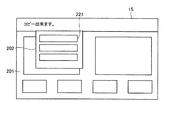
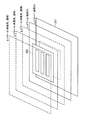
次に、タッチパネル15が表示する画面の構成について説明する。
続いて、本実施の形態におけるMFP100の動作について説明する。
続いて、ユーザーからのタッチ操作を受け付けた場合に、そのユーザーが操作権限を有さないポップアップ画面の表示状態を変更する場合について説明する。
上述の実施の形態によれば、ユーザーがポップアップ画面を表示させる操作を行い、ポップアップ画面を表示させた場合に、操作を行ったユーザーはポップアップ画面で操作を行うことができ、ポップアップ画面に対して操作権限を持たない他のユーザーも、ポップアップ画面の下に表示中の画面に対して入力操作を行うことができる。その結果、ユーザーは作業を中断する必要が無く、作業効率の向上を図ることができる。
表示装置は、受け付けた操作を行ったユーザーを識別する機能を有していればよく、ユーザーの識別方法は、人体通信機能を用いた方法以外のものであってもよい。たとえば、表示装置は指紋とユーザーとの関係を示すテーブルを記憶しており、表示装置のタッチパネルを操作したユーザーの指紋の画像を解析し、上記テーブルに基づいてユーザーを識別してもよい。
上述の実施の形態は、すべての点で例示であって制限的なものではないと考えられるべきである。本発明の範囲は上記した説明ではなくて特許請求の範囲によって示され、特許請求の範囲と均等の意味および範囲内でのすべての変更が含まれることが意図される。
2 メモリ
3 操作パネル
4 認証制御部
5 表示制御部
6 タッチパネル制御部
7 ネットワークI/F
8 LANコネクタ
9 USBコネクタ
10 HDD
11 表示部
12 入力部
13 人体通信部
15 タッチパネル
90 ユーザー
91 人体通信デバイス
100 MFP
201 ベース画面
202,203,204 ポップアップ画面
211 メッセージエリア
212 プレビューエリア
213 設定キー
214 サムネイル画像表示エリア
215 キー配置エリア
216 ユーザー表示エリア
221 オブジェクト
K1,K2,K3,K4,K5 キー
MR1,MR2,MR3 マーキング
P1 位置
REG1,REG2,REG3,REG4 領域
TN1,TN2,TN3 サムネイル画像
Claims (17)
- 各種情報を表示するタッチパネルを備えた表示装置であって、
複数の画面を階層的に前記タッチパネルに表示する表示手段と、
前記表示手段にて表示した複数の画面のうちいずれかの画面への操作を受け付ける操作受付手段と、
前記操作受付手段にて受け付けた操作を行ったユーザーを識別する識別手段と、
前記識別手段にて識別したユーザーが操作権限を有する画面の中で最上位の画面を、前記操作受付手段にて受け付けた操作の対象となる画面として特定する画面特定手段とを備えた、表示装置。 - 前記表示手段にて表示した複数の画面の各々の操作権限を有するユーザーを記憶する記憶手段をさらに備え、
前記画面特定手段は、前記識別手段にて識別したユーザーが前記記憶手段にて記憶したユーザーに含まれているか否かに基づいて画面を特定する、請求項1に記載の表示装置。 - 前記操作受付手段にて新たな画面の表示を伴う操作を受け付けた場合に、前記識別手段にて識別したユーザーに新たな画面の操作権限を付加する操作権限付加手段をさらに備えた、請求項1または2に記載の表示装置。
- 前記識別手段は、
前記操作受付手段にて受け付けた操作を行なったユーザーの人体を経路として、ユーザーが所持する人体通信用デバイスから識別情報を受信する人体通信手段を含む、請求項1〜3のいずれかに記載の表示装置。 - 前記識別手段にて識別したユーザーが、前記表示手段にて表示した複数の画面のいずれにも操作権限を有さない場合に、前記操作受付手段にて受け付けた操作を破棄する操作破棄手段をさらに備えた、請求項1〜4のいずれかに記載の表示装置。
- 前記操作受付手段にて受け付けた操作によって新たな画面を表示する新画面表示手段をさらに備えた、請求項1〜5のいずれかに記載の表示装置。
- 前記新画面表示手段は新たな画面を半透明で表示する、請求項6に記載の表示装置。
- 前記表示手段にて表示した複数の画面のうち、前記識別手段にて識別したユーザーが操作権限を有さない画面の表示状態を変更する表示状態変更手段をさらに備えた、請求項1〜7のいずれかに記載の表示装置。
- 前記表示状態変更手段は、
前記識別手段にて識別したユーザーが操作権限を有さない画面の表示位置を移動する表示位置移動手段を含む、請求項8に記載の表示装置。 - 前記表示状態変更手段は、
前記識別手段にて識別したユーザーが操作権限を有さない画面の形状を変更する画面形状変更手段を含む、請求項8または9に記載の表示装置。 - 前記表示状態変更手段は、
前記識別手段にて識別したユーザーが操作権限を有さない画面を半透明化する半透明化手段を含む、請求項8〜10のいずれかに記載の表示装置。 - 前記半透明化手段にて画面を半透明化した後で、前記半透明化手段にて半透明化した画面とは別の画面への操作を前記操作受付手段が受け付けた場合に、前記半透明化手段にて半透明化した画面の表示状態を元に戻す第1の変更解除手段をさらに備えた、請求項11に記載の表示装置。
- 前記表示状態変更手段は、
前記識別手段にて識別したユーザーが操作権限を有さない画面を非表示化する非表示化手段を含む、請求項8〜12のいずれかに記載の表示装置。 - 前記非表示化手段にて画面を非表示化した後で、前記操作受付手段が操作を受け付けた場合に、前記非表示化手段にて非表示化した画面の表示状態を元に戻す第2の変更解除手段をさらに備えた、請求項13に記載の表示装置。
- 前記表示状態変更手段にて画面の表示状態を変更してから、前記操作受付手段にて操作を受け付けない状態で所定時間が経過した場合に、前記表示状態変更手段にて変更した表示状態を元に戻す第3の変更解除手段をさらに備えた、請求項8〜14のいずれかに記載の表示装置。
- 各種情報を表示するタッチパネルを備えた表示装置の制御方法であって、
複数の画面を階層的に前記タッチパネルに表示する表示ステップと、
前記表示ステップにて表示した複数の画面のうちいずれかの画面への操作を受け付ける操作受付ステップと、
前記操作受付ステップにて受け付けた操作を行ったユーザーを識別する識別ステップと、
前記識別ステップにて識別したユーザーが操作権限を有する画面の中で最上位の画面を、前記操作受付ステップにて受け付けた操作の対象となる画面として特定する画面特定ステップとを備えた、表示装置の制御方法。 - 各種情報を表示するタッチパネルを備えた表示装置の制御プログラムであって、
複数の画面を階層的に前記タッチパネルに表示する表示ステップと、
前記表示ステップにて表示した複数の画面のうちいずれかの画面への操作を受け付ける操作受付ステップと、
前記操作受付ステップにて受け付けた操作を行ったユーザーを識別する識別ステップと、
前記識別ステップにて識別したユーザーが操作権限を有する画面の中で最上位の画面を、前記操作受付ステップにて受け付けた操作の対象となる画面として特定する画面特定ステップとをコンピューターに実行させる、表示装置の制御プログラム。
Priority Applications (2)
| Application Number | Priority Date | Filing Date | Title |
|---|---|---|---|
| JP2012021036A JP5482814B2 (ja) | 2012-02-02 | 2012-02-02 | 表示装置、表示装置の制御方法、および表示装置の制御プログラム |
| US13/753,907 US9081432B2 (en) | 2012-02-02 | 2013-01-30 | Display device with touch panel |
Applications Claiming Priority (1)
| Application Number | Priority Date | Filing Date | Title |
|---|---|---|---|
| JP2012021036A JP5482814B2 (ja) | 2012-02-02 | 2012-02-02 | 表示装置、表示装置の制御方法、および表示装置の制御プログラム |
Publications (2)
| Publication Number | Publication Date |
|---|---|
| JP2013161179A JP2013161179A (ja) | 2013-08-19 |
| JP5482814B2 true JP5482814B2 (ja) | 2014-05-07 |
Family
ID=48902454
Family Applications (1)
| Application Number | Title | Priority Date | Filing Date |
|---|---|---|---|
| JP2012021036A Active JP5482814B2 (ja) | 2012-02-02 | 2012-02-02 | 表示装置、表示装置の制御方法、および表示装置の制御プログラム |
Country Status (2)
| Country | Link |
|---|---|
| US (1) | US9081432B2 (ja) |
| JP (1) | JP5482814B2 (ja) |
Families Citing this family (24)
| Publication number | Priority date | Publication date | Assignee | Title |
|---|---|---|---|---|
| US9454667B2 (en) * | 2011-11-03 | 2016-09-27 | International Business Machines Corporation | Granting object authority via a multi-touch screen to a collaborator |
| USD738394S1 (en) | 2013-06-09 | 2015-09-08 | Apple Inc. | Display screen or portion thereof with animated graphical user interface |
| USD741350S1 (en) | 2013-06-10 | 2015-10-20 | Apple Inc. | Display screen or portion thereof with animated graphical user interface |
| JP5938386B2 (ja) * | 2013-10-31 | 2016-06-22 | 京セラドキュメントソリューションズ株式会社 | 表示入力装置およびそれを備えた画像形成装置 |
| US9883057B2 (en) | 2013-12-12 | 2018-01-30 | Fuji Xerox Co., Ltd. | Processing apparatus and program product for creating, in response to user instruction, process receiving portions to be displayed differently and to perform a different process |
| USD772278S1 (en) | 2013-12-18 | 2016-11-22 | Apple Inc. | Display screen or portion thereof with animated graphical user interface |
| JP2015133674A (ja) * | 2014-01-15 | 2015-07-23 | 株式会社リコー | 読取画像配信システム、画像処理装置及び制御プログラム |
| USD769892S1 (en) | 2014-05-30 | 2016-10-25 | Apple Inc. | Display screen or portion thereof with graphical user interface |
| US9886185B2 (en) | 2014-06-09 | 2018-02-06 | Cornelius, Inc. | Systems and methods of multi-touch concurrent dispensing |
| JP2016053764A (ja) * | 2014-09-02 | 2016-04-14 | ソニー株式会社 | 情報処理装置、情報処理方法、およびプログラム |
| USD765699S1 (en) | 2015-06-06 | 2016-09-06 | Apple Inc. | Display screen or portion thereof with graphical user interface |
| JP6569381B2 (ja) * | 2015-08-17 | 2019-09-04 | 株式会社リコー | 情報処理装置、画像処理装置及びプログラム |
| US9871546B2 (en) * | 2015-09-11 | 2018-01-16 | Panasonic Intellectual Property Corporation Of America | Wearable terminal mountable on part of body of user |
| JP6344615B2 (ja) * | 2015-10-01 | 2018-06-20 | 京セラドキュメントソリューションズ株式会社 | 画像形成装置 |
| US10241591B1 (en) * | 2016-03-02 | 2019-03-26 | L. Alford Frost | Key pad user interface for non-verbal, communication system |
| JP6519539B2 (ja) * | 2016-06-29 | 2019-05-29 | 京セラドキュメントソリューションズ株式会社 | 表示入力装置及び画像形成装置 |
| US9642012B1 (en) | 2016-10-03 | 2017-05-02 | International Business Machines Corporation | Mobile device access control with two-layered display |
| US9852314B1 (en) | 2017-03-20 | 2017-12-26 | International Business Machines Corporation | Mobile device access control with two-layered display |
| USD846587S1 (en) | 2017-06-04 | 2019-04-23 | Apple Inc. | Display screen or portion thereof with animated graphical user interface |
| USD879132S1 (en) | 2018-06-03 | 2020-03-24 | Apple Inc. | Electronic device with graphical user interface |
| USD877175S1 (en) | 2018-06-04 | 2020-03-03 | Apple Inc. | Electronic device with graphical user interface |
| USD883319S1 (en) | 2018-10-29 | 2020-05-05 | Apple Inc. | Electronic device with graphical user interface |
| USD978158S1 (en) * | 2019-12-12 | 2023-02-14 | Bottomline Technologies, Inc. | Display screen with graphical user interface in grid formation |
| USD984461S1 (en) | 2021-06-04 | 2023-04-25 | Apple Inc. | Display screen or portion thereof with graphical user interface |
Family Cites Families (11)
| Publication number | Priority date | Publication date | Assignee | Title |
|---|---|---|---|---|
| JP2000222092A (ja) | 1999-01-29 | 2000-08-11 | Canon Inc | 電子情報表示装置及びその表示制御方法並びに記憶媒体 |
| EP1971107B1 (en) * | 2007-03-14 | 2011-11-16 | Magix Ag | System and method for visual content sharing in an online environment |
| JP2009244725A (ja) | 2008-03-31 | 2009-10-22 | Fujifilm Corp | 画像処理装置及び画像選択方法 |
| JP4766078B2 (ja) | 2008-06-18 | 2011-09-07 | コニカミノルタビジネステクノロジーズ株式会社 | 画像形成装置、画像形成装置によって実行される認証方法および認証プログラム |
| US20100162410A1 (en) * | 2008-12-24 | 2010-06-24 | International Business Machines Corporation | Digital rights management (drm) content protection by proxy transparency control |
| US9176747B2 (en) * | 2009-02-17 | 2015-11-03 | Sandisk Il Ltd. | User-application interface |
| US20100265204A1 (en) * | 2009-04-21 | 2010-10-21 | Sony Ericsson Mobile Communications Ab | Finger recognition for authentication and graphical user interface input |
| CN101877754B (zh) | 2009-05-01 | 2012-11-28 | 柯尼卡美能达商用科技株式会社 | 信息设备装置 |
| JP4788801B2 (ja) | 2009-05-01 | 2011-10-05 | コニカミノルタビジネステクノロジーズ株式会社 | 情報機器装置およびその制御方法、プログラム |
| JP2010286895A (ja) | 2009-06-09 | 2010-12-24 | Toshiba Tec Corp | 情報入力装置及び情報処理装置 |
| CA2844615C (en) * | 2011-08-09 | 2019-01-15 | Blackberry Limited | Manipulating screen layers in multi-layer applications |
-
2012
- 2012-02-02 JP JP2012021036A patent/JP5482814B2/ja active Active
-
2013
- 2013-01-30 US US13/753,907 patent/US9081432B2/en active Active
Also Published As
| Publication number | Publication date |
|---|---|
| US9081432B2 (en) | 2015-07-14 |
| US20130201132A1 (en) | 2013-08-08 |
| JP2013161179A (ja) | 2013-08-19 |
Similar Documents
| Publication | Publication Date | Title |
|---|---|---|
| JP5482814B2 (ja) | 表示装置、表示装置の制御方法、および表示装置の制御プログラム | |
| JP6382008B2 (ja) | 画像処理装置、オブジェクト表示方法及びプログラム | |
| US9325868B2 (en) | Image processor displaying plural function keys in scrollable state | |
| JP6308521B2 (ja) | ジョブ処理装置、ジョブ処理装置の制御方法、及びプログラム | |
| US10277757B2 (en) | Electronic device and image forming apparatus | |
| JP6373063B2 (ja) | 画像形成装置及びその制御方法、並びにプログラム | |
| US9195915B2 (en) | Printing apparatus, method of changing layout, and storage medium | |
| JP2018158529A (ja) | 画像処理装置、システムおよびプログラム | |
| JP6187063B2 (ja) | 情報処理装置、情報処理システム、情報処理方法およびプログラム | |
| JP5494873B1 (ja) | 画像形成装置、画像形成システムおよびプログラム | |
| JP2013162299A (ja) | 画像処理装置、画像処理装置の制御方法、および画像処理装置の制御プログラム | |
| JP6972769B2 (ja) | 情報処理装置およびプログラム | |
| JP5853778B2 (ja) | 印刷設定装置、印刷設定方法、印刷設定プログラムおよび記録媒体 | |
| JP6894964B2 (ja) | プリンタ、プリンタの制御方法及びプログラム | |
| JP2011259393A (ja) | 画像処理装置、スクロール表示方法およびコンピュータプログラム | |
| JP2018133091A (ja) | ジョブ処理装置、ジョブ処理装置の制御方法、及びプログラム | |
| JP5810498B2 (ja) | 表示処理装置およびコンピュータプログラム | |
| US10681229B2 (en) | Image processing apparatus for controlling display of a condition when the displayed condition is obscured by a hand of a user and method and non-transitory recording medium storing computer readable program | |
| JP4867606B2 (ja) | タッチパネル入力装置および画像形成装置 | |
| JP2007150749A (ja) | 画像処理装置 | |
| JP7419477B2 (ja) | 画像処理装置、画像処理装置の制御方法及びプログラム | |
| JP2015037314A (ja) | 画像形成装置 | |
| JP6666049B2 (ja) | 画像処理装置及びその制御方法、並びにプログラム | |
| JP2022009002A (ja) | 画像処理装置およびプログラム | |
| JP6711890B2 (ja) | 表示制御装置、表示制御方法、及びプログラム |
Legal Events
| Date | Code | Title | Description |
|---|---|---|---|
| A621 | Written request for application examination |
Free format text: JAPANESE INTERMEDIATE CODE: A621 Effective date: 20130921 |
|
| TRDD | Decision of grant or rejection written | ||
| A977 | Report on retrieval |
Free format text: JAPANESE INTERMEDIATE CODE: A971007 Effective date: 20140115 |
|
| A01 | Written decision to grant a patent or to grant a registration (utility model) |
Free format text: JAPANESE INTERMEDIATE CODE: A01 Effective date: 20140121 |
|
| A61 | First payment of annual fees (during grant procedure) |
Free format text: JAPANESE INTERMEDIATE CODE: A61 Effective date: 20140203 |
|
| R150 | Certificate of patent or registration of utility model |
Ref document number: 5482814 Country of ref document: JP Free format text: JAPANESE INTERMEDIATE CODE: R150 |