JP6253246B2 - Image processing system, image processing method, and program - Google Patents
Image processing system, image processing method, and program Download PDFInfo
- Publication number
- JP6253246B2 JP6253246B2 JP2013087888A JP2013087888A JP6253246B2 JP 6253246 B2 JP6253246 B2 JP 6253246B2 JP 2013087888 A JP2013087888 A JP 2013087888A JP 2013087888 A JP2013087888 A JP 2013087888A JP 6253246 B2 JP6253246 B2 JP 6253246B2
- Authority
- JP
- Japan
- Prior art keywords
- user
- domain
- information
- image data
- image processing
- Prior art date
- Legal status (The legal status is an assumption and is not a legal conclusion. Google has not performed a legal analysis and makes no representation as to the accuracy of the status listed.)
- Expired - Fee Related
Links
Images





Classifications
-
- H—ELECTRICITY
- H04—ELECTRIC COMMUNICATION TECHNIQUE
- H04L—TRANSMISSION OF DIGITAL INFORMATION, e.g. TELEGRAPHIC COMMUNICATION
- H04L63/00—Network architectures or network communication protocols for network security
- H04L63/08—Network architectures or network communication protocols for network security for authentication of entities
-
- H—ELECTRICITY
- H04—ELECTRIC COMMUNICATION TECHNIQUE
- H04N—PICTORIAL COMMUNICATION, e.g. TELEVISION
- H04N1/00—Scanning, transmission or reproduction of documents or the like, e.g. facsimile transmission; Details thereof
- H04N1/32—Circuits or arrangements for control or supervision between transmitter and receiver or between image input and image output device, e.g. between a still-image camera and its memory or between a still-image camera and a printer device
- H04N1/32101—Display, printing, storage or transmission of additional information, e.g. ID code, date and time or title
-
- H—ELECTRICITY
- H04—ELECTRIC COMMUNICATION TECHNIQUE
- H04L—TRANSMISSION OF DIGITAL INFORMATION, e.g. TELEGRAPHIC COMMUNICATION
- H04L63/00—Network architectures or network communication protocols for network security
- H04L63/08—Network architectures or network communication protocols for network security for authentication of entities
- H04L63/083—Network architectures or network communication protocols for network security for authentication of entities using passwords
-
- H—ELECTRICITY
- H04—ELECTRIC COMMUNICATION TECHNIQUE
- H04L—TRANSMISSION OF DIGITAL INFORMATION, e.g. TELEGRAPHIC COMMUNICATION
- H04L63/00—Network architectures or network communication protocols for network security
- H04L63/08—Network architectures or network communication protocols for network security for authentication of entities
- H04L63/0892—Network architectures or network communication protocols for network security for authentication of entities by using authentication-authorization-accounting [AAA] servers or protocols
-
- H—ELECTRICITY
- H04—ELECTRIC COMMUNICATION TECHNIQUE
- H04N—PICTORIAL COMMUNICATION, e.g. TELEVISION
- H04N2201/00—Indexing scheme relating to scanning, transmission or reproduction of documents or the like, and to details thereof
- H04N2201/32—Circuits or arrangements for control or supervision between transmitter and receiver or between image input and image output device, e.g. between a still-image camera and its memory or between a still-image camera and a printer device
- H04N2201/3201—Display, printing, storage or transmission of additional information, e.g. ID code, date and time or title
- H04N2201/3225—Display, printing, storage or transmission of additional information, e.g. ID code, date and time or title of data relating to an image, a page or a document
- H04N2201/3226—Display, printing, storage or transmission of additional information, e.g. ID code, date and time or title of data relating to an image, a page or a document of identification information or the like, e.g. ID code, index, title, part of an image, reduced-size image
- H04N2201/3228—Display, printing, storage or transmission of additional information, e.g. ID code, date and time or title of data relating to an image, a page or a document of identification information or the like, e.g. ID code, index, title, part of an image, reduced-size image further additional information (metadata) being comprised in the identification information
- H04N2201/3229—Display, printing, storage or transmission of additional information, e.g. ID code, date and time or title of data relating to an image, a page or a document of identification information or the like, e.g. ID code, index, title, part of an image, reduced-size image further additional information (metadata) being comprised in the identification information further additional information (metadata) being comprised in the file name (including path, e.g. directory or folder names at one or more higher hierarchical levels)
Landscapes
- Engineering & Computer Science (AREA)
- Signal Processing (AREA)
- Computer Networks & Wireless Communication (AREA)
- Computer Hardware Design (AREA)
- Computer Security & Cryptography (AREA)
- Computing Systems (AREA)
- General Engineering & Computer Science (AREA)
- Multimedia (AREA)
- Facsimiles In General (AREA)
- Control Or Security For Electrophotography (AREA)
Description
本発明は、画像データを送信する画像処理システム、画像処理方法、及びプログラムに関する。 The present invention relates to an image processing system, an image processing method, and a program for transmitting image data.
従来、MFP(MultiFunction Peripheral)などの画像処理装置から、画像データをファイル送信することが知られている。ファイル送信のための送信プロトコルとして、例えば、SMB(Server Message Block)を用いて画像データを送信することが知られている(特許文献1)。また、他の例として、FTP(File Transfer Protocol)を用いて画像データを送信することが知られている。更に他の例として、WebDAV(Distributed Authoring and Versioning protocol for the WWW)を用いて画像データを送信することが知られている。 Conventionally, it is known that image data is transmitted as a file from an image processing apparatus such as an MFP (Multi Function Peripheral). As a transmission protocol for file transmission, for example, it is known to transmit image data using SMB (Server Message Block) (Patent Document 1). As another example, it is known that image data is transmitted using FTP (File Transfer Protocol). As yet another example, it is known to transmit image data using WebDAV (Distributed Authoring and Versioning protocol for the WWW).
これらのファイル送信を行う場合、画像データの格納先となるフォルダを管理するファイルサーバのホスト名及びフォルダの位置を示すパス情報と、ファイルサーバにアクセスするための認証情報(ユーザ名及びパスワード)が必要である。 When these files are transmitted, the host information of the file server that manages the folder where the image data is stored and the path information indicating the location of the folder and the authentication information (user name and password) for accessing the file server are included. is necessary.
画像処理装置から画像データをファイル送信する際に、画像処理装置を操作しているユーザが自分のフォルダを宛先として画像データを送信し、格納したい場合がある。このとき、ユーザが自分のフォルダのパス情報を入力するのに手間がかかるという問題がある。 When image data is transmitted from an image processing apparatus as a file, a user operating the image processing apparatus may want to transmit and store image data with his / her folder as a destination. At this time, there is a problem that it takes time for the user to input the path information of his / her folder.
この問題に対処するために、画像処理装置にログインする際にユーザが入力したユーザIDを用いてユーザ毎のフォルダのパス情報を自動的に設定することが考えられる。これにより、ユーザは、自分のフォルダのパス情報を送信毎に入力したり、アドレス帳に登録されている多数のパス情報から自分のフォルダのパス情報を選択したりする手間から解放される。 In order to cope with this problem, it is conceivable to automatically set folder path information for each user using a user ID input by the user when logging into the image processing apparatus. As a result, the user is freed from the trouble of inputting path information of his / her folder every transmission or selecting path information of his / her folder from a large number of path information registered in the address book.
また特に、ユーザが入力したユーザIDを、複数のユーザに共通のものとして予め設定されている共通パスの後に追加する形でパス情報を生成するようにすれば、ファイルサーバ内の共通の階層に各ユーザのフォルダが作成されることになる。これにより、管理者にとって管理が容易になるというメリットがある。 In particular, if the path information is generated by adding the user ID input by the user after the common path set in advance as common to a plurality of users, the file ID is added to the common hierarchy in the file server. A folder for each user is created. Thereby, there is an advantage that management becomes easy for the administrator.
一方、画像処理装置へのログインにドメインコントローラ(ドメインサーバ)を利用する環境が増えてきている。ドメインコントローラとは、特定ドメインのアカウント情報を一元的に管理するサーバである。ドメインコントローラを利用することにより、装置毎にアカウント情報を管理する必要がなくなる。 On the other hand, an environment in which a domain controller (domain server) is used for logging in to an image processing apparatus is increasing. A domain controller is a server that centrally manages account information of a specific domain. By using a domain controller, it is not necessary to manage account information for each device.
ドメインコントローラには、認証に使用するユーザIDにドメイン情報を含むことを要求する種別のものと要求しない種別のもの(即ち、ドメイン情報を含まないユーザIDを要求するもの)が存在する。例えば、ユーザ固有の情報が「userx」であり、ドメイン情報が「domainx」である場合、前者のドメインコントローラを利用する際にはユーザIDとして「domainx\userx」を入力しなければならない。後者のドメインコントローラを利用する場合は、ユーザIDとして「userx」を入力すればよい。なお、「\」は区切り記号であって、この記号よりも前がドメイン情報であり、この記号よりも後がユーザ固有の情報であることを示している。区切り記号は、「\」の他に「@」や「¥」が知られている。 There are two types of domain controllers: those that require the domain ID to be included in the user IDs used for authentication and those that do not require (that is, those that require a user ID that does not include domain information). For example, when the user-specific information is “userx” and the domain information is “domainx”, “domainx \ userx” must be input as the user ID when using the former domain controller. When using the latter domain controller, “userx” may be input as the user ID. Note that “\” is a delimiter, and the domain information precedes this symbol, and the information after the symbol is user-specific information. As the delimiter, “@” and “¥” are known in addition to “\”.
ここで、第1ドメインコントローラによって認証されるユーザと第2ドメインコントローラによって認証されるユーザが、同一の共通パスを用いて画像データをファイル送信する場合について考える。このとき、各ドメインコントローラが前者の種別(認証に使用するユーザIDにドメイン情報を含むことを要求する種別)のものであれば、各ユーザが送信する画像データは必ず別のフォルダに格納される。なぜなら、前述の通り、この種別のドメインコントローラを使用する場合はドメイン情報を含むユーザIDを入力する必要があり、これをパス情報の一部として使用することでドメイン情報に対応するフォルダに画像データが振り分けられるからである。 Here, consider a case where a user authenticated by the first domain controller and a user authenticated by the second domain controller transmit image data as a file using the same common path. At this time, if each domain controller is of the former type (a type that requires domain information to be included in the user ID used for authentication), the image data transmitted by each user is always stored in a separate folder. . Because, as described above, when this type of domain controller is used, it is necessary to input a user ID including domain information. By using this as part of path information, image data is stored in a folder corresponding to the domain information. It is because is distributed.
一方、各ドメインコントローラが後者の種別(認証に使用するユーザIDにドメイン情報を含むことを要求しない種別)のものである場合には、入力されるユーザIDにドメイン情報が含まれないため、パス情報にもドメイン情報が含まれない。従って、送信された画像データは、共通パスが示すフォルダの直下に置かれている、ユーザID(ドメイン情報を含まないもの)に対応するフォルダに格納されることになる。しかしながら、第1ドメインコントローラで認証されるユーザと第2ドメインコントローラで認証されるユーザが偶然同じユーザIDを使用していると、別人物である2人が送信した画像データが結果的に同じフォルダに格納されてしまうことになる。この場合、格納先のフォルダをユーザ毎に分けることができないため使い勝手が悪く、またユーザの混乱を生じさせる可能性がある。 On the other hand, if each domain controller is of the latter type (a type that does not require the domain ID to be included in the user ID used for authentication), the domain ID is not included in the input user ID. The information also does not include domain information. Therefore, the transmitted image data is stored in a folder corresponding to the user ID (not including domain information) placed immediately below the folder indicated by the common path. However, if the user authenticated by the first domain controller and the user authenticated by the second domain controller accidentally use the same user ID, the image data transmitted by two different persons will eventually have the same folder. Will be stored. In this case, since the storage destination folder cannot be divided for each user, it is not easy to use and may cause confusion for the user.
本発明は、上記の問題点に鑑みなされたものであり、ユーザの認証に使用されるユーザIDにドメイン情報を追加したものを、画像データの宛先となるフォルダのパス情報の一部として設定する仕組みを提供することを目的とする。 The present invention has been made in view of the above problems, and sets a user ID used for user authentication plus domain information as a part of path information of a folder serving as a destination of image data. The purpose is to provide a mechanism.
上記の目的を達成するために本発明の画像処理システムは、ユーザIDの入力を受け付ける受付手段と、ログイン先のドメインを指定する指定手段と、前記受付手段が受け付けたユーザIDに基づくユーザの認証が成功した後、前記受付手段が受け付けたユーザIDに前記指定手段により指定されたドメインに対応するドメイン情報を追加し、画像データの宛先となるフォルダのパス情報の一部として設定する設定手段と、前記パス情報が示すフォルダを宛先として画像データを送信する送信手段と、を備えることを特徴とする。 In order to achieve the above object, an image processing system of the present invention includes a receiving unit that receives an input of a user ID, a specifying unit that specifies a login destination domain, and user authentication based on the user ID received by the receiving unit. And setting means for adding domain information corresponding to the domain specified by the specifying means to the user ID received by the receiving means and setting it as a part of the path information of the folder serving as the destination of the image data Transmitting means for transmitting image data with the folder indicated by the path information as a destination.
本発明によれば、ユーザの認証に使用されるユーザIDにドメイン情報を追加したものを、画像データの宛先となるフォルダのパス情報の一部として設定することができる。 According to the present invention, a user ID used for user authentication added with domain information can be set as a part of path information of a folder serving as a destination of image data.
以下、図面を参照して本発明の実施の形態を詳しく説明する。なお、以下の実施の形態は特許請求の範囲に係る発明を限定するものでなく、また実施の形態で説明されている特徴の組み合わせの全てが発明の解決手段に必須のものとは限らない。 Hereinafter, embodiments of the present invention will be described in detail with reference to the drawings. The following embodiments do not limit the invention according to the claims, and all combinations of features described in the embodiments are not necessarily essential to the solution means of the invention.
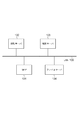
図1は、画像処理システムの全体図である。LAN(Local Area Network)100上には、MFP101、認証サーバ102及び103、ファイルサーバ104が互いに通信可能に接続されている。MFP101は、画像処理装置の一例である。本実施形態では画像処理装置の一例としてMFPを説明するが、単機能のスキャナ装置など、画像データを送信する機能を有していればMFPでなくとも良い。認証サーバ102及び103は、認証装置の一例である。
FIG. 1 is an overall view of an image processing system. On a LAN (Local Area Network) 100, an MFP 101,
ファイルサーバ104は、ファイル管理装置の一例である。MFP101は、ファイルサーバ104内のフォルダを宛先としてSMBやFTP、WebDAVを用いて画像データのファイル送信を行うことができる。また、MFP101は、図示しないメールサーバを介して画像データを電子メールで送信することができる。 The file server 104 is an example of a file management device. The MFP 101 can transmit a file of image data using SMB, FTP, or WebDAV with a folder in the file server 104 as a destination. Further, the MFP 101 can transmit image data by electronic mail via a mail server (not shown).
認証サーバ102及び103は、それぞれドメインコントローラの機能を有する。認証サーバ102は「Domain A」というドメインを管理し、認証サーバ103は「Domain B」というドメインを管理している。MFP101のユーザは、「Domain A」にログインする場合は認証サーバ102によって認証され、「Domain B」にログインする場合は認証サーバ103によって認証される。
Each of the
なお、画像処理システムは、MFP101、認証サーバ102及び103、ファイルサーバ104を含むものとするが、MFP101、認証サーバ102及び103のみ、或いはMFP101のみを画像処理システムと称することもできる。
The image processing system includes the
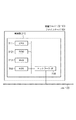
図2は、MFP101の構成を示すブロック図である。CPU211を含む制御部210は、MFP101全体の動作を制御する。CPU211は、ROM212に記憶された制御プログラムを読み出して読取制御や送信制御などの各種制御を行う。RAM213は、CPU211の主メモリ、ワークエリア等の一時記憶領域として用いられる。なお、MFP101は、1つのCPU211が1つのメモリ(RAM213またはHDD214)を用いて後述するフローチャートに示す各処理を実行するものとするが、他の態様であっても構わない。例えば、複数のCPUや複数のRAMまたはHDDを協働させて後述するフローチャートに示す各処理を実行するようにすることもできる。
FIG. 2 is a block diagram illustrating a configuration of the
HDD214は、画像データや各種プログラムを記憶する。操作部I/F215は、操作部219と制御部210を接続する。操作部219には、タッチパネル機能を有する液晶表示部やキーボードなどが備えられ、ユーザの指示を受け付ける受付部として機能する。
The
プリンタI/F216は、プリンタ220と制御部210を接続する。プリンタ220で印刷すべき画像データはプリンタI/F216を介して制御部210から転送され、プリンタ220において記録媒体上に印刷される。
A printer I /
スキャナI/F217は、スキャナ221と制御部210を接続する。スキャナ221は、原稿上の画像を読み取って画像データ(画像ファイル)を生成し、スキャナI/F217を介して制御部210に入力する。MFP101は、スキャナ221で生成された画像データ(画像ファイル)をファイル送信またはメール送信することができる。
The scanner I /
ネットワークI/F218は、制御部210(MFP101)をLAN100に接続する。ネットワークI/F218は、LAN100上の外部装置(認証サーバ102及び103やファイルサーバ104など)に画像データや情報を送信したり、LAN100上の外部装置から各種情報を受信したりする。
A network I /
図3は、認証サーバ102の構成を示すブロック図である。CPU311を含む制御部310は、認証サーバ102全体の動作を制御する。CPU311は、ROM312に記憶された制御プログラムを読み出して各種制御処理を実行する。RAM313は、CPU311の主メモリ、ワークエリア等の一時記憶領域として用いられる。なお、認証サーバ102は、1つのCPU311が1つのメモリ(RAM313またはHDD314)を用いて後述するフローチャートに示す各処理を実行するものとするが、他の態様であっても構わない。例えば、複数のCPUや複数のRAMまたはHDDを協働させて後述するフローチャートに示す各処理を実行するようにすることもできる。
FIG. 3 is a block diagram illustrating a configuration of the
HDD314は、画像データや各種プログラムを記憶する。ネットワークI/F315は、制御部310(認証サーバ102)をLAN100に接続する。ネットワークI/F315は、LAN100上の他の装置との間で各種情報を送受信する。なお、認証サーバ103及びファイルサーバ104の構成は、認証サーバ102と同様(図3)であるため、説明は省略する。
The
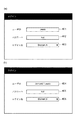
図4(a)(b)は、操作部219に表示される操作画面の一例を示す図である。ユーザは、MFP101の使用を開始する前に、領域401にユーザIDを、領域402にパスワードを、それぞれ入力する必要がある。また、ユーザはログイン先のドメインを指定する必要がある。具体的には、領域403にドロップダウン形式で示される選択肢から、ログイン先のドメインを選択する。ここでは、認証サーバ102が管理する「Domain A」と認証サーバ103が管理する「Domain B」が選択肢として示される。
4A and 4B are diagrams illustrating an example of an operation screen displayed on the
図4(a)に示す状態でユーザがログインの実行を指示すると、MFP101は認証サーバ102に対して「usera」及び「xyz」を送信し、ユーザ認証を依頼する(ユーザによるMFP101の使用可否を問い合わせる)。同様に、図4(b)に示す状態でユーザがログインの実行を指示すると、MFP101は認証サーバ103に対して「domainb\usera」及び「xyz」を送信し、ユーザ認証を依頼する(ユーザによるMFP101の使用可否を問い合わせる)。
When the user instructs to execute login in the state shown in FIG. 4A, the
図4(a)の領域401と図4(b)の領域404を比較すると、領域404の方には「domainb\」という文字列が付加されていることが分かる。このうち「domainb」は、認証サーバ103が管理する「Domain B」に対応するドメイン情報である。また、「\」は区切り記号であって、この記号よりも前がドメイン情報であり、この記号よりも後がユーザ固有の情報であることを示している。区切り記号は、「\」の他に「@」や「¥」が知られている。
Comparing the
領域404の方にドメイン情報が付加されているのは、認証サーバ103がユーザIDにドメイン情報を含めることを要求する種別のドメインコントローラであるためである。一方、認証サーバ102は、ユーザIDにドメイン情報を含めることを要求しない種別のドメインコントローラであるため、領域401の方にはドメイン情報が含まれていない。このように、ユーザは、ログイン先として選択したドメインに応じて、ユーザIDにドメイン情報を含めるか否かを判断して入力する必要がある。
The reason why the domain information is added to the
図5は、操作部219に表示される操作画面の一例を示す図である。ユーザは、図5の画面において、「スキャンして送信」キー501または「コピー」キー502を操作することにより、機能を選択することができる。図5は、「スキャンして送信」キー501が操作された状態を示している。なお、図5では、機能として「スキャンして送信」及び「コピー」を例示しているが、MFP101がこれら以外の機能を備えていてもよい。
FIG. 5 is a diagram illustrating an example of an operation screen displayed on the
「スキャンして送信」キー501を操作したユーザは、操作キー521乃至523のいずれかを操作することにより、送信する画像データの宛先を設定することができる。「アドレス帳」キー521を操作すると、HDD214に保持されているアドレス帳の内容が表示され、ユーザは、アドレス帳に登録された内容を参照し、画像データの宛先として設定することができる。
The user who operates the “scan and send” key 501 can set the destination of the image data to be transmitted by operating one of the
「新規入力」キー522を操作すると、ユーザからの新規入力を受け付ける画面が表示される。ユーザは、表示された画面を介して宛先情報を入力し、画像データの宛先として設定することができる。
When the “new input”
「自分へファイル送信」キー523は、ユーザが自分自身のフォルダを画像データの宛先として設定したい場合に操作する操作キーである。ユーザが「自分へファイル送信」キー523を操作すると、ユーザ自身のフォルダのパス情報が画像データの宛先として自動的に設定される(詳細は後述する)。 The “Send file to yourself” key 523 is an operation key operated when the user wants to set his / her own folder as the destination of the image data. When the user operates the “send file to myself” key 523, the path information of the user's own folder is automatically set as the destination of the image data (details will be described later).
領域510は、操作キー521乃至523を用いて設定された宛先が示される。領域510に表示された宛先の1つを選択した状態で「詳細情報」キー511を操作すると、選択された宛先の詳細情報が表示される(図8)。
An
「読取設定」キー531は、カラー/モノクロなどの読取設定を行う場合に使用する操作キーである。「解像度」キー532は、読取解像度を設定する場合に使用する操作キーである。「ファイル形式」キー533は、送信する画像データのファイル形式を設定する場合に使用する操作キーである。「両面原稿」キー534は、片面/両面読取の設定を行う場合に使用する操作キーである。「読取サイズ」キー535は、読取サイズを設定する場合に使用する操作キーである。
The “reading setting”
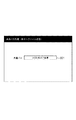
図6は、操作部219に表示される操作画面の一例を示す図である。図6の画面は、管理者のみが操作可能であり、一般のユーザがMFP101を操作する場合には表示されない。領域601には、複数のユーザに共通して使用される共通パスが入力される。ここで設定された共通パスは、RAM213に記憶され、図4(a)の領域401に入力されたユーザID、または図4(b)の領域404に入力されたユーザIDと組み合わされ、画像データの格納先となるフォルダのパス情報として使用される。
FIG. 6 is a diagram illustrating an example of an operation screen displayed on the
共通パスが図6に示すように設定された状態で、図5の「自分へファイル送信」キー523が操作されると、図5の画面は図7に示す状態へと遷移する。図7の画面では、領域510に「\\123.45.6.7」という宛先が1件表示されている。ここでは、図6の領域601で設定された共通パスのうち、ファイルサーバ104のホスト名に相当する部分のみが表示される。領域510に表示された「\\123.45.6.7」を選択した状態で「詳細情報」キー511を操作すると、図8(a)または(b)の画面が表示される。
When the “send file to yourself” key 523 in FIG. 5 is operated in a state where the common path is set as shown in FIG. 6, the screen in FIG. 5 transitions to the state shown in FIG. In the screen of FIG. 7, one destination “\\ 123.45.6.7” is displayed in the
図8(a)(b)は、操作部219に表示される操作画面の一例を示す図である。図8(a)は、図4(a)に示す状態でログインしたユーザが「自分へファイル送信」キー523を操作した場合の例を示す。領域801には、図4(a)の領域401に入力されたユーザID「usera」にドメイン情報「domaina」が追加されたものが、共通パスの「\\123.45.6.7\共有」に続いて記述されている。この結果、「\\123.45.6.7\共有\domaina\usera」というパス情報を用いて画像データが送信されることになる。
8A and 8B are diagrams illustrating an example of an operation screen displayed on the
このように、パス情報を「\\123.45.6.7\共有\usera」とせずに、ドメイン情報「domaina」を追加しているのは、次のような問題に対処するためである。即ち、認証サーバ102と同じ種別(ユーザIDにドメイン情報を含めることを要求しない種別)の認証サーバが別に存在する場合、認証サーバ102で管理している「usera」と同じユーザIDを用いて別のユーザが管理されている可能性がある。このような場合に、「\\123.45.6.7\共有\usera」のようにドメイン情報を含まないパス情報を用いて画像データを送信すると、異なるユーザからの画像データが同じフォルダに格納されてしまうという問題が生じる。
The reason why the domain information “domaina” is added instead of “\\ 123.45.6.7 \ shared \ usera” as the path information is to address the following problem. . That is, when there is another authentication server of the same type as the authentication server 102 (a type that does not require the user ID to include domain information), the
そこでMFP101には、ドメイン情報を含まないユーザIDをパス情報の一部として使用する場合に、ドメイン情報を自動的に追加する構成が設けられている。これにより、複数の認証サーバで偶然同じユーザIDが管理されていたとしても、追加されたドメイン情報によって画像データが異なるフォルダに格納されるようになる。
Therefore, the
領域802には、図4(a)の領域401に入力されたユーザIDの「usera」がファイルサーバへの接続に使用される認証情報のユーザ名として設定されている。ここでは、ユーザID「usera」へのドメイン情報の追加は行われない。また、領域803には、図4(a)の領域402に入力されたパスワードの「xyz」がファイルサーバへの接続に使用される認証情報のパスワードとして設定されている。
In the
図8(b)は図4(b)に示す状態でログインしたユーザが操作キー523を操作した場合の例を示す。領域804には、共通パスの「\\123.45.6.7\共有」と図4(b)の領域404に入力された「domainb\usera」が組み合わされた、「\\123.45.6.7\共有\domainb\usera」というパス情報が設定されている。
FIG. 8B shows an example when the user who has logged in in the state shown in FIG. In the
領域805には、図4(b)の領域404に入力されたユーザIDの「domainb\usera」がファイルサーバへの接続に使用される認証情報のユーザ名として設定されている。また、領域806には、図4(b)の領域405に入力されたパスワードの「xyz」がファイルサーバへの接続に使用される認証情報のパスワードとして設定されている。
In the
図9は、MFP101におけるログイン動作(ユーザがMFP101の使用を開始するときの一連の動作)を説明するフローチャートである。図9のフローチャートに示す各動作(ステップ)は、MFP101のCPU211がHDD214に記憶された制御プログラムを実行することにより実現される。
FIG. 9 is a flowchart for describing a login operation (a series of operations when the user starts using the MFP 101) in the
ステップS901では、操作部219に表示した画面(図4)を介して、ユーザからのユーザID及びパスワードの入力を受け付ける。
In step S901, an input of a user ID and a password from the user is accepted via the screen (FIG. 4) displayed on the
ステップS902では、ステップS901で受け付けたユーザID及びパスワードを認証サーバ102または103に送信し、ユーザ認証を依頼する(ユーザによるMFP101の使用可否を問い合わせる)。送信先の認証サーバは、図4の領域403を用いたログイン先の選択に応じて切り替えられる。
In step S902, the user ID and password received in step S901 are transmitted to the
ステップS903では、認証サーバから通知される内容が、認証OKであるか認証NGであるかを判定する。この結果、認証OKである場合にはステップS904に進み、ユーザによるMFP101の各機能の使用を許可するとともに、ステップS901で受け付けたユーザID及びパスワードをRAM213に記憶する。一方、認証NGである場合にはそのまま処理を終了する(或いは、ステップS901に戻り、ユーザID及びパスワードを入力するための画面を再表示する)。
In step S903, it is determined whether the content notified from the authentication server is authentication OK or authentication NG. As a result, if the authentication is OK, the process proceeds to step S904, where the user is allowed to use each function of the
図10は、MFP101におけるパス情報設定動作を説明するフローチャートである。図10のフローチャートは、「自分へファイル送信」キー523が操作された場合に開始される。図10のフローチャートに示す各動作(ステップ)は、MFP101のCPU211がHDD214に記憶された制御プログラムを実行することにより実現される。
FIG. 10 is a flowchart for explaining the path information setting operation in the
ステップS1001では、図6の領域601に入力され、HDD214に記憶されている共通パスを取得する。ステップS1002では、ステップS901で受け付けられ、ステップS904でRAM213に記憶されたユーザIDを取得する。
In step S1001, the common path that is input to the
ステップS1003では、ステップS1002で取得したユーザIDにドメイン情報が含まれるか否かを、区切り記号の有無に基づいて判定する。具体的には、ステップS1002で取得したユーザIDに区切り記号「\」が含まれていればドメイン情報が含まれると判定し、ステップS1007に進む。一方、ステップS1002で取得したユーザIDに区切り記号「\」が含まれていなければドメイン情報が含まれていないと判定し、ステップS1004に進む。 In step S1003, whether or not the domain information is included in the user ID acquired in step S1002 is determined based on the presence or absence of a delimiter. Specifically, if the user ID acquired in step S1002 includes the delimiter “\”, it is determined that the domain information is included, and the process proceeds to step S1007. On the other hand, if the user ID acquired in step S1002 does not include the delimiter “\”, it is determined that the domain information is not included, and the process proceeds to step S1004.
ステップS1004では、ステップS1002で取得したユーザIDにドメイン情報を追加するか否かを判定する。ユーザIDからドメイン情報を追加するか否かは、図11の画面を介して管理者によって予め設定されている。 In step S1004, it is determined whether to add domain information to the user ID acquired in step S1002. Whether to add the domain information from the user ID is set in advance by the administrator via the screen of FIG.
図11は、操作部219に表示される操作画面の一例を示す図である。図11の画面は、管理者のみが操作可能であり、一般のユーザがMFP101を操作する場合には表示されない。図11の画面において管理者が「する」キー1101を操作すれば、ユーザIDにドメイン情報を追加することが選択される。
FIG. 11 is a diagram illustrating an example of an operation screen displayed on the
一方、管理者が「しない」キー1102を操作すれば、ユーザIDにドメイン情報を追加しないことが選択される。この場合、たとえユーザIDにドメイン情報が含まれていないとしても、ドメイン情報が追加されることなく、ドメイン情報を含まないユーザIDがパス情報の一部として設定される。例えば、システム内にドメイン(認証サーバ)が一つしか存在しない場合や、複数のドメインに同じユーザIDが重複しないように管理されている環境の場合は、異なるユーザの画像データが同じフォルダに格納されるという問題が発生しない。それにも関わらずドメイン情報を追加すると、画像データが必要以上に一つ深い階層のフォルダに格納されることになり、逆に使い勝手が悪くなってしまう。このような場合に、ドメイン情報を追加しないように設定すれば良い。 On the other hand, if the administrator operates the “No” key 1102, it is selected not to add domain information to the user ID. In this case, even if the domain information is not included in the user ID, the domain information is not added, and the user ID not including the domain information is set as a part of the path information. For example, when there is only one domain (authentication server) in the system, or in an environment where the same user ID is managed so as not to overlap in multiple domains, image data of different users is stored in the same folder Does not occur. Nevertheless, if domain information is added, image data will be stored in a folder one level deeper than necessary, and the usability will be worse. In such a case, it may be set so that domain information is not added.
ステップS1004では、ユーザIDにドメイン情報を追加することが選択されていれば、ドメイン情報を追加すると判定し、ステップS1005に進む。一方、ユーザIDにドメイン情報を追加しないことが選択されていれば、ドメイン情報を追加しないと判定し、ステップS1007に進む。 In step S1004, if adding domain information to the user ID is selected, it is determined to add domain information, and the process proceeds to step S1005. On the other hand, if it is selected not to add the domain information to the user ID, it is determined that the domain information is not added, and the process proceeds to step S1007.
ステップS1005では、ステップS1002で取得したユーザIDにドメイン情報を追加する。MFP101のHDD214には、図4の領域403で選択可能な複数のドメイン(認証サーバ)のそれぞれに対応付けて、ユーザIDに追加するためのドメイン情報が記憶されている。ステップS1005では、HDD214に記憶されているドメイン情報を読み出して使用する。
In step S1005, domain information is added to the user ID acquired in step S1002. The
続くステップS1006では、ドメイン情報が追加されたユーザIDを共通パス部分の後に追加したものをフォルダのパス情報として設定する。一方、ステップS1007では、ドメイン情報を含まないユーザIDを共通パス部分の後に追加したものをフォルダのパス情報として設定する。なお、ステップS1004の判定を行わず、ユーザIDにドメイン情報が含まれない場合は常にドメイン情報を追加するようにしても構わない。 In the subsequent step S1006, the user ID added with the domain information added after the common path is set as the folder path information. On the other hand, in step S1007, a user ID not including domain information added after the common path is set as folder path information. Note that the domain information may always be added when the domain information is not included in the user ID without performing the determination in step S1004.
図12は、MFP101における送信動作を説明するフローチャートである。図12のフローチャートは、画像データの宛先が設定された後、図示しないスタートキーが操作された場合に開始される。図12のフローチャートに示す各動作(ステップ)は、MFP101のCPU211がHDD214に記憶された制御プログラムを実行することにより実現される。
FIG. 12 is a flowchart for explaining a transmission operation in the
ステップS1201では、スキャナ221が原稿上の画像を読み取って画像データを生成する。ステップS1202では、図10のステップS1006またはS1007で設定されたパス情報に従ってファイルサーバ104に接続する。このとき、図8の画面に示されるユーザ名及びパスワードがファイルサーバ104へのログインに使用される。
In step S1201, the
ステップS1203では、ファイルサーバ104との接続が成功したか否かを判定する。ファイルサーバ104との接続が成功するとステップS1204に進み、成功しなければそのまま処理を終了する。 In step S1203, it is determined whether or not the connection with the file server 104 is successful. If the connection with the file server 104 is successful, the process advances to step S1204. If the connection is not successful, the process ends.
ステップS1204では、図10のステップS1006またはS1007で設定されたパス情報が示すフォルダがファイルサーバ104に存在するか否かを判定する。該当するフォルダが存在すればステップS1206に進み、存在しなければステップS1205に進む。 In step S1204, it is determined whether the folder indicated by the path information set in step S1006 or S1007 in FIG. If the corresponding folder exists, the process proceeds to step S1206, and if not, the process proceeds to step S1205.
ステップS1205では、図10のステップS1006またはS1007で設定されたパス情報が示すフォルダをファイルサーバ104内に新規作成する。具体的には、ファイルサーバ104に対してフォルダの新規作成を要求するコマンドを送信する。なお、図10のステップS1006またはS1007で設定されたパス情報が示すフォルダがファイルサーバ104に存在しない場合に、そのままエラー終了するようにしても良い。 In step S1205, a folder indicated by the path information set in step S1006 or S1007 in FIG. 10 is newly created in the file server 104. Specifically, a command for requesting creation of a new folder is transmitted to the file server 104. If the file server 104 does not contain the folder indicated by the path information set in step S1006 or S1007 in FIG.
ステップS1206では、ファイルサーバ104に画像データを送信し、図10のステップS1006またはS1007で設定されたパス情報が示すフォルダに格納する。 In step S1206, the image data is transmitted to the file server 104 and stored in the folder indicated by the path information set in step S1006 or S1007 of FIG.
以上の処理により、ユーザIDにドメイン情報が含まれない場合であっても、ドメイン情報を含むパスを画像データの宛先として簡単に設定することができる。 Through the above processing, even when the domain information is not included in the user ID, a path including the domain information can be easily set as the destination of the image data.
また、上述した説明では、ユーザがMFP101の使用を開始するときに図9のフローチャートに従ってユーザを認証する例を説明したが、他の態様であっても構わない。例えば、ユーザがある特定の機能を選択した後に、その機能を使用するためのユーザ認証を図9のフローチャートに従って行うようにしてもよい。
In the above description, the example in which the user is authenticated according to the flowchart of FIG. 9 when the user starts using the
なお、本発明の目的は、以下の処理を実行することによっても達成される。即ち、上述した実施形態の機能を実現するソフトウェアのプログラムコードを記録した記憶媒体を、システム或いは装置に供給し、そのシステム或いは装置のコンピュータ(CPUやMPU等)が記憶媒体に格納されたプログラムコードを読み出す処理である。 The object of the present invention can also be achieved by executing the following processing. That is, a storage medium that records a program code of software that realizes the functions of the above-described embodiments is supplied to a system or apparatus, and a program code (CPU or MPU) of the system or apparatus is stored in the storage medium. Is a process of reading.
この場合、記憶媒体から読み出されたプログラムコード自体が前述した実施の形態の機能を実現することになり、そのプログラムコード及び該プログラムコードを記憶した記憶媒体は本発明を構成することになる。 In this case, the program code itself read from the storage medium realizes the functions of the above-described embodiments, and the program code and the storage medium storing the program code constitute the present invention.
101 MFP
210 制御部
211 CPU
212 ROM
213 RAM
214 HDD
101 MFP
210
212 ROM
213 RAM
214 HDD
Claims (10)
ログイン先のドメインを指定する指定手段と、
前記受付手段が受け付けたユーザIDに基づくユーザの認証が成功した後、前記受付手段が受け付けたユーザIDに前記指定手段により指定されたドメインに対応するドメイン情報を追加し、画像データの宛先となるフォルダのパス情報の一部として設定する設定手段と、
前記パス情報が示すフォルダを宛先として画像データを送信する送信手段と、
を備えることを特徴とする画像処理システム。 And receiving means for receiving the user ID,
A specification means to specify the domain to log in to,
After successful authentication of the user based on the user ID accepted by the accepting means, domain information corresponding to the domain specified by the specifying means is added to the user ID accepted by the accepting means, which becomes the destination of the image data Setting means to set as part of the folder path information;
Transmitting means for transmitting image data with the folder indicated by the path information as a destination;
An image processing system comprising:
前記判定手段による判定の結果、前記受付手段が受け付けたユーザIDにドメイン情報が含まれないと判定された場合に、前記設定手段は、前記受付手段が受け付けたユーザIDに前記指定手段により指定されたドメインに対応するドメイン情報を追加することを特徴とする請求項1に記載の画像処理システム。 A determination unit for determining whether domain information is included in the user ID received by the reception unit;
As a result of determination by the determination unit, when it is determined that the user ID received by the reception unit does not include domain information, the setting unit is specified by the specification unit for the user ID received by the reception unit. The image processing system according to claim 1, further comprising adding domain information corresponding to each domain.
前記判定手段による判定の結果、前記受付手段が受け付けたユーザIDにドメイン情報が含まれないと判定された場合に、前記設定手段は、前記受付手段が受け付けたユーザIDにドメイン情報を追加することが選択されていれば前記受付手段が受け付けたユーザIDにドメイン情報を追加したものを前記パス情報の一部として設定し、前記受付手段が受け付けたユーザIDにドメイン情報を追加しないことが選択されていれば前記受付手段が受け付けたユーザIDにドメイン情報を追加せずに前記パス情報の一部として設定することを特徴とする請求項2または3に記載の画像処理システム。 A selection means for selecting whether to add domain information to the user ID received by the reception means;
As a result of determination by the determination unit, when it is determined that domain information is not included in the user ID received by the reception unit, the setting unit adds domain information to the user ID received by the reception unit. Is selected, the domain information added to the user ID accepted by the accepting means is set as a part of the path information, and it is selected not to add the domain information to the user ID accepted by the accepting means. 4. The image processing system according to claim 2, wherein the image processing system is set as a part of the path information without adding domain information to the user ID received by the receiving unit.
前記受付手段が受け付けたユーザIDに基づくユーザの認証が成功した後、前記受付手段が受け付けたユーザIDにドメイン情報を追加し、画像データの宛先となるフォルダのパス情報の一部として設定する設定手段と、
前記パス情報が示すフォルダを宛先として画像データを送信する送信手段とを備え、
前記パス情報には、複数のユーザに共通して使用される共通パス部分が含まれることを特徴とする画像処理システム。 Receiving means for receiving a user ID;
After authentication of the user based on the user ID accepted by the accepting unit is successful, domain information is added to the user ID accepted by the accepting unit and set as part of the path information of the folder serving as the destination of the image data Means,
Transmission means for transmitting image data with the folder indicated by the path information as a destination,
Wherein the path information, images processing system, characterized in that it contains common path portion used in common to a plurality of users.
前記設定手段は、前記操作キーが操作されたことに応じて前記設定を行うことを特徴とする請求項1から5のいずれか1項に記載の画像処理システム。 An operation key for instructing to set the authenticated user's own folder as the destination of the image data;
The image processing system according to claim 1, wherein the setting unit performs the setting in response to the operation key being operated.
前記送信手段は、前記読取手段が生成した画像データを送信することを特徴とする請求項1から7のいずれか1項に記載の画像処理システム。 A reading unit that reads an image on a document and generates image data;
The transmission unit, an image processing system according to any one of claims 1 7, characterized in that transmitting the image data to said reading means is generated.
ログイン先のドメインを指定する指定工程と、
前記受付工程で受け付けたユーザIDに基づくユーザの認証が成功した後、前記受付工程で受け付けたユーザIDに前記指定工程で指定されたドメインに対応するドメイン情報を追加し、画像データの宛先となるフォルダのパス情報の一部として設定する設定工程と、
前記パス情報が示すフォルダを宛先として画像データを送信する送信工程と、
を備えることを特徴とする画像処理方法。 A reception process for receiving an input of a user ID;
A specification process to specify the domain to log in
After successful authentication of the user based on the user ID received in the receiving step, domain information corresponding to the domain specified in the specifying step is added to the user ID received in the receiving step, which becomes the destination of the image data A setting step to set as part of the folder path information;
A transmission step of transmitting image data with the folder indicated by the path information as a destination;
An image processing method comprising:
Priority Applications (2)
| Application Number | Priority Date | Filing Date | Title |
|---|---|---|---|
| JP2013087888A JP6253246B2 (en) | 2013-04-18 | 2013-04-18 | Image processing system, image processing method, and program |
| US14/251,466 US20140317310A1 (en) | 2013-04-18 | 2014-04-11 | Image processing system, image processing method, and storage medium |
Applications Claiming Priority (1)
| Application Number | Priority Date | Filing Date | Title |
|---|---|---|---|
| JP2013087888A JP6253246B2 (en) | 2013-04-18 | 2013-04-18 | Image processing system, image processing method, and program |
Publications (2)
| Publication Number | Publication Date |
|---|---|
| JP2014212453A JP2014212453A (en) | 2014-11-13 |
| JP6253246B2 true JP6253246B2 (en) | 2017-12-27 |
Family
ID=51729913
Family Applications (1)
| Application Number | Title | Priority Date | Filing Date |
|---|---|---|---|
| JP2013087888A Expired - Fee Related JP6253246B2 (en) | 2013-04-18 | 2013-04-18 | Image processing system, image processing method, and program |
Country Status (2)
| Country | Link |
|---|---|
| US (1) | US20140317310A1 (en) |
| JP (1) | JP6253246B2 (en) |
Families Citing this family (1)
| Publication number | Priority date | Publication date | Assignee | Title |
|---|---|---|---|---|
| CN113472847B (en) * | 2021-05-28 | 2023-04-07 | 济南浪潮数据技术有限公司 | Method, system, device and medium for filtering invalid users |
Family Cites Families (8)
| Publication number | Priority date | Publication date | Assignee | Title |
|---|---|---|---|---|
| US6801911B1 (en) * | 1997-11-21 | 2004-10-05 | International Business Machines Corporation | Data processing system and method for accessing files |
| JP3220441B2 (en) * | 1999-10-08 | 2001-10-22 | 松下電送システム株式会社 | Image transmission apparatus and image transmission method |
| AU2001228235A1 (en) * | 2000-01-27 | 2001-08-07 | Hummingbird Ltd. | A method and system for implementing an enterprise information portal |
| US20030052926A1 (en) * | 2001-09-14 | 2003-03-20 | Dunlap Kendra L. | System and method for disguising depth in tree menus |
| US8451806B2 (en) * | 2006-08-21 | 2013-05-28 | Citrix Sysrems, Inc. | Systems and methods for pinging a user's intranet IP address |
| JP4915460B2 (en) * | 2010-03-12 | 2012-04-11 | コニカミノルタビジネステクノロジーズ株式会社 | Pull print system, server apparatus, and print job management method |
| US8812439B2 (en) * | 2011-03-22 | 2014-08-19 | Oracle International Corporation | Folder structure and authorization mirroring from enterprise resource planning systems to document management systems |
| US9003504B2 (en) * | 2011-06-07 | 2015-04-07 | Unisys Corporation | Remote login arrangement for heterogeneous systems using centralized authentication |
-
2013
- 2013-04-18 JP JP2013087888A patent/JP6253246B2/en not_active Expired - Fee Related
-
2014
- 2014-04-11 US US14/251,466 patent/US20140317310A1/en not_active Abandoned
Also Published As
| Publication number | Publication date |
|---|---|
| JP2014212453A (en) | 2014-11-13 |
| US20140317310A1 (en) | 2014-10-23 |
Similar Documents
| Publication | Publication Date | Title |
|---|---|---|
| JP6112779B2 (en) | Data processing apparatus, data processing apparatus control method, and program | |
| JP6066572B2 (en) | Image processing apparatus, control method for image processing apparatus, and control program | |
| JP6184060B2 (en) | Image processing apparatus, image processing apparatus control method, and program | |
| US9854116B2 (en) | Image processing apparatus configured to transmit image data and method for controlling an image processing apparatus | |
| US9635214B2 (en) | Image processing system for setting filename to received image data, image processing method therefor, and storage medium | |
| JP2022013620A (en) | Image processing apparatus, method for controlling the same, and program | |
| KR20170105951A (en) | Management server and method for managing file | |
| JP6234130B2 (en) | Information processing system, information processing apparatus, information processing method, and program | |
| JP6184269B2 (en) | Image processing system, information processing apparatus, image processing method, information processing method, and program | |
| JP6032906B2 (en) | Image processing system, image processing apparatus, control method for image processing apparatus, and program | |
| JP7081403B2 (en) | Information processing equipment and programs | |
| JP6253246B2 (en) | Image processing system, image processing method, and program | |
| US9509879B2 (en) | Image processing apparatus, method for controlling image processing apparatus, and storage medium | |
| JP6300870B2 (en) | Image processing apparatus, image processing apparatus control method, and program | |
| JP6000639B2 (en) | Image processing apparatus, image processing apparatus control method, and program | |
| JP7263023B2 (en) | Image processing device and method | |
| JP6465851B2 (en) | Image processing apparatus, image processing apparatus control method, and program | |
| JP2015061165A (en) | Image processing system, image processing apparatus, image processing method, and program | |
| JP6576529B2 (en) | Data processing apparatus, data processing apparatus control method, and program | |
| JP6490283B2 (en) | Image processing apparatus, control method, and program | |
| JP6391742B2 (en) | Data processing apparatus, data processing apparatus control method, and program | |
| JP6345226B2 (en) | Image processing apparatus, image processing apparatus control method, and program | |
| JP6433551B2 (en) | Image processing apparatus, image processing apparatus control method, and program | |
| JP2021189753A (en) | Image forming apparatus, method for controlling image forming apparatus, and program |
Legal Events
| Date | Code | Title | Description |
|---|---|---|---|
| A621 | Written request for application examination |
Free format text: JAPANESE INTERMEDIATE CODE: A621 Effective date: 20160414 |
|
| A977 | Report on retrieval |
Free format text: JAPANESE INTERMEDIATE CODE: A971007 Effective date: 20170209 |
|
| A131 | Notification of reasons for refusal |
Free format text: JAPANESE INTERMEDIATE CODE: A131 Effective date: 20170328 |
|
| A521 | Request for written amendment filed |
Free format text: JAPANESE INTERMEDIATE CODE: A523 Effective date: 20170526 |
|
| TRDD | Decision of grant or rejection written | ||
| A01 | Written decision to grant a patent or to grant a registration (utility model) |
Free format text: JAPANESE INTERMEDIATE CODE: A01 Effective date: 20171031 |
|
| A61 | First payment of annual fees (during grant procedure) |
Free format text: JAPANESE INTERMEDIATE CODE: A61 Effective date: 20171128 |
|
| R151 | Written notification of patent or utility model registration |
Ref document number: 6253246 Country of ref document: JP Free format text: JAPANESE INTERMEDIATE CODE: R151 |
|
| LAPS | Cancellation because of no payment of annual fees |