JP6329112B2 - Information processing apparatus and program - Google Patents
Information processing apparatus and program Download PDFInfo
- Publication number
- JP6329112B2 JP6329112B2 JP2015183435A JP2015183435A JP6329112B2 JP 6329112 B2 JP6329112 B2 JP 6329112B2 JP 2015183435 A JP2015183435 A JP 2015183435A JP 2015183435 A JP2015183435 A JP 2015183435A JP 6329112 B2 JP6329112 B2 JP 6329112B2
- Authority
- JP
- Japan
- Prior art keywords
- product
- candidate
- selection button
- information
- display
- Prior art date
- Legal status (The legal status is an assumption and is not a legal conclusion. Google has not performed a legal analysis and makes no representation as to the accuracy of the status listed.)
- Expired - Fee Related
Links
Images





Classifications
-
- G—PHYSICS
- G06—COMPUTING OR CALCULATING; COUNTING
- G06Q—INFORMATION AND COMMUNICATION TECHNOLOGY [ICT] SPECIALLY ADAPTED FOR ADMINISTRATIVE, COMMERCIAL, FINANCIAL, MANAGERIAL OR SUPERVISORY PURPOSES; SYSTEMS OR METHODS SPECIALLY ADAPTED FOR ADMINISTRATIVE, COMMERCIAL, FINANCIAL, MANAGERIAL OR SUPERVISORY PURPOSES, NOT OTHERWISE PROVIDED FOR
- G06Q30/00—Commerce
- G06Q30/06—Buying, selling or leasing transactions
- G06Q30/0601—Electronic shopping [e-shopping]
- G06Q30/0641—Electronic shopping [e-shopping] utilising user interfaces specially adapted for shopping
- G06Q30/0643—Electronic shopping [e-shopping] utilising user interfaces specially adapted for shopping graphically representing goods, e.g. 3D product representation
-
- G—PHYSICS
- G06—COMPUTING OR CALCULATING; COUNTING
- G06F—ELECTRIC DIGITAL DATA PROCESSING
- G06F18/00—Pattern recognition
- G06F18/20—Analysing
- G06F18/22—Matching criteria, e.g. proximity measures
-
- G—PHYSICS
- G06—COMPUTING OR CALCULATING; COUNTING
- G06F—ELECTRIC DIGITAL DATA PROCESSING
- G06F3/00—Input arrangements for transferring data to be processed into a form capable of being handled by the computer; Output arrangements for transferring data from processing unit to output unit, e.g. interface arrangements
- G06F3/01—Input arrangements or combined input and output arrangements for interaction between user and computer
- G06F3/048—Interaction techniques based on graphical user interfaces [GUI]
- G06F3/0481—Interaction techniques based on graphical user interfaces [GUI] based on specific properties of the displayed interaction object or a metaphor-based environment, e.g. interaction with desktop elements like windows or icons, or assisted by a cursor's changing behaviour or appearance
- G06F3/0482—Interaction with lists of selectable items, e.g. menus
-
- G—PHYSICS
- G06—COMPUTING OR CALCULATING; COUNTING
- G06Q—INFORMATION AND COMMUNICATION TECHNOLOGY [ICT] SPECIALLY ADAPTED FOR ADMINISTRATIVE, COMMERCIAL, FINANCIAL, MANAGERIAL OR SUPERVISORY PURPOSES; SYSTEMS OR METHODS SPECIALLY ADAPTED FOR ADMINISTRATIVE, COMMERCIAL, FINANCIAL, MANAGERIAL OR SUPERVISORY PURPOSES, NOT OTHERWISE PROVIDED FOR
- G06Q20/00—Payment architectures, schemes or protocols
- G06Q20/08—Payment architectures
- G06Q20/20—Point-of-sale [POS] network systems
-
- G—PHYSICS
- G06—COMPUTING OR CALCULATING; COUNTING
- G06V—IMAGE OR VIDEO RECOGNITION OR UNDERSTANDING
- G06V10/00—Arrangements for image or video recognition or understanding
- G06V10/70—Arrangements for image or video recognition or understanding using pattern recognition or machine learning
-
- G—PHYSICS
- G09—EDUCATION; CRYPTOGRAPHY; DISPLAY; ADVERTISING; SEALS
- G09G—ARRANGEMENTS OR CIRCUITS FOR CONTROL OF INDICATING DEVICES USING STATIC MEANS TO PRESENT VARIABLE INFORMATION
- G09G5/00—Control arrangements or circuits for visual indicators common to cathode-ray tube indicators and other visual indicators
- G09G5/02—Control arrangements or circuits for visual indicators common to cathode-ray tube indicators and other visual indicators characterised by the way in which colour is displayed
-
- G—PHYSICS
- G09—EDUCATION; CRYPTOGRAPHY; DISPLAY; ADVERTISING; SEALS
- G09G—ARRANGEMENTS OR CIRCUITS FOR CONTROL OF INDICATING DEVICES USING STATIC MEANS TO PRESENT VARIABLE INFORMATION
- G09G5/00—Control arrangements or circuits for visual indicators common to cathode-ray tube indicators and other visual indicators
- G09G5/36—Control arrangements or circuits for visual indicators common to cathode-ray tube indicators and other visual indicators characterised by the display of a graphic pattern, e.g. using an all-points-addressable [APA] memory
- G09G5/38—Control arrangements or circuits for visual indicators common to cathode-ray tube indicators and other visual indicators characterised by the display of a graphic pattern, e.g. using an all-points-addressable [APA] memory with means for controlling the display position
-
- G—PHYSICS
- G06—COMPUTING OR CALCULATING; COUNTING
- G06V—IMAGE OR VIDEO RECOGNITION OR UNDERSTANDING
- G06V20/00—Scenes; Scene-specific elements
- G06V20/60—Type of objects
- G06V20/68—Food, e.g. fruit or vegetables
-
- G—PHYSICS
- G09—EDUCATION; CRYPTOGRAPHY; DISPLAY; ADVERTISING; SEALS
- G09G—ARRANGEMENTS OR CIRCUITS FOR CONTROL OF INDICATING DEVICES USING STATIC MEANS TO PRESENT VARIABLE INFORMATION
- G09G2320/00—Control of display operating conditions
- G09G2320/06—Adjustment of display parameters
- G09G2320/0666—Adjustment of display parameters for control of colour parameters, e.g. colour temperature
-
- G—PHYSICS
- G09—EDUCATION; CRYPTOGRAPHY; DISPLAY; ADVERTISING; SEALS
- G09G—ARRANGEMENTS OR CIRCUITS FOR CONTROL OF INDICATING DEVICES USING STATIC MEANS TO PRESENT VARIABLE INFORMATION
- G09G2320/00—Control of display operating conditions
- G09G2320/06—Adjustment of display parameters
- G09G2320/0686—Adjustment of display parameters with two or more screen areas displaying information with different brightness or colours
-
- G—PHYSICS
- G09—EDUCATION; CRYPTOGRAPHY; DISPLAY; ADVERTISING; SEALS
- G09G—ARRANGEMENTS OR CIRCUITS FOR CONTROL OF INDICATING DEVICES USING STATIC MEANS TO PRESENT VARIABLE INFORMATION
- G09G2320/00—Control of display operating conditions
- G09G2320/08—Arrangements within a display terminal for setting, manually or automatically, display parameters of the display terminal
-
- G—PHYSICS
- G09—EDUCATION; CRYPTOGRAPHY; DISPLAY; ADVERTISING; SEALS
- G09G—ARRANGEMENTS OR CIRCUITS FOR CONTROL OF INDICATING DEVICES USING STATIC MEANS TO PRESENT VARIABLE INFORMATION
- G09G2340/00—Aspects of display data processing
- G09G2340/04—Changes in size, position or resolution of an image
- G09G2340/0464—Positioning
-
- G—PHYSICS
- G09—EDUCATION; CRYPTOGRAPHY; DISPLAY; ADVERTISING; SEALS
- G09G—ARRANGEMENTS OR CIRCUITS FOR CONTROL OF INDICATING DEVICES USING STATIC MEANS TO PRESENT VARIABLE INFORMATION
- G09G2340/00—Aspects of display data processing
- G09G2340/14—Solving problems related to the presentation of information to be displayed
Landscapes
- Engineering & Computer Science (AREA)
- Theoretical Computer Science (AREA)
- Business, Economics & Management (AREA)
- Physics & Mathematics (AREA)
- General Physics & Mathematics (AREA)
- Accounting & Taxation (AREA)
- Finance (AREA)
- Strategic Management (AREA)
- General Business, Economics & Management (AREA)
- General Engineering & Computer Science (AREA)
- Computer Vision & Pattern Recognition (AREA)
- Evolutionary Computation (AREA)
- Artificial Intelligence (AREA)
- Computer Hardware Design (AREA)
- Multimedia (AREA)
- Data Mining & Analysis (AREA)
- Databases & Information Systems (AREA)
- Economics (AREA)
- General Health & Medical Sciences (AREA)
- Medical Informatics (AREA)
- Software Systems (AREA)
- Marketing (AREA)
- Health & Medical Sciences (AREA)
- Computing Systems (AREA)
- Development Economics (AREA)
- Human Computer Interaction (AREA)
- Bioinformatics & Cheminformatics (AREA)
- Bioinformatics & Computational Biology (AREA)
- Evolutionary Biology (AREA)
- Life Sciences & Earth Sciences (AREA)
- Cash Registers Or Receiving Machines (AREA)
Description
本発明の実施形態は、情報処理装置及びプログラムに関する。 Embodiments described herein relate generally to an information processing apparatus and a program.
従来、物品の撮像画像から抽出される特徴量を基に当該物品の商品候補を画面に表示するオブジェクト認識スキャナの開発が、POS(Point-of-Sale)システムなどにおいて進められている。オブジェクト認識スキャナを利用すると、キャッシャが買物カゴの中の物品を撮像エリアに翳した際に、その物品の特徴量に類似する上位の商品候補が類似度の高い順に表示領域に並べて表示されるようになる。キャッシャは、撮像エリアに翳した物品に該当する商品をその商品候補の中から選択することにより、その物品の商品情報を登録することができる。 2. Description of the Related Art Conventionally, development of an object recognition scanner that displays a product candidate of an article on a screen based on a feature amount extracted from a captured image of the article has been advanced in a POS (Point-of-Sale) system or the like. When the object recognition scanner is used, when the cashier puts an item in the shopping basket on the imaging area, the upper product candidates similar to the feature amount of the item are displayed in the display area in order of the similarity. become. The cashier can register the product information of the product by selecting the product corresponding to the product placed in the imaging area from the product candidates.
ところで、同じカテゴリ内の物品を撮像エリアに翳すと、それぞれの上位の商品候補として同様の商品が並ぶ可能性が高くなる。しかし、翳した物品は異なるため、上位の商品候補の順序は入れ替わる。つまり、表示領域に類似度の高い順に並ぶ各商品候補の表示位置が同じカテゴリ内の別の物品を翳した場合にそれぞれ別の表示位置に移動することになる。キャッシャは、熟練度が増すと、撮像エリアに翳した物品がどの商品に対応するかを瞬時に判断できるようになる。このように熟練度の増したキャッシャにとっては、類似度の上位順に並んだ選択ボタンよりも、商品を示す選択ボタンが決まった場所に表示される方が操作性が増す。しかし、従来のシステムでは、物品に対応する商品が分かっても、その選択ボタンの表示位置が物品に応じて異なる位置に移動してしまう。そのため、キャッシャによっては、商品登録の度に、商品の選択ボタンを探す手間が生じ、商品登録をスムーズに行えないという問題がある。 By the way, if articles in the same category are placed in the imaging area, there is a high possibility that similar products are lined up as respective higher-level product candidates. However, because the articles that are hesitated are different, the order of the higher-order product candidates is changed. That is, when the display position of each product candidate arranged in the order of descending similarity in the display area is another item in the same category, it moves to a different display position. As the level of skill increases, the cashier can instantly determine which product the article placed in the imaging area corresponds to. As described above, for the cashier with increased skill level, the operability is improved when the selection button indicating the product is displayed at a predetermined place, rather than the selection buttons arranged in the order of similarity. However, in the conventional system, even if the product corresponding to the article is known, the display position of the selection button moves to a different position depending on the article. For this reason, depending on the cashier, there is a problem that it takes time to search for a product selection button every time the product is registered, and the product registration cannot be performed smoothly.
本発明が解決しようとする課題は、上位の商品候補のそれぞれの選択ボタンの表示位置を所定の位置に固定することが可能な情報処理装置及びプログラムを提供することである。 The problem to be solved by the present invention is to provide an information processing apparatus and program capable of fixing the display position of each selection button of a higher-order product candidate at a predetermined position.
実施形態の情報処理装置は、撮像手段により撮像された画像から当該画像に含まれている物品の商品候補を抽出する抽出手段と、複数の頁の其々で商品の商品選択ボタンを固有位置に表示させるプリセット画面で、表示中の頁の前記商品候補に該当する商品の前記商品選択ボタンの表示設定を前記商品候補であることを示す候補設定にし、前記商品候補ではない商品の前記商品選択ボタンは前記商品候補でないことを示す非候補設定にし、非表示の頁に含まれる前記商品候補に該当する商品の前記商品選択ボタンを、前記非候補設定にした前記商品選択ボタンに選択可能なように割り当てて表示させる表示制御手段と、を備える。 The information processing apparatus according to the embodiment includes an extraction unit that extracts a commodity candidate of an article included in the image from the image captured by the imaging unit, and a commodity selection button for the commodity at a specific position on each of a plurality of pages. In the preset screen to be displayed, the display setting of the product selection button of the product corresponding to the product candidate on the displayed page is set as a candidate setting indicating that it is the product candidate, and the product selection button of the product that is not the product candidate Is set to a non-candidate setting indicating that it is not the product candidate, and the product selection button of the product corresponding to the product candidate included in the non-displayed page can be selected as the product selection button set to the non-candidate setting comprising a display control means for allocated display, the.
(第1の実施形態)
以下、添付図面を参照して、情報処理装置及びプログラムの実施形態を詳細に説明する。本実施形態では、係る情報処理装置及びプログラムの一実施形態として、スーパーマーケット等の店舗に設けられたチェックアウトシステムの商品読取装置への適用例を示す。
(First embodiment)
Hereinafter, embodiments of an information processing apparatus and a program will be described in detail with reference to the accompanying drawings. In the present embodiment, as an embodiment of the information processing apparatus and the program, an application example of a checkout system provided in a store such as a supermarket to a commodity reading apparatus is shown.
図1は、チェックアウトシステム1の一例の外観斜視図である。図1に示すように、チェックアウトシステム1は、物品を読み取って商品候補を表示する商品読取装置101と、商品読取装置101が出力する商品識別情報の商品を登録して精算処理を行う商品精算装置(POS(Point-of-Sale)端末)11とを備える。本実施形態において、POS端末11は、係る情報処理装置及びプログラムを適用したものである。POS端末11は、商品読取装置101から出力される物品の特徴量を示す情報に基づき商品候補を決定し、ユーザ(本例では、キャッシャ)に商品候補を選択させるための画面情報を商品読取装置101に出力する。
FIG. 1 is an external perspective view of an example of a
図1の例において、POS端末11は、レジ台41上にドロワ21に載置した状態で設けられる。POS端末11は、上面に、操作用の押下キーが配列されたキーボード22を有する。また、POS端末11は、キーボード22の上方に、キャッシャが入力等に使用する第1の表示デバイス23と、客が確認に使用する第2の表示デバイス24を有する。第1の表示デバイス23は、液晶等の表示パネル23aを有し、表示パネル23aにタッチパネル26が積層されたタッチ入力式のものである。第2の表示デバイス24は液晶等の表示パネル24aを有する。第2の表示デバイス24は、POS端末11の上部に回転可能に立設されている。ドロワ21は、内部に紙幣や硬貨などを収納し、POS端末11からの制御により開放する。
In the example of FIG. 1, the
レジ台41の隣には、レジ台41と共にL字を形成するサッカー台151を設けている。サッカー台151は、上面に、買物カゴ153などを載置するための荷受面152が形成されている。図1中には、買物カゴ153として、第1の買物カゴ153aと第2の買物カゴ153bとを示している。第1の買物カゴ153aは、客が持ち込んだ買物カゴ、つまり読取前の物品(例えば物品G)の入った買い物カゴである。第2の買物カゴ153bは、読み取りを終えた物品を収納するための買物カゴである。キャッシャは、第1の買物カゴ153aから読取前の例えば物品Gを手に取り、商品読取装置101により物品Gを読み取らせた後、物品Gを第2の買物カゴ153bに移し替える。
Next to the cash register table 41, a soccer table 151 that forms an L shape together with the cash register table 41 is provided. On the upper surface of the soccer table 151, a cargo receiving surface 152 for placing a shopping basket 153 or the like is formed. In FIG. 1, a first shopping basket 153 a and a second shopping basket 153 b are shown as the shopping basket 153. The first shopping cart 153a is a shopping cart brought in by a customer, that is, a shopping cart containing an article before reading (for example, an article G). The second shopping basket 153b is a shopping basket for storing articles that have been read. The cashier picks up, for example, an article G before reading from the first shopping basket 153a, causes the
商品読取装置101はサッカー台151の荷受面152の中央部に立設され、POS端末11と有線又は無線によりデータ送受信可能に接続されている。商品読取装置101は、ハウジング102に読取窓103が正面に配置された読取ユニット110(図2参照)を備える。読取窓103は透明なガラス板等により構成されている。また、商品読取装置101は、ハウジング102の上部に、表示・操作ユニット104を備える。表示・操作ユニット104は主にキャッシャが入力に使用するための液晶等の第3の表示デバイス106を有する。第3の表示デバイス106の画面は、タッチパネル105を積層することにより、タッチ入力が可能となっている。また、第3の表示デバイス106の右隣にキーボード107を設け、キャッシャによるキーボード入力も可能となっている。更に、商品読取装置101は、主に客が確認に使用するための第4の表示デバイス109を表示・操作ユニット104の背面側に備える。
The
読取ユニット110は、読取窓103の奥に、物品等を撮像するための撮像部164(撮像手段、図2参照)を備える。物品が撮像部164により撮像されると、読取ユニット110は撮像画像から物品の特徴量を抽出し、その特徴量をPOS端末11に対して出力する。
The
表示・操作ユニット104は、POS端末11から出力された、プリセット画面や商品候補の選択画面等の各種画面を第3の表示デバイス106に入力可能に表示する。プリセット画面は、商品を選択するための多数の商品ボタンや個数などを入力するためのテンキーなどが予め決まった位置(固有位置)に配置されている画面である。選択画面については、後述する。
The display /
次に、POS端末11及び商品読取装置101のハードウェア構成について説明する。
図2は、POS端末11及び商品読取装置101のハードウェア構成を示すブロック図である。POS端末11は、CPU(Central Processing Unit)61、ROM(Read Only Memory)62、RAM(Random Access Memory)63、HDD64、接続インターフェース65、プリンタ66、ドロワ21、キーボード22、第1の表示デバイス23、第2の表示デバイス24、通信インターフェース25、タッチパネル26などを有する。CPU61と、ROM62と、RAM63はバスにより接続されている。また、ドロワ21、キーボード22、第1の表示デバイス23、第2の表示デバイス24、通信インターフェース25、タッチパネル26、HDD64、接続インターフェース65、プリンタ66は、いずれも各種の入出力回路(いずれも図示せず)を介して上記バスに接続されている。
Next, the hardware configuration of the
FIG. 2 is a block diagram illustrating a hardware configuration of the
CPU61は、POS端末11の全体の制御を司る中央演算処理装置である。ROM62は固定プログラムなどを格納する不揮発性メモリである。RAM63は、CPU61が作業エリアなどとして使用する揮発性メモリである。
The
HDD64は、各種プログラムや各種ファイルを記憶するハードディスク等の記憶部である。各種プログラムには、商品候補を決定し、その商品候補を示す情報を選択画面に配置するなどの処理を含む、商品販売データ処理のためのプログラムPRなどが含まれる。各種ファイルは、ストアコンピュータSCから配信されて格納されたPLUファイルF1などである。また、その他、商品を登録するための登録テーブルや売上テーブルなどが記憶されている。
The
通信インターフェース25は、ストアコンピュータSCとデータ通信を行うためのネットワークカード等である。ストアコンピュータSCは、店舗のバックヤード等に設置されたものである。ストアコンピュータSCは、HDD(図示せず)に、POS端末11に配信するためのPLUファイルF1を格納している。
The
接続インターフェース65は、商品読取装置101の接続インターフェース175や接続インターフェース176と通信を行うためのインターフェースである。通信は、有線又は無線により行う。プリンタ66は、取引内容をレシート等に印字し、そのレシートを排出する印字装置である。
The
商品読取装置101は、CPU161、ROM162、RAM163、撮像部164、音声出力部165、接続インターフェース175、接続インターフェース176、タッチパネル105、第3の表示デバイス106、キーボード107、第4の表示デバイス109などを有する。CPU161と、ROM162と、RAM163はバスにより接続されている。また、撮像部164、音声出力部165、接続インターフェース175は、いずれも各種の入出力回路(いずれも図示せず)を介して上記バスに接続されている。また、タッチパネル105、第3の表示デバイス106、キーボード107、第4の表示デバイス109は、いずれも各種の入出力回路(いずれも図示せず)を介して接続インターフェース176に接続されている。
The
CPU161は、商品読取装置101の全体の制御を司る中央演算処理装置である。ROM162は制御プログラムなどを格納する不揮発性メモリである。制御プログラムには、物品画像から特徴量を抽出し、それをPOS端末11に出力する処理のプログラムなどが含まれる。RAM163は、CPU161が作業エリアなどとして使用する揮発性メモリである。
The
撮像部164は、CCD(Charge Coupled Device)やCMOS(Complementary Metal Oxide Semiconductor)などの撮像素子を有するカラーイメージセンサである。撮像部164は、CPU161からの撮像オン信号により撮像を開始し、読取窓103に翳された物品を所定のフレームレート(例えば30fpsなど)で電気信号に変換し、フレーム画像を順次出力する。
The
音声出力部165は、予め設定された読取音(“ピッ”)や警告音や音声等を再生するための再生回路やスピーカ等を有する。音声出力部165は、CPU161からの制御信号により読取音や警告音や音声等を再生して読取状態等を音で報知する。
The
更に、CPU161には接続インターフェース175が接続されている。接続インターフェース175は、POS端末11の接続インターフェース65と通信接続し、商品読取装置101とPOS端末11との間のデータ送受信を可能にする。
Further, a
接続インターフェース176は、POS端末11の接続インターフェース65と通信接続し、商品読取装置101とPOS端末11との間のデータ送受信を可能にする。
The
ここで、PLUファイルF1について説明する。
PLUファイルF1は、物品別に商品情報と特徴量とが対応付けされたデータファイルである。商品情報は、商品を一意に識別するための商品識別情報(商品ID等)や、商品分類や、商品を示すイラスト画像や、単価などを示す情報である。特徴量は、それぞれの物品のサンプル画像から所定のアルゴリズムで事前に抽出した物品別の特徴を示す特徴量である。
Here, the PLU file F1 will be described.
The PLU file F1 is a data file in which product information and feature quantities are associated with each item. The product information is information indicating product identification information (product ID or the like) for uniquely identifying the product, product classification, an illustration image showing the product, a unit price, and the like. The feature amount is a feature amount indicating a feature for each article extracted in advance from a sample image of each article using a predetermined algorithm.
図3は、PLUファイルF1のデータ構成の一例を示す図である。PLUファイルF1は、物品別に商品情報と特徴量が対応付けられたデータを格納する。図3に示す例では、商品情報として、「商品ID」f1、「商品分類」f2、「商品名」f3、「単価」f4、「イラスト画像」f5などについてのデータを格納する。これらの商品情報に、商品の「特徴量」f6のデータが対応付けられている。「特徴量」f6に格納されるデータは、後述する類似度の判定の際に、照合用のデータとして用いられるものである。なお、「商品ID」f1に示すデータ「XXXXXXXX」は、ユニーク値とする。また、「特徴量」f6に示すデータ「YYYYYYYY」は、商品毎に算出されたランダム値とする。 FIG. 3 is a diagram illustrating an example of a data configuration of the PLU file F1. The PLU file F1 stores data in which product information and feature quantities are associated with each item. In the example illustrated in FIG. 3, data on “product ID” f1, “product classification” f2, “product name” f3, “unit price” f4, “illustration image” f5, and the like is stored as product information. Data of “feature amount” f6 of the product is associated with these product information. The data stored in the “feature amount” f6 is used as data for collation when determining the similarity described later. Note that the data “XXXXXXX” shown in the “product ID” f1 is a unique value. Further, the data “YYYYYYYY” indicated in the “feature amount” f6 is a random value calculated for each product.
次に、POS端末11及び商品読取装置101の機能ブロックの構成について説明する。
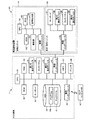
図4は、POS端末11及び商品読取装置101のそれぞれの機能ブロックの構成の一例を示す図である。商品読取装置101では、図2に示すCPU161がROM162の格納プログラムを適宜実行する。これにより、図4に示されるように、CPU161に、画像取込部51、商品検知部52、特徴量抽出部53などの機能部が実現される。また、POS端末11では、図2に示すCPU61がROM62やHDD64の格納プログラムを適宜実行する。これにより、図4に示されるように、CPU61に、商品候補抽出部71、表示制御部72、入力受付部73、売上登録部74などの機能部が実現される。
Next, the functional block configuration of the
FIG. 4 is a diagram illustrating an example of the configuration of the functional blocks of the
画像取込部51は、撮像部164(図2参照)に撮像オン信号を出力して撮像部164に撮像動作を開始させる。その後、画像取込部51は、撮像部164から出力されるフレーム画像を取り込み、RAM163(図2参照)に順次保存する。
The
商品検知部52は、連続する複数のフレーム画像に基づいて物品が読取窓103(図1参照)に翳されたことを検知する。具体的に、商品検知部52は、撮像部164(図2参照)から出力されたフレーム画像をRAM163(図2参照)から読み出し、直近に読み出したフレーム画像との輝度を比較する。商品検知部52は、その輝度の比較により、輝度階調に差分があった場合に手や物品等の何等かの写り込みがあるフレーム画像と判断する。更に、商品検知部52は、写り込みのあるフレーム画像と連続するフレーム画像を2値化して物品の輪郭線を抽出する。そして、商品検知部52は、連続するフレーム画像の輪郭線の位置に変化があったときに、その輪郭線内の画像を読取窓103に翳された物品を示す物品画像として特定する。このようにして、商品検知部52は、物品が読取窓103に翳されたことを検知する。
The
なお、物品画像を特定する方法は上記に限らず、他の方法を用いても良い。例えば、フレーム画像内の物品の輪郭線ではなく、肌色領域の有無により特定するようにしても良い。肌色領域が有る場合、キャッシャの手の写り込みがあることが予想される。従って、そのフレーム画像において輪郭線を抽出し、手の形状を示す輪郭線の、手で物品を把持する位置の輪郭線内の画像を、物品画像として特定する。 The method for specifying the article image is not limited to the above, and other methods may be used. For example, you may make it identify with the presence or absence of a skin color area instead of the outline of the articles | goods in a frame image. If there is a skin color area, it is expected that there will be reflection of the cashier's hand. Therefore, a contour line is extracted from the frame image, and an image within the contour line of the contour line indicating the shape of the hand at the position where the article is gripped by the hand is specified as the article image.
特徴量抽出部53は、フレーム画像内の物品を認識するためのオブジェクト認識処理を物品画像に対して施し、物品画像から特徴量を抽出する。そして、特徴量抽出部53は、その特徴量をPOS端末11の商品候補抽出部71に出力する。具体的に、特徴量抽出部53は、RAM163(図2参照)から物品画像を含むフレーム画像を読み出す。そして、特徴量抽出部53は、その物品画像から物品の色合いや表面の凹凸等の表面状態を示す物品固有の特徴量を抽出する。更に、特徴量抽出部53は、その特徴量を接続インターフェース175(図2参照)に出力する。接続インターフェース175がその特徴量を接続インターフェース65(図2参照)に出力し、接続インターフェース65から商品候補抽出部71にその特徴量が通知される。
The feature
なお、画像中に含まれる物体を認識するオブジェクト認識は、一般物体認識(generic object recognition)とも呼ばれている。一般物体認識の各種認識技術については、下記の文献のように解説されたものがあるため、詳しくはそちらを参照されたい。
柳井 啓司,“一般物体認識の現状と今後”,情報処理学会論文誌,Vol.48,No.SIG16 [平成22年8月10日検索],インターネット<URL: http://mm.cs.uec.ac.jp/IPSJ-TCVIM-Yanai.pdf >
Note that object recognition for recognizing an object included in an image is also called generic object recognition. Various recognition techniques for general object recognition have been explained as in the following document, so please refer to them for details.
Keiji Yanai, “Current Status and Future of General Object Recognition”, IPSJ Journal, Vol. 48, no. SIG16 [Search August 10, 2010], Internet <URL: http://mm.cs.uec.ac.jp/IPSJ-TCVIM-Yanai.pdf>
Jamie Shottonら,“Semantic Texton Forests for Image Categorization and Segmentation”,[平成22年8月10日検索],インターネット<URL: http://citeseerx.ist.psu.edu/viewdoc/download?doi=10.1.1.145.3036&rep=rep1&type=pdf > Jamie Shotton et al., “Semantic Texton Forests for Image Categorization and Segmentation”, [searched August 10, 2010], Internet <URL: http://citeseerx.ist.psu.edu/viewdoc/download?doi=10.1. 1.145.3036 & rep = rep1 & type = pdf>
商品候補抽出部71は、通知された特徴量をPLUファイルF1(図3参照)に登録されている各商品の特徴量と照合し、PLUファイルF1から類似度順の商品情報(商品候補情報)を抽出する。そして、商品候補抽出部71は、その商品候補情報を表示制御部72に出力する。
The product
類似度は、例えばPLUファイルF1内の各商品の特徴量を100%=「類似度:1.0」とした場合に、物品画像の特徴量がどの程度類似しているかを示すものである。類似度の結果は、絶対評価で算出しても良いし、相対評価で算出しても良い。 The similarity indicates, for example, how similar the feature amount of the article image is when the feature amount of each product in the PLU file F1 is 100% = “similarity: 1.0”. The result of similarity may be calculated by absolute evaluation or may be calculated by relative evaluation.
例えば類似度を絶対評価で算出するとする。その場合、物品画像の特徴量と、PLUファイルF1の各商品の特徴量とを1対1で比較し、この比較の結果算出される類似度をそのまま採用する。ここで類似度95%を閾値にしたとする。その場合、商品候補抽出部71は、類似度95%以上の商品(商品候補情報)を類似度の順に順番付けを行って表示制御部72に出力する。
For example, assume that the similarity is calculated by absolute evaluation. In that case, the feature amount of the article image and the feature amount of each product in the PLU file F1 are compared on a one-to-one basis, and the similarity calculated as a result of this comparison is directly adopted. Here, it is assumed that the similarity is 95% as a threshold value. In that case, the product
また、類似度を相対評価で算出するとする。その場合、PLUファイルF1の各商品との類似度の総和が1.0(100%)となるよう算出する。例えばPLUファイルF1に5つの商品(第1の商品、第2の商品、第3の商品、第4の商品、第5の商品)の特徴量が登録されているものとする。その場合の類似度は、例えば第1の商品に対する類似度「0.6」、第2の商品に対する類似度「0.1」、第3の商品に対する類似度「0.1」、第4の商品に対する類似度「0.1」、第5の商品に対する類似度「0.1」等とし、類似度の総和が常に1.0になるようにする。ここで類似度0.5を閾値にしたとする。その場合、商品候補抽出部71は、類似度0.5以上の商品の商品情報(商品候補情報)を類似度の順に順番付けを行って表示制御部72に出力する。
Assume that the similarity is calculated by relative evaluation. In that case, calculation is performed so that the sum of the similarities with each product in the PLU file F1 is 1.0 (100%). For example, it is assumed that feature quantities of five products (first product, second product, third product, fourth product, and fifth product) are registered in the PLU file F1. In this case, the similarity is, for example, the similarity “0.6” for the first product, the similarity “0.1” for the second product, the similarity “0.1” for the third product, The similarity to the product is “0.1”, the similarity to the fifth product is “0.1”, etc., and the sum of the similarities is always 1.0. Here, it is assumed that the degree of similarity is 0.5 as a threshold value. In that case, the product
表示制御部72は、第1の表示デバイス23(図2参照)、第2の表示デバイス24(図2参照)、第3の表示デバイス106(図2参照)、及び第4の表示デバイス109(図2参照)の表示を制御する。特に第3の表示デバイス106に対して、表示制御部72は、商品を選択するための複数の商品ボタンや個数などを入力するためのテンキーなどが所定位置に配列されたプリセット画面等を表示させる。更に、商品候補抽出部71から商品候補情報が出力されると、表示制御部72は、第3の表示デバイス106に対して、選択情報を含む選択画面を表示させる。
The
具体的に、表示制御部72は、商品候補情報に指定されている上位の商品候補の商品ボタンの表示の設定を、商品候補であることを示す設定とし、その他の商品ボタンの表示の設定を商品候補でないことを示す設定とした、プリセット画面の更新情報を生成する。本例では、商品候補であることを示す設定として、商品ボタンの通常表示「点灯」を示す。また、商品候補でないことを示す設定として、グレーアウトによる商品ボタンの「消灯」を示す。なお、これらの設定は、商品候補の商品ボタンか候補外の商品ボタンかをキャッシャが相対的に判断できるものであれば適宜変形しても良い。その後、表示制御部72は、その更新情報を接続インターフェース65に出力する。そして、その更新情報は、接続インターフェース65から接続インターフェース176に出力され、接続インターフェース176から第3の表示デバイス106にその更新情報が出力される。これにより、第3の表示デバイス106が表示画面を更新し、商品候補の選択画面を表示する。
Specifically, the
入力受付部73は、キーボード22、107、タッチパネル26、105などの入出力回路からの各種入力操作を受付ける。例えば第3の表示デバイス106に商品候補の選択画面が表示されている間に、キャッシャがキーボード107の商品ボタン(商品選択ボタン)を押下したり、タッチパネル105の商品ボタン(商品選択ボタン)をタッチしたりしたとする。その場合、操作された商品ボタンの操作情報がその入出力回路から接続インターフェース176に出力される。そして、その操作情報は、接続インターフェース176から接続インターフェース65に出力され、接続インターフェース65から入力受付部73に通知される。
The
売上登録部74は、入力受付部73がキーボード107やタッチパネル105から受け付けた商品ボタンの操作情報に基づき、操作情報に対応する一商品の商品情報を登録テーブル等に登録する。また、売上登録部74は、入力受付部73がタッチパネル26などから受け付けた締めの操作情報に基づき、それまでに登録した一取引分の商品の精算処理を行って、その売上情報を売上テーブル等に登録する。
The
次に、チェックアウトシステム1の動作について説明する。
図5は、チェックアウトシステム1の商品登録及び精算処理の一取引分の処理の一例を示すフロー図である。以下、図5に示すフロー図を例にチェックアウトシステム1の動作について説明する。なお、以下において、POS端末11では、CPU61によるROM62やHDD64の格納プログラムの実行により、商品候補抽出部71、表示制御部72、入力受付部73、売上登録部74などの機能部が立ち上げられているものとする。また、商品読取装置101では、CPU161によるROM162の格納プログラムの実行により、画像取込部51、商品検知部52、特徴量抽出部53などの機能部が立ち上げられているものとする。更に、商品読取装置101では、第3の表示デバイス106にプリセット画面(図6(a)参照)が表示され、撮像部164も常時起動されているものとする。
Next, the operation of the
FIG. 5 is a flowchart illustrating an example of processing for one transaction of the product registration and checkout processing of the
先ず、商品読取装置101は、読取窓103に翳された物品の読取処理を行う(S1)。具体的に、キャッシャが、第1の買物カゴ153a(図1参照)から読取前の物品(例えば物品G)を手に取り、第2の買物カゴ153b(図1参照)に移す際に、物品G(図1参照)を読取窓103(図1参照)に翳して商品の外観を撮像部164(図2参照)に読み取らせる。商品読取装置101では、撮像部164により撮像されたフレーム画像を画像取込部51が取り込んでRAM163に保存する。そして、商品検知部52がそのフレーム画像から物品画像を検知し、特徴量抽出部53が物品画像から特徴量を抽出する。
First, the
次に、商品読取装置101(特徴量抽出部53)は、読取窓に翳された物品の特徴量をPOS端末11(商品候補抽出部71)に通知する(S2)。 Next, the product reading device 101 (feature amount extraction unit 53) notifies the POS terminal 11 (product candidate extraction unit 71) of the feature amount of the article trapped in the reading window (S2).
POS端末11では、商品候補抽出部71が、商品読取装置101から通知された特徴量を基にPLUファイルF1から類似度順の商品情報(商品候補情報)を抽出し、その商品候補情報を表示制御部72に出力する(S3)。商品候補情報の出力点数は、適宜設定して良い。本例では上位4点の商品候補情報を抽出するものとして説明する。
In the
更に、POS端末11では、表示制御部72が、商品候補情報に指定されている上位4点の商品候補の商品ボタンを「点灯」に設定し、その他の商品ボタンをグレーアウトに設定するプリセット画面の更新情報を、商品読取装置101の第3の表示デバイス106に向けて出力する(S4)。
Further, in the
商品読取装置101では、表示制御部72により出力された更新情報に基づき、第3の表示デバイス106が、表示中のプリセット画面を更新して、商品候補の選択画面(図6(b)参照)を表示する(S5)。
In the
更に、商品読取装置101では、キャッシャによりタッチパネル105(又はキーボード107)を介して選択画面の商品候補に対応する商品ボタンが操作されると、その操作情報(商品識別情報)をタッチパネル105(又はキーボード107)の入出力回路(不図示)がPOS端末11の入力受付部73に通知する(S6)。
Further, in the
POS端末11では、商品読取装置101からの商品識別情報を入力受付部73で受け付けると、売上登録部74がその一商品の商品情報を登録テーブル等に登録する(S7)。
In the
以上のステップS1〜ステップS7の処理が買物カゴ153a(図1参照)内の物品の全てに対して行われる。その後、POS端末11において、キャッシャがキーボード22やタッチパネル26の締めキーを押下する。この操作により、POS端末11では、入力受付部73からのその通知を受け、売上登録部74が、一取引分の商品の精算処理を行って、その売上情報を売上テーブル等に登録する(S8)。
The process of the above step S1-step S7 is performed with respect to all the articles | goods in shopping basket 153a (refer FIG. 1). Thereafter, in the
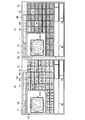
図6は、プリセット画面と選択画面の第3の表示デバイス106における表示例である。図6(a)がプリセット画面の表示例を示し、図6(b)が選択画面の表示例を示す。
FIG. 6 is a display example of the preset screen and the selection screen on the
図6(a)に示すプリセット画面G1は、タブT1、T2、・・・と、商品ボタン表示エリアE1と、画像表示エリアE2などを有する。タブT1、T2、・・・は、商品ボタンをカテゴリ別に切り替えて表示させるためのタブボタンである。商品ボタン表示エリアE1は、タブT1、T2、・・・により指定された一カテゴリの商品ボタンK1、K2・・・をそれぞれの決められた位置に表示する表示エリアである。画像表示エリアE2は、オブジェクト認識する物品の画像の表示エリアである。キャッシャは画面のタッチ入力などにより、タブT1、T2、・・・からカテゴリを指定し、更に商品ボタン表示エリアE1から該当する商品ボタンK1、K2・・・を選択する。この操作により、選択された商品ボタンK1、K2・・・の操作情報がPOS端末11の入力受付部73により受け付けられ、その商品情報が売上登録部74により登録される。
The preset screen G1 shown in FIG. 6A includes tabs T1, T2,..., A product button display area E1, an image display area E2, and the like. Tabs T1, T2,... Are tab buttons for switching and displaying product buttons by category. The product button display area E1 is a display area for displaying the product buttons K1, K2,... Of one category designated by the tabs T1, T2,. The image display area E2 is an image display area of an article that is recognized as an object. The cashier designates the category from the tabs T1, T2,... By touch input on the screen, and further selects the corresponding product buttons K1, K2,. By this operation, the operation information of the selected product buttons K1, K2,... Is received by the
図6(b)に示す選択画面G2は、図6(a)に示すプリセット画面G1を対象に、商品候補の商品ボタンを点灯させ、商品候補以外の商品ボタンをグレーアウトさせたもの、つまりプリセット画面G1の更新画面となっている。本例では、オブジェクト認識対象の物品をバラのキャベツ1個とし、上位4点の商品候補として第1候補「キャベツ1個」、第2候補「レタス1個」、第3候補「白菜1個」、第4候補「キャベツ1/2個」が抽出された場合の表示例を示している。図6(b)に示すように、選択画面G2において、「キャベツ1個」、「レタス1個」、「白菜1個」、「キャベツ1/2個」に対応する商品ボタン(それぞれ、商品ボタンK1、商品ボタンK7、商品ボタンK10、商品ボタンK2)が「点灯」の設定状態のまま表示される。また、それ以外の商品ボタンはグレーアウトの設定により全てグレーアウトで表示される。 The selection screen G2 shown in FIG. 6B is a preset screen in which the product buttons of the product candidates are turned on and the product buttons other than the product candidates are grayed out for the preset screen G1 shown in FIG. 6A. It is a G1 update screen. In this example, the object recognition target article is one rose cabbage, and the first candidate “1 cabbage”, the second candidate “1 lettuce”, and the third candidate “1 Chinese cabbage” as the top 4 candidate products. The display example when the fourth candidate “1/2 cabbage” is extracted is shown. As shown in FIG. 6B, in the selection screen G2, product buttons corresponding to “1 cabbage”, “1 lettuce”, “1 cabbage”, and “1/2 cabbage” (each product button K1, product button K7, product button K10, product button K2) are displayed in the “lit” setting state. In addition, all other product buttons are displayed in grayout according to the grayout setting.
POS端末11の入力受付部73では、商品ボタンK1、K2・・・からの操作入力を点灯中の商品ボタンK1、K2、K7、K10のみ受け付ける。キャッシャは画面のタッチ入力などにより、点灯中の商品ボタンK1、K2、K7、K10の何れか一つを選択する。この操作により、キャッシャが選択した商品ボタンの操作情報がPOS端末11の入力受付部73で受け付けられ、売上登録部74がその商品情報を商品登録する。
The
図6(b)の選択画面G2の表示例は、同一カテゴリの他の商品をオブジェクト認識させた場合においても同様の結果となる。例えば、「レタス1個」をオブジェクト認識させた場合に、「レタス1個」が第1候補となるなどして、順番は異なるが上位4点の商品候補の種類が同じとなる場合がある。また、同じ種類の物品でも形や色など表面状態の異なる物品をオブジェクト認識させた場合に、上位4点の商品候補の種類は同じであるが、候補の順番が異なる場合がある。そのような場合に、同様の結果となる。従って、本実施形態の態様であれば、上位4点の各商品候補に対応する個々の商品ボタンのそれぞれの表示位置を常に固定位置に表示させることができる。 In the display example of the selection screen G2 in FIG. 6B, the same result is obtained when another product in the same category is recognized as an object. For example, when “1 lettuce” is recognized as an object, “1 lettuce” may be the first candidate, and the types of the top four product candidates may be the same, although the order is different. In addition, when objects of the same type but different in surface state such as shape and color are recognized as objects, the top four commodity candidate types are the same, but the candidate order may be different. In such a case, the same result is obtained. Therefore, according to the aspect of the present embodiment, the display positions of the individual product buttons corresponding to the top four product candidates can always be displayed at fixed positions.
なお、上位4点全てではなく一部の商品候補が同じとなる場合であっても、その一部の商品候補については、対応する商品ボタンを固定位置に表示させることができる。 Even if some of the product candidates are the same instead of all of the top four points, the corresponding product buttons can be displayed at fixed positions for the part of the product candidates.
本実施形態では、上位の商品候補が同一カテゴリの同一ページに属する場合の例を示したが、上位の商品候補は同一カテゴリの複数のページ、或いは他のカテゴリに渡っていても良い。例えば、同一カテゴリの商品数が多いために1画面に表示できない場合に、表示制御部72は、商品ボタン表示エリアE1に示す商品ボタンを複数頁に分けて頁単位で画面に表示する。その場合、表示制御部72は、商品ボタン表示エリアE1に第1候補の商品を含む頁の商品ボタンを配置する。そして、表示制御部72は、その頁内に含まれている上位の商品候補の商品ボタンを「点灯」に設定し、それ以外の商品ボタンをグレーアウトに設定するなどした更新情報を第3の表示デバイス106に出力する。
In the present embodiment, an example in which a higher-order product candidate belongs to the same page in the same category has been shown, but a higher-order product candidate may span a plurality of pages in the same category or other categories. For example, when the number of products in the same category is large and cannot be displayed on one screen, the
更に、表示制御部72は、他の頁に含まれる第2商品候補以下の商品候補をグレーアウトに設定した商品ボタンに選択可能なように割り当てて第3の表示デバイス106に出力しても良い。
Further, the
また、本実施形態では、上位の商品候補に対応する商品ボタンを「点灯」し、それ以外の商品ボタンをグレーアウトにする例を示したが、表示態様はこの限りではない。これらの設定は、商品候補の商品ボタンか候補外の商品ボタンかをキャッシャが相対的に判断できるものであれば適宜変形しても良い。例えば「点滅」や、「異なる色による表示」や、商品ボタンの形状を異ならせるなど、上記「点灯」による設定を適宜変更しても良い。
また、本実施形態では、上位の商品候補に対応する商品ボタンを類似度順を示すことなく一律に点灯する例を示したが、表示態様はこの限りではない。例えば、類似度の順番が見た目で分かるように、点灯する商品ボタンの色や濃度を類似度の順番に応じて変更しても良い。また、商品ボタンに類似度の順番を示す数字を表示させても良い。
In the present embodiment, the product button corresponding to the upper product candidate is “lighted” and the other product buttons are grayed out. However, the display mode is not limited to this. These settings may be appropriately modified as long as the cashier can relatively determine whether the product button is a product candidate or a non-candidate product button. For example, the “lighting” setting may be changed as appropriate, such as “flashing”, “display with different colors”, or changing the shape of the product button.
Further, in the present embodiment, an example in which the product buttons corresponding to the higher-order product candidates are uniformly lit without showing the order of similarity is shown, but the display mode is not limited to this. For example, the color or density of the product button that is lit may be changed according to the order of similarity so that the order of similarity can be seen visually. Moreover, you may display the number which shows the order of similarity on a goods button.
本実施形態では、説明を理解しやすいように、物品に付されたバーコードのバーコードスキャナ等による読取機能についての説明を省略した。バーコードの読取機能について、本実施形態のチェックアウトシステムに適宜組合せて実施することは言うまでもない。 In the present embodiment, the description of the reading function of the barcode attached to the article by a barcode scanner or the like is omitted for easy understanding of the description. Needless to say, the barcode reading function is appropriately combined with the checkout system of the present embodiment.
以上により、本実施形態では、物品の読み取り毎に類似度の順番が入れ替わる場合であっても、商品候補のそれぞれに対応する選択ボタンを、プリセット画面に予め設定された各商品候補に対応する商品ボタンの位置に表示させることが可能となる。また、商品候補が他の頁や他のカテゴリに渡って抽出された場合であっても、少なくとも第1商品候補に対応する選択ボタンについては、プリセット画面に予め設定された商品ボタンの位置に表示させることが可能である。従って、上位の商品候補のそれぞれの選択ボタンの表示位置を所定の位置に固定することが可能となる。 As described above, in the present embodiment, even if the order of similarity is switched every time an article is read, the selection button corresponding to each of the product candidates is displayed as a product corresponding to each product candidate preset on the preset screen. It can be displayed at the button position. Even when product candidates are extracted across other pages or other categories, at least the selection buttons corresponding to the first product candidates are displayed at the positions of the product buttons preset on the preset screen. It is possible to make it. Therefore, it is possible to fix the display position of each selection button of the upper product candidate at a predetermined position.
(第2の実施形態)
第1の実施形態では、プリセット画面に設定されている商品ボタンを、商品候補の選択ボタンとして点灯させる(選択情報として示す)場合のチェックアウトシステムの一態様を示した。第2の実施形態では、商品候補の選択専用の画面を設けた場合のチェックアウトシステムの一態様を示す。なお、以下では、第1の実施形態と異なる部分を主に説明し、第1の実施形態と同様の部分の図示及び説明を適宜省略する。
(Second Embodiment)
In the first embodiment, an aspect of the checkout system in the case where the product button set on the preset screen is turned on as a product candidate selection button (shown as selection information) is shown. In the second embodiment, an aspect of a checkout system when a screen dedicated to selection of product candidates is provided is shown. In the following description, portions different from the first embodiment will be mainly described, and illustration and description of portions similar to those of the first embodiment will be appropriately omitted.
第2の実施形態のチェックアウトシステムは、商品候補を選択するための専用の選択画面と、商品候補の選択ボタン(商品選択ボタン)を商品毎に所定の位置に表示させるための位置指定ファイル(表示位置情報)とを更に備える。選択画面や位置指定ファイルは、HDD64等に記憶させて使用する。
The checkout system of the second embodiment includes a dedicated selection screen for selecting product candidates and a position designation file for displaying product candidate selection buttons (product selection buttons) at predetermined positions for each product ( Display position information). The selection screen and the position designation file are stored in the
図7は、第2の実施形態に係る選択画面の画面構成の一例を示す図である。図7に示す選択画面G10は選択画面G10内の4か所の決められたエリア(第1のエリアE20、第2のエリアE21、第3のエリアE22、第4のエリアE23)に、それぞれ、商品候補の選択ボタンK20、K21、K22、K23を配置した画面構成となっている。また、本例では、4か所のエリア外にオブジェクト認識処理の再実行を指示するための再認識ボタンK30を設けている。本例では、選択ボタンK20、K21、K22、K23のそれぞれの配置場所を図7に示される位置に固定し、以下、それぞれの選択ボタンK20、K21、K22、K23の識別を、図7の配置場所を示す「A」、「B」、「C」、「D」により行う。 FIG. 7 is a diagram illustrating an example of a screen configuration of a selection screen according to the second embodiment. The selection screen G10 shown in FIG. 7 is displayed in four predetermined areas (first area E20, second area E21, third area E22, fourth area E23) in the selection screen G10, respectively. The screen configuration includes merchandise candidate selection buttons K20, K21, K22, and K23. In this example, a re-recognition button K30 for instructing re-execution of the object recognition process is provided outside the four areas. In this example, the arrangement locations of the selection buttons K20, K21, K22, and K23 are fixed at the positions shown in FIG. 7, and the identification of the selection buttons K20, K21, K22, and K23 is hereinafter referred to as the arrangement of FIG. It is performed by “A”, “B”, “C”, “D” indicating the place.
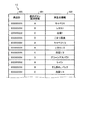
図8は、位置指定ファイルのデータ構成の一例を示す図である。図8に示す位置指定ファイルF2は、商品別に、「商品ID」f20と、「選択ボタン識別情報」f21と、「商品名情報」f22のそれぞれのデータが対応づけて格納されているデータファイルである。図8の例では、「キャベツ1」や「キャベツ1/2」が選択ボタン「A」に対応づけられる。「レタス1」や「レタス1/2」が選択ボタン「B」に対応付けられる。「白菜1」や「白菜1/2」や「白菜1/4」が選択ボタン「C」に対応付けられる。「こまつ菜束」や「グリーンアスパラ1」が選択ボタン「D」に対応付けられる。その他の商品については、説明を省略する。
FIG. 8 is a diagram illustrating an example of the data configuration of the position designation file. The position specification file F2 shown in FIG. 8 is a data file in which data of “product ID” f20, “selection button identification information” f21, and “product name information” f22 are stored in association with each product. is there. In the example of FIG. 8, “
また、第2の実施形態において、POS端末11の表示制御部72(図4参照)は、商品候補抽出部71(図4参照)により商品候補情報が出力されると、次のように第3の表示デバイス106(図2参照)へ選択画面を表示する処理を行う。
In the second embodiment, when the product candidate information is output by the product candidate extraction unit 71 (see FIG. 4), the display control unit 72 (see FIG. 4) of the
表示制御部72は、先ず、位置指定ファイルF2(図8参照)から、上位4点の商品候補についての表示位置を示す情報等を抽出する。例えば、表示制御部72は、商品候補情報として出力された上位4点のそれぞれの商品IDを使用し、商品ID毎に、位置指定ファイルF2において「商品ID」f20に対応付けられている「選択ボタン識別情報」f21と「商品名情報」f22のデータのペアを抽出する。更に、表示制御部72は、「選択ボタン識別情報」f21の抽出データが指定する選択ボタンに、ペアとして抽出した「商品名情報」f22のデータ(商品名情報)を表示可能に設定する。そして、表示制御部72は、その選択画面を第3の表示デバイス106に出力する。
First, the
なお、表示制御部72は、選択ボタンに「商品名情報」を表示可能に設定した場合に、それの「選択ボタン識別情報」と「商品ID」を対応情報としてRAM63などに一時的に保存する。これにより、表示制御部72は、選択ボタンと、選択ボタンに設定されている商品候補とを紐付けて管理する。
When the
ここで、上位4点の商品候補中に、「選択ボタン識別情報」f2に指定されている選択ボタンが同じもの(共通の表示位置を指定するもの)が含まれていたとする。その場合には、表示制御部72は、類似度の高い商品候補の順に選択ボタンに商品名情報を設定する。例えば、表示制御部72が、ある選択ボタンに類似度の高い商品候補の商品名情報を設定し、更に、他の商品候補により同じ選択ボタンが商品名情報の設定先として指定されたとする。その場合、先ず、その他の各選択ボタンに、それぞれを設定先とする商品候補の商品名情報を設定し、残った選択ボタンに、選択ボタンの指定先が重なった残りの商品候補の商品名情報を設定する。
Here, it is assumed that the top four product candidates include the same selection buttons (designating a common display position) designated in the “selection button identification information” f2. In that case, the
次に、第2の実施形態のチェックアウトシステムの動作を説明する。
図9は、第2の実施形態のチェックアウトシステムの商品登録及び精算処理の一取引分の処理の一例を示すフロー図である。ステップS1〜ステップS3の動作は第1の実施形態と同様であるためここでの説明を省略する。以下では、ステップS4−1の処理から説明する。
Next, the operation of the checkout system according to the second embodiment will be described.
FIG. 9 is a flowchart illustrating an example of processing for one transaction of product registration and checkout processing of the checkout system according to the second embodiment. Since the operations in steps S1 to S3 are the same as those in the first embodiment, the description thereof is omitted here. Below, it demonstrates from the process of step S4-1.
表示制御部72は、商品候補抽出部71により上位4点の商品候補情報が出力されると、次の処理を実行する。すなわち、表示制御部72は、商品候補情報として出力された上位4点の商品候補の、それぞれの商品名情報を、決まった表示位置つまり位置指定ファイルF2において指定された選択ボタンに設定し、その選択ボタンを含む選択画面情報を第3の表示デバイス106に向けて出力する(S4−1)。
When the product
すると、商品読取装置101では、第3の表示デバイス106が、表示制御部72により出力された選択画面情報を表示する(S5−1)。
Then, in the
更に、商品読取装置101では、選択画面の商品候補に対応する選択ボタンがキャッシャによりタッチパネル105(又はキーボード107)を介して操作されると、その位置情報をタッチパネル105(又はキーボード107)の入出力回路(不図示)がPOS端末11の入力受付部73に通知する(S6)。
Further, in the
POS端末11では、商品読取装置101からの位置情報を入力受付部73が受け付け、その位置情報から選択画面内の選択ボタンを特定し、RAM63等に保存された対応情報から商品識別情報を売上登録部74に出力する。すると、売上登録部74がその一商品の商品情報を登録テーブル等に登録する(S7)。
In the
以上のステップS1〜ステップS7の処理が買物カゴ153a(図1参照)内の物品の全てに対して行われる。その後、POS端末11において、キャッシャがキーボード22やタッチパネル26の締めキーを押下する。すると、POS端末11では、売上登録部74が、一取引分の商品の精算処理を行って、その売上情報を売上テーブル等に登録する(S8)。
The process of the above step S1-step S7 is performed with respect to all the articles | goods in shopping basket 153a (refer FIG. 1). Thereafter, in the
なお、選択画面上で再認識ボタンが押下された場合は、POS端末11の入力受付部73が、その位置情報をタッチパネル105(又はキーボード107)の入出力回路(不図示)から受け付ける。入力受付部73は、その位置情報から再認識ボタンを特定し、表示制御部72や商品候補抽出部71にその旨を通知する。表示制御部72は、選択画面を閉じ、RAM63等に保存した対応情報を消去する。また、商品候補抽出部71は、その後に商品読取装置101から通知されてくる特徴量を基に商品候補情報を再び抽出し、抽出した商品候補情報を表示制御部72に出力する。
When the re-recognition button is pressed on the selection screen, the
図10は、商品候補の商品名情報を選択ボタンへ設定する表示制御部72の処理のフロー図である。先ず、表示制御部72は、変数N(N=1、2、3、・・・)に初期値「1」を設定する(S50)。
FIG. 10 is a flowchart of the process of the
次に、表示制御部72は、商品候補抽出部71により抽出された商品候補情報から上位N番目の商品候補の商品IDを取得する(S51)。
Next, the
次に、表示制御部72は、位置指定ファイルF2から、商品IDに対応する選択ボタン識別情報と商品名情報を抽出する(S52)。
Next, the
ここで、選択ボタン識別情報の示す選択ボタンに商品名情報が設定されているかを判定する(S53)。 Here, it is determined whether or not product name information is set to the selection button indicated by the selection button identification information (S53).
選択ボタン識別情報の示す選択ボタンに商品名情報が設定されていない場合(ステップS53:No判定)、表示制御部72は、ステップS52で抽出した商品名情報を当該選択ボタンに設定する(S54)。
When the product name information is not set to the selection button indicated by the selection button identification information (step S53: No determination), the
選択ボタン識別情報の示す選択ボタンに商品名情報が設定されている場合(ステップS53:Yes判定)は、表示制御部72は、ステップS52で抽出した商品名情報をRAM63等に一時的に保存し、選択ボタンへの設定を保留する(S55)。
When the product name information is set in the selection button indicated by the selection button identification information (step S53: Yes determination), the
ステップS54、ステップS55の処理後、表示制御部72は、変数Nの値をインクリメントする(S56)。
After the processing of step S54 and step S55, the
次に、表示制御部72は、変数Nが閾値(本例では上位候補4点を示す「4」)を超えたか判定する(S57)。
Next, the
変数Nが「4」以下の場合(ステップS57:No判定)、表示制御部72は、ステップS51の処理に戻り、次の上位の商品候補(2巡目は上位2番目の商品候補)を対象に上述の処理を繰り返す。
When the variable N is “4” or less (step S57: No determination), the
そして、変数Nが「4」を超えると(ステップS57:Yes判定)、続いて、表示制御部72は、保留したものがあるか判定する(S58)。
When the variable N exceeds “4” (step S57: Yes determination), the
保留したものがある場合(ステップS58:Yes判定)、保留したものの中からより上位の商品候補の商品名情報を取得する(S59)。 When there is a suspended item (step S58: Yes determination), product name information of a higher-order item candidate is acquired from the suspended items (S59).
そして、表示制御部72は、商品名情報を設定していない残りの何れかの選択ボタンに、ステップS59で取得した商品名情報を設定する(S60)。
Then, the
ステップS60の処理後、表示制御部72は、ステップS58の判定処理に戻り、ステップS58から上述した処理を同様に繰り返す。そして、保留したものがなくなると(ステップS58:No判定)、表示制御部72は、本設定処理を終了し、設定を行った選択ボタンを含む選択画面情報を第3の表示デバイス106に向けて出力する。
After the process of step S60, the
図11は、選択画面G10(図7参照)の選択ボタンK20、K21、K22、K23に商品名情報が設定された場合の第3の表示デバイス106における表示例である。図11に示す選択画面G11は、上位4点の商品候補として第1候補「キャベツ1個」、第2候補「レタス1個」、第3候補「白菜1個」、第4候補「キャベツ1/2個」が抽出された場合の表示例を示している。
FIG. 11 is a display example on the
位置指定ファイルF2(図8参照)には、第1候補の「キャベツ1」に選択ボタン「A」が対応付けられている。従って、図11の選択ボタンK20(図7の配置場所「A」に対応)に商品名情報として「キャベツ1」が表示される。
In the position designation file F2 (see FIG. 8), the selection button “A” is associated with the first candidate “
また、位置指定ファイルF2(図8参照)には、第2候補の「レタス1」に選択ボタン「B」が対応付けられている。従って、図11の選択ボタンK21(図7の配置場所「B」に対応)に商品名情報として「レタス1」が表示される。
Further, in the position designation file F2 (see FIG. 8), the selection button “B” is associated with the second candidate “
また、位置指定ファイルF2(図8参照)には、第3候補の「白菜1」に選択ボタン「C」が対応付けられている。従って、図11の選択ボタンK22(図7の配置場所「C」に対応)に商品名情報として「白菜1」が表示される。
Further, in the position designation file F2 (see FIG. 8), the selection button “C” is associated with the third candidate “
更に、位置指定ファイルF2(図8参照)には、第4候補の「キャベツ1/2」に選択ボタン「A」が対応付けられている。しかし、図11の選択ボタンK20(図7の配置場所「A」に対応)には上位の商品候補を示す「キャベツ1」が設定される。また、図11の選択ボタンK21と選択ボタンK22には、それぞれ、単独で指定される「レタス1」と「白菜1」が設定される。従って「キャベツ1/2」は残りの選択ボタンである選択ボタンK23(図7の配置場所「D」)に設定されることになる。これにより、図11の選択ボタンK23(図7の配置場所「D」に対応)に商品名情報として「キャベツ1/2」が表示される。商品名情報の設定された選択ボタンK20〜選択ボタンK23が選択情報の一例となる。
Further, in the position designation file F2 (see FIG. 8), the selection button “A” is associated with the fourth candidate “
第2の実施形態では、上位4点の商品候補の選択ボタンを表示する例を示したがこの限りではない。商品候補の数を3や5などと適宜増減させ、それに応じて選択ボタンを増減させても良い。 In the second embodiment, an example is shown in which the selection buttons for the top four commodity candidates are displayed, but this is not restrictive. The number of product candidates may be increased or decreased as appropriate, such as 3 or 5, and the selection buttons may be increased or decreased accordingly.
また、第2の実施形態では、各選択ボタンの位置をそれぞれの所定位置に固定し、表示制御部72が位置指定ファイルF2に指定された位置の選択ボタンに商品候補の商品名情報を表示設定する例を示した。しかし、商品候補を示す選択ボタンを固定位置に表示させる手段はこの限りではない。例えば、予め作成した商品名情報を含む選択ボタンを位置指定ファイルF2に指定された位置に配置するなどしても良い。
In the second embodiment, the position of each selection button is fixed at a predetermined position, and the
また、第2の実施形態では、選択ボタンの例を示したが選択情報がこれに限定されるものではない。選択情報は、キャッシャが商品候補から物品に対応する商品を選択することのできるものであれば、その他の形態であっても良い。 In the second embodiment, an example of the selection button is shown, but the selection information is not limited to this. The selection information may be in other forms as long as the cashier can select a product corresponding to the product from the product candidates.
以上により、第2の実施形態においては、上位の商品候補を大きな選択ボタンにより選択することが可能になる。また、商品の選択ボタンは毎回決まった位置に表示されるようになる。選択ボタンの数を減らすことにより複数の商品の表示先として同じ位置を指定することになるが、その位置を指定する商品候補が一つであれば、その商品の選択ボタンは決まった位置に表示される。その位置を指定する商品候補としてそれとは別の商品が抽出された場合でも、その位置を指定する商品候補が一つであれば、その商品の選択ボタンは決まった位置に表示される。キャッシャは、熟練度が増すと、一つの表示位置に表示される選択キーの商品の系統を覚える。そのため、翳した物品に応じて表示位置に異なる商品の選択ボタンが表示されても、翳した物品を基に、どこにどの商品の選択ボタンが表示されるのか直ぐに判断することができる。 As described above, in the second embodiment, it is possible to select an upper product candidate with a large selection button. The product selection button is displayed at a predetermined position every time. By reducing the number of selection buttons, the same position is specified as the display destination of multiple products. If there is one product candidate that specifies the position, the selection button for that product is displayed at a fixed position. Is done. Even when a different product is extracted as a product candidate for specifying the position, if there is only one product candidate for specifying the position, the product selection button is displayed at a fixed position. As the skill level increases, the cashier learns the product line of the selection key displayed at one display position. Therefore, even if different product selection buttons are displayed at the display positions in accordance with the haunted article, it is possible to immediately determine where the product selection button is displayed based on the haunted article.
また、同じ位置を指定する商品候補が複数あった場合でも、物品に一致する可能性が高いより上位の商品候補の選択ボタンと、その他の商品候補の選択ボタンについては、決まった位置に表示されることになる。 Also, even if there are multiple product candidates that specify the same position, the selection buttons for higher-order product candidates and other product candidate selection buttons that are highly likely to match the article are displayed at fixed positions. Will be.
従って、上位の商品候補のそれぞれの選択ボタンの表示位置を所定の位置に固定することが可能となる。 Therefore, it is possible to fix the display position of each selection button of the upper product candidate at a predetermined position.
第1及び第2の実施形態では、POS端末11を情報処理装置とし、そのCPU61が商品候補抽出部71、表示制御部72、入力受付部73、売上登録部74などの機能部を実現するものとして説明したが、この限りではない。CPU61がCPU161による機能の一部又は全てを実現するように構成しても良い。或いは、読取ユニット110を情報処理装置として機能させ、そのCPU161がCPU61による機能の一部又は全てを実現するように構成しても良い。
In the first and second embodiments, the
また、第1及び第2の実施形態では、係る情報処理装置及びプログラムをチェックアウトシステムへ適用した場合の例を示した。しかし、係る情報処理装置及びプログラムを、その態様に限定するものではない。例えば商品読取の処理と登録/精算の処理とを一装置で行うセルフPOSのように、その他のものに適用しても良い。 In the first and second embodiments, an example in which the information processing apparatus and the program are applied to a checkout system has been described. However, the information processing apparatus and the program are not limited to those modes. For example, the product reading process and the registration / settlement process may be applied to other devices such as a self-POS that performs a single device.
(第3の実施形態)
第3の実施形態では、係る情報処理装置及びプログラムをセルフPOSへ適用する場合のセルフPOSの構成例を示す。なお、以下では、図1および図2に示されるものと同一のもの(又はそれに相当するもの)には同一の符号を付し、その部分の説明を省略する。
図12は、セルフPOS200の構成を示す外観斜視図である。
図13は、セルフPOS200のハードウェア構成を示すブロック図である。
(Third embodiment)
In the third embodiment, a configuration example of the self-POS when the information processing apparatus and the program are applied to the self-POS is shown. In the following description, the same components as those shown in FIGS. 1 and 2 (or equivalent components) are denoted by the same reference numerals, and description thereof is omitted.
FIG. 12 is an external perspective view showing the configuration of the self-
FIG. 13 is a block diagram showing a hardware configuration of the self-
図12及び図13に示すように、セルフPOS200の本体202は、タッチパネル105が表面に配設された第3の表示デバイス106や、商品画像を読み取るための読取ユニット110などを備える。第3の表示デバイス106は、実施形態に示すプリセット画面や候補商品の選択画面の他に、精算画面などを表示する。また、本体202は、右側に未精算の商品の入った第1の買物カゴ153a(図1参照)を置くための商品載置台203を備え、左側に精算済みの商品を置くための商品載置台204を備える。商品載置台204は、精算済みの商品を入れるための袋を掛ける袋掛けフック205や、精算済みの商品を袋に入れる前に一時的に置いておくための一時置き台206を備える。商品載置台203、204は、計量器207、208をそれぞれ兼ね備え、精算前後で商品の重量が同じであることを確認するための機能を有する。更に、本体202は、前面に釣り銭器201などを備える。
As shown in FIGS. 12 and 13, the
セルフPOS200は、CPU161がROM162の格納プログラムを適宜実行して、第1の実施形態(又は第2の実施形態)に示す画像取込部51、商品検知部52、特徴量抽出部53などの機能部を実現する。また、CPU61がROM62やHDD64の格納プログラムを適宜実行して、第1の実施形態(又は第2の実施形態)に示す商品候補抽出部71、表示制御部72、入力受付部73、売上登録部74などの機能部を実現する。
In the self-
読取ユニット110から特徴量が出力されると、当該特徴量は接続インターフェース175と接続インターフェース65を介してCPU61に入力される。また、表示制御部72が生成した選択画面は、接続インターフェース65と接続インターフェース176を介して第3の表示デバイス106に出力される。また、タッチパネル105で商品候補の選択ボタンが押下されると、その位置情報が接続インターフェース176と接続インターフェース65を介してCPU61に入力される。
When a feature value is output from the
なお、セルフPOS200の動作は、第1の実施形態(又は第2の実施形態)で説明したものと略同様に説明することができる。ここでは、動作の説明は繰り返しになるため省略する。
Note that the operation of the self-
なお、第3の実施形態においても、第1及び第2の実施形態のように、各機能部の一部又は全てをCPU61とCPU161の何れか一方で実現できるように適宜変形して良い。
Also in the third embodiment, as in the first and second embodiments, some or all of the functional units may be modified as appropriate so that either one of the
本実施形態及びその変形の情報処理装置で使用する各種プログラムは、インストール可能な形式又は実行可能な形式のファイルでCD−ROM、フレキシブルディスク(FD)、CD−R、DVD(Digital Versatile Disk)等のコンピュータで読み取り可能な記録媒体に記録して提供し、情報処理装置のHDDやフラッシュROMなどに読み込ませて実行してもよい。 Various programs used in the information processing apparatus according to the present embodiment and its modifications are files in an installable or executable format, such as a CD-ROM, flexible disk (FD), CD-R, DVD (Digital Versatile Disk), etc. The program may be provided by being recorded on a computer-readable recording medium, and may be executed by being read into an HDD or a flash ROM of an information processing apparatus.
また、当該プログラムを、インターネット等のネットワークに接続されたコンピュータ上に格納し、ネットワーク経由でダウンロードさせることにより提供するように構成しても良い。 Further, the program may be provided by being stored on a computer connected to a network such as the Internet and downloaded via the network.
以上の各実施形態及びその変形において、情報処理装置及びプログラムについての構成を説明したが、実施形態及びその変形は、例として提示したものであり、発明の範囲を限定することは意図していない。この新規な実施形態及び変形は、その他の様々な形態で実施されることが可能であり、発明の要旨を逸脱しない範囲で、種々の省略、置き換え、変更を行うことができる。これら実施形態やその変形は、発明の範囲や要旨に含まれるとともに、特許請求の範囲に記載された発明とその均等の範囲に含まれる。 In the above embodiments and modifications thereof, the configuration of the information processing apparatus and the program has been described. However, the embodiments and modifications thereof are presented as examples, and are not intended to limit the scope of the invention. . The novel embodiments and modifications can be implemented in various other forms, and various omissions, replacements, and changes can be made without departing from the spirit of the invention. These embodiments and modifications thereof are included in the scope and gist of the invention, and are included in the invention described in the claims and the equivalents thereof.
11 POS端末
51 画像取込部
52 商品検知部
53 特徴量抽出部
71 商品候補抽出部
72 表示制御部
73 入力受付部
74 売上登録部
101 商品読取装置
DESCRIPTION OF
Claims (6)
複数の頁の其々で商品の商品選択ボタンを固有位置に表示させるプリセット画面で、表示中の頁の前記商品候補に該当する商品の前記商品選択ボタンの表示設定を前記商品候補であることを示す候補設定にし、前記商品候補ではない商品の前記商品選択ボタンは前記商品候補でないことを示す非候補設定にし、非表示の頁に含まれる前記商品候補に該当する商品の前記商品選択ボタンを、前記非候補設定にした前記商品選択ボタンに選択可能なように割り当てて表示させる表示制御手段と、
を備える情報処理装置。 Extraction means for extracting product candidates for articles included in the image from the image captured by the imaging means;
In the preset screen that displays the product selection button of the product at a specific position on each of a plurality of pages, the display setting of the product selection button of the product corresponding to the product candidate of the displayed page is the product candidate In the candidate setting shown, the product selection button of the product that is not the product candidate is set as a non-candidate setting indicating that it is not the product candidate, and the product selection button of the product corresponding to the product candidate included in the non-display page, display control means for displaying assigned as selectable in the product selection button to the non-candidate set,
An information processing apparatus comprising:
請求項1に記載の情報処理装置。 In the display mode, the display control unit can identify the order of the similarity between the feature amount of the article included in the image captured by the imaging unit and the feature amount of the product stored in the storage unit. Displaying the product selection button;
The information processing apparatus according to claim 1.
請求項2に記載の情報処理装置。 The display control means displays a number indicating the order of the similarity on the product selection button.
The information processing apparatus according to claim 2.
前記予め決められた配置位置に表示される商品選択ボタンを特定するための選択ボタン識別情報と商品情報とを対応付けて記憶する位置指定ファイルと、A position designation file that stores selection button identification information for identifying a product selection button displayed at the predetermined arrangement position and product information in association with each other;
を備える情報処理装置であって、An information processing apparatus comprising:
前記表示制御手段は、The display control means includes
前記複数の商品候補情報のうち最上位から順に、前記所定数分の商品候補情報に関して、前記位置指定ファイルからそれぞれの選択ボタン識別情報を取得し、In order from the top among the plurality of product candidate information, with respect to the predetermined number of product candidate information, each selection button identification information is acquired from the position designation file,
前記取得したそれぞれの選択ボタン識別情報に基づいて、前記所定数分の商品候補情報に対応する商品選択ボタンを前記表示手段に表示するとともに、Based on the acquired selection button identification information, the product selection button corresponding to the predetermined number of product candidate information is displayed on the display means,
前記所定数分の商品候補情報の中で前記選択ボタン識別情報が重複する場合は、重複する中で最上位の商品候補情報を対応する商品選択ボタンに設定するとともに、重複する中で最上位でない商品候補情報は残りの商品選択ボタンに設定する、When the selection button identification information is duplicated among the predetermined number of product candidate information, the highest product candidate information among the duplicates is set to the corresponding product selection button and is not the highest among the duplicates. Product candidate information is set to the remaining product selection buttons.
情報処理装置。Information processing device.
撮像手段により撮像された画像から当該画像に含まれている物品の商品候補を抽出する抽出手段と、Extraction means for extracting product candidates for articles included in the image from the image captured by the imaging means;
複数の頁の其々で商品の商品選択ボタンを固有位置に表示させるプリセット画面で、表示中の頁の前記商品候補に該当する商品の前記商品選択ボタンの表示設定を前記商品候補であることを示す候補設定にし、前記商品候補ではない商品の前記商品選択ボタンは前記商品候補でないことを示す非候補設定にし、非表示の頁に含まれる前記商品候補に該当する商品の前記商品選択ボタンを、前記非候補設定にした前記商品選択ボタンに選択可能なように割り当てて表示させる表示制御手段と、In the preset screen that displays the product selection button of the product at a specific position on each of a plurality of pages, the display setting of the product selection button of the product corresponding to the product candidate of the displayed page is the product candidate In the candidate setting shown, the product selection button of the product that is not the product candidate is set as a non-candidate setting indicating that it is not the product candidate, and the product selection button of the product corresponding to the product candidate included in the non-display page, Display control means for assigning and displaying the selectable product selection button in the non-candidate setting;
として機能させるためのプログラム。Program to function as.
撮像手段により撮像された物品の画像に基づいて抽出された該物品に関する複数の商品候補情報を対象に、前記複数の商品候補情報別にそれぞれの商品選択ボタンを最上位の商品候補情報から順に表示手段の予め決められた配置位置に所定数表示させる表示制御手段、For a plurality of product candidate information related to the product extracted based on the image of the product imaged by the imaging unit, each product selection button for each of the plurality of product candidate information is displayed in order from the highest product candidate information. Display control means for displaying a predetermined number of predetermined arrangement positions,
として機能させ、Function as
前記表示制御手段は、The display control means includes
前記複数の商品候補情報のうち最上位から順に、前記所定数分の商品候補情報に関して、前記予め決められた配置位置に表示される商品選択ボタンを特定するための選択ボタン識別情報と商品情報とを対応付けて記憶する位置指定ファイルからそれぞれの選択ボタン識別情報を取得し、Selection button identification information and product information for specifying a product selection button displayed at the predetermined arrangement position with respect to the predetermined number of product candidate information in order from the top of the plurality of product candidate information To acquire each selection button identification information from the position designation file that stores and associates,
前記取得したそれぞれの選択ボタン識別情報に基づいて、前記所定数分の商品候補情報に対応する商品選択ボタンを前記表示手段に表示するとともに、Based on the acquired selection button identification information, the product selection button corresponding to the predetermined number of product candidate information is displayed on the display means,
前記所定数分の商品候補情報の中で前記選択ボタン識別情報が重複する場合は、重複する中で最上位の商品候補情報を対応する商品選択ボタンに設定するとともに、重複する中で最上位でない商品候補情報は残りの商品選択ボタンに設定する、When the selection button identification information is duplicated among the predetermined number of product candidate information, the highest product candidate information among the duplicates is set to the corresponding product selection button and is not the highest among the duplicates. Product candidate information is set to the remaining product selection buttons.
ためのプログラム。Program for.
Priority Applications (3)
| Application Number | Priority Date | Filing Date | Title |
|---|---|---|---|
| JP2015183435A JP6329112B2 (en) | 2015-09-16 | 2015-09-16 | Information processing apparatus and program |
| US15/226,704 US20170076698A1 (en) | 2015-09-16 | 2016-08-02 | Image recognition system that displays a user-friendly graphical user interface |
| EP16185612.5A EP3144854B1 (en) | 2015-09-16 | 2016-08-25 | Image recognition system that displays a user-friendly graphical user interface |
Applications Claiming Priority (1)
| Application Number | Priority Date | Filing Date | Title |
|---|---|---|---|
| JP2015183435A JP6329112B2 (en) | 2015-09-16 | 2015-09-16 | Information processing apparatus and program |
Publications (2)
| Publication Number | Publication Date |
|---|---|
| JP2017058977A JP2017058977A (en) | 2017-03-23 |
| JP6329112B2 true JP6329112B2 (en) | 2018-05-23 |
Family
ID=56802317
Family Applications (1)
| Application Number | Title | Priority Date | Filing Date |
|---|---|---|---|
| JP2015183435A Expired - Fee Related JP6329112B2 (en) | 2015-09-16 | 2015-09-16 | Information processing apparatus and program |
Country Status (3)
| Country | Link |
|---|---|
| US (1) | US20170076698A1 (en) |
| EP (1) | EP3144854B1 (en) |
| JP (1) | JP6329112B2 (en) |
Families Citing this family (4)
| Publication number | Priority date | Publication date | Assignee | Title |
|---|---|---|---|---|
| JP7113489B2 (en) * | 2018-02-27 | 2022-08-05 | 株式会社寺岡精工 | Merchandise sales data processor and program |
| US11216786B2 (en) * | 2018-07-17 | 2022-01-04 | Kavita Ramchandani Snyder | System and method for dispatching intelligent invitations to users within a network |
| US11842376B2 (en) * | 2021-06-25 | 2023-12-12 | Toshiba Global Commerce Solutions Holdings Corporation | Method, medium, and system for data lookup based on correlation of user interaction information |
| CN113918017B (en) * | 2021-10-11 | 2024-05-03 | 厦门顶尖电子有限公司 | Instruction input method based on identification scale weighing platform |
Family Cites Families (24)
| Publication number | Priority date | Publication date | Assignee | Title |
|---|---|---|---|---|
| JPH0816822B2 (en) * | 1989-10-11 | 1996-02-21 | パイオニア株式会社 | Car navigation system |
| US5546475A (en) * | 1994-04-29 | 1996-08-13 | International Business Machines Corporation | Produce recognition system |
| US7034864B2 (en) * | 2000-05-19 | 2006-04-25 | Canon Kabushiki Kaisha | Image display apparatus, image display system, and image display method |
| US7845554B2 (en) * | 2000-10-30 | 2010-12-07 | Fujitsu Frontech North America, Inc. | Self-checkout method and apparatus |
| US7653878B1 (en) * | 2002-01-11 | 2010-01-26 | Oracle International Corporation | Visually organizing and highlighting a list of items to show how they satisfy multiple criteria selected by a user |
| US8166412B2 (en) * | 2006-01-13 | 2012-04-24 | Adobe Systems Incorporated | Visual cue discernment on scattered data |
| KR101398478B1 (en) * | 2008-04-10 | 2014-05-26 | 엘지전자 주식회사 | Mobile terminal using variable menu icon and control method thereof |
| JP5403657B2 (en) * | 2009-02-23 | 2014-01-29 | Necインフロンティア株式会社 | Stationary scanner, POS terminal, and settlement product selection method |
| KR20110040188A (en) * | 2009-10-13 | 2011-04-20 | 삼성전자주식회사 | Image forming apparatus that displays an icon for a function and a method of displaying the icon |
| JP5485954B2 (en) * | 2011-09-06 | 2014-05-07 | 東芝テック株式会社 | Store system and program |
| JP5551143B2 (en) * | 2011-12-02 | 2014-07-16 | 東芝テック株式会社 | Store system and program |
| JP5579202B2 (en) * | 2012-01-16 | 2014-08-27 | 東芝テック株式会社 | Information processing apparatus, store system, and program |
| JP5647637B2 (en) * | 2012-03-06 | 2015-01-07 | 東芝テック株式会社 | Information processing apparatus, store system, and program |
| US8489469B1 (en) * | 2012-08-30 | 2013-07-16 | Elbex Video Ltd. | Method and structure for simplified coding of display pages for operating a closed circuit E-commerce |
| WO2014068941A1 (en) * | 2012-11-02 | 2014-05-08 | 株式会社ソニー・コンピュータエンタテインメント | Information processing device and information processing method |
| CN103853606B (en) * | 2012-11-29 | 2018-05-01 | 北京三星通信技术研究有限公司 | Switch the method and apparatus of application program |
| US9537802B2 (en) * | 2013-02-12 | 2017-01-03 | Priceline.Com Llc | Shareable favorites sets |
| CN105144269A (en) * | 2013-04-22 | 2015-12-09 | 三菱电机株式会社 | Dynamic label arrangement device, display device, dynamic label arrangement method, and display method |
| JP2015038719A (en) * | 2013-07-16 | 2015-02-26 | 東芝テック株式会社 | Information processor and program |
| JP5826801B2 (en) * | 2013-07-19 | 2015-12-02 | 東芝テック株式会社 | Product recognition apparatus and product recognition program |
| JP2015041157A (en) * | 2013-08-20 | 2015-03-02 | 東芝テック株式会社 | Product recognition device and control program thereof |
| US20150113482A1 (en) * | 2013-10-22 | 2015-04-23 | David Michael Breger | System for generating icons with blurred background and method therefor |
| WO2015095875A2 (en) * | 2013-12-20 | 2015-06-25 | Baker Richard L | Mobile platform functionalities employing proximal variants and advanced personalization methods to control dynamic icon display on a mobile computing device display screen |
| JP6555866B2 (en) * | 2014-09-22 | 2019-08-07 | カシオ計算機株式会社 | Product registration apparatus and program |
-
2015
- 2015-09-16 JP JP2015183435A patent/JP6329112B2/en not_active Expired - Fee Related
-
2016
- 2016-08-02 US US15/226,704 patent/US20170076698A1/en not_active Abandoned
- 2016-08-25 EP EP16185612.5A patent/EP3144854B1/en not_active Not-in-force
Also Published As
| Publication number | Publication date |
|---|---|
| US20170076698A1 (en) | 2017-03-16 |
| JP2017058977A (en) | 2017-03-23 |
| EP3144854A1 (en) | 2017-03-22 |
| EP3144854B1 (en) | 2019-04-24 |
Similar Documents
| Publication | Publication Date | Title |
|---|---|---|
| JP5579202B2 (en) | Information processing apparatus, store system, and program | |
| JP6141207B2 (en) | Information processing apparatus, store system, and program | |
| JP5551143B2 (en) | Store system and program | |
| JP5194160B1 (en) | Information processing apparatus, information processing method, and program | |
| JP6348827B2 (en) | Information processing apparatus, store system, and program | |
| JP6193897B2 (en) | Information processing apparatus, store system, and program | |
| JP6258761B2 (en) | Information processing apparatus and program | |
| JP6747873B2 (en) | Information processing device and program | |
| JP6425636B2 (en) | Information processing apparatus and program | |
| JP6813310B2 (en) | Article reader and program | |
| JP5551140B2 (en) | Information processing apparatus and program | |
| JP2017139019A (en) | Information processing device, and program | |
| JP2018055716A (en) | Information processing apparatus and program | |
| JP5437404B2 (en) | Information processing apparatus, store system, and program | |
| EP3144854B1 (en) | Image recognition system that displays a user-friendly graphical user interface | |
| JP5770899B2 (en) | Information processing apparatus and program | |
| JP6517398B2 (en) | Information processing apparatus and program | |
| JP5451787B2 (en) | Information processing apparatus, store system, and program | |
| JP6869742B2 (en) | Information processing equipment and programs | |
| JP2013156940A (en) | Information processor, store system and program | |
| JP6851193B2 (en) | Information processing equipment and programs | |
| JP5820011B2 (en) | Information processing apparatus, information processing system, and information processing method | |
| JP5802803B2 (en) | Information processing apparatus and program | |
| JP5529982B2 (en) | Information processing device | |
| JP2016012324A (en) | Information processing apparatus and program |
Legal Events
| Date | Code | Title | Description |
|---|---|---|---|
| A621 | Written request for application examination |
Free format text: JAPANESE INTERMEDIATE CODE: A621 Effective date: 20170216 |
|
| A977 | Report on retrieval |
Free format text: JAPANESE INTERMEDIATE CODE: A971007 Effective date: 20171213 |
|
| A131 | Notification of reasons for refusal |
Free format text: JAPANESE INTERMEDIATE CODE: A131 Effective date: 20171226 |
|
| A521 | Request for written amendment filed |
Free format text: JAPANESE INTERMEDIATE CODE: A523 Effective date: 20180223 |
|
| TRDD | Decision of grant or rejection written | ||
| A01 | Written decision to grant a patent or to grant a registration (utility model) |
Free format text: JAPANESE INTERMEDIATE CODE: A01 Effective date: 20180403 |
|
| A61 | First payment of annual fees (during grant procedure) |
Free format text: JAPANESE INTERMEDIATE CODE: A61 Effective date: 20180419 |
|
| R150 | Certificate of patent or registration of utility model |
Ref document number: 6329112 Country of ref document: JP Free format text: JAPANESE INTERMEDIATE CODE: R150 |
|
| LAPS | Cancellation because of no payment of annual fees |