JP6642012B2 - Information processing system - Google Patents

Information processing system Download PDF

Info

Publication number
JP6642012B2
JP6642012B2 JP2016002747A JP2016002747A JP6642012B2 JP 6642012 B2 JP6642012 B2 JP 6642012B2 JP 2016002747 A JP2016002747 A JP 2016002747A JP 2016002747 A JP2016002747 A JP 2016002747A JP 6642012 B2 JP6642012 B2 JP 6642012B2
Authority
JP
Japan
Prior art keywords
help
information
image forming
forming apparatus
management
Prior art date
Legal status (The legal status is an assumption and is not a legal conclusion. Google has not performed a legal analysis and makes no representation as to the accuracy of the status listed.)
Active
Application number
JP2016002747A
Other languages
Japanese (ja)
Other versions
JP2017121781A (en
Inventor
広基 安藤
広基 安藤
吉美 上江洲
吉美 上江洲
千枝 大原
千枝 大原
河野 将行
将行 河野
Current Assignee (The listed assignees may be inaccurate. Google has not performed a legal analysis and makes no representation or warranty as to the accuracy of the list.)
Fujifilm Business Innovation Corp
Original Assignee
Fuji Xerox Co Ltd
Fujifilm Business Innovation Corp
Priority date (The priority date is an assumption and is not a legal conclusion. Google has not performed a legal analysis and makes no representation as to the accuracy of the date listed.)
Filing date
Publication date
Application filed by Fuji Xerox Co Ltd, Fujifilm Business Innovation Corp filed Critical Fuji Xerox Co Ltd
Priority to JP2016002747A priority Critical patent/JP6642012B2/en
Priority to US15/209,097 priority patent/US20170201636A1/en
Priority to CN201610809319.8A priority patent/CN106959845A/en
Publication of JP2017121781A publication Critical patent/JP2017121781A/en
Application granted granted Critical
Publication of JP6642012B2 publication Critical patent/JP6642012B2/en
Active legal-status Critical Current
Anticipated expiration legal-status Critical

Links

Images

Classifications

    • GPHYSICS
    • G06COMPUTING OR CALCULATING; COUNTING
    • G06FELECTRIC DIGITAL DATA PROCESSING
    • G06F3/00Input arrangements for transferring data to be processed into a form capable of being handled by the computer; Output arrangements for transferring data from processing unit to output unit, e.g. interface arrangements
    • G06F3/12Digital output to print unit, e.g. line printer, chain printer
    • G06F3/1201Dedicated interfaces to print systems
    • G06F3/1202Dedicated interfaces to print systems specifically adapted to achieve a particular effect
    • G06F3/1203Improving or facilitating administration, e.g. print management
    • HELECTRICITY
    • H04ELECTRIC COMMUNICATION TECHNIQUE
    • H04NPICTORIAL COMMUNICATION, e.g. TELEVISION
    • H04N1/00Scanning, transmission or reproduction of documents or the like, e.g. facsimile transmission; Details thereof
    • H04N1/00127Connection or combination of a still picture apparatus with another apparatus, e.g. for storage, processing or transmission of still picture signals or of information associated with a still picture
    • H04N1/00344Connection or combination of a still picture apparatus with another apparatus, e.g. for storage, processing or transmission of still picture signals or of information associated with a still picture with a management, maintenance, service or repair apparatus
    • GPHYSICS
    • G06COMPUTING OR CALCULATING; COUNTING
    • G06FELECTRIC DIGITAL DATA PROCESSING
    • G06F3/00Input arrangements for transferring data to be processed into a form capable of being handled by the computer; Output arrangements for transferring data from processing unit to output unit, e.g. interface arrangements
    • G06F3/12Digital output to print unit, e.g. line printer, chain printer
    • G06F3/1201Dedicated interfaces to print systems
    • G06F3/1223Dedicated interfaces to print systems specifically adapted to use a particular technique
    • G06F3/1229Printer resources management or printer maintenance, e.g. device status, power levels
    • GPHYSICS
    • G06COMPUTING OR CALCULATING; COUNTING
    • G06FELECTRIC DIGITAL DATA PROCESSING
    • G06F3/00Input arrangements for transferring data to be processed into a form capable of being handled by the computer; Output arrangements for transferring data from processing unit to output unit, e.g. interface arrangements
    • G06F3/12Digital output to print unit, e.g. line printer, chain printer
    • G06F3/1201Dedicated interfaces to print systems
    • G06F3/1278Dedicated interfaces to print systems specifically adapted to adopt a particular infrastructure
    • G06F3/1279Controller construction, e.g. aspects of the interface hardware
    • GPHYSICS
    • G06COMPUTING OR CALCULATING; COUNTING
    • G06FELECTRIC DIGITAL DATA PROCESSING
    • G06F3/00Input arrangements for transferring data to be processed into a form capable of being handled by the computer; Output arrangements for transferring data from processing unit to output unit, e.g. interface arrangements
    • G06F3/12Digital output to print unit, e.g. line printer, chain printer
    • G06F3/1201Dedicated interfaces to print systems
    • G06F3/1278Dedicated interfaces to print systems specifically adapted to adopt a particular infrastructure
    • G06F3/1285Remote printer device, e.g. being remote from client or server
    • G06F3/1286Remote printer device, e.g. being remote from client or server via local network
    • GPHYSICS
    • G06COMPUTING OR CALCULATING; COUNTING
    • G06FELECTRIC DIGITAL DATA PROCESSING
    • G06F9/00Arrangements for program control, e.g. control units
    • G06F9/06Arrangements for program control, e.g. control units using stored programs, i.e. using an internal store of processing equipment to receive or retain programs
    • G06F9/44Arrangements for executing specific programs
    • G06F9/451Execution arrangements for user interfaces
    • G06F9/453Help systems
    • HELECTRICITY
    • H04ELECTRIC COMMUNICATION TECHNIQUE
    • H04NPICTORIAL COMMUNICATION, e.g. TELEVISION
    • H04N1/00Scanning, transmission or reproduction of documents or the like, e.g. facsimile transmission; Details thereof
    • H04N1/0035User-machine interface; Control console
    • H04N1/00405Output means
    • H04N1/00408Display of information to the user, e.g. menus
    • H04N1/00413Display of information to the user, e.g. menus using menus, i.e. presenting the user with a plurality of selectable options
    • HELECTRICITY
    • H04ELECTRIC COMMUNICATION TECHNIQUE
    • H04NPICTORIAL COMMUNICATION, e.g. TELEVISION
    • H04N1/00Scanning, transmission or reproduction of documents or the like, e.g. facsimile transmission; Details thereof
    • H04N1/32Circuits or arrangements for control or supervision between transmitter and receiver or between image input and image output device, e.g. between a still-image camera and its memory or between a still-image camera and a printer device
    • H04N1/32502Circuits or arrangements for control or supervision between transmitter and receiver or between image input and image output device, e.g. between a still-image camera and its memory or between a still-image camera and a printer device in systems having a plurality of input or output devices
    • H04N1/32523Circuits or arrangements for control or supervision between transmitter and receiver or between image input and image output device, e.g. between a still-image camera and its memory or between a still-image camera and a printer device in systems having a plurality of input or output devices a plurality of output devices
    • H04N1/32539Detecting or indicating the status of the output devices
    • HELECTRICITY
    • H04ELECTRIC COMMUNICATION TECHNIQUE
    • H04NPICTORIAL COMMUNICATION, e.g. TELEVISION
    • H04N1/00Scanning, transmission or reproduction of documents or the like, e.g. facsimile transmission; Details thereof
    • H04N1/32Circuits or arrangements for control or supervision between transmitter and receiver or between image input and image output device, e.g. between a still-image camera and its memory or between a still-image camera and a printer device
    • H04N1/32609Fault detection or counter-measures, e.g. original mis-positioned, shortage of paper
    • H04N1/32625Fault detection

Landscapes

  • Engineering & Computer Science (AREA)
  • Theoretical Computer Science (AREA)
  • Human Computer Interaction (AREA)
  • Multimedia (AREA)
  • Signal Processing (AREA)
  • General Physics & Mathematics (AREA)
  • General Engineering & Computer Science (AREA)
  • Physics & Mathematics (AREA)
  • Software Systems (AREA)
  • Facsimiles In General (AREA)
  • Accessory Devices And Overall Control Thereof (AREA)
  • Control Or Security For Electrophotography (AREA)
  • User Interface Of Digital Computer (AREA)

Description

本発明は、情報処理システムに関する。   The present invention relates to an information processing system.

複合機(複写機、プリンタ、スキャナ等の機能を兼ね備えた装置)等の画像形成装置において、操作マニュアルや障害対処マニュアル等のヘルプ情報を電子化して記憶し、付属の画面に表示することが行われている。また近年、画像形成装置の高機能化に伴うヘルプ情報の増大や、ソフトウエアバージョンアップによる機能追加等に伴うヘルプ情報の追加や更新に対応するために、インターネット上のサーバから画像形成装置にヘルプ情報を提供することも行われている。   2. Description of the Related Art In an image forming apparatus such as a multifunction peripheral (e.g., an apparatus having functions of a copier, a printer, a scanner, and the like), help information such as an operation manual and a troubleshooting manual is digitized and stored, and is displayed on an attached screen. Have been done. In recent years, in order to cope with an increase in help information due to the sophistication of the image forming apparatus and the addition and update of help information due to the addition of functions by software version upgrade, a server on the Internet provides help to the image forming apparatus. Information is also being provided.

ヘルプ情報をサーバからインターネット経由でダウンロードするのにはある程度の時間がかかり、その間ユーザを待たせることになる。このような待ち時間を軽減するために、一度ダウンロードしたヘルプ情報を画像形成装置内の記憶装置に記憶しておき、同じヘルプ情報が要求された場合にはその記憶装置内の情報を表示することも行われている。また、過去に記憶したヘルプ情報を削除して記憶装置の空き容量を拡げることで、新たなヘルプ情報をサーバからダウンロード可能とすることも行われている。   It takes a certain amount of time to download the help information from the server via the Internet, during which time the user must wait. In order to reduce such waiting time, once downloaded help information is stored in a storage device in the image forming apparatus, and when the same help information is requested, the information in the storage device is displayed. Has also been done. In addition, new help information can be downloaded from a server by deleting help information stored in the past and expanding the free space of the storage device.

例えば、特許文献1に開示された画像形成装置ヘルプシステムは、画像形成装置の表示・入力装置部から情報種別を指定したヘルプ要求が行われると、当該指定された種別に対応するヘルプデータを画像形成装置内のキャッシュメモリから読み出してタッチパネル付きLCDに表示して提供し、キャッシュメモリに当該ヘルプデータが存在しないときには、ネットワークに接続されているヘルプサーバにヘルプデータの問合せを行って、ヘルプサーバから送信されてきたヘルプデータをキャッシュメモリに記憶するとともに、タッチパネル付きLCDに表示する。画像形成装置は、キャッシュメモリの空き容量が所定容量以下になると、キャッシュメモリに記憶されているヘルプデータを所定の規則に従って消去する。   For example, an image forming apparatus help system disclosed in Japanese Patent Application Laid-Open No. H11-15064, when a help request specifying an information type is made from a display / input device unit of the image forming apparatus, converts help data corresponding to the specified type into an image. Read out from the cache memory in the forming apparatus and display it on the LCD with a touch panel and provide it. When the help data does not exist in the cache memory, the help server inquires of the help server connected to the network for help data. The transmitted help data is stored in the cache memory and displayed on the LCD with the touch panel. When the free space of the cache memory becomes equal to or smaller than a predetermined capacity, the image forming apparatus erases the help data stored in the cache memory according to a predetermined rule.

特開2004−252510号公報JP-A-2004-252510

画像形成装置がネットワークを介してヘルプ管理装置から取得したヘルプ情報をキャッシュメモリに記憶して再利用する方式を用いれば、ヘルプ管理装置が画像形成装置からヘルプ情報の要求を受ける頻度が減り、ヘルプ管理装置の負荷を軽減できる。しかし、ヘルプ管理装置が例えばインターネットを介して膨大な数の画像形成装置に対してヘルプ情報を提供する場合を考えると、ヘルプ管理装置の更なる負荷軽減が望まれる。   If the image forming apparatus uses a method in which the help information acquired from the help management apparatus via the network is stored in the cache memory and reused, the frequency at which the help management apparatus receives a request for help information from the image forming apparatus is reduced, and The load on the management device can be reduced. However, considering a case where the help management apparatus provides help information to a huge number of image forming apparatuses via the Internet, for example, it is desired to further reduce the load on the help management apparatus.

本発明は、複数の情報処理装置がそれぞれ個別に管理装置から取得したヘルプ情報を記憶して再利用する方式よりも、各情報処理装置で共有するヘルプ情報を効率的に各画像処理装置に記憶させることができるようにすることを目的とする。   The present invention efficiently stores help information shared by each information processing device in each image processing device, compared to a method in which a plurality of information processing devices individually store and reuse help information acquired from a management device. The purpose is to be able to do.

請求項1に係る発明は、グループを構成する1以上の情報処理装置と、前記情報処理装置に提供するヘルプ情報群を管理する管理装置と、を含み、前記情報処理装置は、前記管理装置に対して、自装置の状態を表す管理情報を定期的に通知する定期通知手段と、前記管理装置から提供されたヘルプ情報を記憶する記憶手段と、ユーザから要求されたヘルプ情報が自装置の前記記憶手段内にない場合において、そのヘルプ情報が自装置の属する前記グループ内のいずれかの情報処理装置にある場合にはその情報処理装置からそのヘルプ情報を取得して提示し、そのヘルプ情報がそのグループ内のいずれの画像形成装置にもない場合には、前記管理装置からそのヘルプ情報を取得して提示する提示手段と、を有し、前記管理装置は、前記情報処理装置の前記定期通知手段から通知された前記管理情報に基づき提供対象に判定したヘルプ情報を、その情報処理装置に提供するための制御を行うヘルプ制御手段、を有前記管理情報には、当該情報処理装置の前記記憶手段にどのヘルプ情報が記憶されているかを示す情報が含まれ、前記ヘルプ制御手段は、前記グループ内の各情報処理装置から通知された前記管理情報から、前記グループ内の複数の情報処理装置に同じヘルプ情報が記憶されていることが分かった場合、同じヘルプ情報を持つ情報処理装置のうち1つを除いた残りの情報処理装置についてそのヘルプ情報を削除対象と判定する、ことを特徴とする情報処理システムである。 The invention according to claim 1 includes one or more information processing apparatuses that form a group, and a management apparatus that manages a group of help information provided to the information processing apparatuses. On the other hand, periodic notification means for periodically notifying management information indicating the state of the own apparatus, storage means for storing help information provided from the management apparatus, and help information requested by a user, If the help information is not in the storage means and the help information is present in any of the information processing devices in the group to which the own device belongs, the help information is acquired from the information processing device and presented, and the help information is And a presentation unit that acquires and presents the help information from the management device when none of the image forming devices in the group exists. The help information determined to provide the subject on the basis of the management information notified from periodic notification means location, help control means for controlling to be provided to the information processing apparatus, have a, in the management information, The information indicating which help information is stored in the storage unit of the information processing apparatus is included, and the help control unit performs the management in the group based on the management information notified from each information processing apparatus in the group. If it is found that the same help information is stored in a plurality of information processing apparatuses, the help information is determined to be deleted for the remaining information processing apparatuses except one of the information processing apparatuses having the same help information. An information processing system characterized in that:

請求項2に係る発明は、前記ヘルプ制御手段は、前記定期通知手段から通知された前記管理情報に含まれる情報に基づき障害の予兆を検知し、予兆を検知した障害に対応するヘルプ情報を提供対象と判定する、ことを特徴とする請求項1に記載の情報処理システムである。   In the invention according to claim 2, the help control unit detects a sign of a failure based on information included in the management information notified from the periodic notification unit, and provides help information corresponding to the detected failure. The information processing system according to claim 1, wherein the information processing system is determined to be a target.

請求項3に係る発明は、前記ヘルプ制御手段は、更に、前記情報処理装置の前記定期通知手段から通知された前記管理情報に基づき削除対象と判定したヘルプ情報を、その情報処理装置の前記記憶手段から削除するための制御を行う、ことを特徴とする請求項1又は2に記載の情報処理システムである。   The invention according to claim 3, wherein the help control unit further stores the help information determined as a deletion target based on the management information notified from the periodic notification unit of the information processing device, in the storage of the information processing device. 3. The information processing system according to claim 1, wherein control for deleting the information from the means is performed.

請求項1に係る発明によれば、複数の情報処理装置がそれぞれ個別に管理装置から取得したヘルプ情報を記憶して再利用する方式よりも、各情報処理装置で共有するヘルプ情報を効率的に各画像処理装置に記憶させることができる。更に、同じヘルプ情報をグループ内の複数の情報処理装置に記憶させることによる記憶手段の容量の圧迫を避けることができる。 According to the first aspect of the present invention, the help information shared by the information processing devices is more efficiently used than a method in which the plurality of information processing devices individually store and reuse the help information acquired from the management device. It can be stored in each image processing device. Further, it is possible to avoid pressure on the capacity of the storage unit caused by storing the same help information in a plurality of information processing apparatuses in the group.

請求項2に係る発明によれば、情報処理装置において近々発生する可能性が高い障害についてのヘルプ情報を前もってその情報処理装置に記憶させておくことができる。   According to the invention according to claim 2, it is possible to store in advance in the information processing apparatus help information on a failure that is likely to occur in the information processing apparatus in advance.

請求項3に係る発明によれば、情報処理装置にとって不要なヘルプ情報を管理装置側で判定し、削除することができる。   According to the third aspect of the invention, the help information unnecessary for the information processing device can be determined and deleted on the management device side.

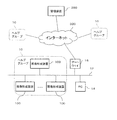
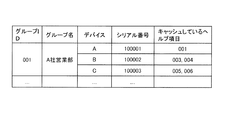
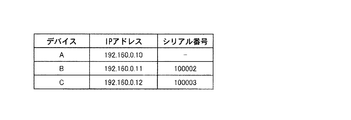
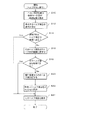
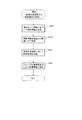
実施形態のシステム構成の一例を示す図である。FIG. 1 is a diagram illustrating an example of a system configuration according to an embodiment. 管理装置の構成の例を示す図である。FIG. 3 illustrates an example of a configuration of a management device. 管理装置が持つグループ管理情報の例を示す図である。FIG. 4 is a diagram illustrating an example of group management information possessed by a management device. 管理装置が持つヘルプ管理情報の例を示す図である。FIG. 6 is a diagram illustrating an example of help management information possessed by the management device. 画像形成装置の構成の例を示す図である。FIG. 2 illustrates an example of a configuration of an image forming apparatus. 画像形成装置が持つグループ情報の例を示す図である。FIG. 4 illustrates an example of group information of the image forming apparatus. 画像形成装置が持つヘルプ管理情報の例を示す図である。FIG. 4 is a diagram illustrating an example of help management information possessed by the image forming apparatus. ユーザからヘルプ項目の表示指示を受けた画像形成装置が実行する処理手順の例を示す図である。FIG. 9 is a diagram illustrating an example of a processing procedure executed by an image forming apparatus that has received a display instruction of a help item from a user. 定期通知及びヘルプ更新のタイミングが到来した際に画像形成装置が実行する処理手順の例を示す図である。FIG. 9 is a diagram illustrating an example of a processing procedure executed by the image forming apparatus when a timing of a periodic notification and a help update arrives. 画像形成装置から定期通知を受け取った際に管理装置が実行する処理手順の例を示す図である。FIG. 9 is a diagram illustrating an example of a processing procedure executed by a management device when a periodic notification is received from an image forming apparatus. 図10の手順のS50の詳細な処理手順の例を示す図である。FIG. 11 is a diagram illustrating an example of a detailed processing procedure in S50 of the procedure in FIG. 10.

図1を参照して、本発明の一実施形態のシステム構成を説明する。図示のように、本実施形態のシステムは、インターネット300に接続された1以上のヘルプグループ10と、管理装置200とを含む。   A system configuration according to an embodiment of the present invention will be described with reference to FIG. As illustrated, the system of the present embodiment includes one or more help groups 10 connected to the Internet 300, and a management device 200.

ヘルプグループ10は、同じヘルプ情報が利用可能な複数の画像形成装置100からなるグループである。ここで、ある画像形成装置100について「ヘルプ情報が利用可能」とは、そのヘルプ情報が、その画像形成装置100についてのヘルプ情報として適切であることである。画像形成装置100のヘルプ情報には、例えばその画像形成装置100が持つ個々の機能の使用方法の説明記事や、起こり得る様々なエラー(障害)それぞれについての対処方法の説明記事などのように、多数の記事(以下、個々のヘルプ記事のことを「ヘルプ項目」と呼ぶ)が含まれる。複数の画像形成装置100が「同じヘルプ情報が利用可能」とは、それら多数のヘルプ項目のすべてがそれら複数の画像形成装置100すべてに利用可能である場合(例えばそれら複数の画像形成装置100が同一の機種又は系統)が典型的であるが、これに限られるわけではない。例えば、ヘルプグループ10がA,B,Cの3つの画像形成装置100からなり、画像形成装置AとBがヘルプ項目aとbを利用可能であり、画像形成装置BとCがヘルプ項目bとcを利用可能である場合も、複数の画像形成装置100が「同じヘルプ情報が利用可能」であるという概念に含まれる。   The help group 10 is a group including a plurality of image forming apparatuses 100 that can use the same help information. Here, “help information is available” for an image forming apparatus 100 means that the help information is appropriate as help information for the image forming apparatus 100. The help information of the image forming apparatus 100 includes, for example, an article explaining how to use each function of the image forming apparatus 100 and an article explaining how to deal with each of various possible errors (failures). A large number of articles (hereinafter, individual help articles are referred to as “help items”) are included. The plurality of image forming apparatuses 100 “use the same help information” means that all of the many help items are available to all of the plurality of image forming apparatuses 100 (for example, if the plurality of image forming apparatuses 100 (Same model or system) is typical, but not limited to this. For example, the help group 10 includes three image forming apparatuses 100 of A, B, and C. The image forming apparatuses A and B can use the help items a and b, and the image forming apparatuses B and C can use the help items b and C. The case where c can be used is also included in the concept that the plurality of image forming apparatuses 100 are “the same help information is available”.

1つのヘルプグループ10に属する複数の画像形成装置100は、ローカルエリアネットワークやイントラネット等の同一のローカルネットワーク12に接続されており、相互に通信可能となっている。ユーザは、PC(パーソナルコンピュータ)14からローカルネットワーク12を介して画像形成装置100に印刷指示を行う。ローカルネットワーク12は、ファイアウォール等のゲートウェイ16を介してインターネット300に接続されている。また、ローカルネットワーク12上に、ヘルプグループ10に属さない画像形成装置100が存在してもよい。   A plurality of image forming apparatuses 100 belonging to one help group 10 are connected to the same local network 12 such as a local area network or an intranet, and can communicate with each other. The user issues a print instruction from the PC (personal computer) 14 to the image forming apparatus 100 via the local network 12. The local network 12 is connected to the Internet 300 via a gateway 16 such as a firewall. Further, an image forming apparatus 100 that does not belong to the help group 10 may exist on the local network 12.

画像形成装置100は、例えば、プリンタ、スキャナ、コピー機、ファクシミリ装置、またはこれらのうちの1以上を兼ね備える複合機である。図5に例示するように、画像形成装置100は、印刷のためのプリント機構130と、原稿の光学的読み取りのためのスキャン機構140とを備えており、これらの機構を用いることで印刷、スキャン、コピー等の処理を行う。ただしこれは一例に過ぎず、印刷のみ、スキャンのみといった単機能の画像形成装置にも本実施形態の手法は適用可能である。画像形成装置100は、ゲートウェイ16又は携帯電話網等を介してインターネット300に接続されている。   The image forming apparatus 100 is, for example, a printer, a scanner, a copier, a facsimile machine, or a multifunction peripheral having at least one of them. As illustrated in FIG. 5, the image forming apparatus 100 includes a printing mechanism 130 for printing and a scanning mechanism 140 for optically reading a document. By using these mechanisms, printing and scanning are performed. And processing such as copying. However, this is only an example, and the method of the present embodiment can be applied to a single-function image forming apparatus such as printing only or scanning only. The image forming apparatus 100 is connected to the Internet 300 via the gateway 16 or a mobile phone network.

管理装置200は、画像形成装置100に対してヘルプ情報を提供する。ヘルプ情報の「提供」は、画像形成装置100からの要求がなくても管理装置200が能動的に提供するプッシュ(Push)方式の提供であってもよいし、HTTP(HyperText Transfer Protocol)リクエスト等の画像形成装置100からの要求に応じて提供するというプル(Pull)方式の提供であってもよい。画像形成装置100等が設置されたネットワーク等の環境に適した方式を用いればよい。管理装置200は、画像形成装置100の使用状態やヘルプ情報の利用状況等を表す管理情報や、画像形成装置100で生じたエラーに関する情報等を画像形成装置100から取得する。そして、それら取得した情報に従い、その画像形成装置100にとって有益である可能性が高いヘルプ情報を特定し、特定したヘルプ情報をその画像形成装置100に提供する。なお、提供するヘルプ情報を特定するために管理装置200が用いる、画像形成装置100の管理情報やエラー情報等の情報は、遠隔保守のためにサーバが画像形成装置100から取得する情報と共通するものが多い。そこで、遠隔保守を行うサーバが、ヘルプ情報を提供する本実施形態の管理装置200の機能を併せ持つようにしてもよい。   The management apparatus 200 provides help information to the image forming apparatus 100. The “provision” of the help information may be a provision of a push (Push) method actively provided by the management apparatus 200 without a request from the image forming apparatus 100, an HTTP (HyperText Transfer Protocol) request, or the like. A pull system may be provided in response to a request from the image forming apparatus 100. A method suitable for an environment such as a network in which the image forming apparatus 100 and the like are installed may be used. The management apparatus 200 acquires management information indicating the use state of the image forming apparatus 100, the use state of the help information, and the like, information about an error that has occurred in the image forming apparatus 100, and the like. Then, according to the acquired information, the help information that is likely to be useful for the image forming apparatus 100 is specified, and the specified help information is provided to the image forming apparatus 100. Note that information such as management information and error information of the image forming apparatus 100 used by the management apparatus 200 to specify the help information to be provided is common to information obtained by the server from the image forming apparatus 100 for remote maintenance. There are many things. Therefore, a server that performs remote maintenance may have the function of the management device 200 of the present embodiment that provides help information.

以下、管理装置200及び画像形成装置100について更に詳しく説明する。   Hereinafter, the management apparatus 200 and the image forming apparatus 100 will be described in more detail.

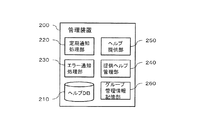
図2に示すように、管理装置200は、ヘルプDB(データベース)210、定期通知処理部220、エラー通知処理部230、提供ヘルプ管理部240、ヘルプ提供部250、グループ管理情報記憶部260を有する。   As shown in FIG. 2, the management device 200 includes a help DB (database) 210, a periodic notification processing unit 220, an error notification processing unit 230, a provided help management unit 240, a help providing unit 250, and a group management information storage unit 260. .

ヘルプDB210は、ヘルプ情報を保持するデータベースである。ヘルプDB210には、多数のヘルプ項目が記憶されている。個々のヘルプ項目は、それぞれ、その項目を一意に識別するヘルプIDと、その項目についてのヘルプ情報の内容であるヘルプ内容とを含んでいる。ヘルプ内容は、当該ヘルプ項目の話題に対応するヘルプ記事の内容であり、例えば、画像形成装置100のある特定の操作についての操作方法の説明や、特定のエラーに対する対処方法の説明等である。   The help DB 210 is a database that stores help information. The help DB 210 stores many help items. Each help item includes a help ID for uniquely identifying the item and a help content which is the content of the help information on the item. The help content is the content of a help article corresponding to the topic of the help item, and includes, for example, a description of an operation method for a specific operation of the image forming apparatus 100 and a description of a method for coping with a specific error.

またヘルプDB210には、そのヘルプグループ10が利用可能なヘルプ項目群の目次を表す目次情報や、個々のヘルプ項目を検索するための検索インデックス情報等を含んでいてもよい。目次に含まれる個々の見出しには、その見出しに対応するヘルプ項目がリンクされており、見出しを選択することでヘルプ項目を呼び出すことができる。また、検索インデックス情報を用いることで、ユーザが入力したキーワードに該当するヘルプ項目を検索することもできる。管理装置200が複数の機種の画像形成装置100に対応する場合、ヘルプDB210には、機種毎に、その機種に対応するヘルプの目次情報やヘルプ項目群が格納される。   Further, the help DB 210 may include table of contents information indicating a table of contents of a help item group that can be used by the help group 10, search index information for searching for individual help items, and the like. Each heading included in the table of contents is linked to a help item corresponding to the heading, and the help item can be called by selecting the heading. Also, by using the search index information, it is possible to search for a help item corresponding to the keyword input by the user. When the management apparatus 200 corresponds to the image forming apparatuses 100 of a plurality of models, the help DB 210 stores, for each model, table of contents information and help items corresponding to the model.

定期通知処理部220は、画像形成装置100の定期通知部112から定期的に通知されてくる画像形成装置100の管理情報を処理することで、その通知の時点でその画像形成装置100にとって必要性が高いヘルプ項目群を判定する。また、定期通知処理部220は、取得した管理情報に基づき、画像形成装置100に保持されているヘルプ項目の中で、その画像形成装置100にとって必要性が低いものを判定する機能を有していてもよい。   The periodic notification processing unit 220 processes the management information of the image forming apparatus 100 that is periodically notified from the periodic notification unit 112 of the image forming apparatus 100. Are determined. Further, the periodic notification processing unit 220 has a function of determining, based on the acquired management information, a help item held in the image forming apparatus 100 that is less necessary for the image forming apparatus 100. You may.

例えば、定期通知処理部220は、画像形成装置100からの管理情報に含まれるその画像形成装置100が保持しているヘルプ項目やその参照回数の情報に基づき、その画像形成装置100に対して必要性が高いヘルプ項目や低いヘルプ項目を特定してもよい。例えば、画像形成装置100から受け取った管理情報から、優先度が高い(例えば優先度がある閾値以上)ヘルプ情報がその画像形成装置100に記憶されていないことが分かった場合、そのヘルプ情報がその画像形成装置100にとって必要性が高いと判定する。また例えば、画像形成装置100が保持しているヘルプ項目の中で参照回数が少ないヘルプ項目(例えば画像形成装置100が取得してから所定の期間が経過したにもかかわらず、参照回数があらかじめ定められた閾値以下であるヘルプ項目)を、その画像形成装置100にとって必要性が低いと判定する。   For example, the periodic notification processing unit 220 may provide the necessary information to the image forming apparatus 100 based on the information on the help items and the number of times of reference, which are held by the image forming apparatus 100 and included in the management information from the image forming apparatus 100. A help item with a high likelihood or a help item with a low likelihood may be specified. For example, when it is found from the management information received from the image forming apparatus 100 that help information having a high priority (for example, a priority is equal to or more than a certain threshold) is not stored in the image forming apparatus 100, the help information is It is determined that the necessity for the image forming apparatus 100 is high. Also, for example, among the help items held by the image forming apparatus 100, a help item having a small number of references (for example, the number of references is determined in advance even though a predetermined period has elapsed since the image forming apparatus 100 acquired the help item). Is determined to be less necessary for the image forming apparatus 100.

また定期通知処理部220は、通知された管理情報の各項目の値に従い、例えば画像形成装置100において近い将来に生じる可能性が高いエラー等のイベントを判定し、その判定結果に基づいてその画像形成装置100に必要なヘルプ項目を判定してもよい。例えば、トナー切れ、紙詰まり、感光体ドラム交換時期到来等、画像形成装置100に生じるエラー等のイベントの予兆を判定する技術が従来利用されているが、定期通知処理部220はそのような予兆判定技術を用いることで発生可能性の高いイベントを判定すればよい。この判定は、そのとき通知された管理情報だけでなく、過去に通知された管理情報を考慮に入れて行ってもよい。そして、定期通知処理部220は、画像形成装置100で近い将来に発生する可能性が高いと判定した各イベントに対応するヘルプ項目を、その時点でその画像形成装置100にとって必要性が高いヘルプ項目と判定すればよい。イベントとヘルプ項目との対応関係はあらかじめ管理装置200内のデータベースに登録されており、定期通知処理部220は、このデータベースを参照して、近い将来に発生する可能性が高いと判定した各イベントに対応するヘルプ項目を特定する。   Further, the periodic notification processing unit 220 determines an event such as an error that is likely to occur in the near future in the image forming apparatus 100 in accordance with the value of each item of the notified management information, and based on the determination result, Help items necessary for forming apparatus 100 may be determined. For example, a technique for determining a sign of an event such as an error occurring in the image forming apparatus 100 such as running out of toner, a paper jam, a photosensitive drum replacement time, or the like has been conventionally used. An event having a high possibility of occurrence may be determined by using the determination technique. This determination may be made in consideration of not only the management information notified at that time but also the management information notified in the past. Then, the periodic notification processing unit 220 replaces the help item corresponding to each event determined to be likely to occur in the near future in the image forming apparatus 100 with the help item that is highly necessary for the image forming apparatus 100 at that time. Should be determined. The correspondence between the event and the help item is registered in a database in the management apparatus 200 in advance, and the periodic notification processing unit 220 refers to this database to determine each event determined to be likely to occur in the near future. Specify the help item corresponding to.

そして、定期通知処理部220は、画像形成装置100にとって必要性が高いと判定したヘルプ項目群のデータを含んだヘルプ項目追加指示、及び(その画像形成装置100が保持しているものの)必要性が低いと判定したヘルプ項目群を特定する情報(例えばそれら各ヘルプ項目のヘルプID)を含んだヘルプ項目削除指示、その画像形成装置100の識別情報(装置IDと呼ぶ)に対応付けて、提供ヘルプ管理部240に登録する。登録された情報は、その画像形成装置100が保持(キャッシュ)するヘルプ情報に関する次回の更新情報となる。この更新情報の生成及び登録の処理は、個々の画像形成装置100についてそれぞれ行われる。   Then, the periodic notification processing unit 220 outputs a help item addition instruction including data of a help item group determined to be highly necessary for the image forming apparatus 100 and the necessity (though the information is held by the image forming apparatus 100). And a help item deletion instruction including information for identifying a help item group determined to be low (for example, a help ID of each help item), and provided in association with the identification information (device ID) of the image forming apparatus 100. Register in the help management unit 240. The registered information is the next update information on the help information held (cached) by the image forming apparatus 100. The process of generating and registering the update information is performed for each image forming apparatus 100.

エラー通知処理部230は、画像形成装置100のエラー通知部114から通知されたエラー情報に基づき、そのエラー情報が示すエラーに対する対処方法を表すヘルプ項目を特定する。そして、特定したヘルプ項目のデータを、その画像形成装置100の装置IDに対応付けて、提供ヘルプ管理部240に登録する。   The error notification processing unit 230 specifies a help item indicating a coping method for the error indicated by the error information based on the error information notified from the error notification unit 114 of the image forming apparatus 100. Then, the specified help item data is registered in the provided help management unit 240 in association with the device ID of the image forming apparatus 100.

提供ヘルプ管理部240は、各画像形成装置100に提供するヘルプ項目の更新情報を管理する機能モジュールである。提供ヘルプ管理部240は、画像形成装置100について定期通知処理部220が生成した更新情報、エラー通知処理部230がその画像形成装置100について特定したヘルプ項目のデータを、その画像形成装置100の装置IDに対応付けて保持する。   The provided help management unit 240 is a function module that manages update information of help items provided to each image forming apparatus 100. The provided help management unit 240 stores the update information generated by the periodic notification processing unit 220 for the image forming apparatus 100 and the data of the help item specified for the image forming apparatus 100 by the error notification processing unit 230 in the apparatus of the image forming apparatus 100. The ID is held in association with the ID.

ヘルプ提供部250は、画像形成装置100のヘルプ取得部116からヘルプ取得要求を受け取り、これに応じて画像形成装置100にヘルプ項目を送信する。まず1つの例として、ヘルプ提供部250は、取得したいヘルプIDを指定したヘルプ取得要求を受け取ると、そのヘルプIDに対応するヘルプ項目をヘルプDB210から読み出し、その画像形成装置100に返信する。また、画像形成装置100から更新情報の取得要求を受けた場合は、ヘルプ提供部250は、提供ヘルプ管理部240内にその画像形成装置100の装置IDに対応づけて保持されている更新情報をその画像形成装置100に提供する。更新情報には、その画像形成装置100に追加して記憶させるヘルプ項目のデータや、その画像形成装置100内のヘルプ項目の削除指示等が含まれる。画像形成装置100への更新情報の送信が成功した場合、ヘルプ提供部250は、提供ヘルプ管理部240からその更新情報を削除する。またヘルプ提供部250は、画像形成装置100からヘルプ取得要求があった場合、その画像形成装置100の装置IDに対応付けて、エラー通知処理部230が求めたヘルプ項目のデータが提供ヘルプ管理部240に登録されていれば、そのヘルプ項目をその画像形成装置100に応答する。   The help providing unit 250 receives a help acquisition request from the help acquisition unit 116 of the image forming apparatus 100, and transmits a help item to the image forming apparatus 100 in response to the request. First, as an example, when receiving a help acquisition request specifying a help ID to be acquired, the help providing unit 250 reads a help item corresponding to the help ID from the help DB 210 and returns the help item to the image forming apparatus 100. When a request to acquire update information is received from the image forming apparatus 100, the help providing unit 250 stores the update information held in the provided help management unit 240 in association with the apparatus ID of the image forming apparatus 100. The image is provided to the image forming apparatus 100. The update information includes data of a help item to be additionally stored in the image forming apparatus 100, an instruction to delete the help item in the image forming apparatus 100, and the like. When the transmission of the update information to the image forming apparatus 100 is successful, the help providing unit 250 deletes the update information from the provided help management unit 240. When a help acquisition request is received from the image forming apparatus 100, the help providing unit 250 stores the help item data obtained by the error notification processing unit 230 in association with the apparatus ID of the image forming apparatus 100. If it is registered in 240, the help item is returned to the image forming apparatus 100.

なお、図示は省略したが、管理装置200は、画像形成装置100のユーザからの電話やチャット等での問い合わせに応答するオペレータ(人間)のためのユーザインタフェース(UI)機能を有している。このUI機能は、管理装置200に付属する表示装置や管理装置200にアクセス可能なネットワーク上のコンピュータを介して、オペレータに提供される。オペレータは、ユーザからの問合せに答えると共に、そのUI機能を用いることで、その問合せに対して役立つヘルプ項目をその画像形成装置100の装置IDに対応付けて提供ヘルプ管理部240に登録する。登録されたヘルプ項目は、その画像形成装置100からヘルプ取得要求が到来した際に、ヘルプ提供部250により画像形成装置100に送信される。   Although not shown, the management apparatus 200 has a user interface (UI) function for an operator (human) responding to an inquiry from a user of the image forming apparatus 100 by telephone or chat. This UI function is provided to the operator via a display device attached to the management device 200 or a computer on a network accessible to the management device 200. The operator answers a query from the user and registers a help item useful for the query in the provided help management unit 240 in association with the device ID of the image forming apparatus 100 by using the UI function. The registered help item is transmitted to the image forming apparatus 100 by the help providing unit 250 when a help acquisition request arrives from the image forming apparatus 100.

また、画像形成装置100を制御するソフトウエアのバージョンアップ等により画像形成装置100に機能が追加されると、その機能についてのヘルプ項目がヘルプDB210に追加される。そして、これに伴って、その画像形成装置100に対応するヘルプの目次情報や検索インデックス情報が、追加されたヘルプ項目を反映したものへと更新されることになる。このような更新が行われた場合、更新後の目次情報や検索インデックス情報が、該当する機種の各画像形成装置100の装置IDに対応付けて提供ヘルプ管理部240に登録される。その後、画像形成装置100からヘルプ取得要求が到来した際、その画像形成装置100の装置IDに対応付けて目次情報等が登録されている場合は、その登録された目次情報等を画像形成装置100に送信する。   Further, when a function is added to the image forming apparatus 100 due to a version upgrade of software for controlling the image forming apparatus 100, a help item for the function is added to the help DB 210. Accordingly, the contents information and search index information of the help corresponding to the image forming apparatus 100 are updated to reflect the added help item. When such an update is performed, the updated table of contents information and search index information are registered in the provided help management unit 240 in association with the apparatus ID of each image forming apparatus 100 of the applicable model. Thereafter, when a help acquisition request arrives from the image forming apparatus 100, if the table of contents information or the like is registered in association with the apparatus ID of the image forming apparatus 100, the registered table of contents information or the like is stored in the image forming apparatus 100. Send to

グループ管理情報記憶部260は、各ヘルプグループ10の管理情報を記憶する。グループ管理情報記憶部260に記憶される管理情報には、グループ管理情報とヘルプ管理情報が含まれる。   The group management information storage unit 260 stores management information of each help group 10. The management information stored in the group management information storage unit 260 includes group management information and help management information.

グループ管理情報の例を図3に示す。この例では、グループ管理情報には、ヘルプグループ10ごとに、そのヘルプグループの一意な識別情報であるグループIDに対応付けて、ヘルプグループ10の名称(「グループ名」)と、そのヘルプグループ10に属する各画像形成装置100の装置名(「デバイス」)、シリアル番号、及び当該画像形成装置100が保持(キャッシュ)しているヘルプ項目のIDのリスト、が含まれる。シリアル番号は、その画像形成装置100の製造元が付与した一意な通し番号であり、その画像形成装置100の識別情報として用いられる。   FIG. 3 shows an example of the group management information. In this example, the group management information includes, for each help group 10, the name of the help group 10 (“group name”) and the help group 10 in association with a group ID that is unique identification information of the help group. , The device name (“device”), the serial number, and a list of IDs of help items held (cached) by the image forming apparatus 100 are included. The serial number is a unique serial number given by the manufacturer of the image forming apparatus 100, and is used as identification information of the image forming apparatus 100.

図4は、グループ管理情報記憶部260に記憶されたヘルプ管理情報の例である。例示したヘルプ管理情報には、ヘルプグループのグループIDに対応付けて、そのヘルプグループ内の画像形成装置100群に保持(キャッシュ)されている個々のヘルプ項目の情報が含まれている。これら個々のヘルプ項目の情報には、それぞれ、そのヘルプ項目のヘルプID、そのヘルプグループ(内のいずれかの画像形成装置100)がそのヘルプ項目を管理装置200から取得した取得日(そのヘルプ項目のバージョン情報が付随していてもよい)、そのヘルプ項目がそのヘルプグループ内で参照された回数、そのヘルプ項目の最新バーションの作成日、そのヘルプ項目の優先度、等が含まれる。ヘルプ項目の優先度は、ヘルプ情報を管理している管理者等がヘルプ項目の重要度に応じて割り当てる。図示例では、優先度の値が小さいほど、より重要なヘルプ項目であることを示す。例えば、優先度が「3」であるヘルプID「001」のヘルプ項目よりも、優先度が「1」であるヘルプID「002」のヘルプ項目の方がより優先されるべき重要なヘルプである。   FIG. 4 is an example of help management information stored in the group management information storage unit 260. The illustrated help management information includes information on individual help items held (cached) in the group of image forming apparatuses 100 in the help group in association with the group ID of the help group. The information of each of these help items includes the help ID of the help item and the date when the help group (any one of the image forming apparatuses 100) acquired the help item from the management device 200 (the help item). May be attached), the number of times the help item has been referenced in the help group, the date of creation of the latest version of the help item, the priority of the help item, and the like. The priority of the help item is assigned by an administrator or the like who manages the help information according to the importance of the help item. In the illustrated example, a smaller priority value indicates a more important help item. For example, the help item with the help ID “002” having the priority “1” is an important help that should be given higher priority than the help item with the help ID “001” having the priority “3”. .

次に、画像形成装置100について詳しく説明する。   Next, the image forming apparatus 100 will be described in detail.

図5に示すように、画像形成装置100は、制御部110、プリント機構130及びスキャン機構140を有する。   As shown in FIG. 5, the image forming apparatus 100 includes a control unit 110, a print mechanism 130, and a scan mechanism 140.

プリント機構130は、媒体に対してインクやトナーにより画像を印刷するための機械的な機構である。スキャン機構140は、原稿を光学的に読み取って電気的な画像信号を生成する機構である。   The printing mechanism 130 is a mechanical mechanism for printing an image on a medium using ink or toner. The scanning mechanism 140 is a mechanism that optically reads a document and generates an electrical image signal.

制御部110は、画像形成装置100の制御を行う情報処理装置である。制御部110は、プリント機構130やスキャン機構140の制御、タッチパネル等の入出力装置を用いたUI(ユーザインタフェース)処理等のための各種の機能を備えているが、図には特にヘルプ情報の管理に関連する機能(定期通知部112〜ヘルプ管理情報保持部128)を示している。   The control unit 110 is an information processing device that controls the image forming apparatus 100. The control unit 110 has various functions for controlling the print mechanism 130 and the scan mechanism 140, and performing UI (user interface) processing using an input / output device such as a touch panel. 2 shows functions related to management (the regular notification unit 112 to the help management information holding unit 128).

定期通知部112は、画像形成装置100の管理情報を、1日に1回や1週間に1回等のように定期的に、管理装置200に通知する。通知される管理情報は、画像形成装置100の管理に用いられる、画像形成装置100の使用状態等を表す情報である。管理情報は、画像形成装置100又はこれに装着された消耗品(トナーカートリッジ等)や交換部品(感光体ドラム等)のこれまでの使用履歴や現在の状態等を表す1以上の情報項目の集まりである。管理情報には、例えば、課金メーター情報(例えば白黒やカラー等の項目毎の印刷枚数を表すカウンタ値)、サービス毎の動作カウンタの情報、消耗品情報(トナーの残量等)、定期交換部品の利用頻度情報(例えば感光体ドラムの使用量等)、故障履歴情報、プリント機構130の動作情報、等の項目が含まれる。これらの情報項目は、遠隔保守のために画像形成装置100が保守センターに定期的に通知する情報と同様の項目でよい。また、定期通知部112が管理装置200に通知する管理情報には、後述するヘルプ管理情報保持部128が保持するヘルプ管理情報や、ヘルプキャッシュ120の空き容量の情報が含まれていてもよい。なお、詳細は後述するが、そのヘルプ管理情報には、例えば、当該画像形成装置100が保持しているヘルプ項目のヘルプIDや取得日、参照回数の情報が含まれる。   The periodic notification unit 112 periodically notifies the management device 200 of the management information of the image forming apparatus 100, such as once a day or once a week. The notified management information is information indicating a use state of the image forming apparatus 100 and the like used for management of the image forming apparatus 100. The management information is a collection of one or more information items indicating the usage history or the current state of the image forming apparatus 100 or consumables (toner cartridge or the like) or replacement parts (photosensitive drum or the like) mounted on the image forming apparatus 100. It is. The management information includes, for example, billing meter information (for example, a counter value indicating the number of prints for each item such as black and white or color), information of an operation counter for each service, consumable information (toner remaining amount, etc.), periodic replacement parts Items such as usage frequency information (for example, the usage amount of the photosensitive drum), failure history information, operation information of the printing mechanism 130, and the like. These information items may be the same items as the information that the image forming apparatus 100 periodically notifies the maintenance center for remote maintenance. Further, the management information notified by the periodic notification unit 112 to the management device 200 may include help management information held by a help management information holding unit 128 described later and information on the free space of the help cache 120. Although details will be described later, the help management information includes, for example, information on the help ID, acquisition date, and reference count of the help item held by the image forming apparatus 100.

エラー通知部114は、画像形成装置100で発生したエラーに関する情報(エラー情報)を管理装置200に通知する。このエラー情報には、例えば、発生したエラーの種類を一意に識別するエラーコードが含まれる。また、エラー情報には、そのエラーの内容についての更に詳しい情報が含まれていてもよい。エラー通知部114が管理装置200に送るエラー情報は、遠隔保守のために画像形成装置100が保守センターに通知するエラー情報と同様のものでよい。エラー通知部114から管理装置200へのエラー情報の通知は、エラーが発生した場合に自動的に実行してもよいし、発生したエラーに対するヘルプ情報の取得指示をユーザから受けたことをトリガとして実行してもよい。   The error notification unit 114 notifies the management device 200 of information (error information) relating to an error that has occurred in the image forming apparatus 100. This error information includes, for example, an error code that uniquely identifies the type of error that has occurred. Further, the error information may include more detailed information about the content of the error. The error information that the error notification unit 114 sends to the management apparatus 200 may be the same as the error information that the image forming apparatus 100 notifies the maintenance center for remote maintenance. The notification of the error information from the error notification unit 114 to the management device 200 may be automatically executed when an error occurs, or may be triggered by receiving a help information acquisition instruction from the user for the occurred error. May be performed.

ヘルプ取得部116は、管理装置200等からヘルプ項目を取得する。ヘルプ取得部116の動作モードには、ユーザから明示的に指定されたヘルプ項目を取得する個別取得モードと、画像形成装置100にエラーが発生していない場合の定期的にヘルプを取得する際のモードである定期モードと、エラーが発生している場合のモードであるエラー時モードがある。   The help acquisition unit 116 acquires help items from the management device 200 or the like. The operation mode of the help acquisition unit 116 includes an individual acquisition mode for acquiring a help item explicitly specified by the user and a mode for periodically acquiring help when no error occurs in the image forming apparatus 100. There are a regular mode, which is a mode, and an error mode, which is a mode when an error has occurred.

個別取得モードでは、例えばヘルプの目次や検索結果からユーザが選択したヘルプ項目を管理装置200から取得する。ただし、自分のヘルプキャッシュ120や、同じヘルプグループ10内の他の画像形成装置100のヘルプキャッシュ120に記憶されているヘルプ項目については、管理装置200からは取得せず、それらヘルプキャッシュ120内のヘルプ項目を用いる。   In the individual acquisition mode, for example, a help item selected by the user is acquired from the management device 200 from a table of contents of the help or a search result. However, the help items stored in the own help cache 120 or the help caches 120 of the other image forming apparatuses 100 in the same help group 10 are not acquired from the management apparatus 200, but are stored in the help cache 120. Use help items.

定期モードでは、ヘルプ取得部116は、定期通知部112の定期的な通知に応じて管理装置200が求めたヘルプ項目の情報、を取得する。定期モードでのヘルプ取得処理は、例えば定期通知部112の通知と同じ頻度で行う。一つの例では、定期通知部112が定期的な通知を行うタイミングからあらかじめ定められた時間だけ後のタイミングで、ヘルプ取得部116が管理装置200からヘルプ項目を取得する。具体的な例では、定期通知部112は平日毎日午前9時に管理装置200に通知を行うようスケジュール設定され、ヘルプ取得部116はその15分後、すなわち平日毎日午前9時15分に管理装置200にポーリングを行ってヘルプ項目群を取得するようスケジュール設定されている、などである。定期通知部112の通知とこれに応じたヘルプ取得部116のヘルプ取得との時間差は、定期的に通知される情報に基づき管理装置200がその画像形成装置100にとって適切なヘルプ項目を特定するのに必要な時間を考慮して定めればよい。   In the regular mode, the help acquiring unit 116 acquires information on the help item obtained by the management device 200 in response to the regular notification from the regular notifying unit 112. The help acquisition process in the regular mode is performed, for example, at the same frequency as the notification of the regular notification unit 112. In one example, the help acquisition unit 116 acquires the help item from the management device 200 at a timing later than the timing at which the regular notification unit 112 performs the regular notification by a predetermined time. In a specific example, the regular notification unit 112 is scheduled to notify the management device 200 at 9:00 am every weekday, and the help acquisition unit 116 sets the management device 200 at 15 minutes after that, that is, at 9:15 am every weekday. Is set to poll and obtain a help item group. The time difference between the notification by the periodic notification unit 112 and the help acquisition by the help acquisition unit 116 in response to this is determined by the management apparatus 200 based on the information that is periodically notified so that the management apparatus 200 specifies an appropriate help item for the image forming apparatus 100. The time may be determined in consideration of the time required.

エラー時モードでは、ヘルプ取得部116は、エラー通知部114からのエラー情報の通知に応じて管理装置200が求めたヘルプ項目を取得する。画像形成装置100でエラーが発生し、これに応じてエラー通知部114が管理装置200に対してエラー情報を通知すると、ヘルプ取得部116は定期モードからエラー時モードに切り替わる。そして、エラー時モードにおいてエラーに対応するヘルプ項目を管理装置200から取得すると、エラー時モードは解除される。   In the error mode, the help acquisition unit 116 acquires the help item obtained by the management device 200 in response to the notification of the error information from the error notification unit 114. When an error occurs in the image forming apparatus 100 and the error notification unit 114 notifies the management apparatus 200 of the error information in response thereto, the help acquisition unit 116 switches from the regular mode to the error mode. Then, when the help item corresponding to the error is acquired from the management device 200 in the error mode, the error mode is released.

ヘルプ情報のポーリング間隔は、定期モードでは定期通知部112の通知の間隔に対応した長い間隔(例えば1日)であるのに対し、エラー時モードでは、そのエラー情報に対応するヘルプ項目をなるべく早く取得するために、例えば1分ごと等のように短い間隔に設定されている。   In the regular mode, the polling interval of the help information is a long interval (for example, one day) corresponding to the notification interval of the regular notifying unit 112, whereas in the error mode, the help item corresponding to the error information is sent as soon as possible. In order to acquire, the interval is set at a short interval, for example, every minute.

ヘルプ取得部116が取得したヘルプ項目は、キャッシュ管理部118に渡される。また、取得されたヘルプ項目がヘルプUI部122からの指示に応じたものである場合、そのヘルプ項目はヘルプUI部122にも渡される。   The help item acquired by the help acquisition unit 116 is passed to the cache management unit 118. If the acquired help item is in response to an instruction from the help UI unit 122, the help item is also passed to the help UI unit 122.

キャッシュ管理部118は、ヘルプキャッシュ120を管理する。より詳しくは、キャッシュ管理部118は、ヘルプ取得部116が取得したヘルプ項目をヘルプキャッシュ120に格納する処理や、空き容量を拡げるためにヘルプキャッシュ120からヘルプ項目を削除する処理を行う。   The cache management unit 118 manages the help cache 120. More specifically, the cache management unit 118 performs a process of storing the help item acquired by the help acquisition unit 116 in the help cache 120 and a process of deleting the help item from the help cache 120 to increase the free space.

ヘルプキャッシュ120は、ヘルプ項目を記憶する記憶手段である。ヘルプキャッシュ120には、管理装置200等から取得したヘルプ項目群、目次情報、検索インデックス情報等が記憶される。   The help cache 120 is storage means for storing help items. The help cache 120 stores a help item group, table of contents information, search index information, and the like acquired from the management device 200 and the like.

ヘルプUI部122は、ユーザにヘルプ情報を表示又は印刷するためのUI処理を行う。例えばヘルプUI部122は、ヘルプの目次情報を画像形成装置100の画面に表示する。表示された目次の中からユーザが詳細情報を見たい項目の見出しを選択すると、ヘルプUI部122は、選択された見出しに対応するヘルプ項目をヘルプキャッシュ120から探す。目的のヘルプ項目がヘルプキャッシュ120内から見つかった場合は、そのヘルプ項目のヘルプ内容を画面に表示等する。見つからなかった場合は、同じヘルプグループ10内の他の画像形成装置100に対し、そのヘルプ項目を持っているかどうかを問い合わせる。そのヘルプ項目を保持している画像形成装置100がそのヘルプグループ10内にあれば、その問合せに応じてそのヘルプ項目が要求元の画像形成装置100に提供される。提供されたヘルプ項目を取得したヘルプUI部122は、そのヘルプ項目を画面に表示する。ヘルプUI部122は、ユーザの指示に応じて、ヘルプ内容を画面表示する代わりに、又はこれに加えて、ヘルプ内容を印刷出力してもよい。   The help UI unit 122 performs a UI process for displaying or printing help information to a user. For example, the help UI unit 122 displays the contents information of the help on the screen of the image forming apparatus 100. When the user selects a heading of an item for which detailed information is desired from the displayed table of contents, the help UI unit 122 searches the help cache 120 for a help item corresponding to the selected heading. When the target help item is found in the help cache 120, the help content of the help item is displayed on the screen. If the help item is not found, an inquiry is made to another image forming apparatus 100 in the same help group 10 as to whether the help item has the help item. If the image forming apparatus 100 holding the help item is in the help group 10, the help item is provided to the requesting image forming apparatus 100 in response to the inquiry. The help UI unit 122 that has obtained the provided help item displays the help item on the screen. The help UI unit 122 may print out the help content instead of or in addition to displaying the help content on the screen according to the user's instruction.

またヘルプUI部122は、画像形成装置100にてエラーが生じた場合に、そのエラーに関するヘルプ項目を画面表示する。ヘルプUI部122は、生じたエラーのエラーコードに対応するヘルプ項目がヘルプキャッシュ120内にあれば、そのヘルプ項目を表示する。そのヘルプコードがヘルプキャッシュ120内になければ、上述のユーザから指示されたヘルプ項目を表示する場合と同様、まず同じヘルプグループ10内の他のいずれかの画像形成装置100に該当のヘルプ項目があればその画像形成装置100からそのヘルプ項目を取得して表示する。なければ管理装置200からそのエラーコードに対応するヘルプ項目を取得して表示する。この表示は、ユーザの確認を経ずに自動的に行ってもよいし、ユーザに表示の要否を問い合わせ、表示が必要との回答があった場合に表示するようにしてもよい。   When an error occurs in the image forming apparatus 100, the help UI unit 122 displays a help item related to the error on a screen. If there is a help item corresponding to the error code of the generated error in the help cache 120, the help UI unit 122 displays the help item. If the help code is not in the help cache 120, as in the case of displaying the help item instructed by the user as described above, first, the corresponding help item is displayed in any one of the other image forming apparatuses 100 in the same help group 10. If so, the help item is acquired from the image forming apparatus 100 and displayed. If not, a help item corresponding to the error code is acquired from the management device 200 and displayed. This display may be performed automatically without the user's confirmation, or may be inquired of the user as to whether or not the display is necessary, and may be displayed when there is a response indicating that the display is necessary.

問合せ応答部124は、同じヘルプグループ10内の他の画像形成装置100からのヘルプ項目の問合せに対する応答を行う。この応答では、問合せ対象のヘルプ項目が自機のヘルプキャッシュ120内にあれば、そのヘルプ項目を提供する。   The inquiry response unit 124 responds to an inquiry about a help item from another image forming apparatus 100 in the same help group 10. In this response, if the help item to be queried is in the help cache 120 of its own device, the help item is provided.

グループ情報保持部126は、ヘルプグループ10内の他の画像形成装置100との通信の際に参照するグループ情報を保持している。図6にグループ情報の一例を示す。図6の例では、グループ情報には、当該ヘルプグループ10に属する画像形成装置100毎に、その画像形成装置100の装置名(「デバイス」)、IPアドレス、シリアル番号が含まれる。このうち装置名及びシリアル番号は、図3を参照して説明したものと同様のものである。IPアドレスは、ローカルネットワーク12を介した通信の際に用いられるアドレスであり、プライベートアドレスでもよい。   The group information holding unit 126 holds group information to be referred to when communicating with another image forming apparatus 100 in the help group 10. FIG. 6 shows an example of the group information. In the example of FIG. 6, the group information includes, for each image forming apparatus 100 belonging to the help group 10, the apparatus name ("device"), the IP address, and the serial number of the image forming apparatus 100. Among them, the device name and the serial number are the same as those described with reference to FIG. The IP address is an address used for communication via the local network 12, and may be a private address.

画像形成装置100は、新たなヘルプ項目をヘルプキャッシュ120に格納したり、ヘルプキャッシュ120の容量不足解消等のためにヘルプキャッシュ120内のヘルプ項目を削除したりした場合には、その都度、該当するヘルプ項目のヘルプIDを管理装置200に通知してもよい。この場合、管理装置200は、その通知に従い、グループ管理情報記憶部260に保持しているグループ管理情報(図3参照)における、当該画像形成装置100の「キャッシュしているヘルプ項目」のリストを更新する。   The image forming apparatus 100 stores a new help item in the help cache 120, or deletes a help item in the help cache 120 in order to eliminate a lack of space in the help cache 120, and so on. The management device 200 may be notified of the help ID of the help item to be performed. In this case, in accordance with the notification, the management apparatus 200 displays a list of “cached help items” of the image forming apparatus 100 in the group management information (see FIG. 3) held in the group management information storage unit 260. Update.

ヘルプ管理情報保持部128は、ヘルプキャッシュ120に記憶されている各ヘルプ項目の管理情報を保持する。ヘルプ管理情報保持部128が持つ管理情報の例を図7に示す。この例のヘルプ管理情報は、ヘルプキャッシュ120に記憶されているヘルプ項目ごとに、そのヘルプ項目のヘルプID、取得日、及び参照回数の情報を含んでいる。取得日は、当該画像形成装置100がそのヘルプ項目を取得してキャッシュした日である。取得日から、そのヘルプ項目のバージョンが特定できる。この例では、ヘルプ情報は、ヘルプ項目ごとにその記事内容が更新され、ヘルプ項目毎にバージョン管理がなされているものとする。取得日の代わりに、又は取得日に加えて、そのヘルプ項目のバージョン情報を記憶してもよい。参照回数は、そのヘルプ項目がユーザから参照された回数である。ヘルプグループ内の複数の画像形成装置100が同じヘルプ項目を重複して保持することを想定する場合には、参照回数として計数するのは、当該画像形成装置100での参照に限定してもよい。また、記憶容量の節約等のために、ヘルプグループ内の複数の画像形成装置100が同じヘルプ項目を重複して保持することがないように制御する場合には、ヘルプ管理情報保持部128が保持する参照回数の値は、ヘルプグループ内での参照回数の合計とする。取得日及び参照回数は、例えば、ヘルプキャッシュ120の空き容量が十分でなくなった場合に、ヘルプキャッシュ120から削除するヘルプ項目を決定するために用いられる。削除するヘルプ項目は、例えばLRU(Least Recently Used)のような公知のキャッシュアルゴリズムを用いて選択すればよい。また、このヘルプ管理情報は、例えば定期通知の際に、管理装置200に通知される。   The help management information holding unit 128 holds management information of each help item stored in the help cache 120. FIG. 7 shows an example of management information held by the help management information holding unit 128. The help management information in this example includes, for each help item stored in the help cache 120, information on the help ID, the acquisition date, and the number of times of reference of the help item. The acquisition date is a date on which the image forming apparatus 100 acquires and caches the help item. From the acquisition date, the version of the help item can be specified. In this example, it is assumed that the content of the help information is updated for each help item, and version control is performed for each help item. Instead of or in addition to the acquisition date, version information of the help item may be stored. The reference count is the number of times the help item has been referred to by the user. When it is assumed that a plurality of image forming apparatuses 100 in the help group hold the same help item in duplicate, counting as the number of times of reference may be limited to the reference in the image forming apparatus 100. . In order to save storage capacity and the like, when controlling so that a plurality of image forming apparatuses 100 in a help group do not hold the same help item redundantly, the help management information holding unit 128 holds the help item. The value of the number of times of reference is the total number of times of reference within the help group. The acquisition date and the number of times of reference are used to determine a help item to be deleted from the help cache 120 when the free space of the help cache 120 becomes insufficient, for example. The help item to be deleted may be selected using a known cache algorithm such as LRU (Least Recently Used). Further, the help management information is notified to the management device 200, for example, at the time of periodic notification.

以上の例では、ヘルプ管理情報保持部128内のヘルプ管理情報を定期通知部112による定期通知の際に管理装置200に通知するとしたが、この代わりに、又はこれに加えて、そのヘルプ管理情報に変化が生じた場合にそのヘルプ管理情報を管理装置200に通知してもよい。例えば、ユーザがヘルプ項目を参照することでそのヘルプ項目の参照回数が増加した場合、ヘルプキャッシュ120内のヘルプ項目を削除した場合、又は同じヘルプグループ内の他の画像形成装置100から取得したヘルプ項目をヘルプキャッシュ120に格納した場合等にヘルプ管理情報が変化するので、そのような場合に、変化後のヘルプ管理情報を管理装置200に通知する。   In the above example, the help management information in the help management information holding unit 128 is notified to the management device 200 at the time of the periodic notification by the periodic notification unit 112. However, instead of or in addition to this, the help management information is notified. May change, the help management information may be notified to the management device 200. For example, when the user refers to the help item, the number of times the help item is referred to increases, the help item in the help cache 120 is deleted, or the help acquired from another image forming apparatus 100 in the same help group. Since the help management information changes when the item is stored in the help cache 120 or the like, in such a case, the changed help management information is notified to the management device 200.

次に、図8を参照して、画像形成装置100のヘルプUI部122及びヘルプ取得部116が行う、個別取得モードにおける処理手順を例示する。   Next, a processing procedure in the individual acquisition mode performed by the help UI unit 122 and the help acquisition unit 116 of the image forming apparatus 100 will be described with reference to FIG.

この処理手順は、ユーザが画像形成装置100の操作部(例えばタッチパネルに表示されたUI画面)内のヘルプボタンを押下すると、開始される。この場合、まずヘルプUI部122が、ヘルプ目次を画面に表示する(S10)。ヘルプ目次は、例えばヘルプ項目毎の見出しがあらかじめ定められた順序で配列されたものであり、個々の見出しに対してヘルプIDの情報が埋め込まれている。表示するヘルプ目次は、例えば、ヘルプグループ10内の画像形成装置100群にキャッシュされているヘルプ項目群の見出しを「よく参照されるヘルプ」等と題して冒頭に配置したものであってもよい。このヘルプ目次の情報は、管理装置200が作成し、各画像形成装置100に提供する。   This processing procedure is started when the user presses a help button in an operation unit (for example, a UI screen displayed on a touch panel) of the image forming apparatus 100. In this case, first, the help UI unit 122 displays a help table of contents on the screen (S10). The help table of contents is, for example, an arrangement of headings for each help item in a predetermined order, and information of a help ID is embedded in each heading. The help table of contents to be displayed may be, for example, a heading of a help item group cached in the image forming apparatus group 100 in the help group 10 titled “Help often referred to” or the like. . The information of the help table of contents is created by the management apparatus 200 and provided to each image forming apparatus 100.

またヘルプUI部122は、上述したヘルプ目次の他に、検索キーの入力欄を画面表示してもよい。そして、その入力欄にユーザが入力した検索キーに該当するヘルプ項目を、検索インデックス情報を用いて検索し、検索結果として得られた1つ乃至複数のヘルプ項目の見出しを画面表示する(S10)。   The help UI unit 122 may display a search key input field on the screen in addition to the help table of contents described above. Then, a help item corresponding to the search key input by the user in the input field is searched using the search index information, and a heading of one or more help items obtained as a search result is displayed on the screen (S10). .

次にヘルプUI部122は、画面表示されたヘルプ目次又は検索結果の中から、ユーザの選択を受け付ける(S12)。ヘルプUI部122は、選択されたヘルプ項目(すなわち選択された見出しに対応付けられたヘルプIDに対応するヘルプ項目)が自機のヘルプキャッシュ120にあるかどうかを調べ(S14)、あればそのヘルプ項目を読み出して画面表示する(S24)。   Next, the help UI unit 122 accepts a user selection from the help table of contents or search results displayed on the screen (S12). The help UI unit 122 checks whether or not the selected help item (that is, the help item corresponding to the help ID associated with the selected headline) exists in the help cache 120 of its own device (S14). The help item is read out and displayed on the screen (S24).

ユーザが選択したヘルプ項目が自機のヘルプキャッシュ120内にない場合、ヘルプUI部122は、ヘルプグループ10内の他の各画像形成装置100に対してそのヘルプ項目をキャッシュしているかどうかを問い合わせる(S16)。問合せの結果、そのヘルプ項目を保持している画像形成装置100があれば、その画像形成装置100から自機にそのヘルプ項目が送信される。ヘルプUI部122は、ヘルプグループ10内の他機からそのヘルプ項目が取得できたか否かを判定し(S18)、取得できた場合は、そのヘルプ項目を画面に表示する(S24)。   If the help item selected by the user is not in its own help cache 120, the help UI unit 122 inquires of each of the other image forming apparatuses 100 in the help group 10 whether the help item is cached. (S16). If there is an image forming apparatus 100 holding the help item as a result of the inquiry, the help item is transmitted from the image forming apparatus 100 to the own apparatus. The help UI unit 122 determines whether or not the help item has been acquired from another device in the help group 10 (S18). If the help item has been acquired, the help item is displayed on the screen (S24).

S18でヘルプグループ10内のいずれの画像形成装置100からもそのヘルプ項目を取得できなかった場合、ヘルプ取得部116によりそのヘルプ項目を管理装置200から取得し(S20)、ヘルプキャッシュ120に格納する(S22)。このとき、ヘルプ管理情報保持部128に対して、そのヘルプ項目のヘルプIDや取得日等を記録する。そして、ヘルプUI部122は、そのヘルプ項目を画面に表示する(S24)。   If the help item cannot be obtained from any of the image forming apparatuses 100 in the help group 10 in S18, the help item is obtained from the management device 200 by the help obtaining unit 116 (S20) and stored in the help cache 120. (S22). At this time, the help ID and the acquisition date of the help item are recorded in the help management information holding unit 128. Then, the help UI unit 122 displays the help item on the screen (S24).

この例では、ヘルプ項目をヘルプグループ10内の他機から取得した場合(S18がYes)には、そのヘルプ項目を自機内にキャッシュしなかった。これは、ヘルプグループ10内で同じヘルプ項目を重複してキャッシュしない場合の例である。この方式では、ヘルプグループ10内の画像形成装置100群のヘルプ情報に関する記憶容量が少なくて済む。なお、この場合、他機からの問合せに応じてヘルプ項目を提供した画像形成装置100は、ヘルプ管理情報保持部128におけるそのヘルプ項目の参照回数(図7参照)9を1増加させる。   In this example, when the help item is acquired from another device in the help group 10 (Yes in S18), the help item is not cached in the own device. This is an example of a case where the same help item is not duplicated and cached in the help group 10. In this method, the storage capacity for the help information of the image forming apparatuses 100 in the help group 10 can be reduced. In this case, the image forming apparatus 100 that has provided the help item in response to an inquiry from another device increases the number of times the help item is referred to (see FIG. 7) 9 in the help management information holding unit 128 by one.

別の例として、ヘルプグループ10内の他機から取得したヘルプ項目を自機内のヘルプキャッシュ120にキャッシュしてもよい。この場合、その他機と自機とが同じヘルプ項目を重複して保持してもよいし、その他機からはそのヘルプ項目を削除してもよい。そのヘルプ項目をその他機と自機とで重複保持する場合には、自機は、他機から取得したヘルプ項目についての管理情報をヘルプ管理情報保持部128に登録し、S24の表示のあと、そのヘルプ項目の参照回数を1増加させる。また、そのヘルプ項目をその他機から削除する場合には、そのヘルプ項目についての管理情報(図7参照)もその他機から自機に移転する。そして、自機はその管理情報をヘルプ管理情報保持部128に登録し、参照回数を更新する。   As another example, a help item obtained from another device in the help group 10 may be cached in the help cache 120 in the own device. In this case, the other device and the own device may repeatedly hold the same help item, or the help item may be deleted from the other device. In a case where the help item is to be retained by both the other device and the own device, the own device registers the management information on the help item acquired from the other device in the help management information holding unit 128, and after displaying S24, The reference number of the help item is increased by one. When the help item is deleted from the other device, the management information (see FIG. 7) on the help item is also transferred from the other device to the own device. Then, the own device registers the management information in the help management information holding unit 128 and updates the reference count.

図8の例では、選択されたヘルプ項目が自機内にない場合、S16でヘルプグループ内の他の各画像形成装置100にそのヘルプ項目を持っていないか問い合わせた。これに対する別の例として、同じヘルプグループ内の他の画像形成装置100がどのヘルプ項目を保持しているかを示すリスト情報を管理装置200から各画像形成装置100に提供してもよい。この例では、画像形成装置100は、S16では、同じヘルプグループ内の各画像形成装置100に問合せを行う代わりに、そのヘルプ項目を保持しているとそのリスト情報に示されている画像形成装置100のみにその問合せを行い、そのヘルプ項目を入手する。この例では、管理装置200は、例えば、定期通知などでヘルプグループ内の各画像形成装置100から当該画像形成装置100のヘルプ管理情報を受け取る都度、そのヘルプグループについての上記リスト情報をそのヘルプ管理通知の情報を反映して更新する。そして、更新後のリスト情報をそのヘルプグループ内の各画像形成装置100に提供する。   In the example of FIG. 8, when the selected help item is not present in the own apparatus, in S16, the other image forming apparatuses 100 in the help group are inquired about whether or not the help item is provided. As another example of this, the management apparatus 200 may provide each image forming apparatus 100 with list information indicating which help item another image forming apparatus 100 in the same help group holds. In this example, in S16, instead of inquiring each image forming apparatus 100 in the same help group, the image forming apparatus 100 indicates in the list information that the help item is held in the list information. Only the inquiry is made to 100 and the help item is obtained. In this example, each time the management apparatus 200 receives the help management information of the image forming apparatus 100 from each of the image forming apparatuses 100 in the help group by, for example, periodic notification, the management apparatus 200 updates the list information of the help group with the help management. Update to reflect the notification information. Then, the updated list information is provided to each image forming apparatus 100 in the help group.

次に、図9を参照して、画像形成装置100の定期通知部112及びヘルプ取得部116が行う、定期モードにおける処理手順の例を説明する。   Next, an example of a processing procedure in the regular mode performed by the regular notification unit 112 and the help acquisition unit 116 of the image forming apparatus 100 will be described with reference to FIG.

この手順では、設定された条件(例えば「平日の朝9時と夕方6時」など)に応じて決まる更新タイミングが到来すると、定期通知部112が、自機100の管理情報(課金メーター情報、サービス毎の動作カウンタの情報、消耗品の残量情報、ヘルプ管理情報(図7参照)等)を管理装置200に通知する(S30)。管理装置200は、その画像形成装置100から取得した管理情報に基づき、その画像形成装置100にとって必要性が高いヘルプ項目群や必要性が低いヘルプ項目群を求め、その画像形成装置100についてのヘルプの更新情報を生成する。S30の通知の後、例えばある一定時間が経過すると、ヘルプ取得部116が、管理装置200にアクセスし、ヘルプの更新情報を取得する(S32)。そして、ヘルプ取得部116は、受け取った更新情報に従い、ヘルプキャッシュ120に保持されるヘルプ項目群を更新する(S34)。例えば、定期通知に応じて必要性が高いと判定されたヘルプ項目をヘルプキャッシュ120に追加したり、必要性が低いと判定されてヘルプ項目をヘルプキャッシュ120から削除したりする。また、ヘルプキャッシュ120内の既存のヘルプ項目に対する新バージョンのヘルプ項目がその更新情報に含まれている場合には、ヘルプキャッシュ120内のそのヘルプ項目を新バージョンへと更新する。またS34では、ヘルプキャッシュ120内のヘルプ項目群の更新に応じて、ヘルプ管理情報保持部128内の管理情報を更新する。例えば、新たにヘルプキャッシュ120に格納したヘルプ項目の管理情報をヘルプ管理情報保持部128に登録し、ヘルプキャッシュ120から削除したヘルプ項目の管理情報をヘルプ管理情報保持部128から削除する。また、ヘルプキャッシュ120内のヘルプ項目を新バージョンに更新した場合には、ヘルプ管理情報保持部128内の当該ヘルプ項目についての取得日の情報をその更新の日付に変更する。あるいは、ヘルプ管理情報保持部128に更新日という項目を加え、この項目にその更新の日付を登録してもよい。   In this procedure, when the update timing determined according to the set conditions (for example, “9:00 am in the morning and 6:00 in the evening”) arrives, the periodic notification unit 112 sends the management information (charging meter information, The information of the operation counter for each service, the remaining amount information of consumables, and the help management information (see FIG. 7) are notified to the management device 200 (S30). Based on the management information acquired from the image forming apparatus 100, the management apparatus 200 obtains a help item group having a high necessity for the image forming apparatus 100 or a help item group having a low necessity for the image forming apparatus 100. Generate update information for. After a certain period of time elapses after the notification of S30, for example, the help acquisition unit 116 accesses the management device 200 and acquires help update information (S32). Then, the help acquisition unit 116 updates the help item group held in the help cache 120 according to the received update information (S34). For example, a help item determined to be highly necessary is added to the help cache 120 in response to the periodic notification, or a help item determined to be less necessary is deleted from the help cache 120. If a new version of the help item for the existing help item in the help cache 120 is included in the update information, the help item in the help cache 120 is updated to the new version. In S34, the management information in the help management information holding unit 128 is updated in accordance with the update of the help item group in the help cache 120. For example, the management information of the help item newly stored in the help cache 120 is registered in the help management information holding unit 128, and the management information of the help item deleted from the help cache 120 is deleted from the help management information holding unit 128. Further, when the help item in the help cache 120 is updated to a new version, the information on the acquisition date of the help item in the help management information holding unit 128 is changed to the date of the update. Alternatively, an item “update date” may be added to the help management information holding unit 128, and the date of the update may be registered in this item.

なお、画像形成装置100から管理装置200に定期的に通知する管理情報に、当該画像形成装置100における、最近の各機能の使用頻度の情報(これは画像形成装置100自体が記録しておく)を含めてもよい。管理装置200は、受け取った各機能の使用頻度の情報に従い、使用頻度が多い(例えばあらかじめ定めた閾値より多い)機能があれば、その機能に関連するヘルプ項目を、その通知に応じてその画像形成装置100に提供するヘルプ項目の1つとして更新情報に加えてもよい。   In the management information that is periodically notified from the image forming apparatus 100 to the management apparatus 200, information on the frequency of use of each recent function in the image forming apparatus 100 (this is recorded by the image forming apparatus 100 itself). May be included. In accordance with the received information on the frequency of use of each function, if there is a function that is frequently used (for example, more than a predetermined threshold), the management device 200 displays a help item related to the function in response to the notification, and One of the help items provided to the forming apparatus 100 may be added to the update information.

次に、図10を参照して、画像形成装置100から定期通知を受けた際の管理装置200の処理の例を説明する。   Next, an example of a process performed by the management device 200 when a periodic notification is received from the image forming apparatus 100 will be described with reference to FIG.

管理装置200の定期通知処理部220は、画像形成装置100の定期通知部112から定期通知を受け取ると、その定期通知に含まれる情報に基づいて、その画像形成装置100のヘルプ項目群についての更新情報を生成する(S50)。この更新情報には、その画像形成装置100に新たに保持させるべきヘルプ項目、削除すべきヘルプ項目、保持されているヘルプ項目についての更新データ等が含まれる。このS50の処理の具体例を、図11を参照して説明する。   When receiving the periodic notification from the periodic notification unit 112 of the image forming apparatus 100, the periodic notification processing unit 220 of the management apparatus 200 updates the help item group of the image forming apparatus 100 based on the information included in the periodic notification. Information is generated (S50). The update information includes a help item to be newly held by the image forming apparatus 100, a help item to be deleted, update data on the held help item, and the like. A specific example of the process of S50 will be described with reference to FIG.

図11の処理手順では、まず定期通知処理部220は、画像形成装置100からの定期通知に含まれるヘルプ管理情報(図7参照)に基づき、その画像形成装置100のヘルプキャッシュ120内に保持されているヘルプ項目を特定する。そして、ヘルプDB210に登録されているヘルプ項目の中で、優先度があらかじめ定めた閾値以上であり、かつその画像形成装置100が保持していないヘルプ項目群を特定し、特定したヘルプ項目群を、その画像形成装置100に提供する予定の更新情報に追加する(S60)。   In the processing procedure of FIG. 11, first, the periodic notification processing unit 220 is held in the help cache 120 of the image forming apparatus 100 based on the help management information (see FIG. 7) included in the periodic notification from the image forming apparatus 100. Identify the help item you are using. Then, among the help items registered in the help DB 210, a help item group whose priority is equal to or higher than a predetermined threshold value and which is not held by the image forming apparatus 100 is specified, and the specified help item group is identified. Is added to the update information to be provided to the image forming apparatus 100 (S60).

なお、特定したヘルプ項目群の合計サイズがその画像形成装置100のヘルプキャッシュ120の空き容量を超える場合は、ヘルプキャッシュ120内に保持されているヘルプ項目の中から例えば優先度が低い順に削除対象を選び、選んだ削除対象のヘルプ項目の合計容量がその超過分以上となるようにしてもよい。削除対象に選ぶヘルプ項目は、優先度が上記閾値以下のものに限定してもよい。S60では、このようにして選んだ削除対象のヘルプ項目群についての削除指示も更新情報に追加する。   If the total size of the specified help item group exceeds the free space of the help cache 120 of the image forming apparatus 100, the help items held in the help cache 120 are deleted from the help items in the order of the priority, for example, in descending order of priority. May be selected so that the total capacity of the selected help items to be deleted is equal to or larger than the excess. Help items to be deleted may be limited to those having a priority equal to or less than the threshold. In S60, a deletion instruction for the help item group to be deleted thus selected is also added to the update information.

また定期通知処理部220は、画像形成装置100からの定期通知に含まれるヘルプ管理情報(図7参照)に含まれるヘルプ項目の参照回数と、ヘルプDB210に登録されているそのヘルプ項目の優先度とから、そのヘルプ項目の必要度合いを示す評価値を計算する。評価値の計算には、例えば、参照回数が多いほど評価値が高くなり、優先度が高いほど評価値が高くなる計算式を用いればよい。そしてその評価値(必要度)が閾値以下であるヘルプ項目を削除対象に選び、それら選択したヘルプ項目を削除する旨の指示を、その画像形成装置100のための更新情報に追加する(S62)。なお、必要性がある程度高いヘルプ項目であっても、取得されてから時間が余り経っていない場合には、参照回数は多くならない。そこで、S62の閾値判定では、参照回数を取得日時からの経過時間で正規化(例えば除算)したり、経過時間が長くなるほど閾値を大きくしたりする等により、経過時間を考慮に入れた判定を行ってもよい。   Also, the periodic notification processing unit 220 counts the number of times the help item is included in the help management information (see FIG. 7) included in the periodic notification from the image forming apparatus 100, and the priority of the help item registered in the help DB 210. Then, an evaluation value indicating the degree of necessity of the help item is calculated. For the calculation of the evaluation value, for example, a calculation formula may be used in which the higher the number of times of reference, the higher the evaluation value, and the higher the priority, the higher the evaluation value. Then, help items whose evaluation value (degree of necessity) is equal to or less than the threshold are selected as deletion targets, and an instruction to delete the selected help items is added to the update information for the image forming apparatus 100 (S62). . It should be noted that, even if the help item is required to a certain extent, if the time has not passed since it was acquired, the number of references does not increase. Therefore, in the threshold determination in S62, the determination taking into account the elapsed time is performed by normalizing (for example, dividing) the number of references by the elapsed time from the acquisition date and time, or increasing the threshold as the elapsed time becomes longer. May go.

また定期通知処理部220は、定期通知に含まれる情報から当該画像形成装置100に生じる可能性が高い障害の予兆を判定し、予兆ありと判定した障害がある場合には、その障害に対応するヘルプ項目を、その画像形成装置100用の更新情報に追加する(S64)。   Further, the periodic notification processing unit 220 determines a sign of a failure that is likely to occur in the image forming apparatus 100 from information included in the regular notification, and if there is a failure determined to have a sign, responds to the failure. The help item is added to the update information for the image forming apparatus 100 (S64).

ここで、定期通知処理部220は、予兆がある障害についてのヘルプ項目については、更新情報に追加する際、ヘルプキャッシュ120から削除不可であることを示す情報を付加してもよい。画像形成装置100のキャッシュ管理部118は、削除不可の情報が付加されたヘルプ項目については、ヘルプキャッシュ120の空き容量を増やす際にヘルプキャッシュ120から削除する対象に選ばない。またキャッシュ管理部118は、LRU等のアルゴリズムにより、ヘルプキャッシュ120内のヘルプ項目のうちあまり参照されないまま時間が経過したものを削除するが、削除不可の情報が付加されたヘルプ項目についてはその条件に該当しても削除しない。   Here, the periodic notification processing unit 220 may add information indicating that deletion is not possible from the help cache 120 when adding a help item for a failure with a sign to the update information. The cache management unit 118 of the image forming apparatus 100 does not select the help item to which the information that cannot be deleted is added from the help cache 120 when increasing the free space of the help cache 120. Also, the cache management unit 118 deletes the help items in the help cache 120 that have passed the time without being referred to much by using an algorithm such as LRU. Do not delete even if

また定期通知処理部220は、定期通知中のヘルプ管理情報から、その画像形成装置100が保持しているヘルプ項目とそのヘルプ項目の取得日(又はバージョン情報)を特定する。そして、特定した各ヘルプ項目についてヘルプDB210からそのヘルプ項目の最新バージョンの作成日(又はバージョン情報)を調べることで、画像形成装置100内のそのヘルプ項目が、ヘルプDB210内の最新バージョンよりも古いバージョンかどうかを判定する。最新バージョンよりも古い場合は、その最新バージョンのデータを更新情報に追加する(S66)。   Further, the periodic notification processing unit 220 specifies the help item held by the image forming apparatus 100 and the acquisition date (or version information) of the help item from the help management information during the periodic notification. Then, by checking the creation date (or version information) of the latest version of the help item from the help DB 210 for each identified help item, the help item in the image forming apparatus 100 is older than the latest version in the help DB 210. Determine if it is a version. If it is older than the latest version, the data of the latest version is added to the update information (S66).

S60〜S66は図11に例示した順序に限らず、どのような順序で実行してもよい。   S60 to S66 are not limited to the order illustrated in FIG. 11, and may be executed in any order.

また、S60及びS62では、定期通知の送信元の画像形成装置100について追加すべきヘルプ項目、及び削除すべきヘルプ項目を、その定期通知の情報と、グループ管理情報記憶部260内のその画像形成装置100に関する情報から判定した。しかし、これは一例に過ぎない。この代わりに、その判定において、グループ管理情報記憶部260内の、その画像形成装置100と同じヘルプグループ内の別の画像形成装置100についての情報を利用してもよい。   In S60 and S62, the help item to be added and the help item to be deleted with respect to the image forming apparatus 100 as the transmission source of the periodic notification are described in the information of the periodic notification and the image formation in the group management information storage unit 260. The determination was made from information on the device 100. However, this is only an example. Alternatively, in the determination, information on another image forming apparatus 100 in the same help group as the image forming apparatus 100 in the group management information storage unit 260 may be used.

例えば、S60において、定期通知の送信元の画像形成装置100は保持していないが優先度が閾値以上であるヘルプ項目が存在した場合でも、同じヘルプグループ内の他の画像形成装置100がそのヘルプ項目を保持しているかどうかをグループ管理情報(図3参照)に基づき判定する。そのヘルプ項目が同じヘルプグループ内に保持されていれば、その画像形成装置100に対する更新情報には、そのヘルプ項目の情報は追加しない。   For example, in step S60, even if there is a help item whose priority is equal to or higher than the threshold value, the image forming apparatus 100 does not hold the image forming apparatus 100 that has transmitted the periodic notification, but the other image forming apparatuses 100 in the same help group have the help item. It is determined whether the item is held based on the group management information (see FIG. 3). If the help item is held in the same help group, the information on the help item is not added to the update information for the image forming apparatus 100.

別の例として、同じヘルプグループ内の複数の画像形成装置100が同じヘルプ項目を保持していることが分かった場合、管理装置200が、それら複数の画像形成装置100のうち1つを除いた他の画像形成装置100に対して、そのヘルプ項目の削除を指示してもよい。例えば、定期通知処理部220は、画像形成装置100からの定期通知の情報から求めた画像形成装置100が保持している各ヘルプ項目につき、そのヘルプ項目を同じヘルプグループ内の他の画像形成装置100が保持しているかどうかを判定する。この判定は、グループ管理情報を参照して行えばよい。この判定により、同じヘルプ項目をグループ内の他の画像形成装置100が保持していることが判明した場合、定期通知処理部220は、例えば定期通知の送信元の画像形成装置100に対する更新情報に、そのヘルプ項目を削除する指示を追加する。   As another example, when it is found that a plurality of image forming apparatuses 100 in the same help group hold the same help item, the management apparatus 200 removes one of the plurality of image forming apparatuses 100. You may instruct another image forming apparatus 100 to delete the help item. For example, for each help item held by the image forming apparatus 100 obtained from the information of the periodic notification from the image forming apparatus 100, the periodic notification processing unit 220 may convert the help item to another image forming apparatus in the same help group. Then, it is determined whether or not 100 holds. This determination may be made with reference to the group management information. If it is determined by this determination that another image forming apparatus 100 in the group holds the same help item, the periodic notification processing unit 220 updates the update information for the image forming apparatus 100 that has transmitted the periodic notification, for example. , Add instructions to remove that help item.

この例では、ヘルプグループ内で重複保持されているヘルプ項目を、定期通知を送ってきた画像形成装置100に削除させたが、この代わりに、ヘルプグループ内の別の画像形成装置100に削除させてよい。例えば、ヘルプグループ内のそのヘルプ項目を保持している画像形成装置100のうち、そのヘルプ項目の参照回数が最高のものを除く各画像形成装置100に対して、そのヘルプ項目の削除させる。これには、例えば、該当する各画像形成装置100に対してそのヘルプ項目の削除指示を即座に送信してもよいし、それら各画像形成装置100からの次の定期通知に応じて削除されるよう、それら各画像形成装置100のための更新情報にそのヘルプ項目の削除指示を追加してもよい。また、この例のためには、グループ管理情報記憶部260には、ヘルプ項目についてのヘルプグループ内での参照回数の合計の代わりに、又はそれに加えて、そのグループ内の画像形成装置100ごとの参照回数を記録しておく。   In this example, the help item that is duplicated and held in the help group is deleted by the image forming apparatus 100 that has sent the periodic notification, but, instead, the help item is deleted by another image forming apparatus 100 in the help group. May be. For example, among the image forming apparatuses 100 holding the help item in the help group, each image forming apparatus 100 excluding the help item with the highest number of references is deleted from the help item. For example, an instruction to delete the help item may be transmitted immediately to the corresponding image forming apparatus 100, or the help item may be deleted in response to the next periodic notification from each of the image forming apparatuses 100. Thus, an instruction to delete the help item may be added to the update information for each of the image forming apparatuses 100. Also, for this example, instead of or in addition to the total number of times the help item has been referred to in the help group, the group management information storage unit 260 stores information for each image forming apparatus 100 in the group. Record the number of references.

また、S64でも、ヘルプグループ内の他の画像形成装置100の情報を利用することができる。例えば、定期通知元の画像形成装置100に予兆ありと判定した障害に対応するヘルプ項目と同じヘルプ項目を、同じヘルプグループ内の他の画像形成装置100が保持している場合、1つの例では、定期通知処理部220は、定期通知元の画像形成装置100のための更新情報にはそのヘルプ項目を追加しない。その画像形成装置100は、同じヘルプグループ内の他の画像形成装置100からそのヘルプ項目を入手できるからである。別の例では、定期通知処理部220は、その定期通知元の画像形成装置100のための更新情報にそのヘルプ項目を追加すると共に、同じヘルプグループ内でそのヘルプ項目を保持している他の画像形成装置100に対して、そのヘルプ項目の削除を指示する。なお、これらはいずれもヘルプグループ内で同じヘルプ項目が複数の画像形成装置100に重複して保持されないようにする場合の例であり、重複保持を認める場合には、単に定期通知元の画像形成装置100のための更新情報に、そのヘルプ項目を追加すればよい。   Also in S64, information of another image forming apparatus 100 in the help group can be used. For example, when another image forming apparatus 100 in the same help group holds the same help item as a help item corresponding to a failure determined to have a sign in the image forming apparatus 100 of the periodic notification source, in one example, The periodic notification processing unit 220 does not add the help item to the update information for the image forming apparatus 100 that is the periodic notification source. This is because the image forming apparatus 100 can obtain the help item from another image forming apparatus 100 in the same help group. In another example, the periodic notification processing unit 220 adds the help item to the update information for the image forming apparatus 100 that is the periodic notification source, and stores another help item in the same help group. The image forming apparatus 100 is instructed to delete the help item. Note that these are all examples in which the same help item in the help group is not redundantly stored in a plurality of image forming apparatuses 100. In the case where the redundant maintenance is permitted, the image forming apparatus of the periodic notification source is simply used. The help item may be added to the update information for the device 100.

なお、S50では、画像形成装置100から受け取った定期通知の情報に基づき、上で説明した更新情報の生成処理の他に、グループ管理情報記憶部260内のグループ管理情報(図3参照)やヘルプ管理情報(図4参照)の更新を行う。これには、まず画像形成装置100からの定期通知に含まれる装置のシリアル番号等から、グループ管理情報記憶部260内のグループ管理情報を参照して、その画像形成装置100が属するヘルプグループを特定する。そして、例えば、定期通知に含まれるヘルプ管理情報にはその画像形成装置100にその定期通知の時点で保持されているヘルプ項目のID群が含まれるので、グループ管理情報内のその画像形成装置100の「キャッシュしているヘルプ項目」欄の情報を、それらヘルプID群に書き換える。また、定期通知の情報には、各ヘルプ項目の参照回数の情報も含まれるので、それら個々のヘルプ項目の参照回数をヘルプ管理情報(図4参照)内の、当該画像形成装置100が属するヘルプグループ内の当該ヘルプ項目の参照回数に反映させる。例えば、画像形成装置100の定期通知部112が前回の定期通知から今回の定期通知までの期間における参照回数を通知するよう構成されているのであれば、S50では、この参照回数を、グループ管理情報記憶部260内のヘルプ管理情報の当該グループ内の当該ヘルプ項目の参照回数に加算すればよい。   In S50, based on the information of the periodic notification received from the image forming apparatus 100, in addition to the update information generation processing described above, the group management information (see FIG. 3) in the group management information storage unit 260 and the help The management information (see FIG. 4) is updated. For this, first, the help group to which the image forming apparatus 100 belongs is specified by referring to the group management information in the group management information storage unit 260 from the serial number of the apparatus included in the periodic notification from the image forming apparatus 100. I do. Then, for example, since the help management information included in the periodic notification includes the ID group of the help items held at the time of the periodic notification in the image forming apparatus 100, the image forming apparatus 100 in the group management information Is rewritten into the help ID group. Further, since the information of the periodic notification includes information on the number of times of reference to each help item, the number of times of reference to each of the help items is determined in the help management information (see FIG. 4) by the help to which the image forming apparatus 100 belongs. This is reflected in the reference count of the help item in the group. For example, if the periodic notification unit 112 of the image forming apparatus 100 is configured to notify the number of references in the period from the previous periodic notification to the current periodic notification, in S50, this reference number is set to the group management information. It may be added to the number of times the help item in the group of the help management information in the storage unit 260 is referred to.

図10の手順の説明に戻ると、S50の後、定期通知処理部220は、生成した更新情報をその画像形成装置100の装置IDと対応付けて提供ヘルプ管理部240に登録する(S52)。   Returning to the description of the procedure of FIG. 10, after S50, the periodic notification processing unit 220 registers the generated update information in the provided help management unit 240 in association with the device ID of the image forming apparatus 100 (S52).

その後、定期通知処理部220は、その画像形成装置100から更新情報の取得要求が来るのを待つ。画像形成装置100から更新情報の取得要求が到来すると、ヘルプ提供部250は、その取得要求に含まれる装置ID(その画像形成装置100のID)に対応する更新情報を提供ヘルプ管理部240から取り出し、その画像形成装置100に送信する(S54)。   Thereafter, the periodic notification processing unit 220 waits for an update information acquisition request from the image forming apparatus 100. When an update information acquisition request arrives from image forming apparatus 100, help providing section 250 extracts update information corresponding to the device ID (ID of image forming apparatus 100) included in the acquisition request from provided help management section 240. Is transmitted to the image forming apparatus 100 (S54).

そして定期通知処理部220は、グループ管理情報記憶部260内のグループ管理情報及びヘルプ管理情報を更新する(S56)。例えば、画像形成装置100に送信した更新情報に、追加するヘルプ項目が含まれる場合には、グループ管理情報(図3参照)内のその画像形成装置100のエントリ中の「キャッシュしているヘルプ項目」の欄に、そのヘルプ項目のヘルプIDを追加すると共に、ヘルプ管理情報(図4参照)内の当該グループの当該ヘルプIDに対応する「取得日」の欄に対してその送信の日付を記録する。また更新情報に、削除するヘルプ項目のヘルプIDが含まれる場合には、その「キャッシュしているヘルプ項目」の欄からそのヘルプIDを削除する。また、更新情報に、ヘルプ項目の更新版のデータが含まれる場合には、ヘルプ管理情報内の当該グループの当該ヘルプIDに対応する「取得日」の欄の日付をその送信の日付に更新する。   Then, the periodic notification processing unit 220 updates the group management information and the help management information in the group management information storage unit 260 (S56). For example, when the update information transmitted to the image forming apparatus 100 includes a help item to be added, the “cached help item” in the entry of the image forming apparatus 100 in the group management information (see FIG. 3). , The help ID of the help item is added, and the transmission date is recorded in the “acquisition date” column corresponding to the help ID of the group in the help management information (see FIG. 4). I do. If the update information includes the help ID of the help item to be deleted, the help ID is deleted from the “cached help item” column. When the update information includes the updated data of the help item, the date in the “acquisition date” column corresponding to the help ID of the group in the help management information is updated to the transmission date. .

以上、図5及び図6を参照して、画像形成装置100からの定期通知に対する定期通知処理部220の処理手順を説明した。   The processing procedure of the periodic notification processing unit 220 for the periodic notification from the image forming apparatus 100 has been described above with reference to FIGS.

なお、以上に説明した処理手順では、作成した更新情報をいったん提供ヘルプ管理部240に登録し、画像形成装置100がその更新情報を取得しに来るのを待ったが、これは一例に過ぎない。別の例として、例えば、定期通知に基づいて更新情報を作成すると、その更新情報をその定期通知の送信元の画像形成装置100に対して返信するようにしてもよい。   In the above-described processing procedure, the created update information is once registered in the provided help management unit 240 and the image forming apparatus 100 waits for the update information to be acquired. However, this is only an example. As another example, for example, when update information is created based on a periodic notification, the update information may be returned to the image forming apparatus 100 that has transmitted the periodic notification.

以上の例では、管理装置200は、画像形成装置100からの定期通知に応じてヘルプ項目の情報を提供したが、これに加えて別の情報をその画像形成装置100に提供してもよい。提供する情報には、画像形成装置100の各種の設定の変更を指示する情報を含んだファイル、画像形成装置100のファームウエアの更新ファイル、画像形成装置100のユーザに通知したい情報(この情報は画像形成装置100の画面に表示される)等が含まれ得る。   In the above example, the management apparatus 200 provides the information of the help item in response to the periodic notification from the image forming apparatus 100. However, in addition to this, other information may be provided to the image forming apparatus 100. The information to be provided includes a file including information instructing to change various settings of the image forming apparatus 100, a firmware update file of the image forming apparatus 100, and information to be notified to the user of the image forming apparatus 100 (this information is Displayed on the screen of the image forming apparatus 100).

以上に例示した画像形成装置100の制御部110、及び管理装置200は、汎用のコンピュータに当該装置の各機能モジュールの処理を表すプログラムを実行させることにより実現される。ここで、コンピュータは、例えば、ハードウエアとして、CPU等のマイクロプロセッサ、ランダムアクセスメモリ(RAM)およびリードオンリメモリ(ROM)等のメモリ(一次記憶)、HDD(ハードディスクドライブ)を制御するHDDコントローラ、各種I/O(入出力)インタフェース、ローカルエリアネットワークなどのネットワークとの接続のための制御を行うネットワークインタフェース等が、たとえばバスを介して接続された回路構成を有する。また、そのバスに対し、例えばI/Oインタフェース経由で、CDやDVDなどの可搬型ディスク記録媒体に対する読み取り及び/又は書き込みのためのディスクドライブ、フラッシュメモリなどの各種規格の可搬型の不揮発性記録媒体に対する読み取り及び/又は書き込みのためのメモリリーダライタ、などが接続されてもよい。上に例示した各機能モジュールの処理内容が記述されたプログラムがCDやDVD等の記録媒体を経由して、又はネットワーク等の通信手段経由で、ハードディスクドライブ等の固定記憶装置に保存され、コンピュータにインストールされる。固定記憶装置に記憶されたプログラムがRAMに読み出されCPU等のマイクロプロセッサにより実行されることにより、上に例示した機能モジュール群が実現される。   The control unit 110 and the management device 200 of the image forming apparatus 100 exemplified above are realized by causing a general-purpose computer to execute a program representing processing of each functional module of the apparatus. Here, the computer includes, for example, a microprocessor such as a CPU, a memory (primary storage) such as a random access memory (RAM) and a read-only memory (ROM), an HDD controller for controlling an HDD (hard disk drive) as hardware, Various I / O (input / output) interfaces, a network interface for controlling connection with a network such as a local area network, and the like have a circuit configuration connected via a bus, for example. In addition, a portable nonvolatile recording of various standards such as a disk drive and a flash memory for reading and / or writing on a portable disk recording medium such as a CD or a DVD via the I / O interface to the bus, for example. A memory reader / writer for reading and / or writing on a medium may be connected. A program in which the processing contents of each of the functional modules exemplified above are described is stored in a fixed storage device such as a hard disk drive via a recording medium such as a CD or DVD, or via a communication means such as a network, and is stored in a computer. Installed. The program stored in the fixed storage device is read into the RAM and executed by the microprocessor such as the CPU, thereby realizing the functional module group exemplified above.

以上では画像形成装置100を例にとって説明したが、本実施形態の制御は、ヘルプ情報を提示する機能を持つ情報処理装置一般に適用可能である。   Although the image forming apparatus 100 has been described above as an example, the control according to the present embodiment is applicable to general information processing apparatuses having a function of presenting help information.

10 ヘルプグループ、12 ローカルネットワーク、14 PC、16 ゲートウェイ、100 画像形成装置、110 制御部、112 定期通知部、114 エラー通知部、116 ヘルプ取得部、118 キャッシュ管理部、120 ヘルプキャッシュ、122 ヘルプUI部、124 問合せ応答部、126 グループ情報保持部、128 ヘルプ管理情報保持部、130 プリント機構、140 スキャン機構、200 管理装置、210 ヘルプDB、220 定期通知処理部、230 エラー通知処理部、240 提供ヘルプ管理部、250 ヘルプ提供部、260 グループ管理情報記憶部、300 インターネット。   Reference Signs List 10 help group, 12 local network, 14 PC, 16 gateway, 100 image forming apparatus, 110 control unit, 112 periodic notification unit, 114 error notification unit, 116 help acquisition unit, 118 cache management unit, 120 help cache, 122 help UI Section, 124 inquiry response section, 126 group information holding section, 128 help management information holding section, 130 printing mechanism, 140 scanning mechanism, 200 management apparatus, 210 help DB, 220 periodic notification processing section, 230 error notification processing section, 240 provision Help management section, 250 help providing section, 260 group management information storage section, 300 Internet.

Claims (3)

グループを構成する1以上の情報処理装置と、前記情報処理装置に提供するヘルプ情報群を管理する管理装置と、を含み、
前記情報処理装置は、
前記管理装置に対して、自装置の状態を表す管理情報を定期的に通知する定期通知手段と、
前記管理装置から提供されたヘルプ情報を記憶する記憶手段と、
ユーザから要求されたヘルプ情報が自装置の前記記憶手段内にない場合において、そのヘルプ情報が自装置の属する前記グループ内のいずれかの情報処理装置にある場合にはその情報処理装置からそのヘルプ情報を取得して提示し、そのヘルプ情報がそのグループ内のいずれの画像形成装置にもない場合には、前記管理装置からそのヘルプ情報を取得して提示する提示手段と、
を有し、
前記管理装置は、
前記情報処理装置の前記定期通知手段から通知された前記管理情報に基づき提供対象に判定したヘルプ情報を、その情報処理装置に提供するための制御を行うヘルプ制御手段、
を有
前記管理情報には、当該情報処理装置の前記記憶手段にどのヘルプ情報が記憶されているかを示す情報が含まれ、
前記ヘルプ制御手段は、前記グループ内の各情報処理装置から通知された前記管理情報から、前記グループ内の複数の情報処理装置に同じヘルプ情報が記憶されていることが分かった場合、同じヘルプ情報を持つ情報処理装置のうち1つを除いた残りの情報処理装置についてそのヘルプ情報を削除対象と判定する、
ことを特徴とする情報処理システム。
Including one or more information processing devices constituting a group, and a management device that manages a help information group provided to the information processing device,
The information processing device,
Periodic notification means for periodically notifying the management device of management information indicating the state of the own device,
Storage means for storing help information provided from the management device;
When the help information requested by the user is not in the storage unit of the own device, and the help information is in any of the information processing devices in the group to which the own device belongs, the help information is transmitted from the information processing device to the help information. Acquiring and presenting information, and a presentation unit for acquiring and presenting the help information from the management device when the help information is not present in any of the image forming apparatuses in the group,
Has,
The management device,
Help control means for performing control for providing the help information determined to be provided based on the management information notified from the regular notification means of the information processing apparatus to the information processing apparatus,
Have a,
The management information includes information indicating which help information is stored in the storage unit of the information processing apparatus,
The help control unit may determine that the same help information is stored in a plurality of information processing apparatuses in the group based on the management information notified from each information processing apparatus in the group. Determining that the help information is to be deleted for the remaining information processing devices excluding one of the information processing devices having
An information processing system, comprising:
前記ヘルプ制御手段は、前記定期通知手段から通知された前記管理情報に含まれる情報に基づき障害の予兆を検知し、予兆を検知した障害に対応するヘルプ情報を提供対象と判定する、ことを特徴とする請求項1に記載の情報処理システム。   The help control unit detects a sign of a failure based on information included in the management information notified from the periodic notification unit, and determines that help information corresponding to the failure for which the sign was detected is to be provided. The information processing system according to claim 1. 前記ヘルプ制御手段は、更に、前記情報処理装置の前記定期通知手段から通知された前記管理情報に基づき削除対象と判定したヘルプ情報を、その情報処理装置の前記記憶手段から削除するための制御を行う、ことを特徴とする請求項1又は2に記載の情報処理システム。   The help control unit further performs control for deleting the help information determined to be deleted based on the management information notified from the periodic notification unit of the information processing device from the storage unit of the information processing device. The information processing system according to claim 1, wherein the information processing is performed.
JP2016002747A 2016-01-08 2016-01-08 Information processing system Active JP6642012B2 (en)

Priority Applications (3)

Application Number Priority Date Filing Date Title
JP2016002747A JP6642012B2 (en) 2016-01-08 2016-01-08 Information processing system
US15/209,097 US20170201636A1 (en) 2016-01-08 2016-07-13 Information processing system
CN201610809319.8A CN106959845A (en) 2016-01-08 2016-09-07 Information processing system

Applications Claiming Priority (1)

Application Number Priority Date Filing Date Title
JP2016002747A JP6642012B2 (en) 2016-01-08 2016-01-08 Information processing system

Publications (2)

Publication Number Publication Date
JP2017121781A JP2017121781A (en) 2017-07-13
JP6642012B2 true JP6642012B2 (en) 2020-02-05

Family

ID=59276333

Family Applications (1)

Application Number Title Priority Date Filing Date
JP2016002747A Active JP6642012B2 (en) 2016-01-08 2016-01-08 Information processing system

Country Status (3)

Country Link
US (1) US20170201636A1 (en)
JP (1) JP6642012B2 (en)
CN (1) CN106959845A (en)

Families Citing this family (4)

* Cited by examiner, † Cited by third party
Publication number Priority date Publication date Assignee Title
JP7380072B2 (en) * 2019-10-21 2023-11-15 京セラドキュメントソリューションズ株式会社 display system
CN113495769B (en) * 2020-04-07 2023-04-07 西安理邦科学仪器有限公司 Page guidance method, equipment, system and storage medium
JP7428061B2 (en) * 2020-04-20 2024-02-06 コニカミノルタ株式会社 Information processing device, control program, and control method
JP2025051941A (en) * 2023-09-25 2025-04-07 東芝テック株式会社 Information processing device, server, and program

Family Cites Families (11)

* Cited by examiner, † Cited by third party
Publication number Priority date Publication date Assignee Title
US6606460B2 (en) * 2001-12-21 2003-08-12 Kabushiki Kaisha Toshiba Apparatus having a help function, image-forming apparatus, and method and program for displaying help information
US20040162890A1 (en) * 2003-02-18 2004-08-19 Yasutoshi Ohta Imaging apparatus help system
JP4154285B2 (en) * 2003-05-27 2008-09-24 株式会社リコー Image output device system
JP2004252510A (en) * 2003-02-18 2004-09-09 Ricoh Co Ltd Image forming device help system
JP2005136957A (en) * 2003-10-09 2005-05-26 Ricoh Co Ltd Image forming apparatus, online operation support system, online operation support method, program, and recording medium
JP4506376B2 (en) * 2004-09-22 2010-07-21 富士ゼロックス株式会社 Image forming apparatus fault handling system, image forming apparatus, management apparatus, image forming apparatus fault handling system control method, and management apparatus control method
JP4408927B2 (en) * 2007-06-08 2010-02-03 キヤノン株式会社 Image forming apparatus and information processing method
EP2015183B1 (en) * 2007-06-08 2018-05-30 Canon Kabushiki Kaisha Image-forming apparatus and information-processing method
JPWO2011121723A1 (en) * 2010-03-30 2013-07-04 キヤノン株式会社 Image processing apparatus, image processing apparatus control method, and program
US20110270771A1 (en) * 2010-05-03 2011-11-03 Xerox Corporation System and method for a flexible management of the escalation of support for devices
JP5751910B2 (en) * 2011-04-26 2015-07-22 キヤノン株式会社 Server, server control method and program

Also Published As

Publication number Publication date
US20170201636A1 (en) 2017-07-13
JP2017121781A (en) 2017-07-13
CN106959845A (en) 2017-07-18

Similar Documents

Publication Publication Date Title
US8964223B2 (en) Server apparatus, image processing apparatus, system, information processing method and program
JP5961081B2 (en) Monitoring device, management system, firmware update method, and program
US20170111247A1 (en) Device management apparatus, device management system, device management method, and computer-readable recording medium
US10333774B2 (en) Image forming apparatus that cooperates with management server, method of controlling image forming apparatus, and storage medium
JP5786835B2 (en) Printing system, printing apparatus, control method therefor, and computer program
KR101748997B1 (en) Setting value management apparatus and management method thereof
JP6642012B2 (en) Information processing system
US10623594B2 (en) Management system and method
JP2014106919A (en) Management apparatus, management method, and program
JP5893378B2 (en) Information processing system, management apparatus, management method, and computer program
JP2015219587A (en) Image forming apparatus, image forming method, and image forming program
JP6478965B2 (en) Information processing apparatus, method and program
CN100371897C (en) Imaging device, host device, imaging system and control method thereof
US20210303223A1 (en) Information processing apparatus and non-transitory computer readable medium
JP6645233B2 (en) Device management system, device management device and program
US20050162693A1 (en) Job management apparatus and method, and control program used therewith
JP6492711B2 (en) Relay device, operation screen providing device, and program
JP6493055B2 (en) Information processing apparatus and program
JP2013025548A (en) Image processing apparatus, image forming apparatus and image processing apparatus management system
JP2010079849A (en) Image forming apparatus management system
CN112788190A (en) Maintenance system for multifunction device and storage medium
US11777819B2 (en) Management apparatus and method
JP6503952B2 (en) Image forming apparatus and program
JP2016086313A (en) Information processing system and program
JP6141083B2 (en) Site monitoring apparatus and method

Legal Events

Date Code Title Description
A621 Written request for application examination

Free format text: JAPANESE INTERMEDIATE CODE: A621

Effective date: 20181122

A977 Report on retrieval

Free format text: JAPANESE INTERMEDIATE CODE: A971007

Effective date: 20190823

A131 Notification of reasons for refusal

Free format text: JAPANESE INTERMEDIATE CODE: A131

Effective date: 20190903

A521 Request for written amendment filed

Free format text: JAPANESE INTERMEDIATE CODE: A523

Effective date: 20191024

TRDD Decision of grant or rejection written
A01 Written decision to grant a patent or to grant a registration (utility model)

Free format text: JAPANESE INTERMEDIATE CODE: A01

Effective date: 20191203

A61 First payment of annual fees (during grant procedure)

Free format text: JAPANESE INTERMEDIATE CODE: A61

Effective date: 20191216

R150 Certificate of patent or registration of utility model

Ref document number: 6642012

Country of ref document: JP

Free format text: JAPANESE INTERMEDIATE CODE: R150

S533 Written request for registration of change of name

Free format text: JAPANESE INTERMEDIATE CODE: R313533

R350 Written notification of registration of transfer

Free format text: JAPANESE INTERMEDIATE CODE: R350