JP7620660B2 - PROGRAM, STORAGE MEDIUM FOR STORING PROGRAM, ELECTRONIC DEVICE, AND METHOD FOR CONTROLLING ELECTRONIC DEVICE - Google Patents
PROGRAM, STORAGE MEDIUM FOR STORING PROGRAM, ELECTRONIC DEVICE, AND METHOD FOR CONTROLLING ELECTRONIC DEVICE Download PDFInfo
- Publication number
- JP7620660B2 JP7620660B2 JP2023084161A JP2023084161A JP7620660B2 JP 7620660 B2 JP7620660 B2 JP 7620660B2 JP 2023084161 A JP2023084161 A JP 2023084161A JP 2023084161 A JP2023084161 A JP 2023084161A JP 7620660 B2 JP7620660 B2 JP 7620660B2
- Authority
- JP
- Japan
- Prior art keywords
- setting state
- communication mode
- external device
- printer
- information
- Prior art date
- Legal status (The legal status is an assumption and is not a legal conclusion. Google has not performed a legal analysis and makes no representation as to the accuracy of the status listed.)
- Active
Links
Images



Classifications
-
- G—PHYSICS
- G06—COMPUTING OR CALCULATING; COUNTING
- G06F—ELECTRIC DIGITAL DATA PROCESSING
- G06F3/00—Input arrangements for transferring data to be processed into a form capable of being handled by the computer; Output arrangements for transferring data from processing unit to output unit, e.g. interface arrangements
- G06F3/12—Digital output to print unit, e.g. line printer, chain printer
- G06F3/1201—Dedicated interfaces to print systems
- G06F3/1223—Dedicated interfaces to print systems specifically adapted to use a particular technique
- G06F3/1236—Connection management
-
- G—PHYSICS
- G06—COMPUTING OR CALCULATING; COUNTING
- G06F—ELECTRIC DIGITAL DATA PROCESSING
- G06F3/00—Input arrangements for transferring data to be processed into a form capable of being handled by the computer; Output arrangements for transferring data from processing unit to output unit, e.g. interface arrangements
- G06F3/12—Digital output to print unit, e.g. line printer, chain printer
- G06F3/1293—Printer information exchange with computer
-
- H—ELECTRICITY
- H04—ELECTRIC COMMUNICATION TECHNIQUE
- H04W—WIRELESS COMMUNICATION NETWORKS
- H04W76/00—Connection management
- H04W76/10—Connection setup
Landscapes
- Engineering & Computer Science (AREA)
- Theoretical Computer Science (AREA)
- Human Computer Interaction (AREA)
- Physics & Mathematics (AREA)
- General Engineering & Computer Science (AREA)
- General Physics & Mathematics (AREA)
- Computer Networks & Wireless Communication (AREA)
- Signal Processing (AREA)
- Mobile Radio Communication Systems (AREA)
- Accessory Devices And Overall Control Thereof (AREA)
Description
本発明は、外部機器と通信を行うためのプログラム、プログラムを記憶する記憶媒体、電子機器、および電子機器の制御方法に関する。 The present invention relates to a program for communicating with an external device, a storage medium for storing the program, an electronic device, and a method for controlling an electronic device.
ローカルエリアネットワーク(以降LANと称す)を介して、PC等の電子機器がプリンタ等の外部機器と通信する技術が知られている。また、LANが無線ネットワークで構築される場合があり、この場合、有線ネットワークと比べ、通信機器の設置場所を選ばないという利便性がある。特許文献1には、電子機器であるPCを介して利用可能な外部機器であるプリンタを無線ネットワークに接続させる技術が記載されている。特許文献1では、プリンタの無線インタフェース(以降I/Fと称す)を一時接続用途のアクセスポイント(以降APと称す)として動作させ、PCからプリンタの無線I/Fに無線LANにより第1の通信モードで一時的に接続することが記載されている。そして、特定のAPとして動作するプリンタを第2の通信モードで接続させるための接続情報をPCが無線LANを介してプリンタに送信することが記載されている。 Technology is known in which electronic devices such as PCs communicate with external devices such as printers via a local area network (hereinafter referred to as LAN). In addition, LANs may be constructed as wireless networks, which are more convenient than wired networks in that communication devices can be installed anywhere. Patent Document 1 describes a technology for connecting a printer, which is an external device that can be used via an electronic device, a PC, to a wireless network. Patent Document 1 describes operating the printer's wireless interface (hereinafter referred to as I/F) as an access point (hereinafter referred to as AP) for temporary connection, and temporarily connecting the PC to the printer's wireless I/F via wireless LAN in a first communication mode. It also describes that the PC transmits connection information to the printer via the wireless LAN in order to connect the printer operating as a specific AP in a second communication mode.
電子機器のユーザの権限や設定状態によっては外部機器との所定の通信が制限され、当該通信を用いた機能を実行することができず、ユーザの利便性を低下させてしまう。 Depending on the user's authority and settings of the electronic device, certain communications with external devices may be restricted, making it impossible to execute functions that use such communications, resulting in reduced convenience for the user.
本発明は、電子機器と外部機器の間の所定の通信を用いた機能の実行においてユーザの利便性の低下を防ぐ仕組みを提供することを目的とする。 The present invention aims to provide a mechanism for preventing a decrease in user convenience when executing functions using specific communication between an electronic device and an external device.
上記課題を解決するため、本発明に係るプログラムは、電子機器のコンピュータを、プログラムを実行する権限がオペレーティングシステムの設定を変更できる管理者権限であるかの所定の情報を取得する取得手段、前記取得手段で取得した前記所定の情報に基づき、前記管理者権限であり、かつ、ネットワークに関する前記オペレーティングシステムの設定状態が第1の設定状態である場合には、外部機器との第1の通信モードでの通信を行い、前記管理者権限であり、かつ、ネットワークに関する前記オペレーティングシステムの設定状態が第2の設定状態である場合には、前記オペレーティングシステムの設定を自動的に前記第1の設定状態に変更して前記外部機器との前記第1の通信モードでの通信を行い、前記管理者権限でなく、かつ、前記オペレーティングシステムの設定状態が前記第1の設定状態である場合には、前記外部機器との前記第1の通信モードでの通信を行い、前記管理者権限でなく、かつ、前記オペレーティングシステムの設定状態が前記第2の設定状態である場合には、前記外部機器との前記第1の通信モードでの通信を行わない、ように制御する制御手段、として機能させる。 In order to solve the above problem, the program of the present invention causes a computer of an electronic device to function as an acquisition means for acquiring specified information on whether the authority to execute the program is administrator authority which can change the settings of the operating system , and a control means for controlling, based on the specified information acquired by the acquisition means, to communicate with an external device in a first communication mode if the authority is the administrator authority and the setting state of the operating system related to the network is a first setting state, to automatically change the setting of the operating system to the first setting state and to communicate with the external device in the first communication mode if the authority is not the administrator authority and the setting state of the operating system related to the network is a second setting state , to communicate with the external device in the first communication mode if the authority is not the administrator authority and the setting state of the operating system is the first setting state , and to not communicate with the external device in the first communication mode if the authority is not the administrator authority and the setting state of the operating system is the second setting state .
本発明によれば、電子機器と外部機器の間の所定の通信を用いた機能の実行においてユーザの利便性の低下を防ぐことができる。 According to the present invention, it is possible to prevent a decrease in user convenience when executing a function using a specified communication between an electronic device and an external device.
以下、添付図面を参照して実施形態を詳しく説明する。なお、以下の実施形態は特許請求の範囲に係る発明を限定するものではない。実施形態には複数の特徴が記載されているが、これらの複数の特徴の全てが発明に必須のものとは限らず、また、複数の特徴は任意に組み合わせられてもよい。さらに、添付図面においては、同一若しくは同様の構成に同一の参照番号を付し、重複した説明は省略する。 The following embodiments are described in detail with reference to the attached drawings. Note that the following embodiments do not limit the invention according to the claims. Although the embodiments describe multiple features, not all of these multiple features are necessarily essential to the invention, and multiple features may be combined in any manner. Furthermore, in the attached drawings, the same reference numbers are used for the same or similar configurations, and duplicate explanations are omitted.
[第1実施形態]
図1は、本実施形態におけるシステムの全体構成の一例を示す図である。本システムは、電子機器の一例としてのPC100と、外部機器の一例としてのプリンタ110と、アクセスポイント(AP)120とを含む。図1のシステムでは、プリンタ110が、AP120と接続するために必要な接続情報(無線プロファイル情報)をPC100から受信し、接続設定すなわちネットワークセットアップを実施することが可能である。
[First embodiment]
Fig. 1 is a diagram showing an example of the overall configuration of a system in this embodiment. This system includes a
PC100は、CPU101、ROM102、RAM105、表示装置106、入力I/F107、有線LAN I/F108、無線LAN I/F109を有する。ROM102、RAM105、CPU101等によって、プログラムを実行するPC100のコンピュータが形成される。
The PC 100 has a
CPU101は、ROM102に記憶された制御プログラムを読み出して実行するプロセッサであり、制御プログラムによってPC100の全体を制御すると共に、後述のフローチャートに示す処理を実行する。そして制御プログラムが実行された結果として、プリンタ110等の外部機器との通信制御や、プリンタ110に出力する印刷ジョブの生成、ネットワークセットアップの指示など、PC100の各種機能が実現される。RAM105は、バックアップ電源を必要とするDRAMまたはSRAM等で構成され、PC100が動作する際の一時的な設定情報や管理データ等を格納するメモリエリアとして用いられる。さらにRAM105は、CPU101の主メモリ、ワークエリア等の一時記憶領域としても用いられ、プリンタ110へ送信するために生成した印刷ジョブを一旦保存するための送信バッファ等としても用いられる。
The
ROM102は、CPU101が実行する制御プログラムやデータテーブル、組み込みオペレーティングシステム(以下、OSという。)プログラム等の固定データを記憶する不揮発性のフラッシュメモリである。本実施形態では、ROM102に記憶されている各制御プログラムは、ROM102に格納されている組み込みOSの管理下で、スケジューリングやタスクスイッチ、割り込み処理等のソフトウェア実行制御を行う。
ROM102は、制御プログラムの一部として、プリンタ110のネットワークセットアップを実行するためのセットアップアプリケーションプログラム103、プリンタ110が解釈可能な印刷ジョブを生成するプリンタドライバ等を記憶している。以下、セットアプリケーションプログラム103を、セットアッププログラム103と呼ぶ。セットアッププログラム103とは、プリンタ110の接続先であるAP120との接続設定を行うためのアプリケーションプログラムであり、ネットワークセットアップ機能以外の他の機能を備えていても良い。例えばセットアッププログラム103は、プリンタ110に印刷を実行させる機能や、プリンタ110にセットされた原稿をスキャンさせる機能、プリンタ110の状態を確認する機能等を備えていても良い。また、セットアッププログラム103は、プリンタ110から取得した情報や、PC100で取得したユーザの個人情報などをサービス管理サーバ(不図示)に送信するための機能を備えていても良い。セットアッププログラム103は、例えば、無線LAN I/F109を介したインターネット通信によって外部のサーバからインストールされることによりROM102に記憶される。またセットアッププログラム103は、プリンタ110のベンダーが提供するアプリケーションプログラムであるものとする。
As part of the control program, the
また、ROM102は、ネットワーク情報104を記憶している。ネットワーク情報104には、PC100の無線LAN I/F109及び有線LAN I/F108に割り当てられているIPアドレスや、PC100が接続中のAP120のIPアドレスやサブネットマスクが格納されている。また、ネットワーク情報104には、PC100が接続したことのあるAPの無線プロファイル情報が格納されている。言い換えれば、ROM102は、PC100が従前に接続したAPの履歴情報を記憶している。無線プロファイル情報は、PC100が接続したAPのSSID(Service Set Identifier)、セキュリティ設定、パスワードを含む。
The
表示装置106は、LED(発光ダイオード)やLCD(液晶ディスプレイ)などから構成され、データの表示やPC100の状態の通知を行う。入力インタフェース(I/F)107は、キーボード等の操作部が操作されることにより、ユーザからのデータ入力や指示操作を受け付けるためのインタフェースである。なお、操作部は、物理キーボードや物理ボタン等であっても良いし、表示装置106に表示されるソフトキーボードやソフトボタン等であっても良い。すなわち、入力インタフェース107は、表示装置106を介してユーザからの入力を受け付けても良い。
The
有線LAN I/F108、無線LAN I/F109は、プリンタ110やAP120等の外部装置と接続して、データ通信を実行するための構成である。例えば、無線LAN I/F109は、プリンタ110内のアクセスポイント(不図示)に接続可能である。また、無線LAN I/F109は、PC100内部のアクセスポイントとして、プリンタ110等の装置と接続するためのアクセスポイントを有している。このアクセスポイントは一般的にテザリングと呼ばれる。なお、該アクセスポイントに、プリンタ110の無線LAN I/F116は接続可能である。無線LAN I/F109が、該アクセスポイントを有効化することで、PC100がアクセスポイントとして動作することになる。無線LAN I/F116と無線LAN I/F109内のアクセスポイントとが接続することで、PC100とプリンタ110は相互に通信可能となる。また、PC100の無線LAN I/F109がインターネットに接続している場合には、無線LAN I/F109を経由してプリンタ110もインターネットに接続可能である。なお、本実施形態では、PC100は、PC100の外部及びプリンタ110の外部に存在する外部装置を介してプリンタ110と通信可能である。なお、外部装置とは、PC100の外部及びプリンタ110の外部に存在する外部アクセスポイント(AP120等)や、アクセスポイント以外で通信を中継可能な装置を含む。AP120としては、例えば、無線LANルータ等の機器などが挙げられる。PC100とプリンタ110とがAP120を介して接続する方式をインフラ接続方式という。図1の無線LAN接続122は、PC100の無線LAN I/F109によるAP120との無線接続を示している。また、図1の有線LAN接続121は、PC100の有線LAN I/F108によるAP120との有線接続を示している。
The wired LAN I/
PC100は、無線LAN I/F109を用いた無線LAN接続123を介して、プリンタ110とPeer to Peer接続(P2P接続、ダイレクト接続)が可能である。無線LAN I/F109は、CPU101からの指示に従って、IEEE802.11で定められた通信規格に準拠したデータの送受信を制御する。その際に用いられる無線通信方式は例えば、業界団体Wi-Fi AllianceがWi-Fi(WirelessFidelity)(登録商標)として規定したものであり、無線LANの規格として定められている。
The
PC100は、図1に示す以外の構成を適宜含み得る。例えば、無線LAN I/F109と異なる通信方式によって通信を行う近距離無線通信インタフェースを含んでも良い。それにより、例えば、PC100は、プリンタ110の近距離無線通信インタフェースと近距離無線通信方式により接続が可能となる。その際の通信方式としては例えば、Near Field Communication(NFC)、Bluetooth(登録商標) Classic、Bluetooth Low Energy(BLE)、Wi-Fi Aware等が挙げられる。
The
プリンタ110は、CPU111、ROM112、RAM115、無線LAN I/F116表示装置117、入力I/F118、印刷部119を有する。ROM112、RAM115、CPU111等によって、プログラムを実行するプリンタ110のコンピュータが形成される。
The
CPU111は、ROM112に記憶された制御プログラムを読み出して実行するプロセッサであり、制御プログラムによってプリンタ110の全体を制御すると共に、後述のフローチャートに示す処理を実行する。そして制御プログラムが実行された結果として、PC100等の外部装置との通信制御など、プリンタ110の各種機能が実現される。RAM115は、バックアップ電源を必要とするDRAMまたはSRAM等で構成され、プリンタ110が動作する際の一時的な設定情報や管理データ等を格納するメモリエリアとして用いられる。さらにRAM115は、CPU111の主メモリ、ワークエリア等の一時記憶領域としても用いられ、PC100等から受信した印刷情報を一旦保持するなどの受信バッファとして動作する場合がある。
The
ROM112は、CPU111が実行する制御プログラムやデータテーブル、組み込みOS等の固定データを記憶する不揮発性のフラッシュメモリである。本実施形態では、ROM112に記憶されている各制御プログラムは、ROM112に格納されている組み込みOSの管理下で、スケジューリングやタスクスイッチ、割り込み処理等のソフトウェア実行制御を行う。
また、ROM112は、ネットワーク情報114を記憶している。ネットワーク情報114には、プリンタ110の無線LAN I/F116に割り当てられているIPアドレスや、プリンタ110が接続中のAP120のIPアドレスやサブネットマスクが格納されている。また、ネットワーク情報114には、プリンタ110が接続したことのあるAPの無線プロファイル情報が格納されている。言い換えれば、ROM112は、プリンタ110が従前に接続したAPの履歴情報を記憶している。無線プロファイル情報は、プリンタ110が接続したAPのSSID、セキュリティ設定、パスワードを含む。また、ROM112には、プリンタ110を識別するためのシリアル番号等も記憶される。また、ROM112には、インクの利用状況や残量を示す情報なども記憶される。
The
表示装置117は、LED(発光ダイオード)やLCD(液晶ディスプレイ)などから構成され、各種メニューの表示やプリンタ110の状態の通知を行う。入力インタフェース(I/F)118は、キーボード等の操作部が操作されることにより、ユーザからのデータ入力や指示操作を受け付けるためのインタフェースである。なお、操作部は、物理キーボードや物理ボタン等であっても良いし、表示装置117に表示されるソフトキーボードやソフトボタン等であっても良い。すなわち、入力インタフェース118は、表示装置117を介してユーザからの入力を受け付けても良い。
The
印刷部119は、画像データに基づいて、インク等の記録剤をカット紙等の記録媒体上に吐出することで、記録媒体上に画像を形成し、印刷結果を出力する。また、印刷部119は、電源投入が着荷時の電源投入であると判断された場合、記録ヘッドのクリーニングやインクの吐出位置を調整するためのレジ調整を含む初期設置処理を実施するよう構成されている。なお、印刷部119は、インクジェット記録方式のみならず、電子写真方式等、他の記録方式が採用された構成であっても良い。
The
プリンタ110は、無線LAN I/F116を用いた無線LAN接続123を介して、PC100とPeer to Peer接続(P2P接続、ダイレクト接続)が可能である。無線LAN I/F116は、CPU111からの指示に従って、IEEE802.11で定められた通信規格に準拠したデータの送受信を制御する。その際に用いられる無線通信方式は例えば、業界団体Wi-Fi AllianceがWi-Fi(WirelessFidelity)(登録商標)として規定したものであり、無線LANの規格として定められている。
The
プリンタ110は、図1に示す以外の構成を適宜含み得る。例えば、無線LAN I/F116と異なる通信方式によって通信を行う近距離無線通信インタフェースを含んでも良い。それにより、例えば、プリンタ110は、PC100の近距離無線通信インタフェースと近距離無線通信方式により接続が可能となる。その際の通信方式としては例えば、Near Field Communication(NFC)、Bluetooth(登録商標) Classic、Bluetooth Low Energy(BLE)、Wi-Fi Aware等が挙げられる。
The
以下に、無線LAN I/F116を用いた無線通信を実行するモードや接続方式について説明する。
Below, we will explain the modes and connection methods for performing wireless communication using the wireless LAN I/
<ダイレクト接続方式について>
ダイレクト接続とは、AP120等の外部装置を介さずに装置同士が直接、無線接続する形態を指す。ダイレクト接続は、Peer to Peer接続(P2P接続)ともいう。プリンタ110は、接続モードの1つとして、ダイレクト接続により通信するためのモード(ダイレクト接続モード)で動作可能である。Wi-Fi通信において、ダイレクト接続により通信するためのモードにはソフトウェアAPモードやWi-Fi Direct(WFD)モード等、複数のモードが存在する。
<Direct connection method>
A direct connection refers to a form in which devices are directly and wirelessly connected to each other without going through an external device such as the
WFDによって、ダイレクト接続を実行するモードをWFDモードという。WFDはWi-Fi Allianceによって策定された規格であり、IEEE802.11シリーズの通信規格に含まれる規格である。WFDモードでは機器探索コマンドにより通信相手となる機器が探索された後に、P2Pのグループオーナー(GO)と、P2Pのクライアントの役割を決定した上で、残りの無線接続の処理を行うことになる。グループオーナーはWi-Fiの親局(親機)に相当し、クライアントはWi-Fiの子局(子機)に相当する。この役割決定は、GO Negotiationと呼ばれる。なお役割決定が行われる前の状態のWFDモードでは、プリンタ110は、親局でも子局でもない状態である。具体的には、まず通信を行う機器との間で、一方の機器が、機器探索コマンドを発行し、WFDモードで接続する機器を探索する。通信相手となる他方の機器が探索されると、両者の間で、互いの機器で供給可能なサービスや機能に関する情報を確認する。なお、この機器供給情報確認はオプションであり、必須ではない。この機器供給情報確認フェーズは、例えばP2PのProvision Discoveryに対応する。次にこの機器供給情報を互いに確認することで、どちらがP2Pのクライアントとなり、どちらがP2Pのグループオーナーとなるかを決定する。クライアントとグループオーナーが決定すると、両者の間で、WFDによる通信を行うためのパラメータを交換する。交換したパラメータに基づいて、クライアントとグループオーナーとの間で残りの無線接続の処理、IP接続の処理を行う。なおWFDモードでは、プリンタ110は、上述したGO Negotiationを実行せずに、プリンタ110が必ずGOとして動作していても良い。すなわちプリンタ110は、Autonomous GOモードであるWFDモードとして動作しても良い。またプリンタ110がWFDモードで動作している状態とは即ち例えば、WFDによる接続が確立されていないがプリンタ110がGOとして動作している状態や、WFDによる接続が確立されており且つプリンタ110がGOとして動作している状態である。
The mode in which a direct connection is performed by WFD is called WFD mode. WFD is a standard established by the Wi-Fi Alliance and is included in the IEEE 802.11 series of communication standards. In WFD mode, after a device to be a communication partner is searched for by a device search command, the roles of P2P group owner (GO) and P2P client are determined, and the remaining wireless connection processing is performed. The group owner corresponds to the parent station (parent device) of Wi-Fi, and the client corresponds to the child station (child device) of Wi-Fi. This role determination is called GO Negotiation. Note that in WFD mode, before the role determination, the
ソフトウェアAPモードでは、通信を行う機器(例えば、PC100とプリンタ110)との間で、一方の機器(例えば、PC100)が、各種サービスを依頼する役割を果たすクライアントとなる。そして、もう一方の機器が、Wi-Fiにおけるアクセスポイントの機能をソフトウェアの設定により実現する。ソフトウェアAPはWi-Fiの親局に相当し、クライアントはWi-Fiの子局に相当する。ソフトウェアAPモードでは、クライアントは、機器探索コマンドによりソフトウェアAPとなる機器を探索する。ソフトウェアAPが探索されると、クライアントとソフトウェアAPとの間で残りの無線接続の処理(無線接続の確立等)を経て、その後、IP接続の処理(IPアドレスの割当等)を行うことになる。なお、クライアントとソフトウェアAPとの間で無線接続を実現する場合に送受信されるコマンドやパラメータについては、Wi-Fi規格で規定されているものを用いればよく、ここでの説明は省略する。
In the software AP mode, between devices that communicate (for example,
本実施形態では、プリンタ110がダイレクト接続を確立・維持している場合、プリンタ110が属するネットワーク内で、親局として動作する。なお、親局とは無線ネットワークを構築する装置であり、無線ネットワークへの接続に用いられるパラメータを子局に対して提供する装置である。無線ネットワークへの接続に用いられるパラメータとは、例えば、親局が利用するチャネルに関するパラメータである。子局は、当該パラメータを受信することで、親局が利用しているチャネルを用いて、親局が構築している無線ネットワークに接続する。ダイレクト接続モードにおいては、プリンタ110が親局として動作するため、ダイレクト接続モードにおける通信にいずれの周波数帯を用いるのか、及びいずれのチャネルを用いるのかを、プリンタ110が決定することが可能である。本実施形態では、プリンタ110は、ダイレクト接続モードにおける通信に、2.4GHzの周波数帯に対応するチャネルと、5GHzの周波数帯に対応するチャネルとを使用可能であるものとする。
In this embodiment, when the
<インフラストラクチャ(インフラ)接続方式について>
インフラ接続は、通信を行う機器(例えば、PC100とプリンタ110)のネットワークを統括するアクセスポイント(例えば、AP120)と接続し、機器同士がアクセスポイントを介して通信するための接続形態である。プリンタ110は、接続モードの1つとして、インフラ接続で通信するためのモード(インフラ接続モード)でも動作可能である。
<About infrastructure connection method>
The infrastructure connection is a connection mode in which devices (e.g.,
インフラ接続において、各機器は機器探索コマンドによりアクセスポイントを探索する。アクセスポイントが探索されると、機器とアクセスポイントとの間で残りの無線接続の処理(無線接続の確立等)を経て、その後、IP接続の処理(IPアドレスの割当等)を行うことになる。なお、機器とアクセスポイントとの間で無線接続を実現する場合に送受信されるコマンドやパラメータについては、Wi-Fi規格で規定されているものを用いればよく、ここでの説明は省略する。 In infrastructure connections, each device searches for an access point using a device search command. Once an access point has been found, the remaining wireless connection processing between the device and the access point (establishing a wireless connection, etc.) is carried out, and then IP connection processing (assigning an IP address, etc.) is carried out. Note that the commands and parameters sent and received when establishing a wireless connection between a device and an access point can be those specified in the Wi-Fi standard, and so a description of these will be omitted here.
本実施形態においてプリンタ110がインフラ接続で動作する際はAP120が親局、プリンタ110が子機として動作する。すなわち本実施形態では、インフラ接続は、子機として動作するプリンタ110と親機として動作するAP120との間の接続を指す。プリンタ110がインフラ接続を確立しており、且つPC100もAP120とのインフラ接続を確立している場合、プリンタ110とPC100との間で、AP120を介した通信が可能となる。インフラ接続における通信に使用されるチャネルは、AP120により決定されるため、プリンタ110は、AP120により決定されたチャネルを使用してインフラ接続における通信を実行する。本実施形態では、プリンタ110は、インフラ接続における通信に、2.4GHzの周波数帯に対応するチャネルと、5GHzの周波数帯に対応するチャネルとを使用可能であるものとする。なおプリンタ110は、インフラ接続における通信には、5GHzの周波数帯のうちDFS(Dynamic Frequency Selection)帯に対応するチャネルも使用可能である。なお、PC100は、プリンタ110とAP120を介して通信するためには、AP120によって形成され、PC100が属するネットワーク上に、プリンタ110が属していることを認識する必要がある。
In this embodiment, when the
<ネットワークセットアップモードについて>
プリンタ110は、ネットワークセットアップモードで動作可能である。プリンタ110がネットワークセットアップモードでの動作を開始するためのトリガは、例えば、ネットワークセットアップモード用ボタンをユーザが押下することであっても良いし、プリンタ110が、着荷後初めて起動(電源ON)することであっても良い。ネットワークセットアップモード用ボタンは、プリンタ110が備えるハード(物理)ボタンであっても良いし、プリンタ110が表示装置117に表示するソフトウェアボタンであっても良い。
<About network setup mode>
The
プリンタ110は、ネットワークセットアップモードでの動作を開始すると、Wi-Fi通信を有効化する。具体的には、プリンタ110は、Wi-Fi通信の有効化処理として、ネットワークセットアップモード専用の、プリンタ110の内部のAP(セットアップ用AP)を有効化する。これにより、プリンタ110は、PC100とWi-Fiによるダイレクト接続を確立可能な状態になる。セットアップ用APと接続するための接続情報(SSIDやパスワード)は、PC100にインストールされたセットアッププログラム103に予め保持されており、PC100は、セットアップ用APと接続するための接続情報を予め認識しているものとする。そのため、ダイレクト接続モードにおいて有効化されるAPの接続情報と異なり、セットアップ用APと接続するための接続情報は、ユーザによって任意に変更できないものとする。なお、ネットワークセットアップモードにおいて、プリンタ110は、通常のWi-Fiでなく、Wi-Fi Direct(WFD)によって端末装置101と接続しても良い。すなわち、プリンタ110は、Group Ownerとして動作し、WFDによる通信によってPC100から設定コマンドを受信しても良い。またネットワークセットアップモードにおいて、プリンタ110は、BluetoothによってPC100と接続しても良い。ここでBluetoothとは、Bluetooth ClassicやBluetooth Low Energy(BLE)を含む。すなわち例えば、プリンタ110は、ネットワークセットアップモードにおいてBLEにおけるスレーブ装置として動作し、BLEによる通信によってPC100から設定コマンドを受信しても良い。また、ネットワークセットアップモードにおいて、プリンタ110は、Wi-Fiによるネットワークセットアップと、BLEによるネットワークセットアップの両方を実行可能となっても良い。すなわちプリンタ110は、ネットワークセットアップモードでの動作を開始すると、Wi-Fi通信とBLE通信の両方を有効化しても良い。具体的にはプリンタ110は、ネットワークセットアップモードでの動作を開始すると、セットアップ用APの有効化と、BLEによってアドバタイズ情報を送信してBLE接続が可能となる状態であるアドバタイズ状態の有効化の両方を実行しても良い。
When the
上述したように、プリンタ110は、ユーザによるボタンの押下や初期設置時を含む所定の条件に応じて、プリンタ110のネットワークセットアップを実行するためのネットワークセットアップモードとして動作する。プリンタ110は、ネットワークセットアップモードとして動作する場合、無線LAN I/F116を制御して、ネットワークセットアップモードとして動作中のみ有効な、セットアップ用APとして動作する。当該セットアップ用APは、上述のソフトAPモード時に有効化されるアクセスポイントとは異なるアクセスポイントである。また当該セットアップ用APのSSIDは、PC100のセットアッププログラム103が認識可能な所定の文字列を含むものとする。
As described above,
また、ネットワークセットアップモードとして動作しているプリンタ110は、セットアップ用APと接続しているPC100との通信において、所定の通信プロトコル(セットアップ用通信プロトコル)を用いるものとする。セットアップ用通信プロトコルは具体的には例えば、SNMP(Simple Network Management Protocol)である。
The
プリンタ110は、ネットワークセットアップモードでの動作を開始した後、所定の時間が経過したら、ネットワークセットアップモードでの動作を停止し、セットアップ用APを無効化する。また、ネットワークセットアップモード中にPC100から、AP120へ接続するための接続情報と無線通信の動作モードの変更指示を受け取った場合にも、セットアップ用APを無効化する。
After starting operation in network setup mode, when a predetermined time has elapsed,
図2を用いて、PC100がプリンタ110をAP120に接続させるネットワークセットアップについて説明する。
Using Figure 2, we will explain the network setup in which
PC100の無線I/Fとセットアップ用APとして動作するプリンタ110の無線I/Fとのダイレクト接続を行うためには、動的ホスト構成プログラム設定(DHCP設定)及びIPアドレスなどのネットワーク設定の変更が必要となる。しかしながら、ネットワーク設定の変更には、オペレーティングシステム(OS)の設定を変更する権限(管理者権限)が必要である。また、PC100に保存されている無線プロファイル情報からAP120への接続情報を取得するためには管理者権限が必要である。故に、ユーザが管理者権限を有さない場合には一律で、ダイレクト接続を用いる機能が制限される場合がある。ネットワークセットアップもそのような機能に該当する。しかしながら、ユーザが管理者権限を有さない場合に一律でネットワークセットアップが制限されるとなると、ユーザの利便性を大きく低下させてしまうことになる。本実施形態では、ユーザが管理者権限を有さない場合であっても、所定の条件を満たすのであれば、ユーザは簡便にプリンタ110をAP120に接続させることができる。図2の処理は例えば、PC100のCPU101がROM102に記憶されているセットアッププログラム103をRAM105に読み出して実行することにより実現される。また、図2の処理は例えば、PC100の入力I/F107を用いて、ユーザから、セットアッププログラム103の実行指示を受け付けた場合に開始する。
In order to directly connect the wireless I/F of the
S201では、CPU101は、管理者権限でのセットアッププログラム103の実行を許可するか否かの確認をユーザに促す実行許可確認画面を表示装置106に表示する。
In S201, the
図3は、S201で表示される実行許可確認画面の一例を示す図である。実行許可確認画面300は、セットアッププログラム103が管理者権限を必要とする処理の実行の指示を受け付けたことに基づき、OSのユーザアカウント制御機能(User Account Control)によって表示されるUAC画面である。管理者権限を必要とする処理とは例えば、プリンタ110をAP120に接続させるネットワークセットアップの処理である。OSのユーザアカウント制御機能は、以降、UAC機能とも呼ぶ。実行許可確認画面300は、OSのAPIにより取得した、管理者権限を持つアカウントのユーザ名を表示する表示領域301、パスワードの入力を受け付ける入力領域302、「はい」ボタン303、「いいえ」ボタン304を含む。図3は、入力領域302に一例として「12345678」と入力されている様子を示している。「12345678」は、管理者権限を持つアカウントのパスワードの一例である。実行許可確認画面300は、管理者権限を持つアカウントのユーザ名及びパスワードを入力するように案内するメッセージ305を表示する。ユーザが管理者権限を持つアカウントのユーザ名及びパスワードを入力後に「はい」ボタン303を押下した場合、セットアッププログラム103による管理者権限での実行が許可される。一方、ユーザが「いいえ」ボタン304を押下した場合、セットアッププログラム103による管理者権限での実行が許可されない。
3 is a diagram showing an example of the execution permission confirmation screen displayed in S201. The execution
S202では、CPU101は、セットアッププログラム103を実行する権限が管理者権限であるか否かを判定し、その判定結果をRAM105等の記憶領域に格納する。具体的には例えば、S201でUAC機能により表示された実行許可確認画面300上で、管理者権限での実行が許可されたか否かに基づいて判定される。なお、セットアッププログラム103を実行する権限が既に管理者権限である場合には、S201、S202の処理は実行されなくても良い。
In S202, the
S203では、CPU101は、セットアップ用APとして動作するプリンタ110を検索する。以降、ネットワークセットアップモードを無線設定モードと呼ぶ。具体的には例えば、セットアッププログラム103は、無線設定モードで動作するプリンタ110が発信するビーコン信号(以下ビーコンと呼ぶ)を無線LAN I/F109を用いて検索する。ビーコンには、SSID等の識別情報が含まれており、無線設定モードで動作するプリンタ110であることを示す名称が割り当てられている。例えば、「TS8xxx_SETUP_mmnnnn」というSSIDの「Setup」という文字列は、「TS8xxx」という名称のプリンタ110が無線設定モードであることを示している。また、SSIDには、同一製品のプリンタが複数存在する場合を考慮して、個体ごとに異なる「mmnnn」という識別番号が含まれている。
In S203, the
S204では、CPU101は、S203で発見された無線設定モードで動作するプリンタ110を無線ネットワークに接続させる無線接続処理を行う。無線接続処理については図4で後述する。
In S204, the
S205では、CPU101は、プリンタ110に関する機種別の情報が記載された機種別情報ファイルをプリンタ110から取得する。機種別情報ファイルには、プリンタ110に対応するドライバインストーラなどの各ソフトウェアのダウンロードURLが記載されている。そして、CPU101は、取得された機種別情報ファイルに記載された各ソフトウェアのダウンロードURLを参照し、ドライバインストーラを含む各ソフトウェアをダウンロードする。
In S205, the
S206では、CPU101は、S205でダウンロードされたドライバインストーラを実行し、プリンタ110のプリンタドライバのインストール及び印刷キューの生成処理を実行する。本実施形態では、ドライバインストーラの実行によるプリンタドライバのインストール及び印刷キュー生成処理を実行するものとして説明する。なお、ドライバインストーラの実行によるプリンタドライバのインストールではなく、OS標準機能によるプリンタドライバの機能を拡張するための拡張アプリケーションプログラムのダウンロード及びインストールが行われても良い。そして、OS標準機能によるプリンタドライバに対応する印刷キュー生成処理が実行されてもよい。OS標準機能によるプリンタドライバとは例えば、Windows(登録商標)11に搭載されている、IPP Class Driverである。すなわち、印刷装置の機種に応じた固有のプリンタドライバではなく、複数の印刷装置で共通して利用可能な標準的なプリンタドライバである。なお、IPPは、Internet Printing Protocolの略である。
In S206, the
また、本実施形態では、S205のタイミングで機種別情報ファイルをダウンロードしたが、ダウンロードのタイミングは図2に限定されない。例えば、後述するS204の無線接続処理のS501で無線設定モードで動作するプリンタを検出して機種を特定したタイミングで、機種別情報をダウンロードしてもよい。その場合、S204の後、S205の処理は実行されなくても良い。S206の後、図2の処理を終了する。 In addition, in this embodiment, the model-specific information file is downloaded at the timing of S205, but the download timing is not limited to that shown in FIG. 2. For example, model-specific information may be downloaded at the timing when a printer operating in wireless setting mode is detected and the model is identified in S501 of the wireless connection processing in S204 described below. In that case, the processing of S205 does not need to be executed after S204. After S206, the processing of FIG. 2 ends.
次に、図4を用いて、セットアッププログラム103によりプリンタ110をAP120の無線ネットワークに接続させる無線接続処理について説明する。
Next, using FIG. 4, we will explain the wireless connection process in which the
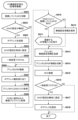
図4は、S204の処理を示すフローチャートである。S401では、CPU101は、S203で検索された結果に基づいて、無線設定モードで動作するプリンタ110が検出されたか否かを判定する。無線設定モードで動作するプリンタ110が検出されたと判定された場合、S402に進み、無線設定モードで動作するプリンタ110が検出されなかったと判定された場合、S407に進む。
Figure 4 is a flowchart showing the processing of S204. In S401, the
S402では、CPU101は、無線LAN I/F109が無線設定指示を実行可能であるか否かを判定する。具体的には、CPU101は、OSのAPIを用いて、有線LAN I/F108もしくは無線LAN I/F109がAP120に接続しているか、無線LAN I/F109が有効であるか、及び無線LAN I/F109のIPv4設定が有効であるかについての情報を取得する。有線LAN I/F108もしくは無線LAN I/F109がAP120に接続しており、無線LAN I/F109が有効であり、且つ無線LAN I/F109のIPv4設定が有効である場合、CPU101は、無線LAN I/F109が無線設定指示を実行可能であると判定する。無線設定指示については図6及び図8で後述する。S402の判定処理は言い換えれば、ネットワーク設定が無線接続処理のための設定となっているかを判定する処理である。無線LAN I/F109が無線設定指示を実行可能であると判定された場合、S403に進み、無線LAN I/F109が無線設定指示を実行可能でないと判定された場合、S407に進む。
In S402, the
S403では、CPU101は、S202で記憶領域に格納された情報に基づいて、セットアッププログラム103を実行する権限が管理者権限であるか否かを判定する。例えば、OSが管理する各種の設定状態のうち、UAC機能により表示された実行許可確認画面300上で管理者権限での実行が許可されたか否かの情報に基づいて判定が行われる。管理者権限であると判定された場合、S404に進み、管理者権限でないと判定された場合、S405に進む。
In S403, the
S404では、CPU101は、プリンタ110内のプリンタ制御プログラム113に対して管理者権限の場合における無線設定の指示を実行する。S404の処理は、図6において後述する。S404の後、図4の処理を終了し、図2のS205に進む。
In S404, the
S405では、CPU101は、OSのAPIを用いて、無線設定指示が実行可能な無線LAN I/F109のIPv4設定のDHCP設定が有効であるか否かを判定する。なお、DHCPとは、Dynamic Host Configuration Protocolの略である。DHCP設定が有効であると判定された場合、S406に進み、DHCP設定が有効でない、例えば無効であると判定された場合、S407に進む。S405の判定処理は言い換えれば、PC100とプリンタ110との間のP2P接続のネットワークにおいて、プリンタ110側からPC100を指定して設定情報(例えばIPアドレス)を割り当てることが可能であるかを判定する処理である。DHCP設定が有効であると判定された場合、管理者権限がないと判定されていても、PC100とプリンタ110との間のP2P接続のネットワークにおいて、プリンタ110側からPC100を指定して設定情報を割り当てることが可能である。一方、DHCP設定が有効でないと判定された場合、PC100とプリンタ110との間のP2P接続のネットワークにおいて、プリンタ110側からPC100を指定して設定情報を割り当てることができない。
In S405, the
S406では、CPU101は、プリンタ110内のプリンタ制御プログラム113に対して管理者権限を必要としない場合における無線設定の指示を実行する。S406の処理は、図8において後述する。以降、管理者権限を必要としないことを非管理者権限ともいう。S406の後、図4の処理を終了し、図2のS205に進む。
In S406, the
S407では、CPU101は、プリンタを操作することにより無線接続方法を案内するための手動設定画面を表示装置106に表示する。S407の後、図4及び図2の処理を終了する。
In S407, the
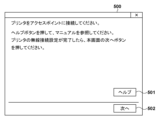
図5は、S407で表示される手動設定画面の一例を示す図である。手動設定画面500は、PC100とプリンタ110との間でP2P接続を行うことなく、プリンタ110上でのユーザ操作によりプリンタ110をAP120と無線接続させるためのガイダンス画面である。ここでのプリンタ110とAP120との無線接続とは例えば、WPS(Wi-Fi Protected Setup)による接続である。手動設定画面500は、「ヘルプ」ボタン501と「次へ」ボタン502を含む。手動設定画面500は、「ヘルプ」ボタン501を押下してマニュアルを参照することを促すメッセージを表示する。また、手動設定画面500は、プリンタ110を操作してAP120と無線LAN I/F116とを無線接続し、その後「次へ」ボタン502を押下するようユーザに促すメッセージを表示する。ユーザが「ヘルプ」ボタン501を押下すると、セットアッププログラム103はブラウザを開き、プリンタ110をAP120と無線接続する方法を解説したWebマニュアルを表示する。Webマニュアルには例えば、プリンタ110とAP120それぞれのWPSボタンを押下することについてのガイダンスが記載されている。
Figure 5 is a diagram showing an example of the manual setting screen displayed in S407. The
ユーザがプリンタ110をAP120と無線接続した後に「次へ」ボタン502を押下すると、図2及び図4の処理を終了する。なお、本実施形態では「ヘルプ」ボタン501を押下してブラウザを開き、Webマニュアルを表示するように説明した。しかしながら、手動設定画面500を表示すると共にブラウザを開きWebマニュアルを表示する構成や、手動設定画面500にプリンタ110をAP120と無線接続させる方法を表示する構成であってもよい。
When the user presses the "Next"
以上のように、ネットワーク設定が無線接続処理のための設定となっていない場合、PC100とプリンタ110との間のP2P接続を行わず、ユーザ操作によりプリンタ110をAP120に無線接続させるためのガイダンスを表示する。また、ネットワーク設定が無線接続処理のための設定となっていてもユーザに管理者権限がない場合には、ネットワーク設定が所定の条件を満たしているかに応じて、PC100とプリンタ110との間のP2P接続を行うか、当該P2P接続を行わずにユーザ操作によりプリンタ110をAP120に無線接続させるためのガイダンスを表示する。即ち、ユーザに管理者権限がない場合であっても、ネットワーク設定が所定の条件を満たしているのであれば、PC100とプリンタ110との間のP2P接続を行う。一方、ユーザに管理者権限がなく、且つネットワーク設定が所定の条件を満たしていない場合には、当該P2P接続を行わず、プリンタ110をAP120に無線接続させるためのガイダンスを表示する。このような表示制御処理により、無線接続処理が失敗となる機会を低減させることができ、UX(ユーザエクスペリエンス)を向上させることができる。
As described above, if the network settings are not set for wireless connection processing, the P2P connection between the
次に、図6を用いてPC100がプリンタ110に対して行う管理者権限の場合における無線設定指示について説明する。
Next, we will use Figure 6 to explain the wireless setting instructions that the
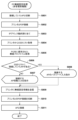
図6は、図4のS404の処理を示すフローチャートである。管理者権限の場合における無線設定指示の処理が開始されると、S601では、CPU101は、現在まで接続していたAP120との間の無線LAN接続122の切断処理を実行する。本実施形態では、PC100がP2P接続が可能な無線LAN I/F109を一つ保有する構成を例として説明している。そのため、S601では、AP120との無線LAN接続122を一時的に切断する。しかしながら、PC100がP2P接続が可能な複数の無線LAN I/Fを有する場合は、S601の処理、および後述するS615の処理は実行されなくても良い。
Figure 6 is a flowchart showing the processing of S404 in Figure 4. When the processing of the wireless setting instruction in the case of administrator authority is started, in S601, the
S602では、CPU101は、OSのAPIを用いて、P2P接続が可能な無線LAN I/F109のIPv4設定のDHCP設定が無効であるか否かを判定する。DHCP設定が無効であると判定された場合、S603に進み、DHCP設定が無効でない、例えば有効であると判定された場合、S606に進む。
In S602, the
S603では、CPU101は、無線LAN I/F109に割り当てられているIPアドレスをOSのAPIを用いて取得し、RAM105等の記憶領域に格納する。S604では、CPU101は、OSのAPIを用いて、P2P接続が可能な無線LAN I/F109のIPv4設定のDHCP設定を有効に変更する。S605では、CPU101は、無線LAN I/F109のIPv4設定のDHCP設定を一時的に変更したことを示す一時変更フラグをONに変更する。一時変更フラグは、DHCP設定の設定変更が行われたか否かを示すフラグとして例えばRAM105の記憶領域に予め記憶されている。
In S603,
S606では、CPU101は、無線設定モードで動作するプリンタ110の無線LAN I/F116との間で、無線LAN接続123を介したP2P接続を行う。このP2P接続の接続処理は例えば、IEEE802.11で規定されるP2P接続の接続処理であってよい。
In S606, the
S607では、CPU101は、無線設定モードで動作するプリンタ110の無線LANI/F116とのWiFi接続を介して、プリンタ110からDHCPによりIPアドレスが割り当てられる。DHCPによりIPアドレスが割り当てられることで、CPU101は、プリンタ110と通信可能な状態となる。
In S607, the
S608では、CPU101は、P2P接続を介して、プリンタ110からSSIDリストを取得する。SSIDリストとは、プリンタ110がAPサーチを実行することにより検出された、プリンタ110が接続可能な1または複数のアクセスポイントを示すリストである。S608の詳細は、図10で後述する。
In S608, the
S609では、CPU101は、PC100のネットワーク情報104に含まれる無線プロファイル情報を参照する。そして、図6の処理開始前、例えば直前に接続しており且つS601で無線LAN接続122を切断したAP120のSSIDと、AP120に接続するために必要なパスワードとを含む無線プロファイル情報を取得する。以下、上記のAP120を接続済みAPと呼ぶ。
In S609, the
S610では、CPU101は、S609で取得された接続済みAPのSSIDがS608で取得されたSSIDリストに含まれるか否かを判定する。SSIDリストに含まれると判定された場合、S612に進み、SSIDリストに含まれないと判定された場合、S611に進む。
In S610, the
S611では、CPU101は、ネットワーク情報の入力を受け付けるためのネットワーク情報入力画面を表示装置106に表示する。
In S611, the
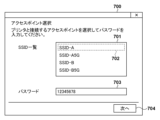
図7は、S611で表示されるネットワーク情報入力画面の一例を示す図である。ネットワーク情報入力画面700は、SSID名称を選択するドロップダウンリスト701、パスワードを入力する入力領域703、及び「次へ」ボタン704を含む。ドロップダウンリスト701には、S608でプリンタ110から取得したSSIDリストの情報が列挙される。ドロップダウンリスト701には、プリンタ110が接続可能なアクセスポイントのみが含まれるため、受信したリストに接続済みAPが含まれない場合とはすなわち、接続済みAPにプリンタ110が接続できない場合である。プリンタ110に対応していない暗号化方式によって接続可能なアクセスポイントは、プリンタ110が接続可能でないため、ドロップダウンリスト701に含まれないことになる。また、プリンタ110に対応していない周波数帯によって接続可能なアクセスポイントは、プリンタ110が接続可能でないため、ドロップダウンリスト701に含まれないことになる。
FIG. 7 is a diagram showing an example of a network information input screen displayed in S611. The network
図7は、「SSID-A」702が選択された状態を示しており、「SSID-A」はAP120(接続済みAPと異なる)のSSIDである。図7では、入力領域703に「12345678」と入力されており、「12345678」はAP120のSSID「SSID-A」のパスワードである。なお、本実施形態では、ドロップダウンリスト701にSSIDが列挙される例を説明しているが、入力領域を用いてユーザにSSID名を入力させる構成でもよい。ネットワーク情報入力画面700には、ユーザにプリンタ110を接続させるAPの選択及びAPのパスワードの入力を促すガイダンスが表示される。ユーザがAPを選択しAPのパスワードを入力して「次へ」ボタン704を押下すると、CPU101は、ドロップダウンリスト701で選択されたSSID及び入力領域703で入力されたパスワードを、プリンタ110に送信する無線設定情報としてRAM105等の記憶領域に保持する。
Figure 7 shows a state where "SSID-A" 702 is selected, and "SSID-A" is the SSID of AP 120 (different from the connected AP). In Figure 7, "12345678" is entered in the
S612では、CPU101は、SSIDリストで接続済みAPと一致したSSIDと、S609で無線プロファイル情報から取得したパスワードとを無線設定情報としてRAM105等の記憶領域に保持する。
In S612, the
S613では、CPU101は、P2P接続を介して、プリンタ110に無線設定情報を無線設定指示として送信する。無線設定情報には、AP120のSSIDとパスワードとが含まれる。S614では、CPU101は、無線設定モードで動作するプリンタ110の無線LANI/F116との間の無線LAN接続123(P2P接続)を切断する。このP2P接続の切断処理は例えば、IEEE802.11で規定されるP2P接続の切断処理であってよい。S615では、CPU101は、S601で切断されたAP120との間で再び、インフラ接続での無線LAN接続122を行う。
In S613, the
S616では、CPU101は、記憶領域に記憶されている一時変更フラグがONであるか否かを判定する。一時変更フラグがONであると判定された場合、S617に進み、一時変更フラグがONでないと判定された場合、図6及び図4の処理を終了する。
In S616, the
S617では、CPU101は、OSのAPIを用いて、無線LAN I/F109のIPv4設定のDHCP設定を有効から無効に変更する。S618では、CPU101は、OSのAPIを用いて、S603でRAM105等の記憶領域に格納されたIPアドレスを、無線LAN I/F109のIPアドレスとして設定する。S618の後、図6及び図4の処理を終了する。
In S617, the
以上のように、本実施形態では、DHCP設定が無効であれば、無線LAN I/F109のIPアドレスを内部の記憶領域に保持した上でDHCP設定を有効に変更する。それにより、プリンタ110からのIPアドレスの割り当てを可能とすることができる。そして、プリンタ110とのP2P接続を切断した後、DHCP設定を無効に変更し、先に内部の記憶領域に保持していたIPアドレスを、無線LAN I/F109のIPアドレスとして設定する。それにより、無線接続処理前のネットワーク設定(IPアドレス)を維持することができる。
As described above, in this embodiment, if the DHCP settings are disabled, the IP address of the wireless LAN I/
次に、図8を用いてPC100がプリンタ110に対して行う非管理者権限の場合における無線設定指示について説明する。
Next, we will use Figure 8 to explain the wireless setting instructions that the
図8は、図4のS406の処理を示すフローチャートである。非管理者権限の場合における無線設定指示の処理が開始されると、図8の処理が実行される。図8のS801~S807、S809~S811は、図6のS601、S606~S611、S613~S615と同様であるため、それらの説明を省略する。 Figure 8 is a flowchart showing the process of S406 in Figure 4. When the process of wireless setting instructions in the case of non-administrator authority is started, the process of Figure 8 is executed. Steps S801 to S807 and S809 to S811 in Figure 8 are similar to steps S601, S606 to S611, and S613 to S615 in Figure 6, so their explanation will be omitted.
S805で取得された接続済みAPのSSIDがプリンタ110から取得したSSIDリストに含まれるとS806で判定された場合、S808に進む。
If it is determined in S806 that the SSID of the connected AP obtained in S805 is included in the SSID list obtained from the
S808では、CPU101は、パスワードの入力を受け付けるためのパスワード入力画面を表示装置106に表示する。
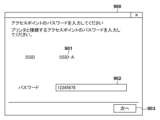
In S808, the
図9は、S808で表示されるパスワード入力画面の一例を示す図である。パスワード入力画面900は、S805で取得された接続済みAPのSSIDを表示する表示領域901、パスワードを入力する入力領域902、及び「次へ」ボタン903を含む。入力領域902には一例として「12345678」と入力されており、「12345678」は接続済みAPのSSID「SSID-A」のパスワードである。パスワード入力画面900にはAP120のパスワードの入力を促すガイダンスが表示される。ユーザがパスワードを入力して「次へ」ボタン903を押下すると、CPU101は、プリンタ110から取得したSSIDリストで接続済みAPと一致したSSID及び入力領域902で入力されたパスワードを、無線設定情報としてRAM105等の記憶領域に保持する。
FIG. 9 is a diagram showing an example of a password input screen displayed in S808. The
以上のように、本実施形態では、ユーザが管理者権限を有していない場合であっても、DHCP設定が有効であれば、PC100とプリンタ110との間のP2P接続を介した無線接続処理を実行する。それにより、管理者権限を有していないことに基づく無線接続処理の失敗の機会を低減させることができ、UXを向上させることができる。また、管理者権限を有していない場合に行われる無線接続処理においては、接続済みAPのパスワードをユーザに入力させるよう構成されている。それにより、管理者権限を有していない場合であっても、無線接続処理を実施することができる。
As described above, in this embodiment, even if the user does not have administrator privileges, if the DHCP settings are valid, the wireless connection process is executed via a P2P connection between the
次にプリンタ110で実施する無線設定処理について図10を用いて説明する。
Next, the wireless setting process performed by the
図10は、プリンタ110で実行される無線設定処理を示すフローチャートである。図10の処理は例えば、プリンタ110のCPU111がROM112に記憶されているプログラム113をRAM115に読み出して実行することにより実現される。図10の処理は、特定の条件をトリガーとして開始する。例えば、プリンタ110の入力I/F118を用いて特定の操作を促す指示を表示装置117に表示し、ユーザから特定の操作を受け付けることを特定の条件としても良い。特定の操作とは、パネル上での操作であっても良いし、プリンタ110の筐体に対する操作であっても良い。また、プリンタ110をユーザが購入し、初回の電源投入時(着荷時)を特定の条件としても良い。
Figure 10 is a flow chart showing the wireless setting process executed by the
S1001では、CPU111は、無線LAN I/F116を用いて周囲のビーコンを検索し、SSIDリストを作成する。SSIDリストとは、図6における説明と同様、プリンタ110がAPサーチを実行することにより発見された、プリンタ110が接続可能な1または複数のアクセスポイントを示すリストである。
In S1001, the
S1002では、CPU111は、無線設定モードを開始し、PC100との無線接続123を介したP2P接続の準備を行う。P2P接続の準備とは、無線LAN I/F116を無線設定モードで動作させ、ビーコンを発信し、PC100の接続を待ち受ける処理である。この時点でのプリンタ110は、上述の「無線設定モードで動作するプリンタ110」である。
In S1002, the
PC100が無線設定モードで動作するプリンタ110の無線LANI/F116に接続し、無線接続123を介したP2P接続が確立されると、S1003に進む。
When the
S1003では、CPU111は、PC100からの情報取得要求を確認する。S1004では、CPU111は、PC100からの情報取得要求として、PC100からプリンタ110に対するSSIDリストの要求があるか否かを判定する。ここでのSSIDリストの要求とは、図6のS608、図8のS804においてPC100からプリンタ110に対して行われるSSIDリストの要求である。SSIDリストの要求があると判定された場合、S1006に進み、SSIDリストの要求がないと判定された場合、S1005に進む。S1006では、CPU111は、要求元であるPC100に対してSSIDリストを送信する。その後、S1003からの処理を繰り返す。
In S1003,
S1005では、CPU111は、PC100からの指示を確認する。S1007では、CPU111は、PC100からの指示として、PC100からプリンタ110に対する無線設定指示があるか否かを判定する。ここでの無線設定指示とは、図6のS613、図8のS809においてPC100からプリンタ110に対して無線設定情報の送信として行われる無線設定指示である。無線設定指示があると判定された場合、S1008に進み、無線設定指示がないと判定された場合、S1003からの処理を繰り返す。
In S1005,
S1008では、CPU111は、無線設定モードを終了し、インフラモードに移行する。即ち、CPU111は、無線LAN I/F116をPC100から指示されたAP120のSSIDに接続し、インフラ接続での無線接続124を確立する。以降、プリンタ110は、接続したAP120が形成するネットワークを介して通信を実行可能となる。S1008の後、図10の処理を終了する。
In S1008, the
以上のように、本実施形態によれば、管理者権限の有無及びネットワーク設定に応じて、プリンタ110を特定のAP120に無線接続させるための適切なガイダンスを表示することができる。その結果、プリンタ110に対する無線接続処理の失敗の機会を低減させることができ、UXを向上させることができる。
As described above, according to this embodiment, it is possible to display appropriate guidance for wirelessly connecting the
[他の実施形態]
PC100のCPU101が行うものとして説明した上述の各種制御は1つのハードウェアが行ってもよいし、複数のハードウェア(例えば、複数のプロセッサーや回路)が処理を分担することで、装置全体の制御を行ってもよい。
[Other embodiments]
The various controls described above as being performed by the
また、上述した実施形態においては、電子機器としてPC100を適用した場合を例にして説明したが、この例に限定されるものではなく、ダイレクト通信モードで通信可能な電子機器であれば適用可能である。すなわち、電子機器として、パーソナルコンピュータやPDA、携帯電話端末、スマートフォン、タブレット端末、音楽プレーヤー、ゲーム機、電子ブックリーダーなどを適用可能である。また、本実施形態における外部機器の例としてプリンタ110を例にして説明したが、この例に限定されるものではなく、電子機器からの指示または制御により利用可能な外部機器であれば適用可能である。すなわち、外部機器として、プリンタ、スキャナー、映像出力装置、音声出力装置(例えばスマートスピーカー)、メディアストリーミングプレーヤーなどを適用可能である。映像出力装置は、例えば、電子機器から指示されたURLで特定されるインターネット上の動画を取得(ダウンロード)する。そして、HDMI(登録商標)などの映像出力端子を介して接続されたディスプレイ機器に出力することで、ディスプレイ機器におけるストリーミング再生を実現したり、ミラーリング表示を実現する装置である。なお、ミラーリング表示とは、電子機器に表示された内容をディスプレイ機器にも表示させる表示である。また、ダイレクト通信モードとして、無線LANによるダイレクト接続による通信の例を説明した。しかしながら、これに限られず、ダイレクト接続は、Bluetooth、BLE、NFCなどの他の種類の通信により実現されてもよい。
In the above-mentioned embodiment, the
本発明は、上述の実施形態の1以上の機能を実現するプログラムを、ネットワーク又は記憶媒体を介してシステム又は装置に供給し、そのシステム又は装置のコンピュータにおける1つ以上のプロセッサーがプログラムを読出し実行する処理でも実現可能である。また、1以上の機能を実現する回路(例えば、ASIC)によっても実現可能である。 The present invention can also be realized by supplying a program that realizes one or more of the functions of the above-described embodiments to a system or device via a network or storage medium, and having one or more processors in the computer of the system or device read and execute the program. It can also be realized by a circuit (e.g., an ASIC) that realizes one or more functions.
本実施形態の開示は、以下のプログラム、プログラムを記憶する記憶媒体、電子機器、および電子機器の制御方法を含む。
(項目1)
電子機器のコンピュータを、
管理者権限であるかの所定の情報を取得する取得手段、
前記取得手段で取得した前記所定の情報に基づき、
管理者権限である場合には、ネットワークに関する設定状態が所定の条件を満しているか否かに関わらず外部機器との第1の通信モードでの通信を行い、
管理者権限でなく、かつ、ネットワークに関する設定状態が前記所定の条件を満たす場合には前記外部機器との前記第1の通信モードでの通信を行い、
管理者権限でなく、かつ、ネットワークに関する設定状態が前記所定の条件を満たさない場合には前記外部機器との前記第1の通信モードでの通信を行わない、
ように制御する制御手段、
として機能させるためのプログラム。
(項目2)
前記制御手段は、管理者権限で、ネットワークに関する設定状態が前記所定の条件を満たさなかった場合には、前記所定の条件を満たす設定状態となるように設定を変更して外部機器と前記第1の通信モードでの通信を行うように制御することを特徴とする項目1に記載のプログラム。
(項目3)
前記所定の条件を満さない設定状態から前記所定の条件を満たす設定状態に変更する設定変更は、管理者権限が必要な設定変更であることを特徴とする項目2に記載のプログラム。
(項目4)
前記所定の条件を満たす設定状態は、前記外部機器が前記第1の通信モードにおいて前記電子機器を指定して通信するための設定情報を、前記外部機器から前記電子機器に対して割り当てることが可能な設定状態であることを特徴とする項目3に記載のプログラム。
(項目5)
前記所定の条件を満たす設定状態は、Dynamic Host Configuration Protocol(DHCP)が有効である設定状態であることを特徴とする項目3又は4に記載のプログラム。
(項目6)
前記外部機器は、前記電子機器と前記第1の通信モードで通信する際に、前記外部機器が前記第1の通信モードにおいて前記電子機器を指定して通信するための設定情報を、前記外部機器から前記電子機器に対して割り当てることを特徴とする項目3乃至5のいずれか1項に記載のプログラム。
(項目7)
前記制御手段は、
管理者権限である場合は、前記第1の通信モードで接続された前記外部機器に、特定のアクセスポイントと、前記第1の通信モードと異なる第2の通信モードで接続するための特定の情報を履歴情報から取得して送信するように制御し、
管理者権限でない場合は、前記第1の通信モードで接続された前記外部機器に、前記特定の情報を前記履歴情報から取得することなく、前記特定の情報としてユーザから入力された情報を送信する、
ように制御することを特徴とする項目1乃至6のいずれか1項に記載のプログラム。
(項目8)
前記第2の通信モードは、インフラ接続による通信モードであることを特徴とする項目7に記載のプログラム。
(項目9)
前記第1の通信モードは、ダイレクト接続による通信モードであることを特徴とする項目8に記載のプログラム。
(項目10)
前記制御手段は、前記第1の通信モードでの通信によって、前記特定の情報を前記外部機器に送信することによって、前記外部機器を前記特定のアクセスポイントに前記第2の通信モードで接続させるように制御することを特徴とする項目7乃至9のいずれか1項に記載のプログラム。
(項目11)
前記特定の情報は、前記特定のアクセスポイントと接続するためのパスワードを含むことを特徴とする項目7乃至10のいずれか1項に記載のプログラム。
(項目12)
前記特定の情報は、前記特定のアクセスポイントの識別情報を含むことを特徴とする項目7乃至11のいずれか1項に記載のプログラム。
(項目13)
前記特定のアクセスポイントは、前記電子機器が前記外部機器と前記第1の通信モードで通信する直前に、前記電子機器が前記第2の通信モードで接続していたアクセスポイントであることを特徴とする項目7乃至12のいずれか1項に記載のプログラム。
(項目14)
前記外部機器は、印刷装置であり、
前記制御手段は、前記外部機器と前記第1の通信モードで通信した後に、当該電子機器から前記外部機器を使用できるようにするための設定処理を行うように制御することを特徴とする項目1乃至13のいずれか1項に記載のプログラム。
(項目15)
前記設定処理は、前記外部機器に対応する印刷キューの生成処理を含むことを特徴とする項目14に記載のプログラム。
(項目16)
前記所定の情報は、オペレーティングシステムのUser Account Control(UAC)機能によって表示されたUAC画面に対してユーザが行った操作に基づく情報であることを特徴とする項目1乃至15のいずれか1項に記載のプログラム。
(項目17)
前記電子機器のコンピュータを、前記UAC画面を表示させるように制御する表示制御手段としてさらに機能させることを特徴とする項目16に記載のプログラム。
(項目18)
項目1乃至17のいずれか1項に記載されたプログラムを記憶したコンピュータが読み取り可能な記憶媒体。
(項目19)
項目1乃至17のいずれか1項に記載されたプログラムの各手段を有することを特徴とする電子機器。
(項目20)
電子機器の制御方法であって、
管理者権限であるかの所定の情報を取得する取得ステップと、
前記取得ステップで取得した前記所定の情報に基づき、
管理者権限である場合には、ネットワークに関する設定状態が所定の条件を満しているか否かに関わらず外部機器との第1の通信モードでの通信を行い、
管理者権限でなく、かつ、ネットワークに関する設定状態が前記所定の条件を満たす場合には前記外部機器との前記第1の通信モードでの通信を行い、
管理者権限でなく、かつ、ネットワークに関する設定状態が前記所定の条件を満たさない場合には前記外部機器との前記第1の通信モードでの通信を行わない、
ように制御する制御ステップと、
を有することを特徴とする電子機器の制御方法。
The disclosure of the present embodiment includes the following program, a storage medium for storing the program, an electronic device, and a method for controlling an electronic device.
(Item 1)
Computers, electronic devices
An acquisition means for acquiring predetermined information as to whether the user has administrator authority;
Based on the predetermined information acquired by the acquisition means,
If the authority is an administrator authority, communication with the external device is performed in the first communication mode regardless of whether the network setting state satisfies a predetermined condition or not;
if the user does not have administrator authority and the network setting state satisfies the predetermined condition, communicate with the external device in the first communication mode;
if the user does not have administrator authority and the network setting state does not satisfy the predetermined condition, communication with the external device in the first communication mode is not performed.
A control means for controlling the
A program to function as a
(Item 2)
The program described in item 1, characterized in that the control means, with administrator authority, controls the communication with the external device in the first communication mode by changing the settings so that the settings satisfy the specified conditions when the network setting state does not satisfy the specified conditions.
(Item 3)
3. The program according to claim 2, wherein a setting change for changing a setting state that does not satisfy the predetermined condition to a setting state that satisfies the predetermined condition is a setting change that requires administrator authority.
(Item 4)
The program described in item 3, characterized in that the setting state that satisfies the specified condition is a setting state in which the external device can assign setting information to the electronic device so that the external device can specify and communicate with the electronic device in the first communication mode.
(Item 5)
5. The program according to item 3 or 4, wherein the setting state that satisfies the predetermined condition is a setting state in which Dynamic Host Configuration Protocol (DHCP) is enabled.
(Item 6)
The program described in any one of items 3 to 5, characterized in that when the external device communicates with the electronic device in the first communication mode, the external device assigns setting information to the electronic device so that the external device can specify the electronic device and communicate in the first communication mode.
(Item 7)
The control means
If the authority is an administrator authority, control is performed so as to acquire, from history information, specific information for connecting to a specific access point in a second communication mode different from the first communication mode, and transmit the acquired information to the external device connected in the first communication mode;
if the user does not have administrator authority, transmit information input by a user as the specific information to the external device connected in the first communication mode, without obtaining the specific information from the history information;
7. The program according to any one of items 1 to 6, wherein the program controls the processing as described above.
(Item 8)
8. The program according to item 7, wherein the second communication mode is a communication mode via infrastructure connection.
(Item 9)
9. The program according to item 8, wherein the first communication mode is a communication mode using a direct connection.
(Item 10)
The program described in any one of items 7 to 9, characterized in that the control means controls the external device to connect to the specific access point in the second communication mode by transmitting the specific information to the external device through communication in the first communication mode.
(Item 11)
11. The program according to any one of items 7 to 10, wherein the specific information includes a password for connecting to the specific access point.
(Item 12)
12. The program according to any one of items 7 to 11, wherein the specific information includes identification information of the specific access point.
(Item 13)
The program described in any one of items 7 to 12, characterized in that the specific access point is an access point to which the electronic device was connected in the second communication mode immediately before the electronic device communicated with the external device in the first communication mode.
(Item 14)
the external device is a printing device,
The program described in any one of items 1 to 13, characterized in that the control means controls the electronic device to perform a setting process to enable the external device to be used from the electronic device after communicating with the external device in the first communication mode.
(Item 15)
15. The program according to item 14, wherein the setting process includes a process for generating a print queue corresponding to the external device.
(Item 16)
16. The program according to any one of items 1 to 15, wherein the predetermined information is information based on an operation performed by a user on a User Account Control (UAC) screen displayed by a UAC function of an operating system.
(Item 17)
17. The program according to item 16, further causing the computer of the electronic device to function as a display control means for controlling the computer to display the UAC screen.
(Item 18)
18. A computer-readable storage medium storing the program according to any one of items 1 to 17.
(Item 19)
18. An electronic device comprising each of the program means described in any one of items 1 to 17.
(Item 20)
A method for controlling an electronic device, comprising:
An acquisition step of acquiring predetermined information on whether the user has administrator authority;
Based on the predetermined information acquired in the acquisition step,
If the authority is an administrator authority, communication with the external device is performed in the first communication mode regardless of whether the network setting state satisfies a predetermined condition or not;
if the user does not have administrator authority and the network setting state satisfies the predetermined condition, communicate with the external device in the first communication mode;
if the user does not have administrator authority and the network setting state does not satisfy the predetermined condition, communication with the external device in the first communication mode is not performed.
A control step of controlling so that
13. A method for controlling an electronic device comprising:
発明は上記実施形態に制限されるものではなく、発明の精神及び範囲から離脱することなく、様々な変更及び変形が可能である。従って、発明の範囲を公にするために請求項を添付する。 The invention is not limited to the above-described embodiment, and various modifications and variations are possible without departing from the spirit and scope of the invention. Therefore, the following claims are appended to disclose the scope of the invention.
100 PC: 101、111 CPU: 102、112 ROM: 105、115 RAM: 110 プリンタ: 120 AP 100 PC: 101, 111 CPU: 102, 112 ROM: 105, 115 RAM: 110 Printer: 120 AP
Claims (19)
プログラムを実行する権限がオペレーティングシステムの設定を変更できる管理者権限であるかの所定の情報を取得する取得手段、
前記取得手段で取得した前記所定の情報に基づき、
前記管理者権限であり、かつ、ネットワークに関する前記オペレーティングシステムの設定状態が第1の設定状態である場合には、外部機器との第1の通信モードでの通信を行い、
前記管理者権限であり、かつ、ネットワークに関する前記オペレーティングシステムの設定状態が第2の設定状態である場合には、前記オペレーティングシステムの設定を自動的に前記第1の設定状態に変更して前記外部機器との前記第1の通信モードでの通信を行い、
前記管理者権限でなく、かつ、前記オペレーティングシステムの設定状態が前記第1の設定状態である場合には、前記外部機器との前記第1の通信モードでの通信を行い、
前記管理者権限でなく、かつ、前記オペレーティングシステムの設定状態が前記第2の設定状態である場合には、前記外部機器との前記第1の通信モードでの通信を行わない、
ように制御する制御手段、
として機能させるためのプログラム。 Computers, electronic devices
An acquisition means for acquiring predetermined information as to whether the authority to execute the program is an administrator authority capable of changing the settings of the operating system ;
Based on the predetermined information acquired by the acquisition means,
if the authority is the administrator and the setting state of the operating system regarding a network is a first setting state, communicating with an external device in a first communication mode;
if the authority is the administrator and the setting state of the operating system related to the network is a second setting state, automatically changing the setting of the operating system to the first setting state and communicating with the external device in the first communication mode;
if the user does not have the administrator authority and the setting state of the operating system is the first setting state , performing communication with the external device in the first communication mode;
if the user does not have the administrator authority and the setting state of the operating system is the second setting state , communication with the external device in the first communication mode is not performed.
A control means for controlling the
A program to function as a
前記管理者権限である場合は、前記第1の通信モードで接続された前記外部機器に、特定のアクセスポイントと、前記第1の通信モードと異なる第2の通信モードで接続するための特定の情報を、履歴情報から取得して送信するように制御し、
前記管理者権限でない場合は、前記第1の通信モードで接続された前記外部機器に、前記特定の情報を前記履歴情報から取得することなく、前記特定の情報としてユーザから入力された情報を送信する、
ように制御し、
前記履歴情報からの前記特定の情報の取得は、前記管理者権限でないと行えないことを特徴とする請求項1に記載のプログラム。 The control means
If the authority is the administrator authority, control is performed so as to acquire, from history information, specific information for connecting to a specific access point in a second communication mode different from the first communication mode, and transmit the acquired information to the external device connected in the first communication mode;
If the user does not have the administrator authority, the specific information is transmitted to the external device connected in the first communication mode as information input by the user without obtaining the specific information from the history information.
Controlled as follows :
2. The program according to claim 1, wherein the specific information can be obtained from the history information only with the administrator authority .
前記制御手段は、前記外部機器と前記第1の通信モードで通信した後に、前記電子機器から前記外部機器を使用できるようにするための設定処理を行うように制御することを特徴とする請求項1に記載のプログラム。 the external device is a printing device,
2. The program according to claim 1, wherein the control means controls to perform a setting process to enable the external device to be used from the electronic device after communicating with the external device in the first communication mode.
プログラムを実行する権限がオペレーティングシステムの設定を変更できる管理者権限であるかの所定の情報を取得する取得ステップと、
前記取得ステップで取得した前記所定の情報に基づき、
前記管理者権限であり、かつ、ネットワークに関する前記オペレーティングシステムの設定状態が第1の設定状態である場合には、外部機器との第1の通信モードでの通信を行い、
前記管理者権限であり、かつ、ネットワークに関する前記オペレーティングシステムの設定状態が第2の設定状態である場合には、前記オペレーティングシステムの設定を自動的に前記第1の設定状態に変更して前記外部機器との前記第1の通信モードでの通信を行い、
前記管理者権限でなく、かつ、前記オペレーティングシステムの設定状態が前記第1の設定状態である場合には、前記外部機器との前記第1の通信モードでの通信を行い、
前記管理者権限でなく、かつ、前記オペレーティングシステムの設定状態が前記第2の設定状態である場合には、前記外部機器との前記第1の通信モードでの通信を行わない、
ように制御する制御ステップと、
を有することを特徴とする電子機器の制御方法。 A method for controlling an electronic device, comprising:
An acquisition step of acquiring predetermined information on whether the authority to execute the program is an administrator authority capable of changing the settings of the operating system ;
Based on the predetermined information acquired in the acquisition step,
if the authority is the administrator and the setting state of the operating system regarding a network is a first setting state, communicating with an external device in a first communication mode;
if the authority is the administrator and the setting state of the operating system related to the network is a second setting state, automatically changing the setting of the operating system to the first setting state and communicating with the external device in the first communication mode;
if the user does not have the administrator authority and the setting state of the operating system is the first setting state , performing communication with the external device in the first communication mode;
if the user does not have the administrator authority and the setting state of the operating system is the second setting state , communication with the external device in the first communication mode is not performed.
A control step of controlling so that
13. A method for controlling an electronic device comprising:
Priority Applications (3)
| Application Number | Priority Date | Filing Date | Title |
|---|---|---|---|
| JP2023084161A JP7620660B2 (en) | 2023-05-22 | 2023-05-22 | PROGRAM, STORAGE MEDIUM FOR STORING PROGRAM, ELECTRONIC DEVICE, AND METHOD FOR CONTROLLING ELECTRONIC DEVICE |
| US18/663,187 US20240397561A1 (en) | 2023-05-22 | 2024-05-14 | Storage medium storing program, electronic device, and method of controlling electronic device |
| JP2025004333A JP2025065140A (en) | 2023-05-22 | 2025-01-10 | PROGRAM, STORAGE MEDIUM FOR STORING PROGRAM, ELECTRONIC DEVICE, AND METHOD FOR CONTROLLING ELECTRONIC DEVICE |
Applications Claiming Priority (1)
| Application Number | Priority Date | Filing Date | Title |
|---|---|---|---|
| JP2023084161A JP7620660B2 (en) | 2023-05-22 | 2023-05-22 | PROGRAM, STORAGE MEDIUM FOR STORING PROGRAM, ELECTRONIC DEVICE, AND METHOD FOR CONTROLLING ELECTRONIC DEVICE |
Related Child Applications (1)
| Application Number | Title | Priority Date | Filing Date |
|---|---|---|---|
| JP2025004333A Division JP2025065140A (en) | 2023-05-22 | 2025-01-10 | PROGRAM, STORAGE MEDIUM FOR STORING PROGRAM, ELECTRONIC DEVICE, AND METHOD FOR CONTROLLING ELECTRONIC DEVICE |
Publications (2)
| Publication Number | Publication Date |
|---|---|
| JP2024167816A JP2024167816A (en) | 2024-12-04 |
| JP7620660B2 true JP7620660B2 (en) | 2025-01-23 |
Family
ID=93564596
Family Applications (2)
| Application Number | Title | Priority Date | Filing Date |
|---|---|---|---|
| JP2023084161A Active JP7620660B2 (en) | 2023-05-22 | 2023-05-22 | PROGRAM, STORAGE MEDIUM FOR STORING PROGRAM, ELECTRONIC DEVICE, AND METHOD FOR CONTROLLING ELECTRONIC DEVICE |
| JP2025004333A Pending JP2025065140A (en) | 2023-05-22 | 2025-01-10 | PROGRAM, STORAGE MEDIUM FOR STORING PROGRAM, ELECTRONIC DEVICE, AND METHOD FOR CONTROLLING ELECTRONIC DEVICE |
Family Applications After (1)
| Application Number | Title | Priority Date | Filing Date |
|---|---|---|---|
| JP2025004333A Pending JP2025065140A (en) | 2023-05-22 | 2025-01-10 | PROGRAM, STORAGE MEDIUM FOR STORING PROGRAM, ELECTRONIC DEVICE, AND METHOD FOR CONTROLLING ELECTRONIC DEVICE |
Country Status (2)
| Country | Link |
|---|---|
| US (1) | US20240397561A1 (en) |
| JP (2) | JP7620660B2 (en) |
Citations (3)
| Publication number | Priority date | Publication date | Assignee | Title |
|---|---|---|---|---|
| JP2009301138A (en) | 2008-06-10 | 2009-12-24 | Ricoh Co Ltd | Image processing apparatus, terminal device, and printer driver installation method |
| JP2021190866A (en) | 2020-05-29 | 2021-12-13 | キヤノン株式会社 | Communication device, radio connection method, and program |
| JP2022097668A (en) | 2017-10-17 | 2022-06-30 | キヤノン株式会社 | Information processing equipment, control methods and programs for information processing equipment |
-
2023
- 2023-05-22 JP JP2023084161A patent/JP7620660B2/en active Active
-
2024
- 2024-05-14 US US18/663,187 patent/US20240397561A1/en active Pending
-
2025
- 2025-01-10 JP JP2025004333A patent/JP2025065140A/en active Pending
Patent Citations (3)
| Publication number | Priority date | Publication date | Assignee | Title |
|---|---|---|---|---|
| JP2009301138A (en) | 2008-06-10 | 2009-12-24 | Ricoh Co Ltd | Image processing apparatus, terminal device, and printer driver installation method |
| JP2022097668A (en) | 2017-10-17 | 2022-06-30 | キヤノン株式会社 | Information processing equipment, control methods and programs for information processing equipment |
| JP2021190866A (en) | 2020-05-29 | 2021-12-13 | キヤノン株式会社 | Communication device, radio connection method, and program |
Also Published As
| Publication number | Publication date |
|---|---|
| JP2025065140A (en) | 2025-04-17 |
| US20240397561A1 (en) | 2024-11-28 |
| JP2024167816A (en) | 2024-12-04 |
Similar Documents
| Publication | Publication Date | Title |
|---|---|---|
| JP7814441B2 (en) | Information processing device, control method, and program | |
| US9706342B2 (en) | Communication apparatus | |
| US20250370672A1 (en) | Control method, information processing apparatus, and computer-readable storage medium storing program | |
| US20240414780A1 (en) | Information processing apparatus, method, and storage medium | |
| US20240414779A1 (en) | Information processing apparatus, control method, and storage medium | |
| JP7620660B2 (en) | PROGRAM, STORAGE MEDIUM FOR STORING PROGRAM, ELECTRONIC DEVICE, AND METHOD FOR CONTROLLING ELECTRONIC DEVICE | |
| JP7778757B2 (en) | System, control method, and program | |
| JP7646522B2 (en) | Information processing device, control method thereof, and program | |
| US20250130744A1 (en) | Information processing apparatus, method, storage medium for storing program | |
| JP7844125B2 (en) | Communication device, its control method, and program | |
| US12175136B2 (en) | Information processing apparatus, control method, and storage medium | |
| US12316498B2 (en) | Communication apparatus communicable with information processing apparatus, control method for communication apparatus, storage medium, and system | |
| US20250301298A1 (en) | Method, information processing device, and storage medium storing program | |
| US20260082440A1 (en) | Information processing apparatus, control method, and non-transitory computer-readable storage medium storing program | |
| US20260099285A1 (en) | Non-transitory computer-readable storage medium storing application program, information processing apparatus, and control method of information processing apparatus | |
| JP2024137193A (en) | PROGRAM, INFORMATION PROCESSING DEVICE, COMMUNICATION SYSTEM, AND STORAGE MEDIUM | |
| JP2025040838A (en) | Information processing device, method and program | |
| JP2025052799A (en) | Information processing device, method and program | |
| JP2026007558A (en) | Information processing device, control method, and program | |
| KR20260005761A (en) | Information processing apparatus, control method, and storage medium | |
| JP2026051819A (en) | Programs, information processing devices, methods for controlling information processing devices, communication devices, methods for controlling communication devices, communication systems | |
| JP2025083920A (en) | PROGRAM, INFORMATION PROCESSING APPARATUS, AND CONTROL METHOD | |
| JP2026067314A (en) | Information processing device, control method, and program | |
| JP2025115246A (en) | Information processing device, control method, and program | |
| JP2024141565A (en) | Information processing device, control method, and program |
Legal Events
| Date | Code | Title | Description |
|---|---|---|---|
| A621 | Written request for application examination |
Free format text: JAPANESE INTERMEDIATE CODE: A621 Effective date: 20230525 |
|
| A131 | Notification of reasons for refusal |
Free format text: JAPANESE INTERMEDIATE CODE: A131 Effective date: 20240708 |
|
| A521 | Request for written amendment filed |
Free format text: JAPANESE INTERMEDIATE CODE: A523 Effective date: 20240906 |
|
| TRDD | Decision of grant or rejection written | ||
| A01 | Written decision to grant a patent or to grant a registration (utility model) |
Free format text: JAPANESE INTERMEDIATE CODE: A01 Effective date: 20241213 |
|
| A61 | First payment of annual fees (during grant procedure) |
Free format text: JAPANESE INTERMEDIATE CODE: A61 Effective date: 20250110 |
|
| R150 | Certificate of patent or registration of utility model |
Ref document number: 7620660 Country of ref document: JP Free format text: JAPANESE INTERMEDIATE CODE: R150 |