KR20130064458A - Display apparatus for displaying screen divided by a plurallity of area and method thereof - Google Patents
Display apparatus for displaying screen divided by a plurallity of area and method thereof Download PDFInfo
- Publication number
- KR20130064458A KR20130064458A KR1020110131083A KR20110131083A KR20130064458A KR 20130064458 A KR20130064458 A KR 20130064458A KR 1020110131083 A KR1020110131083 A KR 1020110131083A KR 20110131083 A KR20110131083 A KR 20110131083A KR 20130064458 A KR20130064458 A KR 20130064458A
- Authority
- KR
- South Korea
- Prior art keywords
- area
- areas
- display
- screen
- displaying
- Prior art date
- Legal status (The legal status is an assumption and is not a legal conclusion. Google has not performed a legal analysis and makes no representation as to the accuracy of the status listed.)
- Ceased
Links
Images






Classifications
-
- G—PHYSICS
- G09—EDUCATION; CRYPTOGRAPHY; DISPLAY; ADVERTISING; SEALS
- G09G—ARRANGEMENTS OR CIRCUITS FOR CONTROL OF INDICATING DEVICES USING STATIC MEANS TO PRESENT VARIABLE INFORMATION
- G09G5/00—Control arrangements or circuits for visual indicators common to cathode-ray tube indicators and other visual indicators
- G09G5/14—Display of multiple viewports
-
- G—PHYSICS
- G06—COMPUTING OR CALCULATING; COUNTING
- G06F—ELECTRIC DIGITAL DATA PROCESSING
- G06F3/00—Input arrangements for transferring data to be processed into a form capable of being handled by the computer; Output arrangements for transferring data from processing unit to output unit, e.g. interface arrangements
- G06F3/14—Digital output to display device ; Cooperation and interconnection of the display device with other functional units
-
- G—PHYSICS
- G06—COMPUTING OR CALCULATING; COUNTING
- G06F—ELECTRIC DIGITAL DATA PROCESSING
- G06F3/00—Input arrangements for transferring data to be processed into a form capable of being handled by the computer; Output arrangements for transferring data from processing unit to output unit, e.g. interface arrangements
- G06F3/01—Input arrangements or combined input and output arrangements for interaction between user and computer
- G06F3/048—Interaction techniques based on graphical user interfaces [GUI]
-
- G—PHYSICS
- G06—COMPUTING OR CALCULATING; COUNTING
- G06F—ELECTRIC DIGITAL DATA PROCESSING
- G06F3/00—Input arrangements for transferring data to be processed into a form capable of being handled by the computer; Output arrangements for transferring data from processing unit to output unit, e.g. interface arrangements
- G06F3/01—Input arrangements or combined input and output arrangements for interaction between user and computer
- G06F3/048—Interaction techniques based on graphical user interfaces [GUI]
- G06F3/0484—Interaction techniques based on graphical user interfaces [GUI] for the control of specific functions or operations, e.g. selecting or manipulating an object, an image or a displayed text element, setting a parameter value or selecting a range
- G06F3/0485—Scrolling or panning
-
- G—PHYSICS
- G06—COMPUTING OR CALCULATING; COUNTING
- G06F—ELECTRIC DIGITAL DATA PROCESSING
- G06F3/00—Input arrangements for transferring data to be processed into a form capable of being handled by the computer; Output arrangements for transferring data from processing unit to output unit, e.g. interface arrangements
- G06F3/01—Input arrangements or combined input and output arrangements for interaction between user and computer
- G06F3/048—Interaction techniques based on graphical user interfaces [GUI]
- G06F3/0487—Interaction techniques based on graphical user interfaces [GUI] using specific features provided by the input device, e.g. functions controlled by the rotation of a mouse with dual sensing arrangements, or of the nature of the input device, e.g. tap gestures based on pressure sensed by a digitiser
- G06F3/0488—Interaction techniques based on graphical user interfaces [GUI] using specific features provided by the input device, e.g. functions controlled by the rotation of a mouse with dual sensing arrangements, or of the nature of the input device, e.g. tap gestures based on pressure sensed by a digitiser using a touch-screen or digitiser, e.g. input of commands through traced gestures
- G06F3/04883—Interaction techniques based on graphical user interfaces [GUI] using specific features provided by the input device, e.g. functions controlled by the rotation of a mouse with dual sensing arrangements, or of the nature of the input device, e.g. tap gestures based on pressure sensed by a digitiser using a touch-screen or digitiser, e.g. input of commands through traced gestures for inputting data by handwriting, e.g. gesture or text
-
- G—PHYSICS
- G06—COMPUTING OR CALCULATING; COUNTING
- G06F—ELECTRIC DIGITAL DATA PROCESSING
- G06F2203/00—Indexing scheme relating to G06F3/00 - G06F3/048
- G06F2203/048—Indexing scheme relating to G06F3/048
- G06F2203/04803—Split screen, i.e. subdividing the display area or the window area into separate subareas
-
- G—PHYSICS
- G06—COMPUTING OR CALCULATING; COUNTING
- G06F—ELECTRIC DIGITAL DATA PROCESSING
- G06F2203/00—Indexing scheme relating to G06F3/00 - G06F3/048
- G06F2203/048—Indexing scheme relating to G06F3/048
- G06F2203/04806—Zoom, i.e. interaction techniques or interactors for controlling the zooming operation
-
- G—PHYSICS
- G06—COMPUTING OR CALCULATING; COUNTING
- G06F—ELECTRIC DIGITAL DATA PROCESSING
- G06F2203/00—Indexing scheme relating to G06F3/00 - G06F3/048
- G06F2203/048—Indexing scheme relating to G06F3/048
- G06F2203/04808—Several contacts: gestures triggering a specific function, e.g. scrolling, zooming, right-click, when the user establishes several contacts with the surface simultaneously; e.g. using several fingers or a combination of fingers and pen
-
- G—PHYSICS
- G09—EDUCATION; CRYPTOGRAPHY; DISPLAY; ADVERTISING; SEALS
- G09G—ARRANGEMENTS OR CIRCUITS FOR CONTROL OF INDICATING DEVICES USING STATIC MEANS TO PRESENT VARIABLE INFORMATION
- G09G2340/00—Aspects of display data processing
- G09G2340/04—Changes in size, position or resolution of an image
- G09G2340/0407—Resolution change, inclusive of the use of different resolutions for different screen areas
-
- G—PHYSICS
- G09—EDUCATION; CRYPTOGRAPHY; DISPLAY; ADVERTISING; SEALS
- G09G—ARRANGEMENTS OR CIRCUITS FOR CONTROL OF INDICATING DEVICES USING STATIC MEANS TO PRESENT VARIABLE INFORMATION
- G09G2340/00—Aspects of display data processing
- G09G2340/04—Changes in size, position or resolution of an image
- G09G2340/0464—Positioning
-
- G—PHYSICS
- G09—EDUCATION; CRYPTOGRAPHY; DISPLAY; ADVERTISING; SEALS
- G09G—ARRANGEMENTS OR CIRCUITS FOR CONTROL OF INDICATING DEVICES USING STATIC MEANS TO PRESENT VARIABLE INFORMATION
- G09G2354/00—Aspects of interface with display user
-
- G—PHYSICS
- G09—EDUCATION; CRYPTOGRAPHY; DISPLAY; ADVERTISING; SEALS
- G09G—ARRANGEMENTS OR CIRCUITS FOR CONTROL OF INDICATING DEVICES USING STATIC MEANS TO PRESENT VARIABLE INFORMATION
- G09G5/00—Control arrangements or circuits for visual indicators common to cathode-ray tube indicators and other visual indicators
- G09G5/34—Control arrangements or circuits for visual indicators common to cathode-ray tube indicators and other visual indicators for rolling or scrolling
Landscapes
- Engineering & Computer Science (AREA)
- Theoretical Computer Science (AREA)
- General Engineering & Computer Science (AREA)
- Physics & Mathematics (AREA)
- General Physics & Mathematics (AREA)
- Human Computer Interaction (AREA)
- Computer Hardware Design (AREA)
- User Interface Of Digital Computer (AREA)
Abstract
디스플레이 장치가 개시된다. 본 장치는, 서로 다른 유형의 객체를 표시하는 복수 개의 영역으로 구분된 화면을 디스플레이하는 디스플레이부 및 사용자 조작에 따라 화면의 각 영역의 크기를 서로 중첩되지 않도록 상대적으로 변경하여 화면을 재구성하고, 변경된 각 영역의 크기에 따라 각 영역에 표시되는 객체를 재배열하는 제어부를 포함한다. 이에 따라, 사용자 편의성을 향상시킬 수 있다.A display device is disclosed. The apparatus reconfigures the screen by relatively changing the size of each area of the screen so as not to overlap each other according to a display unit for displaying a screen divided into a plurality of areas displaying different types of objects and a user's operation. And a controller for rearranging objects displayed in each region according to the size of each region. Accordingly, user convenience can be improved.
Description
본 발명은 디스플레이 장치 및 그 화면 디스플레이 방법에 대한 것으로 보다 상세하게는 복수 개의 영역으로 구분된 화면을 디스플레이하는 디스플레이 장치 및 그 방법에 대한 것이다.The present invention relates to a display apparatus and a screen displaying method thereof, and more particularly, to a display apparatus and a method for displaying a screen divided into a plurality of areas.
전자 기술의 발달에 힘입어 다양한 유형의 전자기기가 개발 및 보급되고 있다. 그 중 하나로 휴대폰이나 MP 3, PDA, 태블릿 PC 등과 같은 휴대형 전자기기가 최근에는 많이 사용되고 있다.BACKGROUND With the development of electronic technology, various types of electronic devices are being developed and distributed. Among them, portable electronic devices such as mobile phones, MP3s, PDAs, tablet PCs, etc. have been used in recent years.
최근 사용되는 전자 기기들은 대부분 디스플레이 유닛을 구비한다. 사용자는전자 기기에서 디스플레이되는 화면을 보면서, 각종 기능들을 선택할 수 있다. 특히 최근에는 어플리케이션 스토어 같은 곳에서 어플리케이션을 자유롭게 다운로드받아서 자신의 전자 기기에 설치할 수 있다. 설치된 어플리케이션에 대한 아이콘은 전자기기의 배경 화면상에 표시된다. Recently used electronic devices are mostly equipped with a display unit. The user can select various functions while viewing the screen displayed on the electronic device. In particular, in recent years, applications can be freely downloaded and installed in their own electronic devices. The icon for the installed application is displayed on the background screen of the electronic device.
현재의 디스플레이 장치들은 각종 어플리케이션이나 폴더 등에 대한 아이콘들을 단순 나열하는 수준의 배경 화면을 제공하고 있다. 따라서, 아이콘의 수가 많은 경우에는 사용자는 복수의 페이지를 스크롤하면서 자신이 실행하고자 하는 어플리케이션의 아이콘을 찾아야 한다는 어려움이 있었다. Current display devices provide a background screen that simply lists icons for various applications or folders. Therefore, when the number of icons is large, the user has a difficulty in finding an icon of an application which he or she wants to run while scrolling a plurality of pages.
즉, 현재의 배경 화면은 각종 어플리케이션을 탐색하고 실행시키기 위한 단순 게이트 역할을 할 뿐, 그 자체로 사용자의 편의성을 향상시키기에는 부족하다는 의견이 지배적이었으며, 이로 인해, 좀 더 직관적이고 사용하기 편리한 디스플레이 장치 및 그 방법에 대한 필요성이 대두되었다. In other words, the opinion that the current background screen serves as a simple gate for navigating and executing various applications, and in itself is not enough to improve user convenience, thereby making the display more intuitive and convenient to use. There is a need for an apparatus and method thereof.
본 발명은 상술한 필요성에 따른 것으로 본 발명의 목적은 복수 개의 영역으로 구분된 화면을 제공하여 사용자의 편의성을 증대시키는 디스플레이 장치 및 그 방법을 제공함에 있다.SUMMARY OF THE INVENTION An object of the present invention is to provide a display device and a method for increasing convenience of a user by providing a screen divided into a plurality of areas.
본 발명의 일 실시 예에 따르면, 디스플레이 장치는, 서로 다른 유형의 객체를 표시하는 복수 개의 영역으로 구분된 화면을 디스플레이하는 디스플레이부 및 사용자 조작에 따라 상기 화면의 각 영역의 크기를 서로 중첩되지 않도록 상대적으로 변경하고, 변경된 영역에 표시될 객체를 소스로부터 자동으로 리로드하여 상기 화면을 재구성하는 제어부를 포함한다.According to an embodiment of the present disclosure, the display apparatus may include a display unit for displaying a screen divided into a plurality of areas for displaying different types of objects and a size of each area of the screen according to a user's manipulation. And a control unit for relatively changing and reloading the screen by automatically reloading an object to be displayed in the changed area from a source.
여기서, 상기 제어부는, 상기 복수 개의 영역 중 확대된 영역에 표시되는 객체를 상기 소스로부터 리로드(reload)하고, 상기 확대된 영역의 레이아웃에 따라 상기 리로드된 객체 및 기존 객체를 재배열하여 표시할 수 있다.Here, the controller may reload an object displayed in the enlarged area of the plurality of areas from the source, and rearrange and display the reloaded object and the existing object according to the layout of the enlarged area. have.
그리고, 상기 복수 개의 영역 중 적어도 하나의 영역은 사용자 조작에 따라 스크롤 가능한 것일 수 있다.At least one area of the plurality of areas may be scrollable according to a user's manipulation.
한편, 상기 제어부는, 상기 복수 개의 영역 간의 경계 부분을 터치하여 드래그하는 사용자 조작에 따라 상기 복수 개의 영역 중 적어도 하나를 확대 또는 축소시키고, 그 확대 또는 축소 정도에 따라 나머지 영역의 크기를 조정할 수 있다.The controller may enlarge or reduce at least one of the plurality of regions according to a user operation of touching and dragging a boundary portion between the plurality of regions, and adjust the size of the remaining region according to the extent of the enlargement or reduction. .
또는, 상기 제어부는, 상기 복수 개의 영역 중 하나의 영역을 터치하여 타 영역과의 경계 방향으로 드래그하는 사용자 조작에 따라 상기 터치된 영역의 크기를 확대시키고, 나머지 영역의 크기를 축소시킬 수 있다.Alternatively, the controller may enlarge the size of the touched area and reduce the size of the remaining area according to a user manipulation of touching one area of the plurality of areas and dragging it in a boundary direction with another area.
한편, 상기 제어부는, 상기 복수 개의 영역 중 하나의 영역에서 두 지점이 터치된 후 서로 이격되는 방향으로 드래그되면 상기 영역에 상세 정보를 표시할 수 있다.The controller may display detailed information in the region when two points are touched in one of the plurality of regions and then dragged in a direction spaced apart from each other.
또한, 상기 제어부는, 복수의 지점을 터치하여 서로 이격시키는 사용자 조작이 입력되면, 상기 복수의 영역이 서로 이격되도록 이동시키면서, 상기 복수 개의 영역의 하부에 가려져 있던 히든 영역(hidden area)을 상기 화면에 표시할 수 있다.In addition, when a user operation of touching a plurality of points to be spaced apart from each other is input, the control unit moves the plurality of areas to be spaced apart from each other, and displays a hidden area that is hidden under the plurality of areas. Can be marked on.
그리고, 상기 히든 영역에는 사용자가 지정한 어플리케이션 화면, 마지막 실행한 어플리케이션 화면, 어플리케이션 리스트 중 하나가 표시될 수 있다.In addition, one of the application screen designated by the user, the last executed application screen, and the application list may be displayed in the hidden area.
이상과 같은 실시 예들에서, 상기 복수 개의 영역 중 하나의 영역은, 선호 기능 리스트 및 전체 어플리케이션을 표시하는 어플리케이션 리스트를 표시하며, 상기 선호 기능 리스트 및 상기 어플리케이션 리스트에 표시된 객체들은 사용자 선택에 따라 서로 이동 가능하며, 상기 어플리케이션 리스트는 스크롤 가능할 수 있다.In the above embodiments, one area of the plurality of areas may display an application list displaying a preferred function list and an entire application, and the objects displayed on the preferred function list and the application list move with each other according to a user selection. The application list may be scrollable.
또한, 상기 복수 개의 영역은, 텍스트 정보를 표시하기 위한 텍스트 표시 영역, 미디어 컨텐츠를 표시하는 컨텐츠 표시 영역, 상기 디스플레이 장치에서 제공하는 기능에 대한 아이콘을 표시하는 아이콘 표시 영역, 어플리케이션의 아이콘을 표시하는 어플리케이션 표시 영역, 송수신한 메시지를 표시하는 메시지 표시 영역, 선호 기능에 대한 아이콘을 표시하는 선호 기능 표시 영역, 위젯 서비스를 제공하는 위젯 영역 중 적어도 하나의 영역을 포함할 수 있다.The plurality of areas may include a text display area for displaying text information, a content display area for displaying media content, an icon display area for displaying an icon for a function provided by the display device, and an icon for an application. The display device may include at least one of an application display area, a message display area for displaying a message transmitted and received, a preference function display area for displaying an icon for a preferred function, and a widget area for providing a widget service.
그리고, 상기 복수 개의 영역 중 적어도 하나에 표시되는 객체는 상기 화면 상에서 재생 가능한 동적 컨텐츠를 포함할 수 있다.The object displayed on at least one of the plurality of areas may include dynamic content that can be played on the screen.
한편, 본 발명의 일 실시 예에 따른 디스플레이 방법은, 서로 다른 유형의 객체를 표시하는 복수 개의 영역으로 구분된 화면을 디스플레이하는 단계, 사용자 조작에 따라 상기 복수 개의 영역 중 하나의 크기가 변경되면, 상기 복수 개의 영역이 서로 중첩되지 않도록 나머지 영역의 크기를 상대적으로 변경하는 단계, 변경된 영역 중 적어도 하나의 영역에 표시될 객체를 소스로부터 자동으로 리로드하여 상기 화면을 재구성하는 단계를 포함한다.On the other hand, the display method according to an embodiment of the present invention, displaying a screen divided into a plurality of areas for displaying different types of objects, when the size of one of the plurality of areas is changed according to a user operation, Relatively changing the size of the remaining area so that the plurality of areas do not overlap each other, and automatically reloading an object to be displayed in at least one of the changed areas from a source and reconfiguring the screen.
그리고, 상기 화면을 재구성하는 단계는, 상기 복수 개의 영역 중 확대된 영역에 표시되는 객체를 상기 소스로부터 리로드(reload)하고, 상기 확대된 영역의 레이아웃에 따라 상기 리로드된 객체 및 기존 객체를 재배열하여 표시할 수 있다.The reconfiguring of the screen may include reloading an object displayed in the enlarged area of the plurality of areas from the source, and rearranging the reloaded object and the existing object according to the layout of the enlarged area. Can be displayed.
그리고, 상기 복수 개의 영역 중 적어도 하나의 영역은 사용자 조작에 따라 스크롤 가능한 것일 수 있다.At least one area of the plurality of areas may be scrollable according to a user's manipulation.
그리고, 상기 복수 개의 영역의 크기는, 상기 복수 개의 영역 간의 경계 부분을 터치하여 드래그하는 사용자 조작 또는 상기 복수 개의 영역 중 하나의 영역을 터치하여 타 영역과의 경계 방향으로 드래그하는 사용자 조작에 따라 변경될 수 있다.The size of the plurality of regions may be changed according to a user operation of touching and dragging a boundary portion between the plurality of regions or a user operation of touching one of the plurality of regions and dragging in a boundary direction with another region. Can be.
또는, 복수의 지점을 터치하여 서로 이격시키는 사용자 조작이 입력되면, 상기 복수 개의 영역이 서로 이격되도록 이동시키면서, 히든 영역(hidden area)을 상기 화면에 표시하는 단계를 더 포함할 수도 있다.Alternatively, when a user operation of touching a plurality of points to be spaced apart from each other is input, the method may further include displaying a hidden area on the screen while moving the plurality of areas to be spaced apart from each other.
이 경우, 상기 히든 영역에는 사용자가 지정한 어플리케이션 화면, 마지막 실행한 어플리케이션 화면, 어플리케이션 리스트 중 하나가 표시될 수 있다.In this case, one of the application screen designated by the user, the last executed application screen, and the application list may be displayed in the hidden area.
그리고, 본 방법은, 상기 복수 개의 영역 중 하나의 영역에서 두 지점이 터치된 후 서로 이격되는 방향으로 드래그되면 상기 영역에 상세 정보를 표시하는 단계를 더 포함할 수도 있다.The method may further include displaying detailed information in the region when two points are touched in one of the plurality of regions and then dragged in a direction spaced apart from each other.
그리고, 상기 복수 개의 영역은, 텍스트 정보를 표시하기 위한 텍스트 표시 영역, 미디어 컨텐츠를 표시하는 컨텐츠 표시 영역, 상기 디스플레이 장치에서 제공하는 기능에 대한 아이콘을 표시하는 아이콘 표시 영역, 어플리케이션의 아이콘을 표시하는 어플리케이션 표시 영역, 송수신한 메시지를 표시하는 메시지 표시 영역, 선호 기능에 대한 아이콘을 표시하는 선호 기능 표시 영역, 위젯 서비스를 제공하는 위젯 영역 중 적어도 하나의 영역을 포함할 수 있다.The plurality of areas may include a text display area for displaying text information, a content display area for displaying media content, an icon display area for displaying an icon for a function provided by the display device, and an icon for an application. The display device may include at least one of an application display area, a message display area for displaying a message transmitted and received, a preference function display area for displaying an icon for a preferred function, and a widget area for providing a widget service.
또는, 상기 복수 개의 영역 중 적어도 하나에 표시되는 객체는 상기 화면 상에서 재생 가능한 동적 컨텐츠를 포함할 수 있다. Alternatively, the object displayed on at least one of the plurality of areas may include dynamic content that can be played on the screen.
이상과 같이 본 발명의 다양한 실시 예에 따르면, 화면의 구성을 사용자 편의대로 조정하면서 기능 탐색 및 감상을 수행할 수 있게 된다. 이에 따라 디스플레이 장치에 대한 사용 편의성이 증대될 수 있다. As described above, according to various embodiments of the present disclosure, it is possible to perform a function search and appreciation while adjusting the configuration of the screen for user convenience. Accordingly, ease of use for the display device may be increased.
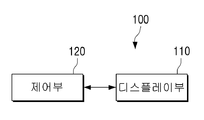
도 1은 본 발명의 일 실시 예에 따른 디스플레이 장치의 구성을 나타내는 블럭도,
도 2는 도 1의 디스플레이 장치에서 화면의 구성을 다양하게 변경시키는 방법을 설명하기 위한 도면,
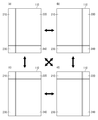
도 3 및 도 4는 화면의 각 영역들 간의 조합 예를 설명하기 위한 도면,
도 5는 화면의 각 영역에 표시되는 객체의 다양한 예를 나타내는 도면,
도 6은 영역의 크기를 변경하는 다양한 방법을 설명하기 위한 도면,
도 7은 하나의 영역에서 사용자 조작에 따라 상세 정보를 표시하는 과정을 설명하기 위한 도면,
도 8은 영역 확장에 따른 정보 리로딩(reloading)을 설명하기 위한 도면,
도 9는 하나의 영역 내에서 스크롤에 의해 객체 표시가 변경되는 과정을 설명하기 위한 도면,
도 10은 아이콘의 이동 방법을 설명하기 위한 도면,
도 11은 히든 레이어를 확인하기 위한 사용자 조작의 일 예를 나타내는 도면,
도 12는 도 11의 조작에 의해 히든 레이어가 표시된 화면을 나타내는 도면,
도 13은 본 발명의 다른 실시 예에 따른 디스플레이 장치의 구성을 나타내는 블럭도, 그리고,
도 14는 본 발명의 일 실시 예에 따른 디스플레이 장치의 디스플레이 방법을 설명하기 위한 흐름도이다.1 is a block diagram showing a configuration of a display device according to an embodiment of the present invention,
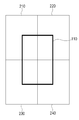
2 is a view for explaining a method of variously changing the configuration of a screen in the display device of FIG.
3 and 4 are diagrams for explaining an example of the combination between the areas of the screen;
5 is a diagram illustrating various examples of an object displayed in each area of a screen;
6 is a view for explaining various methods of changing the size of an area;
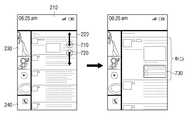
7 is a view for explaining a process of displaying detailed information according to a user's operation in one region;
8 is a diagram for explaining information reloading according to region expansion;
9 is a view for explaining a process of changing an object display by scrolling in one region;
10 is a view for explaining a method of moving an icon;
11 is a diagram illustrating an example of a user operation for confirming a hidden layer;
12 is a diagram illustrating a screen on which a hidden layer is displayed by the operation of FIG. 11;
FIG. 13 is a block diagram illustrating a configuration of a display apparatus according to another exemplary embodiment.
14 is a flowchart illustrating a display method of a display apparatus according to an exemplary embodiment.
이하에서, 첨부된 도면을 이용하여 본 발명에 대하여 구체적으로 설명한다.Hereinafter, the present invention will be described in detail with reference to the accompanying drawings.
도 1은 본 발명의 일 실시 예에 따른 디스플레이 장치의 구성을 나타내는 블럭도이다. 도 1에 따르면, 디스플레이 장치(100)는 디스플레이부(110) 및 제어부(120)를 포함한다. 도 1의 디스플레이 장치(100)는 휴대폰, PDA, 태블릿 PC, 랩탑 컴퓨터, PC, TV 등과 같이 디스플레이 기능을 갖춘 다양한 유형의 장치로 구현될 수 있다.1 is a block diagram showing a configuration of a display device according to an embodiment of the present invention. According to FIG. 1, the
디스플레이부(110)는 화면을 디스플레이한다. 화면은 복수 개의 영역으로 구분되며, 각 영역에는 서로 다른 유형의 객체가 표시된다. 객체란 화면 상에 표시 가능한 아이콘, 사진, 컨텐츠, 이미지, 텍스트, 위젯 영역 등을 의미한다. 특히, 디스플레이부(110)는 디스플레이 장치(100)가 턴-온 되어 초기화되면, 최초로 배경 화면을 표시한다. 배경 화면 자체가 상술한 바와 같이 복수 개의 영역으로 구분되고, 각 영역에 서로 다른 유형의 객체가 표시될 수 있다. 이하에서는, 배경 화면인 경우를 기준으로 설명하지만, 배경 화면 이외의 화면에 대해서도 이하의 내용이 적용될 수 있음은 물론이다. The
제어부(120)는 사용자 조작에 따라 배경화면을 재구성한다. 구체적으로는, 사용자가 복수의 영역 중 적어도 하나를 확대시키거나 축소시키면, 제어부(120)는 디스플레이부(110)를 제어하여, 나머지 영역들의 크기를 상대적으로 변경한다. 그리고, 변경된 각 영역의 크기 및 레이아웃에 맞추어 각 영역에 표시되는 객체를 재배열한다.The
디스플레이부(110)가 터치 스크린으로 구성되는 경우, 사용자 조작은 터치 앤 드래그 방식으로 이루어질 수 있다. 즉, 사용자는 임의의 영역을 직접 터치하거나, 영역 간의 경계 부분을 터치하고 일 방향으로 드래그하여 해당 영역의 크기를 확대 또는 축소시킬 수 있다. 하나의 영역의 크기가 확대되면 나머지 영역들은 중첩되지 않도록 축소되어, 전체 배경 화면이 재구성된다. When the
배경 화면은 디스플레이 장치(100)가 턴-온되고 초기화가 완료되면, 디스플레이된다. 사용자는 배경 화면에서 아이콘을 선택하여 각종 어플리케이션을 실행시킬 수 있다. 어플리케이션이 실행되면, 배경 화면은 해당 어플리케이션의 실행 화면으로 교체될 수 있다. 한편, 사용자는 배경 화면 자체에서 미디어의 내용을 직접 확인하거나, 각종 정보를 바로 확인할 수도 있다. 즉, 단순 아이콘만을 제공하던 종래의 배경 화면과 달리, 도 1의 디스플레이 장치(100)에서 제공되는 배경화면은 동적인 요소를 포함한다. The background screen is displayed when the
제어부(120)는 배경 화면이 표시된 상태에서 기 설정된 시간 동안 사용자 입력이 없으면 화면을 턴-오프시키고, 절전 모드로 들어간다. 절전 모드에서 임의의 키가 선택되거나 사용자의 터치가 있으면, 다시 배경 화면을 표시한다. 배경 화면에 표시되는 영역의 수 및 그 조합 형태는 다양하게 구현될 수 있다. The
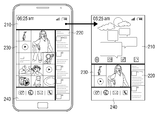
도 2는 배경 화면에서 영역 크기 조정 과정을 설명하기 위한 도면이다. 도 2에 따르면, 배경 화면은 제1 내지 제4 영역(210, 220, 230, 240)으로 구분된다. 각 영역의 크기는 서로 다르게 표시될 수 있다. 도 2의 (a)에서는 제2 영역이 가장 크게 표시되고 나머지 제1, 3, 4 영역(210, 230, 240)의 크기는 상대적으로 작게 표시된다. 사용자가 제1 영역(210) 또는 제1 영역(210)과 제2 영역(220) 간의 경계를 터치하여 오른쪽으로 드래그하면, 배경 화면에서 제1 영역(210)의 크기가 커지면서 제2 영역(220)의 크기는 줄어들게 된다(b). 그 밖에, 제3 영역(230), 제4 영역(240)도 각각 확대될 수 있다(c, d). 이와 같이, 사용자는 자신이 원하는 대로 배경화면을 재구성할 수 있게 된다.2 is a diagram for describing a process of adjusting an area size in a background screen. According to FIG. 2, the background screen is divided into first to
배경 화면의 각 영역에는 카테고리 별로 최적화된 형태로 객체가 배열된다. 특히, 어플리케이션 진입 이전의 최소한도의 기본 정보가 제공된다.In each area of the background screen, objects are arranged in an optimized form for each category. In particular, minimal basic information before application entry is provided.
도 3 및 도 4는 본 발명의 다양한 실시 예에 따른 영역 조합 예를 설명하기 위한 도면이다. 3 and 4 illustrate examples of region combinations according to various embodiments of the present disclosure.
도 3에 따르면, 4개의 동일한 크기 및 동일한 형상의 영역(210 내지 240)들이 행렬 방향으로 나란히 배열되고, 그 연결 경계 부분을 기준으로 디스플레이 장치(100) 화면 크기 만큼의 배경 화면이 디스플레이 장치(100)의 디스플레이부(110)에 표시된다. According to FIG. 3, four identically sized and identically shaped
도 4에 따르면, 서로 다른 크기 및 형상의 영역(210 내지 240)들이 서로 엇갈리도록 배열되고, 그 연결 경계 부분을 포함하는 화면이 디스플레이부(110)에서 배경 화면으로 표시된다. According to FIG. 4,
도 5는 배경 화면을 구성하는 각 영역의 예를 나타내는 도면이다. 도 5에 따르면, 제1 영역(210)은 최신 업데이트 정보, 디바이스 상태, 알림 정보 등과 같은 각종 정보들이 표시된다. 제1 영역(210)에는 각종 위젯 프로그램의 실행 결과 정보가 표시될 수도 있다. 텍스트 형태로 정보를 표시하므로 제1 영역(210)은 텍스트 표시 영역으로 명명될 수도 있고, 컨텍스츄얼 영역(contextual area)으로 명명될 수도 있다. 또한, 제1 영역(210)은 위젯 정보를 표시한다는 점에서 위젯 표시 영역을 포함할 수도 있다. 5 is a diagram illustrating an example of each region constituting a background screen. According to FIG. 5, the
제2 영역(220)에는 SNS(Social Network Service) 어플리케이션이나 메일 서비스 등의 실행에 의해 송수신되는 각종 메시지가 표시될 수 있다. 제2 영역(220)에 표시되는 메시지들은 실시간 업데이트되면서 피드백된다. 또한, 새로운 메시지가 수신되면 이전 메시지들은 한 단계 씩 뒤측에 표시된다. 이와 같이 정보가 단계화되어 제공된다. 제2 영역(220)은 메시지 표시 영역 또는 SNS 어플리케이션 영역으로 명명될 수 있다.The
제3 영역(230)에는 사진이나, 비디오, 오디오 컨텐츠와 같은 각종 미디어 컨텐츠가 표시된다. 이러한 미디어 컨텐츠는 최신 업데이트되는 컨텐츠도 포함하며, 제3 영역(230)에서 직접 제어될 수 있다. 즉, 제3 영역(230)에 표시된 상태 그대로 사용자가 재생하여 컨텐츠를 확인할 수도 있고, 재생 정지시키거나 빨리감기, 되감기 등을 할 수도 있다. 각 미디어 컨텐츠는 썸네일 이미지 형태로 표시되고, 비디어나 오디오 컨텐츠의 경우 재생 가능함을 알리는 GUI 아이콘(▶)을 함께 표시하여 줄 수도 있다. 도 5에 도시된 바와 같이, 전체 미디어 컨텐츠들은 반드시 동일한 크기 및 형태로 표시되는 것은 아니며, 일부 컨텐츠들은 크게 표시될 수도 있다. 제3 영역(230)은 컨텐츠 표시 영역으로 명명될 수도 있다. The
제4 영역(240)은 선호 기능에 대한 아이콘을 표시하는 선호 기능 표시 영역으로 구현될 수 있다. 선호 기능은 디스플레이 장치(100)의 제작자가 디폴트로 정해둘 수도 있고, 사용자가 임의로 선호 기능으로 선택할 수도 있으며, 별도의 선택이 없더라도 사용 횟수에 따라 자동으로 선호 기능 표시 영역에 등록될 수도 있다. 제4 영역(240)은 사용자의 선택에 따라 스크롤될 수 있으며, 스크롤될 경우에는 디스플레이 장치에서 제공하는 기능에 대한 아이콘이나, 어플리케이션의 아이콘을 표시할 수도 있다. 즉, 제4 영역(240)은 아이콘 표시 영역, 어플리케이션 표시 영역, 선호 기능 표시 영역을 함께 포함할 수 있다.The
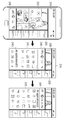
도 6은 배경 화면을 재구성하는 다양한 방법을 설명하기 위한 도면이다. 도 6에 따르면, 복수의 영역(210-240)으로 구분된 배경 화면에서 사용자는 자신이 원하는 대로 영역 크기를 조정할 수 있다. 6 is a diagram for describing various methods of reconfiguring a background screen. According to FIG. 6, in a background screen divided into a plurality of
즉, 도 6에서와 같이 제2 영역(220) 및 제3 영역(230) 사이의 경계 부분을 터치하여 제3 영역(230) 방향으로 드래그하다가 제1 영역(210) 방향으로 드래그하게 되는 경우, 또는 제2 영역(220)을 직접 터치하여 좌상측 방향으로 드래그하는 경우에는 제2 영역(220)이 좌상측으로 확대되고, 나머지 영역(210, 230, 240)들의 크기는 상대적으로 축소된다. That is, as shown in FIG. 6, when the boundary portion between the
제2 영역(220)에서는 최대로 확대된 크기에 맞게 객체들이 재배열된다. 도 6에 따르면, 확대 이전의 제2 영역(220)에서는 메시지의 송수신 주체에 대한 사진 및 정보가 표시되고, 그 하부에는 송수신된 메시지의 일부 내용이 표시된다. 반면, 확대 이후에는 메시지 송수신 주체에 대한 사진 및 정보는 제2 영역(220) 내에서 좌측 부분에 일렬로 정렬되고, 그 옆에는 메시지 전문과 그 메시지에 첨부된 이미지까지 표시된다. In the
제2 영역(220)의 크기가 최대로 확대되게 되면, 나머지 영역(210, 230, 240)에는 최소 기본 객체들만이 표시된다. 가령, 제1 영역(210)에서는 현재 시간이나, 배터리 잔량 정보, 전파 수신 감도 정보 등이 표시되고, 제4 영역(240)에서는 전화 기능에 대한 아이콘만이 표시되며, 제3 영역(230)에서도 작은 크기의 미디어 컨텐츠 이미지 등만을 표시한다.When the size of the
영역 확장이 이루어진 경우, 사용자는 해당 영역을 선택하여 좀 더 상세한 정보를 확인하고자 할 경우가 있다.When the area is extended, the user may select the area to check more detailed information.
도 6에서는 경계 부분을 이용하는 조작, 영역 자체를 터치하는 조작 모두에 의해 배경 화면이 재구성될 수 있는 실시 예를 도시하였으나, 이들 조작 중 하나만에 의해 배경 화면이 재구성되도록 제한되는 실시 예도 가능함은 물론이다. 6 illustrates an embodiment in which the background screen may be reconstructed by both an operation using a boundary portion and an operation of touching the area itself, but it is a matter of course that an embodiment in which the background screen is reconstructed by only one of these operations is also possible. .
도 7은 제2 영역(220)이 도 6과 같은 방식으로 확대된 상태에서 사용자가 일부 메시지를 선택하여 상세 정보를 확인하는 과정을 나타낸다. 즉, 사용자는 두 개의 손가락으로 확인하고자 하는 정보의 두 지점(710, 720)를 터치한 후, 서로 이격되는 방향으로 드래그시키는 조작을 할 수 있다. 이러한 조작에 따라, 터치된 정보에 대한 상세 정보(730)가 표시된다. 도 7의 경우, 해당 메시지에 대한 댓글 정보들이 더 추가 표시되는 상태를 나타낸다. FIG. 7 illustrates a process in which a user selects some messages and checks detailed information while the
도 7에서는 제2 영역(220)을 예로 들었으나, 나머지 영역도 상술한 방식의 조작에 의해 상세 정보를 표시하여 줄 수 있음은 물론이다. In FIG. 7, the
도 8은 복수의 영역 중에서 제1 영역(210)이 확대되었을 때의 객체 재구성 방법을 나타내는 도면이다. 도 8에 따르면, 확대 이전의 제1 영역(210)에서는 최소한의 정보들만이 표시되다가, 확대가 이루어지면 각종 업데이트 메시지, 각종 위젯 실행에 의한 위젯 정보, 기기 상태 정보 등과 같은 다양한 텍스트 정보 또는 이미지 정보 등이 표시된다. 이러한 정보들은, 확대 동작이 이루어질 때 자동으로 리로드(reload)될 수 있다. 즉, 확대 동작이 개시되면, 디스플레이 장치(100)는 저장된 정보들을 새로이 독출하거나, 장치 상태를 재점검하여 제1 영역(210)에 표시될 객체들을 업데이트할 수 있다. 또는, 외부 소스, 즉, 서버에 새로이 액세스하여, 새로운 정보를 수신하여 객체들을 업데이트할 수도 있다. 구체적으로는, 디스플레이 장치(100)는 확대된 영역에 표시될 객체를 제공하는 서버의 IP를 이용하여 서버에 접속한다. 그리고, 표시할 객체에 대한 업데이트 정보를 요청하여, 수신한다. 이에 따라 리로드된 객체는 영역 내의 기존 객체와 함께 해당 영역에서 적절하게 재배열된다. 객체 리로딩은 복수의 영역 전체에 대해서 이루어질 수도 있지만, 이 중 확대된 영역에 대해서만 이루어질 수도 있다. 8 is a diagram illustrating an object reconstruction method when the
도 8에서는 제1 영역을 기준으로 설명하였으나, 다른 영역들이 확대될 때에도 그 영역에 해당하는 객체들의 리로딩 작업이 수행될 수 있음은 물론이다.Although FIG. 8 has been described with reference to the first area, reloading of objects corresponding to the area may be performed even when other areas are enlarged.
도 9는 복수의 영역 중 하나를 스크롤시키면서 다양한 정보를 확인하는 경우를 나타낸다. 구체적으로, 도 9는 제4 영역(240)이 확대된 상태를 나타낸다. 확대 전에는 제4 영역(240)에 선호 기능 아이콘만이 표시되고 있으나, 확대 후에는 제4 영역(240)에 선호 기능 리스트(241) 및 어플리케이션 리스트(243) 등이 표시된다. 어플리케이션 리스트(243)에는 전체 어플리케이션에 대한 아이콘이 표시된다. 9 illustrates a case where various information is confirmed while scrolling one of the plurality of areas. In detail, FIG. 9 illustrates an enlarged state of the
선호 기능 리스트(241)에 표시되는 선호 기능은 폴더 방식으로 정리될 수도 있다. 즉, 선호 기능 리스트(241)에 표시된 폴더가 선택되면, 그 폴더에 해당하는 하위 선호 기능들에 리스트가 오픈될 수 있다. The preference functions displayed on the
이러한 영역은 사용자의 조작에 의해 스크롤되어 많은 수의 아이콘 또는 객체를 표시하여 줄 수 있다. 즉, 사용자가 임의의 리스트를 터치한 후 일 방향으로 빠르게 슬랩(slap)하면, 그 슬랩 방향으로 스크롤이 이루어진다. 이에 따라, 해당 리스트에 표시되는 객체 또는 아이콘이 변경될 수 있다.Such an area may be scrolled by a user's manipulation to display a large number of icons or objects. That is, when the user touches an arbitrary list and quickly slaps in one direction, scrolling is performed in the slap direction. Accordingly, the object or icon displayed on the list may be changed.
도 10은 리스트 간의 객체 표시 이동 방식을 나타내는 도면이다. 도 10에 따르면, 사용자가 어플리케이션 리스트(242) 상에서 하나의 아이콘을 터치하고, 선호 기능 리스트(241) 측으로 드래그한 후, 터치 해제하면, 해당 아이콘은 선호 기능 리스트(241)로 이동되어 표시될 수 있다. 이와 같이 사용자는 편의에 따라 리스트 간 또는 동일 리스트 내에서 객체 또는 아이콘의 위치를 변경할 수 있다.10 is a diagram illustrating a method of moving an object display between lists. According to FIG. 10, when a user touches an icon on the
이상 설명한 실시 예들에서는 4개의 영역으로 조합된 배경 화면을 기준으로 설명하였으나, 영역의 개수는 4개로 제한되지 않는다. 즉, 경우에 따라서는 2, 3개 의 영역으로만 구분될 수도 있고, 5개 이상의 영역이 하나의 배경 화면으로 조합될 수도 있다. 영역 별 개수 및 조합 형태는 디스플레이 화면의 크기, 객체의 종류 등에 따라 다양하게 결정될 수 있다. In the above-described embodiments, the background screen combined into four areas is described as a reference, but the number of areas is not limited to four. That is, in some cases, it may be divided into only two or three regions, or five or more regions may be combined into one background screen. The number and combination form of each region may be variously determined according to the size of the display screen, the type of the object, and the like.
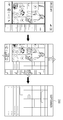
한편, 배경 화면에 표시된 복수의 영역들 이외에 히든 영역이 추가로 더 마련되어, 사용자의 조작 재미를 증대할 수 있다. 즉, 배경 화면에서 분할된 각 영역을 펼치면, Z축 방향으로 하부에 가려져 있던 히든 영역이 배경 화면에 표시되도록 구현할 수 있다.Meanwhile, in addition to the plurality of areas displayed on the background screen, a hidden area may be further provided to increase user's enjoyment of operation. In other words, when the divided areas are unfolded on the background screen, the hidden areas hidden under the Z-axis may be displayed on the background screen.
도 11은 히든 영역을 확인하기 위한 사용자 조작의 일 예를 나타낸다. 도 11에 따르면 사용자가 세 개의 손가락으로 배경 화면의 임의의 세 지점을 터치한 후 서로 이격시키는 모션을 취하게 되면, 히든 영역이 나타날 수 있다. 한편, 반드시 세 개의 지점이 터치되어야 할 필요는 없으며, 두 개 또는 4개 이상의 지점이 터치되어 서로 이격되는 모션일 경우에도 히든 레이어가 나타날 수 있다. 가령, 복수 개의 영역 중 서로 다른 두 개의 영역을 서로 이격시키는 사용자 조작이 입력되면, 터치된 영역들이 서로 이격되도록 이동되면서, 히든 영역에 나타날 수 있다.11 shows an example of a user operation for confirming a hidden area. According to FIG. 11, when a user touches any three points on the background screen with three fingers and then takes a motion of separating them from each other, a hidden area may appear. Meanwhile, the three points do not necessarily need to be touched, and even when two or four or more points are touched and separated from each other, the hidden layer may appear. For example, when a user operation for separating two different areas from among a plurality of areas is input, the touched areas may be moved to be spaced apart from each other and appear in the hidden area.
도 12는 이러한 조작에 의해 히든 영역이 표시되는 과정을 나타내는 도면이다. 도 12에 따르면, 복수의 영역들이 조합된 배경 화면에서 사용자가 기 정의된 제1 조작을 입력하면, 영역들이 서로 갈라지면서 히든 영역(250)이 나타난다. 이러한 상태에서 다시 기 정의된 제2 조작을 입력하면 다시 복수의 영역들이 서로 다가와서 결합하는 형태로 배경 화면이 재구성된다. 제2 조작은 제1 조작과 반대 방향의 조작일 수 있다. 즉, 제1 조작이 세 개의 손가락으로 터치한 후 벌리는 조작이었다면, 제2 조작은 세 개의 손가락으로 터치한 후 오무리는 조작이 될 수 있다.12 is a diagram illustrating a process of displaying a hidden area by such an operation. According to FIG. 12, when a user inputs a first operation defined in a background screen in which a plurality of areas are combined, the
히든 영역은 실시 예에 따라 다양한 객체가 표시될 수 있다. 일 예로, 히든 영역은, 사용자가 지정한 어플리케이션 화면, 마지막 실행한 어플리케이션 화면, 어플리케이션 리스트 중 하나가 될 수도 있다. 도 12에서는 사용자가 컬랜더 어플리케이션을 지정하였을 경우, 그 컬랜더 어플리케이션의 실행 화면이 히든 영역(250)으로 나타난 상태를 도시하였다.In the hidden area, various objects may be displayed according to embodiments. For example, the hidden area may be one of an application screen designated by a user, an application screen last executed, and an application list. FIG. 12 illustrates a state in which an execution screen of the calendar application is displayed as the
한편, 도 6 내지 12에서는 사용자의 터치 및 드래그 조작에 의해 배경 화면이 재구성되는 다양한 실시 예를 도시하였으나, 그 밖에, 디스플레이 장치(100)의 본체에 구비된 방향키나, 음성 인식 기술 등을 이용하여 배경 화면을 재구성할 수도 있음은 물론이다. 또한, 상술한 바와 같이, 배경 화면 이외의 화면에 대해서도 상술한 다양한 구성이 적용될 수 있음은 물론이다. 6 to 12 illustrate various embodiments in which a background screen is reconfigured by a user's touch and drag operation, in addition, by using a direction key or a voice recognition technology provided in the main body of the
도 13은 본 발명의 다른 실시 예에 따른 디스플레이 장치(100)의 구성을 나타내는 블럭도이다. 도 13에 따르면, 디스플레이 장치(100)는 디스플레이부(110), 제어부(120), 인터페이스부(130), 저장부(140)를 포함한다.FIG. 13 is a block diagram illustrating a configuration of a
디스플레이부(110)는 렌더링부(111) 및 터치 스크린부(112)를 포함한다. 터치 스크린부(112)는 각종 화면을 디스플레이하고, 사용자가 해당 화면을 터치하는 지 여부를 감지하여 감지 결과를 제어부(120)로 제공한다. 터치 스크린부(112)는 디스플레이 패널, 터치 센서 또는 압력 센서, 백라이트 유닛, 구동 회로 등을 포함하는 형태로 구성될 수 있다. 터치 스크린 기술을 공지된 바 있고, 본 발명의 필수 구성 요소가 아니므로, 이러한 구성에 대한 도시 및 설명은 생략한다. The
렌더링부(111)는 배경 화면을 구성하여 터치 스크린부(112)로 제공한다. 구체적으로는, 렌더링부(111)는 제어부(120)에서 실행되는 각종 어플리케이션 또는 기능에 대응되는 실행 화면, 송수신 메시지, 텍스트 등과 같은 다양한 정보들을 다양한 GUI(Graphic User Interface) 객체(object)로 구성하고, 각 객체들을 그 유형에 따라 정해진 영역에 표시하는 렌더링 작업을 수행한다. The
저장부(140)는 O/S(Operating System), 각종 어플리케이션, 설정 정보, 실행 데이터 등과 같은 다양한 데이터를 저장한다.The
제어부(120)는 저장부(140)에 저장된 각종 프로그램을 실행시켜, 복수의 영역으로 구분된 배경 화면을 표시하도록 디스플레이부(110)를 제어한다.The
통신 인터페이스부(130)는 제어부(120)의 제어에 따라 각종 외부 소스와 통신을 수행한다. 구체적으로는, 통신 망을 통해서 통화를 연결할 수도 있고, 인터넷과 같은 네트워크에 연결되어 SNS 메시지, 위젯 정보, 미디어 컨텐츠 등을 다운로드받을 수도 있다.The
제어부(120)는 복수의 영역으로 구분된 배경 화면이 표시된 상태에서 사용자가 하나의 영역의 크기를 확대시키면, 확대된 영역에 해당하는 객체들을 리로딩한다. 구체적으로는, 저장부(140)에 저장된 정보를 독출하거나, 통신 인터페이스부(130)를 통해서 외부 서버에 액세스하여 정보를 수신할 수 있다. 제어부(120)는 리로딩된 정보들을 이용하여 객체를 재배열하고, 결과적으로 재구성된 배경 화면을 표시하도록 디스플레이부(110)를 제어한다.The
도 14는 본 발명의 일 실시 예에 따른 디스플레이 방법을 설명하기 위한 흐름도이다. 도 14에 따르면, 복수 개의 영역으로 구분된 배경 화면을 표시한다(S1410). 배경 화면의 구성은 상술한 도 2 내지 도 12에 도시된 바와 같이 다양한 형태로 이루어질 수 있다.14 is a flowchart for explaining a display method according to an exemplary embodiment. According to FIG. 14, a background screen divided into a plurality of areas is displayed (S1410). The background screen may be configured in various forms as shown in FIGS. 2 to 12.
사용자는 배경 화면에서 임의의 객체를 선택하여 바로 컨텐츠를 재생할 수도 있고, 새로운 화면으로 전환 표시할 수 있다. 즉, 미디어 컨텐츠가 선택된 경우, 배경 화면 자체에서 바로 미디어 컨텐츠가 재생되어 비디오 또는 오디오 신호가 출력될 수 있다. 사진이 선택된 경우에는 해당 영역 내에서 사진이 확대되어 표시될 수 있다. 한편, 어플리케이션에 대한 아이콘이 선택되면, 선택된 어플리케이션을 실행시키고 배경화면 전체를 어플리케이션 실행 화면으로 전환하거나, 해당 영역에서만 어플리케이션 실행 화면을 출력할 수도 있다.The user may select any object on the background screen to immediately play the content or switch to a new screen. That is, when the media content is selected, the media content can be directly played on the background screen itself and a video or audio signal can be output. When a picture is selected, the picture may be enlarged and displayed in the corresponding area. Meanwhile, when an icon for an application is selected, the selected application may be executed and the entire background screen may be switched to the application execution screen, or the application execution screen may be output only in the corresponding area.
한편, 사용자 조작이 이루어지면, 사용자 조작에 따라 영역의 크기를 변경하여 배경 화면을 재구성한다(S1420, 1430). 이 경우, 각 영역들은 서로 중첩되지 않도록 상대적으로 변경된다. 하나가 커지게 되면, 나머지 영역은 축소된다. Meanwhile, when a user manipulation is performed, the background screen is reconfigured by changing the size of the region according to the user manipulation (S1420 and 1430). In this case, each area is changed relatively so as not to overlap each other. As one becomes larger, the remaining area shrinks.
그리고 나서, 변경된 각 영역의 크기에 맞게 객체가 재배열된다(S1440). 배경 화면 구성 및 객체 배열 상태에 대해서는 상술한 여러 실시 예에서 설명한 바 있으므로, 중복 설명은 생략한다.Then, the objects are rearranged according to the size of each changed area (S1440). Since the background screen configuration and the object arrangement state have been described in the above-described various embodiments, duplicate description thereof will be omitted.
그 밖에, 도 14에서는 도시하지 않았으나, 디스플레이 방법의 다양한 실시 예에 따르면, 다양한 단계들이 더 포함될 수 있다.In addition, although not shown in FIG. 14, according to various embodiments of the display method, various steps may be further included.
즉, 영역이 확대되었을 경우, 그 확대된 영역에 표시되는 객체를 소스로부터 자동으로 리로드하여 표시하는 단계가 더 포함할 수도 있다.That is, when the area is enlarged, the method may further include automatically reloading and displaying an object displayed on the enlarged area from the source.
또한, 기 정의된 사용자 조작이 입력되면, 상기 복수 개의 영역이 서로 이격되도록 이동시키면서, 히든 영역(hidden area)을 상기 배경 화면에 표시하는 단계를 더 포함할 수도 있다.In addition, when a predefined user manipulation is input, the method may further include displaying a hidden area on the background screen while moving the plurality of areas to be spaced apart from each other.
또는, 복수 개의 영역 중 하나의 영역에서 두 지점이 터치된 후 서로 이격되는 방향으로 드래그되면 그 영역에 상세 정보를 표시하는 단계가 더 포함될 수도 있다.Alternatively, if two points are touched in one of the plurality of areas and then dragged in a direction spaced apart from each other, displaying the detailed information in the area.
이들 각 실시 예에 대한 설명은 상술한 바 있으므로 중복 설명 및 도시는 생략한다.Description of each of these embodiments has been described above, so redundant description and illustration are omitted.
또한, 이들 각 실시 예들에서, 배경 화면을 구성하는 복수 개의 영역은, 텍스트 정보를 표시하기 위한 텍스트 표시 영역, 미디어 컨텐츠를 표시하는 컨텐츠 표시 영역, 상기 디스플레이 장치에서 제공하는 기능에 대한 아이콘을 표시하는 아이콘 표시 영역, 어플리케이션의 아이콘을 표시하는 어플리케이션 표시 영역, 송수신한 메시지를 표시하는 메시지 표시 영역, 선호 기능에 대한 아이콘을 표시하는 선호 기능 표시 영역, 위젯 서비스를 제공하는 위젯 영역 또는 이들의 조합으로 이루어질 수 있다. Also, in each of these embodiments, the plurality of areas configuring the background screen may include a text display area for displaying text information, a content display area for displaying media content, and an icon for a function provided by the display device. It consists of an icon display area, an application display area displaying an icon of an application, a message display area displaying a message sent and received, a preferred function display area displaying an icon for a preferred function, a widget area providing a widget service, or a combination thereof. Can be.
또한, 배경 화면에 표시되는 객체에는 배경 화면 상에서 재생 가능한 동적 컨텐츠가 포함된다. In addition, the object displayed on the background screen includes dynamic content that can be played on the background screen.
한편, 상술한 본 발명의 다양한 실시 예들에 따른 방법을 수행하기 위한 프로그램은 다양한 유형의 기록 매체에 저장되어 사용될 수 있다. Meanwhile, the program for performing the method according to various embodiments of the present disclosure described above may be stored and used in various types of recording media.
구체적으로는, 상술한 방법들을 수행하기 위한 코드는, RAM(Random Access Memory), 플레시메모리, ROM(Read Only Memory), EPROM(Erasable Programmable ROM), EEPROM(Electronically Erasable and Programmable ROM), 레지스터, 하드디스크, 리무버블 디스크, 메모리 카드, USB 메모리, CD-ROM 등과 같이, 단말기에서 판독 가능한 다양한 유형의 기록 매체에 저장되어 있을 수 있다. Specifically, the code for performing the above-described methods may include random access memory (RAM), flash memory, read only memory (ROM), erasable programmable ROM (EPROM), electronically erasable and programmable ROM (EEPROM), registers, hard drives. It may be stored in various types of recording media readable by the terminal, such as a disk, a removable disk, a memory card, a USB memory, a CD-ROM, and the like.
또한, 이상에서는 본 발명의 바람직한 실시예에 대하여 도시하고 설명하였지만, 본 발명은 상술한 특정의 실시예에 한정되지 아니하며, 청구범위에서 청구하는 본 발명의 요지를 벗어남이 없이 당해 발명이 속하는 기술분야에서 통상의 지식을 가진자에 의해 다양한 변형실시가 가능한 것은 물론이고, 이러한 변형실시들은 본 발명의 기술적 사상이나 전망으로부터 개별적으로 이해되어져서는 안될 것이다.While the present invention has been particularly shown and described with reference to exemplary embodiments thereof, it is to be understood that the invention is not limited to the disclosed exemplary embodiments, but, on the contrary, It will be understood by those skilled in the art that various changes in form and detail may be made therein without departing from the spirit and scope of the present invention.
110 : 디스플레이부 120 : 제어부
130 : 인터페이스부 140 : 저장부110: display unit 120: control unit
130: interface unit 140: storage unit
Claims (20)
사용자 조작에 따라 상기 화면의 각 영역의 크기를 서로 중첩되지 않도록 상대적으로 변경하고, 변경된 영역에 표시될 객체를 소스로부터 자동으로 리로드하여 상기 화면을 재구성하는 제어부;를 포함하는 것을 특징으로 하는 디스플레이 장치.A display unit configured to display a screen divided into a plurality of areas displaying different types of objects; And
And a control unit configured to relatively change the size of each area of the screen so as not to overlap each other according to a user's operation, and to reload the object by automatically reloading an object to be displayed on the changed area from a source. .
상기 제어부는,
상기 복수 개의 영역 중 확대된 영역에 표시되는 객체를 상기 소스로부터 리로드(reload)하고, 상기 확대된 영역의 레이아웃에 따라 상기 리로드된 객체 및 기존 객체를 재배열하여 표시하는 것을 특징으로 하는 디스플레이 장치.The method of claim 1,
The control unit,
And reload an object displayed in the enlarged area of the plurality of areas from the source, and rearrange and display the reloaded object and the existing object according to the layout of the enlarged area.
상기 복수 개의 영역 중 적어도 하나의 영역은 사용자 조작에 따라 스크롤 가능한 것을 특징으로 하는 디스플레이 장치.The method of claim 1,
And at least one area of the plurality of areas is scrollable according to a user operation.
상기 제어부는,
상기 복수 개의 영역 간의 경계 부분을 터치하여 드래그하는 사용자 조작에 따라 상기 복수 개의 영역 중 적어도 하나를 확대 또는 축소시키고, 그 확대 또는 축소 정도에 따라 나머지 영역의 크기를 조정하는 것을 특징으로 하는 디스플레이 장치.The method of claim 1,
The control unit,
And at least one of the plurality of areas is enlarged or reduced according to a user manipulation of touching and dragging a boundary portion between the plurality of areas, and adjusting the size of the remaining area according to the extent of the enlargement or reduction.
상기 제어부는,
상기 복수 개의 영역 중 하나의 영역을 터치하여 타 영역과의 경계 방향으로 드래그하는 사용자 조작에 따라 상기 터치된 영역의 크기를 확대시키고, 나머지 영역의 크기를 축소시키는 것을 특징으로 하는 디스플레이 장치.The method of claim 1,
The control unit,
And increasing the size of the touched area and reducing the size of the remaining area according to a user's operation of touching one area of the plurality of areas and dragging it in a boundary direction with another area.
상기 제어부는,
상기 복수 개의 영역 중 하나의 영역에서 두 지점이 터치된 후 서로 이격되는 방향으로 드래그되면 상기 영역에 상세 정보를 표시하는 것을 특징으로 하는 디스플레이 장치.The method of claim 1,
The control unit,
And displaying detailed information in the area when two points are touched in one of the plurality of areas and dragged in a direction spaced apart from each other.
상기 제어부는,
복수의 지점을 터치하여 서로 이격시키는 사용자 조작이 입력되면, 상기 복수의 영역이 서로 이격되도록 이동시키면서, 상기 복수 개의 영역의 하부에 가려져 있던 히든 영역(hidden area)을 상기 화면에 표시하는 것을 특징으로 하는 디스플레이 장치.The method of claim 1,
The control unit,
When a user operation of touching a plurality of points to be spaced apart from each other is input, while moving the plurality of areas to be spaced apart from each other, a hidden area hidden under the plurality of areas is displayed on the screen. Display device.
상기 히든 영역에는 사용자가 지정한 어플리케이션 화면, 마지막 실행한 어플리케이션 화면, 어플리케이션 리스트 중 하나가 표시되는 것을 특징으로 하는 디스플레이 장치.The method of claim 7, wherein
And the application screen specified by the user, one of the last executed application screen, and an application list are displayed in the hidden area.
상기 복수 개의 영역 중 하나의 영역은,
선호 기능 리스트 및 전체 어플리케이션을 표시하는 어플리케이션 리스트를 표시하며,
상기 선호 기능 리스트 및 상기 어플리케이션 리스트에 표시된 객체들은 사용자 선택에 따라 서로 이동 가능하며,
상기 어플리케이션 리스트는 스크롤 가능한 것을 특징으로 하는 디스플레이 장치. The method according to any one of claims 1 to 8,
One region of the plurality of regions,
Displays a list of applications that display a list of preferred features and all applications.
The objects displayed in the preferred function list and the application list are movable to each other according to a user selection.
And the application list is scrollable.
상기 복수 개의 영역은,
텍스트 정보를 표시하기 위한 텍스트 표시 영역, 미디어 컨텐츠를 표시하는 컨텐츠 표시 영역, 상기 디스플레이 장치에서 제공하는 기능에 대한 아이콘을 표시하는 아이콘 표시 영역, 어플리케이션의 아이콘을 표시하는 어플리케이션 표시 영역, 송수신한 메시지를 표시하는 메시지 표시 영역, 선호 기능에 대한 아이콘을 표시하는 선호 기능 표시 영역, 위젯 서비스를 제공하는 위젯 영역 중 적어도 하나의 영역을 포함하는 것을 특징으로 하는 디스플레이 장치.The method according to any one of claims 1 to 8,
The plurality of areas,
A text display area for displaying text information, a content display area for displaying media content, an icon display area for displaying an icon for a function provided by the display device, an application display area for displaying an icon of an application, and a message transmitted and received And at least one of a message display area to display, a preferred function display area to display an icon for a preferred function, and a widget area to provide a widget service.
상기 복수 개의 영역 중 적어도 하나에 표시되는 객체는 상기 화면 상에서 재생 가능한 동적 컨텐츠를 포함하는 것을 특징으로 하는 디스플레이 장치.The method according to any one of claims 1 to 8,
The object displayed on at least one of the plurality of areas includes a dynamic content that can be played on the screen.
사용자 조작에 따라 상기 복수 개의 영역 중 하나의 크기가 변경되면, 상기 복수 개의 영역이 서로 중첩되지 않도록 나머지 영역의 크기를 상대적으로 변경하는 단계;
변경된 영역 중 적어도 하나의 영역에 표시될 객체를 소스로부터 자동으로 리로드하여 상기 화면을 재구성하는 단계;를 포함하는 것을 특징으로 하는 디스플레이 방법.Displaying a screen divided into a plurality of areas displaying different types of objects;
If the size of one of the plurality of areas is changed according to a user manipulation, relatively changing the size of the remaining areas so that the plurality of areas do not overlap each other;
And reloading the screen by automatically reloading an object to be displayed on at least one of the changed areas from a source.
상기 화면을 재구성하는 단계는,
상기 복수 개의 영역 중 확대된 영역에 표시되는 객체를 상기 소스로부터 리로드(reload)하고, 상기 확대된 영역의 레이아웃에 따라 상기 리로드된 객체 및 기존 객체를 재배열하여 표시하는 것을 특징으로 하는 디스플레이 방법.The method of claim 12,
Reconstructing the screen,
And reloading an object displayed in the enlarged area of the plurality of areas from the source, and rearranging and displaying the reloaded object and the existing object according to the layout of the enlarged area.
상기 복수 개의 영역 중 적어도 하나의 영역은 사용자 조작에 따라 스크롤 가능한 것을 특징으로 하는 디스플레이 방법.The method of claim 12,
And at least one area of the plurality of areas is scrollable according to a user operation.
상기 복수 개의 영역의 크기는, 상기 복수 개의 영역 간의 경계 부분을 터치하여 드래그하는 사용자 조작 또는 상기 복수 개의 영역 중 하나의 영역을 터치하여 타 영역과의 경계 방향으로 드래그하는 사용자 조작에 따라 변경되는 것을 특징으로 하는 디스플레이 방법.The method of claim 12,
The sizes of the plurality of regions may be changed according to a user operation of touching and dragging a boundary portion between the plurality of regions or a user operation of touching one region of the plurality of regions and dragging in a boundary direction with another region. Display method characterized in that.
복수의 지점을 터치하여 서로 이격시키는 사용자 조작이 입력되면, 상기 복수 개의 영역이 서로 이격되도록 이동시키면서, 히든 영역(hidden area)을 상기 화면에 표시하는 단계;를 더 포함하는 것을 특징으로 하는 디스플레이 방법.The method of claim 12,
And displaying a hidden area on the screen while moving the plurality of areas so that the plurality of areas are separated from each other by touching a plurality of points. .
상기 히든 영역에는 사용자가 지정한 어플리케이션 화면, 마지막 실행한 어플리케이션 화면, 어플리케이션 리스트 중 하나가 표시되는 것을 특징으로 하는 디스플레이 방법.17. The method of claim 16,
And displaying one of an application screen designated by a user, an application screen last executed, and an application list in the hidden area.
상기 복수 개의 영역 중 하나의 영역에서 두 지점이 터치된 후 서로 이격되는 방향으로 드래그되면 상기 영역에 상세 정보를 표시하는 단계;를 더 포함하는 것을 특징으로 하는 디스플레이 방법.The method of claim 12,
And displaying detailed information in the area when two points are touched in one of the plurality of areas and dragged in a direction to be spaced apart from each other.
상기 복수 개의 영역은,
텍스트 정보를 표시하기 위한 텍스트 표시 영역, 미디어 컨텐츠를 표시하는 컨텐츠 표시 영역, 상기 디스플레이 장치에서 제공하는 기능에 대한 아이콘을 표시하는 아이콘 표시 영역, 어플리케이션의 아이콘을 표시하는 어플리케이션 표시 영역, 송수신한 메시지를 표시하는 메시지 표시 영역, 선호 기능에 대한 아이콘을 표시하는 선호 기능 표시 영역, 위젯 서비스를 제공하는 위젯 영역 중 적어도 하나의 영역을 포함하는 것을 특징으로 하는 디스플레이 방법.19. The method according to any one of claims 12 to 18,
The plurality of areas,
A text display area for displaying text information, a content display area for displaying media content, an icon display area for displaying an icon for a function provided by the display device, an application display area for displaying an icon of an application, and a message transmitted and received And at least one of a message display area to be displayed, a preference function display area to display an icon for a preferred function, and a widget area to provide a widget service.
상기 복수 개의 영역 중 적어도 하나에 표시되는 객체는 상기 화면 상에서 재생 가능한 동적 컨텐츠를 포함하는 것을 특징으로 하는 디스플레이 방법.19. The method according to any one of claims 12 to 18,
The object displayed on at least one of the plurality of areas includes a dynamic content that can be played on the screen.
Priority Applications (4)
| Application Number | Priority Date | Filing Date | Title |
|---|---|---|---|
| KR1020110131083A KR20130064458A (en) | 2011-12-08 | 2011-12-08 | Display apparatus for displaying screen divided by a plurallity of area and method thereof |
| US13/618,763 US20130147849A1 (en) | 2011-12-08 | 2012-09-14 | Display apparatus for displaying screen divided into a plurality of areas and method thereof |
| PCT/KR2012/010603 WO2013085327A1 (en) | 2011-12-08 | 2012-12-07 | Display apparatus for displaying screen divided into a plurality of areas and method thereof |
| EP12856395.4A EP2788857A4 (en) | 2011-12-08 | 2012-12-07 | DISPLAY APPARATUS FOR DISPLAYING A DIVIDED SCREEN IN A PLURALITY OF ZONES, AND ASSOCIATED METHOD |
Applications Claiming Priority (1)
| Application Number | Priority Date | Filing Date | Title |
|---|---|---|---|
| KR1020110131083A KR20130064458A (en) | 2011-12-08 | 2011-12-08 | Display apparatus for displaying screen divided by a plurallity of area and method thereof |
Publications (1)
| Publication Number | Publication Date |
|---|---|
| KR20130064458A true KR20130064458A (en) | 2013-06-18 |
Family
ID=48571577
Family Applications (1)
| Application Number | Title | Priority Date | Filing Date |
|---|---|---|---|
| KR1020110131083A Ceased KR20130064458A (en) | 2011-12-08 | 2011-12-08 | Display apparatus for displaying screen divided by a plurallity of area and method thereof |
Country Status (4)
| Country | Link |
|---|---|
| US (1) | US20130147849A1 (en) |
| EP (1) | EP2788857A4 (en) |
| KR (1) | KR20130064458A (en) |
| WO (1) | WO2013085327A1 (en) |
Cited By (4)
| Publication number | Priority date | Publication date | Assignee | Title |
|---|---|---|---|---|
| KR20150045121A (en) * | 2013-10-18 | 2015-04-28 | 삼성전자주식회사 | Operating Method For Multi-Window And Electronic Device supporting the same |
| KR20170008878A (en) * | 2014-06-13 | 2017-01-24 | 폭스바겐 악티엔 게젤샤프트 | User interface and method for adjusting a semantic scale of a tile |
| WO2020159239A1 (en) * | 2019-01-31 | 2020-08-06 | 삼성전자 주식회사 | Electronic device, method, and computer-readable medium for switchable bar region of user interface |
| KR20220044916A (en) * | 2021-02-19 | 2022-04-12 | 삼성전자주식회사 | Operating Method For Multi-Window And Electronic Device supporting the same |
Families Citing this family (24)
| Publication number | Priority date | Publication date | Assignee | Title |
|---|---|---|---|---|
| CN103902141A (en) * | 2012-12-27 | 2014-07-02 | 北京富纳特创新科技有限公司 | Device and method for achieving dynamic arrangement of desktop functional icons |
| US20140282207A1 (en) * | 2013-03-15 | 2014-09-18 | Rita H. Wouhaybi | Integration for applications and containers |
| US10564843B2 (en) * | 2013-08-22 | 2020-02-18 | Samsung Electronics Co., Ltd. | Display device and method of displaying screen on said display device |
| KR102184269B1 (en) * | 2013-09-02 | 2020-11-30 | 삼성전자 주식회사 | Display apparatus, portable apparatus and method for displaying a screen thereof |
| US9727752B2 (en) * | 2013-09-25 | 2017-08-08 | Kairos Social Solutions, Inc. | Device, system, and method of identifying a specific user from a profile image containing multiple people |
| JP6151157B2 (en) * | 2013-10-29 | 2017-06-21 | 京セラ株式会社 | Electronic device, control program, and operation method of electronic device |
| KR102355118B1 (en) * | 2014-01-06 | 2022-01-26 | 삼성전자주식회사 | Electronic device, and method for displaying an event on a virtual reality mode |
| JP5840722B2 (en) * | 2014-04-10 | 2016-01-06 | ヤフー株式会社 | Information display device, information display method, and information display program |
| KR102218041B1 (en) * | 2014-06-17 | 2021-02-19 | 엘지전자 주식회사 | Mobile terminal |
| KR102268540B1 (en) * | 2014-06-26 | 2021-06-23 | 삼성전자주식회사 | Method for managing data and an electronic device thereof |
| US10956003B2 (en) | 2014-11-03 | 2021-03-23 | Snap-On Incorporated | Methods and systems for displaying vehicle data parameters with pinch-and-expand inputs |
| US9933915B2 (en) | 2014-11-03 | 2018-04-03 | Snap-On Incorporated | Methods and systems for displaying vehicle data parameter graphs in different display orientations |
| KR102223680B1 (en) * | 2014-11-03 | 2021-03-08 | 삼성디스플레이 주식회사 | Stretchable display apparatus and, method and apparatus for controlling the display thereof |
| US10846345B2 (en) * | 2018-02-09 | 2020-11-24 | Microsoft Technology Licensing, Llc | Systems, methods, and software for implementing a notes service |
| RU2633181C2 (en) * | 2015-03-04 | 2017-10-11 | Общество С Ограниченной Ответственностью "Яндекс" | Method of connecting graphic element of resource with one or multiple screens of electronic device and electronic device, which implements it |
| CN105389111B (en) * | 2015-10-28 | 2019-05-17 | 维沃移动通信有限公司 | Operating method and electronic device for split-screen display |
| WO2018030908A1 (en) * | 2016-08-10 | 2018-02-15 | Ringcentral, Ink., (A Delaware Corporation) | Method and system for managing electronic message threads |
| CN109804342B (en) * | 2016-10-10 | 2022-08-05 | 大众汽车有限公司 | Method for adjusting display and operation of graphical user interface |
| KR101873655B1 (en) * | 2016-11-30 | 2018-07-02 | 엘에스산전 주식회사 | Method for displaying a monitoring screen |
| CN108460154B (en) * | 2018-03-27 | 2022-09-20 | 腾讯科技(深圳)有限公司 | Search method, search device, computer equipment and storage medium |
| CN108984058A (en) * | 2018-03-30 | 2018-12-11 | 斑马网络技术有限公司 | The multi-section display adaption system of vehicle-carrying display screen and its application |
| CN109032461B (en) * | 2018-06-08 | 2021-08-17 | 平安科技(深圳)有限公司 | Method, device, server and storage medium for adjusting picture position in page |
| JP2020135430A (en) * | 2019-02-20 | 2020-08-31 | パイオニア株式会社 | Content display control device, content display control method, and program |
| KR20220069370A (en) * | 2020-11-20 | 2022-05-27 | 삼성전자주식회사 | Electronic device having extendable display and method for providing content thereof |
Family Cites Families (20)
| Publication number | Priority date | Publication date | Assignee | Title |
|---|---|---|---|---|
| US7469381B2 (en) * | 2007-01-07 | 2008-12-23 | Apple Inc. | List scrolling and document translation, scaling, and rotation on a touch-screen display |
| US6724403B1 (en) * | 1999-10-29 | 2004-04-20 | Surfcast, Inc. | System and method for simultaneous display of multiple information sources |
| US7370284B2 (en) * | 2003-11-18 | 2008-05-06 | Laszlo Systems, Inc. | User interface for displaying multiple applications |
| KR100618278B1 (en) * | 2005-08-05 | 2006-09-01 | 주식회사 엘지텔레콤 | Mobile communication terminal supporting multitasking through screen resizing and method |
| JP2007128497A (en) * | 2005-10-05 | 2007-05-24 | Sony Corp | Display device and display method |
| US7509588B2 (en) * | 2005-12-30 | 2009-03-24 | Apple Inc. | Portable electronic device with interface reconfiguration mode |
| KR100843077B1 (en) * | 2006-09-28 | 2008-07-02 | 삼성전자주식회사 | Apparatus and method for displaying information grouped in variable size on touch screen |
| US8214768B2 (en) * | 2007-01-05 | 2012-07-03 | Apple Inc. | Method, system, and graphical user interface for viewing multiple application windows |
| KR100892966B1 (en) * | 2007-01-20 | 2009-04-10 | 엘지전자 주식회사 | Electronic device having a touch screen and information display method using the same |
| US8601371B2 (en) * | 2007-06-18 | 2013-12-03 | Apple Inc. | System and method for event-based rendering of visual effects |
| KR100897147B1 (en) * | 2007-07-18 | 2009-05-14 | 에스케이 텔레콤주식회사 | Screen size adjustment and control execution lock method for the touch screen, and the terminal applied thereto |
| US8413075B2 (en) * | 2008-01-04 | 2013-04-02 | Apple Inc. | Gesture movies |
| US8082518B2 (en) * | 2008-08-29 | 2011-12-20 | Microsoft Corporation | Scrollable area multi-scale viewing |
| US7870496B1 (en) * | 2009-01-29 | 2011-01-11 | Jahanzeb Ahmed Sherwani | System using touchscreen user interface of a mobile device to remotely control a host computer |
| US8208964B2 (en) * | 2009-10-30 | 2012-06-26 | Cellco Partnership | Flexible home page layout for mobile devices |
| KR101699739B1 (en) * | 2010-05-14 | 2017-01-25 | 엘지전자 주식회사 | Mobile terminal and operating method thereof |
| US9465457B2 (en) * | 2010-08-30 | 2016-10-11 | Vmware, Inc. | Multi-touch interface gestures for keyboard and/or mouse inputs |
| US20120092381A1 (en) * | 2010-10-19 | 2012-04-19 | Microsoft Corporation | Snapping User Interface Elements Based On Touch Input |
| US20120098639A1 (en) * | 2010-10-26 | 2012-04-26 | Nokia Corporation | Method and apparatus for providing a device unlock mechanism |
| JP6302614B2 (en) * | 2011-02-25 | 2018-03-28 | 任天堂株式会社 | Communication system, information processing apparatus, program, and information processing method |
-
2011
- 2011-12-08 KR KR1020110131083A patent/KR20130064458A/en not_active Ceased
-
2012
- 2012-09-14 US US13/618,763 patent/US20130147849A1/en not_active Abandoned
- 2012-12-07 WO PCT/KR2012/010603 patent/WO2013085327A1/en not_active Ceased
- 2012-12-07 EP EP12856395.4A patent/EP2788857A4/en not_active Withdrawn
Cited By (10)
| Publication number | Priority date | Publication date | Assignee | Title |
|---|---|---|---|---|
| KR20150045121A (en) * | 2013-10-18 | 2015-04-28 | 삼성전자주식회사 | Operating Method For Multi-Window And Electronic Device supporting the same |
| US10963139B2 (en) | 2013-10-18 | 2021-03-30 | Samsung Electronics Co., Ltd. | Operating method for multiple windows and electronic device supporting the same |
| US11307745B2 (en) | 2013-10-18 | 2022-04-19 | Samsung Electronics Co., Ltd. | Operating method for multiple windows and electronic device supporting the same |
| US11809693B2 (en) | 2013-10-18 | 2023-11-07 | Samsung Electronics Co., Ltd. | Operating method for multiple windows and electronic device supporting the same |
| US12511023B2 (en) | 2013-10-18 | 2025-12-30 | Samsung Electronics Co., Ltd. | Operating method for multiple windows and electronic device supporting the same |
| KR20170008878A (en) * | 2014-06-13 | 2017-01-24 | 폭스바겐 악티엔 게젤샤프트 | User interface and method for adjusting a semantic scale of a tile |
| WO2020159239A1 (en) * | 2019-01-31 | 2020-08-06 | 삼성전자 주식회사 | Electronic device, method, and computer-readable medium for switchable bar region of user interface |
| KR20200094967A (en) * | 2019-01-31 | 2020-08-10 | 삼성전자주식회사 | Electronic device, method, and computer readable medium for switchable bar region of user interface |
| US11714538B2 (en) | 2019-01-31 | 2023-08-01 | Samsung Electronics Co., Ltd. | Electronic device, method, and computer-readable medium for switchable bar region of user interface |
| KR20220044916A (en) * | 2021-02-19 | 2022-04-12 | 삼성전자주식회사 | Operating Method For Multi-Window And Electronic Device supporting the same |
Also Published As
| Publication number | Publication date |
|---|---|
| WO2013085327A1 (en) | 2013-06-13 |
| EP2788857A4 (en) | 2015-07-29 |
| EP2788857A1 (en) | 2014-10-15 |
| US20130147849A1 (en) | 2013-06-13 |
Similar Documents
| Publication | Publication Date | Title |
|---|---|---|
| KR20130064458A (en) | Display apparatus for displaying screen divided by a plurallity of area and method thereof | |
| US12182377B2 (en) | Updating display of workspaces in a user interface for managing workspaces in response to user input | |
| US11635869B2 (en) | Display device and method of controlling the same | |
| US11899903B2 (en) | Display device and method of controlling the same | |
| KR102004553B1 (en) | Managing workspaces in a user interface | |
| TWI522889B (en) | Managing workspaces in a user interface | |
| US9262066B2 (en) | User terminal device and method for displaying background screen thereof | |
| JP6144707B2 (en) | How to navigate between content items in a browser using array mode | |
| CN104007894B (en) | Portable device and its more application operating methods | |
| US9658732B2 (en) | Changing a virtual workspace based on user interaction with an application window in a user interface | |
| US9292196B2 (en) | Modifying the presentation of clustered application windows in a user interface | |
| CN115268730A (en) | Device, method and graphical user interface for interacting with user interface objects corresponding to an application | |
| KR20150045121A (en) | Operating Method For Multi-Window And Electronic Device supporting the same | |
| JP2017517055A (en) | Command user interface for displaying and scaling selectable controls and commands | |
| CN103348313A (en) | User interface incorporating sliding panels for listing records and presenting record content | |
| US20200028961A1 (en) | Switching presentations of representations of objects at a user interface | |
| KR20140043360A (en) | Display of immersive and desktop shells | |
| AU2017203900B2 (en) | Managing workspaces in a user interface |
Legal Events
| Date | Code | Title | Description |
|---|---|---|---|
| PA0109 | Patent application |
Patent event code: PA01091R01D Comment text: Patent Application Patent event date: 20111208 |
|
| PG1501 | Laying open of application | ||
| A201 | Request for examination | ||
| PA0201 | Request for examination |
Patent event code: PA02012R01D Patent event date: 20161121 Comment text: Request for Examination of Application Patent event code: PA02011R01I Patent event date: 20111208 Comment text: Patent Application |
|
| E902 | Notification of reason for refusal | ||
| PE0902 | Notice of grounds for rejection |
Comment text: Notification of reason for refusal Patent event date: 20180430 Patent event code: PE09021S01D |
|
| E601 | Decision to refuse application | ||
| PE0601 | Decision on rejection of patent |
Patent event date: 20180717 Comment text: Decision to Refuse Application Patent event code: PE06012S01D Patent event date: 20180430 Comment text: Notification of reason for refusal Patent event code: PE06011S01I |