KR20160091992A - 처리 방법, 처리 장치, 및 단말기 - Google Patents
처리 방법, 처리 장치, 및 단말기 Download PDFInfo
- Publication number
- KR20160091992A KR20160091992A KR1020167017308A KR20167017308A KR20160091992A KR 20160091992 A KR20160091992 A KR 20160091992A KR 1020167017308 A KR1020167017308 A KR 1020167017308A KR 20167017308 A KR20167017308 A KR 20167017308A KR 20160091992 A KR20160091992 A KR 20160091992A
- Authority
- KR
- South Korea
- Prior art keywords
- screen
- window
- sensing
- turn
- gesture
- Prior art date
- Legal status (The legal status is an assumption and is not a legal conclusion. Google has not performed a legal analysis and makes no representation as to the accuracy of the status listed.)
- Granted
Links
Images


Classifications
-
- H—ELECTRICITY
- H04—ELECTRIC COMMUNICATION TECHNIQUE
- H04M—TELEPHONIC COMMUNICATION
- H04M1/00—Substation equipment, e.g. for use by subscribers
- H04M1/72—Mobile telephones; Cordless telephones, i.e. devices for establishing wireless links to base stations without route selection
- H04M1/724—User interfaces specially adapted for cordless or mobile telephones
-
- G—PHYSICS
- G06—COMPUTING OR CALCULATING; COUNTING
- G06F—ELECTRIC DIGITAL DATA PROCESSING
- G06F3/00—Input arrangements for transferring data to be processed into a form capable of being handled by the computer; Output arrangements for transferring data from processing unit to output unit, e.g. interface arrangements
- G06F3/01—Input arrangements or combined input and output arrangements for interaction between user and computer
- G06F3/03—Arrangements for converting the position or the displacement of a member into a coded form
- G06F3/033—Pointing devices displaced or positioned by the user, e.g. mice, trackballs, pens or joysticks; Accessories therefor
- G06F3/0354—Pointing devices displaced or positioned by the user, e.g. mice, trackballs, pens or joysticks; Accessories therefor with detection of two-dimensional [2D] relative movements between the device, or an operating part thereof, and a plane or surface, e.g. 2D mice, trackballs, pens or pucks
- G06F3/03547—Touch pads, in which fingers can move on a surface
-
- H04M1/72519—
-
- G—PHYSICS
- G06—COMPUTING OR CALCULATING; COUNTING
- G06F—ELECTRIC DIGITAL DATA PROCESSING
- G06F3/00—Input arrangements for transferring data to be processed into a form capable of being handled by the computer; Output arrangements for transferring data from processing unit to output unit, e.g. interface arrangements
- G06F3/01—Input arrangements or combined input and output arrangements for interaction between user and computer
- G06F3/048—Interaction techniques based on graphical user interfaces [GUI]
- G06F3/0481—Interaction techniques based on graphical user interfaces [GUI] based on specific properties of the displayed interaction object or a metaphor-based environment, e.g. interaction with desktop elements like windows or icons, or assisted by a cursor's changing behaviour or appearance
- G06F3/04812—Interaction techniques based on cursor appearance or behaviour, e.g. being affected by the presence of displayed objects
-
- G—PHYSICS
- G06—COMPUTING OR CALCULATING; COUNTING
- G06F—ELECTRIC DIGITAL DATA PROCESSING
- G06F3/00—Input arrangements for transferring data to be processed into a form capable of being handled by the computer; Output arrangements for transferring data from processing unit to output unit, e.g. interface arrangements
- G06F3/01—Input arrangements or combined input and output arrangements for interaction between user and computer
- G06F3/048—Interaction techniques based on graphical user interfaces [GUI]
- G06F3/0484—Interaction techniques based on graphical user interfaces [GUI] for the control of specific functions or operations, e.g. selecting or manipulating an object, an image or a displayed text element, setting a parameter value or selecting a range
- G06F3/0485—Scrolling or panning
- G06F3/04855—Interaction with scrollbars
-
- G—PHYSICS
- G06—COMPUTING OR CALCULATING; COUNTING
- G06F—ELECTRIC DIGITAL DATA PROCESSING
- G06F3/00—Input arrangements for transferring data to be processed into a form capable of being handled by the computer; Output arrangements for transferring data from processing unit to output unit, e.g. interface arrangements
- G06F3/01—Input arrangements or combined input and output arrangements for interaction between user and computer
- G06F3/048—Interaction techniques based on graphical user interfaces [GUI]
- G06F3/0487—Interaction techniques based on graphical user interfaces [GUI] using specific features provided by the input device, e.g. functions controlled by the rotation of a mouse with dual sensing arrangements, or of the nature of the input device, e.g. tap gestures based on pressure sensed by a digitiser
- G06F3/0488—Interaction techniques based on graphical user interfaces [GUI] using specific features provided by the input device, e.g. functions controlled by the rotation of a mouse with dual sensing arrangements, or of the nature of the input device, e.g. tap gestures based on pressure sensed by a digitiser using a touch-screen or digitiser, e.g. input of commands through traced gestures
-
- G—PHYSICS
- G06—COMPUTING OR CALCULATING; COUNTING
- G06F—ELECTRIC DIGITAL DATA PROCESSING
- G06F3/00—Input arrangements for transferring data to be processed into a form capable of being handled by the computer; Output arrangements for transferring data from processing unit to output unit, e.g. interface arrangements
- G06F3/01—Input arrangements or combined input and output arrangements for interaction between user and computer
- G06F3/048—Interaction techniques based on graphical user interfaces [GUI]
- G06F3/0487—Interaction techniques based on graphical user interfaces [GUI] using specific features provided by the input device, e.g. functions controlled by the rotation of a mouse with dual sensing arrangements, or of the nature of the input device, e.g. tap gestures based on pressure sensed by a digitiser
- G06F3/0488—Interaction techniques based on graphical user interfaces [GUI] using specific features provided by the input device, e.g. functions controlled by the rotation of a mouse with dual sensing arrangements, or of the nature of the input device, e.g. tap gestures based on pressure sensed by a digitiser using a touch-screen or digitiser, e.g. input of commands through traced gestures
- G06F3/04883—Interaction techniques based on graphical user interfaces [GUI] using specific features provided by the input device, e.g. functions controlled by the rotation of a mouse with dual sensing arrangements, or of the nature of the input device, e.g. tap gestures based on pressure sensed by a digitiser using a touch-screen or digitiser, e.g. input of commands through traced gestures for inputting data by handwriting, e.g. gesture or text
-
- G—PHYSICS
- G06—COMPUTING OR CALCULATING; COUNTING
- G06F—ELECTRIC DIGITAL DATA PROCESSING
- G06F3/00—Input arrangements for transferring data to be processed into a form capable of being handled by the computer; Output arrangements for transferring data from processing unit to output unit, e.g. interface arrangements
- G06F3/01—Input arrangements or combined input and output arrangements for interaction between user and computer
- G06F3/048—Interaction techniques based on graphical user interfaces [GUI]
- G06F3/0487—Interaction techniques based on graphical user interfaces [GUI] using specific features provided by the input device, e.g. functions controlled by the rotation of a mouse with dual sensing arrangements, or of the nature of the input device, e.g. tap gestures based on pressure sensed by a digitiser
- G06F3/0488—Interaction techniques based on graphical user interfaces [GUI] using specific features provided by the input device, e.g. functions controlled by the rotation of a mouse with dual sensing arrangements, or of the nature of the input device, e.g. tap gestures based on pressure sensed by a digitiser using a touch-screen or digitiser, e.g. input of commands through traced gestures
- G06F3/04886—Interaction techniques based on graphical user interfaces [GUI] using specific features provided by the input device, e.g. functions controlled by the rotation of a mouse with dual sensing arrangements, or of the nature of the input device, e.g. tap gestures based on pressure sensed by a digitiser using a touch-screen or digitiser, e.g. input of commands through traced gestures by partitioning the display area of the touch-screen or the surface of the digitising tablet into independently controllable areas, e.g. virtual keyboards or menus
-
- G—PHYSICS
- G06—COMPUTING OR CALCULATING; COUNTING
- G06F—ELECTRIC DIGITAL DATA PROCESSING
- G06F3/00—Input arrangements for transferring data to be processed into a form capable of being handled by the computer; Output arrangements for transferring data from processing unit to output unit, e.g. interface arrangements
- G06F3/01—Input arrangements or combined input and output arrangements for interaction between user and computer
- G06F3/048—Interaction techniques based on graphical user interfaces [GUI]
- G06F3/0487—Interaction techniques based on graphical user interfaces [GUI] using specific features provided by the input device, e.g. functions controlled by the rotation of a mouse with dual sensing arrangements, or of the nature of the input device, e.g. tap gestures based on pressure sensed by a digitiser
- G06F3/0489—Interaction techniques based on graphical user interfaces [GUI] using specific features provided by the input device, e.g. functions controlled by the rotation of a mouse with dual sensing arrangements, or of the nature of the input device, e.g. tap gestures based on pressure sensed by a digitiser using dedicated keyboard keys or combinations thereof
- G06F3/04892—Arrangements for controlling cursor position based on codes indicative of cursor displacements from one discrete location to another, e.g. using cursor control keys associated to different directions or using the tab key
-
- G—PHYSICS
- G06—COMPUTING OR CALCULATING; COUNTING
- G06F—ELECTRIC DIGITAL DATA PROCESSING
- G06F2203/00—Indexing scheme relating to G06F3/00 - G06F3/048
- G06F2203/041—Indexing scheme relating to G06F3/041 - G06F3/045
- G06F2203/04108—Touchless 2D- digitiser, i.e. digitiser detecting the X/Y position of the input means, finger or stylus, also when it does not touch, but is proximate to the digitiser's interaction surface without distance measurement in the Z direction
-
- H—ELECTRICITY
- H04—ELECTRIC COMMUNICATION TECHNIQUE
- H04M—TELEPHONIC COMMUNICATION
- H04M2250/00—Details of telephonic subscriber devices
- H04M2250/22—Details of telephonic subscriber devices including a touch pad, a touch sensor or a touch detector
Landscapes
- Engineering & Computer Science (AREA)
- General Engineering & Computer Science (AREA)
- Theoretical Computer Science (AREA)
- Human Computer Interaction (AREA)
- Physics & Mathematics (AREA)
- General Physics & Mathematics (AREA)
- Computer Networks & Wireless Communication (AREA)
- Signal Processing (AREA)
- User Interface Of Digital Computer (AREA)
Abstract
Description
도 2는 본 발명의 실시예에 따른 처리 방법에서, 커서가 스크린의 조작 불가능 영역에 위치할 때, 단말기의 표시 인터페이스의 개략적인 다이어그램이다.
도 3은 본 발명의 실시예에 따른 처리 방법에서, 커서가 스크린의 조작 가능 영역에 위치할 때, 단말기의 표시 인터페이스의 개략적인 다이어그램이다.
도 4는 본 발명의 실시예에 따른 처리 방법의 조작 프로세스의 개략적인 다이어그램이다.
도 5는 본 발명의 실시예에 따른 처리 방법에서, 감응창을 턴-온 하는 흐름도이다.
도 6은 본 발명의 실시예에 따른 처리 방법에서, 감응창을 턴-온 하는 제스처의 개략적인 다이어그램이다.
도 7은 본 발명의 실시예에 따른 처리 방법에서, 감응창을 턴-오프 하는 흐름도이다.
도 8은 본 발명의 실시예에 따른 처리 방법에서, 감응창을 턴-오프 하는 제스처의 개략적인 다이어그램이다.
도 9는 본 발명의 실시예에 따른 처리 방법에서, 스크롤 바의 표시 및 조작의 흐름도이다.
도 10은 본 발명의 실시예에 따른 처리 방법에서, 스크롤 바의 개략적인 다이어그램이다.
도 11은 본 발명의 실시예에 따른 처리 방법에서, 감응창상에서 입력 트랙(input track)이 연속적으로 슬라이드할 때, 스크린의 대응하는 위치에서 커서의 연속적 움직임의 개략적인 다이어그램이다.
도 12는 본 발명의 실시예에 따른 처리 방법에서, 감응창상에서 입력 트랙이 연속적으로 슬라이드 하지 않을 때, 커서의 비연속적 움직임의 개략적인 다이어그램이다.
도 13은 본 발명의 실시예에 따른 처리 장치의 개략적 구조 다이어그램이다.
도 14는 본 발명의 실시예에 따른 단말기의 개략적 구조 다이어그램이다.
Claims (16)
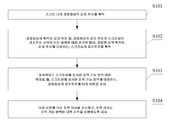
- 처리 방법으로서,
스크린 내의 감응창(sensitive screen)상의 감지위치를 획득하는 단계;
상기 감응창상의 획득된 감지위치 및, 상기 감응창상의 감지위치와 상기 스크린상의 표시위치 사이의 미리 설정된 대응관계에 따라, 상기 감응창상의 획득된 감지위치에 대응하는 상기 스크린상의 표시위치를 획득하는 단계;
상기 표시위치가 상기 스크린상에 표시된 조작 가능 영역 내에 위치할 때, 상기 스크린상에 표시된 조작 가능 영역에 대응하는 상기 감응창상의 감지위치에 터치 버튼을 표시하는 단계; 및
상기 터치 버튼에 대한 조작 지시를 수신하는 단계
를 포함하고,
상기 조작 지시는 상기 조작 가능 영역에 대한 조작을 수행하도록 지시하는 데 사용되는, 처리 방법. - 제1항에 있어서,
상기 감응창상의 획득된 감지위치에 대응하는 상기 스크린상의 표시위치를 획득하는 단계 이후,
상기 표시위치에 커서를 표시하는 단계를 더 포함하고,
상기 표시위치가 상기 스크린상에 표시된 조작 가능 영역 내에 위치할 때, 상기 스크린상에 표시된 조작 가능 영역에 대응하는 상기 감응창상의 감지위치에 터치 버튼을 표시하는 단계는 구체적으로,
상기 커서가 상기 스크린상에 표시된 조작 가능 영역 내에 위치할 때, 상기 스크린상에 표시된 조작 가능 영역에 대응하는 상기 감응창상의 감지위치에 상기 버튼을 표시하는 단계인, 처리 방법. - 제1항 또는 제2항에 있어서,
상기 감응창상의 감지위치와 상기 스크린상의 표시위치 사이의 미리 설정된 대응관계는 구체적으로,
상기 감응창의 길이-폭 비율이 상기 스크린의 길이-폭 비율과 동일한 것, 및/또는 상기 감응창의 경계에 대한 상기 감지위치의 상대적 위치는 상기 스크린의 경계에 대한 상기 표시위치의 상대적 위치와 동일한 것인, 처리 방법. - 제1항 내지 제3항 중 어느 한 항에 있어서,
상기 스크린 내의 감응창상의 감지위치를 획득하는 단계 이전에,
상기 감응창 및 상기 스크린 사이의 위치 관계를 미리 설정하는 단계를 더 포함하는 처리 방법. - 제1항 내지 제4항 중 어느 한 항에 있어서,
상기 스크린 내의 감응창상의 감지위치를 획득하는 단계 이전에,
상기 감응창을 턴 온하는 단계를 더 포함하고,
상기 감응창을 턴 온하는 단계는 구체적으로,
미리 설정된 물리적 버튼을 사용하여 상기 감응창을 턴 온하는 단계이거나, 또는
상기 감응창을 턴 온하는 단계는 구체적으로,
상기 스크린 내의 감응창을 사용하여, 상기 감응창에 대해 행해진 제스처를 탐지하는 단계;
상기 제스처에 대응하는 조작 명령을 획득하도록, 상기 제스처에 따른 매칭을 수행하는 단계; 및
상기 조작 지시가 상기 감응창을 턴 온 시키는 지시일 때, 상기 감응창을 턴 온하는 단계
를 포함하는,
처리 방법. - 제1항 내지 제5항 중 어느 한 항에있어서,
상기 감응창을 턴 오프하는 단계를 더 포함하고,
상기 감응창을 턴 오프하는 단계는, 구체적으로,
미리 설정된 물리적 버튼을 사용하여 상기 감응창을 턴 오프하는 단계이거나, 또는
상기 감응창을 턴 오프하는 단계는, 구체적으로,
상기 스크린 내의 감응창을 사용하여, 상기 감응창에 행해진 제스처를 탐지하는 단계;
상기 제스처에 대응하는 조작 명령을 획득하도록, 상기 제스처에 따라 매칭을 수행하는 단계; 및
상기 조작 지시가 상기 감응창을 턴 오프 하는 지시일 때, 상기 감응창을 턴오프 하는 단계
를 포함하는,
처리 방법. - 제1항 내지 제6항 중 어느 한 항에 있어서,
사용자에 의해, 스크롤 바에 수행된 슬라이딩(sliding) 조작을 수신하는 단계; 및
상기 슬라이딩 조작에 따라, 상기 스크린의 콘텐츠에, 슬라이딩 및 브라우징(browsing) 조작을 수행하는 단계를 더 포함하고,
상기 스크롤 바는 상기 감응창의 모서리에 표시된, 수직 및/또는 수평 스크롤바 인, 처리 방법. - 처리 장치로서,
스크린 내의 감응창상의 감지위치를 획득하도록 구성된 제1 획득 모듈;
상기 감응창상의 획득된 감지위치 및, 상기 감응창상의 감지위치와 상기 스크린상의 표시위치 사이의 미리 설정된 대응관계에 따라, 상기 감응창상의 획득된 감지위치에 대응하는, 상기 스크린상의 표시위치를 획득하도록 구성된 제2 획득 모듈;
상기 표시위치가 상기 스크린상에 표시된 조작 가능 영역 내에 위치할 때, 상기 스크린상에 표시된 조작 가능 영역에 대응하는 상기 감응창상의 감지위치에 터치 버튼을 표시하도록 구성된 제1 표시 모듈;
상기 터치 버튼에 대한 조작 지시를 수신하도록 구성된 제1 수신 모듈
을 포함하고,
상기 조작 지시는 상기 조작 가능 영역에 대한 조작을 수행하도록 지시하는 데 사용되는, 처리 장치. - 제8항에 있어서,
상기 표시위치에 커서를 표시하도록 구성된 제2 표시 모듈을 더 포함하고,
상기 제1 표시 모듈은 구체적으로,
상기 커서가 상기 스크린상에 표시된 조작 가능 영역 내에 위치할 때, 상기 스크린상에 표시된 조작 가능 영역에 대응하는 상기 감응창상의 감지위치에 상기 터치 버튼을 표시하도록 구성된, 처리 장치. - 제8항 또는 제9항에 있어서,
상기 감응창상의 감지위치와 상기 스크린상의 표시위치 사이의 미리 설정된 대응관계는 구체적으로,
상기 감응창의 길이-폭 비가 상기 스크린의 길이-폭 비와 동일한 것, 및/또는 상기 감응창의 경계에 대한 상기 감지위치의 상대적 위치가 상기 스크린의 경계에 대한 상기 표시위치의 상대적 위치와 동일한 것인, 처리 장치. - 제8항 내지 제10항 중 어느 한 항에 있어서,
상기 감응창과 상기 스크린 사이의 위치 관계를 미리 설정하도록 구성된 미리 설정 모듈을 더 포함하는 처리 장치. - 제8항 내지 제11항 중 어느 한 항에 있어서,
상기 감응창을 턴 온 하도록 구성된 턴-온 모듈을 더 포함하고,
상기 턴-온 모듈은 구체적으로,
미리 설정된 물리적 버튼을 사용하여 상기 감응창을 턴 온 하도록 구성되거나, 또는
상기 턴-온 모듈은 구체적으로,
상기 스크린의 감응창을 사용하여, 상기 감응창에 대해 행해진 제스처를 감지하도록 구성된 제1 감지 모듈;
상기 제스처에 대응하는 조작 명령을 획득하도록, 상기 제스처에 따른 매칭을 수행하도록 구성된 제1 매칭 모듈; 및
상기 조작 지시가 상기 감응창을 턴 온 하는 지시일 때, 상기 감응창을 턴 온하도록 구성된 턴-온 서브 모듈
을 포함하는,
처리 장치. - 제8항 내지 제12항 중 어느 한 항에 있어서,
상기 감응창을 턴 오프 하도록 구성된 턴-오프 모듈을 더 포함하고,
상기 턴-오프 모듈은 구체적으로,
미리 설정된 물리적 버튼을 사용하여 상기 감응창을 턴 오프 하도록 구성되거나, 또는
상기 턴-오프 모듈은 구체적으로,
상기 스크린의 감응창을 사용하여, 상기 감응창에 행해진 제스처를 감지하도록 구성된 제2 감지 모듈;
상기 제스처에 대응하는 조작 명령을 획득하도록, 상기 제스처에 따라 매칭을 수행하도록 구성된 제2 매칭 모듈; 및
상기 조작 지시가 상기 감응창을 턴 오프하는 지시일 때, 상기 감응창을 턴 오프하도록 구성된 턴-오프 서브 모듈
을 포함하는,
처리 장치 - 제8항 내지 제13항 중 어느 한 항에 있어서,
사용자에 의해 스크롤 바에 수행된 슬라이딩(sliding) 조작을 수신하도록 구성된 제2 수신 모듈; 및
상기 슬라이딩 조작에 따라, 상기 스크린의 콘텐츠에 슬라이딩(sliding) 및 브라우징(browsing) 조작을 수행하도록 구성된 조작 모듈
을 더 포함하고,
상기 스크롤 바는 상기 감응창의 모서리에 표시된, 수직 및/또는 수평 스크롤바인, 처리 장치. - 제8항 내지 제14항 중 어느 한 항에 기재된 처리 장치를 포함하는 단말기.
- 단말기로서,
상기 단말기는, 프로세서, 스크린, 메모리, 및 버스를 포함하고, 상기 버스를 사용하여, 상기 프로세서, 스크린, 및 메모리는 서로 연결되어 있고,
상기 프로세서는, 제1항 내지 제7항 중 어느 한 항에 기재된 처리 방법을 구현하도록, 상기 단말기의 동작을 제어하고,
상기 처리 방법의 단계는 상기 프로세서 내의 하드웨어의 집적 논리 회로 또는 소프트웨어 형태의 지시를 사용하여 구현되고,
상기 스크린은, 입력 기능, 출력 및 표시 기능을 포함하고, 상기 스크린은 감응창을 포함하며,
상기 메모리는, 상기 프로세서에 의해 실행되는 소프트웨어를 저장하고, 상기 프로세서에 지시 및 데이터를 제공하는,
단말기.
Applications Claiming Priority (1)
| Application Number | Priority Date | Filing Date | Title |
|---|---|---|---|
| PCT/CN2013/088458 WO2015081503A1 (zh) | 2013-12-03 | 2013-12-03 | 一种处理方法、装置及终端 |
Publications (2)
| Publication Number | Publication Date |
|---|---|
| KR20160091992A true KR20160091992A (ko) | 2016-08-03 |
| KR101802835B1 KR101802835B1 (ko) | 2017-11-29 |
Family
ID=52557535
Family Applications (1)
| Application Number | Title | Priority Date | Filing Date |
|---|---|---|---|
| KR1020167017308A Active KR101802835B1 (ko) | 2013-12-03 | 2013-12-03 | 처리 방법, 처리 장치, 및 단말기 |
Country Status (5)
| Country | Link |
|---|---|
| US (1) | US10073613B2 (ko) |
| EP (1) | EP3079340B1 (ko) |
| KR (1) | KR101802835B1 (ko) |
| CN (1) | CN104380238A (ko) |
| WO (1) | WO2015081503A1 (ko) |
Families Citing this family (14)
| Publication number | Priority date | Publication date | Assignee | Title |
|---|---|---|---|---|
| CN104639761B (zh) * | 2015-02-26 | 2017-11-21 | 努比亚技术有限公司 | 单手操作的方法及移动终端 |
| CN106293414B (zh) * | 2015-05-18 | 2019-08-06 | 北京智谷睿拓技术服务有限公司 | 按钮显示方法及用户设备 |
| CN106371688B (zh) * | 2015-07-22 | 2019-10-01 | 小米科技有限责任公司 | 全屏幕单手操作方法及装置 |
| CN107924274A (zh) * | 2015-07-31 | 2018-04-17 | 麦克赛尔株式会社 | 信息终端装置 |
| CN108475156A (zh) * | 2015-12-31 | 2018-08-31 | 华为技术有限公司 | 一种用户界面的菜单显示方法及手持终端 |
| CN106527903B (zh) * | 2016-12-08 | 2020-04-07 | 青岛海信电器股份有限公司 | 触摸控制方法及装置 |
| EP3609402A4 (en) * | 2017-04-14 | 2020-12-16 | Rehabilitation Institute Of Chicago D/B/A Shirley | PROSTHETIC VIRTUAL REALITY LEARNING INTERFACE AND RELATED PROCESSES |
| US11301124B2 (en) | 2017-08-18 | 2022-04-12 | Microsoft Technology Licensing, Llc | User interface modification using preview panel |
| US11237699B2 (en) | 2017-08-18 | 2022-02-01 | Microsoft Technology Licensing, Llc | Proximal menu generation |
| US20190056857A1 (en) * | 2017-08-18 | 2019-02-21 | Microsoft Technology Licensing, Llc | Resizing an active region of a user interface |
| US10417991B2 (en) | 2017-08-18 | 2019-09-17 | Microsoft Technology Licensing, Llc | Multi-display device user interface modification |
| CN109101147B (zh) * | 2018-06-28 | 2022-01-18 | 维沃移动通信有限公司 | 一种消息通知显示方法及终端 |
| CN112416226A (zh) * | 2020-11-19 | 2021-02-26 | 珠海格力电器股份有限公司 | 按钮的显示方法和装置、存储介质、电子装置 |
| EP4343526A4 (en) | 2021-12-08 | 2024-11-20 | Samsung Electronics Co., Ltd. | ELECTRONIC DEVICE SUPPORTING A ONE-HANDED OPERATING MODE AND OPERATING METHOD FOR ELECTRONIC DEVICE |
Family Cites Families (12)
| Publication number | Priority date | Publication date | Assignee | Title |
|---|---|---|---|---|
| JP4412737B2 (ja) * | 2007-09-06 | 2010-02-10 | シャープ株式会社 | 情報表示装置 |
| JP4500845B2 (ja) * | 2007-11-13 | 2010-07-14 | シャープ株式会社 | 情報表示装置、情報表示方法、プログラム及び記録媒体 |
| US9542097B2 (en) * | 2010-01-13 | 2017-01-10 | Lenovo (Singapore) Pte. Ltd. | Virtual touchpad for a touch device |
| WO2012077273A1 (ja) | 2010-12-07 | 2012-06-14 | パナソニック株式会社 | 電子機器 |
| TWI434202B (zh) | 2011-02-25 | 2014-04-11 | Asustek Comp Inc | 具觸控式螢幕的電子裝置及其顯示控制方法 |
| JP5295328B2 (ja) * | 2011-07-29 | 2013-09-18 | Kddi株式会社 | スクリーンパッドによる入力が可能なユーザインタフェース装置、入力処理方法及びプログラム |
| KR20130017241A (ko) | 2011-08-10 | 2013-02-20 | 삼성전자주식회사 | 터치 스크린 단말기에서 입출력 방법 및 장치 |
| CN102681779A (zh) * | 2012-04-25 | 2012-09-19 | 中兴通讯股份有限公司南京分公司 | 触摸屏操作方法及装置 |
| CN102880399B (zh) * | 2012-08-01 | 2016-03-30 | 北京三星通信技术研究有限公司 | 一种屏幕操作方法及装置 |
| CN102915201B (zh) * | 2012-09-17 | 2015-08-05 | 广东欧珀移动通信有限公司 | 一种大屏幕触控手机的单手操作方法 |
| CN102945136B (zh) | 2012-11-09 | 2016-08-03 | 东莞宇龙通信科技有限公司 | 移动终端及其触控操作方法 |
| CN103024156A (zh) * | 2012-11-29 | 2013-04-03 | 广东欧珀移动通信有限公司 | 一种单手操作移动终端的实现方法、系统及移动终端 |
-
2013
- 2013-12-03 WO PCT/CN2013/088458 patent/WO2015081503A1/zh not_active Ceased
- 2013-12-03 KR KR1020167017308A patent/KR101802835B1/ko active Active
- 2013-12-03 CN CN201380005185.9A patent/CN104380238A/zh active Pending
- 2013-12-03 EP EP13898540.3A patent/EP3079340B1/en not_active Not-in-force
- 2013-12-03 US US15/101,321 patent/US10073613B2/en active Active
Also Published As
| Publication number | Publication date |
|---|---|
| EP3079340A1 (en) | 2016-10-12 |
| US10073613B2 (en) | 2018-09-11 |
| EP3079340B1 (en) | 2019-03-06 |
| CN104380238A (zh) | 2015-02-25 |
| KR101802835B1 (ko) | 2017-11-29 |
| US20160306518A1 (en) | 2016-10-20 |
| WO2015081503A1 (zh) | 2015-06-11 |
| EP3079340A4 (en) | 2016-11-30 |
Similar Documents
| Publication | Publication Date | Title |
|---|---|---|
| KR101802835B1 (ko) | 처리 방법, 처리 장치, 및 단말기 | |
| JP5832784B2 (ja) | タッチパネルシステムおよびそれを用いた電子機器 | |
| US11269482B2 (en) | Application association processing method and apparatus | |
| US20130063493A1 (en) | Devices and Methods Involving Display Interaction Using Photovoltaic Arrays | |
| EP3370140B1 (en) | Control method and control device for working mode of touch screen | |
| CN103513817B (zh) | 一种触控设备及控制其配置操作模式的方法、装置 | |
| TW201329835A (zh) | 顯示控制裝置、顯示控制方法及電腦程式 | |
| US20130167084A1 (en) | Information terminal, method of controlling information terminal, and program for controlling information terminal | |
| CN102947780A (zh) | 信息显示装置及屏幕按钮的移动操作方法 | |
| WO2013044735A1 (zh) | 一种浏览器及浏览网页的方法 | |
| JP2010231653A (ja) | 表示装置、表示方法、およびプログラム | |
| US20160004420A1 (en) | Electronic device and computer program product | |
| US9632697B2 (en) | Information processing apparatus and control method thereof, and non-transitory computer-readable medium | |
| US9292185B2 (en) | Display device and display method | |
| KR102135167B1 (ko) | 정보처리장치 및 정보처리방법 | |
| US9436373B2 (en) | Method, apparatus, and computer program for scrolling a document on a touch panel | |
| US20170285798A1 (en) | Method and system for realizing functional key on side surface | |
| JP5620895B2 (ja) | 表示制御装置、方法及びプログラム | |
| KR101403079B1 (ko) | 터치스크린에서 화면 줌 방법 및 이를 이용한 단말기 | |
| US20200210063A1 (en) | Display method and electronic device | |
| KR101371524B1 (ko) | 원격 접속 제어용 마우스 장치 | |
| JP2014153850A (ja) | 電子機器、制御方法およびプログラム | |
| JP6284459B2 (ja) | 端末装置 | |
| KR101692848B1 (ko) | 호버링을 이용하는 가상 터치패드 조작방법 및 이를 수행하는 단말기 | |
| US20150138102A1 (en) | Inputting mode switching method and system utilizing the same |
Legal Events
| Date | Code | Title | Description |
|---|---|---|---|
| A201 | Request for examination | ||
| P11-X000 | Amendment of application requested |
St.27 status event code: A-2-2-P10-P11-nap-X000 |
|
| P13-X000 | Application amended |
St.27 status event code: A-2-2-P10-P13-nap-X000 |
|
| PA0105 | International application |
St.27 status event code: A-0-1-A10-A15-nap-PA0105 |
|
| PA0201 | Request for examination |
St.27 status event code: A-1-2-D10-D11-exm-PA0201 |
|
| PG1501 | Laying open of application |
St.27 status event code: A-1-1-Q10-Q12-nap-PG1501 |
|
| R18-X000 | Changes to party contact information recorded |
St.27 status event code: A-3-3-R10-R18-oth-X000 |
|
| D13-X000 | Search requested |
St.27 status event code: A-1-2-D10-D13-srh-X000 |
|
| D14-X000 | Search report completed |
St.27 status event code: A-1-2-D10-D14-srh-X000 |
|
| E902 | Notification of reason for refusal | ||
| PE0902 | Notice of grounds for rejection |
St.27 status event code: A-1-2-D10-D21-exm-PE0902 |
|
| E13-X000 | Pre-grant limitation requested |
St.27 status event code: A-2-3-E10-E13-lim-X000 |
|
| P11-X000 | Amendment of application requested |
St.27 status event code: A-2-2-P10-P11-nap-X000 |
|
| P13-X000 | Application amended |
St.27 status event code: A-2-2-P10-P13-nap-X000 |
|
| E701 | Decision to grant or registration of patent right | ||
| PE0701 | Decision of registration |
St.27 status event code: A-1-2-D10-D22-exm-PE0701 |
|
| GRNT | Written decision to grant | ||
| PR0701 | Registration of establishment |
St.27 status event code: A-2-4-F10-F11-exm-PR0701 |
|
| PR1002 | Payment of registration fee |
St.27 status event code: A-2-2-U10-U12-oth-PR1002 Fee payment year number: 1 |
|
| PG1601 | Publication of registration |
St.27 status event code: A-4-4-Q10-Q13-nap-PG1601 |
|
| FPAY | Annual fee payment |
Payment date: 20201028 Year of fee payment: 4 |
|
| PR1001 | Payment of annual fee |
St.27 status event code: A-4-4-U10-U11-oth-PR1001 Fee payment year number: 4 |
|
| P22-X000 | Classification modified |
St.27 status event code: A-4-4-P10-P22-nap-X000 |
|
| FPAY | Annual fee payment |
Payment date: 20211027 Year of fee payment: 5 |
|
| PR1001 | Payment of annual fee |
St.27 status event code: A-4-4-U10-U11-oth-PR1001 Fee payment year number: 5 |
|
| FPAY | Annual fee payment |
Payment date: 20221017 Year of fee payment: 6 |
|
| PR1001 | Payment of annual fee |
St.27 status event code: A-4-4-U10-U11-oth-PR1001 Fee payment year number: 6 |
|
| PR1001 | Payment of annual fee |
St.27 status event code: A-4-4-U10-U11-oth-PR1001 Fee payment year number: 7 |
|
| PR1001 | Payment of annual fee |
St.27 status event code: A-4-4-U10-U11-oth-PR1001 Fee payment year number: 8 |
|
| PR1001 | Payment of annual fee |
St.27 status event code: A-4-4-U10-U11-oth-PR1001 Fee payment year number: 9 |
|
| U11 | Full renewal or maintenance fee paid |
Free format text: ST27 STATUS EVENT CODE: A-4-4-U10-U11-OTH-PR1001 (AS PROVIDED BY THE NATIONAL OFFICE) Year of fee payment: 9 |