KR20170081925A - 영상 저장을 위한 방법 및 그 장치 - Google Patents
영상 저장을 위한 방법 및 그 장치 Download PDFInfo
- Publication number
- KR20170081925A KR20170081925A KR1020160000961A KR20160000961A KR20170081925A KR 20170081925 A KR20170081925 A KR 20170081925A KR 1020160000961 A KR1020160000961 A KR 1020160000961A KR 20160000961 A KR20160000961 A KR 20160000961A KR 20170081925 A KR20170081925 A KR 20170081925A
- Authority
- KR
- South Korea
- Prior art keywords
- electronic device
- information
- input
- image
- application
- Prior art date
- Legal status (The legal status is an assumption and is not a legal conclusion. Google has not performed a legal analysis and makes no representation as to the accuracy of the status listed.)
- Granted
Links
Images






Classifications
-
- G—PHYSICS
- G06—COMPUTING OR CALCULATING; COUNTING
- G06F—ELECTRIC DIGITAL DATA PROCESSING
- G06F1/00—Details not covered by groups G06F3/00 - G06F13/00 and G06F21/00
- G06F1/16—Constructional details or arrangements
- G06F1/1613—Constructional details or arrangements for portable computers
- G06F1/1633—Constructional details or arrangements of portable computers not specific to the type of enclosures covered by groups G06F1/1615 - G06F1/1626
- G06F1/1684—Constructional details or arrangements related to integrated I/O peripherals not covered by groups G06F1/1635 - G06F1/1675
- G06F1/1694—Constructional details or arrangements related to integrated I/O peripherals not covered by groups G06F1/1635 - G06F1/1675 the I/O peripheral being a single or a set of motion sensors for pointer control or gesture input obtained by sensing movements of the portable computer
-
- H—ELECTRICITY
- H04—ELECTRIC COMMUNICATION TECHNIQUE
- H04N—PICTORIAL COMMUNICATION, e.g. TELEVISION
- H04N21/00—Selective content distribution, e.g. interactive television or video on demand [VOD]
- H04N21/40—Client devices specifically adapted for the reception of or interaction with content, e.g. set-top-box [STB]; Operations thereof
- H04N21/47—End-user applications
- H04N21/472—End-user interface for requesting content, additional data or services; End-user interface for interacting with content, e.g. for content reservation or setting reminders, for requesting event notification, for manipulating displayed content
- H04N21/47214—End-user interface for requesting content, additional data or services; End-user interface for interacting with content, e.g. for content reservation or setting reminders, for requesting event notification, for manipulating displayed content for content reservation or setting reminders; for requesting event notification, e.g. of sport results or stock market
-
- G—PHYSICS
- G06—COMPUTING OR CALCULATING; COUNTING
- G06F—ELECTRIC DIGITAL DATA PROCESSING
- G06F3/00—Input arrangements for transferring data to be processed into a form capable of being handled by the computer; Output arrangements for transferring data from processing unit to output unit, e.g. interface arrangements
- G06F3/01—Input arrangements or combined input and output arrangements for interaction between user and computer
- G06F3/048—Interaction techniques based on graphical user interfaces [GUI]
- G06F3/0484—Interaction techniques based on graphical user interfaces [GUI] for the control of specific functions or operations, e.g. selecting or manipulating an object, an image or a displayed text element, setting a parameter value or selecting a range
- G06F3/04845—Interaction techniques based on graphical user interfaces [GUI] for the control of specific functions or operations, e.g. selecting or manipulating an object, an image or a displayed text element, setting a parameter value or selecting a range for image manipulation, e.g. dragging, rotation, expansion or change of colour
-
- A—HUMAN NECESSITIES
- A63—SPORTS; GAMES; AMUSEMENTS
- A63F—CARD, BOARD, OR ROULETTE GAMES; INDOOR GAMES USING SMALL MOVING PLAYING BODIES; VIDEO GAMES; GAMES NOT OTHERWISE PROVIDED FOR
- A63F13/00—Video games, i.e. games using an electronically generated display having two or more dimensions
- A63F13/20—Input arrangements for video game devices
- A63F13/21—Input arrangements for video game devices characterised by their sensors, purposes or types
- A63F13/214—Input arrangements for video game devices characterised by their sensors, purposes or types for locating contacts on a surface, e.g. floor mats or touch pads
- A63F13/2145—Input arrangements for video game devices characterised by their sensors, purposes or types for locating contacts on a surface, e.g. floor mats or touch pads the surface being also a display device, e.g. touch screens
-
- A—HUMAN NECESSITIES
- A63—SPORTS; GAMES; AMUSEMENTS
- A63F—CARD, BOARD, OR ROULETTE GAMES; INDOOR GAMES USING SMALL MOVING PLAYING BODIES; VIDEO GAMES; GAMES NOT OTHERWISE PROVIDED FOR
- A63F13/00—Video games, i.e. games using an electronically generated display having two or more dimensions
- A63F13/45—Controlling the progress of the video game
- A63F13/49—Saving the game status; Pausing or ending the game
- A63F13/497—Partially or entirely replaying previous game actions
-
- A—HUMAN NECESSITIES
- A63—SPORTS; GAMES; AMUSEMENTS
- A63F—CARD, BOARD, OR ROULETTE GAMES; INDOOR GAMES USING SMALL MOVING PLAYING BODIES; VIDEO GAMES; GAMES NOT OTHERWISE PROVIDED FOR
- A63F13/00—Video games, i.e. games using an electronically generated display having two or more dimensions
- A63F13/90—Constructional details or arrangements of video game devices not provided for in groups A63F13/20 or A63F13/25, e.g. housing, wiring, connections or cabinets
- A63F13/92—Video game devices specially adapted to be hand-held while playing
-
- G—PHYSICS
- G06—COMPUTING OR CALCULATING; COUNTING
- G06F—ELECTRIC DIGITAL DATA PROCESSING
- G06F1/00—Details not covered by groups G06F3/00 - G06F13/00 and G06F21/00
- G06F1/16—Constructional details or arrangements
- G06F1/1613—Constructional details or arrangements for portable computers
- G06F1/1633—Constructional details or arrangements of portable computers not specific to the type of enclosures covered by groups G06F1/1615 - G06F1/1626
- G06F1/1684—Constructional details or arrangements related to integrated I/O peripherals not covered by groups G06F1/1635 - G06F1/1675
-
- G—PHYSICS
- G06—COMPUTING OR CALCULATING; COUNTING
- G06F—ELECTRIC DIGITAL DATA PROCESSING
- G06F11/00—Error detection; Error correction; Monitoring
- G06F11/30—Monitoring
-
- G—PHYSICS
- G06—COMPUTING OR CALCULATING; COUNTING
- G06F—ELECTRIC DIGITAL DATA PROCESSING
- G06F11/00—Error detection; Error correction; Monitoring
- G06F11/30—Monitoring
- G06F11/3003—Monitoring arrangements specially adapted to the computing system or computing system component being monitored
- G06F11/3013—Monitoring arrangements specially adapted to the computing system or computing system component being monitored where the computing system is an embedded system, i.e. a combination of hardware and software dedicated to perform a certain function in mobile devices, printers, automotive or aircraft systems
-
- G—PHYSICS
- G06—COMPUTING OR CALCULATING; COUNTING
- G06F—ELECTRIC DIGITAL DATA PROCESSING
- G06F11/00—Error detection; Error correction; Monitoring
- G06F11/30—Monitoring
- G06F11/3003—Monitoring arrangements specially adapted to the computing system or computing system component being monitored
- G06F11/3041—Monitoring arrangements specially adapted to the computing system or computing system component being monitored where the computing system component is an input/output interface
-
- G—PHYSICS
- G06—COMPUTING OR CALCULATING; COUNTING
- G06F—ELECTRIC DIGITAL DATA PROCESSING
- G06F11/00—Error detection; Error correction; Monitoring
- G06F11/30—Monitoring
- G06F11/3055—Monitoring arrangements for monitoring the status of the computing system or of the computing system component, e.g. monitoring if the computing system is on, off, available, not available
-
- G—PHYSICS
- G06—COMPUTING OR CALCULATING; COUNTING
- G06F—ELECTRIC DIGITAL DATA PROCESSING
- G06F11/00—Error detection; Error correction; Monitoring
- G06F11/30—Monitoring
- G06F11/3058—Monitoring arrangements for monitoring environmental properties or parameters of the computing system or of the computing system component, e.g. monitoring of power, currents, temperature, humidity, position, vibrations
-
- G—PHYSICS
- G06—COMPUTING OR CALCULATING; COUNTING
- G06F—ELECTRIC DIGITAL DATA PROCESSING
- G06F11/00—Error detection; Error correction; Monitoring
- G06F11/30—Monitoring
- G06F11/34—Recording or statistical evaluation of computer activity, e.g. of down time, of input/output operation ; Recording or statistical evaluation of user activity, e.g. usability assessment
- G06F11/3438—Recording or statistical evaluation of computer activity, e.g. of down time, of input/output operation ; Recording or statistical evaluation of user activity, e.g. usability assessment monitoring of user actions
-
- G—PHYSICS
- G06—COMPUTING OR CALCULATING; COUNTING
- G06F—ELECTRIC DIGITAL DATA PROCESSING
- G06F16/00—Information retrieval; Database structures therefor; File system structures therefor
- G06F16/50—Information retrieval; Database structures therefor; File system structures therefor of still image data
- G06F16/51—Indexing; Data structures therefor; Storage structures
-
- G—PHYSICS
- G06—COMPUTING OR CALCULATING; COUNTING
- G06F—ELECTRIC DIGITAL DATA PROCESSING
- G06F3/00—Input arrangements for transferring data to be processed into a form capable of being handled by the computer; Output arrangements for transferring data from processing unit to output unit, e.g. interface arrangements
- G06F3/01—Input arrangements or combined input and output arrangements for interaction between user and computer
- G06F3/03—Arrangements for converting the position or the displacement of a member into a coded form
- G06F3/033—Pointing devices displaced or positioned by the user, e.g. mice, trackballs, pens or joysticks; Accessories therefor
- G06F3/0346—Pointing devices displaced or positioned by the user, e.g. mice, trackballs, pens or joysticks; Accessories therefor with detection of the device orientation or free movement in a three-dimensional [3D] space, e.g. 3D mice, 6-DOF [six degrees of freedom] pointers using gyroscopes, accelerometers or tilt-sensors
-
- G—PHYSICS
- G06—COMPUTING OR CALCULATING; COUNTING
- G06F—ELECTRIC DIGITAL DATA PROCESSING
- G06F3/00—Input arrangements for transferring data to be processed into a form capable of being handled by the computer; Output arrangements for transferring data from processing unit to output unit, e.g. interface arrangements
- G06F3/01—Input arrangements or combined input and output arrangements for interaction between user and computer
- G06F3/048—Interaction techniques based on graphical user interfaces [GUI]
- G06F3/0484—Interaction techniques based on graphical user interfaces [GUI] for the control of specific functions or operations, e.g. selecting or manipulating an object, an image or a displayed text element, setting a parameter value or selecting a range
-
- G—PHYSICS
- G06—COMPUTING OR CALCULATING; COUNTING
- G06F—ELECTRIC DIGITAL DATA PROCESSING
- G06F3/00—Input arrangements for transferring data to be processed into a form capable of being handled by the computer; Output arrangements for transferring data from processing unit to output unit, e.g. interface arrangements
- G06F3/01—Input arrangements or combined input and output arrangements for interaction between user and computer
- G06F3/048—Interaction techniques based on graphical user interfaces [GUI]
- G06F3/0487—Interaction techniques based on graphical user interfaces [GUI] using specific features provided by the input device, e.g. functions controlled by the rotation of a mouse with dual sensing arrangements, or of the nature of the input device, e.g. tap gestures based on pressure sensed by a digitiser
- G06F3/0488—Interaction techniques based on graphical user interfaces [GUI] using specific features provided by the input device, e.g. functions controlled by the rotation of a mouse with dual sensing arrangements, or of the nature of the input device, e.g. tap gestures based on pressure sensed by a digitiser using a touch-screen or digitiser, e.g. input of commands through traced gestures
-
- G—PHYSICS
- G06—COMPUTING OR CALCULATING; COUNTING
- G06F—ELECTRIC DIGITAL DATA PROCESSING
- G06F3/00—Input arrangements for transferring data to be processed into a form capable of being handled by the computer; Output arrangements for transferring data from processing unit to output unit, e.g. interface arrangements
- G06F3/01—Input arrangements or combined input and output arrangements for interaction between user and computer
- G06F3/048—Interaction techniques based on graphical user interfaces [GUI]
- G06F3/0487—Interaction techniques based on graphical user interfaces [GUI] using specific features provided by the input device, e.g. functions controlled by the rotation of a mouse with dual sensing arrangements, or of the nature of the input device, e.g. tap gestures based on pressure sensed by a digitiser
- G06F3/0488—Interaction techniques based on graphical user interfaces [GUI] using specific features provided by the input device, e.g. functions controlled by the rotation of a mouse with dual sensing arrangements, or of the nature of the input device, e.g. tap gestures based on pressure sensed by a digitiser using a touch-screen or digitiser, e.g. input of commands through traced gestures
- G06F3/04883—Interaction techniques based on graphical user interfaces [GUI] using specific features provided by the input device, e.g. functions controlled by the rotation of a mouse with dual sensing arrangements, or of the nature of the input device, e.g. tap gestures based on pressure sensed by a digitiser using a touch-screen or digitiser, e.g. input of commands through traced gestures for inputting data by handwriting, e.g. gesture or text
-
- G—PHYSICS
- G06—COMPUTING OR CALCULATING; COUNTING
- G06F—ELECTRIC DIGITAL DATA PROCESSING
- G06F9/00—Arrangements for program control, e.g. control units
- G06F9/06—Arrangements for program control, e.g. control units using stored programs, i.e. using an internal store of processing equipment to receive or retain programs
- G06F9/44—Arrangements for executing specific programs
- G06F9/451—Execution arrangements for user interfaces
-
- G—PHYSICS
- G06—COMPUTING OR CALCULATING; COUNTING
- G06T—IMAGE DATA PROCESSING OR GENERATION, IN GENERAL
- G06T1/00—General purpose image data processing
- G06T1/60—Memory management
-
- G—PHYSICS
- G11—INFORMATION STORAGE
- G11B—INFORMATION STORAGE BASED ON RELATIVE MOVEMENT BETWEEN RECORD CARRIER AND TRANSDUCER
- G11B27/00—Editing; Indexing; Addressing; Timing or synchronising; Monitoring; Measuring tape travel
- G11B27/36—Monitoring, i.e. supervising the progress of recording or reproducing
-
- H—ELECTRICITY
- H04—ELECTRIC COMMUNICATION TECHNIQUE
- H04N—PICTORIAL COMMUNICATION, e.g. TELEVISION
- H04N21/00—Selective content distribution, e.g. interactive television or video on demand [VOD]
- H04N21/40—Client devices specifically adapted for the reception of or interaction with content, e.g. set-top-box [STB]; Operations thereof
- H04N21/41—Structure of client; Structure of client peripherals
- H04N21/422—Input-only peripherals, i.e. input devices connected to specially adapted client devices, e.g. global positioning system [GPS]
- H04N21/42201—Input-only peripherals, i.e. input devices connected to specially adapted client devices, e.g. global positioning system [GPS] biosensors, e.g. heat sensor for presence detection, EEG sensors or any limb activity sensors worn by the user
-
- H—ELECTRICITY
- H04—ELECTRIC COMMUNICATION TECHNIQUE
- H04N—PICTORIAL COMMUNICATION, e.g. TELEVISION
- H04N21/00—Selective content distribution, e.g. interactive television or video on demand [VOD]
- H04N21/40—Client devices specifically adapted for the reception of or interaction with content, e.g. set-top-box [STB]; Operations thereof
- H04N21/43—Processing of content or additional data, e.g. demultiplexing additional data from a digital video stream; Elementary client operations, e.g. monitoring of home network or synchronising decoder's clock; Client middleware
- H04N21/433—Content storage operation, e.g. storage operation in response to a pause request, caching operations
- H04N21/4334—Recording operations
-
- H—ELECTRICITY
- H04—ELECTRIC COMMUNICATION TECHNIQUE
- H04N—PICTORIAL COMMUNICATION, e.g. TELEVISION
- H04N21/00—Selective content distribution, e.g. interactive television or video on demand [VOD]
- H04N21/40—Client devices specifically adapted for the reception of or interaction with content, e.g. set-top-box [STB]; Operations thereof
- H04N21/43—Processing of content or additional data, e.g. demultiplexing additional data from a digital video stream; Elementary client operations, e.g. monitoring of home network or synchronising decoder's clock; Client middleware
- H04N21/442—Monitoring of processes or resources, e.g. detecting the failure of a recording device, monitoring the downstream bandwidth, the number of times a movie has been viewed, the storage space available from the internal hard disk
- H04N21/44213—Monitoring of end-user related data
- H04N21/44218—Detecting physical presence or behaviour of the user, e.g. using sensors to detect if the user is leaving the room or changes his face expression during a TV programme
-
- H—ELECTRICITY
- H04—ELECTRIC COMMUNICATION TECHNIQUE
- H04N—PICTORIAL COMMUNICATION, e.g. TELEVISION
- H04N21/00—Selective content distribution, e.g. interactive television or video on demand [VOD]
- H04N21/40—Client devices specifically adapted for the reception of or interaction with content, e.g. set-top-box [STB]; Operations thereof
- H04N21/43—Processing of content or additional data, e.g. demultiplexing additional data from a digital video stream; Elementary client operations, e.g. monitoring of home network or synchronising decoder's clock; Client middleware
- H04N21/442—Monitoring of processes or resources, e.g. detecting the failure of a recording device, monitoring the downstream bandwidth, the number of times a movie has been viewed, the storage space available from the internal hard disk
- H04N21/4424—Monitoring of the internal components or processes of the client device, e.g. CPU or memory load, processing speed, timer, counter or percentage of the hard disk space used
-
- H—ELECTRICITY
- H04—ELECTRIC COMMUNICATION TECHNIQUE
- H04N—PICTORIAL COMMUNICATION, e.g. TELEVISION
- H04N21/00—Selective content distribution, e.g. interactive television or video on demand [VOD]
- H04N21/40—Client devices specifically adapted for the reception of or interaction with content, e.g. set-top-box [STB]; Operations thereof
- H04N21/47—End-user applications
- H04N21/475—End-user interface for inputting end-user data, e.g. personal identification number [PIN], preference data
- H04N21/4755—End-user interface for inputting end-user data, e.g. personal identification number [PIN], preference data for defining user preferences, e.g. favourite actors or genre
-
- H—ELECTRICITY
- H04—ELECTRIC COMMUNICATION TECHNIQUE
- H04N—PICTORIAL COMMUNICATION, e.g. TELEVISION
- H04N21/00—Selective content distribution, e.g. interactive television or video on demand [VOD]
- H04N21/40—Client devices specifically adapted for the reception of or interaction with content, e.g. set-top-box [STB]; Operations thereof
- H04N21/47—End-user applications
- H04N21/482—End-user interface for programme selection
Landscapes
- Engineering & Computer Science (AREA)
- Theoretical Computer Science (AREA)
- General Engineering & Computer Science (AREA)
- Physics & Mathematics (AREA)
- General Physics & Mathematics (AREA)
- Human Computer Interaction (AREA)
- Multimedia (AREA)
- Quality & Reliability (AREA)
- Computing Systems (AREA)
- Software Systems (AREA)
- Computer Hardware Design (AREA)
- Signal Processing (AREA)
- Databases & Information Systems (AREA)
- Mathematical Physics (AREA)
- Health & Medical Sciences (AREA)
- General Health & Medical Sciences (AREA)
- Computer Networks & Wireless Communication (AREA)
- Social Psychology (AREA)
- Analytical Chemistry (AREA)
- Life Sciences & Earth Sciences (AREA)
- Chemical & Material Sciences (AREA)
- Biomedical Technology (AREA)
- Biophysics (AREA)
- Neurosurgery (AREA)
- Data Mining & Analysis (AREA)
- User Interface Of Digital Computer (AREA)
- Strategic Management (AREA)
- Finance (AREA)
- Business, Economics & Management (AREA)
- Facsimiles In General (AREA)
Abstract
Description
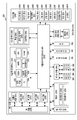
도 2는 다양한 실시 예에 따른 전자 장치의 블록도이다.
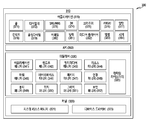
도 3은 다양한 실시 예에 따른 프로그램 모듈의 블록도이다.
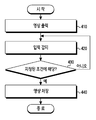
도 4는 본 발명의 일 실시 예에 따른 영상 저장을 위한 방법의 흐름도를 도시한다.
도 5는 본 발명의 다양한 실시 예들에 따른 전자 장치에서 전자 장치의 상태 및 외부 상황 중 적어도 하나가 지정된 조건에 해당하지 않는 때의 표시된 영상의 예를 도시한다.
도 6은 본 발명의 다양한 실시 예들에 따른 전자 장치에서 전자 장치의 상태 및 외부 상황 중 적어도 하나가 지정된 조건에 해당하는 때의 표시된 영상의 예일 수 있다.
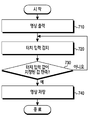
도 7은 본 발명의 다양한 실시 예에 따른 터치 입력에 따른 영상 저장 절차를 도시한다.
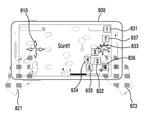
도 8은 본 발명의 다양한 실시 예들에 따른 전자 장치에서 터치 입력에 따른 화면의 표시 예를 도시한다.
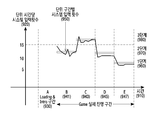
도 9는 본 발명의 다양한 실시 예들에 따른 전자 장치에서 어플리케이션 실행 시간에 따른 입력의 예를 도시한다.
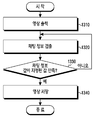
도 10은 본 발명의 다양한 실시 예에 따른 단위 시간당 프레임에 따른 영상 저장 절차를 도시한다.
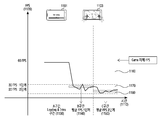
도 11은 본 발명의 다양한 실시 예들에 따른 전자 장치에서 어플리케이션 실행 시간에 따른 단위 시간당 프레임 패턴의 예를 도시한다.
도 12는 본 발명의 다양한 실시 예에 따른 생체 입력 정보에 따른 영상 저장 절차를 도시한다.
도 13은 본 발명의 다양한 실시 예들에 따른 채팅 입력 정보에 따른 영상 저장 절차를 도시한다.
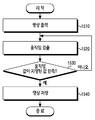
도 14는 본 발명의 다양한 실시 예들에 따른 소리 입력 정보에 따른 영상 저장 절차를 도시한다.
도 15는 본 발명의 다양한 실시 예들에 따른 사용자의 움직임 입력 정보에 따른 영상 저장 절차를 도시한다.
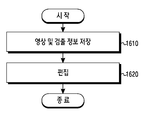
도 16은 본 발명의 다양한 실시 예들에 따른 저장된 영상을 편집하기 위한 절차를 도시한다.
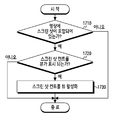
도 17은 본 발명의 다양한 실시 예들에 따른 스크린 샷 뷰 활성화 절차를 도시한다.
도 18은 본 발명의 다양한 실시 예에 따른 스크린 샷 컨트롤 뷰가 표시된 화면의 예를 나타낸다.
| 단위 구간 | 단계 |
| A | 없음 |
| B | 2 단계 |
| C | 3 단계 |
| D | 2 단계 |
| E | 1 단계 |
| 단위 구간 | 단계 |
| A | 0 단계 |
| B | 1 단계 |
| C | 2 단계 |
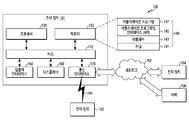
110 : 버스 120 : 프로세서
130 : 메모리 140 : 프로그램
150 : 입출력 인터페이스 160 : 디스플레이
162 : 네트워크 170 : 통신 인터페이스
Claims (26)
- 전자 장치의 방법에 있어서,
어플리케이션을 실행함에 따라, 디스플레이를 통해 영상을 출력하는 동작;
상기 영상을 출력하는 동안, 상기 전자 장치의 상태에 대한 정보 및 외부 상황에 대한 정보 중 적어도 하나를 수신하는 동작;
상기 전자 장치의 상태에 대한 정보 및 외부 상황에 대한 정보 중 적어도 하나에 적어도 기반하여, 상기 전자 장치의 상태 및 상기 외부 상황 중 적어도 하나가, 상기 출력되는 영상의 적어도 일부를 저장하도록 지정된 조건에 해당하는지 결정하는 동작; 및
상기 결정에 적어도 기반하여, 상기 출력되는 영상의 적어도 일부를 저장하는 동작을 포함하는 방법.
- 제 1 항에 있어서,
상기 전자 장치의 상태에 대한 정보는, 상기 어플리케이션의 실행과 관련된 정보 및 상기 어플리케이션의 내부 동작에 대한 정보 중 적어도 하나를 포함하는 방법.
- 제 1 항에 있어서,
상기 전자 장치의 외부 상황에 대한 정보는, 상기 전자 장치가 수신한 정보 및 상기 어플리케이션의 외부 동작에 대한 정보 중 적어도 하나를 포함하는 방법.
- 제 1 항에 있어서,
상기 출력되는 영상의 적어도 일부를 저장하도록 지정된 조건에 해당하는지 결정하는 동작은,
단위 시간 동안 입력된 터치 입력 및 키 입력 중 적어도 하나의 횟수가 지정된 횟수 이상인 경우, 상기 출력되는 영상의 적어도 일부를 저장하도록 지정된 조건에 해당하는 것으로 결정하는 동작을 포함하는 방법.
- 제 1 항에 있어서,
상기 출력되는 영상의 적어도 일부를 저장하도록 지정된 조건에 해당하는지 결정하는 동작은,
단위 시간 동안 디스플레이에 업데이트 되는 그래픽 처리량에 대한 정보인 FPS가 지정된 값 이하일 때, 상기 출력되는 영상의 적어도 일부를 저장하도록 지정된 조건에 해당한다고 판단하는 동작을 포함하는 방법.
- 제 1 항에 있어서,
상기 전자 장치의 외부 상황에 대한 정보는, 생체 입력 정보, 소리 입력 정보, 및 사용자의 움직임 정보 중 적어도 하나에 대한 정보를 포함하고,
상기 출력되는 영상의 적어도 일부를 저장하도록 지정된 조건에 해당하는지 결정하는 동작은,
상기 생체 입력 정보, 상기 소리 입력 정보, 및 상기 사용자의 움직임 정보 중 적어도 하나의 정보가 지정된 조건에 해당하는 경우, 상기 출력되는 영상의 적어도 일부를 저장하도록 지정된 조건에 해당하는 것으로 결정하는 동작을 포함하는 방법.
- 제 1 항에 있어서,
상기 어플리케이션은, 게임 어플리케이션, 동영상 어플리케이션, 및 이미지 뷰어 어플리케이션 중 적어도 하나를 포함하는 방법.
- 제 1 항에 있어서,
상기 전자 장치의 상태 및 상기 외부 상황 중 적어도 하나가, 상기 출력되는 영상의 적어도 일부를 저장하도록 지정된 조건에 해당하는 경우, 상기 출력되는 영상의 적어도 일부의 저장을 시작하는 동작을 더 포함하는 방법.
- 제 1 항에 있어서,
상기 출력되는 영상의 적어도 일부를 저장하는 동작이 완료되면, 상기 저장된 영상의 적어도 일부를 편집하는 화면을 출력하는 동작을 더 포함하고,
상기 화면을 출력하는 동작은, 상기 출력되는 영상의 적어도 일부가 저장될 때의 상기 전자 장치의 상태 정보 및 외부 상황에 대한 정보 중 적어도 하나의 정보를 상기 화면에 표시하는 동작을 포함하는 방법.
- 제 1 항에 있어서,
상기 출력되는 영상의 적어도 일부를 저장하는 동작은, 상기 출력되는 영상의 적어도 일부에 대한 스크린 샷(screen shot)을 저장하는 동작을 포함하고,
상기 저장된 스크린 샷을 이용하여 스크린 샷 컨트롤 뷰(screen shot control view)를 활성화하는 동작을 더 포함하는 방법.
- 전자 장치에 있어서,
디스플레이;
메모리;
입력부;
및
상기 디스플레이, 상기 메모리, 상기 마이크, 상기 입력부 및 상기 센서 모듈과 연결된 적어도 하나의 프로세서를 포함하고,
상기 적어도 하나의 프로세서는,
어플리케이션을 실행함에 따라, 상기 디스플레이를 통해 영상을 출력하고,
상기 영상을 출력하는 동안, 상기 전자 장치의 상태에 대한 정보 및 외부 상황에 대한 정보 중 적어도 하나를 수신하고,
상기 전자 장치의 상태에 대한 정보 및 외부 상황에 대한 정보 중 적어도 하나에 적어도 기반하여, 상기 전자 장치의 상태 및 상기 외부 상황 중 적어도 하나가, 상기 출력되는 영상의 적어도 일부를 저장하도록 지정된 조건에 해당하는지 결정하고,
상기 결정에 적어도 기반하여, 상기 출력되는 영상의 적어도 일부를 상기 메모리에 저장하는 전자 장치.
- 제 11 항에 있어서,
상기 전자 장치의 상태에 대한 정보는, 상기 어플리케이션의 실행과 관련된 정보 및 상기 어플리케이션의 내부 동작에 대한 정보 중 적어도 하나를 포함하는 전자 장치.
- 제 11 항에 있어서,
상기 전자 장치의 외부 상황에 대한 정보는, 상기 전자 장치가 수신한 정보 및 상기 어플리케이션의 외부 동작에 대한 정보 중 적어도 하나를 포함하는 방법.
- 제 11 항에 있어서,
상기 프로세서는,
단위 시간 동안 입력된 터치 입력, 또는 키 입력 중 적어도 하나의 횟수가 지정된 횟수 이상인 경우, 상기 출력되는 영상의 적어도 일부를 저장하도록 지정된 조건에 해당하는 것으로 결정하는 전자 장치.
- 제 11 항에 있어서,
상기 프로세서는,
단위 시간 동안 디스플레이에 업데이트 되는 그래픽 처리량에 대한 정보인 FPS가 지정된 값 이하일 때, 상기 출력되는 영상의 적어도 일부를 저장하도록 지정된 조건에 해당하는 것으로 결정하는 전자 장치.
- 제 11 항에 있어서,
상기 전자 장치의 외부 상황에 대한 정보는, 생체 입력 정보, 소리 입력 정보, 및 사용자의 움직임 정보 중 적어도 하나에 대한 정보를 포함하고,
상기 프로세서는, 상기 생체 입력 정보, 상기 소리 입력 정보, 및 상기 사용자의 움직임 정보 중 적어도 하나의 정보가 지정된 조건에 해당하는 경우, 상기 출력되는 영상의 적어도 일부를 저장하도록 지정된 조건에 해당하는 것으로 결정하는 전자 장치.
- 제 11 항에 있어서,
상기 어플리케이션은, 게임 어플리케이션, 동영상 어플리케이션, 및 이미지 뷰어 어플리케이션 중 적어도 하나를 포함하는 전자 장치.
- 제 11 항에 있어서,
상기 프로세서는,
상기 전자 장치의 상태 및 상기 외부 상황 중 적어도 하나가, 상기 출력되는 영상의 적어도 일부를 저장하도록 지정된 조건에 해당하는 경우, 상기 출력되는 영상의 적어도 일부의 저장을 시작하는 전자 장치.
- 제 11 항에 있어서,
상기 프로세서는 상기 출력되는 영상의 적어도 일부를 저장하는 동작이 완료되면, 상기 저장된 영상의 적어도 일부를 편집하는 화면을 디스플레이를 통해 출력하고,
상기 디스플레이는 상기 출력되는 영상의 적어도 일부가 저장될 때의 상기 전자 장치의 상태 정보 및 외부 상황에 대한 정보 중 적어도 하나의 정보를 상기 화면에 표시하는 전자 장치.
- 제 11 항에 있어서,
상기 프로세서는, 상기 출력되는 영상의 적어도 일부에 대한 스크린 샷(screen shot)을 저장하고, 상기 저장된 스크린 샷을 이용하여 스크린 샷 컨트롤 뷰(screen shot control view)를 활성화하는 전자 장치.
- 전자 장치에 있어서,
메모리; 및
프로세서를 포함하고,
상기 프로세서는,
게임 콘텐트를 적어도 일부 포함하는 어플리케이션을 실행하고, 상기 어플리케이션을 통하여, 상기 게임 콘텐트에 대한 적어도 하나의 사용자 입력 또는 초당 프레임 수를 확인하고,
상기 입력 또는 상기 초당 프레임 수가 지정된 조건을 만족하는 경우, 상기 메모리를 통해 상기 게임 콘텐트의 적어도 일부에 대한 녹화를 수행하도록 설정된 전자 장치.
- 제 21항에 있어서, 상기 프로세서는,
상기 어플리케이션과 다른 어플리케이션을 실행하고,
상기 다른 어플리케이션을 이용하여, 상기 적어도 하나의 사용자 입력 또는 상기 초당 프레임 수에 대한 정보를 획득하도록 설정된 전자 장치.
- 제 21 항에 있어서,
상기 적어도 하나의 사용자 입력은 상기 게임 콘텐트를 제어 하기 위한 적어도 하나의 객체(object) 대한 입력을 포함하고,
상기 프로세서는, 상기 적어도 하나의 객체에 대한 입력 속도 또는 입력 빈도를 확인하도록 설정된 전자 장치.
- 제 21 항에 있어서,
상기 적어도 하나의 입력은, 상기 게임 콘텐트에 획득된 텍스트 입력을 포함하고,
상기 프로세스는, 상기 텍스트에 대한 내용, 길이, 입력 속도, 또는 입력 빈도를 확인하도록 설정된 전자 장치.
- 제 24 항에 있어서,
상기 프로세서는, 상기 텍스트 입력을 외부 장치로부터 수신 하도록 설정된 전자 장치.
- 전자 장치에 있어서,
입력부;
외부 전자 장치와의 통신을 수행하기 위한 인터페이스; 및
제어부를 포함하고,
상기 제어부는, 상기 입력부를 통한 입력에 기반하여 영상을 저장하기 위한 시점인지의 여부를 판단하고, 상기 영상을 저장하기 위한 시점일 경우 상기 영상을 저장하기 위한 명령 신호를 생성하고, 생성된 상기 명령 신호를 상기 외부 전자 장치로 송신하는 전자 장치.
Priority Applications (6)
| Application Number | Priority Date | Filing Date | Title |
|---|---|---|---|
| KR1020160000961A KR102478952B1 (ko) | 2016-01-05 | 2016-01-05 | 영상 저장을 위한 방법 및 그 장치 |
| MYPI2018702333A MY194968A (en) | 2016-01-05 | 2017-01-05 | Method for storing image and electronic device thereof |
| EP17150417.8A EP3190507B1 (en) | 2016-01-05 | 2017-01-05 | Method and electronic device for capturing a screenshot. |
| PCT/KR2017/000117 WO2017119725A1 (en) | 2016-01-05 | 2017-01-05 | Method for storing image and electronic device thereof |
| US15/399,181 US11112953B2 (en) | 2016-01-05 | 2017-01-05 | Method for storing image and electronic device thereof |
| CN201710007221.5A CN106940707A (zh) | 2016-01-05 | 2017-01-05 | 用于存储图像的方法及其电子设备 |
Applications Claiming Priority (1)
| Application Number | Priority Date | Filing Date | Title |
|---|---|---|---|
| KR1020160000961A KR102478952B1 (ko) | 2016-01-05 | 2016-01-05 | 영상 저장을 위한 방법 및 그 장치 |
Publications (2)
| Publication Number | Publication Date |
|---|---|
| KR20170081925A true KR20170081925A (ko) | 2017-07-13 |
| KR102478952B1 KR102478952B1 (ko) | 2022-12-20 |
Family
ID=58094118
Family Applications (1)
| Application Number | Title | Priority Date | Filing Date |
|---|---|---|---|
| KR1020160000961A Active KR102478952B1 (ko) | 2016-01-05 | 2016-01-05 | 영상 저장을 위한 방법 및 그 장치 |
Country Status (6)
| Country | Link |
|---|---|
| US (1) | US11112953B2 (ko) |
| EP (1) | EP3190507B1 (ko) |
| KR (1) | KR102478952B1 (ko) |
| CN (1) | CN106940707A (ko) |
| MY (1) | MY194968A (ko) |
| WO (1) | WO2017119725A1 (ko) |
Families Citing this family (4)
| Publication number | Priority date | Publication date | Assignee | Title |
|---|---|---|---|---|
| KR102379313B1 (ko) * | 2017-08-23 | 2022-03-28 | 삼성전자주식회사 | 어플리케이션을 표시하기 위한 전자 장치 및 그의 동작 방법 |
| JP6644337B1 (ja) * | 2018-09-20 | 2020-02-12 | 株式会社グラフシステム | 鍵写真電子アルバム、鍵写真電子アルバム化プログラムおよび鍵写真電子アルバム化方法 |
| CN112308014B (zh) * | 2020-11-18 | 2024-05-14 | 成都集思鸣智科技有限公司 | 双眼瞳孔与角膜反光点高速精确搜索定位方法 |
| CN114627512B (zh) * | 2020-12-11 | 2025-07-15 | 联咏科技股份有限公司 | 节省内存的指纹影像产生方法及装置 |
Citations (2)
| Publication number | Priority date | Publication date | Assignee | Title |
|---|---|---|---|---|
| US20120204153A1 (en) * | 2011-02-04 | 2012-08-09 | Disney Enterprises, Inc. | Automated testing on multiple video game platforms |
| US20150294433A1 (en) * | 2014-04-11 | 2015-10-15 | Alibaba Group Holding Limited | Generating a screenshot |
Family Cites Families (27)
| Publication number | Priority date | Publication date | Assignee | Title |
|---|---|---|---|---|
| US20030182399A1 (en) * | 2002-03-21 | 2003-09-25 | Silber Matthew A. | Method and apparatus for monitoring web access |
| US8117252B2 (en) | 2002-12-26 | 2012-02-14 | Schaff Glen D | Video-monitor/recording/playback system |
| KR20070058585A (ko) * | 2004-09-06 | 2007-06-08 | 주식회사 디프로텍 | 자동촬영이 가능한 휴대용 전자장치 |
| KR100854814B1 (ko) | 2006-04-24 | 2008-08-27 | 엘지전자 주식회사 | 영상표시기기의 저장영상 편집장치 및 방법 |
| US8187104B2 (en) * | 2007-01-29 | 2012-05-29 | Sony Online Entertainment Llc | System and method for creating, editing, and sharing video content relating to video game events |
| US20140032735A1 (en) * | 2008-06-17 | 2014-01-30 | Abhinav Kapoor | Adaptive rate of screen capture in screen sharing |
| CA2685479C (en) * | 2008-11-06 | 2016-10-11 | Absolute Software Corporation | Conditional window capture |
| JP5369952B2 (ja) | 2009-07-10 | 2013-12-18 | ソニー株式会社 | 情報処理装置および情報処理方法 |
| US9282289B2 (en) * | 2010-12-23 | 2016-03-08 | Citrix Systems, Inc. | Systems, methods, and devices for generating a summary document of an online meeting |
| US20120183271A1 (en) * | 2011-01-17 | 2012-07-19 | Qualcomm Incorporated | Pressure-based video recording |
| US8827814B2 (en) * | 2011-12-21 | 2014-09-09 | Igt | Screen capture to a mobile device |
| KR101919008B1 (ko) * | 2012-02-24 | 2018-11-19 | 삼성전자주식회사 | 정보 제공 방법 및 이를 위한 이동 단말기 |
| CN103455315B (zh) * | 2012-06-04 | 2018-09-07 | 百度在线网络技术(北京)有限公司 | 一种用于实现截屏及获取对应目标信息的方法与设备 |
| US10200464B2 (en) * | 2012-10-02 | 2019-02-05 | Razer (Asia-Pacific) Pte. Ltd. | In-app application casting |
| EP2909796A1 (en) * | 2012-10-05 | 2015-08-26 | Citrix Systems Inc. | Capturing and sharing visual content via an application |
| US20140155022A1 (en) * | 2012-12-05 | 2014-06-05 | Anil Kandregula | Methods and apparatus to monitor usage of mobile devices |
| KR101964461B1 (ko) * | 2012-12-10 | 2019-04-01 | 엘지전자 주식회사 | 이동 단말기 및 이동 단말기의 제어 방법 |
| US9063803B1 (en) * | 2013-04-29 | 2015-06-23 | Amazon Technologies, Inc. | Rich recording and playback of program execution |
| CN103473012A (zh) | 2013-09-09 | 2013-12-25 | 华为技术有限公司 | 截屏方法、装置和终端设备 |
| KR102154802B1 (ko) | 2014-02-11 | 2020-09-11 | 삼성전자주식회사 | 전자 장치의 촬영 방법 및 그 전자 장치 |
| US20150277571A1 (en) * | 2014-03-31 | 2015-10-01 | Kobo Incorporated | User interface to capture a partial screen display responsive to a user gesture |
| US20160098334A1 (en) * | 2014-10-03 | 2016-04-07 | GameBench Limited | Benchmarking mobile devices |
| US20160139777A1 (en) * | 2014-11-18 | 2016-05-19 | Sony Corporation | Screenshot based indication of supplemental information |
| KR102304305B1 (ko) * | 2015-01-21 | 2021-09-23 | 엘지전자 주식회사 | 이동단말기 및 그 제어방법 |
| US9779389B2 (en) * | 2015-03-24 | 2017-10-03 | Getgo, Inc. | Generation of screenshots for a visual summary of an online meeting under diverse and/or varying network and/or client computer performance conditions |
| CN104850350A (zh) * | 2015-05-25 | 2015-08-19 | 上海卓易科技股份有限公司 | 一种触屏设备的截图方法及系统 |
| CN105117134A (zh) | 2015-09-15 | 2015-12-02 | 合肥联宝信息技术有限公司 | 一种图像获取和处理系统及其控制方法 |
-
2016
- 2016-01-05 KR KR1020160000961A patent/KR102478952B1/ko active Active
-
2017
- 2017-01-05 CN CN201710007221.5A patent/CN106940707A/zh active Pending
- 2017-01-05 MY MYPI2018702333A patent/MY194968A/en unknown
- 2017-01-05 WO PCT/KR2017/000117 patent/WO2017119725A1/en not_active Ceased
- 2017-01-05 US US15/399,181 patent/US11112953B2/en not_active Expired - Fee Related
- 2017-01-05 EP EP17150417.8A patent/EP3190507B1/en active Active
Patent Citations (2)
| Publication number | Priority date | Publication date | Assignee | Title |
|---|---|---|---|---|
| US20120204153A1 (en) * | 2011-02-04 | 2012-08-09 | Disney Enterprises, Inc. | Automated testing on multiple video game platforms |
| US20150294433A1 (en) * | 2014-04-11 | 2015-10-15 | Alibaba Group Holding Limited | Generating a screenshot |
Also Published As
| Publication number | Publication date |
|---|---|
| WO2017119725A1 (en) | 2017-07-13 |
| KR102478952B1 (ko) | 2022-12-20 |
| US20170192654A1 (en) | 2017-07-06 |
| EP3190507B1 (en) | 2022-06-01 |
| MY194968A (en) | 2022-12-28 |
| CN106940707A (zh) | 2017-07-11 |
| US11112953B2 (en) | 2021-09-07 |
| EP3190507A1 (en) | 2017-07-12 |
Similar Documents
| Publication | Publication Date | Title |
|---|---|---|
| KR102264806B1 (ko) | 스크린 미러링 서비스 제공방법 및 장치 | |
| KR102516590B1 (ko) | 전자 장치 및 전자 장치에서 디스플레이의 변형에 따라 기능을 실행하기 위한 방법 | |
| US10996847B2 (en) | Method for providing content search interface and electronic device for supporting the same | |
| KR102294359B1 (ko) | 전자 장치 및 전자 장치에서 알림을 제어하는 방법 | |
| KR102361568B1 (ko) | 디스플레이를 제어하는 전자 장치 및 방법 | |
| CN110192248A (zh) | 语音输入处理方法和用于支持该方法的电子设备 | |
| KR20170138667A (ko) | 어플리케이션을 활성화하는 방법 및 이를 제공하는 전자 장치 | |
| KR102781369B1 (ko) | 전자 장치의 역할을 결정하는 방법 및 그 전자 장치 | |
| KR20170017289A (ko) | 콘텐츠를 송수신하는 전자 장치 및 방법 | |
| KR20160129607A (ko) | 전자 장치의 근거리 무선 통신 방법 및 이를 사용하는 전자 장치 | |
| KR20160128606A (ko) | 바로가기 ui를 제공하는 전자 장치 및 방법 | |
| KR20160143148A (ko) | 전자 장치 및 전자 장치에서의 입출력 제어 방법 | |
| KR20160047155A (ko) | 전자 장치 및 전자 장치에서의 이상 여부 판단 방법 | |
| KR20170050702A (ko) | 제스처 감지 방법 및 이를 지원하는 전자 장치 | |
| KR20170027589A (ko) | 기능 제어 방법 및 그 방법을 처리하는 전자 장치 | |
| KR20160031217A (ko) | 제어 방법 및 그 방법을 처리하는 전자장치 | |
| KR20160124536A (ko) | 사용자 인터페이스를 제공하는 방법 및 전자장치 | |
| KR20160071897A (ko) | 전자장치 및 전자장치의 어플리케이션 실행 방법 | |
| KR20160105121A (ko) | 전자 장치의 동작 방법, 전자 장치 및 저장 매체 | |
| KR20170052003A (ko) | 복수의 디스플레이들을 갖는 전자 장치 및 그 동작 방법 | |
| KR20160061053A (ko) | 전자장치 및 전자장치의 화면 표시방법 | |
| KR20180070216A (ko) | 콘텐츠 태깅 방법 및 이를 지원하는 전자 장치 | |
| KR102459370B1 (ko) | 전자 장치 및 그 동작 방법 | |
| KR102312316B1 (ko) | 외부 장치 인식 방법 및 그 방법을 처리하는 전자 장치 | |
| KR20160057822A (ko) | 디스플레이를 제어하기 위한 방법 및 그 전자 장치 |
Legal Events
| Date | Code | Title | Description |
|---|---|---|---|
| PA0109 | Patent application |
Patent event code: PA01091R01D Comment text: Patent Application Patent event date: 20160105 |
|
| PG1501 | Laying open of application | ||
| A201 | Request for examination | ||
| PA0201 | Request for examination |
Patent event code: PA02012R01D Patent event date: 20210104 Comment text: Request for Examination of Application Patent event code: PA02011R01I Patent event date: 20160105 Comment text: Patent Application |
|
| E902 | Notification of reason for refusal | ||
| PE0902 | Notice of grounds for rejection |
Comment text: Notification of reason for refusal Patent event date: 20220620 Patent event code: PE09021S01D |
|
| E701 | Decision to grant or registration of patent right | ||
| PE0701 | Decision of registration |
Patent event code: PE07011S01D Comment text: Decision to Grant Registration Patent event date: 20221121 |
|
| GRNT | Written decision to grant | ||
| PR0701 | Registration of establishment |
Comment text: Registration of Establishment Patent event date: 20221214 Patent event code: PR07011E01D |
|
| PR1002 | Payment of registration fee |
Payment date: 20221215 End annual number: 3 Start annual number: 1 |
|
| PG1601 | Publication of registration |