KR20180135687A - 이동 단말기 및 이에 의한 사용자 인터페이스 제공 방법, 서버 및 이에 의한 모바일 서비스 제공 방법 - Google Patents
이동 단말기 및 이에 의한 사용자 인터페이스 제공 방법, 서버 및 이에 의한 모바일 서비스 제공 방법 Download PDFInfo
- Publication number
- KR20180135687A KR20180135687A KR1020170074139A KR20170074139A KR20180135687A KR 20180135687 A KR20180135687 A KR 20180135687A KR 1020170074139 A KR1020170074139 A KR 1020170074139A KR 20170074139 A KR20170074139 A KR 20170074139A KR 20180135687 A KR20180135687 A KR 20180135687A
- Authority
- KR
- South Korea
- Prior art keywords
- information
- user
- input
- mobile terminal
- user interface
- Prior art date
- Legal status (The legal status is an assumption and is not a legal conclusion. Google has not performed a legal analysis and makes no representation as to the accuracy of the status listed.)
- Granted
Links
Images






Classifications
-
- H—ELECTRICITY
- H04—ELECTRIC COMMUNICATION TECHNIQUE
- H04M—TELEPHONIC COMMUNICATION
- H04M1/00—Substation equipment, e.g. for use by subscribers
- H04M1/72—Mobile telephones; Cordless telephones, i.e. devices for establishing wireless links to base stations without route selection
- H04M1/724—User interfaces specially adapted for cordless or mobile telephones
- H04M1/72469—User interfaces specially adapted for cordless or mobile telephones for operating the device by selecting functions from two or more displayed items, e.g. menus or icons
- H04M1/72472—User interfaces specially adapted for cordless or mobile telephones for operating the device by selecting functions from two or more displayed items, e.g. menus or icons wherein the items are sorted according to specific criteria, e.g. frequency of use
-
- H04M1/72586—
-
- G—PHYSICS
- G06—COMPUTING OR CALCULATING; COUNTING
- G06F—ELECTRIC DIGITAL DATA PROCESSING
- G06F3/00—Input arrangements for transferring data to be processed into a form capable of being handled by the computer; Output arrangements for transferring data from processing unit to output unit, e.g. interface arrangements
- G06F3/01—Input arrangements or combined input and output arrangements for interaction between user and computer
- G06F3/048—Interaction techniques based on graphical user interfaces [GUI]
- G06F3/0487—Interaction techniques based on graphical user interfaces [GUI] using specific features provided by the input device, e.g. functions controlled by the rotation of a mouse with dual sensing arrangements, or of the nature of the input device, e.g. tap gestures based on pressure sensed by a digitiser
- G06F3/0488—Interaction techniques based on graphical user interfaces [GUI] using specific features provided by the input device, e.g. functions controlled by the rotation of a mouse with dual sensing arrangements, or of the nature of the input device, e.g. tap gestures based on pressure sensed by a digitiser using a touch-screen or digitiser, e.g. input of commands through traced gestures
- G06F3/04886—Interaction techniques based on graphical user interfaces [GUI] using specific features provided by the input device, e.g. functions controlled by the rotation of a mouse with dual sensing arrangements, or of the nature of the input device, e.g. tap gestures based on pressure sensed by a digitiser using a touch-screen or digitiser, e.g. input of commands through traced gestures by partitioning the display area of the touch-screen or the surface of the digitising tablet into independently controllable areas, e.g. virtual keyboards or menus
-
- G—PHYSICS
- G06—COMPUTING OR CALCULATING; COUNTING
- G06F—ELECTRIC DIGITAL DATA PROCESSING
- G06F3/00—Input arrangements for transferring data to be processed into a form capable of being handled by the computer; Output arrangements for transferring data from processing unit to output unit, e.g. interface arrangements
- G06F3/01—Input arrangements or combined input and output arrangements for interaction between user and computer
- G06F3/03—Arrangements for converting the position or the displacement of a member into a coded form
- G06F3/033—Pointing devices displaced or positioned by the user, e.g. mice, trackballs, pens or joysticks; Accessories therefor
- G06F3/0346—Pointing devices displaced or positioned by the user, e.g. mice, trackballs, pens or joysticks; Accessories therefor with detection of the device orientation or free movement in a three-dimensional [3D] space, e.g. 3D mice, 6-DOF [six degrees of freedom] pointers using gyroscopes, accelerometers or tilt-sensors
-
- G—PHYSICS
- G06—COMPUTING OR CALCULATING; COUNTING
- G06F—ELECTRIC DIGITAL DATA PROCESSING
- G06F3/00—Input arrangements for transferring data to be processed into a form capable of being handled by the computer; Output arrangements for transferring data from processing unit to output unit, e.g. interface arrangements
- G06F3/01—Input arrangements or combined input and output arrangements for interaction between user and computer
- G06F3/048—Interaction techniques based on graphical user interfaces [GUI]
- G06F3/0481—Interaction techniques based on graphical user interfaces [GUI] based on specific properties of the displayed interaction object or a metaphor-based environment, e.g. interaction with desktop elements like windows or icons, or assisted by a cursor's changing behaviour or appearance
- G06F3/04817—Interaction techniques based on graphical user interfaces [GUI] based on specific properties of the displayed interaction object or a metaphor-based environment, e.g. interaction with desktop elements like windows or icons, or assisted by a cursor's changing behaviour or appearance using icons
-
- G—PHYSICS
- G06—COMPUTING OR CALCULATING; COUNTING
- G06F—ELECTRIC DIGITAL DATA PROCESSING
- G06F3/00—Input arrangements for transferring data to be processed into a form capable of being handled by the computer; Output arrangements for transferring data from processing unit to output unit, e.g. interface arrangements
- G06F3/01—Input arrangements or combined input and output arrangements for interaction between user and computer
- G06F3/048—Interaction techniques based on graphical user interfaces [GUI]
- G06F3/0481—Interaction techniques based on graphical user interfaces [GUI] based on specific properties of the displayed interaction object or a metaphor-based environment, e.g. interaction with desktop elements like windows or icons, or assisted by a cursor's changing behaviour or appearance
- G06F3/0482—Interaction with lists of selectable items, e.g. menus
-
- G—PHYSICS
- G06—COMPUTING OR CALCULATING; COUNTING
- G06F—ELECTRIC DIGITAL DATA PROCESSING
- G06F3/00—Input arrangements for transferring data to be processed into a form capable of being handled by the computer; Output arrangements for transferring data from processing unit to output unit, e.g. interface arrangements
- G06F3/01—Input arrangements or combined input and output arrangements for interaction between user and computer
- G06F3/048—Interaction techniques based on graphical user interfaces [GUI]
- G06F3/0484—Interaction techniques based on graphical user interfaces [GUI] for the control of specific functions or operations, e.g. selecting or manipulating an object, an image or a displayed text element, setting a parameter value or selecting a range
- G06F3/04842—Selection of displayed objects or displayed text elements
-
- G—PHYSICS
- G06—COMPUTING OR CALCULATING; COUNTING
- G06F—ELECTRIC DIGITAL DATA PROCESSING
- G06F9/00—Arrangements for program control, e.g. control units
- G06F9/06—Arrangements for program control, e.g. control units using stored programs, i.e. using an internal store of processing equipment to receive or retain programs
- G06F9/44—Arrangements for executing specific programs
- G06F9/451—Execution arrangements for user interfaces
-
- H—ELECTRICITY
- H04—ELECTRIC COMMUNICATION TECHNIQUE
- H04M—TELEPHONIC COMMUNICATION
- H04M1/00—Substation equipment, e.g. for use by subscribers
- H04M1/72—Mobile telephones; Cordless telephones, i.e. devices for establishing wireless links to base stations without route selection
- H04M1/724—User interfaces specially adapted for cordless or mobile telephones
- H04M1/72403—User interfaces specially adapted for cordless or mobile telephones with means for local support of applications that increase the functionality
-
- H04M1/72522—
-
- G—PHYSICS
- G06—COMPUTING OR CALCULATING; COUNTING
- G06F—ELECTRIC DIGITAL DATA PROCESSING
- G06F2203/00—Indexing scheme relating to G06F3/00 - G06F3/048
- G06F2203/048—Indexing scheme relating to G06F3/048
- G06F2203/04803—Split screen, i.e. subdividing the display area or the window area into separate subareas
-
- H—ELECTRICITY
- H04—ELECTRIC COMMUNICATION TECHNIQUE
- H04M—TELEPHONIC COMMUNICATION
- H04M2201/00—Electronic components, circuits, software, systems or apparatus used in telephone systems
- H04M2201/34—Microprocessors
-
- H—ELECTRICITY
- H04—ELECTRIC COMMUNICATION TECHNIQUE
- H04M—TELEPHONIC COMMUNICATION
- H04M2201/00—Electronic components, circuits, software, systems or apparatus used in telephone systems
- H04M2201/38—Displays
-
- H—ELECTRICITY
- H04—ELECTRIC COMMUNICATION TECHNIQUE
- H04M—TELEPHONIC COMMUNICATION
- H04M2250/00—Details of telephonic subscriber devices
- H04M2250/22—Details of telephonic subscriber devices including a touch pad, a touch sensor or a touch detector
Landscapes
- Engineering & Computer Science (AREA)
- Theoretical Computer Science (AREA)
- General Engineering & Computer Science (AREA)
- Human Computer Interaction (AREA)
- Physics & Mathematics (AREA)
- General Physics & Mathematics (AREA)
- Software Systems (AREA)
- Computer Networks & Wireless Communication (AREA)
- Signal Processing (AREA)
- User Interface Of Digital Computer (AREA)
- Telephone Function (AREA)
Abstract
Description
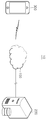
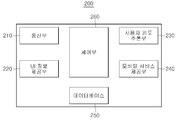
도 2는 본 발명의 일 실시 예에 따른 서버의 구성을 도시하는 블록도;
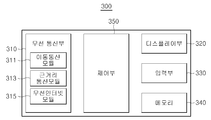
도 3은 본 발명의 일 실시 예에 따른 이동 단말기의 구성을 도시하는 블록도;
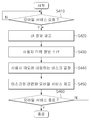
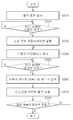
도 4는 본 발명의 일 실시 예에 따른 서버의 동작을 설명하는 순서도;
도 5는 본 발명의 일 실시 예에 따른 이동 단말기의 동작을 설명하는 순서도;
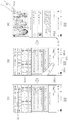
도 6은 본 발명의 일 실시 예에 따른 사용자 인터페이스의 구성을 설명하는 도면;
도 7은 본 발명의 일 실시 예에 따른 사용자 인터페이스를 표시하는 이동 단말기의 동작을 설명하기 위해 참조되는 도면;
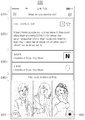
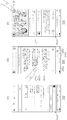
도 8 및 도 9는 사용자 인터페이스에서 제공하는 제1 표시창의 기능을 설명하기 위해 참조되는 도면;
도 10은 사용자 인터페이스에서 제공하는 액션 가이드 메뉴의 기능을 설명하기 위해 참조되는 도면;
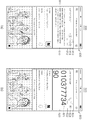
도 11 내지 도 13은 사용자 인터페이스에서 제공하는 액션 입력창의 기능을 설명하기 위해 참조되는 도면;
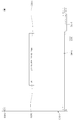
도 14a 및 도 14b는 본 발명의 일 실시 예에 따른 웹 브라우저 화면을 나타내는 도면;
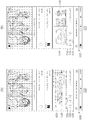
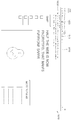
도 15 및 도 16은 새 탭 화면에서 제공하는 액션 입력창의 기능을 설명하기 위해 참조되는 도면;
도 17은 본 발명의 다른 실시 예에 따른 웹 브라우저 화면을 나타내는 도면.
200: 서버 210: 통신부
220: UI 정보 제공부 230: 사용자 의도 추론부
240: 모바일 서비스 제공부 250: 데이터베이스
260: 제어부 300: 이동 단말기
Claims (20)
- 동작화면을 디스플레이부에 표시하는 단계;
제1 사용자 입력에 대응하여 미리 정의된 사용자 인터페이스(User Interface, UI)를 상기 디스플레이부에 표시하는 단계;
상기 사용자 인터페이스로 입력되는 정보를 기반으로 단말 사용자의 의도(intent)에 대응하는 태스크를 결정하는 단계; 및
상기 결정된 태스크와 관련된 동작을 수행하는 단계;를 포함하는 이동 단말기의 동작 방법. - 제1항에 있어서, 상기 사용자 인터페이스를 표시하는 단계는,
상기 사용자 인터페이스를 상기 동작화면 상에 오버레이(overlay) 형태로 표시하는 것을 특징으로 하는 이동 단말기의 동작 방법. - 제1항에 있어서,
상기 제1 사용자 입력은, 홈 버튼을 롱 터치(long touch)하는 입력, 홈 버튼을 포스터치(force touch)하는 입력, 단말기 바디를 미리 결정된 횟수만큼 탭(tap)하는 입력, 단말기 바디를 미리 결정된 패턴에 따라 이동 또는 회전하는 입력, 및 디스플레이부를 멀티 터치(multi-touch)하는 입력 중 어느 하나임을 특징으로 하는 이동 단말기의 동작 방법. - 제1항에 있어서,
상기 사용자 인터페이스는, 상기 단말 사용자의 의도를 지시하는 텍스트 정보를 입력하기 위한 액션 입력창, 가장 마지막에 복사된 클립 정보를 제공하기 위한 제1 표시창, 상기 동작화면과 관련된 정보를 제공하기 위한 제2 표시창, 및 상기 단말 사용자의 의도와 관련된 정보를 추가로 검색하기 위한 추가 액션 검색창 중 적어도 하나를 포함하는 것을 특징으로 하는 이동 단말기의 동작 방법. - 제4항에 있어서,
상기 액션 입력창은, 상기 단말 사용자의 의도에 대응하는 태스크의 종류를 지시하는 액션 메뉴들(action menus)을 제공하기 위한 액션 가이드 메뉴를 포함하는 것을 특징으로 하는 이동 단말기의 동작 방법. - 제5항에 있어서,
상기 액션 가이드 메뉴가 선택되는 경우, 상기 단말 사용자가 의도하는 태스크들을 지시하기 위한 복수의 액션 메뉴들을 포함하는 액션 메뉴 리스트를 표시하는 단계;
상기 복수의 액션 메뉴들 중 어느 하나가 선택되는 경우, 상기 선택된 액션 메뉴에 대응하는 텍스트 정보를 상기 액션 입력창에 자동으로 입력하는 단계를 더 포함하는 이동 단말기의 동작 방법. - 제4항에 있어서,
상기 액션 입력창을 통해 상기 단말 사용자의 의도에 대응하는 태스크의 종류를 지시하는 제1 텍스트 정보와, 상기 태스크의 내용을 지시하는 제2 텍스트 정보를 입력 받는 단계를 더 포함하는 이동 단말기의 동작 방법. - 제4항에 있어서,
상기 1 표시창을 통해, 상기 복사된 클립 정보와 관련된 하나 이상의 동작 메뉴들을 제공하는 단계를 더 포함하고,
상기 동작 메뉴들은, 상기 복사된 클립 정보의 종류에 따라 변경되는 것을 특징으로 하는 이동 단말기의 동작 방법. - 제4항에 있어서,
상기 동작화면에 표시되고 있는 컨텐츠를 분석하여 상기 동작화면과 관련된 정보를 상기 제2 표시창에 제공하는 단계를 더 포함하고,
상기 제2 표시창에서 제공 가능한 정보는, 앱 다운로드 추천 정보, 동작 메뉴 정보, 앱 서비스 정보, 알림 정보 및 컨시어지(concierge) 정보 중 적어도 하나를 포함하는 것을 특징으로 하는 이동 단말기의 동작 방법. - 제4항에 있어서,
상기 단말 사용자가 의도하는 태스크를 상기 사용자 인터페이스에서 지원하지 않은 경우, 상기 액션 입력창을 기반으로 미리 결정된 검색 사이트를 이용한 검색 기능을 제공하는 단계를 더 포함하는 이동 단말기의 동작 방법. - 제1항에 있어서, 상기 동작 수행 단계는,
상기 결정된 태스크와 관련된 하나 이상의 동작 옵션 메뉴들을 제공하는 단계를 포함하고,
상기 동작 메뉴 옵션들은, 기 설치된 기능 또는 앱 서비스에 대응하는 동작 옵션 메뉴와, 서버에서 제공하는 기능 또는 앱 서비스에 대응하는 동작 옵션 메뉴 중 적어도 하나를 포함하는 것을 특징으로 하는 이동 단말기의 동작 방법. - 제1항에 있어서,
상기 동작화면이 웹 브라우저 화면인 경우, 상기 사용자 인터페이스는 상기 웹 브라우저 화면의 새 탭 화면으로 구성되는 것을 특징으로 하는 이동 단말기의 동작 방법. - 제1항에 있어서,
제2 사용자 입력에 대응하여 상기 사용자 인터페이스의 표시를 제거하는 단계를 더 포함하는 이동 단말기의 동작 방법. - 디스플레이부;
서버와의 무선 통신 인터페이스를 제공하는 무선 통신부; 및
기 설정된 사용자 입력에 대응하여 미리 정의된 사용자 인터페이스(User Interface, UI)를 상기 디스플레이부에 표시하고, 상기 사용자 인터페이스로 입력되는 정보를 기반으로 단말 사용자의 의도(intent)에 대응하는 태스크를 결정하며, 상기 결정된 태스크와 관련된 동작을 수행하는 제어부;를 포함하는 이동 단말기. - 미리 정의된 사용자 인터페이스(UI)에 관한 정보를 이동 단말기로 전송하는 단계;
상기 사용자 인터페이스를 통해 입력되는 정보를 상기 이동 단말기로부터 수신하는 단계;
상기 수신된 입력 정보를 기반으로 단말 사용자의 의도를 추론하고, 상기 추론된 단말 사용자의 의도에 대응하는 태스크를 결정하는 단계; 및
상기 결정된 태스크와 관련된 모바일 서비스를 상기 이동 단말기로 제공하는 단계를 포함하는 서버의 동작 방법. - 제15항에 있어서,
상기 이동 단말기의 동작화면에 관한 정보를 수신하는 단계;
상기 동작화면에 관한 정보를 반영하여 상기 사용자 인터페이스에 관한 정보를 생성하는 단계를 더 포함하는 서버의 동작 방법. - 제15항에 있어서, 상기 제공 단계는,
상기 결정된 태스크와 관련된 하나 이상의 동작 옵션 메뉴들에 관한 정보를 상기 이동 단말기로 제공하는 것을 특징으로 하는 서버의 동작 방법. - 제15항에 있어서, 상기 제공 단계는,
상기 결정된 태스크와 관련된 동작, 기능 또는 앱 서비스 등에 관한 정보를 상기 이동 단말기로 제공하는 것을 특징으로 하는 서버의 동작 방법. - 미리 정의된 사용자 인터페이스(UI)에 관한 정보를 이동 단말기로 전송하고, 상기 사용자 인터페이스를 통해 입력되는 정보를 상기 이동 단말기로부터 수신하는 통신부;
상기 통신부를 통해 수신된 입력 정보를 기반으로 단말 사용자의 의도를 추론하고, 상기 추론된 단말 사용자의 의도에 대응하는 태스크를 결정하는 사용자 의도 추론부; 및
상기 사용자 의도 추론부를 통해 결정된 태스크와 관련된 모바일 서비스를 상기 이동 단말기로 제공하는 모바일 서비스 제공부를 포함하는 서버. - 제1항 내지 제13항 및 제15항 내지 제18항 중 어느 하나의 항에 따른 방법이 컴퓨터 상에서 수행 가능한 프로그램 코드를 기록한 컴퓨터 판독 가능한 기록 매체.
Priority Applications (2)
| Application Number | Priority Date | Filing Date | Title |
|---|---|---|---|
| KR1020170074139A KR101968951B1 (ko) | 2017-06-13 | 2017-06-13 | 이동 단말기 및 이에 의한 사용자 인터페이스 제공 방법, 서버 및 이에 의한 모바일 서비스 제공 방법 |
| US16/005,901 US20180356977A1 (en) | 2017-06-13 | 2018-06-12 | Mobile terminal and method for providing user interface using the same, server and method for providing mobile service using the same |
Applications Claiming Priority (1)
| Application Number | Priority Date | Filing Date | Title |
|---|---|---|---|
| KR1020170074139A KR101968951B1 (ko) | 2017-06-13 | 2017-06-13 | 이동 단말기 및 이에 의한 사용자 인터페이스 제공 방법, 서버 및 이에 의한 모바일 서비스 제공 방법 |
Publications (2)
| Publication Number | Publication Date |
|---|---|
| KR20180135687A true KR20180135687A (ko) | 2018-12-21 |
| KR101968951B1 KR101968951B1 (ko) | 2019-08-13 |
Family
ID=64562161
Family Applications (1)
| Application Number | Title | Priority Date | Filing Date |
|---|---|---|---|
| KR1020170074139A Active KR101968951B1 (ko) | 2017-06-13 | 2017-06-13 | 이동 단말기 및 이에 의한 사용자 인터페이스 제공 방법, 서버 및 이에 의한 모바일 서비스 제공 방법 |
Country Status (2)
| Country | Link |
|---|---|
| US (1) | US20180356977A1 (ko) |
| KR (1) | KR101968951B1 (ko) |
Cited By (2)
| Publication number | Priority date | Publication date | Assignee | Title |
|---|---|---|---|---|
| DE202019106172U1 (de) | 2018-11-07 | 2019-11-14 | Hyundai Mobis Co., Ltd. | Head-up-Display für ein Fahrzeug |
| WO2022265448A1 (ko) * | 2021-06-17 | 2022-12-22 | 삼성전자 주식회사 | 애플리케이션 화면을 탐색하는 전자 장치 및 그 동작 방법 |
Families Citing this family (3)
| Publication number | Priority date | Publication date | Assignee | Title |
|---|---|---|---|---|
| JP7414476B2 (ja) * | 2019-11-08 | 2024-01-16 | キヤノン株式会社 | 画像形成装置 |
| CN111176764B (zh) | 2019-12-10 | 2022-04-05 | 华为技术有限公司 | 显示控制方法和终端设备 |
| CN118331465A (zh) * | 2022-07-26 | 2024-07-12 | 荣耀终端有限公司 | 一种日程创建方法、终端设备及终端系统 |
Citations (2)
| Publication number | Priority date | Publication date | Assignee | Title |
|---|---|---|---|---|
| KR20090077480A (ko) * | 2008-01-11 | 2009-07-15 | 삼성전자주식회사 | 조작 가이드를 표시하는 ui 제공방법 및 이를 적용한멀티미디어 기기 |
| KR20150083730A (ko) * | 2014-01-10 | 2015-07-20 | 삼성전자주식회사 | 컴퓨팅 디바이스에서 컨텐츠 복사 실행 방법, 컨텐츠 붙여넣기 실행 방법 및 컴퓨팅 디바이스 |
-
2017
- 2017-06-13 KR KR1020170074139A patent/KR101968951B1/ko active Active
-
2018
- 2018-06-12 US US16/005,901 patent/US20180356977A1/en not_active Abandoned
Patent Citations (2)
| Publication number | Priority date | Publication date | Assignee | Title |
|---|---|---|---|---|
| KR20090077480A (ko) * | 2008-01-11 | 2009-07-15 | 삼성전자주식회사 | 조작 가이드를 표시하는 ui 제공방법 및 이를 적용한멀티미디어 기기 |
| KR20150083730A (ko) * | 2014-01-10 | 2015-07-20 | 삼성전자주식회사 | 컴퓨팅 디바이스에서 컨텐츠 복사 실행 방법, 컨텐츠 붙여넣기 실행 방법 및 컴퓨팅 디바이스 |
Cited By (3)
| Publication number | Priority date | Publication date | Assignee | Title |
|---|---|---|---|---|
| DE202019106172U1 (de) | 2018-11-07 | 2019-11-14 | Hyundai Mobis Co., Ltd. | Head-up-Display für ein Fahrzeug |
| WO2022265448A1 (ko) * | 2021-06-17 | 2022-12-22 | 삼성전자 주식회사 | 애플리케이션 화면을 탐색하는 전자 장치 및 그 동작 방법 |
| US12175059B2 (en) | 2021-06-17 | 2024-12-24 | Samsung Electronics Co., Ltd. | Method and electronic device for navigating application screen |
Also Published As
| Publication number | Publication date |
|---|---|
| KR101968951B1 (ko) | 2019-08-13 |
| US20180356977A1 (en) | 2018-12-13 |
Similar Documents
| Publication | Publication Date | Title |
|---|---|---|
| KR101968951B1 (ko) | 이동 단말기 및 이에 의한 사용자 인터페이스 제공 방법, 서버 및 이에 의한 모바일 서비스 제공 방법 | |
| EP3627311B1 (en) | Computer application promotion | |
| US20170220227A1 (en) | Overloading App Icon Touchscreen Interaction to Provide Action Accessibility | |
| JP6467135B2 (ja) | ウェブページ共有方法、システム及びこれを支援する端末機 | |
| US11044358B2 (en) | Mobile terminal and method for providing user interface using the same, server and method for providing mobile service using the same | |
| KR101741698B1 (ko) | 검색 서비스 제공방법 및 이를 적용한 디스플레이 장치 | |
| JP2020181590A (ja) | デバイスがユーザ・インターフェースをディスプレイする方法及びそのデバイス | |
| US9431004B2 (en) | Variable-depth audio presentation of textual information | |
| KR102092762B1 (ko) | 디스플레이 장치 및 그의 목적지 설정 방법 | |
| WO2017210535A1 (en) | Methods and systems for managing bookmarks | |
| CN102257493A (zh) | 对个人信息进行地理编码 | |
| TWI682290B (zh) | 使用應用程式自服務提供伺服器接收服務的裝置及方法 | |
| US9843556B2 (en) | Address book information service system, and method and device for address book information service therein | |
| EP2587356A2 (en) | Controlling method for basic screen and portable device therefore | |
| US10296639B2 (en) | Personalized audio presentation of textual information | |
| KR101615579B1 (ko) | Rss 채널 정보 제공 방법 및 시스템과, 이를 이용하는 휴대 단말기 | |
| CN111557089A (zh) | 用于使能上下文交互的方法和电子设备 | |
| KR101968952B1 (ko) | 이동 단말기 및 이에 의한 사용자 인터페이스 제공 방법, 서버 및 이에 의한 모바일 서비스 제공 방법 | |
| KR20180135549A (ko) | 복수의 스토리지 계정들을 통합 관리하기 위한 방법 및 그 장치 | |
| KR101699059B1 (ko) | 대기 화면에서 퀵 메뉴 및 관련 컨텐츠를 제공하는 방법과 시스템 및 기록 매체 | |
| KR101949397B1 (ko) | 이동 단말기 및 이에 의한 사용자 인터페이스 제공 방법, 서버 및 이에 의한 모바일 서비스 제공 방법 | |
| KR101932281B1 (ko) | 이동 단말기 및 이에 의한 웹 서비스 표시 방법,웹 서버 및 이에 의한 웹 서비스 제공 방법 | |
| KR20130050705A (ko) | 키워드 검색 방법 및 장치 | |
| KR102031237B1 (ko) | 이동 단말기 및 이에 의한 사용자 인터페이스 제공 방법, 및 서버 및 이에 의한 모바일 서비스 제공 방법 | |
| US8942534B2 (en) | Information processing apparatus, information processing method, program, and information processing system |
Legal Events
| Date | Code | Title | Description |
|---|---|---|---|
| A201 | Request for examination | ||
| PA0109 | Patent application |
St.27 status event code: A-0-1-A10-A12-nap-PA0109 |
|
| PA0201 | Request for examination |
St.27 status event code: A-1-2-D10-D11-exm-PA0201 |
|
| D13-X000 | Search requested |
St.27 status event code: A-1-2-D10-D13-srh-X000 |
|
| D14-X000 | Search report completed |
St.27 status event code: A-1-2-D10-D14-srh-X000 |
|
| PN2301 | Change of applicant |
St.27 status event code: A-3-3-R10-R13-asn-PN2301 St.27 status event code: A-3-3-R10-R11-asn-PN2301 |
|
| E902 | Notification of reason for refusal | ||
| PE0902 | Notice of grounds for rejection |
St.27 status event code: A-1-2-D10-D21-exm-PE0902 |
|
| E13-X000 | Pre-grant limitation requested |
St.27 status event code: A-2-3-E10-E13-lim-X000 |
|
| P11-X000 | Amendment of application requested |
St.27 status event code: A-2-2-P10-P11-nap-X000 |
|
| P13-X000 | Application amended |
St.27 status event code: A-2-2-P10-P13-nap-X000 |
|
| PN2301 | Change of applicant |
St.27 status event code: A-3-3-R10-R13-asn-PN2301 St.27 status event code: A-3-3-R10-R11-asn-PN2301 |
|
| PG1501 | Laying open of application |
St.27 status event code: A-1-1-Q10-Q12-nap-PG1501 |
|
| E701 | Decision to grant or registration of patent right | ||
| PE0701 | Decision of registration |
St.27 status event code: A-1-2-D10-D22-exm-PE0701 |
|
| GRNT | Written decision to grant | ||
| PR0701 | Registration of establishment |
St.27 status event code: A-2-4-F10-F11-exm-PR0701 |
|
| PR1002 | Payment of registration fee |
St.27 status event code: A-2-2-U10-U11-oth-PR1002 Fee payment year number: 1 |
|
| PG1601 | Publication of registration |
St.27 status event code: A-4-4-Q10-Q13-nap-PG1601 |
|
| P22-X000 | Classification modified |
St.27 status event code: A-4-4-P10-P22-nap-X000 |
|
| PR1001 | Payment of annual fee |
St.27 status event code: A-4-4-U10-U11-oth-PR1001 Fee payment year number: 4 |
|
| R18-X000 | Changes to party contact information recorded |
St.27 status event code: A-5-5-R10-R18-oth-X000 |
|
| PR1001 | Payment of annual fee |
St.27 status event code: A-4-4-U10-U11-oth-PR1001 Fee payment year number: 5 |
|
| PR1001 | Payment of annual fee |
St.27 status event code: A-4-4-U10-U11-oth-PR1001 Fee payment year number: 6 |
|
| PR1001 | Payment of annual fee |
St.27 status event code: A-4-4-U10-U11-oth-PR1001 Fee payment year number: 7 |
|
| U11 | Full renewal or maintenance fee paid |
Free format text: ST27 STATUS EVENT CODE: A-4-4-U10-U11-OTH-PR1001 (AS PROVIDED BY THE NATIONAL OFFICE) Year of fee payment: 7 |