RU2425467C2 - Mobile terminal device - Google Patents
Mobile terminal device Download PDFInfo
- Publication number
- RU2425467C2 RU2425467C2 RU2009113227/09A RU2009113227A RU2425467C2 RU 2425467 C2 RU2425467 C2 RU 2425467C2 RU 2009113227/09 A RU2009113227/09 A RU 2009113227/09A RU 2009113227 A RU2009113227 A RU 2009113227A RU 2425467 C2 RU2425467 C2 RU 2425467C2
- Authority
- RU
- Russia
- Prior art keywords
- mode
- telephone number
- call
- calls
- display
- Prior art date
Links
- 238000010295 mobile communication Methods 0.000 claims abstract description 23
- 238000009434 installation Methods 0.000 claims abstract description 7
- 238000004891 communication Methods 0.000 abstract description 20
- 238000005516 engineering process Methods 0.000 abstract 1
- 239000000126 substance Substances 0.000 abstract 1
- 230000006870 function Effects 0.000 description 20
- 238000010586 diagram Methods 0.000 description 19
- 238000012790 confirmation Methods 0.000 description 2
- 238000000926 separation method Methods 0.000 description 2
- 230000005236 sound signal Effects 0.000 description 2
- 102100029860 Suppressor of tumorigenicity 20 protein Human genes 0.000 description 1
- 230000005540 biological transmission Effects 0.000 description 1
- 230000001413 cellular effect Effects 0.000 description 1
- 230000000295 complement effect Effects 0.000 description 1
- 238000000034 method Methods 0.000 description 1
Images









Classifications
-
- H—ELECTRICITY
- H04—ELECTRIC COMMUNICATION TECHNIQUE
- H04B—TRANSMISSION
- H04B1/00—Details of transmission systems, not covered by a single one of groups H04B3/00 - H04B13/00; Details of transmission systems not characterised by the medium used for transmission
- H04B1/38—Transceivers, i.e. devices in which transmitter and receiver form a structural unit and in which at least one part is used for functions of transmitting and receiving
- H04B1/40—Circuits
-
- H—ELECTRICITY
- H04—ELECTRIC COMMUNICATION TECHNIQUE
- H04W—WIRELESS COMMUNICATION NETWORKS
- H04W8/00—Network data management
- H04W8/18—Processing of user or subscriber data, e.g. subscribed services, user preferences or user profiles; Transfer of user or subscriber data
-
- H—ELECTRICITY
- H04—ELECTRIC COMMUNICATION TECHNIQUE
- H04W—WIRELESS COMMUNICATION NETWORKS
- H04W4/00—Services specially adapted for wireless communication networks; Facilities therefor
- H04W4/18—Information format or content conversion, e.g. adaptation by the network of the transmitted or received information for the purpose of wireless delivery to users or terminals
Landscapes
- Engineering & Computer Science (AREA)
- Computer Networks & Wireless Communication (AREA)
- Signal Processing (AREA)
- Databases & Information Systems (AREA)
- Telephone Function (AREA)
- Mobile Radio Communication Systems (AREA)
Abstract
Description
Область техники, к которой относится изобретениеFIELD OF THE INVENTION
Настоящее изобретение относится к мобильному оконечному устройству, в частности к мобильному оконечному устройству с двумя телефонными номерами.The present invention relates to a mobile terminal device, in particular to a mobile terminal device with two telephone numbers.
Уровень техникиState of the art
Обычно в мобильных оконечных устройствах (терминалах), например сотовых телефонах и им подобных устройствах, аппаратно реализуются расширенные функции, и такое устройство имеет несколько элементов идентификационной информации терминала и использует данные элементы идентификационной информации терминала по отдельности. Например, в патентном документе 1 описано оконечное устройство связи (терминал), снабженное несколькими элементами идентификационной информации терминала и способное выполнять оптимальную настройку в соответствии с идентификационной информацией терминала.Usually, in mobile terminal devices (terminals), for example, cellular telephones and similar devices, advanced functions are implemented in hardware, and such a device has several terminal identification information elements and uses these terminal identification information elements individually. For example, Patent Document 1 describes a communication terminal device (terminal) equipped with several elements of terminal identification information and capable of performing optimal tuning in accordance with terminal identification information.
Патентный документ 1: патентная публикация Японии №2006-14355.Patent Document 1: Japanese Patent Publication No. 2006-14355.
Каждый из множества пользователей мобильных оконечных устройств, например сотовых телефонов и им подобных устройств, использует одно мобильное оконечное устройство для деловых и личных нужд. Среди таких пользователей существует потребность в раздельном использовании различных телефонных номеров для деловых и личных нужд. Кроме того, предполагается, что, наряду с личными нуждами, пользователь использует мобильное оконечное устройство для временных нужд, например, в качестве номера для связи в течение определенного события, представительского номера для группы пользователей и т.п., и в этом случае существует потребность в отдельном телефонном номере, предназначенном для временного использования.Each of a plurality of users of mobile terminals, such as cell phones and the like, uses one mobile terminal for business and personal needs. Among such users there is a need for separate use of different telephone numbers for business and personal needs. In addition, it is assumed that, along with personal needs, the user uses a mobile terminal for temporary needs, for example, as a number for communication during a certain event, a representative number for a group of users, etc., and in this case there is a need in a separate telephone number for temporary use.
В описанном выше уровне техники, например, предполагается, что дополнительный номер устанавливается отличным от внешнего номера, и не предполагается раздельное использование различных номеров для деловых и личных нужд или для обычного и временного использования. Соответственно, в сложившихся обстоятельствах не существует мобильного оконечного устройства, пригодного для такого раздельного применения.In the prior art described above, for example, it is assumed that the extension number is set to be different from the external number, and it is not intended that the different numbers be used separately for business and personal needs or for ordinary and temporary use. Accordingly, in the circumstances, there is no mobile terminal device suitable for such separate use.
Раскрытие изобретенияDisclosure of invention
Целью настоящего изобретения является создание мобильного оконечного устройства с функциями, пригодными для разделения делового и личного использования, обычного и временного использования и т.п.The aim of the present invention is to provide a mobile terminal device with functions suitable for the separation of business and personal use, ordinary and temporary use, etc.
Мобильное оконечное устройство в настоящем изобретении представляет собой мобильное оконечное устройство, выполненное с возможностью выполнения вызовов и приема вызовов с использованием первой идентификационной информации и с возможностью выполнения вызовов и приема вызовов с использованием второй идентификационной информации, и характеризуется наличием модуля изменения режима, выполняющего переключение режима между первым режимом, вторым режимом и общим режимом, и модуля управления исходящими вызовами, выполняющего вызов с использованием первой идентификационной информации в первом режиме, выполняющего вызов с использованием второй идентификационной информации во втором режиме и выполняющего вызов с использованием первой идентификационной информации или второй идентификационной информации в общем режиме.The mobile terminal device in the present invention is a mobile terminal device configured to make and receive calls using the first identification information and to make calls and receive calls using the second identification information, and is characterized by the presence of a mode change module that switches the mode between the first mode, the second mode and the general mode, and the outgoing call control module, making a call using by using the first identification information in the first mode, making a call using the second identification information in the second mode and making the call using the first identification information or the second identification information in the common mode.
Устройство в соответствии с этой конфигурацией имеет два элемента идентификационной информации, например обычный телефонный номер для обычного режима и дополнительный телефонный номер для дополнительного режима, и, таким образом, способно выполнять функции, позволяющие разделять деловое и личное использование, обычное и временное использование и т.п. Кроме того, устройство имеет общий режим, позволяющий использовать оба элемента идентификационной информации, и таким образом может быть использовано также в случае, когда не требуется раздельное использование.The device in accordance with this configuration has two elements of identification information, for example, a regular telephone number for normal mode and an additional telephone number for additional mode, and thus is able to perform functions that allow separation of business and personal use, normal and temporary use, etc. P. In addition, the device has a common mode that allows you to use both elements of identification information, and thus can also be used in cases where separate use is not required.
Предпочтительно мобильное оконечное устройство по настоящему изобретению содержит первую адресную книгу для первого режима, вторую адресную книгу для второго режима, модуль отображения, отображающий информацию в мобильном оконечном устройстве, и модуль управления, отображающий информацию из адресной книги в модуле отображения в соответствии с каждым режимом.Preferably, the mobile terminal device of the present invention comprises a first address book for the first mode, a second address book for the second mode, a display unit displaying information in the mobile terminal device, and a control unit displaying information from the address book in the display unit in accordance with each mode.
В мобильном оконечном устройстве по настоящему изобретению модуль управления предпочтительно отображает информацию только из первой адресной книги при приеме вызова в первом режиме, отображает информацию только из второй адресной книги при приеме вызова во втором режиме и отображает информацию из первой адресной книги и из второй адресной книги при приеме вызова в общем режиме.In the mobile terminal device of the present invention, the control module preferably displays information only from the first address book when receiving a call in the first mode, displays information only from the second address book when receiving a call in the second mode, and displays information from the first address book and from the second address book when receiving a call in general mode.
В мобильном оконечном устройстве по настоящему изобретению при приеме вызова с использованием второй идентификационной информации в первом режиме модуль управления предпочтительно отображает информацию о входящем вызове посредством вида отображения, отличного от вида отображения входящего вызова с использованием первой идентификационной информации.In the mobile terminal device of the present invention, when receiving a call using the second identification information in the first mode, the control module preferably displays information about the incoming call by means of a display other than the display type of the incoming call using the first identification information.
В мобильном оконечном устройстве по настоящему изобретению при выполнении вызова из адресной книги в общем режиме модуль управления исходящими вызовами предпочтительно выполняет вызов с использованием идентификационной информации, соответствующей типу адресной книги.In the mobile terminal device of the present invention, when making a call from the address book in general mode, the outgoing call control module preferably makes a call using identification information corresponding to the type of address book.
В мобильном оконечном устройстве по настоящему изобретению при выполнении вызова из истории входящих и исходящих вызовов в общем режиме модуль управления исходящими вызовами предпочтительно выполняет вызов с использованием идентификационной информации, соответствующей описаниям истории входящих и исходящих вызовов.In the mobile terminal device of the present invention, when making a call from the history of incoming and outgoing calls in general mode, the outgoing call control module preferably makes a call using identification information corresponding to the history descriptions of the incoming and outgoing calls.
Мобильное оконечное устройство по настоящему изобретению предпочтительно содержит модуль управления источником питания, устанавливающий режим «выключено» источника питания при входящем вызове с использованием первой идентификационной информации или второй идентификационной информации.The mobile terminal device of the present invention preferably comprises a power source control module setting the power source to “off” in an incoming call using the first identification information or second identification information.
В мобильном оконечном устройстве по настоящему изобретению модуль управления источником питания устанавливает режим «выключено» источника питания в соответствии с переключением между первым режимом, вторым режимом и общим режимом.In the mobile terminal device of the present invention, the power supply control module sets the power source to “off” in accordance with the switching between the first mode, the second mode and the general mode.
Краткое описание чертежейBrief Description of the Drawings
Фиг.1 представляет собой диаграмму, иллюстрирующую схематическую конфигурацию системы, включающей мобильное оконечное устройство в соответствии с вариантом осуществления настоящего изобретения.1 is a diagram illustrating a schematic configuration of a system including a mobile terminal device in accordance with an embodiment of the present invention.
Фиг.2 представляет собой блок-схему, иллюстрирующую схематическую конфигурацию мобильного оконечного устройства в системе, показанной на фиг.1.FIG. 2 is a block diagram illustrating a schematic configuration of a mobile terminal in the system shown in FIG. 1.
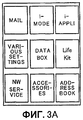
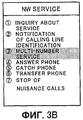
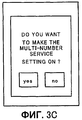
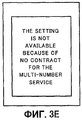
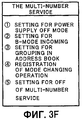
Фиг.3A-3F представляют собой диаграммы для объяснения изменений на экране при задании настроек для нескольких номеров.3A-3F are diagrams for explaining changes on the screen when making settings for multiple numbers.
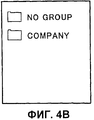
Фиг.4А-4С представляют собой диаграммы, иллюстрирующие виды отображения адресных книг в мобильном оконечном устройстве в соответствии с вариантом осуществления изобретения.4A-4C are diagrams illustrating display views of address books in a mobile terminal device according to an embodiment of the invention.
Фиг.5 представляет собой диаграмму, поясняющую виды отображения при входящих вызовах в мобильном оконечном устройстве в соответствии с вариантом осуществления изобретения.FIG. 5 is a diagram explaining display views of incoming calls in a mobile terminal in accordance with an embodiment of the invention.
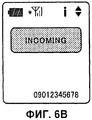
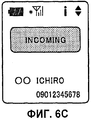
Фиг.6А-6С представляют собой диаграммы, иллюстрирующие виды отображения при входящих вызовах в мобильном оконечном устройстве в соответствии с вариантом осуществления изобретения.6A-6C are diagrams illustrating views of incoming calls in a mobile terminal in accordance with an embodiment of the invention.
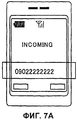
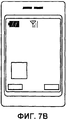
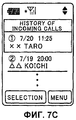
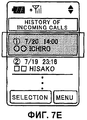
Фиг.7А-7Е представляют собой диаграммы, иллюстрирующие виды отображения при входящих вызовах в мобильном оконечном устройстве в соответствии с вариантом осуществления изобретения.7A-7E are diagrams illustrating views of incoming calls in a mobile terminal device according to an embodiment of the invention.
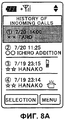
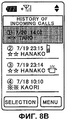
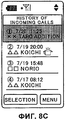
Фиг.8А-8С представляют собой диаграммы, иллюстрирующие виды отображения историй входящих вызовов в мобильном оконечном устройстве в соответствии с вариантом осуществлением изобретения.8A-8C are diagrams illustrating views of displaying incoming call histories in a mobile terminal device in accordance with an embodiment of the invention.
Фиг.9 представляет собой диаграмму, поясняющую прием электронной почты (e-mail) при обслуживании нескольких номеров.Fig.9 is a diagram explaining the reception of e-mail (e-mail) when serving multiple numbers.
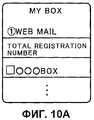
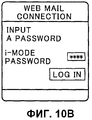
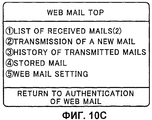
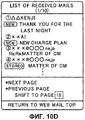
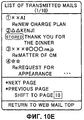
Фиг.10А-10Е представляют собой диаграммы, показывающие изображение на дисплее для сообщений Web-почты (Web mail) в мобильном оконечном устройстве в соответствии с вариантом осуществления изобретения.10A-10E are diagrams showing a display image for Web mail messages in a mobile terminal device according to an embodiment of the invention.
Фиг.11 представляет собой диаграмму, иллюстрирующую пересылку сообщений Web-почты на почту i-mode (i-mode mail) в мобильном оконечном устройстве в соответствии с вариантом осуществления изобретения.11 is a diagram illustrating the forwarding of Web-mail messages to i-mode mail (i-mode mail) in a mobile terminal device in accordance with an embodiment of the invention.
Фиг.12 представляет собой диаграмму, поясняющую работу мобильного оконечного устройства в режиме «выключено» источника питания в соответствии с вариантом осуществления изобретения.12 is a diagram explaining the operation of the mobile terminal device in the “off” mode of the power source in accordance with an embodiment of the invention.
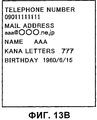
Фиг.13А-13С представляют собой диаграммы, иллюстрирующие описания в меню мобильного оконечного устройства в соответствии с вариантом осуществления изобретения.13A-13C are diagrams illustrating menu descriptions of a mobile terminal in accordance with an embodiment of the invention.
Осуществление изобретенияThe implementation of the invention
Далее осуществление изобретения подробно описывается со ссылкой на прилагаемые чертежи.The implementation of the invention is described in detail with reference to the accompanying drawings.
На фиг.1 показана диаграмма, иллюстрирующая схематическую конфигурацию системы, включающей мобильное оконечное устройство в соответствии с вариантом осуществления настоящего изобретения. Система на фиг.1 в основном состоит из мобильного терминала 1, узла 3 мобильной связи, подключенного к мобильному терминалу 1 посредством сети 2 мобильной связи, и Web-сервера 5, подключенного к узлу 3 мобильной связи посредством сети, такой, например, как сеть 4 Интернет и т.п.1 is a diagram illustrating a schematic configuration of a system including a mobile terminal device in accordance with an embodiment of the present invention. The system of FIG. 1 mainly consists of a mobile terminal 1, a
Мобильный терминал 1 имеет обычный режим, дополнительный режим и общий режим; обычный телефонный номер для обычного режима, который является первой идентификационной информацией, и дополнительный телефонный номер для дополнительного режима, который является второй идентификационной информацией; и, кроме того, обычный адрес электронной почты для обычного режима и дополнительный адрес электронной почты для дополнительного режима. Мобильный терминал 1 способен выполнять и принимать вызовы с использованием обычных телефонных номеров, которые представляют собой первую идентификационную информацию, и способен выполнять и принимать вызовы с использованием дополнительных телефонных номеров, которые представляют собой вторую идентификационную информацию.Mobile terminal 1 has a normal mode, an additional mode and a common mode; a regular telephone number for the normal mode, which is the first identification information, and an additional telephone number for the secondary mode, which is the second identification information; and, in addition, a regular email address for normal mode and a secondary email address for secondary mode. The mobile terminal 1 is capable of making and receiving calls using ordinary telephone numbers, which are the first identification information, and is capable of making and receiving calls using additional telephone numbers, which are the second identification information.
Кроме того, мобильный терминал 1 имеет операционную систему (mobile OS, мобильная операционная система), и в мобильной операционной системе выполняются функция обозревателя (browser function), функция просмотра (viewer function), менеджер Java-приложений (JAM, Java Application Manager) и другие функции.In addition, the mobile terminal 1 has an operating system (mobile OS, mobile operating system), and a browser function, a viewer function, a Java application manager (JAM, Java Application Manager) and other functions.
Сеть 2 мобильной связи представляет собой сеть между мобильным терминалом 1 и узлом 3 мобильной связи. Сеть 2 мобильной связи в дополнение к обычной сети мобильной связи включает в себя сеть мобильной пакетной связи. Например, узел сети мобильной связи содержит сервер i-mode (зарегистрированный товарный знак) и другие подобные, выполняет функцию шлюза (gateway function) для соединения сети 2 мобильной связи и сети 4 Интернет и, более предметно, выполняет функцию распределения информации, функцию передачи/приема почты, функцию хранения почты, функцию управления пользователями, функцию управления поставщика информации и функцию управления начислением платы за информацию. Эта сеть включает в себя сеть 4 Интернет и другие сети, например локальные сети (LAN, Local Area Network), глобальные (региональные) сети (WAN, Wide Area Network) и им подобные.The
Фиг.2 представляет собой блок-схему, схематически иллюстрирующую конфигурацию мобильного терминала в системе, показанной на фиг.1. Кроме того, конфигурация, показанная на фиг.2, упрощена в целях объяснения изобретения, и предполагается, что ее элементы установлены в обычном мобильном терминале.FIG. 2 is a block diagram schematically illustrating a configuration of a mobile terminal in the system shown in FIG. 1. In addition, the configuration shown in FIG. 2 is simplified in order to explain the invention, and it is assumed that its elements are installed in a conventional mobile terminal.
Мобильный терминал 1 в основном состоит из модуля 11 управления, управляющего устройством в целом, модуля 12 управления связью, управляющего беспроводной связью через антенну, модуля 13 ввода для ввода различных видов информации и данных, модуля 14 управления дисплеем, управляющего отображением на дисплее 15 различных видов информации и данных, модуля 16 размещения, размещающего данные в заранее определенной области хранения в соответствии с режимом, модуля 17 хранения, сохраняющего различные виды данных, модуля 18 управления источником питания, переключающего режимы «включено»/«выключено» источника питания в соответствии с режимом, модуля 19 изменения режима, переключающего режим мобильного терминала 1 между обычным режимом (первым режимом), дополнительным режимом (вторым режимом) и общим режимом, и модуля 20 управления приложениями, управляющего запуском различных видов приложений.The mobile terminal 1 mainly consists of a
Модуль 12 управления связью управляет беспроводной связью с другим мобильным терминалом, другим подобным устройством связи и т.п. Например, модуль 12 управления связью выполняет и принимает вызовы на другой мобильный терминал или от другого мобильного терминала и другого устройства связи и передает и принимает почту, направленную на другой мобильный терминал и другое устройство связи или от них. Модуль 12 управления связью выполняет вызовы с использованием телефонного номера, соответствующего режиму. Например, модуль 12 управления связью осуществляет управление исходящим вызовом для выполнения вызова с использованием обычного телефонного номера в обычном режиме, для выполнения вызова с использованием дополнительного телефонного номера в дополнительном режиме, а также для выполнения вызова с использованием или обычного телефонного номера, или дополнительного телефонного номера в общем режиме.The
Модуль 12 управления связью передает почтовое сообщение с мобильного терминала 1 с обычным почтовым адресом и получает доступ к почтовому Web-сайту для передачи почтового сообщения с дополнительным почтовым адресом. В то же время модуль 12 управления связью принимает уведомление о приеме при получении сообщения Web-почты на дополнительный почтовый адрес. Затем модуль 12 управления связью дает команду переслать на обычный почтовый адрес сообщение Web-почты, принятое на дополнительный почтовый адрес.The
При выполнении вызова из адресной книги в общем режиме модуль 12 управления связью осуществляет управление исходящим вызовом для выполнения вызова с использованием идентификационной информации в соответствии с видом адресной книги. Другими словами, при выполнении вызова в состоянии, когда адресная книга отображается на дисплее 15 в общем режиме, вызов выполняется с использованием идентификационной информации в соответствии с видом отображаемой адресной книги (обычная адресная книга, дополнительная адресная книга и адресная книга без настройки). Например, вызов выполняется с использованием обычного телефонного номера, если вызов выполняется из обычной адресной книги или из адресной книги без настройки, или с использованием дополнительного телефонного номера, если вызов выполняется из дополнительной адресной книги.When making a call from the address book in general mode, the
Между тем при выполнении вызова из истории входящих и исходящих вызовов в общем режиме модуль 12 управления связью осуществляет управление исходящим вызовом для выполнения вызова с использованием идентификационной информации в соответствии с описаниями истории входящих и исходящих вызовов. Другими словами, при выполнении вызова в состоянии, когда история входящих и исходящих вызовов отображается на дисплее 15 в общем режиме, вызов выполняется с использованием идентификационной информации в соответствии с описаниями (имя адресата, телефонный номер адресата, имя отправителя и телефонный номер отправителя) из отображаемой истории входящих и исходящих вызовов. Например, если вызов выполняется по имени отправителя в истории входящих и исходящих вызовов, то вызов выполняется с использованием телефонного номера, соответствующего адресной книге, в которой содержится имя отправителя.Meanwhile, when making a call from the history of incoming and outgoing calls in general mode, the
Модуль 13 ввода является средством для ввода пользователем различных входных данных в мобильный терминал 1. Посредством модуля 13 ввода пользователь может вводить различные виды данных и выполнять операции, например включать/выключать источник питания, изменять режим и т.д.The
Модуль 14 управления дисплеем имеет функцию просмотра и отображает различные данные и информацию на дисплее 15. Кроме того, модуль 14 управления дисплеем форматирует данные и информацию для отображения в заранее определенном виде отображения. Кроме того, модуль 14 управления дисплеем отображает на дисплее данные и информацию, выбираемые в соответствии с режимами мобильного терминала 1, например информацию из адресной книги. К примеру, в соответствии с режимом модуль 14 управления дисплеем ограничивает отображение указания входящих вызовов, истории входящих и исходящих вызовов, истории переданной и полученной почты, пиктограммы непрочтенного сообщения и т.д. Другими словами, модуль 14 управления дисплеем отображает информацию только из обычной адресной книги при приеме вызова в обычном режиме, отображает информацию только из дополнительной адресной книги при приеме вызова в дополнительном режиме и отображает информацию из обычной адресной книги и дополнительной адресной книги при приеме вызова в общем режиме.The
Более конкретно, когда мобильный терминал 1 установлен в некоторый режим (например, в обычный режим), модуль 14 управления дисплеем отображает на дисплее 15 информацию из адресной книги, соответствующей текущему режиму или общему режиму. Другими словами, когда мобильный терминал 1 установлен в некоторый режим, модуль 14 управления дисплеем не отображает на дисплее 15 информацию из адресной книги, соответствующей другому режиму (например, дополнительному режиму), или изменяет вид отображения и ограничивает до минимума отображаемую информацию. Например, при приеме вызова на дополнительный телефонный номер в обычном режиме модуль 14 управления дисплеем отображает на дисплее 15 информацию о входящем вызове посредством вида отображения, отличного от вида отображения вызова при приеме вызова на обычный телефонный номер.More specifically, when the mobile terminal 1 is set to a certain mode (for example, to the normal mode), the
Модуль 16 размещения помещает принятые мобильным терминалом 1 почтовые сообщения для каждого режима в папки А и В, 17d и 17е модуля 17 хранения. Например, модуль 16 размещения помещает почтовые сообщения, отправленные на адрес для обычного режима, в папку 17d А и помещает почтовые сообщения, отправленные на адрес для дополнительного режима, в папку 17е В. Кроме того, в данном варианте осуществления почтовое сообщение на адрес для дополнительного режима представляет собой уведомление о приеме сообщения Web-почты или SMS-сообщения (короткого сообщения).The
Модуль 17 хранения включает в себя адресную книгу 17а обычного режима, в которой содержатся объекты, назначенные для обычного режима, адресную книгу 17b дополнительного режима, в которой содержатся объекты, назначенные для дополнительного режима, адресную книгу 17с без настройки, в которой содержатся объекты без настройки, папку 17d А для хранения почтовых сообщений, отправленных на адрес для обычного режима, и папку 17е В для хранения почтовых сообщений, отправленных на адрес для дополнительного режима.The
Модуль 18 управления источником питания устанавливает режим «выключено» источника питания при входящем вызове с использованием обычной идентификационной информации или дополнительной идентификационной информации. При этом режим «выключено» источника питания выдает ответ о выключенном источнике питания (имитирует выключение источника питания) при виртуальном выключении источника питания в режиме «выключено» источника питания. Например, если обычный телефонный номер установлен в режим «выключено» источника питания, то модуль 18 управления источником питания устанавливает режим «выключено» источника питания при поступлении вызова на обычный телефонный номер. Режим «выключено» источника питания можно реализовать, например, установкой существующего «публичного» режима (public mode) или «водительского» режима (driving mode). В этом состоянии при выполнении вызова на обычный телефонный номер мобильный терминал 1 выполняет операцию «не обслуживается» (например, выдает сообщение о выключенном источнике питания или нахождении вне зоны обслуживания) и соединение не устанавливается.The power
Модуль 18 управления источником питания устанавливает режим «выключено» источника питания в соответствии с переключением между обычным режимом, дополнительным режимом и общим режимом. Когда режим «выключено» источника питания установлен в любом из режимов, режим «выключено» источника питания может указываться на экране. Режим «выключено» источника питания возможно указать для обычного телефонного номера в обычном режиме, для дополнительного телефонного номера в дополнительном режиме и для обычного телефонного номера и дополнительного телефонного номера в общем режиме. Соответственно, в этом случае модуль 14 управления дисплеем отображает на дисплее 15 указание режима «выключено» источника питания (например, индикатор «не обслуживается») в соответствии с режимом.The power
Модуль 19 изменения режима по команде пользователя переключает режим между обычным режимом, дополнительным режимом и общим режимом. Кроме того, для установки режима использования нескольких телефонных номеров и установки режима «выключено» источника питания, поскольку такие установки выполняются на стороне сети, мобильный терминал 1 запрашивает установку у узла 3 мобильной связи через сеть 2 мобильной связи, и узел 3 мобильной связи производит установку режима.The
Модуль 20 управления приложениями выполняет программное приложение, созданное на языке программирования (например, языке Java (зарегистрированный товарный знак)), в соответствии с командой модуля 11 управления. При необходимости модуль 20 управления приложениями запускает приложение между мобильным терминалом 1 и узлом 3 мобильной связи.The
Далее описаны функции мобильного терминала 1, выполненного, как описано выше. Для услуги, использующей вышеупомянутый мобильный терминал 1, т.е. услуги, позволяющей использовать несколько телефонных номеров (далее услуга нескольких номеров), сетевая сторона выполняет установку, разрешающую или запрещающую услугу. Соответственно, функции услуги нескольких номеров разрешены только при установке, разрешающей эту услугу.The following describes the functions of the mobile terminal 1, made as described above. For a service using the aforementioned mobile terminal 1, i.e. a service that allows the use of several telephone numbers (hereinafter referred to as the service of several numbers), the network side performs an installation that allows or prohibits the service. Accordingly, the functions of the multi-room service are only allowed in an installation that allows this service.
Например, в случае выполнения установки (включения) услуги нескольких номеров на экранном меню мобильного терминала 1 выбирается услуга сети (network service, NW service), как показано на фиг.3А. Если выбран пункт «услуга сети» (NW SERVICE), мобильный терминал 1 связывается с узлом 3 мобильной связи через модуль 12 управления связью. Далее отображается экран, показанный на фиг.3В. При выборе на экране пункта «услуга нескольких номеров» (MULTI-NUMBER SERVICE) отображается экран, показанный на фиг.3С. Кроме того, для доступа к нескольким номерам запрашивается и проверяется пароль.For example, in the case of installing (turning on) the service of several numbers on the on-screen menu of the mobile terminal 1, a network service (network service, NW service) is selected, as shown in FIG. 3A. If the “Network Service” (NW SERVICE) item is selected, the mobile terminal 1 communicates with the
Если на экране, показанном на фиг.3С, выбирается «да» (YES), то отображается экран, показанный на фиг.3D, который сменяется экраном, показанным на фиг.3F, если у пользователя есть договор на пользование услугой, или экраном, показанным на фиг.3Е, если у пользователя нет договора на пользование услугой. Если на экране, показанном на фиг.3С, выбирается «нет» (NO), то возвращается экран, показанный на фиг.3В. Кроме того, если установка услуги нескольких номеров уже была выполнена, то при выборе услуги нескольких номеров на экране, показанном на фиг.3В, экран сменяется экраном, показанным на фиг.3F.If “Yes” (YES) is selected on the screen shown in FIG. 3C, the screen shown in FIG. 3D is displayed, which is replaced by the screen shown in FIG. 3F if the user has an agreement to use the service, or a screen, shown in FIG. 3E if the user does not have an agreement to use the service. If the screen shown in FIG. 3C selects “NO” (NO), then the screen shown in FIG. 3B is returned. In addition, if the installation of the service of several numbers has already been completed, then when you select the service of several numbers on the screen shown in figv, the screen is replaced by the screen shown in fig.3F.
В случае приема вызова при наличии кода обслуживания, соответствующего услуге нескольких номеров, и еще не включенной услуги после окончания вызова появляется всплывающее сообщение «Услуга нескольких номеров не включена. Хотите включить?». В то же время, если услуга включена, при приеме вызова в отсутствие договора на услугу, т.е. вызова в отсутствие кода обслуживания, соответствующего услуге нескольких номеров, появляется всплывающее сообщение «Услуга нескольких номеров отключена из-за отсутствия договора на услугу нескольких номеров» и услуга выключается. Кроме того, при выключении ранее разделенные папки и группы не изменяются. Также при установке или удалении из устройства карты для терминала (например, карты FOMA (зарегистрированный товарный знак)) информацию о предыдущих настройках можно передавать без изменений.In case of receiving a call if there is a service code corresponding to the service of several numbers, and the service is not yet activated, after the end of the call, a pop-up message appears “The service of several numbers is not included. Want to turn it on? ” At the same time, if the service is turned on, when receiving a call in the absence of a service contract, i.e. call in the absence of a service code corresponding to the service of several numbers, a pop-up message appears "The service of several numbers is disabled due to the lack of a contract for the service of several numbers" and the service is turned off. In addition, when turned off, previously divided folders and groups are not changed. Also, when installing or removing a terminal card from a device (for example, a FOMA card (registered trademark)), information about previous settings can be transferred without changes.
При включении услуги нескольких номеров можно активировать функции, служащие для раздельного использования в деловых и личных целях, обычного и временного использования и т.п. Например, выполняются запросы на раздельное использование двух телефонных номеров и почтовых адресов в соответствии с назначением, скрытие существования одного номера и почтового адреса и т.п.When you enable the service of several numbers, you can activate the functions that serve for separate use for business and personal purposes, regular and temporary use, etc. For example, requests are made for the separate use of two phone numbers and mailing addresses in accordance with the purpose, hiding the existence of one number and mailing address, etc.
Для этой услуги мобильный терминал 1 имеет три режима, т.е. общий режим, обычный режим и дополнительный режим. Общий режим представляет собой режим, допускающий раздельное использование обычного телефонного номера (обычного почтового адреса) и дополнительного телефонного номера (дополнительного почтового адреса). Обычный режим представляет собой режим, используемый при обычном телефонном номере (обычном почтовом адресе). В таком обычном режиме на экране не указывается, что услуга нескольких номеров выключена. Другими словами, чтобы наличие дополнительного режима не проявлялось, модуль 14 управления дисплеем не отображает на дисплее 15 информацию, относящуюся к дополнительному режиму. Дополнительный режим представляет собой режим, используемый при дополнительном телефонном номере (дополнительном почтовом адресе).For this service, the mobile terminal 1 has three modes, i.e. general mode, normal mode and secondary mode. General mode is a mode that allows the separate use of a regular phone number (regular mailing address) and an additional phone number (additional mailing address). Normal mode is the mode used with a regular telephone number (regular mailing address). In this normal mode, the screen does not indicate that the multi-number service is turned off. In other words, in order to prevent the presence of an additional mode, the
При изменении режима в мобильном терминале 1, другими словами, когда пользователь выполняет операцию изменения режима с помощью модуля 13 ввода, модуль 19 изменения режима переключает режим между общим режимом, обычным режимом и дополнительным режимом. В этом случае модуль 14 управления дисплеем отображает на дисплее 15 всплывающее сообщение, запрашивающее, какой режим установить. Что касается операции смены режима, далее пользователь может зарегистрировать (подтвердить) операцию по своему усмотрению, чтобы другие не узнали способа выполнения операции.When the mode is changed in the mobile terminal 1, in other words, when the user performs the mode change operation by the
Относительно адресной книги в мобильном терминале 1 есть по меньшей мере обычная адресная книга для обычного телефонного номера и дополнительная адресная книга для дополнительного телефонного номера. В данном варианте осуществления мобильный терминал 1 содержит в модуле 17 хранения обычную адресную книгу 17а, дополнительную адресную книгу 17b и адресную книгу 17с без настройки. В обычной адресной книге 17а присутствуют объекты, на которые выполнялись и от которых принимались вызовы с использованием обычного телефонного номера, в дополнительной адресной книге 17b присутствуют объекты, на которые выполнялись и от которых принимались вызовы с использованием дополнительного телефонного номера, а в адресной книге 17с без настройки присутствуют объекты без настройки для использования обычного телефонного номера или дополнительного телефонного номера.Regarding the address book, the mobile terminal 1 has at least a regular address book for a regular phone number and an additional address book for an additional phone number. In this embodiment, the mobile terminal 1 comprises in the
Эти адресные книги 17а-17с отображаются модулем 14 управления дисплеем в соответствии с режимом, как показано на фиг.4. Другими словами, в общем режиме, как показано на фиг.4А, отображаются все адресные книги - адресная книга без настройки, обычная адресная книга (обозначенная как А на фиг.4) и дополнительная адресная книга (обозначенная как В на фиг.4). В обычном режиме, как показано на фиг.4В, отображаются адресная книга без настройки и обычная адресная книга. В дополнительном режиме, как показано на фиг.4С, отображаются адресная книга без настройки и дополнительная адресная книга.These
Мобильный терминал 1 имеет общий режим, обычный режим и дополнительный режим, как описано выше, отображает информацию только из обычной адресной книги при приеме вызова в обычном режиме, отображает информацию только из дополнительной адресной книги при приеме вызова в дополнительном режиме и отображает информацию из обычной адресной книги и из дополнительной адресной книги при приеме вызова в общем режиме. Например, когда установлен обычный режим, терминал 1 не отображает на дисплее 15 информацию из адресной книги дополнительного режима. Таким образом, возможно не отображать определенного партнера в истории входящих и исходящих вызовов. В ином варианте, когда установлен обычный режим, терминал 1 меняет вид отображения и ограничивает до минимума отображаемую информацию из адресной книги дополнительного режима. Таким образом, становится возможным дать пользователю понять, что входящий вызов выполняется с использованием телефонного номера, соответствующего режиму, отличному от текущего режима (такой телефонный номер существует в адресной книге, соответствующей другому режиму).Mobile terminal 1 has a common mode, a normal mode and an additional mode, as described above, displays information only from the regular address book when receiving a call in normal mode, displays information only from the additional address book when receiving a call in the additional mode, and displays information from the normal address books and from the additional address book when receiving a call in general mode. For example, when normal mode is set, terminal 1 does not display information from the address book of the secondary mode on the
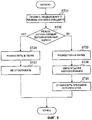
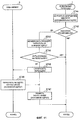
Фиг.5 представляет собой диаграмму, поясняющую виды отображения при входящих вызовах в мобильном оконечном устройстве в соответствии с вариантом осуществления изобретения. Когда мобильный терминал 1 принимает вызов в состоянии включенной услуги нескольких номеров (шаг ST11), мобильный терминал 1 определяет текущий режим (шаг ST12). Если текущим является общий режим, модуль 11 управления обращается к адресной книге в модуле 17 хранения (шаг ST13). Здесь, поскольку текущим является общий режим, модуль 11 управления обращается ко всем адресным книгам - обычной адресной книге 17а, дополнительной адресной книге 17b и адресной книге 17с без настройки. Затем, если телефонный номер вызывающей стороны зарегистрирован в адресной книге, производится обратный поиск по телефонному номеру, извлекаются имя и обозначение, и модуль 14 управления дисплеем не изменяет вида отображения (шаг ST14) и отображает на дисплее 15 телефонный номер, имя и обозначение (шаг ST15). Например, в общем режиме при поступлении вызова от объекта, для которого вызовы выполняются и принимаются в дополнительном режиме, как показано на фиг.6А, имя и телефонный номер, найденные обратным поиском в дополнительной адресной книге, отображаются на дисплее 15. В этом случае на дисплее 15 также отображается индикатор дополнительного режима «дополнительный номер» (ADDITIONAL NUMBER на фиг.6А).FIG. 5 is a diagram explaining display views of incoming calls in a mobile terminal in accordance with an embodiment of the invention. When the mobile terminal 1 receives the call in the multi-number service enabled state (step ST11), the mobile terminal 1 determines the current mode (step ST12). If the common mode is current, the
Если текущим является обычный режим, определяется телефонный номер (шаг ST16) и, если входящий вызов осуществляется на обычный телефонный номер, модуль 11 управления обращается к адресной книге в модуле 17 хранения (шаг ST17). Здесь, поскольку текущим является обычный режим, модуль 11 управления обращается к обычной адресной книге 17а и адресной книге 17с без настройки. Затем, если телефонный номер вызывающей стороны зарегистрирован в обычной адресной книге, производится обратный поиск телефонного номера, извлекаются имя и обозначение, и модуль 14 управления дисплеем не изменяет вида отображения (шаг ST18) и отображает на дисплее 15 телефонный номер, имя и обозначение. В то же время, если входящий вызов выполняется на дополнительный телефонный номер, модуль 11 управления аналогичным образом обращается к адресной книге в модуле 17 хранения (шаг ST17). Здесь, поскольку текущим является обычный режим, модуль 11 управления обращается к обычной адресной книге 17а и адресной книге 17с без настройки. Здесь, поскольку вызов на телефонный номер дополнительного режима принимается в обычном режиме, модуль 14 управления дисплеем изменяет вид отображения дополнительного телефонного номера (например, изменяет цвет) (шаг ST20) и отображает на дисплее 15 только телефонный номер (шаг ST21). Например, при поступлении вызова в обычном режиме от объекта, для которого вызовы выполняются и принимаются в дополнительном режиме, как показано на фиг.6В, на дисплее 15 отображается телефонный номер с измененным видом отображения.If the normal mode is current, the telephone number is determined (step ST16), and if an incoming call is made to the regular telephone number, the
Если текущим является дополнительный режим, определяется телефонный номер (шаг ST22) и, если входящий вызов выполняется на обычный телефонный номер, модуль 11 управления обращается к адресной книге в модуле 17 хранения (шаг ST23). Здесь, поскольку текущим является дополнительный режим, модуль 11 управления обращается к дополнительной адресной книге 17b и адресной книге 17с без настройки. В этом случае, поскольку вызов на телефонный номер обычного режима принимается в дополнительном режиме, модуль 14 управления дисплеем изменяет вид отображения обычного телефонного номера (например, изменяет цвет) (шаг ST24) и отображает на дисплее 15 только телефонный номер (шаг ST25). Подобным же образом, если входящий вызов выполняется на дополнительный телефонный номер, модуль 11 управления обращается к адресной книге в модуле 17 хранения (шаг ST23). Здесь, поскольку текущим является дополнительный режим, модуль 11 управления обращается к дополнительной адресной книге 17а и адресной книге 17с без настройки. Затем, если телефонный номер вызывающей стороны зарегистрирован в дополнительной адресной книге, производится обратный поиск телефонного номера, извлекаются имя и обозначение, и модуль 14 управления дисплеем не изменяет вида отображения (шаг ST26) и отображает на дисплее 15 телефонный номер, имя и обозначение (шаг ST27). Например, в дополнительном режиме при поступлении вызова от объекта, для которого вызовы выполняются и принимаются в дополнительном режиме, как показано на фиг.6С, телефонный номер имя и обозначение отображаются на дисплее 15 без изменения вида отображения телефонного номера.If the additional mode is current, the telephone number is determined (step ST22), and if an incoming call is made to a regular telephone number, the
Как описано выше, в каком-либо режиме, кроме общего режима, при поступлении вызова на телефонный номер для другого режима, отличного от общего режима, информация из адресной книги не отображается, пропущенный вызов не отображается, и вызов не записывается в истории входящих и исходящих вызовов. В то же время в каком-либо режиме, кроме общего режима, при поступлении вызова на телефонный номер этого режима, отличного от общего режима, отображается информация из адресной книги, отображается пропущенный вызов, и вызов записывается в историю входящих и исходящих вызовов. Например, как показано на фиг.7, если мобильный терминал 1 установлен в обычный режим, то при поступлении вызова на дополнительный телефонный номер, как показано на фиг.7А, терминал 1 издает звуковой сигнал и/или вибрирует при входящем вызове, но информация из адресной книги не отображается. Вместо этого изменяется вид отображения путем изменения цвета отображения телефонного номера или аналогичным образом. Далее, как показано на фиг.7В, пропущенный вызов не отображается и, как показано на фиг.7С, вызов не записывается в историю входящих и исходящих вызовов. В то же время, если мобильный терминал 1 находится в обычном режиме, при поступлении вызова на обычный телефонный номер отображается информация из адресной книги со звуковым сигналом и/или вибрацией входящего вызова. Далее, как показано на фиг.7D, отображается пропущенный вызов и, как показано на фиг.7Е, вызов записывается в историю входящих и исходящих вызовов.As described above, in a mode other than general mode, when a call is received to a telephone number for a mode other than general mode, information from the address book is not displayed, the missed call is not displayed, and the call is not recorded in the incoming and outgoing history calls. At the same time, in any mode except the general mode, when a call is received to the telephone number of this mode other than the general mode, information from the address book is displayed, the missed call is displayed, and the call is recorded in the history of incoming and outgoing calls. For example, as shown in Fig. 7, if the mobile terminal 1 is set to normal mode, then when a call arrives at an additional telephone number, as shown in Fig. 7A, the terminal 1 emits a sound signal and / or vibrates when an incoming call, but the information from Address Book is not displayed. Instead, the display type is changed by changing the display color of the telephone number or the like. Further, as shown in FIG. 7B, the missed call is not displayed and, as shown in FIG. 7C, the call is not recorded in the history of incoming and outgoing calls. At the same time, if the mobile terminal 1 is in normal mode, when a call arrives at a regular telephone number, information from the address book with a sound signal and / or vibration of an incoming call is displayed. Next, as shown in FIG. 7D, the missed call is displayed and, as shown in FIG. 7E, the call is recorded in the history of incoming and outgoing calls.
Другими словами, что касается истории входящих вызовов, то в общем режиме, как показано на фиг.8А, на дисплее 15 отображается как вызов, принятый на обычный телефонный номер, так и вызов, принятый на дополнительный телефонный номер. В этом случае вызов на дополнительный телефонный номер идентифицируется и отображается как «дополнительный» (ADDITION). В обычном режиме, как показано на фиг.8В, отображаются только вызовы, принятые на обычный телефонный номер без отображения вызовов на дополнительный телефонный номер. В дополнительном режиме, как показано на фиг.8С, отображаются только вызовы, принятые на дополнительный телефонный номер без отображения вызовов на обычный телефонный номер. В этом случае вызовы на дополнительный телефонный номер идентифицируются и отображаются как «дополнительные» (ADDITION).In other words, with regard to the history of incoming calls, in general mode, as shown in FIG. 8A, the
Когда при услуге нескольких номеров выполняется вызов абонента, зарегистрированного в адресной книге (другими словами, когда отображается адресная книга и отображаемый объект выбирается для выполнения вызова), вызов выполняется с использованием телефонного номера, связанного с адресной книгой. Другими словами, вызов выполняется в соответствии с режимом в случае отсутствия настройки, или выполняется с использованием обычного телефонного номера в обычном режиме, или выполняется с использованием дополнительного телефонного номера в дополнительном режиме. Кроме того, когда вызов выполняется путем прямого набора номера для вызова с помощью модуля 13 ввода, для каждого вызова возможен выбор телефонного номера в общем режиме, используется обычный телефонный номер для вызова в обычном режиме и используется дополнительный телефонный номер для вызова в дополнительном режиме. Кроме того, при выполнении вызова из истории входящих и исходящих вызовов для вызова используется телефонный номер (обычный телефонный номер или дополнительный телефонный номер), использовавшийся для выполнения (приема) вызова.When a multi-number service calls a subscriber registered in the address book (in other words, when the address book is displayed and the displayed object is selected to make the call), the call is made using the phone number associated with the address book. In other words, the call is made in accordance with the mode in the absence of setup, or is performed using a regular telephone number in normal mode, or is made using an additional telephone number in secondary mode. In addition, when a call is made by directly dialing a number for a call using the
При услуге нескольких номеров предоставляется как обычный почтовый адрес, так и дополнительный почтовый адрес. Дополнительный почтовый адрес представляет собой почтовый адрес для Web-почты. При передаче почтового сообщения на дополнительный почтовый адрес Web-сервер 5 передает уведомление о приеме посредством почтового сообщения i-mode (зарегистрированный товарный знак) через узел 3 мобильной связи. Кроме того, на дополнительный почтовый адрес можно принять короткое почтовое сообщение (SMS-сообщение).With the service of several numbers, both a regular postal address and an additional postal address are provided. The alternate mailing address is the mailing address for Web mail. When sending a mail message to an additional mailing address, the
Фиг.9 представляет собой диаграмму, поясняющую прием электронной почты при услуге нескольких номеров. При получении уведомления о приеме или SMS-сообщения на дополнительный телефонный номер (шаг ST31) мобильный терминал определяет текущей режим. Например, определяется, что текущим режимом является дополнительный режим (шаг ST32). Тогда, если мобильный терминал 1 установлен в дополнительный режим, почтовое сообщение, содержащее уведомление о приеме, и SMS-сообщение помещаются в папку 17е В модуля 17 хранения (шаг ST33). Затем во время отображения на дисплее 15 Web-почты проверяется наличие в дополнительной адресной книге почтового адреса, отображаемого браузером (шаг ST34), и, если адрес найден, в браузере отображается имя из адресной книги, обозначение, история и т.п. (шаг ST35). Кроме того, в общем режиме проверяются все адресные книги 17а, 17b и 17с, в то время как в дополнительном режиме проверяется адресная книга 17с без настройки и дополнительная адресная книга 17b.Fig.9 is a diagram explaining the reception of e-mail with the service of several numbers. Upon receipt of a notification of receipt or SMS to an additional telephone number (step ST31), the mobile terminal determines the current mode. For example, it is determined that the current mode is the auxiliary mode (step ST32). Then, if the mobile terminal 1 is set to the additional mode, the mail message containing the notification of receipt and the SMS message are placed in the
Когда мобильный терминал 1 находится в обычном режиме, почтовое сообщение, содержащее уведомление о приеме, и SMS-сообщение помещаются в папку 17е В модуля 17 хранения (шаг ST36). В этом случае модуль 14 управления дисплеем не отображает на дисплее 15 папку 17е В. Кроме того, чтобы скрыть получение, модуль 14 управления дисплеем не отображает пиктограмму непрочтенного сообщения (шаг ST37).When the mobile terminal 1 is in normal mode, an email message containing a notification of receipt and an SMS message are placed in a
В случае Web-почты дисплей выглядит, как показано на фиг.10А-10Е. Другими словами, если на экране, показанном на фиг.10А, выбирается «Web-почта» (WEB MAIL), экран меняется, как показано на фиг.10В, и, если на экране для регистрации введен пароль, отображается экран, показанный на фиг.10С. Далее, например, если на экране выбран список принятых почтовых сообщений, отображается экран, показанный на фиг.10D, а если выбран список отправленных почтовых сообщений, отображается экран, показанный на фиг.10Е.In the case of Webmail, the display looks as shown in FIGS. 10A-10E. In other words, if “Webmail” (WEB MAIL) is selected on the screen shown in FIG. 10A, the screen changes as shown in FIG. 10B, and if a password is entered on the registration screen, the screen shown in FIG. .10C. Further, for example, if a list of received mail messages is selected on the screen, the screen shown in FIG. 10D is displayed, and if a list of sent mail messages is selected, the screen shown in FIG. 10E is displayed.
Далее, при отправке почты, в случае обычного почтового адреса мобильный терминал 1 может отправлять почтовые сообщения, но в случае дополнительного почтового адреса, поскольку используется Web-почта, для отправки почтового сообщения мобильный терминал 1 получает доступ к Web-серверу от модуля 12 управления связью через узел 3 мобильной связи. Соответственно, в общем режиме и в дополнительном режиме на экране меню мобильного терминала 1 выводится меню, позволяющее получить доступ к сайту Web-почты. Это меню образуется путем вставки URL (Uniform Resource Locator). В случае SMS-сообщения, поскольку почтовое сообщение может передаваться также на дополнительный телефонный номер, почтовое сообщение может передаваться в соответствии с адресной книгой в общем режиме, может передаваться с обычного телефонного номера в обычном режиме и может передаваться с дополнительного телефонного номера в дополнительном режиме.Further, when sending mail, in the case of a regular mailing address, the mobile terminal 1 can send mail messages, but in the case of an additional mailing address, since Web-mail is used, the mobile terminal 1 gets access to the Web server from the
В мобильном терминале 1 в случае, если сообщение Web-почты полностью не отображается, при приеме Web-почты она пересылается на телефонный номер, соответствующий режиму, использующему почту i-mode. Таким образом, даже если сообщение Web-почты не отображается полностью, сообщение Web-почты может отображаться полностью в качестве сообщения почты i-mode. Далее, в соответствии с такими процедурами, если во время использования нескольких почтовых адресов использование какого-либо из почтовых адресов ограничено, возможно использовать оба почтовых адреса, несмотря на ограничение в функционировании.In mobile terminal 1, if the Web-mail message is not completely displayed, when receiving Web-mail it is sent to the telephone number corresponding to the mode using i-mode mail. Thus, even if the Webmail message is not displayed completely, the Webmail message can be displayed completely as an i-mode mail message. Further, in accordance with such procedures, if during the use of several mailing addresses the use of any of the mailing addresses is limited, it is possible to use both mailing addresses, despite the limitation in operation.
Фиг.11 представляет собой диаграмму, иллюстрирующую пересылку сообщения Web-почты на почту i-mode. Мобильный терминал 1 принимает уведомление о приеме посредством почтового сообщения i-mode и просматривает Web-почту (шаг ST41). Если сообщение Web-почты не отображается полностью при просмотре почты (шаг ST42), то сообщение Web-почты пересылается на обычный почтовый адрес. Другими словами, активируется пункт «переслать на основной адрес (обычный почтовый адрес)» (шаг ST43) для инициирования пересылки (шаги ST44, ST45). Таким образом, Web-сервер 5 пересылает сообщение Web-почты на обычный почтовый адрес для почты i-mode (ST46). Мобильный терминал 1 принимает сообщение Web-почты как почтовое сообщение i-mode (шаг ST47). Затем сообщение Web-почты отображается на дисплее 15 в полном виде.11 is a diagram illustrating the forwarding of a Web mail message to i-mode mail. The mobile terminal 1 receives the notification of receipt by means of the i-mode mail message and scans the web mail (step ST41). If the Webmail message does not display completely when viewing mail (step ST42), then the Webmail message is forwarded to the regular mailing address. In other words, the “forward to primary address (regular mailing address)” item is activated (step ST43) to initiate forwarding (steps ST44, ST45). Thus, the
При услуге нескольких номеров, если установлен общий режим, возможно установить один из телефонных номеров в режим «выключено» источника питания с помощью модуля 18 управления источником питания. Кроме того, возможно установить дополнительный телефонный номер в режим «выключено» источника питания в обычном режиме и возможно установить обычный телефонный номер в режим «выключено» источника питания в дополнительном режиме. Таким образом, поскольку действие режима «выключено» источника питания связано с режимом, возможно реализовать варианты, когда пользователь не желает отвечать на входящий вызов для режима, отличного от текущего режима, и т.п. Например, если для деловых и личных целей используются различные телефонные номера, возможно предотвратить получение делового вызова в личное время. Кроме того, такой режим «выключено» источника питания может быть легко включен в мобильном терминале 1 для каждого телефонного номера, как в «публичном» режиме (public mode) или «водительском» режиме (driving mode). Например, отображением указания «не обслуживается» и т.п. режим «выключено» источника питания можно подтвердить на дисплее 15. В этом случае возможно подтверждение режима «выключено» для обычного телефонного номера (основного номера) и дополнительного телефонного номера в общем режиме, подтверждение режима «выключено» для обычного телефонного номера (основного номера) в обычном режиме и подтверждение режима «выключено» для дополнительного телефонного номера в дополнительном режиме.When the service of several numbers, if the General mode is set, it is possible to set one of the phone numbers in the “off” mode of the power source using the power
Фиг.12 представляет собой диаграмму для объяснения работы мобильного оконечного устройства в режиме «выключено» источника питания в соответствии с вариантом осуществления изобретения. При приеме вызова мобильным терминалом 1 в общем режиме (шаг ST51) определяется, установлен ли режим «выключено» источника питания (шаг ST52). Если режим «выключено» источника питания установлен для дополнительного телефонного номера в дополнительном режиме (режиме дополнительного номера), то определяется текущий режим мобильного терминала 1 (шаг ST53). Если текущим является дополнительный режим, выполняется операция «источник питания выключен» (шаг ST55). Другими словами, на дисплее 15 отображается указание «не обслуживается». Если текущим является обычный режим (режим основного номера), то определяется, вызывается ли основной номер (обычный телефонный номер) (шаг ST54). Если вызывается не основной номер, то, поскольку вызывается дополнительный номер, выполняется операция «источник питания выключен» (шаг ST55). В этом случае указание «не обслуживается» на дисплее 15 не отображается. В то же время, если вызывается основной номер, выполняется операция «входящий вызов» (шаг ST56). Далее, если мобильный терминал 1 находится в общем режиме, выполняется операция «входящий вызов» (шаг ST56).12 is a diagram for explaining the operation of the mobile terminal in the “off” mode of the power supply in accordance with an embodiment of the invention. When a call is received by the mobile terminal 1 in the general mode (step ST51), it is determined whether the power supply is “off” (step ST52). If the “power off” mode of the power supply is set for the additional telephone number in the additional mode (additional number mode), then the current mode of the mobile terminal 1 is determined (step ST53). If the auxiliary mode is current, the operation “power supply is off” is performed (step ST55). In other words, the indication “not serviced” is displayed on the
Если режим «выключено» источника питания установлен для обычного телефонного номера в обычном режиме (режиме основного номера), то определяется текущий режим мобильного терминала 1 (шаг ST57). Далее, если текущим является обычный режим, выполняется операция выключения источника питания (шаг ST55). Другими словами, на дисплее 15 отображается указание «не обслуживается». Если текущим является дополнительный режим (режим дополнительного номера), то определяется, вызывается ли дополнительный номер (дополнительный телефонный номер) (шаг ST58). Если вызывается не дополнительный номер, то, поскольку вызывается основной номер, выполняется операция выключения источника питания (шаг ST55). В этом случае указание «не обслуживается» на дисплее 15 не отображается. В то же время, если вызывается дополнительный номер, выполняется операция «входящий вызов» (шаг ST56). Далее, если мобильный терминал 1 находится в общем режиме, выполняется операция «входящий вызов» (шаг ST56).If the power supply is turned off for the regular telephone number in the normal mode (main number mode), the current mode of the mobile terminal 1 is determined (step ST57). Further, if the normal mode is current, the operation of turning off the power source is performed (step ST55). In other words, the indication “not serviced” is displayed on the
Итак, мобильное оконечное устройство в соответствии с данным вариантом осуществления имеет обычный режим, дополнительный режим и общий режим; имеет обычный телефонный номер для обычного режима и дополнительный телефонный номер для дополнительного режима; кроме того, имеет обычную адресную книгу для обычного телефонного номера и дополнительную адресную книгу для дополнительного телефонного номера; модуль отображения для отображения информации в мобильном оконечном устройстве и модуль управления, управляющий модулем отображения для отображения информации из адресной книги в соответствии с режимом мобильного оконечного устройства; и таким образом способно выполнять функции, служащие для реализации раздельного использования в деловых и личных целях, обычного и временного использования и т.п.So, the mobile terminal device in accordance with this embodiment has a normal mode, an additional mode, and a general mode; has a regular phone number for normal mode and an additional phone number for additional mode; in addition, it has a regular address book for a regular phone number and an additional address book for an additional phone number; a display module for displaying information in the mobile terminal device; and a control module controlling a display module for displaying information from the address book in accordance with the mode of the mobile terminal device; and thus able to perform functions that serve for the implementation of separate use for business and personal purposes, ordinary and temporary use, etc.
Кроме того, в мобильном терминале 1 в общем режиме возможно установить экран ожидания (standby screen) для общего режима, в обычном режиме возможно установить экран ожидания для обычного режима и в дополнительном режиме возможно установить экран ожидания для дополнительного режима. Кроме того, в мобильном терминале 1 настройки для входящих вызовов, такие как вызывной сигнал, экран при входящем вызове, характер/вид виброзвонка и т.п., могут устанавливаться для каждого из соответствующих вызовов на обычный телефонный номер и дополнительный телефонный номер. Другими словами, возможно установить соответствующие настройки для входящих вызовов для обычного режима и дополнительного режима в общем режиме, сделать соответствующие настройки для входящих вызовов для обычного режима в обычном режиме и сделать соответствующие настройки для входящих вызовов для дополнительного режима в дополнительном режиме.In addition, in the mobile terminal 1 in the general mode, it is possible to set a standby screen for the general mode, in the normal mode it is possible to set the standby screen for the normal mode, and in the additional mode it is possible to set the standby screen for the additional mode. In addition, in the mobile terminal 1, settings for incoming calls, such as a ringing tone, a screen for an incoming call, the nature / type of a vibrating alert, etc., can be set for each of the calls to a regular telephone number and an additional telephone number. In other words, it is possible to set the appropriate settings for incoming calls for regular mode and secondary mode in general mode, make the appropriate settings for incoming calls for normal mode in normal mode, and make the appropriate settings for incoming calls for secondary mode in secondary mode.
Более того, в мобильном терминале 1 возможно установить режим автоответчика и режим переадресации как для обычного телефонного номера, так и для дополнительного телефонного номера. Такие настройки возможны и для обычного телефонного номера, и для дополнительного телефонного номера в общем режиме, для обычного телефонного номера в обычном режиме и для дополнительного телефонного номера в дополнительном режиме. Кроме того, что касается отображения пиктограммы, уведомляющей о состоянии автоответчика, то, например, отображается уведомление о количестве принятых звонков для возможности распознавания уведомления в виде пиктограммы (значка) как для обычного телефонного номера, так и для дополнительного телефонного номера в общем режиме, уведомление о количестве принятых звонков для обычного телефонного номера отображается только в обычном режиме, а уведомление о количестве принятых звонков для дополнительного телефонного номера отображается только в дополнительном режиме.Moreover, in the mobile terminal 1, it is possible to set the answering machine mode and call forwarding mode for both a regular telephone number and an additional telephone number. Such settings are possible both for a regular telephone number, and for an additional telephone number in general mode, for a regular telephone number in normal mode, and for an additional telephone number in auxiliary mode. In addition, with regard to the display of the icon notifying the state of the answering machine, for example, a notification of the number of received calls is displayed to enable recognition of the notification in the form of a pictogram (icon) for both a regular telephone number and an additional telephone number in general mode, notification the number of received calls for a regular phone number is displayed only in normal mode, and a notification about the number of received calls for an additional phone number is displayed ko in the additional mode.
Кроме того, для дополнительного телефонного номера и дополнительного почтового адреса могут быть установлены описания меню. В общем режиме, как показано на фиг.13А, на дисплее 15 отображаются телефонные номера и почтовые адреса обоих режимов. В обычном режиме, как показано на фиг.13В, на дисплее 15 отображается обычный телефонный номер и обычный почтовый адрес. В дополнительном режиме, как показано на фиг.13С, на дисплее 15 отображается дополнительный телефонный номер и дополнительный почтовый адрес.In addition, menu descriptions can be set for an additional telephone number and an additional mailing address. In general mode, as shown in FIG. 13A, the telephone numbers and mailing addresses of both modes are displayed on the
Мобильное оконечное устройство в данном изобретении представляет собой мобильное оконечное устройство, способное выполнять и принимать вызовы с использованием первой идентификационной информации, и выполнять и принимать вызовы с использованием второй идентификационной информации; содержит модуль изменения режима, который переключает режим между первым режимом, вторым режимом и общим режимом, и модуль управления исходящими вызовами, который выполняет вызов с использованием первой идентификационной информации в первом режиме, выполняет вызов с использованием второй идентификационной информации во втором режиме и выполняет вызов с использованием первой идентификационной информации или второй идентификационной информации в общем режиме; и таким образом способно выполнять функции, служащие для реализации раздельного использования в деловых и личных целях, обычного и временного использования и т.п.The mobile terminal device in this invention is a mobile terminal device capable of making and receiving calls using the first identification information, and making and receiving calls using the second identification information; comprises a mode changing module that switches the mode between the first mode, the second mode and the general mode, and an outgoing call control module that makes a call using the first identification information in the first mode, makes a call using the second identification information in the second mode, and makes a call with using the first identification information or the second identification information in a common mode; and thus able to perform functions that serve for the implementation of separate use for business and personal purposes, ordinary and temporary use, etc.
Данное изобретение не ограничивается конфигурацией, описанной в указанном выше варианте осуществления, и вид отображения на экране и т.п. может реализовываться на практике с соответствующими изменениями без отклонения от сути данного изобретения. Указанный выше вариант осуществления описывает случай установки нескольких раздельных адресных книг, но данное изобретение можно изменить так, чтобы объекты обычного режима и объекты дополнительного режима содержались в одной адресной книге, а для различения объектов обычного режима и объектов дополнительного режима использовались идентификаторы, позволяющие создавать виртуальные адресные книги для обычного режима и для дополнительного режима. Более того, данный вариант осуществления может быть реализован на практике с внесенными в него изменениями без выхода за рамки данного изобретения.The present invention is not limited to the configuration described in the above embodiment, and a display type on a screen or the like. can be implemented in practice with appropriate changes without deviating from the essence of this invention. The above embodiment describes the case of installing several separate address books, but this invention can be changed so that the objects of the normal mode and the objects of the additional mode are contained in the same address book, and identifiers are used to distinguish between the objects of the ordinary mode and the objects of the additional mode, which allow creating virtual address books books for normal mode and for additional mode. Moreover, this embodiment may be practiced, as amended, without departing from the scope of the present invention.
Claims (20)
Applications Claiming Priority (2)
| Application Number | Priority Date | Filing Date | Title |
|---|---|---|---|
| JP2006260649A JP4574603B2 (en) | 2006-09-26 | 2006-09-26 | Mobile terminal device |
| JP2006-260649 | 2006-09-26 |
Publications (2)
| Publication Number | Publication Date |
|---|---|
| RU2009113227A RU2009113227A (en) | 2010-11-10 |
| RU2425467C2 true RU2425467C2 (en) | 2011-07-27 |
Family
ID=39229994
Family Applications (1)
| Application Number | Title | Priority Date | Filing Date |
|---|---|---|---|
| RU2009113227/09A RU2425467C2 (en) | 2006-09-26 | 2007-09-20 | Mobile terminal device |
Country Status (9)
| Country | Link |
|---|---|
| US (2) | US8428656B2 (en) |
| EP (1) | EP2071858A4 (en) |
| JP (1) | JP4574603B2 (en) |
| KR (1) | KR101075391B1 (en) |
| CN (2) | CN102685723B (en) |
| AU (1) | AU2007301252B2 (en) |
| RU (1) | RU2425467C2 (en) |
| TW (1) | TWI376138B (en) |
| WO (1) | WO2008038558A1 (en) |
Families Citing this family (20)
| Publication number | Priority date | Publication date | Assignee | Title |
|---|---|---|---|---|
| JP5227665B2 (en) * | 2008-06-03 | 2013-07-03 | ソフトバンクモバイル株式会社 | Communication terminal device |
| JP5274221B2 (en) * | 2008-11-28 | 2013-08-28 | ソフトバンクモバイル株式会社 | Mobile communication terminal device, mobile communication terminal control method, and mobile communication terminal control program |
| KR20120006066A (en) * | 2009-06-16 | 2012-01-17 | 인텔 코오퍼레이션 | Camera applications in a handheld device |
| JP5576074B2 (en) | 2009-08-27 | 2014-08-20 | 京セラ株式会社 | Mobile terminal device |
| US9143597B2 (en) | 2009-09-21 | 2015-09-22 | Avaya Inc. | Method for telephony client synchronization in telephone virtualization |
| US9338273B2 (en) * | 2009-09-22 | 2016-05-10 | Avaya Inc. | Method for telephony client synchronization in telephone virtualization |
| US8718611B2 (en) * | 2009-09-30 | 2014-05-06 | Avaya Inc. | Method for the selection of an active software environment of a virtualized telecommunications terminal |
| US9094426B2 (en) * | 2009-11-20 | 2015-07-28 | Avaya Inc. | Method for telecommunications device synchronization |
| JP5683128B2 (en) * | 2010-04-28 | 2015-03-11 | キヤノン株式会社 | COMMUNICATION DEVICE, ITS CONTROL METHOD, AND PROGRAM |
| CN102263850A (en) * | 2010-05-29 | 2011-11-30 | 比亚迪股份有限公司 | A mobile terminal and display method thereof |
| JP5597058B2 (en) * | 2010-08-11 | 2014-10-01 | 京セラ株式会社 | Mobile terminal, unnotified information display control program, and unnotified information display control method |
| KR101890674B1 (en) * | 2011-12-07 | 2018-08-22 | 엘지전자 주식회사 | Mobile Terminal And Method For Controlling Operation Thereof |
| JP2013143689A (en) * | 2012-01-11 | 2013-07-22 | Nec Commun Syst Ltd | Communication terminal, communication start control, and communication start control program |
| WO2013127055A1 (en) * | 2012-02-27 | 2013-09-06 | Nokia Corporation | Apparatus and associated methods |
| KR102003740B1 (en) | 2012-12-21 | 2019-10-01 | 삼성전자주식회사 | Device and method for managing phone number in terminal |
| CN104601736B (en) | 2013-10-30 | 2018-10-23 | 腾讯科技(深圳)有限公司 | A kind of implementation method and device of short URL services |
| CN104202734A (en) * | 2014-09-23 | 2014-12-10 | 酷派软件技术(深圳)有限公司 | Notification processing method, notification processing device and terminal |
| JP6433298B2 (en) * | 2015-01-07 | 2018-12-05 | 西菱電機株式会社 | Communication device |
| US10250745B2 (en) | 2017-08-28 | 2019-04-02 | T-Mobile Usa, Inc. | Identifying the cellular number on a cellular device capable of supporting multiple cellular numbers |
| DE102017129353A1 (en) | 2017-12-08 | 2019-06-13 | Ensinger Gmbh | Polymer-based substrate and process for its preparation |
Citations (3)
| Publication number | Priority date | Publication date | Assignee | Title |
|---|---|---|---|---|
| JP2000261545A (en) * | 1999-03-04 | 2000-09-22 | Nec Corp | Method and system for controlling sending and receiving by mobile station having a plurality of identification numbers |
| RU27767U1 (en) * | 2002-10-08 | 2003-02-10 | Шумилин Владимир Сергеевич | PHONE WITH TWO AND MORE SIM CARD |
| EP1511278A2 (en) * | 2003-08-25 | 2005-03-02 | Nec Corporation | Portable communication terminal , computer program and method for originating a call |
Family Cites Families (59)
| Publication number | Priority date | Publication date | Assignee | Title |
|---|---|---|---|---|
| FI96564C (en) | 1991-07-08 | 1996-07-10 | Nokia Mobile Phones Ltd | Private telephone number in cellular telephone system |
| US7260203B2 (en) * | 1992-08-26 | 2007-08-21 | Bellsouth Intellectual Property Corporation | Method and apparatus for routing calls based on identification of the calling party or calling line |
| JP2004120788A (en) * | 1993-12-27 | 2004-04-15 | Casio Comput Co Ltd | Mobile phone equipment |
| CA2180991C (en) * | 1996-07-11 | 2001-08-21 | Peter Couse | Intelligent cordless telephone interface device |
| US5838777A (en) * | 1997-02-28 | 1998-11-17 | Inventec Corporation | Apparatus for auto-detecting dialing of a parallel communication device |
| JP3857388B2 (en) * | 1997-06-27 | 2006-12-13 | 富士通株式会社 | Mobile communication terminal |
| US6567671B2 (en) * | 1997-08-11 | 2003-05-20 | At&T Wireless Services, Inc. | Wireless communication device with call screening |
| JPH11205422A (en) * | 1998-01-19 | 1999-07-30 | Matsushita Electric Ind Co Ltd | Mobile terminal device |
| US6574471B1 (en) * | 1998-02-03 | 2003-06-03 | Ericsson Inc. | Apparatus and method for handling incoming calls received by a portable intelligent communications device during a meeting |
| JPH11234193A (en) | 1998-02-16 | 1999-08-27 | Canon Inc | Portable terminal device and control method thereof |
| JP2000236385A (en) * | 1999-02-17 | 2000-08-29 | Sony Corp | Cordless telephone |
| JP2000253111A (en) * | 1999-03-01 | 2000-09-14 | Toshiba Corp | Wireless mobile terminal |
| KR20000074880A (en) * | 1999-05-26 | 2000-12-15 | 김남영 | One-Two-Three h.p. |
| JP2001045136A (en) | 1999-07-29 | 2001-02-16 | Hitachi Commun Syst Inc | Telephone |
| JP2002084360A (en) * | 2000-06-29 | 2002-03-22 | Toshiba Corp | Communication terminal with caller identification information display function |
| US20020034930A1 (en) * | 2000-09-11 | 2002-03-21 | Shunpei Yamazaki | Electronic device and method of usage thereof |
| US6970706B2 (en) * | 2000-12-05 | 2005-11-29 | Siemens Communications, Inc. | Hierarchical call control with selective broadcast audio messaging system |
| US7133859B1 (en) * | 2001-01-05 | 2006-11-07 | Palm, Inc. | Category specific sort and display instructions for an electronic device |
| JP2003110684A (en) * | 2001-09-27 | 2003-04-11 | Brother Ind Ltd | Electronic address book, communication device, and computer program |
| JP2003189361A (en) | 2001-12-18 | 2003-07-04 | Toshiba Corp | Mobile communication terminal |
| JP4085237B2 (en) * | 2001-12-21 | 2008-05-14 | 日本電気株式会社 | Mobile phone usage contract system and communication method |
| AUPS107202A0 (en) * | 2002-03-13 | 2002-04-11 | K W Dinn Holdings Pty Limited | Improved device interface |
| CN1185847C (en) * | 2002-03-25 | 2005-01-19 | 英华达(上海)电子有限公司 | Method for intelligence switch between two cards in mobile phones |
| JP2004007054A (en) * | 2002-05-30 | 2004-01-08 | Sanyo Electric Co Ltd | Communication apparatus |
| KR20030093038A (en) * | 2002-06-01 | 2003-12-06 | 삼성전자주식회사 | Recipient's situation mode service method and mobile communication terminal therefor |
| WO2004019637A1 (en) * | 2002-08-20 | 2004-03-04 | Mitsubishi Denki Kabushiki Kaisha | Method and device for receiving radio signal |
| US20040198461A1 (en) * | 2002-09-12 | 2004-10-07 | Coombes Daniel J. | Method and apparatus for answering incoming calls at a mobile communication device |
| US7844667B2 (en) * | 2003-01-22 | 2010-11-30 | Nec Corporation | Presence system and information processing equipment, dynamic buddy list generation method in presence system, and presence notification destination controlling method and its program for use with presence system |
| KR100493170B1 (en) * | 2003-02-06 | 2005-06-02 | 삼성전자주식회사 | Context-based telecommunication method and mobile telecommunication system therefor |
| US20040242213A1 (en) * | 2003-06-02 | 2004-12-02 | Benco David S. | Network-based power up of a mobile unit |
| US7117445B2 (en) * | 2003-06-30 | 2006-10-03 | Danger, Inc. | Multi-mode communication apparatus and interface for contacting a user |
| JP4235521B2 (en) * | 2003-09-24 | 2009-03-11 | キヤノン株式会社 | Image processing apparatus and display control method for image processing apparatus |
| JP4448000B2 (en) * | 2003-11-05 | 2010-04-07 | キヤノン株式会社 | Information transmission apparatus, information transmission destination designation method, storage medium, and program |
| KR100854717B1 (en) * | 2003-12-01 | 2008-08-27 | (주)한국아이바스 | Multi mobile phone, multi number support system using same and method thereof |
| JP2005184539A (en) * | 2003-12-19 | 2005-07-07 | Aruze Corp | Mobile phone |
| JP2005204226A (en) | 2004-01-19 | 2005-07-28 | Aruze Corp | Mobile phone |
| JP4213598B2 (en) | 2004-01-21 | 2009-01-21 | アルゼ株式会社 | Mobile phone and mobile phone control program |
| JP2005252610A (en) | 2004-03-03 | 2005-09-15 | Sharp Corp | Mobile device |
| US20050260975A1 (en) * | 2004-05-19 | 2005-11-24 | Chen Christopher Y W | Telecommunications system and method for providing an automatic notification of availability of a communication device to establish a telephone call |
| KR20050113347A (en) * | 2004-05-27 | 2005-12-02 | 엘지전자 주식회사 | Method for caller confirming by color conversion of call alarming apparatus |
| JP2005348233A (en) | 2004-06-04 | 2005-12-15 | Nec Software Chubu Ltd | Communication system, communication method, mobile telephone device, relay device, and program thereof |
| JP2006014008A (en) | 2004-06-28 | 2006-01-12 | Ricoh Co Ltd | Calling system and calling method |
| US20060046786A1 (en) * | 2004-09-02 | 2006-03-02 | Franco Montebovi | Mobile communication terminal and method |
| WO2006038779A1 (en) * | 2004-10-01 | 2006-04-13 | Samsung Electronics Co., Ltd. | Device and method for displaying event in wireless terminal |
| JP2006121335A (en) | 2004-10-20 | 2006-05-11 | Vodafone Kk | Information communication terminal, communication management system, and communication system |
| JP2006121334A (en) | 2004-10-20 | 2006-05-11 | Vodafone Kk | Information communication terminal and communication management system |
| JP2006121336A (en) | 2004-10-20 | 2006-05-11 | Vodafone Kk | Information communication terminal, communication management system, and communication system |
| JP4116627B2 (en) * | 2005-01-28 | 2008-07-09 | 株式会社東芝 | Communication terminal |
| WO2006098012A1 (en) * | 2005-03-16 | 2006-09-21 | Fujitsu Limited | Communication terminal apparatus and program |
| US20060223584A1 (en) * | 2005-03-30 | 2006-10-05 | Lucent Technologies Inc. | Notify me service in wireless networks |
| US7941183B2 (en) * | 2005-07-05 | 2011-05-10 | Nec Corporation | Telephone and incoming call notification method for telephone |
| JP2006014355A (en) | 2005-07-25 | 2006-01-12 | Ricoh Co Ltd | Communication terminal device |
| US20070072648A1 (en) * | 2005-09-23 | 2007-03-29 | Stoops Daniel S | Method and apparatus for identifying a calling party |
| US7792253B2 (en) * | 2005-10-27 | 2010-09-07 | International Business Machines Corporation | Communications involving devices having different communication modes |
| CN1964366B (en) * | 2005-11-10 | 2011-02-02 | 鸿富锦精密工业(深圳)有限公司 | Dual screen mobile device and its display method |
| US20070111714A1 (en) * | 2005-11-14 | 2007-05-17 | Bellsouth Intellectual Property Corporation | Methods and apparatus for recognizing home network provider of incoming wireless calls |
| CN1809192A (en) * | 2006-02-07 | 2006-07-26 | 宇龙计算机通信科技(深圳)有限公司 | Call interface system and method for mobile communication terminal |
| US20070202895A1 (en) * | 2006-02-27 | 2007-08-30 | Benco David S | SMS notification of called party availability |
| US20070224944A1 (en) * | 2006-03-10 | 2007-09-27 | Hsiang Chen | Portable device having changeable operating modes |
-
2006
- 2006-09-26 JP JP2006260649A patent/JP4574603B2/en not_active Expired - Fee Related
-
2007
- 2007-09-20 EP EP07807608A patent/EP2071858A4/en not_active Withdrawn
- 2007-09-20 US US12/442,591 patent/US8428656B2/en not_active Expired - Fee Related
- 2007-09-20 CN CN201210159922.8A patent/CN102685723B/en not_active Expired - Fee Related
- 2007-09-20 KR KR1020097008410A patent/KR101075391B1/en not_active Expired - Fee Related
- 2007-09-20 AU AU2007301252A patent/AU2007301252B2/en not_active Ceased
- 2007-09-20 CN CN2007800357182A patent/CN101518109B/en not_active Expired - Fee Related
- 2007-09-20 WO PCT/JP2007/068244 patent/WO2008038558A1/en not_active Ceased
- 2007-09-20 RU RU2009113227/09A patent/RU2425467C2/en not_active IP Right Cessation
- 2007-09-21 TW TW096135541A patent/TWI376138B/en not_active IP Right Cessation
-
2012
- 2012-07-05 US US13/542,174 patent/US8611961B2/en not_active Expired - Fee Related
Patent Citations (3)
| Publication number | Priority date | Publication date | Assignee | Title |
|---|---|---|---|---|
| JP2000261545A (en) * | 1999-03-04 | 2000-09-22 | Nec Corp | Method and system for controlling sending and receiving by mobile station having a plurality of identification numbers |
| RU27767U1 (en) * | 2002-10-08 | 2003-02-10 | Шумилин Владимир Сергеевич | PHONE WITH TWO AND MORE SIM CARD |
| EP1511278A2 (en) * | 2003-08-25 | 2005-03-02 | Nec Corporation | Portable communication terminal , computer program and method for originating a call |
Also Published As
| Publication number | Publication date |
|---|---|
| US20120276950A1 (en) | 2012-11-01 |
| WO2008038558A1 (en) | 2008-04-03 |
| AU2007301252B2 (en) | 2011-05-12 |
| TWI376138B (en) | 2012-11-01 |
| JP4574603B2 (en) | 2010-11-04 |
| EP2071858A4 (en) | 2011-11-09 |
| AU2007301252A1 (en) | 2008-04-03 |
| US20110098089A1 (en) | 2011-04-28 |
| US8611961B2 (en) | 2013-12-17 |
| CN102685723B (en) | 2015-07-22 |
| JP2008085456A (en) | 2008-04-10 |
| CN102685723A (en) | 2012-09-19 |
| US8428656B2 (en) | 2013-04-23 |
| EP2071858A1 (en) | 2009-06-17 |
| RU2009113227A (en) | 2010-11-10 |
| CN101518109B (en) | 2012-10-24 |
| KR101075391B1 (en) | 2011-10-24 |
| CN101518109A (en) | 2009-08-26 |
| TW200826603A (en) | 2008-06-16 |
| KR20090073204A (en) | 2009-07-02 |
Similar Documents
| Publication | Publication Date | Title |
|---|---|---|
| RU2425467C2 (en) | Mobile terminal device | |
| KR100469737B1 (en) | System and method for notifying a user of the status of other mobile terminals | |
| US9137362B2 (en) | Method and system for managing communication sessions set-up between users | |
| JP2008005125A (en) | Mobile phone terminal | |
| JP4394102B2 (en) | Communications system | |
| KR100779369B1 (en) | How to Sign Up, Change, and Terminate a Multi Phone Number Service | |
| JP2007251332A (en) | Mobile communication terminal, incoming call management device, and program | |
| KR20130049601A (en) | Call control method according to the presence information | |
| JP2003323380A (en) | Information processing apparatus, information processing method, and information processing program | |
| JP4704481B2 (en) | Mobile terminal device | |
| KR100673246B1 (en) | Method of providing called party information in mobile communication network | |
| JPH11331412A (en) | Telephone terminal device | |
| JP2000349906A (en) | Communication device and communication management device | |
| KR100738201B1 (en) | How to provide caller / caller nickname display service in connection with user address book | |
| KR100823439B1 (en) | Method and system for providing outgoing call information of incoming call in multi-number service | |
| HK1126918A (en) | Mobile object terminal device | |
| KR100910301B1 (en) | Method and system for providing instant messenger service to subscribers of multi-number service and wireless communication terminal for same | |
| JP2001320502A (en) | Communication device and control method thereof | |
| JP4679326B2 (en) | Communication system and communication method | |
| KR100613979B1 (en) | Messaging service method to select whether to save temporarily in communication network, wireless communication terminal and method thereof | |
| KR101082661B1 (en) | A mobile terminal for multi-number service and a method of data processing using the same | |
| JP2003324767A (en) | Portable wireless terminal |
Legal Events
| Date | Code | Title | Description |
|---|---|---|---|
| MM4A | The patent is invalid due to non-payment of fees |
Effective date: 20170921 |