US10032299B2 - Portable image device for generating application images - Google Patents
Portable image device for generating application images Download PDFInfo
- Publication number
- US10032299B2 US10032299B2 US15/089,971 US201615089971A US10032299B2 US 10032299 B2 US10032299 B2 US 10032299B2 US 201615089971 A US201615089971 A US 201615089971A US 10032299 B2 US10032299 B2 US 10032299B2
- Authority
- US
- United States
- Prior art keywords
- image
- portable
- input
- application
- screen
- Prior art date
- Legal status (The legal status is an assumption and is not a legal conclusion. Google has not performed a legal analysis and makes no representation as to the accuracy of the status listed.)
- Active, expires
Links
Images




Classifications
-
- H—ELECTRICITY
- H04—ELECTRIC COMMUNICATION TECHNIQUE
- H04N—PICTORIAL COMMUNICATION, e.g. TELEVISION
- H04N13/00—Stereoscopic video systems; Multi-view video systems; Details thereof
- H04N13/10—Processing, recording or transmission of stereoscopic or multi-view image signals
- H04N13/189—Recording image signals; Reproducing recorded image signals
-
- G—PHYSICS
- G06—COMPUTING OR CALCULATING; COUNTING
- G06T—IMAGE DATA PROCESSING OR GENERATION, IN GENERAL
- G06T11/00—Two-dimensional [2D] image generation
- G06T11/60—Creating or editing images; Combining images with text
-
- G—PHYSICS
- G06—COMPUTING OR CALCULATING; COUNTING
- G06T—IMAGE DATA PROCESSING OR GENERATION, IN GENERAL
- G06T3/00—Geometric image transformations in the plane of the image
- G06T3/40—Scaling of whole images or parts thereof, e.g. expanding or contracting
-
- H—ELECTRICITY
- H04—ELECTRIC COMMUNICATION TECHNIQUE
- H04N—PICTORIAL COMMUNICATION, e.g. TELEVISION
- H04N13/00—Stereoscopic video systems; Multi-view video systems; Details thereof
- H04N13/20—Image signal generators
- H04N13/261—Image signal generators with monoscopic-to-stereoscopic image conversion
-
- G—PHYSICS
- G09—EDUCATION; CRYPTOGRAPHY; DISPLAY; ADVERTISING; SEALS
- G09G—ARRANGEMENTS OR CIRCUITS FOR CONTROL OF INDICATING DEVICES USING STATIC MEANS TO PRESENT VARIABLE INFORMATION
- G09G2320/00—Control of display operating conditions
- G09G2320/02—Improving the quality of display appearance
- G09G2320/0209—Crosstalk reduction, i.e. to reduce direct or indirect influences of signals directed to a certain pixel of the displayed image on other pixels of said image, inclusive of influences affecting pixels in different frames or fields or sub-images which constitute a same image, e.g. left and right images of a stereoscopic display
Definitions
- the present disclosure relates to an apparatus and method for displaying an image on a portable image device. More particularly, the present disclosure relates to an apparatus and method for generating a stereo image associated with an application using a portable image device.
- An application is a program designed to perform a group of coordinated functions, tasks, or activities on an electronic device.
- an application can include at least one of a word processing function, a communication function including audio, video, and data communications including telephone calls, SMS/MMS messages, email, etc., scheduling or calendar functions, alarm functions, calculator functions, etc.
- images associated with an executed application are displayed on a display of the electronic device in a two-dimensional format where a single image having a single focal point is generated.
- the images to be displayed are generated by processing and rendering image content data into panels where the processing and rendering of the image content data is performed or refreshed every frame.
- the processing and rendering techniques according to the related art create undesired visual artifacts.
- the edges of the image may vary slightly due to rendering differences between each frame causing aliasing or jagged edges in continuous stereo frames. This aliasing may undesirably make the image appear to be wiggling or swimming.
- an aspect of the present disclosure is to provide an apparatus and method for generating a stereo image associated with an application using a portable image device to reduce undesirable visual artifacts.
- a method for displaying an image on a portable image device includes receiving a first input indicative of an input associated with an application, generating a first image object in a buffer of the portable image device, storing the first image object in a memory of the portable image device, generating a first image using the first image object stored in the memory of the portable image device, and displaying the first image on an image display device of the portable image device.
- a portable image device includes an image display device configured to display an image, an input device configured to receive an input, and a controller configured to: receive a first input from the input device, the first input being indicative of an input associated with an application, control a buffer to generate a first image object, store the first image object in a memory, control a stereo image composer device to generate a first image using the first image object stored in the memory, and control the image display device to display the first image.
- FIG. 1 illustrates a front perspective view of a portable image device according to various embodiments of the present disclosure
- FIG. 2 illustrates a rear perspective view of the portable image device according to various embodiments of the present disclosure
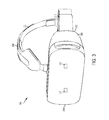
- FIG. 3 illustrates a front perspective view of another portable image device according to various embodiments of the present disclosure
- FIG. 4 is a block diagram illustrating a configuration of a portable image device according to various embodiments of the present disclosure
- FIG. 5 is a flow chart illustrating a method of generating an image according to various embodiments of the present disclosure
- FIG. 6 is a flow chart illustrating another method of generating an image according to various embodiments of the present disclosure.
- FIG. 7 is a flow chart illustrating another method of generating an image according to various embodiments of the present disclosure.
- FIG. 8 is a flow chart illustrating another method of generating an image according to various embodiments of the present disclosure.
- an electronic device may include communication functionality.
- an electronic device may be a smart phone, a tablet personal computer (PC), a mobile phone, a video phone, an e-book reader, a desktop PC, a laptop PC, a netbook PC, a personal digital assistant (PDA), a portable multimedia player (PMP), an MP3 player, a mobile medical device, a camera, a wearable device (e.g., a head-mounted device (HMD), electronic clothes, electronic braces, an electronic necklace, an electronic appcessory, an electronic tattoo, or a smart watch), and/or the like.
- HMD head-mounted device
- HMD head-mounted device
- electronic clothes electronic braces
- an electronic necklace an electronic appcessory
- an electronic tattoo or a smart watch
- an electronic device may be a smart home appliance with communication functionality.
- a smart home appliance may be, for example, a television, a digital video disk (DVD) player, an audio, a refrigerator, an air conditioner, a vacuum cleaner, an oven, a microwave oven, a washer, a dryer, an air purifier, a set-top box, a TV box (e.g., SAMSUNG HOMESYNC, APPLE TV, or GOOGLE TV), a gaming console, an electronic dictionary, an electronic key, a camcorder, an electronic picture frame, and/or the like.
- DVD digital video disk
- an electronic device may be a medical device (e.g., magnetic resonance angiography (MRA) device, a magnetic resonance imaging (MRI) device, computed tomography (CT) device, an imaging device, or an ultrasonic device), a navigation device, a global positioning system (GPS) receiver, an event data recorder (EDR), a flight data recorder (FDR), an automotive infotainment device, a naval electronic device (e.g., naval navigation device, gyroscope, or compass), an avionic electronic device, a security device, an industrial or consumer robot, and/or the like.
- MRA magnetic resonance angiography
- MRI magnetic resonance imaging
- CT computed tomography
- imaging device an imaging device
- ultrasonic device ultrasonic device
- GPS global positioning system
- EDR event data recorder
- FDR flight data recorder
- automotive infotainment device e.g., a navigation device, a global positioning system (GPS) receiver, an event data recorder (
- an electronic device may be furniture, part of a building/structure, an electronic board, electronic signature receiving device, a projector, various measuring devices (e.g., water, electricity, gas or electro-magnetic wave measuring devices), and/or the like that include communication functionality.
- various measuring devices e.g., water, electricity, gas or electro-magnetic wave measuring devices
- an electronic device may be any combination of the foregoing devices.
- an electronic device according to various embodiments of the present disclosure is not limited to the foregoing devices.
- Various embodiments of the present disclosure include an apparatus and method for simulating interaction with an electronic device using a portable image device.
- FIG. 1 illustrates a front perspective view of a portable image device according to various embodiments of the present disclosure.
- FIG. 2 illustrates a rear perspective view of the portable image device according to various embodiments of the present disclosure.
- a portable image device 100 is configured to display an image to be viewed by a single user.
- the portable image device 100 may be any type of portable image device such as a heads-up display or a head-mounted display (HIVID).
- the portable image device 100 may include glasses, goggles, or a helmet worn on the head of a user.
- the portable image device 100 may be a heads-up display that displays an image on, in, or through a transparent display where the image is superimposed over a current viewpoint which allows for simultaneous viewing of the image and the current surroundings.
- the portable image device 100 may include a housing 102 , a first transparent display 104 , a second transparent display 106 , an image capture device 108 , a first projection device 110 , and a second projection device 112 .
- the portable image device 100 may further include at least one of an input device and an output device. While the portable image device 100 is shown as having a configuration as illustrated in FIGS. 1 and 2 , one of ordinary skill in the art would recognize that the portable image device 100 may have any configuration including size, shape, arrangement, and/or orientation.
- the housing 102 may include a front frame 114 , a rear frame 116 , a first support 118 , and a second support 120 .
- the first support 118 and the second support 120 may be pivotally mounted to the housing 102 by hinges 122 and 124 , respectively.
- the first support 118 and the second support 120 may be secured to the housing 102 in any manner.
- the housing 102 may include various types of materials including glass, plastic, metal, and a combination thereof.
- the first transparent display 104 and the second transparent display 106 are configured to display an image.
- the first projection device 110 may project a first image onto the first transparent display 104 and the second projection device 112 may project a second image onto the second transparent display 106 .
- the first image and the second image may be displayed to create a stereographic image or a three-dimensional image.
- the first transparent display 104 and the second transparent display 106 may be made of any transparent material including glass, plastic, etc.
- the image capture device 108 is configured to capture an image.
- the image capture device 108 may capture an image external to the portable image device 100 such as within the surrounding environment of the portable image device 100 .
- the image capture device 108 may capture an image that is within the line of sight of a user of the portable image device 100 .
- the image capture device 108 may capture an image which a user is unable to see within a direct line of sight.
- the image capture device 108 may include one or more cameras. As illustrated in FIG. 1 , a single image capture device 108 is arranged in the housing 102 between the first transparent display 104 and the second transparent display 106 . However, one or more image capture devices may be arranged in any position on the front frame 114 . For instance, an image capture device 108 may be arranged above, below, to the left and/or to the right of the first transparent display 104 and/or the second transparent display 106 .
- the image capture device 108 may be any type of capture device including an infrared camera, a red-green-blue (RGB) camera, a combination thereof, etc.
- RGB red-green-blue
- the portable image device 100 may further include one or more image capture devices (not illustrated) disposed on the rear frame 116 of the housing 102 where the image capture devices disposed on the rear frame 116 are orientated to capture images associated with the user such as for eye-tracking techniques, etc.
- the first projection device 110 and the second projection device 112 are configured to project images onto the first transparent display 104 and the second transparent display 106 , respectively.
- the first projection device 110 and the second projection device 112 may be disposed within the housing 102 where the light is projected through an opening formed in the housing 102 or the first projection device 110 and the second projection device 112 may be disposed on a surface of the housing 102 .
- the portable image device 100 can further include at least one of an input device and/or an output device.
- the input device can include one or more input devices such as a microphone 126 configured to generate an electrical signal from a sound wave where the electrical signal indicates an input from a user and at least one button 128 configured to receive a tactile input from a user.
- the at least one button 128 may include one or more touch sensors configured to operate as a power button, a volume button, a menu button, a home button, a back button, navigation buttons (e.g., left button, right button, up button, down button, etc.), and/or a combination thereof.
- the output device may include one or more output devices such as an audio output device 130 (e.g., a speaker) configured to output sound associated with the portable image device 100 and a vibration output device (not illustrated).
- the input device and/or the output device may be integrally formed with the portable image device 100 .
- the at least one button 128 may be disposed on the housing 102 of the portable image device 100 .
- the microphone 126 may be integrally formed with the housing 102 of the portable image device 100 .
- the input device and/or the output device may be separate from the housing 102 .
- the microphone 126 may be a separate device from the portable image device 100 where the microphone 126 and the portable image device 100 are in communication to allow the portable image device 100 to communicate with the microphone 126 .
- the portable image device 100 may further include one or more sensors (not illustrated) configured to detect a state or surrounding environment of the portable image device 100 .
- the one or more sensors may detect a state or surrounding environment condition of the portable image device 100 and transmit a signal to a controller of the portable image device 100 .
- the one or more sensors may include at least one of a proximity sensor for detecting the proximity of an object to the portable image device 100 , a motion/orientation sensor for detecting a motion or orientation (e.g., rotation, acceleration, deceleration, and vibration) of the portable image device 100 , an illumination sensor for detecting ambient illumination in the surrounding environment of the portable image device 100 , or a combination thereof.
- the motion/orientation sensor may include at least one of an acceleration sensor, a gravity sensor, a geomagnetic sensor, a gyro sensor, a shock sensor, a global positioning system (GPS) sensor, and a compass sensor.
- FIG. 3 illustrates a front perspective view of another portable image device according to various embodiments of the present disclosure.
- a portable image device 200 is a head mounted display configured to display an image to a user.
- the portable image device 200 may be used in an alternative reality (AR) environment and/or a virtual reality (VR) environment.
- the portable image device 200 may include a support 202 , a housing 204 , a first image capture device 206 , and a second image capture device 207 .
- the support 202 is configured to secure the portable image device 200 to a user.
- the support 202 allows the portable image device 200 to be worn and removably coupled to a user.
- the support 202 may include a head support 208 and/or a strap 210 . While FIG. 3 illustrates both the head support 208 and the strap 210 , one of ordinary skill in the art would recognize that the portable image device 200 can include one or more support elements where the support elements may have the same or different configurations.
- the housing 204 may include a first surface 212 and a second surface 214 .
- the first surface 212 may be arranged on an inner portion of the housing 204 such that a portion of the first surface 212 may come in contact with the user's face.
- a portion of the first surface 212 may come in close contact with the user's face (e.g., around the eyes) where the portion of the first surface 212 may be supported on the user's face.
- the second surface 214 may be positioned on an external portion of the housing such that the second surface 214 is positioned away from the user's face.
- the first image capture device 206 and the second image capture device 207 are configured to capture an image.
- the first image capture device 206 and the second image capture device 207 may capture images external to the portable image device 200 such as within the surrounding environment of the portable image device 200 .
- the first image capture device 206 and the second image capture device 207 may be any type of image capture device.
- the first image capture device 206 or the second image capture device 207 may be an infrared camera, an RGB camera, a combination thereof, etc.
- the first image capture device 206 and the second image capture device 207 may be the same type of image capture device or a different type of capture device.
- portable image device 200 includes a first image capture device 206 and a second image capture device 207 .
- portable image device 200 may include one or more image capture devices. Each image capture device may be arranged in any position and/or configuration with respect to the housing 204 .
- the first image capture device 206 and/or the second image capture device 207 may be oriented at various angles to capture images of the surrounding environment of the portable image device 200 from various points of view.
- the first image capture device 206 and/or the second image capture device 207 may be arranged and oriented in substantially the same position as the user's eyes in order to capture images in a line of sight similar to that of the user when the portable image device 200 is not supported on the user's head.
- the first image capture device 206 and/or the second image capture device 207 may be alternatively or additionally arranged and oriented to capture images outside the user's line of sight.
- a display (not illustrated) configured to display an image may be disposed within the housing 204 .
- the display may be a single display or a plurality of displays configured to display an image to the user.
- the display may operate in various modes to generate two-dimensional or three-dimensional images.
- the display may include at least one of a display panel, a lens, a laser, and a projector to create a two-dimensional or three-dimensional image including stereographic images, holograms, etc. to be viewed by the user.
- the first image capture device 206 and the second image capture device 207 may be used to capture images that create stereo images to be displayed to the user on the display disposed within the housing 204 .
- the first image capture device 206 may have a focal point associated with a left eye of the user and the second image capture device 207 may have a focal point associated with the right eye of the user where the first image capture device 206 and the second image capture device 207 are arranged an eye width apart to capture two different images.
- the images captured by the first image capture device 206 and the second image capture device 207 may be processed to create a three-dimensional and/or stereo image.
- the portable image device 200 may further include one or more image capture devices (not illustrated) disposed within the housing 204 where the image capture devices disposed within the housing 204 are orientated to capture images associated with the user such as for eye-tracking techniques, etc.
- portable image device 200 may further include at least one of an input device and/or an output device.
- the input device can include one or more input devices such as a microphone configured to generate an electrical signal from a sound wave where the electrical signal indicates an input from a user and at least one button configured to receive a tactile input from a user.
- the at least one button may include one or more touch sensors configured to operate as a power button, a volume button, a menu button, a home button, a back button, navigation buttons (e.g., left button, right button, up button, down button, etc.), and/or a combination thereof.
- the output device may include one or more output devices such as an audio output device (e.g., a speaker) configured to output sound and a vibration output device.
- the input device and/or the output device may be integrally formed with the portable image device 200 .
- the at least one button may be disposed on the housing 204 of the portable image device 200 .
- the microphone may be integrally formed with the housing 204 of the portable image device 200 .
- the input device and/or the output device may be separate from the housing 204 .
- the microphone may be a separate device from the portable image device 200 where the microphone and the portable image device 200 are in communication to allow the portable image device 200 to communicate with the microphone.
- the portable image device 200 may also further include one or more sensors (not illustrated) configured to detect a state or surrounding environment of the portable image device 200 .
- the one or more sensors may detect a state or surrounding environment condition of the portable image device 200 and transmit a signal to a controller of the portable image device 200 .
- the one or more sensors may include at least one of a proximity sensor for detecting the proximity of an object to the portable image device 200 , a motion/orientation sensor for detecting a motion or orientation (e.g., rotation, acceleration, deceleration, and vibration) of the portable image device 200 , an illumination sensor for detecting ambient illumination in the surrounding environment of the portable image device 200 , or a combination thereof.
- the motion/orientation sensor may include at least one of an acceleration sensor, a gravity sensor, a geomagnetic sensor, a gyro sensor, a shock sensor, a global positioning system (GPS) sensor, and a compass sensor.
- FIG. 4 is a block diagram illustrating a configuration of a portable image device according to various embodiments of the present disclosure.
- the portable image device 400 includes an image display device 402 , an input device 404 , a buffer 406 , a memory 408 , a stereo image composer device 410 , and a controller 412 .
- the portable image device 400 may be portable image device 100 and/or portable image device 200 .
- the image display device 402 is configured to display an image to a user of the portable image device 400 .
- the image display device 402 may be a single display or a plurality of displays configured to display an image to the user.
- the image display device 402 may be used to display a two-dimensional image and/or a three-dimensional image to the user.
- the image display device 402 may include at least one of a display panel, a lens, a laser, and a projector to create two-dimensional or three-dimensional images including holograms.
- the input device 404 is configured to receive an input.
- the input device 404 may include one or more different types of input devices.
- the input device 404 can be a tactile input device such as a button or an audio input device such as a microphone.
- the input device 404 may include one or more buttons configured to receive an input from the user.
- a user may interact with the input device 404 to turn the portable image device 400 on and off or select and/or search for a menu item or icon.
- the input device 404 may also be a separate device in communication with the portable image device 400 where the input is received at the input device 404 and then an indication that an input has been detected is communicated to the portable image device 400 .
- the button can include one or more of a power button, a volume button, a menu button, a home button, a back button, navigation buttons (e.g., left button, right button, up button, down button, etc.), or a combination thereof.
- the input device 404 can further include a keypad to receive a key input from the user to control the portable image device 400 .
- the keypad may be a physical keypad coupled with the portable image device 400 , a virtual keypad displayed by a projector of the portable image device 400 , or a combination thereof.
- the microphone When the input device 404 includes a microphone, the microphone generates an electrical signal from a sound wave where the electrical signal indicates an input from the user.
- the buffer 406 is configured to temporarily store information.
- buffer 406 may be configured to temporarily store image content information.
- the buffer 406 may include one or more buffers.
- the memory 408 is configured to store information.
- the memory 408 includes at least one of a non-transitory computer readable storage medium.
- the memory 408 may include at least one of an external memory device functionally connected with the portable image device 400 and a storage device integrally formed with the portable image device 400 such as a hard drive.
- the stereo image composer device 410 is configured to generate a stereo image to display on the image display device 402 .
- the stereo image composer device 410 can generate a stereo image to display on the image display device 402 from an image object transmitted from the buffer 406 and/or an image from the memory 408 .
- the controller 412 is configured to control one or more operations of the portable image device 400 .
- the controller 412 is configured to receive a first input indicative of an input associated with an application of the portable image device 400 .
- An image object may be generated in the buffer 406 of the portable image device 400 after receiving the first input.
- a first image may be generated based on the image object generated in the buffer 406 .
- the first image may be stored in memory 408 .
- a stereo image may be generated by the stereo image composer device 410 based on the first image where the stereo image is then displayed on the image display device 402 .
- the stereo image may be an image associated with only the application or the stereo image may be associated with the full view available to the user (e.g., one or more application interfaces, background or desktop-like images, etc.).
- the controller 412 may determine whether to update the stereo image each frame.
- a second image object may be generated in the buffer 406 reflecting the change or modification of the image, a second image may be generated and/or stored, and a second stereo image may be generated based on the second image.
- the stereo image composer device 410 may re-generate the stereo image using the first image stored in the memory 408 or continue to display the stereo image without re-generating or re-rendering the image.
- the controller 412 is configured to receive an input indicative of executing an application.
- the stereo image composer device 410 can generate an image based on an image stored in the memory 408 before the application is fully executed.
- the controller 412 is configured to receive an input indicative of a request to close a currently executed application.
- An image of the screen of the application may be captured and an image can be generated in the buffer 406 based on the captured image of the screen.
- the image may be stored in the memory 408 and used by the stereo image composer device 410 when an input to execute the application is received.
- the portable image device 400 may further include an image capture device 414 , a sensor 416 , a transceiver 418 , an output device 420 , and a power management device 422 .
- the image capture device 414 is configured to capture an image.
- the image capture device 414 may include one or more cameras such as an infrared camera, an RGB camera, a combination thereof, etc.
- the image capture device 414 includes a lens system and an image sensor, and may further include a flash.
- the image capture device 414 converts an optical signal input (or captured) through the lens systems into an electrical image signal and outputs the electric image signal to the controller 412 .
- the image capture device 414 may capture a moving object or a still object.
- the image capture device 414 may be further configured to detect a motion or gesture.
- the sensor 416 is configured to detect a state of the portable image device 400 and/or a state of the surrounding environment of the portable image device 400 .
- the sensor 416 may include one or more sensors that detect a state or surrounding environmental condition of the portable image device and transmit a signal indicative of the detection to the controller 412 .
- the sensor 416 may include at least one of a proximity sensor for detecting the proximity of an object to the portable image device 400 , a motion/orientation sensor for detecting a motion or orientation (e.g., rotation, acceleration, deceleration, and vibration) of the portable image device 400 , an illumination sensor for detecting ambient illumination in the surrounding environment of the portable image device 400 , or a combination thereof.
- the motion/orientation sensor may include at least one of an acceleration sensor, a gravity sensor, a geomagnetic sensor, a gyro sensor, a shock sensor, a global positioning system (GPS) sensor, and a compass sensor.
- the transceiver 418 is configured to transmit and/or receive signals.
- the transceiver 418 is used to establish communication with one or more devices such as an electronic device or a peripheral/auxiliary device.
- the transceiver 418 may include one or more devices configured to transmit and/or receive short-range and/or long-range communications.
- short range communications may include at least one of BLUETOOTH, Infrared Data Association (IrDA), Wi-Fi, Near Field Communication (NFC), etc.
- the output device 420 is configured to provide information to the user.
- the output device 420 may be a speaker configured to output sound to the user or to another party different from the user.
- the power management device 422 is configured to manage the power of the portable image device.
- the power management device 422 may include a power management integrated circuit (PMIC), a charger IC, a battery, and/or a battery gauge.
- the battery may store or produce electricity to supply power to the portable image device.
- the battery gauge measures various attributes of the battery.
- the battery gauge may be configured to measure the remaining capacity, the voltage, the current, and/or the temperature of the battery.
- an indicator associated with the battery status may be displayed on the image display device 402 of the portable image device 400 .
- FIGS. 5-8 are flow charts illustrating a method of displaying an image on a display of a portable image device according to various embodiments of the present disclosure.
- FIGS. 5-8 the methods will be discussed with reference to exemplary portable image device 400 illustrated in FIG. 4 .
- the methods can be implemented with any suitable portable image device including portable image device 100 and portable image device 200 .
- One skilled in the art, using the disclosures provided herein, will appreciate that various steps of the methods can be omitted, rearranged, combined, and/or adapted in various ways.
- an input is received at the portable image device 400 .
- an input or selection may be provided via the input device 412 .
- the input may be associated with an application.
- an input event such as a selection or alphanumeric input may be detected.
- an initial image such as a month view image may be displayed.
- An input associated with a selection of a day of the month e.g., the 15 th
- an input associated with the input of an event to be scheduled may be detected.
- a first image object may be generated.
- the first image object may be generated at buffer 407 after the input is detected.
- the first image object may correspond to image content where one bit represents one pixel or multiple bits represent one pixel.
- the first image object may have a first image format such as an uncompressed bitmap format.
- the first image object may be generated by defining an image context parameter (e.g., size, opaqueness, and scale), providing image content to the buffer based on the image context parameter, and generating the image object from the image content and the image context parameter.
- an image context parameter e.g., size, opaqueness, and scale
- a first image is generated.
- the first image may be compressed and/or scaled to create a first image where the first image has a different format from the first image object.
- the first image format may include a JPEG, a MPEG, or a PGN format.
- the first image may be generated using background processing.
- a layered and/or progressive format may be used to improve processing time and reduce perceived delays.
- the first image may be a snapped or captured image or have a static texture format.
- the first image may be compressed or have a progressive format coding.
- additional processing and or additional information may be added to the first image object information when the first image is generated.
- the first image object may correspond to snapshots or screen captures of the application.
- Various management and organizational techniques may be performed including productivity and/or enterprise related work and additional imaging or computer vision tasks.
- customized scaling and resizing such as seam carving may also be performed.
- additional information may be added to the first image object such as embedding copyright and/or privacy information, pre-defined (e.g., customized) or live (e.g., dynamic) annotations, icons, time stamps, etc. may also be added.
- a first stereo image is generated and displayed.
- the first stereo image is generated by the stereo image composer device 410 based on the first image.
- the stereo image composer device 410 can generate a left image and a right image to represent the first image.
- the first stereo image is displayed on the image display device 404 .
- the first image may also be stored in the memory 408 .
- the stereo image composer device 410 may generate the stereo image by retrieving the first image from the memory 408 or the first image may also be sent from the buffer 406 to the stereo image composer device 410 to be used to generate the stereo image in order to reduce call and/or processing time.
- a determination whether to update the stereo image is made. For example, for each frame, the controller may determine whether to update the stereo image. The determination may be made based on various events.
- the various events may include a user event (e.g., an input) being detected, a time event defined by the application having elapsed, creating a flicker of a cursor displayed on the screen, etc.
- the stereo image composer device 410 may re-generate the stereo image using the first image stored in the memory 408 or continue to display the stereo image without re-generating or re-rendering the image.
- a second image object may be generated in the buffer 406 reflecting the change or the modification of the image.
- a second image may be generated and/or stored at the memory 408 and, at operation 609 , a second stereo image may be generated based on the second image similar to the process described above.
- the second image may represent an entire image associated with the application.
- the second image object may be updated such that only a portion of the image content data is modified where the portion of the image content data is modified based on the event.
- an input indicative of executing an application is received.
- an input indicator is provided by input device 404 to the controller 412 where the controller 412 determines that the input is associated with initiating execution or launching of the application.
- a stored image is retrieved.
- the controller 412 may retrieve a stored image from the memory 408 .
- the stored image may represent an initialization screen of the application.
- a stereo image is generated and displayed.
- the stereo image composer device 410 can generate a stereo image based on the stored image where the stereo image that is generated is displayed on the image display device 402 .
- the stereo image may be generated and/or displayed before or after the execution of the application is completed. For example, if the stereo image is displayed before the execution of the application is completed, a user may not perceive any delay in the execution and/or processing time associated with the execution of the application.
- a request to close an application is received.
- the controller 412 may receive an input indicating that a request to close an application has been received.
- a screen of the application is captured. For example, a snapshot or screen capture may be performed on the screen currently displayed when the request to close the application is received.
- an image is generated.
- the information associated with the snapshot or the screen capture may be transferred to the buffer 406 .
- the image information associated with the snapshot or screen capture may be compressed or processed to generate an image.
- the image is stored. For example, after the image is generated in the buffer 406 , the image may be transferred to the memory 408 to be stored.
- the process may be performed any time in which an input indicative of storing an image used to generate a stereo image is received.
- a plurality of images may be stored in the memory 408 where the stereo image composer device 410 may generate a stereo image using the plurality of images at different times during execution of the application.
- a snapshot of an application may be captured into a screenshot bitmap texture.
- Background processing may be performed on the bitmap texture to allow the texture to be rendered as a stereo image.
- the image may be rendered for background or unfocused applications in different depths.
- the image may be rendered in a hybrid way where images associated with some background applications are rendered as static textures while images associated with other background applications are rendered as live apps (e.g., each frame is generated from image objects provided by a buffer where the image objects are not pre-processed or pre-scaled).
- images associated with background applications may be rendered in different depths using different resolution textures in order to optimize a three-dimensional virtual reality viewing experience.
- each image associated with an application may be rendered to have a different size and or different levels of detail based on the type of application scenario such as productivity, enterprise, education, social network, etc.
- a left and/or a right screen may be captured and a title may be added to the left and/or right screens in a scaled-down snapshot or a texture/snapshot array for animation where the texture is displayed in the background.
- a left and/or a right screen may be captured and the screenshot of the application is saved and stored in the memory 408 .
- a left and/or right screen may be captured and a texture or snapshot array for animation may be saved and/or privacy information may be added.
- a left and/or right screen may be captured and the screenshot of the application may be saved and/or an animated logo or texture array, etc. may be added.
- the whole screen In static non-virtual reality applications that are dominated by images or textures, the whole screen may be captured and seam carving, etc. may be performed for better content-aware resizing, etc.
- static non-virtual reality application that are dominated by letters and numbers, the whole screen may be captured and the screen shot of the application may be captured to preserve textures or letters without much processing.
- the whole screen may be captured and seam carving may be performed to resize or capture an array of textures/snaps for animation.
- the whole screen may be captured where the screen shot may be captured without much processing and capture an array of textures for animation.
- the whole screen may be captured or the window associated with the application where the screen may be captured and annotations, etc. may be added.
- Any such software may be stored in a non-transitory computer readable storage medium.
- the non-transitory computer readable storage medium stores one or more programs (software modules), the one or more programs comprising instructions, which when executed by one or more processors in an electronic device, cause the electronic device to perform a method of the present disclosure.
- Any such software may be stored in the form of volatile or non-volatile storage such as, for example, a storage device like a Read Only Memory (ROM), whether erasable or rewritable or not, or in the form of memory such as, for example, Random Access Memory (RAM), memory chips, device or integrated circuits or on an optically or magnetically readable medium such as, for example, a Compact Disk (CD), Digital Versatile Disc (DVD), magnetic disk or magnetic tape or the like.
- ROM Read Only Memory
- RAM Random Access Memory
- CD Compact Disk
- DVD Digital Versatile Disc
- the storage devices and storage media are various embodiments of non-transitory machine-readable storage that are suitable for storing a program or programs comprising instructions that, when executed, implement various embodiments of the present disclosure. Accordingly, various embodiments provide a program comprising code for implementing apparatus or a method as claimed in any one of the claims of this specification and a non-transitory machine-readable storage storing such a program.
Landscapes
- Engineering & Computer Science (AREA)
- Multimedia (AREA)
- Signal Processing (AREA)
- Physics & Mathematics (AREA)
- General Physics & Mathematics (AREA)
- Theoretical Computer Science (AREA)
- Controls And Circuits For Display Device (AREA)
- User Interface Of Digital Computer (AREA)
Priority Applications (4)
| Application Number | Priority Date | Filing Date | Title |
|---|---|---|---|
| US15/089,971 US10032299B2 (en) | 2016-04-04 | 2016-04-04 | Portable image device for generating application images |
| PCT/KR2017/003667 WO2017176025A1 (fr) | 2016-04-04 | 2017-04-04 | Appareil et procédé de dispositif d'image portable pour générer des images d'application |
| CN201780022013.0A CN108885348B (zh) | 2016-04-04 | 2017-04-04 | 用于生成应用图像的便携式图像设备的装置和方法 |
| EP17779325.4A EP3417339A4 (fr) | 2016-04-04 | 2017-04-04 | Appareil et procédé de dispositif d'image portable pour générer des images d'application |
Applications Claiming Priority (1)
| Application Number | Priority Date | Filing Date | Title |
|---|---|---|---|
| US15/089,971 US10032299B2 (en) | 2016-04-04 | 2016-04-04 | Portable image device for generating application images |
Publications (2)
| Publication Number | Publication Date |
|---|---|
| US20170287182A1 US20170287182A1 (en) | 2017-10-05 |
| US10032299B2 true US10032299B2 (en) | 2018-07-24 |
Family
ID=59959470
Family Applications (1)
| Application Number | Title | Priority Date | Filing Date |
|---|---|---|---|
| US15/089,971 Active 2036-06-26 US10032299B2 (en) | 2016-04-04 | 2016-04-04 | Portable image device for generating application images |
Country Status (4)
| Country | Link |
|---|---|
| US (1) | US10032299B2 (fr) |
| EP (1) | EP3417339A4 (fr) |
| CN (1) | CN108885348B (fr) |
| WO (1) | WO2017176025A1 (fr) |
Families Citing this family (4)
| Publication number | Priority date | Publication date | Assignee | Title |
|---|---|---|---|---|
| US10725761B2 (en) * | 2016-06-10 | 2020-07-28 | Apple Inc. | Providing updated application data for previewing applications on a display |
| US10520979B2 (en) | 2016-06-10 | 2019-12-31 | Apple Inc. | Enhanced application preview mode |
| US11281312B2 (en) * | 2018-01-08 | 2022-03-22 | Immersion Networks, Inc. | Methods and apparatuses for producing smooth representations of input motion in time and space |
| CN112732088B (zh) * | 2021-01-18 | 2023-01-20 | 海信视像科技股份有限公司 | 一种虚拟现实设备及单目截屏方法 |
Citations (12)
| Publication number | Priority date | Publication date | Assignee | Title |
|---|---|---|---|---|
| US6414681B1 (en) * | 1994-10-12 | 2002-07-02 | Canon Kabushiki Kaisha | Method and apparatus for stereo image display |
| KR20080109442A (ko) | 2007-06-13 | 2008-12-17 | 엘지전자 주식회사 | 고글을 이용한 디스플레이 장치 |
| US7489318B1 (en) | 2004-05-20 | 2009-02-10 | Nvidia Corporation | Apparatus and method for managing memory to generate a texture from a render target when forming graphical images |
| US20110090324A1 (en) | 2009-10-15 | 2011-04-21 | Bit Cauldron Corporation | System and method of displaying three dimensional images using crystal sweep with freeze tag |
| US20120287243A1 (en) * | 2011-05-13 | 2012-11-15 | Kenneth Alan Parulski | Stereoscopic camera using anaglyphic display during capture |
| US20130063452A1 (en) | 2011-09-12 | 2013-03-14 | Microsoft Corporation | Capturing screen displays in video memory and detecting render artifacts |
| US20130258055A1 (en) | 2012-03-30 | 2013-10-03 | Altek Corporation | Method and device for generating three-dimensional image |
| US20140200861A1 (en) * | 2013-01-11 | 2014-07-17 | CyberCity 3D, Inc. | Computer-implemented system and method for roof modeling and asset management |
| US20150072791A1 (en) | 2013-09-11 | 2015-03-12 | Dionicio MELCHOR BATISTA JEREZ | Systems and methods for an internet competition network |
| US20150082239A1 (en) | 2013-09-13 | 2015-03-19 | Curious Olive, Inc. | Remote Virtualization of Mobile Apps with Transformed Ad Target Preview |
| US20150081764A1 (en) | 2013-09-13 | 2015-03-19 | Curious Olive, Inc. | Remote Virtualization of Mobile Apps |
| US20150087288A1 (en) | 2013-09-24 | 2015-03-26 | Motorola Mobility Llc | System and method for transferring software applications and data between two mobile devices with different operating systems |
Family Cites Families (5)
| Publication number | Priority date | Publication date | Assignee | Title |
|---|---|---|---|---|
| JP2003109032A (ja) * | 2001-09-26 | 2003-04-11 | Pioneer Electronic Corp | 画像作成装置及びコンピュータプログラム |
| CN100432912C (zh) * | 2004-05-07 | 2008-11-12 | 索尼株式会社 | 便携式电子设备及其显示方法和图形用户接口装置 |
| US9154700B2 (en) | 2009-10-16 | 2015-10-06 | Samsung Electronics Co., Ltd. | Apparatus and method for image capture using image stored in camera |
| KR101685991B1 (ko) | 2010-09-30 | 2016-12-13 | 엘지전자 주식회사 | 이동 단말기 및 이동 단말기의 제어 방법 |
| US8379934B2 (en) | 2011-02-04 | 2013-02-19 | Eastman Kodak Company | Estimating subject motion between image frames |
-
2016
- 2016-04-04 US US15/089,971 patent/US10032299B2/en active Active
-
2017
- 2017-04-04 EP EP17779325.4A patent/EP3417339A4/fr not_active Ceased
- 2017-04-04 CN CN201780022013.0A patent/CN108885348B/zh not_active Expired - Fee Related
- 2017-04-04 WO PCT/KR2017/003667 patent/WO2017176025A1/fr not_active Ceased
Patent Citations (13)
| Publication number | Priority date | Publication date | Assignee | Title |
|---|---|---|---|---|
| US6414681B1 (en) * | 1994-10-12 | 2002-07-02 | Canon Kabushiki Kaisha | Method and apparatus for stereo image display |
| US7489318B1 (en) | 2004-05-20 | 2009-02-10 | Nvidia Corporation | Apparatus and method for managing memory to generate a texture from a render target when forming graphical images |
| KR20080109442A (ko) | 2007-06-13 | 2008-12-17 | 엘지전자 주식회사 | 고글을 이용한 디스플레이 장치 |
| US20110090324A1 (en) | 2009-10-15 | 2011-04-21 | Bit Cauldron Corporation | System and method of displaying three dimensional images using crystal sweep with freeze tag |
| US8780180B2 (en) | 2011-05-13 | 2014-07-15 | Apple Inc. | Stereoscopic camera using anaglyphic display during capture |
| US20120287243A1 (en) * | 2011-05-13 | 2012-11-15 | Kenneth Alan Parulski | Stereoscopic camera using anaglyphic display during capture |
| US20130063452A1 (en) | 2011-09-12 | 2013-03-14 | Microsoft Corporation | Capturing screen displays in video memory and detecting render artifacts |
| US20130258055A1 (en) | 2012-03-30 | 2013-10-03 | Altek Corporation | Method and device for generating three-dimensional image |
| US20140200861A1 (en) * | 2013-01-11 | 2014-07-17 | CyberCity 3D, Inc. | Computer-implemented system and method for roof modeling and asset management |
| US20150072791A1 (en) | 2013-09-11 | 2015-03-12 | Dionicio MELCHOR BATISTA JEREZ | Systems and methods for an internet competition network |
| US20150082239A1 (en) | 2013-09-13 | 2015-03-19 | Curious Olive, Inc. | Remote Virtualization of Mobile Apps with Transformed Ad Target Preview |
| US20150081764A1 (en) | 2013-09-13 | 2015-03-19 | Curious Olive, Inc. | Remote Virtualization of Mobile Apps |
| US20150087288A1 (en) | 2013-09-24 | 2015-03-26 | Motorola Mobility Llc | System and method for transferring software applications and data between two mobile devices with different operating systems |
Also Published As
| Publication number | Publication date |
|---|---|
| US20170287182A1 (en) | 2017-10-05 |
| EP3417339A4 (fr) | 2019-04-10 |
| WO2017176025A1 (fr) | 2017-10-12 |
| CN108885348B (zh) | 2021-08-03 |
| CN108885348A (zh) | 2018-11-23 |
| EP3417339A1 (fr) | 2018-12-26 |
Similar Documents
| Publication | Publication Date | Title |
|---|---|---|
| US10163198B2 (en) | Portable image device for simulating interaction with electronic device | |
| CN108027650B (zh) | 用于测量显示器之间的角度的方法和使用该方法的电子设备 | |
| US20170230640A1 (en) | Portable image device with external display | |
| CN112181572B (zh) | 互动特效展示方法、装置、终端及存储介质 | |
| US10986330B2 (en) | Method and system for 360 degree head-mounted display monitoring between software program modules using video or image texture sharing | |
| US20170150139A1 (en) | Electronic device and method for displaying content according to display mode | |
| WO2019112815A1 (fr) | Présentation de fichier de projet numérique | |
| CN110036647A (zh) | 用于管理三维内容的缩略图的方法和设备 | |
| CN110352446A (zh) | 用于获得图像的方法和装置及其记录介质 | |
| KR20180080474A (ko) | 뷰 벡터별 다른 렌더링 품질을 갖는 영상을 생성하는 전자 장치 | |
| US11054963B2 (en) | Method for displaying navigator associated with content and electronic device for implementing the same | |
| US10802784B2 (en) | Transmission of data related to an indicator between a user terminal device and a head mounted display and method for controlling the transmission of data | |
| US10032299B2 (en) | Portable image device for generating application images | |
| CN111742281A (zh) | 用于针对显示在显示器上的第一内容提供根据外部对象的移动的第二内容的电子装置及其操作方法 | |
| KR20180096170A (ko) | 전자 장치 및 전자 장치에서 360도 영상 디스플레이 방법 | |
| CN108734662B (zh) | 显示图标的方法和装置 | |
| CN113747199A (zh) | 视频编辑方法、装置、电子设备、存储介质及程序产品 | |
| US11699412B2 (en) | Application programming interface for setting the prominence of user interface elements | |
| CN110853128A (zh) | 虚拟物体显示方法、装置、计算机设备及存储介质 | |
| KR20170004816A (ko) | 디스플레이 장치 및 그 제어 방법 | |
| US11240432B2 (en) | Control method for displaying images upright | |
| US12468383B2 (en) | Gaze and head pose interaction | |
| US10854010B2 (en) | Method and device for processing image, and recording medium | |
| CN118827950A (zh) | 控制方法、装置、头戴显示设备及介质 | |
| CN115543082A (zh) | 交互方法、装置、终端设备和计算机可读存储介质 |
Legal Events
| Date | Code | Title | Description |
|---|---|---|---|
| AS | Assignment |
Owner name: SAMSUNG ELECTRONICS CO., LTD., KOREA, REPUBLIC OF Free format text: ASSIGNMENT OF ASSIGNORS INTEREST;ASSIGNORS:SUN, YAJIE;FLYNN, TOM;ROCHFORD, CIARAN;AND OTHERS;SIGNING DATES FROM 20160212 TO 20160320;REEL/FRAME:038185/0045 |
|
| AS | Assignment |
Owner name: SAMSUNG ELECTRONICS CO., LTD., KOREA, REPUBLIC OF Free format text: ASSIGNMENT OF ASSIGNORS INTEREST;ASSIGNOR:SHEMITZ, JON;REEL/FRAME:041707/0815 Effective date: 20170202 |
|
| STCF | Information on status: patent grant |
Free format text: PATENTED CASE |
|
| MAFP | Maintenance fee payment |
Free format text: PAYMENT OF MAINTENANCE FEE, 4TH YEAR, LARGE ENTITY (ORIGINAL EVENT CODE: M1551); ENTITY STATUS OF PATENT OWNER: LARGE ENTITY Year of fee payment: 4 |
|
| MAFP | Maintenance fee payment |
Free format text: PAYMENT OF MAINTENANCE FEE, 8TH YEAR, LARGE ENTITY (ORIGINAL EVENT CODE: M1552); ENTITY STATUS OF PATENT OWNER: LARGE ENTITY Year of fee payment: 8 |