WO2010027006A1 - ジェスチャー入力操作装置、方法、プログラム及び携帯デバイス - Google Patents
ジェスチャー入力操作装置、方法、プログラム及び携帯デバイス Download PDFInfo
- Publication number
- WO2010027006A1 WO2010027006A1 PCT/JP2009/065378 JP2009065378W WO2010027006A1 WO 2010027006 A1 WO2010027006 A1 WO 2010027006A1 JP 2009065378 W JP2009065378 W JP 2009065378W WO 2010027006 A1 WO2010027006 A1 WO 2010027006A1
- Authority
- WO
- WIPO (PCT)
- Prior art keywords
- gesture
- display screen
- route
- input
- input operation
- Prior art date
- Legal status (The legal status is an assumption and is not a legal conclusion. Google has not performed a legal analysis and makes no representation as to the accuracy of the status listed.)
- Ceased
Links
Images







Classifications
-
- G—PHYSICS
- G06—COMPUTING OR CALCULATING; COUNTING
- G06F—ELECTRIC DIGITAL DATA PROCESSING
- G06F3/00—Input arrangements for transferring data to be processed into a form capable of being handled by the computer; Output arrangements for transferring data from processing unit to output unit, e.g. interface arrangements
- G06F3/01—Input arrangements or combined input and output arrangements for interaction between user and computer
- G06F3/048—Interaction techniques based on graphical user interfaces [GUI]
- G06F3/0487—Interaction techniques based on graphical user interfaces [GUI] using specific features provided by the input device, e.g. functions controlled by the rotation of a mouse with dual sensing arrangements, or of the nature of the input device, e.g. tap gestures based on pressure sensed by a digitiser
- G06F3/0488—Interaction techniques based on graphical user interfaces [GUI] using specific features provided by the input device, e.g. functions controlled by the rotation of a mouse with dual sensing arrangements, or of the nature of the input device, e.g. tap gestures based on pressure sensed by a digitiser using a touch-screen or digitiser, e.g. input of commands through traced gestures
- G06F3/04883—Interaction techniques based on graphical user interfaces [GUI] using specific features provided by the input device, e.g. functions controlled by the rotation of a mouse with dual sensing arrangements, or of the nature of the input device, e.g. tap gestures based on pressure sensed by a digitiser using a touch-screen or digitiser, e.g. input of commands through traced gestures for inputting data by handwriting, e.g. gesture or text
-
- G—PHYSICS
- G06—COMPUTING OR CALCULATING; COUNTING
- G06F—ELECTRIC DIGITAL DATA PROCESSING
- G06F3/00—Input arrangements for transferring data to be processed into a form capable of being handled by the computer; Output arrangements for transferring data from processing unit to output unit, e.g. interface arrangements
- G06F3/01—Input arrangements or combined input and output arrangements for interaction between user and computer
- G06F3/017—Gesture based interaction, e.g. based on a set of recognized hand gestures
-
- G—PHYSICS
- G06—COMPUTING OR CALCULATING; COUNTING
- G06F—ELECTRIC DIGITAL DATA PROCESSING
- G06F3/00—Input arrangements for transferring data to be processed into a form capable of being handled by the computer; Output arrangements for transferring data from processing unit to output unit, e.g. interface arrangements
- G06F3/01—Input arrangements or combined input and output arrangements for interaction between user and computer
- G06F3/03—Arrangements for converting the position or the displacement of a member into a coded form
- G06F3/041—Digitisers, e.g. for touch screens or touch pads, characterised by the transducing means
Definitions
- the present invention relates to a portable device provided with a pointing device.
- the present invention relates to a gesture input operation device, method, program, and portable device that are small and facilitate input operation.
- FIG. 19 is a diagram for explaining an outline of a dialog of a related portable device and a user.
- the selection operation is a button “Yes” displayed on the screen in response to the message “Do you want to delete the image?” ”Or“ No ”.
- the buttons themselves cannot be displayed large with a limited screen size of the portable device, it is necessary to touch a small area, and an operation error is likely to occur.
- the items that can be selected are reduced when the display area of the button is enlarged.
- Patent Document 1 describes an in-vehicle information terminal intended to operate correctly according to a user's instruction even when accurate touch panel operation is difficult.
- Patent Document 1 describes a technique for detecting a change in touch position of a touch panel operation.
- the processing content corresponding to the screen display content at the touch position of the touch panel operation is executed.
- the terminal recognizes the operation gesture from the locus, and executes the processing content corresponding to the operation gesture.
- Patent Document 2 describes a command input method in a touch panel display of a car navigation device.
- Patent Document 1 an operation gesture is recognized from the locus of the touch position, but there is a problem that the amount of processing becomes enormous if conventional techniques of character recognition and figure recognition are used for recognition of the operation gesture. Further, in Patent Document 2, line drawings such as line drawings and triangles are recognized, but there is a problem that the processing amount becomes enormous if the related art of graphic recognition is used. Therefore, these techniques are burdensome and difficult to apply for portable devices with limited resources such as processing capacity, storage capacity, and power supply capacity.
- the present invention provides a gesture input operation device and method capable of facilitating input by an operation using the entire display screen via a pointing device, and suppressing excessive increase in processing amount and contributing to downsizing.
- An object is to provide a program and a portable device.
- the gesture operation input device of the present invention is a gesture operation input device that performs an information input operation on a display screen via a pointing device, and each display information has identification information.
- Each display information has identification information.
- a gesture route rule storage unit for performing an operation of inputting the identification information of each designated area when the pointing device sequentially designates the area in the display screen in accordance with a gesture input to the display screen.
- the operation route information storage unit for temporarily storing the route information and the gesture route rule.
- a gesture determination unit that determines that the gesture drawn on the display screen is a gesture defined in the gesture route rule if the input route information matches the route information of the input operation.
- the gesture operation input method of the present invention is a gesture operation input method for performing an information input operation on a display screen via a pointing device, and the display screen includes at least two regions each having identification information attached thereto. And when the area in the display screen is sequentially designated by the pointing device in accordance with the input of a gesture on the display screen, the identification information of each designated area is input to the route information of the operation.
- the gesture operation input program of the present invention is a gesture operation input program for performing an information input operation on a display screen via a pointing device, and the display screen includes at least two areas each having identification information attached thereto.
- the identification information of each designated region is input to the route information of the operation.
- a procedure for temporarily storing a gesture including a figure and a character, a route of the region that passes through the display screen at the time of input operation, a gesture route rule that is defined by the identification information of each region, Compared with the route information of the input operation, if they match, they are drawn on the display screen. Gestures and a procedure for determining that the gesture defined by said gesture route rule.
- the portable device of the present invention is a portable device that performs an input operation of information on a display screen via a pointing device, and at least two areas each having identification information attached thereto are set on the display screen, Gesture route rule storage unit for storing a gesture route rule defined by the identification information of each region, the route of the region that passes through the display screen during an input operation for gestures including figures and characters, and the display screen
- Gesture route rule storage unit for storing a gesture route rule defined by the identification information of each region, the route of the region that passes through the display screen during an input operation for gestures including figures and characters
- the display screen When the area in the display screen is sequentially designated by the pointing device in accordance with the input of the gesture, an operation for temporarily storing the identification information of each designated area as the route information of the input operation
- the route information storage unit, the gesture route rule and the route information of the input operation are compared and matched. If that determines that the gesture drawn on said display screen is the gesture defined by said gesture route rule, and a
- a gesture input operation device that can facilitate input by an operation using the entire display screen via a pointing device, and can suppress an excessive increase in processing amount and contribute to downsizing.
- Methods, programs, and portable devices can be provided.
- 2 is a flowchart illustrating a series of operation examples of the gesture operation input device 100 in FIG. 1. It is a figure which shows the specific example of the gesture route rule of the "circle figure” preserve
- FIG. 6 is a diagram showing a gesture in which a gesture route rule stored in a gesture route rule storage unit 103A in FIG.
- FIG. 11 is a diagram showing a gesture in which a gesture route rule stored in a gesture route rule storage unit 103A in FIG. 10 is visually drawn in a 3 ⁇ 3 matrix region. It is a figure which shows the example which applies a gesture input operation apparatus to a portable device, and performs a dialog of a user and a portable device. It is a figure which shows the example which applies a gesture input operation apparatus to a portable device, and performs menu operation by the user with a portable device. It is a figure explaining the outline
- DESCRIPTION OF SYMBOLS 100 Gesture operation input device 101 ... Pointing device 102 ... Control part 102A ... Gesture determination part 102B ... Area setting part 103 ... Memory
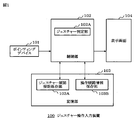
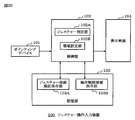
- FIG. 1 is a block diagram showing a schematic configuration of a gesture operation input device according to the present embodiment.
- the gesture operation input device 100 includes a pointing device 101, a control unit 102, a storage unit 103, and a display screen 104.
- the control unit 102 includes a gesture determination unit 102A
- the storage unit 103 includes a gesture route rule storage unit 103A and an operation route information storage unit 103B.
- the display screen 104 is set with at least two areas each having identification information. The user inputs a gesture by drawing various figures and characters on the display screen 104 via the pointing device 101.
- the pointing device sequentially designates the areas that pass on the display screen.
- the identification information of each designated area is temporarily stored in the operation route information storage unit 103B as route information of the input operation.
- the route of the region that passes on the display screen when a gesture is input is defined in advance by the identification information of each region, and as a gesture route rule, It is stored in the gesture route rule storage unit 103A.
- the gesture determination unit 102B compares the route information of the input operation with the gesture route rule, and if it matches one of the defined gesture routes, the gesture is input. judge.
- the gesture operation input apparatus shown in FIG. 1 is used for a portable device, and the pointing device 101 is configured by a touch panel.
- the control unit 102 is constituted by a CPU (Central Processing Unit), and the operation of the gesture determination unit 102A is executed by software.
- the storage unit 103 includes a RAM (Random Access Memory) and a ROM (Read Only Memory).
- the software executed by the gesture determination unit 102A is stored in the ROM, and the gesture route rule storage unit 103A is also configured by the ROM. Further, the area division setting of the display screen 104 and the identification information of each area are also stored in the ROM. Note that the ROM for storing the above data may be a rewritable ROM, and may be set again as necessary.
- the operation route information storage unit 103B includes a RAM.
- the display screen 104 is configured by an LCD (Liquid Crystal Display), and the display screen 104 is provided with a touch panel that is a pointing device 101.
- FIG. 2 is a diagram for explaining an example of area division of the display screen 104 in FIG.
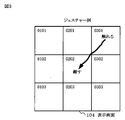
- FIG. 3 is a diagram for explaining an example of determining a gesture by tracing the screen of the display screen 104 provided with a touch panel with a finger from the upper right to the middle. As an example, a case will be described in which a gesture traced with a finger on the display screen 104 is determined as a gesture passing through the upper right area 0301 and the middle area 0202.
- gesture route rule corresponding to this gesture matrix numbers 0301 and 0202 are stored in advance in the gesture route rule storage unit 103A.
- the user's input operation on the touch panel is somewhat fluctuating, it is sufficiently conceivable that the finger passes through the adjacent areas 0201 and 0302 when passing between the areas 0301 and 0202.
- 0201 and 0302 are further added as gesture route rules corresponding to this gesture, and are stored in the gesture route rule storage unit 103A in the form of (0301, x0302, x0201, 0202).
- the matrix numbers x0302 and x0201 that start with “x” are caused by gesture input operation blurring to determine that the adjacent region 0302 or 0201 may be passed while passing through the regions 0301 and 0202. This is the matrix number of the side roadway to be.
- the touch panel which is the pointing device 101, specifies an area touched by the finger.
- the route of the matrix number of the designated area is stored in the operation route information storage unit 103B.
- the user inputs a gesture passing through the areas 0301 and 0202 with some fluctuations some typical examples of the path of the matrix number of the area that can be stored in the operation path information storage unit 103B are shown below.
- mismatch Example 12 0301, 0202, 0201 ... Determination of mismatch Example 13: 0301, 0202, 0302 ... Determination of mismatch Example 14: 0201, 0301, 0202 ... Determination of mismatch Example 15: 0302, 0301, 0202 ... Determination of mismatch Example 16: 0301, 0302, 0202, 0201 ... Determination of mismatch Example 17: 0301, 0201, 0202, 0302 ... Determination of mismatch
- any route in the above example is generated for the gesture passing through the areas 0301 and 0202, and is stored as operation route information.
- the gesture determination unit 102A of the control unit 102 compares the gesture route rule (0301, x0302, x0201, 0202) stored in the gesture route rule storage unit 103A with the operation route information stored in the operation route information storage unit 103B. .
- the number of the operation route information that matches the matrix numbers x0302 and x0201 having “x” is set as a side route.
- the gesture determination unit 102A compares the matrix numbers of the gesture route rules of the matrix numbers 0301 and 0202, including the matrix number of the operation route information of the side route road, and determines whether or not they match.
- Gesture determination unit 102A uses the determination result to determine whether or not the operation route information stored in operation route information storage unit 103B corresponds to a gesture.
- the above Example 1-5 performs a match determination, and determines that the gesture is stored in the gesture route rule storage unit 103A.
- the above Example 6-17 determines a mismatch and determines that the gesture does not correspond to the gesture stored by the gesture route rule storage unit 103A.
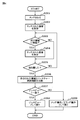
- FIG. 4 is a flowchart for explaining a series of operation examples of the gesture operation input device 100 in FIG. As shown in the figure, it is assumed that the finger touches the display screen 104 set in the area on the matrix by the matrix setting unit 102A in step S201.
- step S202 the control unit 102 designates an area touched on the display screen 104 using the touch panel of the pointing device 101, and stores the matrix number of the designated area in the operation route information storage unit 103B.
- step S ⁇ b> 203 the control unit 102 determines whether the finger has moved to another region due to a change in the matrix number of the region designated on the touch panel of the pointing device 101. If it has not moved to another area, the process proceeds to step S205.
- step S204 the control unit 102 stores the route of the matrix number of the touched region in the operation route information storage unit 103B when moving to another region.
- step S ⁇ b> 205 the control unit 102 determines whether the touched finger is released from the display screen 104.
- step S206 the gesture determination unit 102B compares the route of the matrix number of the area stored in the operation route information storage unit 103B with the gesture route rule stored in the gesture route rule storage unit 103A.
- step S207 if there is no gesture route rule that matches the gesture route rule storage unit 103A in the above comparison, the gesture determination unit 102B determines that the route of the matrix number of the area stored in the operation route information storage unit 103B is a gesture. Otherwise, the process proceeds to step S209.
- step S208 if there is a gesture route rule that matches the gesture route rule storage unit 103A in the comparison, the gesture determination unit 102B determines that the route of the matrix number of the area stored in the operation route information storage unit 103B is the gesture. Is determined as a predetermined gesture input process, and the process ends.
- step S209 the designated touch is handled as a normal touch operation or a drag operation, and the process is terminated.
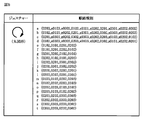
- an embodiment of the present invention will be described using a specific example of a gesture route rule stored in the gesture route rule storage unit 103A. First, it is assumed that a 3 ⁇ 3 matrix area shown in FIG. 2 is set by the gesture determination unit 102A on the display screen 104, and a matrix number is set for each area.
- the gesture route rule storage unit 103 ⁇ / b> A includes a “round figure”, “crescendo figure”, “decrescendo figure”, “le letter”, “reverse letter”, “Z letter”, “ Various variations of the gesture route rule are stored for “N character” and “e character”. It is difficult for the user to trace the same shape every time the user draws a gesture on the display screen 104 with a finger. This is because it can be a gesture.
- 11 to 16 are diagrams showing the gesture route rules stored in the gesture route rule storage unit 103A in FIGS. 5 to 10 as gestures that are visually drawn in a 3 ⁇ 3 matrix area.
- FIG. 17 is a diagram illustrating an example in which a gesture input operation device is applied to a mobile device and a dialog between the user and the mobile device is performed.
- a confirmation dialog is performed between the user and the mobile device on the display screen 104 of the mobile device for deleting the image.
- the mobile device asks the user to answer “Yes” or “No” to “Is image Img.001gif deleted?”, “Yes” gesture input for “round figure” For “No”, an operation input of a “letter” gesture is requested.
- FIG. 18 is a diagram illustrating an example in which a user performs a menu operation on a portable device to which the gesture input operation device is applied.
- a plurality of menus for requesting an operation input of a gesture such as e-mail, phone book, browser, TV, Java (registered trademark).
- a gesture such as e-mail, phone book, browser, TV, Java (registered trademark)
- the camera is displayed.
- “N character” for starting the mail function “reverse character” for starting the phone book function
- “e character” for starting the browser function “decrescendo figure” for starting the TV function
- Java (registered trademark) function “Circle” is drawn for activation of “Z”
- “Z letter” is drawn for activation of camera function.
- the amount of memory required for the gesture route rule storage unit 103A is very small, and even a gesture operation that rotates twice on the display screen 104 can be accommodated in about 100 bytes. Therefore, even if the gesture route rule storage unit 103A has 100 types of gesture route rules, the calculation fits in about 10 kbytes of data, and it is effective even for portable devices with limited ROM and RAM capacities. Furthermore, since this embodiment only requires a rough operation using the entire touch panel, there is no need for external parts for fine operations such as a touch pen, and the touch pen itself and its storage area can be omitted. There is an effect that both can be reduced.
- this embodiment only needs to draw a gesture, there is no need to display a selection button or list on the display screen 104, and the drawing of the button itself can be omitted and used for other displays. It becomes possible.
- a gesture operation for example, when the mail function is activated by the gesture of “N letter”, the mail function is directly activated by drawing the “N letter” gesture on the display screen 104 while operating another function. Is possible.
- the currently opened data and the contents of the function may be taken over by the function activated by the gesture operation.
- a gesture function can be enabled at the same time on a screen on which a touch operation and a drag operation can be performed. It is also possible to add, delete, and change gestures simply by changing the content stored in the gesture route rule storage unit 103A.
- a touch panel is used as an example of the pointing device 101.
- the pointing device 101 can also be implemented with a mouse as another point device that can perform a so-called drag operation of “move while selected”.
- the gesture operation input device 100 can be packaged as a device that omits the display screen 104 from the gesture operation input device 100 and transmits a gesture operation as a signal from the control unit 102 having the gesture determination unit 102A to the terminal side. This package can be sold as a single touch device that supports gesture operation determination. In FIG.
- the display screen 104 is divided into areas on a 3 ⁇ 3 matrix.
- area division setting of the screen if the number of areas is too small, the number of graphic patterns that can be input is limited.
- the 3-by-3 matrix can handle a much wider variety of graphics and variations than the 2-by-2 matrix, and it has enough area to draw a simple two-dimensional figure at the level described above.
- a pattern there is no particular limitation on the number of divisions of the area, and it may be 2 rows, 2 columns, 4 rows, 4 columns, and 10 rows and 10 columns, depending on the application. Note that the number of row and column divisions is not necessarily the same, and may be, for example, 3 rows and 2 columns instead of 3 rows and 3 columns. In FIG.
- FIG. 20 is a block diagram showing a schematic configuration of a gesture operation input device according to the third embodiment of the present invention.
- the gesture operation input device 100 includes a pointing device 101, a control unit 102 having a gesture determination unit 102A and an area setting unit 102B, a storage unit 103 having a gesture route rule storage unit 103A and an operation route information storage unit 103B. And a display screen 104, and is used for a portable device.
- a gesture operation input device that performs an input operation of information on a display screen via a pointing device, an area setting unit that sets a plurality of areas on the display screen and numbers each area, and a gesture that includes figures and characters
- a gesture route rule storage unit that stores a gesture route rule that is formed with a number of regions that pass through a predetermined route on the display screen, and a gesture is drawn on the display screen, and the pointing device
- an operation route information storage unit that temporarily stores the number of the specified region as the route information of the input operation, and a gesture stored in the operation route information storage unit
- the route rule and the route information of the input operation stored in the operation route information storage unit are compared and matched Route information of the input operation and a determining the gesture determination unit as a gesture drawn on said display screen.
- the pointing device includes a touch panel or a mouse.
- the region set by the region setting unit includes a region on a 3 ⁇ 3 matrix.
- the gesture route rule stored in the gesture route rule storage unit includes a gesture route rule of a circle shape, a crescendo shape, a decrescendo shape, a letter, a reverse letter, a Z letter, an N letter, and an e letter.
- the gesture route rules stored in the gesture route rule storage unit are registered, added, and changed via the Internet.
- a gesture operation input method for performing an input operation of information on a display screen via a pointing device, a step of setting a plurality of areas on the display screen and numbering each area, a gesture is drawn on the display screen, When a plurality of areas set on the display screen are specified by the pointing device, the step of temporarily storing the number of the specified area as route information of the input operation, and the gesture including a figure and a character If the gesture route rule stored by the number of the region that passes through the region in a predetermined route on the display screen is compared with the stored route information of the input operation, the route information of the input operation is displayed as the display Determining as a gesture drawn on the screen.
- a gesture operation input program for performing an input operation of information on a display screen via a pointing device
- a procedure for setting a plurality of areas on the display screen and numbering each area a gesture is drawn on the display screen
- the number of the specified area is temporarily stored as route information of the input operation, and the gesture including the figure and the character
- the gesture route rule stored by the number of the region that passes through the region in a predetermined route on the display screen is compared with the stored route information of the input operation, the route information of the input operation is displayed as the display And a procedure for determining as a gesture drawn on the screen.
- a portable device that performs an input operation of information on a display screen via a pointing device
- the area setting unit that sets a plurality of areas on the display screen and numbers each area, and the gesture including a figure and a character
- a gesture route rule storage unit for storing a gesture route rule formed by a number of an area passing through a predetermined route on the display screen; a gesture drawn on the display screen; and the display screen by the pointing device
- an operation route information storage unit that temporarily stores the number of the specified region as route information of the input operation, and a gesture route rule stored in the operation route information storage unit Is compared with the route information of the input operation stored in the operation route information storage unit, Road information and a determining the gesture determination unit as a gesture drawn on said display screen.
- a mobile device As described above, application to a mobile device has been described.
- a mobile device a mobile phone, a PDA (Personal Digital Assistant: a portable information terminal), a PHS (Personal Handy-phone System: a simple mobile phone), a DECT (Digital Enhanced Cordless Tessential
- the present invention can also be used for digital cordless telephones, portable audio players, portable video players, portable game machines, electronic dictionaries and the like.
Landscapes
- Engineering & Computer Science (AREA)
- General Engineering & Computer Science (AREA)
- Theoretical Computer Science (AREA)
- Human Computer Interaction (AREA)
- Physics & Mathematics (AREA)
- General Physics & Mathematics (AREA)
- User Interface Of Digital Computer (AREA)
- Position Input By Displaying (AREA)
- Telephone Function (AREA)
Abstract
Description
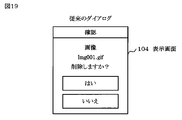
図19は関連する携帯デバイスとユーザのダイアログの概要を説明する図である。本図に示すように、この携帯デバイスでは、画面上の画像を削除する場合には、「画像を削除しますか?」の表示に対して、選択操作は画面上に表示されたボタン「はい」又は「いいえ」に触れることで行われている。
しかし、携帯デバイスの限られた画面サイズではボタン自体も大きく表示することができないため、小さい領域にタッチする必要があり操作ミスを起こしやすいという問題があった。さらに、ボタンの表示領域を大きくすると選択できる項目が少なくなってしまうという問題があった。
このような問題に対応するための、タッチパネルに関連する技術として以下のものがある。
例えば、特許文献1には、正確なタッチパネル操作が困難な場合であっても、ユーザの指示どおり正しく動作させることを目的とする車載情報端末が記載されている。具体的には、この目的を達成するため特許文献1にはタッチパネル操作のタッチ位置の変化を検出する技術が記載されている。この技術を用いた端末では、タッチ位置が変化しない場合はタッチパネル操作のタッチ位置における画面表示内容に対応する処理内容を実行する。一方、タッチ位置が変化した場合は、端末はその軌跡から操作ジェスチャーを認識し、その操作ジェスチャーに対応する処理内容を実行する。
また、例えば特許文献2には、カーナビゲーション装置のタッチパネルディスプレーにおけるコマンド入力方式が記載されている。このコマンド入力方式では、スクロールボタンやコマンドボタン等が地図等の上に重ねられて表示されても、下の地図等が隠されるというような弊害がない。これは線分や三角形のような複数の線画をコマンドに割当て、ユーザがコマンドを意味する線画をタッチパネルディスプレーに指で描くと、この線画が認識され、対応するコマンドが実行されるためである。
また、上記特許文献2では、線画、三角形のような線画を認識するが、図形認識の関連技術を使用すると、やはり処理量が膨大になるという問題がある。
したがってこれらの技術は処理能力、記憶容量、電源容量などのリソースが限られた携帯デバイスにとっては負担が大きく、適用が難しい。
本発明は上記問題点に鑑みて、ポインティングデバイスを介して表示画面全体を使った操作で入力を容易にでき、且つ処理量の過度の増加を抑制し小型化に寄与できるジェスチャー入力操作装置、方法、プログラム及び携帯デバイスを提供することを目的とする。
さらに、本発明のジェスチャー操作入力方法は、ポインティングデバイスを介して表示画面に情報の入力操作を行うジェスチャー操作入力方法であって、前記表示画面には、それぞれ識別情報が付された少なくとも2つの領域を設定する工程と、前記表示画面にジェスチャーの入力に伴い、前記ポインティングデバイスにより前記表示画面内の前記領域が順次指定されたときに、指定された各領域の前記識別情報を入力操作の順路情報として、一時的に保存する工程と、図形、文字を含むジェスチャーについて、入力操作の際に前記表示画面において通過する前記領域の順路を、各領域の前記識別情報によって定義したジェスチャー順路規則と、前記入力操作の順路情報とを比較して、一致する場合には、前記表示画面に描かれたジェスチャーが前記ジェスチャー順路規則で定義されているジェスチャーであることを判定する工程とを備える。
さらに、本発明のジェスチャー操作入力プログラムは、ポインティングデバイスを介して表示画面に情報の入力操作を行うジェスチャー操作入力プログラムであって、前記表示画面には、それぞれ識別情報が付された少なくとも2つの領域を設定する手順と、前記表示画面にジェスチャーの入力に伴い、前記ポインティングデバイスにより前記表示画面内の前記領域が順次指定されたときに、指定された各領域の前記識別情報を入力操作の順路情報として、一時的に保存する手順と、図形、文字を含むジェスチャーについて、入力操作の際に前記表示画面において通過する前記領域の順路を、各領域の前記識別情報によって定義したジェスチャー順路規則と、前記入力操作の順路情報とを比較して、一致する場合には、前記表示画面に描かれたジェスチャーが前記ジェスチャー順路規則で定義されているジェスチャーであることを判定する手順とを備える。
さらに、本発明の携帯デバイスは、ポインティングデバイスを介して表示画面に情報の入力操作を行う携帯デバイスであって、前記表示画面には、それぞれ識別情報が付された少なくとも2つの領域を設定し、図形、文字を含むジェスチャーについて、入力操作の際に前記表示画面において通過する前記領域の順路を、各領域の前記識別情報によって定義したジェスチャー順路規則を保存するジェスチャー順路規則保存部と、前記表示画面へのジェスチャーの入力に伴い、前記ポインティングデバイスにより前記表示画面内の前記領域が順次指定されたときに、指定された各領域の前記識別情報を入力操作の順路情報として、一時的に保存する操作順路情報保存部と、前記ジェスチャー順路規則と前記入力操作の順路情報とを比較して、一致する場合には、前記表示画面に描かれたジェスチャーが前記ジェスチャー順路規則で定義されているジェスチャーであることを判定する、ジェスチャー判定部とを備える。
100…ジェスチャー操作入力装置
101…ポインティングデバイス
102…制御部
102A…ジェスチャー判定部
102B…領域設定部
103…記憶部
103A…ジェスチャー順路規則保存部
103B…操作順路情報保存部
104…表示画面
0101、0120、0103、…、0301、0302、0303…領域の行列番号
図1は本実施の形態に係るジェスチャー操作入力装置の概略構成を示すブロック図である。
本図に示すように、ジェスチャー操作入力装置100はポインティングデバイス101、制御部102、記憶部103、並びに表示画面104で構成される。制御部102はジェスチャー判定部102Aを有しており、記憶部103はジェスチャー順路規則保存部103A及び操作順路情報保存部103Bを有している。
表示画面104は、それぞれ識別情報が付された少なくとも2つの領域が設定されている。ユーザはポインティングデバイス101を介して、表示画面104上に各種図形、文字を描くことによりジェスチャーを入力する。ジェスチャーの入力操作の際、前記ポインティングデバイスにより前記表示画面上を通過する前記領域が順次指定される。指定された各領域の前記識別情報は入力操作の順路情報として、操作順路情報保存部103Bに一時的に保存される。
一方、入力されるべき各種のジェスチャーについては予め、ジェスチャーが入力される際に前記表示画面上を通過する前記領域の順路を、各領域の前記識別情報で定義しておき、ジェスチャー順路規則として、ジェスチャー順路規則保存部103Aに保存しておく。
ジェスチャー判定部102Bは、ポインティングデバイスから入力操作があったときに、入力操作の順路情報をジェスチャー順路規則と比較し、定義されたジェスチャー順路のいずれかに一致する場合は、そのジェスチャーが入力されたと判定する。
以上のような構成により、この実施の形態では、ポインティングデバイスを介して表示画面104全体を使った操作で入力を容易にでき、また入力されるジェスチャーの軌跡自体や図形そのものを認識するような場合に比べて、処理量を大幅に抑制できる。
次に本発明の他の実施の形態の具体的な構成とその動作の例を説明する。図1に示すジェスチャー操作入力装置は携帯デバイスに使用するものとし、ポインティングデバイス101はタッチパネルで構成される。制御部102はCPU(Central Processing Unit:中央処理装置)で構成され、ジェスチャー判定部102Aの動作はソフトウエアで実行される。記憶部103はRAM(Random Access Memory:ランダム・アクセス・メモリ)、ROM(Read Only Memory:リード・オンリ・メモリ)で構成される。ジェスチャー判定部102Aにより実行されるソフトウエアはROMに記憶され、また、ジェスチャー順路規則保存部103AもROMで構成される。さらに、表示画面104の領域分割の設定および各領域の識別情報に関してもROMに保存しておく。なお、上記のデータを保存するROMを書き換え可能ROMとし、必要に応じて設定し直せるようにしてもよい。一方、操作順路情報保存部103BはRAMで構成される。また表示画面104はLCD(Liquid Crystal Display:液晶ディスプレイ)で構成され、表示画面104にはポインティングデバイス101であるタッチパネルが設けられている。
図2は図1における表示画面104の領域分割例を説明する図である。本図に示すように、表示画面104は、一例として、3行×3列のマトリックス状の領域に分割され、各領域には識別情報として4桁の行列番号数字が、例えば、0101、0102、0103、…、0301、0302、0303のように、設定される。先ず、簡単な例でジェスチャー判定の概要を以下に説明する。
図3はタッチパネルが設けられた表示画面104の画面を、右上から真中に指でなぞるジェスチャーを判定する例を説明する図である。一例として、表示画面104上を指でなぞるジェスチャーが右上の領域0301、真中の領域0202を通るジェスチャーと判定する場合について説明する。
このジェスチャーに対応する一番単純なジェスチャー順路規則として、ジェスチャー順路規則保存部103Aには、行列番号0301、0202が予め保存される。ただし、タッチパネルでのユーザの入力操作は多少ぶれがあるため、指が領域0301と0202の間を通るときに隣接する領域0201や0302を通ることも十分考えられる。例えば、図3では領域0201を通っている。そのため、このジェスチャーに対応するジェスチャー順路規則としてはさらに0201や0302が追加され、(0301、x0302、x0201、0202)という形でジェスチャー順路規則保存部103Aに保存される。ここで、「x」で始まる行列番号x0302、x0201は、領域0301及び0202を通過する間に隣接する領域0302又は0201を通ってもよいということを判定するための、ジェスチャーの入力操作ぶれに起因する脇道順路の行列番号である。
ユーザの指が表示画面104上をなぞると、ポインティングデバイス101であるタッチパネルが指の触れた領域を指定する。指定された領域の行列番号の順路は操作順路情報保存部103Bに記憶される。ユーザが領域0301と0202を通るジェスチャーを多少のぶれを伴いつつ入力する場合に、操作順路情報保存部103Bに記憶されうる領域の行列番号の順路の代表的ないくつかの例を以下に示す。
例1:0301、0202 …一致の判定
例2:0301、0302、0202 …一致の判定
例3:0301、0201、0202 …一致の判定
例4:0301、0201、0302、0202 …一致の判定
例5:0301、0302、0201、0202 …一致の判定
例6:0301、0202、0102 …不一致の判定
例7:0301、0202、0203 …不一致の判定
例8:0301、0202、0103 …不一致の判定
例9:0202、0301 …不一致の判定
例10:0201、0202 …不一致の判定
例11:0302、0202 …不一致の判定
例12:0301、0202、0201 …不一致の判定
例13:0301、0202、0302 …不一致の判定
例14:0201、0301、0202 …不一致の判定
例15:0302、0301、0202 …不一致の判定
例16:0301、0302、0202、0201…不一致の判定
例17:0301、0201、0202、0302…不一致の判定
操作順路情報保存部103Bでは、領域0301と0202を通るジェスチャーに対して上記例のいずれかの順路が発生し、操作順路情報として保存されることになる。
制御部102のジェスチャー判定部102Aは、ジェスチャー順路規則保存部103Aに保存されているジェスチャー順路規則(0301、x0302、x0201、0202)と操作順路情報保存部103Bに保存された操作順路情報を比較する。両者を比較する際には、「x」のある行列番号x0302、x0201と一致する操作順路情報の番号については、脇道順路として設定される。ジェスチャー判定部102Aは、この脇道順路の操作順路情報の行列番号を含めて、行列番号0301、0202のジェスチャー順路規則の行列番号を比較して、一致、不一致の判定を行う。ジェスチャー判定部102Aはその判定結果を用いて操作順路情報保存部103Bに保存された操作順路情報がジェスチャーに該当するか否かを判定する。
上記例1−17に対して、ジェスチャー判定部102Aでは、上記例1−5は一致の判定を行い、ジェスチャー順路規則保存部103Aが保存するジェスチャーに該当すると判定する。一方、ジェスチャー判定部102Aでは、上記例6−17は不一致の判定を行い、ジェスチャー順路規則保存部103Aが保存するジェスチャーに該当しないと判定する。
ここで、上記例11−17でも、ジェスチャー順路規則保存部103Aに保存されたジェスチャー順路規則では「x」のある行列番号があるが、「x」のある行列番号が「x」のない行列番号の間にないので、脇道順路としないことにする。このため、これらの順路は不一致と判断される。
同様に、上記例10では、0201はジェスチャー順路規則保存部103Aに保存されたジェスチャー順路規則では「x」のある行列番号があるが、「x」のない行列番号の間にないので、脇道順路としないことにする。このため、やはり不一致と判断される。
このように入力操作のぶれは許容し、一方で、ぶれとは無関係な許容は排除する。
図4は図1におけるジェスチャー操作入力装置100の一連の動作例を説明するフローチャートである。
本図に示すように、ステップS201において、マトリックス設定部102Aによりマトリックス上の領域に設定されている表示画面104上に指がタッチしたとする。
ステップS202において、制御部102は、表示画面104上にタッチされた領域をポインティングデバイス101のタッチパネルで指定し、指定された領域の行列番号を操作順路情報保存部103Bに保存させる。
ステップS203において、制御部102は、ポインティングデバイス101のタッチパネルで指定された領域の行列番号の変化により指が別の領域に移動したかを判断する。別の領域に移動していなければステップS205に進む。
ステップS204において、制御部102は、別の領域に移動している場合にはタッチされている領域の行列番号の順路を操作順路情報保存部103Bに保存する。
ステップS205において、制御部102は表示画面104上からタッチした指を離したかを判断する。離していない場合にはステップS203に戻る。
ステップS206において、ジェスチャー判定部102Bは、操作順路情報保存部103Bに保存された領域の行列番号の順路とジェスチャー順路規則保存部103Aに保存されたジェスチャー順路規則とを比較する。
ステップS207において、ジェスチャー判定部102Bは、上記比較で、ジェスチャー順路規則保存部103Aに一致するジェスチャー順路規則がない場合には、操作順路情報保存部103Bに保存された領域の行列番号の順路はジェスチャーでないと判定し、ステップS209に進む。
ステップS208において、ジェスチャー判定部102Bは、上記比較で、ジェスチャー順路規則保存部103Aに一致するジェスチャー順路規則がある場合には、操作順路情報保存部103Bに保存された領域の行列番号の順路はジェスチャーとして判定し、所定のジェスチャー入力処理として扱い、処理を終了する。
ステップS209において、指定されたタッチを通常のタッチ操作又はドラッグ操作として扱い、処理を終了する。
次に、ジェスチャー順路規則保存部103Aに保存されるジェスチャー順路規則の具体的な例によって、本発明の実施の形態を説明する。
先ず、表示画面104上にはジェスチャー判定部102Aにより図2に示す3行×3列のマトリックス状の領域が設定され、それぞれの領域に行列番号が設定されているとする。
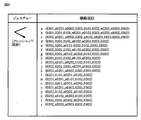
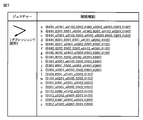
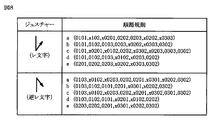
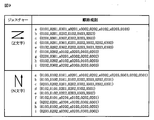
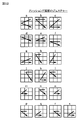
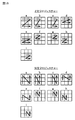
ジェスチャー順路規則保存部103Aには、図5~10に示すように「丸図形」、「クレッシェンド図形」、「デクレッシェンド図形」、「レ文字」、「逆レ文字」、「Z文字」、「N文字」、「e文字」について、それぞれジェスチャー順路規則の各種バリエーションが保存される。
1つのジェスチャーに対して順路規則の各種バリエーションを設定するのは、ユーザが指で表示画面104上にジェスチャーを描画する毎に全く同じ形のジェスチャーをなぞることは困難であり、少しずつ異なる形のジェスチャーとなりうるためである。
図11~16は図5~10でジェスチャー順路規則保存部103Aに保存したジェスチャー順路規則を、それぞれ視覚的に3行×3列のマトリックス状の領域に描画したジェスチャーとして示す図である。
以下に、図5~10に示すジェスチャー順路規則が保存されたジェスチャー順路規則保存部103Aを有するジェスチャー操作入力装置100を備えた携帯デバイスの実施の形態について説明する。
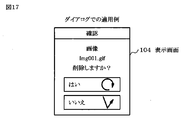
図17は、ジェスチャー入力操作装置を携帯デバイスに適用し、ユーザと携帯デバイスのダイアログを行う例を示す図である。ここでは、画像の削除に対して携帯デバイスの表示画面104上でユーザと携帯デバイスの間で確認のダイアログを行う例を示している。携帯デバイスは、「画像Img.001gif削除しますか?」に対してユーザに「はい」、「いいえ」の応答を求める際に、「はい」に対しては「丸図形」のジェスチャーの操作入力を求め、「いいえ」に対しては「レ文字」のジェスチャーの操作入力を求める。ユーザは、「はい」の選択に対して「丸図形」のジェスチャーを描き、「いいえ」の選択に対して「レ文字」のジェスチャーを描く。ジェスチャーの操作入力後には図4のフローチャートに従い、ジェスチャーの判定を行う。
このようにして、選択アイコンにジェスチャーを示す図をデザインすると従来のキー操作での選択とタッチでの操作を両立することも可能で、ユーザにもわかりやすいデザインとなる。また、既存のレイアウトを大きく変更することなくタッチパネルを採用できるため、ソフト開発費を抑えることができる。
図18はジェスチャー入力操作装置が適用された携帯デバイスでのユーザによるメニュー操作を行う例を示す図である。本図に示すように、メニューの選択に対して携帯デバイスの表示画面104上に、ジェスチャーの操作入力を求めるための複数のメニュー、例えばメール、電話帳、ブラウザ、テレビ、Java(登録商標)、カメラが表示される。例えばメール機能の起動は「N文字」、電話帳機能の起動は「逆レ文字」、ブラウザ機能の起動は「e文字」、テレビ機能の起動は「デクレッシェンド図形」、Java(登録商標)機能の起動は「丸図形」、カメラ機能の起動は「Z文字」が、それぞれ描かれる。ジェスチャーの操作入力後には図4のフローチャートに従い、ジェスチャーの判定が行われる。
このようにして、メニューアイコンにジェスチャーを示す図をデザインすると従来のキー操作での選択とタッチでの操作を両立することも可能である。ユーザにもわかりやすいデザインとなる。また、既存のレイアウトを大きく変更することなくタッチパネルを採用できるため、ソフト開発費を抑えることができる。
したがってこの実施の形態では、表示画面104上のタッチパネル全体を使って操作できるため、タッチパネル面積を大きくとることができ、携帯デバイス等でも、細かい操作を要求されず、小さなボタンを苦労して選択しなくても済むようになるという効果がある。
さらに、ポインティングデバイス101操作中の処理内容(図4のステップS203、204)が非常に単純であるため、CPU資源が限られる携帯デバイス等でもすばやい操作レスポンスが可能になるという効果がある。
さらに、ジェスチャー順路規則保存部103Aに要求されるメモリ量は非常に小さく、表示画面104上を2回回るジェスチャー操作でも100バイト程度に収めることが可能である。したがってジェスチャー順路規則保存部103Aが100種類のジェスチャー順路規則を持ったとしても、10kバイト程度のデータに収まる計算であり、ROM、RAM容量が制限される携帯デバイスでも有効になるという効果がある。
さらにこの実施の形態は、タッチパネル全体を使った大雑把な操作で済むため、タッチペンなど精細な操作をするための外部部品が不要であり、タッチペン自体や、その保存領域が省略可能になりサイズ、コストの両方を縮小することができるという効果がある。
さらにこの実施の形態は、ジェスチャーが描ければよいので、表示画面104上に選択のためのボタン、リストを表示する必要がなくなり、ボタン自体の描画を省略して他の表示に利用することが可能となる。例えば、一般的な端末デバイスではマルチタスクの起動等はいったん起動メニューなどを表示し、機能を選択して起動するのが一般的である。しかしジェスチャー操作ならば、例えば、「N文字」のジェスチャーでメール機能を起動する場合に、別の機能を操作中に「N文字」のジェスチャーを表示画面104に描くことで直接にメール機能を起動することが可能である。マルチタスク、機能連携をサポートする携帯デバイスでは、現在開いているデータや、機能の内容がジェスチャー操作によって起動された機能に引き継がれてもよい。例えば、「N文字」のジェスチャーでメール機能が起動されている場合に、「逆レ文字」のジェスチャーで電話帳機能を起動し、メールの宛先欄に予め操作していた電話帳の相手を指定することで、よりスムーズなユーザインタフェースが実現可能となる。
また、タッチ操作、ドラッグ操作が可能な画面で、ジェスチャー機能も同時に有効とすることも可能である。
また、ジェスチャー順路規則保存部103Aへの保存内容を変更するだけでジェスチャーを追加、削除、変更することも可能である。
なお、以上の実施の形態では、ポインティングデバイス101としてタッチパネルを例に挙げたが、「選択したまま移動」いわゆるドラッグ操作が可能であるほかのポイントデバイスとしてマウスでも実施可能である。すなわち、マウスによるクリックし始めから離すところまでをジェスチャーと判定可能であるためである。
また、ジェスチャー順路規則保存部103Aに保存しておくジェスチャー順路規則のデータはインターネット上などからダウンロードし、登録、追加、変更できるようにしてもよい。ジェスチャー順路規則保存部103Aに保存されている内容は1ジェスチャーに対して100バイト程度の非常に単純な構造を持つデータのため登録、追加、変更は容易である。
また、ジェスチャー操作入力装置100から表示画面104を省略し、ジェスチャー判定部102Aを有する制御部102から端末側にジェスチャー操作を信号として送信するデバイスとしてジェスチャー操作入力装置100をパッケージ化することができる。このパッケージは、ジェスチャー操作判定をサポートした単体のタッチデバイスとして販売可能である。
また、図2では表示画面104上を3行3列のマトリックス上の領域に分割して説明した。画面の領域分割設定に関しては、領域数が少なすぎると入力可能な図形パターンが限られ、逆に多すぎると考慮すべきバリエーションや脇道順路が増え、ハードウェア資源として効率的でなくなる。3行3列のマトリックスは、2行2列のマトリックスに比べ格段に多様な図形およびそのバリエーションに対応することができ、かつ上述したレベルの単純な二次元図形を描く分には十分な領域設定パターンといえる。
しかしながら、領域の分割数にはもちろん制限は特にあるわけではなく、用途に応じて2行2列、4行4列、10行10列でもよい。なお、行と列の分割数も必ずしも同一である必要はなく、例えば3行3列ではなく、3行2列としてもよい。また図2では、表示画面104上に3行3列のマトリックス上の領域分割線を表示しているが、分割線を表示する必要はなく、タッチパネルが領域ごとに物理的に分かれている必要もない。
〔第3の実施の形態〕
図20は本発明の第3の実施の形態を示すジェスチャー操作入力装置の概略構成を示すブロック図である。本図に示すように、ジェスチャー操作入力装置100はポインティングデバイス101、ジェスチャー判定部102A及び領域設定部102Bを有する制御部102、ジェスチャー順路規則保存部103A及び操作順路情報保存部103Bを有する記憶部103、並びに表示画面104で構成され、携帯デバイスに使用される。
〔第4の実施の形態〕
ポインティングデバイスを介して表示画面に情報の入力操作を行うジェスチャー操作入力装置において、前記表示画面に複数の領域を設定し、各領域に番号を付ける領域設定部と、図形、文字を含むジェスチャーに対して前記表示画面に領域を予め決められた順路で通過する領域の番号で形成されるジェスチャー順路規則を保存するジェスチャー順路規則保存部と、前記表示画面にジェスチャーが描かれて、前記ポインティングデバイスにより前記表示画面に設定された領域が複数指定された場合、指定された領域の番号を入力操作の順路情報として一時的に保存する操作順路情報保存部と、前記操作順路情報保存部に保存されたジェスチャー順路規則と前記操作順路情報保存部に保存された入力操作の順路情報とを比較して一致する場合には入力操作の順路情報は前記表示画面に描かれたジェスチャーとして判定するジェスチャー判定部とを備える。
〔第5の実施の形態〕
前記ジェスチャー順路規則保存部に保存されるジェスチャー順路規則に対して通過する領域と通過する領域の間に入力操作ぶれで通過する隣接の領域がある場合には通過する領域と通過する領域の番号の間に入力操作ぶれ領域の番号をジェスチャー順路規則に保存し、前記ジェスチャー判定部は、前記操作順路情報保存部に保存される入力操作の順路情報が前記操作順路情報保存部に保存されるジェスチャー順路規則の入力操作ぶれ領域の番号と一致する場合には一致する入力操作の順路情報の領域の番号を無視し、無視した番号を除いた入力操作の順路情報の領域の番号と、無視した入力操作ぶれ領域の番号を除いたジェスチャー順路規則の領域の番号を比較する。
〔第6の実施の形態〕
前記ポインティングデバイスはタッチパネル又はマウスを含む。
〔第7の実施の形態〕
前記領域設定部が設定する領域は3行3列のマトリックス上の領域を含む。
〔第8の実施の形態〕
前記ジェスチャー順路規則保存部に保存されるジェスチャー順路規則は、丸図形、クレッシェンド図形、デクレッシェンド図形、レ文字、逆レ文字、Z文字、N文字、e文字のジェスチャー順路規則を含む。
〔第9の実施の形態〕
前記ジェスチャー順路規則保存部に保存されるジェスチャー順路規則はインターネットを介して、登録、追加、変更される。
〔第10の実施の形態〕
ポインティングデバイスを介して表示画面に情報の入力操作を行うジェスチャー操作入力方法において、前記表示画面に複数の領域を設定し、各領域に番号を付ける工程と、前記表示画面にジェスチャーが描かれて、前記ポインティングデバイスにより前記表示画面に設定された領域が複数指定された場合、指定された領域の番号を入力操作の順路情報として一時的に保存する工程と、図形、文字を含むジェスチャーに対して前記表示画面に領域を予め決められた順路で通過する領域の番号で保存されたジェスチャー順路規則と保存された入力操作の順路情報とを比較して一致する場合には入力操作の順路情報は前記表示画面に描かれたジェスチャーとして判定する工程とを備える。
〔第11の実施の形態〕
ポインティングデバイスを介して表示画面に情報の入力操作を行うジェスチャー操作入力プログラムにおいて、前記表示画面に複数の領域を設定し、各領域に番号を付ける手順と、前記表示画面にジェスチャーが描かれて、前記ポインティングデバイスにより前記表示画面に設定された領域が複数指定された場合、指定された領域の番号を入力操作の順路情報として一時的に保存する手順と、図形、文字を含むジェスチャーに対して前記表示画面に領域を予め決められた順路で通過する領域の番号で保存されたジェスチャー順路規則と保存された入力操作の順路情報とを比較して一致する場合には入力操作の順路情報は前記表示画面に描かれたジェスチャーとして判定する手順とを備える。
〔第12の実施の形態〕
ポインティングデバイスを介して表示画面に情報の入力操作を行う携帯デバイスにおいて、前記表示画面に複数の領域を設定し、各領域に番号を付ける領域設定部と、図形、文字を含むジェスチャーに対して前記表示画面に領域を予め決められた順路で通過する領域の番号で形成されるジェスチャー順路規則を保存するジェスチャー順路規則保存部と、前記表示画面にジェスチャーが描かれて、前記ポインティングデバイスにより前記表示画面に設定された領域が複数指定された場合、指定された領域の番号を入力操作の順路情報として一時的に保存する操作順路情報保存部と、前記操作順路情報保存部に保存されたジェスチャー順路規則と前記操作順路情報保存部に保存された入力操作の順路情報とを比較して一致する場合には入力操作の順路情報は前記表示画面に描かれたジェスチャーとして判定するジェスチャー判定部とを備える。
〔第13の実施の形態〕
前記表示画面に「はい」又は「いいえ」の確認のダイアログが表示され、前記表示画面に丸図形が描かれた場合描かれた丸図形を判定し「はい」の確認とし、レ文字が描かれた場合描かれたレ文字を判定し「いいえ」の確認とする。
〔第14の実施の形態〕
前記表示画面に「メール」、「電話帳」、「ブラウザ」、「ワンセグ」、「Java(登録商標)]、「カメラ」を含むメニューが表示され、前記表示画面にN文字が描かれた場合描かれたN文字を判定しメール機能の起動と確認し、前記表示画面に逆レ文字が描かれた場合描かれた逆レ文字を判定し電話帳機能の起動と確認し、前記表示画面にe文字が描かれた場合描かれたe文字を判定しブラウザ機能の起動と確認し、前記表示画面にデクレッシェンド図形が描かれた場合描かれたデクレッシェンド図形を判定しワンセグ機能の起動と確認し、前記表示画面に丸図形が描かれた場合描かれた丸図形を判定しJava(登録商標)機能の起動と確認し、さらに、前記表示画面にZ図形が描かれた場合描かれたZ図形を判定しカメラ機能の起動と確認する。
以上、実施の形態を参照して本願発明を説明したが、本願発明は上記実施形態及び実施例に限定されるものではない。本願発明の構成や詳細には、本願発明のスコープ内で当業者が理解し得る様々な変更をすることができる。
なお、この出願は、2008年9月3日に出願された日本出願特願2008−226492を基礎とする優先権を主張し、その開示の全てをここに取り込む。
Claims (11)
- ポインティングデバイスを介して表示画面に情報の入力操作を行うジェスチャー操作入力装置において、
前記表示画面には、それぞれ識別情報が付された少なくとも2つの領域が設定され、
図形、文字を含むジェスチャーについて、入力操作の際に前記表示画面において通過する前記領域の順路を、各領域の前記識別情報によって定義したジェスチャー順路規則を保存するジェスチャー順路規則保存部と、
前記表示画面へのジェスチャーの入力に伴い、前記ポインティングデバイスにより前記表示画面内の前記領域が順次指定されたときに、指定された各領域の前記識別情報を入力操作の順路情報として、一時的に保存する操作順路情報保存部と、
前記ジェスチャー順路規則と前記入力操作の順路情報とを比較して、一致する場合には、前記表示画面に描かれたジェスチャーが前記ジェスチャー順路規則で定義されているジェスチャーであることを判定する、ジェスチャー判定部とを備えることを特徴とするジェスチャー操作入力装置。 - 前記ジェスチャー順路規則に対して、さらに入力操作ぶれで通過する領域の識別情報を追加し、
前記表示画面へのジェスチャーの入力の結果、前記操作順路情報保存部に保存された入力操作の順路情報に、前記入力操作ぶれで通過する領域の識別情報が含まれている場合には、前記ジェスチャー判定部は、当該入力操作ぶれ領域の識別情報を無視して、前記ジェスチャー順路規則と前記入力操作の順路情報とを比較することを特徴とする、請求項1に記載のジェスチャー操作入力装置。 - 前記ポインティングデバイスはタッチパネル又はマウスを含むことを特徴とする、請求項1に記載のジェスチャー操作入力装置。
- 前記領域設定部が設定する領域は3行3列のマトリックス上の領域を含むことを特徴とする、請求項1に記載のジェスチャー操作入力装置。
- 前記ジェスチャー順路規則保存部に保存されるジェスチャー順路規則は、丸図形、クレッシェンド図形、デクレッシェンド図形、レ文字、逆レ文字、Z文字、N文字、e文字のジェスチャー順路規則を含むことを特徴とする、請求項1に記載のジェスチャー操作入力装置。
- 前記ジェスチャー順路規則保存部に保存されるジェスチャー順路規則はインターネットを介して、登録、追加、変更されることを特徴とする、請求項2に記載のジェスチャー操作入力装置。
- ポインティングデバイスを介して表示画面に情報の入力操作を行うジェスチャー操作入力方法において、
前記表示画面には、それぞれ識別情報が付された少なくとも2つの領域を設定する工程と、
前記表示画面にジェスチャーの入力に伴い、前記ポインティングデバイスにより前記表示画面内の前記領域が順次指定されたときに、指定された各領域の前記識別情報を入力操作の順路情報として、一時的に保存する工程と、
図形、文字を含むジェスチャーについて、入力操作の際に前記表示画面において通過する前記領域の順路を、各領域の前記識別情報によって定義したジェスチャー順路規則と、前記入力操作の順路情報とを比較して、一致する場合には、前記表示画面に描かれたジェスチャーが前記ジェスチャー順路規則で定義されているジェスチャーであることを判定する工程とを備えることを特徴とするジェスチャー操作入力方法。 - ポインティングデバイスを介して表示画面に情報の入力操作を行うジェスチャー操作入力プログラムにおいて、
前記表示画面には、それぞれ識別情報が付された少なくとも2つの領域を設定する手順と、
前記表示画面にジェスチャーの入力に伴い、前記ポインティングデバイスにより前記表示画面内の前記領域が順次指定されたときに、指定された各領域の前記識別情報を入力操作の順路情報として、一時的に保存する手順と、
図形、文字を含むジェスチャーについて、入力操作の際に前記表示画面において通過する前記領域の順路を、各領域の前記識別情報によって定義したジェスチャー順路規則と、前記入力操作の順路情報とを比較して、一致する場合には、前記表示画面に描かれたジェスチャーが前記ジェスチャー順路規則で定義されているジェスチャーであることを判定する手順とを備えることを特徴とするジェスチャー操作入力プログラム。 - ポインティングデバイスを介して表示画面に情報の入力操作を行う携帯デバイスにおいて、
前記表示画面には、それぞれ識別情報が付された少なくとも2つの領域を設定し、
図形、文字を含むジェスチャーについて、入力操作の際に前記表示画面において通過する前記領域の順路を、各領域の前記識別情報によって定義したジェスチャー順路規則を保存するジェスチャー順路規則保存部と、
前記表示画面へのジェスチャーの入力に伴い、前記ポインティングデバイスにより前記表示画面内の前記領域が順次指定されたときに、指定された各領域の前記識別情報を入力操作の順路情報として、一時的に保存する操作順路情報保存部と、
前記ジェスチャー順路規則と前記入力操作の順路情報とを比較して、一致する場合には、前記表示画面に描かれたジェスチャーが前記ジェスチャー順路規則で定義されているジェスチャーであることを判定する、ジェスチャー判定部とを備えることを特徴とする携帯デバイス。 - 前記表示画面に少なくとも2つのダイアログボックスを表示し、前記ダイアログボックスにそれぞれ特定の図形を対応させ、前記表示画面に当該特定の図形が描かれた場合に、当該図形が描かれたことを判定し、対応する前記ダイアログボックスの選択と認定することを特徴とする、請求項9に記載の携帯デバイス。
- 前記表示画面に少なくとも2つのメニューアイコンを表示し、前記メニューアイコンにそれぞれ特定の図形を対応させ、前記表示画面に当該特定の図形が描かれた場合に、当該図形が描かれたことを判定し、対応する前記メニューアイコンの選択と認定することを特徴とする、請求項9に記載の携帯デバイス。
Priority Applications (5)
| Application Number | Priority Date | Filing Date | Title |
|---|---|---|---|
| JP2010527807A JP5494483B2 (ja) | 2008-09-03 | 2009-08-27 | ジェスチャー入力操作装置、方法、プログラム及び携帯デバイス |
| US13/057,845 US20110141050A1 (en) | 2008-09-03 | 2009-08-27 | Gesture input operation device, method, program, and portable device |
| EP09811531.4A EP2323019A4 (en) | 2008-09-03 | 2009-08-27 | GESTURE INPUT OPERATING DEVICE, METHOD, PROGRAM, AND PORTABLE DEVICE |
| CN2009801344969A CN102144206B (zh) | 2008-09-03 | 2009-08-27 | 姿势输入操作设备、方法、程序和便携式设备 |
| US14/298,463 US20140285459A1 (en) | 2008-09-03 | 2014-06-06 | Gesture input operation device, method, program, and portable device |
Applications Claiming Priority (2)
| Application Number | Priority Date | Filing Date | Title |
|---|---|---|---|
| JP2008-226492 | 2008-09-03 | ||
| JP2008226492 | 2008-09-03 |
Related Child Applications (2)
| Application Number | Title | Priority Date | Filing Date |
|---|---|---|---|
| US13/057,845 A-371-Of-International US20110141050A1 (en) | 2008-09-03 | 2009-08-27 | Gesture input operation device, method, program, and portable device |
| US14/298,463 Continuation US20140285459A1 (en) | 2008-09-03 | 2014-06-06 | Gesture input operation device, method, program, and portable device |
Publications (1)
| Publication Number | Publication Date |
|---|---|
| WO2010027006A1 true WO2010027006A1 (ja) | 2010-03-11 |
Family
ID=41797172
Family Applications (1)
| Application Number | Title | Priority Date | Filing Date |
|---|---|---|---|
| PCT/JP2009/065378 Ceased WO2010027006A1 (ja) | 2008-09-03 | 2009-08-27 | ジェスチャー入力操作装置、方法、プログラム及び携帯デバイス |
Country Status (5)
| Country | Link |
|---|---|
| US (2) | US20110141050A1 (ja) |
| EP (1) | EP2323019A4 (ja) |
| JP (1) | JP5494483B2 (ja) |
| CN (1) | CN102144206B (ja) |
| WO (1) | WO2010027006A1 (ja) |
Cited By (7)
| Publication number | Priority date | Publication date | Assignee | Title |
|---|---|---|---|---|
| CN102236440A (zh) * | 2010-04-22 | 2011-11-09 | 联芯科技有限公司 | 密码输入方法以及使用该方法的移动终端 |
| WO2011158701A1 (ja) * | 2010-06-14 | 2011-12-22 | 株式会社ソニー・コンピュータエンタテインメント | 端末装置 |
| JP2012003304A (ja) * | 2010-06-14 | 2012-01-05 | Sony Computer Entertainment Inc | 端末装置 |
| WO2012101670A1 (ja) * | 2011-01-25 | 2012-08-02 | 三菱電機株式会社 | 入力操作装置 |
| JP2013080439A (ja) * | 2011-10-05 | 2013-05-02 | Nippon Telegr & Teleph Corp <Ntt> | 情報入力装置及びそのプログラム |
| JP2013528304A (ja) * | 2010-06-08 | 2013-07-08 | マイクロソフト コーポレーション | ジャンプ、チェックマーク、および取消し線のジェスチャー |
| JP2014088730A (ja) * | 2012-10-31 | 2014-05-15 | Mitsubishi Electric Corp | 携帯通信機およびドア制御装置 |
Families Citing this family (9)
| Publication number | Priority date | Publication date | Assignee | Title |
|---|---|---|---|---|
| KR102101818B1 (ko) * | 2012-07-30 | 2020-04-17 | 삼성전자주식회사 | 단말기의 데이터전송 제어장치 및 방법 |
| KR102084041B1 (ko) | 2012-08-24 | 2020-03-04 | 삼성전자 주식회사 | 펜 기능 운용 방법 및 시스템 |
| CN103076976A (zh) * | 2013-01-07 | 2013-05-01 | 华为终端有限公司 | 添加应用图标的方法、移除应用图标的方法和装置 |
| US10295826B2 (en) * | 2013-02-19 | 2019-05-21 | Mirama Service Inc. | Shape recognition device, shape recognition program, and shape recognition method |
| JP5862587B2 (ja) * | 2013-03-25 | 2016-02-16 | コニカミノルタ株式会社 | ジェスチャ判別装置、ジェスチャ判別方法、およびコンピュータプログラム |
| KR102169521B1 (ko) | 2013-05-14 | 2020-10-23 | 삼성전자 주식회사 | 입력장치, 디스플레이장치 및 그 제어방법 |
| CN105335038B (zh) * | 2014-07-30 | 2019-05-07 | 联想企业解决方案(新加坡)有限公司 | 一种提示触摸输入操作的方法和系统 |
| DE102014013763A1 (de) * | 2014-09-05 | 2016-03-10 | Daimler Ag | Bedienvorrichtung und Verfahren zum Bedienen von Funktionen eines Fahrzeugs, insbesondere eines Kraftwagens |
| KR102203951B1 (ko) * | 2020-10-07 | 2021-01-18 | 김병수 | 리모트컨트롤 시스템 |
Citations (6)
| Publication number | Priority date | Publication date | Assignee | Title |
|---|---|---|---|---|
| JPH1185398A (ja) | 1997-09-11 | 1999-03-30 | Kenwood Corp | タッチパネルディスプレー用コマンド入力装置 |
| JPH11184816A (ja) * | 1997-12-22 | 1999-07-09 | Casio Comput Co Ltd | 端末装置及び記憶媒体 |
| JP2002082734A (ja) * | 2000-09-06 | 2002-03-22 | Sony Corp | 情報処理装置、情報処理方法、並びにプログラム格納媒体 |
| JP2006172006A (ja) * | 2004-12-14 | 2006-06-29 | Sanyo Electric Co Ltd | 電子機器 |
| JP2007145106A (ja) | 2005-11-25 | 2007-06-14 | Xanavi Informatics Corp | 車載情報端末 |
| JP2008226492A (ja) | 2007-03-08 | 2008-09-25 | Hitachi Displays Ltd | 蛍光ランプ及びそれを用いた画像表示装置 |
Family Cites Families (6)
| Publication number | Priority date | Publication date | Assignee | Title |
|---|---|---|---|---|
| US20060284839A1 (en) * | 1999-12-15 | 2006-12-21 | Automotive Technologies International, Inc. | Vehicular Steering Wheel with Input Device |
| US6057845A (en) * | 1997-11-14 | 2000-05-02 | Sensiva, Inc. | System, method, and apparatus for generation and recognizing universal commands |
| US7623119B2 (en) * | 2004-04-21 | 2009-11-24 | Nokia Corporation | Graphical functions by gestures |
| WO2006009813A1 (en) * | 2004-06-18 | 2006-01-26 | Microth, Inc. | Stroke-based data entry device, system, and method |
| US20080074384A1 (en) * | 2006-09-22 | 2008-03-27 | Research In Motion Limited | System and method for adjusting icons, text and images on an electronic device |
| CN101231567A (zh) * | 2007-01-24 | 2008-07-30 | 北京三星通信技术研究有限公司 | 基于手写识别的人机交互方法和系统及运行该系统的设备 |
-
2009
- 2009-08-27 JP JP2010527807A patent/JP5494483B2/ja not_active Expired - Fee Related
- 2009-08-27 CN CN2009801344969A patent/CN102144206B/zh not_active Expired - Fee Related
- 2009-08-27 WO PCT/JP2009/065378 patent/WO2010027006A1/ja not_active Ceased
- 2009-08-27 US US13/057,845 patent/US20110141050A1/en not_active Abandoned
- 2009-08-27 EP EP09811531.4A patent/EP2323019A4/en not_active Withdrawn
-
2014
- 2014-06-06 US US14/298,463 patent/US20140285459A1/en not_active Abandoned
Patent Citations (6)
| Publication number | Priority date | Publication date | Assignee | Title |
|---|---|---|---|---|
| JPH1185398A (ja) | 1997-09-11 | 1999-03-30 | Kenwood Corp | タッチパネルディスプレー用コマンド入力装置 |
| JPH11184816A (ja) * | 1997-12-22 | 1999-07-09 | Casio Comput Co Ltd | 端末装置及び記憶媒体 |
| JP2002082734A (ja) * | 2000-09-06 | 2002-03-22 | Sony Corp | 情報処理装置、情報処理方法、並びにプログラム格納媒体 |
| JP2006172006A (ja) * | 2004-12-14 | 2006-06-29 | Sanyo Electric Co Ltd | 電子機器 |
| JP2007145106A (ja) | 2005-11-25 | 2007-06-14 | Xanavi Informatics Corp | 車載情報端末 |
| JP2008226492A (ja) | 2007-03-08 | 2008-09-25 | Hitachi Displays Ltd | 蛍光ランプ及びそれを用いた画像表示装置 |
Non-Patent Citations (1)
| Title |
|---|
| See also references of EP2323019A4 |
Cited By (8)
| Publication number | Priority date | Publication date | Assignee | Title |
|---|---|---|---|---|
| CN102236440A (zh) * | 2010-04-22 | 2011-11-09 | 联芯科技有限公司 | 密码输入方法以及使用该方法的移动终端 |
| JP2013528304A (ja) * | 2010-06-08 | 2013-07-08 | マイクロソフト コーポレーション | ジャンプ、チェックマーク、および取消し線のジェスチャー |
| WO2011158701A1 (ja) * | 2010-06-14 | 2011-12-22 | 株式会社ソニー・コンピュータエンタテインメント | 端末装置 |
| JP2012003304A (ja) * | 2010-06-14 | 2012-01-05 | Sony Computer Entertainment Inc | 端末装置 |
| WO2012101670A1 (ja) * | 2011-01-25 | 2012-08-02 | 三菱電機株式会社 | 入力操作装置 |
| JP5460890B2 (ja) * | 2011-01-25 | 2014-04-02 | 三菱電機株式会社 | 入力操作装置 |
| JP2013080439A (ja) * | 2011-10-05 | 2013-05-02 | Nippon Telegr & Teleph Corp <Ntt> | 情報入力装置及びそのプログラム |
| JP2014088730A (ja) * | 2012-10-31 | 2014-05-15 | Mitsubishi Electric Corp | 携帯通信機およびドア制御装置 |
Also Published As
| Publication number | Publication date |
|---|---|
| CN102144206A (zh) | 2011-08-03 |
| EP2323019A1 (en) | 2011-05-18 |
| JP5494483B2 (ja) | 2014-05-14 |
| US20140285459A1 (en) | 2014-09-25 |
| CN102144206B (zh) | 2013-12-04 |
| EP2323019A4 (en) | 2014-04-16 |
| US20110141050A1 (en) | 2011-06-16 |
| JPWO2010027006A1 (ja) | 2012-02-02 |
Similar Documents
| Publication | Publication Date | Title |
|---|---|---|
| JP5494483B2 (ja) | ジェスチャー入力操作装置、方法、プログラム及び携帯デバイス | |
| CN102112948B (zh) | 在便携终端中使用模式识别的用户界面装置和方法 | |
| JP5522167B2 (ja) | 電子機器、ジェスチャー処理方法、及びジェスチャー処理プログラム | |
| US9535600B2 (en) | Touch-sensitive device and touch-based folder control method thereof | |
| US9690474B2 (en) | User interface, device and method for providing an improved text input | |
| US8576230B2 (en) | Graph display apparatus, recording medium on which program is recorded, and graph display method | |
| JP3797977B2 (ja) | 文字入力装置、文字入力方法及び文字入力プログラム | |
| KR20140042270A (ko) | 애플리케이션을 실행하기 위한 방법 및 그 전자 장치 | |
| JP2014106964A (ja) | アプリケーションを表示する方法及びその電子装置 | |
| KR20140112296A (ko) | 다중 터치에 대응하는 기능을 처리하기 위한 방법 및 그 전자 장치 | |
| EP2738658A2 (en) | Terminal and method for operating the same | |
| JP6043221B2 (ja) | 情報端末、操作領域制御方法及び操作領域制御プログラム | |
| CN102750260B (zh) | 描绘曲线的电子设备及曲线描绘方法 | |
| JP2013126140A (ja) | 入力支援プログラム及び入力支援装置 | |
| JP2012174247A (ja) | 携帯電子機器、接触操作制御方法および接触操作制御プログラム | |
| JP5667632B2 (ja) | 電子機器及びその制御方法 | |
| JP2011141725A (ja) | ナビゲーション装置 | |
| JP2013114318A (ja) | 携帯型電子機器 | |
| JPH0594253A (ja) | 画面タツチ型キー入力装置 | |
| KR101439552B1 (ko) | 터치 스크린을 이용한 휴대 단말기의 동작 제어 방법 및 그휴대 단말기 | |
| JP4226307B2 (ja) | 情報入力装置及びプログラム | |
| JP5692317B2 (ja) | 計算装置及び計算プログラム | |
| US10261675B2 (en) | Method and apparatus for displaying screen in device having touch screen | |
| JPWO2014106910A1 (ja) | 情報処理装置及び情報入力制御プログラム | |
| JP5636584B2 (ja) | 文字入力装置、文字入力方法及び文字入力プログラム |
Legal Events
| Date | Code | Title | Description |
|---|---|---|---|
| WWE | Wipo information: entry into national phase |
Ref document number: 200980134496.9 Country of ref document: CN |
|
| 121 | Ep: the epo has been informed by wipo that ep was designated in this application |
Ref document number: 09811531 Country of ref document: EP Kind code of ref document: A1 |
|
| REEP | Request for entry into the european phase |
Ref document number: 2009811531 Country of ref document: EP |
|
| WWE | Wipo information: entry into national phase |
Ref document number: 13057845 Country of ref document: US Ref document number: 2009811531 Country of ref document: EP |
|
| WWE | Wipo information: entry into national phase |
Ref document number: 2010527807 Country of ref document: JP |
|
| NENP | Non-entry into the national phase |
Ref country code: DE |