WO2010131900A2 - Interface utilisateur à sélection de direction et terminal utilisateur comprenant celle-ci - Google Patents
Interface utilisateur à sélection de direction et terminal utilisateur comprenant celle-ci Download PDFInfo
- Publication number
- WO2010131900A2 WO2010131900A2 PCT/KR2010/002999 KR2010002999W WO2010131900A2 WO 2010131900 A2 WO2010131900 A2 WO 2010131900A2 KR 2010002999 W KR2010002999 W KR 2010002999W WO 2010131900 A2 WO2010131900 A2 WO 2010131900A2
- Authority
- WO
- WIPO (PCT)
- Prior art keywords
- menu
- user interface
- component
- components
- user
- Prior art date
- Legal status (The legal status is an assumption and is not a legal conclusion. Google has not performed a legal analysis and makes no representation as to the accuracy of the status listed.)
- Ceased
Links
Images



Classifications
-
- G—PHYSICS
- G06—COMPUTING OR CALCULATING; COUNTING
- G06F—ELECTRIC DIGITAL DATA PROCESSING
- G06F3/00—Input arrangements for transferring data to be processed into a form capable of being handled by the computer; Output arrangements for transferring data from processing unit to output unit, e.g. interface arrangements
- G06F3/01—Input arrangements or combined input and output arrangements for interaction between user and computer
- G06F3/048—Interaction techniques based on graphical user interfaces [GUI]
- G06F3/0481—Interaction techniques based on graphical user interfaces [GUI] based on specific properties of the displayed interaction object or a metaphor-based environment, e.g. interaction with desktop elements like windows or icons, or assisted by a cursor's changing behaviour or appearance
- G06F3/0482—Interaction with lists of selectable items, e.g. menus
Definitions
- the present invention relates to a user interface capable of efficiently searching for desired information with a minimum input operation in a limited screen size and reconfigurable by a user, and comprising: a trajectory for arranging a component frame having a predetermined geometric shape for a plurality of menu components;
- the present invention relates to a user interface for searching for final content in a manner of outputting menu components of a next step by arranging orientations on a bearing and selecting one of them, and a user terminal implementing the same.
- the problem to be solved by the embodiment of the present invention is to effectively search for various information provided through a communication network, such as the Internet, even with a minimum input operation in a limited screen size, and to implement a user interface that can be reconfigured by a user It is to provide a user terminal.
- a communication network such as the Internet
- One aspect of the present invention for solving the above problems is a plurality of user selectable menu components; And a component frame having a geometrically possible planar or three-dimensional figure shape and a frame for arranging the menu components at a predetermined position for each orientation on one or more tracks.
- a user interface including a plurality of menu components selectable by a user, and a component frame having a geometrically planar planar or three-dimensional figure shape and a frame for arranging the menu components at predetermined positions for each orientation on one or more tracks.
- An input unit providing an output unit for displaying and an operation unit for selecting a menu component of the user interface;
- a GUI operating unit configured to configure the user interface and output a user interface of a next step indicated by a selected menu component when one of the menu components is selected, or output final content corresponding to the selected menu.
- the environment mainly requires a small area input means due to the characteristics of the portable terminal device. More efficient information retrieval means are provided.
- the configuration menu components can be edited and reconfigured directly according to the user's intention, it is possible to conveniently check the desired content in a short time on a limited size screen. Do.
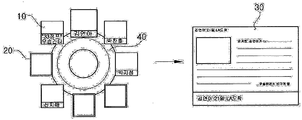
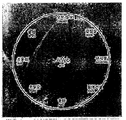
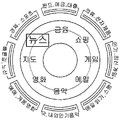
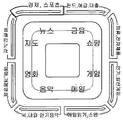
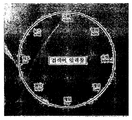
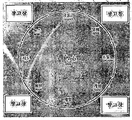
- 1 to 6 are screen examples schematically illustrating a general structure of a user interface according to an embodiment of the present invention.
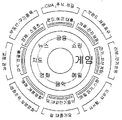
- 7 to 11 are screen examples showing the configuration of a user interface according to an embodiment of the present invention.
- 16 and 17 illustrate examples of switching a user interface screen when a menu component is selected and proceeds to the next step.
- FIG. 18 illustrates an example in which a menu component is additionally arranged in the user interface of the present invention.
- 19 and 20 illustrate examples of a user interface screen outputting a history of step movement when moving to the next step in the user interface of the present invention.
- 21 and 22 are screen examples illustrating a reconfiguration process of a customized user interface.
- FIG. 23 is a block diagram schematically illustrating a configuration of a user terminal to which a user interface is applied according to an embodiment of the present invention.
- FIG. 25 shows an example of a user interface screen according to Modification Example 3 of the present invention.
- 1 to 6 are screen examples schematically illustrating a general structure of an interface according to an embodiment of the present invention.
- a user interface includes a plurality of menu components 10 selectable by a user and a component frame 20 that is a frame for arranging the menu components 10 at a specific position. And a final content 30, and optionally a skin 40, which is a background image for emphasizing the presence or position of the menu components 10 or providing a user with a beautiful feeling. It may further include, in addition to the shape of the planar figure may be formed as a three-dimensional figure in the 3D environment.
- the menu component 10 may be a link or hypertext or may be the final content 30 itself to switch to the next user interface or output the final content 30 corresponding to the menu component 10.
- the menu component 10 may be a combination of link information into any one of a simple text, a thumbnail image or an icon image, and a thumbnail movie.
- the menu component 10 may include a text and a fragment image or a text and a fragment video. Link information may be combined with a composite of.
- the menu component 10 may be a web component or a mini application application that reproduces and outputs an image, a video, a sound source, and the like.
- the menu component 10 may be arranged on the track in a predetermined direction.
- the component frame 20 is a frame for arranging the plurality of menu components 10 at a predetermined position, and each menu component 10 is disposed in a direction on the component frame 20 having a track shape. Note that the arrangement may be arranged in a matrix form of a checkerboard rather than a track. When arranged in a matrix like this, the lower menu may be output as a polyhedron.
- the final content 30 is a final object to be explored through the user interface of the present invention and provides a user with news articles, product advertisements, shopping information, entertainment information, audio / video multimedia services, and the like.
- the final content 30 may be any one of document data, image data, sound source data, video data, or a combination of at least two or more, or an application application program for reproducing these data.
- the final content 30 may be a document that combines and provides at least two or more of the data using a markup language such as html, xml, sgml, etc., in this case, the final content
- the content menu selected for may include URL (Uniform Resource Locator) or link information indicating a local storage path.
- Skin 40 is a background image of menu components 10 and component frame 20. It is preferable to consider that the user can intuitively grasp the relationship between the input means and the operation method of the user interface by using an image in which the shape of the input means is used as the skin 40.
- the present invention is not limited thereto, and the skin 40 may be formed according to the screen form of the user terminal (for example, a planar figure such as a circle, a horizontal rectangle, a vertical rectangle, and a square, as well as a three-dimensional shape capable of geometry in a 3D environment).
- the shape of may be implemented in various ways.
- Components of the user interface are not limited to the above-described components but may further include various components.
- the terminal may further include a search term input window for inputting a search term in order to find the final content 30 desired by the user.
- the search term input window is placed in the center of the user interface.
- the arrangement position of the search word input window is not limited to the center of the user interface but may be changed according to the user's setting.
- the user may select a search word input window and move it to another location.
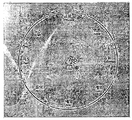
- the user interface according to the embodiment of the present invention may be designed in various designs so as to be simple as shown in FIG.
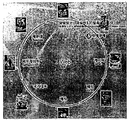
- FIG. 2 shows another configuration example of a user interface in which all the websites are searched and arranged with menu components 10 according to a predetermined category while having their own search engine or interworking with other search engine tools.
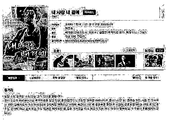
- FIG. 3 When the user selects the "movie" menu component 10 of the plurality of menu components 10, as shown in FIG. 3, the "movie” submenu components or “movies” included in the "movie” menu component 10 as shown in FIG. 3.
- FIG. Output as shown to the user.
- the "news” sub-menu component or “news” contents included in the "news” menu component 10 may be output to the user interface, or in FIG. 6.
- the related detailed information text, image or video
- the order in which the relevant sub-menu components or contents are arranged or viewed may be displayed in order by an option set by the user in advance, or may be displayed on the web by a predetermined search engine linked with the user interface of the present invention.
- the results of searching for the existing contents may be displayed according to predetermined classification criteria such as popularity, search order, time order, file capacity order, and attribute. Of course, it can be displayed randomly.
- the order in which the menu components 10 are arranged may also be changed by the user's setting.
- this feature can lead to unintentional user selection, so that it can be used for business or advertising revenue, and in the case of news content, it can provide a predetermined benefit to an article provider.
- the user interface of the present invention may be more advantageous when used for news articles or product search.
- This is a new search tool that changes the concept of existing web browsers.
- the mobile terminal has a directivity, and thus it is possible to select and inquire more quickly and conveniently in the second search after the first search.
- the third search screen, or the reverse order thereof it is based on the directional movement concept, thereby enabling a quick and convenient search.
- the user interface according to the embodiment of the present invention serves as a portal website that can be personalized, and sometimes a web screen or a web window itself, which is a collection of only desired menus.
- Existing portal websites categorize vast amounts of contents for all of a variety of users according to a predetermined classification criteria and display them on the website.However, in terms of individual users, all the various contents are searched. In fact, there are not a lot of frequently viewed contents. Therefore, if a user sets the classification criteria of contents according to his or her preference or intention, and places only the set categories on the screen, it becomes a more personalized user interface that is much easier to personalize.
- the menus classified into eight categories are given examples.
- the number and the directional movement can be easily searched and matched with the directional movement input operation of the user.
- the number or arrangement of classification categories and the addition or reduction of category menus can be freely modified according to the usage environment or design purpose, as described below.
- the space on the screen is sufficient, and the space may be used for other purposes.
- another web tool or user interface may be placed in a corner space area of a rectangular screen to create a more personalized mobile environment.
- the user interface area for advertisements can be placed to increase space utilization even on limited screen sizes. But of course, this can be removed and personalized by the user. It will be understood by those skilled in the art that the above-described features are the same in the following embodiments.
- 7 to 11 are screen examples illustrating the configuration of a user interface according to an exemplary embodiment of the present invention.
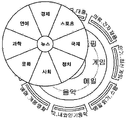
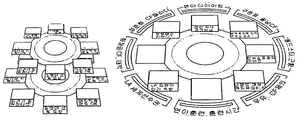
- a user interface includes a skin 40 representing an image of a plurality of circular trajectories, menu components 10 listed according to each circular trajectory, and menu components 10. It comprises a component frame 20 for positioning in a predetermined position.
- the circular trajectory is not necessarily fixed to a specific number and may be variously set according to the screen size, resolution, content (or type) of the user terminal 100, and the like.
- 7 shows an example of a user interface with two circular orbits in particular.
- eight menu components 10 belonging to the first category may be radially disposed in each direction in the inner track, and eight submenu components belonging to the second category may be radially disposed in the outer track. It is shown.
- the first category includes a keyword corresponding to a major classification by category
- the second category corresponds to a keyword corresponding to a detailed classification for each keyword of the first category. It may include.
- the first category of the inner track contains the large category of keywords
- the second category of the intermediate track contains the middle category of keywords
- the outer category of the third category contains the small categories of keywords.
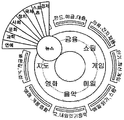
- 2B shows an example of a user interface with three trajectories.
- the main menu components 10 belonging to the first category are radially disposed in each direction on the first trajectory, and the first submenu components belonging to the second category are radially main on the second trajectory.
- the third trajectory is further formed to correspond to the menu components, respectively, the lower second sub-menu components are respectively arranged radially to correspond to the first sub-menu components belonging to the second category ( See FIG. 8).
- the first category includes a keyword corresponding to a major category
- the second category is a keyword of a similar class that can be easily associated with the keyword of the first category. It may include.
- the eight menu components 10 belonging to the first category are disposed in the inner track as an example.
- the menu components belonging to the first category disposed in the inner track are not limited to eight but variously set according to the user's setting. Can be.
- the first category is disposed in both the inner track and the outer track.
- a menu component 10 belonging to may be arranged.
- the menu component 10 belonging to the first category may also be disposed on the outer track only when the number of the menu components 10 belonging to the first category cannot be arranged on the inner track.
- each of the menu components classified and arranged by category may output the searched results in cooperation with its own search engine or other search engine tools as described above. That is, as a result, the search results are classified into large headings, middle headings, and subheadings in the DB and are output. This can be output in various ways automatically or by preset.
- the shape of the skin 40 and trajectory of the user interface according to an embodiment of the invention is not necessarily limited to a circle. Accordingly, the skin 40 and the trajectory of the user interface according to the embodiment of the present invention may be implemented as a circle, an ellipse, a polygon having a curved edge, and a corner such as a rectangle, a triangle, a pentagon, a hexagon, an octagon, a star, etc. It may be implemented as a planar figure such as a polygon instead of a curve, and in a 3D environment, it may also be implemented as a geometrically possible three-dimensional figure and may improve user's intuition or experience.
- the arrangement of the menu component 10 is described in the case where the screen of the user terminal according to the embodiment of the present invention is particularly rectangular, except that the shape of the skin 40 and the shape of the track are not circular. 1 and the detailed description thereof will be omitted.
- FIG. 10 and 11 illustrate examples of a user interface that enables faster navigation.
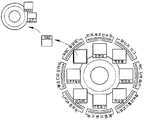
- the user wants to select the "news" menu component 10 arranged at the 10-11 o'clock position, in the previous example, when the "news" menu component 10 is selected, the sub-menu components of the lower level or Although a user interface displaying the contents is output, in the present example, prior to selecting the "news" menu component 10, the corresponding sub-menu components are inputted through the direction input of the input means while identifying which sub-menu components or contents are present. Or you can browse the contents at once. That is, in FIG.
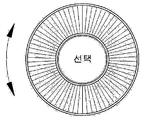
- the user interface of the circular selection window may be the final content 30 corresponding to the menu to be selected as described above, or may be a second submenu component.
- news content for the "Sport" submenu component may be displayed by performing a direction input indicating the "Sport" submenu component at 1 o'clock while the user interface of the circular selection window is activated.
- Second sub-menu components such as ",” basketball “,” soccer “or the like may be displayed.
- FIG. 11 an example is shown in which the fan-shaped selection window is replaced with the user interface of the circular selection window.
- the operation method is the same. However, it will be easily understood by those skilled in the art that the present invention will be a more suitable example in the case of the rotary input means.
- the user When the menu component 10 of the user interface according to the embodiment of the present invention is fixed and is touched, for example, through a manipulation of the input means, the user directly selects the desired menu component 10 to move to a next user interface or a cursor. Move to the desired menu component 10 and select the menu component 10 where the cursor is located to move to the next user interface or open the final content 30 corresponding to the menu component 10. It is about.
- the term "cursor” refers to a pointing means for indicating which menu component 10 is currently in a waiting state for selection, or waiting for a user input or indicating a position. none. For example, a certain color border is displayed on the menu component 10 that is waiting to be selected (see “News” menu component of FIG. 7), or the size of the menu component 10 that is waiting to be selected is compared with other menu components.
- the cursor can be expressed in such a way as to enlarge (see “Game” menu component of FIG. 8).
- the menu component 10 waiting to be selected may be expressed by giving a three-dimensional effect, color conversion, blinking, or highlight function.
- the menu component 10 waiting to be selected may be represented in various ways.
- the cursor when the initial screen of the user interface is output to the user terminal 100, the cursor may be set to be located at a predetermined specific menu component 10.
- the user manipulates the input means to move the cursor of the user interface and activate the menu component 10 at the point where the cursor is located. This will be described as an example according to the type of specific input means.
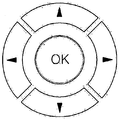
- a directional key can be considered.
- the directional key includes a direction key for moving the cursor and a selection key for selecting the menu component 10 at the point where the cursor is located, and a mode change key for switching the operation mode although not shown in the drawing. It may further include.
- the direction key may be a structure consisting of a plurality of keys corresponding to each direction, or may be a structure for selecting a plurality of directions with one circular, elliptical or polygonal key.
- the selection key is preferably provided at the center of the direction key, but may be provided at a separate location of the user terminal regardless of the direction key.
- the mode change key may be provided separately from the direction key and the selection key, but is not limited thereto. That is, the selection key and the mode change key may be used as one key. As a specific example, when the corresponding key is shortly pressed for a predetermined time or less, the selection key may be operated. To this end, the user terminal should further include a predetermined counting means.
- the direction key and / or the selection key and / or the mode change key of the directional key may be implemented by a touch method.
- a rotary key can be considered.
- the rotatable key includes a wheel key rotating at 360 ° and a selection key for selecting the menu component 10 at the point where the cursor is located, and although not shown in the drawing, for switching the operation mode. It may further include a mode change key.
- the selection key may be provided at the center of the wheel key or at another position.
- the menu component 10 at the point where the cursor is positioned is selected.
- the mode change key is preferably provided at a position separate from the wheel key and the selection key, but is not limited thereto. That is, the selection key and the mode change key may be used as one key, and a specific example thereof is the same as described with reference to FIG. 3A.
- the wheel key and / or the selection key and / or the mode change key of the rotary key may also be implemented by a touch method.
- a keyboard can be considered.
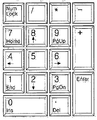
- the numeric key part of the keyboard is “1", “2", “3”, “4", “5", “6", “7”, “8”, “9” It includes numeric keys of "and” Enter “key. "1”, “2”, “3”, “4", “6", “7”, “8”, and “9” on the keyboard are “SW”, “S”, “SE” and “W” respectively. , “E”, “NW”, “N”, and “NE” can serve as a direction key, and "5" or "Enter” can serve as a selection key for selecting the menu component 10. have.
- the keyboard is not limited to the numeric board portion, and four or six adjacent keys of the character key portion of the keyboard are combined to set direction keys, and other specific keys (such as the "Enter” key). You can also set as the select key.
- the "I”, “J”, “M”, and “K” keys may be matched to the "N”, “W”, “S”, and “E” directions, respectively.
- the keyboard may further be assigned a mode change key for switching the operation mode of the user interface. This is more useful when the user interface according to the embodiment of the present invention is operated by a keyboard alone without a mouse.
- a data input device (not shown), which is an application of the present invention (patent application No. 2007-0045255), may be employed.
- the data input device filed by the inventor of the present invention is an input device capable of independently or simultaneously pressing and moving, and is capable of moving in any direction by pressing or moving the input device. It is an input means that can be selected and executed by another operation and can best realize the advantages of the present invention.
- those skilled in the art will fully understand that the invention of the patent application as well as the related input device inventions pre- filed by the inventors of the present application are the same.
- a touch screen (not shown) or a touch pad (not shown) may be considered as another example of the input means.
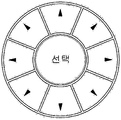
- the input means may employ a rotation direction key as shown in FIG. 15.
- the form of the input means is not limited to three types.
- a touch method that is widely used in recent years may be employed, and in addition, operation methods of the input means may be distinguished for menu movement on the same track, movement between different trajectories, and selection of the menu component 10 at the cursor point. If so, any type of input means may be used.
- the menu component 10 of the user interface can be rotated clockwise or counterclockwise on the track by the user's manipulation of the input means, and in advance the menu component 10 through the manipulation of the input means. After moving to a predetermined position, the menu component 10 is selected to move to a next user interface or to open a final content 30 corresponding to the menu component 10.
- the position of a particular menu component 10 of a particular trajectory of the user interface may be predetermined as a user's selection waiting position (for example, the east point of the inner trajectory).
- the user moves the desired menu component 10 to the selection standby position by operating the input means to rotate the trajectory of the user interface, and selects the menu component 10 at the corresponding position.
- This will be described as an example according to the specific type of the input means as follows.
- a rotation direction key may be considered as shown in FIG. 15.
- the rotation direction key includes a center menu selection key, a pair of orbital rotation keys disposed on the left and right sides of the menu selection key, and a pair of orbital movement keys disposed above and below the menu selection key.
- the menu components 10 of the current orbit rotate one by one clockwise or counterclockwise.
- the current trajectory and the other trajectory (s) are alternately switched. The user moves the desired menu component 10 to the selection standby position by using the orbital rotation key and / or the orbital movement key and selects the corresponding menu component 10 by pressing a menu selection key at the center.
- a rotary key can be considered.
- the rotatable key is shown in FIG. 13, wherein the user rotates the track clockwise or counterclockwise by using a wheel key rotated 360 °, and directionally presses the wheel key to change the current track to another track (s). Can be switched to).
- the user may select the menu component 10 of the selection standby position through a selection key provided at a location separate from the wheel key or a selection key provided at a center portion of the rotatable key.
- 16 and 17 illustrate examples of switching the UI screen when the user proceeds to the next step according to the selection of the menu component.
- the cursor movement and the menu component 10 are performed by using the directional keys in the fixed-orbit user interface will be described as an example.
- the present invention also relates to another type of input means. It is possible to easily infer the operating method of the user interface according to the embodiment.
- the cursor is located at the “finance” menu component 10 which is a predetermined position in the initial screen of the user interface.
- the user presses the northwest (NW) of the directional keys to select the "Economy, Sports” first submenu component and moves the cursor to the "news" menu component (10) of the same trajectory, once again the northwest of the directional key ( NW) to move the cursor to the "Economic, Sports” first submenu component of the outer track.
- NW northwest of the directional key
- a next stage user interface screen including detailed menus of the first sub-menu component that is, the second sub-menu component is output.
- the cursor may be located at the second position of the "Kim Yu-na" sub-menu component, which is a predetermined position, or at the position of the first sub-menu component selected in the previous step.
- the user operates the directional keys appropriately to position the cursor on the desired second menu component and select the corresponding second menu component.
- the user interface screen of the next step is output again, and if the next step of the selection is the final content 30, the corresponding final content 30 is displayed. Is activated.
- a news article in which text data and image data are synthesized is activated as the final content 30 and output to the screen.
- a cursor is located at a “finance” menu component that is a predetermined position in an initial screen (first step) of a user interface.
- the user presses the northwest (NW) of the directional keys to select the "Economy, Sports” first submenu component, moves the cursor to the "news" menu component of the same orbit, and once again moves the northwest (NW) of the directional keys. Press to move the cursor to the "Economic, Sports” first submenu component of the outer track. Then, press the center selection key of the directional key to select the "Economy, Sport” first sub-menu component.
- a user interface screen of a next step consisting of detailed menus of the first submenu component, that is, second submenus
- the user manipulates the directional keys appropriately to position the cursor on the desired second submenu component and selects the corresponding second submenu component.
- the user interface screen of the next stage is output again, and the next stage of the second submenu component selection (third stage) ) Is the final content 30, the corresponding final content 30 is activated.
- the third step is the final content 30
- the information window for displaying the final content 30 or all or part of the content is activated or finalized instead of the second submenu component at the point where the cursor is located in the second step.
- the content obtained by reducing the content 30 at a predetermined ratio is output.
- the user interface according to the detailed menu of the "Kim Yu-na" second sub-menu component is output in the third step.
- the content where the final content 30 is reduced at a predetermined rate is output instead of the second submenu component at the point where the cursor is located.
- Such reduced content may be simply a reduced content of the final content 30 according to a predetermined ratio, or may extract only a partial content of the final content 30 and output it to a screen area of a predetermined limited size.
- the user may enter the fourth step to check the contents of the final content 30, but may also check the entire contents or partial contents of the contents in advance by viewing the reduced contents.
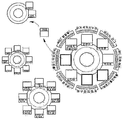
- the menu components, sub-menu components or contents are fixedly disposed on the outer track and the inner track, but are not necessarily limited thereto. That is, when the user selects a menu component 10 of the inner track, the lower menu components having keywords of the detailed field associated with the menu component may be newly disposed in the outer track.
- the outer track contains "Economic News”, “Presence News”, “Sports News”, “Weather News”, “International News”, “Real Estate News” , Sub-menu components of "Culture News” and "Art News” are arranged.
- the news article in which text data and image data are synthesized as an example of the final content 30 in FIG. 16 and FIG. 17 is mentioned as an example, the sound source data, the video data, the web page to which the URL is designated, etc. are also described as the final content 30. Can be used).
- the present invention relates to a method of additionally arranging a menu component or a submenu component in a free space of a user terminal screen.
- FIG. 18 illustrates an example in which the third submenu component is additionally disposed in the third step of FIG. 17.
- the number of third submenu components that can be arranged in a circular track is eight, although there are 13 detailed submenus of the second submenu component of “Kim Yu-na” in the second stage. Therefore, the remaining five third sub-menu components may be arranged in a list form on the lower right side of the UI screen.
- the user can move the cursor from the circular orbit to the additional third sub-menu component list through the trajectory movement operation of the input means, and move the cursor within the list through the north and south movement operations. have.
- the positions at which the remaining five third sub-menu components are arranged in the form of a list are not limited to the lower right of the user interface screen but may be arranged in various locations according to the user's setting.
- the remaining five third submenu components are arranged in the form of a list on the user interface screen, but the remaining five third submenu components may not be arranged on the user interface screen.
- the detailed menu for the second sub-menu component “Kim Yu-na” of the second stage that is, there are 13 third sub-menu components
- the number of the third sub-menu components that can be arranged in a circular orbit is 8
- Eight third submenu components are placed on the circular trajectory
- the remaining three third submenu components, which were not arranged by the user by operating the input means are placed on the circular trajectory, and eight third submenus originally placed on the circular trajectory.
- the menu component may not be placed.
- the method of arranging five third submenu components that are not arranged in the circular orbit instead of the eight third submenu components that were arranged in the circular orbit is performed by the user's input means. Instead of the menu component, five third sub-menu components that were not arranged in the circular track may be displayed, and in turn, instead of the eight third sub-menu components arranged in the circular track by the user's input means, one by one in the circular track. Five third submenu components that were not arranged may be arranged. In addition to the methods described above, the remaining five third submenu components may be arranged on the screen in various ways.
- 19 and 20 show an example of a user interface screen outputting a history of step movement.
- the user interfaces of the previous steps may be displayed in a form in which the number of closed curved layers are stacked around the user interface of the current step.
- the user can easily check the progress of the current screen in the initial stage of the user interface, and can display as many menu components and sub-menu components as one screen (the stages displayed on the screen * the number of menu components per track). You can check it.
- the user can move from the circular trajectory of the current stage to the circular trajectory of the previous stage through the trajectory movement operation of the input means.
- the trajectory may be moved in such a manner that the circular trajectory of the current stage and the circular trajectory (s) of the previous stage are alternately switched to the center of the screen.
- the user may not identify each menu component or submenu components constituting the user interface only in a limited range of predetermined steps.
- the user may extract the desired menu components or sub-menu components from the current user interface and reconfigure them into their own user interface.
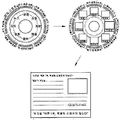
- 21 is a screen example illustrating a process of generating a customized user interface according to an embodiment of the present invention.
- the user terminal 100 may operate by dividing into a navigation mode for finding the desired final content 30 using a user interface and a reconfiguration mode for configuring a personalized user interface. have. Therefore, the user terminal must be assigned a key for mode switching.
- the mode switch key may be provided separately from an input means for manipulation of a user interface, or may use a key of an existing input means as it is. In the latter example, when a key for moving a cursor or a menu rotates and a key for selecting a menu are input at the same time, the operation mode may be set to be switched.
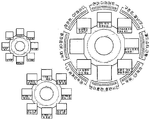
- a frame of a new user interface to be newly configured is displayed at a predetermined position (for example, the upper left portion of the screen in FIG. 21) among the empty spaces of the screen.
- the frame of the new user interface may be displayed on the screen when the reconstruction mode is executed, and the frame of the new user interface is displayed in a blank state without the menu component 10 at a predetermined position from the initial state of the screen, and then after the user input operation. It may even be activated.
- the user operates the input means to move the cursor in the existing user interface in the center of the screen.
- the menu selection key of the input means is selected to transfer the corresponding menu component 10 or submenu component to the component frame 20 of the new user interface. .
- the user moves the cursor from the current user interface to the new user interface by inputting the cursor movement key of the input means several times. For example, if the cursor is located on the inner track of the current user interface, pressing the cursor shift key of the input means once moves the cursor to the outer track, and pressing the cursor shift key once more disappears the cursor and the new user interface The outer track of is activated, and pressing the cursor movement key once more activates the inner track of the new user interface.
- trajectory setting method is only one example, and it is obvious that the trajectory setting method can be variously set according to the implementation form of the above-described input means.
- the new user interface When the editing of the new user interface is finished and the operation mode is switched to the navigation mode, the new user interface is displayed on the screen, and the user can operate the input means to perform cursor movement and menu component selection in the same way as in the previous user interface. have.
- FIG. 22 is a modified example of FIG. 21. Instead of outputting only one step to the screen using the current user interface, the user interface of the previous step is also displayed on the screen as in the embodiments of FIGS. 19 and 20 to edit the new user interface. It is about the case.
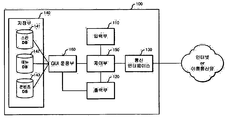
- the user terminal 100 includes an input unit 110, an output unit 120, a communication interface 130, a storage unit 140, a controller 150, and a GUI operating unit 160.
- the input unit 110 is an instruction for moving a cursor between a menu component 10 or a submenu component on the same trajectory or a menu component 10 or a submenu component on a different trajectory in a menu component fixed user interface. And instructions for selecting the menu component 10 or the submenu component at the point where the cursor is located. In addition, the input unit 110 may rotate the menu component 10 or sub-menu components on the same track or change the trajectory of the rotation target in the menu component rotational user interface, and the menu component 10 located at a predetermined point. Or, the user receives an instruction for selecting a submenu component.
- the input means mentioned in the foregoing description is the same concept as the input unit 110.
- Directional keys, rotary keys, touch keys, keyboards, touch screens, mice, keypads of mobile terminals for movement of cursors, rotation of menu components 10 or submenu components, and selection of menu components 10 or submenu components, A jog dial, a direction movement key, and the like may be used as the input unit 110.
- the output unit 120 outputs general information necessary for driving the user terminal 100 to the screen, and in particular, the step-by-step user interface configured by the GUI operation unit 150 and the final content 30 selected by the user on the screen. Output In addition, the output unit 120 outputs an advertisement simultaneously with the user interface on the screen of the user terminal 100.
- a CRT, LCD, LED, plasma type monitor, TV, liquid crystal display, etc. may be used as the output unit 120.
- the communication interface 130 downloads an operation application, a frame, configuration content, and an advertisement of a user interface according to an embodiment of the present invention through the Internet or a mobile communication network, and transmits the downloaded application to the storage 140.
- the storage 140 stores an operating system, various applications, and advertisements necessary for driving the user terminal 100, and in particular, a skin 40, a menu component 10, and final content constituting a user interface according to an embodiment of the present invention.
- 30 is stored in the skin DB 141, the menu DB 142, and the content DB 143, respectively.
- the controller 150 performs overall control for smoothly driving the user terminal 100, and in particular, controls the GUI operation unit 160 to smoothly provide a user interface according to an embodiment of the present invention.
- the GUI operating unit 160 configures a user interface according to an embodiment of the present invention, moves the cursor or rotates the component frame 20, selects a menu component 10 or a submenu component, and additional menu components 10. Or reconfigure the user interface according to the output of the additional submenu component list, the history output of the user interface, the execution of the customized user interface, or provide the user interface of the next step or output the final content 30.
- the GUI manager 160 may be implemented as an application application that provides the above functions.
- the user interface of the present invention may be produced by a dedicated editor, for example, a website is edited by a user using the Namo Web Editor, or may be produced using other known production tools or solutions.
- the output unit 120 When a user executes a web page by operating one of the input means described above, the output unit 120 outputs a web page composed of a user interface on the screen of the user terminal 100. Since the input means has been described above, a detailed description thereof will be omitted for convenience.
- the user interface constituting the web page is a component frame 20 and a skin 40 which is a frame for arranging the plurality of menu components 10 and the plurality of menu components in a predetermined position by orientation on one or more tracks as described above. It consists of Since components and shapes of the user interface have been described above, detailed descriptions thereof will be omitted for convenience. That is, in this embodiment, the user interface corresponds to a frame constituting an existing web page.
- the plurality of menu components 10 may be menu components 10 in an initially set state or may be menu components 10 reconfigured by a user. Since the method of reconfiguring the menu component 10 by the user has been described above, a detailed description thereof will be omitted.
- the plurality of menu components 10 include classified search results retrieved from all websites. Since the search results included in the menu component 10 are search results searched from all websites, duplicate search results may exist. The duplicate search results may or may not be included in the menu component 10 by the user's setting.
- search results included in the plurality of menu components 10 may be included in a sorted order based on one of the criteria such as the latest order, the popularity order, the search order, the file size order, or the like.
- the user operates the input means to select and rotate the menu component 10 to move to the next step and to check the final content 30 desired by the user. Since the method of operating the input means by the user and selecting the menu component 10 to move to the next step or checking the final content 30 by operating the input means has been described above, the detailed description is omitted for convenience.
- the user interface configuring the web page may further include a search word input window through which a user may input a search word by operating an input means as shown in FIG. 24.
- the search word input window may be activated by being activated in an area of the center of the user interface, or may be activated in a predetermined area on the user interface or on each menu component through a separate function key input.
- the user interface constituting the web page further includes a search term input window
- the user may easily and quickly check the desired final content 30 by inputting the search term in the search term input window.
- a web page composed of a user interface is performed, and the user interface constituting the web page is composed of a plurality of menu components 10, and each menu component 10 is executed.
- the user operates the input means to enter the search word "Kim Yu-na" into the search word input window and perform a search.
- the plurality of menu components 10 include only search results related to the search word "Kim Yua" entered by the user.
- the user inputs a search word in the search word input window so that the user can easily and quickly check the final content 30 desired by the user.
- the search word input window may be omitted intentionally or intentionally.
- the submenu component or the final content included in the plurality of menu components 10 is not a search result in which all the websites are searched. There is a difference in that the information stored in is classified and included in each of the plurality of menu components 10.
- the user interface consists of a plurality of menu components 10, a component frame 20, and a skin 40, the user can reconfigure the plurality of menu components 10, and the user manipulates the input means to make the menu components 10.
- To move to the next step and check the final content 30 is the same as in the modified embodiment 1 of the present invention, a detailed description thereof will be omitted.
- a user interface is disposed on the screen of the user terminal 100.
- an advertisement window may be activated or fixedly arranged in an empty space where the user interface is not displayed, thereby displaying an advertisement.
- the position at which the advertisement window is formed and the size of the advertisement window are not limited and may be variously formed in a range that does not overlap the user interface.
- the advertisement displayed along with the user interface on the screen of the user terminal may display various advertisements such as a line advertisement, an image advertisement, a video advertisement, and the like.
- the advertisement displayed on the screen of the user terminal together with the user interface may display an advertisement related to a menu component or content selected by a user by operating an input means through the advertisement window.
- the advertisement window displayed on the user terminal screen may display various advertisements such as advertisements input by a user terminal maker or a production company or advertisements downloaded through the Internet.
- the display of the advertisement in the empty space where the user interface is not arranged on the screen of the user terminal 100 has been described.
- various images and images may be displayed according to the user's designation in addition to the advertisement.
- a user-specified picture may be disposed in a blank margin space in which the user interface is not arranged on the screen of the user terminal 100.
- a desktop PC As a user terminal 100 according to an embodiment of the present invention, a desktop PC, a laptop PC, a palmtop PC, a PDA (Personal Digital Assistants), a PMP (Personal Multimedia Player), Telematics Terminal, Car Navigation, Mobile Phone, Smart Phone like Blackberry, Game Terminal like X-Box, PlayStation, Nintendo DS, etc. may be used. .
- PDA Personal Digital Assistants
- PMP Personal Multimedia Player
- the input unit 110 of the user terminal 100 described as a key input input means or a rotary wheel input means using the detection of the mechanical contact, but the electronic input means using a touch sensor
- the user interface according to the embodiment of the present invention can be operated in the same manner.
- the input unit 110 of the user terminal is implemented as a touch screen, the user may intuitively select each menu component without having to implement a cursor.
Landscapes
- Engineering & Computer Science (AREA)
- General Engineering & Computer Science (AREA)
- Theoretical Computer Science (AREA)
- Human Computer Interaction (AREA)
- Physics & Mathematics (AREA)
- General Physics & Mathematics (AREA)
- User Interface Of Digital Computer (AREA)
Abstract
La présente invention concerne une interface utilisateur qui organise des éléments de menu sélectionnables par l'utilisateur par azimut sur une ou plusieurs trajectoires présentant une figure géométrique prédéterminée, et qui, lorsqu'un élément de menu est sélectionné, recherche des contenus finaux par un procédé de sortie d'éléments de menu de l'étape suivante. Elle concerne également un terminal utilisateur comprenant ladite interface utilisateur. Une interface utilisateur, selon un mode de réalisation de l'invention, comprend: plusieurs éléments de menu sélectionnables par l'utilisateur; et une trame d'éléments présentant une forme tridimensionnelle planaire pouvant être géométrique pour organiser les éléments de menu dans des positions prédéterminées par azimut sur une ou plusieurs trajectoires. Un moyen d'entrée prédéterminé peut être utilisé pour sélectionner un élément de menu désiré, et les éléments de menu configurant l'interface utilisateur peuvent être modifiés ou reconstitués par l'utilisateur.
Applications Claiming Priority (4)
| Application Number | Priority Date | Filing Date | Title |
|---|---|---|---|
| KR20090041322 | 2009-05-12 | ||
| KR10-2009-0041322 | 2009-05-12 | ||
| KR1020090095531A KR20100122433A (ko) | 2009-05-12 | 2009-10-08 | 방향 선택형 사용자 인터페이스 및 이를 구현하는 사용자 단말기 |
| KR10-2009-0095531 | 2009-10-08 |
Publications (2)
| Publication Number | Publication Date |
|---|---|
| WO2010131900A2 true WO2010131900A2 (fr) | 2010-11-18 |
| WO2010131900A3 WO2010131900A3 (fr) | 2011-03-10 |
Family
ID=43085454
Family Applications (1)
| Application Number | Title | Priority Date | Filing Date |
|---|---|---|---|
| PCT/KR2010/002999 Ceased WO2010131900A2 (fr) | 2009-05-12 | 2010-05-12 | Interface utilisateur à sélection de direction et terminal utilisateur comprenant celle-ci |
Country Status (1)
| Country | Link |
|---|---|
| WO (1) | WO2010131900A2 (fr) |
Cited By (3)
| Publication number | Priority date | Publication date | Assignee | Title |
|---|---|---|---|---|
| CN103064591A (zh) * | 2012-12-29 | 2013-04-24 | 倪旻 | 一种多级菜单导航界面实现方法 |
| US9100906B1 (en) * | 2013-01-15 | 2015-08-04 | Sprint Communications Company L.P. | Parameters for user devices in wireless access systems based on azimuth angle |
| US9104783B2 (en) | 2010-02-09 | 2015-08-11 | Exb Asset Management Gmbh | Association of information entities along a time line |
Family Cites Families (5)
| Publication number | Priority date | Publication date | Assignee | Title |
|---|---|---|---|---|
| US6549219B2 (en) * | 1999-04-09 | 2003-04-15 | International Business Machines Corporation | Pie menu graphical user interface |
| KR100715808B1 (ko) * | 2005-10-01 | 2007-05-08 | 엘지전자 주식회사 | 이동통신 단말기 및 이를 이용한 목록 표시방법 |
| KR100686956B1 (ko) * | 2006-02-20 | 2007-02-26 | 김선권 | 그래픽 사용자 인터페이스를 위한 계층화된 링메뉴 제공방법 및 그 장치 |
| JP2007287135A (ja) * | 2006-03-20 | 2007-11-01 | Denso Corp | 画像表示制御装置および画像表示制御装置用のプログラム |
| KR20080079872A (ko) * | 2007-02-28 | 2008-09-02 | 삼성전자주식회사 | 단말기의 메뉴 표시 방법 |
-
2010
- 2010-05-12 WO PCT/KR2010/002999 patent/WO2010131900A2/fr not_active Ceased
Cited By (3)
| Publication number | Priority date | Publication date | Assignee | Title |
|---|---|---|---|---|
| US9104783B2 (en) | 2010-02-09 | 2015-08-11 | Exb Asset Management Gmbh | Association of information entities along a time line |
| CN103064591A (zh) * | 2012-12-29 | 2013-04-24 | 倪旻 | 一种多级菜单导航界面实现方法 |
| US9100906B1 (en) * | 2013-01-15 | 2015-08-04 | Sprint Communications Company L.P. | Parameters for user devices in wireless access systems based on azimuth angle |
Also Published As
| Publication number | Publication date |
|---|---|
| WO2010131900A3 (fr) | 2011-03-10 |
Similar Documents
| Publication | Publication Date | Title |
|---|---|---|
| RU2450320C2 (ru) | Универсальный круговой пользовательский интерфейс со многими состояниями | |
| KR20100122462A (ko) | 방향 선택형 사용자 인터페이스 및 이를 구현하는 사용자 단말기 | |
| WO2013085327A1 (fr) | Appareil d'affichage conçu pour afficher un écran divisé en une pluralité de zones, et procédé associé | |
| WO2010134710A2 (fr) | Procédé de recherche de liste et terminal mobile prenant en charge de procédé | |
| US20080168368A1 (en) | Dashboards, Widgets and Devices | |
| US20080168367A1 (en) | Dashboards, Widgets and Devices | |
| TW200907781A (en) | Glance and click user interface | |
| US20080168382A1 (en) | Dashboards, Widgets and Devices | |
| US20070002077A1 (en) | Methods and System for Providing Information Services Related to Visual Imagery Using Cameraphones | |
| WO2010110613A1 (fr) | Procédé permettant de diviser des zones d'un écran et terminal mobile utilisant ce procédé | |
| WO2012091289A1 (fr) | Procédé de déplacement d'un objet entre des pages et appareil d'interface | |
| WO2010134718A2 (fr) | Dispositif mobile et procédé d'édition de pages utilisées pour un écran domestique | |
| WO2012153992A2 (fr) | Procédé et appareil de commande de l'affichage d'un article | |
| EP3021204A1 (fr) | Dispositif de traitement d'informations, procédé de traitement d'informations, et programme informatique | |
| EP3021203A1 (fr) | Dispositif de traitement d'informations, procédé de traitement d'informations, et programme informatique | |
| JP2007122496A (ja) | 表示情報選択装置及び方法、プログラム並びに記録媒体 | |
| KR20090109582A (ko) | 콘텐츠 표시 장치, 텔레비전 수상기, 콘텐츠 표시 방법, 콘텐츠 표시 제어 프로그램을 기록한 컴퓨터 판독가능한 기록 매체 | |
| KR20070035071A (ko) | 큐트식 사용자 인터페이스 | |
| CN108874265A (zh) | 多媒体信息显示方法、装置、计算机设备及存储介质 | |
| CN113535031A (zh) | 页面显示方法、装置、设备及介质 | |
| WO2009131353A2 (fr) | Système de navigation sur le web | |
| WO2010131902A2 (fr) | Interface graphique utilisateur utilisant un polyèdre, et terminal utilisateur comprenant celle-ci | |
| WO2010131900A2 (fr) | Interface utilisateur à sélection de direction et terminal utilisateur comprenant celle-ci | |
| KR20100122461A (ko) | 다면체를 이용한 그래픽 사용자 인터페이스 및 이를 구현하는 사용자 단말기 | |
| CN116208702B (zh) | 多媒体文件播放方法、装置、电子设备及可读存储介质 |
Legal Events
| Date | Code | Title | Description |
|---|---|---|---|
| 121 | Ep: the epo has been informed by wipo that ep was designated in this application |
Ref document number: 10775102 Country of ref document: EP Kind code of ref document: A2 |
|
| NENP | Non-entry into the national phase |
Ref country code: DE |
|
| 122 | Ep: pct application non-entry in european phase |
Ref document number: 10775102 Country of ref document: EP Kind code of ref document: A2 |