WO2010143637A1 - 画像処理装置、画像処理方法及び記憶媒体 - Google Patents
画像処理装置、画像処理方法及び記憶媒体 Download PDFInfo
- Publication number
- WO2010143637A1 WO2010143637A1 PCT/JP2010/059716 JP2010059716W WO2010143637A1 WO 2010143637 A1 WO2010143637 A1 WO 2010143637A1 JP 2010059716 W JP2010059716 W JP 2010059716W WO 2010143637 A1 WO2010143637 A1 WO 2010143637A1
- Authority
- WO
- WIPO (PCT)
- Prior art keywords
- structured document
- elements
- image processing
- processing apparatus
- web page
- Prior art date
- Legal status (The legal status is an assumption and is not a legal conclusion. Google has not performed a legal analysis and makes no representation as to the accuracy of the status listed.)
- Ceased
Links
Images




Classifications
-
- G—PHYSICS
- G06—COMPUTING OR CALCULATING; COUNTING
- G06F—ELECTRIC DIGITAL DATA PROCESSING
- G06F3/00—Input arrangements for transferring data to be processed into a form capable of being handled by the computer; Output arrangements for transferring data from processing unit to output unit, e.g. interface arrangements
- G06F3/01—Input arrangements or combined input and output arrangements for interaction between user and computer
- G06F3/048—Interaction techniques based on graphical user interfaces [GUI]
- G06F3/0481—Interaction techniques based on graphical user interfaces [GUI] based on specific properties of the displayed interaction object or a metaphor-based environment, e.g. interaction with desktop elements like windows or icons, or assisted by a cursor's changing behaviour or appearance
-
- G—PHYSICS
- G06—COMPUTING OR CALCULATING; COUNTING
- G06F—ELECTRIC DIGITAL DATA PROCESSING
- G06F3/00—Input arrangements for transferring data to be processed into a form capable of being handled by the computer; Output arrangements for transferring data from processing unit to output unit, e.g. interface arrangements
- G06F3/12—Digital output to print unit, e.g. line printer, chain printer
- G06F3/1201—Dedicated interfaces to print systems
- G06F3/1278—Dedicated interfaces to print systems specifically adapted to adopt a particular infrastructure
- G06F3/1285—Remote printer device, e.g. being remote from client or server
- G06F3/1288—Remote printer device, e.g. being remote from client or server in client-server-printer device configuration
-
- G—PHYSICS
- G06—COMPUTING OR CALCULATING; COUNTING
- G06F—ELECTRIC DIGITAL DATA PROCESSING
- G06F3/00—Input arrangements for transferring data to be processed into a form capable of being handled by the computer; Output arrangements for transferring data from processing unit to output unit, e.g. interface arrangements
- G06F3/12—Digital output to print unit, e.g. line printer, chain printer
-
- G—PHYSICS
- G06—COMPUTING OR CALCULATING; COUNTING
- G06F—ELECTRIC DIGITAL DATA PROCESSING
- G06F3/00—Input arrangements for transferring data to be processed into a form capable of being handled by the computer; Output arrangements for transferring data from processing unit to output unit, e.g. interface arrangements
- G06F3/12—Digital output to print unit, e.g. line printer, chain printer
- G06F3/1201—Dedicated interfaces to print systems
- G06F3/1202—Dedicated interfaces to print systems specifically adapted to achieve a particular effect
- G06F3/1203—Improving or facilitating administration, e.g. print management
- G06F3/1204—Improving or facilitating administration, e.g. print management resulting in reduced user or operator actions, e.g. presetting, automatic actions, using hardware token storing data
-
- G—PHYSICS
- G06—COMPUTING OR CALCULATING; COUNTING
- G06F—ELECTRIC DIGITAL DATA PROCESSING
- G06F3/00—Input arrangements for transferring data to be processed into a form capable of being handled by the computer; Output arrangements for transferring data from processing unit to output unit, e.g. interface arrangements
- G06F3/12—Digital output to print unit, e.g. line printer, chain printer
- G06F3/1201—Dedicated interfaces to print systems
- G06F3/1223—Dedicated interfaces to print systems specifically adapted to use a particular technique
- G06F3/1237—Print job management
- G06F3/1244—Job translation or job parsing, e.g. page banding
- G06F3/1246—Job translation or job parsing, e.g. page banding by handling markup languages, e.g. XSL, XML, HTML
-
- G—PHYSICS
- G06—COMPUTING OR CALCULATING; COUNTING
- G06F—ELECTRIC DIGITAL DATA PROCESSING
- G06F40/00—Handling natural language data
- G06F40/10—Text processing
- G06F40/12—Use of codes for handling textual entities
- G06F40/14—Tree-structured documents
- G06F40/143—Markup, e.g. Standard Generalized Markup Language [SGML] or Document Type Definition [DTD]
Definitions
- the present invention relates to an image processing apparatus that outputs elements included in a structured document.
- Web pages are expressed in a structured document described in a structured language (markup language) such as HTML (Hyper Text Markup Language) or XHTML (Extensible Hyper Text Markup Language).
- markup language such as HTML (Hyper Text Markup Language) or XHTML (Extensible Hyper Text Markup Language).
- the structured document is analyzed by software called a browser, and a Web page can be displayed by displaying the structured document on a display according to the analysis result.
- Japanese Patent Publication No. 0358337 discloses a structured text or image corresponding to a selected part of a Web page in response to a user selecting a partial rectangle in the Web page using a pointing device such as a mouse. It describes that a new structured document is created by copying elements included in a document. The document describes that only text and images selected by the user are displayed based on a newly created structured document.
- Patent Document 1 the user must specify an area of the Web page and select an element included in the structured document. Therefore, there is a need for a technique for further simplifying a user operation for selecting an element included in a structured document.
- the present invention provides an image processing apparatus that selects and outputs an appropriate element from a plurality of elements included in a structured document.
- an appropriate element can be selected and output from a plurality of elements included in the structured document.
- FIG. 2 is a block diagram showing a configuration of a PC 101.
- FIG. 2 is a block diagram showing a software configuration on a PC 101.
- FIG. It is a figure which shows an example of a structured document. It is a figure which shows an example of the DOM tree of a structured document. It is a figure which shows an example of a GUI screen. It is a figure which shows the GUI screen in which the display effect which shows a center element was given. It is a figure which shows the GUI screen in which the display effect which shows a center element was given. It is a figure which shows the GUI screen which displayed the thumbnail image which shows a center element as a list. It is a figure which shows the process sequence which extracts the center element and center element group of a structured document.
- FIG. 1 is a diagram illustrating an example of a printing system that performs printing based on a structured document.
- a PC (Personal Computer) 101 shown in FIG. 1 is connected to a printer 104 and causes the printer 104 to print an image as a print control apparatus.
- the PC 101 is connected to the WWW server 103 via the Internet 102, downloads a structured document described in a structured language (markup language), and displays a Web page based on the structured document.
- This structured document is described in a language such as HTML or XHTML.
- the printer 104 prints an image.
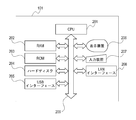
- FIG. 2 is a block diagram showing the configuration of the PC 101.
- the CPU 201 performs data operations and instructions according to a program, and controls each unit of the PC 101 and connected devices.
- a RAM 202 is a memory used as a temporary storage area
- a ROM 203 is a memory that stores various programs executed by the CPU 201.
- the hard disk 204 records an operating system (OS), a browser, other application software programs, data, and the like. That is, the CPU 201 reads out a program stored in the ROM 203 or the hard disk 204 to the RAM 202 and executes the program using the RAM 202 as a work memory to perform various controls.
- OS operating system
- the CPU 201 reads out a program stored in the ROM 203 or the hard disk 204 to the RAM 202 and executes the program using the RAM 202 as a work memory to perform various controls.
- the USB interface 205 is an interface to which a USB cable is connected, and is an interface for performing data communication with the printer 104. Note that communication with the printer 104 may be performed by other than the USB cable, for example, by SCSI or wireless.
- the display device 206 includes a CRT, a liquid crystal display, and a graphic controller, and displays a Web page downloaded from the WWW server 103, a print preview image, a graphic user interface (GUI), and the like.
- the input device 207 is a device for the user to give various instructions to the PC 101, and includes, for example, a mouse and a keyboard.
- a system bus 209 exchanges data with the CPU 201, RAM 202, ROM 203, hard disk 204, and the like.
- the LAN interface 208 is an interface to which a LAN cable is connected, and performs data communication with an external WWW server 103 via a router (not shown) or the Internet 102. Note that this data communication may be performed wirelessly using, for example, a wireless interface.
- FIG. 2 shows a case where the PC 101 is a so-called notebook PC in which the display device 206, the input device 207, the CPU 201, the RAM 202, and the like are integrated.
- the present invention is not limited to this, and the PC may be a so-called desktop type in which the display device and the input device are separated from the control unit.
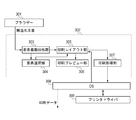
- FIG. 3 is a block diagram showing a software configuration on the PC 101. Each block shown in FIG. 3 is obtained by classifying programs stored in the ROM 203 or the hard disk 204 by function, and these programs are executed by the CPU 201. A program that runs on the PC 101 and its data processing configuration will be described below with reference to FIG.
- a browser 301 is an application for displaying a Web page, downloads a structured document stored in the WWW server 103 to the hard disk 204 of the PC 101, and displays the Web page on the display device 206 according to the analysis result.
- the downloaded structured document file is described in HTML, XHTML, or the like, and elements constituting the structured document such as text and images are described using tags.
- FIG. 4 is a diagram showing an example of a structured document.
- the structured document 401 is described in the XHTML format.
- another file called Cascading Style Sheet (hereinafter abbreviated as CSS) that specifies the display style of the elements included in such a structured document is specified in the structured document.
- CSS Cascading Style Sheet
- the browser 301 analyzes these structured document files and displays a Web page on the display device 206.
- the structured document printing module 302 is plug-in software called from the browser 301.
- the structured document printing module 302 is executed.
- the automatic element extraction is a process of extracting an element that is the center of information in a Web page and determining it as a print target area. Details will be described later.
- the element automatic extraction unit 303 analyzes elements in the structured document, and constructs hierarchical structure data of an element called a DOM (Document Object Model) tree in a temporary storage area such as the RAM 202.
- DOM Document Object Model
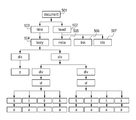
- FIG. 5 is a diagram showing an example of a DOM tree of a structured document.
- This DOM tree shows the data structure of the structured document, and shows the elements included in the structured document and the hierarchical structure of the structured document.
- the DOM tree is stored in the temporary storage area by the element automatic extraction unit 303 analyzing the elements included in the structured document and the hierarchical structure thereof.
- the DOM tree of the structured document 401 has a ⁇ document> node 501 representing the entire document as a root node, and has a ⁇ head> node 502 and a ⁇ html> node 503 as its child nodes.
- the ⁇ html> node 503 further has a ⁇ body> node 504 as its child node.
- Each element node holds data such as a pointer to a parent element node, a pointer to a sibling element node, a pointer to a child element node list, attribute information, and text information.
- the display state and layout information of each element are defined in the CSS file, and this information is stored in the temporary storage area as information of each element node of the DOM tree.
- the element font information, font size, character color, display position, and the like correspond to each element node information.
- the element automatic extraction unit 303 refers to the area occupied by each element in the web page, the text amount, the text ratio to the area occupied by the element, the tag type, and the tag attribute from the DOM tree, and becomes the center of information in the web page. Identify one or more elements.
- a plurality of elements that are the center of information in the Web page are referred to as a central element group, and an element that is the center of information in the central element group is referred to as a central element.
- the central element and the central element group can be preferentially selected as candidates for printing. In other words, when printing a partial area of a Web page, it is likely that the user wants to print the element that becomes the center of the Web page, so that the element that becomes the center of the Web page can be preferentially selected. Like that.
- the text amount here represents the amount of character information actually displayed on the browser among the character information included in the element.
- the text ratio represents the ratio of the text amount to the total tag size of the element.
- an element indicating an advertisement in a web page often has a link to another web page.
- the information assigned for the link such as the URL increases, so the ratio of the character information actually displayed on the browser to the total tag size of the element is low.
- the target element is, for example, an advertisement based on the above-described text ratio. Therefore, it is possible to determine whether or not the element has a high possibility of being desired as a print target by the user.
- the element selection unit 304 displays a display effect indicating one or a plurality of central element groups and central elements extracted by the automatic element extraction unit 303 included in the displayed Web page on the GUI screen displayed on the display device 206. Apply.
- this central element or the central element group is to be printed.
- the user can change the elements to be printed by changing the elements to be effected on the GUI screen using the input device 207 such as a mouse or a keyboard.
- the element selection unit 304 When an instruction for determining an element to be printed is input from the input device 207 to the element selection unit 304, the element selection unit 304 prints information for specifying an element to be printed according to the input instruction. Passed to the layout unit 305.
- the print layout unit 305 determines the layout for the paper of the element specified as the print target from the central element group based on the central element extracted by the automatic element extraction unit 303 or the information from the element selection unit 304. This layout is determined according to the print setting, and the print setting includes information such as a paper size, a resolution, and a printable area for the paper size. Information indicating print settings is acquired from the printer driver 309 via the OS 308.
- the print preview unit 306 displays an image in which elements are arranged in the layout determined by the print layout unit 305 on the display device 206 as a print preview.
- the print processing unit 307 causes the printer driver 309 to execute a drawing process via the OS 308 in accordance with the element arrangement information acquired from the print layout unit 305.
- the OS 308 provides an API (Application Programming Interface) for the structured document printing module 302 and the printer driver 309 to exchange print setting data and an API for performing a drawing process.
- the OS 308 includes various control software such as a spooler system that manages print jobs and a port monitor that outputs printer commands to a port.
- the printer driver 309 generates print data according to the drawing process executed by the print processing unit 307 and converts it into a printer command. Then, the converted printer command is transmitted to the printer 104 via the OS 308 and printed on paper.
- FIG. 6 is a diagram illustrating an example of a GUI screen.
- a return button 601 for switching a Web page to be displayed a forward button 602, an address input area 603, and the like are arranged.
- the browser 301 is provided with a print button 604, a print preview button 605, and an automatic extraction button 606.
- the automatic extraction button 606 is a button for executing the automatic extraction function of the central element group included in the structured document described above.
- the browser 301 calls the structured document printing module 302 using the structured document file for the Web page being displayed as a parameter.
- the structured document printing module 302 extracts the central element group and the central element from the designated structured document file and displays them on the browser 301. Details of the process of extracting the central element and the central element group will be described later with reference to FIG.
- FIG. 7 is a diagram showing a GUI screen on which a display effect indicating the central element is applied.
- a semitransparent rectangle is synthesized and displayed in the area of the central element 708 extracted by the element automatic extraction unit 303.
- the browser 301 includes a “next” button 702 for selecting other elements included in the central element group, a “back” button 703, and a “thumbnail display” button 704 for displaying a list of central element groups as thumbnails. Is displayed.
- the automatic extraction button 606 is pressed in the state shown in FIG. 6, it is assumed that a semitransparent rectangle is first synthesized with the element 708 as shown in FIG. 7A.
- the “Next” button 702 is pressed, a translucent rectangle is synthesized and displayed on another element 709 as shown in FIG. 7B.
- a print button 705 for printing the central element as a print target and a print preview button 706 for starting print preview are arranged.
- a cancel button 707 for canceling the display of the central element is also displayed at the same time. When this button is pressed, the GUI screen returns to the state shown in FIG. 7A can be manually adjusted by dragging the mouse on the browser 301 to adjust the position and size of the area.
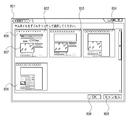
- FIG. 8 is a diagram showing a GUI screen displaying a list of thumbnail images indicating the central element.
- a thumbnail list screen 801 as a GUI screen includes thumbnail images 802, 803, 804, and 805.
- Each thumbnail image represents a Web page, and an area 807 in which semi-transparent rectangles are combined is a print target. The element which becomes is shown.
- each thumbnail image includes an area 806 for displaying text included in the central element group to be printed, and the element to be printed can be recognized from the contents of the text. The user can determine an element to be printed by selecting any one of the thumbnail images in the GUI screen.
- GUI screen shown in FIG. 7 and the GUI screen shown in FIG. 8 may be displayed in combination. That is, on the GUI screen, as shown in FIG. 7, the area indicating the element to be printed in the Web page and the thumbnail image of the Web page in which the element to be printed is shown as shown in FIG. To provide a display area that can be selected. When a thumbnail image is selected, the contents of the Web page indicated by the thumbnail image are reflected in the area where the Web page is displayed. As a result, the user can easily select an element to be printed using the thumbnail, and can check the contents of the element to be printed on the Web page.
- the print area may be automatically determined without causing the user to select a candidate print area.
- the user can confirm the area to be printed in advance, but printing may be performed immediately after the display is omitted and the elements are automatically extracted. Thereby, for example, the user can print the automatically extracted area only by clicking a predetermined button once.
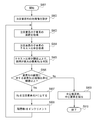
- FIG. 9 is a diagram showing a processing procedure for extracting the central element and the central element group of the structured document. Note that the processing shown in this figure corresponds to the automatic element extraction unit 303 shown in FIG. 3, and a program for executing this processing is stored in the ROM 203 or the hard disk 204. The CPU 201 reads out this program to the RAM 202 and executes it, so that the processing described here can be performed.
- step S901 when the automatic extraction button 606 of the browser 301 shown in FIG. 6 is pressed and an automatic extraction instruction is issued, the structured document printing module 302 is activated to start processing of the automatic element extraction unit 303.
- step S ⁇ b> 902 the element automatic extraction unit 303 sets an initial value of the element of interest Ri among elements included in the structured document read via the browser 301.
- the attention element Ri is a candidate for the central element, and the variable i represents the number of hierarchies below the body element of the DOM tree constructed corresponding to the structured document, and the higher the value, the lower the number of hierarchies. Corresponds to the hierarchy.
- the body element 504 in the DOM tree is set as the initial attention element R1 of the attention element Ri (i is a natural number).
- the element automatic extraction unit 303 extracts a target element for each layer from the upper layer to the lower layer of the DOM tree.
- the width and height (unit: pixel) in the Web page of all the child elements assigned to the lower layer included in the element of interest Ri are acquired, and assigned to the lower layer included in the element of attention Ri from these.
- the area of the web page of all the child elements is acquired.
- the text amount and the XHTML tag size included in all the child elements of the target element Ri are acquired, and the text ratios of all the child elements assigned to the lower layers included in the target element Ri are acquired from these. .
- an element Rc having a text ratio that is equal to or larger than a predetermined threshold and has the largest area is determined.
- Element candidate based on the information acquired in S903 and S904, among the child elements included in the element of interest Ri, an element Rc having a text ratio that is equal to or larger than a predetermined threshold and has the largest area.
- the area ratio of Rc to the area of Ri is obtained, and it is determined whether the ratio is equal to or greater than a predetermined threshold. If the area ratio is equal to or greater than the threshold value, the process proceeds to S907, where Rc is determined as the element of interest R (i + 1), and the process proceeds to S908.
- the elements R1, R2, R3,... Rn are determined. Note that the threshold used in the processing shown in S905 and S906 can be changed by the user.
- the process proceeds to S909, and the central element group and the central element are extracted.
- the attention elements R1 to Rn extracted so far are set as the central element group, and among them, Rn is particularly set as the central element.
- the central element Rn has the smallest area in the central element group, and is considered to be the central element because it is considered that the area unnecessary for the user is most deleted.
- the central element group is an element that is a candidate for printing when the user enlarges an element to be printed, and is an element that is extracted when the extraction conditions are relaxed in the processing of FIG.
- the element automatic extraction unit 303 can analyze the DOM tree of the structured document for each hierarchy and extract the central element and the central element group. It can be seen that the central element and the central element group extracted according to this processing procedure extract elements having a large area and a high text ratio among the elements.
- an element assigned to a lower hierarchy is a more central element in the Web page, so that the user is more likely to be a print target. Seem. Therefore, when a display effect indicating an element to be printed in a Web page is applied, an element assigned to a lower layer such as a central element may be displayed with higher priority. In addition, when the thumbnail image indicating the Web page is displayed in a selectable manner as described above, an element assigned to a lower hierarchy in the central element group may be preferentially selected.
- the element area and the element text ratio are used to extract the central element.
- the central element can also be extracted using the element tag type, tag attribute, and style. Good. For example, based on the tag type and tag attribute of the element, the background of the area corresponding to the element on the Web page and the character size of the text included in the text element are acquired, and the central element is extracted based on the acquired background and character size. .
- the central element is determined by setting the child element of the element of attention as the next element of attention. That is, in the Web page, the central element is determined by narrowing down the area corresponding to the child element included in the area corresponding to the element of interest.
- the present invention is not limited to this, and an element allocated below the element of interest other than the child element of the element of interest may be set as the next element of attention. That is, in the Web page, the central element may be determined using an area other than the area corresponding to the element of interest as the area corresponding to the element of interest.
- one attention element is extracted for each layer from the upper layer of the DOM tree, but a plurality of attention elements may be extracted. Further, the element of interest and the central element may be extracted by analyzing all elements instead of the DOM tree.
- the display indicating the automatically extracted element is performed.
- the display is not limited to this, and the automatically extracted element may be laid out and printed without displaying. .
- the central element is extracted from the lower elements of the target element.
- the central element is compared with other elements assigned to the same hierarchy of the target element. May be extracted. That is, the central element included in the element of interest in the Web page may be extracted, and the element arranged in a region different from the element of interest may be extracted as the central element.
- a plurality of central elements are extracted in different areas on the Web page, that is, a plurality of different areas on the Web page can be printed.
- a plurality of central elements to be printed may be assigned to different hierarchies.
- thumbnail images indicating the automatically extracted central element group are displayed as a list for output, and the user can select a candidate for output from among them. Therefore, the user can select and output an area desired to be output in the Web page by a simple operation. Furthermore, since it is possible to adjust the area of the selected center element, it is possible to specify and extract the area desired to be output in more detail.
- the present invention can also be realized by executing the following processing. That is, software (program) that realizes the functions of the above-described embodiments is supplied to a system or apparatus via a network or various storage media, and the computer (or CPU, MPU, etc.) of the system or apparatus reads the program. It is a process to be executed. Furthermore, the present invention can also be realized by a plurality of processors such as a CPU and an MPU executing processes in cooperation.
Landscapes
- Engineering & Computer Science (AREA)
- Theoretical Computer Science (AREA)
- General Engineering & Computer Science (AREA)
- Physics & Mathematics (AREA)
- General Physics & Mathematics (AREA)
- Human Computer Interaction (AREA)
- Health & Medical Sciences (AREA)
- Artificial Intelligence (AREA)
- Audiology, Speech & Language Pathology (AREA)
- Computational Linguistics (AREA)
- General Health & Medical Sciences (AREA)
- Document Processing Apparatus (AREA)
- User Interface Of Digital Computer (AREA)
- Information Transfer Between Computers (AREA)
Abstract
複数の要素のそれぞれが階層構造で定義された構造化文書に含まれる複数の要素の内容を示す情報を取得して、取得した前記情報が示す、前記構造化文書に含まれる複数の要素の内容に基づき、前記構造化文書に含まれる複数の要素のうちのいずれかを選択する。そして、選択された前記要素を、他の要素と区別して出力する。 なお、前記構造化文書に含まれる要素は、複数の階層のそれぞれにおいて選択可能であり、前記複数の階層のいずれかの階層で選択された要素が他の要素と区別して出力される。 これにより、構造化文書に含まれる複数の要素から適切な要素を選択して出力することができる。
Description
本発明は、構造化文書に含まれる要素を出力する画像処理装置に関する。
近年、インターネットを介してサーバにアクセスし、Webページを表示して様々な情報を得ることが可能となった。これらのWebページはHTML(Hyper Text Markup Language)、XHTML(Extensible Hyper Text Markup Language)といった構造化言語(マークアップ言語)で記述された構造化文書で表現される。そして、この構造化文書をブラウザーと呼ばれるソフトウェアが解析し、解析結果に応じてディスプレイに表示させることでWebページの表示が可能となる。
また、これらWebページを印刷する場合、ユーザにより選択されたWebページの一部の領域を印刷することできる。例えば特登録03588337号公報には、ユーザがWebページ内の一部矩形をマウス等のポインティングデバイスを用いて選択したことに応じて、Webページの選択された部分に対応するテキストやイメージといった構造化文書に含まれる要素をコピーして、新たな構造化文書を作成することが記載されている。そして、新たに作成した構造化文書に基づき、ユーザが選択したテキストやイメージのみを表示させることが記載されている。
しかしながら、特許文献1記載の方法では、ユーザはWebページの領域を指定して、構造化文書に含まれる要素を選択しなければならない。よって、構造化文書に含まれる要素を選択するためのユーザによる操作を、さらに簡単にするための技術が求められている。
そこで本発明は、構造化文書に含まれる複数の要素から適切な要素を選択して出力する画像処理装置を提供する。
複数の要素のそれぞれが階層構造で定義された構造化文書に含まれる複数の要素の内容を示す情報を取得する取得手段と、前記取得手段が取得した情報が示す、前記構造化文書に含まれる複数の要素の内容に基づき、前記構造化文書に含まれる複数の要素のうちのいずれかを、複数の階層のそれぞれにおいて選択可能な選択手段と、前記選択手段によりいずれかの階層で選択された要素を、他の要素と区別して出力する出力手段と、を有することを特徴とする。
本発明によれば、構造化文書に含まれる複数の要素から適切な要素を選択して出力することができる。
以下、添付図面を参照して本発明の好適な実施の形態を詳しく説明する。尚、以下の実施の形態は特許請求の範囲に係る本発明を限定するものでなく、また本実施の形態で説明されている特徴の組み合わせの全てが本発明の解決手段に必須のものとは限らない。
図1は、構造化文書に基づき印刷する印刷システムの例を示す図である。図1に示したPC(Personal Computer)101はプリンタ104と接続されており印刷制御装置としてプリンタ104に画像を印刷させる。またPC101は、インターネット102を介してWWWサーバ103と接続されており、構造化言語(マークアップ言語)で記述された構造化文書をダウンロードして、その構造化文書に基づきWebページを表示する。なお、この構造化文書はHTMLやXHTML等の言語で記述されている。さらに、このダウンロードした構造化文書に基づき、プリンタ104に画像を印刷させる。
図2はPC101の構成を示すブロック図である。CPU201は、プログラムに従ってデータの演算や命令を行い、PC101の各部や接続された装置に対する制御を行う。RAM202は、一時記憶領域として使用されるメモリであり、ROM203は、CPU201により実行される各種のプログラムを保存するメモリである。ハードディスク204はオペレーティングシステム(OS)、ブラウザーやその他のアプリケーションソフトのプログラムやデータ等を記録する。つまり、CPU201が、ROM203或いはハードディスク204に格納されたプログラムをRAM202に読出し、RAM202をワークメモリとしてプログラムを実行することで各種の制御が行われる。
USBインターフェース205は、USBケーブルが接続されるインターフェースであり、プリンタ104とのデータ通信を行うためのインターフェースである。なおプリンタ104との通信はUSBケーブル以外でも、例えばSCSIや無線により行われてもよい。
表示装置206はCRTや液晶ディスプレイとグラフィックコントローラとからなり、WWWサーバ103からダウンロードしたWebページや、印刷プレビュー画像、またグラフィックユーザインターフェース(GUI)などの表示が行われる。入力装置207はユーザがPC101に対して各種指示を与えるための装置であり、例えばマウスやキーボードがある。システムバス209は、CPU201やRAM202、ROM203、ハードディスク204等との間のデータのやり取りを行う。
LANインターフェース208はLANケーブルが接続されるインターフェースであり、不図示のルータ、またインターネット102を介して外部のWWWサーバ103とのデータ通信が行われる。なおこのデータ通信は、例えば無線に対応したインターフェースにより、無線で行われてもよい。
また図2では、PC101が表示装置206と入力装置207、CPU201、RAM202等の制御部と一体となった所謂ノート型のPCの場合を示している。しかし本発明はこれに限らず、PCは、表示装置と入力装置とが制御部と別体となった所謂デスクトップ型のものでもよい。
図3はPC101上のソフトウェアの構成を示すブロック図である。この図3に示された各ブロックはROM203やハードディスク204に保存されているプログラムを機能ごとに分類したものであり、これらのプログラムはCPU201により実行される。以下にPC101上で動作するプログラムとそのデータ処理構成について図3を用いて説明する。図3においてブラウザー301はWebページを表示するためのアプリケーションであり、WWWサーバ103に記憶された構造化文書をPC101のハードディスク204へダウンロードし、解析結果に応じて表示装置206にWebページを表示させる。ダウンロードされる構造化文書ファイルはHTMLやXHTML等で記述されており、テキストや画像等の構造化文書を構成する要素がタグを用いて記述されている。
図4は、構造化文書の一例を示す図である。図4で構造化文書401はXHTML形式で記述されている。また、このような構造化文書に含まれる要素の表示スタイルを指定するCascading Style Sheet(以下CSSと略す)と呼ばれる別ファイルが構造化文書内に指定されている。ブラウザー301はこれらの構造化文書ファイルを解析して表示装置206へWebページを表示させる。
図3において構造化文書印刷モジュール302はブラウザー301から呼び出されるプラグインソフトウェアであり、ユーザがブラウザー301に対して要素の自動抽出の指示を行ったときこの構造化文書印刷モジュール302が実行される。なお要素の自動抽出とは、Webページ内の情報の中心となる要素を抽出し、印刷対象領域として確定する処理である。詳細は後述する。
構造化文書印刷モジュール302において、要素自動抽出部303は構造化文書内の要素を解析し、DOM(Document Object Model)ツリーと呼ばれる要素の階層構造データをRAM202等の一時記憶領域に構築する。
図5は、構造化文書のDOMツリーの一例を示す図である。このDOMツリーは構造化文書のデータ構造を示すものであり、構造化文書に含まれる要素と、構造化文書が有する階層構造を示している。このDOMツリーは、要素自動抽出部303が構造化文書に含まれる要素とその階層構造を解析することで一時記憶領域に記憶される。
図5では、構造化文書401のDOMツリーは文書全体をあらわす<document>ノード501をルートノードにもち、その子ノードに<head>ノード502、<html>ノード503を持つ。<html>ノード503は更にその子ノードに<body>ノード504を持つ。また各要素ノードは、親要素ノードへのポインタ、兄弟要素ノードへのポインタ、子要素ノードリストへのポインタ、属性情報、テキスト情報等のデータを保持する。また、各要素の表示状態やレイアウト情報はCSSファイルで定義され、この情報はDOMツリーの各要素ノードの情報として一時記憶領域に記憶される。例えば要素のフォント種別、フォントサイズ、文字色、表示位置等がこの各要素ノード情報にあたる。
さらに要素自動抽出部303はこのDOMツリーから、各要素がWebページにおいて占める面積、テキスト量、要素が占める面積に対するテキスト比率、タグ種別、タグ属性を参照し、Webページ内の情報の中心となる1つまたは複数の要素を特定する。以降、このWebページ内の情報の中心となる複数の要素を中心要素群と呼び、中心要素群の中で最も情報の中心となる要素を中心要素と呼ぶ。本実施例では、この中心要素および中心要素群を印刷対象の候補として優先的に選択可能にする。つまり、Webページの一部の領域を印刷する場合に、ユーザはWebページの中心となる要素の印刷を望む可能性が高いと思われるため、Webページにおいて中心となる要素を優先的に選択できるようにする。
なお、ここでのテキスト量とは、要素に含まれる文字情報のうちの実際にブラウザーに表示される文字情報のデータ量を表す。またテキスト比率とは要素の全タグサイズに対するテキスト量の比率を表す。例えば、Webページ内で広告を示す要素の場合、別のWebページへのリンクを有している場合が多い。この場合、要素に含まれる文字情報のうち、URL等のリンクのために割り当てられる情報が多くなるため、要素の全タグサイズに対する実際にブラウザーに表示される文字情報の比率は低くなる。このように、上述のテキスト比率により対象の要素が例えば広告か否かを推測することができる。よって、ユーザが印刷対象として望む可能性の高い種類の要素か否かを判断することができる。
要素選択部304は、表示装置206に表示されたGUI画面上において、表示されたWebページに含まれる要素自動抽出部303が抽出した1つまたは複数の中心要素群や中心要素を示す表示効果を施す。本実施例においては、この表示効果が施された要素を印刷対象とするため、この中心要素、または中心要素群が印刷対象となる。これに対してユーザは、マウスやキーボード等の入力装置207を用いてGUI画面において効果を施される要素を変更して、印刷対象となる要素を変更することができる。
そして、印刷対象となる要素を決定する指示が入力装置207から要素選択部304に入力されると、要素選択部304は入力した指示に応じて印刷対象とする要素を特定するための情報を印刷レイアウト部305に渡す。
印刷レイアウト部305は、要素自動抽出部303が抽出した中心要素、または要素選択部304からの情報に基づき、中心要素群から印刷対象として特定された要素の用紙に対するレイアウトを決定する。このレイアウトは印刷設定に従って決定され、この印刷設定には用紙サイズ、解像度、用紙サイズに対する印刷可能領域等の情報が含まれる。なお印刷設定を示す情報はOS308を介してプリンタドライバ309から取得される。
印刷プレビュー部306は、印刷レイアウト部305が決定したレイアウトに要素が配置された画像を印刷プレビューとして表示装置206に表示する。印刷処理部307は印刷開始指示を受けた場合に、印刷レイアウト部305から取得した要素の配置情報に従って、OS308を介してプリンタドライバ309に対して描画処理を実行させる。
OS308は構造化文書印刷モジュール302とプリンタドライバ309とが印刷設定データのやり取りを行うためのAPI(Application Programming Interface)や描画処理を行うためのAPIを提供する。またOS308には印刷のジョブを管理するスプーラーシステム、プリンタコマンドをポートへ出力するポートモニター等の各種制御ソフトウェアが含まれるが詳細については省略する。
プリンタドライバ309は印刷処理部307により実行された描画処理にしたがって印刷データを生成し、プリンタコマンドに変換する。そして変換したプリンタコマンドを、OS308を介してプリンタ104に送信し、用紙へ印刷させる。
次に図6、図7を用いて、前述の要素選択部304の表示制御により表示される印刷対象を選択するためのGUI画面について説明する。図6は、GUI画面の一例を示す図である。ブラウザー301には、表示するWebページを切り替えるための戻るボタン601、進むボタン602、アドレス入力領域603などが配置されている。さらにブラウザー301には印刷ボタン604、印刷プレビューボタン605および自動抽出ボタン606が配置されている。この自動抽出ボタン606は、前述した構造化文書に含まれる中心要素群の自動抽出機能を実行させるためのボタンである。ユーザが自動抽出ボタン606を押下すると、ブラウザー301が表示中のWebページに対する構造化文書ファイルをパラメータとして構造化文書印刷モジュール302を呼び出す。構造化文書印刷モジュール302は、指定された構造化文書ファイルから中心要素群および中心要素を抽出してブラウザー301に表示する。この中心要素および中心要素群を抽出する処理の詳細は図9で後述する。
図7は、中心要素を示す表示効果が施されたGUI画面を示す図である。図7では、要素自動抽出部303により抽出された中心要素708の領域に半透明な矩形を合成して表示する。更にブラウザー301には、中心要素群に含まれる他の要素を選択するための「次へ」ボタン702、「戻る」ボタン703および中心要素群の一覧をサムネイル表示するための「サムネイル表示」ボタン704を表示する。例えば、図6で示した状態で自動抽出ボタン606が押されると、まず図7Aのように要素708に半透明の矩形が合成されたとする。そして、「次へ」ボタン702が押されると、図7Bに示すように別の要素709に半透明矩形が合成されて表示される。
更に図7に示すGUI画面においては、中心要素を印刷対象として印刷させるための印刷ボタン705、および印刷プレビューを開始するための印刷プレビューボタン706が配置される。また中心要素の表示を中止するためのキャンセルボタン707も同時に表示し、これが押された場合、GUI画面は図6の状態に戻る。また図7Aに示す中心要素708の領域は、ブラウザー301上でのマウスのドラッグ操作により手動で領域の位置およびサイズの調整を行うことが可能である。
図8は、中心要素を示すサムネイル画像を一覧表示したGUI画面を示す図である。ブラウザー301に含まれる「サムネイル表示」ボタン704がユーザにより押されると、この図8に示した画面が表示される。GUI画面としてのサムネイル一覧画面801にはサムネイル画像802、803、804、805が含まれ、それぞれのサムネイル画像はWebページを表しており、そのうち半透明の矩形が合成された領域807は、印刷対象となる要素を示している。さらに各サムネイル画像は、印刷対象としての中心要素群に含まれるテキストを表示する領域806を含み、そのテキストの内容からも印刷対象となっている要素を認識することができる。このGUI画面に対してユーザは、画面内のサムネイル画像のいずれかを選択することで、印刷対象となる要素を確定することができる。
なお、図7で示したGUI画面と、図8で示したGUI画面とを組み合わせて表示しても良い。つまり、GUI画面に、図7で示したようにWebページのうち印刷対象となっている要素を示す領域と、図8のように印刷対象とする要素が示されたWebページのサムネイル画像をユーザにより選択可能に表示する領域とを設ける。そして、サムネイル画像が選択されると、そのサムネイル画像が示すWebページの内容を、Webページが表示された領域に反映させる。これによりユーザは、サムネイルを用いて印刷対象とする要素の選択が容易になるとともに、印刷対象となる要素の内容をWebページで確認することができる。
なお、図7、図8に示すようにWebページの一部の色を変えるなどの効果を加えて印刷対象とする領域を示すのではなく、印刷対象から外れる要素を削除して、印刷対象となった要素に限定して表示させてもよい。また、上述のように、ユーザに印刷対象領域の候補を選択させずに、自動で印刷領域を決定してもよい。さらに、印刷対象の要素を区別可能に表示させることで印刷する領域をユーザに予め確認させることができるが、表示を省き、要素の自動抽出を行った後にすぐに印刷を行ってもよい。これにより、例えばユーザが所定のボタンを1回クリックするだけで、自動的に抽出された領域を印刷させることができる。
図9は、構造化文書の中心要素および中心要素群を抽出する処理手順を示す図である。なお、この図で示す処理は図3で示した要素自動抽出部303に対応しており、この処理を実行するためのプログラムがROM203やハードディスク204に保存されている。そして、CPU201がこのプログラムをRAM202に読出し実行することにより、ここで説明する処理を行うことができる。
まずS901において、図6で示したブラウザー301の自動抽出ボタン606が押下されて自動抽出指示が出されたとき、構造化文書印刷モジュール302が起動されて要素自動抽出部303の処理を開始する。S902において、要素自動抽出部303は、ブラウザー301を介して読み出された構造化文書に含まれる要素のうち、注目要素Riの初期値を設定する。なお、この注目要素Riは中心要素の候補であり、変数iは構造化文書に対応して構築されたDOMツリーのbody要素以下の階層数を表し、階層数はその値が大きいほど、より下位の階層に対応する。このS902では、DOMツリー内のbody要素504を注目要素Ri(iは自然数)の初期の注目要素R1とする。
次に要素自動抽出部303は、S903~S908において、DOMツリーの上位階層から下位階層へ各階層毎に注目要素を抽出する。まずS903において、注目要素Riに含まれる下位階層に割り当てられた全ての子要素のWebページにおける幅および高さ(単位はピクセル)を取得し、これらから注目要素Riに含まれる下位階層に割り当てられた全ての子要素のWebページにおける面積を取得する。さらにS904において、注目要素Riの全ての子要素に含まれるテキスト量およびXHTMLタグサイズをそれぞれ取得し、これらから注目要素Riに含まれる下位階層に割り当てられた全ての子要素のテキスト比率を取得する。
S905では、S903とS904で取得した情報に基づき、注目要素Riに含まれる子要素のうち、テキスト比率があらかじめ定めた閾値以上で、且つその中で面積が最大の要素Rcを判別して、注目要素候補とする。そしてS906において、Riの面積に対するRcの面積比率を求め、それがあらかじめ定めた閾値以上であるかを判定する。面積比率が閾値以上ならばS907に進んでRcを注目要素R(i+1)として確定してS908へ進み、さらに下位の階層の注目要素を抽出するため、階層数iをインクリメントする。上記S903~S908を繰り返すことで、R1、R2、R3、・・・Rnとなる要素が決定する。なお、S905、S906で示した処理で用いられる閾値はユーザにより変更可能である。
また、S906において面積比率が閾値未満であればS909へ進み、中心要素群と中心要素を抽出する。具体的には、それまでに抽出された注目要素R1~Rnを中心要素群とし、その中で特にRnを中心要素とする。この中心要素Rnは中心要素群の中で面積が最小であり、ユーザにとって不必要と思われる領域が最も削除されていると考えられるため中心要素として特定する。また中心要素群は、ユーザが印刷対象とする要素を拡大した場合に印刷対象の候補となる要素であり、また図9の処理において抽出の条件を緩和した場合に抽出される要素となる。
以上の処理手順により要素自動抽出部303が構造化文書のDOMツリーを階層ごとに解析し、中心要素および中心要素群を抽出することができる。この処理手順に従って抽出された中心要素および中心要素群は、要素の中でも面積が大きく、テキスト比率が高い要素が抽出されることがわかる。
なお、ここで抽出された中心要素群のうち、より下位の階層に割り当てられた要素はWebページの中でより中心となる要素となるため、ユーザが印刷対象とする可能性がより高いものと思われる。よって、Webページのうち印刷対象とする要素を示す表示効果を施す場合には、中心要素など、より下位階層に割り当てられた要素をより優先的に表示させるようにしてもよい。また上述のようにWebページを示すサムネイル画像を選択可能に表示させる場合、中心要素群の中でより下位階層に割り当てられた要素を優先的に選択できるようにしてもよい。
なお、上記の処理では、構造化文書で定義されている全ての階層において要素を選択することが可能な例を示した。しかし、これに限らず、構造化文書で定義されている特定の一部の階層において要素を選択できる構成でもよい。この特定の階層は、例えば、予め決まっている階層でもよいし、ユーザが指定した階層であってもよい。
また、上記の処理では中心要素の抽出のために要素の面積および要素のテキスト比率を用いているが、それら以外にも要素のタグ種別、タグ属性およびスタイルを用いて中心要素を抽出してもよい。例えば、要素のタグ種別やタグ属性により、Webページにおける要素に対応した領域の背景や、テキスト要素に含まれるテキストの文字サイズを取得して、取得した背景や文字サイズに基づき中心要素を抽出する。
さらに、上記の処理では注目要素の子要素を次の注目要素とすることで中心要素を決定していた。つまり、Webページにおいては、注目要素に対応した領域に含まれる子要素に対応した領域に絞込みを行うことで中心要素を決定していた。しかし、これに限らず、注目要素の子要素以外の、注目要素よりも下位に割り当てられた要素を次の注目要素としてもよい。即ち、Webページにおいては、注目要素に対応した領域以外の領域を、注目要素に対応した領域として中心要素を決定してもよい。
また上記の処理ではDOMツリーの上位階層から各階層ごとに1つの注目要素を抽出したが、複数の注目要素を抽出してもよい。またDOMツリーではなく全要素を解析して注目要素および中心要素を抽出してもよい。
さらに、上記の説明では自動で抽出された要素を示す表示を行っていたが、これに限らず、表示を行わずに、自動で抽出された要素をレイアウトして印刷させるものであってもよい。
なお、以上の実施例によれば、注目要素の下位の要素から中心要素を抽出していたが、その中心要素に加えて、注目要素の同じ階層に割り当てられた他の要素に対して中心要素の抽出を行ってもよい。即ち、Webページにおいて注目要素に含まれる中心要素を抽出するとともに、その注目要素とは異なる領域に配置されている要素も中心要素として抽出してもよい。この場合、Webページにおいて異なる領域に複数の中心要素が抽出されることになり、つまりWebページにおける異なる複数の領域を印刷対象とすることができる。また、印刷対象となる複数の中心要素は、異なる階層に割り当てられていてもよい。
以上述べたように本実施例によれば、構造化文書内の出力対象としてユーザが望む要素を自動的に抽出して印刷することが可能となる。さらに自動抽出した中心要素群を示すサムネイル画像を出力のための候補として一覧表示し、ユーザはその中から出力を望む候補を選択することも可能である。したがってユーザは、Webページ内の出力を望む領域を簡単な操作で選択して出力することができる。またさらに、選択した中心要素の領域を調整することも可能となるため、出力を望む領域を、より詳細に指定して抽出することも可能となる。
その他の実施例
また、本発明は、以下の処理を実行することによっても実現される。即ち、上述した実施形態の機能を実現するソフトウェア(プログラム)を、ネットワーク又は各種記憶媒体を介してシステム或いは装置に供給し、そのシステム或いは装置のコンピュータ(またはCPUやMPU等)がプログラムを読み出して実行する処理である。さらに、本発明は、CPUやMPU等の複数のプロセッサが連携して処理を実行することによっても実現される。
また、本発明は、以下の処理を実行することによっても実現される。即ち、上述した実施形態の機能を実現するソフトウェア(プログラム)を、ネットワーク又は各種記憶媒体を介してシステム或いは装置に供給し、そのシステム或いは装置のコンピュータ(またはCPUやMPU等)がプログラムを読み出して実行する処理である。さらに、本発明は、CPUやMPU等の複数のプロセッサが連携して処理を実行することによっても実現される。
本発明は上記実施の形態に制限されるものではなく、本発明の精神及び範囲から離脱することなく、様々な変更及び変形が可能である。従って、本発明の範囲を公にするために以下の請求項を添付する。
本願は、2009年6月9日提出の日本国特許出願特願2009―138398を基礎として優先権を主張するものであり、その記載内容の全てをここに援用する。
Claims (10)
- 複数の要素のそれぞれが階層構造で定義された構造化文書に含まれる複数の要素の内容を示す情報を取得する取得手段と、
前記取得手段が取得した情報が示す、前記構造化文書に含まれる複数の要素の内容に基づき、前記構造化文書に含まれる複数の要素のうちのいずれかを、複数の階層のそれぞれにおいて選択可能な選択手段と、
前記選択手段によりいずれかの階層で選択された要素を、他の要素と区別して出力する出力手段と、
を有することを特徴とする画像処理装置。 - 前記出力手段は、前記選択手段により選択された要素と他の要素との両方を、区別して出力することを特徴とする請求項1に記載の画像処理装置。
- ユーザによる指示に応じて、前記選択手段により選択された要素を変更する変更手段を有することを特徴とする請求項1に記載の画像処理装置。
- 前記出力手段は、前記選択手段により選択された要素に対応する画像を印刷装置に印刷させることを特徴とする請求項1に記載の画像処理装置。
- 前記出力手段は、印刷装置に印刷させるための設定を示す印刷設定を取得し、取得した前記印刷設定に基づき前記選択手段により選択された要素のレイアウトを決定して、決定された前記レイアウトに従って前記要素が配置された画像を印刷装置に印刷させることを特徴とする請求項4に記載の画像処理装置。
- 前記取得手段は、構造化文書に基づくWebページにおける前記構造化文書に含まれる要素に対応する領域の大きさを示す情報を取得することを特徴とする請求項1に記載の画像処理装置。
- 前記取得手段は、構造化文書に含まれる要素に含まれるテキストの内容を示す情報を取得することを特徴とする請求項1に記載の画像処理装置。
- 前記構造化文書に含まれる第1の要素は、前記構造化文書に基づくWebページの、前記構造化文書において前記第1の要素よりも上位の階層に割り当てられた第2の要素に対応する領域の一部の領域に対応し、前記選択手段は、前記取得手段により取得した情報に基づき、前記第1の要素と前記第2の要素のいずれかを選択することを特徴とする請求項1に記載の画像処理装置。
- 複数の要素のそれぞれが階層構造で定義された構造化文書に含まれる複数の要素の内容を示す情報を取得する取得工程と、
前記取得工程において取得した前記情報が示す、前記構造化文書に含まれる複数の要素の内容に基づき、前記構造化文書に含まれる複数の要素のうちのいずれかを選択する選択工程と、
前記選択工程において選択された要素を、他の要素と区別して出力する出力工程と、を有し、
前記選択工程では、前記構造化文書に含まれる要素が、複数の階層のそれぞれにおいて選択可能であり、前記出力工程では、前記複数の階層のいずれかの階層で選択された要素が他の要素と区別して出力されることを特徴とする画像処理方法。 - 請求項9に記載の画像処理方法をコンピュータに実行させるためのプログラムを記憶した記憶媒体。
Priority Applications (2)
| Application Number | Priority Date | Filing Date | Title |
|---|---|---|---|
| KR1020117031417A KR101376905B1 (ko) | 2009-06-09 | 2010-06-08 | 화상 처리 장치, 화상 처리 방법 및 기억 매체 |
| US12/906,924 US9141324B2 (en) | 2009-06-09 | 2010-10-18 | Outputting selective elements of a structured document |
Applications Claiming Priority (2)
| Application Number | Priority Date | Filing Date | Title |
|---|---|---|---|
| JP2009-138398 | 2009-06-09 | ||
| JP2009138398A JP5483934B2 (ja) | 2009-06-09 | 2009-06-09 | 情報処理装置、情報処理方法、およびプログラム |
Related Child Applications (1)
| Application Number | Title | Priority Date | Filing Date |
|---|---|---|---|
| US12/906,924 Continuation US9141324B2 (en) | 2009-06-09 | 2010-10-18 | Outputting selective elements of a structured document |
Publications (1)
| Publication Number | Publication Date |
|---|---|
| WO2010143637A1 true WO2010143637A1 (ja) | 2010-12-16 |
Family
ID=43308892
Family Applications (1)
| Application Number | Title | Priority Date | Filing Date |
|---|---|---|---|
| PCT/JP2010/059716 Ceased WO2010143637A1 (ja) | 2009-06-09 | 2010-06-08 | 画像処理装置、画像処理方法及び記憶媒体 |
Country Status (4)
| Country | Link |
|---|---|
| US (1) | US9141324B2 (ja) |
| JP (1) | JP5483934B2 (ja) |
| KR (1) | KR101376905B1 (ja) |
| WO (1) | WO2010143637A1 (ja) |
Families Citing this family (6)
| Publication number | Priority date | Publication date | Assignee | Title |
|---|---|---|---|---|
| JP5483934B2 (ja) | 2009-06-09 | 2014-05-07 | キヤノン株式会社 | 情報処理装置、情報処理方法、およびプログラム |
| JP5801545B2 (ja) * | 2010-10-15 | 2015-10-28 | キヤノン株式会社 | 情報処理装置、その情報処理方法及びプログラム |
| IL214360A (en) * | 2011-07-31 | 2016-05-31 | Verint Systems Ltd | System and method for identifying main pages in decoding network traffic |
| JP5766257B2 (ja) * | 2013-11-25 | 2015-08-19 | キヤノン株式会社 | 情報処理装置、情報処理方法、およびプログラム |
| US20150269272A1 (en) * | 2014-03-21 | 2015-09-24 | Xiaomi Inc. | Methods, devices, and apparatuses for adjusting display of webpage |
| US10956106B1 (en) * | 2019-10-30 | 2021-03-23 | Xerox Corporation | Methods and systems enabling a user to customize content for printing |
Citations (3)
| Publication number | Priority date | Publication date | Assignee | Title |
|---|---|---|---|---|
| JP2003084951A (ja) * | 2001-09-14 | 2003-03-20 | Fuji Xerox Co Ltd | 文書処理装置および画像出力装置ならびにそれらの方法 |
| JP2006260541A (ja) * | 2005-02-16 | 2006-09-28 | Matsushita Electric Ind Co Ltd | Webコンテンツ表示装置およびその方法 |
| JP2007011513A (ja) * | 2005-06-28 | 2007-01-18 | Ricoh Co Ltd | 文書表示装置、文書表示方法並びにプログラムおよび記録媒体 |
Family Cites Families (21)
| Publication number | Priority date | Publication date | Assignee | Title |
|---|---|---|---|---|
| JPH05143588A (ja) * | 1991-10-30 | 1993-06-11 | Oki Techno Syst Raboratori:Kk | 文書編集装置 |
| JP3715444B2 (ja) * | 1998-06-30 | 2005-11-09 | 株式会社東芝 | 構造化文書保存方法及び構造化文書保存装置 |
| JP2001325258A (ja) * | 2000-05-15 | 2001-11-22 | Mitsubishi Electric Corp | 書類管理システム |
| US7685514B1 (en) * | 2000-05-25 | 2010-03-23 | International Business Machines Corporation | Method and system for incorporation of graphical print techniques in a web browser |
| JP2002032364A (ja) * | 2000-07-14 | 2002-01-31 | Ricoh Co Ltd | 文書情報処理方法、文書情報処理装置及び記録媒体 |
| US20020069260A1 (en) * | 2000-12-01 | 2002-06-06 | Tagg James S. | Systems and methods for printing website data |
| JP4370783B2 (ja) * | 2002-06-27 | 2009-11-25 | 沖電気工業株式会社 | 情報処理装置および方法 |
| AU2002951709A0 (en) * | 2002-09-26 | 2002-10-17 | Canon Information Systems Research Australia Pty Ltd | Efficient printing of frames pages |
| US20040174563A1 (en) * | 2003-03-03 | 2004-09-09 | Cassidy John J. | Arranging images on a page |
| US7249319B1 (en) * | 2003-12-22 | 2007-07-24 | Microsoft Corporation | Smartly formatted print in toolbar |
| AU2004201773A1 (en) * | 2004-04-28 | 2004-06-03 | Canon Information Systems Research Australia Pty Ltd | Method of Printing a Selected Element within a Web Page |
| KR100585312B1 (ko) * | 2004-05-21 | 2006-06-01 | 삼성전자주식회사 | 웹페이지 인쇄 방법 |
| US20070124670A1 (en) * | 2005-11-29 | 2007-05-31 | Finck Thomas W | Systems, methods, and media for printing web pages |
| US20080055613A1 (en) * | 2006-06-30 | 2008-03-06 | Joseph Aaron Hatfield | Method for Printing Content from a Web Page |
| WO2008022197A2 (en) * | 2006-08-15 | 2008-02-21 | Neps, Llc | Content and print production management system and method |
| JP2008158885A (ja) * | 2006-12-25 | 2008-07-10 | Canon Software Inc | 情報処理装置および文書印刷処理方法およびプログラムおよび記録媒体 |
| US8078979B2 (en) * | 2007-11-27 | 2011-12-13 | Microsoft Corporation | Web page editor with element selection mechanism |
| US20100281351A1 (en) * | 2009-04-29 | 2010-11-04 | Soiba Mohammed | Web print content control using html |
| JP5483934B2 (ja) | 2009-06-09 | 2014-05-07 | キヤノン株式会社 | 情報処理装置、情報処理方法、およびプログラム |
| US20110075164A1 (en) * | 2009-09-30 | 2011-03-31 | Kurt Nathan Nordback | Systems and methods for enhanced printing of online content |
| US20130159889A1 (en) * | 2010-07-07 | 2013-06-20 | Li-Wei Zheng | Obtaining Rendering Co-ordinates Of Visible Text Elements |
-
2009
- 2009-06-09 JP JP2009138398A patent/JP5483934B2/ja active Active
-
2010
- 2010-06-08 KR KR1020117031417A patent/KR101376905B1/ko active Active
- 2010-06-08 WO PCT/JP2010/059716 patent/WO2010143637A1/ja not_active Ceased
- 2010-10-18 US US12/906,924 patent/US9141324B2/en active Active
Patent Citations (3)
| Publication number | Priority date | Publication date | Assignee | Title |
|---|---|---|---|---|
| JP2003084951A (ja) * | 2001-09-14 | 2003-03-20 | Fuji Xerox Co Ltd | 文書処理装置および画像出力装置ならびにそれらの方法 |
| JP2006260541A (ja) * | 2005-02-16 | 2006-09-28 | Matsushita Electric Ind Co Ltd | Webコンテンツ表示装置およびその方法 |
| JP2007011513A (ja) * | 2005-06-28 | 2007-01-18 | Ricoh Co Ltd | 文書表示装置、文書表示方法並びにプログラムおよび記録媒体 |
Also Published As
| Publication number | Publication date |
|---|---|
| JP2010286902A (ja) | 2010-12-24 |
| JP5483934B2 (ja) | 2014-05-07 |
| US20110035657A1 (en) | 2011-02-10 |
| US9141324B2 (en) | 2015-09-22 |
| KR20120026110A (ko) | 2012-03-16 |
| KR101376905B1 (ko) | 2014-03-20 |
Similar Documents
| Publication | Publication Date | Title |
|---|---|---|
| JP5801545B2 (ja) | 情報処理装置、その情報処理方法及びプログラム | |
| JP5692968B2 (ja) | 情報処理装置、情報処理方法、およびプログラム | |
| JP5629435B2 (ja) | 情報処理装置、情報処理方法、およびプログラム | |
| JP5455456B2 (ja) | 情報処理装置、情報処理方法、およびプログラム | |
| JP6157210B2 (ja) | 文書変換装置、文書変換方法、及びプログラム | |
| WO2010143621A1 (ja) | 画像処理装置、画像処理方法及び記憶媒体 | |
| KR101376905B1 (ko) | 화상 처리 장치, 화상 처리 방법 및 기억 매체 | |
| JP4966533B2 (ja) | 印刷システム、印刷方法、印刷プログラムおよび記録媒体 | |
| JP5735778B2 (ja) | 情報処理装置、情報処理方法、及びプログラム | |
| JP5792942B2 (ja) | 情報処理装置、情報処理方法、及び、プログラム | |
| WO2011001945A1 (ja) | 画像処理装置、画像処理方法及び記録媒体 | |
| US20130097483A1 (en) | Information processing apparatus, web browser control method, and storage medium storing program thereof | |
| JP5766257B2 (ja) | 情報処理装置、情報処理方法、およびプログラム | |
| JP2001306550A (ja) | 表示情報処理装置 | |
| JP5646019B2 (ja) | 画像処理装置、画像処理方法及びプログラム | |
| JP2011096267A (ja) | 印刷装置、印刷方法、印刷プログラムおよび記録媒体 |
Legal Events
| Date | Code | Title | Description |
|---|---|---|---|
| 121 | Ep: the epo has been informed by wipo that ep was designated in this application |
Ref document number: 10786168 Country of ref document: EP Kind code of ref document: A1 |
|
| NENP | Non-entry into the national phase |
Ref country code: DE |
|
| ENP | Entry into the national phase |
Ref document number: 20117031417 Country of ref document: KR Kind code of ref document: A |
|
| 122 | Ep: pct application non-entry in european phase |
Ref document number: 10786168 Country of ref document: EP Kind code of ref document: A1 |