WO2011004960A2 - Procédé de saisie de caractères à touches multiples - Google Patents
Procédé de saisie de caractères à touches multiples Download PDFInfo
- Publication number
- WO2011004960A2 WO2011004960A2 PCT/KR2010/003284 KR2010003284W WO2011004960A2 WO 2011004960 A2 WO2011004960 A2 WO 2011004960A2 KR 2010003284 W KR2010003284 W KR 2010003284W WO 2011004960 A2 WO2011004960 A2 WO 2011004960A2
- Authority
- WO
- WIPO (PCT)
- Prior art keywords
- touch
- character
- input
- points
- point
- Prior art date
- Legal status (The legal status is an assumption and is not a legal conclusion. Google has not performed a legal analysis and makes no representation as to the accuracy of the status listed.)
- Ceased
Links
Images





Classifications
-
- G—PHYSICS
- G06—COMPUTING OR CALCULATING; COUNTING
- G06F—ELECTRIC DIGITAL DATA PROCESSING
- G06F3/00—Input arrangements for transferring data to be processed into a form capable of being handled by the computer; Output arrangements for transferring data from processing unit to output unit, e.g. interface arrangements
- G06F3/01—Input arrangements or combined input and output arrangements for interaction between user and computer
- G06F3/048—Interaction techniques based on graphical user interfaces [GUI]
- G06F3/0487—Interaction techniques based on graphical user interfaces [GUI] using specific features provided by the input device, e.g. functions controlled by the rotation of a mouse with dual sensing arrangements, or of the nature of the input device, e.g. tap gestures based on pressure sensed by a digitiser
- G06F3/0488—Interaction techniques based on graphical user interfaces [GUI] using specific features provided by the input device, e.g. functions controlled by the rotation of a mouse with dual sensing arrangements, or of the nature of the input device, e.g. tap gestures based on pressure sensed by a digitiser using a touch-screen or digitiser, e.g. input of commands through traced gestures
- G06F3/04886—Interaction techniques based on graphical user interfaces [GUI] using specific features provided by the input device, e.g. functions controlled by the rotation of a mouse with dual sensing arrangements, or of the nature of the input device, e.g. tap gestures based on pressure sensed by a digitiser using a touch-screen or digitiser, e.g. input of commands through traced gestures by partitioning the display area of the touch-screen or the surface of the digitising tablet into independently controllable areas, e.g. virtual keyboards or menus
-
- G—PHYSICS
- G06—COMPUTING OR CALCULATING; COUNTING
- G06F—ELECTRIC DIGITAL DATA PROCESSING
- G06F3/00—Input arrangements for transferring data to be processed into a form capable of being handled by the computer; Output arrangements for transferring data from processing unit to output unit, e.g. interface arrangements
- G06F3/01—Input arrangements or combined input and output arrangements for interaction between user and computer
- G06F3/048—Interaction techniques based on graphical user interfaces [GUI]
- G06F3/0487—Interaction techniques based on graphical user interfaces [GUI] using specific features provided by the input device, e.g. functions controlled by the rotation of a mouse with dual sensing arrangements, or of the nature of the input device, e.g. tap gestures based on pressure sensed by a digitiser
- G06F3/0488—Interaction techniques based on graphical user interfaces [GUI] using specific features provided by the input device, e.g. functions controlled by the rotation of a mouse with dual sensing arrangements, or of the nature of the input device, e.g. tap gestures based on pressure sensed by a digitiser using a touch-screen or digitiser, e.g. input of commands through traced gestures
- G06F3/04883—Interaction techniques based on graphical user interfaces [GUI] using specific features provided by the input device, e.g. functions controlled by the rotation of a mouse with dual sensing arrangements, or of the nature of the input device, e.g. tap gestures based on pressure sensed by a digitiser using a touch-screen or digitiser, e.g. input of commands through traced gestures for inputting data by handwriting, e.g. gesture or text
-
- G—PHYSICS
- G06—COMPUTING OR CALCULATING; COUNTING
- G06F—ELECTRIC DIGITAL DATA PROCESSING
- G06F3/00—Input arrangements for transferring data to be processed into a form capable of being handled by the computer; Output arrangements for transferring data from processing unit to output unit, e.g. interface arrangements
- G06F3/01—Input arrangements or combined input and output arrangements for interaction between user and computer
- G06F3/02—Input arrangements using manually operated switches, e.g. using keyboards or dials
- G06F3/023—Arrangements for converting discrete items of information into a coded form, e.g. arrangements for interpreting keyboard generated codes as alphanumeric codes, operand codes or instruction codes
- G06F3/0233—Character input methods
- G06F3/0236—Character input methods using selection techniques to select from displayed items
-
- G—PHYSICS
- G06—COMPUTING OR CALCULATING; COUNTING
- G06F—ELECTRIC DIGITAL DATA PROCESSING
- G06F3/00—Input arrangements for transferring data to be processed into a form capable of being handled by the computer; Output arrangements for transferring data from processing unit to output unit, e.g. interface arrangements
- G06F3/01—Input arrangements or combined input and output arrangements for interaction between user and computer
- G06F3/03—Arrangements for converting the position or the displacement of a member into a coded form
- G06F3/041—Digitisers, e.g. for touch screens or touch pads, characterised by the transducing means
- G06F3/0416—Control or interface arrangements specially adapted for digitisers
-
- G—PHYSICS
- G06—COMPUTING OR CALCULATING; COUNTING
- G06F—ELECTRIC DIGITAL DATA PROCESSING
- G06F2203/00—Indexing scheme relating to G06F3/00 - G06F3/048
- G06F2203/041—Indexing scheme relating to G06F3/041 - G06F3/045
- G06F2203/04104—Multi-touch detection in digitiser, i.e. details about the simultaneous detection of a plurality of touching locations, e.g. multiple fingers or pen and finger
-
- G—PHYSICS
- G06—COMPUTING OR CALCULATING; COUNTING
- G06F—ELECTRIC DIGITAL DATA PROCESSING
- G06F2203/00—Indexing scheme relating to G06F3/00 - G06F3/048
- G06F2203/048—Indexing scheme relating to G06F3/048
- G06F2203/04808—Several contacts: gestures triggering a specific function, e.g. scrolling, zooming, right-click, when the user establishes several contacts with the surface simultaneously; e.g. using several fingers or a combination of fingers and pen
Definitions
- the present invention relates to a multi-touch type character input technology through touch input, and in particular, a user touches one or more points through a touch screen or a touch pad capable of detecting multi-touch, selects a preset character, and then continuously
- the present invention relates to a multi-touch type character input technology that allows a user to select various characters sequentially by changing a touch state of a touch point or moving a touch point to derive another preset character from a previously recognized character.
- touch screen is a display means as well as an input means
- a touch screen type mobile device often includes only a touch screen without a separate mechanical button. Accordingly, when various menu buttons are displayed on the touch screen to enable the control and input of the mobile device through the touch screen, the user may recognize the corresponding command by touching the same.
- the user has a function to more conveniently control the mobile device using two fingers.
- a virtual keyboard is displayed on the touch screen, and the user touches them to input characters.
- the touch screen is less touched and distinguishes between characters and characters.
- the user is inconvenient in inputting a variety of characters by touching a virtual button on the touch screen because it can not be reproduced.
- each language of the country has a variety of characters, for example, the English alphabet consists of 26 characters and Hangul is 24 characters, if you display all on the screen, because the size of each character button is limited, As the size is reduced, an error may occur in the character input by incorrectly touching the adjacent character while the user touches the character.
- An object of the present invention is a multi-touch type character that can input a variety of characters by easy touch input operation without using a separate character input button or a virtual key input menu through a touch screen or a touch pad that can detect multi-touch To provide input technology.
- a method of inputting a multi-touch type text into a text table including: (A) a character table in which characters are separately arranged for each attribute of a multi-touch; (B) detecting a touch occurrence on the touch input surface; (C) recognizing a first attribute according to the number of touch points by touch; (D) recognizing a first character corresponding to the first attribute in the character table; And (E) detecting a change in the first attribute and recognizing a second character derived from the first character in the character table in response to the second attribute according to the change in the first attribute.
- step (A) includes preparing a character table in which characters are divided according to the number of touch points, the number of touch points, and the moving direction of the touch points.
- step (C) comprises: recognizing the number of touch points;
- step (D) comprises: recognizing a first character corresponding to the number of touch points in the text table; It is configured to include, step (E), (E-1) detecting the number change of the touch point; (E-2) when a change in the number of touch points occurs, recognizing a second character derived from the first letter in the text table in response to the change in the number of touch points; (E-3) detecting the movement of the current touch point; (E-4) recognizing a movement direction of the current touch point when the movement of the current touch point occurs; And (E-5) recognizing a third character derived from one of the first character and the second character in the character table corresponding to the moving direction; It is preferably configured to include.
- the step (A) comprises the step of providing a character table including characters arranged separately according to the arrangement between the plurality of touch points;
- Step C) includes the step of recognizing the arrangement form between the touch points when the number of touch points is plural, and the step (D) recognizes the corresponding character corresponding to the number and arrangement of touch points from the character table. It is preferably configured to include.
- step (A) provides a character table including characters arranged separately according to touch separated points and non-touch separated points when the number of touch points changes.
- step (E-2) recognizing a touch-separated point and a non-touch-separated point when a change in the number of touch points occurs, and recognizing a corresponding character from a text table. It is preferable.
- the step (A) comprises the step of providing a character table including a character arranged corresponding to the case of the touch hold input; and (C
- the step (c) includes determining whether the touch point is in a touch hold state in which the touch point is maintained in a touch state for a predetermined time or more, and step (D) includes a touch hold input from a text table when the touch input is in the touch hold state. Recognizing a corresponding character for the; preferably comprises a.
- the step (A) may further include: preparing a character table including characters arranged separately according to the divided regions by dividing the touch input region. And (B) dividing an area of the touch input surface and detecting a dividing area where a touch input has occurred; and (D) dividing a divided area where a touch input has occurred from a character table. Recognizing the character; preferably comprises a.
- step (A) may further include preparing a character table corresponding to each input mode for each of the plurality of input modes.
- step) when there are a plurality of touch points, double touch occurrence is detected among the touch points, and when the double touch occurs, the corresponding input mode is set according to which touch point occurs and the character table corresponding to the corresponding input mode. Selecting a; It is preferably configured to further include.
- the step (A) further comprises the step of displaying the type of the character corresponding to the character table on the screen for each number of touch points; and (D)
- the method may further include arranging a combination of character forms that are dependent on the number of touch points and selectable according to the moving direction of the touch point according to the selectable moving direction, and displaying the same on the screen.
- step (E) is dependent on the change in the number of touch points when the change of the number of touch points occurs and has a character form selectable according to the moving direction of the touch point. And arranging the combination according to the selectable moving direction and displaying the combination on the screen.
- a variety of characters can be input by a simple touch input method through a touch input surface capable of multi-touch sensing, and thus there is no need to provide a separate character input button or a virtual key input menu.
- the range of characters that can be selected can be narrowed gradually, and the characters that can be selected in each step are displayed as screenshots, so that the user can enter characters more conveniently. have.
- FIG. 1 is a flow chart showing the overall operation of the multi-touch type character input method through a touch input according to an embodiment of the present invention
- FIG. 2 is a flow chart illustrating in more detail the operation of FIG. 1;
- FIG. 3 is an exemplary view showing a first screenshot and a second screenshot for assisting a user in inputting a text in a multi-touch text input technology through touch input according to an embodiment of the present invention
- FIG. 4 is an exemplary view showing another embodiment of the present invention for distinguishing a character input according to the arrangement of touch points;
- FIG. 5 is an exemplary view showing a screenshot showing that inputtable characters are set differently according to the number of touch points in the method of FIG. 4;
- FIG. 6 is an exemplary view showing another embodiment of displaying a screenshot on a screen in the embodiments of FIGS. 4 and 5;
- FIG. 7 is an example of inputting numbers in which 10 numbers of 0, 1, 2, ..., 9 are input in a manner conceived in the form of Roman numerals.
- 9 is an example of function key input such as SPACE, BACK SPACE, DELETE, RETURN,
- 10 is an example of editing function input such as COPY, CUT, PASTE,
- FIG. 11 is an example of a region division in which a type of character is divided and inputted by dividing a touch input region
- FIG. 13 is an exemplary diagram illustrating that an inputable character group is selected according to the number of touch points inputted to a touch and a position at which a touch is input.
- FIG. 14 is an exemplary diagram illustrating that a group of characters that can be input is selected according to a location where an auxiliary key input and a touch are input.
- 15 is an exemplary diagram illustrating that a group of characters that can be input is selected according to shapes of a plurality of touch inputs.
- FIG. 16 illustrates an example of selecting a group of characters that can be input according to a sequential touch input.
- FIG. 17 illustrates an example of selecting a plurality of character groups by multi-touch input.
- FIG. 18 is an exemplary diagram illustrating that one character group is selected while a plurality of character groups are selected as shown in FIG. 17.
- FIG. 19 is an exemplary diagram illustrating that one character group is selected when a touch input is generated again within a predetermined time after a state in which a plurality of character groups are selected as shown in FIG. 17 is released.
- FIG. 1 is a flowchart illustrating the overall operation of the multi-touch type character input method through touch input according to an embodiment of the present invention.
- the present invention can be applied to a mobile device such as a mobile phone, an MP3 player, a PMP, a PDA, and the like, provided with a touch input surface such as a touch screen or a touch pad.
- a touch input surface such as a touch screen or a touch pad.
- touch devices such touch-inputable electronic devices will be referred to as touch devices.
- a character table in which characters are divided and arranged according to attributes of a multi-touch is provided (ST10).
- the character is a concept including all the general characters, special characters, numbers, function keys, editing keys, etc., and the term referred to in the following claims should also be interpreted in this sense.
- the multi-touch refers to the case where the user touches the touch input surface at least one point, and the touch device should have a function for detecting the multi-touch.
- the touch device should have a function for detecting the multi-touch.
- the properties of multi-touch include the number of touch points touched by the user, the form of each touch point on the touch input surface, how the number of touch points has changed since the user lifted or added a finger after the touch, and the state of the touch. When the touch point is moved in the direction of the touch point is changed.
- various types of touch attributes which can be derived from multi-touch, can be utilized as an input classification operation.
- the characters are arranged by the attributes of the multi-touch, and they may be simply arranged one-to-one according to the attributes of the multi-touch.
- various character arrangements are possible by using permutations and combinations of the multi-touch attributes. That is, since the attribute of the multi-touch can be continuously changed by the user through the touch device, the character table can be configured to gradually narrow the types of characters that can be selected for each change step.
- the touch device detects touch generation on the touch input surface in real time (ST20).
- the touch device When a touch occurs on the touch input surface (ST30), the touch device recognizes a first attribute according to the number of touch points by the touch (ST40).
- the first attribute may be an attribute closely related to the number of touch points and may indicate the number of touch points themselves or may be an extended concept. This will be described in more detail with reference to FIG. 2.
- the touch device recognizes the first character corresponding to the first attribute in the prepared text table (ST50).
- the width of the character selection can be further expanded by the subsequent operation of the user.
- the touch device detects a change in the first property (ST60).
- the touch device When the change of the first property is detected (ST70), the touch device recognizes the second property according to the change of the first property (ST80).
- the second property may be a property related to the change of the first property described above and may indicate a change in the number of touch points, a movement of the touch point, and the like. This will be described in more detail with reference to FIG. 2.
- the touch device recognizes a second character derived from the first character in the character table prepared in advance in response to the second attribute according to the change of the first attribute (ST90). That is, the second character may be selected from the group of characters that are subsequently selectable with the first character being recognized.
- a third character derived from the second character may be selected, which will be described in more detail with reference to FIG. 2.
- FIG. 2 is a flowchart showing the operation of FIG. 1 in more detail.
- the input character can be selected by detecting a touch operation.
- a text table is prepared in the touch device (ST110).
- the character table may be provided in hardware or may be provided by installing a program after the product is released. At this time, the characters are arranged in the text table according to the number of touch points, the change of the number of touch points, and the moving direction of the touch points.
- the touch detection is a multi-touch detection, one or more touches may be detected not only by touch.
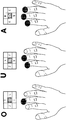
- the touch device When a touch occurs (ST130), the touch device recognizes the number of touch points by the touch (ST140). The first character corresponding to the number of touch points is recognized in the character table (ST150). For example, if one touch point is 'O', if two, 'U', and if three, 'A' is recognized, the corresponding character set in the character table is recognized.
- the touch device recognizes the arrangement form for two or more touch points and recognizes the corresponding character.
- FIG. 5 to be described later a method of distinguishing and recognizing characters according to the arrangement form when two or more touch points are described is described.
- the touch device detects a change in the number of touch points (ST160). For example, even when the user initially forms a touch point with two fingers, the touch point is changed to one by removing one finger.
- characters may be recognized differently depending on which of the existing touch points is maintained and which are separated.
- the character must be set in advance by dividing the number of touch points on the character table and the corresponding touch-separated and non-touch-separated points, and the touch device recognizes which of the touch points is maintained and which is separated. You should be able to.
- 'C' is recognized as the second character derived from one character. That is, the currently selected letter is changed from 'U' to 'C'. This is illustrated in more detail in FIG. 3 to be described later.
- the touch device detects the movement of the current touch point (ST190).
- the movement direction of the current touch point is recognized (ST210).
- the touch point is detected to move up, down, left and right, and diagonally. That is, the user may select a character not only by the change of the number of touch points but also by the movement of the touch point.
- the touch device recognizes a third character derived from one of the first character and the second character in the character table in response to the movement direction of the current touch point (ST220).
- the user may select the first character by touching the touch input surface, and then select the second character by changing the number of touch points, or move the current touch point by changing the number of touch points. You can also select 3 characters. In addition, the current touch point may be moved without changing the number of touch points to select another type of third character.
- FIG 3 is an exemplary view showing a first screenshot and a second screenshot for assisting a user in inputting a text in a multi-touch text input technology through touch input according to an embodiment of the present invention.
- the first and second screenshots show the user, at each stage, a character that is currently selectable from among the characters set in the character table of the touch device.
- the first screenshot on the left is an image that is displayed before the user inputs a touch. According to the number of touch points, 'O' for one touch point, 'U' for two points, and 'A' for three points. Is recognized, and it shows which characters are recognized when touch movement is made in each case.
- 'T', 'I', 'J', and 'L' may be recognized according to up, down, left, and right directions of the touch movement direction.
- the same rule can be applied to the remaining 'U' and 'A'.
- the second screenshot on the right is an image displayed when the user touches the touch input surface and one character is recognized once, and shows how the characters can be selected according to the change in the number of touch points and the touch movement direction accordingly. Giving.
- 'O' is selected because there is only one touch point
- 'Q' is recognized when the touch point is moved in a diagonal direction, so that all 26 letters of the English alphabet can be recognized.
- the English alphabet is arranged in consideration of the similarity to the touch operation, and this arrangement principle can be explained by the shape of the alphabet and the red line additionally displayed in the second screenshot of FIG. That is, the letters 'O', 'U', and 'A' each have similarities to the shape of the touch point, and 'C' and 'D' are also convex in the direction in which the touch remains due to the change in the number of touch points. In the case of 'H' and 'Y', the arrangement of the alphabet was set by giving points to the touches remaining after the number of touch points changed.
- the letters are also composed of 'S', 'G', 'K', 'B', 'R' and 'P' which are selected according to the movement direction of the touch point.
- the arrangement of the alphabet was set in consideration of the similarity between the shape of the line and the moving direction of the touch point.
- the arrangement of the 26 letters of the English alphabet according to the above description can be arranged in various ways as one embodiment, and it is also possible to arrange the letters other than the English alphabet in various ways.
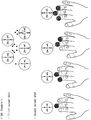
- FIG. 4 is an exemplary view showing another embodiment of the present invention for distinguishing a character input according to the arrangement of touch points.
- 'U' is recognized when two points are horizontal when touched by two fingers, but when the two points are inclined, 'U' is recognized according to the direction of the inclination. . Subsequently, different characters may be recognized according to touch movement directions of up, down, left, and right.
- the touch device In order to recognize characters according to the arrangement of touch points, the touch device must be equipped with a multi-touch recognition function and a function for recognizing the arrangement of a plurality of touch points, and a reference value for distinguishing each arrangement is a user. It is preferable to set for convenience.
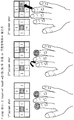
- FIG. 5 is an exemplary view showing a screenshot showing that the characters that can be input are set differently according to the number of touch points in the method of FIG. 4.
- 'U' is selected and then 'Z', 'V', 'F', and 'N' may be selected as a screenshot.
- 'C' and 'D' may be input. Mark it.
- 'A' is selected, and then 'K', 'W', 'E', and 'M' can be selected as a screenshot.
- the touch point of the three fingers is horizontal to some extent, as shown in FIG. 4, the 'H' may be selected.
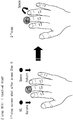
- FIG. 6 is an exemplary view showing another embodiment of displaying a screenshot on a screen in the embodiments of FIGS. 4 and 5.
- a second screenshot is displayed to select subsequent characters.
- the user can select text by moving the current touch point.
- FIG. 7 is an example of inputting numbers in which 10 numbers of 0, 1, 2, ..., 9 are input in a manner conceived in the form of Roman numerals.
- the touch points are recognized by moving down after touching 1, 2, and 3 points.
- 4 and 6 are distinguished and recognized according to which touch point is moved downward after touching two points.
- 5 is recognized by touching one point
- 7 is recognized by touching three points and then moving down two points on the right side.
- 8 and 9 may be input by touching two points, and 8 and 9 may be distinguished and recognized according to the direction of the angle formed by the two touch points.
- three points may be recognized by touching them in a triangular form.
- the form of the number input is similar to the Roman numeral description method, and there is an advantage that the number input can be easily stored.
- the touch screen may be divided to recognize letters and numbers separately. Presenting.
- the present invention shows an example of inputting special characters as an expandable embodiment. That is, the embodiments of FIGS. 4 to 6 introduce a method of inputting all 26 alphabetic characters only by the number of touch points, the arrangement form of the touch points, and the moving direction. 10] introduces a method of extending the input by varying the number of touch points.
- the change of the number of touch points is the method introduced in the embodiment of FIG. 3, and the touch input is changed by changing the number of touch points by removing some of the touched fingers or adding touch points with fingers that are not touched. This is how we extend it.
- the touch input may be further extended by moving a part of the touch points, and the corresponding character may be determined only by moving the touch points up, down, left, or right, or the character image of the screenshot displayed on the screen. You can also move the touch point to a location and then release your finger to determine the character.
- This section introduces how to enter special characters in parentheses. After the user touches two points on both sides of the touch screen, the user can input a left parenthesis character and a right parenthesis character by separating one of the two points.
- the input of a special character can be selected only when one of the two touch points is separated, so that it can be implemented without setting a width reference value of two touch points.
- 9 is an exemplary diagram of function key input such as SPACE, BACK SPACE, DELETE, RETURN, and the like.
- this is an expandable embodiment in addition to the above-described embodiments of FIGS. 4, 5, and 6, and illustrates input of various function keys.
- FIG. 8 an input method of separating two touch points after touching two points is input.
- FIG. 9 an input is made by adding a touch point after touching a point.
- a touch is made with one finger, which is the same as the method of inputting 'O' described above with reference to FIG. 4. Subsequent subsequent operations further touch either point on either side of the touch point.
- Function keys such as SPACE, BACK SPACE, DELETE, RETURN, etc. are recognized by subsequent touches that are additionally touched. For example, an additional touch on the left point is recognized as a back space, and an additional touch on the right point is recognized as a space.
- the function key recognition process may be performed at an additional touch moment or may be recognized by subsequent touch separation as shown in 2 Step of FIG. 9.
- the function key can be recognized by moving the additional touched point. For example, if the left point is additionally touched and moved downward, this may be recognized as DELETE. If the right point is further touched and then moved downward, it may be recognized as RETURN.
- 10 is an example of inputting editing functions such as COPY, CUT, and PASTE.
- FIG. 8 and FIG. 9 the embodiment can be extended in addition to the embodiments shown in FIGS. 4 to 6.
- the touch point can be moved to move the cursor on the screen.
- the user can touch the left point to select an object on the screen.
- the selected object may be text on a document or may be an image or an icon.
- various objects can be the object of choice.
- the editing function can be selected by lowering the left touch point, and the CUT function can be recognized by lowering the first touched point.
- the PASTE function can be recognized by further touching the right point.
- FIG. 11 illustrates an example of region division in which a type of character is divided and inputted by dividing an area to be touched.
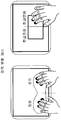
- the input region may be divided to the left and right, and the touch input through the left region may be recognized as an English alphabet, and the touch input through the right region may be set to be recognized as a number.
- FIG. 12 illustrates a method of changing an input mode by only a touch input.
- the touch device is provided with a text table corresponding to each input mode separately.
- a character table for an English alphabet a character table for a Korean input, and a character table for a special character may be separately provided. Accordingly, although the same type of touch input may overlap between each character table, a character to be input may be distinguished and input by distinguishing an input mode currently input.
- the input mode In order to set the input mode, a plurality of points are first touched when a finger touches the touch input surface. Then, the input mode is set by double touching any one of the touch points.
- the double touch means that the second touch is made without moving the position within a short time, and the time difference recognized as the double touch can be arbitrarily set, but the user can recognize it to some extent like the double click of the mouse, but it is set not too long. It is preferable.
- the input mode is set to the Korean input mode by double-touching the left touch point. Can be. Subsequently, the subsequent touch input recognizes the corresponding character from the character table corresponding to the Hangul input mode. Thereafter, to change the input mode, the input mode may be changed through the double touch as described above.
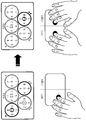
- each character group will be described on the assumption that two character groups are arranged at the bottom and three at the top.
- it will be described on the assumption that the touch input area of the touch screen or touch pad to which the touch is input is largely divided into left and right.
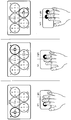
- FIG. 13 is an exemplary diagram illustrating that an inputable character group is selected according to the number of touch points inputted to a touch and a position at which a touch is input.
- a character group on the left is selected among the character groups located in the upper column as shown in the left side of FIG. 13.
- the character group on the right side is selected from the character groups located in the upper column as shown in the center of FIG. 13.
- the character group on the right side is selected among the character groups located in the lower column as shown in the right side of FIG. 13.
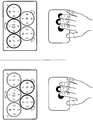
- FIG. 14 is an exemplary diagram illustrating that a group of characters that can be input is selected according to a location where an auxiliary key input and a touch are input.
- a supplementary key for selecting a character group column divided into two columns.
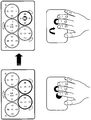
- 15 is an exemplary diagram illustrating that a group of characters that can be input is selected according to shapes of a plurality of touch inputs.
- FIG. 16 illustrates an example of selecting a group of characters that can be input according to a sequential touch input.
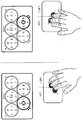
- FIG. 17 illustrates an example of selecting a plurality of character groups by multi-touch input.
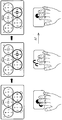
- FIG. 18 is an exemplary diagram illustrating that one character group is selected while a plurality of character groups are selected as shown in FIG. 17.
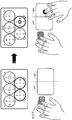
- FIG. 19 is an exemplary diagram illustrating that one character group is selected when a touch input is generated again within a predetermined time after a state in which a plurality of character groups are selected as shown in FIG. 17 is released.
- both touch inputs are released as shown in the center of FIG. 19. If a single touch input is generated on the right side of the touch input area within a predetermined time period, only the character group on the right side is selected among the character groups located in the lower column as shown in the right side of FIG.
Landscapes
- Engineering & Computer Science (AREA)
- General Engineering & Computer Science (AREA)
- Theoretical Computer Science (AREA)
- Human Computer Interaction (AREA)
- Physics & Mathematics (AREA)
- General Physics & Mathematics (AREA)
- User Interface Of Digital Computer (AREA)
- Input From Keyboards Or The Like (AREA)
Abstract
Priority Applications (1)
| Application Number | Priority Date | Filing Date | Title |
|---|---|---|---|
| US12/989,465 US20110175816A1 (en) | 2009-07-06 | 2010-05-26 | Multi-touch character input method |
Applications Claiming Priority (2)
| Application Number | Priority Date | Filing Date | Title |
|---|---|---|---|
| KR10-2009-0061297 | 2009-07-06 | ||
| KR1020090061297A KR100923755B1 (ko) | 2009-07-06 | 2009-07-06 | 멀티터치 방식 문자입력 방법 |
Publications (2)
| Publication Number | Publication Date |
|---|---|
| WO2011004960A2 true WO2011004960A2 (fr) | 2011-01-13 |
| WO2011004960A3 WO2011004960A3 (fr) | 2011-03-03 |
Family
ID=41562473
Family Applications (1)
| Application Number | Title | Priority Date | Filing Date |
|---|---|---|---|
| PCT/KR2010/003284 Ceased WO2011004960A2 (fr) | 2009-07-06 | 2010-05-26 | Procédé de saisie de caractères à touches multiples |
Country Status (3)
| Country | Link |
|---|---|
| US (1) | US20110175816A1 (fr) |
| KR (1) | KR100923755B1 (fr) |
| WO (1) | WO2011004960A2 (fr) |
Cited By (2)
| Publication number | Priority date | Publication date | Assignee | Title |
|---|---|---|---|---|
| WO2012125989A2 (fr) | 2011-03-17 | 2012-09-20 | Laubach Kevin | Interface tactile améliorée |
| WO2015016434A1 (fr) * | 2013-08-02 | 2015-02-05 | 주식회사 큐키 | Appareil ayant un clavier virtuel amélioré |
Families Citing this family (25)
| Publication number | Priority date | Publication date | Assignee | Title |
|---|---|---|---|---|
| KR101307345B1 (ko) * | 2009-03-31 | 2013-09-11 | 한국전자통신연구원 | 멀티 터치 포인트를 이용한 키 입력 장치 및 그 방법 |
| KR101636705B1 (ko) * | 2009-08-06 | 2016-07-06 | 삼성전자주식회사 | 터치스크린을 구비한 휴대 단말의 문자 입력 방법 및 장치 |
| US20110052296A1 (en) * | 2009-08-28 | 2011-03-03 | Toshiyasu Abe | Keyboard |
| KR20110074822A (ko) * | 2009-12-26 | 2011-07-04 | 김기주 | 터치스크린 상에서 터치 버튼의 멀티터치 인식방법, 문자 입력 방법 및 객체 변형 방법 |
| WO2011078632A2 (fr) * | 2009-12-26 | 2011-06-30 | Kim Ki Ju | Procédé destiné à reconnaître de multiples contacts d'un bouton tactile, à entrer des caractères et à déformer un objet sur un écran tactile |
| US9405404B2 (en) * | 2010-03-26 | 2016-08-02 | Autodesk, Inc. | Multi-touch marking menus and directional chording gestures |
| US8810509B2 (en) | 2010-04-27 | 2014-08-19 | Microsoft Corporation | Interfacing with a computing application using a multi-digit sensor |
| KR101675374B1 (ko) * | 2010-06-10 | 2016-11-11 | 삼성전자 주식회사 | 휴대 단말기의 문자 입력 방법 및 장치 |
| KR101672212B1 (ko) * | 2010-06-15 | 2016-11-04 | 엘지전자 주식회사 | 휴대 단말기 및 그 동작 방법 |
| US9329773B2 (en) * | 2011-05-19 | 2016-05-03 | International Business Machines Corporation | Scalable gesture-based device control |
| US8957868B2 (en) * | 2011-06-03 | 2015-02-17 | Microsoft Corporation | Multi-touch text input |
| KR101313287B1 (ko) * | 2011-07-22 | 2013-09-30 | 주식회사 네오위즈인터넷 | 문자 입력을 제공하는 방법, 단말기 및 기록매체 |
| KR101315915B1 (ko) * | 2011-10-18 | 2013-10-08 | 인크로스 주식회사 | 입력 이벤트 처리를 위한 장치, 방법과, 기록매체 |
| KR101375924B1 (ko) * | 2012-01-30 | 2014-03-20 | 한국과학기술원 | 멀티 터치 스크린에서의 탭핑을 이용하여 문자를 입력하는 장치 및 방법 |
| KR101331531B1 (ko) * | 2012-03-30 | 2013-11-20 | 주식회사 코맥스 | 손가락 제스쳐를 이용한 스크린 메뉴의 전환 장치 |
| TW201403405A (zh) * | 2012-07-09 | 2014-01-16 | Mstar Semiconductor Inc | 符號輸入裝置、符號輸入方法及相關的電腦程式產品 |
| JP6188288B2 (ja) * | 2012-07-20 | 2017-08-30 | キヤノン株式会社 | 情報処理装置及びその制御方法 |
| KR101495591B1 (ko) * | 2013-10-08 | 2015-02-25 | 원투씨엠 주식회사 | 정전식 터치 인증 방법 |
| US10824708B2 (en) * | 2012-11-19 | 2020-11-03 | 12Cm Global Pte. Ltd. | Method and system for authenticating stamp touch |
| KR102118084B1 (ko) * | 2013-03-22 | 2020-06-02 | 삼성전자주식회사 | 터치스크린을 구비한 디바이스에서 화면 표시 방법 및 장치 |
| CN103955504B (zh) * | 2014-04-24 | 2017-07-14 | 华为技术有限公司 | 一种筛选信息的方法和用户终端 |
| JP6368181B2 (ja) * | 2014-07-15 | 2018-08-01 | 株式会社高知システム開発 | 文字入力装置、文字入力用プログラム及び文字入力方法 |
| US10747426B2 (en) * | 2014-09-01 | 2020-08-18 | Typyn, Inc. | Software for keyboard-less typing based upon gestures |
| KR102207067B1 (ko) * | 2018-12-28 | 2021-01-25 | 이진우 | 홀로그램 기반의 문자 인식 방법 및 그 장치 |
| CN110536006B (zh) * | 2019-08-16 | 2021-03-02 | 维沃移动通信有限公司 | 一种对象位置调整方法及电子设备 |
Family Cites Families (8)
| Publication number | Priority date | Publication date | Assignee | Title |
|---|---|---|---|---|
| KR100651396B1 (ko) * | 2003-09-05 | 2006-11-29 | 삼성전자주식회사 | 문자 인식 장치 및 방법 |
| KR101068486B1 (ko) * | 2004-04-23 | 2011-09-28 | 주식회사 유퍼스트에프엔 | 터치스크린을 가진 전자기기의 한글입력장치 및 한글입력방법 |
| KR100784260B1 (ko) * | 2006-07-11 | 2007-12-11 | 주식회사 케이티프리텔 | 터치패드를 이용한 단말에서의 문자 입력 방법 및 장치 |
| KR100720335B1 (ko) | 2006-12-20 | 2007-05-23 | 최경순 | 접촉 위치 이동에 따라 생성되는 상대좌표값에 대응하는텍스트를 입력하는 텍스트 입력 장치 및 그 방법 |
| KR100821161B1 (ko) * | 2007-02-26 | 2008-04-14 | 삼성전자주식회사 | 터치스크린을 이용한 문자 입력방법 및 장치 |
| KR101372753B1 (ko) * | 2007-06-26 | 2014-03-10 | 삼성전자주식회사 | 터치스크린을 구비한 단말기에서의 입력 방법 및 장치 |
| KR100939924B1 (ko) * | 2007-12-27 | 2010-02-04 | 팅크웨어(주) | 터치 스크린 방식의 문자 입력 방법 및 시스템 |
| US20090249258A1 (en) * | 2008-03-29 | 2009-10-01 | Thomas Zhiwei Tang | Simple Motion Based Input System |
-
2009
- 2009-07-06 KR KR1020090061297A patent/KR100923755B1/ko not_active Expired - Fee Related
-
2010
- 2010-05-26 US US12/989,465 patent/US20110175816A1/en not_active Abandoned
- 2010-05-26 WO PCT/KR2010/003284 patent/WO2011004960A2/fr not_active Ceased
Cited By (3)
| Publication number | Priority date | Publication date | Assignee | Title |
|---|---|---|---|---|
| WO2012125989A2 (fr) | 2011-03-17 | 2012-09-20 | Laubach Kevin | Interface tactile améliorée |
| EP2686759A4 (fr) * | 2011-03-17 | 2015-04-01 | Kevin Laubach | Interface tactile améliorée |
| WO2015016434A1 (fr) * | 2013-08-02 | 2015-02-05 | 주식회사 큐키 | Appareil ayant un clavier virtuel amélioré |
Also Published As
| Publication number | Publication date |
|---|---|
| WO2011004960A3 (fr) | 2011-03-03 |
| KR100923755B1 (ko) | 2009-10-27 |
| US20110175816A1 (en) | 2011-07-21 |
Similar Documents
| Publication | Publication Date | Title |
|---|---|---|
| WO2011004960A2 (fr) | Procédé de saisie de caractères à touches multiples | |
| WO2011102689A4 (fr) | Appareil d'entrée de clé plurilingue et procédé associé | |
| WO2011046270A1 (fr) | Système de commande d'entrées de type tactile multipoints | |
| WO2011053058A2 (fr) | Dispositif mobile et procédé pour obtenir une interface utilisateur (ui) de ce dispositif | |
| WO2014185624A1 (fr) | Dispositif de saisie de texte et procede de saisie de texte | |
| WO2012018212A2 (fr) | Dispositif tactile et son procédé de commande de dossiers par effleurement | |
| WO2010137859A2 (fr) | Appareil et procédé pour déverrouiller un mode verrouillage d'un terminal portable | |
| WO2013180454A1 (fr) | Procédé d'affichage d'un élément dans un terminal et terminal utilisant celui-ci | |
| WO2011096702A2 (fr) | Dispositif et procédé de saisie de caractère écrit | |
| WO2015076547A1 (fr) | Procédé d'affichage d'un clavier virtuel sur terminal mobile, et terminal mobile | |
| WO2013151347A1 (fr) | Appareil et procédé d'entrée de caractères | |
| WO2010143839A2 (fr) | Procédé et dispositif de mise en oeuvre d'une interface graphique utilisateur destinée à la recherche d'un contenu | |
| WO2014137176A1 (fr) | Appareil d'entrée, appareil d'affichage, et procédés de commande desdits appareils | |
| WO2016022002A1 (fr) | Appareil et procédé de commande du contenu à l'aide d'une interaction de ligne | |
| WO2015182811A1 (fr) | Appareil et procédé d'établissement d'une interface utilisateur | |
| WO2016085186A1 (fr) | Appareil électronique et procédé d'affichage d'objet graphique de ce dernier | |
| WO2014029170A1 (fr) | Procédé de commande tactile d'un écran tactile bimodal capacitif et électromagnétique et dispositif électronique portatif | |
| WO2015072803A1 (fr) | Terminal et procédé de commande de terminal | |
| WO2016129923A1 (fr) | Dispositif d'affichage, procédé d'affichage et support d'enregistrement lisible par ordinateur | |
| WO2021029658A1 (fr) | Dispositif de saisie de caractères chinois basé sur un caractère de saisie initial, et procédé de commande associé | |
| WO2012173378A2 (fr) | Appareil et procédé permettant de fournir une interface utilisateur présentant une disposition de clavier | |
| WO2019039866A1 (fr) | Dispositif électronique et procédé de commande de celui-ci | |
| WO2021133050A1 (fr) | Système de clavier virtuel multilingue de type à entrée de motif | |
| WO2013073797A1 (fr) | Dispositif de clavier pour un écran tactile et son procédé de fourniture | |
| WO2013115440A1 (fr) | Appareil et procédé d'entrée de lettres par mouvement de contact sur un écran tactile multipoint |
Legal Events
| Date | Code | Title | Description |
|---|---|---|---|
| WWE | Wipo information: entry into national phase |
Ref document number: 12989465 Country of ref document: US |
|
| 121 | Ep: the epo has been informed by wipo that ep was designated in this application |
Ref document number: 10797235 Country of ref document: EP Kind code of ref document: A2 |
|
| NENP | Non-entry into the national phase |
Ref country code: DE |
|
| 32PN | Ep: public notification in the ep bulletin as address of the adressee cannot be established |
Free format text: NOTING OF LOSS OF RIGHTS PURSUANT TO RULE 112(1) EPC (EPO FORM 1205A DATED 11/05/2012) |
|
| 122 | Ep: pct application non-entry in european phase |
Ref document number: 10797235 Country of ref document: EP Kind code of ref document: A2 |