WO2012105195A1 - 手書き文字入力装置 - Google Patents
手書き文字入力装置 Download PDFInfo
- Publication number
- WO2012105195A1 WO2012105195A1 PCT/JP2012/000498 JP2012000498W WO2012105195A1 WO 2012105195 A1 WO2012105195 A1 WO 2012105195A1 JP 2012000498 W JP2012000498 W JP 2012000498W WO 2012105195 A1 WO2012105195 A1 WO 2012105195A1
- Authority
- WO
- WIPO (PCT)
- Prior art keywords
- input
- character information
- character
- gesture
- handwriting
- Prior art date
- Legal status (The legal status is an assumption and is not a legal conclusion. Google has not performed a legal analysis and makes no representation as to the accuracy of the status listed.)
- Ceased
Links
Images



Classifications
-
- G—PHYSICS
- G06—COMPUTING OR CALCULATING; COUNTING
- G06F—ELECTRIC DIGITAL DATA PROCESSING
- G06F3/00—Input arrangements for transferring data to be processed into a form capable of being handled by the computer; Output arrangements for transferring data from processing unit to output unit, e.g. interface arrangements
- G06F3/01—Input arrangements or combined input and output arrangements for interaction between user and computer
- G06F3/048—Interaction techniques based on graphical user interfaces [GUI]
- G06F3/0487—Interaction techniques based on graphical user interfaces [GUI] using specific features provided by the input device, e.g. functions controlled by the rotation of a mouse with dual sensing arrangements, or of the nature of the input device, e.g. tap gestures based on pressure sensed by a digitiser
- G06F3/0488—Interaction techniques based on graphical user interfaces [GUI] using specific features provided by the input device, e.g. functions controlled by the rotation of a mouse with dual sensing arrangements, or of the nature of the input device, e.g. tap gestures based on pressure sensed by a digitiser using a touch-screen or digitiser, e.g. input of commands through traced gestures
- G06F3/04883—Interaction techniques based on graphical user interfaces [GUI] using specific features provided by the input device, e.g. functions controlled by the rotation of a mouse with dual sensing arrangements, or of the nature of the input device, e.g. tap gestures based on pressure sensed by a digitiser using a touch-screen or digitiser, e.g. input of commands through traced gestures for inputting data by handwriting, e.g. gesture or text
Definitions
- the present invention relates to a handwritten character input device for inputting characters by handwriting to an electronic device mounted with a touch panel.
- the delete button exists in a different place from the character input area, the correction of the input information by the delete button increases the amount of movement of the user's hand, which is a bothersome task for the user.
- the rhythm being written is broken, which causes the usability (usability) to be significantly reduced.
- Patent Document 1 it is possible to realize deletion of input characters and the like by performing a scratch out operation in the character input area after character input is determined.
- Patent Document 1 does not disclose the deletion of character information during the input of character information.
- patent document 2 it is going to implement
- Patent Document 2 does not disclose a specific method for detecting whether the locus entered in the character input area during character input is a gesture operation as normal character information. For example, even if "x" is entered as a gesture, it can not be distinguished whether it is an input of "x" as a symbol character or a gesture operation.
- the gesture operation described in the character input area is displayed as handwriting.
- the present invention is intended to solve the above-mentioned problems, and it is an object of the present invention to provide a handwritten character input device having improved convenience (usability), particularly operability, concerning editing of input characters at the time of handwritten character input.
- character information input means for inputting characters by handwriting
- character recognition means for recognizing characters from character information inputted from the character information input means
- the character information input means Detecting handwriting input based on directions of vectors of first coordinates and second coordinates in each input stroke among the character information being input to the character information input means and handwriting display means for displaying the character information as handwriting and character information being input to the character information input means
- a gesture detection unit which executes a preset function when the gesture detection unit detects a gesture input.
- the handwritten character input device further includes vector learning means for learning vector directions of first and second coordinates of each stroke of the character information input to the character information input means, and the vector If the vector direction accumulated in the learning means matches the vector direction for the gesture detection by the gesture detection means, the gesture detection means changes the vector direction for the gesture detection to match the gesture.
- a character information input unit for inputting characters by handwriting
- a character recognition unit for recognizing characters from character information input from the character information input unit
- the character information input unit The input speed of the character information is calculated from the first coordinate and the second coordinate in each input stroke among the handwriting display means for displaying the inputted character information as handwriting and the character information being input to the character information input means
- a gesture detection unit that detects a gesture input when the input speed is equal to or higher than a predetermined input speed, and executes a preset function when the gesture detection unit detects a gesture input.
- a character information input unit for inputting characters by handwriting, a character recognition unit for recognizing characters from character information input from the character information input unit, and the character information input unit
- the handwriting display means for displaying the input character information as handwriting and the character information being input to the character information input means, any coordinate within each input stroke is within the specific coordinate range of the character information input means
- a gesture detection unit that detects a gesture input when the gesture input is detected, and when the gesture detection unit detects a gesture input, a preset function is executed.
- the handwriting display unit when the gesture detection unit detects a gesture input, the handwriting display unit does not display character information input as a gesture as a handwriting or a preset color Alternatively, the handwriting of the gesture is displayed by the thickness, or one of them is performed.
- the gesture detection means detects a gesture input
- the character information being input is erased.
- the handwriting display means moves and displays the handwriting in the direction of the vector calculated by the gesture detection means when the gesture detection means detects a gesture.
- a preset function can be performed. For example, editing operations can be performed such as erasing character information while entering character information in a character input area, changing character types, changing upper and lower case characters, performing input confirmation, starting kana-kanji conversion, and the like.
- the learning function it is possible to switch the method of judging the gesture input according to the character entry feature of the user.
- Block diagram showing the configuration according to the embodiment of the present invention Flow chart showing the operation according to the embodiment of the present invention
- the figure which shows an example of the input of the character information to the character information input means by the finger which concerns on embodiment of this invention.
- FIG. 1 shows a block configuration according to an embodiment of the present invention.
- FIG. 2 shows a flow chart showing the operation according to the embodiment of the present invention.
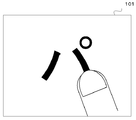
- FIG. 3 shows an example of the input of the character information to the character information input means by the finger according to the embodiment of the present invention.
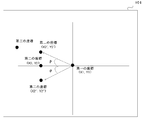
- FIG. 4 shows an example of gesture input determination according to the vector direction according to the embodiment of the present invention.
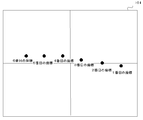
- FIG. 5 shows an example of judging the gesture input based on the input position according to the embodiment of the present invention.
- FIG. 6 shows an example of handwriting deletion at the time of gesture input according to the embodiment of the present invention.
- the character information input unit 101 is a unit for the user to input character information by handwriting.
- the character information is coordinate information in the character input area, and includes input time information of each coordinate.
- the handwriting display unit 102 displays the character information input to the character information input unit 101 as a handwriting.
- the gesture detection unit 103 detects a gesture from the character information input to the character information input unit 101.
- the character recognition unit 104 performs character recognition from the character information input to the character information input unit 101.
- the vector learning unit 105 learns the vector direction of each stroke of the character information input to the character information input unit.
- the character information input unit 101 is a unit for a user such as a touch panel display to input information to an electronic device using a finger or a stylus.
- the user inputs character information to the character information input means 101.
- the character information input unit 101 acquires coordinate information on the touch panel display in time series based on the input information (step S201). Moreover, the time which acquired each coordinate is hold
- FIG. 3 shows an example in which character information is input to the character information input unit 101 by a finger. The same applies to the case where character information is input by input means other than a finger such as a stylus.
- the character information input unit 101 sequentially transmits the input character information to the gesture detection unit 103.
- the gesture detection unit 103 detects a gesture based on the character information received from the character information input unit 101 (step S202).
- the gesture detection means 103 detects whether it is a gesture or a normal character input from the vector direction of the first coordinate and the second coordinate of each stroke of the input information.
- FIG. 4 a part of coordinate data received from the character information input unit 101 is described.
- a specific coordinate point adjacent to the first coordinate (X1, Y1) and the second coordinate (X2, Y2), the second coordinate time stamp is newer than the first coordinate, and the first coordinate is the origin Calculate the vector to the second coordinate. If the direction of this vector is a specific direction, the character information is determined to be a gesture.
- the method of the gesture detection in step S202 will be described in detail.
- the direction of the vector judged to be a gesture is optimal to the left with respect to the first coordinate. This is most suitable for distinction between gesture determination and ordinary character input, since there is no character that describes a stroke in the left direction in character input for Japanese. This is not the case at the time of language input in languages other than Japanese, so the direction of this vector may be changed as appropriate depending on the language to be applied.
- input information can be coordinates of (X2 ′, Y2 ′) or (X2 ′ ′, Y2 ′ ′).
- input information can be coordinates of (X2 ′, Y2 ′) or (X2 ′ ′, Y2 ′ ′).
- ⁇ tan ⁇ 1 (Y 2 ⁇ Y 1 ) / (X 2 ⁇ X 1), and when ⁇ / 4 ⁇ ⁇ / 4 is satisfied, it can be determined as a gesture.
- ⁇ / 4 and ⁇ / 4 are examples of the input fluctuation tolerance value, and the value can also be changed by tuning or the like.
- the vector learning unit 105 receives, from the gesture detection unit 103, character input information not determined to be a gesture. Then, the vector directions of the first coordinate and the second coordinate are accumulated, and when the left direction vector becomes a certain number or more, it is determined that the user writes the stroke in the left direction at the time of normal character writing, The vector learning means 105 notifies the gesture detection means 103 to that effect.
- the notified gesture detection unit 103 adjusts the condition of ⁇ for the above-described gesture detection. That is, the stroke in the right direction is determined as a gesture. Thereby, gesture detection can be performed according to the characteristic of the user who writes in.
- a mode for learning character features of the user is provided in advance, and the vector learning unit 105 It is also possible to learn vector methods and to determine the vector direction in which the gesture detection means 103 detects a gesture.
- step S202 it can be determined whether the gesture or the normal character input by the input speed of the character information.
- the gesture detection unit 103 calculates an input velocity from the first coordinate to the second coordinate, and detects a gesture when the input velocity is a predetermined velocity or more. In this way, when inputting a gesture, the user can input a gesture simply by inputting more quickly than when entering characters.
- each stroke is made up of a plurality of coordinates, and among the plurality of coordinates, the first coordinate input first is present in a specific area of the character information input means 101 If so, it can be judged as a gesture. If the first coordinate of a certain stroke exists in the area near the center of the right half of the character information input means 101, it is judged as a gesture input (see FIG. 5). In this case, since there is no character that starts a stroke from the center part of the right half in the input for Japanese, it can be judged whether it is a gesture input or a normal character input.
- the judgment of the gesture may be performed by combining these methods. Furthermore, in the method of judging the gesture based on the vector direction and the writing speed, it is better to judge the gesture on the earliest possible coordinates (for example, the first and second coordinates) of a certain stroke. This is to realize that the handwriting is not displayed at the time of gesture input in the handwriting display means 102 described later. Since the handwriting can not be displayed until it is judged whether it is a gesture or normal character entry, it is possible to reduce the feedback delay of the handwriting display by making this judgment as soon as possible.
- the gesture detection unit 103 determines that the input character information is not a gesture, the input character information is notified to the handwriting display unit 102 as it is, and the handwriting display unit 102 displays the handwriting according to the input character information (step S203). Also, the gesture detection unit 103 notifies the character recognition unit 104 of the input character information, and the character recognition unit 104 performs character recognition in accordance with the input character information (step S204).
- the gesture detection means 103 detects a gesture, the case where the character in input is erase
- the gesture detection unit 103 notifies the handwriting display unit 102 and the character recognition unit 104 that the gesture has been input.
- the handwriting display means 102 which has received the notification erases the currently displayed handwriting.
- the character recognition means 104 clears the input character information already inputted, and the next character input becomes possible (step S205).
- the handwriting displayed by the handwriting display unit 102 is erased, the vector direction can be obtained from the gesture detection unit 103, and the displayed handwriting can be displayed while being shifted in the direction of the vector and erased. Since the character can be erased in a form linked to the gesture operation of the user, the operation is intuitive.
- FIG. 6 shows an example in which the character "pa" is erased in the left direction.
- the character deletion during input has been described as an example of the operation at the time of gesture detection, but in addition to the deletion, the character type of the character being input is changed, for example, "O" is changed to "O", It is possible to carry out any control over the characters in the input, such as full-width switching and case switching. It can be used as a trigger for confirmation of a character being input or execution of kana-kanji conversion, etc. Control is performed by gesture input into the character information input unit 101 without pressing a separately prepared confirmation key or conversion key. This improves user convenience (usability).
- the handwriting character input device can improve the convenience (usability) at the time of handwriting character input, particularly the operability.
- character information input means 101 handwriting display means 103 gesture detection means 104 character recognition means 105 vector learning means
Landscapes
- Engineering & Computer Science (AREA)
- General Engineering & Computer Science (AREA)
- Theoretical Computer Science (AREA)
- Human Computer Interaction (AREA)
- Physics & Mathematics (AREA)
- General Physics & Mathematics (AREA)
- User Interface Of Digital Computer (AREA)
- Position Input By Displaying (AREA)
Abstract
漢字や平仮名、カタカナ、記号や英数字を全て同じモードで文字情報を入力する場合、文字入力領域に文字情報を記入中に文字情報を消去するなど編集作業を行おうとしても、通常の文字情報とジェスチャ操作を区別できないという課題がある。 文字情報入力手段101は、入力された文字情報を逐次的にジェスチャ検出手段103に送信する。ジェスチャ検出手段103は、文字情報入力手段101から受信した文字情報に基づきジェスチャの検出を行う。ジェスチャ検出手段103は、入力情報の各ストロークの第一の座標と第二の座標のベクトル方向から、ジェスチャなのか通常の文字入力なのかを検出する。
Description
本発明は、タッチパネル搭載の電子機器に対して手書きにて文字入力を行う手書き文字入力装置に関するものである。
手書き文字入力が可能なタッチパネル搭載の電子機器に対して文字入力(オンライン文字入力)を行う場合、利用者はタッチパネル上に表示された手書き文字入力領域内に文字情報を記載し、電子機器が文字認識を行うことにより文字を入力する。文字入力領域は、文字の区切りを判断するために、1つの文字入力領域に1文字記入する方法が主流となっている。
電子機器によっては複数の文字入力領域を同時に表示し、複数の文字を逐次的に入力できるようになっている。また近年の文字認識技術の進歩に伴い、漢字や平仮名、カタカナ、記号や英数字をそれぞれ認識するためのモードを設けずに、全て同じ入力モードで入力された文字情報を認識可能な文字入力方法が登場している。さらに、文字入力中の利用者へのフィードバックとして、入力時の軌跡を筆跡として表示することが一般的である。
このような電子機器において、文字入力領域内に文字を記入している際、利用者が誤った文字を入力したことに気づき、修正するような場合は、文字入力領域とは別に用意されたタッチパネル上の消去ボタンなどを押下することにより、入力中の文字情報をクリアすることができる。
電子機器によっては複数の文字入力領域を同時に表示し、複数の文字を逐次的に入力できるようになっている。また近年の文字認識技術の進歩に伴い、漢字や平仮名、カタカナ、記号や英数字をそれぞれ認識するためのモードを設けずに、全て同じ入力モードで入力された文字情報を認識可能な文字入力方法が登場している。さらに、文字入力中の利用者へのフィードバックとして、入力時の軌跡を筆跡として表示することが一般的である。
このような電子機器において、文字入力領域内に文字を記入している際、利用者が誤った文字を入力したことに気づき、修正するような場合は、文字入力領域とは別に用意されたタッチパネル上の消去ボタンなどを押下することにより、入力中の文字情報をクリアすることができる。
しかし、消去ボタンは文字入力領域とは別の場所に存在するので、消去ボタンによる入力情報の修正は、利用者の手の動く量が多くなり、利用者にとって煩わしい作業となってしまうと同時に、記入しているリズムが崩れてしまい利便性(ユーザビリティ)を著しく低下させる一因となる。
特許文献1では文字入力の確定後に文字入力領域内でスクラッチアウト動作をすることにより、入力済み文字の消去などを実現することができる。しかしながら、文字情報の入力中に文字情報を消去することに関して、特許文献1には開示されていない。また、特許文献2では、特定のジェスチャ作業(「×」を記入するなど)を文字入力領域に記載することにより、同様の操作を実現しようとしている。しかし、特許文献2では、文字入力中に文字入力領域に記入された軌跡が、ジェスチャ操作なのが通常の文字情報なのかを検出するための具体的方法について開示がない。例えば、ジェスチャとして「×」を記入しても、記号文字としての「×」の入力なのか、ジェスチャ操作なのか区別がつかない。また、文字入力領域に記載したジェスチャ操作を筆跡と表示してしまう。
従来の構成では、漢字や平仮名、カタカナ、記号や英数字を全て同じモードで文字情報を入力する場合、文字入力領域に文字情報を記入中に文字情報を消去するなど編集作業を行おうとしても、通常の文字情報とジェスチャ操作を区別できない。さらにジェスチャ操作入力時に筆跡として出力してしまう課題がある。
本発明は、上記課題を解決するもので、手書き文字入力時の入力文字の編集に関する利便性(ユーザビリティ)、特に操作性を向上させた手書き文字入力装置を提供することを目的とする。
本発明の手書き文字入力装置では、手書きにより文字を入力する文字情報入力手段と、前記文字情報入力手段から入力された文字情報から文字を認識する文字認識手段と、前記文字情報入力手段に入力された文字情報を筆跡として表示する筆跡表示手段と、前記文字情報入力手段へ入力中の文字情報のうち、各入力ストロークにおける第一の座標と第二の座標のベクトルの方向によりジェスチャ入力を検出するジェスチャ検出手段とを備え、前記ジェスチャ検出手段がジェスチャ入力を検出した場合に、予め設定された機能を実行するものである。
上記構成によれば、漢字や平仮名、記号や英数字を全て同じモードで文字情報を入力する場合、予め設定された機能を行うことができる。例えば、文字入力領域に文字情報を記入中に文字情報を消去する、文字種を変更する、大文字小文字を変更する、入力確定を行う、かな漢字変換を開始するなど、編集作業を行うことができる。
また、本発明の手書き文字入力装置では、前記文字情報入力手段に入力された文字情報の各ストロークの第一の座標と第二の座標のベクトル方向を学習するベクトル学習手段とを備え、前記ベクトル学習手段に蓄積されたベクトル方向が、前記ジェスチャ検出手段がジェスチャ検出するためのベクトル方向と、一定の割合以上一致する場合に、前記ジェスチャ検出手段はジェスチャ検出するためのベクトル方向を変更してジェスチャを検出するものである。
上記構成によれば、利用者の文字記入特徴に応じてジェスチャ入力の判断方法を切替えることができる。
また、本発明の手書き文字入力装置では、手書きにより文字を入力する文字情報入力手段と、前記文字情報入力手段から入力された文字情報から文字を認識する文字認識手段と、前記文字情報入力手段に入力された文字情報を筆跡として表示する筆跡表示手段と、前記文字情報入力手段へ入力中の文字情報のうち、各入力ストロークにおける第一の座標と第二の座標から文字情報の入力速度を算出し、一定の入力速度以上であった場合にジェスチャ入力を検出するジェスチャ検出手段とを備え、前記ジェスチャ検出手段がジェスチャ入力を検出した場合に、予め設定された機能を実行するものである。
上記構成によれば、漢字や平仮名、記号や英数字を全て同じモードで文字情報を入力する場合、予め設定された機能を行うことができる。例えば、文字入力領域に文字情報を記入中に文字情報を消去する、文字種を変更する、大文字小文字を変更する、入力確定を行う、かな漢字変換を開始するなど、編集作業を行うことができる。
また、本発明の手書き文字入力装置では、手書きにより文字を入力する文字情報入力手段と、前記文字情報入力手段から入力された文字情報から文字を認識する文字認識手段と、前記文字情報入力手段に入力された文字情報を筆跡として表示する筆跡表示手段と、前記文字情報入力手段へ入力中の文字情報のうち、各入力ストローク内の任意の座標が前記文字情報入力手段の特定の座標範囲内であったときにジェスチャ入力を検出するジェスチャ検出手段とを備え、前記ジェスチャ検出手段がジェスチャ入力を検出した場合に、予め設定された機能を実行するものである。
上記構成によれば、漢字や平仮名、記号や英数字を全て同じモードで文字情報を入力する場合、予め設定された機能を行うことができる。例えば、文字入力領域に文字情報を記入中に文字情報を消去する、文字種を変更する、大文字小文字を変更する、入力確定を行う、かな漢字変換を開始するなど、編集作業を行うことができる。
また、本発明の手書き文字入力装置では、前記ジェスチャ検出手段がジェスチャ入力を検出した場合に、前記筆跡表示手段はジェスチャとして入力された文字情報を筆跡として表示しないか、又は、予め設定された色あるいは太さでジェスチャの筆跡を表示するか、いずれかを行うものである。
上記構成によれば、ジェスチャ検出した場合に、通常の文字入力時と異なるユーザフィードバックを利用者に提供することができる。
また、本発明の手書き文字入力装置では、ジェスチャ検出手段がジェスチャ入力を検出した場合に、入力中の文字情報に対する消去を行うものである。
上記構成によれば、文字入力領域に文字情報を記入中に文字情報を消去することができる。
また、本発明の手書き文字入力装置では、筆跡表示手段は、前記ジェスチャ検出手段がジェスチャを検出した場合、ジェスチャ検出手段が算出したベクトルの方向に、筆跡を移動させながら表示するものである。
上記構成によれば、筆跡消去時に利用者に対して視覚的にフィードバックを行うことができる。
以上のように、本発明の手書き文字入力装置によれば、漢字や平仮名、記号や英数字を全て同じモードで文字情報を入力する場合、予め設定された機能を行うことができる。例えば、文字入力領域に文字情報を記入中に文字情報を消去する、文字種を変更する、大文字小文字を変更する、入力確定を行う、かな漢字変換を開始するなど、編集作業を行うことができる。また、ジェスチャ操作入力時は筆跡を表示しない、別の筆跡を表示するなど、通常とは異なる筆跡の表示を行うことができる。またさらに学習機能を有することにより、利用者の文字記入特徴に応じてジェスチャ入力の判断方法を切替えることができる。
従って、手書き文字入力時の入力文字の編集に関する利便性(ユーザビリティ)、特に操作性を向上させた手書き文字入力装置を提供することができる。
以下に、本発明の実施の形態について、図面を参照しながら説明する。
(実施の形態1)
図1は本発明の実施の形態に係るブロック構成を示す。図2は本発明の実施の形態に係る動作を示すフロー図を示す。図3は本発明の実施の形態に係る指による文字情報入力手段への文字情報の入力の一例を示す。図4は本発明の実施の形態に係るベクトル方向によるジェスチャ入力判断例を示す。図5は本発明の実施の形態に係る入力位置によるジェスチャ入力判断例を示す。図6は本発明の実施の形態に係るジェスチャ入力時の筆跡消去例を示す。
図1は本発明の実施の形態に係るブロック構成を示す。図2は本発明の実施の形態に係る動作を示すフロー図を示す。図3は本発明の実施の形態に係る指による文字情報入力手段への文字情報の入力の一例を示す。図4は本発明の実施の形態に係るベクトル方向によるジェスチャ入力判断例を示す。図5は本発明の実施の形態に係る入力位置によるジェスチャ入力判断例を示す。図6は本発明の実施の形態に係るジェスチャ入力時の筆跡消去例を示す。
文字情報入力手段101は利用者が手書きにより文字情報を入力するための手段である。文字情報は、文字入力領域における座標情報であり、各座標の入力された時間情報を含んでいる。筆跡表示手段102は文字情報入力手段101に入力された文字情報を筆跡として表示する。ジェスチャ検出手段103は文字情報入力手段101に入力された文字情報からジェスチャを検出する。文字認識手段104は文字情報入力手段101に入力された文字情報から文字認識を行う。ベクトル学習手段105は文字情報入力手段に入力された文字情報のストローク毎のベクトル方向を学習する。
文字情報入力手段101はタッチパネルディスプレイなどの利用者が指やスタイラスを用いて電子機器に対して情報を入力するため手段である。利用者は文字情報入力手段101に文字情報を入力する。文字情報入力手段101は入力された情報に基づきタッチパネルディスプレイ上の座標情報を時系列に取得する(ステップS201)。また、各座標を取得した時間を保持する。このとき文字情報入力手段101は、ペンアップ(ストロークの開始点)とペンダウン(ストロークの終了点)の情報によるストローク情報も含めて座標情報として入力情報を取得する。図3では指により文字情報入力手段101に文字情報を入力する場合の例を示している。なお、スタイラスなど指以外の入力手段により文字情報が入力される場合でも同様である。
また文字情報入力手段101は、入力された文字情報を逐次的にジェスチャ検出手段103に送信する。
ジェスチャ検出手段103は、文字情報入力手段101から受信した文字情報に基づきジェスチャの検出を行う(ステップS202)。ジェスチャ検出手段103は、入力情報の各ストロークの第一の座標と第二の座標のベクトル方向から、ジェスチャなのか通常の文字入力なのかを検出する。図4では、文字情報入力手段101から受信した座標データの一部を記載している。隣接する特定の座標点を第一の座標(X1,Y1)と第二の座標(X2,Y2)、第一の座標より第二の座標のタイムスタンプが新しいとし、第一の座標を原点とした第二の座標へのベクトルを算出する。このベクトルの方向が特定の方向であれば、その文字情報はジェスチャであると判断する。
ステップS202におけるジェスチャ検出の方法について、詳細について説明する。
日本語向けの入力の場合、ジェスチャと判断するベクトルの方向は、第一の座標に対して真左が最適である。これは日本語向けの文字入力では、左方向にストロークを記載する文字が存在しないため、ジェスチャの判断と通常の文字入力との区別には最適である。日本語以外での言語入力時はこの限りではないので、適用する言語によって、このベクトルの方向は適宜変更すればよい。
ステップS202におけるジェスチャ検出の方法について、詳細について説明する。
日本語向けの入力の場合、ジェスチャと判断するベクトルの方向は、第一の座標に対して真左が最適である。これは日本語向けの文字入力では、左方向にストロークを記載する文字が存在しないため、ジェスチャの判断と通常の文字入力との区別には最適である。日本語以外での言語入力時はこの限りではないので、適用する言語によって、このベクトルの方向は適宜変更すればよい。
また、記入時の入力揺れなどの問題により、利用者が第二の座標を第一の座標の真左に正確に入力することは難しい。例えば、真左にジェスチャ入力をした場合でも、入力情報が(X2´,Y2´)や(X2″,Y2″)の座標となり得る。この問題を解決するため、真左方向に対して角度θの範囲内に第二の座標が存在するのであれば、ジェスチャ入力と判断してもよい。
これらを併せて数式で表記すると、θ= tan-1 (Y2-Y1)/(X2-X1)となり、-π/4 < θ < π/4を満たす場合は、ジェスチャとして判断することができる。なお、-π/4、π/4は入力揺れ許容値の一例であり、チューニングなどにより値を変更することもできる。
また、ここでは左方向のストロークをジェスチャと判断しているが、左手により文字を記入するような左利きの利用者は、通常の筆順と異なり、稀に左方向のストロークにより文字を入力する場合がある。例えば、漢数字の「一」を右から左へ記入するなどである。
この場合を考慮して、ベクトル学習手段105はジェスチャと判断されなかった文字入力情報をジェスチャ検出手段103から受け取る。そして、第一の座標と第二の座標のベクトル方向を蓄積し、左方向のベクトルが一定数以上になれば、通常文字の記入時に左方向へストロークを記入する利用者であると判断し、ベクトル学習手段105は、ジェスチャ検出手段103にその旨を通知する。通知を受けたジェスチャ検出手段103は上述のジェスチャ検出するためのθの条件を調整する。つまり、右方向のストロークをジェスチャと判断する。これにより、記入する利用者の特性に応じてジェスチャ検出を行うことができる。なお、ここでは通常の文字記入中の入力情報を学習する実施例を記載しているが、事前に利用者の文字特徴を学習するためのモードを設けて、そのモード内においてベクトル学習手段105がベクトル方法を学習し、ジェスチャ検出手段103がジェスチャを検出するベクトル方向を決定することも可能である。
この場合を考慮して、ベクトル学習手段105はジェスチャと判断されなかった文字入力情報をジェスチャ検出手段103から受け取る。そして、第一の座標と第二の座標のベクトル方向を蓄積し、左方向のベクトルが一定数以上になれば、通常文字の記入時に左方向へストロークを記入する利用者であると判断し、ベクトル学習手段105は、ジェスチャ検出手段103にその旨を通知する。通知を受けたジェスチャ検出手段103は上述のジェスチャ検出するためのθの条件を調整する。つまり、右方向のストロークをジェスチャと判断する。これにより、記入する利用者の特性に応じてジェスチャ検出を行うことができる。なお、ここでは通常の文字記入中の入力情報を学習する実施例を記載しているが、事前に利用者の文字特徴を学習するためのモードを設けて、そのモード内においてベクトル学習手段105がベクトル方法を学習し、ジェスチャ検出手段103がジェスチャを検出するベクトル方向を決定することも可能である。
またステップS202におけるジェスチャ検出の別の方法として、文字情報の入力速度によりジェスチャか通常の文字入力かを判断することができる。ジェスチャ検出手段103は第一の座標から第二の座標への入力速度を算出し、ある一定の速度以上の入力速度であった場合に、ジェスチャを検出する。これにより、ジェスチャを入力する場合、利用者は文字記入時より素早く入力するだけで、ジェスチャを入力することができる。
さらにステップS202におけるジェスチャ検出の別の方法として、各ストロークは複数の座標からなるが、この複数の座標のうち、最初に入力された一番目の座標が文字情報入力手段101の特定の領域に存在していれば、ジェスチャとして判断することができる。あるストロークの1番目の座標が、文字情報入力手段101の右半分の中央近辺の領域に存在していればジェスチャ入力と判断する(図5参照)。
この場合、日本語向けの入力では右半分の中央部からストロークを開始する文字がないため、ジェスチャ入力か、通常の文字入力かの判断ができる。文字情報入力手段101のどの位置に1番目の座標が存在していたらジェスチャと判断するかは、入力する言語により変更することもできる。さらにここでは1番目の座標のみの位置を例に取り説明したが、各ストロークの複数の座標のうち、一定数以上の座標が特定の位置に存在した場合にはジェスチャと判断する、などの応用も可能である。
この場合、日本語向けの入力では右半分の中央部からストロークを開始する文字がないため、ジェスチャ入力か、通常の文字入力かの判断ができる。文字情報入力手段101のどの位置に1番目の座標が存在していたらジェスチャと判断するかは、入力する言語により変更することもできる。さらにここでは1番目の座標のみの位置を例に取り説明したが、各ストロークの複数の座標のうち、一定数以上の座標が特定の位置に存在した場合にはジェスチャと判断する、などの応用も可能である。
ベクトル方向、記入速度、座標の位置によるジェスチャの判断方法をそれぞれ説明したが、これらの方法を組合せることにより、ジェスチャの判断を行ってもよい。
またさらに、ベクトル方向、記入速度によるジェスチャの判断方法では、あるストロークのできるだけ早い座標(例えば一番目と二番目の座標)を対象に、ジェスチャの判断を行う方が良い。後述する筆跡表示手段102においてジェスチャ入力時は筆跡を表示させないことを実現するためである。ジェスチャなのか通常の文字記入なのか判断するまで筆跡を表示することができないため、この判断をできるだけ早く行う方が、筆跡表示のフィードバック遅延を少なくすることができる。
またさらに、ベクトル方向、記入速度によるジェスチャの判断方法では、あるストロークのできるだけ早い座標(例えば一番目と二番目の座標)を対象に、ジェスチャの判断を行う方が良い。後述する筆跡表示手段102においてジェスチャ入力時は筆跡を表示させないことを実現するためである。ジェスチャなのか通常の文字記入なのか判断するまで筆跡を表示することができないため、この判断をできるだけ早く行う方が、筆跡表示のフィードバック遅延を少なくすることができる。
ジェスチャ検出手段103がジェスチャでないと判断した場合は、入力文字情報をそのまま筆跡表示手段102へ通知し、筆跡表示手段102は入力文字情報に従って筆跡を表示する(ステップS203)。またジェスチャ検出手段103は文字認識手段104に入力文字情報を通知し、文字認識手段104は入力文字情報に従って文字認識を行う(ステップS204)。
一方、ジェスチャ検出手段103がジェスチャを検出した場合、入力中の文字を消去する場合を例にとって説明する。ジェスチャ検出手段103は筆跡表示手段102、と文字認識手段104に対して、ジェスチャが入力されたことをそれぞれ通知する。通知を受けた筆跡表示手段102は、現在表示している筆跡を消去する。文字認識手段104は、既に入力されている入力文字情報をクリアし、次の文字入力が可能となる(ステップS205)。
なお、筆跡表示手段102が表示している筆跡を消去するとき、ジェスチャ検出手段103からベクトル方向を取得し、表示している筆跡をそのベクトルの方向にずらしながら表示し、消去することもでき、利用者のジェスチャ動作とリンクする形で文字を消去できるため直感的な操作となる。図6では「パ」の文字を左方向に消去する例を示している。
なお、筆跡表示手段102が表示している筆跡を消去するとき、ジェスチャ検出手段103からベクトル方向を取得し、表示している筆跡をそのベクトルの方向にずらしながら表示し、消去することもでき、利用者のジェスチャ動作とリンクする形で文字を消去できるため直感的な操作となる。図6では「パ」の文字を左方向に消去する例を示している。
ここでは、ジェスチャ検出時の動作として、入力中の文字消去を例に取り説明したが、消去以外に、入力中の文字の文字種の変更、例えば「O」を「O」に変更する、や半角全角の切替え、大文字小文字の切り替え、といった入力中の文字に対する任意の制御を実施することができる。入力中の文字の確定やカナ漢字変換の実行などの契機とすることもでき、別途用意された確定キーや変換キーを押下することなく、文字情報入力手段101中へのジェスチャ入力により制御を行うことができ、利用者の利便性(ユーザビリティ)が向上する。
この構成により、漢字や平仮名、カタカナ、記号や英数字を全て同じモードで文字情報を入力する場合、文字入力領域に文字情報を記入中に文字情報を消去する、文字種を変更する、大文字小文字を変更する、確定を行う、かな漢字変換を開始するなど、編集作業を行うことができる。また、ジェスチャ操作入力時は筆跡を表示しない、別の筆跡を表示するなど、通常とは異なる筆跡の表示を行うことができる。さらに学習機能を有することにより、利用者の文字記入特徴に応じてジェスチャ入力の判断方法を切替えることができる。
従って、手書き文字入力時の入力文字の編集に関する利便性(ユーザビリティ)、特に操作性を向上させた手書き文字入力装置を提供することができる。
本発明を詳細にまた特定の実施態様を参照して説明したが、本発明の精神と範囲を逸脱することなく様々な変更や修正を加えることができることは当業者にとって明らかである。
本出願は、2011年1月31日出願の日本特許出願No.2011-017538に基づくものであり、その内容はここに参照として取り込まれる。
本出願は、2011年1月31日出願の日本特許出願No.2011-017538に基づくものであり、その内容はここに参照として取り込まれる。
本発明にかかる手書き文字入力装置は、手書き文字入力時の利便性(ユーザビリティ)、特に操作性を向上させることができる。
101 文字情報入力手段
102 筆跡表示手段
103 ジェスチャ検出手段
104 文字認識手段
105 ベクトル学習手段
102 筆跡表示手段
103 ジェスチャ検出手段
104 文字認識手段
105 ベクトル学習手段
Claims (7)
- 手書きにより文字を入力する文字情報入力手段と、
前記文字情報入力手段から入力された文字情報から文字を認識する文字認識手段と、
前記文字情報入力手段に入力された文字情報を筆跡として表示する筆跡表示手段と、
前記文字情報入力手段へ入力中の文字情報のうち、各入力ストロークにおける第一の座標と第二の座標のベクトルの方向によりジェスチャ入力を検出するジェスチャ検出手段と、
を備え、
前記ジェスチャ検出手段がジェスチャ入力を検出した場合に、予め設定された機能を実行する手書き文字入力装置。 - 前記文字情報入力手段に入力された文字情報の各ストロークの第一の座標と第二の座標のベクトル方向を学習するベクトル学習手段を備え、
前記ベクトル学習手段に蓄積されたベクトル方向が、前記ジェスチャ検出手段がジェスチャ検出するためのベクトル方向と、一定の割合以上一致する場合に、前記ジェスチャ検出手段はジェスチャ検出するためのベクトル方向を変更してジェスチャを検出する、
請求項1記載の手書き文字入力装置。 - 手書きにより文字を入力する文字情報入力手段と、
前記文字情報入力手段から入力された文字情報から文字を認識する文字認識手段と、
前記文字情報入力手段に入力された文字情報を筆跡として表示する筆跡表示手段と、
前記文字情報入力手段へ入力中の文字情報のうち、各入力ストロークにおける第一の座標と第二の座標から文字情報の入力速度を算出し、一定の入力速度以上であった場合にジェスチャ入力を検出するジェスチャ検出手段と、
を備え、
前記ジェスチャ検出手段がジェスチャ入力を検出した場合に、予め設定された機能を実行する手書き文字入力装置。 - 手書きにより文字を入力する文字情報入力手段と、
前記文字情報入力手段から入力された文字情報から文字を認識する文字認識手段と、
前記文字情報入力手段に入力された文字情報を筆跡として表示する筆跡表示手段と、
前記文字情報入力手段へ入力中の文字情報のうち、各入力ストローク内の任意の座標が前記文字情報入力手段の特定の座標範囲内であったときにジェスチャ入力を検出するジェスチャ検出手段と、
を備え、
前記ジェスチャ検出手段がジェスチャ入力を検出した場合に、予め設定された機能を実行する手書き文字入力装置。 - 前記ジェスチャ検出手段がジェスチャ入力を検出した場合に、前記筆跡表示手段はジェスチャとして入力された文字情報を筆跡として表示しないか、又は、予め設定された色あるいは太さでジェスチャの筆跡を表示するか、いずれかを行う、
請求項1乃至4のいずれか1項記載の手書き文字入力装置。 - 前記ジェスチャ検出手段がジェスチャ入力を検出した場合に、入力中の文字情報に対する消去を行う、
請求項1乃至5のいずれか1項記載の手書き文字入力装置。 - 前記筆跡表示手段は、前記ジェスチャ検出手段がジェスチャを検出した場合、ジェスチャ検出手段が算出したベクトルの方向に、筆跡を移動させながら表示する、
請求項6記載の手書き文字入力装置。
Applications Claiming Priority (2)
| Application Number | Priority Date | Filing Date | Title |
|---|---|---|---|
| JP2011-017538 | 2011-01-31 | ||
| JP2011017538A JP5519546B2 (ja) | 2011-01-31 | 2011-01-31 | 手書き文字入力装置 |
Publications (1)
| Publication Number | Publication Date |
|---|---|
| WO2012105195A1 true WO2012105195A1 (ja) | 2012-08-09 |
Family
ID=46602421
Family Applications (1)
| Application Number | Title | Priority Date | Filing Date |
|---|---|---|---|
| PCT/JP2012/000498 Ceased WO2012105195A1 (ja) | 2011-01-31 | 2012-01-26 | 手書き文字入力装置 |
Country Status (3)
| Country | Link |
|---|---|
| JP (1) | JP5519546B2 (ja) |
| TW (1) | TW201237682A (ja) |
| WO (1) | WO2012105195A1 (ja) |
Cited By (1)
| Publication number | Priority date | Publication date | Assignee | Title |
|---|---|---|---|---|
| CN107067031A (zh) * | 2017-03-29 | 2017-08-18 | 西北大学 | 一种基于Wi‑Fi信号的书法姿态自动识别方法 |
Citations (4)
| Publication number | Priority date | Publication date | Assignee | Title |
|---|---|---|---|---|
| JPH10214152A (ja) * | 1997-01-29 | 1998-08-11 | Canon Inc | 情報機器及び情報機器における軌跡情報処理方法 |
| JP2003196593A (ja) * | 2001-12-28 | 2003-07-11 | Toshiba Corp | 文字認識装置および文字認識方法および文字認識プログラム |
| JP2008027082A (ja) * | 2006-07-19 | 2008-02-07 | Fujitsu Ltd | 手書き入力装置、手書き入力方法、及びコンピュータプログラム |
| JP2008250374A (ja) * | 2007-03-29 | 2008-10-16 | Toshiba Corp | 筆跡判定装置、方法およびプログラム |
Family Cites Families (5)
| Publication number | Priority date | Publication date | Assignee | Title |
|---|---|---|---|---|
| JPH0991082A (ja) * | 1995-09-21 | 1997-04-04 | Canon Inc | 情報処理装置及び方法及び記憶媒体 |
| JP3874571B2 (ja) * | 1999-05-21 | 2007-01-31 | シャープ株式会社 | ジェスチャー処理装置及びジェスチャー処理方法 |
| JP3427050B2 (ja) * | 2000-10-20 | 2003-07-14 | シャープ株式会社 | 文書情報処理装置および文書情報処理方法 |
| JP4686502B2 (ja) * | 2000-10-31 | 2011-05-25 | 株式会社東芝 | オンライン文字認識装置 |
| KR20110132349A (ko) * | 2009-01-26 | 2011-12-07 | 지로 테크놀로지스 (2009) 엘티디. | 객체의 거동을 모니터링하는 장치 및 방법 |
-
2011
- 2011-01-31 JP JP2011017538A patent/JP5519546B2/ja active Active
-
2012
- 2012-01-26 WO PCT/JP2012/000498 patent/WO2012105195A1/ja not_active Ceased
- 2012-01-31 TW TW101103104A patent/TW201237682A/zh unknown
Patent Citations (4)
| Publication number | Priority date | Publication date | Assignee | Title |
|---|---|---|---|---|
| JPH10214152A (ja) * | 1997-01-29 | 1998-08-11 | Canon Inc | 情報機器及び情報機器における軌跡情報処理方法 |
| JP2003196593A (ja) * | 2001-12-28 | 2003-07-11 | Toshiba Corp | 文字認識装置および文字認識方法および文字認識プログラム |
| JP2008027082A (ja) * | 2006-07-19 | 2008-02-07 | Fujitsu Ltd | 手書き入力装置、手書き入力方法、及びコンピュータプログラム |
| JP2008250374A (ja) * | 2007-03-29 | 2008-10-16 | Toshiba Corp | 筆跡判定装置、方法およびプログラム |
Cited By (1)
| Publication number | Priority date | Publication date | Assignee | Title |
|---|---|---|---|---|
| CN107067031A (zh) * | 2017-03-29 | 2017-08-18 | 西北大学 | 一种基于Wi‑Fi信号的书法姿态自动识别方法 |
Also Published As
| Publication number | Publication date |
|---|---|
| TW201237682A (en) | 2012-09-16 |
| JP5519546B2 (ja) | 2014-06-11 |
| JP2012159899A (ja) | 2012-08-23 |
Similar Documents
| Publication | Publication Date | Title |
|---|---|---|
| US20210406578A1 (en) | Handwriting-based predictive population of partial virtual keyboards | |
| US8059101B2 (en) | Swipe gestures for touch screen keyboards | |
| US10983694B2 (en) | Disambiguation of keyboard input | |
| US8633906B2 (en) | Operation control apparatus, operation control method, and computer program | |
| US20100259482A1 (en) | Keyboard gesturing | |
| JP6180888B2 (ja) | 電子機器、方法およびプログラム | |
| US20160124926A1 (en) | Advanced methods and systems for text input error correction | |
| US10007382B2 (en) | Information processing apparatus and information processing method | |
| CN105229574A (zh) | 减少基于触摸的键盘的错误率 | |
| US20160147436A1 (en) | Electronic apparatus and method | |
| KR20180119647A (ko) | 문자열에 문자를 삽입하기 위한 방법 및 대응하는 디지털 디바이스 | |
| US10416868B2 (en) | Method and system for character insertion in a character string | |
| US20150363037A1 (en) | Control method of touch panel | |
| US11112965B2 (en) | Advanced methods and systems for text input error correction | |
| CN109002201A (zh) | 在电子呈现系统中拒绝无关触摸输入 | |
| CN101601050A (zh) | 对字进行预览和选择的系统及方法 | |
| JP5712232B2 (ja) | 入力装置 | |
| JP5519546B2 (ja) | 手書き文字入力装置 | |
| JP5642862B2 (ja) | 入力装置および入力方法 | |
| JP5495406B2 (ja) | 入力装置および入力方法 | |
| JP2015122114A (ja) | 入力装置 | |
| JP2013025370A (ja) | 手書き入力装置 |
Legal Events
| Date | Code | Title | Description |
|---|---|---|---|
| 121 | Ep: the epo has been informed by wipo that ep was designated in this application |
Ref document number: 12741823 Country of ref document: EP Kind code of ref document: A1 |
|
| NENP | Non-entry into the national phase |
Ref country code: DE |
|
| 122 | Ep: pct application non-entry in european phase |
Ref document number: 12741823 Country of ref document: EP Kind code of ref document: A1 |