WO2012137933A1 - Système de transmission de messages et application de transmission de messages - Google Patents
Système de transmission de messages et application de transmission de messages Download PDFInfo
- Publication number
- WO2012137933A1 WO2012137933A1 PCT/JP2012/059552 JP2012059552W WO2012137933A1 WO 2012137933 A1 WO2012137933 A1 WO 2012137933A1 JP 2012059552 W JP2012059552 W JP 2012059552W WO 2012137933 A1 WO2012137933 A1 WO 2012137933A1
- Authority
- WO
- WIPO (PCT)
- Prior art keywords
- message
- transmission device
- message transmission
- area
- item
- Prior art date
- Legal status (The legal status is an assumption and is not a legal conclusion. Google has not performed a legal analysis and makes no representation as to the accuracy of the status listed.)
- Ceased
Links
Images








Classifications
-
- G—PHYSICS
- G06—COMPUTING OR CALCULATING; COUNTING
- G06F—ELECTRIC DIGITAL DATA PROCESSING
- G06F3/00—Input arrangements for transferring data to be processed into a form capable of being handled by the computer; Output arrangements for transferring data from processing unit to output unit, e.g. interface arrangements
- G06F3/01—Input arrangements or combined input and output arrangements for interaction between user and computer
- G06F3/048—Interaction techniques based on graphical user interfaces [GUI]
-
- G—PHYSICS
- G06—COMPUTING OR CALCULATING; COUNTING
- G06F—ELECTRIC DIGITAL DATA PROCESSING
- G06F2203/00—Indexing scheme relating to G06F3/00 - G06F3/048
- G06F2203/048—Indexing scheme relating to G06F3/048
- G06F2203/04803—Split screen, i.e. subdividing the display area or the window area into separate subareas
Definitions
- the present invention relates to a message transmission device for transmitting a message from person to person.
- decoration mail In order to adapt these messages, some mobile phones have a function to decorate mail. For example, normal text is replaced with an image (logo) and displayed. Alternatively, normal text is displayed together with an image (logo). As a result, the message can be transmitted more brilliantly than ordinary mail.
- decorated mail is also referred to as decoration mail.
- the background image is displayed on the screen by the background image display means.
- the message dividing means divides the set message into a plurality of structural units.
- the structural unit is exemplified as a unit of each character constituting the message. Of course, it may be a unit constituting a message, and may be a word unit as long as it is written in English.
- the unit of a phrase may be used as a structural unit, or the unit of a phrase (phrase) may be used as a structural unit.
- the constituent unit may be a unit of each scale constituting the melody. Such a constituent unit is arranged in the background image by the constituent unit arranging means.
- the position instruction means is a structure for indicating an arbitrary position on the screen and can be configured using a touch panel. Of course, it is only necessary to indicate the position of the screen, and it may be configured by a pointing device such as a mouse.
- the structural unit acquisition means acquires the structural unit based on the position indicated by the position instruction means.
- a message is configured by the constituent units and displayed by the message display unit.
- the message is output by dividing the message into constituent units and finding the constituent units from the background image.
- the message can be transmitted like a game, and the search will continue without knowing the content of the message or what work is being done until halfway. In output, the user can be surprised.
- the message transmission device is embodied as a portable device, for example.
- a mobile phone such as a smartphone.
- a tablet PC for example, it is embodied as a tablet PC.
- the structural unit described above is displayed as a card image on the background screen.
- a character image is synthesized with a card image to create and display a card image for each structural unit.
- a note image may be combined with a card image to create a card image for each structural unit.
- the discovery / acquisition of the structural unit is the discovery / acquisition of the card image from the background image, which contributes to the improvement of the game feeling.
- the image display means preferably has a configuration in which a plurality of background images are switched and displayed based on the position designated via the position designation means. If it does in this way, it will search for a structural unit from a plurality of background images, and it contributes to search like a game.
- the constituent unit arranging means arranges the constituent units in association with the areas. For example, an area is set in accordance with a “drawer” or “cupboard” in the background image, and a structural unit is arranged in association with this area. In this way, the structural unit can be found from the predetermined position of the background image, so that the game performance can be improved.
- the structural unit arranged in the area may be visible.
- the structural unit arranged in the area may be invisible.
- the structural unit that is made visible by the structural unit acquisition means is acquired based on the position indicated by the position instruction means. That is, it is acquired after the hidden structural unit is visible. Thereby, since acquisition of a structural unit will follow the discovery, game property can be improved.
- the above-mentioned area includes a special area.
- the special area is in an open state only when the corresponding item is acquired by the item acquisition means. If it does in this way, it will be necessary to acquire an item prior to the opening of an area, and game nature can be improved.
- the constituent unit arrangement means arranges the item corresponding to the special area in association with the area.
- the items are also arranged in association with the areas in the same manner as the structural unit described above. In this way, items can be handled in the same manner as the structural unit, and the processing is not complicated.
- the items arranged in the area may be visible. Further, when the area is in the closed state, the items arranged in the area may be invisible.
- the item that has become visible is acquired by the item acquisition means based on the position indicated via the position instruction means. That is, it is acquired after the hidden item is visible. Thereby, since acquisition of an item will follow the discovery, game nature can be improved.
- the message display means displays a sub message in addition to the message. In this way, there is a high possibility that feelings that cannot be conveyed only by messages can be conveyed.
- the message display means reproduces voice in addition to the message.
- the message display means reproduces voice in addition to the message.
- a microphone for inputting voice In this way, voice can be recorded via the microphone, which is convenient.
- the message display means displays an image in addition to the message.
- the message display means displays an image in addition to the message.
- a camera for inputting an image In this way, an image can be recorded via the camera, which is convenient.
- FIG. 2A is an explanatory diagram illustrating an example of a menu screen
- FIG. 2B is an explanatory diagram illustrating an example of a message setting screen.
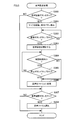
- It is a flowchart which shows a message setting process.
- It is a flowchart which shows a message input process.
- It is a flowchart which shows an audio
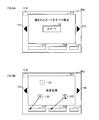
- 6A is an explanatory diagram illustrating an example of a start screen
- FIG. 6B is an explanatory diagram illustrating an example of a message search screen.
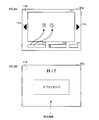
- FIG. 7A is an explanatory diagram illustrating an example of a screen for ending the message search
- FIG. 7B is an explanatory diagram illustrating an example of a message search ending screen.
- FIG. 8A is an explanatory diagram illustrating a state in which a message is configured
- FIG. 8B is an explanatory diagram illustrating a state in which a sub message is displayed together with the message.
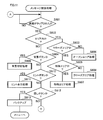
- It is a flowchart which shows a main process. It is a flowchart which shows a message arrangement
- FIG. 1 is a block diagram illustrating a schematic configuration of a tablet PC (hereinafter referred to as “tablet”) 1 according to an embodiment.
- the tablet 1 is a personal information terminal with portability, and is configured around the control unit 10.
- the control unit 10 is configured as a so-called computer system, and includes a CPU, a RAM, a ROM, an I / O, and a bus line connecting them.
- the control unit 10 includes a storage unit 11 that is a nonvolatile memory.
- the control unit 10 is electrically connected with a touch panel 20, a power switch 30, a GPS receiver 40, a camera 50, a microphone 60, a communication unit 70, a display 80 having a screen 80a, and a speaker 90.
- the power switch 30 is for instructing power supply from the battery. With this power switch 30, the tablet 1 can be in a completely power-off state, or can be in a sleep state in which the time until startup is shortened.
- the GPS receiver 40 is a receiver for GPS (GLOBAL POSITIONING SYSTEM), and receives signals from several GPS satellites in the sky and calculates the current position of the tablet 1.
- GPS GLOBAL POSITIONING SYSTEM
- the camera 50 is for taking pictures of landscapes and people, and can take not only still images but also moving images.
- the display 80 includes an outer camera attached to the opposite side of the screen 80a and an inner camera attached to the same side of the screen 80a.
- the outer camera can shoot the same image as a normal digital camera while viewing the image displayed on the screen 80a.
- the inner camera is used when, for example, the user himself / herself is a subject, and the subject on the screen 80a side can be photographed while viewing the image displayed on the screen 80a.
- the microphone 60 is configured to input sound. As will be described later, a voice message is recorded using the microphone 60.
- the communication unit 70 can be connected to the Internet. For example, it is connected to the Internet through a base station of a mobile phone. Of course, wireless LAN connection is possible, and connection to the Internet may be made via the wireless LAN.
- the display 80 is a color liquid crystal display device, and has the screen 80a configured integrally with the touch panel 20 as described above.
- the speaker 90 is configured to output sound. In the present embodiment, it is used for reproduction of sound input via the microphone 60, reproduction of music (hereinafter referred to as “BGM”), and reproduction of sound effects (hereinafter referred to as “SE”).
- the message transmission application is for transmitting a message from one user to another in a game-like manner.
- a message to be transmitted first by a certain user is set.
- This message is divided into character units and hidden in the background image displayed on the screen 80a as a character card.
- Another user finds a character card from the background image. When all the character cards are found, the character cards constitute a message, and the message is transmitted from one user to another user.
- the tablet 1 displays a menu screen through a predetermined loading screen by starting a message transmission application.
- a message setting button 101, an option button 102, and a resume button 110 as necessary are displayed on the screen 80a.
- Each button 101, 102, 110 is displayed using an image, and is considered to have been pressed by tapping a corresponding location on the screen 80a. The same applies to the buttons below.
- the message setting button 101 is for performing message setting. When the message setting button 101 is pressed, a message setting screen described later is displayed.
- the option button 102 is for setting the volume of BGM and SE. When the option button 102 is pressed, a slide bar for adjusting the volume of BGM and SE is displayed.
- the resume button 110 is used to resume “message search” from the point of interruption when “message search” described later is interrupted.
- a message input field 103 On the message setting screen, a message input field 103, a sub message input field 104, an audio recording button 105, an audio selection button 106, an image recording button 107, an image selection button 108, and a start button 109 are displayed.
- the message input field 103 is a space for inputting a message to be transmitted.
- the sub message input field 104 is a space for inputting a sub message when there is a message attached to the message. These messages are input using a software keyboard displayed by tapping the input fields 103 and 104.
- the sub message is not essential and can be omitted.
- the voice recording button 105 is used to record a voice attached to a message.
- the voice recording button 105 is tapped, the screen shifts to a voice recording screen, an operation button (record and stop button) is displayed, and voice can be recorded through the microphone 60.
- the voice selection button 106 is used to select a voice to be attached to the message.
- the voice selection button 106 is tapped, the voice selection screen is displayed, a list of voices recorded so far is displayed, and voice selection is possible.
- the image recording button 107 is for recording an image attached to the message.
- the screen moves to an image recording screen, and operation buttons (recording and stop buttons, etc.) are displayed, and recording via the camera 50, that is, recording with an external camera or an internal camera becomes possible.
- the image here may be a still image or a moving image. Of course, a configuration may be adopted in which still images and moving images can be selectively recorded.
- the image selection button 108 is for selecting an image to be attached to the message.
- the screen shifts to an image selection screen, a list of images stored so far is displayed, and an image can be selected.
- the start button 109 is for starting a message search. When the start button 109 is tapped, the screen shifts to a “start screen” shown in FIG. 6A.
- a message input process is executed.
- a sub message input process is executed.
- a voice setting process is executed.
- an image setting process is executed. The processes of S10 to S40 will be described in order.
- the message input process (S10 in FIG. 3) will be described.
- S100 it is determined whether or not the input field has been tapped. This process determines whether or not the message input field 103 has been tapped, and affirmative determination is made when tapped. If it is determined that the input field has been tapped (S100: YES), the process proceeds to S101. On the other hand, if it is determined that the input field has not been tapped (S100: NO), the subsequent process is not executed and the message input process is terminated.
- a keyboard is displayed.
- the software keyboard is displayed using the lower half of the screen 80a.
- the user inputs a message.
- S102 it is determined whether or not the “confirm” button has been tapped.
- a “confirm” button is displayed to end the input to the input field in S100. This process is to determine the tap of the “confirm” button. If it is determined that the “confirm” button has been tapped (S102: YES), the process proceeds to S103. On the other hand, as long as the “confirm” button is not tapped (S102: NO), the determination process of S102 is repeated.
- S103 which is shifted when the message is confirmed, it is determined whether or not the number of characters is within the limit. This process determines whether or not the number of characters in the input message exceeds a predetermined number of characters. If it is determined that the number of characters is within the limit (S103: YES), the keyboard is hidden in S104, a message is stored in S105, and then the message input process is terminated. The message is stored in the storage unit 11 of the control unit 10. On the other hand, when the number of characters exceeds the limit (S103: NO), the processing from S102 is repeated.
- the voice recording button 105 in FIG. 2B it is determined whether or not the voice recording button has been tapped.
- an affirmative determination is made when the voice recording button 105 in FIG. 2B is tapped. If it is determined that it has been tapped (S300: YES), the microphone 60 is activated in S301, operation buttons (record button, stop button, etc.) are displayed, and the process proceeds to S302. On the other hand, when it is not tapped (S300: NO), the process proceeds to S307.
- S302 it is determined whether or not the recording button has been tapped. If it is determined that the record button has been tapped (S302: YES), voice recording is started in S303, and then the process proceeds to S304. On the other hand, as long as the recording button is not tapped (S302: NO), the determination process of S302 is repeated.
- S304 it is determined whether it is within the time limit. It is assumed that the sound recording time is predetermined, for example, 15 seconds. This process determines whether or not the time is within a predetermined time. If it is determined that the time is within the time limit (S304: YES), the process proceeds to S305. On the other hand, when it is determined that the time limit is exceeded (S304: NO), the process proceeds to S306.
- S305 it is determined whether or not the stop button has been tapped. If it is determined that the stop button has been tapped (S305: YES), the process proceeds to S306. On the other hand, as long as the stop button is not tapped (S305: NO), the processing from S304 is repeated.
- S307 it is determined whether or not the voice selection button has been tapped. Here, an affirmative determination is made when the audio selection button 106 in FIG. 2B is tapped. If it is determined that it has been tapped (S307: YES), the process proceeds to S308. On the other hand, if it is determined that it has not been tapped (S307: NO), the process of S308 is not executed and the voice setting process is terminated.
- an audio file is selected. As described above, this process is for selecting a voice to be attached to a message, and the user selects a voice from the displayed voice list.
- the image setting process (S40 in FIG. 3) is the same process as the voice setting process shown in FIG. Specifically, the recording is performed via the camera 50 instead of the recording via the microphone 60. Therefore, the explanation is omitted.
- a “start screen” displayed on the screen 80a when the start button 109 shown in FIG. 2B is tapped will be described with reference to FIG. 6A.
- a background image 111, a start button 112, two background buttons 113 and 114, a character card area 115, an item area 116, and a hint button 117 are displayed.
- the hidden button 118 can be tapped but cannot be visually recognized.
- the background image 111 is an image displayed in the background when searching for a message, and several types are prepared in advance and stored in the storage unit 11. In the present embodiment, the description will be continued assuming that four types of child room, living room, kitchen, and garden are prepared.
- the two background buttons 113 and 114 include a left background button 113 and a right background button 114, which are used by the user to move the search area.
- the background image 111 is switched by tapping the background buttons 113 and 114. .
- the background image 111 is switched in the order of child room ⁇ kitchen ⁇ living room ⁇ garden.
- moving from the child room to the left side becomes a kitchen
- moving from the kitchen to the left side becomes a living room
- moving from the living room to the left side becomes a garden.
- it is not possible to move from the garden to the left side and in this case, a message “cannot move” is displayed, or an SE indicating that movement is not possible is reproduced.
- the left background button 113 may be hidden or displayed so that the button cannot be operated.
- the background image 111 is switched in the order of garden ⁇ living room ⁇ kitchen ⁇ children room.
- moving from the garden to the right side becomes a living room
- moving from the living room to the right side becomes a kitchen
- moving from the kitchen to the right side becomes a children's room.
- a message “cannot move” is displayed, or an SE indicating that movement is not possible is reproduced.
- the right background button 114 may be hidden or displayed lightly so that the button cannot be operated.
- the character card area 115 is an area where the acquired character cards are displayed side by side. Character cards are displayed side by side in order of acquisition from the left side. When there are more character cards, they are displayed in the area so that the left and right ends of the character cards overlap.
- the item area 116 is an area where the acquired items are displayed side by side. Items are also displayed side by side in order of acquisition from the left.
- the hint button 117 displays a hidden place of the character card or item by tapping when the hidden character card or item is not found. In the present embodiment, the hint button 117 is always displayed. However, the hint button 117 may be activated when a predetermined percentage (for example, 80%) of the character card is found.
- the hidden button 118 is a non-display button arranged at the upper left of the screen 80a and does not appear on the screen 80a.
- the menu screen shown in FIG. 2A is displayed. This is a button for instructing to interrupt the message search.
- a resume button 110 as shown by a broken line in FIG. 2A is displayed on the menu screen.
- the message set by the user that is, the message input in the message input field 103 in FIG. 2B is divided into character units and hidden in the background image 111.
- the background image 111 In the background image 111, an arrangement area and a special area are prepared. These are circular or quadrangular areas defined by coordinate values with respect to the background image 111. These areas can be seen in the image as drawers in children's rooms, cupboards in the living room, and fallen leaves in the garden.
- both the arrangement area and the special area have two types of states: closed (closed in the drawer example) and open (open in the drawer example).
- closed closed in the drawer example
- open open in the drawer example
- the area in the closed state is referred to as “closed area”
- the area in the open state is referred to as “open area” as appropriate.
- the special area is an area corresponding to the item.
- the area corresponding to the special area is viewed as an image, it is a drawer with a key or a dial-type safe.
- Corresponding items are “key” and “card with dial number”.
- the arrangement area becomes an open area with a simple tap, whereas the special area becomes an open area by tapping after finding an item.
- the character card is arranged in the arrangement area or the special area when it becomes an open area in this way, the character card is displayed. The user acquires the character card by tapping the character card. The same applies to items.
- the message set by the user is “Hi”
- the message is divided into character units, and the character cards “H” and “i” are arranged in the arrangement area or special area of the background image 111.
- the character card “H” is arranged in the arrangement area 120 and the character card “i” is arranged in the special area 121.
- an item corresponding to the special area 121 is arranged in the arrangement area 122.
- the arrangement area 120 becomes an open area, and the character card “H” is displayed.
- the character card “H” moves to the character card area 115.
- the movement trajectory of the character card may be displayed using a particle system or the like.
- the acquired character cards are displayed in the order of acquisition.
- the special area 121 in which the character card “i” is arranged is not an open area until after possessing the item. Then, a user acquires an item similarly to a character card by tapping the arrangement area 122. The acquired item moves to the item area 116. The movement trajectory may be displayed in the same manner as the character card.
- the special area 121 When the special area 121 is tapped after acquiring items in this way, the special area 121 becomes an open area. Therefore, the user can acquire the appearing character card “i”.
- the arrangement area is larger than the total number of the character card and the item.
- a special area is prepared.
- the arrangement area and the special area are suggested by the image, they are not clearly shown. Therefore, the user taps the entire background image to search for a character card and an item.
- the character card “i” when the character card “i” is acquired after the character card “H” is acquired, the character card “i” is also the same as the character card “H” as shown in FIG. 7A.
- the character card area 115 To the character card area 115. Since all the character cards are acquired by acquiring the character card “i”, the character card area 115 is blinked as shown in FIG. 7B.
- the character card moves from the character card area 115 onto the background image 111 to compose a message.
- the character cards “H” and “i” move so as to be in the order of composing the message.
- the character cards “H” and “i” move so as to dance in the air.
- a message is displayed in the upper part of the screen, and a sub message is displayed from the middle part to the lower part.
- the set image is displayed in the background.
- the set sound is played back.
- the display of the sub message may be a transparent display, and the image set as the background may be displayed behind the sub message.
- This main process is executed when the start button 119 in FIG. 2B is tapped.
- a message arrangement process is executed.
- a message search process is executed.
- a message display process is executed.
- FIG. 10 is a flowchart showing details of the message arrangement process (S50 in FIG. 9).
- a message is read.
- a message input by the user via the message input field 103 is read from the storage unit 11.
- the data is divided into character units.
- This process divides the message into character units. For example, if it is “Hi”, it is divided into “H” and “i”.
- Special characters such as periods, commas, colons, semicolons, exclamation marks, question marks, double quotes, and single quotes may be split as a single character, not considered as characters, and displayed at the end. It may appear only (see FIG. 8B).
- Japanese which is divided into kanji, hiragana and katakana units.
- special characters such as punctuation marks may be one character or may not be regarded as characters.
- a character card is created. This process creates a character card for image display for the divided characters. Specifically, the text input character is synthesized as image data with a card image prepared in advance.
- an arrangement area or a special area is selected.
- the arrangement area and the special area are associated with the background image.
- an area in which character cards are arranged is selected at random from among arrangement areas and special areas associated with a plurality of background images.
- step S505 a character card is placed in the placement area or special area selected in step S504. This process associates an area with a character card internally.
- step S506 it is determined whether or not a special area has been selected in the arrangement of the character cards. If it is determined that a special area has been selected (S506: YES), the process proceeds to S507. On the other hand, if it is determined that the special area has not been selected (S506: NO), the processing of S507 and S508 is not executed, and the message arrangement process is terminated.
- an arrangement area is selected.
- an arrangement area for arranging items is selected.
- a placement area is randomly selected from unused placement areas.
- FIG. 11 is a flowchart showing details of the message search process (S60 in FIG. 9).
- S601 it is determined whether or not the screen is tapped. If it is determined that the screen has been tapped (S601: YES), the process proceeds to S602. On the other hand, if it is determined that the screen is not tapped (S601: NO), the determination process of S601 is repeated.
- S602 it is determined whether or not it is in the area. This process determines whether the tapped position is inside the arrangement area or the special area. If it is determined that the area is within the area (S602: YES), the process proceeds to S603. On the other hand, if it is determined that it is not within the area (S602: NO), the process proceeds to S604.
- S603 it is determined whether the area is a closed area. If it is determined that the current area is a closed area (S603: YES), the process proceeds to S605. On the other hand, if it is determined that it is not a closed area (S603: NO), that is, if it is an open area, an open area process is executed in S606.
- S605 it is determined whether or not it is a special area. If it is determined that the area is a special area (S605: YES), that is, if the area is a closed special area, special area processing is executed in S607. On the other hand, if it is determined that the area is not a special area (S605: NO), that is, if it is a closed arrangement area, the closed area processing is executed in S608.
- S604 which is shifted when the outside of the area is tapped, it is determined whether or not the background buttons 113 and 114 are tapped. If it is determined that the button is the background button 113 or 114 (S604: YES), the background switching process is executed in S609. On the other hand, if it is determined that the buttons are not the background buttons 113 and 114 (S604: NO), the process proceeds to S610.
- S610 it is determined whether the tapped button 117 is a hint button. If it is determined that the button is the hint button 117 (S610: YES), a hint display process is executed in S611. On the other hand, if it is determined that the button is not the hint button 117 (S610: NO), the process proceeds to S612.
- S612 it is determined whether or not it is the hidden button 118 that has been tapped. If it is determined that the hidden button 118 has been tapped (S612: YES), backup is performed in S613, and the screen returns to the menu screen. On the other hand, when it is determined that the button is not the hidden button 118 (S612: NO), the processing from S601 is repeated.
- This process is a process when the arrangement area in the closed state is tapped.
- the area will be opened.
- an effect that the “drawer” is opened is performed.
- a predetermined SE is output.
- S621 it is determined whether or not a character card is arranged. For example, when the character card “H” is arranged as in the arrangement area 120 in FIG. If it is determined here that a character card is placed (S621: YES), the process proceeds to S622. On the other hand, when it is determined that the character card is not arranged (S621: NO), the process of S622 is not executed and the process proceeds to S623.
- a character card appearance effect is performed.
- This processing is an effect that, for example, when a “drawer” image is displayed in the arrangement area, a character card appears in the “drawer” when the “drawer” is opened. At this time, a predetermined SE is output.
- S623 it is determined whether or not the item is arranged. For example, when an item is arranged as in the arrangement area 122 in FIG. 6B, an affirmative determination is made. If it is determined that the item is arranged (S623: YES), an item appearance effect is performed in S624. This effect is an effect that an item appears in an open drawer when, for example, an image of “drawer” is displayed in the arrangement area. At this time, a predetermined SE is output. Thereafter, the process proceeds to S601 in FIG. On the other hand, when it is determined that the item is not arranged (S623: NO), the process of S624 is not executed, and the process proceeds to S601 in FIG.
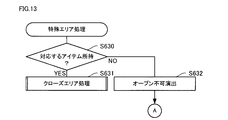
- This process is a process when a special area in a closed state is tapped.
- the first S630 it is determined whether or not the corresponding item is possessed. If it is determined that the corresponding item is possessed (S630: YES), the closed area process (see FIG. 12) is executed in S631. On the other hand, when it is determined that the corresponding item is not possessed (S630: NO), an unopenable effect is executed in S632, and then the process proceeds to S601 in FIG.
- the opening impossible effect is an effect indicating that the area cannot be opened because there is no item, and is an effect by text display or SE.
- This process is a process when an open arrangement area or special area is tapped.
- S640 it is determined whether or not a character card is appearing. If it is determined here that a character card is appearing (S640: YES), a character card acquisition effect is performed in S641, and then the process proceeds to S642.
- the character card acquisition effect is an effect in which the character card moves to the character card area 115 as described above. At this time, a predetermined SE is output. On the other hand, when it is determined that no character card has appeared (S640: NO), the processing of S641 and S642 is not executed, and the process proceeds to S643.
- S642 it is determined whether or not all character cards have been acquired. If it is determined that all character cards have been acquired (S642: YES), the open area process (message search process) is terminated. Thereby, the message display process (S70 in FIG. 9) is executed. On the other hand, as long as there is a character card that has not been acquired (S642: NO), the process proceeds to S643.
- S643 that is shifted when a negative determination is made in S640 or S642, it is determined whether or not an item is appearing. If it is determined that the item is appearing (S643: YES), an item acquisition effect is performed in S644, and then the process proceeds to S601 in FIG.
- the item acquisition effect is an effect in which the item moves to the item area 116 as described above. At this time, a predetermined SE is output. On the other hand, when it is determined that the item has not appeared (S643: NO), the process of S644 is not executed, and the process proceeds to S601 in FIG.
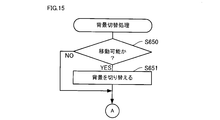
- the first S650 it is determined whether or not movement is possible. If it is determined that the object can be moved (S650: YES), the background is switched in S651, and then the process proceeds to S601 in FIG. On the other hand, when it is determined that the movement is impossible (S650: NO), the process of S651 is not executed, and the process proceeds to S601 in FIG.
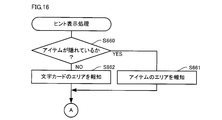
- the first S660 it is determined whether or not the item is hidden. This process determines whether there is an item that has not yet been discovered. If it is determined that the item is hidden (S660: YES), that is, if there is an item that has not been acquired, the area of the item is notified in S661, and then the process proceeds to S601 in FIG. .
- the notification of the item area is, for example, displayed in a blinking circle or the like with respect to the background image area.
- the area of the character card is notified in S662
- the process proceeds to S601 in FIG. Transition.
- the notification of the character card area is the same as the notification of the item area.
- FIG. 17 is a flowchart showing details of the message display process (S70 in FIG. 9).
- a message composition effect is performed. This effect is to blink the character card area 115 when all the character cards have been acquired, and to compose a message with the character cards so as to flutter in the air.
- a predetermined SE is output. This is as shown in FIGS. 7B and 8A.
- a message is displayed. As shown in the upper part of FIG. 8B. In the next S703, a sub message is displayed. As shown in the middle of FIG. 8B. In subsequent S704, it is determined whether or not a sound is set. In this process, it is determined whether or not the voice attached to the message is set. If it is determined that the sound is set (S704: YES), the sound is reproduced in S705, and then the process proceeds to S706. On the other hand, when it is determined that no voice is set (S704: NO), the processing of S705 is not executed, and the process proceeds to S706.
- an image is displayed. This process displays an image that is the background of the message and sub-message. If no image is set, a default image is displayed.
- the effect in this embodiment is demonstrated.
- the set message is read (S501 in FIG. 10), divided into character units (S502), a character card is created (S503), and then an area is selected (S504). Place. Then, it is determined whether or not the screen has been tapped (S601 in FIG. 11), it is determined whether or not it is within the area (S602), and if a character card is appearing (S640 in FIG. 14), the character is A card acquisition effect is performed (S641). When all the character cards are acquired (S642: YES), a message composition effect is performed using the character cards (S701 in FIG. 17), and a message is displayed (S702).
- the message is displayed by dividing the message into character units and finding the character card corresponding to those characters from the background image.
- the message can be transmitted like a game, and the search will continue without knowing the content of the message or what work is being done until halfway. In the display, the user can be surprised.
- a character card indicating each character is created (S502 and S503 in FIG. 10). Then, this character card is displayed on the background image. As a result, a character card is searched for, which contributes to an improvement in game feeling.
- a plurality of types of background images are prepared. Specifically, there are four types: children's room, living room, kitchen, and garden.
- the background switching process is executed (S609).
- the background switching process it is determined whether or not movement is possible (S650 in FIG. 15), and if the movement is possible, the background is switched (S650: YES, S651). As a result, a character card is searched from a plurality of background images, which contributes to a search like a game.
- a plurality of areas are set corresponding to the background image.
- the character cards are randomly arranged in association with arrangement areas or special areas in the plurality of areas.
- the area takes two states, closed and open, and when the closed area in the closed state is tapped (S601: YES, S602: YES, S603: YES in FIG. 11), An area open effect is performed (S620 in FIG. 12).
- This item corresponds to a special area.
- the special area only when the corresponding item is possessed (S630: YES in FIG. 13), the area open effect is performed (FIG. 13). 12 at S620). Thereby, it becomes necessary to acquire an item prior to opening the area, and the game performance can be improved.
- the item is arranged by selecting the arrangement area where the character card is not arranged (S507, S508). Thereby, an item can be handled like a character card, and processing does not become complicated.
- a sub message can be set (S20 in FIG. 3), and the sub message is displayed in addition to the message (S703 in FIG. 17).
- voice can be set (S30 in FIG. 3), and the set voice is reproduced in addition to the message (S704 in FIG. 17: YES, S705).
- the voice can be recorded through the microphone 60 (S300 to S306 in FIG. 5), which is convenient.
- an image can be set (S40 in FIG. 3), and the set image is displayed in addition to the message (S706 in FIG. 17).
- an image can be recorded via the camera 50, which is convenient.
- the present invention is not limited to the above-described embodiments, and can be implemented in various forms.
- the message transmission device is embodied as the tablet 1, but the message transmission device may be embodied as a mobile phone such as a smartphone.
- information for example, personal name or company name
- information for example, personal name or company name
- an input field for setter information may be provided on the screen 80a shown in FIG. 2B so that setter information attached to a message can be input.
- the setter information is displayed on the screen 80a of FIG. 8B.
- the information of the message setter can be presented to the message searcher. For example, when a company or the like is a message setter, the company can be advertised.
- the character card is directly found.
- a configuration in which a character card can be found by finding a plurality of cards and finding one card is completed, and the plurality of cards are found. Good.
- the character card is appropriately searched from the background image.
Landscapes
- Engineering & Computer Science (AREA)
- General Engineering & Computer Science (AREA)
- Theoretical Computer Science (AREA)
- Human Computer Interaction (AREA)
- Physics & Mathematics (AREA)
- General Physics & Mathematics (AREA)
- User Interface Of Digital Computer (AREA)
- Information Transfer Between Computers (AREA)
- Telephone Function (AREA)
Abstract
La présente invention concerne un dispositif de transmission de messages comportant: un moyen d'affichage d'image pour l'affichage d'une image d'arrière-plan sur un écran ; un moyen de segmentation de message pour la segmentation d'un message établi en une pluralité d'unités de configuration ; un moyen de positionnement d'unités de configuration pour le positionnement d'unités de configuration dans l'image d'arrière-plan; un moyen d'orientation de position pour l'orientation d'une position arbitraire sur l'écran ; un moyen d'acquisition d'unités de configuration pour l'acquisition d'unités de configuration en fonction de la position qui est orientée par le moyen de d'orientation de position ; et un moyen d'affichage de messages pour la configuration et l'affichage du message par les unités de configuration lorsque toutes les unités de configuration ont été acquises par le moyen d'acquisition d'unités de configuration.
Priority Applications (1)
| Application Number | Priority Date | Filing Date | Title |
|---|---|---|---|
| JP2013508951A JPWO2012137933A1 (ja) | 2011-04-07 | 2012-04-06 | メッセージ伝達装置、及びメッセージ伝達アプリケーション |
Applications Claiming Priority (2)
| Application Number | Priority Date | Filing Date | Title |
|---|---|---|---|
| JP2011-085482 | 2011-04-07 | ||
| JP2011085482 | 2011-04-07 |
Publications (1)
| Publication Number | Publication Date |
|---|---|
| WO2012137933A1 true WO2012137933A1 (fr) | 2012-10-11 |
Family
ID=46969321
Family Applications (1)
| Application Number | Title | Priority Date | Filing Date |
|---|---|---|---|
| PCT/JP2012/059552 Ceased WO2012137933A1 (fr) | 2011-04-07 | 2012-04-06 | Système de transmission de messages et application de transmission de messages |
Country Status (2)
| Country | Link |
|---|---|
| JP (1) | JPWO2012137933A1 (fr) |
| WO (1) | WO2012137933A1 (fr) |
Cited By (1)
| Publication number | Priority date | Publication date | Assignee | Title |
|---|---|---|---|---|
| JP2022191216A (ja) * | 2018-05-07 | 2022-12-27 | グーグル エルエルシー | 割込みをかける第2のセッションの終了時に第1の自動アシスタントセッションを自動的に再開するかどうかを決定すること |
Citations (6)
| Publication number | Priority date | Publication date | Assignee | Title |
|---|---|---|---|---|
| JP2002041943A (ja) * | 2000-07-24 | 2002-02-08 | Pagecom Co Ltd | インターネットを用いた広告方法 |
| JP2002334044A (ja) * | 2001-05-08 | 2002-11-22 | Toshiba Corp | データ伝送システム及び情報通信端末 |
| JP2004094741A (ja) * | 2002-09-02 | 2004-03-25 | Matsushita Electric Ind Co Ltd | 情報送受信装置及び情報送受信方法 |
| JP2004129861A (ja) * | 2002-10-10 | 2004-04-30 | Sanyo Electric Co Ltd | 通信端末 |
| JP2007195826A (ja) * | 2006-01-27 | 2007-08-09 | Square Enix Co Ltd | ゲーム装置、ゲームの進行方法、並びにプログラム及び記録媒体 |
| JP2008113746A (ja) * | 2006-11-01 | 2008-05-22 | Fujifilm Corp | ゲーム装置及び画像通信システム |
-
2012
- 2012-04-06 JP JP2013508951A patent/JPWO2012137933A1/ja active Pending
- 2012-04-06 WO PCT/JP2012/059552 patent/WO2012137933A1/fr not_active Ceased
Patent Citations (6)
| Publication number | Priority date | Publication date | Assignee | Title |
|---|---|---|---|---|
| JP2002041943A (ja) * | 2000-07-24 | 2002-02-08 | Pagecom Co Ltd | インターネットを用いた広告方法 |
| JP2002334044A (ja) * | 2001-05-08 | 2002-11-22 | Toshiba Corp | データ伝送システム及び情報通信端末 |
| JP2004094741A (ja) * | 2002-09-02 | 2004-03-25 | Matsushita Electric Ind Co Ltd | 情報送受信装置及び情報送受信方法 |
| JP2004129861A (ja) * | 2002-10-10 | 2004-04-30 | Sanyo Electric Co Ltd | 通信端末 |
| JP2007195826A (ja) * | 2006-01-27 | 2007-08-09 | Square Enix Co Ltd | ゲーム装置、ゲームの進行方法、並びにプログラム及び記録媒体 |
| JP2008113746A (ja) * | 2006-11-01 | 2008-05-22 | Fujifilm Corp | ゲーム装置及び画像通信システム |
Cited By (4)
| Publication number | Priority date | Publication date | Assignee | Title |
|---|---|---|---|---|
| JP2022191216A (ja) * | 2018-05-07 | 2022-12-27 | グーグル エルエルシー | 割込みをかける第2のセッションの終了時に第1の自動アシスタントセッションを自動的に再開するかどうかを決定すること |
| JP7384976B2 (ja) | 2018-05-07 | 2023-11-21 | グーグル エルエルシー | 割込みをかける第2のセッションの終了時に第1の自動アシスタントセッションを自動的に再開するかどうかを決定すること |
| US11830491B2 (en) | 2018-05-07 | 2023-11-28 | Google Llc | Determining whether to automatically resume first automated assistant session upon cessation of interrupting second session |
| US12243526B2 (en) | 2018-05-07 | 2025-03-04 | Gray Ice Higdon | Determining whether to automatically resume first automated assistant session upon cessation of interrupting second session |
Also Published As
| Publication number | Publication date |
|---|---|
| JPWO2012137933A1 (ja) | 2014-07-28 |
Similar Documents
| Publication | Publication Date | Title |
|---|---|---|
| US12153776B2 (en) | Content presentation and interaction across multiple displays | |
| US12566872B2 (en) | Device, method, and graphical user interface for accessing an application in a locked device | |
| KR102606075B1 (ko) | 복수의 디스플레이들을 포함하는 전자 장치 및 그 동작 방법 | |
| US11537268B2 (en) | Electronic device comprising multiple displays and method for operating same | |
| US20230266876A1 (en) | Portable device comprising a touch-screen display, and method for controlling same | |
| Mattioli | On Orbitz, Mac users steered to pricier hotels | |
| KR101864618B1 (ko) | 이동 단말기 및 그것의 사용자 인터페이스 제공 방법 | |
| US8294680B2 (en) | System and method for touch-based text entry | |
| US20080244446A1 (en) | Disambiguation of icons and other media in text-based applications | |
| US8866855B2 (en) | Electronic device, method of displaying display item, and search processing method | |
| US20100199176A1 (en) | Electronic device with text prediction function and method | |
| US20140377722A1 (en) | Synchronous presentation of content with a braille translation | |
| US20070174787A1 (en) | Device and method for providing information about relationships between respective sharers based on shared information | |
| US20150326708A1 (en) | System for wireless network messaging using emoticons | |
| KR20110055696A (ko) | 정보가 표시되도록 출력을 제공하는 제어기, 장치, 방법 및 컴퓨터 판독가능한 저장 매체 | |
| Beighley | iPhone 5: Visual QuickStart Guide | |
| WO2009128838A1 (fr) | Levée d'ambiguïté d'icônes et d'autres éléments multimédias dans des applications à base de texte | |
| JPWO2012137933A1 (ja) | メッセージ伝達装置、及びメッセージ伝達アプリケーション | |
| TWI423113B (zh) | 互動式人機介面及其所適用之可攜式通訊裝置 | |
| JP2008178449A (ja) | パズルゲームシステム、テンキーキャラクター | |
| CN116489463B (zh) | 多媒体资源推荐方法、装置、终端及存储介质 | |
| JP6367733B2 (ja) | 画面制御装置、画面制御方法及び画面制御プログラム | |
| JP4678692B2 (ja) | 携帯情報端末 | |
| Hennig | App literacy for librarians | |
| Ziegler | Palm Pre for Dummies |
Legal Events
| Date | Code | Title | Description |
|---|---|---|---|
| 121 | Ep: the epo has been informed by wipo that ep was designated in this application |
Ref document number: 12767508 Country of ref document: EP Kind code of ref document: A1 |
|
| ENP | Entry into the national phase |
Ref document number: 2013508951 Country of ref document: JP Kind code of ref document: A |
|
| NENP | Non-entry into the national phase |
Ref country code: DE |
|
| 122 | Ep: pct application non-entry in european phase |
Ref document number: 12767508 Country of ref document: EP Kind code of ref document: A1 |