WO2012144139A1 - UI(User Interface)作成支援装置、UI作成支援方法及びプログラム - Google Patents
UI(User Interface)作成支援装置、UI作成支援方法及びプログラム Download PDFInfo
- Publication number
- WO2012144139A1 WO2012144139A1 PCT/JP2012/002346 JP2012002346W WO2012144139A1 WO 2012144139 A1 WO2012144139 A1 WO 2012144139A1 JP 2012002346 W JP2012002346 W JP 2012002346W WO 2012144139 A1 WO2012144139 A1 WO 2012144139A1
- Authority
- WO
- WIPO (PCT)
- Prior art keywords
- influence
- degree
- screen
- configuration
- user
- Prior art date
- Legal status (The legal status is an assumption and is not a legal conclusion. Google has not performed a legal analysis and makes no representation as to the accuracy of the status listed.)
- Ceased
Links
Images

Classifications
-
- G—PHYSICS
- G06—COMPUTING OR CALCULATING; COUNTING
- G06F—ELECTRIC DIGITAL DATA PROCESSING
- G06F3/00—Input arrangements for transferring data to be processed into a form capable of being handled by the computer; Output arrangements for transferring data from processing unit to output unit, e.g. interface arrangements
- G06F3/01—Input arrangements or combined input and output arrangements for interaction between user and computer
- G06F3/048—Interaction techniques based on graphical user interfaces [GUI]
-
- G—PHYSICS
- G06—COMPUTING OR CALCULATING; COUNTING
- G06F—ELECTRIC DIGITAL DATA PROCESSING
- G06F8/00—Arrangements for software engineering
- G06F8/30—Creation or generation of source code
- G06F8/38—Creation or generation of source code for implementing user interfaces
Definitions
- a user who creates a UI screen (hereinafter referred to as “design user”) needs to grasp a user who uses the created UI screen (hereinafter referred to as “assumed user”) and design a UI screen suitable for the assumed user.
- design user a user who uses the created UI screen
- assumed user a user who uses the created UI screen
- Patent Document 2 discloses an interactive device for presenting optimal operation guidance that is suitable for the user's operation proficiency level.
- the interactive apparatus measures the time from when it is operable to when input by the user is made, and determines the user's proficiency based on the time. Then, the dialogue apparatus outputs operation guidance according to the proficiency level specified by the determination result.
- Patent Document 3 quantitatively evaluates the impact of risk on earned value management schedule efficiency and cost efficiency, and predicts the project volume and completion prediction after a certain period from the current point during the project. An apparatus is disclosed.
- command displays that are not often used automatically can be deleted from the screen, command displays and the like can be additionally displayed in the screen, and a series of operations including frequent command selection can be integrated. Also disclosed is a command display control device that can change the mode between command displays that are likely to cause erroneous operations.
- Patent Document 5 discloses a function evaluation method for evaluating functions of an information processing device in different execution environments.
- the conventional technique has a UI screen so that each assumed user can easily operate according to the attribute (eg, proficiency level) of each assumed user.
- the attribute eg, proficiency level
- an object of the present invention is to provide a technique for providing support for creating a UI screen suitable for each assumed user in consideration of a viewpoint different from operability.
- a UI creation support apparatus that performs support for creating a UI screen for each user, and the degree-of-impact information that indicates the degree of influence when the process through the UI screen is erroneous
- a UI creation support apparatus comprising: an acquisition unit that acquires for each user; and a UI configuration determination unit that determines a configuration of the UI screen for each user based on the degree of influence specified by the degree of influence information.
- a program for providing support for creating a UI screen for each user, and the degree-of-impact information indicating the degree of influence when the process through the UI screen is erroneous A program for causing a computer to function as an acquisition unit that acquires for each user and a UI configuration determination unit that determines a configuration of the UI screen for each user based on the degree of influence specified by the degree of influence information Is provided.
- a UI creation support method for providing support for creating a UI screen for each user, and an influence degree indicating a degree of influence when a process through the UI screen is erroneous.
- a UI creation support method to be executed is provided.
- a technique for creating a UI screen suitable for each assumed user in consideration of a viewpoint different from operability is provided.
- each unit of the present embodiment includes an arbitrary computer CPU, memory, a program loaded in the memory (a program stored in the memory in advance from the stage of shipping the device, a storage medium such as a CD, and the Internet). And a storage unit such as a hard disk for storing the program, and a network connection interface, and any combination of hardware and software. It will be understood by those skilled in the art that there are various modifications to the implementation method and equipment.
- each device of the present embodiment is described as being realized by one device, but the means for realizing it is not limited to this. That is, it may be a physically separated configuration or a logically separated configuration.
- the UI creation support apparatus provides support for a design user to create a UI screen suitable for each assumed user.
- the UI creation support apparatus displays, for each assumed user, information indicating the degree of influence (eg, amount of damage) when a process (eg, input of information) via the UI screen is erroneous.
- the degree of influence e.g, amount of damage
- the UI screen configuration is determined for each assumed user.
- the UI screen for an assumed user with a high degree of influence is configured to pursue the difficulty of processing errors, and the UI screen for an assumed user with a low degree of influence pursues good operability.
- the configuration is configured to pursue the difficulty of processing errors, and the UI screen for an assumed user with a low degree of influence pursues good operability.
- FIG. 1 is a functional block diagram showing an example of the configuration of the UI creation support apparatus 1 of the present embodiment.
- the UI creation support apparatus 1 according to the present embodiment includes an acquisition unit 10 and a UI configuration determination unit 20.
- the UI creation support apparatus 1 of the present embodiment can also include the UI configuration holding unit 30 and / or the UI screen creation unit 40.
- each part will be described.
- the acquisition unit 10 acquires, for each assumed user, influence degree information indicating the degree of influence (hereinafter referred to as “the degree of influence of a processing error”) when a process via the UI screen is incorrect (eg, incorrect input).
- the UI screen here is a UI screen being designed by the design user.
- the impact level of a processing error may be a monetary impact level (hereinafter “monetary impact level”), a temporal impact level (hereinafter “time impact level”), or a human impact level (hereinafter “ The degree of human influence ”) can be considered.
- the purpose and usage of the UI screen eg, daily work, important projects, accounting work
- the content of processing via the UI screen e.g., the content of processing via the UI screen
- the type of input that will be accepted from the UI screen Example: Information related to daily work, confidential information, input for determining an order less than a predetermined amount, input for determining an order exceeding a predetermined amount), one or more assumed users who operate the UI screen, each of the assumed users Type of input (eg, Mr. A, Mr. B-input for determining an order less than a predetermined amount, Mr. C-input for determining an order of a predetermined amount or more), attributes of each assumed user (Example: title, department))
- Various information related to UI screen design is revealed.
- the design user can predict the degree of influence of a processing error for each assumed user using the information as described above, and can input a predicted value (influence degree information) to the UI creation support apparatus 1.
- the design user acquires prediction results from other users (eg, assumed users, customers) who have predicted the degree of influence of processing errors using the information as described above, and acquired predictions.
- a value (influence degree information) can be input to the UI creation support apparatus 1 as it is.
- the design user can input the degree-of-impact information specified by the customer to the UI creation support apparatus 1 as it is.
- the acquisition part 10 acquires the information (impact degree information) which shows the influence degree of the processing mistake input in this way.
- the influence degree information may be information including at least one of a monetary influence degree, a temporal influence degree, and a human influence degree.
- the monetary influence level may be determined based on, for example, a predicted amount of damage that may be caused by an error in processing via the UI screen. Specifically, a predicted amount required to solve a problem that may be caused by an error in processing via the UI screen, a predicted amount that is considered to be obtained if there is no such problem, and the like can be considered. It means that the greater the amount, the greater the degree of influence.
- the time influence degree is a predicted time required to solve a problem considered to occur due to an error in processing via the UI screen and / or a problem considered to occur due to an error in processing via the UI screen. It may be determined based on the time that can be spent to resolve. The time that can be spent to solve the problem is, for example, the upper limit of downtime. It means that the greater the estimated time required to solve a problem that may occur due to an error in processing via the UI screen, the greater the degree of influence. On the other hand, the smaller the time that can be spent to solve a problem that may be caused by a processing error via the UI screen, the greater the degree of influence.
- the degree of human influence includes, for example, the estimated number of personnel required to solve a problem that may occur due to an error in processing via the UI screen, and the influence of a problem that may occur due to an error in processing via the UI screen. It may be determined based on at least one of a wide range of organizations and whether a problem that may occur due to an error in processing via the UI screen affects human life. It means that the greater the estimated number of personnel required to solve a problem that may occur due to an error in processing via the UI screen, the greater the degree of influence.
- the acquisition unit 10 receives the input of such influence degree information from the design user for each assumed user.
- the design user may input the degree of influence information indicating the degree of influence when a process that is considered to have the greatest degree of influence is erroneous.
- the means for the acquisition unit 10 to accept the input of the degree of influence information from the design user is not particularly limited, and the amount, time, number of people, YES or NO, etc. can be obtained via any input device such as a mouse, keyboard, touch panel display, microphone, etc. Input of predetermined information can be accepted. You can also use drop-down lists and input boxes.
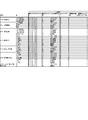
- the UI configuration determination unit 20 determines the configuration of the UI screen for each assumed user based on the degree of influence specified by the influence degree information acquired by the acquisition unit 10. For example, the UI configuration determination unit 20 refers to information (hereinafter referred to as “influence configuration correspondence information”) that defines a preferable UI screen configuration content according to the degree of influence as shown in FIG. Can be determined.
- influence configuration correspondence information as shown in FIG. 2 is held in advance by the UI configuration holding unit 30 shown in FIG.
- the influence configuration correspondence information illustrated in FIG. 2 various item contents indicating the degree of influence of processing errors are described in the “item” column, and a plurality of degrees of influence of processing mistakes for each item are described in the “value” column. Values (conditions) for categorizing the levels are described.
- the column “UI configuration” the configuration content of a suitable UI screen is described in association with each degree of influence of a processing error for each item indicating the degree of influence of a processing error.
- the “UI configuration” column is divided into a plurality of columns, and each column describes a plurality of configuration items obtained by subdividing the UI screen configuration.
- Error impact amount is determined based on the estimated amount of damage that may be caused by processing errors via the UI screen. Specifically, it includes a predicted amount required to solve a problem that may occur due to an error in processing via the UI screen, a predicted amount that can be obtained if there is no such problem, and the like.
- ⁇ “ Error impact range ” is determined based on the organization affected by the problem that may be caused by processing error via the UI screen.
- the number of organizations and their types can be determined arbitrarily, but in the example shown in FIG. 2, they are classified into four categories: “users themselves”, “inside / outside”, “customers”, and “society (whole)”. Yes.
- the degree of influence of the processing error is small, but as “inside / outside”, “customer”, and “society (whole)” progress, It shows that the degree of influence of processing errors increases.
- the “error recovery amount” is determined based on the predicted amount required to solve a problem that may occur due to a processing error via the UI screen.
- Error recovery time is determined based on the time required to solve a problem that may occur due to an error in processing via the UI screen.
- Error recovery personnel scale is determined based on the number of personnel required to solve a problem that may occur due to an error in processing via the UI screen.
- the “error recovery request time” may be determined based on the time that can be spent to solve a problem that may be caused by an error in processing via the UI screen.
- the time that can be spent to solve the problem can be, for example, the upper limit of downtime defined by SLA (Service Level Agreement).
- the presence / absence of an effect on human life due to an error is determined based on whether or not a problem that may occur due to an error in processing via the UI screen affects human life.
- the items indicating the degree of influence of processing errors shown in FIG. 2 are merely examples, and other items may be included, or one or more of the illustrated examples may not be included.
- the values (conditions) for classifying the degree of influence of processing errors of each item into a plurality of levels are merely examples, and may be other values or may be classified into other numbers of levels. .
- the number of operation path variations is determined in association with the degree of influence of processing errors.
- the operation path for example, “command input from menu on menu bar”, “command input from context menu”, “command input from toolbar”, “key shot cut”, and the like can be considered.
- the number of operation path variations is small, the content of the operation is limited, and the processing proceeds in the same procedure every time. Therefore, it is considered that errors in processing via the UI screen can be reduced.
- the number of operation path variations is large, the operability of the UI screen is considered to be improved.
- the scale of the number of operation steps performed by the assumed user when executing a single process is determined in association with each degree of influence of a processing error. For example, in the process of inputting the date “January 1, 2011” via the UI screen, after inputting all of “Year (2011)”, “Month (1)”, and “Day (1)”, , And a message such as “Is it correct? YesorNo” is output after inputting “Year (2011)”, “Month (1)”, and “Day (1)”. Each time “YesorNo” is input, and “Year (2011)”, “Month (1)”, and “Day (1)” are all input, and the process is completed with the “Confirm” input operation. Then, the number of operation steps is different.
- “Input format restriction” defines a configuration (input format) set in an input box that accepts input of predetermined information (numerical values, characters) in association with each degree of influence of processing errors.
- input format “value verification”, “format verification”, “free input”, and the like can be considered.
- Value collation is a configuration in which a value that can be accepted for input is stored in advance for each input box, and the input is accepted only when a value that matches any of these values is input.
- “Format verification” stores in advance the format of values that can be accepted for each input box (eg, “XXX-YYYY (X and Y are numerical values)”, “number of bits of input data”, etc.).
- Undo buffer defines the size of the buffer for Undo (Undo buffer) in association with the degree of influence of processing errors.
- the Undo buffer is small, the range of past operations that can be traced back becomes narrow and the operability deteriorates. However, it is possible to avoid inconveniences such as losing sight of the current operation stage by going back and forth with the operation stage. It is thought that the error of the process through the can be reduced.
- the Undo buffer is large, the range of past operations that can be traced is widened, so that the operability is considered to be improved.
- the degree of “large”, “medium”, and “small” shown in FIG. 2 is a design matter. The item can also be determined by the number of operations that can be undoed.
- the amount of information in one screen defines the amount of information to be displayed simultaneously on one screen in association with the degree of influence of processing errors. For example, even when information with the same content is displayed on the screen, “configuration of windows that display all the information simultaneously on the screen”, “classify the information into a plurality of windows, and selectively display each window A configuration of a plurality of UI screens such as “a configuration for displaying information selectively on the screen while scrolling”, and the amount of information displayed simultaneously on one screen is different. If the amount of information to be displayed simultaneously on one screen is small, operations such as window switching and scrolling are required, so operability may be degraded, but an appropriate amount of information should be displayed on the screen.
- “Number of item classification layers to be displayed in one screen” is determined by associating the amount of information to be displayed simultaneously in one screen with each degree of influence of processing errors, as in the above “amount of information in one screen”.
- the type of information for adjusting the display amount is limited to information displayed in association with each input box.
- item information eg, “address”, “phone number”, “name”, “product name”, “number” for identifying information to be input is displayed in association with each input box. Is done.
- item information may be hierarchized into a predetermined number of layers, and information on higher concepts may be displayed in association with an input box.
- input boxes associated with “address”, “telephone number”, and “name” are displayed together on the screen, and the characters “orderer information” (superordinate concept) are displayed in association with these input boxes.
- input boxes associated with “product name” and “number” are displayed together on the screen, and the characters “ordered product information” (superordinate concept) are displayed in association with these input boxes.
- the characters “order information”, which is a superordinate concept of “orderer information” and “ordered product information” can also be displayed. The assumed user can grasp the type of information input to each input box based on such information.
- the number of item classification layers displayed in one screen defines the number of item information layers to be displayed simultaneously in one screen in association with the degree of influence of processing errors. If there are many item information levels to be displayed simultaneously in one screen, the assumed user can easily grasp the hierarchical structure of multiple input boxes, so multiple input boxes are grouped and input step by step. It is possible to proceed with work, and it is possible to reduce erroneous recognition of information input to each input box by grasping a plurality of input boxes hierarchically. For this reason, when there are many item information layers displayed simultaneously on one screen, it is considered that errors in processing via the UI screen can be reduced. On the other hand, when the number of item information layers displayed simultaneously on one screen is small, the amount of information displayed simultaneously on one screen can be reduced, so operations such as window switching and scrolling are not required. It is considered that the operability is improved.
- configuration items illustrated in FIG. 2 are merely examples, and other configuration items may be included, or one or more of the illustrated items may not be included.
- the contents of each configuration item determined in association with the degree of influence of processing errors are design matters.
- the UI configuration determination unit 20 determines the configuration of the UI screen for the assumed user with reference to the influence configuration correspondence information as illustrated in FIG. For example, it is assumed that the acquisition unit 10 acquires the error influence range “customer” as the influence degree information. In this case, the UI configuration determination unit 20 searches the influence configuration correspondence information shown in FIG. 2 using “error influence range” and “customer” as keys, and “operation path variation: 2 variations” and “number of operation steps: medium”. , “Input format restriction: value collation”, “Undo buffer: medium”, “amount of information in one screen: medium”, and “number of item classification layers to be displayed in one screen: 2” are determined.
- each item when providing a plurality of items (“item” column) indicating the degree of influence of a processing error, each item may be given a priority.
- the UI structure determination part 20 may determine the structure of UI screen based on the influence degree of an item with a high priority. The priority order may be assigned to each configuration item obtained by subdividing the UI screen configuration.
- the UI screen creation unit 40 creates a UI screen according to the determination of the UI configuration determination unit 20.
- a configuration of the UI screen creation unit 40 can be realized according to the related art.
- a module for realizing each configuration shown in FIG. 2 (for example, “executable only with a mouse or touch”) is stored in the storage device in advance, and the UI screen creation unit 40 includes the module One UI screen may be created by using.
- the UI screen for an assumed user with a small degree of influence is configured to pursue good operability.
- the UI screen for an assumed user with a small degree of influence is not limited to this.
- the configuration may be a configuration in which other points are pursued. For example, as the degree of influence decreases, the UI screen function mounting man-hours may be reduced, or the UI screen design cost may be further reduced.
- the illustrations here are merely examples, and the present invention is not limited to these.
- the UI creation support apparatus of the present embodiment can be realized by installing the following program in a computer, for example.
- a program for providing support for creating a UI screen for each user An acquisition unit that acquires, for each user, influence degree information indicating a degree of influence when processing via the UI screen is erroneous; UI configuration determining means for determining a configuration of the UI screen for each user based on the degree of influence specified by the degree of influence information; As a program to make the computer function.
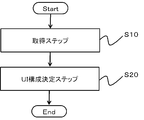
- the acquisition unit 10 acquires influence degree information indicating the degree of influence when a process through the UI screen is erroneous for each user (S10: acquisition step). For example, it is assumed that the design user inputs only the error influence amount “5,000,000 yen” to the UI creation support apparatus as the influence degree information of the first assumed user. Then, the acquisition unit 10 acquires the influence degree information.
- the UI configuration determination unit 20 determines the configuration of the UI screen for each user based on the degree of influence specified by the degree of influence information acquired by the acquisition unit 10 in S10 (S20: UI configuration determination step). .
- the UI configuration determination unit 20 refers to the influence configuration correspondence information shown in FIG. 2 held by the UI configuration holding unit 30 and based on the error influence amount “5,000,000 yen” acquired by the acquisition unit 10.
- the configuration of the UI screen for the first assumed user is determined.
- the UI configuration determining unit 20 searches the column of “item” in the impact configuration correspondence information shown in FIG. 2 using “error impact amount” as a key, and “5,000,000 yen”.
- the “value” column is searched using as a key to identify a row that satisfies both conditions. Then, the content of the configuration item described in the row is determined as the configuration of the UI screen for the first assumed user.
- operation path variation 3 variations
- number of operation steps: medium “input format restriction: format verification”, “Undo buffer: medium”, “amount of information in one screen: medium”, “one screen
- the structure of the item classification hierarchy number to be displayed: 2 ” is determined.
- the acquisition unit 10 acquires one piece of influence level information.
- the acquisition unit 10 may be, for example, an error influence amount “5,000,000 yen” and an error influence range “customer”.
- a plurality of pieces of influence degree information can also be acquired.
- the UI configuration determination unit 20 can determine the configuration of the UI screen according to, for example, a predetermined “priority order of items indicating the degree of influence of processing errors”. For example, when the priority order of the error influence amount is higher than the priority order of the error influence range, the UI configuration determination unit 20 uses the “error influence amount” and “5,000,000 yen” as keys as the above figure.
- the priority order can be assigned to each of a plurality of configuration items (items described in the UI configuration column in FIG. 2) obtained by subdividing the UI screen configuration.
- the priority of the error influence amount is higher than the priority of the error influence range in “operation path variation”, and “number of operation steps” ".
- the priority can be set so that the priority of the error influence range is higher than the priority of the error influence amount.
- the UI configuration determination unit 20 displays “operation path As the composition of “variations”, “3 variations” are determined according to the high-priority error impact amount “5,000,000 yen”, and the “number of operation steps” is composed, and the error impact range “customer with high priority” "Medium” will be determined.
- the UI screen for an assumed user having a large degree of influence of a processing error is configured to pursue the difficulty of processing errors.
- the UI screen for an assumed user with a small degree of influence of a processing error has a configuration not pursuing difficulty in causing a processing error, for example, a configuration pursuing good operability.
- the operability of the UI screen for an assumed user with a large degree of influence of a processing error may be deteriorated.
- the degree of influence of a processing error is large, a processing error occurs rather than the operability. It is considered that the configuration pursuing difficulty is a UI screen suitable for the assumed user.
- the UI creation support apparatus is used to create the first proposal of the configuration included in the UI screen being designed, and then the UI is based on the first proposal.
- the screen design can be changed. Also from this point, according to the present embodiment, it can be said that the time and labor in designing the UI screen can be reduced.
Landscapes
- Engineering & Computer Science (AREA)
- General Engineering & Computer Science (AREA)
- Theoretical Computer Science (AREA)
- Software Systems (AREA)
- Human Computer Interaction (AREA)
- Physics & Mathematics (AREA)
- General Physics & Mathematics (AREA)
- User Interface Of Digital Computer (AREA)
- Stored Programmes (AREA)
Abstract
Description
前記UI画面を介した処理を誤った場合の影響の度合いを示す影響度合情報を、前記ユーザごとに取得する取得手段、
前記影響度合情報で特定される前記影響の度合いに基づいて、前記ユーザごとに前記UI画面の構成を決定するUI構成決定手段、
としてコンピュータを機能させるためのプログラム。
Claims (8)
- UI(User Interface)画面をユーザごとに作成するための支援を行うUI作成支援装置であって、
前記UI画面を介した処理を誤った場合の影響の度合いを示す影響度合情報を、前記ユーザごとに取得する取得手段と、
前記影響度合情報で特定される前記影響の度合いに基づいて、前記ユーザごとに前記UI画面の構成を決定するUI構成決定手段と、
を有するUI作成支援装置。 - 請求項1に記載のUI作成支援装置において、
前記取得手段が取得する前記影響度合情報は、金銭的影響度合、時間的影響度合、及び、人的影響度合の中の少なくとも1つを含むUI作成支援装置。 - 請求項2に記載のUI作成支援装置において、
前記金銭的影響度合は、前記処理の誤りにより発生すると考えられる損害の予測金額に基づいて定められているUI作成支援装置。 - 請求項2に記載のUI作成支援装置において、
前記時間的影響度合は、前記処理の誤りにより発生すると考えられる問題を解決するために要する予測時間、及び/又は、前記処理の誤りにより発生すると考えられる問題を解決するために費やすことができる時間に基づいて定められているUI作成支援装置。 - 請求項2に記載のUI作成支援装置において、
前記人的影響度合は、前記処理の誤りにより発生すると考えられる問題を解決するために要する人員の予測人数、前記処理の誤りにより発生すると考えられる問題の影響が及ぶ組織、及び、前記処理の誤りにより発生すると考えられる問題が人命に影響を及ぼすか否かの中の少なくとも1つに基づいて定められているUI作成支援装置。 - 請求項1から5のいずれか1項に記載のUI作成支援装置において、
前記影響の度合いに応じたUI画面の構成内容を定めた情報を保持するUI構成保持手段をさらに有し、
前記UI構成決定手段は、前記UI構成保持手段を参照し、前記ユーザごとに前記UI画面の構成を決定するUI作成支援装置。 - UI画面をユーザごとに作成するための支援を行うためのプログラムであって、
前記UI画面を介した処理を誤った場合の影響の度合いを示す影響度合情報を、前記ユーザごとに取得する取得手段、
前記影響度合情報で特定される前記影響の度合いに基づいて、前記ユーザごとに前記UI画面の構成を決定するUI構成決定手段、
としてコンピュータを機能させるためのプログラム。 - UI画面をユーザごとに作成するための支援を行うためのUI作成支援方法であって、
前記UI画面を介した処理を誤った場合の影響の度合いを示す影響度合情報を、前記ユーザごとに取得する取得ステップと、
前記影響度合情報で特定される前記影響の度合いに基づいて、前記ユーザごとに前記UI画面の構成を決定するUI構成決定ステップと、
をコンピュータが実行するUI作成支援方法。
Priority Applications (2)
| Application Number | Priority Date | Filing Date | Title |
|---|---|---|---|
| JP2013510858A JPWO2012144139A1 (ja) | 2011-04-21 | 2012-04-04 | UI(UserInterface)作成支援装置、UI作成支援方法及びプログラム |
| US14/111,879 US20140229867A1 (en) | 2011-04-21 | 2012-04-04 | User interface (ui) creation support system, ui creation support method, and program |
Applications Claiming Priority (2)
| Application Number | Priority Date | Filing Date | Title |
|---|---|---|---|
| JP2011-095177 | 2011-04-21 | ||
| JP2011095177 | 2011-04-21 |
Publications (1)
| Publication Number | Publication Date |
|---|---|
| WO2012144139A1 true WO2012144139A1 (ja) | 2012-10-26 |
Family
ID=47041275
Family Applications (1)
| Application Number | Title | Priority Date | Filing Date |
|---|---|---|---|
| PCT/JP2012/002346 Ceased WO2012144139A1 (ja) | 2011-04-21 | 2012-04-04 | UI(User Interface)作成支援装置、UI作成支援方法及びプログラム |
Country Status (3)
| Country | Link |
|---|---|
| US (1) | US20140229867A1 (ja) |
| JP (1) | JPWO2012144139A1 (ja) |
| WO (1) | WO2012144139A1 (ja) |
Cited By (2)
| Publication number | Priority date | Publication date | Assignee | Title |
|---|---|---|---|---|
| JP5576572B1 (ja) * | 2013-03-07 | 2014-08-20 | 三菱電機株式会社 | エンジニアリングツール |
| JP2016030097A (ja) * | 2014-07-29 | 2016-03-07 | オリンパス株式会社 | 医療業務支援装置 |
Families Citing this family (1)
| Publication number | Priority date | Publication date | Assignee | Title |
|---|---|---|---|---|
| JP5910510B2 (ja) * | 2011-01-27 | 2016-04-27 | 日本電気株式会社 | UI(UserInterface)作成支援装置、UI作成支援方法及びプログラム |
Citations (4)
| Publication number | Priority date | Publication date | Assignee | Title |
|---|---|---|---|---|
| JPH08137649A (ja) * | 1994-11-04 | 1996-05-31 | Fujitsu Ltd | 画面遷移制御方式 |
| JP2004021580A (ja) * | 2002-06-17 | 2004-01-22 | Casio Comput Co Ltd | データ処理装置及びプログラム |
| JP2004355418A (ja) * | 2003-05-30 | 2004-12-16 | Hitachi Ltd | 情報処理装置、情報処理システム、情報処理プログラム、および情報処理装置におけるguiを提供する方法 |
| JP2010034998A (ja) * | 2008-07-30 | 2010-02-12 | Sony Corp | 情報処理装置、情報処理システムおよび情報処理方法 |
Family Cites Families (2)
| Publication number | Priority date | Publication date | Assignee | Title |
|---|---|---|---|---|
| US8448127B2 (en) * | 2009-01-30 | 2013-05-21 | Raytheon Company | Software forecasting system |
| JP5400599B2 (ja) * | 2009-12-18 | 2014-01-29 | 株式会社日立製作所 | Guiカスタマイズ方法、システム及びプログラム |
-
2012
- 2012-04-04 WO PCT/JP2012/002346 patent/WO2012144139A1/ja not_active Ceased
- 2012-04-04 JP JP2013510858A patent/JPWO2012144139A1/ja active Pending
- 2012-04-04 US US14/111,879 patent/US20140229867A1/en not_active Abandoned
Patent Citations (4)
| Publication number | Priority date | Publication date | Assignee | Title |
|---|---|---|---|---|
| JPH08137649A (ja) * | 1994-11-04 | 1996-05-31 | Fujitsu Ltd | 画面遷移制御方式 |
| JP2004021580A (ja) * | 2002-06-17 | 2004-01-22 | Casio Comput Co Ltd | データ処理装置及びプログラム |
| JP2004355418A (ja) * | 2003-05-30 | 2004-12-16 | Hitachi Ltd | 情報処理装置、情報処理システム、情報処理プログラム、および情報処理装置におけるguiを提供する方法 |
| JP2010034998A (ja) * | 2008-07-30 | 2010-02-12 | Sony Corp | 情報処理装置、情報処理システムおよび情報処理方法 |
Non-Patent Citations (1)
| Title |
|---|
| RYOSUKE OKUBO ET AL.: "Gamen Layout to Yoso no Taikeika -Gamen Design Pattern no Kochiku", PROCEEDINGS OF THE HUMAN INTERFACE SYMPOSIUM 2010 RONBUNSHU, 7 September 2010 (2010-09-07), pages 169 - 172 * |
Cited By (3)
| Publication number | Priority date | Publication date | Assignee | Title |
|---|---|---|---|---|
| JP5576572B1 (ja) * | 2013-03-07 | 2014-08-20 | 三菱電機株式会社 | エンジニアリングツール |
| US9639249B2 (en) | 2013-03-07 | 2017-05-02 | Mitsubishi Electric Corporation | Engineering tool providing human interface among plurality of human interfaces according to user skill level |
| JP2016030097A (ja) * | 2014-07-29 | 2016-03-07 | オリンパス株式会社 | 医療業務支援装置 |
Also Published As
| Publication number | Publication date |
|---|---|
| JPWO2012144139A1 (ja) | 2014-07-28 |
| US20140229867A1 (en) | 2014-08-14 |
Similar Documents
| Publication | Publication Date | Title |
|---|---|---|
| US11630828B2 (en) | Website scoring system | |
| US11687706B2 (en) | Digital processing systems and methods for automatic display of value types based on custom heading in collaborative work systems | |
| US10121157B2 (en) | Recommending user actions based on collective intelligence for a multi-tenant data analysis system | |
| US9383913B2 (en) | Touch screen device data filtering | |
| CN101599047B (zh) | 软件升级分析系统 | |
| US11269901B2 (en) | Cognitive test advisor facility for identifying test repair actions | |
| US7886028B2 (en) | Method and system for system migration | |
| JP7827735B2 (ja) | データセットにおけるデータ品質問題を訂正するための処理ワークフローの生成及び実行 | |
| US20160274990A1 (en) | Application performance monitoring using evolving functions | |
| US20140071138A1 (en) | Determining Alternative Visualizations for Data Based on an Initial Data Visualization | |
| US20090024425A1 (en) | Methods, Systems, and Computer-Readable Media for Determining an Application Risk Rating | |
| CN102436606B (zh) | 面向企业资源规划的知晓上下文的环境 | |
| US20150178647A1 (en) | Method and system for project risk identification and assessment | |
| US20080263504A1 (en) | Using code analysis for requirements management | |
| JP2017041171A (ja) | テストシナリオ生成支援装置およびテストシナリオ生成支援方法 | |
| US20160277257A1 (en) | Modleing application performance using evolving functions | |
| US20250209180A1 (en) | Intelligent ai risk management framework | |
| Bettayeb et al. | Quality and exposure control in semiconductor manufacturing. Part I: Modelling | |
| WO2012144139A1 (ja) | UI(User Interface)作成支援装置、UI作成支援方法及びプログラム | |
| JP2007011604A (ja) | 不具合診断システム及びプログラム | |
| US20250156812A1 (en) | Digital processing systems and methods for improving dataset state determinations | |
| JP2019160110A (ja) | 情報処理装置及びプログラム | |
| US20130326378A1 (en) | Ui creation support system, ui creation support method, and non-transitory storage medium | |
| US20210117489A1 (en) | Recommendation system based on adjustable virtual indicium | |
| JP6695847B2 (ja) | ソフトウェア部品管理システム、計算機 |
Legal Events
| Date | Code | Title | Description |
|---|---|---|---|
| 121 | Ep: the epo has been informed by wipo that ep was designated in this application |
Ref document number: 12774808 Country of ref document: EP Kind code of ref document: A1 |
|
| ENP | Entry into the national phase |
Ref document number: 2013510858 Country of ref document: JP Kind code of ref document: A |
|
| WWE | Wipo information: entry into national phase |
Ref document number: 14111879 Country of ref document: US |
|
| NENP | Non-entry into the national phase |
Ref country code: DE |
|
| 122 | Ep: pct application non-entry in european phase |
Ref document number: 12774808 Country of ref document: EP Kind code of ref document: A1 |