WO2012147799A1 - Dispositif électronique - Google Patents
Dispositif électronique Download PDFInfo
- Publication number
- WO2012147799A1 WO2012147799A1 PCT/JP2012/061098 JP2012061098W WO2012147799A1 WO 2012147799 A1 WO2012147799 A1 WO 2012147799A1 JP 2012061098 W JP2012061098 W JP 2012061098W WO 2012147799 A1 WO2012147799 A1 WO 2012147799A1
- Authority
- WO
- WIPO (PCT)
- Prior art keywords
- content
- contents
- selection
- electronic device
- touch panel
- Prior art date
- Legal status (The legal status is an assumption and is not a legal conclusion. Google has not performed a legal analysis and makes no representation as to the accuracy of the status listed.)
- Ceased
Links
Images





Classifications
-
- G—PHYSICS
- G06—COMPUTING OR CALCULATING; COUNTING
- G06F—ELECTRIC DIGITAL DATA PROCESSING
- G06F3/00—Input arrangements for transferring data to be processed into a form capable of being handled by the computer; Output arrangements for transferring data from processing unit to output unit, e.g. interface arrangements
- G06F3/01—Input arrangements or combined input and output arrangements for interaction between user and computer
- G06F3/048—Interaction techniques based on graphical user interfaces [GUI]
- G06F3/0484—Interaction techniques based on graphical user interfaces [GUI] for the control of specific functions or operations, e.g. selecting or manipulating an object, an image or a displayed text element, setting a parameter value or selecting a range
- G06F3/04842—Selection of displayed objects or displayed text elements
-
- G—PHYSICS
- G06—COMPUTING OR CALCULATING; COUNTING
- G06F—ELECTRIC DIGITAL DATA PROCESSING
- G06F3/00—Input arrangements for transferring data to be processed into a form capable of being handled by the computer; Output arrangements for transferring data from processing unit to output unit, e.g. interface arrangements
- G06F3/01—Input arrangements or combined input and output arrangements for interaction between user and computer
- G06F3/048—Interaction techniques based on graphical user interfaces [GUI]
- G06F3/0487—Interaction techniques based on graphical user interfaces [GUI] using specific features provided by the input device, e.g. functions controlled by the rotation of a mouse with dual sensing arrangements, or of the nature of the input device, e.g. tap gestures based on pressure sensed by a digitiser
- G06F3/0488—Interaction techniques based on graphical user interfaces [GUI] using specific features provided by the input device, e.g. functions controlled by the rotation of a mouse with dual sensing arrangements, or of the nature of the input device, e.g. tap gestures based on pressure sensed by a digitiser using a touch-screen or digitiser, e.g. input of commands through traced gestures
- G06F3/04883—Interaction techniques based on graphical user interfaces [GUI] using specific features provided by the input device, e.g. functions controlled by the rotation of a mouse with dual sensing arrangements, or of the nature of the input device, e.g. tap gestures based on pressure sensed by a digitiser using a touch-screen or digitiser, e.g. input of commands through traced gestures for inputting data by handwriting, e.g. gesture or text
-
- G—PHYSICS
- G06—COMPUTING OR CALCULATING; COUNTING
- G06F—ELECTRIC DIGITAL DATA PROCESSING
- G06F3/00—Input arrangements for transferring data to be processed into a form capable of being handled by the computer; Output arrangements for transferring data from processing unit to output unit, e.g. interface arrangements
- G06F3/01—Input arrangements or combined input and output arrangements for interaction between user and computer
- G06F3/048—Interaction techniques based on graphical user interfaces [GUI]
- G06F3/0481—Interaction techniques based on graphical user interfaces [GUI] based on specific properties of the displayed interaction object or a metaphor-based environment, e.g. interaction with desktop elements like windows or icons, or assisted by a cursor's changing behaviour or appearance
- G06F3/0482—Interaction with lists of selectable items, e.g. menus
-
- G—PHYSICS
- G06—COMPUTING OR CALCULATING; COUNTING
- G06F—ELECTRIC DIGITAL DATA PROCESSING
- G06F3/00—Input arrangements for transferring data to be processed into a form capable of being handled by the computer; Output arrangements for transferring data from processing unit to output unit, e.g. interface arrangements
- G06F3/01—Input arrangements or combined input and output arrangements for interaction between user and computer
- G06F3/048—Interaction techniques based on graphical user interfaces [GUI]
- G06F3/0487—Interaction techniques based on graphical user interfaces [GUI] using specific features provided by the input device, e.g. functions controlled by the rotation of a mouse with dual sensing arrangements, or of the nature of the input device, e.g. tap gestures based on pressure sensed by a digitiser
- G06F3/0488—Interaction techniques based on graphical user interfaces [GUI] using specific features provided by the input device, e.g. functions controlled by the rotation of a mouse with dual sensing arrangements, or of the nature of the input device, e.g. tap gestures based on pressure sensed by a digitiser using a touch-screen or digitiser, e.g. input of commands through traced gestures
-
- G—PHYSICS
- G11—INFORMATION STORAGE
- G11B—INFORMATION STORAGE BASED ON RELATIVE MOVEMENT BETWEEN RECORD CARRIER AND TRANSDUCER
- G11B27/00—Editing; Indexing; Addressing; Timing or synchronising; Monitoring; Measuring tape travel
- G11B27/02—Editing, e.g. varying the order of information signals recorded on, or reproduced from, record carriers
Definitions
- the present invention relates to an electronic device having a display screen and a touch panel, and more specifically to an electronic device that can improve operability when selecting a plurality of contents.
- an electronic apparatus that has a display screen that can display various types of information and includes a touch panel type operation means on the display screen.
- a touch panel As a touch panel, a finger pressure sensor type, a resistance film type, and a capacitance type are known, and the user not only visually recognizes characters and images displayed on the display screen but also taps, double taps, and flicks the touch panel. By dragging or the like, it is possible to perform operations such as operation and editing of data and folders (hereinafter referred to as “contents”) according to the installed application.
- contents such as image data and document data can be attached to the mail by operating the touch panel when the mail is created.
- contents such as image data and document data can be attached to the mail by operating the touch panel when the mail is created.
- music data and music files can be selected and listened to by operating the touch panel.
- An electronic device includes: A display unit having a display screen; A touch panel provided on the display screen for receiving touch input; When a plurality of contents are displayed on the display unit, the touch panel includes a selection unit that selects two or more contents that have received touch input, The selection unit cancels the selection state when the selected content is selected again.
- An electronic device program includes: A display unit having a display screen; A touch panel that is provided on the display screen and receives a touch input, and a computer of an electronic device, When a plurality of contents are displayed on the display unit, the touch panel selects two or more contents that have received touch input; and A procedure for releasing the selected state when the selected content is selected again; Is executed.
- An electronic device control method includes: A display unit having a display screen; A method for controlling an electronic device, comprising a touch panel provided on the display screen and receiving a touch input, When a plurality of contents are displayed on the display unit, the touch panel selects two or more contents that have received touch input, When the content in the selected state is selected again, the selected state is released.
- FIG. 1 is a perspective view showing an electronic apparatus according to an embodiment of the present invention.
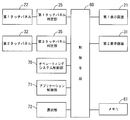
- FIG. 2 is a block diagram of an electronic device according to an embodiment of the present invention.
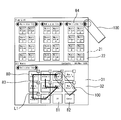
- FIG. 3 is an explanatory diagram showing a file manager screen according to an embodiment of the present invention.
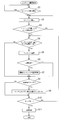
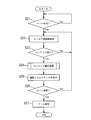
- FIG. 4 is a flowchart showing an operation according to an embodiment of the present invention.
- FIG. 5 is an explanatory diagram showing processing for invalidating duplicate content according to an embodiment of the present invention.
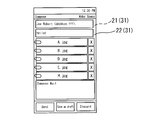
- FIG. 6 is an explanatory diagram of a display screen showing a state in which the selected content according to the embodiment of the present invention is attached to the mail.
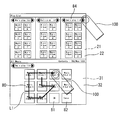
- FIG. 7 is an explanatory diagram showing a playlist creation screen for music files according to an embodiment of the present invention.
- FIG. 8 is a flowchart for transmitting a content attached to a mail according to an embodiment of the present invention.
- FIG. 9 is an explanatory diagram of a display screen corresponding to the flowchart of FIG.
- FIG. 10 is an explanatory diagram showing a favorite list creation screen on the video playback screen according to the embodiment of the present invention.
- FIG. 11 is an explanatory diagram showing a file manager screen according to another embodiment of the present invention.
- FIG. 12 is a flowchart showing an operation according to another embodiment of the present invention.
- FIG. 13 is an explanatory diagram showing a playlist creation screen for music files according to another embodiment of the present invention.
- a portable electronic device having two display screens (21) and (31) and a touch panel (22) and (32) on each display screen (21) and (31) ( An embodiment to which the present invention is applied will be described in 10).
- the illustrated electronic device (10) is for explanation, and it is needless to say that the present invention should not be interpreted in a limited manner with respect to a specific structure and configuration.
- the electronic device (10) activates one or a plurality of applications on the platform operating system and displays various information on the display screens (21) and (31).
- processing such as operation and editing can be performed.
- the electronic device (10) includes display units (20) and (30) having display screens (21) and (31) and touch panels (22) and (32), respectively.
- the display screens (21) and (31) can display information such as characters, figures, images, videos, music, and moving pictures corresponding to the application desired by the user.
- the touch panels (22) and (32) are arranged on the display screens (21) and (31), and can be operated by touching the user.
- the display screens (20) and (30) can be configured to be connected to each other by a connecting mechanism (40) so as to be relatively movable by opening and closing or sliding.
- the display units (20) and (30) are not limited to two.
- the first display unit (20) and the second display unit (30) have a display screen (21) capable of displaying information in a housing (23) (33) whose one surface is open. (31) is accommodated so as to be visible from the opening side.
- the display screens (21) and (31) are electrically connected to a control means (60) (see FIG. 2) described later, and can display various information.
- the display unit located on the right back side of the drawing is referred to as a first display unit (20), and the display unit located on the left front side is referred to as a second display unit (30).
- the display screens (21) and (31) can be exemplified by liquid crystal displays.
- touch panels (22) and (32) that can be operated by a user touching with a fingertip (100) or the like are provided.
- the touch panels (22) and (32) are disposed so as to close the openings of the housings (23) and (33), and are formed to be transparent so that the display screens (21) and (31) are visible.
- Examples of the touch panels (22) and (32) include a finger pressure sensor method, a capacitance method, and a resistance film method.
- the first display unit (20) and the second display unit (30) can be relatively moved by the connecting mechanism (40).
- the connecting mechanism (40) is omitted, for example, the first display unit (20) is slidable and / or rotatable with respect to the second display unit (30). it can.
- FIG. 2 shows an example of a block diagram of the electronic apparatus of the present invention.
- all control of the electronic device (10) is performed by a control means (60) composed of a CPU or the like.
- the touch panel (22) (32) is connected to the control means (60) via the touch panel determination unit (25) (35), and the display screen (21) ( 31), an operating system control unit (70), an application control unit (71), a selection unit (72), a memory (61) serving as a storage unit, and the like are connected.
- the first touch panel (22) and the second touch panel (32) are electrically connected to the control means (60) via the first touch panel determination unit (25) and the second touch panel determination unit (35), respectively.
- the user input from the first touch panel (22) and the second touch panel (32) is transmitted as coordinate information to the control means (60) via the touch panel determination unit (25) (35), and the control means (60)
- information on the display screens (21) and (31) is edited and operated.
- Touch panel (22) (32) accepts operation with user's finger (100), stylus pen, etc.
- the touch panel (22) (32) accepts operations such as a tap that touches the touch panel (22) (32) for a relatively short time and then releases the finger from the touch panel (22) (32) or twice within a predetermined time. Double tap for performing touch, so-called drag for moving the content selected on the touch panel (22) (32) while touching, so-called flick for quickly paying after touching the touch panel (22) (32) It is done.
- Still other operations include a so-called pinch that changes the distance while touching the touch panel (22) (32) with two fingers, a so-called long touch that touches the same position on the touch panel (22) (32), a touch panel ( 22) Touch the touch panel (22) (32) while touching (32), so-called slide (swipe).
- the first display screen (21) and the second display screen (31) are electrically connected to the control means (60) and can display various information corresponding to the operating system and application software to be used.
- the operating system mounted on the electronic device (10) is operated by the operating system control unit (70) electrically connected to the control means (60).
- the operating system is a system that serves as an interface for the application, and performs activation, termination, volume adjustment, time display, alarm setting, and other system operations of the application.
- various applications that are activated in the electronic device (10) are operated on the operating system by the application control unit (71) electrically connected to the control means (60).
- Examples of the application include mail software, music player, browser, viewer software, and the like.
- the electronic device (10) can operate the control means (60) or the like to start an operating system or an application and perform a content display operation (see step 1 in the flowchart of FIG. 4).
- FIG. 3 shows a list of a plurality of contents displayed on the first display screen (21) and / or the second display screen (31) (step 2).
- the illustrated screen is a file manager screen for file management, and image data is displayed as thumbnails (80) in the screen.
- the electronic device (10) can display the content as an image, an icon, a file name, or a folder instead of the thumbnail display, or can display it for each folder name in which the content is stored.
- the content of the specific embodiment includes, for example, a list of data such as image data that can be attached to the created mail when mail software is running, a list of music data for a music player, a browser In this case, a list of links (favorites) may be used.
- the memory (61) which is a storage unit electrically connected to the control means (60).
- the memory (61) stores an operating system, applications, various operations of the electronic device (10), programs for executing the following operations, and the like.
- the selection unit (72) displays two or more contents in a selected state by the user's operation on the touch panels (22) and (32) while the contents are displayed on the display screens (21) and (31) (see FIG. 3).
- the selection unit (72) is connected to the control means (60).
- the selection unit (72) touches the touch panel (22) and (32) with a finger (100) or the like (step 3), and the display screen (21 )
- the content display position of (31) matches the touch position (step 4)
- the contents are selected and extracted in order, and a list of two or more extracted contents is created.
- the selection unit (72) inputs a signal to the touch panel determination units (25) and (35) by the user's operation on the touch panels (22) and (32) (step 3).
- the content selection process shown is performed (steps 5 to 7).
- the user touches the touch panel (22) (32) with respect to the content displayed on the display screens (21) and (31) (step 3), and the touch panel ( 22) A process of sequentially selecting the content desired by the user on the touched path when the finger (100) or the like is slid (swipe) on (32).
- the selection unit (72) selects the corresponding content (step 5). For example, as indicated by a solid line L in FIG. 3, the user selects a thumbnail (80) with a finger (100) or the like in the order of A, B, A, D, E, and H (A is selected in duplicate). By tracing, the thumbnails 80 of A, B, D, E, and H are selected. At that time, the electronic device (10) blinks the selected thumbnail (80) or displays the outer periphery of the thumbnail (80) so that the user can easily recognize that the content is selected based on the operation. It is desirable to display a frame or the like.
- the same content is selected a plurality of times (see the selection order in FIG. 5). ).
- the content (thumbnail A in the figure) selected by overlapping with the solid line L in FIG. 3 may be stored as it is in a list to be described later as it is, but step 6 in the flowchart of FIG. As shown in step 7, with respect to the content selected a plurality of times, in order to avoid duplication, the duplicate content selected later is invalidated as shown in the list of FIG. 5.
- step 8 If content thumbnails (80), icons, etc. are arranged across multiple screens, touch the touch panel (22) (32) and touch the finger (100) to the edge of the display screen (21) (31). Etc., or if the edges of the display screens (21) and (31) are touched for a predetermined time (step 8), the slide (swipe) operation should be continued on the next screen that is not currently accepting slides. Is desirable (step 9).
- the selection unit (72) sequentially selects content until the user finishes the slide operation. For example, the slide operation is considered to end when the user lifts the finger (100) from the touch panel (22) (32) (step 10), and the content selected in the content selection process can be confirmed (step 10). Step 11).
- the selection unit (72) creates a list of selected contents.
- the list created by the selection unit (72) is stored in the memory (61).
- the user can use the list created by the selection unit (72) for attachment to an email (see FIG. 6) or for creating a playlist library (see FIG. 7).
- the electronic device (10) When the user starts the slide operation again for a predetermined time (for example, 3 seconds) after the slide operation is completed, the electronic device (10) continues to return to step 3 in the flowchart in FIG. The content selection process may be continued.
- a predetermined time for example, 3 seconds
- any content selected by the user is selected again within a predetermined time, so that the electronic device (10) performs processing for deleting the content selected again from the list. It is good as well.
- the electronic device (10) displays thumbnails such as “OK” (81) and “Cancel” (82) on the screen, and the thumbnail of “OK” (81) is displayed. If selected, a list is created, and when a “Cancel” (82) thumbnail is selected, the list creation may be stopped.
- FIG. 6 shows a state where the list created in FIGS. 3 to 5 is attached to the mail of the mail software.
- contents (.jpg image in the figure) are attached in the order of the created list. If the order is not important for the content, such as attachment to an e-mail, it may be attached in the order of the date of the content, the order of the file name, or the like.
- FIG. 7 shows a state in which a music player is activated as an application using the electronic device (10) having the two display screens (21) and (31) shown in FIG.
- a plurality of playlists libraries
- the electronic device (10) is a playlist created by the user on the first display screen (21) ("Ema's play list” (84) in the figure), and the state after the list is created for easy understanding. Is selected by an operation on the touch panel (22), the music file stored in the memory (61) on the second display screen (31) ("Music Album 1 to 10" in the figure) is displayed. Display with thumbnail (80).
- the electronic device (10) is traced with the finger (100) in the order of the album to be reproduced by the user.
- Music files are selected in the order of 10, 9, 5, 1, 2, and 3. Since the album 2 is selected in duplicate, the selection of the duplicate file selected later is invalidated in the manner described in steps 3 and 4 and FIG. 5 of the flowchart of FIG.
- a list is created by the electronic device (10), and the “Ema's play list” (84) is displayed in the selected order.
- the album is registered. Therefore, the user can listen to the desired music file in the desired order by playing the registered playlist.
- FIG. 8 and FIG. 9 show specific examples of the flow of creating and transmitting a mail with contents attached and the screen display thereof.
- a mail creation operation is input by the user as shown in Step 21 of FIG. 8 with the mail software activated, as shown in Step 22 of FIG. 8 and FIG. 9A
- the display screen (21) or The mail creation screen (90) is displayed on at least one of (31).
- the content attachment button is operated as shown by reference numeral (91) in FIG. 9A (step 23), and the content selection screen (93) is displayed as shown in FIG. 9B.
- the content selection process described with reference to FIG. 4 is performed (step 24). More specifically, as shown in FIG.
- the electronic device (10) displays a selection screen (93) for designating the storage location of the content to be attached, and the user selects a desired folder, for example.
- a list screen (94) of contents included in the selected folder is displayed.
- the operation of tracing the touch panel may be recognized as another operation such as dragging. Therefore, in the present invention, a button (95) for confirming the shift to the content selection process is provided.
- the electronic device (10) shifts to display of a file list screen (97) with a check box (96) as shown in FIG. 9 (d). .
- a check mark (98) is added to the check box of the selected file, and the selected content is attached when the user lifts his / her finger from the touch panel (step 25). ).
- step 26 After the content is attached to the mail, when the user selects mail transmission on the mail creation screen (step 26), the mail with the content attached is transmitted (step 27).
- FIG. 10 shows an embodiment in which the present invention is applied to moving image playback software.
- a video playback screen is displayed on the upper display screen (21), a list of videos (90a) retrieved from the Internet etc. on the lower display screen (31), and a favorite list file to be created
- the name (90b) is displayed.
- the user can select two or more contents by simply tracing the desired contents, create a list in order, and the operation is extremely intuitive. Can be improved.
- the storage order of the image files is changed or a plurality of links are displayed depending on the tracing order.
- the link to be opened next may be determined according to the order of tracing the link. Further, the link may be opened in a separate window according to the order of tracing the link.
- the selection is performed by tracing the contents to be deleted in order.
- the processing for storing the ordering is omitted.
- an electronic device (10) that is easy to operate intuitively can be provided to the user.
- ⁇ Other embodiments> 11 to 13 show different embodiments of the content selection processing of the present invention.
- the selection unit (72) selects a desired content on the route.
- Content selection processing for selecting in order is performed.
- the content selection process is to select the content in the order of input when the user touches the touch panel (22) (32) with the finger (100) in order (for example, tap). is there.
- step 2 when the content display operation is performed by the control means (60) (step 1), as shown in FIG. A plurality of contents are displayed in a list on the first display screen (21) and / or the second display screen (31) (step 2).
- the selection unit (72) touches the touch panel (22) and (32) with a finger (100) or the like (step 3), and the display screen (21 )
- the contents are selected and extracted to create a list thereof.
- the list is stored in a memory (61) (storage unit) such as a cache memory.
- the selection unit (72) transmits a signal to the touch panel determination units (25) and (35) by a user operation on the touch panels (22) and (32) (step 3).
- the content selection process shown is performed (steps 5 to 7).
- the content selection processing is performed by visually checking the content displayed on the display screens (21) and (31), and touching the touch panels (22) and (32) with the finger (100) or the like to obtain two or more desired contents. This is a process of selecting contents by touching in order (for example, tapping).
- the selection unit (72) selects the corresponding content (step 5). For example, in the order indicated by the solid line L in FIG. 11, the user selects the thumbnail (80) with the finger (100) or the like in the order of A, B, A, D, E, H (A is selected in duplicate). When selection is performed by tapping or the like, thumbnails (80) of A, B, D, E, and H are selected.
- the electronic device (10) blinks the selected thumbnail (80) or displays a frame or the like on the outer periphery of the thumbnail (80) so that the user can easily recognize that the selected state has been reached.
- a check box (83) may be provided at the end of the thumbnail so that a check is made when selected. Further, in order to make the selection order easy to understand, it is desirable to display numbers (1 to 5 in the figure) representing the selection order in the check box (83) as shown in FIG.
- the same content is selected a plurality of times (see the selection order in FIG. 5 described above). Specifically, when the contents are selected in the order of the solid line L in FIG. 11, the thumbnail A is selected redundantly.
- the duplicated thumbnails may appear in the list to be described several times as they are, but as shown in step 6 and step 7 of the flowchart in FIG. 12, in order to avoid the duplication, the list of FIG. As shown in FIG. 4, the duplicate content selected later is invalidated.
- thumbnails (80), icons, etc. of content are arranged across multiple screens, flick at the edges of the display screens (21), (31) or at the edges of the display screens (21), (31) for a predetermined time
- the touched operation is accepted (step 8)
- the above process is continued until the user finishes selecting the desired content.
- the end of the selection operation is continued when a content selection in step 1 is subsequently performed for a predetermined time (for example, 3 seconds), and when the predetermined time elapses, the selection operation is regarded as the end (step 10 ′).
- the content selected in the content selection process can be confirmed (step 11).
- the selection unit (72) creates a list of the selected contents. The user can use the created list for attachment to an email (see FIG. 6 described above) or for creating a playlist library (see FIG. 13).
- the side-selected content is deleted from the list by selecting any content selected by the user again by tapping within a predetermined time. It may be done.
- the electronic device (10) displays thumbnails such as “OK” (81) and “Cancel” (82) on the screen, and the user changes the “OK” (81). If a thumbnail is selected, a list may be created. If a “Cancel” (82) thumbnail is selected, the list creation may be stopped.
- FIGS. 8 to 10 of the content selection processing described above and the description related thereto can also be applied to this embodiment.
- an operation of tracing the touch panel may be read as a selection operation by a tap or the like.
- the electronic device (10) according to the present invention can execute the above-described processing by a program.
- the present invention is useful as an electronic device with excellent operability that allows a plurality of contents to be selected by an intuitive operation.
Landscapes
- Engineering & Computer Science (AREA)
- General Engineering & Computer Science (AREA)
- Theoretical Computer Science (AREA)
- Human Computer Interaction (AREA)
- Physics & Mathematics (AREA)
- General Physics & Mathematics (AREA)
- User Interface Of Digital Computer (AREA)
Abstract
L'invention concerne un dispositif électronique comprenant : des dispositifs d'affichage (20, 30) comprenant des écrans d'affichage (21, 31) ; des panneaux tactiles (22, 32) prévus sur les écrans d'affichage et servant à recevoir une entrée tactile ; et une unité de sélection (72) permettant de placer au moins deux contenus, pour lesquels les panneaux tactiles ont reçu une entrée tactile, dans un état sélectionné lorsqu'une pluralité de contenus sont affichés sur les écrans. L'unité de sélection annule l'état sélectionné lorsque les contenus qui sont dans l'état sélectionné sont de nouveau sélectionnés. Un programme conçu pour ce dispositif électronique amène les dispositifs d'affichage à : placer au moins deux contenus, pour lesquels les panneaux tactiles ont reçu une entrée tactile, dans un état sélectionné lorsqu'une pluralité de contenus est affichée ; et annuler l'état sélectionné lorsque les contenus qui sont dans l'état sélectionné sont de nouveau sélectionnés.
Priority Applications (1)
| Application Number | Priority Date | Filing Date | Title |
|---|---|---|---|
| US14/114,014 US20140181753A1 (en) | 2011-04-26 | 2012-04-25 | Electronic device |
Applications Claiming Priority (4)
| Application Number | Priority Date | Filing Date | Title |
|---|---|---|---|
| JP2011098047A JP2012230527A (ja) | 2011-04-26 | 2011-04-26 | 電子機器 |
| JP2011-098047 | 2011-04-26 | ||
| JP2011098046A JP6029261B2 (ja) | 2011-04-26 | 2011-04-26 | 電子機器 |
| JP2011-098046 | 2011-04-26 |
Publications (1)
| Publication Number | Publication Date |
|---|---|
| WO2012147799A1 true WO2012147799A1 (fr) | 2012-11-01 |
Family
ID=47072316
Family Applications (1)
| Application Number | Title | Priority Date | Filing Date |
|---|---|---|---|
| PCT/JP2012/061098 Ceased WO2012147799A1 (fr) | 2011-04-26 | 2012-04-25 | Dispositif électronique |
Country Status (2)
| Country | Link |
|---|---|
| US (1) | US20140181753A1 (fr) |
| WO (1) | WO2012147799A1 (fr) |
Cited By (2)
| Publication number | Priority date | Publication date | Assignee | Title |
|---|---|---|---|---|
| JP2017037449A (ja) * | 2015-08-10 | 2017-02-16 | カシオ計算機株式会社 | ファイル管理装置、ファイル管理方法、及びプログラム |
| JP2017515241A (ja) * | 2014-05-05 | 2017-06-08 | 中興通訊股▲ふん▼有限公司Zte Corporation | タッチパネルに基づく要素削除方法及び装置 |
Families Citing this family (10)
| Publication number | Priority date | Publication date | Assignee | Title |
|---|---|---|---|---|
| US11096668B2 (en) | 2013-03-13 | 2021-08-24 | Samsung Electronics Co., Ltd. | Method and ultrasound apparatus for displaying an object |
| WO2014142468A1 (fr) | 2013-03-13 | 2014-09-18 | Samsung Electronics Co., Ltd. | Procédé de fourniture d'une copie image et appareil à ultrasons associé |
| JP6153007B2 (ja) * | 2013-07-19 | 2017-06-28 | 株式会社コナミデジタルエンタテインメント | 操作システム、操作制御方法、操作制御プログラム |
| JP6277626B2 (ja) | 2013-08-08 | 2018-02-14 | 株式会社リコー | 再生システム、再生制御システム、情報端末、表示装置、再生制御プログラム及び再生制御方法 |
| US10203865B2 (en) * | 2014-08-25 | 2019-02-12 | International Business Machines Corporation | Document content reordering for assistive technologies by connecting traced paths through the content |
| CN112631488B (zh) | 2015-12-31 | 2022-11-11 | 北京三星通信技术研究有限公司 | 一种基于智能桌面的内容显示方法和智能桌面终端 |
| DE102017105377A1 (de) * | 2016-03-17 | 2017-09-21 | Jtekt Corporation | Steuerkonsole für Werkzeugmaschinen und Verwaltungssystem für Werkzeugmaschinen |
| KR20180133138A (ko) * | 2017-06-05 | 2018-12-13 | 엘지전자 주식회사 | 이동 단말기 및 그 제어 방법 |
| JP7317561B2 (ja) | 2019-04-19 | 2023-07-31 | キヤノン株式会社 | タッチパネルを用いた文字入力のための画像処理装置、その制御方法及びプログラム |
| JP7024766B2 (ja) * | 2019-08-16 | 2022-02-24 | 株式会社セガ | 情報処理装置、プログラム及び情報処理方法 |
Citations (3)
| Publication number | Priority date | Publication date | Assignee | Title |
|---|---|---|---|---|
| JP2003288068A (ja) * | 2002-01-23 | 2003-10-10 | Sony Corp | 画像表示制御方法および画像表示制御装置 |
| JP2005092386A (ja) * | 2003-09-16 | 2005-04-07 | Sony Corp | 画像選択装置および画像選択方法 |
| JP2009003579A (ja) * | 2007-06-19 | 2009-01-08 | Brother Ind Ltd | 画像選択装置および画像選択プログラム |
Family Cites Families (27)
| Publication number | Priority date | Publication date | Assignee | Title |
|---|---|---|---|---|
| US5485565A (en) * | 1993-08-04 | 1996-01-16 | Xerox Corporation | Gestural indicators for selecting graphic objects |
| JP3348410B2 (ja) * | 1994-10-05 | 2002-11-20 | インターナショナル・ビジネス・マシーンズ・コーポレーション | オブジェクトの追加および削除を選択的に行う方法およびシステム |
| US7036016B1 (en) * | 1998-02-12 | 2006-04-25 | Smith Jr A James | Method and apparatus for securing a list of passwords and personal identification numbers |
| US7086013B2 (en) * | 2002-03-22 | 2006-08-01 | Xerox Corporation | Method and system for overloading loop selection commands in a system for selecting and arranging visible material in document images |
| US7093202B2 (en) * | 2002-03-22 | 2006-08-15 | Xerox Corporation | Method and system for interpreting imprecise object selection paths |
| US7299424B2 (en) * | 2002-05-14 | 2007-11-20 | Microsoft Corporation | Lasso select |
| US20030222915A1 (en) * | 2002-05-30 | 2003-12-04 | International Business Machines Corporation | Data processor controlled display system with drag and drop movement of displayed items from source to destination screen positions and interactive modification of dragged items during the movement |
| JP2004118917A (ja) * | 2002-09-25 | 2004-04-15 | Clarion Co Ltd | 電子機器及びナビゲーション装置 |
| JP4217051B2 (ja) * | 2002-10-31 | 2009-01-28 | キヤノンイメージングシステムズ株式会社 | 情報処理装置、オブジェクト選択方法、及びオブジェクト選択プログラム |
| US7554530B2 (en) * | 2002-12-23 | 2009-06-30 | Nokia Corporation | Touch screen user interface featuring stroke-based object selection and functional object activation |
| US7098896B2 (en) * | 2003-01-16 | 2006-08-29 | Forword Input Inc. | System and method for continuous stroke word-based text input |
| US7565618B2 (en) * | 2003-02-13 | 2009-07-21 | LumaPix Inc. | Method and system for distributing multiple dragged objects |
| US20060129945A1 (en) * | 2004-12-15 | 2006-06-15 | International Business Machines Corporation | Apparatus and method for pointer drag path operations |
| US20060136833A1 (en) * | 2004-12-15 | 2006-06-22 | International Business Machines Corporation | Apparatus and method for chaining objects in a pointer drag path |
| TW200805131A (en) * | 2006-05-24 | 2008-01-16 | Lg Electronics Inc | Touch screen device and method of selecting files thereon |
| US8904479B1 (en) * | 2008-03-28 | 2014-12-02 | Google Inc. | Pattern-based mobile device unlocking |
| US8127240B2 (en) * | 2008-04-09 | 2012-02-28 | International Business Machines Corporation | Seamless drag and drop operation with multiple event handlers |
| US8856671B2 (en) * | 2008-05-11 | 2014-10-07 | Navteq B.V. | Route selection by drag and drop |
| US8423916B2 (en) * | 2008-11-20 | 2013-04-16 | Canon Kabushiki Kaisha | Information processing apparatus, processing method thereof, and computer-readable storage medium |
| US10108934B2 (en) * | 2009-07-10 | 2018-10-23 | Microsoft Technology Licensing, Llc | Items selection via automatic generalization |
| US8621391B2 (en) * | 2009-12-16 | 2013-12-31 | Apple Inc. | Device, method, and computer readable medium for maintaining a selection order in a displayed thumbnail stack of user interface elements acted upon via gestured operations |
| US8813183B2 (en) * | 2010-02-11 | 2014-08-19 | Antique Books, Inc. | Method and system for processor or web logon |
| KR20110128567A (ko) * | 2010-05-24 | 2011-11-30 | 삼성전자주식회사 | 사용자 인터페이스에 포함되는 오브젝트의 제어 방법 및 상기 방법이 채용된 장치 |
| JP5640467B2 (ja) * | 2010-06-01 | 2014-12-17 | ソニー株式会社 | 表示方法および情報処理装置 |
| US9323442B2 (en) * | 2010-09-30 | 2016-04-26 | Apple Inc. | Managing items in a user interface |
| KR20130052743A (ko) * | 2010-10-15 | 2013-05-23 | 삼성전자주식회사 | 항목 선택 방법 |
| KR101459447B1 (ko) * | 2013-03-27 | 2014-11-07 | 현대자동차 주식회사 | 터치스크린을 이용한 항목 선택 방법 및 시스템 |
-
2012
- 2012-04-25 WO PCT/JP2012/061098 patent/WO2012147799A1/fr not_active Ceased
- 2012-04-25 US US14/114,014 patent/US20140181753A1/en not_active Abandoned
Patent Citations (3)
| Publication number | Priority date | Publication date | Assignee | Title |
|---|---|---|---|---|
| JP2003288068A (ja) * | 2002-01-23 | 2003-10-10 | Sony Corp | 画像表示制御方法および画像表示制御装置 |
| JP2005092386A (ja) * | 2003-09-16 | 2005-04-07 | Sony Corp | 画像選択装置および画像選択方法 |
| JP2009003579A (ja) * | 2007-06-19 | 2009-01-08 | Brother Ind Ltd | 画像選択装置および画像選択プログラム |
Cited By (3)
| Publication number | Priority date | Publication date | Assignee | Title |
|---|---|---|---|---|
| JP2017515241A (ja) * | 2014-05-05 | 2017-06-08 | 中興通訊股▲ふん▼有限公司Zte Corporation | タッチパネルに基づく要素削除方法及び装置 |
| EP3133479A4 (fr) * | 2014-05-05 | 2017-12-27 | ZTE Corporation | Procédé et appareil de suppression d'élément basés sur un écran tactile |
| JP2017037449A (ja) * | 2015-08-10 | 2017-02-16 | カシオ計算機株式会社 | ファイル管理装置、ファイル管理方法、及びプログラム |
Also Published As
| Publication number | Publication date |
|---|---|
| US20140181753A1 (en) | 2014-06-26 |
Similar Documents
| Publication | Publication Date | Title |
|---|---|---|
| WO2012147799A1 (fr) | Dispositif électronique | |
| JP2012230527A (ja) | 電子機器 | |
| JP6506347B2 (ja) | 電子装置及びそのホーム画面編集方法 | |
| US10133475B2 (en) | Portable electronic device configured to present contact images | |
| US9092128B2 (en) | Method and apparatus for managing visual information | |
| US10019153B2 (en) | Scrapbooking digital content in computing devices using a swiping gesture | |
| KR102203885B1 (ko) | 사용자 단말 장치 및 그 제어 방법 | |
| US8736557B2 (en) | Electronic device with image based browsers | |
| JP4799414B2 (ja) | アイテム内のコンテンツをナビゲートするシステムおよび方法 | |
| US8686962B2 (en) | Gestures for controlling, manipulating, and editing of media files using touch sensitive devices | |
| CN105122176B (zh) | 用于管理在电子设备上显示的内容的系统和方法 | |
| JP5930363B2 (ja) | 携帯情報機器およびコンテンツ表示方法 | |
| US20150067582A1 (en) | Content navigation structure and transition mechanism | |
| US20130021281A1 (en) | Interactive input system displaying an e-book graphic object and method of manipulating a e-book graphic object | |
| CN103201716B (zh) | 触敏电子设备 | |
| TW201232387A (en) | Information processing apparatus, program, and control method | |
| US20130002796A1 (en) | System and Method For Incorporating Content In A Videoconferencing Environment Without A Personal Computer | |
| WO2012133272A1 (fr) | Dispositif électronique | |
| US20140040740A1 (en) | Information processing apparatus, information processing method, and program | |
| CN106716327A (zh) | 利用无缝转换的阅读和编辑的合并体验 | |
| US10019425B2 (en) | Enhancement to text selection controls | |
| US20170083212A1 (en) | Application program preview interface and operation method thereof | |
| US20150363069A1 (en) | Display control | |
| JP6029261B2 (ja) | 電子機器 | |
| US20150143243A1 (en) | Hierarchical presentation editor |
Legal Events
| Date | Code | Title | Description |
|---|---|---|---|
| 121 | Ep: the epo has been informed by wipo that ep was designated in this application |
Ref document number: 12776332 Country of ref document: EP Kind code of ref document: A1 |
|
| NENP | Non-entry into the national phase |
Ref country code: DE |
|
| WWE | Wipo information: entry into national phase |
Ref document number: 14114014 Country of ref document: US |
|
| 122 | Ep: pct application non-entry in european phase |
Ref document number: 12776332 Country of ref document: EP Kind code of ref document: A1 |