WO2013011648A1 - Appareil de traitement d'informations, procédé de traitement d'informations et programme - Google Patents
Appareil de traitement d'informations, procédé de traitement d'informations et programme Download PDFInfo
- Publication number
- WO2013011648A1 WO2013011648A1 PCT/JP2012/004365 JP2012004365W WO2013011648A1 WO 2013011648 A1 WO2013011648 A1 WO 2013011648A1 JP 2012004365 W JP2012004365 W JP 2012004365W WO 2013011648 A1 WO2013011648 A1 WO 2013011648A1
- Authority
- WO
- WIPO (PCT)
- Prior art keywords
- information processing
- processing apparatus
- display
- layer data
- tilt
- Prior art date
- Legal status (The legal status is an assumption and is not a legal conclusion. Google has not performed a legal analysis and makes no representation as to the accuracy of the status listed.)
- Ceased
Links
Images







Classifications
-
- G—PHYSICS
- G06—COMPUTING OR CALCULATING; COUNTING
- G06F—ELECTRIC DIGITAL DATA PROCESSING
- G06F3/00—Input arrangements for transferring data to be processed into a form capable of being handled by the computer; Output arrangements for transferring data from processing unit to output unit, e.g. interface arrangements
- G06F3/01—Input arrangements or combined input and output arrangements for interaction between user and computer
- G06F3/03—Arrangements for converting the position or the displacement of a member into a coded form
- G06F3/041—Digitisers, e.g. for touch screens or touch pads, characterised by the transducing means
-
- G—PHYSICS
- G06—COMPUTING OR CALCULATING; COUNTING
- G06F—ELECTRIC DIGITAL DATA PROCESSING
- G06F1/00—Details not covered by groups G06F3/00 - G06F13/00 and G06F21/00
- G06F1/16—Constructional details or arrangements
- G06F1/1613—Constructional details or arrangements for portable computers
- G06F1/1626—Constructional details or arrangements for portable computers with a single-body enclosure integrating a flat display, e.g. Personal Digital Assistants [PDAs]
-
- G—PHYSICS
- G06—COMPUTING OR CALCULATING; COUNTING
- G06F—ELECTRIC DIGITAL DATA PROCESSING
- G06F1/00—Details not covered by groups G06F3/00 - G06F13/00 and G06F21/00
- G06F1/16—Constructional details or arrangements
- G06F1/1613—Constructional details or arrangements for portable computers
- G06F1/1633—Constructional details or arrangements of portable computers not specific to the type of enclosures covered by groups G06F1/1615 - G06F1/1626
- G06F1/1684—Constructional details or arrangements related to integrated I/O peripherals not covered by groups G06F1/1635 - G06F1/1675
- G06F1/1694—Constructional details or arrangements related to integrated I/O peripherals not covered by groups G06F1/1635 - G06F1/1675 the I/O peripheral being a single or a set of motion sensors for pointer control or gesture input obtained by sensing movements of the portable computer
-
- G—PHYSICS
- G06—COMPUTING OR CALCULATING; COUNTING
- G06F—ELECTRIC DIGITAL DATA PROCESSING
- G06F3/00—Input arrangements for transferring data to be processed into a form capable of being handled by the computer; Output arrangements for transferring data from processing unit to output unit, e.g. interface arrangements
- G06F3/01—Input arrangements or combined input and output arrangements for interaction between user and computer
- G06F3/017—Gesture based interaction, e.g. based on a set of recognized hand gestures
-
- G—PHYSICS
- G06—COMPUTING OR CALCULATING; COUNTING
- G06F—ELECTRIC DIGITAL DATA PROCESSING
- G06F3/00—Input arrangements for transferring data to be processed into a form capable of being handled by the computer; Output arrangements for transferring data from processing unit to output unit, e.g. interface arrangements
- G06F3/01—Input arrangements or combined input and output arrangements for interaction between user and computer
- G06F3/03—Arrangements for converting the position or the displacement of a member into a coded form
- G06F3/033—Pointing devices displaced or positioned by the user, e.g. mice, trackballs, pens or joysticks; Accessories therefor
- G06F3/0346—Pointing devices displaced or positioned by the user, e.g. mice, trackballs, pens or joysticks; Accessories therefor with detection of the device orientation or free movement in a three-dimensional [3D] space, e.g. 3D mice, 6-DOF [six degrees of freedom] pointers using gyroscopes, accelerometers or tilt-sensors
-
- G—PHYSICS
- G06—COMPUTING OR CALCULATING; COUNTING
- G06F—ELECTRIC DIGITAL DATA PROCESSING
- G06F3/00—Input arrangements for transferring data to be processed into a form capable of being handled by the computer; Output arrangements for transferring data from processing unit to output unit, e.g. interface arrangements
- G06F3/01—Input arrangements or combined input and output arrangements for interaction between user and computer
- G06F3/048—Interaction techniques based on graphical user interfaces [GUI]
- G06F3/0481—Interaction techniques based on graphical user interfaces [GUI] based on specific properties of the displayed interaction object or a metaphor-based environment, e.g. interaction with desktop elements like windows or icons, or assisted by a cursor's changing behaviour or appearance
- G06F3/0482—Interaction with lists of selectable items, e.g. menus
-
- G—PHYSICS
- G06—COMPUTING OR CALCULATING; COUNTING
- G06F—ELECTRIC DIGITAL DATA PROCESSING
- G06F3/00—Input arrangements for transferring data to be processed into a form capable of being handled by the computer; Output arrangements for transferring data from processing unit to output unit, e.g. interface arrangements
- G06F3/01—Input arrangements or combined input and output arrangements for interaction between user and computer
- G06F3/048—Interaction techniques based on graphical user interfaces [GUI]
- G06F3/0484—Interaction techniques based on graphical user interfaces [GUI] for the control of specific functions or operations, e.g. selecting or manipulating an object, an image or a displayed text element, setting a parameter value or selecting a range
- G06F3/04842—Selection of displayed objects or displayed text elements
-
- G—PHYSICS
- G06—COMPUTING OR CALCULATING; COUNTING
- G06F—ELECTRIC DIGITAL DATA PROCESSING
- G06F3/00—Input arrangements for transferring data to be processed into a form capable of being handled by the computer; Output arrangements for transferring data from processing unit to output unit, e.g. interface arrangements
- G06F3/01—Input arrangements or combined input and output arrangements for interaction between user and computer
- G06F3/048—Interaction techniques based on graphical user interfaces [GUI]
- G06F3/0484—Interaction techniques based on graphical user interfaces [GUI] for the control of specific functions or operations, e.g. selecting or manipulating an object, an image or a displayed text element, setting a parameter value or selecting a range
- G06F3/04845—Interaction techniques based on graphical user interfaces [GUI] for the control of specific functions or operations, e.g. selecting or manipulating an object, an image or a displayed text element, setting a parameter value or selecting a range for image manipulation, e.g. dragging, rotation, expansion or change of colour
-
- G—PHYSICS
- G06—COMPUTING OR CALCULATING; COUNTING
- G06F—ELECTRIC DIGITAL DATA PROCESSING
- G06F3/00—Input arrangements for transferring data to be processed into a form capable of being handled by the computer; Output arrangements for transferring data from processing unit to output unit, e.g. interface arrangements
- G06F3/01—Input arrangements or combined input and output arrangements for interaction between user and computer
- G06F3/048—Interaction techniques based on graphical user interfaces [GUI]
- G06F3/0484—Interaction techniques based on graphical user interfaces [GUI] for the control of specific functions or operations, e.g. selecting or manipulating an object, an image or a displayed text element, setting a parameter value or selecting a range
- G06F3/0485—Scrolling or panning
-
- G—PHYSICS
- G06—COMPUTING OR CALCULATING; COUNTING
- G06F—ELECTRIC DIGITAL DATA PROCESSING
- G06F3/00—Input arrangements for transferring data to be processed into a form capable of being handled by the computer; Output arrangements for transferring data from processing unit to output unit, e.g. interface arrangements
- G06F3/01—Input arrangements or combined input and output arrangements for interaction between user and computer
- G06F3/048—Interaction techniques based on graphical user interfaces [GUI]
- G06F3/0484—Interaction techniques based on graphical user interfaces [GUI] for the control of specific functions or operations, e.g. selecting or manipulating an object, an image or a displayed text element, setting a parameter value or selecting a range
- G06F3/0486—Drag-and-drop
-
- G—PHYSICS
- G06—COMPUTING OR CALCULATING; COUNTING
- G06F—ELECTRIC DIGITAL DATA PROCESSING
- G06F3/00—Input arrangements for transferring data to be processed into a form capable of being handled by the computer; Output arrangements for transferring data from processing unit to output unit, e.g. interface arrangements
- G06F3/01—Input arrangements or combined input and output arrangements for interaction between user and computer
- G06F3/048—Interaction techniques based on graphical user interfaces [GUI]
- G06F3/0487—Interaction techniques based on graphical user interfaces [GUI] using specific features provided by the input device, e.g. functions controlled by the rotation of a mouse with dual sensing arrangements, or of the nature of the input device, e.g. tap gestures based on pressure sensed by a digitiser
- G06F3/0488—Interaction techniques based on graphical user interfaces [GUI] using specific features provided by the input device, e.g. functions controlled by the rotation of a mouse with dual sensing arrangements, or of the nature of the input device, e.g. tap gestures based on pressure sensed by a digitiser using a touch-screen or digitiser, e.g. input of commands through traced gestures
- G06F3/04883—Interaction techniques based on graphical user interfaces [GUI] using specific features provided by the input device, e.g. functions controlled by the rotation of a mouse with dual sensing arrangements, or of the nature of the input device, e.g. tap gestures based on pressure sensed by a digitiser using a touch-screen or digitiser, e.g. input of commands through traced gestures for inputting data by handwriting, e.g. gesture or text
-
- H—ELECTRICITY
- H04—ELECTRIC COMMUNICATION TECHNIQUE
- H04N—PICTORIAL COMMUNICATION, e.g. TELEVISION
- H04N21/00—Selective content distribution, e.g. interactive television or video on demand [VOD]
- H04N21/40—Client devices specifically adapted for the reception of or interaction with content, e.g. set-top-box [STB]; Operations thereof
- H04N21/41—Structure of client; Structure of client peripherals
- H04N21/4104—Peripherals receiving signals from specially adapted client devices
- H04N21/4122—Peripherals receiving signals from specially adapted client devices additional display device, e.g. video projector
-
- H—ELECTRICITY
- H04—ELECTRIC COMMUNICATION TECHNIQUE
- H04N—PICTORIAL COMMUNICATION, e.g. TELEVISION
- H04N21/00—Selective content distribution, e.g. interactive television or video on demand [VOD]
- H04N21/40—Client devices specifically adapted for the reception of or interaction with content, e.g. set-top-box [STB]; Operations thereof
- H04N21/41—Structure of client; Structure of client peripherals
- H04N21/414—Specialised client platforms, e.g. receiver in car or embedded in a mobile appliance
- H04N21/41407—Specialised client platforms, e.g. receiver in car or embedded in a mobile appliance embedded in a portable device, e.g. video client on a mobile phone, PDA, laptop
-
- H—ELECTRICITY
- H04—ELECTRIC COMMUNICATION TECHNIQUE
- H04N—PICTORIAL COMMUNICATION, e.g. TELEVISION
- H04N21/00—Selective content distribution, e.g. interactive television or video on demand [VOD]
- H04N21/40—Client devices specifically adapted for the reception of or interaction with content, e.g. set-top-box [STB]; Operations thereof
- H04N21/41—Structure of client; Structure of client peripherals
- H04N21/422—Input-only peripherals, i.e. input devices connected to specially adapted client devices, e.g. global positioning system [GPS]
- H04N21/42202—Input-only peripherals, i.e. input devices connected to specially adapted client devices, e.g. global positioning system [GPS] environmental sensors, e.g. for detecting temperature, luminosity, pressure, earthquakes
-
- H—ELECTRICITY
- H04—ELECTRIC COMMUNICATION TECHNIQUE
- H04N—PICTORIAL COMMUNICATION, e.g. TELEVISION
- H04N21/00—Selective content distribution, e.g. interactive television or video on demand [VOD]
- H04N21/40—Client devices specifically adapted for the reception of or interaction with content, e.g. set-top-box [STB]; Operations thereof
- H04N21/41—Structure of client; Structure of client peripherals
- H04N21/422—Input-only peripherals, i.e. input devices connected to specially adapted client devices, e.g. global positioning system [GPS]
- H04N21/42204—User interfaces specially adapted for controlling a client device through a remote control device; Remote control devices therefor
-
- H—ELECTRICITY
- H04—ELECTRIC COMMUNICATION TECHNIQUE
- H04N—PICTORIAL COMMUNICATION, e.g. TELEVISION
- H04N21/00—Selective content distribution, e.g. interactive television or video on demand [VOD]
- H04N21/40—Client devices specifically adapted for the reception of or interaction with content, e.g. set-top-box [STB]; Operations thereof
- H04N21/41—Structure of client; Structure of client peripherals
- H04N21/422—Input-only peripherals, i.e. input devices connected to specially adapted client devices, e.g. global positioning system [GPS]
- H04N21/42204—User interfaces specially adapted for controlling a client device through a remote control device; Remote control devices therefor
- H04N21/42206—User interfaces specially adapted for controlling a client device through a remote control device; Remote control devices therefor characterized by hardware details
- H04N21/4222—Remote control device emulator integrated into a non-television apparatus, e.g. a PDA, media center or smart toy
-
- H—ELECTRICITY
- H04—ELECTRIC COMMUNICATION TECHNIQUE
- H04N—PICTORIAL COMMUNICATION, e.g. TELEVISION
- H04N21/00—Selective content distribution, e.g. interactive television or video on demand [VOD]
- H04N21/40—Client devices specifically adapted for the reception of or interaction with content, e.g. set-top-box [STB]; Operations thereof
- H04N21/41—Structure of client; Structure of client peripherals
- H04N21/422—Input-only peripherals, i.e. input devices connected to specially adapted client devices, e.g. global positioning system [GPS]
- H04N21/42204—User interfaces specially adapted for controlling a client device through a remote control device; Remote control devices therefor
- H04N21/42206—User interfaces specially adapted for controlling a client device through a remote control device; Remote control devices therefor characterized by hardware details
- H04N21/42224—Touch pad or touch panel provided on the remote control
-
- H—ELECTRICITY
- H04—ELECTRIC COMMUNICATION TECHNIQUE
- H04N—PICTORIAL COMMUNICATION, e.g. TELEVISION
- H04N21/00—Selective content distribution, e.g. interactive television or video on demand [VOD]
- H04N21/40—Client devices specifically adapted for the reception of or interaction with content, e.g. set-top-box [STB]; Operations thereof
- H04N21/43—Processing of content or additional data, e.g. demultiplexing additional data from a digital video stream; Elementary client operations, e.g. monitoring of home network or synchronising decoder's clock; Client middleware
- H04N21/436—Interfacing a local distribution network, e.g. communicating with another STB or one or more peripheral devices inside the home
- H04N21/43615—Interfacing a Home Network, e.g. for connecting the client to a plurality of peripherals
-
- G—PHYSICS
- G06—COMPUTING OR CALCULATING; COUNTING
- G06F—ELECTRIC DIGITAL DATA PROCESSING
- G06F2200/00—Indexing scheme relating to G06F1/04 - G06F1/32
- G06F2200/16—Indexing scheme relating to G06F1/16 - G06F1/18
- G06F2200/163—Indexing scheme relating to constructional details of the computer
- G06F2200/1637—Sensing arrangement for detection of housing movement or orientation, e.g. for controlling scrolling or cursor movement on the display of an handheld computer
-
- G—PHYSICS
- G06—COMPUTING OR CALCULATING; COUNTING
- G06F—ELECTRIC DIGITAL DATA PROCESSING
- G06F2203/00—Indexing scheme relating to G06F3/00 - G06F3/048
- G06F2203/038—Indexing scheme relating to G06F3/038
- G06F2203/0381—Multimodal input, i.e. interface arrangements enabling the user to issue commands by simultaneous use of input devices of different nature, e.g. voice plus gesture on digitizer
-
- H—ELECTRICITY
- H04—ELECTRIC COMMUNICATION TECHNIQUE
- H04M—TELEPHONIC COMMUNICATION
- H04M1/00—Substation equipment, e.g. for use by subscribers
- H04M1/72—Mobile telephones; Cordless telephones, i.e. devices for establishing wireless links to base stations without route selection
- H04M1/724—User interfaces specially adapted for cordless or mobile telephones
- H04M1/72403—User interfaces specially adapted for cordless or mobile telephones with means for local support of applications that increase the functionality
- H04M1/72409—User interfaces specially adapted for cordless or mobile telephones with means for local support of applications that increase the functionality by interfacing with external accessories
- H04M1/72415—User interfaces specially adapted for cordless or mobile telephones with means for local support of applications that increase the functionality by interfacing with external accessories for remote control of appliances
-
- H—ELECTRICITY
- H04—ELECTRIC COMMUNICATION TECHNIQUE
- H04M—TELEPHONIC COMMUNICATION
- H04M2250/00—Details of telephonic subscriber devices
- H04M2250/12—Details of telephonic subscriber devices including a sensor for measuring a physical value, e.g. temperature or motion
-
- H—ELECTRICITY
- H04—ELECTRIC COMMUNICATION TECHNIQUE
- H04N—PICTORIAL COMMUNICATION, e.g. TELEVISION
- H04N21/00—Selective content distribution, e.g. interactive television or video on demand [VOD]
- H04N21/40—Client devices specifically adapted for the reception of or interaction with content, e.g. set-top-box [STB]; Operations thereof
- H04N21/41—Structure of client; Structure of client peripherals
- H04N21/422—Input-only peripherals, i.e. input devices connected to specially adapted client devices, e.g. global positioning system [GPS]
- H04N21/42204—User interfaces specially adapted for controlling a client device through a remote control device; Remote control devices therefor
- H04N21/42206—User interfaces specially adapted for controlling a client device through a remote control device; Remote control devices therefor characterized by hardware details
- H04N21/42222—Additional components integrated in the remote control device, e.g. timer, speaker, sensors for detecting position, direction or movement of the remote control, microphone or battery charging device
Definitions
- the present disclosure relates to an information processing apparatus, an information processing method, and a program.
- Patent Document 1 discloses an information processing apparatus that uses a touch panel to operate selection items of a layered structure. It is described that the information processing apparatus displays a desired selection item by a scroll operation on the touch panel, selects the selection item by a touch operation on the displayed selection item, and determines the selection of the selection item by a push operation with respect to the selected selection item.
- the present disclosure proposes a new and improved information processing apparatus, information processing method, and program that may improve an operability in an operation of selecting a selection item of a layered structure.
- the present disclosure provides an information processing apparatus comprising: a processor that controls a display to display first layer data; and a detection unit that detects movement of the information processing apparatus, wherein the processor controls the display to display second layer data corresponding to the first layer data together with the first layer data based on a movement detected by the detection unit.
- detection unit is a tilt detection unit that detects a tilt movement of the information processing apparatus.
- the present disclosure provides a method performed by an information processing apparatus, the method comprising: controlling, by a processor of the information processing apparatus, a display to display first layer data; detecting, by a detection unit of the information processing apparatus, movement of the information processing apparatus; and controlling, by the processor, the display to display second layer data corresponding to the first layer data together with the first layer data based on a detected movement.
- the present disclosure provides a non-transitory computer-readable medium including computer program instructions, which when executed by an information processing apparatus, cause the information processing apparatus to perform a method comprising: controlling a display to display first layer data; detecting movement of the information processing apparatus; and controlling the display to display second layer data corresponding to the first layer data together with the first layer data based on a detected movement.
- an operability in an operation of selecting a selection item of a layered structure may be improved.
- Fig. 1 is an explanatory diagram illustrating an example of an external appearance of an information processing apparatus according to an embodiment of the present disclosure.
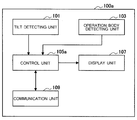
- Fig. 2 is a functional block diagram of an information processing apparatus according to a first embodiment of the present disclosure.
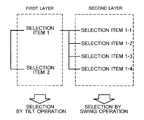
- Fig. 3 is an explanatory diagram of selection items of a layered structure and an operation of the information processing apparatus according to the same embodiment.
- Fig. 4 is an explanatory diagram of a tilt operation used in the same embodiment.
- Fig. 5 is an explanatory diagram of the relation between a tilt operation and a tilt angle used in the same embodiment.
- Fig. 6 is an explanatory diagram of a swing operation used in the same embodiment.
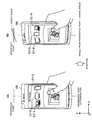
- Fig. 7A is an explanatory diagram of an operation of selecting content to be shifted in the same embodiment.
- Fig. 1 is an explanatory diagram illustrating an example of an external appearance of an information processing apparatus according to an embodiment of the present disclosure.
- Fig. 2 is a functional block diagram of an information processing apparatus according to
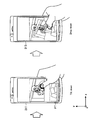
- FIG. 7B is an explanatory diagram of an operation at the time of transmitting content to an external apparatus in the same embodiment.
- Fig. 7C is an explanatory diagram of an operation at the time of adding content in a playlist.
- Fig. 8 is an explanatory diagram of selection items of a layered structure and an operation at the time when the information processing apparatus according to the same embodiment displays selection items in a step-by-step manner according to a tilt degree.
- Fig. 9 is an example of a display screen where the information processing apparatus according to the same embodiment displays selection items in a step-by-step manner.
- Fig. 10 is a flow chart illustrating an example of an operation in an operation of determining a content shift destination of the information processing apparatus according to the same embodiment.
- FIG. 11 is a flow chart illustrating an example of an operation at the time of arranging a device thumbnail according to a distance from a transmission destination device in the same embodiment.
- Fig. 12 is an explanatory diagram for describing the arrangement of an object on a display screen displayed in the same embodiment.
- Fig. 13 is a functional block diagram of an information processing apparatus according to a second embodiment of the present disclosure.
- Fig. 14 is a flow chart illustrating an example of an operation of a selection operation of a selection item of the information processing apparatus according to the same embodiment.
- Fig. 15 is a functional block diagram of an information processing apparatus according to a third embodiment of the present disclosure.
- Fig. 16 is an explanatory diagram illustrating an example of a display screen displayed by the information processing apparatus according to the same embodiment.
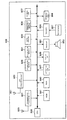
- Fig. 17 is a block diagram illustrating an example of a hardware configuration of an information processing apparatus according to the first to third embodiments of the present disclosure.
- Example of Configuration 1-1 Example of Configuration 1-2.
- Example of Operation 1-3 Example of Operation Using Tilt Degree (Example of Arranging Transmission Destination Device According to Distance) 1-4.
- Second Embodiment Generalized Example of Application
- Example of Configuration 2-2.
- Example of Operation 3 Example of Configuration 4.
- Example of Hardware Configuration Example of Hardware Configuration
- Fig. 1 is an explanatory diagram illustrating an example of an external appearance of an information processing apparatus according to an embodiment of the present disclosure.
- Fig. 2 is a functional block diagram of an information processing apparatus according to a first embodiment of the present disclosure.
- Fig. 3 is an explanatory diagram of selection items of a layered structure and an operation of the information processing apparatus according to the same embodiment.
- Fig. 4 is an explanatory diagram of a tilt operation used in the same embodiment.
- Fig. 5 is an explanatory diagram of the relation between a tilt operation and a tilt angle used in the same embodiment.
- Fig. 6 is an explanatory diagram of a swing operation used in the same embodiment.
- Fig. 7A is an explanatory diagram of an operation of selecting content to be shifted in the same embodiment.
- Fig. 1 is an explanatory diagram illustrating an example of an external appearance of an information processing apparatus according to an embodiment of the present disclosure.
- Fig. 2 is a functional block diagram of an information processing apparatus according to
- FIG. 7B is an explanatory diagram of an operation at the time of transmitting content to an external apparatus in the same embodiment.
- Fig. 7C is an explanatory diagram of an operation at the time of adding content in a playlist.
- Fig. 8 is an explanatory diagram of selection items of a layered structure and an operation at the time when the information processing apparatus according to the same embodiment displays selection items in a step-by-step manner according to a tilt degree.
- Fig. 9 is an example of a display screen where the information processing apparatus according to the same embodiment displays selection items in a step-by-step manner.
- Fig. 1 illustrates an example of an information processing apparatus 100 to which the technology of the present specification is applied.
- the information processing apparatus 100 is a terminal apparatus that has a function of detecting a tilt of a casing.
- the information processing apparatus 100 may be a terminal apparatus such as a portable phone, a portable music play apparatus, a portable image processing apparatus, a portable game console, a tablet-type terminal, a Personal Computer (PC), or the like.
- PC Personal Computer
- the information processing apparatus 100 includes a display unit 107 on a surface of its casing.
- a touch sensor may be overlapped with the display unit 107 to detect a position of an operation body on a display screen displayed on the display unit 107.
- the longitudinal direction of the casing of the information processing apparatus 100 is defined as a y direction (example of a first direction), and the lateral direction of the casing is defined as an x direction (example of a second direction).
- a functional configuration of an information processing apparatus 100a is illustrated.
- a plurality of elements having substantially the same functional configuration may be distinguished by different alphabets attached after the same reference sign.
- a plurality of elements having substantially the same functional configuration if necessary, are distinguished like an information processing apparatus 100a and an information processing apparatus 100b.
- each of a plurality of elements having substantially the same functional configuration need not be especially distinguished, only the same reference sign is assigned thereto.
- the information processing apparatuses are simply referred to as information processing apparatuses 100.
- the information processing apparatus 100a mainly includes a tilt detecting unit 101, an operation body detecting unit 103, a control unit 105, a display unit 107, and a communication unit 109.
- the tilt detecting unit 101 has a function of detecting a tilt of the casing of the information processing apparatus 100.
- the tilt detecting unit 101 may be, for example, a motion sensor such as an angular velocity sensor, an acceleration sensor, an angle sensor, or the like.
- the tilt detecting unit 101 may be realized by a combination of at least two or more of the above motion sensors.
- An example of the angular velocity sensor used herein may be a vibration-type gyro sensor, a rotation coma gyro sensor, or the like.
- the acceleration sensor used herein may be, for example, a piezoresistive acceleration sensor, a piezoelectric acceleration sensor, a capacitive acceleration sensor, or the like.
- an example of the angle sensor may be a geomagnetic sensor.
- the motion sensor used as the tilt detecting unit 101 is a sensor capable of detecting a rotation angle with respect to three axes.
- the tilt detecting unit 101 may provide information about a detected tilt to the control unit 105.
- the operation body detecting unit 103 has a function of detecting an operation by an operation body.
- the operation body detecting unit 103 may be, for example, realized by a touch sensor that is installed overlappingly on the display unit 107 to detect a position of an operation body with respect to a display screen displayed on the display unit 107.
- the operation body may be, for example, a user's finger or a stylus pen.
- the operation body detecting unit 103 may provide information about an operation by a detected operation body to the control unit 105.
- the control unit 105a has a function of controlling an overall operation of the information processing apparatus 100a.
- the control unit 105a may control an operation of the information processing apparatus 100a based on at least one of information about a tilt detected by the tilt detecting unit 101 and information about an operation by an operation body detected by the operation body detecting unit 103.
- the control unit 105a may control a display of a display screen displayed on the display unit 107, based on at least one of information about a tilt detected by the tilt detecting unit 101 and information about an operation by an operation body detected by the operation body detecting unit 103.
- the control unit 105a may control a connection of an external apparatus through the communication unit 109.
- control of the control unit 105 of the information processing unit 100 in a case where selection items for determining an operation of the information processing apparatus 100a are of a layered structure as illustrated in Fig. 3.
- the control unit 105 may select a selection item of a layered structure, based on an operation of a plurality of steps using a tilt detected by the tilt detecting unit 101. For example, assume a case where selection items of a first layer include a selection item 1 and a selection item 2, and selection items of a second layer lower than the first layer include a selection item 1-1, a selection item 1-2, a selection item 1-3, and a selection item 1-4.
- the control unit 105 may first select any one of the selection item 1 and the selection item 2 based on a tilt operation using a tilt with respect to a y direction of the casing.
- the y direction is an example of a first direction
- the tilt operation is an example of a first operation using a tilt with respect to the first direction.
- the control unit 105 may select any one of the selection item 1-1, the selection item 1-2, the selection item 1-3, and the selection item 1-4 based on a swing operation using a tilt with respect to an x direction of the casing.
- the x direction is an example of a second direction perpendicular to the first direction
- the swing operation is an example of a second operation using a tilt with respect to the second direction.
- the tilt operation is an operation using a tilt of the casing of the information processing apparatus 100 from a state of a time point as a reference.
- a reference point as a reference may be a time point of detecting a push operation of an operation body with respect to a display screen.
- the control unit 105 may detect a change in the tilt of the casing with respect to the state of the casing at this time point. Accordingly, the control unit 105 determines that a tilt angle is a tilted angle of the casing from the y direction with respect to the reference point.
- a tilt operation in an ascending direction of the front side of the casing when viewed from the user is called a tilt up
- a tilt operation in a descending direction of the front side of the casing when viewed from the user is called a tilt down.
- the swing operation is also an operation using a tilt of the casing of the information processing apparatus 100 from a state of a time point as a reference.
- a reference point may be, for example, a time point of the transition from a tilt operation to a swing operation. That is, the control unit 105 may determine that the reference point is a point of the conversion from a state with a tilt change with respect to the y direction to a state with a tilt change with respect to the x direction without a tilt change with respect to the y direction. Then, the control unit 105 may determine that a swing angle is a tilted angle of the casing from the x direction with respect to the reference point.
- the control unit 105 may change a selection item display according to this swing angle. For example, herein, assume that a selection item C1-1, a selection item C1-2, and a selection item C1-3 are displayed before the change of a swing angle. In this case, when the user changes a swing angle, the display of the selection items C rotates such that the selection item C1-2, the selection item C1-3, and a selection item C1-4 are displayed. Herein, for example, the control unit 105 may select a selection item displayed in the center. The control unit 105 changes the selected selection item whenever the user changes the swing angle to change the display of the selection items C.
- the first layer is a layer for selecting whether a content shift destination is inside or outside the information processing apparatus 100a.
- the selection items include a layer for selecting a content transmission destination device.
- the selection item 1 is "to transmit content to an external apparatus”
- the selection item 2 is "to add content in a playlist”. As illustrated in a display screen 301 of Fig.
- the control unit 105a displays a display screen 303 on which a header HD representing the selection item 1 and a playlist thumbnail group PT representing the selection item 2 are displayed.
- a display screen 303 the user may know that he can perform an operation of selecting any one of the selection item 1 and the selection item 2.
- a tilt up operation it proceeds to Fig. 7B, and when a tilt down operation is performed, it proceeds to Fig. 7C.
- a tilt up operation is detected.
- a display screen 305 including a device base area DA for displaying a selection item of a transmission destination device is displayed.
- the control unit 105a displays a display screen 307 on which a device thumbnail DT is displayed on the device base area DA.
- the control unit 105a may determine a display arrangement of the device thumbnail DT based on a frequency at which a selection item corresponding to each device thumbnail DT is selected. For example, the control unit 105a may arrange a selection item with a high selection frequency at a position that is easily selected by the user.
- the control unit 105a may arrange a selection item with the highest selection frequency at the center.
- a selection item represented by the device thumbnail DT rotates and simultaneously a selected selection item changes.
- the control unit 105a selects the selection item corresponding to the device thumbnail DT displayed in the center.
- the control unit 105a may confirm the selection of the selection item.
- this selection transmission destination device
- the control unit 105a transmits content to a confirmed transmission destination device CL1 through the communication unit 109.
- the control unit 105a determines a state where the selection item 2 further sliding in the playlist thumbnail group PT displayed on the display screen 303 is selected. Then, in the state where the selection item 2 is selected and a confirmation operation by the operation body is inputted, the control unit 105a may confirm the selection of the selection item.
- the control unit 105a confirms the selection of the selection item 2 and adds the selection item 2 in a playlist.
- the selection items may be displayed by being divided into a plurality of steps as illustrated in Fig. 9.
- each layer corresponds to a degree of a tilt detected by the tilt detecting unit 101 and herein a tilt angle is within a predetermined first range, it becomes a state where a selection item corresponding to a device thumbnail displayed at the center among a device thumbnail group DTa is selected.
- the tilt angle is within a second range larger than the first range, it becomes a state where a selection item corresponding to a device thumbnail displayed at the center among a device thumbnail group DTb is selected. That is, the user uses a combination of a tilt angle and a swing operation in order to select a selection item of the second layer.
- control unit 105a may acquire a distance between the communication unit 109 and a transmission destination device represented by a device thumbnail, and may determine an arrangement of the device thumbnail displayed as a selection item, based on the distance. For example, the control unit 105a may determine an arrangement of the device thumbnail so that the user can easily select a transmission destination device that is at a short distance. The control unit 105a may select a smaller tilt angle as the distance from the transmission destination device becomes smaller. Also, the control unit 105a may arrange a transmission destination device, which is at a short distance, in the center.
- the display unit 107 is an example of an output device, and may be a display device such as a liquid crystal display (LCD) device, an organic light emitting diode (OLED) display device, or the like.
- the display unit 107 may provide a display screen to the user under the control of the control unit 105.
- the communication unit 109 is a communication interface for allowing the information processing apparatus 100 to communicate with another apparatus.
- the communication unit 109 may be a wireless communication interface for communicating with another apparatus by wireless.
- the communication unit 109 may be an interface for connecting with a digital living network alliance (DLNA) compliant device by wireless.
- the information processing apparatus 100a may function as a DLNA server, and may transmit content to a connected DLNA client.
- Fig. 10 is a flow chart illustrating an example of an operation in an operation of determining a content shift destination of the information processing apparatus according to the same embodiment.
- Fig. 11 is a flow chart illustrating an example of an operation at the time of arranging a device thumbnail according to a distance from a transmission destination device in the same embodiment.
- the control unit 105a determines whether a push operation with respect to a moving image thumbnail MT is detected by the operation body detecting unit 103 (S101). If it is determined in step S101 that a push operation with respect to the moving image thumbnail MT is detected, the control unit 105a slides out anything other than the moving image thumbnail MT (for example, a footer FT or the like) (S103). Then, the control unit 105a slides in a header HD to an upper portion of a display screen, and slides in a playlist thumbnail group PT to a lower portion of the display screen (S105).
- the control unit 105a determines whether a tilt up operation is detected by the tilt detecting unit 101 (S107). Then, if a tilt up operation is detected, the control unit 105a displays a device thumbnail DT on an upper portion of the display screen and selects the transmission of content to an external apparatus (S109). After the device thumbnail DT is displayed, the control unit 105a determines whether a swing operation is detected by the tilt detecting unit 101 (S111). Herein, if a swing operation is detected, the control unit 105a rotates the device thumbnail DT according to a direction of the swing operation (S113).
- the control unit 105a changes a display position of the device thumbnail DT by the swing operation, and selects a device thumbnail DT displayed in the center among these.
- the control unit 105a determines whether an upward drag operation, specifically a drag operation toward the selected device thumbnail DT, is detected by the operation body detecting unit 103 (S115).
- the control unit 105a transfers a moving image to a device corresponding to a device thumbnail displayed in the center (selected) (S117).
- step S107 the control unit 105a determines whether a tilt down operation is detected by the tilt detecting unit 101 (S119). Then, if it is determined in step S119 that a tilt down operation is detected, the control unit 105a further slides in the playlist thumbnail group PT of a lower portion of the display screen and selects the addition of content in a playlist (S121). Then, the control unit 105a determines whether a downward drag operation is detected by the operation body detecting unit 103 (S123). If a drag operation is detected in step S123, the control unit 105a adds a moving image in the playlist (S125).
- step S111 determines whether a swing operation is not detected in step S111, if a drag operation is not detected in step S115, if a tilt down operation is not detected in step S119, and if a drag operation is not detected in step S123.
- the control unit 105a determines whether the detachment of a finger from the screen is detected by the operation body detecting unit 103 (S127). Then, if the detachment of a finger from the screen is detected, the control unit 105a cancels the so-far process and ends the operation (S129).
- control unit 105a may determine an arrangement of the device thumbnail DT based on a distance from each device. An operation of the control unit 105a in this case is illustrated in Fig. 11.
- the control unit 105a acquires a DLNA client list (S201). Then, the control unit 105a acquires a distance from each DLNA client (S203). Next, the control unit 105a determines an arrangement of the device thumbnail DT based on the acquired distance (S205). As described above, it may be preferable that this arrangement is made such that the user can easily select a device that is at a short distance. For example, it may be preferable that a smaller tilt angle may be selected as the distance becomes smaller. Also, for example, the arrangement may be made nearer to the center as the distance becomes smaller. Then, the control unit 105a displays the device thumbnail DT in the determined arrangement (S207).
- a display screen for selecting selection items of a layered structure is displayed three-dimensionally.
- a three-dimensional representational power may be used to improve an operability of the user.
- the respective objects displayed on a display screen are represented by a positional relation as illustrated in Fig. 12.
- Fig. 12 is an explanatory diagram for describing the arrangement of an object on a display screen displayed in the same embodiment.
- FIG. 12 corresponds to the reference signs illustrated in Fig. 7.
- the moving image thumbnail MT corresponds to the object represented by the reference sign illustrated in the left diagram of Fig. 7A.
- a moving image thumbnail MT1 a moving image thumbnail MT2, and a moving image thumbnail MT3 are illustrated.
- the moving image thumbnail MT2 represents an arrangement of the moving image thumbnail MT after performance of a push operation as illustrated in the right diagram of Fig. 7A, and the moving image thumbnail MT may be moved down by the push operation by the distance of a in a backward direction when viewed from the user.
- a footer FT1 is simultaneously slid out in a downward direction to become an arrangement of a footer FT2.
- a background BG changes from a position of a background BG1 to a position of a background BG2.
- the playlist thumbnail group PT is slid in to become an arrangement of a playlist thumbnail group PT2.
- the header HD is arranged at the position of a header HD1.
- the moving image thumbnail MT becomes an arrangement of a moving image thumbnail MT3 according to a tilt angle.
- the device base DA is slid in from the upper side of a display screen.
- the device thumbnail DT is displayed on the device base DA.
- an arrangement of the device base DA is represented by a device base DA2
- an arrangement of the device thumbnail DT is represented by a device thumbnail DT2.
- the information processing apparatus 100a has been described above.
- the case of applying the technology of the present disclosure to a scene of transmission of content between devices corresponding to a DLNA has been described as a specific application example of the information processing apparatus that selects selection items of a layered structure by an operation of a plurality of steps using the detected tilt of the casing.
- the user performs a push operation of indicating content to be transmitted on the display screen with a finger, and may perform an operation of tilting (tilt up or tilt down) the casing without detaching the finger, thereby determining whether to move content to an external apparatus or perform an internal operation.
- a transmission destination device may be selected by performing a swing operation using the tilt of the casing toward a further different direction.
- a drag operation or the like may be used to determine the selected selection item.
- An operation according to a tilt of the casing is intuitive, but may cause an erroneous operation if there is no feedback of a tilt degree. Therefore, a combination of separate operations by an operation body, such as a drag operation, may be used to reduce an erroneous operation.
- Second Embodiment (Generalized Example of Application)>
- the present technology may be more widely applied to an information processing apparatus that selects a selection item of a layered structure. Therefore, the more generalized present technology will be described herein.
- Fig. 13 is a functional block diagram of an information processing apparatus according to a second embodiment of the present disclosure.
- An information processing apparatus 100b mainly includes a tilt detecting unit 101, an operation body detecting unit 103, a control unit 105b, and a display unit 107.
- the control unit 105b may select a selection item of a layered structure based on an operation of a plurality of steps using a tilt detected by the tilt detecting unit 101.
- the control unit 105b may select a selection item of a first layer based on a first operation using a tilt with respect to a first direction.
- the control unit 105b may display selection items of the second layer, and may select a selection item of the second layer based on a second operation using a tilt with respect to a second direction perpendicular to the first direction.
- the control unit 105b may confirm the selection of a selection item based on an input by an operation body detected by the operation body detecting unit 103.
- Fig. 14 is a flow chart illustrating an example of an operation of a selection operation of a selection item of the information processing apparatus according to the same embodiment.
- an operation described herein is a generalized one of the operation of the information processing apparatus 100a described in the first embodiment, and the first embodiment is a specific example of the second embodiment.
- the control unit 105b determines whether a push operation is detected by the operation body detecting unit 103 (S301). Herein, if a push operation is detected, the control unit 105b displays selection items of the first layer (S303). Then, the control unit 105b determines whether a tilt operation is detected by the tilt detecting unit 101 (S305). Then, if it is determined in step S305 that a tilt operation is detected, the control unit 105b selects a selection item of the first layer according to a tilt angle (S307).
- the control unit 105b determines whether there are selection items in a lower layer of the first layer (S309). If it is determined in step S309 that there are selection items in the lower layer, the control unit 105b displays the selection items of the lower layer on the display unit 109 (S311). Then, in a state where the selection items of the lower layer are displayed, the control unit 105b determines whether a swing operation is detected by the tilt detecting unit 101 (S313). Herein, if a swing operation is detected, the control unit 105b selects a selection item according to the detected swing operation (S315).
- the control unit 105b determines whether a drag operation is detected by the operation body detecting unit 103 (S317). Herein, if it is determined that a drag operation is detected, the control unit 105b confirms the selection of a selection item based on the detected drag operation (S319).
- an example of a selection item of a layered structure may be a selection item in a screen that changes operation settings of the information processing apparatus 100b.
- a selection item for changing display-related settings may be selected among the selection items in the screen changing the operation settings.
- a selection item changing a display size, a selection item changing the brightness of a screen, or the like may be present in a lower layer of the selected selection item.
- a display size in a selection item of a further lower layer may be selected.
- FIG. 15 is a functional block diagram of an information processing apparatus according to a third embodiment of the present disclosure.
- An information processing apparatus 100c according to a third embodiment of the present disclosure mainly includes, for example, a tilt detecting unit 101, a control unit 105c, a display unit 107, and an imaging unit 111.
- the control unit 105c may further control an imaging function by the imaging unit 111. Also, a push operation or a drag operation used in the first embodiment and the second embodiment may be replaced with an operation by a hardware key in the present embodiment. When there is a strong need not to touch a display screen, if an operation by an operation body using a hardware key is used instead of an operation by an operation body using a touch sensor, it may be possible to prevent a fingerprint or a scratch from occurring on a display screen.
- the control unit 105c may display, for example, a setting screen of an imaging function as illustrated in Fig. 16.
- a tilt operation is performed using a tilt with respect to a lateral direction (x direction). Also, a swing operation is performed using a tilt with respect to the longitudinal direction (y direction).
- the control unit 105c may select any one of a selection item 21, a selection item 22, a selection item 23, and the like by a tilt operation. Also, when there is a selection item of a lower layer of the selection item 22 displayed in the center as illustrated in Fig. 16, the control unit 105c may display a selection item 22-1 and a selection item 22-2 of the lower layer of the selection item 22. Also, the control unit 105c may select any one of the selection item 22-1 and the selection item 22-2 by a swing operation. For example, the control unit 105c may determine the selection of a selection item based on a determination operation by a hardware key.
- the imaging unit 111 is a camera module including an imaging device such as a charge coupled device (CCD) imaging device or a complementary metal oxide semiconductor (CMOS) imaging device.
- the imaging unit 111 operates under the control of the control unit 105c.
- the imaging unit 111 may operate according to the settings set by the above-described setting screen.
- the examples of the functions of the information processing apparatus 100 according to the first to third embodiment of the present disclosure have been shown above.
- the respective elements described above may be configured by using general-purpose members or circuits, or may be configured by hardware specialized in the functions of the respective elements.
- an arithmetic device such as a central processing unit (CPU) or the like, may perform the functions of the respective elements by reading a control program from a storage medium, such as a read only memory (ROM), a random access memory (RAM), or the like, which stores the control program describing a processing procedure of realizing these functions, and by interpreting and executing the program. Therefore, the configuration to be used may be appropriately modified depending on a level of technology when the present embodiment is implemented. An example of a hardware configuration of the information processing apparatus 100 will be described later.
- a computer program for realizing the respective functions of the information processing apparatus 100 according to the present embodiment described above may be created and implemented on a personal computer or the like.
- a computer-readable recording medium on which such a computer program is stored may also be provided.
- the recording medium may be, for example, a magnetic disc, an optical disc, a magneto-optical disc, a flash memory, or the like.
- the computer program may also be delivered through a network, without using the recording medium.
- Fig. 17 is a block diagram illustrating an example of a hardware configuration of an information processing apparatus according to the first to third embodiments of the present disclosure.
- the information processing apparatus 100 includes, for example, a GPS antenna 821, a GPS processing unit 823, a communication antenna 825, a communication processing unit 827, a geomagnetic sensor 829, an acceleration sensor 831, a gyro sensor 833, an atmospheric pressure sensor 835, an imaging unit 837, a central processing unit (CPU) 839, a read only memory (ROM) 841, a random access memory (RAM) 843, an operation unit 847, a display unit 849, a decoder 851, a speaker 853, an encoder 855, a microphone 857, and a storage unit 859.
- a GPS antenna 821 for example, a GPS antenna 821, a GPS processing unit 823, a communication antenna 825, a communication processing unit 827, a geomagnetic sensor 829, an acceleration sensor 831, a gyro sensor 833, an atmospheric pressure sensor 835, an imaging unit 837, a central processing unit (CPU) 839, a
- the GPS antenna 821 is an example of an antenna that receives a signal from a positioning satellite.
- the GPS antenna 821 may receive GPS signals from a plurality of GPS satellites, and inputs the received GPS signals to the GPS processing unit 823.
- the GPS processing unit 823 is an example of a calculation unit that calculates position information based on a signal received from a positioning satellite.
- the GPS processing unit 823 calculates current position information based on a plurality of GPS signals inputted from the GPS antenna 821, and outputs the calculated position information.
- the GPS processing unit 823 calculates a position of each GPS satellite from the orbital data of each GPS satellite, and calculates a distance from each GPS satellite to a relevant terminal apparatus 100 based on a time difference between a GPS signal transmission time and a GPS signal reception time. Then, a current three-dimensional position may be calculated based on the calculated position of each GPS satellite and the distance from each GPS satellite to the relevant terminal apparatus 100.
- the orbital data of a GPS satellite used herein may be included in, for example, a GPS signal.
- the orbital data of a GPS satellite may be acquired from an external server through the communication antenna 825.
- the communication antenna 825 is, for example, an antenna that has a function of receiving a signal through a mobile communication network or a wireless local area network (LAN) communication network.
- the communication antenna 825 may provide the received signal to the communication processing unit 827.
- the communication processing unit 827 has a function of performing various kinds of signal processing on a signal provided from the communication antenna 825.
- the communication processing unit 827 may provide the CPU 839 with a digital signal generated from a provided analog signal.
- the geomagnetic sensor 829 is a sensor that detects geomagnetism as a voltage value.
- the geomagnetic sensor 829 may be a triaxial geomagnetic sensor that detects a geomagnetism of an X axis direction, a geomagnetism of a Y axis direction, and a geomagnetism of a Z axis direction.
- the geomagnetic sensor 829 may provide detected geomagnetic data to the CPU 839.
- the acceleration sensor 831 is a sensor that detects acceleration as a voltage value.
- the acceleration sensor 831 may be a triaxial acceleration sensor that detects acceleration in an X axis direction, acceleration in a Y axis direction, and acceleration in a Z axis direction.
- the acceleration sensor 831 may provide detected acceleration data to the CPU 839.
- the gyro sensor 833 is a kind of measurement equipment that detects the angle or acceleration of an object.
- the gyro sensor 833 may be a triaxial gyro sensor that detects a changing rate of a rotation angle around an X axis, a Y axis, and a Z axis (angular velocity) as a voltage value.
- the gyro sensor 833 may provide detected angular velocity data to the CPU 839.
- the atmospheric pressure sensor 835 is a sensor that detects an ambient atmospheric pressure as a voltage value.
- the atmospheric pressure sensor 835 may detect an atmospheric pressure at a predetermined sampling frequency, and may provide detected atmospheric pressure data to the CPU 839.
- the imaging unit 837 has a function of capturing a still image or a moving image through a lens under the control of the CPU 839.
- the imaging unit 837 may store a captured image in the storage unit 859.
- the CPU 839 functions as an arithmetic processing unit and a control unit, and controls an overall operation in the information processing apparatus 100 according to various programs. Also, the CPU 839 may be a microprocessor. The CPU 839 may realize various functions according to various programs.
- the ROM 841 may store programs used in the CPU 839, arithmetic parameters, or the like.
- the RAM 843 may temporarily store a program used in execution of the CPU 839, suitable variable parameters in the execution, or the like.
- the operation unit 847 has a function of generating an input signal for allowing the user to perform a desired operation.
- the operation unit 847 may include, for example, an input unit, such as a touch sensor, a mouse, a keyboard, buttons, a microphone, switches, levers, and the like, for allowing the user to input information, and an input/output control unit for generating an input signal based on a user's input and outputting the signal to the CPU 839.
- the display unit 849 is an example of an output unit.
- the display unit 849 may be a display device such as a liquid crystal display (LCD) device, an organic light emitting diode (OLED) display device, or the like.
- the display unit 849 may provide information to the user by displaying a screen.
- the decoder 851 has a function of performing decoding, analog conversion, and the like, on inputted data and under the control of the CPU 839. For example, the decoder 851 decodes audio data inputted through the communication antenna 825 and the communication processing unit 827, and performs analog conversion to output an audio signal to the speaker 853. The speaker 853 may output a sound based on the audio signal provided from the decoder 851.
- the encoder 855 has a function of performing digital conversion, encoding, and the like, on inputted data under the control of the CPU 839.
- the encoder 855 may perform digital conversion, encoding, and the like, on an audio signal inputted from the microphone 857, to output audio data.
- the microphone 857 may collect sounds and output the collected sound as an audio signal.
- the storage unit 859 is a data storage device.
- the storage unit 859 may include a storage medium, a recording device recording data on the storage medium, a reading device reading data from the storage medium, and a deleting device deleting data stored in the storage medium, and the like.
- the storage medium may include, for example, a nonvolatile memory, such as a flash memory, a magnetoresistive random access memory (MRAM), a ferroelectric random access memory (FeRAM), a phase change random access memory (PRAM), and an electronically erasable and programmable read only memory (EEPROM), or a magnetic recording medium such as a hard disk drive (HDD).
- a nonvolatile memory such as a flash memory, a magnetoresistive random access memory (MRAM), a ferroelectric random access memory (FeRAM), a phase change random access memory (PRAM), and an electronically erasable and programmable read only memory (EEPROM), or a magnetic recording medium such as a hard disk drive (HDD).
- transmitted content may be not only moving images such as movie, television program, and video program, but also music data such as music, performance, and radio program, image data such as picture, document, painting, and diagram, game, software, and the like.
- the present technology is not limited to such an example.
- content may be reproduced on the information processing apparatus 100a, or may be stored in the storage unit included in the information processing apparatus 100a.
- an operation by an operation body for confirming selection is a drag operation using a touch sensor
- the operation for confirming selection may be, for example, a press down of a hardware key.
- the operation for confirming selection may be a tap operation with respect to a selection item.
- various operations using a touch sensor may be used. However, in a case where a series of operation are performed from a push operation in the first embodiment, when a drag operation is used, it becomes an intuitive operation for the user, thus improving the operability.
- a tilt operation and a swing operation may be alternately used to select selection items of three or more layers.
- the steps described in the flow chart may include not only a process performed serially in the order described, but also a process performed in a parallel manner or in an individual manner without being performed serially. Needless to say, even when the process is performed serially, the order described may be suitably changed according to circumstances.
- An information processing apparatus comprising: a processor that controls a display to display first layer data; and a detection unit that detects movement of the information processing apparatus, wherein the processor controls the display to display second layer data corresponding to the first layer data together with the first layer data based on a movement detected by the detection unit.
- the detection unit is a tilt detection unit that detects a tilt movement of the information processing apparatus.
- the processor controls the first layer data to be added to the playlist.
- a non-transitory computer-readable medium including computer program instructions, which when executed by an information processing apparatus, cause the information processing apparatus to perform a method comprising: controlling a display to display first layer data; detecting movement of the information processing apparatus; and controlling the display to display second layer data corresponding to the first layer data together with the first layer data based on a detected movement.
Landscapes
- Engineering & Computer Science (AREA)
- Theoretical Computer Science (AREA)
- General Engineering & Computer Science (AREA)
- Human Computer Interaction (AREA)
- Physics & Mathematics (AREA)
- General Physics & Mathematics (AREA)
- Multimedia (AREA)
- Signal Processing (AREA)
- Computer Hardware Design (AREA)
- Biodiversity & Conservation Biology (AREA)
- Life Sciences & Earth Sciences (AREA)
- Ecology (AREA)
- Emergency Management (AREA)
- Environmental & Geological Engineering (AREA)
- Environmental Sciences (AREA)
- Remote Sensing (AREA)
- Business, Economics & Management (AREA)
- User Interface Of Digital Computer (AREA)
- Databases & Information Systems (AREA)
- Position Input By Displaying (AREA)
Abstract
Priority Applications (6)
| Application Number | Priority Date | Filing Date | Title |
|---|---|---|---|
| US14/232,728 US9489070B2 (en) | 2011-07-21 | 2012-07-05 | Information processing apparatus, information processing method, and program |
| KR1020147000456A KR20140048933A (ko) | 2011-07-21 | 2012-07-05 | 정보 처리 장치, 정보 처리 방법 및 프로그램 |
| EP12814957.2A EP2734916B1 (fr) | 2011-07-21 | 2012-07-05 | Appareil de traitement d'informations, procédé de traitement d'informations et programme |
| RU2014100954/08A RU2014100954A (ru) | 2011-07-21 | 2012-07-05 | Устройство обработки информации, способ обработки информации и программа |
| US15/255,458 US10416785B2 (en) | 2011-07-21 | 2016-09-02 | Information processing apparatus, information processing method, and program |
| US16/532,510 US10915188B2 (en) | 2011-07-21 | 2019-08-06 | Information processing apparatus, information processing method, and program |
Applications Claiming Priority (2)
| Application Number | Priority Date | Filing Date | Title |
|---|---|---|---|
| JP2011159815A JP2013025567A (ja) | 2011-07-21 | 2011-07-21 | 情報処理装置、情報処理方法、及びプログラム |
| JP2011-159815 | 2011-07-21 |
Related Child Applications (2)
| Application Number | Title | Priority Date | Filing Date |
|---|---|---|---|
| US14/232,728 A-371-Of-International US9489070B2 (en) | 2011-07-21 | 2012-07-05 | Information processing apparatus, information processing method, and program |
| US15/255,458 Continuation US10416785B2 (en) | 2011-07-21 | 2016-09-02 | Information processing apparatus, information processing method, and program |
Publications (1)
| Publication Number | Publication Date |
|---|---|
| WO2013011648A1 true WO2013011648A1 (fr) | 2013-01-24 |
Family
ID=47557851
Family Applications (1)
| Application Number | Title | Priority Date | Filing Date |
|---|---|---|---|
| PCT/JP2012/004365 Ceased WO2013011648A1 (fr) | 2011-07-21 | 2012-07-05 | Appareil de traitement d'informations, procédé de traitement d'informations et programme |
Country Status (7)
| Country | Link |
|---|---|
| US (3) | US9489070B2 (fr) |
| EP (1) | EP2734916B1 (fr) |
| JP (1) | JP2013025567A (fr) |
| KR (1) | KR20140048933A (fr) |
| CN (2) | CN103092470B (fr) |
| RU (1) | RU2014100954A (fr) |
| WO (1) | WO2013011648A1 (fr) |
Families Citing this family (19)
| Publication number | Priority date | Publication date | Assignee | Title |
|---|---|---|---|---|
| US20120256959A1 (en) * | 2009-12-30 | 2012-10-11 | Cywee Group Limited | Method of controlling mobile device with touch-sensitive display and motion sensor, and mobile device |
| JP2013025567A (ja) * | 2011-07-21 | 2013-02-04 | Sony Corp | 情報処理装置、情報処理方法、及びプログラム |
| JP5927872B2 (ja) | 2011-12-01 | 2016-06-01 | ソニー株式会社 | 情報処理装置、情報処理方法およびプログラム |
| TWI540492B (zh) * | 2012-12-20 | 2016-07-01 | 晨星半導體股份有限公司 | 電子裝置以及電子裝置控制方法 |
| JP6152730B2 (ja) * | 2013-07-18 | 2017-06-28 | 富士ゼロックス株式会社 | 情報処理装置及び情報処理プログラム |
| CN104615344A (zh) * | 2013-11-04 | 2015-05-13 | 英业达科技有限公司 | 解锁系统及其方法 |
| JP6024725B2 (ja) * | 2014-01-17 | 2016-11-16 | カシオ計算機株式会社 | システム |
| US20150253946A1 (en) * | 2014-03-10 | 2015-09-10 | Verizon Patent And Licensing Inc. | Method and apparatus for transferring files based on user interaction |
| CN104183004A (zh) * | 2014-08-12 | 2014-12-03 | 小米科技有限责任公司 | 天气显示方法及装置 |
| CN105807909A (zh) * | 2014-12-31 | 2016-07-27 | 联想(北京)有限公司 | 一种屏幕亮度调节方法及电子设备 |
| WO2019026708A1 (fr) * | 2017-08-01 | 2019-02-07 | オムロン株式会社 | Unité de gestion de capteur, appareil de capteur, procédé de fourniture de données de détection et programme de fourniture de données de détection |
| WO2020018592A1 (fr) * | 2018-07-17 | 2020-01-23 | Methodical Mind, Llc. | Système d'interface utilisateur graphique |
| US12041280B2 (en) * | 2019-12-11 | 2024-07-16 | Google Llc | Methods, systems, and media for providing dynamic media sessions with video stream transfer features |
| IL324661A (en) | 2019-12-27 | 2026-01-01 | Methodical Mind Llc | Graphical user interface system |
| CN115335801A (zh) | 2020-01-22 | 2022-11-11 | 方法思维有限责任公司 | 图形用户界面系统 |
| WO2022008070A1 (fr) * | 2020-07-10 | 2022-01-13 | Telefonaktiebolaget Lm Ericsson (Publ) | Procédé et dispositif permettant d'obtenir une entrée d'utilisateur |
| CN115867883A (zh) | 2020-07-10 | 2023-03-28 | 瑞典爱立信有限公司 | 用于接收用户输入的方法和装置 |
| KR102729891B1 (ko) | 2020-12-11 | 2024-11-13 | 엘지디스플레이 주식회사 | 전계 발광 표시장치와 그 구동방법 |
| CA3226777A1 (fr) | 2021-07-21 | 2023-01-26 | Methodical Mind, Llc. | Module de guidage de systeme d'interface utilisateur graphique |
Citations (6)
| Publication number | Priority date | Publication date | Assignee | Title |
|---|---|---|---|---|
| JP2005221816A (ja) * | 2004-02-06 | 2005-08-18 | Sharp Corp | 電子装置 |
| JP2008045914A (ja) * | 2006-08-11 | 2008-02-28 | Xanavi Informatics Corp | ナビゲーション装置 |
| JP2009027398A (ja) * | 2007-07-19 | 2009-02-05 | Nikon Corp | 電子カメラ |
| US20100004031A1 (en) | 2008-07-07 | 2010-01-07 | Lg Electronics Inc. | Mobile terminal and operation control method thereof |
| JP2011059820A (ja) | 2009-09-07 | 2011-03-24 | Sony Corp | 情報処理装置、情報処理方法、およびプログラム |
| JP2011082891A (ja) * | 2009-10-09 | 2011-04-21 | Nec Corp | 携帯端末 |
Family Cites Families (15)
| Publication number | Priority date | Publication date | Assignee | Title |
|---|---|---|---|---|
| CN1119051C (zh) * | 1999-11-03 | 2003-08-20 | 摩托罗拉公司 | 用于在便携式电子设备上选择用户界面选项的装置和方法 |
| JP4635342B2 (ja) * | 2001-01-10 | 2011-02-23 | ソニー株式会社 | 情報処理端末および方法 |
| US6798429B2 (en) * | 2001-03-29 | 2004-09-28 | Intel Corporation | Intuitive mobile device interface to virtual spaces |
| US7301529B2 (en) * | 2004-03-23 | 2007-11-27 | Fujitsu Limited | Context dependent gesture response |
| JP4553838B2 (ja) | 2005-12-28 | 2010-09-29 | 富士通株式会社 | 通信方法、通信システム、中継装置及び通信装置 |
| US8078230B2 (en) * | 2008-06-27 | 2011-12-13 | Motorola Mobility, Inc. | Method and apparatus for providing a prioritized list of display devices for display of a media file |
| US8340726B1 (en) * | 2008-06-30 | 2012-12-25 | Iwao Fujisaki | Communication device |
| US9571625B2 (en) * | 2009-08-11 | 2017-02-14 | Lg Electronics Inc. | Electronic device and control method thereof |
| CN101997961A (zh) * | 2009-08-12 | 2011-03-30 | 深圳市联创金格尔通讯设备有限公司 | 基于加速度传感器的移动电话荧屏界面控制方法和装置 |
| JP5446624B2 (ja) * | 2009-09-07 | 2014-03-19 | ソニー株式会社 | 情報表示装置、情報表示方法及びプログラム |
| JP5448073B2 (ja) * | 2010-01-12 | 2014-03-19 | 任天堂株式会社 | 情報処理装置、情報処理プログラム、情報処理システム、および、選択対象の選択方法 |
| CN101873525A (zh) * | 2010-06-21 | 2010-10-27 | 中兴通讯股份有限公司 | 移动终端中联系人信息储存的方法及装置 |
| US8972879B2 (en) * | 2010-07-30 | 2015-03-03 | Apple Inc. | Device, method, and graphical user interface for reordering the front-to-back positions of objects |
| US9483085B2 (en) * | 2011-06-01 | 2016-11-01 | Blackberry Limited | Portable electronic device including touch-sensitive display and method of controlling same |
| JP2013025567A (ja) * | 2011-07-21 | 2013-02-04 | Sony Corp | 情報処理装置、情報処理方法、及びプログラム |
-
2011
- 2011-07-21 JP JP2011159815A patent/JP2013025567A/ja not_active Withdrawn
-
2012
- 2012-07-05 RU RU2014100954/08A patent/RU2014100954A/ru not_active Application Discontinuation
- 2012-07-05 WO PCT/JP2012/004365 patent/WO2013011648A1/fr not_active Ceased
- 2012-07-05 KR KR1020147000456A patent/KR20140048933A/ko not_active Withdrawn
- 2012-07-05 US US14/232,728 patent/US9489070B2/en not_active Expired - Fee Related
- 2012-07-05 EP EP12814957.2A patent/EP2734916B1/fr not_active Not-in-force
- 2012-07-13 CN CN201210244633.8A patent/CN103092470B/zh not_active Expired - Fee Related
- 2012-07-13 CN CN2012203424276U patent/CN203117955U/zh not_active Expired - Fee Related
-
2016
- 2016-09-02 US US15/255,458 patent/US10416785B2/en active Active
-
2019
- 2019-08-06 US US16/532,510 patent/US10915188B2/en active Active
Patent Citations (6)
| Publication number | Priority date | Publication date | Assignee | Title |
|---|---|---|---|---|
| JP2005221816A (ja) * | 2004-02-06 | 2005-08-18 | Sharp Corp | 電子装置 |
| JP2008045914A (ja) * | 2006-08-11 | 2008-02-28 | Xanavi Informatics Corp | ナビゲーション装置 |
| JP2009027398A (ja) * | 2007-07-19 | 2009-02-05 | Nikon Corp | 電子カメラ |
| US20100004031A1 (en) | 2008-07-07 | 2010-01-07 | Lg Electronics Inc. | Mobile terminal and operation control method thereof |
| JP2011059820A (ja) | 2009-09-07 | 2011-03-24 | Sony Corp | 情報処理装置、情報処理方法、およびプログラム |
| JP2011082891A (ja) * | 2009-10-09 | 2011-04-21 | Nec Corp | 携帯端末 |
Non-Patent Citations (1)
| Title |
|---|
| See also references of EP2734916A4 |
Also Published As
| Publication number | Publication date |
|---|---|
| US10915188B2 (en) | 2021-02-09 |
| EP2734916A4 (fr) | 2015-03-18 |
| US10416785B2 (en) | 2019-09-17 |
| EP2734916A1 (fr) | 2014-05-28 |
| CN103092470A (zh) | 2013-05-08 |
| CN203117955U (zh) | 2013-08-07 |
| US20160370884A1 (en) | 2016-12-22 |
| US20140168129A1 (en) | 2014-06-19 |
| JP2013025567A (ja) | 2013-02-04 |
| EP2734916B1 (fr) | 2020-09-02 |
| CN103092470B (zh) | 2017-09-12 |
| KR20140048933A (ko) | 2014-04-24 |
| US9489070B2 (en) | 2016-11-08 |
| RU2014100954A (ru) | 2015-07-20 |
| US20190361541A1 (en) | 2019-11-28 |
Similar Documents
| Publication | Publication Date | Title |
|---|---|---|
| US10915188B2 (en) | Information processing apparatus, information processing method, and program | |
| US8988342B2 (en) | Display apparatus, remote controlling apparatus and control method thereof | |
| US9414125B2 (en) | Remote control device | |
| EP2353065B1 (fr) | Contrôle et accès à un contenu par traitement du mouvement sur des dispositifs mobiles | |
| US20130342456A1 (en) | Remote control apparatus and control method thereof | |
| JP5205557B2 (ja) | 端末の角度に応じて互いに異なる映像情報を提供するための方法、端末およびコンピュータ読取可能な記録媒体 | |
| US9460535B2 (en) | Information processing device, information processing method, and program | |
| US10140002B2 (en) | Information processing apparatus, information processing method, and program | |
| JP2013506218A (ja) | 端末の動きまたは姿勢に基づいてビジュアルサーチを行うための方法、端末およびコンピュータ読取可能な記録媒体 | |
| KR101339985B1 (ko) | 원격 제어 장치, 디스플레이 장치 및 그 제어 방법 | |
| US20130201157A1 (en) | User interface device and method of providing user interface | |
| KR20150009199A (ko) | 객체 편집을 위한 전자 장치 및 방법 |
Legal Events
| Date | Code | Title | Description |
|---|---|---|---|
| 121 | Ep: the epo has been informed by wipo that ep was designated in this application |
Ref document number: 12814957 Country of ref document: EP Kind code of ref document: A1 |
|
| WWE | Wipo information: entry into national phase |
Ref document number: 2012814957 Country of ref document: EP |
|
| ENP | Entry into the national phase |
Ref document number: 20147000456 Country of ref document: KR Kind code of ref document: A |
|
| ENP | Entry into the national phase |
Ref document number: 2014100954 Country of ref document: RU Kind code of ref document: A |
|
| WWE | Wipo information: entry into national phase |
Ref document number: 14232728 Country of ref document: US |
|
| NENP | Non-entry into the national phase |
Ref country code: DE |