WO2013105666A1 - Terminal d'informations qui affiche des images et procédé d'affichage d'images - Google Patents
Terminal d'informations qui affiche des images et procédé d'affichage d'images Download PDFInfo
- Publication number
- WO2013105666A1 WO2013105666A1 PCT/JP2013/050485 JP2013050485W WO2013105666A1 WO 2013105666 A1 WO2013105666 A1 WO 2013105666A1 JP 2013050485 W JP2013050485 W JP 2013050485W WO 2013105666 A1 WO2013105666 A1 WO 2013105666A1
- Authority
- WO
- WIPO (PCT)
- Prior art keywords
- image
- displayed
- captured image
- display
- display unit
- Prior art date
- Legal status (The legal status is an assumption and is not a legal conclusion. Google has not performed a legal analysis and makes no representation as to the accuracy of the status listed.)
- Ceased
Links
Images



Classifications
-
- G—PHYSICS
- G06—COMPUTING OR CALCULATING; COUNTING
- G06F—ELECTRIC DIGITAL DATA PROCESSING
- G06F3/00—Input arrangements for transferring data to be processed into a form capable of being handled by the computer; Output arrangements for transferring data from processing unit to output unit, e.g. interface arrangements
- G06F3/01—Input arrangements or combined input and output arrangements for interaction between user and computer
- G06F3/048—Interaction techniques based on graphical user interfaces [GUI]
- G06F3/0484—Interaction techniques based on graphical user interfaces [GUI] for the control of specific functions or operations, e.g. selecting or manipulating an object, an image or a displayed text element, setting a parameter value or selecting a range
- G06F3/0485—Scrolling or panning
-
- G—PHYSICS
- G06—COMPUTING OR CALCULATING; COUNTING
- G06F—ELECTRIC DIGITAL DATA PROCESSING
- G06F3/00—Input arrangements for transferring data to be processed into a form capable of being handled by the computer; Output arrangements for transferring data from processing unit to output unit, e.g. interface arrangements
- G06F3/01—Input arrangements or combined input and output arrangements for interaction between user and computer
- G06F3/048—Interaction techniques based on graphical user interfaces [GUI]
- G06F3/0484—Interaction techniques based on graphical user interfaces [GUI] for the control of specific functions or operations, e.g. selecting or manipulating an object, an image or a displayed text element, setting a parameter value or selecting a range
- G06F3/04842—Selection of displayed objects or displayed text elements
-
- G—PHYSICS
- G06—COMPUTING OR CALCULATING; COUNTING
- G06F—ELECTRIC DIGITAL DATA PROCESSING
- G06F3/00—Input arrangements for transferring data to be processed into a form capable of being handled by the computer; Output arrangements for transferring data from processing unit to output unit, e.g. interface arrangements
- G06F3/01—Input arrangements or combined input and output arrangements for interaction between user and computer
- G06F3/048—Interaction techniques based on graphical user interfaces [GUI]
- G06F3/0484—Interaction techniques based on graphical user interfaces [GUI] for the control of specific functions or operations, e.g. selecting or manipulating an object, an image or a displayed text element, setting a parameter value or selecting a range
- G06F3/04845—Interaction techniques based on graphical user interfaces [GUI] for the control of specific functions or operations, e.g. selecting or manipulating an object, an image or a displayed text element, setting a parameter value or selecting a range for image manipulation, e.g. dragging, rotation, expansion or change of colour
-
- G—PHYSICS
- G06—COMPUTING OR CALCULATING; COUNTING
- G06F—ELECTRIC DIGITAL DATA PROCESSING
- G06F3/00—Input arrangements for transferring data to be processed into a form capable of being handled by the computer; Output arrangements for transferring data from processing unit to output unit, e.g. interface arrangements
- G06F3/01—Input arrangements or combined input and output arrangements for interaction between user and computer
- G06F3/048—Interaction techniques based on graphical user interfaces [GUI]
- G06F3/0487—Interaction techniques based on graphical user interfaces [GUI] using specific features provided by the input device, e.g. functions controlled by the rotation of a mouse with dual sensing arrangements, or of the nature of the input device, e.g. tap gestures based on pressure sensed by a digitiser
- G06F3/0488—Interaction techniques based on graphical user interfaces [GUI] using specific features provided by the input device, e.g. functions controlled by the rotation of a mouse with dual sensing arrangements, or of the nature of the input device, e.g. tap gestures based on pressure sensed by a digitiser using a touch-screen or digitiser, e.g. input of commands through traced gestures
-
- G—PHYSICS
- G06—COMPUTING OR CALCULATING; COUNTING
- G06F—ELECTRIC DIGITAL DATA PROCESSING
- G06F3/00—Input arrangements for transferring data to be processed into a form capable of being handled by the computer; Output arrangements for transferring data from processing unit to output unit, e.g. interface arrangements
- G06F3/01—Input arrangements or combined input and output arrangements for interaction between user and computer
- G06F3/048—Interaction techniques based on graphical user interfaces [GUI]
- G06F3/0487—Interaction techniques based on graphical user interfaces [GUI] using specific features provided by the input device, e.g. functions controlled by the rotation of a mouse with dual sensing arrangements, or of the nature of the input device, e.g. tap gestures based on pressure sensed by a digitiser
- G06F3/0488—Interaction techniques based on graphical user interfaces [GUI] using specific features provided by the input device, e.g. functions controlled by the rotation of a mouse with dual sensing arrangements, or of the nature of the input device, e.g. tap gestures based on pressure sensed by a digitiser using a touch-screen or digitiser, e.g. input of commands through traced gestures
- G06F3/04883—Interaction techniques based on graphical user interfaces [GUI] using specific features provided by the input device, e.g. functions controlled by the rotation of a mouse with dual sensing arrangements, or of the nature of the input device, e.g. tap gestures based on pressure sensed by a digitiser using a touch-screen or digitiser, e.g. input of commands through traced gestures for inputting data by handwriting, e.g. gesture or text
-
- H—ELECTRICITY
- H04—ELECTRIC COMMUNICATION TECHNIQUE
- H04M—TELEPHONIC COMMUNICATION
- H04M1/00—Substation equipment, e.g. for use by subscribers
- H04M1/72—Mobile telephones; Cordless telephones, i.e. devices for establishing wireless links to base stations without route selection
- H04M1/724—User interfaces specially adapted for cordless or mobile telephones
-
- H—ELECTRICITY
- H04—ELECTRIC COMMUNICATION TECHNIQUE
- H04N—PICTORIAL COMMUNICATION, e.g. TELEVISION
- H04N1/00—Scanning, transmission or reproduction of documents or the like, e.g. facsimile transmission; Details thereof
- H04N1/0035—User-machine interface; Control console
- H04N1/00405—Output means
- H04N1/00408—Display of information to the user, e.g. menus
- H04N1/0044—Display of information to the user, e.g. menus for image preview or review, e.g. to help the user position a sheet
- H04N1/00458—Sequential viewing of a plurality of images, e.g. browsing or scrolling
-
- H—ELECTRICITY
- H04—ELECTRIC COMMUNICATION TECHNIQUE
- H04N—PICTORIAL COMMUNICATION, e.g. TELEVISION
- H04N2201/00—Indexing scheme relating to scanning, transmission or reproduction of documents or the like, and to details thereof
- H04N2201/32—Circuits or arrangements for control or supervision between transmitter and receiver or between image input and image output device, e.g. between a still-image camera and its memory or between a still-image camera and a printer device
- H04N2201/3285—Circuits or arrangements for control or supervision between transmitter and receiver or between image input and image output device, e.g. between a still-image camera and its memory or between a still-image camera and a printer device using picture signal storage, e.g. at transmitter
- H04N2201/3288—Storage of two or more complete document pages or image frames
Definitions
- the present invention relates to an information terminal for displaying an image and an image display method.
- An information terminal such as a high-function mobile phone (for example, a smartphone) can not only perform wireless communication but also display various information and perform various processes intended by the user.
- the user interface includes not only a visual display unit but also an audible user interface, but a large amount of information is exchanged through the display unit.
- information is often input and output by a user operating a display screen incorporating a touch-sensitive sensor (touch sensor) with a stylus or a finger.
- touch-sensitive sensor touch sensor
- the information provided to the user is not limited to one screen, and the user needs to scroll in the vertical and horizontal directions in order to view all of the information. It is preferable that the time to reach a desired screen by scrolling is short. That is, scrolling is preferably performed at high speed.
- the display screen since the display screen is relatively small, there are many opportunities for scrolling, and high speed is particularly required.
- An object of the present invention is to provide an information terminal and an information display method capable of improving the cache efficiency of a captured image stored in advance in order to speed up screen scrolling in the information terminal.
- An information terminal A display for displaying an image; A captured image storage unit that stores a captured image showing a state in which one or more objects are displayed on the display unit; An image control unit that causes the display unit to display the captured image in accordance with a scroll operation by a user, and the display unit captures the captured image at the end of the scrolling by the user according to control by the image control unit.
- One or more objects corresponding to the When at least one of the period and the number of times displayed without changing the arrangement of the object displayed on the background image by the display unit is not less than the threshold, the image storage unit The information terminal stores the captured image corresponding to the displayed image in accordance with the control by.
- the functional block diagram of the information terminal by one Example The figure which shows typically the mutual relationship of an object image, a background image, a superimposition image, and a capture image.
- the flowchart which shows an example of the method of acquiring a captured image.
- the flowchart which shows another example of a method which acquires a captured image.
- the flowchart which shows another example of a method which acquires a captured image.
- 10 is a flowchart illustrating an example method for deleting a captured image.
- FIG. 1 shows a functional block diagram of an information terminal according to an embodiment.
- FIG. 1 shows elements that are particularly relevant to the present embodiment among elements that execute various functions of the information terminal.
- the information terminal can be any device capable of displaying information to the user, and is typically a mobile terminal but may be a fixed terminal.
- Information terminals are specifically user devices, mobile phones, high-performance mobile phones, smartphones, tablet computers, personal digital assistants, portable personal computers, palmtop computers, laptop computers, desktop computers, etc. It is not limited to.
- the information terminal in FIG. 1 has at least a display unit 11, an operation unit 12, an operation determination unit 13, a captured image storage unit 14, a timer unit 15, and a screen control unit 16.
- the display unit 11 is a user interface that visually displays information to the user of the information terminal.
- the display unit 11 is a display, a control panel including a keypad, a cathode ray tube (CRT), a liquid crystal display (LCD), an organic EL panel, a touch screen, or the like, but is not limited thereto.
- the operation unit 12 receives an operation for causing the information terminal to perform an operation intended by the user.
- a typical example of the operation intended by the user is a movement indicating button selection, screen scrolling, or the like.
- the operation unit may include, for example, a mechanically selectable button, but may include an arbitrary mechanical operation unit such as a keyboard, a mouse, a trackball, and the like.
- the operation unit 12 may include a voice input unit such as a microphone so that an operation requested by the user can be performed.
- the display unit 11 and the operation unit 13 may be provided in different areas or may be provided together.
- the display unit 11 in this embodiment is covered with a transparent panel provided with a contact-sensitive sensor so that the movement of the user's finger for controlling the operation of the information terminal can be detected.
- the display unit 11 and the operation unit 13 may be integrated.
- the operation determination unit 13 determines what the input indicating the user's intention input to the operation unit 13 is.
- the input may be mechanical input, voice input, contact input, or the like.
- the operation determination unit 13 determines an operation such as scrolling or flicking that the user is going to perform, and determines what the scroll destination screen is. Details of the operation will be described later.
- the captured image storage unit 14 stores the image displayed on the display unit 11 as a captured image.
- one or more objects are displayed on the display unit 11 so as to overlap a background image. That is, the operation for displaying the object and the operation for displaying the background image are performed in parallel.
- a capture image showing a state in which an object overlaps the background image is created as necessary, and the captured image is stored in the captured image storage unit 14.
- a captured image showing a state in which one or more objects are arranged may be created and stored.
- an object is an arbitrary expression displayed so as to be superimposed on a background image, and is typically an icon or a gadget.
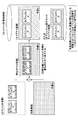
- Fig. 2 schematically shows the interrelationship between the object image representing the object, the background image, the superimposed image and the captured image.
- an object image representing one or more objects and a background image representing a background or a wallpaper are superimposed on the display unit 11 and displayed.
- a captured image is created by superimposing and displaying a single image.
- the captured image is a state in which the state displayed on the display unit 11 is expressed as one image.
- the background that occupies the whole or most of the display unit 11 and one or more It is an image showing a state where an object overlaps.
- the captured image may be created limited to the portions of the objects P and Q in FIG.
- the timer unit 15 in FIG. 1 can measure an arbitrary time in the information terminal, but in this embodiment, the timer unit 15 measures the time during which the display is continued without changing the object. As will be described later, when the time exceeds a predetermined threshold, the displayed image is stored in the captured image storage unit 14 as a captured image.
- the screen control unit 16 controls operations related to and accompanying the display of information by the display unit 11.
- the screen control unit 16 performs operations such as operation control of the operation unit 12, calculation of the screen movement amount to the transition destination of the scroll performed by the user, generation and destruction of the captured image, transition between the superimposed image and the captured image, etc. The details of the operation will be described later.
- the information terminal has an arbitrary function for providing information to the user and an arbitrary function for acquiring information input from the user. It may be. More generally, the information terminal may comprise any visual, auditory or mechanical user interface.
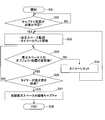
- FIG. 3 is a flowchart illustrating an example of a method for acquiring a captured image. This method is performed in an information terminal as shown in FIG. In this case, some kind of image is displayed on the display unit 11 of the information terminal, and the image is stored in the captured image storage unit 14 as a captured image under certain conditions according to the procedure described below.
- step S32 The flow starts from step S31 and proceeds to step S32.
- the screen control unit 16 analyzes the displayed image, determines whether or not the image can be scrolled, and is scrollable.
- the second case is a case where the screen control unit 16 confirms the setting of the information terminal that permits or prohibits high-speed scrolling and high-speed scrolling is permitted. This is because, depending on the user, such scrolling may be prohibited.
- the screen control unit 16 confirms whether or not there is a sufficient capacity available for storing or storing the captured image, and there is a sufficient capacity.
- step S33 the screen control unit 16 acquires information on the image displayed on the display unit 11, and starts the time measurement by the timer unit 15.
- the display unit 11 displays only a part of the provided information.
- the screen control unit 16 grasps the overall image of the scrolled image.
- step S34 when one or more objects are displayed on the background image on the display unit 11, the screen control unit 16 determines whether the arrangement or position of at least one object has been changed. If changed, the flow proceeds to step S35, the time counted by the timer unit 15 is reset, and the flow returns to step S33.
- step 34 if the time counted by the timer unit 15 exceeds the specified value without changing the arrangement of any displayed object, the flow proceeds from step S36 to S37. If the specified value is not exceeded in step S36, the flow returns to step S34, and it is determined whether or not the object arrangement has been changed.
- step S37 When reaching step S37, the period measured from step S33 exceeds the specified value without changing the object arrangement. That is, the image remains displayed unchanged for at least the specified value. Such an image is likely to be displayed again in the future. Therefore, in step S37, a captured image is created in a state where one or more objects and a background image are currently displayed on the display unit 11, and stored in the captured image storage unit 14. Alternatively, a captured image limited to the object portion may be created and stored. Then, the flow proceeds to step S38, and the procedure for acquiring the captured image ends. In this way, various captured images are stored in the captured image storage unit 14. Another method for acquiring the captured image will be described later.
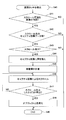
- FIG. 4 shows a flowchart of a method for displaying an image by the information terminal.
- the method shown in FIG. 3 (or FIG. 5 or FIG. 6) is executed.
- the method shown in FIG. 4 starts from step S40.
- step S40 the user of the information terminal touches the display unit 11 and performs some operation. Such an operation is input by the operation unit 12 and is performed by the operation determination unit 13.
- step S41 the screen control unit 16 determines whether or not the image displayed on the display unit 11 can be scrolled. If the image is not scrollable, the flow proceeds to step S49 and ends. If the image is scrollable, the flow proceeds to step S42.
- step S42 the screen control unit 16 determines whether or not the capture image at the scroll destination when the scroll is performed is stored in the capture image storage unit 14. If the captured image has not been saved, the flow proceeds to step S49 and ends. If the image is scrollable, the flow proceeds to step S43. The procedure for saving the captured image is performed according to the flowchart of FIG. 3 (or FIG. 5 or FIG. 6).
- step S43 it is determined whether or not the user has performed a scroll operation. If the user has not performed the scroll operation, the flow proceeds to step S49 and ends. If a scroll operation is detected, the flow proceeds to step S44.
- step S44 the screen control unit 16 replaces the image displayed on the display unit 11 (the image displaying the object superimposed on the background image) with the captured image.
- the captured image includes a background image
- the entire image displayed on the screen is replaced with the captured image.
- the captured image includes only the object portion
- the image of the object portion in the image displayed on the screen is replaced with the captured image.
- step S45 the screen control unit 16 analyzes the movement (speed, direction, distance, etc.) of the user's finger and calculates the screen movement amount to the scroll destination.
- step S46 the screen control unit 16 displays the state of scrolling on the display unit 11 by repeatedly displaying and replacing the captured image.
- step S47 it is determined whether or not the screen has reached the scroll destination (whether or not scrolling has stopped). If the screen has not yet reached the scroll destination, the flow returns to step S46 and continues scrolling. In step S47, when the screen reaches the scroll destination, the flow proceeds to step S48.
- step S48 the screen control unit 16 replaces the last captured image used at the time of scrolling in the display unit 11 with an image in which the corresponding object and background image are superimposed or an image of the object. As a result, it is possible to perform an operation of moving or selecting only the object displayed on the background image. Then, the flow proceeds to step S49 and ends.
- step S46 after scrolling from the first captured image to the next second captured image, there is little practical advantage of retaining the first captured image as a candidate for subsequent display. For this reason, the first captured image may be deleted from the display candidates after step S46. However, it should be noted that this deletion is not a process of deleting the captured image from the captured image storage unit 14, but the contents of the captured image storage unit 14 are maintained. A modified example of deleting the contents of the captured image storage unit 14 will be described later.
- the captured image used for scrolling is an image that is likely to be displayed again in the future (as described in the method shown in FIG. 3). Image) only. Therefore, high-speed scrolling can be realized with a small memory capacity without wasting excessive memory capacity of the captured image storage unit 14.
- FIG. 5 is a flowchart showing another example of a method for acquiring a captured image. This method is also performed in an information terminal as shown in FIG. In the figure, steps or stages already described with reference to FIG.
- step S31 The flow starts from step S31 and proceeds to step S32.
- step S32 There are at least three cases as the case of reaching step S32. For example, when the image can be scrolled, when high-speed scrolling is permitted, and when there is a sufficient capacity for storing the captured image.
- step S51 the screen control unit 16 increments the reference count of the image displayed on the display unit 11. Similarly to step S33, the screen controller 16 grasps the entire image of the image to be scrolled in step S51.
- step S52 the screen control unit 16 determines whether the arrangement or position of at least one object has been changed when one or more objects are displayed on the display unit 11 so as to overlap the background image. If changed, the flow proceeds to step S53, the reference count is reset, and the flow returns to step S51.
- step 52 if the number of references exceeds the specified value without changing the arrangement of any displayed object, the flow proceeds from step S54 to S37. If the specified value is not exceeded in step S54, the flow returns to step S52, and it is determined whether or not the object arrangement has been changed.
- step S37 a captured image is created in a state where one or more objects and a background image are currently displayed on the display unit 11, and stored in the captured image storage unit 14. Alternatively, a captured image limited to the object portion may be created and stored. Then, the flow proceeds to step S38, and the procedure for acquiring the captured image ends. In this way, various captured images are stored in the captured image storage unit 14.
- FIG. 6 is a flowchart showing still another method example for acquiring a captured image. This method is also performed in an information terminal as shown in FIG.
- step S31 The flow starts from step S31 and proceeds to step S32.
- step S32 There are at least three cases as the case of reaching step S32. For example, when the image can be scrolled, when high-speed scrolling is permitted, and when there is a sufficient capacity for storing the captured image.
- step S61 the screen control unit 16 acquires information on the image displayed on the display unit 11, and starts the time measurement by the timer unit 15. Further, the screen control unit 16 increments the reference count of the image displayed on the display unit 11. Similar to step S33, the screen controller 16 grasps the whole image of the scrolled image.
- step S62 when one or more objects are displayed on the display unit 11 so as to overlap the background image, the screen control unit 16 determines whether the arrangement or position of at least one object has been changed. If changed, the flow proceeds to step S35, the time counted by the timer unit 15 is reset, and the flow returns to step S61.
- step S63 If the arrangement of any displayed object is not changed in step 62, the flow proceeds to step S63.
- step S63 it is determined whether or not the number of reference times of the image is equal to or less than a certain number.
- step S64 the screen control unit 16 sets the specified value of the timer used in step S36 to be smaller. That is, the timer specified value used in step S36 differs depending on the determination result in step S63. If the number of references is small, the first specified value is used, and if the number of references is large, a second specified value smaller than the first specified value is used.
- step S36 it is determined whether or not the period timed by the timer exceeds the timer specified value. If the specified timer value is not exceeded, the flow returns to step S62, and it is determined whether or not the object arrangement has been changed. If the timer threshold is exceeded, the flow proceeds to step S37.
- step S37 When reaching step S37, the time measured from step S61 exceeds the specified value without changing the arrangement of the objects. Such an image remains unchanged and is likely to be displayed again in the future. Therefore, in step S37, a captured image is created in a state where one or more objects and a background image are currently displayed on the display unit 11, and stored in the captured image storage unit 14. Alternatively, a captured image limited to the object portion may be created and stored. Then, the flow proceeds to step S38, and the procedure for acquiring the captured image ends.
- the length of the timer specified value varies depending on the reference count. If the number of references is small, the first specified value is used, and if the number of references is large, a second specified value smaller than the first specified value is used. If the number of times of reference is large, it is understood that the possibility of being referred to next time is high.
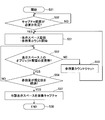
- FIG. 7 is a flowchart showing an example of a method for deleting a captured image. Steps S31 to S37 show a procedure for acquiring a captured image, which is the same as that described with reference to FIG. 3, and therefore will not be described repeatedly. Instead of the procedure from steps S31 to S37 in FIG. 7, the procedure shown in FIG. 5 or FIG. 6 may be performed.
- step S71 the screen control unit 16 determines whether the arrangement or position of at least one object has been changed when one or more objects corresponding to the image stored as the capture image are displayed on the display unit 11. Determine whether or not. If changed, the possibility that the same image as the captured image will be displayed in the future becomes considerably low, and the captured image is deleted in step S73.
- the operations of a plurality of functional units may be physically performed by one component, or the operations of one functional unit may be physically performed by a plurality of components.
- an apparatus according to an embodiment of the present invention has been described using a functional block diagram, but such an apparatus may be realized by hardware, software, or a combination thereof.
- the software is available on random access memory (RAM), flash memory, read only memory (ROM), EPROM, EEPROM, registers, hard disk (HDD), removable disk, CD-ROM, database, server and any other suitable storage medium May be.
Landscapes
- Engineering & Computer Science (AREA)
- General Engineering & Computer Science (AREA)
- Theoretical Computer Science (AREA)
- Human Computer Interaction (AREA)
- Physics & Mathematics (AREA)
- General Physics & Mathematics (AREA)
- Signal Processing (AREA)
- Multimedia (AREA)
- Computer Networks & Wireless Communication (AREA)
- User Interface Of Digital Computer (AREA)
- Digital Computer Display Output (AREA)
- Controls And Circuits For Display Device (AREA)
Abstract
Un terminal d'informations comprend : une unité d'affichage qui affiche une image ; une unité de stockage d'image capturée qui stocke une image capturée qui désigne un état d'un ou de plusieurs objets qui sont affichés dans l'unité d'affichage ; et une unité de commande d'image qui affiche l'image capturée dans l'unité d'affichage selon une opération de défilement effectuée par un utilisateur. Selon la commande réalisée par l'unité de commande d'image, l'unité d'affichage affiche un ou plusieurs objets, correspondant à l'image capturée, en les superposant à l'image d'arrière-plan, lorsque le défilement par l'utilisateur est terminé. Si l'intervalle et/ou le nombre d'itérations, pour lequel/lesquels l'unité d'affichage affiche sans la changer la position d'un objet superposé sur l'image d'arrière-plan, est/sont supérieur(s) ou égal/égaux à un seuil, l'unité de stockage d'image stocke l'image capturée correspondant à l'image affichée selon la commande réalisée par l'unité de commande d'image.
Priority Applications (2)
| Application Number | Priority Date | Filing Date | Title |
|---|---|---|---|
| EP13736265.3A EP2804085B1 (fr) | 2012-01-13 | 2013-01-11 | Terminal d'informations qui affiche des images et procédé d'affichage d'images |
| US14/371,201 US20150020022A1 (en) | 2012-01-13 | 2013-01-11 | Information terminal for displaying image and image displaying method |
Applications Claiming Priority (2)
| Application Number | Priority Date | Filing Date | Title |
|---|---|---|---|
| JP2012-005510 | 2012-01-13 | ||
| JP2012005510A JP5349625B2 (ja) | 2012-01-13 | 2012-01-13 | 画像を表示する情報端末及び画像表示方法 |
Publications (1)
| Publication Number | Publication Date |
|---|---|
| WO2013105666A1 true WO2013105666A1 (fr) | 2013-07-18 |
Family
ID=48781606
Family Applications (1)
| Application Number | Title | Priority Date | Filing Date |
|---|---|---|---|
| PCT/JP2013/050485 Ceased WO2013105666A1 (fr) | 2012-01-13 | 2013-01-11 | Terminal d'informations qui affiche des images et procédé d'affichage d'images |
Country Status (4)
| Country | Link |
|---|---|
| US (1) | US20150020022A1 (fr) |
| EP (1) | EP2804085B1 (fr) |
| JP (1) | JP5349625B2 (fr) |
| WO (1) | WO2013105666A1 (fr) |
Families Citing this family (1)
| Publication number | Priority date | Publication date | Assignee | Title |
|---|---|---|---|---|
| JP6919509B2 (ja) * | 2017-11-09 | 2021-08-18 | コニカミノルタ株式会社 | 表示装置、画像処理装置、表示システム及びプログラム |
Citations (4)
| Publication number | Priority date | Publication date | Assignee | Title |
|---|---|---|---|---|
| JPH0736438A (ja) * | 1993-07-21 | 1995-02-07 | Seiko Epson Corp | スクロール制御装置 |
| JP2009198639A (ja) * | 2008-02-20 | 2009-09-03 | Seiko Epson Corp | 画像表示装置及び画像表示装置のスクロール制御方法及びスクロール制御プログラム、画像表示装置を備えた電子機器 |
| JP2011187051A (ja) | 2010-02-15 | 2011-09-22 | Canon Inc | 情報処理装置およびその制御方法 |
| JP2011198249A (ja) * | 2010-03-23 | 2011-10-06 | Sony Corp | 画像処理装置、画像処理方法および画像処理プログラム |
Family Cites Families (6)
| Publication number | Priority date | Publication date | Assignee | Title |
|---|---|---|---|---|
| US6573915B1 (en) * | 1999-12-08 | 2003-06-03 | International Business Machines Corporation | Efficient capture of computer screens |
| US7143366B1 (en) * | 2001-06-11 | 2006-11-28 | Rockwell Automation Technologies, Inc. | Graphical compare utility |
| FI116165B (fi) * | 2004-05-07 | 2005-09-30 | Myorigo Oy | Menetelmä ja järjestely käyttäjän syötteen uudelleen tulkitsemiseksi mobiililaitteessa |
| US8146006B2 (en) * | 2006-12-01 | 2012-03-27 | International Business Machines Corporation | Method and apparatus for obtaining user interface information from executable program code |
| US20080282160A1 (en) * | 2007-04-06 | 2008-11-13 | James Ian Tonnison | Designated screen capturing and automatic image exporting |
| JP5361572B2 (ja) * | 2009-06-30 | 2013-12-04 | キヤノン株式会社 | 情報処理装置、情報処理方法、およびプログラム |
-
2012
- 2012-01-13 JP JP2012005510A patent/JP5349625B2/ja not_active Expired - Fee Related
-
2013
- 2013-01-11 US US14/371,201 patent/US20150020022A1/en not_active Abandoned
- 2013-01-11 EP EP13736265.3A patent/EP2804085B1/fr not_active Not-in-force
- 2013-01-11 WO PCT/JP2013/050485 patent/WO2013105666A1/fr not_active Ceased
Patent Citations (4)
| Publication number | Priority date | Publication date | Assignee | Title |
|---|---|---|---|---|
| JPH0736438A (ja) * | 1993-07-21 | 1995-02-07 | Seiko Epson Corp | スクロール制御装置 |
| JP2009198639A (ja) * | 2008-02-20 | 2009-09-03 | Seiko Epson Corp | 画像表示装置及び画像表示装置のスクロール制御方法及びスクロール制御プログラム、画像表示装置を備えた電子機器 |
| JP2011187051A (ja) | 2010-02-15 | 2011-09-22 | Canon Inc | 情報処理装置およびその制御方法 |
| JP2011198249A (ja) * | 2010-03-23 | 2011-10-06 | Sony Corp | 画像処理装置、画像処理方法および画像処理プログラム |
Non-Patent Citations (1)
| Title |
|---|
| See also references of EP2804085A4 |
Also Published As
| Publication number | Publication date |
|---|---|
| EP2804085A1 (fr) | 2014-11-19 |
| EP2804085B1 (fr) | 2018-12-19 |
| JP2013145464A (ja) | 2013-07-25 |
| US20150020022A1 (en) | 2015-01-15 |
| JP5349625B2 (ja) | 2013-11-20 |
| EP2804085A4 (fr) | 2015-08-26 |
Similar Documents
| Publication | Publication Date | Title |
|---|---|---|
| JP5970086B2 (ja) | タッチスクリーンホバリング入力処理 | |
| JP6122037B2 (ja) | 端末機におけるコンテンツ移動方法及び装置 | |
| US9104262B2 (en) | Methods for displaying and moving data and systems using the same | |
| US9569071B2 (en) | Method and apparatus for operating graphic menu bar and recording medium using the same | |
| JP6368455B2 (ja) | 装置、方法、及びプログラム | |
| CN104350454B (zh) | 使得搜索结果得到显示 | |
| JP4533943B2 (ja) | 情報処理装置、表示制御方法およびプログラム | |
| US20150116230A1 (en) | Display Device and Icon Control Method Thereof | |
| US8769403B2 (en) | Selection-based resizing for advanced scrolling of display items | |
| US20130076659A1 (en) | Device, method, and storage medium storing program | |
| KR20110011388A (ko) | 데이터 스크롤 방법 및 장치 | |
| KR20110041915A (ko) | 데이터 표시 방법 및 그를 수행하는 단말기 | |
| JP2013164700A (ja) | 携帯端末のスクロール方法及びスクロール装置 | |
| CN101957679A (zh) | 根据触摸信号来显示菜单信息的移动终端 | |
| US9298364B2 (en) | Mobile electronic device, screen control method, and storage medium strong screen control program | |
| CN104035678A (zh) | 滚动方法及使用该滚动方法的电子设备 | |
| KR20150071130A (ko) | 휴대단말기에서 스크롤을 제어하는 방법 및 장치 | |
| KR20140122665A (ko) | 폴더블 전자 장치 및 그것의 가시 영역들을 관리하는 방법 | |
| US9851876B2 (en) | Method, apparatus and computer-readable medium for adjusting size of screen object | |
| KR20140075424A (ko) | 컨텐츠 확대 디스플레이 방법 및 그 전자 장치 | |
| JP2012174247A (ja) | 携帯電子機器、接触操作制御方法および接触操作制御プログラム | |
| JP5349625B2 (ja) | 画像を表示する情報端末及び画像表示方法 | |
| KR101251021B1 (ko) | 터치스크린 출력화면 조정방법 | |
| CN101576798A (zh) | 选项信息的浏览方法、装置及存储介质 | |
| US20140245214A1 (en) | Enabling search in a touchscreen device |
Legal Events
| Date | Code | Title | Description |
|---|---|---|---|
| 121 | Ep: the epo has been informed by wipo that ep was designated in this application |
Ref document number: 13736265 Country of ref document: EP Kind code of ref document: A1 |
|
| WWE | Wipo information: entry into national phase |
Ref document number: 14371201 Country of ref document: US |
|
| WWE | Wipo information: entry into national phase |
Ref document number: 2013736265 Country of ref document: EP |
|
| NENP | Non-entry into the national phase |
Ref country code: DE |