WO2013157232A2 - Information processing apparatus, information processing method, program, and information processing system - Google Patents
Information processing apparatus, information processing method, program, and information processing system Download PDFInfo
- Publication number
- WO2013157232A2 WO2013157232A2 PCT/JP2013/002502 JP2013002502W WO2013157232A2 WO 2013157232 A2 WO2013157232 A2 WO 2013157232A2 JP 2013002502 W JP2013002502 W JP 2013002502W WO 2013157232 A2 WO2013157232 A2 WO 2013157232A2
- Authority
- WO
- WIPO (PCT)
- Prior art keywords
- operation surface
- gui
- mapping
- area
- information processing
- Prior art date
- Legal status (The legal status is an assumption and is not a legal conclusion. Google has not performed a legal analysis and makes no representation as to the accuracy of the status listed.)
- Ceased
Links
Images





Classifications
-
- G—PHYSICS
- G06—COMPUTING OR CALCULATING; COUNTING
- G06F—ELECTRIC DIGITAL DATA PROCESSING
- G06F3/00—Input arrangements for transferring data to be processed into a form capable of being handled by the computer; Output arrangements for transferring data from processing unit to output unit, e.g. interface arrangements
- G06F3/01—Input arrangements or combined input and output arrangements for interaction between user and computer
- G06F3/048—Interaction techniques based on graphical user interfaces [GUI]
- G06F3/0481—Interaction techniques based on graphical user interfaces [GUI] based on specific properties of the displayed interaction object or a metaphor-based environment, e.g. interaction with desktop elements like windows or icons, or assisted by a cursor's changing behaviour or appearance
- G06F3/04817—Interaction techniques based on graphical user interfaces [GUI] based on specific properties of the displayed interaction object or a metaphor-based environment, e.g. interaction with desktop elements like windows or icons, or assisted by a cursor's changing behaviour or appearance using icons
-
- G—PHYSICS
- G06—COMPUTING OR CALCULATING; COUNTING
- G06F—ELECTRIC DIGITAL DATA PROCESSING
- G06F3/00—Input arrangements for transferring data to be processed into a form capable of being handled by the computer; Output arrangements for transferring data from processing unit to output unit, e.g. interface arrangements
- G06F3/01—Input arrangements or combined input and output arrangements for interaction between user and computer
- G06F3/048—Interaction techniques based on graphical user interfaces [GUI]
- G06F3/0487—Interaction techniques based on graphical user interfaces [GUI] using specific features provided by the input device, e.g. functions controlled by the rotation of a mouse with dual sensing arrangements, or of the nature of the input device, e.g. tap gestures based on pressure sensed by a digitiser
- G06F3/0488—Interaction techniques based on graphical user interfaces [GUI] using specific features provided by the input device, e.g. functions controlled by the rotation of a mouse with dual sensing arrangements, or of the nature of the input device, e.g. tap gestures based on pressure sensed by a digitiser using a touch-screen or digitiser, e.g. input of commands through traced gestures
- G06F3/04886—Interaction techniques based on graphical user interfaces [GUI] using specific features provided by the input device, e.g. functions controlled by the rotation of a mouse with dual sensing arrangements, or of the nature of the input device, e.g. tap gestures based on pressure sensed by a digitiser using a touch-screen or digitiser, e.g. input of commands through traced gestures by partitioning the display area of the touch-screen or the surface of the digitising tablet into independently controllable areas, e.g. virtual keyboards or menus
-
- G—PHYSICS
- G06—COMPUTING OR CALCULATING; COUNTING
- G06F—ELECTRIC DIGITAL DATA PROCESSING
- G06F3/00—Input arrangements for transferring data to be processed into a form capable of being handled by the computer; Output arrangements for transferring data from processing unit to output unit, e.g. interface arrangements
- G06F3/01—Input arrangements or combined input and output arrangements for interaction between user and computer
- G06F3/048—Interaction techniques based on graphical user interfaces [GUI]
- G06F3/0484—Interaction techniques based on graphical user interfaces [GUI] for the control of specific functions or operations, e.g. selecting or manipulating an object, an image or a displayed text element, setting a parameter value or selecting a range
- G06F3/04842—Selection of displayed objects or displayed text elements
-
- G—PHYSICS
- G06—COMPUTING OR CALCULATING; COUNTING
- G06F—ELECTRIC DIGITAL DATA PROCESSING
- G06F3/00—Input arrangements for transferring data to be processed into a form capable of being handled by the computer; Output arrangements for transferring data from processing unit to output unit, e.g. interface arrangements
- G06F3/01—Input arrangements or combined input and output arrangements for interaction between user and computer
- G06F3/048—Interaction techniques based on graphical user interfaces [GUI]
- G06F3/0487—Interaction techniques based on graphical user interfaces [GUI] using specific features provided by the input device, e.g. functions controlled by the rotation of a mouse with dual sensing arrangements, or of the nature of the input device, e.g. tap gestures based on pressure sensed by a digitiser
- G06F3/0488—Interaction techniques based on graphical user interfaces [GUI] using specific features provided by the input device, e.g. functions controlled by the rotation of a mouse with dual sensing arrangements, or of the nature of the input device, e.g. tap gestures based on pressure sensed by a digitiser using a touch-screen or digitiser, e.g. input of commands through traced gestures
-
- G—PHYSICS
- G06—COMPUTING OR CALCULATING; COUNTING
- G06F—ELECTRIC DIGITAL DATA PROCESSING
- G06F2203/00—Indexing scheme relating to G06F3/00 - G06F3/048
- G06F2203/048—Indexing scheme relating to G06F3/048
- G06F2203/04808—Several contacts: gestures triggering a specific function, e.g. scrolling, zooming, right-click, when the user establishes several contacts with the surface simultaneously; e.g. using several fingers or a combination of fingers and pen
Definitions
- a pointer In the first operation system, a pointer is moved according to a relative position which is touched on the operation surface with reference to a position on the operation surface at which a touch is started. Therefore, the pointer is not necessarily displayed at the same position even when the same position on the operation surface is touched.
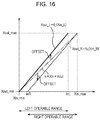
- FIG. 16 is a view illustrating the correspondence relationship between the position (Xin,Yin) on the operation surface and the correspondence point (Xout,Yout) on the display screen according to the fourth mapping, in accordance with an embodiment of the present disclosure.
- Fig. 17 is a flowchart illustrating a determination process to apply the fourth mapping (offset mapping) in accordance with an embodiment of the present disclosure.
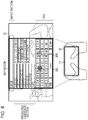
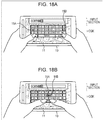
- Fig. 18 is a view illustrating a display example of the operation surface as the touch screen of the terminal in accordance with an embodiment of the present disclosure.
- Fig. 19 is a block diagram illustrating a configuration example of a computer in accordance with an embodiment of the present disclosure.
- the control unit 41 controls each block which configures the terminal 10, and performs other necessary processes.
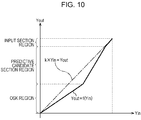
- the positions (Xin,Yin) on the operation surface 11 is associated with the positions (k x Xin,k x Yin) on the GUI region.
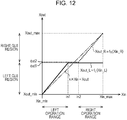
- f L (Xin_L) and f R (Xin_R) indicate the third mapping.
- the mapping is performed to limit the region which can be pointed to using the left hand and the region which can be pointed to using the right hand of the GUI region in the horizontal direction.
- the regions which can be respectively pointed to using the left hand and the right hand in the vertical direction or the like are possible to limit the regions which can be respectively pointed to using the left hand and the right hand in the vertical direction or the like.
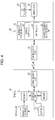
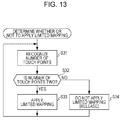
- step S41 When it is determined that the number of touch points has not increased in step S41, the process proceeds to step S47.
- the touch point recognition based on, for example, the shadow (e.g., shape) of a finger on the operation surface 11.
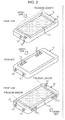
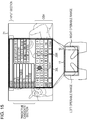
- a range from the left end of the operation surface 11 to a position which is slightly central rather than the right end thereof, that is, a range which has a narrower horizontal width than the operation surface 11 is a range which can be operated by a left hand (hereinafter, referred to as a left operable range), and a range from the right end of the operation surface 11 to a position which is slightly central rather than the left end thereof, that is, a range which has a narrower horizontal width than the operation surface 11 is a range which can be operated by a right hand (hereinafter, referred to as a right operable range).
- the operation surface 11 is associated with the GUI region such that the left operable range which is associated with the GUI region is shifted to the left side from the right operable range with regard to the left touch point, and the right operable range which is associated with the GUI region is shifted to the right side from the left operable range with regard to the right touch point.
- the right operable range which has the narrower horizontal width than the operation surface 11 is uniformly associated with the GUI region as shown in Fig. 16. Therefore, as the right touch point Xin_R is positioned on the left side, the right correspondence point Xout_R on the GUI region which corresponds to the right touch point Xin_R is offset (the offset is indicated using a downward arrow in Fig. 16) to the further left compared to the case of the normal matching.
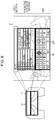
- the left-hand finger interferes (e.g., contact) with the right-hand finger on the operation surface 11 in the normal mapping, and thus it is difficult to point to the "H” key using the right-hand finger while pointing to the "G” key using the left-hand finger.
- the left correspondence point Xout_L on the GUI region which corresponds to the left touch point Xin_L is offset to the further right compared to the normal mapping
- the right correspondence point Xout_R on the GUI region which corresponds to the right touch point Xin_R is offset to the further left compared to the normal mapping.
- the mapping which offsets the correspondence point in the horizontal direction is performed as the offset mapping (e.g., fourth mapping).
- the offset mapping it is possible to offset a correspondence point which is positioned on the upper side between the left correspondence point and the right correspondence point to the lower side, and to offset a correspondence point which is positioned on the lower side to the upper side.
- the pointers 30L and 30R which are displayed on the display screen 21 jumps to move when the touch point is changed from a single point to two points and when two points are changed into a single point.
- the user may be caused to feel a sense of incompatibility.
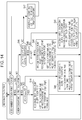
- the mapping unit 62 performs the offset mapping.
- the offset mapping in which the offset amount of the x-coordinate of the correspondence point which corresponds to the touch point varies according to the x-coordinate of the touch point (hereinafter, referred to as a variable offset mapping) is performed as described in Fig. 15.
- the offset mapping in which the offset amount of the y-coordinate of the correspondence point which corresponds to the touch point is uniform regardless of the y-coordinate of the touch point (hereinafter, referred to as a fixed offset mapping) is performed.
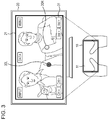
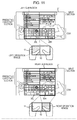
- the pointer 15R is displayed at the right correspondence point of the position obtained by offsetting the predetermined offset amount in the y direction from the right touch point. Therefore, it is possible to prevent the pointer 15R from being hidden by the right-hand finger which touches the right touch point.
- the left correspondence point which corresponds to the left touch point is at a position obtained by offsetting a predetermined offset amount in the y direction from the left touch point and offsetting the offset amount which increases according to the x-coordinate of the left touch point in the x direction (e.g., right direction) (e.g., near center).
- the input unit 107 includes a keyboard, a mouse, a microphone, and the like.
- the output unit 106 includes a Liquid Crystal Display (LCD), a speaker, and the like.
- LCD Liquid Crystal Display
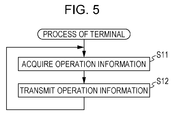
- the information which indicates a touch point on the operation surface 11 configures the operation information and then transmitted to the TV 20.
- information which indicates a correspondence point corresponding to the touch point on the operation surface 11 may be included in the operation information and then transmitted to the TV 20.
- embodiments of the present disclosure may include the following configurations.
Landscapes
- Engineering & Computer Science (AREA)
- General Engineering & Computer Science (AREA)
- Theoretical Computer Science (AREA)
- Human Computer Interaction (AREA)
- Physics & Mathematics (AREA)
- General Physics & Mathematics (AREA)
- User Interface Of Digital Computer (AREA)
- Position Input By Displaying (AREA)
- Input From Keyboards Or The Like (AREA)
Priority Applications (5)
| Application Number | Priority Date | Filing Date | Title |
|---|---|---|---|
| US14/385,381 US9772744B2 (en) | 2012-04-19 | 2013-04-12 | Information processing apparatus, information processing method, program, and information processing system |
| EP13723974.5A EP2839367A2 (de) | 2012-04-19 | 2013-04-12 | Informationsverarbeitungsvorrichtung, informationsverarbeitungsverfahren, programm und informationsverarbeitungssystem |
| CN201380019572.8A CN104220978B (zh) | 2012-04-19 | 2013-04-12 | 信息处理装置、信息处理方法、程序及信息处理系统 |
| US15/690,802 US10162480B2 (en) | 2012-04-19 | 2017-08-30 | Information processing apparatus, information processing method, program, and information processing system |
| US16/205,542 US10942620B2 (en) | 2012-04-19 | 2018-11-30 | Information processing apparatus, information processing method, program, and information processing system |
Applications Claiming Priority (2)
| Application Number | Priority Date | Filing Date | Title |
|---|---|---|---|
| JP2012-095497 | 2012-04-19 | ||
| JP2012095497A JP5966557B2 (ja) | 2012-04-19 | 2012-04-19 | 情報処理装置、情報処理方法、プログラム、及び、情報処理システム |
Related Child Applications (2)
| Application Number | Title | Priority Date | Filing Date |
|---|---|---|---|
| US14/385,381 A-371-Of-International US9772744B2 (en) | 2012-04-19 | 2013-04-12 | Information processing apparatus, information processing method, program, and information processing system |
| US15/690,802 Continuation US10162480B2 (en) | 2012-04-19 | 2017-08-30 | Information processing apparatus, information processing method, program, and information processing system |
Publications (2)
| Publication Number | Publication Date |
|---|---|
| WO2013157232A2 true WO2013157232A2 (en) | 2013-10-24 |
| WO2013157232A3 WO2013157232A3 (en) | 2014-01-09 |
Family
ID=48468693
Family Applications (1)
| Application Number | Title | Priority Date | Filing Date |
|---|---|---|---|
| PCT/JP2013/002502 Ceased WO2013157232A2 (en) | 2012-04-19 | 2013-04-12 | Information processing apparatus, information processing method, program, and information processing system |
Country Status (5)
| Country | Link |
|---|---|
| US (3) | US9772744B2 (de) |
| EP (1) | EP2839367A2 (de) |
| JP (1) | JP5966557B2 (de) |
| CN (2) | CN104220978B (de) |
| WO (1) | WO2013157232A2 (de) |
Cited By (1)
| Publication number | Priority date | Publication date | Assignee | Title |
|---|---|---|---|---|
| KR20160067945A (ko) * | 2013-11-08 | 2016-06-14 | 후아웨이 테크놀러지 컴퍼니 리미티드 | 지능형 단말기 및 이의 입력 조작 인터페이스를 디스플레이하는 방법 |
Families Citing this family (15)
| Publication number | Priority date | Publication date | Assignee | Title |
|---|---|---|---|---|
| US9274642B2 (en) * | 2011-10-20 | 2016-03-01 | Microsoft Technology Licensing, Llc | Acceleration-based interaction for multi-pointer indirect input devices |
| KR102089447B1 (ko) * | 2013-06-04 | 2020-03-16 | 삼성전자 주식회사 | 전자 기기 및 그의 애플리케이션 제어 방법 |
| JP2015007949A (ja) * | 2013-06-26 | 2015-01-15 | ソニー株式会社 | 表示装置、表示制御方法及びコンピュータプログラム |
| JP6150712B2 (ja) * | 2013-10-30 | 2017-06-21 | シャープ株式会社 | 情報処理装置およびプログラム |
| KR20150054190A (ko) * | 2013-11-11 | 2015-05-20 | 삼성전자주식회사 | 디스플레이 장치 및 그 제어 방법 |
| JP6204324B2 (ja) * | 2014-04-08 | 2017-09-27 | 松本 美司 | ウェアラブル情報端末、及び、充電システム |
| WO2016036427A1 (en) | 2014-09-02 | 2016-03-10 | Apple Inc. | Electronic device with rotatable input mechanism |
| DE202015006142U1 (de) | 2014-09-02 | 2015-12-09 | Apple Inc. | Elektronische Touch-Kommunikation |
| JP2016091290A (ja) * | 2014-11-05 | 2016-05-23 | アイシン・エィ・ダブリュ株式会社 | 指示受付システム、方法およびプログラム |
| US9740352B2 (en) | 2015-09-30 | 2017-08-22 | Elo Touch Solutions, Inc. | Supporting multiple users on a large scale projected capacitive touchscreen |
| KR102519578B1 (ko) * | 2016-07-05 | 2023-04-07 | 삼성전자주식회사 | 전자 장치의 화면 표시 방법 및 그 장치 |
| KR102410103B1 (ko) * | 2017-11-17 | 2022-06-21 | 엘지디스플레이 주식회사 | 터치센서 내장형 표시장치 |
| JP7094175B2 (ja) * | 2018-08-09 | 2022-07-01 | パナソニックホールディングス株式会社 | 入力装置 |
| US11086516B2 (en) * | 2018-10-31 | 2021-08-10 | Christie Scott Wall | Mobile, versatile, transparent, double-sided data input or control device |
| KR102580209B1 (ko) * | 2023-03-23 | 2023-09-20 | 주식회사 바이텔 | 터치 키보드와 터치 마우스 기능을 구비한 통합 리모컨 |
Citations (1)
| Publication number | Priority date | Publication date | Assignee | Title |
|---|---|---|---|---|
| JP2009253773A (ja) | 2008-04-08 | 2009-10-29 | Sharp Corp | ディスプレイシステム、リモコン装置、ディスプレイ装置、リモコン装置の制御方法、およびディスプレイ装置の制御方法 |
Family Cites Families (22)
| Publication number | Priority date | Publication date | Assignee | Title |
|---|---|---|---|---|
| JPS61259331A (ja) * | 1985-05-13 | 1986-11-17 | Nec Corp | 座標入力方法とその装置 |
| JPH06282368A (ja) * | 1993-02-01 | 1994-10-07 | Wacom Co Ltd | 情報処理装置の位置情報入力システム |
| JPH11161426A (ja) * | 1997-12-01 | 1999-06-18 | Fujitsu Takamisawa Component Ltd | タッチパネル装置 |
| US7506270B1 (en) * | 2000-08-14 | 2009-03-17 | Microsoft Corporation | Methods and arrangements for selective placement of movable objects within a graphical user interface |
| US7552402B2 (en) * | 2006-06-22 | 2009-06-23 | Microsoft Corporation | Interface orientation using shadows |
| KR100954594B1 (ko) * | 2007-02-23 | 2010-04-26 | (주)티피다시아이 | 디지털 기기에 사용되는 포인팅장치를 이용한 가상키보드입력시스템 |
| US8065624B2 (en) * | 2007-06-28 | 2011-11-22 | Panasonic Corporation | Virtual keypad systems and methods |
| US20090002218A1 (en) * | 2007-06-28 | 2009-01-01 | Matsushita Electric Industrial Co., Ltd. | Direction and holding-style invariant, symmetric design, touch and button based remote user interaction device |
| WO2009148210A1 (en) * | 2008-06-02 | 2009-12-10 | Lg Electronics Inc. | Virtual optical input unit and control method thereof |
| US9552154B2 (en) * | 2008-11-25 | 2017-01-24 | Samsung Electronics Co., Ltd. | Device and method for providing a user interface |
| KR20100059698A (ko) | 2008-11-25 | 2010-06-04 | 삼성전자주식회사 | 유저인터페이스 제공 장치, 제공방법, 및 이를 기록한 컴퓨터 판독 가능한 기록매체 |
| US20100302190A1 (en) * | 2009-06-02 | 2010-12-02 | Elan Microelectronics Corporation | Multi-functional touchpad remote controller |
| JP5750875B2 (ja) * | 2010-12-01 | 2015-07-22 | ソニー株式会社 | 情報処理装置、情報処理方法及びプログラム |
| WO2011096166A1 (ja) * | 2010-02-03 | 2011-08-11 | パナソニック株式会社 | 表示制御装置、表示制御方法およびタッチパッド入力システム |
| US8970518B2 (en) * | 2010-03-10 | 2015-03-03 | Panasonic Intellectual Property Corporation Of America | Click position control apparatus, click position control method, and touch sensor system |
| JPWO2011145276A1 (ja) * | 2010-05-20 | 2013-07-22 | パナソニック株式会社 | 操作装置、操作方法、プログラム、記録媒体、及び集積回路 |
| JP5598104B2 (ja) * | 2010-06-10 | 2014-10-01 | ソニー株式会社 | 情報処理装置、情報処理方法及びコンピュータプログラム |
| KR20110138914A (ko) * | 2010-06-22 | 2011-12-28 | 삼성전자주식회사 | 사용자 입력장치, 이를 포함하는 디스플레이장치 및 그 제어방법 |
| JP5189709B2 (ja) * | 2010-07-07 | 2013-04-24 | パナソニック株式会社 | 端末装置およびgui画面生成方法 |
| US20130241832A1 (en) * | 2010-09-07 | 2013-09-19 | Zrro Technologies (2009) Ltd. | Method and device for controlling the behavior of virtual objects on a display |
| US8547354B2 (en) * | 2010-11-05 | 2013-10-01 | Apple Inc. | Device, method, and graphical user interface for manipulating soft keyboards |
| US9201510B2 (en) * | 2012-04-16 | 2015-12-01 | Blackberry Limited | Method and device having touchscreen keyboard with visual cues |
-
2012
- 2012-04-19 JP JP2012095497A patent/JP5966557B2/ja active Active
-
2013
- 2013-04-12 US US14/385,381 patent/US9772744B2/en active Active
- 2013-04-12 CN CN201380019572.8A patent/CN104220978B/zh not_active Expired - Fee Related
- 2013-04-12 CN CN201810527415.2A patent/CN108829333B/zh not_active Expired - Fee Related
- 2013-04-12 WO PCT/JP2013/002502 patent/WO2013157232A2/en not_active Ceased
- 2013-04-12 EP EP13723974.5A patent/EP2839367A2/de not_active Withdrawn
-
2017
- 2017-08-30 US US15/690,802 patent/US10162480B2/en active Active
-
2018
- 2018-11-30 US US16/205,542 patent/US10942620B2/en active Active
Patent Citations (1)
| Publication number | Priority date | Publication date | Assignee | Title |
|---|---|---|---|---|
| JP2009253773A (ja) | 2008-04-08 | 2009-10-29 | Sharp Corp | ディスプレイシステム、リモコン装置、ディスプレイ装置、リモコン装置の制御方法、およびディスプレイ装置の制御方法 |
Cited By (3)
| Publication number | Priority date | Publication date | Assignee | Title |
|---|---|---|---|---|
| KR20160067945A (ko) * | 2013-11-08 | 2016-06-14 | 후아웨이 테크놀러지 컴퍼니 리미티드 | 지능형 단말기 및 이의 입력 조작 인터페이스를 디스플레이하는 방법 |
| EP2998843A4 (de) * | 2013-11-08 | 2016-08-31 | Huawei Tech Co Ltd | Intelligentes endgerät und verfahren zur anzeige von eingabeschnittstellen davon |
| KR101870391B1 (ko) | 2013-11-08 | 2018-06-22 | 후아웨이 테크놀러지 컴퍼니 리미티드 | 지능형 단말기 및 이의 입력 조작 인터페이스를 디스플레이하는 방법 |
Also Published As
| Publication number | Publication date |
|---|---|
| US20150040070A1 (en) | 2015-02-05 |
| CN108829333B (zh) | 2021-12-17 |
| US20190107938A1 (en) | 2019-04-11 |
| CN104220978B (zh) | 2018-06-19 |
| US9772744B2 (en) | 2017-09-26 |
| CN108829333A (zh) | 2018-11-16 |
| US10162480B2 (en) | 2018-12-25 |
| JP5966557B2 (ja) | 2016-08-10 |
| US20170364240A1 (en) | 2017-12-21 |
| EP2839367A2 (de) | 2015-02-25 |
| US10942620B2 (en) | 2021-03-09 |
| JP2013222426A (ja) | 2013-10-28 |
| WO2013157232A3 (en) | 2014-01-09 |
| CN104220978A (zh) | 2014-12-17 |
Similar Documents
| Publication | Publication Date | Title |
|---|---|---|
| US10942620B2 (en) | Information processing apparatus, information processing method, program, and information processing system | |
| EP3404520B1 (de) | Verfahren zur informationsanzeige durch berührungseingaben in ein mobiles endgerät | |
| US9891732B2 (en) | Selective rejection of touch contacts in an edge region of a touch surface | |
| KR102337216B1 (ko) | 영상 표시 장치 및 영상 표시 방법 | |
| US20160124606A1 (en) | Display apparatus, system, and controlling method thereof | |
| KR20160097868A (ko) | 디스플레이 장치 및 디스플레이 방법 | |
| JP2015011679A (ja) | 操作入力装置及び入力操作処理方法 | |
| US8887101B2 (en) | Method for moving a cursor and display apparatus using the same | |
| KR20140140759A (ko) | 터치스크린을 구비하는 디바이스에서 화면 표시 방법 및 장치 | |
| JP2013114645A (ja) | 小型情報機器 | |
| JP6156709B2 (ja) | 情報処理装置、情報処理方法、プログラム、及び、情報処理システム | |
| AU2013100574A4 (en) | Interpreting touch contacts on a touch surface | |
| AU2015271962B2 (en) | Interpreting touch contacts on a touch surface | |
| KR102118084B1 (ko) | 터치스크린을 구비한 디바이스에서 화면 표시 방법 및 장치 | |
| CN110633139B (zh) | 一种功能切换方法及装置 | |
| HK1133709A (en) | Selective rejection of touch contacts in an edge region of a touch surface | |
| HK1169182A (en) | Selective rejection of touch contacts in an edge region of a touch surface |
Legal Events
| Date | Code | Title | Description |
|---|---|---|---|
| 121 | Ep: the epo has been informed by wipo that ep was designated in this application |
Ref document number: 13723974 Country of ref document: EP Kind code of ref document: A2 |
|
| WWE | Wipo information: entry into national phase |
Ref document number: 2013723974 Country of ref document: EP |
|
| WWE | Wipo information: entry into national phase |
Ref document number: 14385381 Country of ref document: US |